Adding an extra touchkey
This section explains how to add an extra touchkey to a pair of single electrodes for an application.
This section explains how to add an extra touchkey to a pair of single electrodes for an application.
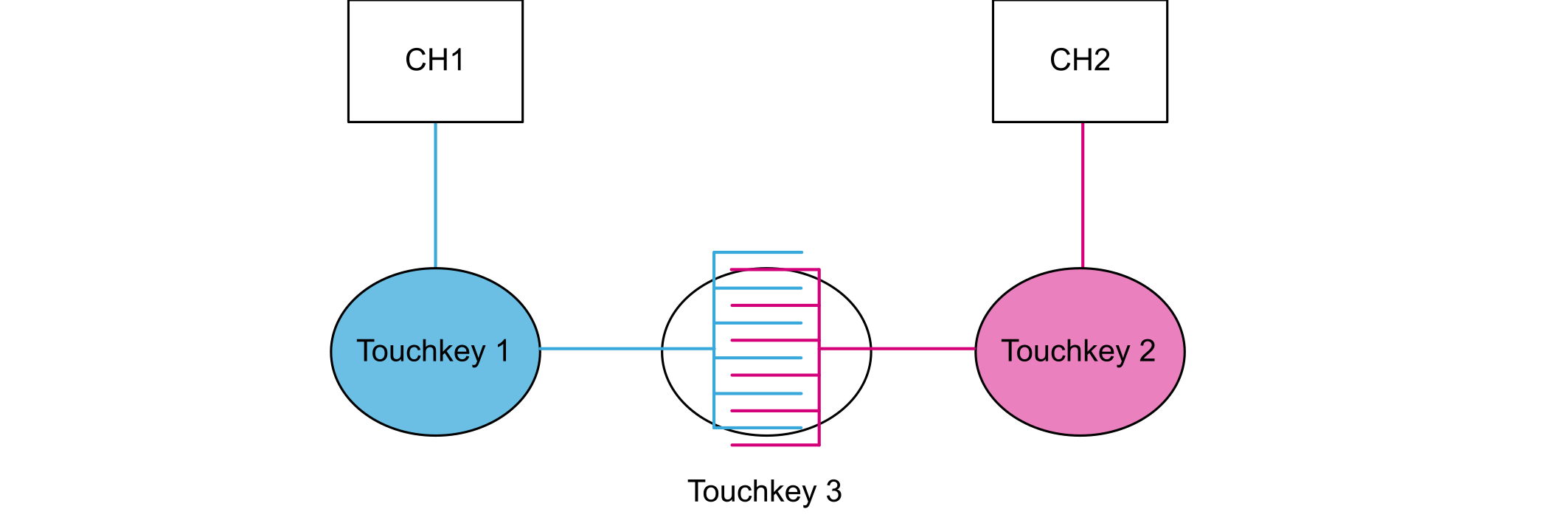
| Touchkeys | Channel 1 state | Channel 2 state |
|---|---|---|
| No touch | Idle | Idle |
| Touchkey 1 touched | Detect | Idle |
| Touchkey 2 touched | Idle | Detect |
| Touchkey 3 touched | Detect | Detect |
The drawback of this hardware and software implementation is that there is no way to discriminate a touch on both touchkey 1 and touchkey 2, from a single touch on touchkey 3 as implemented in Figure 1 Basic hardware implementation.
This solution suits applications where only one touchkey can be detected at once or, if a few touchkeys are valid at the same time, where the touchkeys do not share an electrode.

If two touchkeys from the same set are touched concurrently, an incorrect touchkey is detected. For example, the user can touch touchkeys 1, 6, and 8 at the same time, and the application decodes them correctly. If touchkeys 2 and 3 are touched simultaneously, only touchkey 3 is reported. Likewise, if touchkeys 4 and 5 are touched concurrently, touchkey 6 is incorrectly reported.
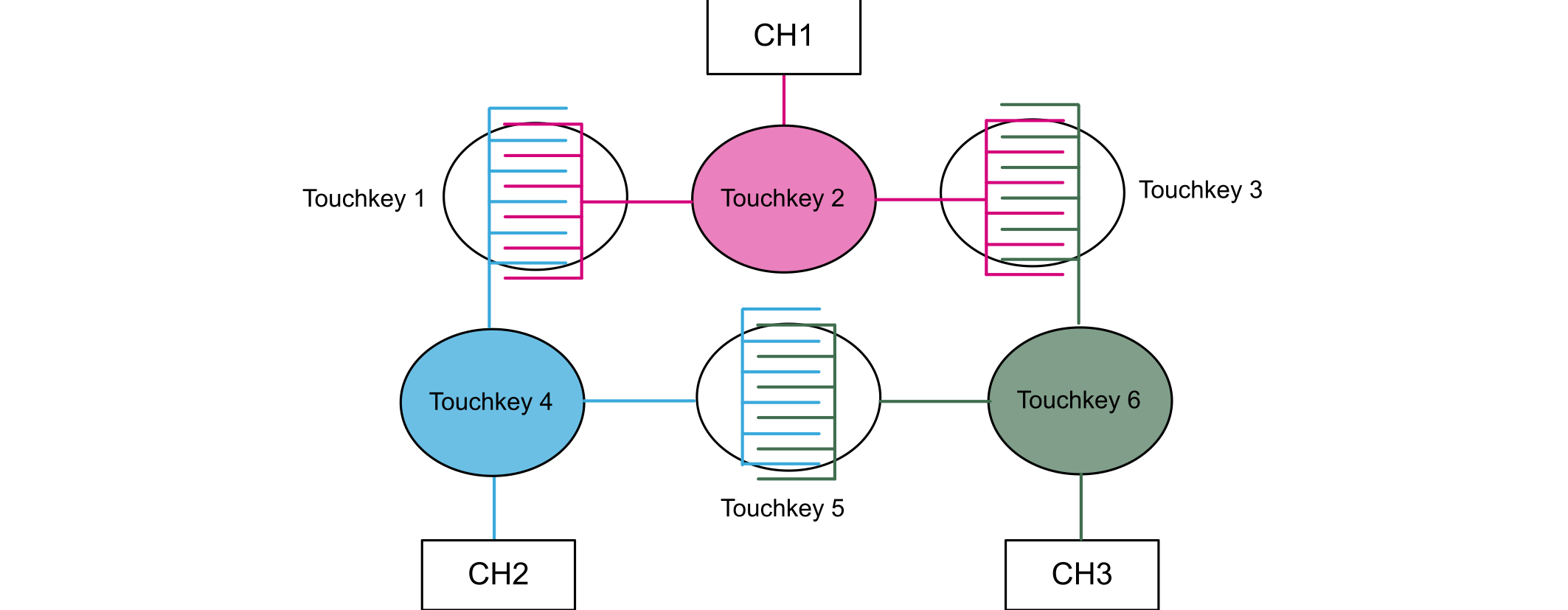
In some applications, adding one touchkey by electrode pairs is not enough and building an electrode network to get a touchkey matrix is more efficient.

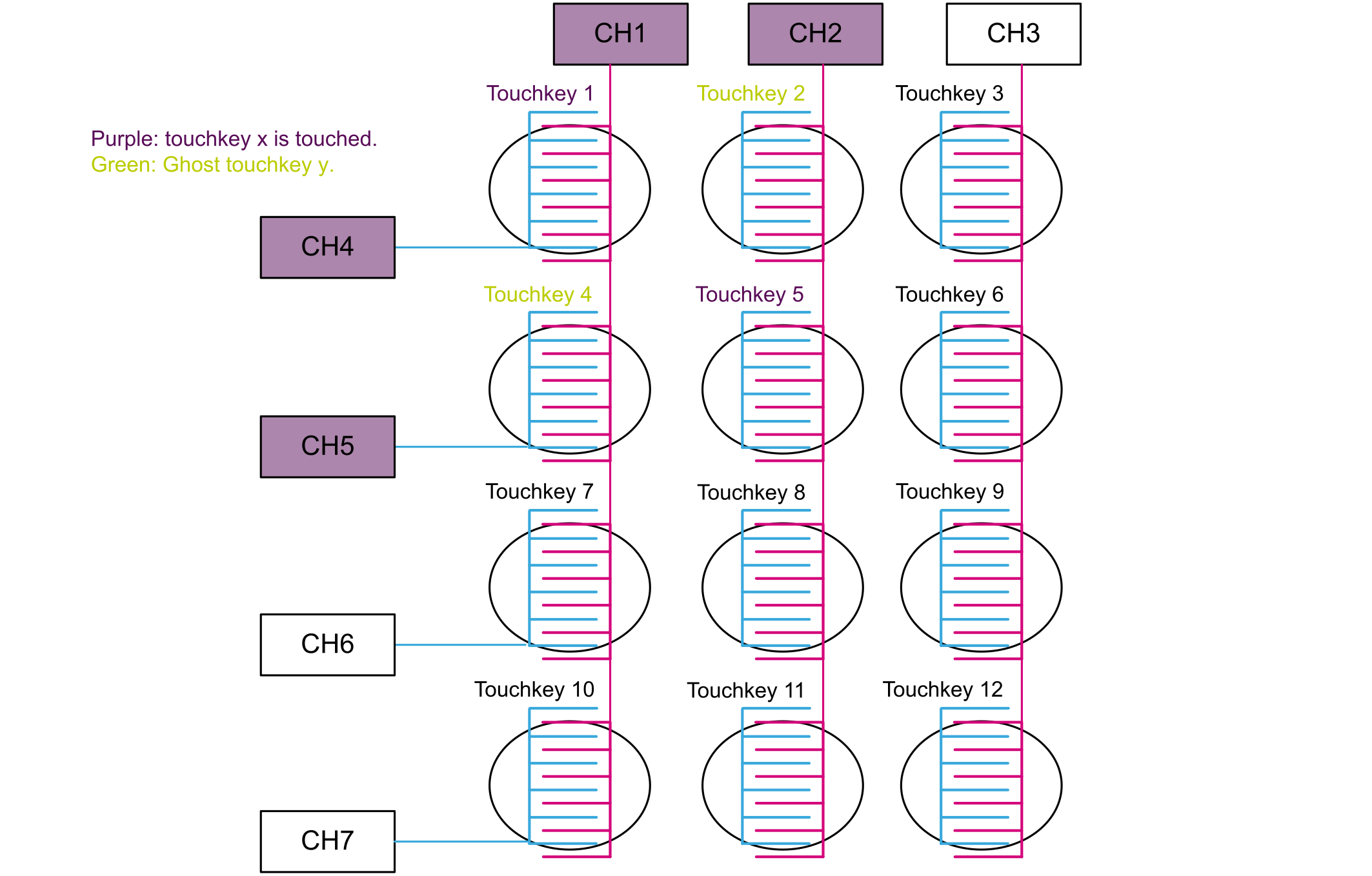
In this implementation example, seven channels provide a touchkey matrix of 12 touchkeys. Each touchkey is generated by interlacing a channel row with a channel column. For example, touchkey 1 is generated by interlacing CH1 with CH4.
It is recommended to have homogeneous sized touchkeys, so that each touchkey has the same sensitivity. This simplifies the threshold setup and acquisition can be achieved using the same sampling capacitor value.
The channel acquisition is managed by the touch sensing firmware library in the same way as for single electrodes. A decoding step must be also performed at application level depending on the combination of detected channels.
A touch on touchkey 1 triggers a detection on two channels, CH1 and CH4 (see Figure 4 Matrix hardware implementation ).
The decoding table mirrors the matrix shown in Figure 4 Matrix hardware implementation. A touchkey is activated when the two channels it is connected to, are in detection state.

However, when two touchkeys are touched on different rows or columns, four channels are detected and it is difficult to discriminate a true touch from a false one. This phenomenon is known as the “ghost” effect.
The user can combine the touchkey matrix with single electrode touchkeys to maximize the number of possible touchkeys. This gives a pure single touch interface.

In the case of multitouches, it is impossible to discriminate which touchkeys are touched. This solution is only adapted for applications where the user touches one key at a time.
The limitations can be reduced through careful management of the touchkeys and touchkey matrices.
For extra touchkeys and touchkey matrices, it is important to define the sets of touchkeys in which the touchkeys cannot be touched at the same time. This allows multi-touching capability across sets.