No STM32TRUSTEE
The steps are the same than in SFI firmware image creation procedure for STM32H7/L5/U3/U5/WBA5/WBA6/WL5 with the following 2 modifications:
-
Step 1: Build the firmware image(s) using standard development tools.
If the OEM wants to provision the firmware in EEPROM (EEPROM is a user flash memory area with high-cycle programming), the OEM must configure the firmware address as EEPROM by setting the EDATA option in the option bytes file.
- Step2: Build the option byte configuration file:
There is no RDP option byte in STM32H5. The equivalent option byte is the PRODUCT_STATE.
It must be set to minimum PROVISIONED (that is PROVISIONED, TZ_CLOSED, CLOSED or LOCKED)
There is the same constraint as in SFI firmware image creation procedure for STM32H7/L5/U3/U5/WBA5/WBA6/WL5 about the TZEN option byte value.
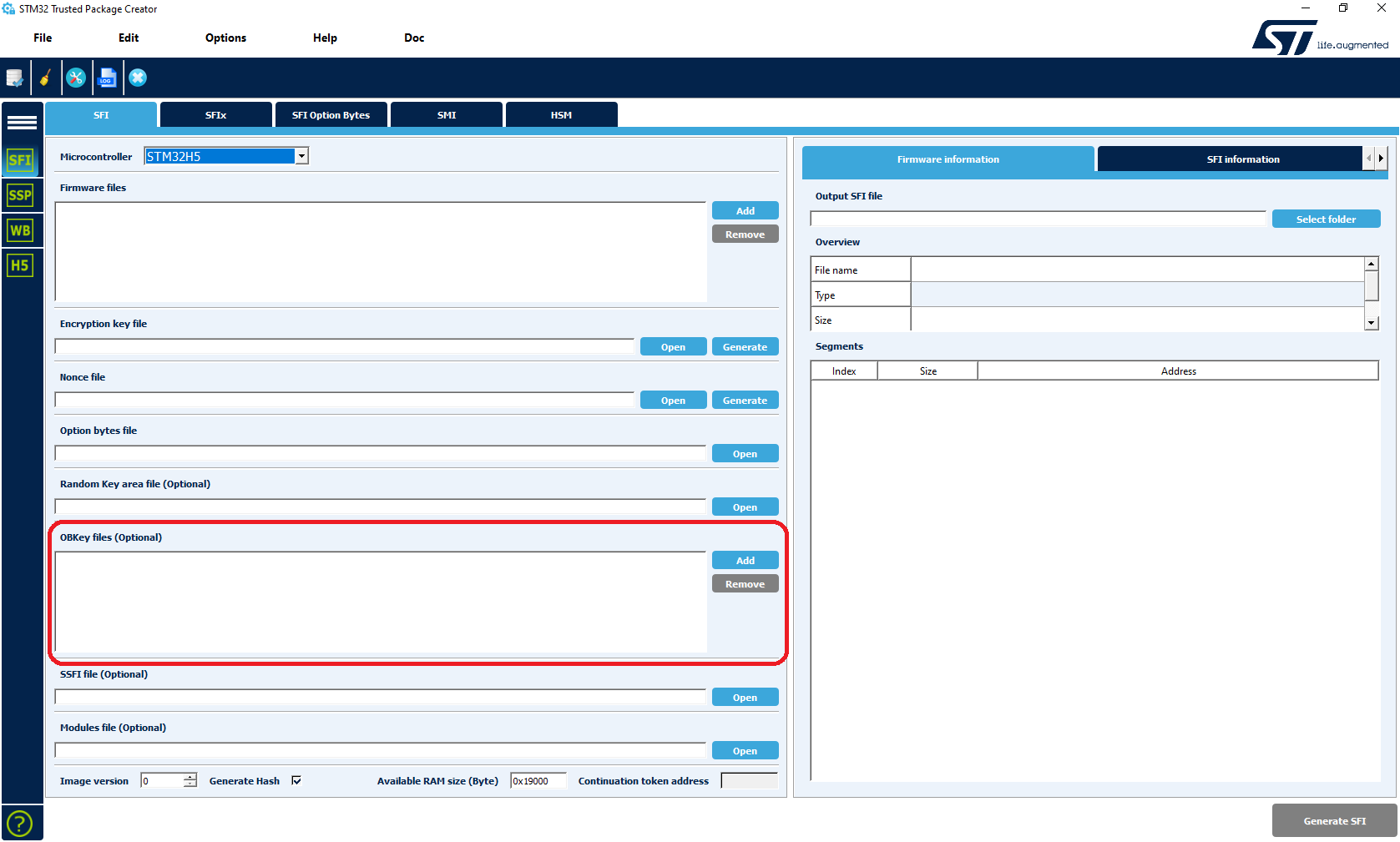
- OBK provision:
It is new compared to SFI firmware image creation procedure for STM32H7/L5/U3/U5/WBA5/WBA6/WL5
Figure 21 SFI image generation tab for STM32H5 depicts the TPC GUI to provision the OBK.
Debug authentication
Provision OBK to be able to perform debug authentication procedure that is used to:
- perform a full or partial regression
- open the debug for a given HDP level and security state (HDPL1_S, HDPL1_NS, HDPL2_S, HDPL2_NS, HDPL3_S, HDPL3_NS)
STM32TRUSTEE
See [WikiSTM32H5].
SFI firmware image creation for STM32H7RS
Internal flash memory only
The steps are the same than in SFI firmware image creation procedure for STM32H7/L5/U3/U5/WBA5/WBA6/WL5 plus the OBK to provision, SFIx is not supported on STM32H7RS:
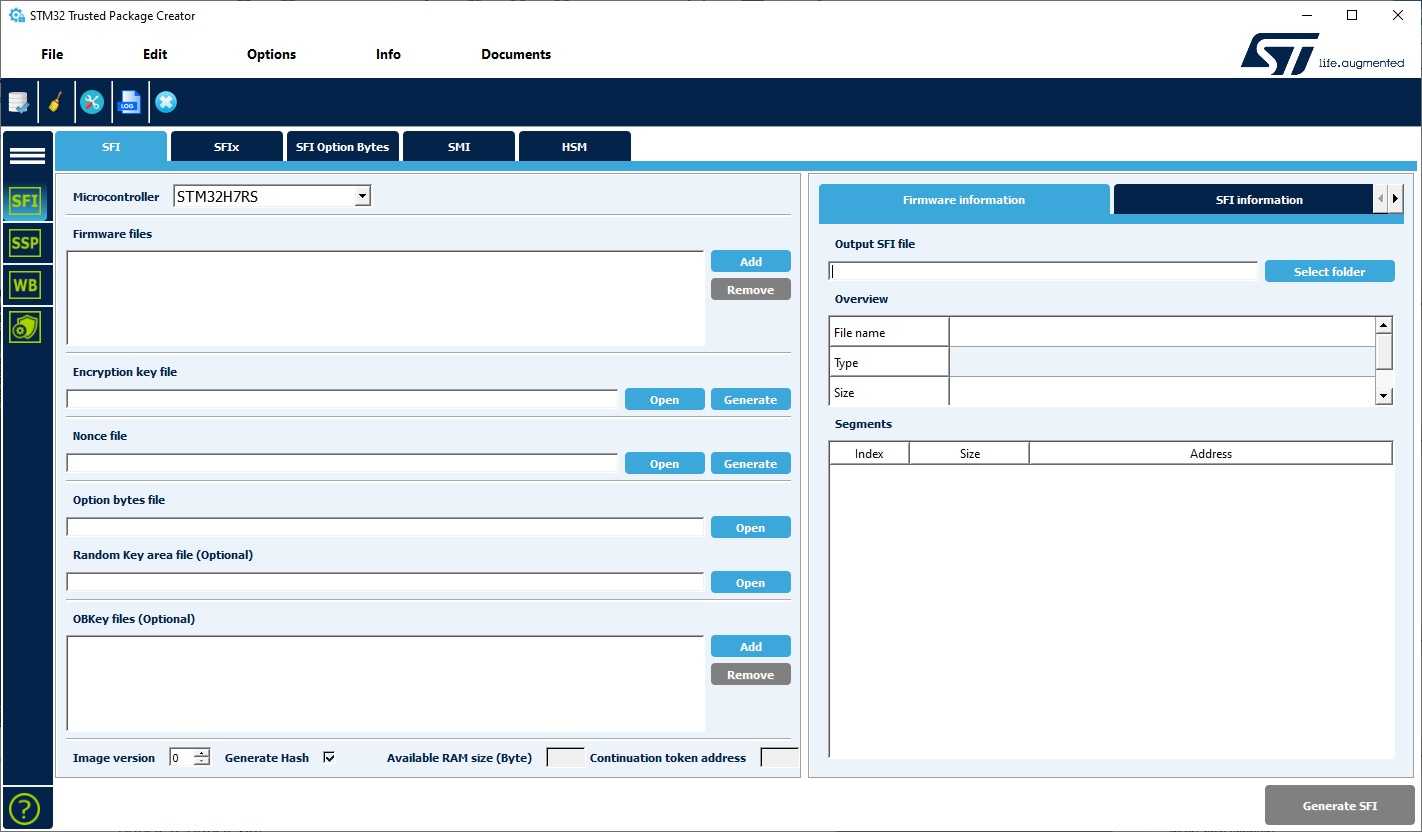
Minimum OB requirements
For FLASH_ROTSRP register, it is mandatory to follow these rules:
- OEM_PROVD must be set to 0xB4 (provisioned)
- DBG_AUTH must be set to 0x51, 0x8A or 0xB4 (ECDSA, password or Locked)
- IROT_SELECT must be set to whether 0x6A or 0xB4 (configuration ignored on STM32H7R3/H7R7)
OBK provisioning
The OBK must be provisioned to be able to perform the debug authentication procedure that is used to:
• perform a full regression
• open the debug for a given HDP level (HDPL1, HDPL2, HDPL3)
• force download (allow application update using BL)
Optionally, provision the OBK to configure firmware application. It is mandatory to provision debug authentication OBK first.
More information is available in [RM0477].
SFI ST HSM key provisioning
ST HSM smartcard configuration is done using STM32 Trusted Package Creator tool following the below steps:
Note:
ST HSM configuration can be done only once, the ST HSM is locked after successful programming.
Contact ST sales representative for ST HSM ordering information.
- Insert a virgin ST HSM in smartcard reader.
- Select HSM tab of STM32 Trusted Package Creator.
- Add a firmware identifier (allows OEM to identify the correct ST HSM for a given firmware).
- Open the Encryption key and Nonce files. They can be selected either by entering their absolute or relative paths, or by selecting them with the Open button. In order to properly protect the firmware confidentiality, the AES secret key must be different every time the OEM encrypts a new firmware or a new release of the same firmware.
- On ST HSM V2, select the personalization data file according to specific STM32 MCU, productID and license type (stm32xx_productID_licenseType_....enc.bin). ProductID is defined in STM32 chip certificate and the different license types are detailed in License types.
For security reasons, it is advised to use the most recent personalization data file available in the latest
STM32CubeProgrammer version. More info on personalization data in [AN5054].
- Configure the maximum installation counter.
- Configure ST HSM by clicking the Program HSM button. A feedback window indicating that ST HSM is going to be completely locked is displayed, to confirm and continue the procedure click Yes. If all the fields are filled properly, the "HSM programmed successfully" message is displayed.
After key provisioning, ST HSM can be used to secure install protected firmware on counter number of STM32 devices.
More information on ST HSM provisioning is available in [AN5054].
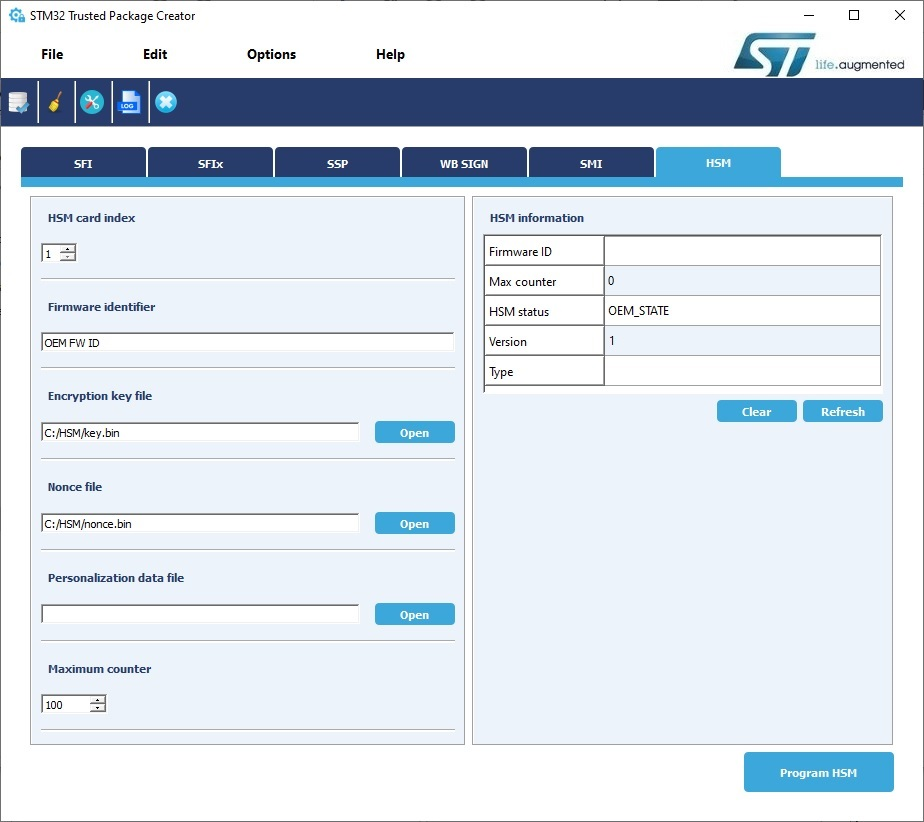
Note:
When using ST HSM version 1, the "Personalization data file" field is ignored when programming starts. It is only used with ST HSM version 2.
When the card is successfully programmed, a popup window message "HSM successfully programmed" appears, and the ST HSM is locked. Otherwise an error message is displayed.
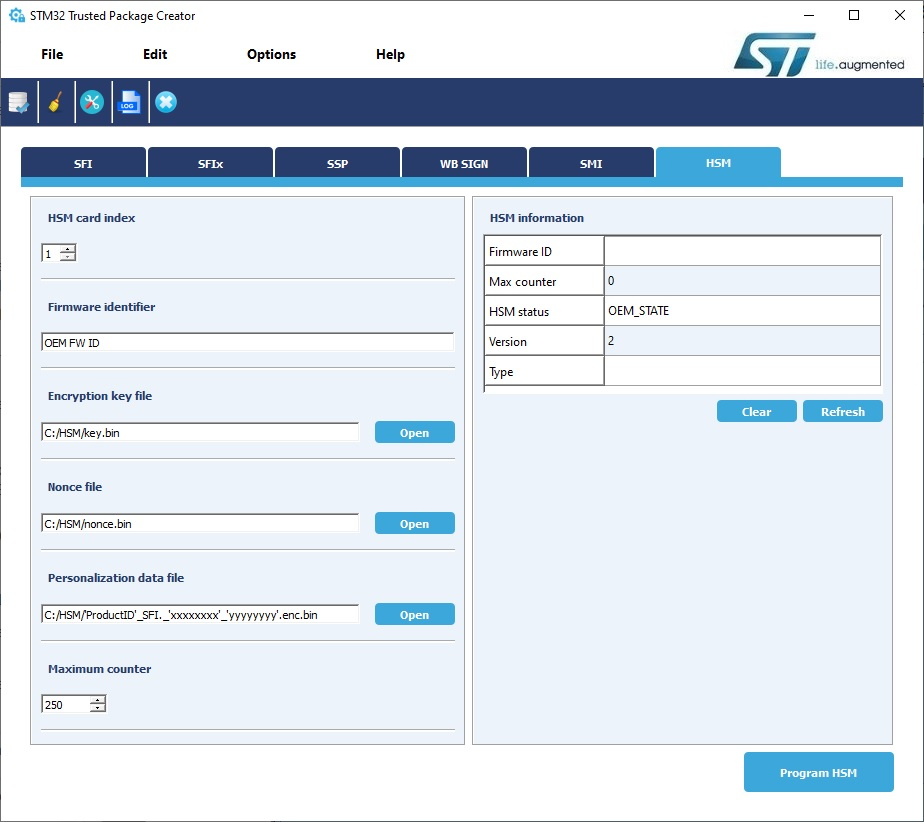
Note:
When the card is successfully programmed, a popup window message "HSM successfully programmed" appears, and the ST HSM is locked. Otherwise an error message is displayed.
SFI image programming by OEMs or CMs
Secure firmware installation flow
Once the SFI image has been prepared using the STM32 Trusted Package Creator, the OEM sends it to the CMs.
CM production lines need to be equipped with a flash memory programming tool (FT). This tool is used to:
- Download the SFI image prepared with STM32 trusted package creator, including the image header and the encrypted part of the SFI image.
- For each STM32 device:
- STM32L5, STM32U3, STM32U5, STM32WBA5, STM32WBA6, STM32WL5, and STM32H5: load secure bootloader part II within SRAM.
- Request the device certificate from the secure bootloader.
- Request a dedicated license from the ST HSM. The ST HSM uses the device certificate to produce a dedicated license for a given firmware to be stored in this particular STM32 device. ST HSM can generate different license types according to the provisioned personalization data file in ST HSM (see SFI ST HSM key provisioning step 5). The different licenses types are detailed in License types.
- Ask the secure bootloader to process the license, decrypt and flash the SFI image in internal flash memory.
- Ask secure bootloader to decrypt and re-encrypt SFI image section dedicated to external flash memory if applicable.
- Ask external flash loader to program encrypted external flash section to external flash memory if applicable.
- Program STM32 option bytes.
STM32CubeProgrammer is the flash memory programming tool provided by STMicroelectronics. It is available in CLI mode and can be downloaded free of charge from www.st.com.
STM32CubeProgrammer is not certified for production lines, but can be used for testing SFI.
It supports the secure programming of SFI images.
The supported interfaces (JTAG, USART, USB, SPI, ...) are listed in STM32CubeProgrammer user manual [UM2237].
STM32CubeProgrammer communicates with the chosen interface that triggers the secure bootloader in order to handle the OEMs' encrypted SFI image during SFI operations.
On STM32H75xxx only, to start the SFI process, the bootloader activates the security via OB programming, which in turn activates the secure bootloader.
On STM32U5, STM32WBA5, and STM32WBA6, if OEM password keys have been set, it is necessary to reset them to start a SFI or SFIx. The value 0xFFFFFFFF must be written in OEM password keys to reset these keys. On STM32U3, if OEM password keys have been set, it is not possible to run SFI procedure on the sample anymore.
STM32CubeProgrammer example command using USART interface on STM32 devices supporting SFI and with ST HSM smartcard usage:
- sfi command example allowing secure installing of firmware "data.sfi" into STM32 user flash memory:
STM32_Programmer_CLI.exe -c port=COM1 -sfi "C:\SFI\data.sfi" hsm=1 slot=1