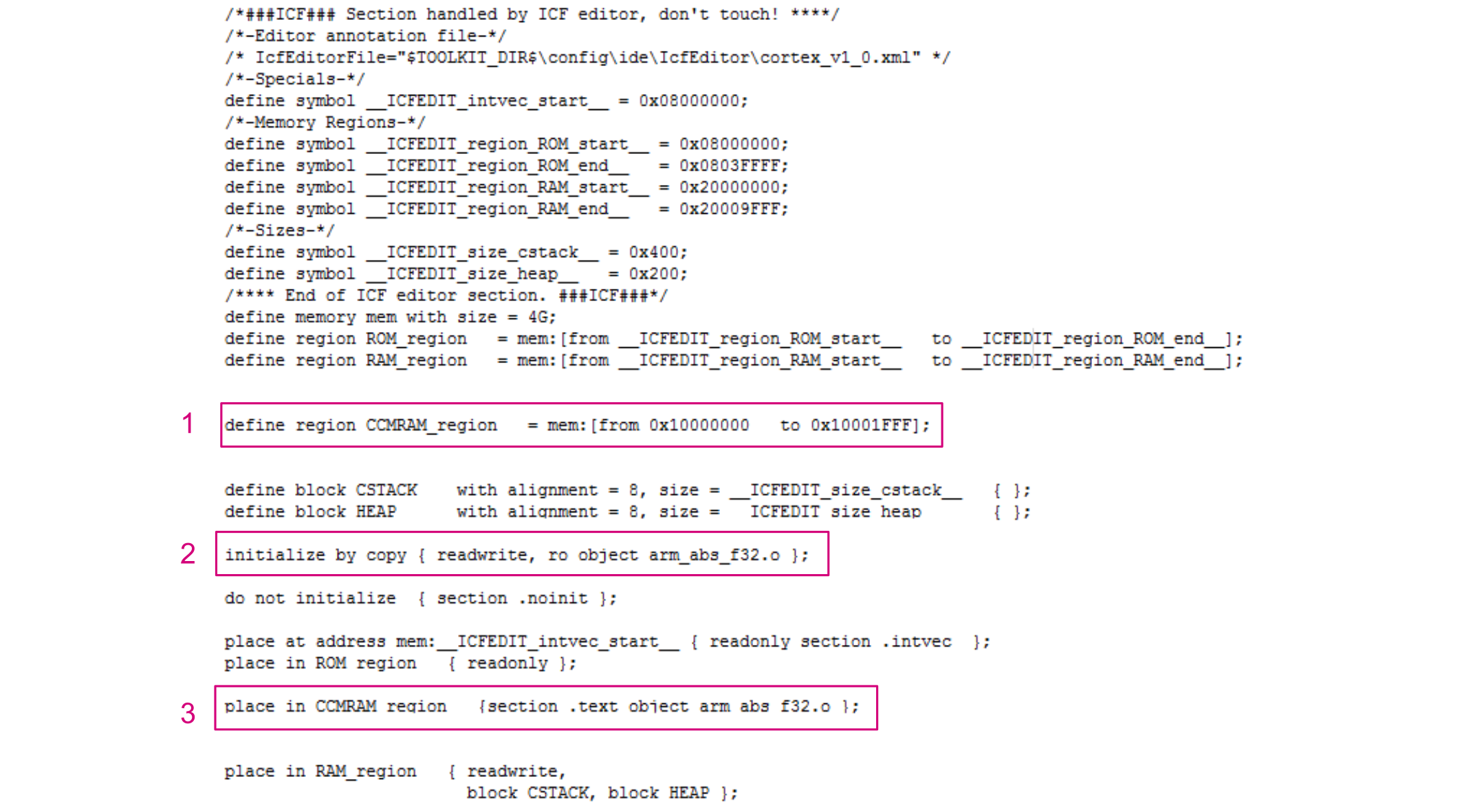
Execute a simple code from CCM SRAM (except for interrupt handler)
A simple code can be composed of one or more functions that are not referenced from an interrupt handler. If the code is referenced from an interrupt handler, follow the steps described in Execute an interrupt handler from CCM SRAM.
IAR Embedded Workbench® provides the possibility to place one or more functions or a whole source file in CCM SRAM. This operation requires a new section to be defined in the linker file (.icf) to host the code to be placed in CCM SRAM. This section is copied to CCM SRAM at startup. The required steps are listed below:
- Define the address area for the CCM SRAM by indicating the start and end addresses.
- Tell the linker to copy at startup the section named
.ccmramfrom the flash memory to the CCM SRAM. - Indicate to the linker that the code section
.ccmrammust be placed in the CCM SRAM region.
The figure below shows an example of code implementing these operations.

Note:
This procedure is not valid for interrupt handlers.
Execute a source file from CCM SRAM
Execute a source file from CCM SRAM means that all functions declared in this file are executed from this memory area.
To place and execute a source file from CCM SRAM, use the IAR Embedded Workbench® file Options window as follows:
- Add the section .ccmram (for example) in the linker file as defined in Execute a simple code from CCM SRAM (except for interrupt handler).
- Right click on the file name from the workspace window.
- Select Options from the displayed menu.
- Check Override inherited settings from the displayed window.
- Select the Output tab and type the name of the section already defined in the linker file (
.ccmramin this example) in the Code section name field (see the figure below).Figure 4. IAR Embedded Workbench® file placement 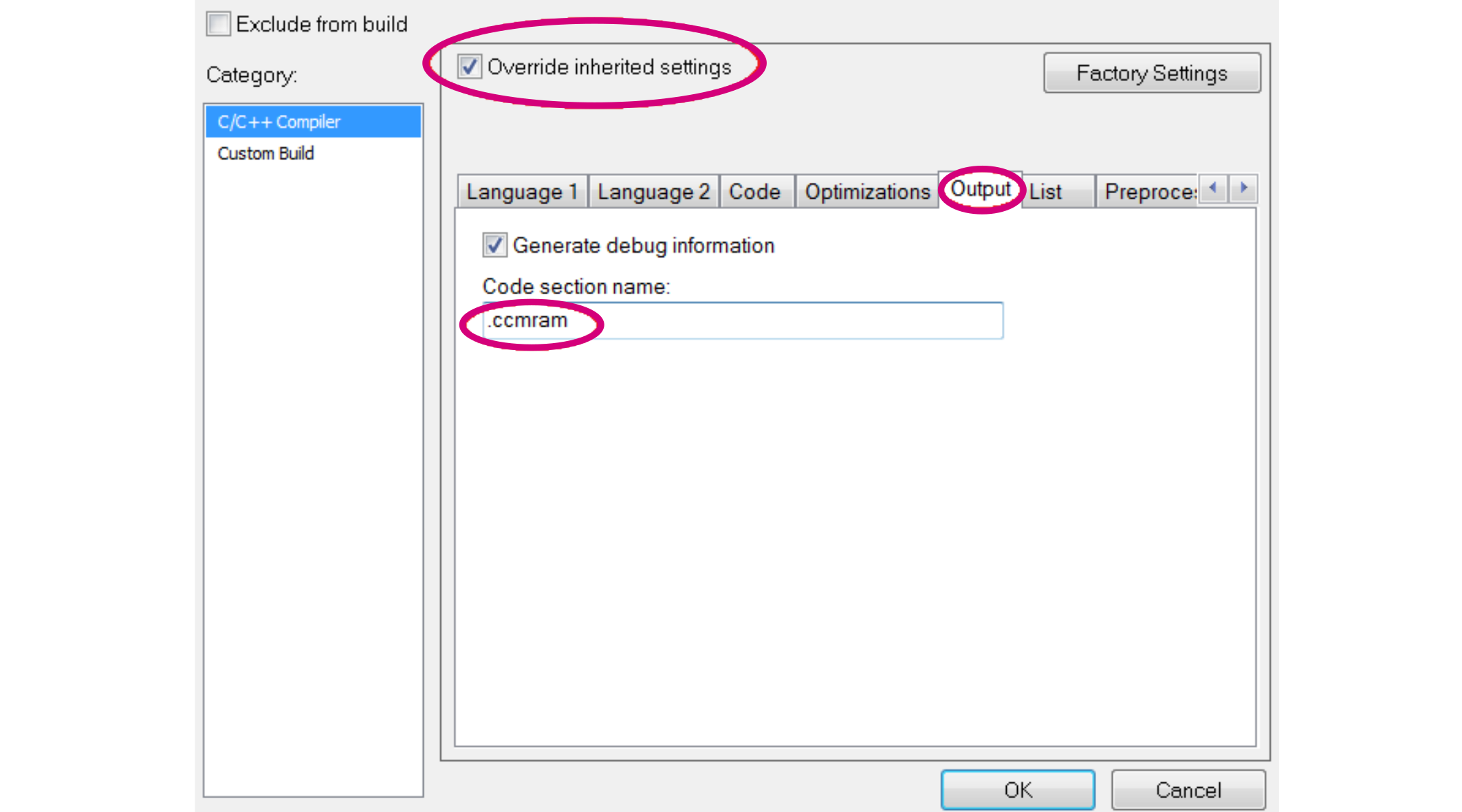
Executing one or more functions from CCM SRAM
The steps required to execute a function from CCM SRAM are the following:
- Add the section
.ccmramin the linker file as described in Execute a simple code from CCM SRAM (except for interrupt handler). - Using keyword
pragma location, specify the function to be executed from CCM SRAM (see the figure below).
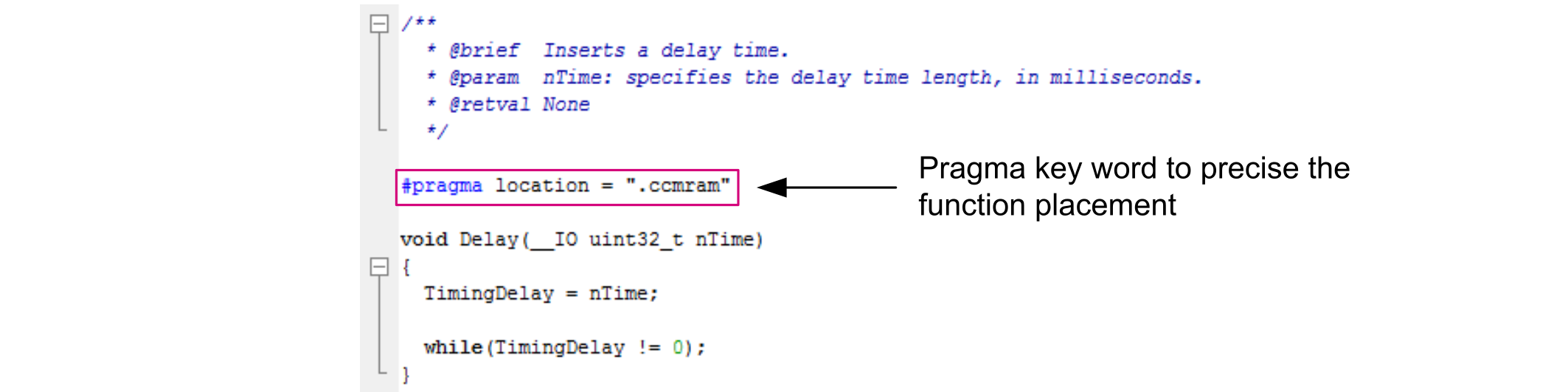
Note:
To execute more than one function from CCM SRAM, the pragma location keyword must be placed above each function declaration.
Execute an interrupt handler from CCM SRAM
The vector table is implemented as an array named __vector_table and referenced in the startup code.
The IAR Embedded Workbench® linker protects the sections that are referenced from the startup code from being affected by an 'initialize by copy' directive. The symbol __vector_table must not be used to allow copying interrupt handler sections via the 'initialize by copy' directive. A second vector table must be created and placed in CCM SRAM.
The steps required to execute an interrupt handler from CCM SRAM are listed below and described in the next sub-sections:
- Update the linker file (.icf).
- Update the startup file.
- Place the interrupt handler in CCM SRAM.
- Remap the vector table to CCM SRAM.
Updating the linker file (.icf)
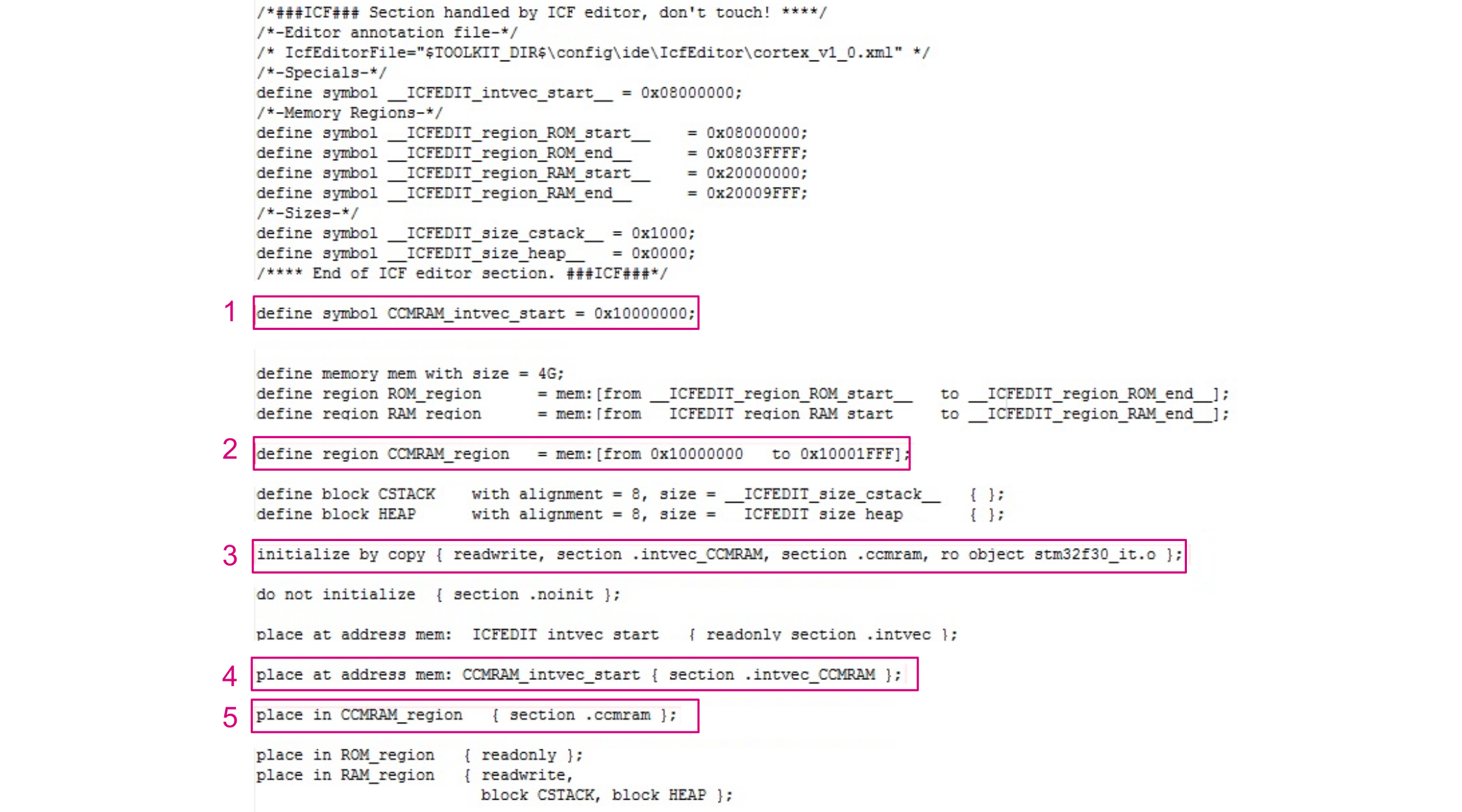
The following steps are needed to update the linker file .icf (see the figure below):
- Define the address where the second vector table is located: 0x1000 0000.
- Define the memory address area for the CCM SRAM by specifying the start and end addresses.
- Tell the linker to copy at startup the section named
.ccmramand the second vector table section.intvec_CCMRAMfrom flash memory to CCM SRAM. - Tell the linker that the second vector table must be placed in the
.intvec_CCMRAMsection. - Indicate that the
.ccmramcode section must be placed in CCM SRAM.
Updating the startup file
The following steps are needed to update the startup file:
- Make a second vector table to be stored in CCM SRAM. For example, the startup_stm32f30x.s file must be modified by removing all entries except
sfe(CSTACK)andReset_Handlerfrom the original vector table__vector_table. - Add a second vector table to be placed in CCM SRAM. It must contain all entries. As an example this table can be called
__vector_table_CCMRAM. This vector table must be placed in the.intvec_CCMRAMsection defined in the linker file.
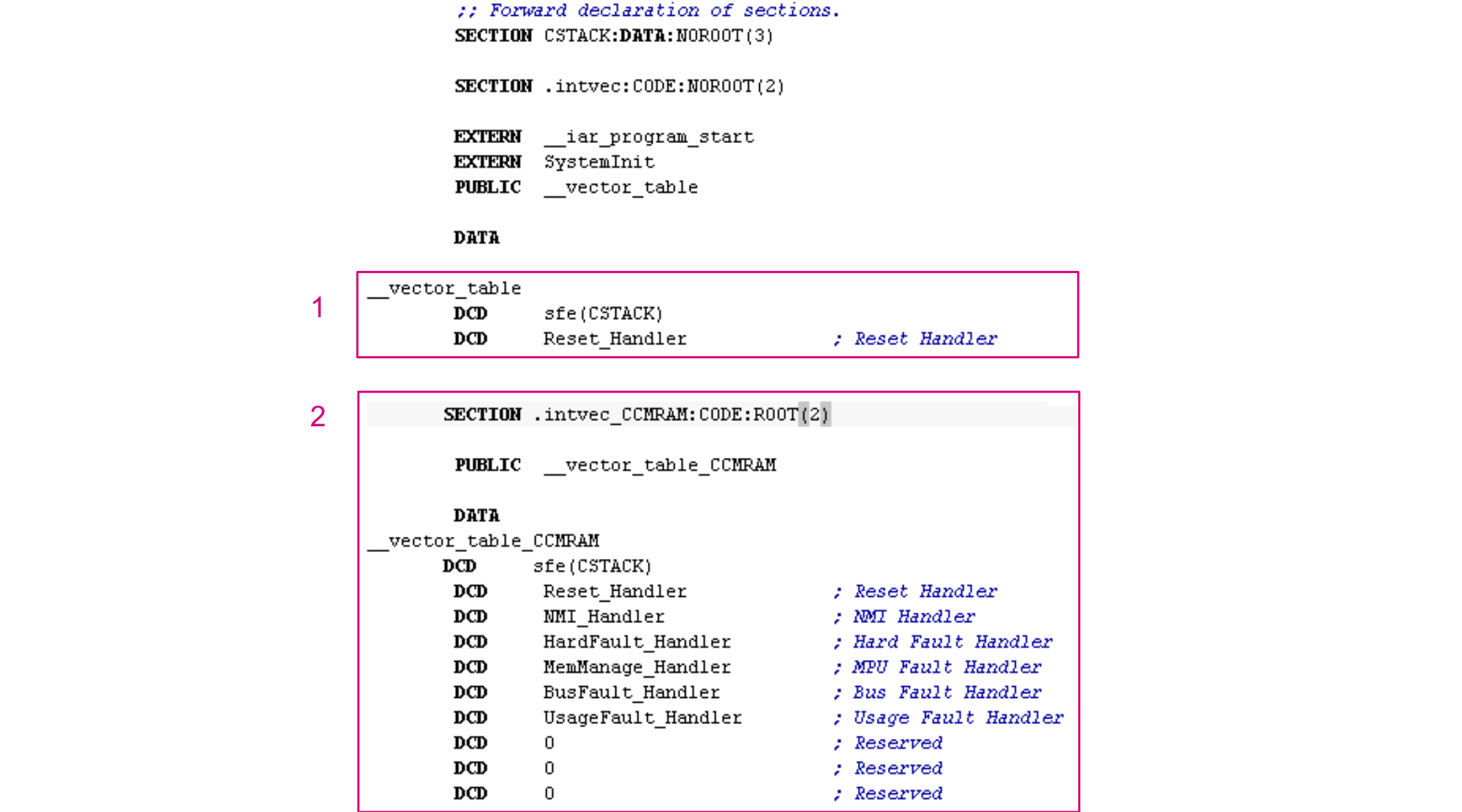
Place the interrupt handler in CCM SRAM
Place the interrupt handler to be executed in CCM SRAM as described in Executing one or more functions from CCM SRAM or the whole stm32f_it.c file as described in Execute a source file from CCM SRAM.
Remap the vector table to CCM SRAM
In the SystemInit function, remap the vector table to CCM SRAM by modifying the VTOR register as follows:
SCB->VTOR = 0x10000000 | VECT_TAB_OFFSET;Execute a library (.a) from CCM SRAM
IAR Embedded Workbench® allows the execution of a library or a library module from CCM SRAM. The required steps are listed below:
- Define the memory address area corresponding to the CCM SRAM by specifying the start and end addresses.
Figure 8. CCM SRAM area definition 
- Update the linker to copy at startup the library or the library module in CCM SRAM using the '
initialize by copy' directive.Figure 9. IAR Embedded Workbench® section initialization 
- Indicate to the linker that the library must be placed in CCM SRAM.
Figure 10. IAR Embedded Workbench® library placement 
To execute a library module from CCM SRAM, follow steps 1, 2 and 3 using the library module name.
The example in the figure below shows how to place arm_abs_f32.o (a module of iar_cortexM4l_math.a library) in CCM SRAM.