AN4296 · Application noteUse STM32F3/STM32G4 CCM SRAM with IAR Embedded Workbench®, Keil® MDK-ARM, STMicroelectronics STM32CubeIDE, and other GNU-based toolchains
Download .pdfOpen in the full document

Execute application code from CCM SRAM using the Keil MDK-ARM toolchain

Execute a function or an interrupt handler from CCM SRAM

The steps required to execute a function or an interrupt handler from CCM SRAM are listed below:

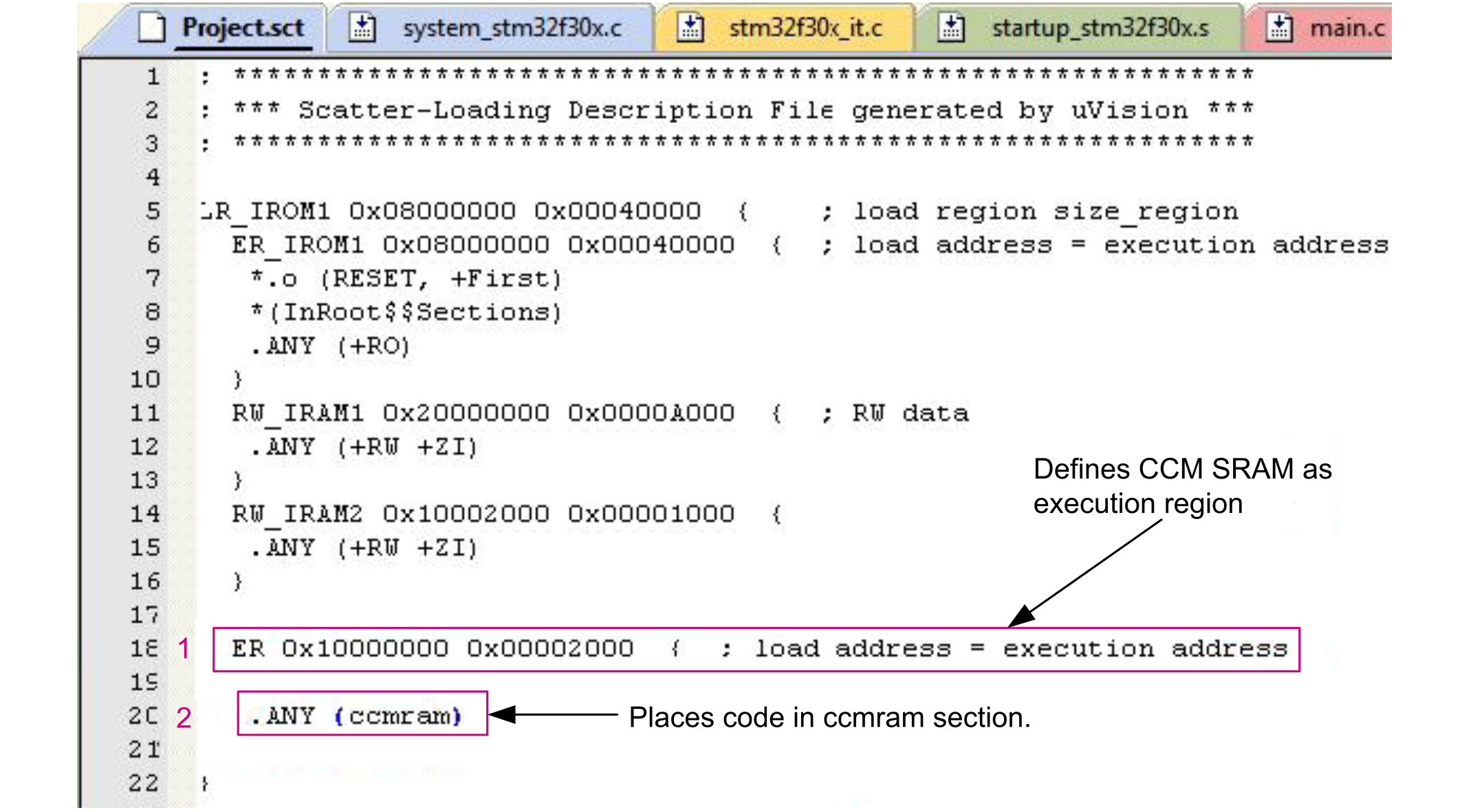
  1. Define a new region (ccmram) in the scatter file by indicating the start and end addresses of CCM SRAM.
  2. Indicate to the linker that the sections with the ccmram attribute must be placed in the CCM SRAM region.
    Figure 12. MDK-ARM scatter file
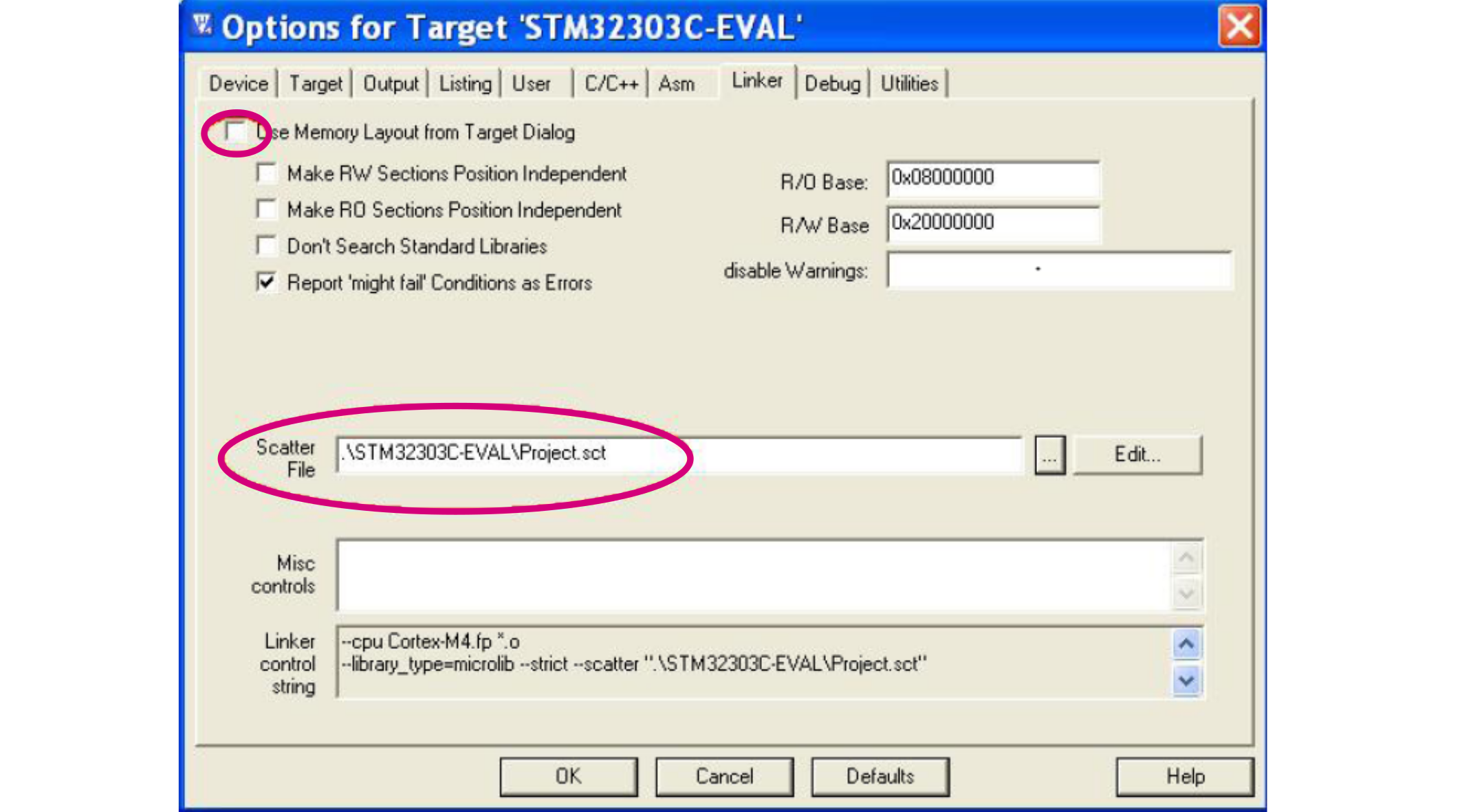
  3. Refer to the modified scatter file for the project options.
    Figure 13. MDK-ARM Options menu
  4. Place the part of code to be executed from CCM SRAM in the ccmram section defined above. This is done by adding the attribute key word above the function declaration.
    Figure 14. MDK-ARM function placement
Note:

To execute more than one function from CCM SRAM, the attribute keyword must be placed above each function declaration.

Execute a source file from CCM SRAM

Executing a source file from CCM SRAM means that all functions declared in this file are executed from the CCM SRAM region.

Follow the steps below to execute a file from CCM SRAM:

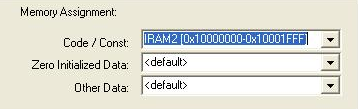
  1. Define the CCM SRAM as a memory area in the project option window (Project > option > target).
    Figure 15. MDK-ARM target memory
  2. Right click on the file to place it in CCM SRAM and select Options.
  3. Select the CCM SRAM region in the Memory assignment menu.
    Figure 16. MDK-ARM file placement

Execute a library or a library module from CCM SRAM

Follow the steps below to execute a library or a library module from CCM SRAM:

  1. Define CCM SRAM as a memory area as shown in the figure below.
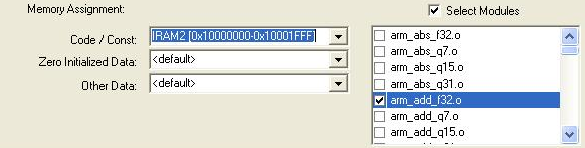
  2. Right click on the library from the workspace and select Options.
  3. Place the complete library or a module from a library in CCM SRAM.
Figure 17. MDK-ARM library placement

Execute a function or an interrupt handler from CCM SRAM

The steps required to execute a function or an interrupt handler from CCM SRAM are listed below:

  1. Define a new region (ccmram) in the linker file (.ld) by defining the start address and the size of the CCM SRAM region.
    /* Entry Point */
    ENTRY(Reset_Handler)
    
    /* Highest address of the user mode stack */
    _estack = ORIGIN(RAM) + LENGTH(RAM);  /* end of "RAM" Ram type memory */
    
    _Min_Heap_Size = 0x200;               /* required amount of heap  */
    _Min_Stack_Size = 0x400;              /* required amount of stack */
    
    /* Memories definition */
    MEMORY
    {
      RAM    (xrw)  : ORIGIN = 0x20000000, LENGTH = 112K
      FLASH  (rx)   : ORIGIN = 0x8000000,  LENGTH = 512K
      CCMRAM (xrw)  : ORIGIN = 0x10000000, LENGTH = 8K
    }
  2. Instruct the linker that code sections with the ccmram attribute must be placed in CCM SRAM. Insert the following code into the linker script. It is important to insert it before .text in the script.
    /* The startup code into "FLASH" Rom type memory */
      .isr_vector :
      {
        . = ALIGN(4);
        KEEP(*(.isr_vector)) /* Startup code */
        . = ALIGN(4);
      } >FLASH
    
      /*--- New CCMRAM linker section definition ---*/
      _siccmram = LOADADDR(.ccmram);
      /* CCMRAM section */
      .ccmram :
      {
        . = ALIGN(4);
        _sccmram = .;        /* define a global symbols at ccmram start */
        *(.ccmram)     
        *(.ccmram*)
        . = ALIGN(4);
        _eccmram = .;        /* define a global symbols at ccmram end */
      } >CCMRAM AT> FLASH
      /*--- End of CCMRAM linker section definition ---*/
    
      /* The program code and other data into "FLASH" Rom type memory */
      .text :
      {
        . = ALIGN(4);
        *(.text)             /* .text sections (code) */       
        *(.text*)            /* .text* sections (code) */
        *(.glue_7)           /* glue arm to thumb code */
        *(.glue_7t)          /* glue thumb to arm code */
        *(.eh_frame)
    
        KEEP (*(.init))
        KEEP (*(.fini))
          
        . = ALIGN(4);
        _etext = .;          /* define a global symbols at end of code */
      } >FLASH
  3. Modify the startup file to initialize data and code to place in CCM SRAM at startup time.
    /* Copy the data segment initializers from flash to SRAM */
      ldr r0, =_sdata
      ldr r1, =_edata
      ldr r2, =_sidata
      movs r3, #0
      b  LoopCopyDataInit
    
    CopyDataInit:
      ldr r4, [r2, r3]
      str r4, [r0, r3]
      adds r3, r3, #4
    
    LoopCopyDataInit:
      adds r4, r0, r3
      cmp r4, r1
      bcc CopyDataInit
    
    /* Copy from flash to CCMRAM */
      ldr r0, =_sccmram
      ldr r1, =_eccmram
      ldr r2, =_siccmram
      movs r3, #0
      b  LoopCopyCcmInit
    
    CopyCcmInit:
      ldr r4, [r2, r3]
      str r4, [r0, r3]
      adds r3, r3, #4
    
    LoopCopyCcmInit:
      adds r4, r0, r3
      cmp r4, r1
      bcc CopyCcmInit
    /* End of copy to CCMRAM */
      
    /* Zero fill the bss segment. */
      ldr r2, =_sbss
      ldr r4, =_ebss
      movs r3, #0
      b LoopFillZerobss
    
    FillZerobss:
      str  r3, [r2]
      adds r2, r2, #4
    
    LoopFillZerobss:
      cmp r2, r4
      bcc FillZerobss
    
    /* Call the clock system initialization function.*/
        bl  SystemInit
    /* Call static constructors */
        bl __libc_init_array
    /* Call the application's entry point.*/
        bl  main
    
    LoopForever:
        b  LoopForever
  4. Place the part of code to be executed from CCM SRAM in the .ccmram section by adding the attribute key word in the function prototype.
    void NMI_Handler(void);
    void HardFault_Handler(void);
    void MemManage_Handler(void);
    void BusFault_Handler(void);
    void UsageFault_Handler(void);
    void SVC_Handler(void);
    void DebugMon_Handler(void);
    void PendSV_Handler(void);
    
    void SysTick_Handler(void) __attribute__((section (".ccmram")));

Execute a file from CCM SRAM

Executing a source file from CCM SRAM means that all functions declared in this file are executed from CCM SRAM.

To execute a file from CCM SRAM, follow the steps listed below:

  1. Add the .ccmram section in the linker file as defined in Execute a function or an interrupt handler from CCM SRAM.
  2. Place the file in CCM SRAM as shown below. The startup file also needs to be updated to copy code from the flash memory to CCM SRAM as described in Execute a function or an interrupt handler from CCM SRAM.

    This example shows how to execute file myTestCCM.o from CCM SRAM:

    /*--- New CCMRAM linker section definition ---*/
    _siccmram = LOADADDR(.ccmram);
    /* CCMRAM section */
    .ccmram :
    {
      . = ALIGN(4);
      _sccmram = .;     /* define a global symbols at ccmram start */
      *(.ccmram)     
      *(.ccmram*)
      *myTestCCM.o(.text .text*)
      . = ALIGN(4);
      _eccmram = .;     /* define a global symbols at ccmram end */
    } >CCMRAM AT> FLASH
    /*--- End of CCMRAM linker section definition ---*/