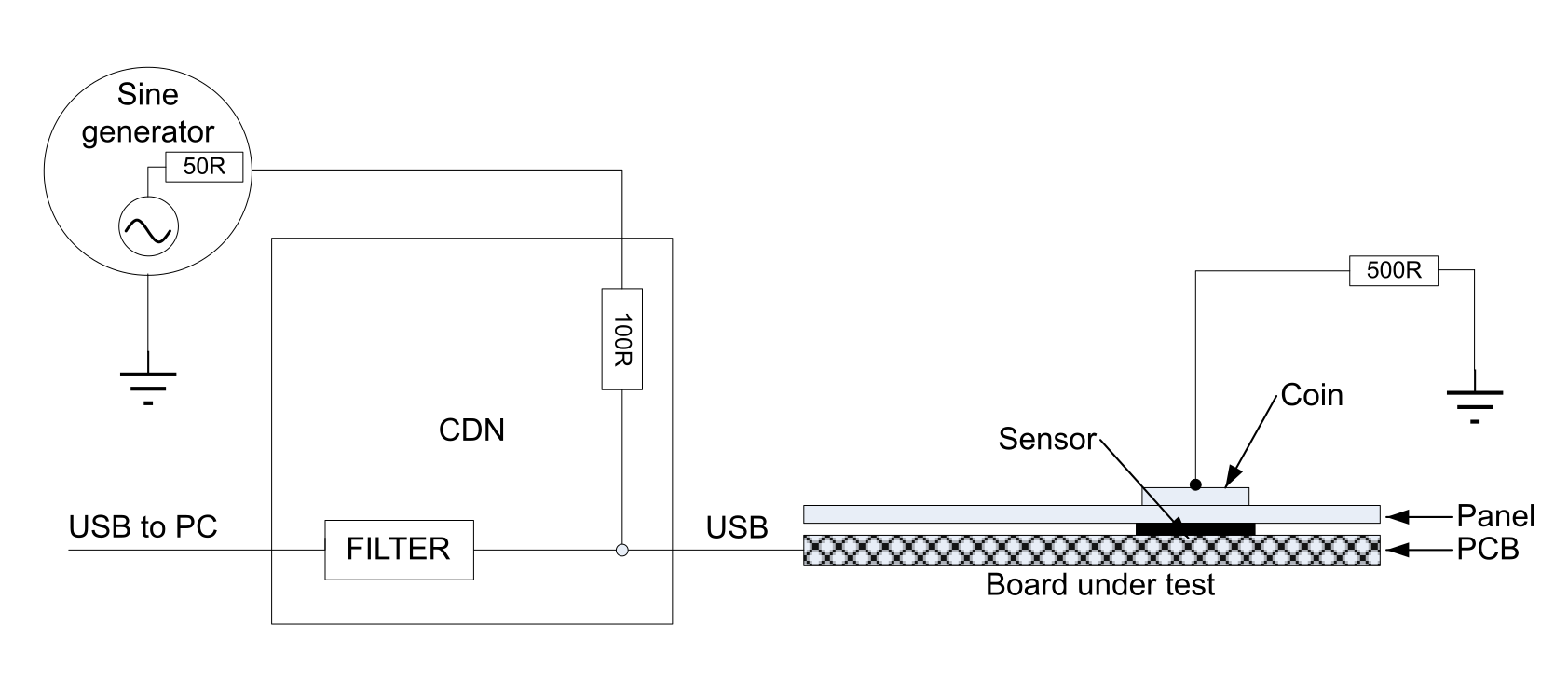
Most of the IEC61000-4-6 compliant generators do not offer the ability to generate a step smaller than 1 kHz. In order to determine the most critical noise frequency, it is usually required to use 100 Hz steps or even 10 Hz steps. The setup detailed in this section is an alternative to find out the most critical noise frequencies and to evaluate the robustness of the EUT at these frequencies.
Note:
The noise frequencies impacting the equipment are around the charge transfer frequency and up to 40 MHz. Higher noise frequency does not have an impact on the equipment operation.
Test setup
In order to simulate a human finger, a copper coin (from10 to16 mm diameter) with a 500 Ω serial resistor connected to GND can be used.
The CDN adaptor is the same as the one used in IEC61000-4-6.
Figure 7. Test condition
Generator settings
The following steps are needed to set the generator:
Select “sine wave” and “sweep” mode.
Sweep menu: time = 300 s, return time = 0, linear, interval = 1 ms
Set Vpp value on the generator to obtain the corresponding voltage injected on the EUT in case of standard test.
Example: to test in the same condition as the standard at 3 Vrms, the user must adjust the generator voltage to inject 15 Vpp measured on the board with an oscilloscope.
Note:
On the AFG3102 Tektronix® generator, the modulation is not available in sweep mode.
Set the start and end frequencies such that the sweep range does not exceed 60 kHz for a 300 s duration. This recommendation allows the detection of the worst case level with sufficient accuracy (typically less than 5 % error).
Note:
An external amplifier may be needed in case the generator is not able to reach the appropriate injection level.
Data logging and data processing
Data logging
The log function of the STM Studio tool can be used to collect data from the STM32 target (refer to the STM-STUDIO-STM32 data brief for more details).
Example: “MyChannels_Data[x].Delta” and “MyTKeys[(x)].p_Data->StateId”
Data processing
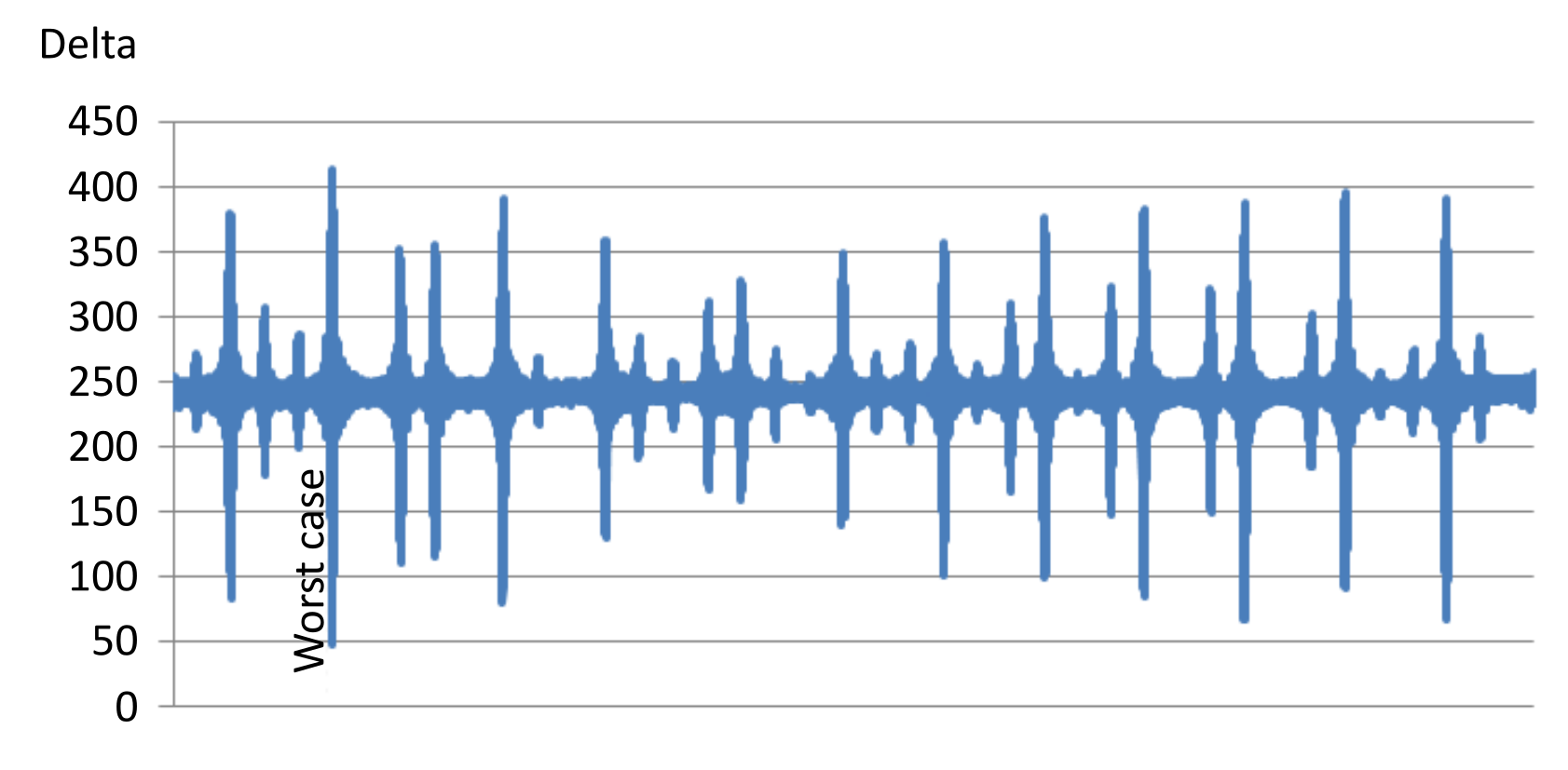
In this example, the frequency sweep starts at 500 Hz and ends at 550 kHz. Noise level is set on the generator to 4.6 Vpp (no modulation). The detect out threshold is set to 50. The sensor is touched and the detection is valid if the measured delta is upper 50, else the touch detection is lost (error is reported). It means that 4.6 Vpp is the limit to avoid detection loss (4.5 Vpp pass).
As a comparison, IEC61000-4-6 standard recommendation to use 1 % frequency steps would have lead to explore only 10 frequencies in this range.
Figure 8. Data processing
How to improve noise immunity
The two following directions can be followed to improve noise immunity:
Decrease noise level.
Increase signal (measurement sensitivity).
Note:
In order to obtain a real benefit on the SNR, the noise reduction must not degrade the sensitivity and vice versa.
Proposed improvement techniques
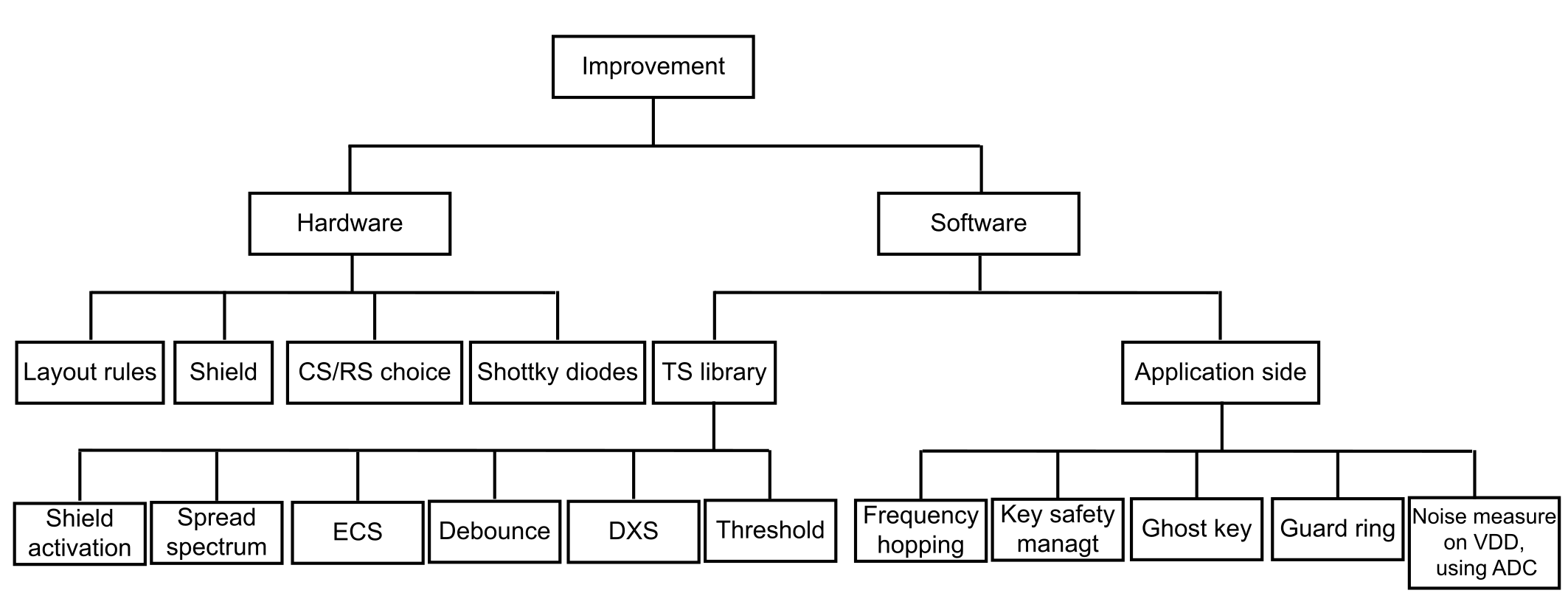
The improvement techniques detailed below are based on hardware and software choices.
Figure 9. Process flow
Several improvement techniques are introduced below:
Active shield
This feature increases the measurement sensitivity.
Spread spectrum
When activated, the spread spectrum creates several acquisition frequencies. This feature is particularly appropriate for reducing overall noise level inside the measurement when the noise is concentrated on certain frequencies (as opposed to a white noise).
Detection thresholds
Adjusting these parameters allows the optimization of the reported detection that is a compromise between false detection and detection loss.
SW filter
This feature, such as debounce filter, can be used to remove short and unwanted detections.
Frequency hopping
Upon detection of excessive noise on a dedicated channel, the firmware is able to change the acquisition frequency in order to move out of the disturbed frequency range. There may be some situations where frequency hopping and spread spectrum cannot be activated both at the same time. This is useful to get a Class B operation with no false touch detections (generally preferable than having some false touch detections).
Channel blocking
This feature uses an additional channel to detect noise and cancel touchkey detection if noise reaches a determined threshold. Sensors involved are ghost and guard-ring. Sensors involved are ghost and guard-ring.
Impedance path to earth
Decreasing the impedance path to earth is a good way to cancel the conducted noise effect (use of a metallic chassis, system ground and earth connected together). For instance, an application offering a direct connection between the earth and the system ground is not impacted by the conducted noise.
Schottky diodes on sensor and shield
Adding a low-capacitance Schottky diode like ST BAS70, increases the conducted-noise voltage level immunity. These Schottky diodes must be used on both sensors and shield.
Increasing Cs and/or Rs increases the acquisition time but decreases conducted-noise effects.
Noise measurement on VDD
On application using the STM32 general purpose ADC, the LDO (or SMPS if any) input ripple can be measured and the application can decide to stop touch sensing acquisition when the conducted-noise voltage level is too high, or another counter measure such as increasing the debounce parameters.
Active shield
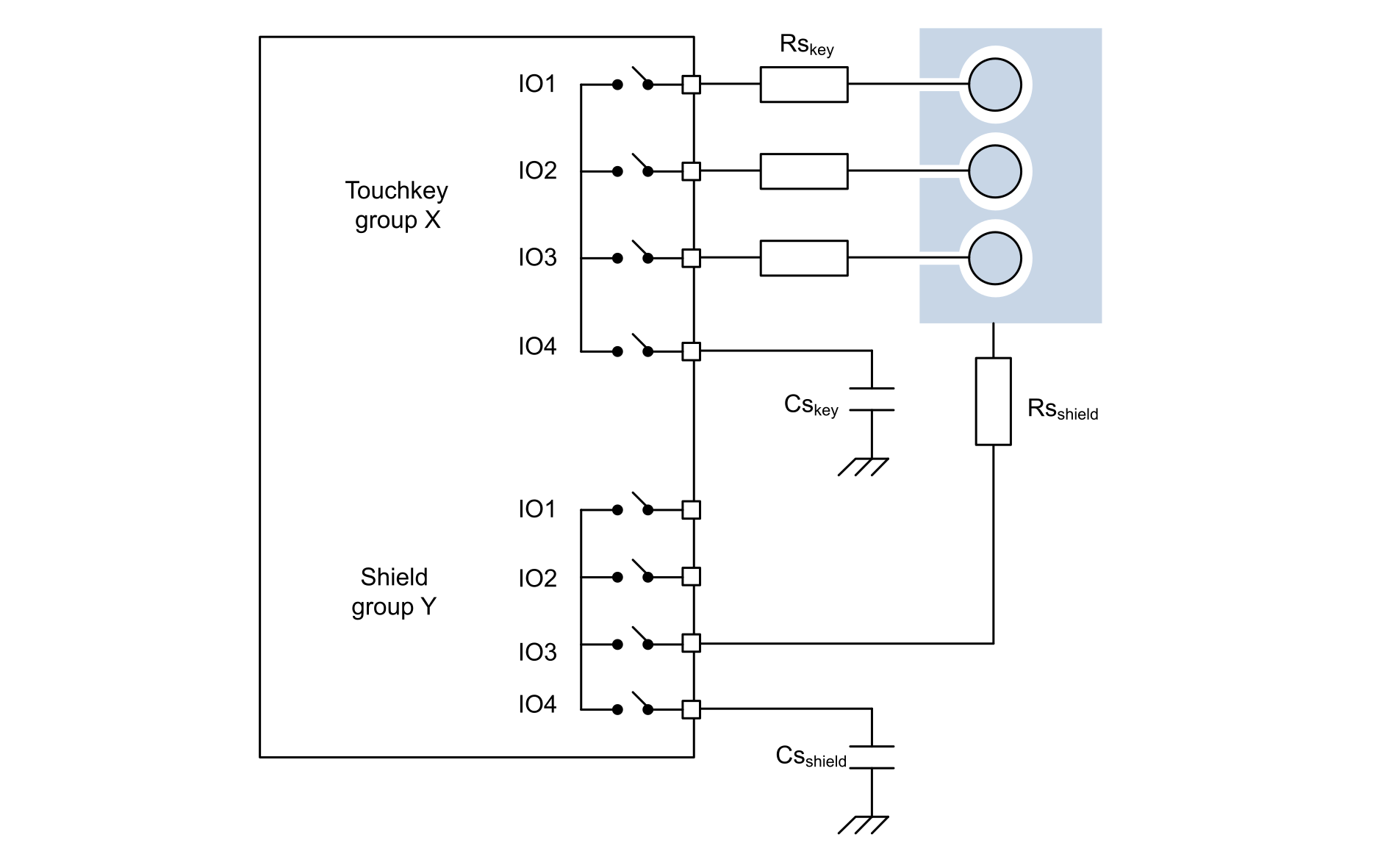
The active shield is an electrode that wraps around the sensor. The goal is to minimize the parasitic capacitance between the sensor and the ground. To drive the shield electrode, a channel of a dedicated group with its own Cs can be used (see the figure below).Figure 10. Active shield
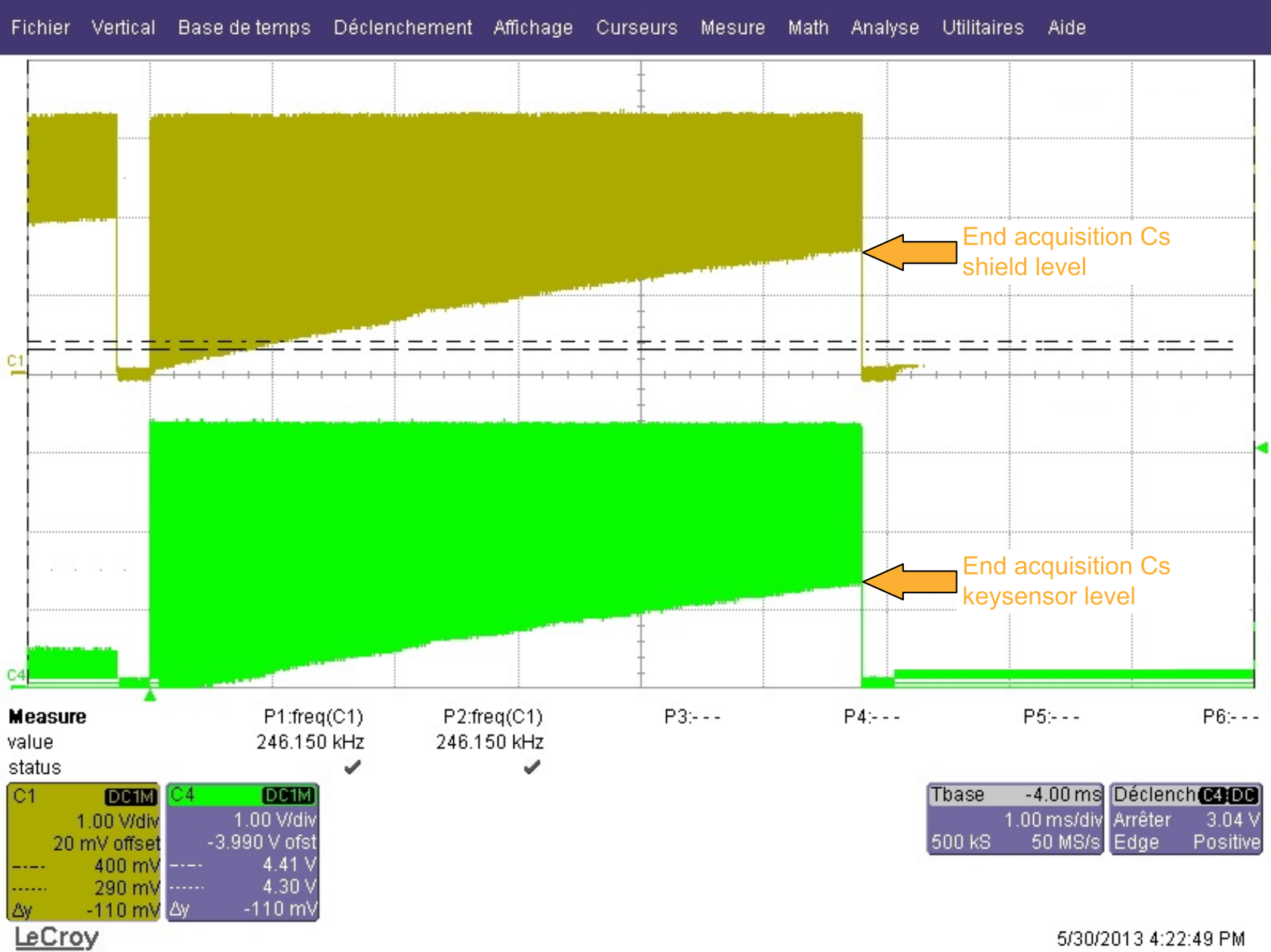
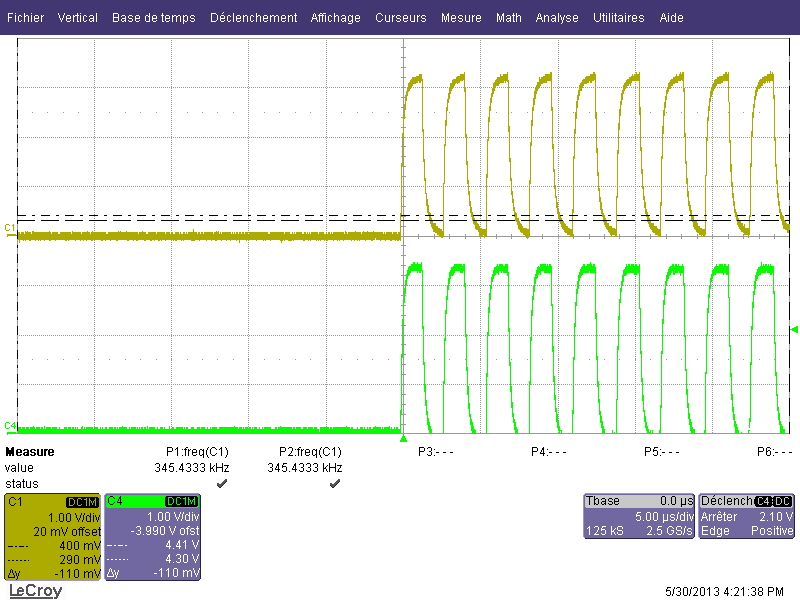
It is important to check the shied electrode waveform. Csshield capacitance value and Rsshield serial resistor value must be adjusted in order to obtain the same signal shape as sensor electrode waveform (same amplitude, same rising and falling time).
The figure below shows the electrode sensor waveform in green and shield electrode waveform in yellow. The Csshield is adjusted to obtain approximately the same charge level at the end of the acquisition.Figure 11. Electrode and active shield waveforms
The figure below is a zoom of the previous one at the beginning of acquisition: Rsshield and Csshield are adjusted to obtain approximately the same rise and fall time on the shield electrode as sensor electrode waveform.Figure 12. Waveform detail
When the active shield is properly implemented, the count value is about twice as much as the count value without active shield. Since the noise level is not increased, the SNR is improved by a factor of 2, and noise immunity as well.
The negative impact of this feature is the requirement to dedicate two more I/Os and one more touch sensing group.
Refer to the following documents for more details on the active shield implementation:
'Drive shield' section of the application note Design with surface sensors for touch sensing applications on MCUs (AN4312)
'Shield adjustment' section of the application note Tuning a touch sensing application on MCUs (AN4316)
TSC part of the STM32L4 online web training
To activate the shield functionality, from software point of view, using TSL, HAL_TSC_Init must be call with the following parameters:
where TSC_GROUPx_IOy is the group of I/Os connected to Rsshield. (x = 1..8, y = 1..4) and TSC_GROUPx_IOz is the group of I/Os connected to Csshield. (x = 1..8, z = 1..4 and z ≠ y).
In tsl_user.h file from bank setting point of view, SHIELD_IO_MSK must be set as follows:
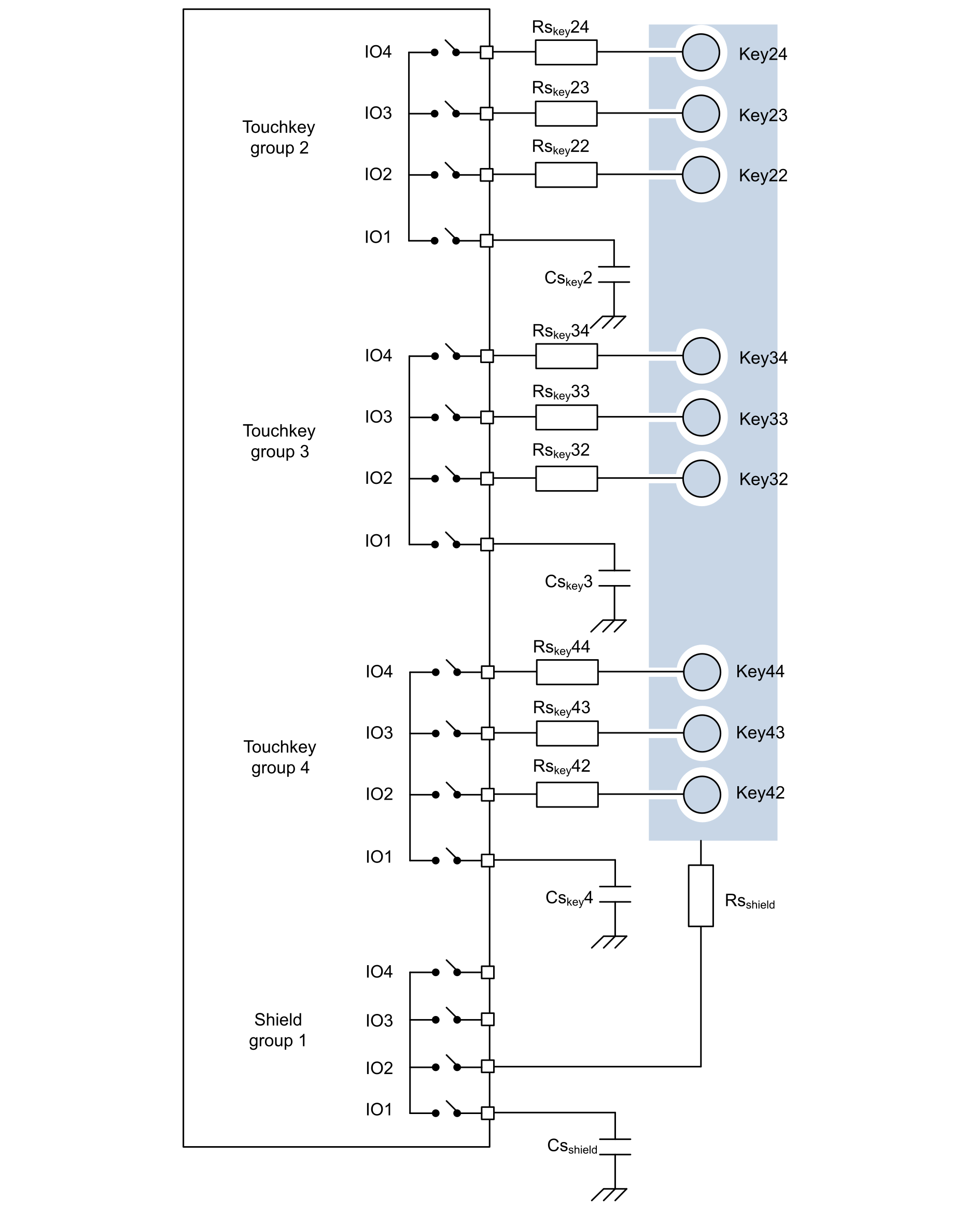
In this example, the configuration is the one given in the figure below.Figure 13. Active shield implementation example
Shield on group 1
G1_IO1 connect to Csshield
G1_IO2 connect to Rsshield and shield copper
Sensors on group 2
G2_IO1 connect to Cskey2
G2_IO2 connect to Rskey22 and sensor (Key22)
G2_IO3 connect to Rskey23 and sensor (Key23)
G2_IO4 connect to Rskey24 and sensor (Key24)
Sensors on group 3
G3_IO1 connect to Cskey3
G3_IO2 connect to Rskey32 and sensor (Key32)
G3_IO3 connect to Rskey33 and sensor (Key33)
G3_IO4 connect to Rskey34 and sensor (Key34)
Sensors on group 4
G4_IO1 connect to Cskey4
G4_IO2 connect to Rskey42 and sensor (Key42)
G4_IO3 connect to Rskey43 and sensor (Key43)
G4_IO4 connect to Rskey44 and sensor (Key44)
To get the status of Key22 to Key44, the followings banks assignation is used:
Bank1 to get Key22, Key32 and Key42 stateID
Bank2 to get Key23, Key33 and Key43 stateID
Bank3 to get Key24, Key34 and Key44 stateID
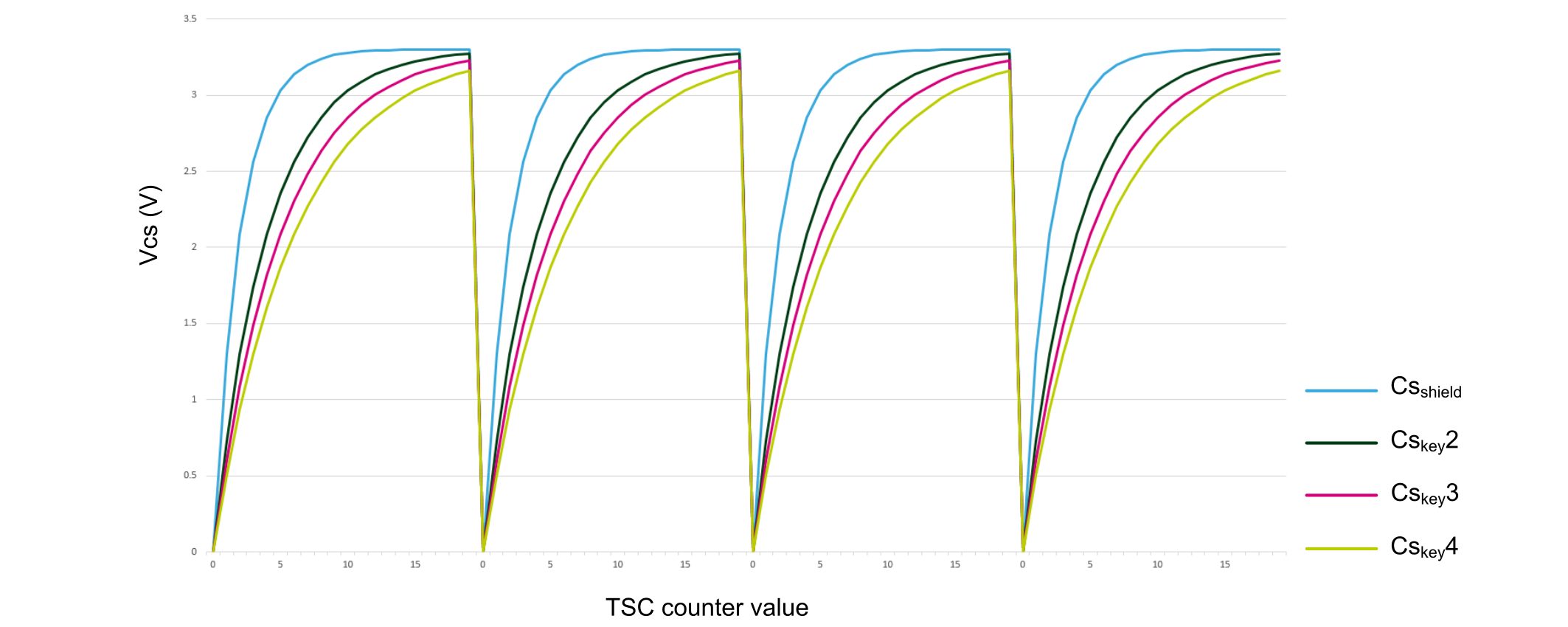
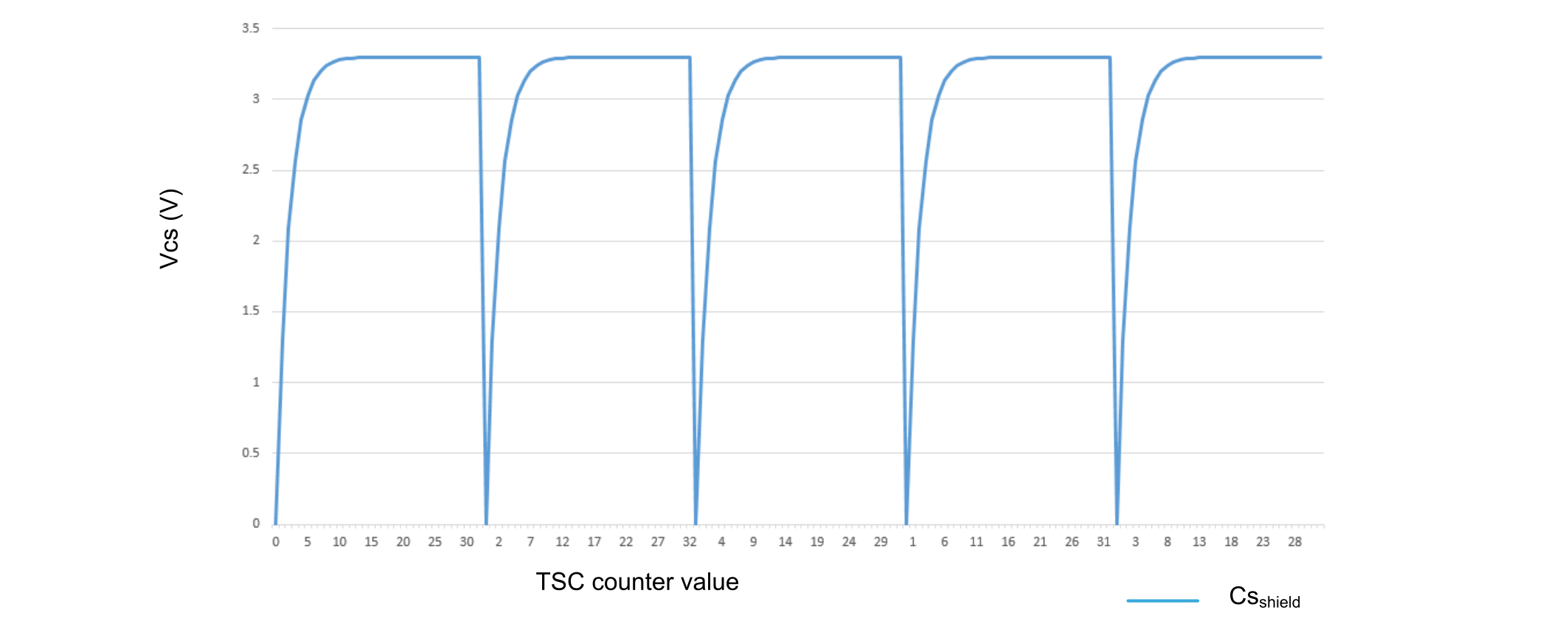
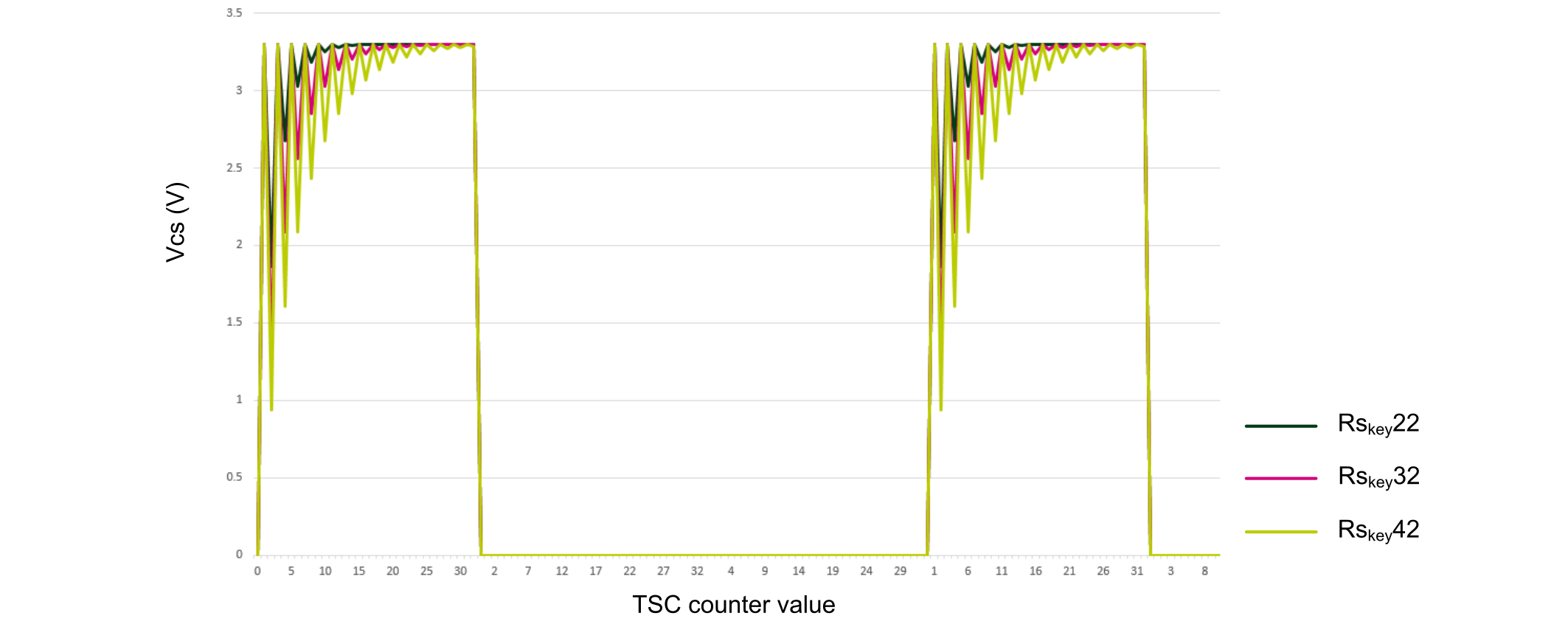
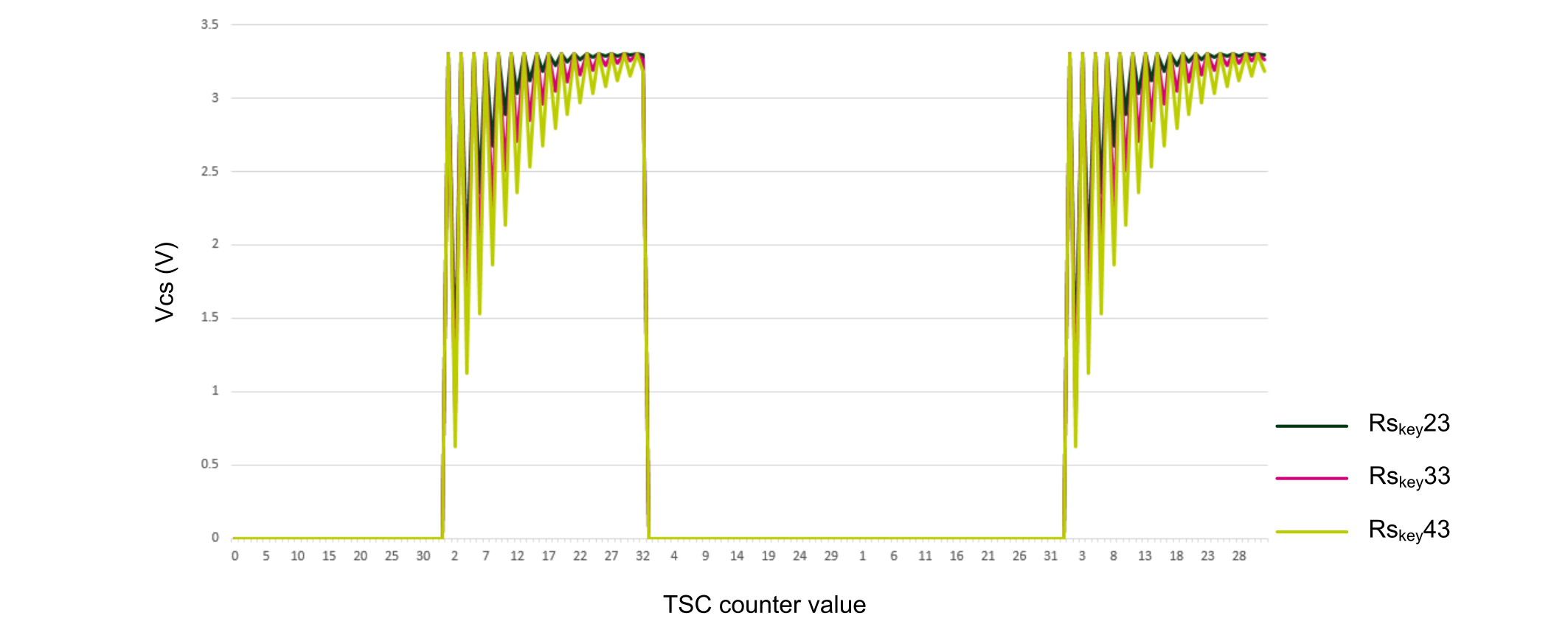
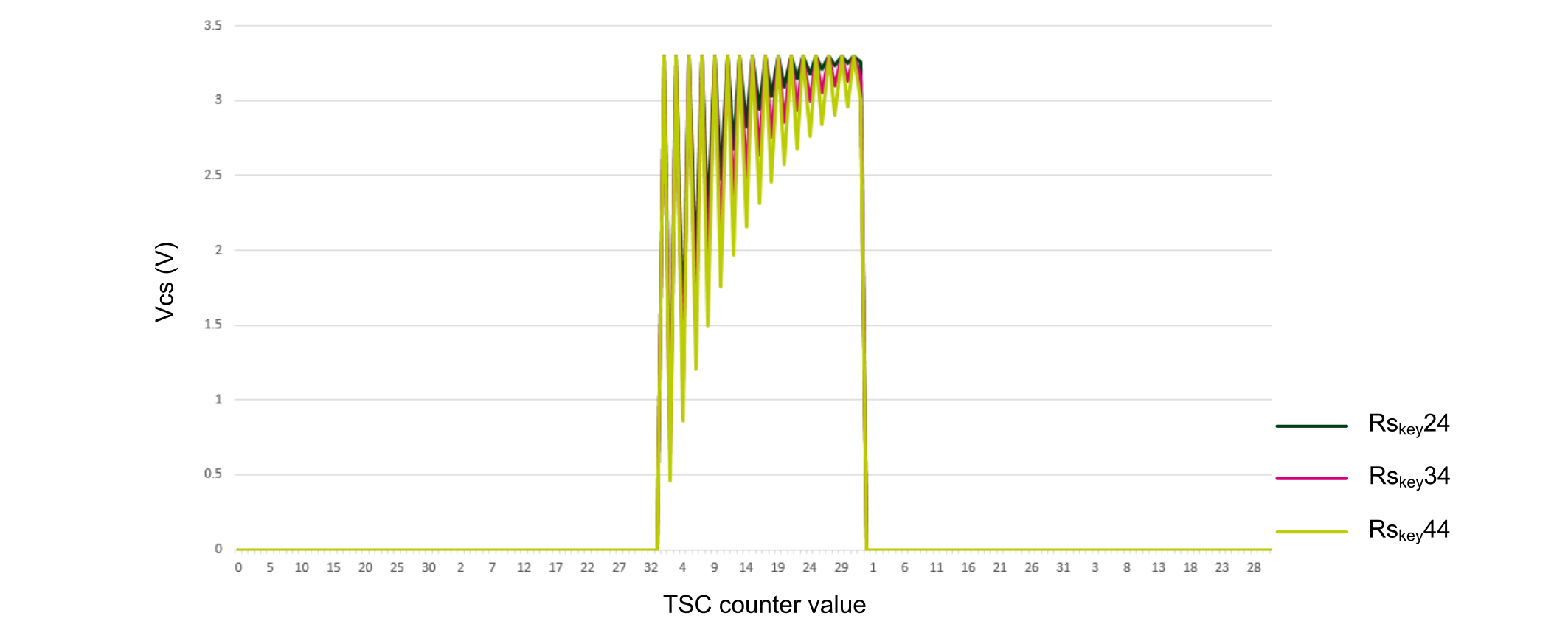
With this banks mapping, the waveforms on Rsxx and Csxx are the ones given in the figures below.Figure 14. Waveform on sampling capacitorsFigure 15. Waveform on Csshield
To improve the conducted-noise immunity, the following Rs and Cs values give good performance:
Csshield = 100 nF (to adjust according to previous explanations in this section)
Rsshield = 1 kΩ (to adjust according to previous explanations in this section)
Cskeyx = 47 nF
Rskeyxx = 10 kΩ
Figure 16. Waveform on G2_IO2, G3_IO2 and G3_IO2Figure 17. Waveform on G2_IO3, G3_IO3 and G3_IO3Figure 18. Waveform on G2_IO4, G3_IO4 and G3_IO4