AN4299 · Application noteHow to improve conducted noise robustness for touch sensing applications on STM32 MCUs
Download .pdfOpen in the full document

Spread spectrum

Spread spectrum

Without spread spectrum, the main noise susceptibility is found at the acquisition frequency and its value is 1/TCD (TCD = transfer cycle duration).

The main frequency (HCLK) in the STM32 MCUs comes from the PLL output. Preferably the highest frequency recommended by specification is used to offer an optimum response time (example: 48 MHz for the STM32F0 series).

This frequency is divided in the TSC cell by the programmable prescaler (PGCLK). This frequency determines the basic timing units for CTPH, CTPL as follows:

Transfer cycle duration = (1/ (PGCLK) x ((CTPH + 1) + (CTPL + 1))) + (dead time = 2 x 1/ (HCLK)

with dead time = 2

By enabling the spread spectrum feature (with the SSE, spread spectrum enable), the noise susceptibility is distributed on multiple frequencies. This is done by adding HCLK timing units (period) to CTPH.

The SSD, spread spectrum deviation) allows the number of distributed frequencies to be set as follows:

from 0 (1 x tSSCLK) to 127 (128 x tSSCLK)

Setting SSD to 32 gives usually good results.

The negative impact of this feature is the degradation of the acquisition speed and thus the response time. For example, SSD set to 127 adds an average of 64 x (1/ 48 MHz) = 1.33 µs to each count. For a 2000 counts acquisition duration, 2.6 ms is added due to spread spectrum activation.

Usually end users need a response time in less than 60 ms. Assuming the application uses three banks, the individual acquisition must be reported in less than 20 ms. If moreover a debounce filter is used (set to 2), this time constraint must be divided further by a factor of three. This leads to a maximum target time for one acquisition equal to 6.6 ms.

One acquisition time = count number x transfer cycle duration (see the transfer-cycle duration formula above)

To activate the spread-spectrum functionality, from software point of view, TSL, HAL_TSC_Init must be called with the following parameters:
htsc.Instance = TSC;
  …
  htsc.Init.SpreadSpectrum = ENABLE;
  htsc.Init.SpreadSpectrumDeviation = 32;
  htsc.Init.SpreadSpectrumPrescaler = TSC_SS_PRESC_DIV1;
  …
  if (HAL_TSC_Init(&htsc) != HAL_OK)
  {
    Error_Handler();
  }
where:
  • SpreadSpectrumDeviation is SSD (from 1 to 127 when SSE = 1); typically set to 32
  • SpreadSpectrumPrescaler is SSPSC (spread spectrum prescaler); can be divide-by-one or divide‑by‑two.
With frequency hopping, it is recommended to disable the spread spectrum for the following reasons:
  • The spread spectrum decreases the impact when the noise is applied but this effect applies to a larger frequency spectrum.
  • When using frequency hopping, only one of the acquisition frequencies must be impacted by the noise. It is important that only one acquisition frequency is impacted by one noise frequency.
  • While the noise frequency is between the two acquisition frequencies, it must not impact both of them. It may be the case while the spread spectrum is enabled.


Channel blocking

The TSL parameter of the detection exclusion system (DXS) can be set with the code below, to avoid multiple detections and improve the system level safety:
/*============================================================================*/
/* Detection Exclusion System (DXS)                                           */
/*============================================================================*/

/** @defgroup Common_Parameters_DXS 12 - DXS
  * @{ */

/** Detection Exclusion System (0=No, 1=Yes)
*/
#define TSLPRM_USE_DXS (1)

/** @} Common_Parameters_DXS */

DXS can be set at group level also by setting the THIS_DXSLOCK object. Getting ghost or guard-ring sensors state level can be used to suspend on application level remaining sensors acquisition. Getting ghost or guard-ring sensors state level can be used to suspend the next sensors acquisition at application level.

Threshold adjustment

The two following thresholds can be adjusted:
  • DETECT_IN: threshold to set a detection, recommended to be set to 2/3 of delta signal while touched with a normalized finger
  • DETECT_OUT: threshold to reset a detection, set to 1/3 of delta signal

Example: if the delta when there is a touch is 150 counts, set TSLPRM_TKEY_DETECT_IN_TH to 100 and TSLPRM_TKEY_DETECT_OUT_TH to 50.

Those values can be adjusted knowing they are a compromise between the two following requirements:
  • Avoid false detection on untouched adjacent key sensors.
  • Avoid detection loss.
To handle the threshold functionality, from software point of view, two levels must be take into account:
  • By default, all sensors threshold values are defined in tsl_conf.h file, with the code below.
    /** TouchKeys Detect state input threshold (range=0..255)
      - Enter Detect state if delta is above
    */
    #define TSLPRM_TKEY_DETECT_IN_TH (100)
    
    /** TouchKeys Detect state output threshold (range=0..255)
      - Exit Detect state if delta is below
    */
    #define TSLPRM_TKEY_DETECT_OUT_TH (50)
    
  • Individual sensor threshold can be set, using TSL in tsl_user.c, with tsl_user_SetThresholds api call, as follows.
    /**
      * @brief  Set thresholds for each object (optional).
      * @param  None
      * @retval None
      */
    void tsl_user_SetThresholds(void)
    {
    /* USER CODE BEGIN Tsl_user_SetThresholds */
     	 /* Example: Adjust on sensor 0, 1 and 2 Detect thresholds */
      	MyTKeys_Param[0].DetectInTh -= 10;
     	 MyTKeys_Param[0].DetectOutTh += 10;
      	MyTKeys_Param[1].DetectInTh -= 8;
     	 MyTKeys_Param[1].DetectOutTh += 22;
      	MyTKeys_Param[2].DetectInTh += 10;
     	 MyTKeys_Param[2].DetectOutTh += 20;
    /* USER CODE END Tsl_user_SetThresholds */
      } 
    

    As all sensors do not have the same sensitivity, this feature can be used to adjust the sensor trigger level.

Software filter (debounce)

The software filter allows the reduction of false detections or detection losses. It is configured with TSLPRM_DEBOUNCE_DETECT and TSLPRM_DEBOUNCE_RELEASE parameters.

Setting the TSLPRM_DEBOUNCE_DETECT parameter to four or five, means that five consecutive acquisitions with a touch detected are needed to report a touch detection.

There is a trade-off. Increasing this parameter results in a longer response time between the moment when a user touch change occurs and when it is actually reported to the system.

To handle the debounce functionality, from software point of view, two levels must be taken into account:
  • The conducted noise may increase or decrease the “measure, delta” values. The TSL library is able to handle these cases using the debounce feature (see DETECT and RELEASE defined in tsl_conf.h):
    /*============================================================================*/
    /* Debounce counters                                                          */
    /*============================================================================*/
    
    /** @defgroup Common_Parameters_Debounce 09 - Debounce counters
      * @{ */
    
    /** Proximity state debounce in samples unit (range=0..63)
      - A Low value will result in a higher sensitivity during the Proximity detection
     but with less noise filtering.
      - A High value will result in improving the system noise immunity 
     but will increase the system response time.
    */
    #define TSLPRM_DEBOUNCE_PROX (2)
    
    /** Detect state debounce in samples unit (range=0..63)
      - A Low value will result in a higher sensitivity during the detection
     but with less noise filtering.
      - A High value will result in improving the system noise immunity
     but will increase the system response time.
    */
    #define TSLPRM_DEBOUNCE_DETECT (4)
    
    /** Release state debounce in samples unit (range=0..63)
      - A Low value will result in a higher sensitivity during the end-detection
     but with less noise filtering.
      - A High value will result in a lower sensitivity during the end-detection
     but with more noise filtering.
    */
    #define TSLPRM_DEBOUNCE_RELEASE (6)
    
    /** Re-calibration state debounce in samples unit (range=0..63)
      - A Low value will result in a higher sensitivity during the recalibration
     but with less noise filtering.
      - A High value will result in a lower sensitivity during the recalibration
     but with more noise filtering.
    */
    #define TSLPRM_DEBOUNCE_CALIB (4)
    
    /** Error state debounce in samples unit (range=0..63)
      - A Low value will result in a higher sensitivity to enter in error state.
      - A High value will result in a lower sensitivity to enter in error state.
    */
    #define TSLPRM_DEBOUNCE_ERROR (3)
    
    /** @} Common_Parameters_Debounce */
    
  • Individual sensor debounce can be set, using TSL in tsl_user.c, with the tsl_user_SetThresholds api call.
    /**
      * @brief  Set thresholds for each object (optional).
      * @param  None
      * @retval None
      */
    void tsl_user_SetThresholds(void)
    {
    /* USER CODE BEGIN Tsl_user_SetThresholds */
     	 /* Example: Increase the debounce detect values for the TKEY 0 */
      	MyTKeys_Param[0]. CounterDebDetect += 2;
     	 MyTKeys_Param[0]. CounterDebRelease += 2;
    /* We can do the same for CounterDebRelease, CounterDebError, CounterDebCalib and
    CounterDebProx*/
    /* USER CODE END Tsl_user_SetThresholds */
      } 
    
  • In order to pass the FTB (fast transient burst test) from IEC61000-4-4, a 15 ms extra delay must be added between each acquisition of the same touch key. Debounce value must be taken into account (see the figures below).
    Figure 19. With debounce = 1
    Figure 20. With debounce = 3

Schottky diodes on sensor and shield

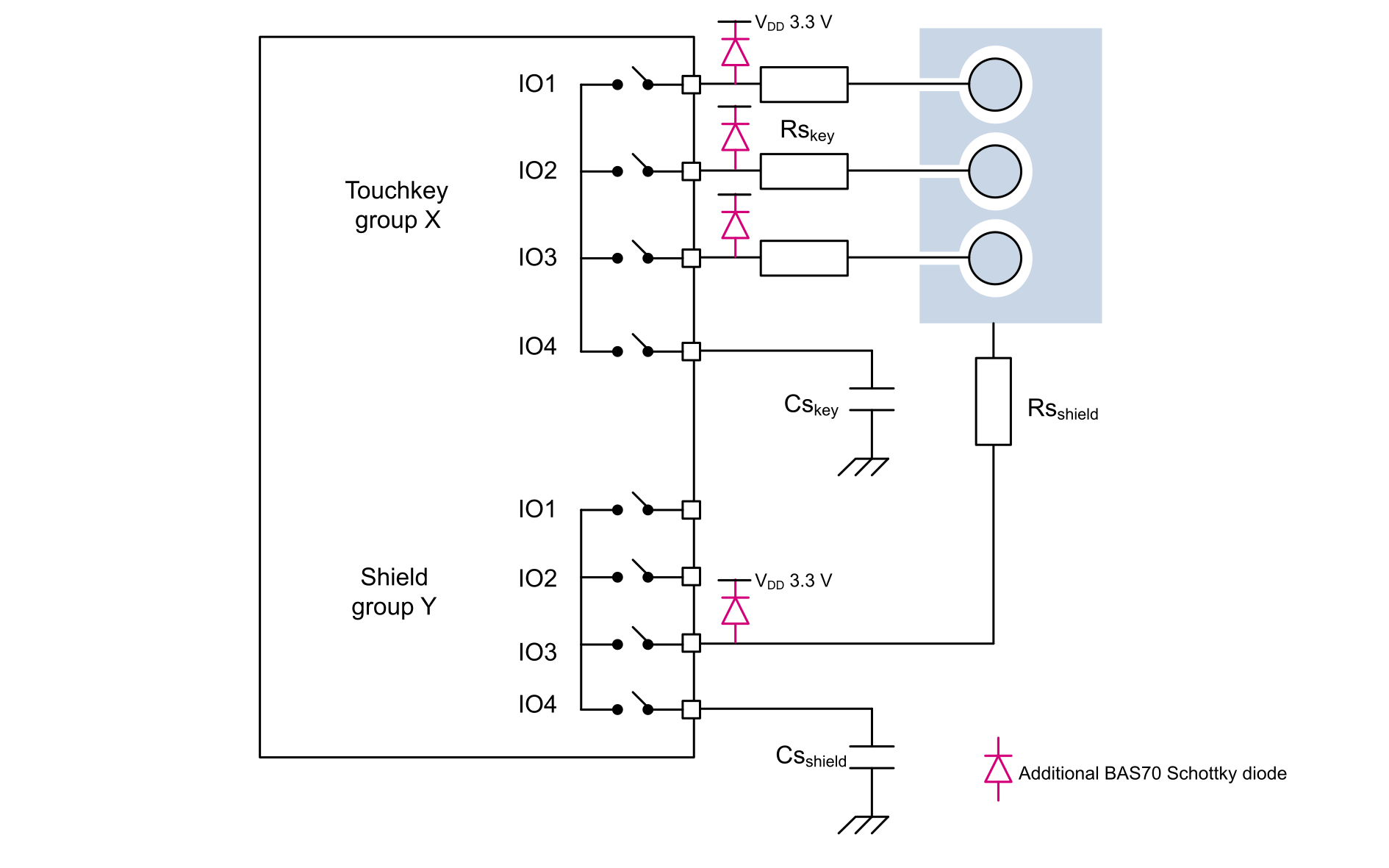
Adding a low-capacitance Schottky diode close to the MCU, like an ST BAS70, increases the voltage level immunity versus the conducted noise:

  • On shield group Y, one Schottky diode must be added: single-diode packages BAS70ZFILM (SOD-123), BAS70JFILM (SOD-323) and BAS70KFILM (SOD-523) are the best choices.
  • On touchkey group X, three Schottky diodes must be added: a three-parallel-diodes package, like BAS70-08SFILM (SOT-323-6L), or three single-diode packages, are the best choice.

Refer to the BAS70 datasheet for more details on the available packages.

Important:

These additional Schottky diodes must be used on all STM32 devices. Any unused GPIO must be set to Reset state or grounded.

The figure below explains how to connect these extra Schottky diodes.
Figure 21. Schottky BAS70 diodes on sensor and shield

Reduce ripple on VDD

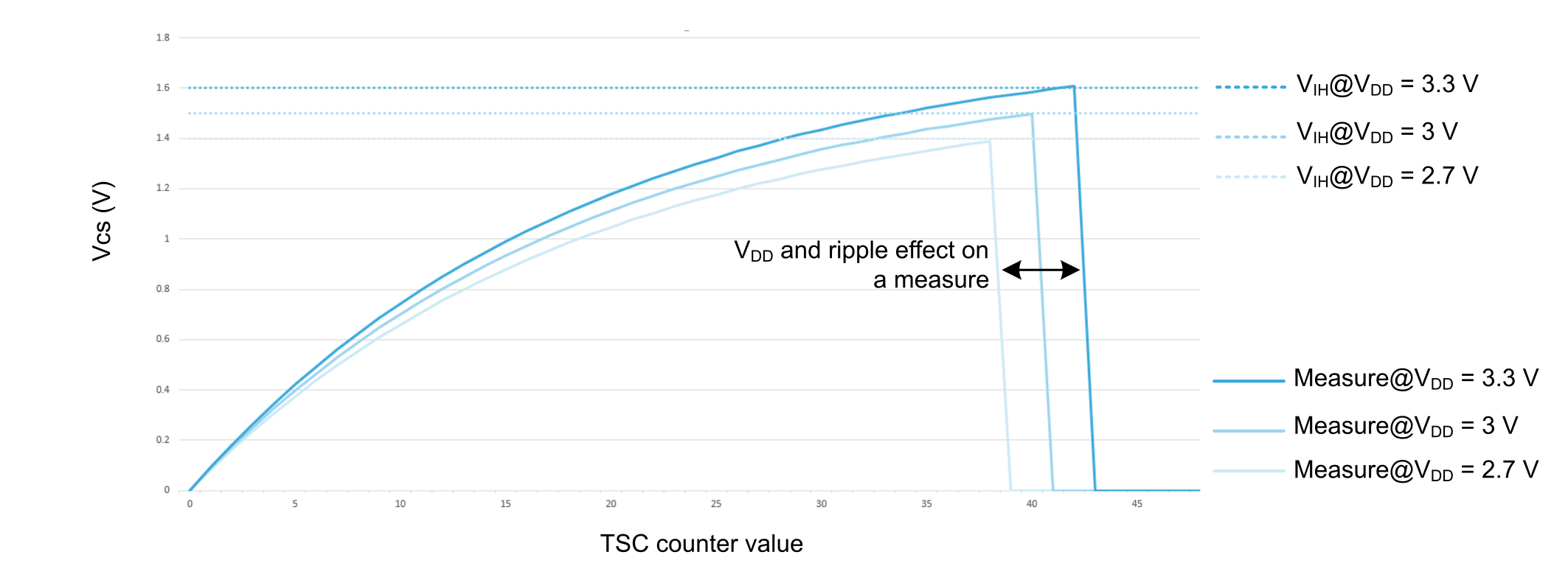
The absolute value of any measure is impacted by VIH (input high-level voltage). VIH voltage level varies with VDD. The ripple on VDD impacts also the Cx (sensor capacitance) charged voltage.

The figure below describes the impact of VDD and ripple effect on a measure.
Figure 22. VDD and ripple effect on a measure
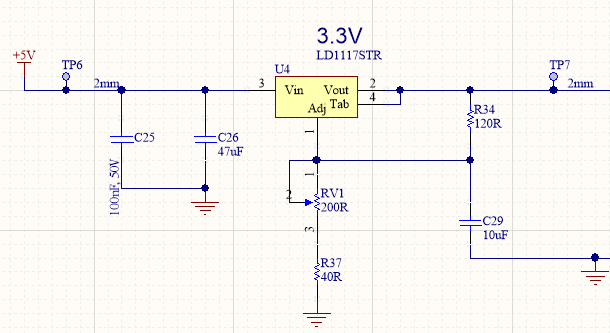
To avoid unstable measurements, VDD ripple and voltage level changes must be removed. A good example, using the LD1117 (an ST LDO), is to add a 10 μF capacitor on Vsense, as shown in the figure below (see the LD1117 datasheet for more details).
Figure 23. LDO application to improve ripple injection

Regarding low-speed VDD voltage level changes in battery-powered systems (≥ 10 s), the ECS TSL feature is in charge to handle this use case. To activate the ECS feature by software, look at the following examples:

  • Inside interrupt
    /**
      * @brief This function handles Touch sensing controller interrupt.
      */
    void TSC_IRQHandler(void)
    {
      HAL_TSC_IRQHandler(&htsc);
      TSL_acq_BankGetResult(TSCidxGroup, 0, 0);
      TSCidxGroup++;
      if (TSCidxGroup > TSLPRM_TOTAL_BANKS-1)
      {
        TSCidxGroup=0;
        // Start process to handle all results, we do this after all bank acquisition (this is a choice)
        TSCAcqDone++;
      }else{
        // We restart bank acquisition only if we have more than 1 bank (this is a choice)
        TSL_acq_BankConfig(TSCidxGroup);
        TSL_acq_BankStartAcq_IT();
      }
    }
    
  • In main loop
    int TSCidxGroup=0;
    int TSCAcqDone=0;
    #define TKEY_DET(NB) (MyTKeys[(NB)].p_Data->StateId == TSL_STATEID_DETECT)
    #define TKEY_PRX(NB) (MyTKeys[(NB)].p_Data->StateId == TSL_STATEID_PROX)
    #define TKEY_REL(NB) (MyTKeys[(NB)].p_Data->StateId == TSL_STATEID_RELEASE)
    #define TKEY_CAL(NB) (MyTKeys[(NB)].p_Data->StateId == TSL_STATEID_CALIB)
    extern __IO TSL_tTick_ms_T ECSLastTick;
    
    int main(void)
    {
      /* Reset of all peripherals, Initializes the Flash interface and the Systick. */
      HAL_Init();
      /* Configure the system clock */
      SystemClock_Config();
      /* Initialize all configured peripherals */
      MX_GPIO_Init();
      MX_TSC_Init();
      MX_TOUCHSENSING_Init();
      // Wait end of calibration on sensor 0
      while(TKEY_CAL(0))
      {
        tsl_user_Exec();
        HAL_Delay(20);
      }
      // Start First TSC acquisition
      TSCidxGroup=0;
      TSCAcqDone=0;
      TSL_acq_BankConfig(TSCidxGroup);
      TSL_acq_BankStartAcq_IT();
      __WFI();
      /* Infinite loop */
      while (1)
      {
        HAL_GPIO_TogglePin(LED1_GPIO_Port, LED1_Pin);
        // Process TSC acquisition
        if(TSCAcqDone != 0){
          TSCAcqDone = 0;
          // Get TSC/TSL keys status
          TSL_obj_GroupProcess(&MyObjGroup);
          // Process DXS
          TSL_dxs_FirstObj(&MyObjGroup);
          // Process ECS algo
          if (TSL_tim_CheckDelay_ms(TSLPRM_ECS_DELAY, &ECSLastTick) == TSL_STATUS_OK)
          {
            TSL_ecs_Process(&MyObjGroup);
          }
          // activate led if key is press
          if(TKEY_DET(0)){
            HAL_GPIO_WritePin(LED2_GPIO_Port, LED2_Pin, GPIO_PIN_SET);}
          else if(TKEY_REL(0)){
            HAL_GPIO_WritePin(LED2_GPIO_Port, LED2_Pin, GPIO_PIN_RESET);
          }
          //FTB, or Fast Transient Burst immunity: wait for 15ms
          HAL_Delay(15);
          // After last bank acquisition we restart all bank acquisition
          TSCidxGroup = 0;
          TSCAcqDone = 0;
          TSL_acq_BankConfig(TSCidxGroup);
          TSL_acq_BankStartAcq_IT();
        }else{
          __WFI();
        }
      }
    }
    

The ECS parameters or filters in tsl_user.h, are adjusted and activated with the code below.
/*============================================================================*/
/* Environment Change System (ECS)                                            */
/*============================================================================*/

/** @defgroup Common_Parameters_ECS 10 - ECS
  * @{ */

/** Environment Change System Slow K factor (range=0..255)
  - The higher value is K, the faster is the response time.
*/
#define TSLPRM_ECS_K_SLOW (10)

/** Environment Change System Fast K factor (range=0..255)
  - The higher value is K, the faster is the response time.
*/
#define TSLPRM_ECS_K_FAST (20)

/** Environment Change System delay in msec (range=0..5000)
  - The ECS will be started after this delay and when all sensors are in Release state.
*/
#define TSLPRM_ECS_DELAY (500)

/** @} Common_Parameters_ECS */