Light-emitting diodes (LEDs) are very often implemented near capacitive sensor buttons on application boards. LEDs are very useful for showing that the button has been correctly touched.
When designing application boards with LEDs, the following considerations must be taken into account:
LEDs change capacitance when switched on and off
A LED driver tracks can change impedance when switched on and off.
The LED load current can affect the power rail.
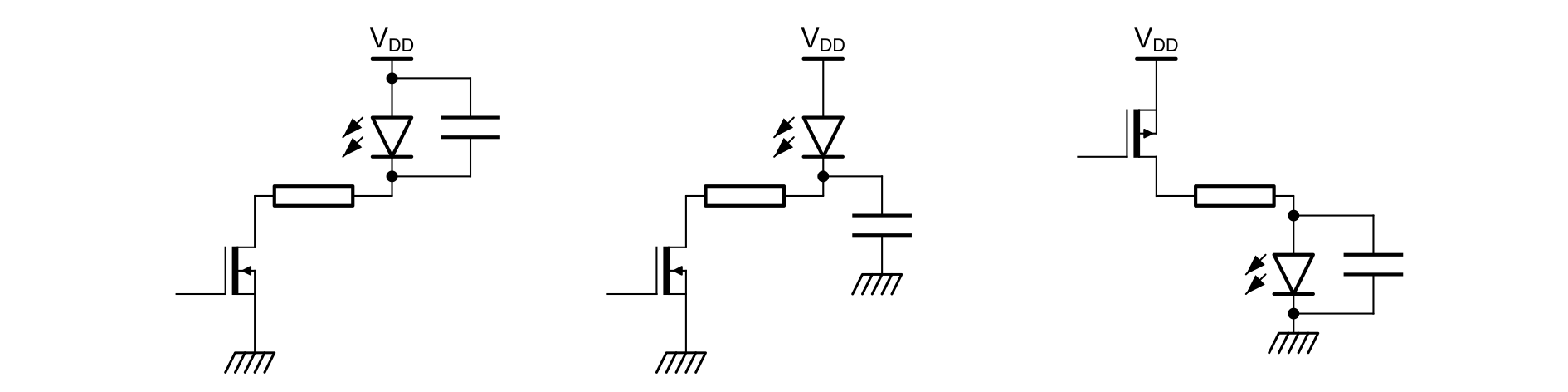
Both sides of the LEDs must always follow the low-impedance path to ground (or power). Otherwise, LEDs must be bypassed by a capacitor to suppress the high impedance (typically 10 nF).
The examples of bypass capacitors for the LEDs using a driver (see the figure below) can also be applied to transistors.Figure 8. Examples of cases where a LED bypass capacitor is required
Figure 9. Avoid to swap resistor and led
TC versus FT and TT I/Os
TC and FT I/O structures are slightly different:
TC is a 3.6 V compliant I/O
FT is a 5 V tolerant I/O
TT is a 3 V compliant I/O
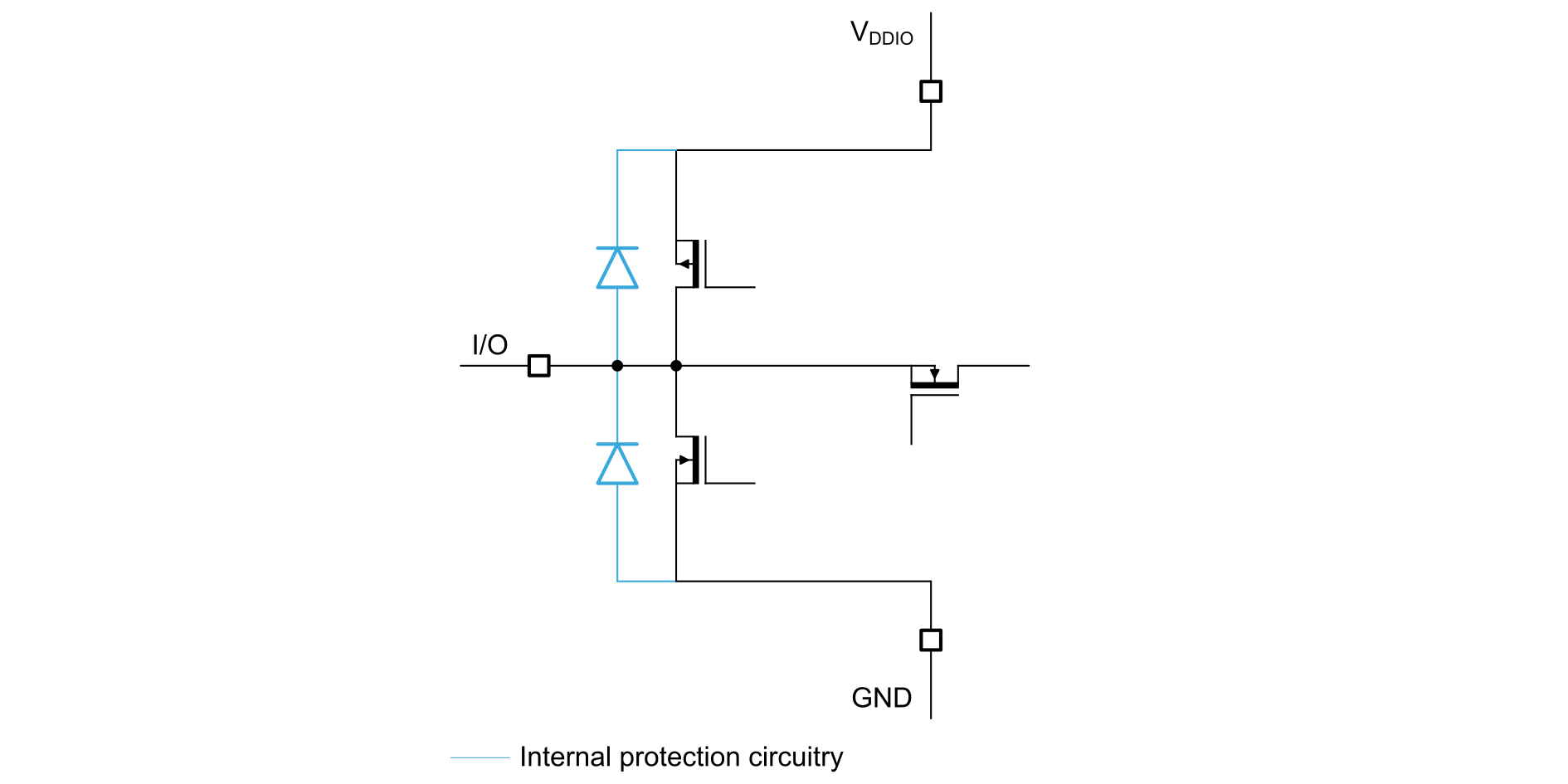
On a TC I/O, there is an internal clamping diode connected to VDD (see the figure below).Figure 10. TC I/O
Thanks to this diode, when an EMC stress occurs, the level of the noise is clamped to VDD. As a consequence, channels implemented on TC I/O show a better noise immunity.
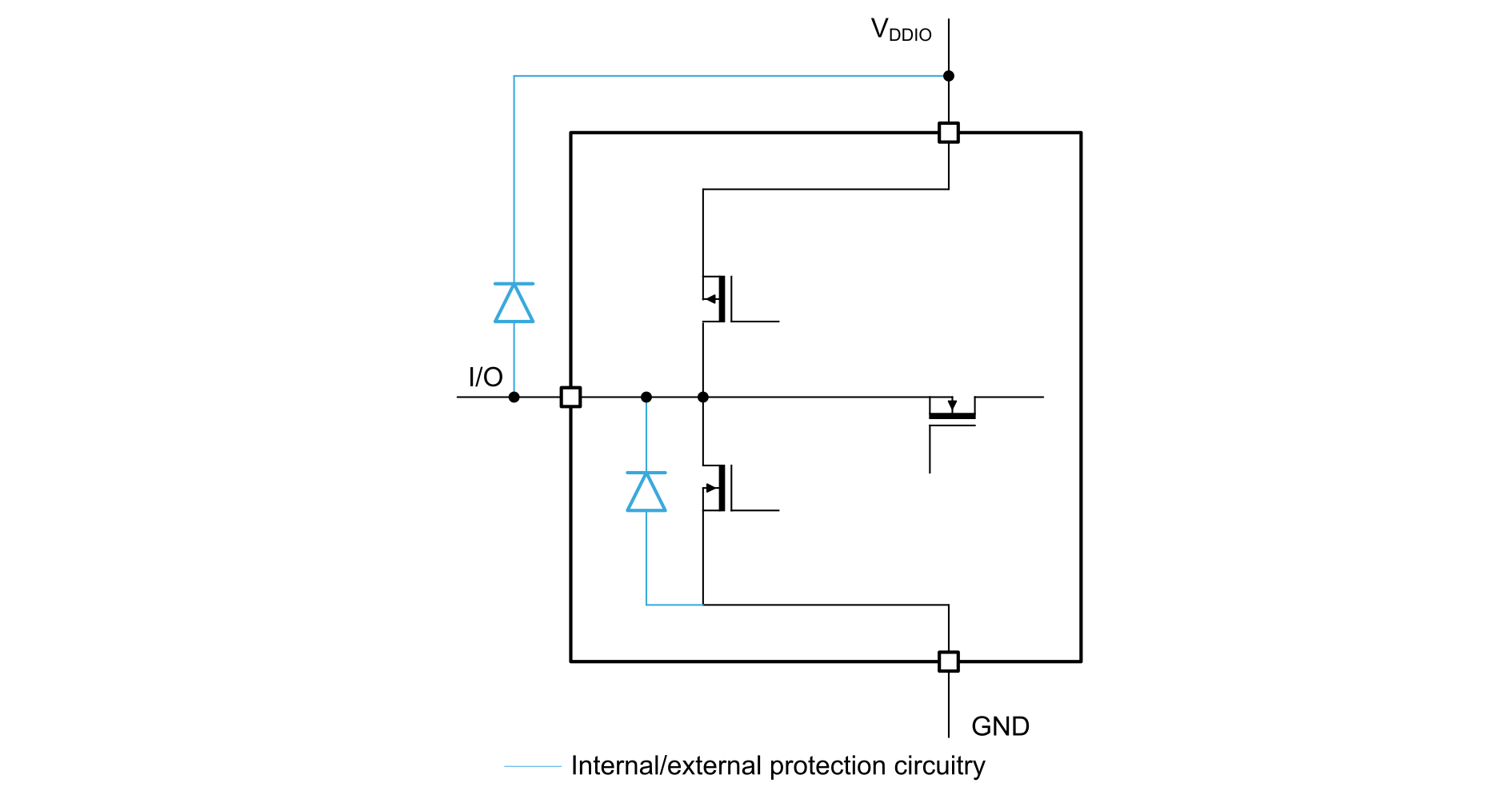
With FT and TT I/Os, the same noise immunity level than with TC I/O can be reached by adding an external Schottky diode (see the figure below).Figure 11. FT and TT I/Os
A Schottky diode with a low capacitance (< 5 pF) must be selected to secure the channel sensitivity reduction remains insignificant.
BAR 18 / BAS70-04 06 (Cmax = 2 pF) is a recommended STMicroelectronics Schottky diode.
This configuration is recommend in all cases (TC, FT or TT I/Os) to improve system conducted noise robustness.
Power supply
For devices without a touch sensing dedicated regulator, it is strongly recommended to use an external voltage regulator to power the device only.
The voltage regulator must be chosen to provide a stable voltage without any ripple. The actual precision of the voltage is not important, but the noise rejection feature is critical. This voltage is used to drive CX and is also used as a reference when measuring the sampling capacitor (CS). Any variation of this voltage may induce measurement variations that may generate a false touch or a missed touch. For instance, a ±10 mV peak to peak variation on VDD limits the resolution of linear sensor or rotary sensor to 4 or 5 bits.
The voltage regulator must be placed as far as possible from the sensors and their tracks.
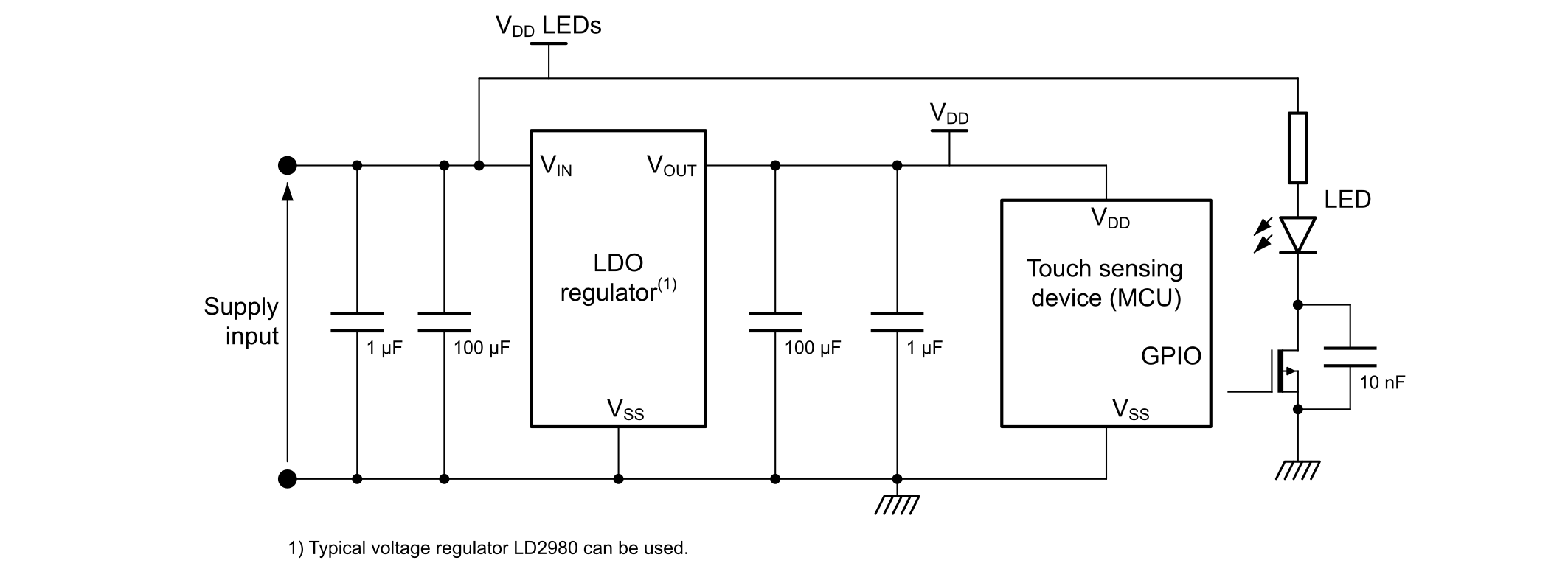
The voltage regulator also acts as a filter against noise coming from the power supply. It is recommended to power any switching components, such as LEDs, directly from VDD and not from the regulated voltage (see the figure below).Figure 12. Typical power supply schematic
Surface sensor design
Touchkey sensor
A touchkey can be either touched or untouched by the user. The information managed by the microcontroller is a binary one (0 for untouched and 1 for touched).
The sensor can be any shape. However, it is recommended to use round or oval as these shapes are the simplest. The libraries and hardware cells automatically compensate for capacitance differences, but the acquisition time and processing parameters can be optimized if the electrodes have similar capacitance. It is then recommended to use the same shape for all electrodes. The touchkeys can be customized by the drawing on the panel.
When designing touchkey sensors, the two following parameters must be considered:
the object size to be detected
the panel thickness
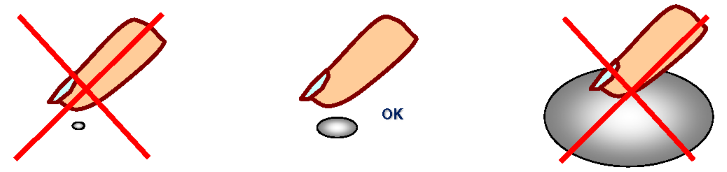
Regarding object size, it is recommended to design a sensor in the same range as the object to be detected. In most cases, it is a finger (see the figure below).Figure 13. Sensor size
Regarding panel thickness, the touchkey must be at least four times as wide as the panel is thick. For example, a panel that is 1.5 mm thick and has no immediately adjacent ground layer, must have a touchkey sensor at least 6 mm in diameter if the touchkey sensor is round, or with a 6 mm side if the touchkey sensor is square (see the figure below). There are sensitivity issues if dimensions lower than these values are used.Figure 14. Recommended electrode size
As shown in the equation below, a capacitor is used to detect the finger touch.
CT =
where:
CT is the touchkey capacitance.
A is the area with regard to the electrode and the conductive object.
d is the distance between the electrode and the conductive object (usually the panel thickness).
εR is the dielectric relative permittivity.
ε0 is the vacuum permittivity.
The capacitor is proportional to the size of the electrode. Increasing the electrode area allows the capacitor to be maximized, but increasing the electrode size above the size of a finger touch only increases the parasitic capacitance and not the finger touch capacitance, resulting in lower relative sensitivity. (refer to PCB and layout).
There is also a problem of relative sensitivity: when the electrode size is increased, CT stops increasing while CX keeps growing. This is because the parasitic capacitance is directly proportional to the electrode area.
Touchkey matrix sensor
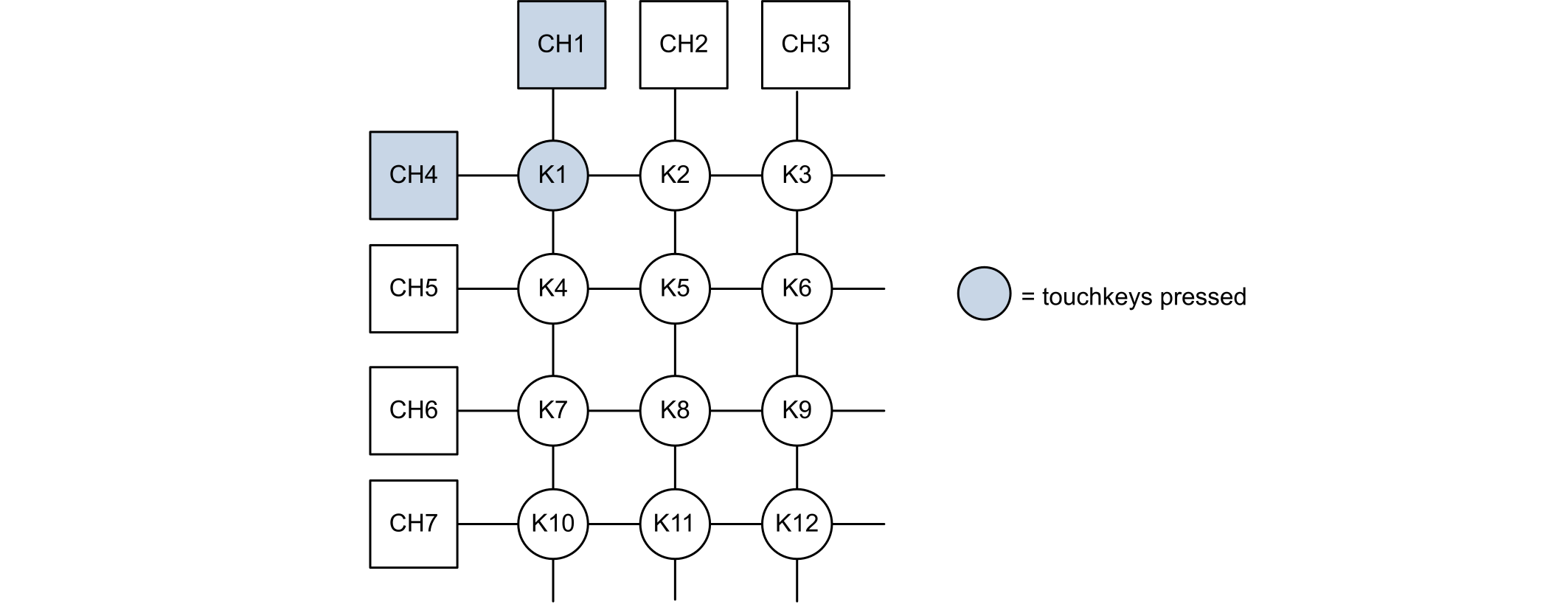
To extend the number of touchkeys, the touchkey can be implemented using a matrix arrangement (see the figure below). Refer to the application note Increase the number of touchkeys for touch sensing applications on MCUs (AN3236) for more details.Figure 15. Simple matrix implementation
Some hardware recommendations are listed below:
Touching one touchkey may induce sufficient capacitance change on other channels.
Avoid imbalanced electrodes.
Avoid column and line electrodes tracks too close in the user touchable area.
Linear sensor
A linear sensor is a set of contiguous capacitive electrodes connected to the device and placed in a single axis line. The number of electrodes depends on the desired size and resolution of the sensor.
The electrodes can be arranged in the three following different ways:
Mono electrodes design: each channel is associated to only one electrode (see the figure below).Figure 16. Mono electrodes design
Half-ended electrodes design: the first and the last electrodes are connected to the same channel (usually the first one) and their width is half the width of the other electrodes. This is to ensure that all the electrodes capacitance are identical (see the figure below). Figure 17. Half-ended electrodes design
Dual electrodes design: all the electrodes are duplicated and interlaced together (see the figure below).Figure 18. Dual electrodes design
The half-ended and dual electrodes designs are used to increased the touch area of the sensor.
On top of that, there are two manners to design the electrodes pattern on the PCB:
These two patterns are described in more details in the next sections.
Note:
For optimum performance of a linear or rotary sensor, all channels of such a sensor must be acquired simultaneously. Therefore, selected I/Os must belong to different analog I/O groups. Refer to the product datasheet for more information regarding I/O groups and available capacitive sensing GPIOs.
Normal patterned linear sensor
With a normal patterned half-ended linear sensor, the linearity is limited due to the ratio square width versus finger touch area (see the figure below).Figure 19. Normal patterned linear sensor (5 channels/6 half-ended electrodes design electrodes)
The size of the square electrode and gap between electrodes are valid irrespective of the number of electrodes.
To get larger linear sensors, the number of electrodes can be increased to eight.
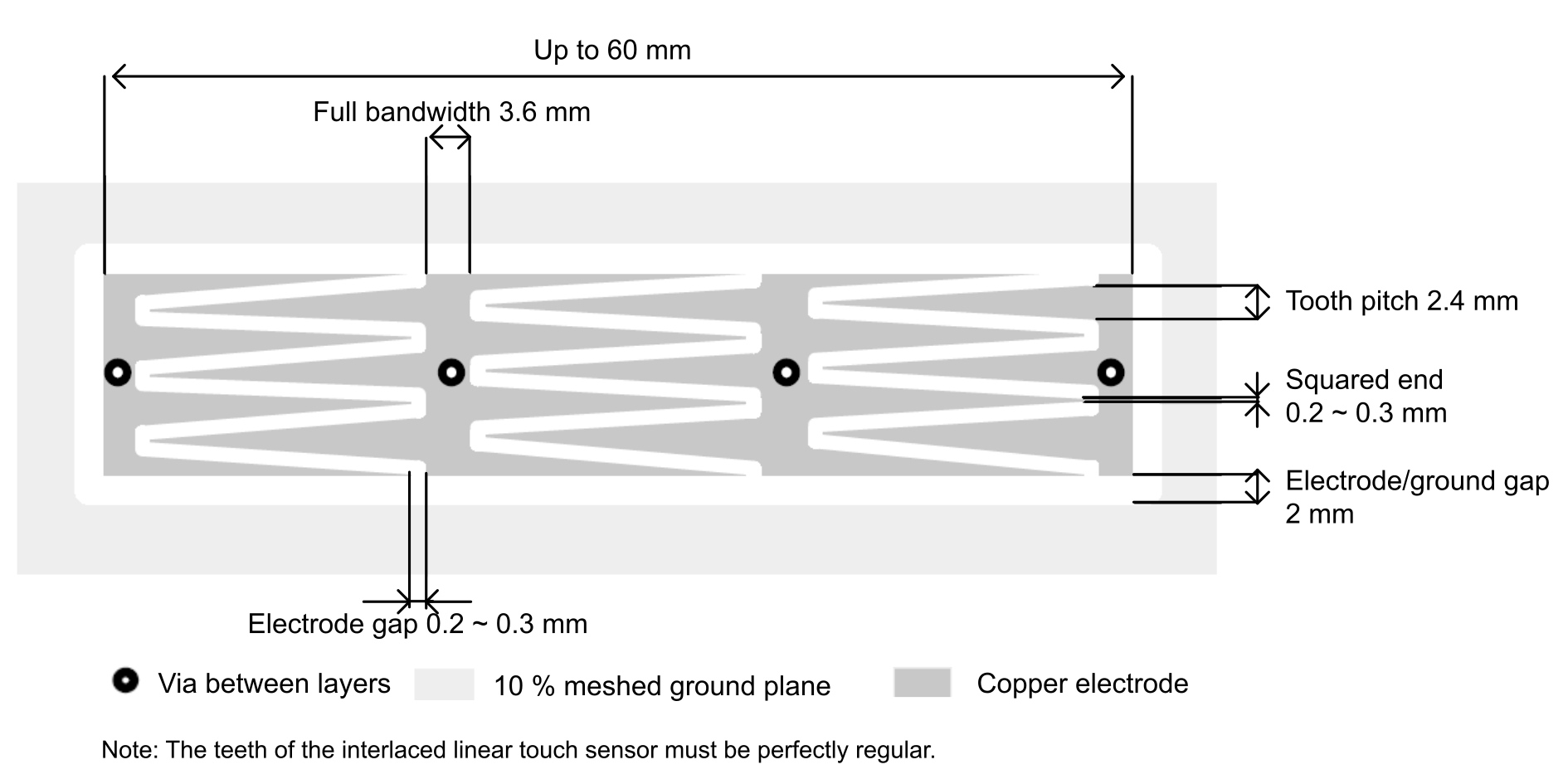
Interlaced patterned linear sensor
When using the charge transfer acquisition principle, it is possible to use only three channels thanks to the higher resolution achieved.Figure 20. Interlaced linear touch sensor (3 channels/4 half-ended electrodes design electrodes)