AN5347 · Application noteIntroduction to Arm® TrustZone® features on STM32L5, STM32U5, and STM32U3 MCUs
Download .pdfOpen in the full document

Readout protection (RDP) when TrustZone enabled

Readout protection (RDP) when TrustZone enabled

When TrustZone is enabled (TZEN = 1), the four RDP levels, from no protection (level 0) to maximum protection with no debug (level 2), are detailed in the table below.
Table 11. RDP protection levels (when TrustZone enabled)
RDP byte valueRDP level
0xAA0
0x550.5
Any value except 0x55, 0xAA, or 0xCC1
0xCC2

RDP level 1

In RDP level 1, the flash main memory, the backup registers, the backup RAM (STM32U5 only), OTFDEC region (when available), ICACHE, DCACHE, and SRAMs cannot be accessed. An intrusion is detected in case of debug access when the CPU is in secure state.

When the CPU is in nonsecure state, connections to the target through JTAG/SWD and RDP regression are possible. Any debug access other than halting the CPU is considered as an intrusion.

The RDP regression must be done in one of the following ways:
  • Through bootloader: the boot must be done from the RSS.
    Note:

    With a boot from RSS, it is possible to do regression through JTAG/SWD as well.

  • Through JTAG/SWD, with a boot from the user flash memory: The CPU must be in nonsecure state to be able to connect to the target.

    Before programming the RDP level 1, the user must ensure that the secure application calls the non-secure application (possible connection to the target), and that the regression from RDP level 1 is possible.

    CAUTION:

    If there is no nonsecure code, the CPU always remains in the secure state and the RDP regression cannot be done through JTAG/SWD with a boot from the user flash memory. In this case, the only way to do regression is through JTAG/SWD/bootloader with a boot from RSS. For more details, refer to the 'Boot configuration' section of the document AN5347_General-info.html#id_13614__entry_kq3_jtd_wkb or AN5347_General-info.html#id_13614__entry_vrc_1mc_4qb. In STM32U5/U3, the RDP level 1 regression can be protected by OEM1 and OEM2 keys that have been provisioned at lower RDP levels (refer to document AN5347_General-info.html#id_13614__entry_vrc_1mc_4qb or AN5347_General-info.html#id_13614__entry_t3w_t4m_g2c for more details).

The ST boards for STM32L5/U5/U3 (Nucleo, Evaluation and Discovery kit) come with the integrated ST-LINK that can be used as power supply and for debug at the same time. Due to the mass storage interface of the ST-LINK that requires the target identification at ST-LINK startup (SWD connection), a debug intrusion is detected every time the ST-LINK USB cable is plugged. The user application is never executed and the CPU remains always in LOCKUP state and no code execution is possible in case of an intrusion. The target cannot then be connected.

The following solutions must be used to maintain the user application execution and to connect to the target through JTAG/SWD:
  • Use the ST-LINK for debug only: Another supply source must be used. To execute the user application, a power off/on must be applied while the ST-LINK USB cable is already plugged.
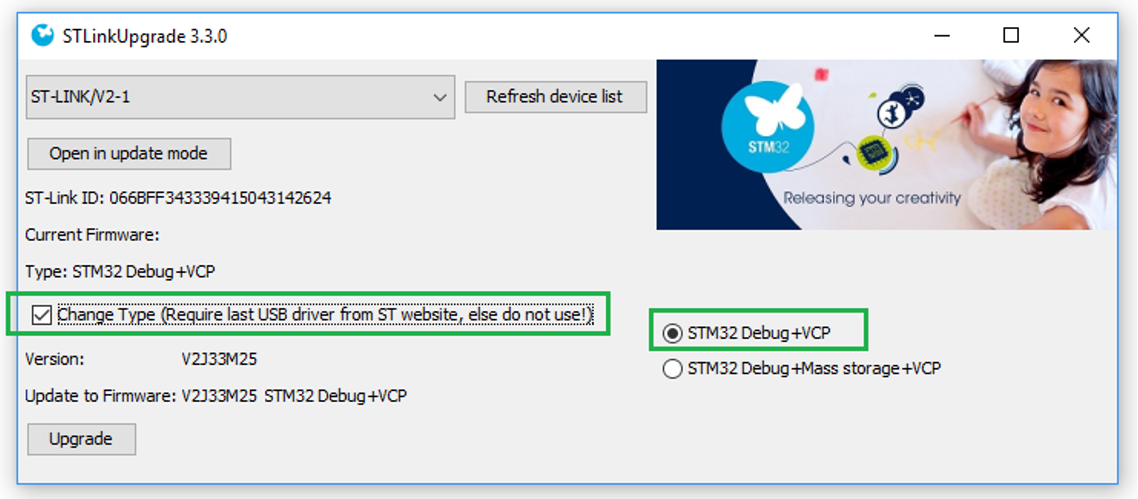
  • Disable the mass storage interface of the ST-LINK, by changing the firmware type through the STLinkUpgrade application, as shown in Figure 6 Disabling the mass storage interface of the ST-LINK.
    Note:

    The ability to disable the mass storage has only been implemented in ST-Link/V2.

Figure 6. Disabling the mass storage interface of the ST-LINK

RDP level 0.5

In RDP level 0.5, the secure flash memory, the secure backup registers, the backup RAM (STM32U5 only), OTFDEC region (when available), ICACHE, DCACHE, and SRAMs area cannot be accessed. The nonsecure flash memory, the nonsecure backup registers and the nonsecure SRAMs area remain accessible.

When the CPU is in secure state, it is not possible to connect to the target through JTAG/SWD.

When the CPU is in nonsecure state, connection to the target through JTAG/SWD and RDP regression are possible.

Note:

In STM32U5/U3, at RDP level 0.5, it is not possible to request RDP level 0. An RDP increase to level 1 followed by a RDP regression to level 0 is required.

The RDP regression is done in one of the following ways:
  • through bootloader: the boot must be done from the RSS.
    Note:

    With a boot from RSS, it is possible to do regression through JTAG/SWD as well.

  • Through JTAG/SWD, with a boot from the user flash memory: In order to be able to connect to the target, the CPU must be in nonsecure state because the secure debug is forbidden in RDP level 0.5. It is then possible to connect to the target only when the CPU is in nonsecure state.

    Before programming the RDP level 0.5, the user must always ensure that the secure application calls the nonsecure application (possible connection to the target), and that the regression from RDP level 0.5 is possible.

    CAUTION:

    If there is no nonsecure code, the CPU always remains in the secure state and the RDP regression cannot be done through JTAG/SWD with a boot from the user flash memory. In this case, the only way to do regression is through JTAG/SWD/bootloader with a boot from RSS. For more details, refer to the 'Boot configuration' section of the document AN5347_General-info.html#id_13614__entry_kq3_jtd_wkb or AN5347_General-info.html#id_13614__entry_vrc_1mc_4qb.

For more details about the different readout protection levels and the access status versus protection level and execution mode when TZEN = 1, refer to the document AN5347_General-info.html#id_13614__entry_kq3_jtd_wkb or AN5347_General-info.html#id_13614__entry_vrc_1mc_4qb.

Note:

In RDP level 1 and 0.5, when the STM32CubeProgrammer is used, the connection to the target must be done in "Hot plug" mode, in order to keep the user application executing during the connection to the target and to avoid a connection when the CPU is in reset state (means CPU secure).

CAUTION: It is not possible to do RDP regression when the following conditions are met:
  • BOOT_LOCK option bit is set.
  • For STM32L5/U5: SECBOOTADD0[24:0] is an address in the secure user flash memory.
  • For STM32U3: ADD[24:0] in the FLASH_SBOOT0R register is an address in the secure user flash memory.
  • There is no nonsecure code. The CPU is always in secure state and it is not possible to program the nonsecure flash memory in RDP level 0.5.
RDP level 2

When the RDP level 2 is set, the protection level 1 is guaranteed. The boot from SRAM (boot RAM mode) and the boot from system memory (bootloader mode) are no longer available. Only boot from main flash memory or RSS are possible.

When booting from main flash memory or RSS, all operations are allowed on the main flash memory. Read, erase and program accesses to flash memory and SRAMs from user code are allowed.

For STM32U5/U3, unless an OEM2 key has been provisioned, the following features are applicable:
  • Option bytes cannot be programmed nor erased except the SWAP_BANK option bit.
  • The RDP level 2 cannot be removed (irreversible operation).
  • All debug features are disabled. Debug is also disabled under reset.
  • JTAG and SWD are definitively disabled. The regression is possible using the JTAG/SWD under reset mode.
Note:

In STM32U5/U3, if an OEM2 key has been provided under lower RDP protection, JTAG and SWD remain enabled under reset only to interface with DBGMCU_SR, DBGMCU_DBG_AUTH_HOST and DBGMCU_DBG_AUTH_DEVICE registers, to obtain the device identification and to provide this OEM2 key to request RDP regression.

RDP transitions with OEM keys (STM32U5/U3)

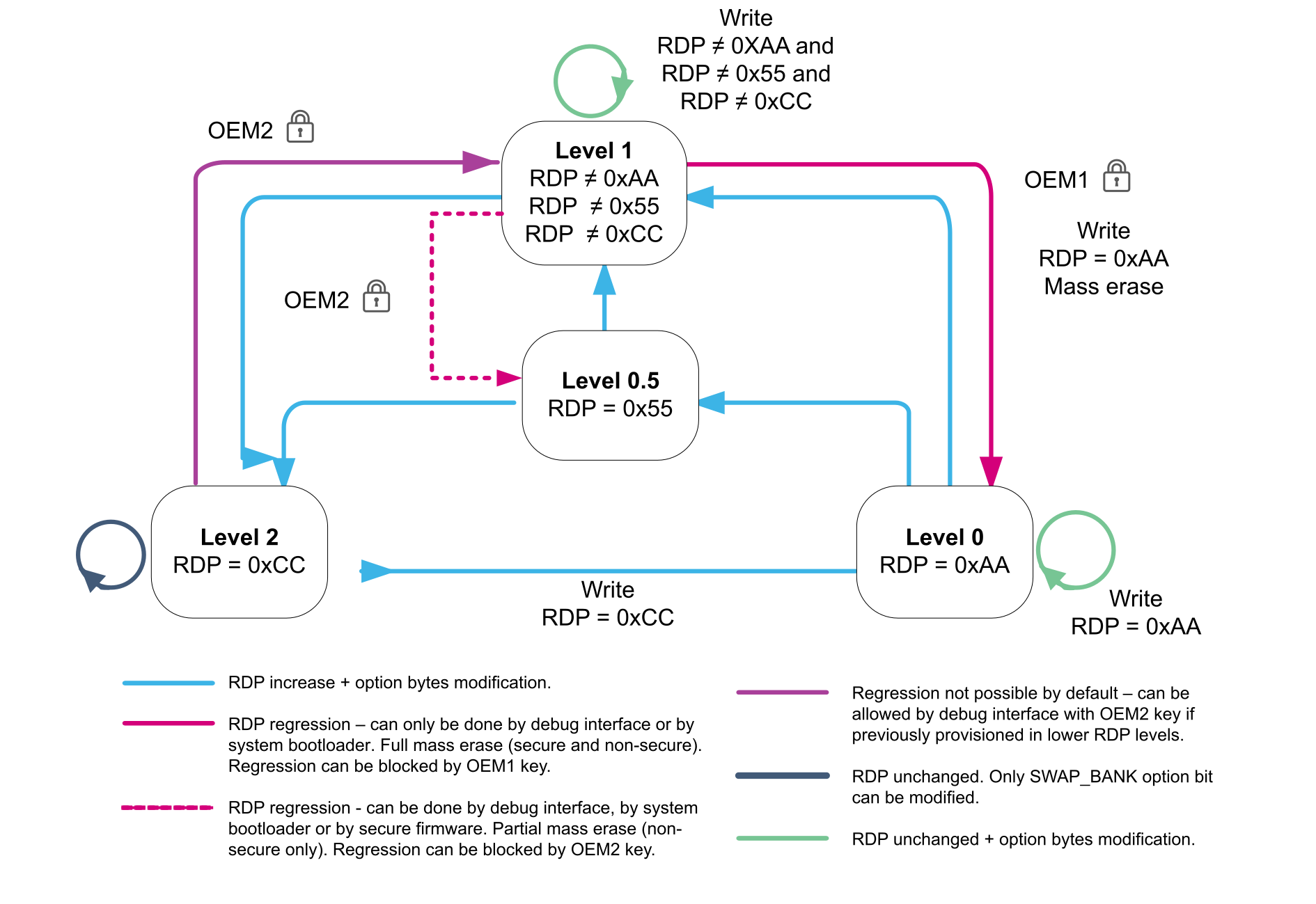
The figure below shows the RDP level transition scheme when TrustZone is enabled (TZEN = 1).
Figure 7. RDP level transition scheme when TrustZone is enabled


Two keys (OEM1KEY and OEM2KEY) can be defined to lock the RDP regression (available with or without TrustZone).

  • For STM32U5, OEM1KEY and OEM2KEY are 64-bit keys.
  • For STM32U3, OEM1KEY and OEM2KEY are 128-bit keys.
Without OEM2 lock mechanism, the transition to RDP level 2 is irreversible and causes the device to be completely locked. This is why it is recommended to activate the OEM2 lock mechanism to allow the possibility to do a regression from RDP level 2.
  • OEM1KEY can be modified:
    • in RDP level 0
    • in RDP level 0.5 or level 1 if OEM1LOCK bit is cleared
  • OEM2KEY can be modified:
    • in RDP level 0 or level 0.5
    • in RDP level 1 if OEM2LOCK bit is cleared

For STM32U5, to perform a regression, shift OEMxKEY[31:0], then OEMxKEY[63:32] through JTAG or SWD in the DBGMCU_DBG_AUTH_HOST register. If key matches OEMxKEY, the RDP regression is launched by hardware.

For STM32U3, to perform a regression, shift OEMxKEY[31:0], OEMxKEY[63:32], OEMxKEY[95:64], and then OEMxKEY[127:96] through JTAG or SWD in the DBGMCU_DBG_AUTH_HOST register. If key matches OEMxKEY, the RDP regression is launched by hardware.

Note:

For STM32U5, the RDP transition using OEM keys mechanism can be disabled by writing 0xFFFFFFFF 0xFFFFFFFF in the corresponding OEM key option bytes. This can only be done when the OEM key modification is possible.

CAUTION:

For STM32U3, once set, the RDP transition with OEM keys mechanism cannot be disabled. This means that the OEM keys can be modified, but never cleared.

Refer to Demonstration of RDP transitions using OEM keys on STM32U5 and documents AN5347_General-info.html#id_13614__entry_vrc_1mc_4qb and AN5347_General-info.html#id_13614__entry_t3w_t4m_g2c for more details.

Security features available only when TrustZone is enabled

The following features are available only when TrustZone is enabled:
  • GTZC secure watermark protection
  • HDP (hide protection) option bytes
  • Flash memory block-based secure protection
  • RDP level 0.5
  • RSS and SFI
  • BOOT_LOCK
  • Secure interrupts
  • GTZC secure protection

TrustZone deactivation

As mentioned in Overview, the TrustZone is disabled by default in all STM32L5/U5/U3 devices. The TrustZone is activated by setting the TZEN option bit.

The TrustZone deactivation must be done in parallel to an RDP regression (see RDP level 0.5). This assumes that the system is already in RDP level 1 or RDP level 0.5 (regression from level 0.5 is applicable only to STM32L5). See RDP level 1 and RDP level 0.5 for the associated recommendations to take into account.

After the TrustZone deactivation, all features mentioned in Security features available only when TrustZone is enabled are no longer available and all secure registers are RAZ/WI. The GTZC can still be used to configure the privilege access.

Following a regression from TZEN = 1 to TZEN = 0, the sample is virgin, corresponding to the production state.

Note:

For STM32L5 only, if the BOOT_LOCK option bit is set, it cannot be cleared. After clearing TZEN and setting it again, the BOOT_LOCK remains set and the unique boot entry address is the address programmed in SECBOOTADD0[24:0] option bytes.