TZEN/RDP regression with a boot from user flash memory
The following sequence is needed to perform a TZEN and RDP regression with a boot from user flash memory.
- Make sure that secure and nonsecure applications are well loaded and executed.
- Set RDP to level 1 (or level 0.5 for STM32L5) through STM32CubeProgrammer (intrusion occurs). Then only 'Hot Plug' connection is possible.
Figure 8. Setting RDP to level 1 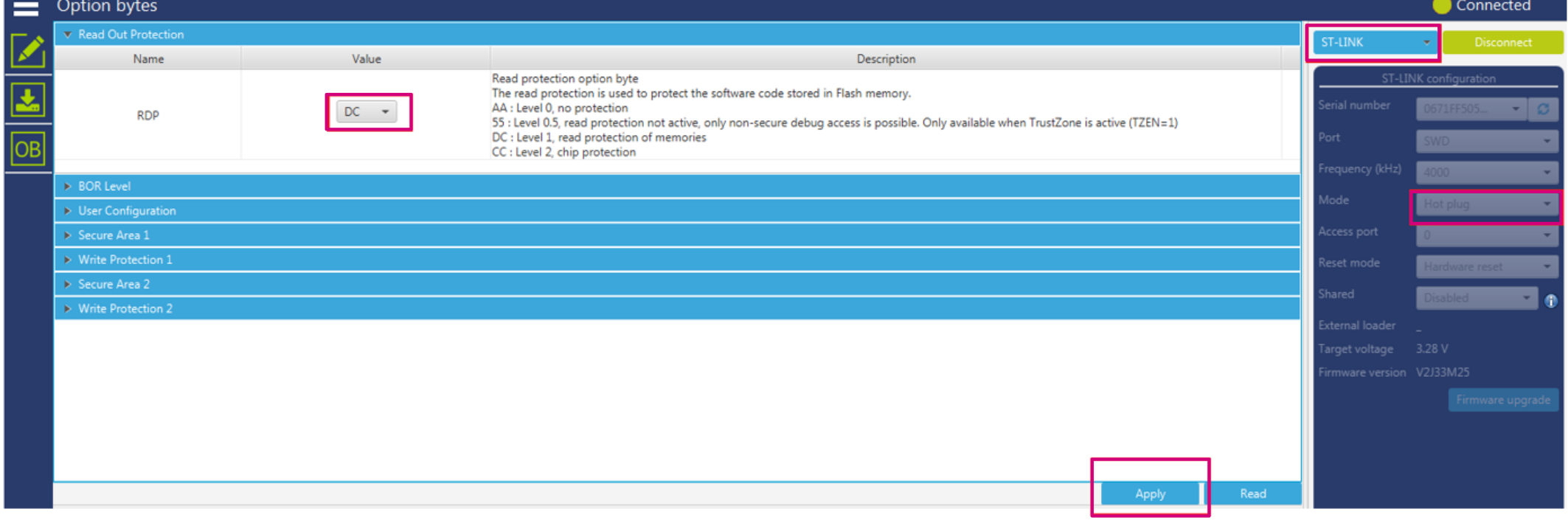
- Choose one of the following alternatives to recover from intrusion:
- Use a power supply different from ST-LINK (more details in RDP level 1) in order to be able to connect to the target.
- Remove the IDD jumper, then put it back in place to exit from intrusion.
- Set RDP to level 0 (option byte value 0xAA) and uncheck the TZEN box, then click on Apply.
Figure 9. TZEN and RDP regression through SWD with boot from user Flash 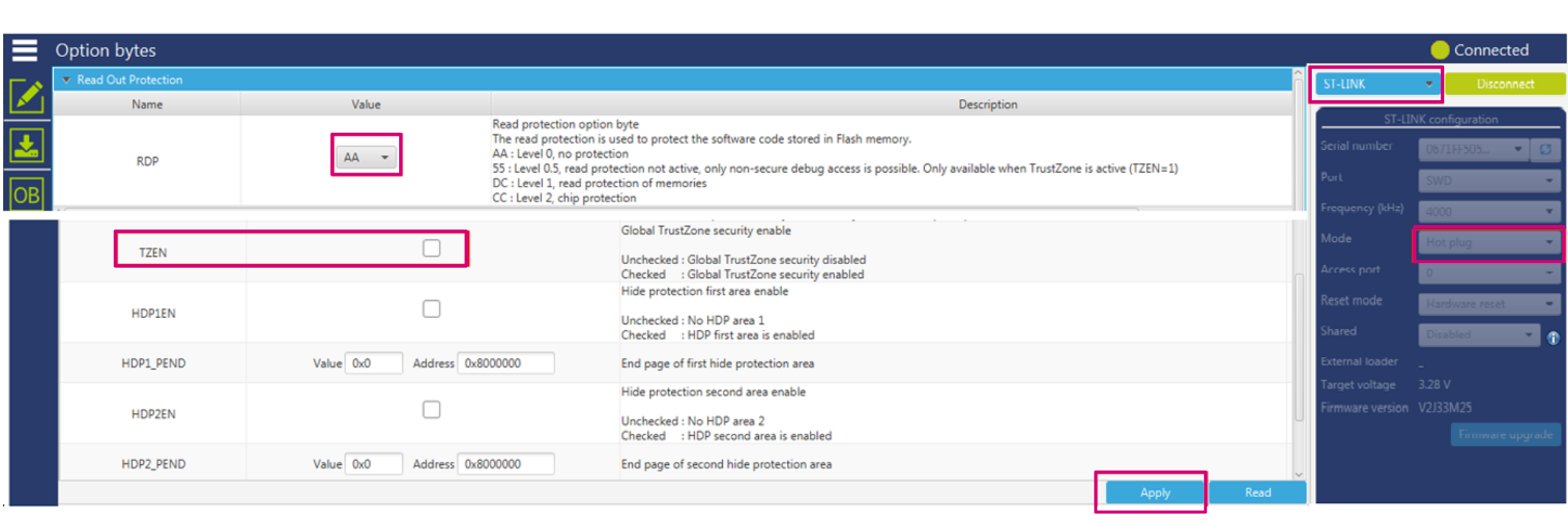
If the TZEN and RDP regression with a boot from user flash, was not successful due to the fact that the first step was not respected (secure application not calling a nonsecure application), the only way to do a regression is with a boot from RSS as shown in the next section.
TZEN/RDP regression with a boot from RSS
This section explains how to change the boot on STM32L5/U5/U3 ST boards.
The boot must be done from RSS by applying a high level on BOOT0 pin:
- On an evaluation board (STM32L552E-EV or STM32U575I-EV), a switch SW1 is provided to change the boot (see the document AN5347_General-info.html#id_13614__entry_o4p_qrd_4qb or AN5347_General-info.html#id_13614__entry_lny_rrd_4qb).
- On a Discovery kit (STM32L562E-DK or B-U585I-IOT02A), a small rework must be done to change the boot from RSS (see the document AN5347_General-info.html#id_13614__entry_ypw_3td_4qb or AN5347_General-info.html#id_13614__entry_zky_ltd_4qb).
- On a Nucleo board (NUCLEO-L552ZE-Q or NUCLEO-U575ZI-Q or NUCLEO-U385RG-Q ), a connection between CN11 pin 5 (VDD) and pin 7 (PH3_BOOT0) must be done (see the document AN5347_General-info.html#id_13614__entry_pvx_bxd_4qb or AN5347_General-info.html#id_13614__entry_wqc_cxd_4qb).
The following sequence is recommended to boot from RSS :
- Make sure the following actions are completed:
- nSWBOOT0 option byte is checked (BOOT0 taken from PH3/BOOT0 pin)
- High-level voltage is applied on PH3/BOOT0 pin.
- For STM32L5/U5: NSBOOTADD1 option byte is configured to 0x17F200 value at 0x0BF9 0000 address (RSS address).
For STM32U3: ADD[24:0] option byte in FLASH_BOOT1R is configured to 0x17F1E0 value at 0x0BF8 F000 address (RSS address).
- BOOT_LOCK option byte is unchecked (boot based on the pad/option bit configuration).
- Set RDP to level 1 through STM32CubeProgrammer (Intrusion occurs). Then only 'Hot plug' connection is possible.
- Recover from intrusion with one of the following alternatives:
- Remove the IDD jumper, then put it back in place to exit from intrusion.
- Use a power supply different from ST-LINK in order to be able to connect to the target.
- Set RDP to level 0 (option byte value 0xAA) and uncheck the TZEN box. Then click on Apply.
The regression can be done through JTAG/SWD or bootloader as detailed below:
- Through JTAG/SWD, set RDP to level 0 (option byte value 0xAA) and uncheck the TZEN box, then click on Apply.
- Through bootloader, using one of the supported communication interfaces (USB in this example):
- If RDP is set to level 0.5, set RDP level to level 0 (option byte value 0xAA) and uncheck the TZEN box, then click on Apply. Note:
Regression from RDP level 0.5 to level 0 is possible only with STM32L5. For STM32U5/U3, the RDP level must be first raised from level 0.5 to level 1, then revert from level 1 to level 0, in parallel with TZEN deactivation.
Figure 10. TZEN and RDP regression (level 0.5 to level 0) through bootloader 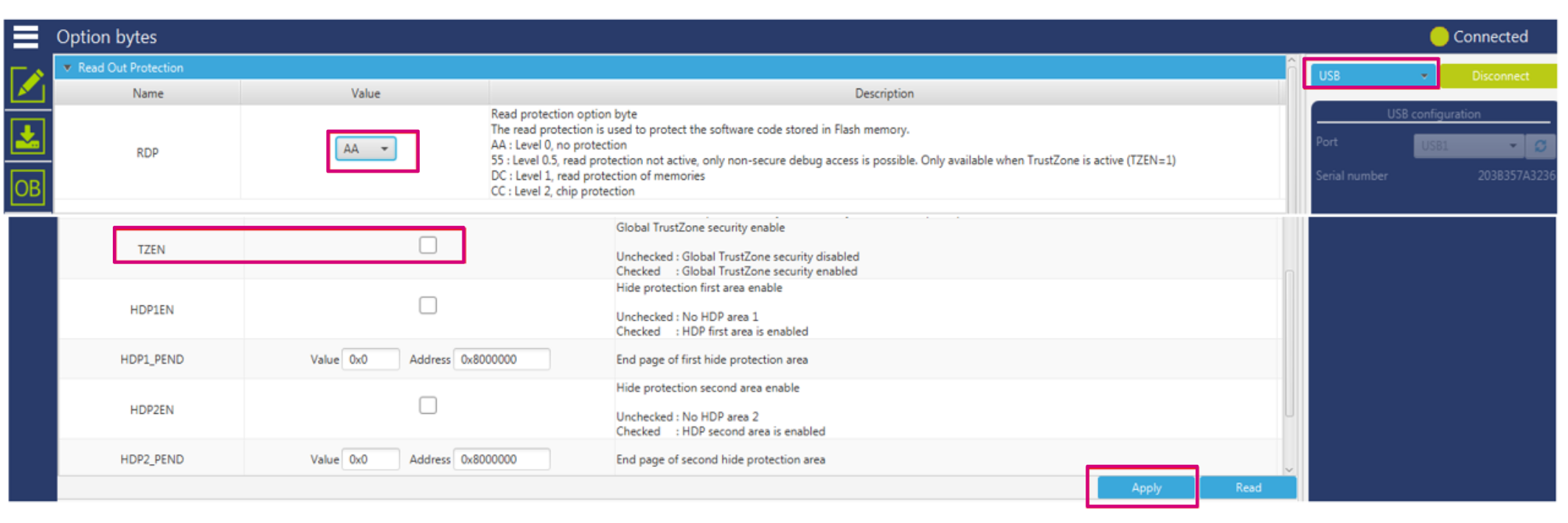
- If RDP is set to level 1, the RDP regression with the STM32CubeProgrammer graphical interface is shown in the figure below.
Figure 11. RDP regression (level 1 to level 0) through bootloader 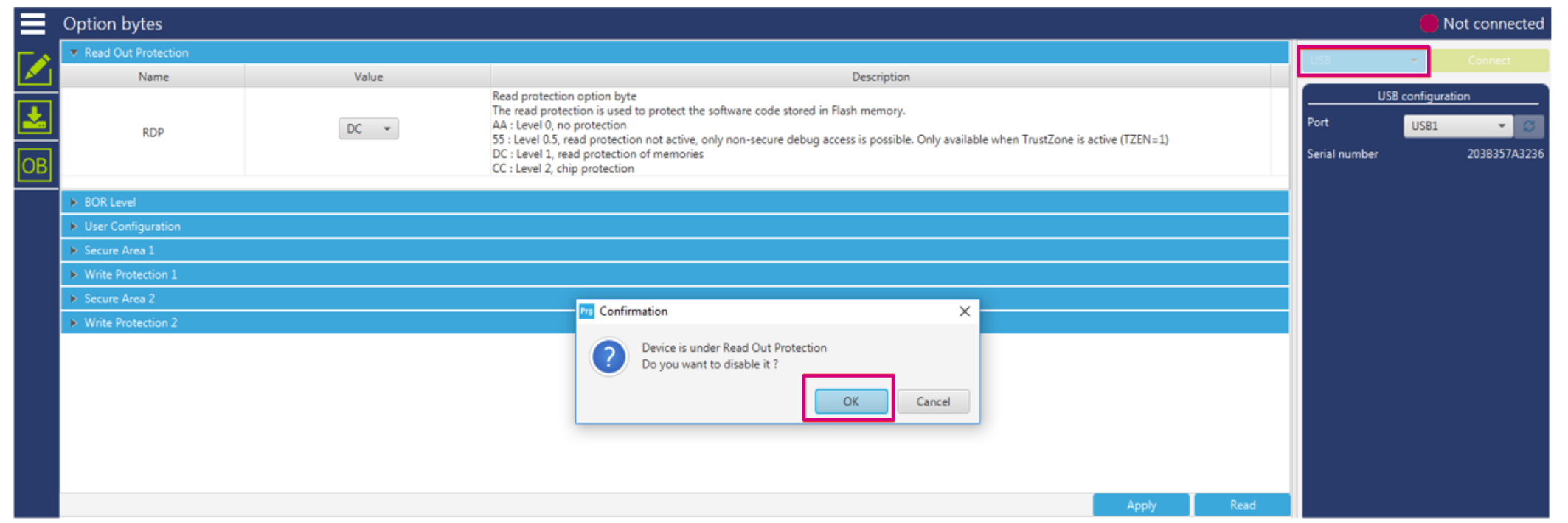
- If RDP is set to level 0.5, set RDP level to level 0 (option byte value 0xAA) and uncheck the TZEN box, then click on Apply.
If RDP is set to level 1 and the TZEN regression cannot be done using the STM32CubeProgrammer graphical interface, the STM32CubeProgrammer CLI (command line instructions) must be used, applying the following TZEN regression command:
> STM32_Programmer_CLI.exe -c port=USB1 -tzenreg
      -------------------------------------------------------------------
                       STM32CubeProgrammer v2.8.0
      -------------------------------------------------------------------
USB speed   : Full Speed (12MBit/s)
Manuf. ID   : STMicroelectronics
Product ID  : DFU in FS Mode
SN          : 207E31953536
FW version  : 0x011a
Device ID   : 0x0482
Warning: Device is under Read Out Protection
Disabling TrustZone...
Disabling TrustZone successfully
TZEN/RDP regression when RDP level 1 is locked by an OEM1 Key
This feature is available in STM32U5/U3. The OEM1 RDP lock mechanism is active when the OEM1LOCK bit is set. It blocks the RDP level 1 to RDP level 0 regression.
For STM32U5, locking the RDP level 1 with an OEM1 key can be done with the following CLI command in an example where OEM1Key [31:0] = 0xABCDEFAB and OEM1Key [63:32] = 0x12345678.
>STM32_Programmer_CLI.exe -c port=swd  mode=hotplug  -lockRDP1 0xABCDEFAB 0x12345678
      -------------------------------------------------------------------
                       STM32CubeProgrammer v2.8.0
      -------------------------------------------------------------------

	Lock RDP1 password successfully done
To raise the RDP level to 1, the following CLI can be applied.
>STM32_Programmer_CLI.exe -c port=swd  mode=hotplug  -ob rdp=0xDC
      -------------------------------------------------------------------
                       STM32CubeProgrammer v2.8.0
      -------------------------------------------------------------------

	Option Bytes successfully programmed
As explained in Overview, TZEN deactivation must be done in parallel with RDP level 1. The OEM1 key must be provided to unlock the RDP level 1 regression. The following STM32CubeProgrammer CLI can be applied for TZEN + RDP level 1 to level 0 regressions with OEM1 key.
> STM32_Programmer_CLI.exe -c port=swd mode=UR -unlockRDP1 0xABCDEFAB 0x12345678 -ob RDP=0xAA TZEN=0
      -------------------------------------------------------------------
                       STM32CubeProgrammer v2.8.0
      -------------------------------------------------------------------

	Unlock RDP1 password successfully done
	Option Bytes successfully programmed
Note:
For STM32U3, the same CLI commands can be done but with a 128-bit key. For example OEM1Key [31:0] = 0xABCDEFAB , OEM1Key[63:32] = 0x12345678, OEM1Key [95:64] = 0xABCDEFAB and OEM1Key[127:96] = 0x12345678.
CAUTION:
For STM32U3, once set, the OEM key lock mechanism cannot be disabled. This means that the OEM key can be modified but never cleared.
Demonstration of RDP transitions using OEM keys on STM32U5
In order to reach the best protection level, it is recommended to activate TrustZone and to set the RDP level 2 with password authentication regression enabled.
The RDP protects the flash main memory, the option bytes, the backup registers, the backup RAM (STM32U5 only), OTFDEC region (when available), ICACHE, DCACHE, and SRAMs. Two keys (OEM1KEY and OEM2KEY) can be defined in order to lock the RDP regression. When TrustZone is activated, the CPU is split into secure and nonsecure zones, with a set of protections described in previous sections.
This section demonstrates how to practice the RDP level transitions using the STM32CubeProgrammer CLI when OEM1KEY and OEM2KEY are provisioned to unlock RDP regressions on STM32U5.
Note:
For more details on RDP transitions with OEMxKEY, refer to the document AN5347_General-info.html#id_13614__entry_vrc_1mc_4qb and AN5347_General-info.html#id_13614__entry_t3w_t4m_g2c.
In this STM32U5 example, when the CPU is secure, the RDP regression is done through the RSS. This can be performed by connecting the PH3_BOOT0 PIN to VDD on the board. The table below summarizes the transition sequences detailed in sections linked in the first column (when the CPU is nonsecure, all these steps are applicable except the transition to/from level 0.5).
| Step number and title | Description | Comments |
|---|---|---|
| Step 1 - Provision OEM1KEY | Provision OEM1Key to unlock RDP1 to RDP0 regression ( | The user can choose any 64-bit key length except all 1 or all 0. When 0xFFFFFFFF 0xFFFFFFFF is used, the OEMxKEYs are cleared. |
| Step 2 - Provision OEM2KEY | Provision OEM2Key (OEM2KEY=0x21ABCDEF 0x22ABCDEF):
| |
| Step 3 - Check if OEMxKEYs are provisioned | OEM1LOCK and OEM2LOCK bits set to 1. | If OEMxKEYs are not well provisioned, the user must repeat the failed step 1 or step 2, and recheck again |
| Step4 - Set option byte TZEN = 1 | Set the CPU as secure. | TrustZone enabled |
| Step 5 - Set RDP level 2 | Rise RDP to level 2 (-ob rdp=0xCC).This shows that, when OEM2KEY is provisioned, the regression from RDP level 2 to level 1 is authorized. | Make sure that Step 2 is passed, otherwise the device is no more accessible. |
| Step 6 - Unlock RDP level 2 with OEM2Key | Authorize RDP level 2 to level 1 regression. The correct OEM2KEY must be provided. |
|
| Step 7 - Set RDP to level 1 | Regression of RDP to level 1 is now possible (unlocked by Step 6). | If not successful, it means that RDP level 2 to level 1 regression is not unlocked with the correct OEM2KEY. |
| Step 8 - Unlock RDP level 1 with OEM2 key | Enable the RDP level 1 to level 0.5 regression. | Be sure that, in the CLI, the option -unlockrdp1 is used with OEM2KY=0x21ABCDEF 0x22ABCDEF. |
| Step 9 - Set RDP level 0.5 | RDP level 1 to level 0.5 regression is now possible as OEM2Key is provided in Step 8. | - |
| Step 10 - Raise RDP from level 0.5 to level 1 | - | As an RDP level 0.5 to level 0 regression is not possible, the user must first rise the RDP to level 1. |
| Step 11 - Unlock RDP level 1 with OEM1Key | The correct OEM1KEY must be provided. | - |
| Step 12 - Set RDP level 0 and reset TZEN = 0 | TZEN + RDP level 1 to level 0 regression | - |