AN5373 · Application noteGetting started with STM32U5 MCU hardware development
Download .pdfOpen in the full document

Embedded bootloader and RSS

Embedded bootloader and RSS

The embedded bootloader is located in the system memory and programmed by ST during production. It is used to reprogram the flash memory by using the following serial interfaces:
  • USART: USART1 on pins PA9/PA10, USART2 on pins PA2/PA3, USART3 on pins PC10/PC11
  • I2C: I2C1 on pins PB6/PB7, I2C2 on pins PB10/PB11, I2C3 on pins PC0/PC1
  • SPI: SPI1 on pins PA4/PA5/PA6/PA7, SPI2 on pins PB12/PB13/PB14/PB15, SPI3 on pins PB5/PG9/PG10/PG12
  • FDCAN: FDCAN1 on pins PB8/PB9
  • USB in device mode through the DFU (device firmware upgrade) interface, on pins PA11/PA12

For further details on the STM32 bootloader, refer to document AN5373_general-info.html#id_14462__entry_z2x_1fh_dvb.

The RSS (root secure services) are embedded in a flash memory area named secure information block, programmed during ST production.

The RSS enable, for example, the SFI (secure firmware installation) using the RSS extension firmware (RSSe SFI). This feature allows the customers to protect the confidentiality of the firmware to be provisioned into the STM32 device when the production is subcontracted to a third party. Refer to document AN5373_general-info.html#id_14462__entry_hbr_jfh_dvb.

The RSS are available on all devices, after enabling the TrustZone® through the TZEN option bit.
Debug management

The serial wire/JTAG debug port (SWJ-DP) is an Arm® standard CoreSight™ debug port.

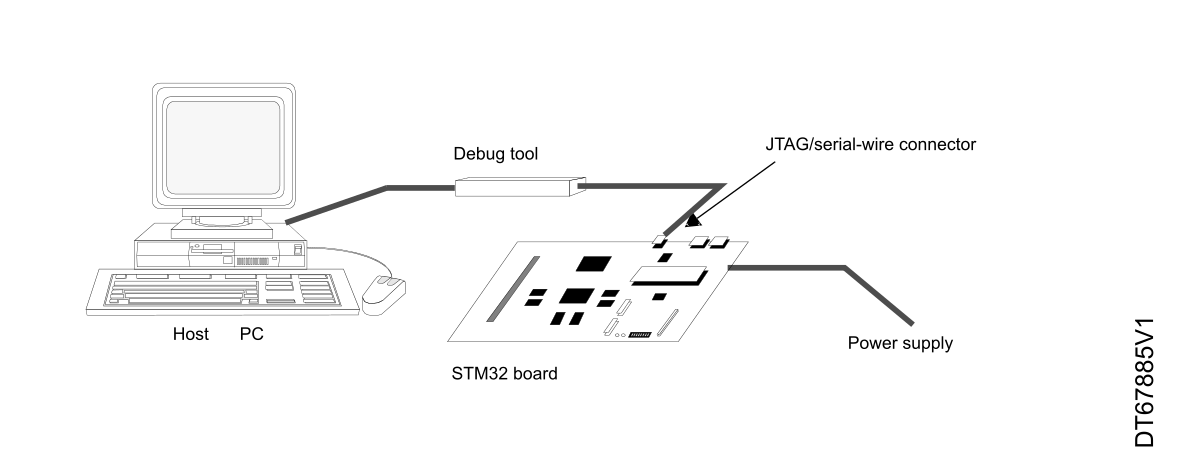
The host/target interface is the hardware equipment that connects the host to the application board. This interface is made of three components: a hardware debug tool, a serial-wire connector, and a cable connecting the host to the debug tool.

The figure below shows the connection of the host to a development board.
Figure 14. Host-to-board connection


The Nucleo demonstration board embeds the debug tools (STLINK), so it can be directly connected to the PC through a USB cable.

SWJ-DP (serial-wire and JTAG debug port)

The SWJ-DP combines:
  • a JTAG‑DP that provides a 5-pin standard JTAG interface to the AHP-AP port
  • an SW-DP that provides a 2-pin (clock + data) interface to the AHP-AP port

In the SWJ-DP, the two JTAG pins of the SW-DP are multiplexed with some of the five JTAG pins of the JTAG-DP.

Note:

The software can configure all SWJ-DP port I/Os to other functions, but debugging is no longer possible.

SWJ-DP pins

Five pins are used as outputs for the SWJ-DP, as alternate functions of the GPIOs (general-purpose I/Os). These pins, detailed in the table below, are available on all packages.
Table 6. Debug port pin assignment
SWJ-DP pinJTAG debug portSW debug portPin assignment
TypeDescriptionTypeDebug assignment
JTMS/SWDIOInputJTAG test mode selectionInput/OutputSerial‑wire data input/outputPA13
JTCK/SWCLKInputJTAG test clockInputSerial‑wire clockPA14
JTDIInputJTAG test data input--PA15
JTDO/TRACESWOOutputJTAG test data output-TRACESWO if asynchronous trace is enabledPB3
JNTRSTInputJTAG test nReset--PB4

Flexible SWJ-DP pin assignment

After reset (SYSRESETn or PORESETn), all five pins used for the SWJ-DP are assigned as dedicated pins that are immediately usable by the debugger host.
Note:

The trace outputs are not assigned except if explicitly programmed by the debugger host.

The table below shows the different possibilities for releasing some pins (refer to document AN5373_general-info.html#id_14462__entry_msl_1fh_dvb for more details).
Table 7. SWJ-DP I/O pin availability
Available debug portsSWJ-DP I/O pin assigned
PA13 /

JTMS/

SWDIO

PA14 /

JTCK/

SWCLK

PA15 /

JTDI

PB3 /

JTDO

PB4/

JNTRST

Full SWJ‑DP (JTAG‑DP + SW‑DP)

Reset state

XXXXX
Full SWJ‑DP (JTAG‑DP + SW‑DP) but without JNTRSTXXXX-
JTAG-DP disabled and SW-DP enabledXX-
JTAG-DP disabled and SW-DP disabledReleased

Internal pull-up and pull-down resistors on JTAG pins

The JTAG input pins must not be floating since they are directly connected to flip-flops that control the debug mode features. Special care must be taken with the SWCLK/TCK pin that is directly connected to the clock of some of these flip-flops.

To avoid any uncontrolled I/O levels, the devices embed the following internal resistors on the JTAG input pins:
  • JNTRST: internal pull-up
  • JTDI: internal pull-up
  • JTMS/SWDIO: internal pull-up
  • TCK/SWCLK: internal pull-down
Once the user software releases the JTAG I/O, the GPIO controller takes the control again, and the software can then use these I/Os as standard GPIOs. The reset states of the GPIO control registers put the I/Os in the following equivalent states:
  • JNTRST: input pull-up
  • JTDI: input pull-up
  • JTMS/SWDIO: input pull-up
  • JTCK/SWCLK: input pull-down
  • JTDO: input floating
Note:

The JTAG IEEE standard recommends adding pull-up resistors on TDI, TMS, and nTRST, but there is no special recommendation for TCK. However, for the devices, an integrated pull-down resistor is used for JTCK. Having embedded pull-up and pull-down resistors removes the need to add external resistors.

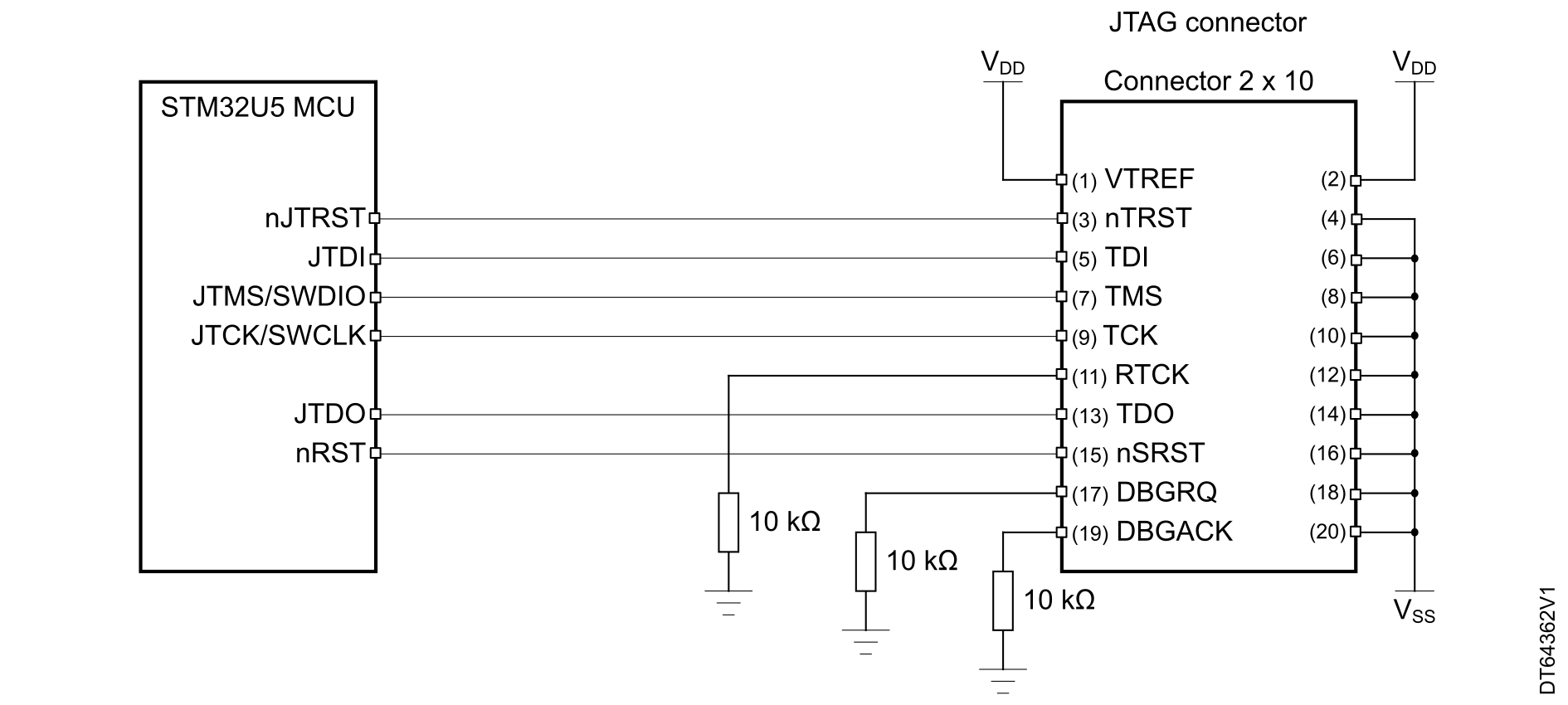
SWJ-DP connection with standard JTAG connector

The figure below shows the connection between the device and a standard JTAG connector.
Figure 15. JTAG connector implementation