AN5373 · Application noteGetting started with STM32U5 MCU hardware development
Download .pdfOpen in the full document

Serial-wire debug (SWD) pin assignment

Serial-wire debug (SWD) pin assignment

The same SWD pin assignment, detailed in the table below, is available on all packages.
Table 8. SWD port pins
SWD pinSWD portPin assignment
TypeDebug assignment
SWDIOInput/OutputSerial-wire data input/outputPA13
SWCLKInputSerial-wire clockPA14

After reset, the pins used for the SWD are assigned as dedicated pins that can be immediately used by the debugger host.

However, the MCU offers the possibility to disable the SWD, therefore releasing the associated pins for GPIO use.

For more details on how to disable SWD port, refer to section I/O pin alternate function multiplexer and mapping of document AN6011_general_info.html#id_59975__entry_msl_1fh_dvb.

Internal pull-up and pull-down on SWD pins

Once the user software releases the SWD I/O, the GPIO controller takes control of it. The reset states of the GPIO control registers put the I/Os in the equivalent states:
  • SWDIO: alternate function pull-up
  • SWCLK: alternate function pull-down

Having embedded pull-up and pull-down resistors removes the need to add external resistors.

SWD port connection with standard SWD connector

The figure below shows the connection between the device and a standard SWD connector.
Figure 16. SWD connector implementation

PCB (printed circuit board)

For technical reasons, it is best to use a multilayer PCB, with a separate layer dedicated to ground (VSS) and another dedicated to the VDD supply.

This provides a good decoupling and a good shielding effect. For many applications, economical reasons prohibit the use of this type of board. In this case, the major requirement is to ensure a good structure for ground and power supply.

Component position

A preliminary layout of the PCB must separate circuits into different blocks:
  • high-current circuits
  • low-voltage circuits
  • digital component circuits
  • circuits separated according to their EMI contribution, in order to reduce noise due to cross-coupling on the PCB

Ground and power supply

The following rules related to grounding must be respected:
  • Ground every block (noisy, low-level sensitive, digital, or others) individually.
  • Return all grounds to a single point.
  • Avoid loops (or ensure they have a minimum area).

In order to improve analog performance, the user must use separate supply sources for VDD and VDDA, and place the decoupling capacitors as close as possible to the device.

The power supplies (VSS, VDD, VSSA, VDDA, VDDUSB, VDDIO2, VDDDSI, or VDDSMPS) must be implemented close to the ground line to minimize the area of the supplies loop. This is because the supply loop acts as an antenna, and acts as the main transmitter and receiver of EMI. All component‑free PCB areas must be filled with additional grounding to create a kind of shielding (especially when using single‑layer PCBs).

Decoupling

All power-supply and ground pins must be properly connected to the power supplies. These connections (including pads, tracks, and vias) must have the lowest possible impedance. This is typically achieved with thick track widths and, preferably, the use of dedicated power-supply planes in multilayer PCBs.

In addition, each power supply pair must be decoupled with filtering ceramic capacitors (100 nF) and a tantalum or ceramic capacitor of about 10 μF, connected in parallel on the device.

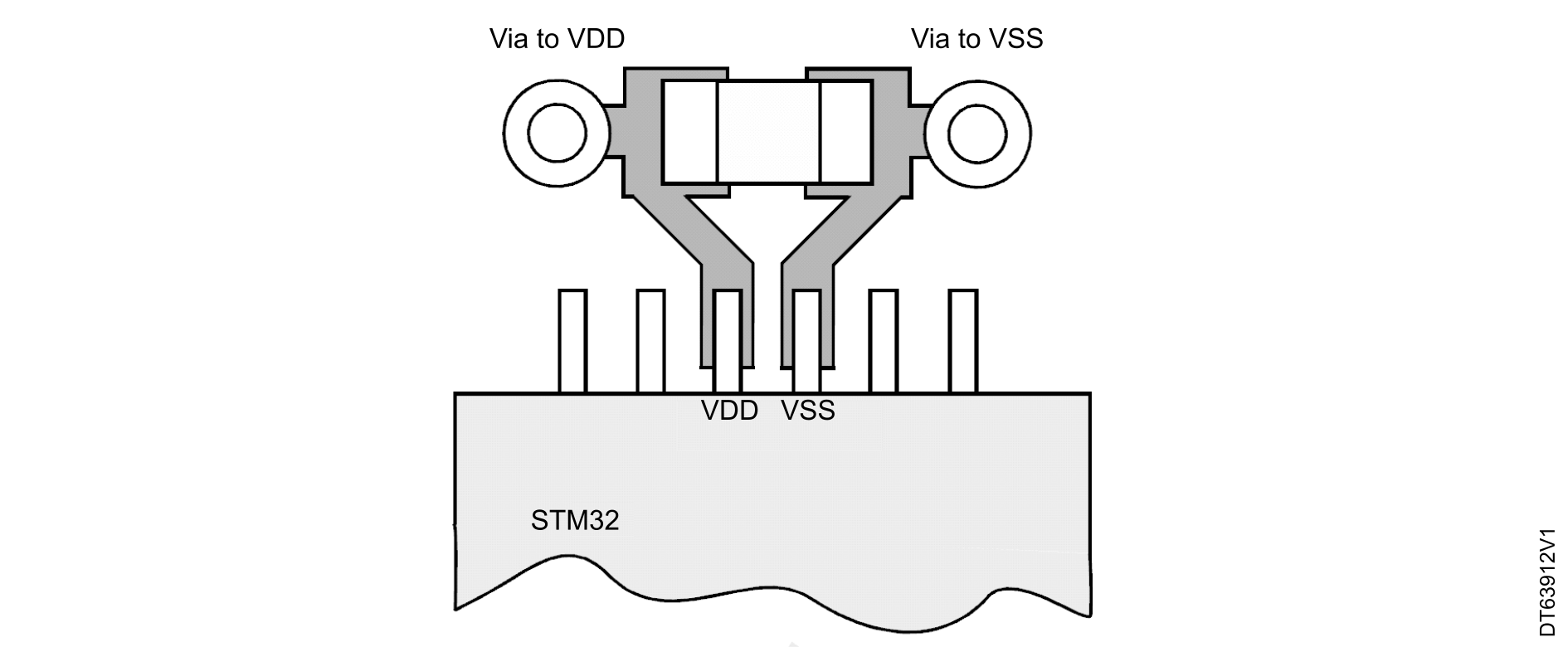
Some packages use a common VSS pin for several VDD pins, instead of a pair of power pins (one VSS for each VDD). In that case, the capacitors must be between each VDD pin and the common VSS pin. These capacitors must be placed as close as possible to, or below the appropriate pins on the underside of the PCB. Typical values are 10 to 100 nF, but exact values depend on the application needs.

The figure below shows the typical layout of such a VDD/VSS pin pair.
Figure 17. Typical layout for VDD/VSS pin pair

Other signals

When designing an application, the EMC performance can be improved by closely studying the following:
  • Signals for which a temporary disturbance affects the running process permanently (it is the case for interrupts and handshaking strobe signals but not the case for LED commands)

    For these signals, a surrounding ground trace, shorter lengths, and the absence of noisy and sensitive traces nearby (crosstalk effect) improve EMC performance.

    For digital signals, the best possible electrical margin must be reached for the two logical states. Slow Schmitt triggers are recommended to eliminate parasitic states.

  • Noisy signals (example: clock)
  • Sensitive signals (example: high impedance)

Unused I/Os and features

All microcontrollers are designed for a variety of applications and often a particular application does not use 100 % of the MCU resources.

To increase the EMC performance and avoid extra power consumption, the unused features of the device must be disabled and disconnected from the clock tree, as follows:
  • The unused clock source must be disabled.
  • The unused I/Os must not be left floating.
  • The unused I/O pins must be configured as analog input by software, and must be connected to a fixed logic level 0 or 1 by an external or internal pull-up or pull-down, or configured as output mode using software.

Description

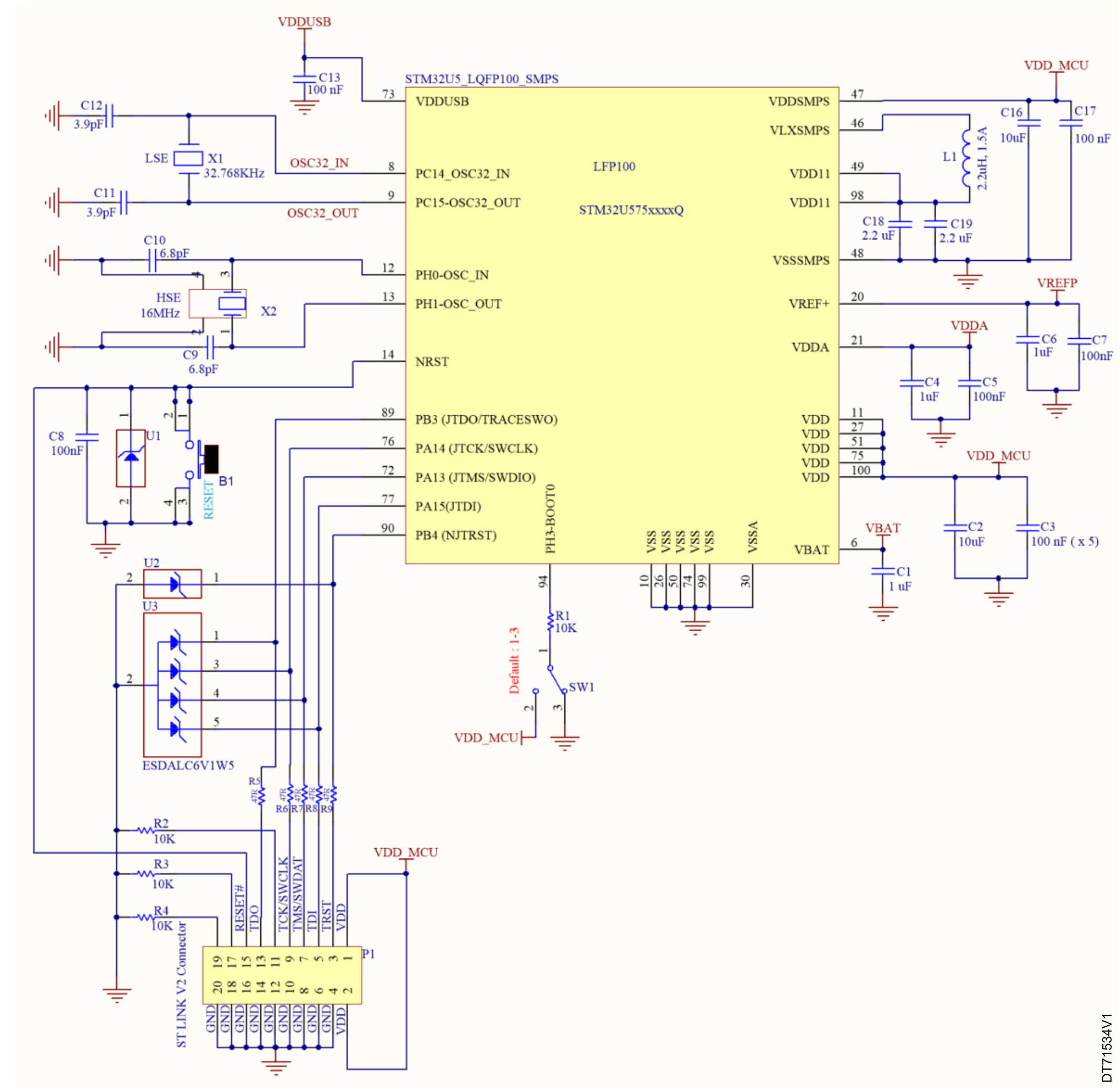
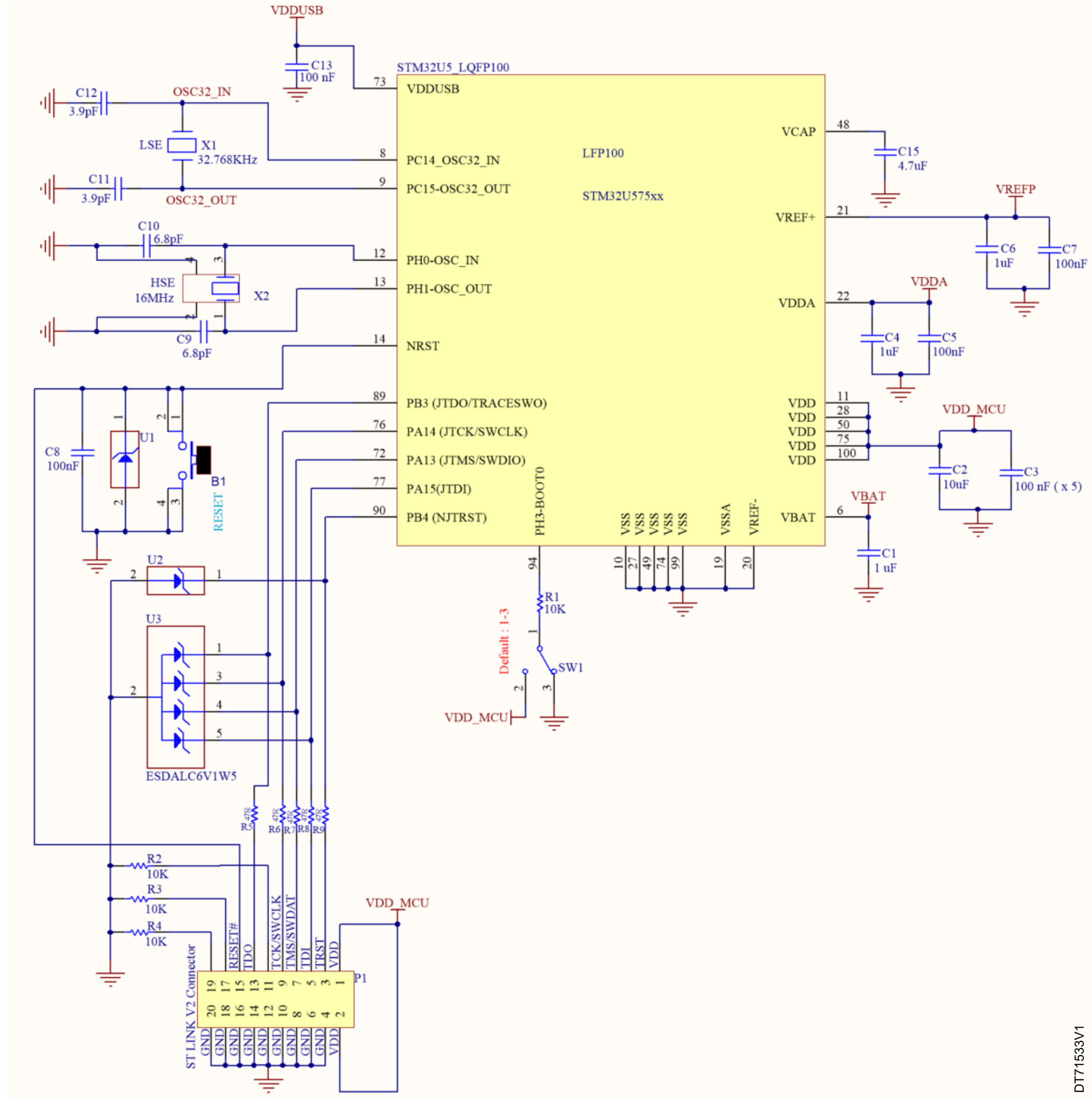
The reference designs shown in the next sections are based on STM32U5 devices in LQFP144 and TFBGA216 packages. This reference design can be tailored to any STM32U5 device with a different package, using the pin correspondence given in Design reference for a STM32U5 device (with and without SMPS) and Design reference for a STM32U599/5A9/5F9/5G9 device (with SMPS).

Clock

Two clock sources are used for the MCU (see Clocks for more details):
  • LSE: X1 – 32.768 kHz crystal for the embedded RTC
  • HSE: X2 – 16 MHz crystal for the MCU

See Clocks for more details.

Reset

The reset signal is active low in the reference design figures shown in Design reference for a STM32U5 device (with and without SMPS).

The reset sources include:
  • the reset button (B1)
  • debugging tools via the connector CN1

See Reset and power-supply supervisor for more details.

Boot mode

The user can add a switch on the board to change the boot option.

See Boot configuration for more details.

Note:

When waking up from Standby mode, the BOOT pin is sampled and the user must pay attention to its value.

SWD interface

The reference design shows the connection between the STM32U575/585 device and a standard SWD connector.

See Debug management for more details.

Note:

To allow tools to reset the applications, the RESET pins must be connected.

Power supply

See Power supply management for more details.

Design reference for a STM32U5 device (with and without SMPS)

Table 9 Components of STM32U5 device design reference lists the components used for a STM32U5 design reference :
Table 9. Components of STM32U5 device design reference
ReferenceTypeValueQuantityComments
B1Push-button-1-
C1, C4, C6Ceramic capacitor1 µF3Decoupling capacitors

C6 used for the internal VREFBUF

C2, C16Tantalum or ceramic capacitor10 µF2Decoupling capacitors required for the package
C3 (x5), C5, C7, C8, C13, C17Ceramic capacitor100 nF10For each external power pin
C15Tantalum or ceramic capacitor4.7 µF1Decoupling capacitor
C18, C192.2 µF2Required on each VDD11 pin of packages with SMPS
C11, C123.9 µFUsed for LSE: the value depends on the crystal characteristics (refer to document AN5373_general-info.html#id_14462__entry_phr_xrh_dvb)
C9, C106.8 pF
L1Coil2.2 µH1Required for SMPS packages on VLXSMPS pin
X1Quartz32.768 kHz1Used for LSE
X216 MHz1Used for HSE
R1Resistor10 KΩ1R1 maintains PH3-BOOT0 pin at a logic low or high level
R2, R3, R43Used for the ST‑LINK interface
SW1Switch-1Used to select the right boot mode
U1, U2, U3ESD protection 6V1-3Used for ESD protection
R5, R6, R7, R8, R9-47 Ω5
P1ST LINK V2 connector-1Used to connect an external ST‑LINK
Figure 18. STM32U535/545/575/585xxxxQ reference design (with SMPS)
Figure 19. STM32U5xxx reference design (without SMPS)
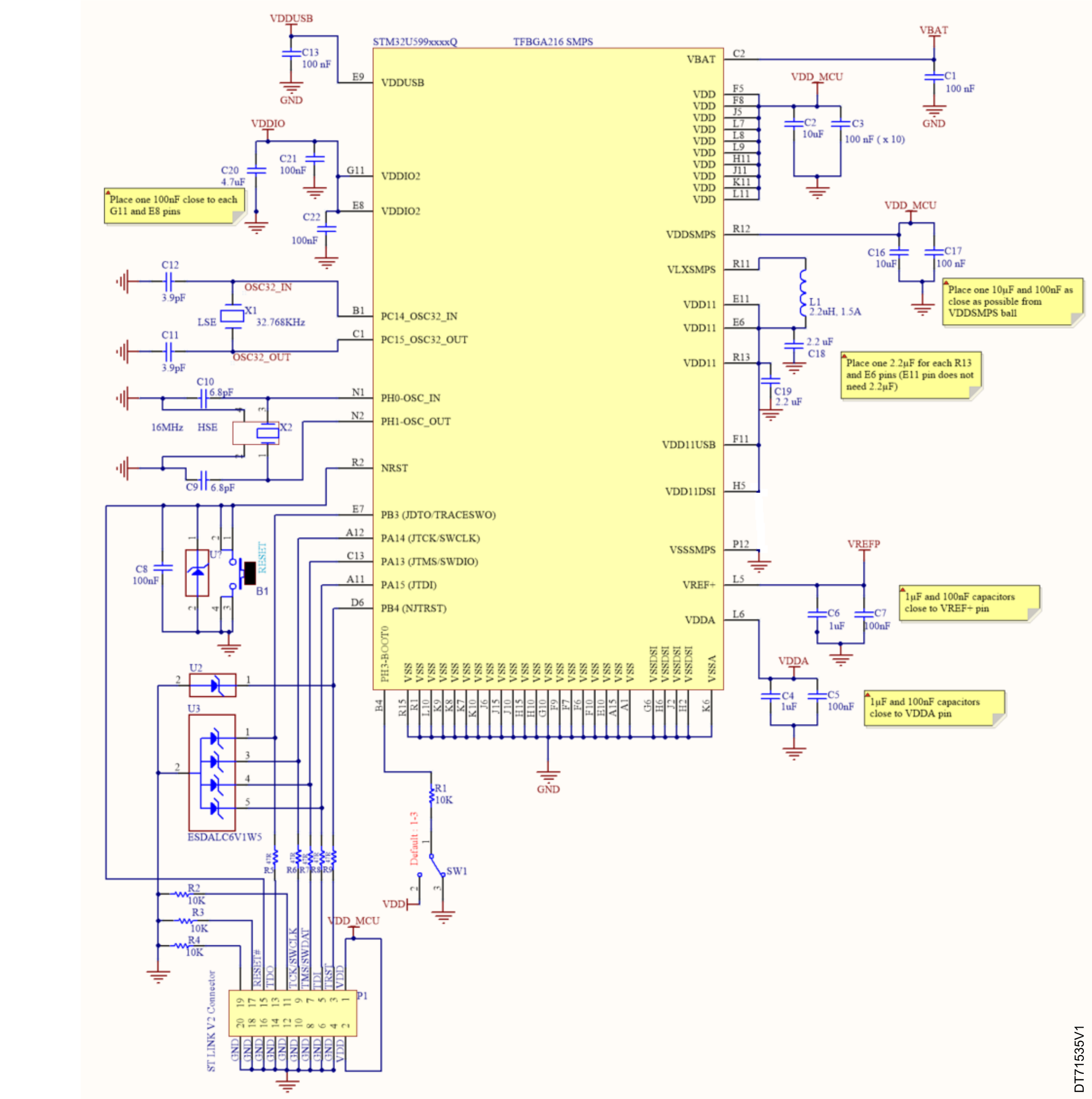
Table 10 Components of STM32U599 discovery kit lists the components in the STM32U599 discovery kit STM32U599J-DK (reference design MB1662) based on STM32U599xxxxQ device, with SMPS (see Figure 20 STM32U59/5A/5F/5GxxxxxQ reference design (with SMPS)).
Table 10. Components of STM32U599 discovery kit
ReferenceTypeValueQuantityComments
B1Push-button-1-
C4, C6Ceramic capacitor1 µF2Decoupling capacitors

C6 used for the internal VREFBUF

C2, C16Tantalum or ceramic capacitor10 µF2Decoupling capacitors required for the package
C1, C3 (x10), C5, C7, C8, C13, C17, C21, C22, C23Ceramic capacitor100 nF19For each external power pin
C20Tantalum or ceramic capacitor4.7 µF1Decoupling capacitor
C18, C192.2 µF2Required on each VDD11 pin of packages with SMPS
C11, C123.9 pF2Used for LSE: the value depends on the crystal characteristics (refer to document AN5373_general-info.html#id_14462__entry_phr_xrh_dvb)
C9, C106.8 pF2
L1Coil2.2 µH1Required for SMPS packages on VLXSMPS pin
X1Quartz32.768 kHz1Used for LSE
X216 MHz1Used for HSE
R1Resistor10 KΩ1R1 maintains PH3-BOOT0 pin at a logic low or high level
R2, R3, R43Used for the ST‑LINK interface
SW1Switch-1Used to select the right boot mode
U1, U2, U3ESD protection 6V1-3Used for ESD protection
R5, R6, R7, R8, R9-47 Ω5
P1ST LINK V2 connector-1Used to connect an external ST‑LINK
Figure 20. STM32U59/5A/5F/5GxxxxxQ reference design (with SMPS)