AN5020 ยท Application noteIntroduction to digital camera interface (DCMI) for STM32 MCUs
Download .pdfOpen in the full document

Capture modes

Capture modes

The DCMI supports two types of capture: snapshot (a single frame) and continuous grab (a sequence of frames).

The user can control the capture rate by selecting the bytes, lines, and frames to capture in the DCMI_CR register. These features are used to convert the color format of the image, and/or to reduce the image resolution (by capturing one line out of two, the vertical resolution is divided by 2). For more details, refer to Image resizing (resolution modification).

Snapshot mode

In this mode, a single frame is captured. After the capture is enabled by setting the CAPTURE bit in DCMI_CR, the interface waits for the detection of a start of frame (the next DCMI_VSYNC or the next embedded frame-start code, depending on the synchronization mode) before sampling the data.

Once the first complete frame is received, the DCMI is automatically disabled (CAPTURE bit automatically cleared), and all the other frames are ignored. In case of an overrun, the frame is lost and the camera interface is disabled.
Figure 28. Frame reception in snapshot mode

Continuous grab mode

Once this mode is selected and the capture is enabled (CAPTURE = 1), the interface waits for the detection of a start of frame (the next DCMI_VSYNC or the next embedded frame-start code, depending on the synchronization mode) before sampling the data.

In this mode, the DCMI can be configured to capture all the frames, every alternate frame (50% bandwidth reduction), or one frame out of four (75% bandwidth reduction). The camera interface is not automatically disabled but the user must disable it by setting CAPTURE = 0 . After being disabled by the user, the DCMI continues to grab data until the end of the current frame.
Figure 29. Frame reception in continuous grab mode

Data formats and storage

The DCMI supports the following data formats:
  • 8-bit progressive video: either monochrome or raw Bayer
  • YCbCr 4:2:2 progressive video
  • RGB565 progressive video
  • Compressed data (JPEG)
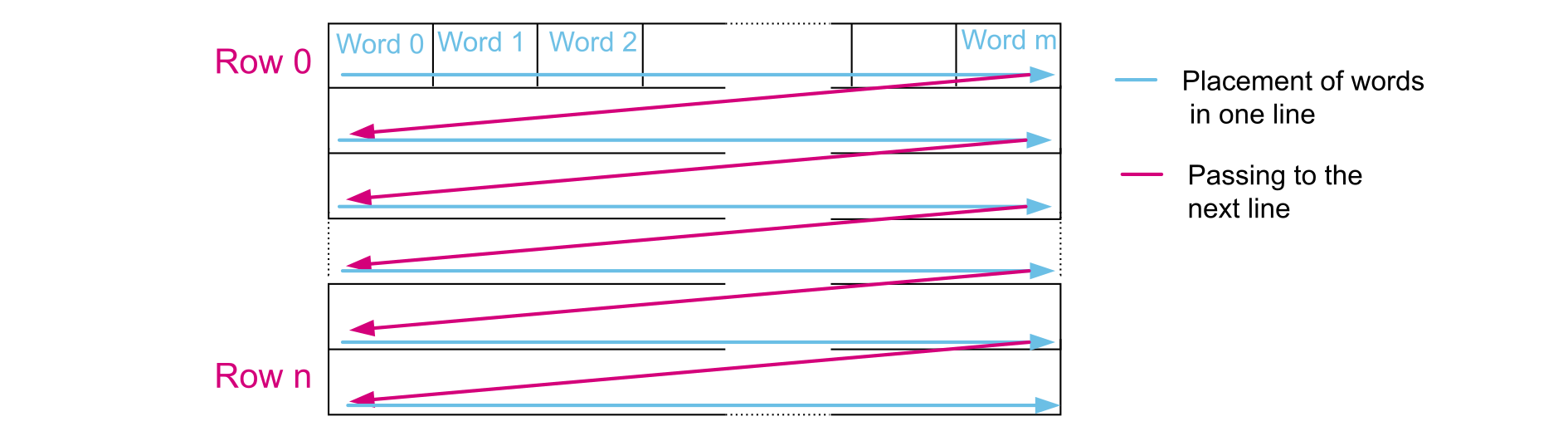
For monochrome, RGB and YCbCr, the frame buffer is stored in raster mode as shown in Figure 30 Pixel raster scan order.
Figure 30. Pixel raster scan order
Note:

Only 32-bit words are used, and only the little-endian format is supported (the least significant byte is stored in the smallest address).

Data received from the camera can be organized in lines, frames (raw YUV/RGB/Bayer modes), or can be a sequence of JPEG images.

The number of bytes in a line may not be a multiple of four. The user must therefore be careful when handling this case since a DMA request is generated each time a complete 32-bit word has been constructed from the captured data. When an end of frame is detected and the 32-bit word to be transferred has not been completely received, the remaining data are padded with zeros, and a DMA request is generated.

RGB565

RGB refers to Red, Green, and Blue, which represent the three hues of light. Any color is obtained by mixing these three colors.

565 is used to indicate that each pixel consists of 16 bits divided as follows:
  • 5 bits for encoding the red value (the most significant 5 bits)
  • 6 bits for encoding the green value
  • 5 bits for encoding the blue value (the less significant 5 bits)
Each component has the same spatial resolution (4:4:4 format): each sample has a red (R), a green (G) and a blue (B) component. Figure 32 DCMI data register filled with RGB data shows the DCMI data register containing RGB data, when an 8-bit data width is selected.
Figure 32. DCMI data register filled with RGB data

YCbCr

YCbCr is a family of color spaces that separates the luminance or luma (brightness) from the chrominance or chroma (color differences).

YCbCr consists of three components:
  • Y refers to the luminance or luma (black and white).
  • Cb refers to the blue difference chroma.
  • Cr refers to the red difference chroma.

YCbCr 4:2:2 is a subsampling scheme, which requires a half resolution in horizontal direction: for every two horizontal Y samples, there is one Cb or Cr sample.

Each component (Y, Cb, and Cr) is encoded in 8 bits. Figure 33 DCMI data register filled with YCbCr data shows the DCMI data register containing YCbCr data when an 8-bit data width is selected.
Figure 33. DCMI data register filled with YCbCr data

YCbCr, Y only

Note:

This data format is only available for the STM32F446, STM32F469/479, STM32F7, STM32H7, STM32L496xx, STM32L4A6, STM32L4+, STM32U5, STM32H5, and STM32N647/657 devices listed in Table 1.

The buffer contains only the Y information, monochrome image. The chroma information is dropped. Only the luma component of each pixel, encoded in 8 bits, is stored. The result is a monochrome image having the half-horizontal resolution of the original image (YCbCr data). Figure 34 DCMI data register filled with Y only data shows the DCMI register when an 8-bit data width is selected.
Figure 34. DCMI data register filled with Y only data

JPEG

For compressed data (JPEG), the DCMI supports only the hardware synchronization, and the input size is not limited. Each JPEG stream is divided into packets, which have programmable size. The packet dispatching depends on the image content, and results in a variable blanking duration between two packets.

To allow JPEG image reception, the JPEG bit must be set to one in the DCMI_CR register. The JPEG images are not stored as lines and frames. The DCMI_VSYNC signal is used to start the capture while DCMI_HSYNC serves as a data enable signal.

If the full data stream finishes and the detection of an end of stream does not occur (DCMI_VSYNC does not change), the DCMI pads out the end of the frame by inserting zeros: if the stream size is not a multiple of four, at the end of the stream, the DCMI pads the remaining data with zeros.
Note:

The crop feature and embedded synchronization mode cannot be used in the JPEG format.

Figure 35. JPEG data reception

Crop feature

With the crop feature, the camera interface selects a rectangular window from the received image. The start coordinates (upper-left corner) are specified in the 32-bit DCMI_CWSTRT register.

The window size is specified in number of pixel clocks (horizontal dimension), and in number of lines (vertical dimension) in the DCMI_CWSIZE register.

Image resizing (resolution modification)

Note:

This feature is only available for STM32F446, STM32F469/479, STM32F7x5/6/7/8/9, STM32F750, STM32H7, STM32L496xx, STM32L4A6, STM32L4+, STM32U5, STM32H5, and STM32N647/657 devices listed in Table 1.

As described in Capture modes, the DCMI capture features are set through the DCMI_CR register.

The DCMI captures all received lines, or one line out of two (the user can choose to capture the odd or even lines).

This feature affects the vertical resolution that can be received by the DCMI as sent from the camera module or divided by two (only the odd or the even lines are received).

This interface also allows the capture of:
  • All received data
  • Every other byte from the received data (one byte out of two, only the odd or the even bytes are received)
  • One byte out of four
  • Two bytes out of four
This feature affects the horizontal resolution allowing the user to select one of the following resolutions:
  • The full horizontal resolution
  • The half of the horizontal resolution
  • The quarter of the horizontal resolution (available only for 8 bpp data formats)
CAUTION:

For some data formats (color spaces), the modification of the horizontal resolution allows a change of the data format. For example, when the data format is YCbCr, the data is received interleaved (CbYCrYCbYCr). When the user chooses to receive every other byte, the DCMI receives only the Y component of each sample, means converting YCbCr data into Y-only data. This conversion affects both the horizontal resolution (only half of the image is received), and the data format.

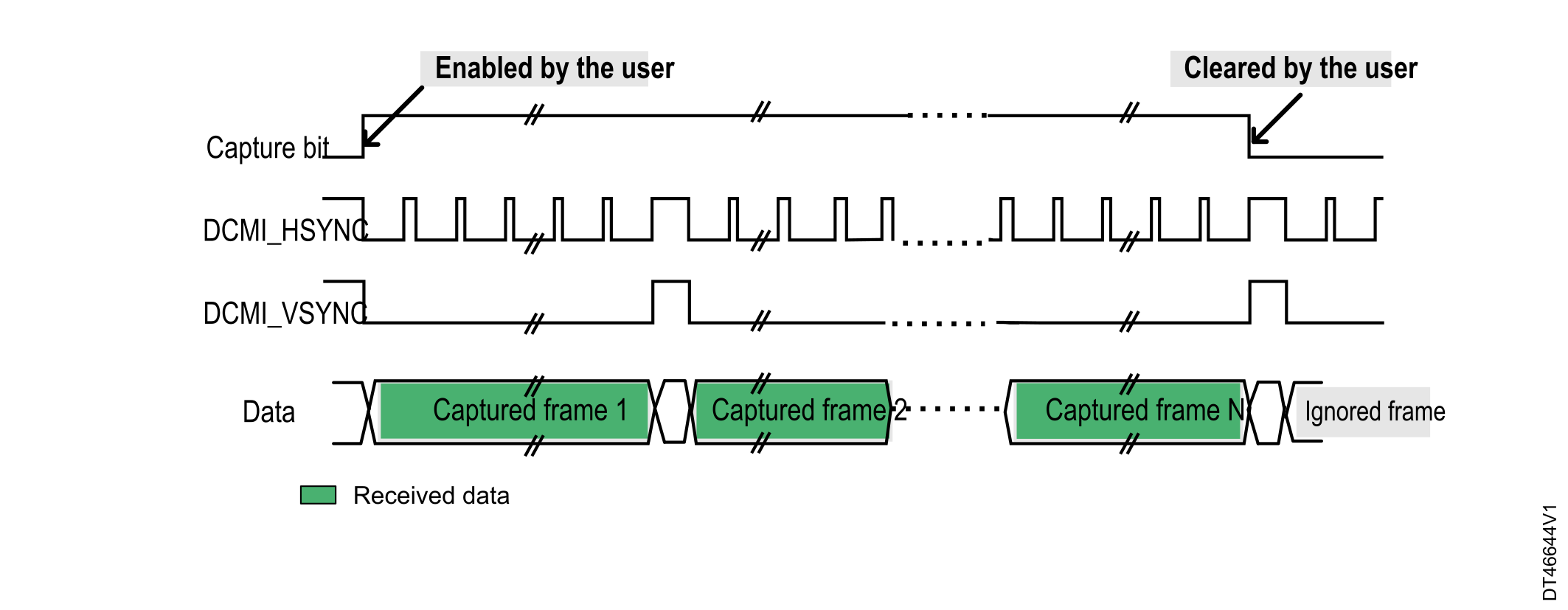
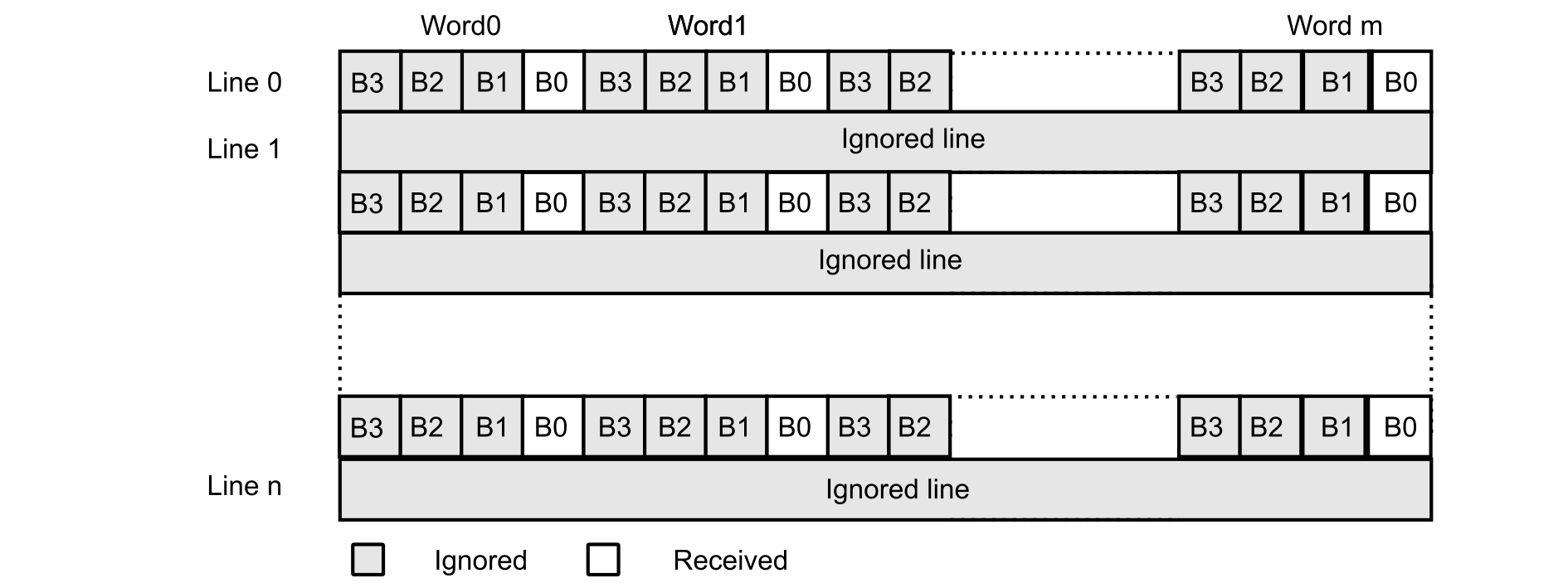
Figure 36 Frame resolution modification shows one frame when receiving only one byte out of four and one line out of two.
Figure 36. Frame resolution modification

DCMI interrupts

The following interrupts can be generated:
  • IT_LINE indicates the end of line.
  • IT_FRAME indicates the end of frame capture.
  • IT_OVR indicates the overrun of data reception.
  • IT_VSYNC indicates the synchronization frame.
  • IT_ERR indicates the detection of an error in the embedded synchronization code order (only in embedded synchronization mode).

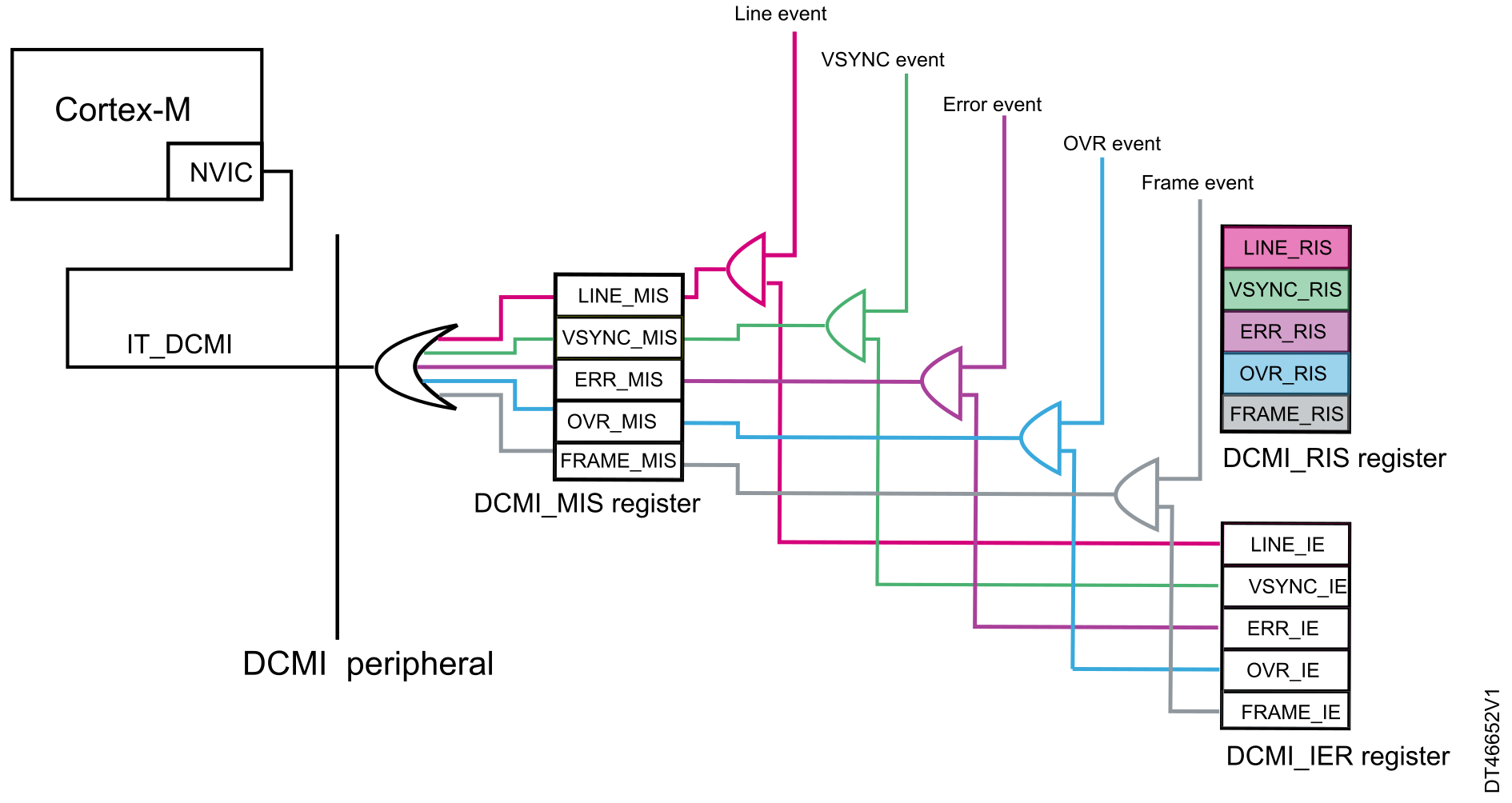
All interrupts can be masked by software. The global interrupt dcmi_it is the logic OR of all the individual interrupts.

The DCMI interrupts are handled through the following registers:
  • DCMI_IER: read/write register allowing the interrupts to be generated when the corresponding event occurs
  • DCMI_RIS: read-only register giving the current status of the corresponding interrupt, before masking this interrupt with DCMI_IER (each bit gives the status of the interrupt that can be enabled or disabled in DCMI_IER).
  • DCMI_MIS: read-only register providing the current masked status of the corresponding interrupt, depending on DCMI_IER and DCMI_RIS.

If an event occurs and the corresponding interrupt is enabled, the DCMI global interrupt is generated.

Figure 37. DCMI interrupts and registers