AN5020 · Application noteIntroduction to digital camera interface (DCMI) for STM32 MCUs
Download .pdfOpen in the full document

Camera module configuration

Camera module configuration

The following steps allow a correct configuration of the camera module (refer also to the camera module datasheet):
  1. Configure the input/output functionalities for camera configuration pins to be able to modify its registers (serial communication, mostly I2C).
  2. Apply hardware reset on the camera module.
  3. Initialize the camera module:
    • Configure the image resolution.
    • Configure the contrast and the brightness.
    • Configure the white balance of the camera (such as black and white, white negative, white normal).
    • Select the camera interface (some camera modules have serial and parallel interface).
    • Select the synchronization mode if the camera module supports more than one.
    • Configure the clock signals frequencies.
    • Select the output data format.

Power consumption

In order to save more energy when the application is in low-power mode, it is recommended to put the camera module in low-power mode before the STM32 entry in low-power mode.

Putting camera module in low-power mode ensures a considerable gain in power consumption.

Example for OV9655 CMOS sensor:
  • In active mode, the operating current is 20 mA.
  • In standby mode, the current requirements drop to 1 mA in case of I2C-initiated Standby mode (the internal circuit activity is suspended but the clock is not halted), and to 10 μA in case of pin-initiated Standby mode (the internal device clock is halted and all internal counters are reset). For more details, refer to the camera datasheet.

Performance

For all STM32 MCUs, the number of bytes to be transferred at each pixel clock depends on the extended data mode:
  • When the DCMI is configured to receive 8-bit data, the camera interface takes four pixel clock cycles to capture a 32-bit data word.
  • When the DCMI is configured to receive 10-, 12-, or 14-bit data, the camera interface takes two pixel clock cycles to capture a 32-bit data word.
The table below summarizes the maximum data flow depending on the data width configuration.
Table 13. Maximum data flow at maximum DCMI_PIXCLKThese values are calculated for the maximum DCMI_PIXCLK given in Table 2 Availability of DCMI and related resources.
STM32Data flow (max Mbyte/s) in extended data mode
8-bit

1 byte per PICXCLK

10-bit

1.25 bytes per PICXCLK

12-bit

1.5 bytes per PICXCLK

14-bit

1.75 bytes per PICXCLK

STM32F246.87558.59470.31282.031
STM32F452.73465.91879.10192.285
STM32F7
STM32H723/733, STM32H743/753, STM32H747/757, STM32H745/755, STM32H742, STM32H750, STM32H7A3/7B378.12597.656117.187136.718
STM32H725/735, STM32H730107.422134.277161.133187.988
STM32L431.2539.06246.87554.687
STM32L4+46.87558.59470.31282.031
STM32U562.578.12593.75109.375
STM32H593.75117.187140.625164.062
STM32N647/657

In some applications, the DMA2 (or the DMA1 for the STM32H7 and STM32L4+; the GPDMA1 for the STM32U5 and STM32N647/657; and the GPDMA1 and GPDMA2 for the STM32H5) is configured to serve other requests in parallel with the DCMI request. In this case, the user must pay attention to the stream priority configurations, and consider the performance impact when the DMA serves other streams in parallel with the DCMI.

For better performance, when using the DCMI in parallel with other peripherals having requests that can be connected to either DMA1 or DMA2, or to GPDMA1 and GPDMA2, it is better to configure these streams to be served by the DMA/GPDMA that is not serving the DCMI.

The user must make sure that the DCMI supports the pixel clock configured on the camera module side to avoid the overrun.

It is recommended to use the highest system speed HCLK for better performance. However, the user must consider the speed of all the peripherals used (for example the speed of external memories) to avoid an overrun and to ensure the successful operation of the application.

The DCMI is not the only AHB peripheral but there are many other peripherals. The DMA is not the only master that can access the AHB peripherals. Using many AHB peripherals or other masters accessing the AHB peripherals leads to a concurrency on the AHB: the user must consider its impact on performance.

DCMI use cases

There are several imaging applications that can be implemented using the DCMI and other STM32 peripherals. Here below some application examples:
  • Machine vision
  • Toys
  • Biometry
  • Security and video surveillance
  • Door phone and home automation
  • Industrial monitoring systems and automated inspection
  • System control
  • Access control systems
  • Bar-code scanning
  • Video conferencing
  • Drones
  • Real-time video streaming and battery-powered video cameras
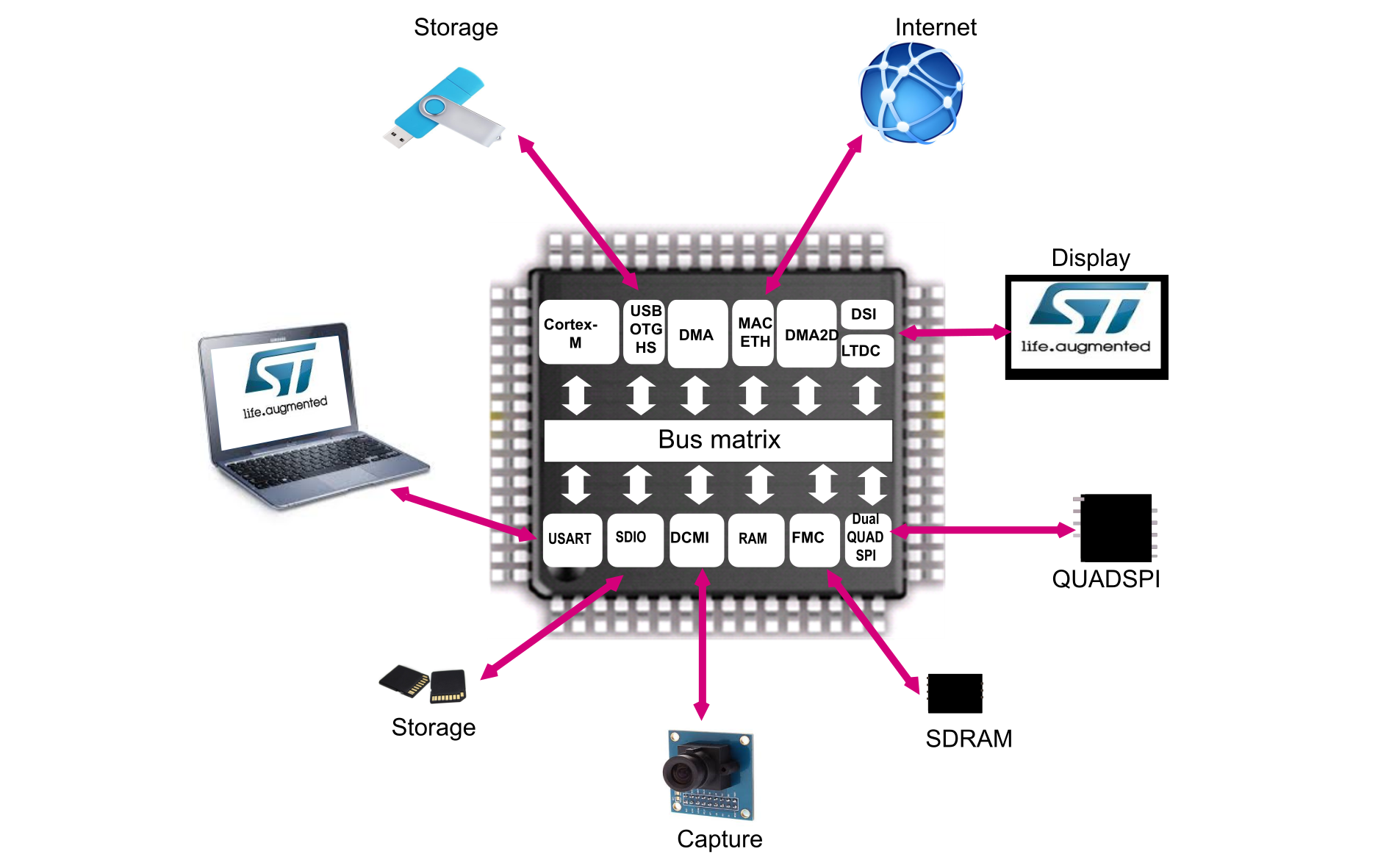
Figure 48 STM32 DCMI application example provides examples of applications based on an STM32 MCU. These applications allow the user to:
  • Capture data
  • Store it to internal or external memories
  • Display it
  • Share it via the internet
  • Communicate with human beings
Figure 48. STM32 DCMI application example

STM32Cube examples

The STM32CubeF2, STM32CubeF4, STM32CubeF7, STM32CubeH7, STM32CubeL4, and STM32CubeU5 MCU Packages offer a large set of examples implemented and tested on the corresponding boards.

The table below gives an overview of the DCMI examples and applications across various STM32Cube. All these examples are developed to capture RGB data. For most of the examples, the user can select one of the following resolutions: QQVGA 160x120, QVGA 320x240, 480x272, VGA 640x480.
Table 14. STM32Cube DCMI examples
MCU PackageProject nameBoard
STM32CubeF2DCMI_CaptureModeSTM3220G-EVAL, STM3221G‑EVAL
SnapshotMode
Camera_To_USBDisk
STM32CubeF4DCMI_CaptureModeSTM32446E‑EVAL, STM32429I‑EVAL1, STM32469I‑EVAL, STM3240G‑EVAL
SnapshotMode
Camera_To_USBDisk
STM32CubeF7DCMI_CaptureModeSTM32756G-EVAL, STM32F769I‑EVAL
SnapshotMode
Camera_To_USBDisk
CameraSTM32F7508-DISCOVERY
STM32CubeH7DCMI_CaptureModeSTM32H747I-DISCOVERY
SnapshotMode
STM32CubeL4DCMI_CaptureMode32L496GDISCOVERY, 32L4R9IDISCOVERY
SnapshotMode32L496GDISCOVERY
DCMI_Preview
STM32CubeU5DCMI_ContinousCap_EmbeddedSynchMode STM32U575I-EVAL