AN5020 · Application noteIntroduction to digital camera interface (DCMI) for STM32 MCUs
Download .pdfOpen in the full document

Low-power modes

Low-power modes

The STM32 power mode has a direct effect on the DCMI, which operates as follows over the different power modes:
  • In Run mode, the DCMI and all peripherals operate normally.
  • In Sleep mode, the DCMI and all peripherals work normally, and generate interrupts to wake up the CPU.
  • In Stop and Standby modes, the DCMI does not work.
For some STM32 devices, there are other low-power modes where the state of the DCMI varies from one to the other:
  • Low-power Run mode
  • Low-power Sleep mode: interrupts from peripherals cause the device to exit this mode.
  • Stop 0, Stop 1, Stop 2, Stop 3 modes: the content of peripheral registers is kept.
  • Shutdown mode: the peripheral must be reinitialized when exiting Shutdown mode.
The table below summarizes the DCMI operation in the different modes.
Table 7. DCMI operation in low-power modes
ModeDCMI operation
RunActive
Low-power Run1
Sleep
Low-power Sleep1
Stop2Frozen
Stop 03
Stop 13
Stop 23
Stop 34
Stop mode SVOS high5
Stop mode SVOS low5
StandbyPowered down
Shutdown3
1 Only for the STM32L496xx, STM32L4A6xx, and STM32L4+ devices.
2 Not available on the STM32N647/657 devices.
3 Only for the STM32L496xx, STM32L4A6xx, STM32L4+, and STM32U5 devices.
4 Only on the STM32U5 devices.
5 Only for the STM32N647/657 devices.


DCMI configuration

When selecting a camera module to interface with STM32 MCUs, the user must consider some parameters such as the pixel clock, the supported data format, and the resolutions.

To correctly implement the application, the user needs to perform the following configurations:
  • Configure the GPIOs.
  • Configure the timings and the clocks.
  • Configure the DCMI peripheral.
  • Configure the DMA.
  • Configure the camera module:
    • Configure the I2C to allow the camera module configuration and control.
    • Set parameters such as contrast, brightness, color effect, polarities, and data format.
Note:

It is recommended to reset the DCMI and the camera module before starting the configuration. The DCMI can be reset by setting the corresponding bit in the RCC_AHB2RSTR register, which resets the clock domains.

GPIO configuration

To easily configure the DCMI GPIOs (such as data pins, control signals pins, camera configuration pins), and to avoid any pin conflicts, it is recommended to use the STM32CubeMX configuration and initialization code generator.

Thanks to the STM32CubeMX, the user generates a project with all the needed peripherals preconfigured.

Depending on the extended data mode chosen by configuring EDM bits in DCMI_CR register, the DCMI receives a 8-, 10-, 12-, or 14-bpp clock (DCMI_PIXCLK).

The user needs to configure:
  • 11, 13, 15, or 17 GPIOs for the DCMI for the hardware synchronization
  • only nine GPIOs (eight pins for data and one pin for DCMI_PIXCLK) for the embedded synchronization

The user needs to configure also the I2C, and in some cases the camera power supply pin (if the camera power supply source is the STM32 MCU).

Enable interrupts

To be able to use the DCMI interrupts, the user must enable the DCMI global interrupts on the NVIC side. Each interrupt is then enabled separately by enabling its corresponding enable bit in the DCMI_IER register:
  • Only four interrupts (IT_LINE, IT_FRAME, IT_OVR, and IT_DCMI_VSYNC) can be used in hardware synchronization mode.
  • The five interrupts can be used in embedded synchronization mode.

The software allows the user to check whether the specified DCMI interrupt has occurred or not, by checking the state of the flags.

System clock configuration (HCLK)

It is recommended to use the highest system clock to get the best performance. This recommendation applies also for the frame buffer of the external memory: if an external memory is used for the frame buffer, the clock must be set at the highest allowed speed to get the best memory bandwidth.

Examples:
  • STM32F4x9xx devices: the maximum system speed is 180 MHz. If an external SDRAM is connected to the FMC, the maximum SDRAM clock is 90 MHz (HCLK/2).
  • STM32F7 devices: the maximum system speed is 216 MHz. With this speed and HCLK/2 prescaler, the SDRAM speed exceeds the maximum allowed speed (see datasheets for more details). To get the maximum SDRAM, it is recommended to configure HCLK @ 200 MHz, then the SDRAM speed is set at 100 MHz.
The clock configurations providing the highest performance are the following:
  • For STM32F2x7 devices, HCLK @ 120 MHz and SRAM @ 60 MHz
  • For STM32F407/417 devices, HCLK @ 168 MHz and SRAM @ 60 MHz
  • For STM32L4x6 devices, HCLK @ 80 MHz and SRAM @ 40 MHz

DCMI clock and timing configuration (DCMI_PIXCLK)

The DCMI pixel clock configuration depends on the configuration of the pixel clock of the camera module. The user must make sure that the pixel clock has the same configuration on the DCMI and the camera module sides.

DCMI_PIXCLK is an input signal for the DCMI used for input data sampling. The user selects either the rising or the falling edge for capturing data by configuring the PCKPOL bit in the DCMI_CR register.

As explained in Data synchronization, there are two types of synchronization: embedded and hardware. To select the desired synchronization mode for the application, the user needs to configure the ESS bit in DCMI_CR.

DCMI clock configuration in hardware synchronization

The DCMI_HSYNC and DCMI_VSYNC signals are used. The configuration of these two signals is defined by selecting each signal active level (high or low) for the VSPOL and HSPOL bits in DCMI_CR.

Note:

The user must make sure that DCMI_HSYNC and DCMI_VSYNC polarities are programmed according to the camera module configuration. In the hardware synchronization mode (ESS = 0 in DCMI_CR), the IT_VSYNC interrupt is generated (if enabled), even when CAPTURE = 0 in DCMI_CR. To reduce the frame capture rate even further, the IT_VSYNC interrupt can be used to count the number of frames between two captures, in conjunction with the snapshot mode. This is not allowed by the embedded synchronization mode.

DCMI clock configuration in embedded synchronization
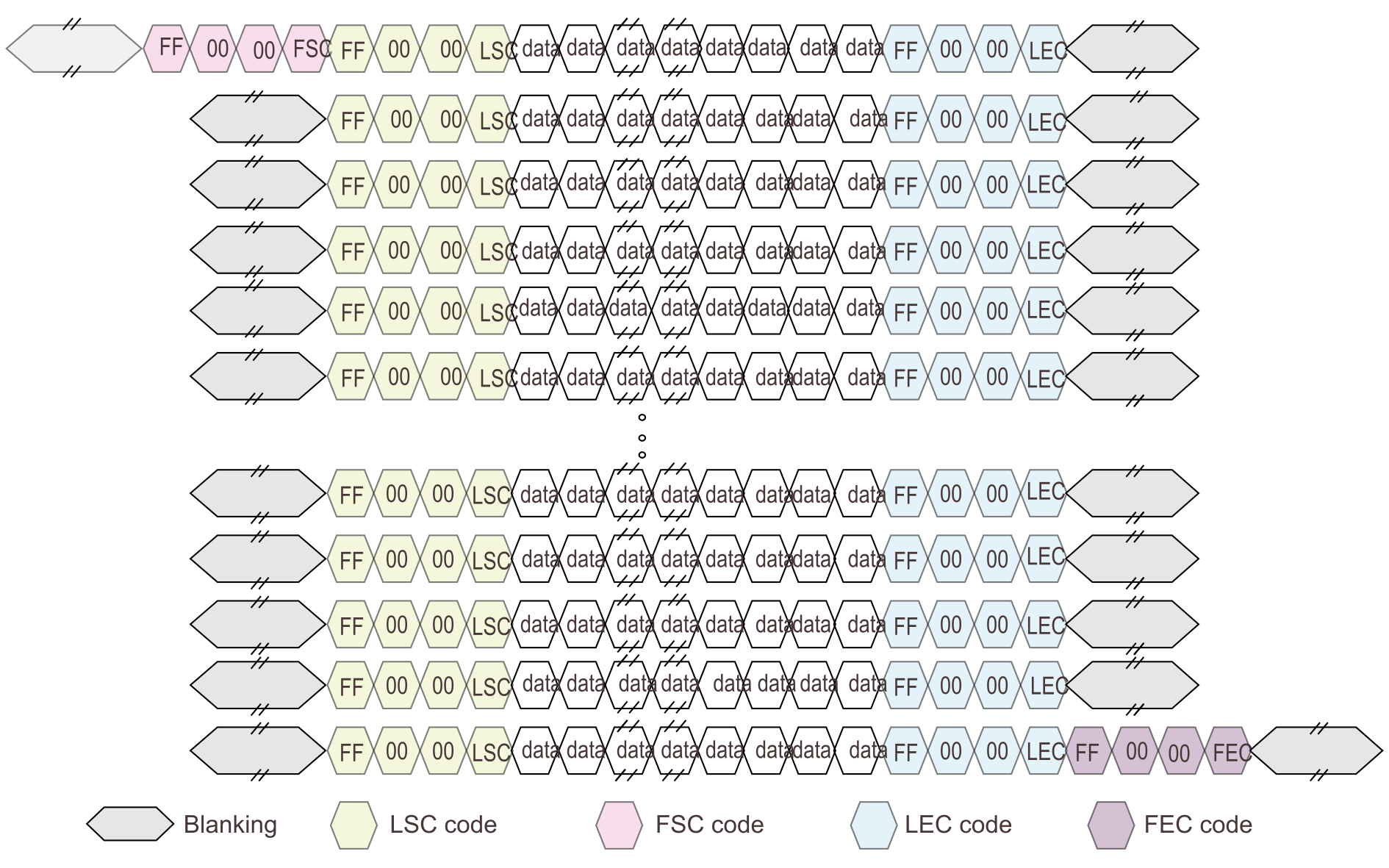
The line-start/line-end and frame-start/frame-end are determined by codes or markers embedded within the data flow. The embedded synchronization codes are supported only for an 8-bit parallel data interface width. The synchronization codes must be programmed in the DCMI_ESCR register as defined in Figure 38 DCMI_ESCR register bytes.
Figure 38. DCMI_ESCR register bytes

FEC (frame-end code)

The most significant byte specifies the frame-end delimiter. The camera module sends a 32-bit word containing 0xFF 00 00 XY with XY = FEC code, to signal the end of a frame. The code is received as indicated in Figure 39 FEC structure.
Figure 39. FEC structure

Before the reception of this FEC code, VSYNC must be set to one in DCMI_SR to indicate a valid frame. After the reception of the FEC, VSYNC must be cleared to zero to indicate that it is synchronization between frames. VSYNC must remain at zero until the reception of the next frame-start code.

If FEC = 0xFF (the camera module sends 0xFF 00 00 FF), all the unused codes are interpreted as frame-end codes. There are 253 values corresponding to the end-of-frame delimiter (0xFF0000FF and the 252 unused codes).

LEC (line-end code)

This byte specifies the line-end marker. The code received from the camera to indicate the end of line is 0xFF 00 00 XY with XY = LEC code.
Figure 40. LEC structure

FSC (frame-start code)

This byte specifies the frame-start marker. The code received from the camera to indicate the start of new frame is 0xFF 00 00 XY with XY = FSC code.
Figure 41. FSC structure

LSC (line-start code)

This byte specifies the line-start marker. The code received from the camera to indicate the start of new line is 0xFF 00 00 XY with XY = LSC code.

If LSC = 0xFF, the camera module does not send a frame-start delimiter. The DCMI interprets the first occurrence of an LSC code after an FEC code as an FSC code occurrence.
Figure 42. LSC structure


In this embedded synchronization mode, HSPOL and VSPOL bits are ignored. While the DCMI receives data (CAPTURE = 1 in DCMI_CR), the user can monitor the data flow to know if it is an active line/frame or a synchronization between lines/frames, by reading VSYNC and HSYNC in DCMI_SR.

If ERR_IE = 1 in DCMI_IER, an interrupt is generated each time an error occurs (such as embedded synchronization characters not received in the correct order).

Figure 43 Frame structure in embedded synchronization mode shows a frame received in embedded synchronization mode.
Figure 43. Frame structure in embedded synchronization mode