AN4861 · Application noteIntroduction to LCD-TFT display controller (LTDC) on STM32 MCUs
Download .pdfOpen in the full document

Storing graphic primitives

Storing graphic primitives

Graphic primitives are basic elements (such as images or fonts) that can be combined to build the framebuffer content that is displayed.

Static data must be placed in a nonvolatile memory. When the amount of data to store is relatively low, the internal flash memory can be used. Otherwise, graphical contents must be placed in external memories.

The STM32 MCUs offer parallel (FMC) or serial (Quad SPI, Octo SPI, XSPI) interface for external NOR Flash memories (see Table 3 STM32 MCUs embedding an LTDC and their available graphic portfolio).

To build the framebuffer content, the DMA2D can directly read graphic primitives from a parallel NOR Flash or a Quad-SPI Flash.

Refer to the document AN4861_General-information.html#id_62127__entry_wzv_bky_31c and AN4861_General-information.html#id_62127__entry_psc_cky_31c for more details on storing graphic content on Quad SPI, Octo SPI,and XSPI memory.
Converting images to C files

To add graphic primitives to a user project, these primitives must be converted to C or header files. Some specific tools can be used to generate C or *.h files.

Warning:

The user must convert images to C files respecting the configured pixel input format described in Pixel input format. Some tools may generate C or *.h files with Red and Blue colors swapped. To avoid this issue, the LCD image converter tool can be used.

The LCD image converter is a very customizable free tool used to convert images to C files and to generate the C file in the desired format. An example is described in Display an image from the internal flash.

Hardware considerations

Two important hardware interfaces must be carefully designed: the LTDC interface and the external memory interface (used for framebuffer) such as FMC_SDRAM or FMC_SRAM.

LTDC parallel interface

When the pixel clock is below 40 MHz (SVGA), a simple 3.3 V signaling can be used.

It is possible to reach 83 MHz with a parallel RGB if the load and the wire length are reduced (for example to interface on the same PCB with on-board an LVDS or HDMI transceiver).

It is recommended to configure the LTDC GPIOs at the maximum operating speed OSPEEDRy[1:0] = 11. Refer to the product reference manual for a description of the GPIOx_SPEEDR register.

FMC SDRAM/SRAM interface

When using an external SRAM or SDRAM memory for a framebuffer, the FMC-SDRAM and the FMC-SRAM interfaces speed depend on many factors including the board layout and the pad speed. A good PCB design enables to reach the maximum pixel clock described in Table 10 STM32F4x9 maximal supported pixel clock to Table 19 STM32N6xx maximal supported pixel clock.

The layout must be as good as possible in order to get the best performances. For more information on PCB routing guidelines, refer to the documents AN4861_General-information.html#id_62127__entry_wdp_qmy_31c and AN4861_General-information.html#id_62127__entry_rhs_qmy_31c available on the STMicroelectronics website

Saving power consumption

When an application is in idle state and displays only a screen saver, it is important to drive the STM32 product in Sleep mode to reduce the power consumption. In Sleep mode, all peripherals can be enabled (FMC-SDRAM and LTDC for instance) while the CPU is stopped.

External memories, such as SDRAM or Quad-SPI Flash, can be driven in low-power modes whenever it is needed in order to avoid the waste of power.

If the application is in low-power state but requires to display graphics, the LTDC can be kept active, and the SDRAM can be put in self-refresh mode (in order to save power). If the application is set in power-down mode, it saves even more power.

The display can also be disabled or put in low-power mode if it is not needed when running the application.

LTDC application examples

This section provides:

  • some graphic implementation examples considering the resources requirements
  • an example on how to create a basic graphical application
  • a summary of STM32 reference boards that embeds LTDC and features an on-board LCD-TFT panel

Single-chip MCU

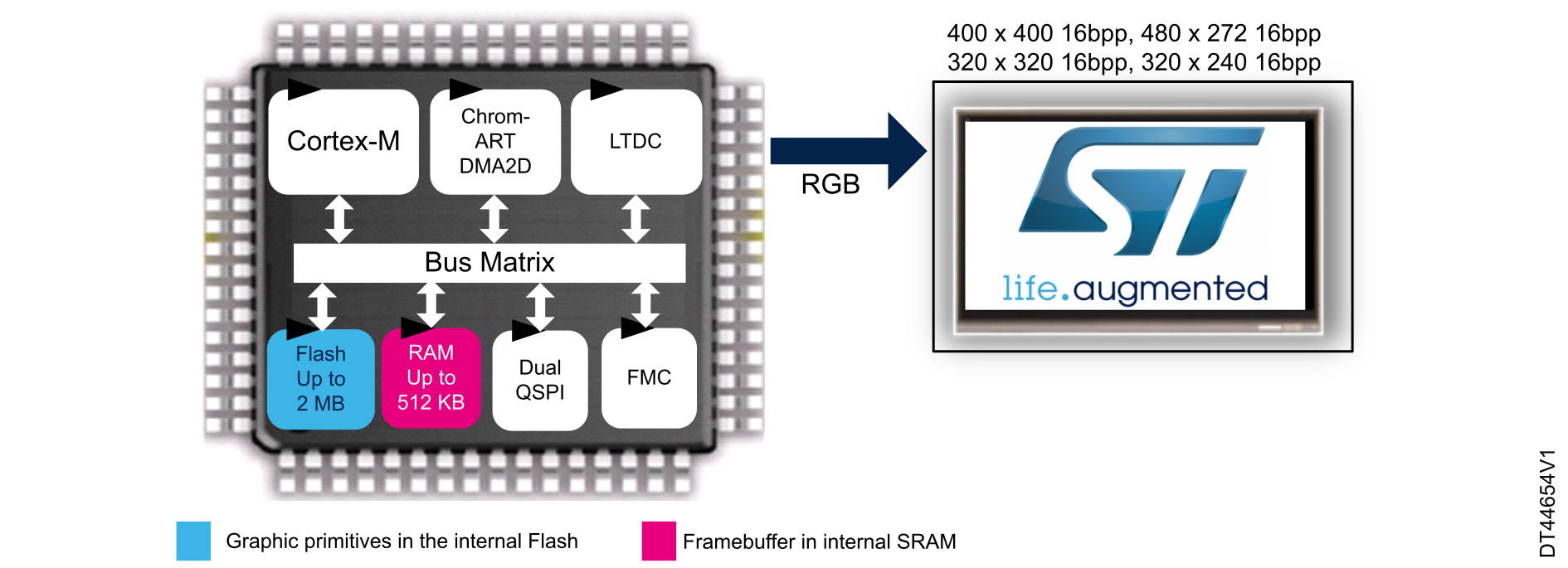
Thanks to their integrated SRAM, the STM32 MCUs can be used for graphic applications, without the need of an external SDRAM/SRAM memory for framebuffer. Also, thanks to their high-size internal flash (up to 2 Mbytes), graphic primitives can be stored in these memories. The use of internal memories allows reduced number of used pins, easy PCB design and cost savings.

In order to use a single-chip MCU for a graphical application, the following hardware configuration can be used:

  • internal flash up to 2 Mbytes, storing user application code and graphic primitives
  • framebuffer located in the internal SRAM

    Depending on the internal SRAM size for each STM32 MCU, the user can interface with a corresponding display size and color depth as illustrated below:

    • STM32F7x7: use SRAM1 (368 Kbytes) to support resolutions 400 x 400 16 bpp (313 Kbytes) or 480 x 272 16 bpp (255 Kbytes)
    • STM32F7x6: use SRAM1 (240 Kbytes) to support 320 x 320 resolution with 16 bpp (200 Kbytes)
    • STM32F469/F479: use SRAM1 (160 Kbytes) to support 320 x 240 resolution with 16 bpp (154 Kbytes)
    • STM32F429/F439: use SRAM1 (112 Kbytes) to support 320 x 240 resolution with 8 bpp (75 Kbytes).
    • STM32 MCU packages: LQFP 100 or TFBGA100

Figure 32 Low-end graphic implementation example illustrates a graphic implementation example, with a single chip and no external memories used.

Figure 32. Low-end graphic implementation example


MCU with external memory

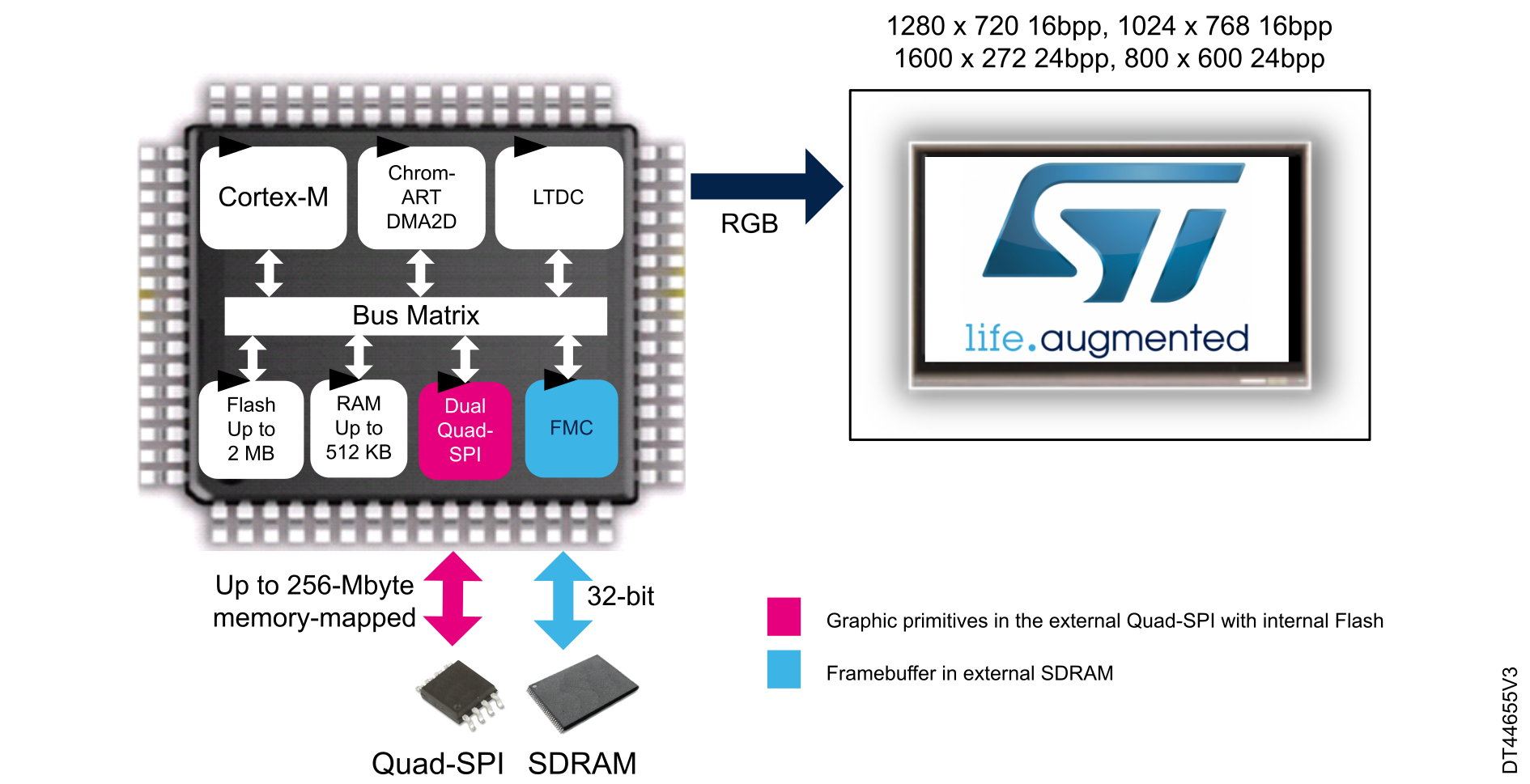
In order to interface with higher resolution displays, an external memory connected to the FMC is needed for framebuffer. An external Quad-SPI flash memory can be used to store graphic primitives.

For mid-end or high-end graphical applications, the following hardware configuration example can be used:

  • external Quad-SPI flash memory with up to 256 Mbytes addressable memory-mapped, used to store graphic primitives
  • external SDRAM 32-bit memory used for framebuffer
  • STM32 MCU packages: UFBGA169, UFBGA176, LQFP 176, LQFP 208, TFBGA216, WLCSP168, and WLCSP180.

Figure 33 High-end graphic implementation example illustrates a graphic implementation example where two external memories are connected to an STM32 MCU, one for the framebuffer and the other for graphic primitives.

Figure 33. High-end graphic implementation example


Table 24 Example of graphic implantations with STM32 in different hardware configurations summarizes an example of graphic implementations in different STM32 hardware configurations.

Table 24. Example of graphic implantations with STM32 in different hardware configurations
VariantDisplay sizeColor depthExternal memory-SDRAMDisplay interfaceSTM32 package1
High-end1280 x 72016bpp32-bitRGB888

UFBGA176
TFBGA216/UFBGA169/
LQFP176/LQFP208
WLCSP180/WLCSP168/UFBGA176 + 25/TFBGA225

1024 x 768
1600 x 27224bpp
800 x 600
Mid-end800 x 60016bpp16-bitRGB666LQFP144/WLCSP143
800 x 48024bpp
640 x 480
400 x 4002
Low-end400 x 40016bppNoRGB666LQFP100/TFBGA100/UFBGA144
480 x 272
320 x 320
320 x 240
1 Package availability of STM32 MCUs embedding LTDC is summarized in Table 21 STM32 packages with LTDC peripheral versus RGB interface availability.
2 400 x 400 and 320 x 320 are specific display resolutions commonly used for smart watches.