NB-IoT Sidekick
Your AI-powered assistant for faster, easier ST87M01 NB-IoT module support
Ask direct questions about the ST87M01 NB-IoT module and quickly find practical guidance from ST resources.
NB-IoT Sidekick helps you navigate technical documentation, evaluation resources, software, reference designs, and connectivity topics without searching across multiple sources.
Use it to move faster from question to answer, while keeping critical design decisions anchored in official ST documentation.
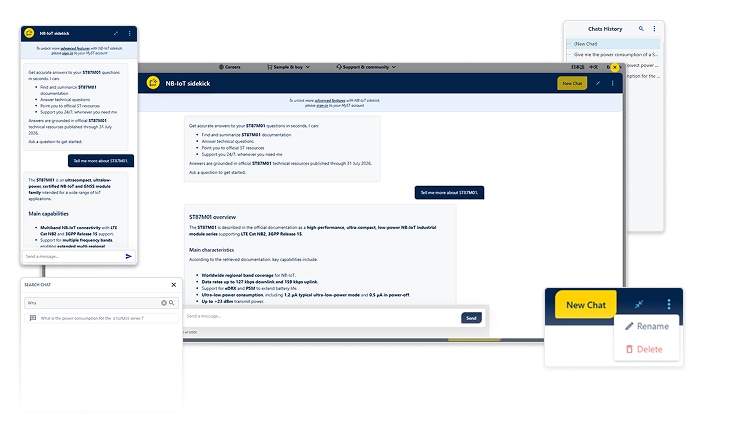
Why use NB-IoT Sidekick

Find product answers: get guidance on ST87M01 features, documentation, and ecosystem resources.

Troubleshoot connectivity: explore NB-IoT behavior, configuration topics, and network-related questions.

Use technical content: summarize documents, extract parameters, and turn complex information into usable answers.

Explore the ecosystem: find guidance on the evaluation kits and boards, reference designs, software resources, documentation, and available technical materials..
Getting started with NB-IoT Sidekick
NB-IoT Sidekick is conversational and easy to use. Ask your question in English or another supported language, and it responds in the same language.

Ask your question: type it in the input area at the bottom of the interface. You can enter up to 50,000 characters.

Add context: include part numbers, keywords, configuration details, or application information.

Review the answer: send the question, then check the response against your design context.
NB-IoT Sidekick is available directly on NB-IoT-related ST web pages. Look for the widget in the bottom-right corner to get started.
Try it now by clicking the widget located in the bottom-right corner of this page.
Sign in to unlock more features
Sign in to your myST account to access additional features, including:
- Chat history
- Chat renaming
- Conversation search
- A consistent experience across browsers
Best practices for better answers
- Be specific: include the ST87M01 module, relevant technical terms, configuration details, and application context.
- Choose the right topic: focus your request on connectivity, documentation, evaluation resources, or software support.
- Ask clearly: request a summary, comparison, troubleshooting help, parameter extraction, or a draft technical response.
- Check critical information: confirm important technical choices against official ST documentation.
- Share feedback: use the thumbs up or thumbs down buttons to help improve future answers.
Important to know
For transparency on AI usage, data handling, and privacy, refer to the ST AI transparency report.
NB-IoT Sidekick answers are based on the information available to it. As ST87M01 resources evolve, the assistant evolves as well.
For the best results, provide precise questions and context. AI-generated answers may occasionally be incomplete
Share your feedback
Help us improve NB-IoT Sidekick by sharing your feedback on the ST Community feedback forum.