STM32 Sidekick
Your AI-powered assistant for faster, smarter STM32 development
Get accurate answers to your STM32-related questions in seconds - without digging through documentation.
Available 24/7, STM32 Sidekick helps you find trusted information faster, reduce research effort, and stay focused on development.
Why use STM32 Sidekick
- Find information faster: Get answers in seconds instead of searching across multiple STM32 resources. STM32 Sidekick helps you quickly locate the information that matters to your task.
- Reduce research effort: Receive personalized answers tailored to your specific STM32 device, challenge, or topic. STM32 Sidekick combines information from multiple STM32 resources, helping you spend less time searching and more time developing.
- Verify answers with trusted sources: Every answer is grounded in official STM32 documentation, including datasheets, reference manuals, application notes, user manuals, wikis, and community knowledge base articles. Answers include citations and links to source documents so you can explore further and validate information when needed.
Get support when you need it: Whether you're evaluating a device, debugging an issue, or learning about a feature, STM32 Sidekick is available 24/7 through st.com and the ST Community.
Getting started with STM32 Sidekick
STM32 Sidekick is simple and conversational. Although the interface is primarily in English, you can ask questions in multiple languages, including Chinese, French, German, Italian, and Japanese, and receive answers in the same language, making STM32 knowledge more accessible to developers worldwide.

Ask your question: Enter your question, challenge, or topic of interest in the input area. You can enter up to 50,000 characters.

Add context: Include the STM32 series, device name, development tool, or application details whenever possible.

Send and Review: Submit your question and review the answer, along with the cited STM32 sources used to generate the response.
What you can ask STM32 Sidekick
Try asking questions such as:
“What are the main differences between STM32U5 and STM32L4?”
“How does the ADC work on STM32G4?”
“Why is my STM32CubeIDE project not detecting the board?”
“Which application note explains low-power modes for STM32L4?”
Access STM32 Sidekick
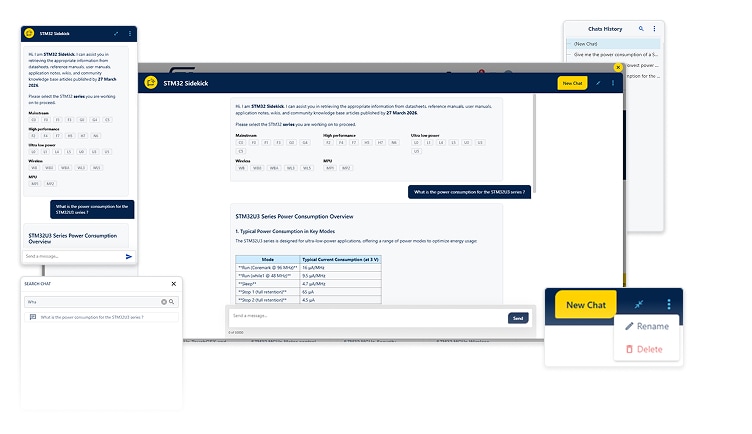
STM32 Sidekick is available directly on STM32 product pages, Developer Zones, support pages, and the STM32 Community. Look for the widget in the bottom-right corner of the page to get started.
Unlock more features
Sign in to your myST account to access additional features, including:
- Chat history
- Chat renaming
- Conversation search
- A consistent experience across browsers
Best practices for better answers
- Be specific: include the STM32 series, device name, peripheral, software tool, or technical challenge you are working on.
- Add relevant context: provide configuration details, application requirements, or development environment information that may help narrow the response.
- Use clear prompts: ask STM32 Sidekick to explain, summarize, compare, troubleshoot, or locate information.
- Validate critical decisions: STM32 Sidekick helps you move faster, but important design decisions should always be verified against the original STM32 documentation.
- Share feedback: use the feedback options provided to help improve future answers.
Important to know
For transparency on AI usage, data handling, and privacy, refer to the ST AI transparency report.
STM32 Sidekick generates answers using official STM32 technical resources. While every effort is made to provide accurate and relevant information, AI-generated responses may occasionally be incomplete or incorrect. Always verify critical information using the cited source documentation.
The more specific your question and context, the more useful and accurate the response is likely to be.
Share your feedback
Have suggestions or found an issue? Share your feedback with the team through the ST Community feedback forum.