
STM32 series supported
Main features
STM32CubeMX is a user-friendly configuration and code generation tool for STM32 microcontrollers and microprocessors. It allows developers to generate optimized project outputs in a fast and effective way.
STM32CubeMX is available in two offerings: STM32CubeMX and STM32CubeMX2, each supporting specific STM32 series.
- Pinout
- Clock
- Peripherals
- Software components
- File generation
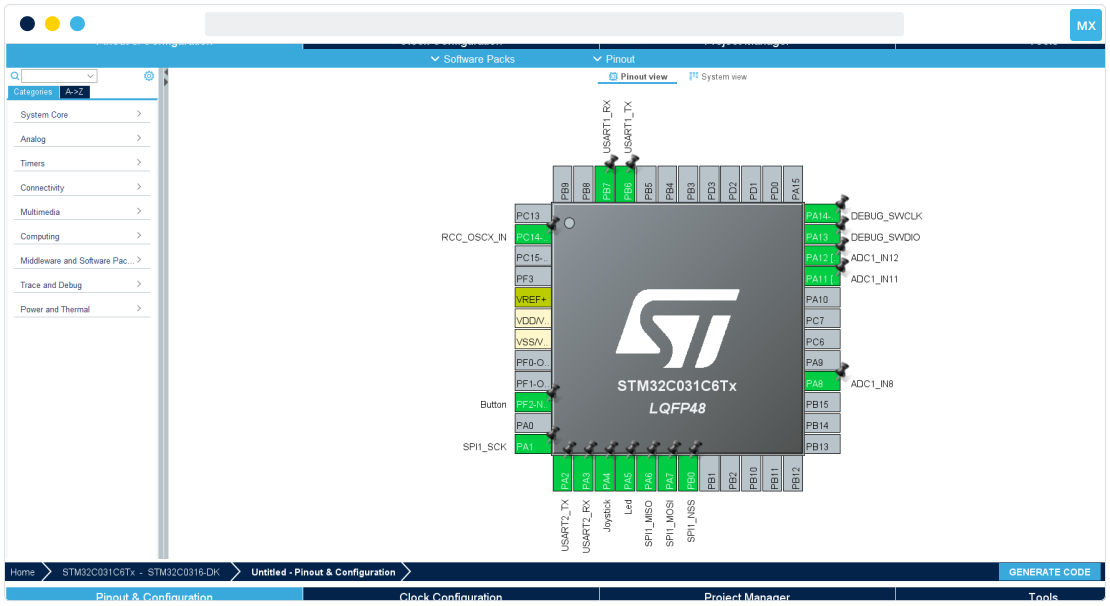
Pinout configuration
Define your pinout configuration for your overall system.
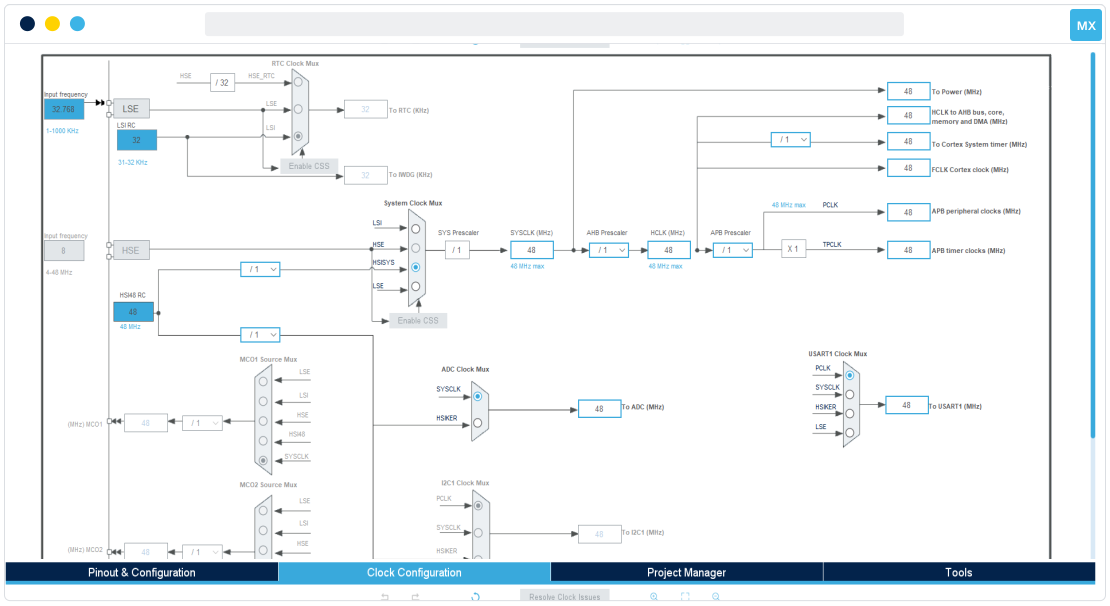
Clock configuration
Visualize the clock tree configuration and use the automatic solver to adapt the clock based on your needs.
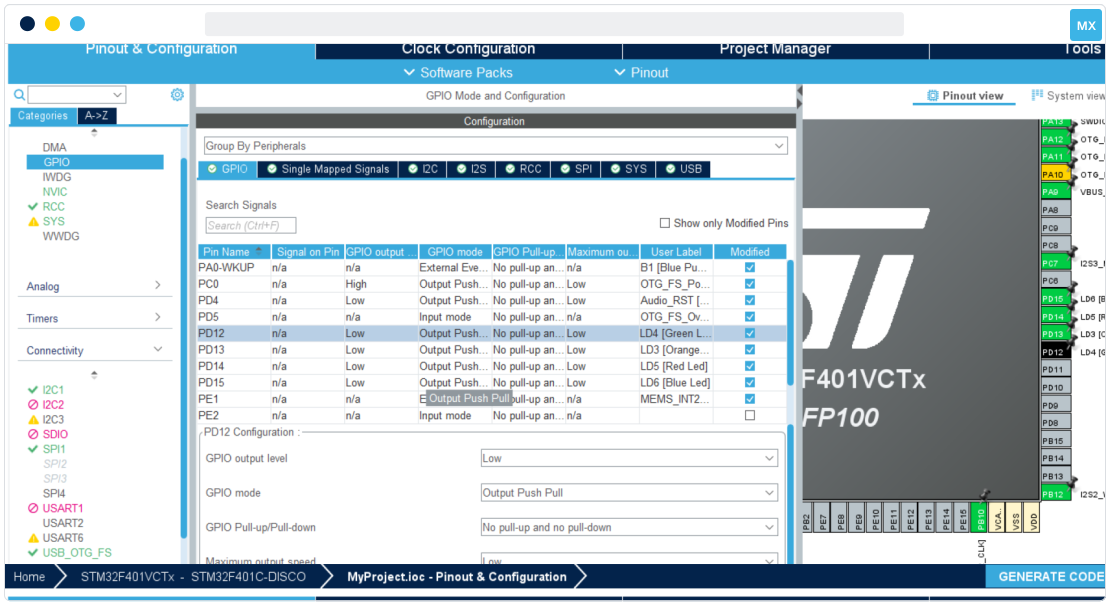
Peripheral configuration
Configure every peripheral for your project initialization while effectively managing hardware resource sharing.
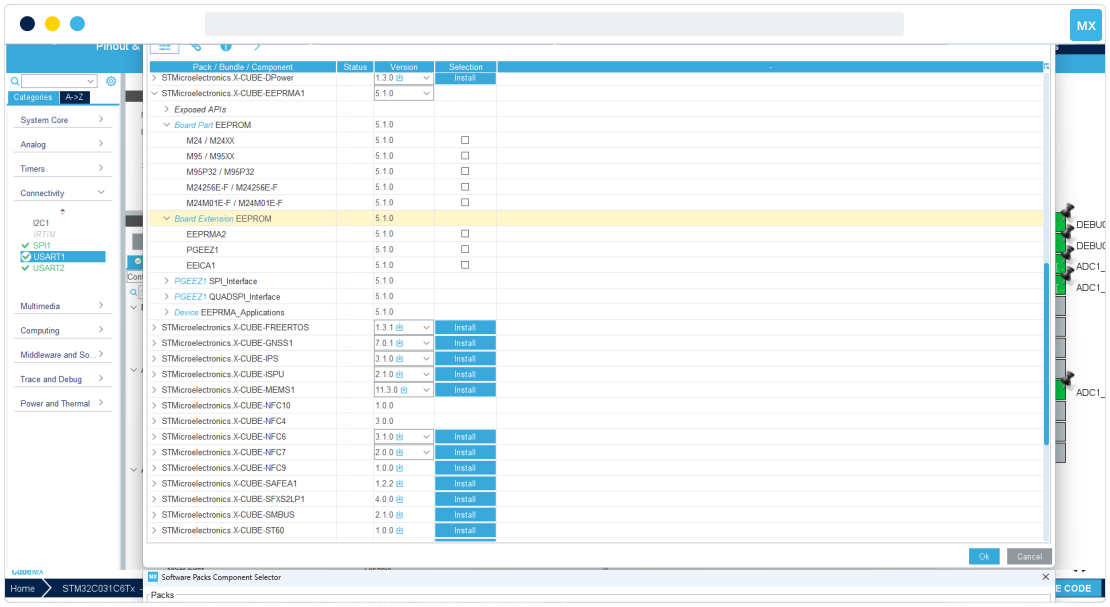
Add software packages
Manage additional software packages and their dependencies. Add them to your project, and configure them just like any other native peripheral or middleware.
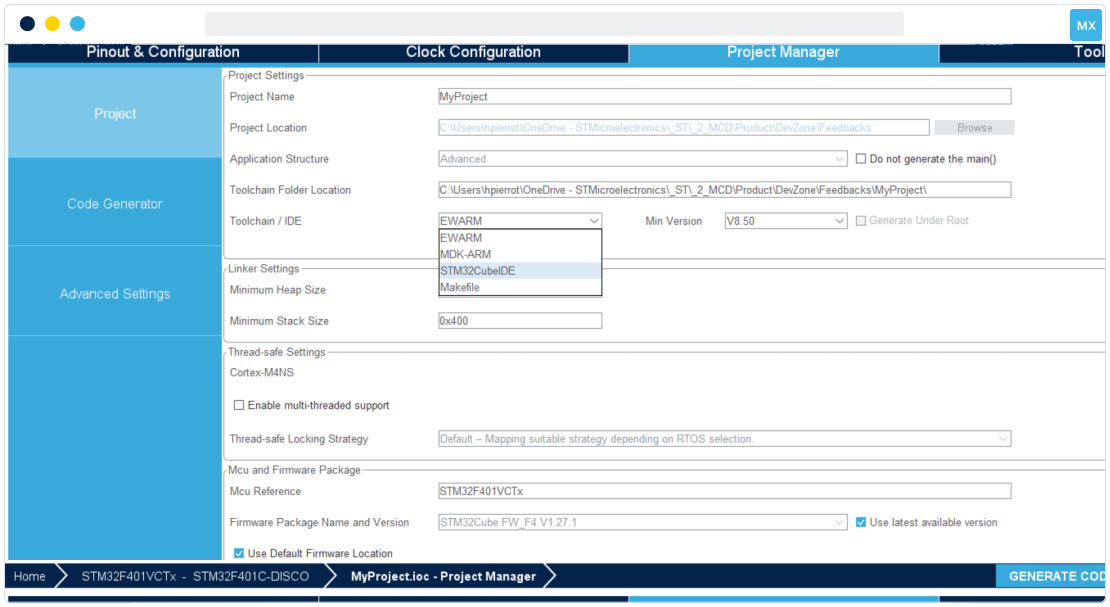
Configure and generate the project
Finetune your project configuration and select your target IDE toolchain. Finally, generate the C code and include all the selected libraries in your project.
- Pinout
- Clock
- Peripherals
- Software components
- File generation
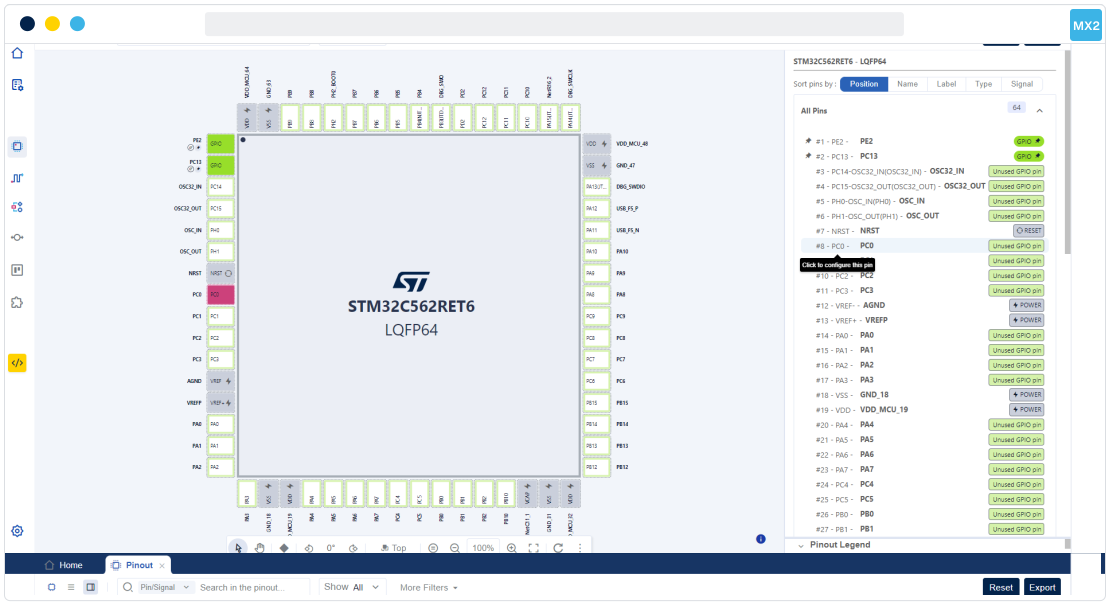
Pinout configuration
Define your pinout configuration for your overall system.
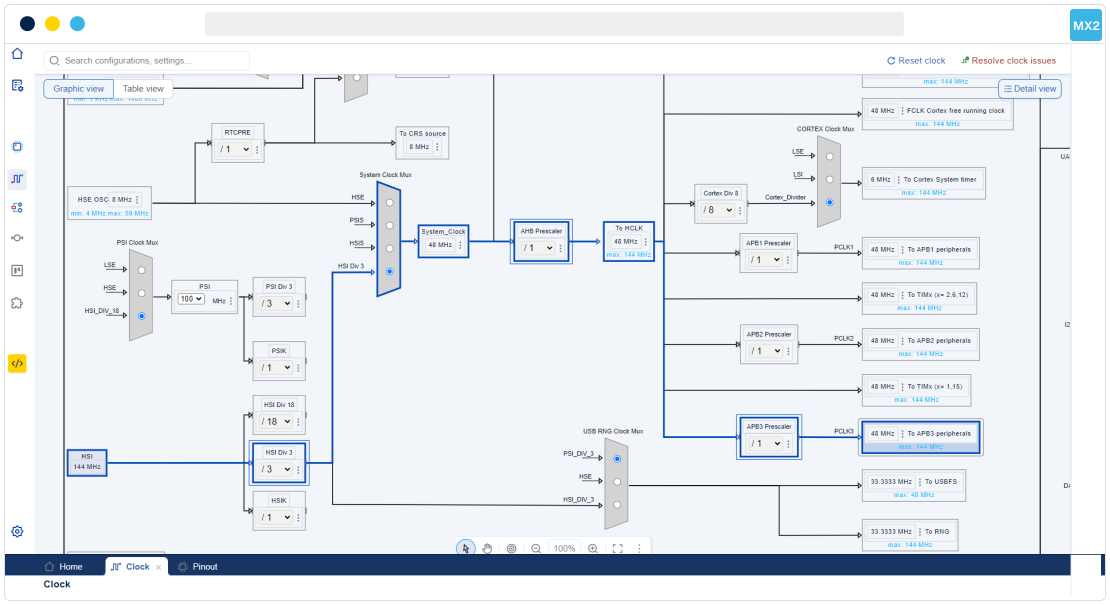
Clock configuration
Visualize the clock tree and its configuration and use the automatic solver to adapt the clock based on your needs.
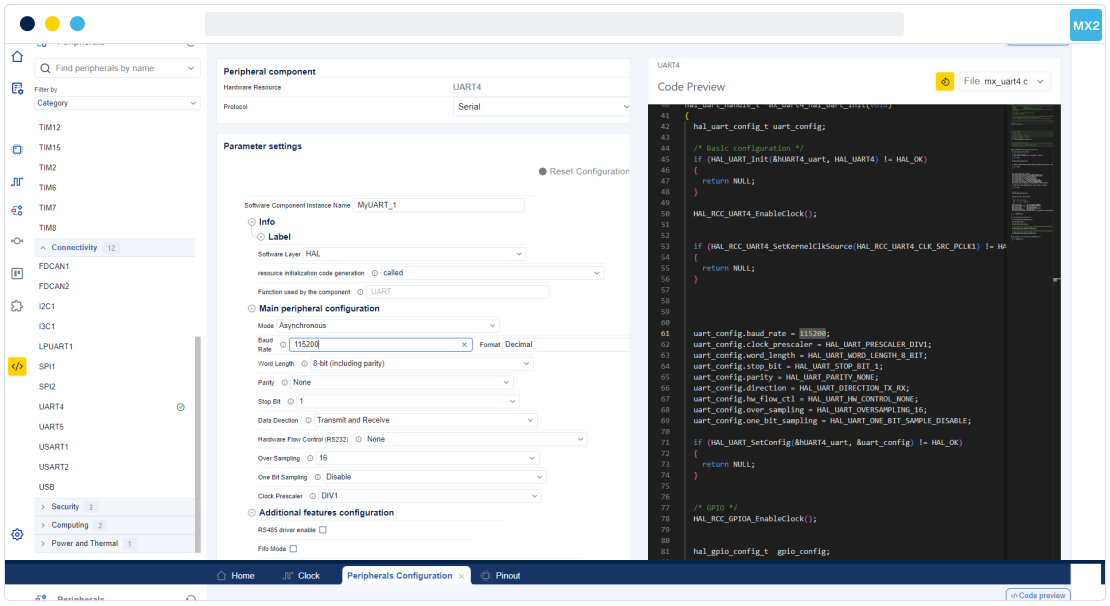
Peripheral configuration
Configure every peripheral for your project initialization while effectively managing hardware resource sharing.
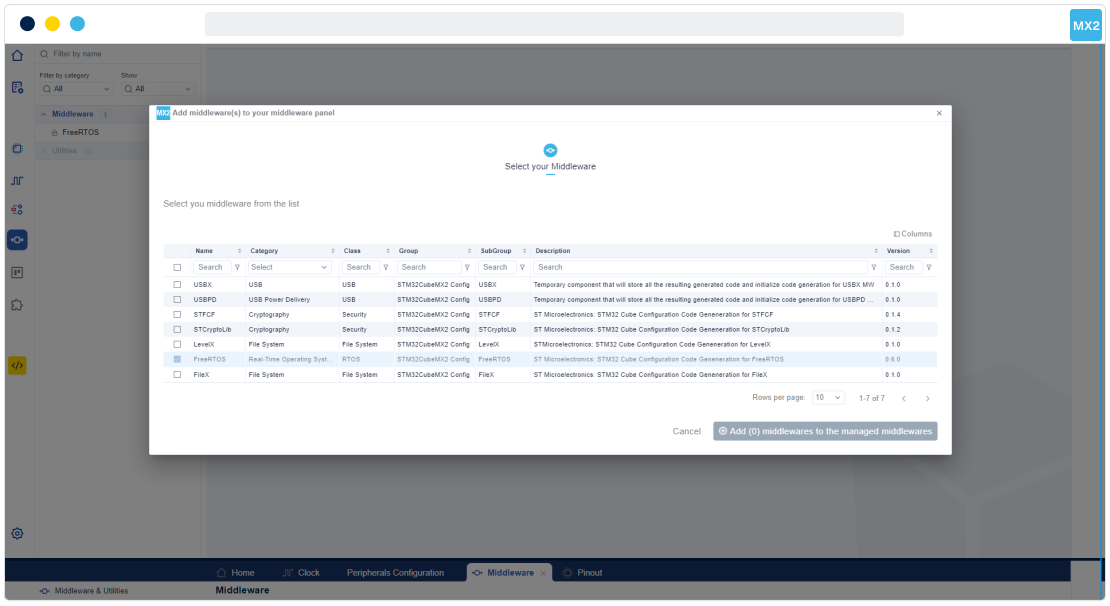
Add software packages
Manage additional software packages and their dependencies. Add them to your project, and configure them just like any other native peripheral or middleware.
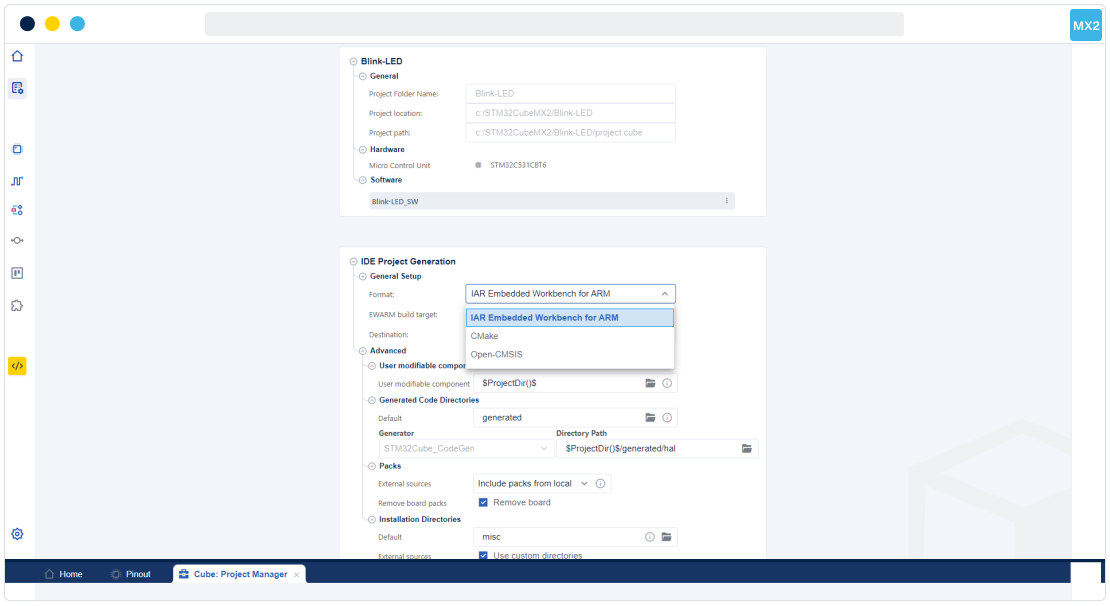
Configure and generate the project
Finetune your project configuration and select your target IDE toolchain. Generate the C code and include all the selected libraries in your project.
Resources to start your project
STM32CubeMX
Something went wrong with the server request. Please try again in a few moments.
If you don't want to login now, you can download the software by simply providing your name and e-mail address in the form below and validating it.
This allows us to stay in contact and inform you about updates of this software.
For subsequent downloads this step will not be required for most of our software.
You’ll receive a clickable email shortly to validate your email and start the download.
This link will be valid for 24 hours.
Please check your spam filters in case you did not receive the e-mail.
You’ll receive a clickable email shortly to validate your email and start the download.
This link will be valid for 24 hours.
Please check your spam filters in case you did not receive the e-mail.
The e-mail that you have entered during the download attempt has not yet been validated.
Please check your inbox for the e-mail with the download link.
In case you did not receive the e-mail, or you entered a wrong e-mail address, you can start-over the process.
For security / validation purposes, all software download requests must originate from a valid email address.
ST.com users may login at this time to begin download. Non-ST.com users may either create an account at this time or enter an email address to receive a download link to the software.
Please log in to MyST or create an account to start the download.


Please create an account to start the download, or continue as a guest.
License Agreement

BY CLICKING ON THE "I ACCEPT" BUTTON OR BY UNZIPPING, INSTALLING, COPYING, DOWNLOADING, ACCESSING OR OTHERWISE USING THIS SOFTWARE PACKAGE OR ANY PART THEREOF, INCLUDING ANY RELATED DOCUMENTATION (collectively the “SOFTWARE PACKAGE”) FROM STMICROELECTRONICS INTERNATIONAL N.V, SWISS BRANCH AND/OR ITS AFFILIATED COMPANIES (collectively "STMICROELECTRONICS”), YOU (hereinafter referred also to as “THE RECIPIENT”), ON BEHALF OF YOURSELF, OR ON BEHALF OF ANY ENTITY BY WHICH YOU ARE EMPLOYED AND/OR ENGAGED, AGREE TO BE BOUND BY THIS AGREEMENT.
Under STMICROELECTRONICS’ intellectual property rights and subject to applicable licensing terms for any third-party software incorporated in the SOFTWARE PACKAGE and applicable Open Source Terms (as defined here below), the redistribution, reproduction and use in source and binary forms of the SOFTWARE PACKAGE or any part thereof, with or without modification, are permitted provided that the following conditions are met:
- Redistribution of source code (modified or not) must retain any copyright notice accompanying the SOFTWARE PACKAGE, this list of conditions and the disclaimer below.
- Redistributions in binary form, except as embedded into a processing unit device manufactured by or for STMicroelectronics or a software update for any such device, must reproduce the accompanying copyright notice, this list of conditions and the below disclaimer in capital type, in the documentation and/or other materials provided with the distribution.
- Neither the name of STMicroelectronics nor the names of other contributors to the SOFTWARE PACKAGE may be used to endorse or promote products derived from the SOFTWARE PACKAGE or part thereof without specific written permission.
- The SOFTWARE PACKAGE or any part thereof, including modifications and/or derivative works of the SOFTWARE PACKAGE, must be used and execute solely and exclusively on or in combination with a processing unit device manufactured by or for STMicroelectronics.
- No use, reproduction or redistribution of the SOFTWARE PACKAGE partially or totally may be done in any manner that would subject the SOFTWARE PACKAGE to any Open Source Terms (as defined below).
- Some portion of the SOFTWARE PACKAGE may contain software subject to Open Source Terms (as defined below) applicable for each such portion (“Open Source Software”), as further specified in the SOFTWARE PACKAGE. Such Open Source Software is supplied under the applicable Open Source Terms and is not subject to the terms and conditions of this AGREEMENT. “Open Source Terms” shall mean any open source license which requires as part of distribution of software that the source code of such software is distributed therewith or otherwise made available, or open source license that substantially complies with the Open Source definition specified at www.opensource.org and any other comparable open source license such as for example GNU General Public License (GPL), Eclipse Public License (EPL), Apache Software License, BSD license and MIT license.
- The SOFTWARE PACKAGE may also include third party software as expressly specified in the SOFTWARE PACKAGE subject to specific license terms from such third parties. Such third-party software is supplied under such specific license terms and is not subject to the terms and conditions of this AGREEMENT. By installing copying, downloading, accessing or otherwise using the SOFTWARE PACKAGE, the RECIPIENT agrees to be bound by such license terms with regard to such third-party software.
- STMicroelectronics has no obligation to provide any maintenance, support or updates for the SOFTWARE PACKAGE.
- The SOFTWARE PACKAGE is and will remain the exclusive property of STMicroelectronics and its licensors. The RECIPIENT will not take any action that jeopardizes STMicroelectronics and its licensors' proprietary rights or acquire any rights in the SOFTWARE PACKAGE, except the limited rights specified hereunder.
- The RECIPIENT shall comply with all applicable laws and regulations affecting the use of the SOFTWARE PACKAGE or any part thereof including any applicable export control law or regulation.
- Redistribution and use of the SOFTWARE PACKAGE partially or any part thereof other than as permitted under this AGREEMENT is void and will automatically terminate RECIPIENT’s rights under this AGREEMENT.
- The RECIPIENT shall be solely liable to determine and verify that the SOFTWARE PACKAGE is fit for the RECIPIENT intended use, environment or application and comply with all regulatory, safety and security related requirements concerning any use.
THE SOFTWARE PACKAGE IS PROVIDED BY STMICROELECTRONICS AND CONTRIBUTORS "AS IS" AND ANY EXPRESS, IMPLIED OR STATUTORY WARRANTIES, INCLUDING, BUT NOT LIMITED TO, THE IMPLIED WARRANTIES OF MERCHANTABILITY, FITNESS FOR A PARTICULAR PURPOSE AND NON-INFRINGEMENT OF THIRD PARTY INTELLECTUAL PROPERTY RIGHTS ARE DISCLAIMED TO THE FULLEST EXTENT PERMITTED BY LAW. IN NO EVENT SHALL STMICROELECTRONICS OR CONTRIBUTORS BE LIABLE FOR ANY DIRECT, INDIRECT, INCIDENTAL, SPECIAL, EXEMPLARY, OR CONSEQUENTIAL DAMAGES (INCLUDING, BUT NOT LIMITED TO, PROCUREMENT OF SUBSTITUTE GOODS OR SERVICES; LOSS OF USE, DATA, OR PROFITS; OR BUSINESS INTERRUPTION) HOWEVER CAUSED AND ON ANY THEORY OF LIABILITY, WHETHER IN CONTRACT, STRICT LIABILITY, OR TORT (INCLUDING NEGLIGENCE OR OTHERWISE) ARISING IN ANY WAY OUT OF THE USE OF THE SOFTWARE PACKAGE, EVEN IF ADVISED OF THE POSSIBILITY OF SUCH DAMAGE.
EXCEPT AS EXPRESSLY PERMITTED HEREUNDER AND SUBJECT TO THE APPLICABLE LICENSING TERMS FOR ANY THIRD-PARTY SOFTWARE INCORPORATED IN THE SOFTWARE PACKAGE AND OPEN SOURCE TERMS AS APPLICABLE, NO LICENSE OR OTHER RIGHTS, WHETHER EXPRESS OR IMPLIED, ARE GRANTED UNDER ANY PATENT OR OTHER INTELLECTUAL PROPERTY RIGHTS OF STMICROELECTRONICS OR ANY THIRD PARTY.

Something went wrong with the server request. Please try again in a few moments.
If you don't want to login now, you can download the software by simply providing your name and e-mail address in the form below and validating it.
This allows us to stay in contact and inform you about updates of this software.
For subsequent downloads this step will not be required for most of our software.
You’ll receive a clickable email shortly to validate your email and start the download.
This link will be valid for 24 hours.
Please check your spam filters in case you did not receive the e-mail.
You’ll receive a clickable email shortly to validate your email and start the download.
This link will be valid for 24 hours.
Please check your spam filters in case you did not receive the e-mail.
The e-mail that you have entered during the download attempt has not yet been validated.
Please check your inbox for the e-mail with the download link.
In case you did not receive the e-mail, or you entered a wrong e-mail address, you can start-over the process.
For security / validation purposes, all software download requests must originate from a valid email address.
ST.com users may login at this time to begin download. Non-ST.com users may either create an account at this time or enter an email address to receive a download link to the software.
Please log in to MyST or create an account to start the download.
Please create an account to start the download, or continue as a guest.
License Agreement
BY CLICKING ON THE "I ACCEPT" BUTTON OR BY UNZIPPING, INSTALLING, COPYING, DOWNLOADING, ACCESSING OR OTHERWISE USING THIS SOFTWARE PACKAGE OR ANY PART THEREOF, INCLUDING ANY RELATED DOCUMENTATION (collectively the “SOFTWARE PACKAGE”) FROM STMICROELECTRONICS INTERNATIONAL N.V, SWISS BRANCH AND/OR ITS AFFILIATED COMPANIES (collectively "STMICROELECTRONICS”), YOU (hereinafter referred also to as “THE RECIPIENT”), ON BEHALF OF YOURSELF, OR ON BEHALF OF ANY ENTITY BY WHICH YOU ARE EMPLOYED AND/OR ENGAGED, AGREE TO BE BOUND BY THIS AGREEMENT.
Under STMICROELECTRONICS’ intellectual property rights and subject to applicable licensing terms for any third-party software incorporated in the SOFTWARE PACKAGE and applicable Open Source Terms (as defined here below), the redistribution, reproduction and use in source and binary forms of the SOFTWARE PACKAGE or any part thereof, with or without modification, are permitted provided that the following conditions are met:
- Redistribution of source code (modified or not) must retain any copyright notice accompanying the SOFTWARE PACKAGE, this list of conditions and the disclaimer below.
- Redistributions in binary form, except as embedded into a processing unit device manufactured by or for STMicroelectronics or a software update for any such device, must reproduce the accompanying copyright notice, this list of conditions and the below disclaimer in capital type, in the documentation and/or other materials provided with the distribution.
- Neither the name of STMicroelectronics nor the names of other contributors to the SOFTWARE PACKAGE may be used to endorse or promote products derived from the SOFTWARE PACKAGE or part thereof without specific written permission.
- The SOFTWARE PACKAGE or any part thereof, including modifications and/or derivative works of the SOFTWARE PACKAGE, must be used and execute solely and exclusively on or in combination with a processing unit device manufactured by or for STMicroelectronics.
- No use, reproduction or redistribution of the SOFTWARE PACKAGE partially or totally may be done in any manner that would subject the SOFTWARE PACKAGE to any Open Source Terms (as defined below).
- Some portion of the SOFTWARE PACKAGE may contain software subject to Open Source Terms (as defined below) applicable for each such portion (“Open Source Software”), as further specified in the SOFTWARE PACKAGE. Such Open Source Software is supplied under the applicable Open Source Terms and is not subject to the terms and conditions of this AGREEMENT. “Open Source Terms” shall mean any open source license which requires as part of distribution of software that the source code of such software is distributed therewith or otherwise made available, or open source license that substantially complies with the Open Source definition specified at www.opensource.org and any other comparable open source license such as for example GNU General Public License (GPL), Eclipse Public License (EPL), Apache Software License, BSD license and MIT license.
- The SOFTWARE PACKAGE may also include third party software as expressly specified in the SOFTWARE PACKAGE subject to specific license terms from such third parties. Such third-party software is supplied under such specific license terms and is not subject to the terms and conditions of this AGREEMENT. By installing copying, downloading, accessing or otherwise using the SOFTWARE PACKAGE, the RECIPIENT agrees to be bound by such license terms with regard to such third-party software.
- STMicroelectronics has no obligation to provide any maintenance, support or updates for the SOFTWARE PACKAGE.
- The SOFTWARE PACKAGE is and will remain the exclusive property of STMicroelectronics and its licensors. The RECIPIENT will not take any action that jeopardizes STMicroelectronics and its licensors' proprietary rights or acquire any rights in the SOFTWARE PACKAGE, except the limited rights specified hereunder.
- The RECIPIENT shall comply with all applicable laws and regulations affecting the use of the SOFTWARE PACKAGE or any part thereof including any applicable export control law or regulation.
- Redistribution and use of the SOFTWARE PACKAGE partially or any part thereof other than as permitted under this AGREEMENT is void and will automatically terminate RECIPIENT’s rights under this AGREEMENT.
- The RECIPIENT shall be solely liable to determine and verify that the SOFTWARE PACKAGE is fit for the RECIPIENT intended use, environment or application and comply with all regulatory, safety and security related requirements concerning any use.
THE SOFTWARE PACKAGE IS PROVIDED BY STMICROELECTRONICS AND CONTRIBUTORS "AS IS" AND ANY EXPRESS, IMPLIED OR STATUTORY WARRANTIES, INCLUDING, BUT NOT LIMITED TO, THE IMPLIED WARRANTIES OF MERCHANTABILITY, FITNESS FOR A PARTICULAR PURPOSE AND NON-INFRINGEMENT OF THIRD PARTY INTELLECTUAL PROPERTY RIGHTS ARE DISCLAIMED TO THE FULLEST EXTENT PERMITTED BY LAW. IN NO EVENT SHALL STMICROELECTRONICS OR CONTRIBUTORS BE LIABLE FOR ANY DIRECT, INDIRECT, INCIDENTAL, SPECIAL, EXEMPLARY, OR CONSEQUENTIAL DAMAGES (INCLUDING, BUT NOT LIMITED TO, PROCUREMENT OF SUBSTITUTE GOODS OR SERVICES; LOSS OF USE, DATA, OR PROFITS; OR BUSINESS INTERRUPTION) HOWEVER CAUSED AND ON ANY THEORY OF LIABILITY, WHETHER IN CONTRACT, STRICT LIABILITY, OR TORT (INCLUDING NEGLIGENCE OR OTHERWISE) ARISING IN ANY WAY OUT OF THE USE OF THE SOFTWARE PACKAGE, EVEN IF ADVISED OF THE POSSIBILITY OF SUCH DAMAGE.
EXCEPT AS EXPRESSLY PERMITTED HEREUNDER AND SUBJECT TO THE APPLICABLE LICENSING TERMS FOR ANY THIRD-PARTY SOFTWARE INCORPORATED IN THE SOFTWARE PACKAGE AND OPEN SOURCE TERMS AS APPLICABLE, NO LICENSE OR OTHER RIGHTS, WHETHER EXPRESS OR IMPLIED, ARE GRANTED UNDER ANY PATENT OR OTHER INTELLECTUAL PROPERTY RIGHTS OF STMICROELECTRONICS OR ANY THIRD PARTY.
Something went wrong with the server request. Please try again in a few moments.
If you don't want to login now, you can download the software by simply providing your name and e-mail address in the form below and validating it.
This allows us to stay in contact and inform you about updates of this software.
For subsequent downloads this step will not be required for most of our software.
You’ll receive a clickable email shortly to validate your email and start the download.
This link will be valid for 24 hours.
Please check your spam filters in case you did not receive the e-mail.
You’ll receive a clickable email shortly to validate your email and start the download.
This link will be valid for 24 hours.
Please check your spam filters in case you did not receive the e-mail.
The e-mail that you have entered during the download attempt has not yet been validated.
Please check your inbox for the e-mail with the download link.
In case you did not receive the e-mail, or you entered a wrong e-mail address, you can start-over the process.
For security / validation purposes, all software download requests must originate from a valid email address.
ST.com users may login at this time to begin download. Non-ST.com users may either create an account at this time or enter an email address to receive a download link to the software.
Please log in to MyST or create an account to start the download.
Please create an account to start the download, or continue as a guest.
License Agreement
BY CLICKING ON THE "I ACCEPT" BUTTON OR BY UNZIPPING, INSTALLING, COPYING, DOWNLOADING, ACCESSING OR OTHERWISE USING THIS SOFTWARE PACKAGE OR ANY PART THEREOF, INCLUDING ANY RELATED DOCUMENTATION (collectively the “SOFTWARE PACKAGE”) FROM STMICROELECTRONICS INTERNATIONAL N.V, SWISS BRANCH AND/OR ITS AFFILIATED COMPANIES (collectively "STMICROELECTRONICS”), YOU (hereinafter referred also to as “THE RECIPIENT”), ON BEHALF OF YOURSELF, OR ON BEHALF OF ANY ENTITY BY WHICH YOU ARE EMPLOYED AND/OR ENGAGED, AGREE TO BE BOUND BY THIS AGREEMENT.
Under STMICROELECTRONICS’ intellectual property rights and subject to applicable licensing terms for any third-party software incorporated in the SOFTWARE PACKAGE and applicable Open Source Terms (as defined here below), the redistribution, reproduction and use in source and binary forms of the SOFTWARE PACKAGE or any part thereof, with or without modification, are permitted provided that the following conditions are met:
- Redistribution of source code (modified or not) must retain any copyright notice accompanying the SOFTWARE PACKAGE, this list of conditions and the disclaimer below.
- Redistributions in binary form, except as embedded into a processing unit device manufactured by or for STMicroelectronics or a software update for any such device, must reproduce the accompanying copyright notice, this list of conditions and the below disclaimer in capital type, in the documentation and/or other materials provided with the distribution.
- Neither the name of STMicroelectronics nor the names of other contributors to the SOFTWARE PACKAGE may be used to endorse or promote products derived from the SOFTWARE PACKAGE or part thereof without specific written permission.
- The SOFTWARE PACKAGE or any part thereof, including modifications and/or derivative works of the SOFTWARE PACKAGE, must be used and execute solely and exclusively on or in combination with a processing unit device manufactured by or for STMicroelectronics.
- No use, reproduction or redistribution of the SOFTWARE PACKAGE partially or totally may be done in any manner that would subject the SOFTWARE PACKAGE to any Open Source Terms (as defined below).
- Some portion of the SOFTWARE PACKAGE may contain software subject to Open Source Terms (as defined below) applicable for each such portion (“Open Source Software”), as further specified in the SOFTWARE PACKAGE. Such Open Source Software is supplied under the applicable Open Source Terms and is not subject to the terms and conditions of this AGREEMENT. “Open Source Terms” shall mean any open source license which requires as part of distribution of software that the source code of such software is distributed therewith or otherwise made available, or open source license that substantially complies with the Open Source definition specified at www.opensource.org and any other comparable open source license such as for example GNU General Public License (GPL), Eclipse Public License (EPL), Apache Software License, BSD license and MIT license.
- The SOFTWARE PACKAGE may also include third party software as expressly specified in the SOFTWARE PACKAGE subject to specific license terms from such third parties. Such third-party software is supplied under such specific license terms and is not subject to the terms and conditions of this AGREEMENT. By installing copying, downloading, accessing or otherwise using the SOFTWARE PACKAGE, the RECIPIENT agrees to be bound by such license terms with regard to such third-party software.
- STMicroelectronics has no obligation to provide any maintenance, support or updates for the SOFTWARE PACKAGE.
- The SOFTWARE PACKAGE is and will remain the exclusive property of STMicroelectronics and its licensors. The RECIPIENT will not take any action that jeopardizes STMicroelectronics and its licensors' proprietary rights or acquire any rights in the SOFTWARE PACKAGE, except the limited rights specified hereunder.
- The RECIPIENT shall comply with all applicable laws and regulations affecting the use of the SOFTWARE PACKAGE or any part thereof including any applicable export control law or regulation.
- Redistribution and use of the SOFTWARE PACKAGE partially or any part thereof other than as permitted under this AGREEMENT is void and will automatically terminate RECIPIENT’s rights under this AGREEMENT.
- The RECIPIENT shall be solely liable to determine and verify that the SOFTWARE PACKAGE is fit for the RECIPIENT intended use, environment or application and comply with all regulatory, safety and security related requirements concerning any use.
THE SOFTWARE PACKAGE IS PROVIDED BY STMICROELECTRONICS AND CONTRIBUTORS "AS IS" AND ANY EXPRESS, IMPLIED OR STATUTORY WARRANTIES, INCLUDING, BUT NOT LIMITED TO, THE IMPLIED WARRANTIES OF MERCHANTABILITY, FITNESS FOR A PARTICULAR PURPOSE AND NON-INFRINGEMENT OF THIRD PARTY INTELLECTUAL PROPERTY RIGHTS ARE DISCLAIMED TO THE FULLEST EXTENT PERMITTED BY LAW. IN NO EVENT SHALL STMICROELECTRONICS OR CONTRIBUTORS BE LIABLE FOR ANY DIRECT, INDIRECT, INCIDENTAL, SPECIAL, EXEMPLARY, OR CONSEQUENTIAL DAMAGES (INCLUDING, BUT NOT LIMITED TO, PROCUREMENT OF SUBSTITUTE GOODS OR SERVICES; LOSS OF USE, DATA, OR PROFITS; OR BUSINESS INTERRUPTION) HOWEVER CAUSED AND ON ANY THEORY OF LIABILITY, WHETHER IN CONTRACT, STRICT LIABILITY, OR TORT (INCLUDING NEGLIGENCE OR OTHERWISE) ARISING IN ANY WAY OUT OF THE USE OF THE SOFTWARE PACKAGE, EVEN IF ADVISED OF THE POSSIBILITY OF SUCH DAMAGE.
EXCEPT AS EXPRESSLY PERMITTED HEREUNDER AND SUBJECT TO THE APPLICABLE LICENSING TERMS FOR ANY THIRD-PARTY SOFTWARE INCORPORATED IN THE SOFTWARE PACKAGE AND OPEN SOURCE TERMS AS APPLICABLE, NO LICENSE OR OTHER RIGHTS, WHETHER EXPRESS OR IMPLIED, ARE GRANTED UNDER ANY PATENT OR OTHER INTELLECTUAL PROPERTY RIGHTS OF STMICROELECTRONICS OR ANY THIRD PARTY.
Something went wrong with the server request. Please try again in a few moments.
If you don't want to login now, you can download the software by simply providing your name and e-mail address in the form below and validating it.
This allows us to stay in contact and inform you about updates of this software.
For subsequent downloads this step will not be required for most of our software.
You’ll receive a clickable email shortly to validate your email and start the download.
This link will be valid for 24 hours.
Please check your spam filters in case you did not receive the e-mail.
You’ll receive a clickable email shortly to validate your email and start the download.
This link will be valid for 24 hours.
Please check your spam filters in case you did not receive the e-mail.
The e-mail that you have entered during the download attempt has not yet been validated.
Please check your inbox for the e-mail with the download link.
In case you did not receive the e-mail, or you entered a wrong e-mail address, you can start-over the process.
For security / validation purposes, all software download requests must originate from a valid email address.
ST.com users may login at this time to begin download. Non-ST.com users may either create an account at this time or enter an email address to receive a download link to the software.
Please log in to MyST or create an account to start the download.
Please create an account to start the download, or continue as a guest.
License Agreement
BY CLICKING ON THE "I ACCEPT" BUTTON OR BY UNZIPPING, INSTALLING, COPYING, DOWNLOADING, ACCESSING OR OTHERWISE USING THIS SOFTWARE PACKAGE OR ANY PART THEREOF, INCLUDING ANY RELATED DOCUMENTATION (collectively the “SOFTWARE PACKAGE”) FROM STMICROELECTRONICS INTERNATIONAL N.V, SWISS BRANCH AND/OR ITS AFFILIATED COMPANIES (collectively "STMICROELECTRONICS”), YOU (hereinafter referred also to as “THE RECIPIENT”), ON BEHALF OF YOURSELF, OR ON BEHALF OF ANY ENTITY BY WHICH YOU ARE EMPLOYED AND/OR ENGAGED, AGREE TO BE BOUND BY THIS AGREEMENT.
Under STMICROELECTRONICS’ intellectual property rights and subject to applicable licensing terms for any third-party software incorporated in the SOFTWARE PACKAGE and applicable Open Source Terms (as defined here below), the redistribution, reproduction and use in source and binary forms of the SOFTWARE PACKAGE or any part thereof, with or without modification, are permitted provided that the following conditions are met:
- Redistribution of source code (modified or not) must retain any copyright notice accompanying the SOFTWARE PACKAGE, this list of conditions and the disclaimer below.
- Redistributions in binary form, except as embedded into a processing unit device manufactured by or for STMicroelectronics or a software update for any such device, must reproduce the accompanying copyright notice, this list of conditions and the below disclaimer in capital type, in the documentation and/or other materials provided with the distribution.
- Neither the name of STMicroelectronics nor the names of other contributors to the SOFTWARE PACKAGE may be used to endorse or promote products derived from the SOFTWARE PACKAGE or part thereof without specific written permission.
- The SOFTWARE PACKAGE or any part thereof, including modifications and/or derivative works of the SOFTWARE PACKAGE, must be used and execute solely and exclusively on or in combination with a processing unit device manufactured by or for STMicroelectronics.
- No use, reproduction or redistribution of the SOFTWARE PACKAGE partially or totally may be done in any manner that would subject the SOFTWARE PACKAGE to any Open Source Terms (as defined below).
- Some portion of the SOFTWARE PACKAGE may contain software subject to Open Source Terms (as defined below) applicable for each such portion (“Open Source Software”), as further specified in the SOFTWARE PACKAGE. Such Open Source Software is supplied under the applicable Open Source Terms and is not subject to the terms and conditions of this AGREEMENT. “Open Source Terms” shall mean any open source license which requires as part of distribution of software that the source code of such software is distributed therewith or otherwise made available, or open source license that substantially complies with the Open Source definition specified at www.opensource.org and any other comparable open source license such as for example GNU General Public License (GPL), Eclipse Public License (EPL), Apache Software License, BSD license and MIT license.
- The SOFTWARE PACKAGE may also include third party software as expressly specified in the SOFTWARE PACKAGE subject to specific license terms from such third parties. Such third-party software is supplied under such specific license terms and is not subject to the terms and conditions of this AGREEMENT. By installing copying, downloading, accessing or otherwise using the SOFTWARE PACKAGE, the RECIPIENT agrees to be bound by such license terms with regard to such third-party software.
- STMicroelectronics has no obligation to provide any maintenance, support or updates for the SOFTWARE PACKAGE.
- The SOFTWARE PACKAGE is and will remain the exclusive property of STMicroelectronics and its licensors. The RECIPIENT will not take any action that jeopardizes STMicroelectronics and its licensors' proprietary rights or acquire any rights in the SOFTWARE PACKAGE, except the limited rights specified hereunder.
- The RECIPIENT shall comply with all applicable laws and regulations affecting the use of the SOFTWARE PACKAGE or any part thereof including any applicable export control law or regulation.
- Redistribution and use of the SOFTWARE PACKAGE partially or any part thereof other than as permitted under this AGREEMENT is void and will automatically terminate RECIPIENT’s rights under this AGREEMENT.
- The RECIPIENT shall be solely liable to determine and verify that the SOFTWARE PACKAGE is fit for the RECIPIENT intended use, environment or application and comply with all regulatory, safety and security related requirements concerning any use.
THE SOFTWARE PACKAGE IS PROVIDED BY STMICROELECTRONICS AND CONTRIBUTORS "AS IS" AND ANY EXPRESS, IMPLIED OR STATUTORY WARRANTIES, INCLUDING, BUT NOT LIMITED TO, THE IMPLIED WARRANTIES OF MERCHANTABILITY, FITNESS FOR A PARTICULAR PURPOSE AND NON-INFRINGEMENT OF THIRD PARTY INTELLECTUAL PROPERTY RIGHTS ARE DISCLAIMED TO THE FULLEST EXTENT PERMITTED BY LAW. IN NO EVENT SHALL STMICROELECTRONICS OR CONTRIBUTORS BE LIABLE FOR ANY DIRECT, INDIRECT, INCIDENTAL, SPECIAL, EXEMPLARY, OR CONSEQUENTIAL DAMAGES (INCLUDING, BUT NOT LIMITED TO, PROCUREMENT OF SUBSTITUTE GOODS OR SERVICES; LOSS OF USE, DATA, OR PROFITS; OR BUSINESS INTERRUPTION) HOWEVER CAUSED AND ON ANY THEORY OF LIABILITY, WHETHER IN CONTRACT, STRICT LIABILITY, OR TORT (INCLUDING NEGLIGENCE OR OTHERWISE) ARISING IN ANY WAY OUT OF THE USE OF THE SOFTWARE PACKAGE, EVEN IF ADVISED OF THE POSSIBILITY OF SUCH DAMAGE.
EXCEPT AS EXPRESSLY PERMITTED HEREUNDER AND SUBJECT TO THE APPLICABLE LICENSING TERMS FOR ANY THIRD-PARTY SOFTWARE INCORPORATED IN THE SOFTWARE PACKAGE AND OPEN SOURCE TERMS AS APPLICABLE, NO LICENSE OR OTHER RIGHTS, WHETHER EXPRESS OR IMPLIED, ARE GRANTED UNDER ANY PATENT OR OTHER INTELLECTUAL PROPERTY RIGHTS OF STMICROELECTRONICS OR ANY THIRD PARTY.
Something went wrong with the server request. Please try again in a few moments.
If you don't want to login now, you can download the software by simply providing your name and e-mail address in the form below and validating it.
This allows us to stay in contact and inform you about updates of this software.
For subsequent downloads this step will not be required for most of our software.
You’ll receive a clickable email shortly to validate your email and start the download.
This link will be valid for 24 hours.
Please check your spam filters in case you did not receive the e-mail.
You’ll receive a clickable email shortly to validate your email and start the download.
This link will be valid for 24 hours.
Please check your spam filters in case you did not receive the e-mail.
The e-mail that you have entered during the download attempt has not yet been validated.
Please check your inbox for the e-mail with the download link.
In case you did not receive the e-mail, or you entered a wrong e-mail address, you can start-over the process.
For security / validation purposes, all software download requests must originate from a valid email address.
ST.com users may login at this time to begin download. Non-ST.com users may either create an account at this time or enter an email address to receive a download link to the software.
Please log in to MyST or create an account to start the download.
Please create an account to start the download, or continue as a guest.
License Agreement
BY CLICKING ON THE "I ACCEPT" BUTTON OR BY UNZIPPING, INSTALLING, COPYING, DOWNLOADING, ACCESSING OR OTHERWISE USING THIS SOFTWARE PACKAGE OR ANY PART THEREOF, INCLUDING ANY RELATED DOCUMENTATION (collectively the “SOFTWARE PACKAGE”) FROM STMICROELECTRONICS INTERNATIONAL N.V, SWISS BRANCH AND/OR ITS AFFILIATED COMPANIES (collectively "STMICROELECTRONICS”), YOU (hereinafter referred also to as “THE RECIPIENT”), ON BEHALF OF YOURSELF, OR ON BEHALF OF ANY ENTITY BY WHICH YOU ARE EMPLOYED AND/OR ENGAGED, AGREE TO BE BOUND BY THIS AGREEMENT.
Under STMICROELECTRONICS’ intellectual property rights and subject to applicable licensing terms for any third-party software incorporated in the SOFTWARE PACKAGE and applicable Open Source Terms (as defined here below), the redistribution, reproduction and use in source and binary forms of the SOFTWARE PACKAGE or any part thereof, with or without modification, are permitted provided that the following conditions are met:
- Redistribution of source code (modified or not) must retain any copyright notice accompanying the SOFTWARE PACKAGE, this list of conditions and the disclaimer below.
- Redistributions in binary form, except as embedded into a processing unit device manufactured by or for STMicroelectronics or a software update for any such device, must reproduce the accompanying copyright notice, this list of conditions and the below disclaimer in capital type, in the documentation and/or other materials provided with the distribution.
- Neither the name of STMicroelectronics nor the names of other contributors to the SOFTWARE PACKAGE may be used to endorse or promote products derived from the SOFTWARE PACKAGE or part thereof without specific written permission.
- The SOFTWARE PACKAGE or any part thereof, including modifications and/or derivative works of the SOFTWARE PACKAGE, must be used and execute solely and exclusively on or in combination with a processing unit device manufactured by or for STMicroelectronics.
- No use, reproduction or redistribution of the SOFTWARE PACKAGE partially or totally may be done in any manner that would subject the SOFTWARE PACKAGE to any Open Source Terms (as defined below).
- Some portion of the SOFTWARE PACKAGE may contain software subject to Open Source Terms (as defined below) applicable for each such portion (“Open Source Software”), as further specified in the SOFTWARE PACKAGE. Such Open Source Software is supplied under the applicable Open Source Terms and is not subject to the terms and conditions of this AGREEMENT. “Open Source Terms” shall mean any open source license which requires as part of distribution of software that the source code of such software is distributed therewith or otherwise made available, or open source license that substantially complies with the Open Source definition specified at www.opensource.org and any other comparable open source license such as for example GNU General Public License (GPL), Eclipse Public License (EPL), Apache Software License, BSD license and MIT license.
- The SOFTWARE PACKAGE may also include third party software as expressly specified in the SOFTWARE PACKAGE subject to specific license terms from such third parties. Such third-party software is supplied under such specific license terms and is not subject to the terms and conditions of this AGREEMENT. By installing copying, downloading, accessing or otherwise using the SOFTWARE PACKAGE, the RECIPIENT agrees to be bound by such license terms with regard to such third-party software.
- STMicroelectronics has no obligation to provide any maintenance, support or updates for the SOFTWARE PACKAGE.
- The SOFTWARE PACKAGE is and will remain the exclusive property of STMicroelectronics and its licensors. The RECIPIENT will not take any action that jeopardizes STMicroelectronics and its licensors' proprietary rights or acquire any rights in the SOFTWARE PACKAGE, except the limited rights specified hereunder.
- The RECIPIENT shall comply with all applicable laws and regulations affecting the use of the SOFTWARE PACKAGE or any part thereof including any applicable export control law or regulation.
- Redistribution and use of the SOFTWARE PACKAGE partially or any part thereof other than as permitted under this AGREEMENT is void and will automatically terminate RECIPIENT’s rights under this AGREEMENT.
- The RECIPIENT shall be solely liable to determine and verify that the SOFTWARE PACKAGE is fit for the RECIPIENT intended use, environment or application and comply with all regulatory, safety and security related requirements concerning any use.
THE SOFTWARE PACKAGE IS PROVIDED BY STMICROELECTRONICS AND CONTRIBUTORS "AS IS" AND ANY EXPRESS, IMPLIED OR STATUTORY WARRANTIES, INCLUDING, BUT NOT LIMITED TO, THE IMPLIED WARRANTIES OF MERCHANTABILITY, FITNESS FOR A PARTICULAR PURPOSE AND NON-INFRINGEMENT OF THIRD PARTY INTELLECTUAL PROPERTY RIGHTS ARE DISCLAIMED TO THE FULLEST EXTENT PERMITTED BY LAW. IN NO EVENT SHALL STMICROELECTRONICS OR CONTRIBUTORS BE LIABLE FOR ANY DIRECT, INDIRECT, INCIDENTAL, SPECIAL, EXEMPLARY, OR CONSEQUENTIAL DAMAGES (INCLUDING, BUT NOT LIMITED TO, PROCUREMENT OF SUBSTITUTE GOODS OR SERVICES; LOSS OF USE, DATA, OR PROFITS; OR BUSINESS INTERRUPTION) HOWEVER CAUSED AND ON ANY THEORY OF LIABILITY, WHETHER IN CONTRACT, STRICT LIABILITY, OR TORT (INCLUDING NEGLIGENCE OR OTHERWISE) ARISING IN ANY WAY OUT OF THE USE OF THE SOFTWARE PACKAGE, EVEN IF ADVISED OF THE POSSIBILITY OF SUCH DAMAGE.
EXCEPT AS EXPRESSLY PERMITTED HEREUNDER AND SUBJECT TO THE APPLICABLE LICENSING TERMS FOR ANY THIRD-PARTY SOFTWARE INCORPORATED IN THE SOFTWARE PACKAGE AND OPEN SOURCE TERMS AS APPLICABLE, NO LICENSE OR OTHER RIGHTS, WHETHER EXPRESS OR IMPLIED, ARE GRANTED UNDER ANY PATENT OR OTHER INTELLECTUAL PROPERTY RIGHTS OF STMICROELECTRONICS OR ANY THIRD PARTY.
Something went wrong with the server request. Please try again in a few moments.
If you don't want to login now, you can download the software by simply providing your name and e-mail address in the form below and validating it.
This allows us to stay in contact and inform you about updates of this software.
For subsequent downloads this step will not be required for most of our software.
You’ll receive a clickable email shortly to validate your email and start the download.
This link will be valid for 24 hours.
Please check your spam filters in case you did not receive the e-mail.
You’ll receive a clickable email shortly to validate your email and start the download.
This link will be valid for 24 hours.
Please check your spam filters in case you did not receive the e-mail.
The e-mail that you have entered during the download attempt has not yet been validated.
Please check your inbox for the e-mail with the download link.
In case you did not receive the e-mail, or you entered a wrong e-mail address, you can start-over the process.
For security / validation purposes, all software download requests must originate from a valid email address.
ST.com users may login at this time to begin download. Non-ST.com users may either create an account at this time or enter an email address to receive a download link to the software.
Please log in to MyST or create an account to start the download.
Please create an account to start the download, or continue as a guest.
License Agreement
BY CLICKING ON THE "I ACCEPT" BUTTON OR BY UNZIPPING, INSTALLING, COPYING, DOWNLOADING, ACCESSING OR OTHERWISE USING THIS SOFTWARE PACKAGE OR ANY PART THEREOF, INCLUDING ANY RELATED DOCUMENTATION (collectively the “SOFTWARE PACKAGE”) FROM STMICROELECTRONICS INTERNATIONAL N.V, SWISS BRANCH AND/OR ITS AFFILIATED COMPANIES (collectively "STMICROELECTRONICS”), YOU (hereinafter referred also to as “THE RECIPIENT”), ON BEHALF OF YOURSELF, OR ON BEHALF OF ANY ENTITY BY WHICH YOU ARE EMPLOYED AND/OR ENGAGED, AGREE TO BE BOUND BY THIS AGREEMENT.
Under STMICROELECTRONICS’ intellectual property rights and subject to applicable licensing terms for any third-party software incorporated in the SOFTWARE PACKAGE and applicable Open Source Terms (as defined here below), the redistribution, reproduction and use in source and binary forms of the SOFTWARE PACKAGE or any part thereof, with or without modification, are permitted provided that the following conditions are met:
- Redistribution of source code (modified or not) must retain any copyright notice accompanying the SOFTWARE PACKAGE, this list of conditions and the disclaimer below.
- Redistributions in binary form, except as embedded into a processing unit device manufactured by or for STMicroelectronics or a software update for any such device, must reproduce the accompanying copyright notice, this list of conditions and the below disclaimer in capital type, in the documentation and/or other materials provided with the distribution.
- Neither the name of STMicroelectronics nor the names of other contributors to the SOFTWARE PACKAGE may be used to endorse or promote products derived from the SOFTWARE PACKAGE or part thereof without specific written permission.
- The SOFTWARE PACKAGE or any part thereof, including modifications and/or derivative works of the SOFTWARE PACKAGE, must be used and execute solely and exclusively on or in combination with a processing unit device manufactured by or for STMicroelectronics.
- No use, reproduction or redistribution of the SOFTWARE PACKAGE partially or totally may be done in any manner that would subject the SOFTWARE PACKAGE to any Open Source Terms (as defined below).
- Some portion of the SOFTWARE PACKAGE may contain software subject to Open Source Terms (as defined below) applicable for each such portion (“Open Source Software”), as further specified in the SOFTWARE PACKAGE. Such Open Source Software is supplied under the applicable Open Source Terms and is not subject to the terms and conditions of this AGREEMENT. “Open Source Terms” shall mean any open source license which requires as part of distribution of software that the source code of such software is distributed therewith or otherwise made available, or open source license that substantially complies with the Open Source definition specified at www.opensource.org and any other comparable open source license such as for example GNU General Public License (GPL), Eclipse Public License (EPL), Apache Software License, BSD license and MIT license.
- The SOFTWARE PACKAGE may also include third party software as expressly specified in the SOFTWARE PACKAGE subject to specific license terms from such third parties. Such third-party software is supplied under such specific license terms and is not subject to the terms and conditions of this AGREEMENT. By installing copying, downloading, accessing or otherwise using the SOFTWARE PACKAGE, the RECIPIENT agrees to be bound by such license terms with regard to such third-party software.
- STMicroelectronics has no obligation to provide any maintenance, support or updates for the SOFTWARE PACKAGE.
- The SOFTWARE PACKAGE is and will remain the exclusive property of STMicroelectronics and its licensors. The RECIPIENT will not take any action that jeopardizes STMicroelectronics and its licensors' proprietary rights or acquire any rights in the SOFTWARE PACKAGE, except the limited rights specified hereunder.
- The RECIPIENT shall comply with all applicable laws and regulations affecting the use of the SOFTWARE PACKAGE or any part thereof including any applicable export control law or regulation.
- Redistribution and use of the SOFTWARE PACKAGE partially or any part thereof other than as permitted under this AGREEMENT is void and will automatically terminate RECIPIENT’s rights under this AGREEMENT.
- The RECIPIENT shall be solely liable to determine and verify that the SOFTWARE PACKAGE is fit for the RECIPIENT intended use, environment or application and comply with all regulatory, safety and security related requirements concerning any use.
THE SOFTWARE PACKAGE IS PROVIDED BY STMICROELECTRONICS AND CONTRIBUTORS "AS IS" AND ANY EXPRESS, IMPLIED OR STATUTORY WARRANTIES, INCLUDING, BUT NOT LIMITED TO, THE IMPLIED WARRANTIES OF MERCHANTABILITY, FITNESS FOR A PARTICULAR PURPOSE AND NON-INFRINGEMENT OF THIRD PARTY INTELLECTUAL PROPERTY RIGHTS ARE DISCLAIMED TO THE FULLEST EXTENT PERMITTED BY LAW. IN NO EVENT SHALL STMICROELECTRONICS OR CONTRIBUTORS BE LIABLE FOR ANY DIRECT, INDIRECT, INCIDENTAL, SPECIAL, EXEMPLARY, OR CONSEQUENTIAL DAMAGES (INCLUDING, BUT NOT LIMITED TO, PROCUREMENT OF SUBSTITUTE GOODS OR SERVICES; LOSS OF USE, DATA, OR PROFITS; OR BUSINESS INTERRUPTION) HOWEVER CAUSED AND ON ANY THEORY OF LIABILITY, WHETHER IN CONTRACT, STRICT LIABILITY, OR TORT (INCLUDING NEGLIGENCE OR OTHERWISE) ARISING IN ANY WAY OUT OF THE USE OF THE SOFTWARE PACKAGE, EVEN IF ADVISED OF THE POSSIBILITY OF SUCH DAMAGE.
EXCEPT AS EXPRESSLY PERMITTED HEREUNDER AND SUBJECT TO THE APPLICABLE LICENSING TERMS FOR ANY THIRD-PARTY SOFTWARE INCORPORATED IN THE SOFTWARE PACKAGE AND OPEN SOURCE TERMS AS APPLICABLE, NO LICENSE OR OTHER RIGHTS, WHETHER EXPRESS OR IMPLIED, ARE GRANTED UNDER ANY PATENT OR OTHER INTELLECTUAL PROPERTY RIGHTS OF STMICROELECTRONICS OR ANY THIRD PARTY.
Something went wrong with the server request. Please try again in a few moments.
If you don't want to login now, you can download the software by simply providing your name and e-mail address in the form below and validating it.
This allows us to stay in contact and inform you about updates of this software.
For subsequent downloads this step will not be required for most of our software.
You’ll receive a clickable email shortly to validate your email and start the download.
This link will be valid for 24 hours.
Please check your spam filters in case you did not receive the e-mail.
You’ll receive a clickable email shortly to validate your email and start the download.
This link will be valid for 24 hours.
Please check your spam filters in case you did not receive the e-mail.
The e-mail that you have entered during the download attempt has not yet been validated.
Please check your inbox for the e-mail with the download link.
In case you did not receive the e-mail, or you entered a wrong e-mail address, you can start-over the process.
For security / validation purposes, all software download requests must originate from a valid email address.
ST.com users may login at this time to begin download. Non-ST.com users may either create an account at this time or enter an email address to receive a download link to the software.
Please log in to MyST or create an account to start the download.
Please create an account to start the download, or continue as a guest.
License Agreement
BY CLICKING ON THE "I ACCEPT" BUTTON OR BY UNZIPPING, INSTALLING, COPYING, DOWNLOADING, ACCESSING OR OTHERWISE USING THIS SOFTWARE PACKAGE OR ANY PART THEREOF, INCLUDING ANY RELATED DOCUMENTATION (collectively the “SOFTWARE PACKAGE”) FROM STMICROELECTRONICS INTERNATIONAL N.V, SWISS BRANCH AND/OR ITS AFFILIATED COMPANIES (collectively "STMICROELECTRONICS”), YOU (hereinafter referred also to as “THE RECIPIENT”), ON BEHALF OF YOURSELF, OR ON BEHALF OF ANY ENTITY BY WHICH YOU ARE EMPLOYED AND/OR ENGAGED, AGREE TO BE BOUND BY THIS AGREEMENT.
Under STMICROELECTRONICS’ intellectual property rights and subject to applicable licensing terms for any third-party software incorporated in the SOFTWARE PACKAGE and applicable Open Source Terms (as defined here below), the redistribution, reproduction and use in source and binary forms of the SOFTWARE PACKAGE or any part thereof, with or without modification, are permitted provided that the following conditions are met:
- Redistribution of source code (modified or not) must retain any copyright notice accompanying the SOFTWARE PACKAGE, this list of conditions and the disclaimer below.
- Redistributions in binary form, except as embedded into a processing unit device manufactured by or for STMicroelectronics or a software update for any such device, must reproduce the accompanying copyright notice, this list of conditions and the below disclaimer in capital type, in the documentation and/or other materials provided with the distribution.
- Neither the name of STMicroelectronics nor the names of other contributors to the SOFTWARE PACKAGE may be used to endorse or promote products derived from the SOFTWARE PACKAGE or part thereof without specific written permission.
- The SOFTWARE PACKAGE or any part thereof, including modifications and/or derivative works of the SOFTWARE PACKAGE, must be used and execute solely and exclusively on or in combination with a processing unit device manufactured by or for STMicroelectronics.
- No use, reproduction or redistribution of the SOFTWARE PACKAGE partially or totally may be done in any manner that would subject the SOFTWARE PACKAGE to any Open Source Terms (as defined below).
- Some portion of the SOFTWARE PACKAGE may contain software subject to Open Source Terms (as defined below) applicable for each such portion (“Open Source Software”), as further specified in the SOFTWARE PACKAGE. Such Open Source Software is supplied under the applicable Open Source Terms and is not subject to the terms and conditions of this AGREEMENT. “Open Source Terms” shall mean any open source license which requires as part of distribution of software that the source code of such software is distributed therewith or otherwise made available, or open source license that substantially complies with the Open Source definition specified at www.opensource.org and any other comparable open source license such as for example GNU General Public License (GPL), Eclipse Public License (EPL), Apache Software License, BSD license and MIT license.
- The SOFTWARE PACKAGE may also include third party software as expressly specified in the SOFTWARE PACKAGE subject to specific license terms from such third parties. Such third-party software is supplied under such specific license terms and is not subject to the terms and conditions of this AGREEMENT. By installing copying, downloading, accessing or otherwise using the SOFTWARE PACKAGE, the RECIPIENT agrees to be bound by such license terms with regard to such third-party software.
- STMicroelectronics has no obligation to provide any maintenance, support or updates for the SOFTWARE PACKAGE.
- The SOFTWARE PACKAGE is and will remain the exclusive property of STMicroelectronics and its licensors. The RECIPIENT will not take any action that jeopardizes STMicroelectronics and its licensors' proprietary rights or acquire any rights in the SOFTWARE PACKAGE, except the limited rights specified hereunder.
- The RECIPIENT shall comply with all applicable laws and regulations affecting the use of the SOFTWARE PACKAGE or any part thereof including any applicable export control law or regulation.
- Redistribution and use of the SOFTWARE PACKAGE partially or any part thereof other than as permitted under this AGREEMENT is void and will automatically terminate RECIPIENT’s rights under this AGREEMENT.
- The RECIPIENT shall be solely liable to determine and verify that the SOFTWARE PACKAGE is fit for the RECIPIENT intended use, environment or application and comply with all regulatory, safety and security related requirements concerning any use.
THE SOFTWARE PACKAGE IS PROVIDED BY STMICROELECTRONICS AND CONTRIBUTORS "AS IS" AND ANY EXPRESS, IMPLIED OR STATUTORY WARRANTIES, INCLUDING, BUT NOT LIMITED TO, THE IMPLIED WARRANTIES OF MERCHANTABILITY, FITNESS FOR A PARTICULAR PURPOSE AND NON-INFRINGEMENT OF THIRD PARTY INTELLECTUAL PROPERTY RIGHTS ARE DISCLAIMED TO THE FULLEST EXTENT PERMITTED BY LAW. IN NO EVENT SHALL STMICROELECTRONICS OR CONTRIBUTORS BE LIABLE FOR ANY DIRECT, INDIRECT, INCIDENTAL, SPECIAL, EXEMPLARY, OR CONSEQUENTIAL DAMAGES (INCLUDING, BUT NOT LIMITED TO, PROCUREMENT OF SUBSTITUTE GOODS OR SERVICES; LOSS OF USE, DATA, OR PROFITS; OR BUSINESS INTERRUPTION) HOWEVER CAUSED AND ON ANY THEORY OF LIABILITY, WHETHER IN CONTRACT, STRICT LIABILITY, OR TORT (INCLUDING NEGLIGENCE OR OTHERWISE) ARISING IN ANY WAY OUT OF THE USE OF THE SOFTWARE PACKAGE, EVEN IF ADVISED OF THE POSSIBILITY OF SUCH DAMAGE.
EXCEPT AS EXPRESSLY PERMITTED HEREUNDER AND SUBJECT TO THE APPLICABLE LICENSING TERMS FOR ANY THIRD-PARTY SOFTWARE INCORPORATED IN THE SOFTWARE PACKAGE AND OPEN SOURCE TERMS AS APPLICABLE, NO LICENSE OR OTHER RIGHTS, WHETHER EXPRESS OR IMPLIED, ARE GRANTED UNDER ANY PATENT OR OTHER INTELLECTUAL PROPERTY RIGHTS OF STMICROELECTRONICS OR ANY THIRD PARTY.
Something went wrong with the server request. Please try again in a few moments.
If you don't want to login now, you can download the software by simply providing your name and e-mail address in the form below and validating it.
This allows us to stay in contact and inform you about updates of this software.
For subsequent downloads this step will not be required for most of our software.
You’ll receive a clickable email shortly to validate your email and start the download.
This link will be valid for 24 hours.
Please check your spam filters in case you did not receive the e-mail.
You’ll receive a clickable email shortly to validate your email and start the download.
This link will be valid for 24 hours.
Please check your spam filters in case you did not receive the e-mail.
The e-mail that you have entered during the download attempt has not yet been validated.
Please check your inbox for the e-mail with the download link.
In case you did not receive the e-mail, or you entered a wrong e-mail address, you can start-over the process.
For security / validation purposes, all software download requests must originate from a valid email address.
ST.com users may login at this time to begin download. Non-ST.com users may either create an account at this time or enter an email address to receive a download link to the software.
Please log in to MyST or create an account to start the download.
Please create an account to start the download, or continue as a guest.
License Agreement
BY CLICKING ON THE "I ACCEPT" BUTTON OR BY UNZIPPING, INSTALLING, COPYING, DOWNLOADING, ACCESSING OR OTHERWISE USING THIS SOFTWARE PACKAGE OR ANY PART THEREOF, INCLUDING ANY RELATED DOCUMENTATION (collectively the “SOFTWARE PACKAGE”) FROM STMICROELECTRONICS INTERNATIONAL N.V, SWISS BRANCH AND/OR ITS AFFILIATED COMPANIES (collectively "STMICROELECTRONICS”), YOU (hereinafter referred also to as “THE RECIPIENT”), ON BEHALF OF YOURSELF, OR ON BEHALF OF ANY ENTITY BY WHICH YOU ARE EMPLOYED AND/OR ENGAGED, AGREE TO BE BOUND BY THIS AGREEMENT.
Under STMICROELECTRONICS’ intellectual property rights and subject to applicable licensing terms for any third-party software incorporated in the SOFTWARE PACKAGE and applicable Open Source Terms (as defined here below), the redistribution, reproduction and use in source and binary forms of the SOFTWARE PACKAGE or any part thereof, with or without modification, are permitted provided that the following conditions are met:
- Redistribution of source code (modified or not) must retain any copyright notice accompanying the SOFTWARE PACKAGE, this list of conditions and the disclaimer below.
- Redistributions in binary form, except as embedded into a processing unit device manufactured by or for STMicroelectronics or a software update for any such device, must reproduce the accompanying copyright notice, this list of conditions and the below disclaimer in capital type, in the documentation and/or other materials provided with the distribution.
- Neither the name of STMicroelectronics nor the names of other contributors to the SOFTWARE PACKAGE may be used to endorse or promote products derived from the SOFTWARE PACKAGE or part thereof without specific written permission.
- The SOFTWARE PACKAGE or any part thereof, including modifications and/or derivative works of the SOFTWARE PACKAGE, must be used and execute solely and exclusively on or in combination with a processing unit device manufactured by or for STMicroelectronics.
- No use, reproduction or redistribution of the SOFTWARE PACKAGE partially or totally may be done in any manner that would subject the SOFTWARE PACKAGE to any Open Source Terms (as defined below).
- Some portion of the SOFTWARE PACKAGE may contain software subject to Open Source Terms (as defined below) applicable for each such portion (“Open Source Software”), as further specified in the SOFTWARE PACKAGE. Such Open Source Software is supplied under the applicable Open Source Terms and is not subject to the terms and conditions of this AGREEMENT. “Open Source Terms” shall mean any open source license which requires as part of distribution of software that the source code of such software is distributed therewith or otherwise made available, or open source license that substantially complies with the Open Source definition specified at www.opensource.org and any other comparable open source license such as for example GNU General Public License (GPL), Eclipse Public License (EPL), Apache Software License, BSD license and MIT license.
- The SOFTWARE PACKAGE may also include third party software as expressly specified in the SOFTWARE PACKAGE subject to specific license terms from such third parties. Such third-party software is supplied under such specific license terms and is not subject to the terms and conditions of this AGREEMENT. By installing copying, downloading, accessing or otherwise using the SOFTWARE PACKAGE, the RECIPIENT agrees to be bound by such license terms with regard to such third-party software.
- STMicroelectronics has no obligation to provide any maintenance, support or updates for the SOFTWARE PACKAGE.
- The SOFTWARE PACKAGE is and will remain the exclusive property of STMicroelectronics and its licensors. The RECIPIENT will not take any action that jeopardizes STMicroelectronics and its licensors' proprietary rights or acquire any rights in the SOFTWARE PACKAGE, except the limited rights specified hereunder.
- The RECIPIENT shall comply with all applicable laws and regulations affecting the use of the SOFTWARE PACKAGE or any part thereof including any applicable export control law or regulation.
- Redistribution and use of the SOFTWARE PACKAGE partially or any part thereof other than as permitted under this AGREEMENT is void and will automatically terminate RECIPIENT’s rights under this AGREEMENT.
- The RECIPIENT shall be solely liable to determine and verify that the SOFTWARE PACKAGE is fit for the RECIPIENT intended use, environment or application and comply with all regulatory, safety and security related requirements concerning any use.
THE SOFTWARE PACKAGE IS PROVIDED BY STMICROELECTRONICS AND CONTRIBUTORS "AS IS" AND ANY EXPRESS, IMPLIED OR STATUTORY WARRANTIES, INCLUDING, BUT NOT LIMITED TO, THE IMPLIED WARRANTIES OF MERCHANTABILITY, FITNESS FOR A PARTICULAR PURPOSE AND NON-INFRINGEMENT OF THIRD PARTY INTELLECTUAL PROPERTY RIGHTS ARE DISCLAIMED TO THE FULLEST EXTENT PERMITTED BY LAW. IN NO EVENT SHALL STMICROELECTRONICS OR CONTRIBUTORS BE LIABLE FOR ANY DIRECT, INDIRECT, INCIDENTAL, SPECIAL, EXEMPLARY, OR CONSEQUENTIAL DAMAGES (INCLUDING, BUT NOT LIMITED TO, PROCUREMENT OF SUBSTITUTE GOODS OR SERVICES; LOSS OF USE, DATA, OR PROFITS; OR BUSINESS INTERRUPTION) HOWEVER CAUSED AND ON ANY THEORY OF LIABILITY, WHETHER IN CONTRACT, STRICT LIABILITY, OR TORT (INCLUDING NEGLIGENCE OR OTHERWISE) ARISING IN ANY WAY OUT OF THE USE OF THE SOFTWARE PACKAGE, EVEN IF ADVISED OF THE POSSIBILITY OF SUCH DAMAGE.
EXCEPT AS EXPRESSLY PERMITTED HEREUNDER AND SUBJECT TO THE APPLICABLE LICENSING TERMS FOR ANY THIRD-PARTY SOFTWARE INCORPORATED IN THE SOFTWARE PACKAGE AND OPEN SOURCE TERMS AS APPLICABLE, NO LICENSE OR OTHER RIGHTS, WHETHER EXPRESS OR IMPLIED, ARE GRANTED UNDER ANY PATENT OR OTHER INTELLECTUAL PROPERTY RIGHTS OF STMICROELECTRONICS OR ANY THIRD PARTY.
Something went wrong with the server request. Please try again in a few moments.
If you don't want to login now, you can download the software by simply providing your name and e-mail address in the form below and validating it.
This allows us to stay in contact and inform you about updates of this software.
For subsequent downloads this step will not be required for most of our software.
You’ll receive a clickable email shortly to validate your email and start the download.
This link will be valid for 24 hours.
Please check your spam filters in case you did not receive the e-mail.
You’ll receive a clickable email shortly to validate your email and start the download.
This link will be valid for 24 hours.
Please check your spam filters in case you did not receive the e-mail.
The e-mail that you have entered during the download attempt has not yet been validated.
Please check your inbox for the e-mail with the download link.
In case you did not receive the e-mail, or you entered a wrong e-mail address, you can start-over the process.
For security / validation purposes, all software download requests must originate from a valid email address.
ST.com users may login at this time to begin download. Non-ST.com users may either create an account at this time or enter an email address to receive a download link to the software.
Please log in to MyST or create an account to start the download.
Please create an account to start the download, or continue as a guest.
License Agreement
BY CLICKING ON THE "I ACCEPT" BUTTON OR BY UNZIPPING, INSTALLING, COPYING, DOWNLOADING, ACCESSING OR OTHERWISE USING THIS SOFTWARE PACKAGE OR ANY PART THEREOF, INCLUDING ANY RELATED DOCUMENTATION (collectively the “SOFTWARE PACKAGE”) FROM STMICROELECTRONICS INTERNATIONAL N.V, SWISS BRANCH AND/OR ITS AFFILIATED COMPANIES (collectively "STMICROELECTRONICS”), YOU (hereinafter referred also to as “THE RECIPIENT”), ON BEHALF OF YOURSELF, OR ON BEHALF OF ANY ENTITY BY WHICH YOU ARE EMPLOYED AND/OR ENGAGED, AGREE TO BE BOUND BY THIS AGREEMENT.
Under STMICROELECTRONICS’ intellectual property rights and subject to applicable licensing terms for any third-party software incorporated in the SOFTWARE PACKAGE and applicable Open Source Terms (as defined here below), the redistribution, reproduction and use in source and binary forms of the SOFTWARE PACKAGE or any part thereof, with or without modification, are permitted provided that the following conditions are met:
- Redistribution of source code (modified or not) must retain any copyright notice accompanying the SOFTWARE PACKAGE, this list of conditions and the disclaimer below.
- Redistributions in binary form, except as embedded into a processing unit device manufactured by or for STMicroelectronics or a software update for any such device, must reproduce the accompanying copyright notice, this list of conditions and the below disclaimer in capital type, in the documentation and/or other materials provided with the distribution.
- Neither the name of STMicroelectronics nor the names of other contributors to the SOFTWARE PACKAGE may be used to endorse or promote products derived from the SOFTWARE PACKAGE or part thereof without specific written permission.
- The SOFTWARE PACKAGE or any part thereof, including modifications and/or derivative works of the SOFTWARE PACKAGE, must be used and execute solely and exclusively on or in combination with a processing unit device manufactured by or for STMicroelectronics.
- No use, reproduction or redistribution of the SOFTWARE PACKAGE partially or totally may be done in any manner that would subject the SOFTWARE PACKAGE to any Open Source Terms (as defined below).
- Some portion of the SOFTWARE PACKAGE may contain software subject to Open Source Terms (as defined below) applicable for each such portion (“Open Source Software”), as further specified in the SOFTWARE PACKAGE. Such Open Source Software is supplied under the applicable Open Source Terms and is not subject to the terms and conditions of this AGREEMENT. “Open Source Terms” shall mean any open source license which requires as part of distribution of software that the source code of such software is distributed therewith or otherwise made available, or open source license that substantially complies with the Open Source definition specified at www.opensource.org and any other comparable open source license such as for example GNU General Public License (GPL), Eclipse Public License (EPL), Apache Software License, BSD license and MIT license.
- The SOFTWARE PACKAGE may also include third party software as expressly specified in the SOFTWARE PACKAGE subject to specific license terms from such third parties. Such third-party software is supplied under such specific license terms and is not subject to the terms and conditions of this AGREEMENT. By installing copying, downloading, accessing or otherwise using the SOFTWARE PACKAGE, the RECIPIENT agrees to be bound by such license terms with regard to such third-party software.
- STMicroelectronics has no obligation to provide any maintenance, support or updates for the SOFTWARE PACKAGE.
- The SOFTWARE PACKAGE is and will remain the exclusive property of STMicroelectronics and its licensors. The RECIPIENT will not take any action that jeopardizes STMicroelectronics and its licensors' proprietary rights or acquire any rights in the SOFTWARE PACKAGE, except the limited rights specified hereunder.
- The RECIPIENT shall comply with all applicable laws and regulations affecting the use of the SOFTWARE PACKAGE or any part thereof including any applicable export control law or regulation.
- Redistribution and use of the SOFTWARE PACKAGE partially or any part thereof other than as permitted under this AGREEMENT is void and will automatically terminate RECIPIENT’s rights under this AGREEMENT.
- The RECIPIENT shall be solely liable to determine and verify that the SOFTWARE PACKAGE is fit for the RECIPIENT intended use, environment or application and comply with all regulatory, safety and security related requirements concerning any use.
THE SOFTWARE PACKAGE IS PROVIDED BY STMICROELECTRONICS AND CONTRIBUTORS "AS IS" AND ANY EXPRESS, IMPLIED OR STATUTORY WARRANTIES, INCLUDING, BUT NOT LIMITED TO, THE IMPLIED WARRANTIES OF MERCHANTABILITY, FITNESS FOR A PARTICULAR PURPOSE AND NON-INFRINGEMENT OF THIRD PARTY INTELLECTUAL PROPERTY RIGHTS ARE DISCLAIMED TO THE FULLEST EXTENT PERMITTED BY LAW. IN NO EVENT SHALL STMICROELECTRONICS OR CONTRIBUTORS BE LIABLE FOR ANY DIRECT, INDIRECT, INCIDENTAL, SPECIAL, EXEMPLARY, OR CONSEQUENTIAL DAMAGES (INCLUDING, BUT NOT LIMITED TO, PROCUREMENT OF SUBSTITUTE GOODS OR SERVICES; LOSS OF USE, DATA, OR PROFITS; OR BUSINESS INTERRUPTION) HOWEVER CAUSED AND ON ANY THEORY OF LIABILITY, WHETHER IN CONTRACT, STRICT LIABILITY, OR TORT (INCLUDING NEGLIGENCE OR OTHERWISE) ARISING IN ANY WAY OUT OF THE USE OF THE SOFTWARE PACKAGE, EVEN IF ADVISED OF THE POSSIBILITY OF SUCH DAMAGE.
EXCEPT AS EXPRESSLY PERMITTED HEREUNDER AND SUBJECT TO THE APPLICABLE LICENSING TERMS FOR ANY THIRD-PARTY SOFTWARE INCORPORATED IN THE SOFTWARE PACKAGE AND OPEN SOURCE TERMS AS APPLICABLE, NO LICENSE OR OTHER RIGHTS, WHETHER EXPRESS OR IMPLIED, ARE GRANTED UNDER ANY PATENT OR OTHER INTELLECTUAL PROPERTY RIGHTS OF STMICROELECTRONICS OR ANY THIRD PARTY.
Something went wrong with the server request. Please try again in a few moments.
If you don't want to login now, you can download the software by simply providing your name and e-mail address in the form below and validating it.
This allows us to stay in contact and inform you about updates of this software.
For subsequent downloads this step will not be required for most of our software.
You’ll receive a clickable email shortly to validate your email and start the download.
This link will be valid for 24 hours.
Please check your spam filters in case you did not receive the e-mail.
You’ll receive a clickable email shortly to validate your email and start the download.
This link will be valid for 24 hours.
Please check your spam filters in case you did not receive the e-mail.
The e-mail that you have entered during the download attempt has not yet been validated.
Please check your inbox for the e-mail with the download link.
In case you did not receive the e-mail, or you entered a wrong e-mail address, you can start-over the process.
For security / validation purposes, all software download requests must originate from a valid email address.
ST.com users may login at this time to begin download. Non-ST.com users may either create an account at this time or enter an email address to receive a download link to the software.
Please log in to MyST or create an account to start the download.
Please create an account to start the download, or continue as a guest.
License Agreement
BY CLICKING ON THE "I ACCEPT" BUTTON OR BY UNZIPPING, INSTALLING, COPYING, DOWNLOADING, ACCESSING OR OTHERWISE USING THIS SOFTWARE PACKAGE OR ANY PART THEREOF, INCLUDING ANY RELATED DOCUMENTATION (collectively the “SOFTWARE PACKAGE”) FROM STMICROELECTRONICS INTERNATIONAL N.V, SWISS BRANCH AND/OR ITS AFFILIATED COMPANIES (collectively "STMICROELECTRONICS”), YOU (hereinafter referred also to as “THE RECIPIENT”), ON BEHALF OF YOURSELF, OR ON BEHALF OF ANY ENTITY BY WHICH YOU ARE EMPLOYED AND/OR ENGAGED, AGREE TO BE BOUND BY THIS AGREEMENT.
Under STMICROELECTRONICS’ intellectual property rights and subject to applicable licensing terms for any third-party software incorporated in the SOFTWARE PACKAGE and applicable Open Source Terms (as defined here below), the redistribution, reproduction and use in source and binary forms of the SOFTWARE PACKAGE or any part thereof, with or without modification, are permitted provided that the following conditions are met:
- Redistribution of source code (modified or not) must retain any copyright notice accompanying the SOFTWARE PACKAGE, this list of conditions and the disclaimer below.
- Redistributions in binary form, except as embedded into a processing unit device manufactured by or for STMicroelectronics or a software update for any such device, must reproduce the accompanying copyright notice, this list of conditions and the below disclaimer in capital type, in the documentation and/or other materials provided with the distribution.
- Neither the name of STMicroelectronics nor the names of other contributors to the SOFTWARE PACKAGE may be used to endorse or promote products derived from the SOFTWARE PACKAGE or part thereof without specific written permission.
- The SOFTWARE PACKAGE or any part thereof, including modifications and/or derivative works of the SOFTWARE PACKAGE, must be used and execute solely and exclusively on or in combination with a processing unit device manufactured by or for STMicroelectronics.
- No use, reproduction or redistribution of the SOFTWARE PACKAGE partially or totally may be done in any manner that would subject the SOFTWARE PACKAGE to any Open Source Terms (as defined below).
- Some portion of the SOFTWARE PACKAGE may contain software subject to Open Source Terms (as defined below) applicable for each such portion (“Open Source Software”), as further specified in the SOFTWARE PACKAGE. Such Open Source Software is supplied under the applicable Open Source Terms and is not subject to the terms and conditions of this AGREEMENT. “Open Source Terms” shall mean any open source license which requires as part of distribution of software that the source code of such software is distributed therewith or otherwise made available, or open source license that substantially complies with the Open Source definition specified at www.opensource.org and any other comparable open source license such as for example GNU General Public License (GPL), Eclipse Public License (EPL), Apache Software License, BSD license and MIT license.
- The SOFTWARE PACKAGE may also include third party software as expressly specified in the SOFTWARE PACKAGE subject to specific license terms from such third parties. Such third-party software is supplied under such specific license terms and is not subject to the terms and conditions of this AGREEMENT. By installing copying, downloading, accessing or otherwise using the SOFTWARE PACKAGE, the RECIPIENT agrees to be bound by such license terms with regard to such third-party software.
- STMicroelectronics has no obligation to provide any maintenance, support or updates for the SOFTWARE PACKAGE.
- The SOFTWARE PACKAGE is and will remain the exclusive property of STMicroelectronics and its licensors. The RECIPIENT will not take any action that jeopardizes STMicroelectronics and its licensors' proprietary rights or acquire any rights in the SOFTWARE PACKAGE, except the limited rights specified hereunder.
- The RECIPIENT shall comply with all applicable laws and regulations affecting the use of the SOFTWARE PACKAGE or any part thereof including any applicable export control law or regulation.
- Redistribution and use of the SOFTWARE PACKAGE partially or any part thereof other than as permitted under this AGREEMENT is void and will automatically terminate RECIPIENT’s rights under this AGREEMENT.
- The RECIPIENT shall be solely liable to determine and verify that the SOFTWARE PACKAGE is fit for the RECIPIENT intended use, environment or application and comply with all regulatory, safety and security related requirements concerning any use.
THE SOFTWARE PACKAGE IS PROVIDED BY STMICROELECTRONICS AND CONTRIBUTORS "AS IS" AND ANY EXPRESS, IMPLIED OR STATUTORY WARRANTIES, INCLUDING, BUT NOT LIMITED TO, THE IMPLIED WARRANTIES OF MERCHANTABILITY, FITNESS FOR A PARTICULAR PURPOSE AND NON-INFRINGEMENT OF THIRD PARTY INTELLECTUAL PROPERTY RIGHTS ARE DISCLAIMED TO THE FULLEST EXTENT PERMITTED BY LAW. IN NO EVENT SHALL STMICROELECTRONICS OR CONTRIBUTORS BE LIABLE FOR ANY DIRECT, INDIRECT, INCIDENTAL, SPECIAL, EXEMPLARY, OR CONSEQUENTIAL DAMAGES (INCLUDING, BUT NOT LIMITED TO, PROCUREMENT OF SUBSTITUTE GOODS OR SERVICES; LOSS OF USE, DATA, OR PROFITS; OR BUSINESS INTERRUPTION) HOWEVER CAUSED AND ON ANY THEORY OF LIABILITY, WHETHER IN CONTRACT, STRICT LIABILITY, OR TORT (INCLUDING NEGLIGENCE OR OTHERWISE) ARISING IN ANY WAY OUT OF THE USE OF THE SOFTWARE PACKAGE, EVEN IF ADVISED OF THE POSSIBILITY OF SUCH DAMAGE.
EXCEPT AS EXPRESSLY PERMITTED HEREUNDER AND SUBJECT TO THE APPLICABLE LICENSING TERMS FOR ANY THIRD-PARTY SOFTWARE INCORPORATED IN THE SOFTWARE PACKAGE AND OPEN SOURCE TERMS AS APPLICABLE, NO LICENSE OR OTHER RIGHTS, WHETHER EXPRESS OR IMPLIED, ARE GRANTED UNDER ANY PATENT OR OTHER INTELLECTUAL PROPERTY RIGHTS OF STMICROELECTRONICS OR ANY THIRD PARTY.
Something went wrong with the server request. Please try again in a few moments.
If you don't want to login now, you can download the software by simply providing your name and e-mail address in the form below and validating it.
This allows us to stay in contact and inform you about updates of this software.
For subsequent downloads this step will not be required for most of our software.
You’ll receive a clickable email shortly to validate your email and start the download.
This link will be valid for 24 hours.
Please check your spam filters in case you did not receive the e-mail.
You’ll receive a clickable email shortly to validate your email and start the download.
This link will be valid for 24 hours.
Please check your spam filters in case you did not receive the e-mail.
The e-mail that you have entered during the download attempt has not yet been validated.
Please check your inbox for the e-mail with the download link.
In case you did not receive the e-mail, or you entered a wrong e-mail address, you can start-over the process.
For security / validation purposes, all software download requests must originate from a valid email address.
ST.com users may login at this time to begin download. Non-ST.com users may either create an account at this time or enter an email address to receive a download link to the software.
Please log in to MyST or create an account to start the download.
Please create an account to start the download, or continue as a guest.
License Agreement
BY CLICKING ON THE "I ACCEPT" BUTTON OR BY UNZIPPING, INSTALLING, COPYING, DOWNLOADING, ACCESSING OR OTHERWISE USING THIS SOFTWARE PACKAGE OR ANY PART THEREOF, INCLUDING ANY RELATED DOCUMENTATION (collectively the “SOFTWARE PACKAGE”) FROM STMICROELECTRONICS INTERNATIONAL N.V, SWISS BRANCH AND/OR ITS AFFILIATED COMPANIES (collectively "STMICROELECTRONICS”), YOU (hereinafter referred also to as “THE RECIPIENT”), ON BEHALF OF YOURSELF, OR ON BEHALF OF ANY ENTITY BY WHICH YOU ARE EMPLOYED AND/OR ENGAGED, AGREE TO BE BOUND BY THIS AGREEMENT.
Under STMICROELECTRONICS’ intellectual property rights and subject to applicable licensing terms for any third-party software incorporated in the SOFTWARE PACKAGE and applicable Open Source Terms (as defined here below), the redistribution, reproduction and use in source and binary forms of the SOFTWARE PACKAGE or any part thereof, with or without modification, are permitted provided that the following conditions are met:
- Redistribution of source code (modified or not) must retain any copyright notice accompanying the SOFTWARE PACKAGE, this list of conditions and the disclaimer below.
- Redistributions in binary form, except as embedded into a processing unit device manufactured by or for STMicroelectronics or a software update for any such device, must reproduce the accompanying copyright notice, this list of conditions and the below disclaimer in capital type, in the documentation and/or other materials provided with the distribution.
- Neither the name of STMicroelectronics nor the names of other contributors to the SOFTWARE PACKAGE may be used to endorse or promote products derived from the SOFTWARE PACKAGE or part thereof without specific written permission.
- The SOFTWARE PACKAGE or any part thereof, including modifications and/or derivative works of the SOFTWARE PACKAGE, must be used and execute solely and exclusively on or in combination with a processing unit device manufactured by or for STMicroelectronics.
- No use, reproduction or redistribution of the SOFTWARE PACKAGE partially or totally may be done in any manner that would subject the SOFTWARE PACKAGE to any Open Source Terms (as defined below).
- Some portion of the SOFTWARE PACKAGE may contain software subject to Open Source Terms (as defined below) applicable for each such portion (“Open Source Software”), as further specified in the SOFTWARE PACKAGE. Such Open Source Software is supplied under the applicable Open Source Terms and is not subject to the terms and conditions of this AGREEMENT. “Open Source Terms” shall mean any open source license which requires as part of distribution of software that the source code of such software is distributed therewith or otherwise made available, or open source license that substantially complies with the Open Source definition specified at www.opensource.org and any other comparable open source license such as for example GNU General Public License (GPL), Eclipse Public License (EPL), Apache Software License, BSD license and MIT license.
- The SOFTWARE PACKAGE may also include third party software as expressly specified in the SOFTWARE PACKAGE subject to specific license terms from such third parties. Such third-party software is supplied under such specific license terms and is not subject to the terms and conditions of this AGREEMENT. By installing copying, downloading, accessing or otherwise using the SOFTWARE PACKAGE, the RECIPIENT agrees to be bound by such license terms with regard to such third-party software.
- STMicroelectronics has no obligation to provide any maintenance, support or updates for the SOFTWARE PACKAGE.
- The SOFTWARE PACKAGE is and will remain the exclusive property of STMicroelectronics and its licensors. The RECIPIENT will not take any action that jeopardizes STMicroelectronics and its licensors' proprietary rights or acquire any rights in the SOFTWARE PACKAGE, except the limited rights specified hereunder.
- The RECIPIENT shall comply with all applicable laws and regulations affecting the use of the SOFTWARE PACKAGE or any part thereof including any applicable export control law or regulation.
- Redistribution and use of the SOFTWARE PACKAGE partially or any part thereof other than as permitted under this AGREEMENT is void and will automatically terminate RECIPIENT’s rights under this AGREEMENT.
- The RECIPIENT shall be solely liable to determine and verify that the SOFTWARE PACKAGE is fit for the RECIPIENT intended use, environment or application and comply with all regulatory, safety and security related requirements concerning any use.
THE SOFTWARE PACKAGE IS PROVIDED BY STMICROELECTRONICS AND CONTRIBUTORS "AS IS" AND ANY EXPRESS, IMPLIED OR STATUTORY WARRANTIES, INCLUDING, BUT NOT LIMITED TO, THE IMPLIED WARRANTIES OF MERCHANTABILITY, FITNESS FOR A PARTICULAR PURPOSE AND NON-INFRINGEMENT OF THIRD PARTY INTELLECTUAL PROPERTY RIGHTS ARE DISCLAIMED TO THE FULLEST EXTENT PERMITTED BY LAW. IN NO EVENT SHALL STMICROELECTRONICS OR CONTRIBUTORS BE LIABLE FOR ANY DIRECT, INDIRECT, INCIDENTAL, SPECIAL, EXEMPLARY, OR CONSEQUENTIAL DAMAGES (INCLUDING, BUT NOT LIMITED TO, PROCUREMENT OF SUBSTITUTE GOODS OR SERVICES; LOSS OF USE, DATA, OR PROFITS; OR BUSINESS INTERRUPTION) HOWEVER CAUSED AND ON ANY THEORY OF LIABILITY, WHETHER IN CONTRACT, STRICT LIABILITY, OR TORT (INCLUDING NEGLIGENCE OR OTHERWISE) ARISING IN ANY WAY OUT OF THE USE OF THE SOFTWARE PACKAGE, EVEN IF ADVISED OF THE POSSIBILITY OF SUCH DAMAGE.
EXCEPT AS EXPRESSLY PERMITTED HEREUNDER AND SUBJECT TO THE APPLICABLE LICENSING TERMS FOR ANY THIRD-PARTY SOFTWARE INCORPORATED IN THE SOFTWARE PACKAGE AND OPEN SOURCE TERMS AS APPLICABLE, NO LICENSE OR OTHER RIGHTS, WHETHER EXPRESS OR IMPLIED, ARE GRANTED UNDER ANY PATENT OR OTHER INTELLECTUAL PROPERTY RIGHTS OF STMICROELECTRONICS OR ANY THIRD PARTY.
Something went wrong with the server request. Please try again in a few moments.
If you don't want to login now, you can download the software by simply providing your name and e-mail address in the form below and validating it.
This allows us to stay in contact and inform you about updates of this software.
For subsequent downloads this step will not be required for most of our software.
You’ll receive a clickable email shortly to validate your email and start the download.
This link will be valid for 24 hours.
Please check your spam filters in case you did not receive the e-mail.
You’ll receive a clickable email shortly to validate your email and start the download.
This link will be valid for 24 hours.
Please check your spam filters in case you did not receive the e-mail.
The e-mail that you have entered during the download attempt has not yet been validated.
Please check your inbox for the e-mail with the download link.
In case you did not receive the e-mail, or you entered a wrong e-mail address, you can start-over the process.
For security / validation purposes, all software download requests must originate from a valid email address.
ST.com users may login at this time to begin download. Non-ST.com users may either create an account at this time or enter an email address to receive a download link to the software.
Please log in to MyST or create an account to start the download.
Please create an account to start the download, or continue as a guest.
License Agreement
BY CLICKING ON THE "I ACCEPT" BUTTON OR BY UNZIPPING, INSTALLING, COPYING, DOWNLOADING, ACCESSING OR OTHERWISE USING THIS SOFTWARE PACKAGE OR ANY PART THEREOF, INCLUDING ANY RELATED DOCUMENTATION (collectively the “SOFTWARE PACKAGE”) FROM STMICROELECTRONICS INTERNATIONAL N.V, SWISS BRANCH AND/OR ITS AFFILIATED COMPANIES (collectively "STMICROELECTRONICS”), YOU (hereinafter referred also to as “THE RECIPIENT”), ON BEHALF OF YOURSELF, OR ON BEHALF OF ANY ENTITY BY WHICH YOU ARE EMPLOYED AND/OR ENGAGED, AGREE TO BE BOUND BY THIS AGREEMENT.
Under STMICROELECTRONICS’ intellectual property rights and subject to applicable licensing terms for any third-party software incorporated in the SOFTWARE PACKAGE and applicable Open Source Terms (as defined here below), the redistribution, reproduction and use in source and binary forms of the SOFTWARE PACKAGE or any part thereof, with or without modification, are permitted provided that the following conditions are met:
- Redistribution of source code (modified or not) must retain any copyright notice accompanying the SOFTWARE PACKAGE, this list of conditions and the disclaimer below.
- Redistributions in binary form, except as embedded into a processing unit device manufactured by or for STMicroelectronics or a software update for any such device, must reproduce the accompanying copyright notice, this list of conditions and the below disclaimer in capital type, in the documentation and/or other materials provided with the distribution.
- Neither the name of STMicroelectronics nor the names of other contributors to the SOFTWARE PACKAGE may be used to endorse or promote products derived from the SOFTWARE PACKAGE or part thereof without specific written permission.
- The SOFTWARE PACKAGE or any part thereof, including modifications and/or derivative works of the SOFTWARE PACKAGE, must be used and execute solely and exclusively on or in combination with a processing unit device manufactured by or for STMicroelectronics.
- No use, reproduction or redistribution of the SOFTWARE PACKAGE partially or totally may be done in any manner that would subject the SOFTWARE PACKAGE to any Open Source Terms (as defined below).
- Some portion of the SOFTWARE PACKAGE may contain software subject to Open Source Terms (as defined below) applicable for each such portion (“Open Source Software”), as further specified in the SOFTWARE PACKAGE. Such Open Source Software is supplied under the applicable Open Source Terms and is not subject to the terms and conditions of this AGREEMENT. “Open Source Terms” shall mean any open source license which requires as part of distribution of software that the source code of such software is distributed therewith or otherwise made available, or open source license that substantially complies with the Open Source definition specified at www.opensource.org and any other comparable open source license such as for example GNU General Public License (GPL), Eclipse Public License (EPL), Apache Software License, BSD license and MIT license.
- The SOFTWARE PACKAGE may also include third party software as expressly specified in the SOFTWARE PACKAGE subject to specific license terms from such third parties. Such third-party software is supplied under such specific license terms and is not subject to the terms and conditions of this AGREEMENT. By installing copying, downloading, accessing or otherwise using the SOFTWARE PACKAGE, the RECIPIENT agrees to be bound by such license terms with regard to such third-party software.
- STMicroelectronics has no obligation to provide any maintenance, support or updates for the SOFTWARE PACKAGE.
- The SOFTWARE PACKAGE is and will remain the exclusive property of STMicroelectronics and its licensors. The RECIPIENT will not take any action that jeopardizes STMicroelectronics and its licensors' proprietary rights or acquire any rights in the SOFTWARE PACKAGE, except the limited rights specified hereunder.
- The RECIPIENT shall comply with all applicable laws and regulations affecting the use of the SOFTWARE PACKAGE or any part thereof including any applicable export control law or regulation.
- Redistribution and use of the SOFTWARE PACKAGE partially or any part thereof other than as permitted under this AGREEMENT is void and will automatically terminate RECIPIENT’s rights under this AGREEMENT.
- The RECIPIENT shall be solely liable to determine and verify that the SOFTWARE PACKAGE is fit for the RECIPIENT intended use, environment or application and comply with all regulatory, safety and security related requirements concerning any use.
THE SOFTWARE PACKAGE IS PROVIDED BY STMICROELECTRONICS AND CONTRIBUTORS "AS IS" AND ANY EXPRESS, IMPLIED OR STATUTORY WARRANTIES, INCLUDING, BUT NOT LIMITED TO, THE IMPLIED WARRANTIES OF MERCHANTABILITY, FITNESS FOR A PARTICULAR PURPOSE AND NON-INFRINGEMENT OF THIRD PARTY INTELLECTUAL PROPERTY RIGHTS ARE DISCLAIMED TO THE FULLEST EXTENT PERMITTED BY LAW. IN NO EVENT SHALL STMICROELECTRONICS OR CONTRIBUTORS BE LIABLE FOR ANY DIRECT, INDIRECT, INCIDENTAL, SPECIAL, EXEMPLARY, OR CONSEQUENTIAL DAMAGES (INCLUDING, BUT NOT LIMITED TO, PROCUREMENT OF SUBSTITUTE GOODS OR SERVICES; LOSS OF USE, DATA, OR PROFITS; OR BUSINESS INTERRUPTION) HOWEVER CAUSED AND ON ANY THEORY OF LIABILITY, WHETHER IN CONTRACT, STRICT LIABILITY, OR TORT (INCLUDING NEGLIGENCE OR OTHERWISE) ARISING IN ANY WAY OUT OF THE USE OF THE SOFTWARE PACKAGE, EVEN IF ADVISED OF THE POSSIBILITY OF SUCH DAMAGE.
EXCEPT AS EXPRESSLY PERMITTED HEREUNDER AND SUBJECT TO THE APPLICABLE LICENSING TERMS FOR ANY THIRD-PARTY SOFTWARE INCORPORATED IN THE SOFTWARE PACKAGE AND OPEN SOURCE TERMS AS APPLICABLE, NO LICENSE OR OTHER RIGHTS, WHETHER EXPRESS OR IMPLIED, ARE GRANTED UNDER ANY PATENT OR OTHER INTELLECTUAL PROPERTY RIGHTS OF STMICROELECTRONICS OR ANY THIRD PARTY.
Something went wrong with the server request. Please try again in a few moments.
If you don't want to login now, you can download the software by simply providing your name and e-mail address in the form below and validating it.
This allows us to stay in contact and inform you about updates of this software.
For subsequent downloads this step will not be required for most of our software.
You’ll receive a clickable email shortly to validate your email and start the download.
This link will be valid for 24 hours.
Please check your spam filters in case you did not receive the e-mail.
You’ll receive a clickable email shortly to validate your email and start the download.
This link will be valid for 24 hours.
Please check your spam filters in case you did not receive the e-mail.
The e-mail that you have entered during the download attempt has not yet been validated.
Please check your inbox for the e-mail with the download link.
In case you did not receive the e-mail, or you entered a wrong e-mail address, you can start-over the process.
For security / validation purposes, all software download requests must originate from a valid email address.
ST.com users may login at this time to begin download. Non-ST.com users may either create an account at this time or enter an email address to receive a download link to the software.
Please log in to MyST or create an account to start the download.
Please create an account to start the download, or continue as a guest.
License Agreement
BY CLICKING ON THE "I ACCEPT" BUTTON OR BY UNZIPPING, INSTALLING, COPYING, DOWNLOADING, ACCESSING OR OTHERWISE USING THIS SOFTWARE PACKAGE OR ANY PART THEREOF, INCLUDING ANY RELATED DOCUMENTATION (collectively the “SOFTWARE PACKAGE”) FROM STMICROELECTRONICS INTERNATIONAL N.V, SWISS BRANCH AND/OR ITS AFFILIATED COMPANIES (collectively "STMICROELECTRONICS”), YOU (hereinafter referred also to as “THE RECIPIENT”), ON BEHALF OF YOURSELF, OR ON BEHALF OF ANY ENTITY BY WHICH YOU ARE EMPLOYED AND/OR ENGAGED, AGREE TO BE BOUND BY THIS AGREEMENT.
Under STMICROELECTRONICS’ intellectual property rights and subject to applicable licensing terms for any third-party software incorporated in the SOFTWARE PACKAGE and applicable Open Source Terms (as defined here below), the redistribution, reproduction and use in source and binary forms of the SOFTWARE PACKAGE or any part thereof, with or without modification, are permitted provided that the following conditions are met:
- Redistribution of source code (modified or not) must retain any copyright notice accompanying the SOFTWARE PACKAGE, this list of conditions and the disclaimer below.
- Redistributions in binary form, except as embedded into a processing unit device manufactured by or for STMicroelectronics or a software update for any such device, must reproduce the accompanying copyright notice, this list of conditions and the below disclaimer in capital type, in the documentation and/or other materials provided with the distribution.
- Neither the name of STMicroelectronics nor the names of other contributors to the SOFTWARE PACKAGE may be used to endorse or promote products derived from the SOFTWARE PACKAGE or part thereof without specific written permission.
- The SOFTWARE PACKAGE or any part thereof, including modifications and/or derivative works of the SOFTWARE PACKAGE, must be used and execute solely and exclusively on or in combination with a processing unit device manufactured by or for STMicroelectronics.
- No use, reproduction or redistribution of the SOFTWARE PACKAGE partially or totally may be done in any manner that would subject the SOFTWARE PACKAGE to any Open Source Terms (as defined below).
- Some portion of the SOFTWARE PACKAGE may contain software subject to Open Source Terms (as defined below) applicable for each such portion (“Open Source Software”), as further specified in the SOFTWARE PACKAGE. Such Open Source Software is supplied under the applicable Open Source Terms and is not subject to the terms and conditions of this AGREEMENT. “Open Source Terms” shall mean any open source license which requires as part of distribution of software that the source code of such software is distributed therewith or otherwise made available, or open source license that substantially complies with the Open Source definition specified at www.opensource.org and any other comparable open source license such as for example GNU General Public License (GPL), Eclipse Public License (EPL), Apache Software License, BSD license and MIT license.
- The SOFTWARE PACKAGE may also include third party software as expressly specified in the SOFTWARE PACKAGE subject to specific license terms from such third parties. Such third-party software is supplied under such specific license terms and is not subject to the terms and conditions of this AGREEMENT. By installing copying, downloading, accessing or otherwise using the SOFTWARE PACKAGE, the RECIPIENT agrees to be bound by such license terms with regard to such third-party software.
- STMicroelectronics has no obligation to provide any maintenance, support or updates for the SOFTWARE PACKAGE.
- The SOFTWARE PACKAGE is and will remain the exclusive property of STMicroelectronics and its licensors. The RECIPIENT will not take any action that jeopardizes STMicroelectronics and its licensors' proprietary rights or acquire any rights in the SOFTWARE PACKAGE, except the limited rights specified hereunder.
- The RECIPIENT shall comply with all applicable laws and regulations affecting the use of the SOFTWARE PACKAGE or any part thereof including any applicable export control law or regulation.
- Redistribution and use of the SOFTWARE PACKAGE partially or any part thereof other than as permitted under this AGREEMENT is void and will automatically terminate RECIPIENT’s rights under this AGREEMENT.
- The RECIPIENT shall be solely liable to determine and verify that the SOFTWARE PACKAGE is fit for the RECIPIENT intended use, environment or application and comply with all regulatory, safety and security related requirements concerning any use.
THE SOFTWARE PACKAGE IS PROVIDED BY STMICROELECTRONICS AND CONTRIBUTORS "AS IS" AND ANY EXPRESS, IMPLIED OR STATUTORY WARRANTIES, INCLUDING, BUT NOT LIMITED TO, THE IMPLIED WARRANTIES OF MERCHANTABILITY, FITNESS FOR A PARTICULAR PURPOSE AND NON-INFRINGEMENT OF THIRD PARTY INTELLECTUAL PROPERTY RIGHTS ARE DISCLAIMED TO THE FULLEST EXTENT PERMITTED BY LAW. IN NO EVENT SHALL STMICROELECTRONICS OR CONTRIBUTORS BE LIABLE FOR ANY DIRECT, INDIRECT, INCIDENTAL, SPECIAL, EXEMPLARY, OR CONSEQUENTIAL DAMAGES (INCLUDING, BUT NOT LIMITED TO, PROCUREMENT OF SUBSTITUTE GOODS OR SERVICES; LOSS OF USE, DATA, OR PROFITS; OR BUSINESS INTERRUPTION) HOWEVER CAUSED AND ON ANY THEORY OF LIABILITY, WHETHER IN CONTRACT, STRICT LIABILITY, OR TORT (INCLUDING NEGLIGENCE OR OTHERWISE) ARISING IN ANY WAY OUT OF THE USE OF THE SOFTWARE PACKAGE, EVEN IF ADVISED OF THE POSSIBILITY OF SUCH DAMAGE.
EXCEPT AS EXPRESSLY PERMITTED HEREUNDER AND SUBJECT TO THE APPLICABLE LICENSING TERMS FOR ANY THIRD-PARTY SOFTWARE INCORPORATED IN THE SOFTWARE PACKAGE AND OPEN SOURCE TERMS AS APPLICABLE, NO LICENSE OR OTHER RIGHTS, WHETHER EXPRESS OR IMPLIED, ARE GRANTED UNDER ANY PATENT OR OTHER INTELLECTUAL PROPERTY RIGHTS OF STMICROELECTRONICS OR ANY THIRD PARTY.
Something went wrong with the server request. Please try again in a few moments.
If you don't want to login now, you can download the software by simply providing your name and e-mail address in the form below and validating it.
This allows us to stay in contact and inform you about updates of this software.
For subsequent downloads this step will not be required for most of our software.
You’ll receive a clickable email shortly to validate your email and start the download.
This link will be valid for 24 hours.
Please check your spam filters in case you did not receive the e-mail.
You’ll receive a clickable email shortly to validate your email and start the download.
This link will be valid for 24 hours.
Please check your spam filters in case you did not receive the e-mail.
The e-mail that you have entered during the download attempt has not yet been validated.
Please check your inbox for the e-mail with the download link.
In case you did not receive the e-mail, or you entered a wrong e-mail address, you can start-over the process.
For security / validation purposes, all software download requests must originate from a valid email address.
ST.com users may login at this time to begin download. Non-ST.com users may either create an account at this time or enter an email address to receive a download link to the software.
Please log in to MyST or create an account to start the download.
Please create an account to start the download, or continue as a guest.
License Agreement
BY CLICKING ON THE "I ACCEPT" BUTTON OR BY UNZIPPING, INSTALLING, COPYING, DOWNLOADING, ACCESSING OR OTHERWISE USING THIS SOFTWARE PACKAGE OR ANY PART THEREOF, INCLUDING ANY RELATED DOCUMENTATION (collectively the “SOFTWARE PACKAGE”) FROM STMICROELECTRONICS INTERNATIONAL N.V, SWISS BRANCH AND/OR ITS AFFILIATED COMPANIES (collectively "STMICROELECTRONICS”), YOU (hereinafter referred also to as “THE RECIPIENT”), ON BEHALF OF YOURSELF, OR ON BEHALF OF ANY ENTITY BY WHICH YOU ARE EMPLOYED AND/OR ENGAGED, AGREE TO BE BOUND BY THIS AGREEMENT.
Under STMICROELECTRONICS’ intellectual property rights and subject to applicable licensing terms for any third-party software incorporated in the SOFTWARE PACKAGE and applicable Open Source Terms (as defined here below), the redistribution, reproduction and use in source and binary forms of the SOFTWARE PACKAGE or any part thereof, with or without modification, are permitted provided that the following conditions are met:
- Redistribution of source code (modified or not) must retain any copyright notice accompanying the SOFTWARE PACKAGE, this list of conditions and the disclaimer below.
- Redistributions in binary form, except as embedded into a processing unit device manufactured by or for STMicroelectronics or a software update for any such device, must reproduce the accompanying copyright notice, this list of conditions and the below disclaimer in capital type, in the documentation and/or other materials provided with the distribution.
- Neither the name of STMicroelectronics nor the names of other contributors to the SOFTWARE PACKAGE may be used to endorse or promote products derived from the SOFTWARE PACKAGE or part thereof without specific written permission.
- The SOFTWARE PACKAGE or any part thereof, including modifications and/or derivative works of the SOFTWARE PACKAGE, must be used and execute solely and exclusively on or in combination with a processing unit device manufactured by or for STMicroelectronics.
- No use, reproduction or redistribution of the SOFTWARE PACKAGE partially or totally may be done in any manner that would subject the SOFTWARE PACKAGE to any Open Source Terms (as defined below).
- Some portion of the SOFTWARE PACKAGE may contain software subject to Open Source Terms (as defined below) applicable for each such portion (“Open Source Software”), as further specified in the SOFTWARE PACKAGE. Such Open Source Software is supplied under the applicable Open Source Terms and is not subject to the terms and conditions of this AGREEMENT. “Open Source Terms” shall mean any open source license which requires as part of distribution of software that the source code of such software is distributed therewith or otherwise made available, or open source license that substantially complies with the Open Source definition specified at www.opensource.org and any other comparable open source license such as for example GNU General Public License (GPL), Eclipse Public License (EPL), Apache Software License, BSD license and MIT license.
- The SOFTWARE PACKAGE may also include third party software as expressly specified in the SOFTWARE PACKAGE subject to specific license terms from such third parties. Such third-party software is supplied under such specific license terms and is not subject to the terms and conditions of this AGREEMENT. By installing copying, downloading, accessing or otherwise using the SOFTWARE PACKAGE, the RECIPIENT agrees to be bound by such license terms with regard to such third-party software.
- STMicroelectronics has no obligation to provide any maintenance, support or updates for the SOFTWARE PACKAGE.
- The SOFTWARE PACKAGE is and will remain the exclusive property of STMicroelectronics and its licensors. The RECIPIENT will not take any action that jeopardizes STMicroelectronics and its licensors' proprietary rights or acquire any rights in the SOFTWARE PACKAGE, except the limited rights specified hereunder.
- The RECIPIENT shall comply with all applicable laws and regulations affecting the use of the SOFTWARE PACKAGE or any part thereof including any applicable export control law or regulation.
- Redistribution and use of the SOFTWARE PACKAGE partially or any part thereof other than as permitted under this AGREEMENT is void and will automatically terminate RECIPIENT’s rights under this AGREEMENT.
- The RECIPIENT shall be solely liable to determine and verify that the SOFTWARE PACKAGE is fit for the RECIPIENT intended use, environment or application and comply with all regulatory, safety and security related requirements concerning any use.
THE SOFTWARE PACKAGE IS PROVIDED BY STMICROELECTRONICS AND CONTRIBUTORS "AS IS" AND ANY EXPRESS, IMPLIED OR STATUTORY WARRANTIES, INCLUDING, BUT NOT LIMITED TO, THE IMPLIED WARRANTIES OF MERCHANTABILITY, FITNESS FOR A PARTICULAR PURPOSE AND NON-INFRINGEMENT OF THIRD PARTY INTELLECTUAL PROPERTY RIGHTS ARE DISCLAIMED TO THE FULLEST EXTENT PERMITTED BY LAW. IN NO EVENT SHALL STMICROELECTRONICS OR CONTRIBUTORS BE LIABLE FOR ANY DIRECT, INDIRECT, INCIDENTAL, SPECIAL, EXEMPLARY, OR CONSEQUENTIAL DAMAGES (INCLUDING, BUT NOT LIMITED TO, PROCUREMENT OF SUBSTITUTE GOODS OR SERVICES; LOSS OF USE, DATA, OR PROFITS; OR BUSINESS INTERRUPTION) HOWEVER CAUSED AND ON ANY THEORY OF LIABILITY, WHETHER IN CONTRACT, STRICT LIABILITY, OR TORT (INCLUDING NEGLIGENCE OR OTHERWISE) ARISING IN ANY WAY OUT OF THE USE OF THE SOFTWARE PACKAGE, EVEN IF ADVISED OF THE POSSIBILITY OF SUCH DAMAGE.
EXCEPT AS EXPRESSLY PERMITTED HEREUNDER AND SUBJECT TO THE APPLICABLE LICENSING TERMS FOR ANY THIRD-PARTY SOFTWARE INCORPORATED IN THE SOFTWARE PACKAGE AND OPEN SOURCE TERMS AS APPLICABLE, NO LICENSE OR OTHER RIGHTS, WHETHER EXPRESS OR IMPLIED, ARE GRANTED UNDER ANY PATENT OR OTHER INTELLECTUAL PROPERTY RIGHTS OF STMICROELECTRONICS OR ANY THIRD PARTY.
Something went wrong with the server request. Please try again in a few moments.
If you don't want to login now, you can download the software by simply providing your name and e-mail address in the form below and validating it.
This allows us to stay in contact and inform you about updates of this software.
For subsequent downloads this step will not be required for most of our software.
You’ll receive a clickable email shortly to validate your email and start the download.
This link will be valid for 24 hours.
Please check your spam filters in case you did not receive the e-mail.
You’ll receive a clickable email shortly to validate your email and start the download.
This link will be valid for 24 hours.
Please check your spam filters in case you did not receive the e-mail.
The e-mail that you have entered during the download attempt has not yet been validated.
Please check your inbox for the e-mail with the download link.
In case you did not receive the e-mail, or you entered a wrong e-mail address, you can start-over the process.
For security / validation purposes, all software download requests must originate from a valid email address.
ST.com users may login at this time to begin download. Non-ST.com users may either create an account at this time or enter an email address to receive a download link to the software.
Please log in to MyST or create an account to start the download.
Please create an account to start the download, or continue as a guest.
License Agreement
BY CLICKING ON THE "I ACCEPT" BUTTON OR BY UNZIPPING, INSTALLING, COPYING, DOWNLOADING, ACCESSING OR OTHERWISE USING THIS SOFTWARE PACKAGE OR ANY PART THEREOF, INCLUDING ANY RELATED DOCUMENTATION (collectively the “SOFTWARE PACKAGE”) FROM STMICROELECTRONICS INTERNATIONAL N.V, SWISS BRANCH AND/OR ITS AFFILIATED COMPANIES (collectively "STMICROELECTRONICS”), YOU (hereinafter referred also to as “THE RECIPIENT”), ON BEHALF OF YOURSELF, OR ON BEHALF OF ANY ENTITY BY WHICH YOU ARE EMPLOYED AND/OR ENGAGED, AGREE TO BE BOUND BY THIS AGREEMENT.
Under STMICROELECTRONICS’ intellectual property rights and subject to applicable licensing terms for any third-party software incorporated in the SOFTWARE PACKAGE and applicable Open Source Terms (as defined here below), the redistribution, reproduction and use in source and binary forms of the SOFTWARE PACKAGE or any part thereof, with or without modification, are permitted provided that the following conditions are met:
- Redistribution of source code (modified or not) must retain any copyright notice accompanying the SOFTWARE PACKAGE, this list of conditions and the disclaimer below.
- Redistributions in binary form, except as embedded into a processing unit device manufactured by or for STMicroelectronics or a software update for any such device, must reproduce the accompanying copyright notice, this list of conditions and the below disclaimer in capital type, in the documentation and/or other materials provided with the distribution.
- Neither the name of STMicroelectronics nor the names of other contributors to the SOFTWARE PACKAGE may be used to endorse or promote products derived from the SOFTWARE PACKAGE or part thereof without specific written permission.
- The SOFTWARE PACKAGE or any part thereof, including modifications and/or derivative works of the SOFTWARE PACKAGE, must be used and execute solely and exclusively on or in combination with a processing unit device manufactured by or for STMicroelectronics.
- No use, reproduction or redistribution of the SOFTWARE PACKAGE partially or totally may be done in any manner that would subject the SOFTWARE PACKAGE to any Open Source Terms (as defined below).
- Some portion of the SOFTWARE PACKAGE may contain software subject to Open Source Terms (as defined below) applicable for each such portion (“Open Source Software”), as further specified in the SOFTWARE PACKAGE. Such Open Source Software is supplied under the applicable Open Source Terms and is not subject to the terms and conditions of this AGREEMENT. “Open Source Terms” shall mean any open source license which requires as part of distribution of software that the source code of such software is distributed therewith or otherwise made available, or open source license that substantially complies with the Open Source definition specified at www.opensource.org and any other comparable open source license such as for example GNU General Public License (GPL), Eclipse Public License (EPL), Apache Software License, BSD license and MIT license.
- The SOFTWARE PACKAGE may also include third party software as expressly specified in the SOFTWARE PACKAGE subject to specific license terms from such third parties. Such third-party software is supplied under such specific license terms and is not subject to the terms and conditions of this AGREEMENT. By installing copying, downloading, accessing or otherwise using the SOFTWARE PACKAGE, the RECIPIENT agrees to be bound by such license terms with regard to such third-party software.
- STMicroelectronics has no obligation to provide any maintenance, support or updates for the SOFTWARE PACKAGE.
- The SOFTWARE PACKAGE is and will remain the exclusive property of STMicroelectronics and its licensors. The RECIPIENT will not take any action that jeopardizes STMicroelectronics and its licensors' proprietary rights or acquire any rights in the SOFTWARE PACKAGE, except the limited rights specified hereunder.
- The RECIPIENT shall comply with all applicable laws and regulations affecting the use of the SOFTWARE PACKAGE or any part thereof including any applicable export control law or regulation.
- Redistribution and use of the SOFTWARE PACKAGE partially or any part thereof other than as permitted under this AGREEMENT is void and will automatically terminate RECIPIENT’s rights under this AGREEMENT.
- The RECIPIENT shall be solely liable to determine and verify that the SOFTWARE PACKAGE is fit for the RECIPIENT intended use, environment or application and comply with all regulatory, safety and security related requirements concerning any use.
THE SOFTWARE PACKAGE IS PROVIDED BY STMICROELECTRONICS AND CONTRIBUTORS "AS IS" AND ANY EXPRESS, IMPLIED OR STATUTORY WARRANTIES, INCLUDING, BUT NOT LIMITED TO, THE IMPLIED WARRANTIES OF MERCHANTABILITY, FITNESS FOR A PARTICULAR PURPOSE AND NON-INFRINGEMENT OF THIRD PARTY INTELLECTUAL PROPERTY RIGHTS ARE DISCLAIMED TO THE FULLEST EXTENT PERMITTED BY LAW. IN NO EVENT SHALL STMICROELECTRONICS OR CONTRIBUTORS BE LIABLE FOR ANY DIRECT, INDIRECT, INCIDENTAL, SPECIAL, EXEMPLARY, OR CONSEQUENTIAL DAMAGES (INCLUDING, BUT NOT LIMITED TO, PROCUREMENT OF SUBSTITUTE GOODS OR SERVICES; LOSS OF USE, DATA, OR PROFITS; OR BUSINESS INTERRUPTION) HOWEVER CAUSED AND ON ANY THEORY OF LIABILITY, WHETHER IN CONTRACT, STRICT LIABILITY, OR TORT (INCLUDING NEGLIGENCE OR OTHERWISE) ARISING IN ANY WAY OUT OF THE USE OF THE SOFTWARE PACKAGE, EVEN IF ADVISED OF THE POSSIBILITY OF SUCH DAMAGE.
EXCEPT AS EXPRESSLY PERMITTED HEREUNDER AND SUBJECT TO THE APPLICABLE LICENSING TERMS FOR ANY THIRD-PARTY SOFTWARE INCORPORATED IN THE SOFTWARE PACKAGE AND OPEN SOURCE TERMS AS APPLICABLE, NO LICENSE OR OTHER RIGHTS, WHETHER EXPRESS OR IMPLIED, ARE GRANTED UNDER ANY PATENT OR OTHER INTELLECTUAL PROPERTY RIGHTS OF STMICROELECTRONICS OR ANY THIRD PARTY.
Something went wrong with the server request. Please try again in a few moments.
If you don't want to login now, you can download the software by simply providing your name and e-mail address in the form below and validating it.
This allows us to stay in contact and inform you about updates of this software.
For subsequent downloads this step will not be required for most of our software.
You’ll receive a clickable email shortly to validate your email and start the download.
This link will be valid for 24 hours.
Please check your spam filters in case you did not receive the e-mail.
You’ll receive a clickable email shortly to validate your email and start the download.
This link will be valid for 24 hours.
Please check your spam filters in case you did not receive the e-mail.
The e-mail that you have entered during the download attempt has not yet been validated.
Please check your inbox for the e-mail with the download link.
In case you did not receive the e-mail, or you entered a wrong e-mail address, you can start-over the process.
For security / validation purposes, all software download requests must originate from a valid email address.
ST.com users may login at this time to begin download. Non-ST.com users may either create an account at this time or enter an email address to receive a download link to the software.
Please log in to MyST or create an account to start the download.
Please create an account to start the download, or continue as a guest.
License Agreement
BY CLICKING ON THE "I ACCEPT" BUTTON OR BY UNZIPPING, INSTALLING, COPYING, DOWNLOADING, ACCESSING OR OTHERWISE USING THIS SOFTWARE PACKAGE OR ANY PART THEREOF, INCLUDING ANY RELATED DOCUMENTATION (collectively the “SOFTWARE PACKAGE”) FROM STMICROELECTRONICS INTERNATIONAL N.V, SWISS BRANCH AND/OR ITS AFFILIATED COMPANIES (collectively "STMICROELECTRONICS”), YOU (hereinafter referred also to as “THE RECIPIENT”), ON BEHALF OF YOURSELF, OR ON BEHALF OF ANY ENTITY BY WHICH YOU ARE EMPLOYED AND/OR ENGAGED, AGREE TO BE BOUND BY THIS AGREEMENT.
Under STMICROELECTRONICS’ intellectual property rights and subject to applicable licensing terms for any third-party software incorporated in the SOFTWARE PACKAGE and applicable Open Source Terms (as defined here below), the redistribution, reproduction and use in source and binary forms of the SOFTWARE PACKAGE or any part thereof, with or without modification, are permitted provided that the following conditions are met:
- Redistribution of source code (modified or not) must retain any copyright notice accompanying the SOFTWARE PACKAGE, this list of conditions and the disclaimer below.
- Redistributions in binary form, except as embedded into a processing unit device manufactured by or for STMicroelectronics or a software update for any such device, must reproduce the accompanying copyright notice, this list of conditions and the below disclaimer in capital type, in the documentation and/or other materials provided with the distribution.
- Neither the name of STMicroelectronics nor the names of other contributors to the SOFTWARE PACKAGE may be used to endorse or promote products derived from the SOFTWARE PACKAGE or part thereof without specific written permission.
- The SOFTWARE PACKAGE or any part thereof, including modifications and/or derivative works of the SOFTWARE PACKAGE, must be used and execute solely and exclusively on or in combination with a processing unit device manufactured by or for STMicroelectronics.
- No use, reproduction or redistribution of the SOFTWARE PACKAGE partially or totally may be done in any manner that would subject the SOFTWARE PACKAGE to any Open Source Terms (as defined below).
- Some portion of the SOFTWARE PACKAGE may contain software subject to Open Source Terms (as defined below) applicable for each such portion (“Open Source Software”), as further specified in the SOFTWARE PACKAGE. Such Open Source Software is supplied under the applicable Open Source Terms and is not subject to the terms and conditions of this AGREEMENT. “Open Source Terms” shall mean any open source license which requires as part of distribution of software that the source code of such software is distributed therewith or otherwise made available, or open source license that substantially complies with the Open Source definition specified at www.opensource.org and any other comparable open source license such as for example GNU General Public License (GPL), Eclipse Public License (EPL), Apache Software License, BSD license and MIT license.
- The SOFTWARE PACKAGE may also include third party software as expressly specified in the SOFTWARE PACKAGE subject to specific license terms from such third parties. Such third-party software is supplied under such specific license terms and is not subject to the terms and conditions of this AGREEMENT. By installing copying, downloading, accessing or otherwise using the SOFTWARE PACKAGE, the RECIPIENT agrees to be bound by such license terms with regard to such third-party software.
- STMicroelectronics has no obligation to provide any maintenance, support or updates for the SOFTWARE PACKAGE.
- The SOFTWARE PACKAGE is and will remain the exclusive property of STMicroelectronics and its licensors. The RECIPIENT will not take any action that jeopardizes STMicroelectronics and its licensors' proprietary rights or acquire any rights in the SOFTWARE PACKAGE, except the limited rights specified hereunder.
- The RECIPIENT shall comply with all applicable laws and regulations affecting the use of the SOFTWARE PACKAGE or any part thereof including any applicable export control law or regulation.
- Redistribution and use of the SOFTWARE PACKAGE partially or any part thereof other than as permitted under this AGREEMENT is void and will automatically terminate RECIPIENT’s rights under this AGREEMENT.
- The RECIPIENT shall be solely liable to determine and verify that the SOFTWARE PACKAGE is fit for the RECIPIENT intended use, environment or application and comply with all regulatory, safety and security related requirements concerning any use.
THE SOFTWARE PACKAGE IS PROVIDED BY STMICROELECTRONICS AND CONTRIBUTORS "AS IS" AND ANY EXPRESS, IMPLIED OR STATUTORY WARRANTIES, INCLUDING, BUT NOT LIMITED TO, THE IMPLIED WARRANTIES OF MERCHANTABILITY, FITNESS FOR A PARTICULAR PURPOSE AND NON-INFRINGEMENT OF THIRD PARTY INTELLECTUAL PROPERTY RIGHTS ARE DISCLAIMED TO THE FULLEST EXTENT PERMITTED BY LAW. IN NO EVENT SHALL STMICROELECTRONICS OR CONTRIBUTORS BE LIABLE FOR ANY DIRECT, INDIRECT, INCIDENTAL, SPECIAL, EXEMPLARY, OR CONSEQUENTIAL DAMAGES (INCLUDING, BUT NOT LIMITED TO, PROCUREMENT OF SUBSTITUTE GOODS OR SERVICES; LOSS OF USE, DATA, OR PROFITS; OR BUSINESS INTERRUPTION) HOWEVER CAUSED AND ON ANY THEORY OF LIABILITY, WHETHER IN CONTRACT, STRICT LIABILITY, OR TORT (INCLUDING NEGLIGENCE OR OTHERWISE) ARISING IN ANY WAY OUT OF THE USE OF THE SOFTWARE PACKAGE, EVEN IF ADVISED OF THE POSSIBILITY OF SUCH DAMAGE.
EXCEPT AS EXPRESSLY PERMITTED HEREUNDER AND SUBJECT TO THE APPLICABLE LICENSING TERMS FOR ANY THIRD-PARTY SOFTWARE INCORPORATED IN THE SOFTWARE PACKAGE AND OPEN SOURCE TERMS AS APPLICABLE, NO LICENSE OR OTHER RIGHTS, WHETHER EXPRESS OR IMPLIED, ARE GRANTED UNDER ANY PATENT OR OTHER INTELLECTUAL PROPERTY RIGHTS OF STMICROELECTRONICS OR ANY THIRD PARTY.
Something went wrong with the server request. Please try again in a few moments.
If you don't want to login now, you can download the software by simply providing your name and e-mail address in the form below and validating it.
This allows us to stay in contact and inform you about updates of this software.
For subsequent downloads this step will not be required for most of our software.
You’ll receive a clickable email shortly to validate your email and start the download.
This link will be valid for 24 hours.
Please check your spam filters in case you did not receive the e-mail.
You’ll receive a clickable email shortly to validate your email and start the download.
This link will be valid for 24 hours.
Please check your spam filters in case you did not receive the e-mail.
The e-mail that you have entered during the download attempt has not yet been validated.
Please check your inbox for the e-mail with the download link.
In case you did not receive the e-mail, or you entered a wrong e-mail address, you can start-over the process.
For security / validation purposes, all software download requests must originate from a valid email address.
ST.com users may login at this time to begin download. Non-ST.com users may either create an account at this time or enter an email address to receive a download link to the software.
Please log in to MyST or create an account to start the download.
Please create an account to start the download, or continue as a guest.
License Agreement
BY CLICKING ON THE "I ACCEPT" BUTTON OR BY UNZIPPING, INSTALLING, COPYING, DOWNLOADING, ACCESSING OR OTHERWISE USING THIS SOFTWARE PACKAGE OR ANY PART THEREOF, INCLUDING ANY RELATED DOCUMENTATION (collectively the “SOFTWARE PACKAGE”) FROM STMICROELECTRONICS INTERNATIONAL N.V, SWISS BRANCH AND/OR ITS AFFILIATED COMPANIES (collectively "STMICROELECTRONICS”), YOU (hereinafter referred also to as “THE RECIPIENT”), ON BEHALF OF YOURSELF, OR ON BEHALF OF ANY ENTITY BY WHICH YOU ARE EMPLOYED AND/OR ENGAGED, AGREE TO BE BOUND BY THIS AGREEMENT.
Under STMICROELECTRONICS’ intellectual property rights and subject to applicable licensing terms for any third-party software incorporated in the SOFTWARE PACKAGE and applicable Open Source Terms (as defined here below), the redistribution, reproduction and use in source and binary forms of the SOFTWARE PACKAGE or any part thereof, with or without modification, are permitted provided that the following conditions are met:
- Redistribution of source code (modified or not) must retain any copyright notice accompanying the SOFTWARE PACKAGE, this list of conditions and the disclaimer below.
- Redistributions in binary form, except as embedded into a processing unit device manufactured by or for STMicroelectronics or a software update for any such device, must reproduce the accompanying copyright notice, this list of conditions and the below disclaimer in capital type, in the documentation and/or other materials provided with the distribution.
- Neither the name of STMicroelectronics nor the names of other contributors to the SOFTWARE PACKAGE may be used to endorse or promote products derived from the SOFTWARE PACKAGE or part thereof without specific written permission.
- The SOFTWARE PACKAGE or any part thereof, including modifications and/or derivative works of the SOFTWARE PACKAGE, must be used and execute solely and exclusively on or in combination with a processing unit device manufactured by or for STMicroelectronics.
- No use, reproduction or redistribution of the SOFTWARE PACKAGE partially or totally may be done in any manner that would subject the SOFTWARE PACKAGE to any Open Source Terms (as defined below).
- Some portion of the SOFTWARE PACKAGE may contain software subject to Open Source Terms (as defined below) applicable for each such portion (“Open Source Software”), as further specified in the SOFTWARE PACKAGE. Such Open Source Software is supplied under the applicable Open Source Terms and is not subject to the terms and conditions of this AGREEMENT. “Open Source Terms” shall mean any open source license which requires as part of distribution of software that the source code of such software is distributed therewith or otherwise made available, or open source license that substantially complies with the Open Source definition specified at www.opensource.org and any other comparable open source license such as for example GNU General Public License (GPL), Eclipse Public License (EPL), Apache Software License, BSD license and MIT license.
- The SOFTWARE PACKAGE may also include third party software as expressly specified in the SOFTWARE PACKAGE subject to specific license terms from such third parties. Such third-party software is supplied under such specific license terms and is not subject to the terms and conditions of this AGREEMENT. By installing copying, downloading, accessing or otherwise using the SOFTWARE PACKAGE, the RECIPIENT agrees to be bound by such license terms with regard to such third-party software.
- STMicroelectronics has no obligation to provide any maintenance, support or updates for the SOFTWARE PACKAGE.
- The SOFTWARE PACKAGE is and will remain the exclusive property of STMicroelectronics and its licensors. The RECIPIENT will not take any action that jeopardizes STMicroelectronics and its licensors' proprietary rights or acquire any rights in the SOFTWARE PACKAGE, except the limited rights specified hereunder.
- The RECIPIENT shall comply with all applicable laws and regulations affecting the use of the SOFTWARE PACKAGE or any part thereof including any applicable export control law or regulation.
- Redistribution and use of the SOFTWARE PACKAGE partially or any part thereof other than as permitted under this AGREEMENT is void and will automatically terminate RECIPIENT’s rights under this AGREEMENT.
- The RECIPIENT shall be solely liable to determine and verify that the SOFTWARE PACKAGE is fit for the RECIPIENT intended use, environment or application and comply with all regulatory, safety and security related requirements concerning any use.
THE SOFTWARE PACKAGE IS PROVIDED BY STMICROELECTRONICS AND CONTRIBUTORS "AS IS" AND ANY EXPRESS, IMPLIED OR STATUTORY WARRANTIES, INCLUDING, BUT NOT LIMITED TO, THE IMPLIED WARRANTIES OF MERCHANTABILITY, FITNESS FOR A PARTICULAR PURPOSE AND NON-INFRINGEMENT OF THIRD PARTY INTELLECTUAL PROPERTY RIGHTS ARE DISCLAIMED TO THE FULLEST EXTENT PERMITTED BY LAW. IN NO EVENT SHALL STMICROELECTRONICS OR CONTRIBUTORS BE LIABLE FOR ANY DIRECT, INDIRECT, INCIDENTAL, SPECIAL, EXEMPLARY, OR CONSEQUENTIAL DAMAGES (INCLUDING, BUT NOT LIMITED TO, PROCUREMENT OF SUBSTITUTE GOODS OR SERVICES; LOSS OF USE, DATA, OR PROFITS; OR BUSINESS INTERRUPTION) HOWEVER CAUSED AND ON ANY THEORY OF LIABILITY, WHETHER IN CONTRACT, STRICT LIABILITY, OR TORT (INCLUDING NEGLIGENCE OR OTHERWISE) ARISING IN ANY WAY OUT OF THE USE OF THE SOFTWARE PACKAGE, EVEN IF ADVISED OF THE POSSIBILITY OF SUCH DAMAGE.
EXCEPT AS EXPRESSLY PERMITTED HEREUNDER AND SUBJECT TO THE APPLICABLE LICENSING TERMS FOR ANY THIRD-PARTY SOFTWARE INCORPORATED IN THE SOFTWARE PACKAGE AND OPEN SOURCE TERMS AS APPLICABLE, NO LICENSE OR OTHER RIGHTS, WHETHER EXPRESS OR IMPLIED, ARE GRANTED UNDER ANY PATENT OR OTHER INTELLECTUAL PROPERTY RIGHTS OF STMICROELECTRONICS OR ANY THIRD PARTY.
Something went wrong with the server request. Please try again in a few moments.
If you don't want to login now, you can download the software by simply providing your name and e-mail address in the form below and validating it.
This allows us to stay in contact and inform you about updates of this software.
For subsequent downloads this step will not be required for most of our software.
You’ll receive a clickable email shortly to validate your email and start the download.
This link will be valid for 24 hours.
Please check your spam filters in case you did not receive the e-mail.
You’ll receive a clickable email shortly to validate your email and start the download.
This link will be valid for 24 hours.
Please check your spam filters in case you did not receive the e-mail.
The e-mail that you have entered during the download attempt has not yet been validated.
Please check your inbox for the e-mail with the download link.
In case you did not receive the e-mail, or you entered a wrong e-mail address, you can start-over the process.
For security / validation purposes, all software download requests must originate from a valid email address.
ST.com users may login at this time to begin download. Non-ST.com users may either create an account at this time or enter an email address to receive a download link to the software.
Please log in to MyST or create an account to start the download.
Please create an account to start the download, or continue as a guest.
License Agreement
BY CLICKING ON THE "I ACCEPT" BUTTON OR BY UNZIPPING, INSTALLING, COPYING, DOWNLOADING, ACCESSING OR OTHERWISE USING THIS SOFTWARE PACKAGE OR ANY PART THEREOF, INCLUDING ANY RELATED DOCUMENTATION (collectively the “SOFTWARE PACKAGE”) FROM STMICROELECTRONICS INTERNATIONAL N.V, SWISS BRANCH AND/OR ITS AFFILIATED COMPANIES (collectively "STMICROELECTRONICS”), YOU (hereinafter referred also to as “THE RECIPIENT”), ON BEHALF OF YOURSELF, OR ON BEHALF OF ANY ENTITY BY WHICH YOU ARE EMPLOYED AND/OR ENGAGED, AGREE TO BE BOUND BY THIS AGREEMENT.
Under STMICROELECTRONICS’ intellectual property rights and subject to applicable licensing terms for any third-party software incorporated in the SOFTWARE PACKAGE and applicable Open Source Terms (as defined here below), the redistribution, reproduction and use in source and binary forms of the SOFTWARE PACKAGE or any part thereof, with or without modification, are permitted provided that the following conditions are met:
- Redistribution of source code (modified or not) must retain any copyright notice accompanying the SOFTWARE PACKAGE, this list of conditions and the disclaimer below.
- Redistributions in binary form, except as embedded into a processing unit device manufactured by or for STMicroelectronics or a software update for any such device, must reproduce the accompanying copyright notice, this list of conditions and the below disclaimer in capital type, in the documentation and/or other materials provided with the distribution.
- Neither the name of STMicroelectronics nor the names of other contributors to the SOFTWARE PACKAGE may be used to endorse or promote products derived from the SOFTWARE PACKAGE or part thereof without specific written permission.
- The SOFTWARE PACKAGE or any part thereof, including modifications and/or derivative works of the SOFTWARE PACKAGE, must be used and execute solely and exclusively on or in combination with a processing unit device manufactured by or for STMicroelectronics.
- No use, reproduction or redistribution of the SOFTWARE PACKAGE partially or totally may be done in any manner that would subject the SOFTWARE PACKAGE to any Open Source Terms (as defined below).
- Some portion of the SOFTWARE PACKAGE may contain software subject to Open Source Terms (as defined below) applicable for each such portion (“Open Source Software”), as further specified in the SOFTWARE PACKAGE. Such Open Source Software is supplied under the applicable Open Source Terms and is not subject to the terms and conditions of this AGREEMENT. “Open Source Terms” shall mean any open source license which requires as part of distribution of software that the source code of such software is distributed therewith or otherwise made available, or open source license that substantially complies with the Open Source definition specified at www.opensource.org and any other comparable open source license such as for example GNU General Public License (GPL), Eclipse Public License (EPL), Apache Software License, BSD license and MIT license.
- The SOFTWARE PACKAGE may also include third party software as expressly specified in the SOFTWARE PACKAGE subject to specific license terms from such third parties. Such third-party software is supplied under such specific license terms and is not subject to the terms and conditions of this AGREEMENT. By installing copying, downloading, accessing or otherwise using the SOFTWARE PACKAGE, the RECIPIENT agrees to be bound by such license terms with regard to such third-party software.
- STMicroelectronics has no obligation to provide any maintenance, support or updates for the SOFTWARE PACKAGE.
- The SOFTWARE PACKAGE is and will remain the exclusive property of STMicroelectronics and its licensors. The RECIPIENT will not take any action that jeopardizes STMicroelectronics and its licensors' proprietary rights or acquire any rights in the SOFTWARE PACKAGE, except the limited rights specified hereunder.
- The RECIPIENT shall comply with all applicable laws and regulations affecting the use of the SOFTWARE PACKAGE or any part thereof including any applicable export control law or regulation.
- Redistribution and use of the SOFTWARE PACKAGE partially or any part thereof other than as permitted under this AGREEMENT is void and will automatically terminate RECIPIENT’s rights under this AGREEMENT.
- The RECIPIENT shall be solely liable to determine and verify that the SOFTWARE PACKAGE is fit for the RECIPIENT intended use, environment or application and comply with all regulatory, safety and security related requirements concerning any use.
THE SOFTWARE PACKAGE IS PROVIDED BY STMICROELECTRONICS AND CONTRIBUTORS "AS IS" AND ANY EXPRESS, IMPLIED OR STATUTORY WARRANTIES, INCLUDING, BUT NOT LIMITED TO, THE IMPLIED WARRANTIES OF MERCHANTABILITY, FITNESS FOR A PARTICULAR PURPOSE AND NON-INFRINGEMENT OF THIRD PARTY INTELLECTUAL PROPERTY RIGHTS ARE DISCLAIMED TO THE FULLEST EXTENT PERMITTED BY LAW. IN NO EVENT SHALL STMICROELECTRONICS OR CONTRIBUTORS BE LIABLE FOR ANY DIRECT, INDIRECT, INCIDENTAL, SPECIAL, EXEMPLARY, OR CONSEQUENTIAL DAMAGES (INCLUDING, BUT NOT LIMITED TO, PROCUREMENT OF SUBSTITUTE GOODS OR SERVICES; LOSS OF USE, DATA, OR PROFITS; OR BUSINESS INTERRUPTION) HOWEVER CAUSED AND ON ANY THEORY OF LIABILITY, WHETHER IN CONTRACT, STRICT LIABILITY, OR TORT (INCLUDING NEGLIGENCE OR OTHERWISE) ARISING IN ANY WAY OUT OF THE USE OF THE SOFTWARE PACKAGE, EVEN IF ADVISED OF THE POSSIBILITY OF SUCH DAMAGE.
EXCEPT AS EXPRESSLY PERMITTED HEREUNDER AND SUBJECT TO THE APPLICABLE LICENSING TERMS FOR ANY THIRD-PARTY SOFTWARE INCORPORATED IN THE SOFTWARE PACKAGE AND OPEN SOURCE TERMS AS APPLICABLE, NO LICENSE OR OTHER RIGHTS, WHETHER EXPRESS OR IMPLIED, ARE GRANTED UNDER ANY PATENT OR OTHER INTELLECTUAL PROPERTY RIGHTS OF STMICROELECTRONICS OR ANY THIRD PARTY.
Something went wrong with the server request. Please try again in a few moments.
If you don't want to login now, you can download the software by simply providing your name and e-mail address in the form below and validating it.
This allows us to stay in contact and inform you about updates of this software.
For subsequent downloads this step will not be required for most of our software.
You’ll receive a clickable email shortly to validate your email and start the download.
This link will be valid for 24 hours.
Please check your spam filters in case you did not receive the e-mail.
You’ll receive a clickable email shortly to validate your email and start the download.
This link will be valid for 24 hours.
Please check your spam filters in case you did not receive the e-mail.
The e-mail that you have entered during the download attempt has not yet been validated.
Please check your inbox for the e-mail with the download link.
In case you did not receive the e-mail, or you entered a wrong e-mail address, you can start-over the process.
For security / validation purposes, all software download requests must originate from a valid email address.
ST.com users may login at this time to begin download. Non-ST.com users may either create an account at this time or enter an email address to receive a download link to the software.
Please log in to MyST or create an account to start the download.
Please create an account to start the download, or continue as a guest.
License Agreement
BY CLICKING ON THE "I ACCEPT" BUTTON OR BY UNZIPPING, INSTALLING, COPYING, DOWNLOADING, ACCESSING OR OTHERWISE USING THIS SOFTWARE PACKAGE OR ANY PART THEREOF, INCLUDING ANY RELATED DOCUMENTATION (collectively the “SOFTWARE PACKAGE”) FROM STMICROELECTRONICS INTERNATIONAL N.V, SWISS BRANCH AND/OR ITS AFFILIATED COMPANIES (collectively "STMICROELECTRONICS”), YOU (hereinafter referred also to as “THE RECIPIENT”), ON BEHALF OF YOURSELF, OR ON BEHALF OF ANY ENTITY BY WHICH YOU ARE EMPLOYED AND/OR ENGAGED, AGREE TO BE BOUND BY THIS AGREEMENT.
Under STMICROELECTRONICS’ intellectual property rights and subject to applicable licensing terms for any third-party software incorporated in the SOFTWARE PACKAGE and applicable Open Source Terms (as defined here below), the redistribution, reproduction and use in source and binary forms of the SOFTWARE PACKAGE or any part thereof, with or without modification, are permitted provided that the following conditions are met:
- Redistribution of source code (modified or not) must retain any copyright notice accompanying the SOFTWARE PACKAGE, this list of conditions and the disclaimer below.
- Redistributions in binary form, except as embedded into a processing unit device manufactured by or for STMicroelectronics or a software update for any such device, must reproduce the accompanying copyright notice, this list of conditions and the below disclaimer in capital type, in the documentation and/or other materials provided with the distribution.
- Neither the name of STMicroelectronics nor the names of other contributors to the SOFTWARE PACKAGE may be used to endorse or promote products derived from the SOFTWARE PACKAGE or part thereof without specific written permission.
- The SOFTWARE PACKAGE or any part thereof, including modifications and/or derivative works of the SOFTWARE PACKAGE, must be used and execute solely and exclusively on or in combination with a processing unit device manufactured by or for STMicroelectronics.
- No use, reproduction or redistribution of the SOFTWARE PACKAGE partially or totally may be done in any manner that would subject the SOFTWARE PACKAGE to any Open Source Terms (as defined below).
- Some portion of the SOFTWARE PACKAGE may contain software subject to Open Source Terms (as defined below) applicable for each such portion (“Open Source Software”), as further specified in the SOFTWARE PACKAGE. Such Open Source Software is supplied under the applicable Open Source Terms and is not subject to the terms and conditions of this AGREEMENT. “Open Source Terms” shall mean any open source license which requires as part of distribution of software that the source code of such software is distributed therewith or otherwise made available, or open source license that substantially complies with the Open Source definition specified at www.opensource.org and any other comparable open source license such as for example GNU General Public License (GPL), Eclipse Public License (EPL), Apache Software License, BSD license and MIT license.
- The SOFTWARE PACKAGE may also include third party software as expressly specified in the SOFTWARE PACKAGE subject to specific license terms from such third parties. Such third-party software is supplied under such specific license terms and is not subject to the terms and conditions of this AGREEMENT. By installing copying, downloading, accessing or otherwise using the SOFTWARE PACKAGE, the RECIPIENT agrees to be bound by such license terms with regard to such third-party software.
- STMicroelectronics has no obligation to provide any maintenance, support or updates for the SOFTWARE PACKAGE.
- The SOFTWARE PACKAGE is and will remain the exclusive property of STMicroelectronics and its licensors. The RECIPIENT will not take any action that jeopardizes STMicroelectronics and its licensors' proprietary rights or acquire any rights in the SOFTWARE PACKAGE, except the limited rights specified hereunder.
- The RECIPIENT shall comply with all applicable laws and regulations affecting the use of the SOFTWARE PACKAGE or any part thereof including any applicable export control law or regulation.
- Redistribution and use of the SOFTWARE PACKAGE partially or any part thereof other than as permitted under this AGREEMENT is void and will automatically terminate RECIPIENT’s rights under this AGREEMENT.
- The RECIPIENT shall be solely liable to determine and verify that the SOFTWARE PACKAGE is fit for the RECIPIENT intended use, environment or application and comply with all regulatory, safety and security related requirements concerning any use.
THE SOFTWARE PACKAGE IS PROVIDED BY STMICROELECTRONICS AND CONTRIBUTORS "AS IS" AND ANY EXPRESS, IMPLIED OR STATUTORY WARRANTIES, INCLUDING, BUT NOT LIMITED TO, THE IMPLIED WARRANTIES OF MERCHANTABILITY, FITNESS FOR A PARTICULAR PURPOSE AND NON-INFRINGEMENT OF THIRD PARTY INTELLECTUAL PROPERTY RIGHTS ARE DISCLAIMED TO THE FULLEST EXTENT PERMITTED BY LAW. IN NO EVENT SHALL STMICROELECTRONICS OR CONTRIBUTORS BE LIABLE FOR ANY DIRECT, INDIRECT, INCIDENTAL, SPECIAL, EXEMPLARY, OR CONSEQUENTIAL DAMAGES (INCLUDING, BUT NOT LIMITED TO, PROCUREMENT OF SUBSTITUTE GOODS OR SERVICES; LOSS OF USE, DATA, OR PROFITS; OR BUSINESS INTERRUPTION) HOWEVER CAUSED AND ON ANY THEORY OF LIABILITY, WHETHER IN CONTRACT, STRICT LIABILITY, OR TORT (INCLUDING NEGLIGENCE OR OTHERWISE) ARISING IN ANY WAY OUT OF THE USE OF THE SOFTWARE PACKAGE, EVEN IF ADVISED OF THE POSSIBILITY OF SUCH DAMAGE.
EXCEPT AS EXPRESSLY PERMITTED HEREUNDER AND SUBJECT TO THE APPLICABLE LICENSING TERMS FOR ANY THIRD-PARTY SOFTWARE INCORPORATED IN THE SOFTWARE PACKAGE AND OPEN SOURCE TERMS AS APPLICABLE, NO LICENSE OR OTHER RIGHTS, WHETHER EXPRESS OR IMPLIED, ARE GRANTED UNDER ANY PATENT OR OTHER INTELLECTUAL PROPERTY RIGHTS OF STMICROELECTRONICS OR ANY THIRD PARTY.
Something went wrong with the server request. Please try again in a few moments.
If you don't want to login now, you can download the software by simply providing your name and e-mail address in the form below and validating it.
This allows us to stay in contact and inform you about updates of this software.
For subsequent downloads this step will not be required for most of our software.
You’ll receive a clickable email shortly to validate your email and start the download.
This link will be valid for 24 hours.
Please check your spam filters in case you did not receive the e-mail.
You’ll receive a clickable email shortly to validate your email and start the download.
This link will be valid for 24 hours.
Please check your spam filters in case you did not receive the e-mail.
The e-mail that you have entered during the download attempt has not yet been validated.
Please check your inbox for the e-mail with the download link.
In case you did not receive the e-mail, or you entered a wrong e-mail address, you can start-over the process.
For security / validation purposes, all software download requests must originate from a valid email address.
ST.com users may login at this time to begin download. Non-ST.com users may either create an account at this time or enter an email address to receive a download link to the software.
Please log in to MyST or create an account to start the download.
Please create an account to start the download, or continue as a guest.
License Agreement
BY CLICKING ON THE "I ACCEPT" BUTTON OR BY UNZIPPING, INSTALLING, COPYING, DOWNLOADING, ACCESSING OR OTHERWISE USING THIS SOFTWARE PACKAGE OR ANY PART THEREOF, INCLUDING ANY RELATED DOCUMENTATION (collectively the “SOFTWARE PACKAGE”) FROM STMICROELECTRONICS INTERNATIONAL N.V, SWISS BRANCH AND/OR ITS AFFILIATED COMPANIES (collectively "STMICROELECTRONICS”), YOU (hereinafter referred also to as “THE RECIPIENT”), ON BEHALF OF YOURSELF, OR ON BEHALF OF ANY ENTITY BY WHICH YOU ARE EMPLOYED AND/OR ENGAGED, AGREE TO BE BOUND BY THIS AGREEMENT.
Under STMICROELECTRONICS’ intellectual property rights and subject to applicable licensing terms for any third-party software incorporated in the SOFTWARE PACKAGE and applicable Open Source Terms (as defined here below), the redistribution, reproduction and use in source and binary forms of the SOFTWARE PACKAGE or any part thereof, with or without modification, are permitted provided that the following conditions are met:
- Redistribution of source code (modified or not) must retain any copyright notice accompanying the SOFTWARE PACKAGE, this list of conditions and the disclaimer below.
- Redistributions in binary form, except as embedded into a processing unit device manufactured by or for STMicroelectronics or a software update for any such device, must reproduce the accompanying copyright notice, this list of conditions and the below disclaimer in capital type, in the documentation and/or other materials provided with the distribution.
- Neither the name of STMicroelectronics nor the names of other contributors to the SOFTWARE PACKAGE may be used to endorse or promote products derived from the SOFTWARE PACKAGE or part thereof without specific written permission.
- The SOFTWARE PACKAGE or any part thereof, including modifications and/or derivative works of the SOFTWARE PACKAGE, must be used and execute solely and exclusively on or in combination with a processing unit device manufactured by or for STMicroelectronics.
- No use, reproduction or redistribution of the SOFTWARE PACKAGE partially or totally may be done in any manner that would subject the SOFTWARE PACKAGE to any Open Source Terms (as defined below).
- Some portion of the SOFTWARE PACKAGE may contain software subject to Open Source Terms (as defined below) applicable for each such portion (“Open Source Software”), as further specified in the SOFTWARE PACKAGE. Such Open Source Software is supplied under the applicable Open Source Terms and is not subject to the terms and conditions of this AGREEMENT. “Open Source Terms” shall mean any open source license which requires as part of distribution of software that the source code of such software is distributed therewith or otherwise made available, or open source license that substantially complies with the Open Source definition specified at www.opensource.org and any other comparable open source license such as for example GNU General Public License (GPL), Eclipse Public License (EPL), Apache Software License, BSD license and MIT license.
- The SOFTWARE PACKAGE may also include third party software as expressly specified in the SOFTWARE PACKAGE subject to specific license terms from such third parties. Such third-party software is supplied under such specific license terms and is not subject to the terms and conditions of this AGREEMENT. By installing copying, downloading, accessing or otherwise using the SOFTWARE PACKAGE, the RECIPIENT agrees to be bound by such license terms with regard to such third-party software.
- STMicroelectronics has no obligation to provide any maintenance, support or updates for the SOFTWARE PACKAGE.
- The SOFTWARE PACKAGE is and will remain the exclusive property of STMicroelectronics and its licensors. The RECIPIENT will not take any action that jeopardizes STMicroelectronics and its licensors' proprietary rights or acquire any rights in the SOFTWARE PACKAGE, except the limited rights specified hereunder.
- The RECIPIENT shall comply with all applicable laws and regulations affecting the use of the SOFTWARE PACKAGE or any part thereof including any applicable export control law or regulation.
- Redistribution and use of the SOFTWARE PACKAGE partially or any part thereof other than as permitted under this AGREEMENT is void and will automatically terminate RECIPIENT’s rights under this AGREEMENT.
- The RECIPIENT shall be solely liable to determine and verify that the SOFTWARE PACKAGE is fit for the RECIPIENT intended use, environment or application and comply with all regulatory, safety and security related requirements concerning any use.
THE SOFTWARE PACKAGE IS PROVIDED BY STMICROELECTRONICS AND CONTRIBUTORS "AS IS" AND ANY EXPRESS, IMPLIED OR STATUTORY WARRANTIES, INCLUDING, BUT NOT LIMITED TO, THE IMPLIED WARRANTIES OF MERCHANTABILITY, FITNESS FOR A PARTICULAR PURPOSE AND NON-INFRINGEMENT OF THIRD PARTY INTELLECTUAL PROPERTY RIGHTS ARE DISCLAIMED TO THE FULLEST EXTENT PERMITTED BY LAW. IN NO EVENT SHALL STMICROELECTRONICS OR CONTRIBUTORS BE LIABLE FOR ANY DIRECT, INDIRECT, INCIDENTAL, SPECIAL, EXEMPLARY, OR CONSEQUENTIAL DAMAGES (INCLUDING, BUT NOT LIMITED TO, PROCUREMENT OF SUBSTITUTE GOODS OR SERVICES; LOSS OF USE, DATA, OR PROFITS; OR BUSINESS INTERRUPTION) HOWEVER CAUSED AND ON ANY THEORY OF LIABILITY, WHETHER IN CONTRACT, STRICT LIABILITY, OR TORT (INCLUDING NEGLIGENCE OR OTHERWISE) ARISING IN ANY WAY OUT OF THE USE OF THE SOFTWARE PACKAGE, EVEN IF ADVISED OF THE POSSIBILITY OF SUCH DAMAGE.
EXCEPT AS EXPRESSLY PERMITTED HEREUNDER AND SUBJECT TO THE APPLICABLE LICENSING TERMS FOR ANY THIRD-PARTY SOFTWARE INCORPORATED IN THE SOFTWARE PACKAGE AND OPEN SOURCE TERMS AS APPLICABLE, NO LICENSE OR OTHER RIGHTS, WHETHER EXPRESS OR IMPLIED, ARE GRANTED UNDER ANY PATENT OR OTHER INTELLECTUAL PROPERTY RIGHTS OF STMICROELECTRONICS OR ANY THIRD PARTY.
Something went wrong with the server request. Please try again in a few moments.
If you don't want to login now, you can download the software by simply providing your name and e-mail address in the form below and validating it.
This allows us to stay in contact and inform you about updates of this software.
For subsequent downloads this step will not be required for most of our software.
You’ll receive a clickable email shortly to validate your email and start the download.
This link will be valid for 24 hours.
Please check your spam filters in case you did not receive the e-mail.
You’ll receive a clickable email shortly to validate your email and start the download.
This link will be valid for 24 hours.
Please check your spam filters in case you did not receive the e-mail.
The e-mail that you have entered during the download attempt has not yet been validated.
Please check your inbox for the e-mail with the download link.
In case you did not receive the e-mail, or you entered a wrong e-mail address, you can start-over the process.
For security / validation purposes, all software download requests must originate from a valid email address.
ST.com users may login at this time to begin download. Non-ST.com users may either create an account at this time or enter an email address to receive a download link to the software.
Please log in to MyST or create an account to start the download.
Please create an account to start the download, or continue as a guest.
License Agreement
BY CLICKING ON THE "I ACCEPT" BUTTON OR BY UNZIPPING, INSTALLING, COPYING, DOWNLOADING, ACCESSING OR OTHERWISE USING THIS SOFTWARE PACKAGE OR ANY PART THEREOF, INCLUDING ANY RELATED DOCUMENTATION (collectively the “SOFTWARE PACKAGE”) FROM STMICROELECTRONICS INTERNATIONAL N.V, SWISS BRANCH AND/OR ITS AFFILIATED COMPANIES (collectively "STMICROELECTRONICS”), YOU (hereinafter referred also to as “THE RECIPIENT”), ON BEHALF OF YOURSELF, OR ON BEHALF OF ANY ENTITY BY WHICH YOU ARE EMPLOYED AND/OR ENGAGED, AGREE TO BE BOUND BY THIS AGREEMENT.
Under STMICROELECTRONICS’ intellectual property rights and subject to applicable licensing terms for any third-party software incorporated in the SOFTWARE PACKAGE and applicable Open Source Terms (as defined here below), the redistribution, reproduction and use in source and binary forms of the SOFTWARE PACKAGE or any part thereof, with or without modification, are permitted provided that the following conditions are met:
- Redistribution of source code (modified or not) must retain any copyright notice accompanying the SOFTWARE PACKAGE, this list of conditions and the disclaimer below.
- Redistributions in binary form, except as embedded into a processing unit device manufactured by or for STMicroelectronics or a software update for any such device, must reproduce the accompanying copyright notice, this list of conditions and the below disclaimer in capital type, in the documentation and/or other materials provided with the distribution.
- Neither the name of STMicroelectronics nor the names of other contributors to the SOFTWARE PACKAGE may be used to endorse or promote products derived from the SOFTWARE PACKAGE or part thereof without specific written permission.
- The SOFTWARE PACKAGE or any part thereof, including modifications and/or derivative works of the SOFTWARE PACKAGE, must be used and execute solely and exclusively on or in combination with a processing unit device manufactured by or for STMicroelectronics.
- No use, reproduction or redistribution of the SOFTWARE PACKAGE partially or totally may be done in any manner that would subject the SOFTWARE PACKAGE to any Open Source Terms (as defined below).
- Some portion of the SOFTWARE PACKAGE may contain software subject to Open Source Terms (as defined below) applicable for each such portion (“Open Source Software”), as further specified in the SOFTWARE PACKAGE. Such Open Source Software is supplied under the applicable Open Source Terms and is not subject to the terms and conditions of this AGREEMENT. “Open Source Terms” shall mean any open source license which requires as part of distribution of software that the source code of such software is distributed therewith or otherwise made available, or open source license that substantially complies with the Open Source definition specified at www.opensource.org and any other comparable open source license such as for example GNU General Public License (GPL), Eclipse Public License (EPL), Apache Software License, BSD license and MIT license.
- The SOFTWARE PACKAGE may also include third party software as expressly specified in the SOFTWARE PACKAGE subject to specific license terms from such third parties. Such third-party software is supplied under such specific license terms and is not subject to the terms and conditions of this AGREEMENT. By installing copying, downloading, accessing or otherwise using the SOFTWARE PACKAGE, the RECIPIENT agrees to be bound by such license terms with regard to such third-party software.
- STMicroelectronics has no obligation to provide any maintenance, support or updates for the SOFTWARE PACKAGE.
- The SOFTWARE PACKAGE is and will remain the exclusive property of STMicroelectronics and its licensors. The RECIPIENT will not take any action that jeopardizes STMicroelectronics and its licensors' proprietary rights or acquire any rights in the SOFTWARE PACKAGE, except the limited rights specified hereunder.
- The RECIPIENT shall comply with all applicable laws and regulations affecting the use of the SOFTWARE PACKAGE or any part thereof including any applicable export control law or regulation.
- Redistribution and use of the SOFTWARE PACKAGE partially or any part thereof other than as permitted under this AGREEMENT is void and will automatically terminate RECIPIENT’s rights under this AGREEMENT.
- The RECIPIENT shall be solely liable to determine and verify that the SOFTWARE PACKAGE is fit for the RECIPIENT intended use, environment or application and comply with all regulatory, safety and security related requirements concerning any use.
THE SOFTWARE PACKAGE IS PROVIDED BY STMICROELECTRONICS AND CONTRIBUTORS "AS IS" AND ANY EXPRESS, IMPLIED OR STATUTORY WARRANTIES, INCLUDING, BUT NOT LIMITED TO, THE IMPLIED WARRANTIES OF MERCHANTABILITY, FITNESS FOR A PARTICULAR PURPOSE AND NON-INFRINGEMENT OF THIRD PARTY INTELLECTUAL PROPERTY RIGHTS ARE DISCLAIMED TO THE FULLEST EXTENT PERMITTED BY LAW. IN NO EVENT SHALL STMICROELECTRONICS OR CONTRIBUTORS BE LIABLE FOR ANY DIRECT, INDIRECT, INCIDENTAL, SPECIAL, EXEMPLARY, OR CONSEQUENTIAL DAMAGES (INCLUDING, BUT NOT LIMITED TO, PROCUREMENT OF SUBSTITUTE GOODS OR SERVICES; LOSS OF USE, DATA, OR PROFITS; OR BUSINESS INTERRUPTION) HOWEVER CAUSED AND ON ANY THEORY OF LIABILITY, WHETHER IN CONTRACT, STRICT LIABILITY, OR TORT (INCLUDING NEGLIGENCE OR OTHERWISE) ARISING IN ANY WAY OUT OF THE USE OF THE SOFTWARE PACKAGE, EVEN IF ADVISED OF THE POSSIBILITY OF SUCH DAMAGE.
EXCEPT AS EXPRESSLY PERMITTED HEREUNDER AND SUBJECT TO THE APPLICABLE LICENSING TERMS FOR ANY THIRD-PARTY SOFTWARE INCORPORATED IN THE SOFTWARE PACKAGE AND OPEN SOURCE TERMS AS APPLICABLE, NO LICENSE OR OTHER RIGHTS, WHETHER EXPRESS OR IMPLIED, ARE GRANTED UNDER ANY PATENT OR OTHER INTELLECTUAL PROPERTY RIGHTS OF STMICROELECTRONICS OR ANY THIRD PARTY.
Something went wrong with the server request. Please try again in a few moments.
If you don't want to login now, you can download the software by simply providing your name and e-mail address in the form below and validating it.
This allows us to stay in contact and inform you about updates of this software.
For subsequent downloads this step will not be required for most of our software.
You’ll receive a clickable email shortly to validate your email and start the download.
This link will be valid for 24 hours.
Please check your spam filters in case you did not receive the e-mail.
You’ll receive a clickable email shortly to validate your email and start the download.
This link will be valid for 24 hours.
Please check your spam filters in case you did not receive the e-mail.
The e-mail that you have entered during the download attempt has not yet been validated.
Please check your inbox for the e-mail with the download link.
In case you did not receive the e-mail, or you entered a wrong e-mail address, you can start-over the process.
For security / validation purposes, all software download requests must originate from a valid email address.
ST.com users may login at this time to begin download. Non-ST.com users may either create an account at this time or enter an email address to receive a download link to the software.
Please log in to MyST or create an account to start the download.
Please create an account to start the download, or continue as a guest.
License Agreement
BY CLICKING ON THE "I ACCEPT" BUTTON OR BY UNZIPPING, INSTALLING, COPYING, DOWNLOADING, ACCESSING OR OTHERWISE USING THIS SOFTWARE PACKAGE OR ANY PART THEREOF, INCLUDING ANY RELATED DOCUMENTATION (collectively the “SOFTWARE PACKAGE”) FROM STMICROELECTRONICS INTERNATIONAL N.V, SWISS BRANCH AND/OR ITS AFFILIATED COMPANIES (collectively "STMICROELECTRONICS”), YOU (hereinafter referred also to as “THE RECIPIENT”), ON BEHALF OF YOURSELF, OR ON BEHALF OF ANY ENTITY BY WHICH YOU ARE EMPLOYED AND/OR ENGAGED, AGREE TO BE BOUND BY THIS AGREEMENT.
Under STMICROELECTRONICS’ intellectual property rights and subject to applicable licensing terms for any third-party software incorporated in the SOFTWARE PACKAGE and applicable Open Source Terms (as defined here below), the redistribution, reproduction and use in source and binary forms of the SOFTWARE PACKAGE or any part thereof, with or without modification, are permitted provided that the following conditions are met:
- Redistribution of source code (modified or not) must retain any copyright notice accompanying the SOFTWARE PACKAGE, this list of conditions and the disclaimer below.
- Redistributions in binary form, except as embedded into a processing unit device manufactured by or for STMicroelectronics or a software update for any such device, must reproduce the accompanying copyright notice, this list of conditions and the below disclaimer in capital type, in the documentation and/or other materials provided with the distribution.
- Neither the name of STMicroelectronics nor the names of other contributors to the SOFTWARE PACKAGE may be used to endorse or promote products derived from the SOFTWARE PACKAGE or part thereof without specific written permission.
- The SOFTWARE PACKAGE or any part thereof, including modifications and/or derivative works of the SOFTWARE PACKAGE, must be used and execute solely and exclusively on or in combination with a processing unit device manufactured by or for STMicroelectronics.
- No use, reproduction or redistribution of the SOFTWARE PACKAGE partially or totally may be done in any manner that would subject the SOFTWARE PACKAGE to any Open Source Terms (as defined below).
- Some portion of the SOFTWARE PACKAGE may contain software subject to Open Source Terms (as defined below) applicable for each such portion (“Open Source Software”), as further specified in the SOFTWARE PACKAGE. Such Open Source Software is supplied under the applicable Open Source Terms and is not subject to the terms and conditions of this AGREEMENT. “Open Source Terms” shall mean any open source license which requires as part of distribution of software that the source code of such software is distributed therewith or otherwise made available, or open source license that substantially complies with the Open Source definition specified at www.opensource.org and any other comparable open source license such as for example GNU General Public License (GPL), Eclipse Public License (EPL), Apache Software License, BSD license and MIT license.
- The SOFTWARE PACKAGE may also include third party software as expressly specified in the SOFTWARE PACKAGE subject to specific license terms from such third parties. Such third-party software is supplied under such specific license terms and is not subject to the terms and conditions of this AGREEMENT. By installing copying, downloading, accessing or otherwise using the SOFTWARE PACKAGE, the RECIPIENT agrees to be bound by such license terms with regard to such third-party software.
- STMicroelectronics has no obligation to provide any maintenance, support or updates for the SOFTWARE PACKAGE.
- The SOFTWARE PACKAGE is and will remain the exclusive property of STMicroelectronics and its licensors. The RECIPIENT will not take any action that jeopardizes STMicroelectronics and its licensors' proprietary rights or acquire any rights in the SOFTWARE PACKAGE, except the limited rights specified hereunder.
- The RECIPIENT shall comply with all applicable laws and regulations affecting the use of the SOFTWARE PACKAGE or any part thereof including any applicable export control law or regulation.
- Redistribution and use of the SOFTWARE PACKAGE partially or any part thereof other than as permitted under this AGREEMENT is void and will automatically terminate RECIPIENT’s rights under this AGREEMENT.
- The RECIPIENT shall be solely liable to determine and verify that the SOFTWARE PACKAGE is fit for the RECIPIENT intended use, environment or application and comply with all regulatory, safety and security related requirements concerning any use.
THE SOFTWARE PACKAGE IS PROVIDED BY STMICROELECTRONICS AND CONTRIBUTORS "AS IS" AND ANY EXPRESS, IMPLIED OR STATUTORY WARRANTIES, INCLUDING, BUT NOT LIMITED TO, THE IMPLIED WARRANTIES OF MERCHANTABILITY, FITNESS FOR A PARTICULAR PURPOSE AND NON-INFRINGEMENT OF THIRD PARTY INTELLECTUAL PROPERTY RIGHTS ARE DISCLAIMED TO THE FULLEST EXTENT PERMITTED BY LAW. IN NO EVENT SHALL STMICROELECTRONICS OR CONTRIBUTORS BE LIABLE FOR ANY DIRECT, INDIRECT, INCIDENTAL, SPECIAL, EXEMPLARY, OR CONSEQUENTIAL DAMAGES (INCLUDING, BUT NOT LIMITED TO, PROCUREMENT OF SUBSTITUTE GOODS OR SERVICES; LOSS OF USE, DATA, OR PROFITS; OR BUSINESS INTERRUPTION) HOWEVER CAUSED AND ON ANY THEORY OF LIABILITY, WHETHER IN CONTRACT, STRICT LIABILITY, OR TORT (INCLUDING NEGLIGENCE OR OTHERWISE) ARISING IN ANY WAY OUT OF THE USE OF THE SOFTWARE PACKAGE, EVEN IF ADVISED OF THE POSSIBILITY OF SUCH DAMAGE.
EXCEPT AS EXPRESSLY PERMITTED HEREUNDER AND SUBJECT TO THE APPLICABLE LICENSING TERMS FOR ANY THIRD-PARTY SOFTWARE INCORPORATED IN THE SOFTWARE PACKAGE AND OPEN SOURCE TERMS AS APPLICABLE, NO LICENSE OR OTHER RIGHTS, WHETHER EXPRESS OR IMPLIED, ARE GRANTED UNDER ANY PATENT OR OTHER INTELLECTUAL PROPERTY RIGHTS OF STMICROELECTRONICS OR ANY THIRD PARTY.
Something went wrong with the server request. Please try again in a few moments.
If you don't want to login now, you can download the software by simply providing your name and e-mail address in the form below and validating it.
This allows us to stay in contact and inform you about updates of this software.
For subsequent downloads this step will not be required for most of our software.
You’ll receive a clickable email shortly to validate your email and start the download.
This link will be valid for 24 hours.
Please check your spam filters in case you did not receive the e-mail.
You’ll receive a clickable email shortly to validate your email and start the download.
This link will be valid for 24 hours.
Please check your spam filters in case you did not receive the e-mail.
The e-mail that you have entered during the download attempt has not yet been validated.
Please check your inbox for the e-mail with the download link.
In case you did not receive the e-mail, or you entered a wrong e-mail address, you can start-over the process.
For security / validation purposes, all software download requests must originate from a valid email address.
ST.com users may login at this time to begin download. Non-ST.com users may either create an account at this time or enter an email address to receive a download link to the software.
Please log in to MyST or create an account to start the download.
Please create an account to start the download, or continue as a guest.
License Agreement
BY CLICKING ON THE "I ACCEPT" BUTTON OR BY UNZIPPING, INSTALLING, COPYING, DOWNLOADING, ACCESSING OR OTHERWISE USING THIS SOFTWARE PACKAGE OR ANY PART THEREOF, INCLUDING ANY RELATED DOCUMENTATION (collectively the “SOFTWARE PACKAGE”) FROM STMICROELECTRONICS INTERNATIONAL N.V, SWISS BRANCH AND/OR ITS AFFILIATED COMPANIES (collectively "STMICROELECTRONICS”), YOU (hereinafter referred also to as “THE RECIPIENT”), ON BEHALF OF YOURSELF, OR ON BEHALF OF ANY ENTITY BY WHICH YOU ARE EMPLOYED AND/OR ENGAGED, AGREE TO BE BOUND BY THIS AGREEMENT.
Under STMICROELECTRONICS’ intellectual property rights and subject to applicable licensing terms for any third-party software incorporated in the SOFTWARE PACKAGE and applicable Open Source Terms (as defined here below), the redistribution, reproduction and use in source and binary forms of the SOFTWARE PACKAGE or any part thereof, with or without modification, are permitted provided that the following conditions are met:
- Redistribution of source code (modified or not) must retain any copyright notice accompanying the SOFTWARE PACKAGE, this list of conditions and the disclaimer below.
- Redistributions in binary form, except as embedded into a processing unit device manufactured by or for STMicroelectronics or a software update for any such device, must reproduce the accompanying copyright notice, this list of conditions and the below disclaimer in capital type, in the documentation and/or other materials provided with the distribution.
- Neither the name of STMicroelectronics nor the names of other contributors to the SOFTWARE PACKAGE may be used to endorse or promote products derived from the SOFTWARE PACKAGE or part thereof without specific written permission.
- The SOFTWARE PACKAGE or any part thereof, including modifications and/or derivative works of the SOFTWARE PACKAGE, must be used and execute solely and exclusively on or in combination with a processing unit device manufactured by or for STMicroelectronics.
- No use, reproduction or redistribution of the SOFTWARE PACKAGE partially or totally may be done in any manner that would subject the SOFTWARE PACKAGE to any Open Source Terms (as defined below).
- Some portion of the SOFTWARE PACKAGE may contain software subject to Open Source Terms (as defined below) applicable for each such portion (“Open Source Software”), as further specified in the SOFTWARE PACKAGE. Such Open Source Software is supplied under the applicable Open Source Terms and is not subject to the terms and conditions of this AGREEMENT. “Open Source Terms” shall mean any open source license which requires as part of distribution of software that the source code of such software is distributed therewith or otherwise made available, or open source license that substantially complies with the Open Source definition specified at www.opensource.org and any other comparable open source license such as for example GNU General Public License (GPL), Eclipse Public License (EPL), Apache Software License, BSD license and MIT license.
- The SOFTWARE PACKAGE may also include third party software as expressly specified in the SOFTWARE PACKAGE subject to specific license terms from such third parties. Such third-party software is supplied under such specific license terms and is not subject to the terms and conditions of this AGREEMENT. By installing copying, downloading, accessing or otherwise using the SOFTWARE PACKAGE, the RECIPIENT agrees to be bound by such license terms with regard to such third-party software.
- STMicroelectronics has no obligation to provide any maintenance, support or updates for the SOFTWARE PACKAGE.
- The SOFTWARE PACKAGE is and will remain the exclusive property of STMicroelectronics and its licensors. The RECIPIENT will not take any action that jeopardizes STMicroelectronics and its licensors' proprietary rights or acquire any rights in the SOFTWARE PACKAGE, except the limited rights specified hereunder.
- The RECIPIENT shall comply with all applicable laws and regulations affecting the use of the SOFTWARE PACKAGE or any part thereof including any applicable export control law or regulation.
- Redistribution and use of the SOFTWARE PACKAGE partially or any part thereof other than as permitted under this AGREEMENT is void and will automatically terminate RECIPIENT’s rights under this AGREEMENT.
- The RECIPIENT shall be solely liable to determine and verify that the SOFTWARE PACKAGE is fit for the RECIPIENT intended use, environment or application and comply with all regulatory, safety and security related requirements concerning any use.
THE SOFTWARE PACKAGE IS PROVIDED BY STMICROELECTRONICS AND CONTRIBUTORS "AS IS" AND ANY EXPRESS, IMPLIED OR STATUTORY WARRANTIES, INCLUDING, BUT NOT LIMITED TO, THE IMPLIED WARRANTIES OF MERCHANTABILITY, FITNESS FOR A PARTICULAR PURPOSE AND NON-INFRINGEMENT OF THIRD PARTY INTELLECTUAL PROPERTY RIGHTS ARE DISCLAIMED TO THE FULLEST EXTENT PERMITTED BY LAW. IN NO EVENT SHALL STMICROELECTRONICS OR CONTRIBUTORS BE LIABLE FOR ANY DIRECT, INDIRECT, INCIDENTAL, SPECIAL, EXEMPLARY, OR CONSEQUENTIAL DAMAGES (INCLUDING, BUT NOT LIMITED TO, PROCUREMENT OF SUBSTITUTE GOODS OR SERVICES; LOSS OF USE, DATA, OR PROFITS; OR BUSINESS INTERRUPTION) HOWEVER CAUSED AND ON ANY THEORY OF LIABILITY, WHETHER IN CONTRACT, STRICT LIABILITY, OR TORT (INCLUDING NEGLIGENCE OR OTHERWISE) ARISING IN ANY WAY OUT OF THE USE OF THE SOFTWARE PACKAGE, EVEN IF ADVISED OF THE POSSIBILITY OF SUCH DAMAGE.
EXCEPT AS EXPRESSLY PERMITTED HEREUNDER AND SUBJECT TO THE APPLICABLE LICENSING TERMS FOR ANY THIRD-PARTY SOFTWARE INCORPORATED IN THE SOFTWARE PACKAGE AND OPEN SOURCE TERMS AS APPLICABLE, NO LICENSE OR OTHER RIGHTS, WHETHER EXPRESS OR IMPLIED, ARE GRANTED UNDER ANY PATENT OR OTHER INTELLECTUAL PROPERTY RIGHTS OF STMICROELECTRONICS OR ANY THIRD PARTY.
Something went wrong with the server request. Please try again in a few moments.
If you don't want to login now, you can download the software by simply providing your name and e-mail address in the form below and validating it.
This allows us to stay in contact and inform you about updates of this software.
For subsequent downloads this step will not be required for most of our software.
You’ll receive a clickable email shortly to validate your email and start the download.
This link will be valid for 24 hours.
Please check your spam filters in case you did not receive the e-mail.
You’ll receive a clickable email shortly to validate your email and start the download.
This link will be valid for 24 hours.
Please check your spam filters in case you did not receive the e-mail.
The e-mail that you have entered during the download attempt has not yet been validated.
Please check your inbox for the e-mail with the download link.
In case you did not receive the e-mail, or you entered a wrong e-mail address, you can start-over the process.
For security / validation purposes, all software download requests must originate from a valid email address.
ST.com users may login at this time to begin download. Non-ST.com users may either create an account at this time or enter an email address to receive a download link to the software.
Please log in to MyST or create an account to start the download.
Please create an account to start the download, or continue as a guest.
License Agreement
BY CLICKING ON THE "I ACCEPT" BUTTON OR BY UNZIPPING, INSTALLING, COPYING, DOWNLOADING, ACCESSING OR OTHERWISE USING THIS SOFTWARE PACKAGE OR ANY PART THEREOF, INCLUDING ANY RELATED DOCUMENTATION (collectively the “SOFTWARE PACKAGE”) FROM STMICROELECTRONICS INTERNATIONAL N.V, SWISS BRANCH AND/OR ITS AFFILIATED COMPANIES (collectively "STMICROELECTRONICS”), YOU (hereinafter referred also to as “THE RECIPIENT”), ON BEHALF OF YOURSELF, OR ON BEHALF OF ANY ENTITY BY WHICH YOU ARE EMPLOYED AND/OR ENGAGED, AGREE TO BE BOUND BY THIS AGREEMENT.
Under STMICROELECTRONICS’ intellectual property rights and subject to applicable licensing terms for any third-party software incorporated in the SOFTWARE PACKAGE and applicable Open Source Terms (as defined here below), the redistribution, reproduction and use in source and binary forms of the SOFTWARE PACKAGE or any part thereof, with or without modification, are permitted provided that the following conditions are met:
- Redistribution of source code (modified or not) must retain any copyright notice accompanying the SOFTWARE PACKAGE, this list of conditions and the disclaimer below.
- Redistributions in binary form, except as embedded into a processing unit device manufactured by or for STMicroelectronics or a software update for any such device, must reproduce the accompanying copyright notice, this list of conditions and the below disclaimer in capital type, in the documentation and/or other materials provided with the distribution.
- Neither the name of STMicroelectronics nor the names of other contributors to the SOFTWARE PACKAGE may be used to endorse or promote products derived from the SOFTWARE PACKAGE or part thereof without specific written permission.
- The SOFTWARE PACKAGE or any part thereof, including modifications and/or derivative works of the SOFTWARE PACKAGE, must be used and execute solely and exclusively on or in combination with a processing unit device manufactured by or for STMicroelectronics.
- No use, reproduction or redistribution of the SOFTWARE PACKAGE partially or totally may be done in any manner that would subject the SOFTWARE PACKAGE to any Open Source Terms (as defined below).
- Some portion of the SOFTWARE PACKAGE may contain software subject to Open Source Terms (as defined below) applicable for each such portion (“Open Source Software”), as further specified in the SOFTWARE PACKAGE. Such Open Source Software is supplied under the applicable Open Source Terms and is not subject to the terms and conditions of this AGREEMENT. “Open Source Terms” shall mean any open source license which requires as part of distribution of software that the source code of such software is distributed therewith or otherwise made available, or open source license that substantially complies with the Open Source definition specified at www.opensource.org and any other comparable open source license such as for example GNU General Public License (GPL), Eclipse Public License (EPL), Apache Software License, BSD license and MIT license.
- The SOFTWARE PACKAGE may also include third party software as expressly specified in the SOFTWARE PACKAGE subject to specific license terms from such third parties. Such third-party software is supplied under such specific license terms and is not subject to the terms and conditions of this AGREEMENT. By installing copying, downloading, accessing or otherwise using the SOFTWARE PACKAGE, the RECIPIENT agrees to be bound by such license terms with regard to such third-party software.
- STMicroelectronics has no obligation to provide any maintenance, support or updates for the SOFTWARE PACKAGE.
- The SOFTWARE PACKAGE is and will remain the exclusive property of STMicroelectronics and its licensors. The RECIPIENT will not take any action that jeopardizes STMicroelectronics and its licensors' proprietary rights or acquire any rights in the SOFTWARE PACKAGE, except the limited rights specified hereunder.
- The RECIPIENT shall comply with all applicable laws and regulations affecting the use of the SOFTWARE PACKAGE or any part thereof including any applicable export control law or regulation.
- Redistribution and use of the SOFTWARE PACKAGE partially or any part thereof other than as permitted under this AGREEMENT is void and will automatically terminate RECIPIENT’s rights under this AGREEMENT.
- The RECIPIENT shall be solely liable to determine and verify that the SOFTWARE PACKAGE is fit for the RECIPIENT intended use, environment or application and comply with all regulatory, safety and security related requirements concerning any use.
THE SOFTWARE PACKAGE IS PROVIDED BY STMICROELECTRONICS AND CONTRIBUTORS "AS IS" AND ANY EXPRESS, IMPLIED OR STATUTORY WARRANTIES, INCLUDING, BUT NOT LIMITED TO, THE IMPLIED WARRANTIES OF MERCHANTABILITY, FITNESS FOR A PARTICULAR PURPOSE AND NON-INFRINGEMENT OF THIRD PARTY INTELLECTUAL PROPERTY RIGHTS ARE DISCLAIMED TO THE FULLEST EXTENT PERMITTED BY LAW. IN NO EVENT SHALL STMICROELECTRONICS OR CONTRIBUTORS BE LIABLE FOR ANY DIRECT, INDIRECT, INCIDENTAL, SPECIAL, EXEMPLARY, OR CONSEQUENTIAL DAMAGES (INCLUDING, BUT NOT LIMITED TO, PROCUREMENT OF SUBSTITUTE GOODS OR SERVICES; LOSS OF USE, DATA, OR PROFITS; OR BUSINESS INTERRUPTION) HOWEVER CAUSED AND ON ANY THEORY OF LIABILITY, WHETHER IN CONTRACT, STRICT LIABILITY, OR TORT (INCLUDING NEGLIGENCE OR OTHERWISE) ARISING IN ANY WAY OUT OF THE USE OF THE SOFTWARE PACKAGE, EVEN IF ADVISED OF THE POSSIBILITY OF SUCH DAMAGE.
EXCEPT AS EXPRESSLY PERMITTED HEREUNDER AND SUBJECT TO THE APPLICABLE LICENSING TERMS FOR ANY THIRD-PARTY SOFTWARE INCORPORATED IN THE SOFTWARE PACKAGE AND OPEN SOURCE TERMS AS APPLICABLE, NO LICENSE OR OTHER RIGHTS, WHETHER EXPRESS OR IMPLIED, ARE GRANTED UNDER ANY PATENT OR OTHER INTELLECTUAL PROPERTY RIGHTS OF STMICROELECTRONICS OR ANY THIRD PARTY.
Something went wrong with the server request. Please try again in a few moments.
If you don't want to login now, you can download the software by simply providing your name and e-mail address in the form below and validating it.
This allows us to stay in contact and inform you about updates of this software.
For subsequent downloads this step will not be required for most of our software.
You’ll receive a clickable email shortly to validate your email and start the download.
This link will be valid for 24 hours.
Please check your spam filters in case you did not receive the e-mail.
You’ll receive a clickable email shortly to validate your email and start the download.
This link will be valid for 24 hours.
Please check your spam filters in case you did not receive the e-mail.
The e-mail that you have entered during the download attempt has not yet been validated.
Please check your inbox for the e-mail with the download link.
In case you did not receive the e-mail, or you entered a wrong e-mail address, you can start-over the process.
For security / validation purposes, all software download requests must originate from a valid email address.
ST.com users may login at this time to begin download. Non-ST.com users may either create an account at this time or enter an email address to receive a download link to the software.
Please log in to MyST or create an account to start the download.
Please create an account to start the download, or continue as a guest.
License Agreement
BY CLICKING ON THE "I ACCEPT" BUTTON OR BY UNZIPPING, INSTALLING, COPYING, DOWNLOADING, ACCESSING OR OTHERWISE USING THIS SOFTWARE PACKAGE OR ANY PART THEREOF, INCLUDING ANY RELATED DOCUMENTATION (collectively the “SOFTWARE PACKAGE”) FROM STMICROELECTRONICS INTERNATIONAL N.V, SWISS BRANCH AND/OR ITS AFFILIATED COMPANIES (collectively "STMICROELECTRONICS”), YOU (hereinafter referred also to as “THE RECIPIENT”), ON BEHALF OF YOURSELF, OR ON BEHALF OF ANY ENTITY BY WHICH YOU ARE EMPLOYED AND/OR ENGAGED, AGREE TO BE BOUND BY THIS AGREEMENT.
Under STMICROELECTRONICS’ intellectual property rights and subject to applicable licensing terms for any third-party software incorporated in the SOFTWARE PACKAGE and applicable Open Source Terms (as defined here below), the redistribution, reproduction and use in source and binary forms of the SOFTWARE PACKAGE or any part thereof, with or without modification, are permitted provided that the following conditions are met:
- Redistribution of source code (modified or not) must retain any copyright notice accompanying the SOFTWARE PACKAGE, this list of conditions and the disclaimer below.
- Redistributions in binary form, except as embedded into a processing unit device manufactured by or for STMicroelectronics or a software update for any such device, must reproduce the accompanying copyright notice, this list of conditions and the below disclaimer in capital type, in the documentation and/or other materials provided with the distribution.
- Neither the name of STMicroelectronics nor the names of other contributors to the SOFTWARE PACKAGE may be used to endorse or promote products derived from the SOFTWARE PACKAGE or part thereof without specific written permission.
- The SOFTWARE PACKAGE or any part thereof, including modifications and/or derivative works of the SOFTWARE PACKAGE, must be used and execute solely and exclusively on or in combination with a processing unit device manufactured by or for STMicroelectronics.
- No use, reproduction or redistribution of the SOFTWARE PACKAGE partially or totally may be done in any manner that would subject the SOFTWARE PACKAGE to any Open Source Terms (as defined below).
- Some portion of the SOFTWARE PACKAGE may contain software subject to Open Source Terms (as defined below) applicable for each such portion (“Open Source Software”), as further specified in the SOFTWARE PACKAGE. Such Open Source Software is supplied under the applicable Open Source Terms and is not subject to the terms and conditions of this AGREEMENT. “Open Source Terms” shall mean any open source license which requires as part of distribution of software that the source code of such software is distributed therewith or otherwise made available, or open source license that substantially complies with the Open Source definition specified at www.opensource.org and any other comparable open source license such as for example GNU General Public License (GPL), Eclipse Public License (EPL), Apache Software License, BSD license and MIT license.
- The SOFTWARE PACKAGE may also include third party software as expressly specified in the SOFTWARE PACKAGE subject to specific license terms from such third parties. Such third-party software is supplied under such specific license terms and is not subject to the terms and conditions of this AGREEMENT. By installing copying, downloading, accessing or otherwise using the SOFTWARE PACKAGE, the RECIPIENT agrees to be bound by such license terms with regard to such third-party software.
- STMicroelectronics has no obligation to provide any maintenance, support or updates for the SOFTWARE PACKAGE.
- The SOFTWARE PACKAGE is and will remain the exclusive property of STMicroelectronics and its licensors. The RECIPIENT will not take any action that jeopardizes STMicroelectronics and its licensors' proprietary rights or acquire any rights in the SOFTWARE PACKAGE, except the limited rights specified hereunder.
- The RECIPIENT shall comply with all applicable laws and regulations affecting the use of the SOFTWARE PACKAGE or any part thereof including any applicable export control law or regulation.
- Redistribution and use of the SOFTWARE PACKAGE partially or any part thereof other than as permitted under this AGREEMENT is void and will automatically terminate RECIPIENT’s rights under this AGREEMENT.
- The RECIPIENT shall be solely liable to determine and verify that the SOFTWARE PACKAGE is fit for the RECIPIENT intended use, environment or application and comply with all regulatory, safety and security related requirements concerning any use.
THE SOFTWARE PACKAGE IS PROVIDED BY STMICROELECTRONICS AND CONTRIBUTORS "AS IS" AND ANY EXPRESS, IMPLIED OR STATUTORY WARRANTIES, INCLUDING, BUT NOT LIMITED TO, THE IMPLIED WARRANTIES OF MERCHANTABILITY, FITNESS FOR A PARTICULAR PURPOSE AND NON-INFRINGEMENT OF THIRD PARTY INTELLECTUAL PROPERTY RIGHTS ARE DISCLAIMED TO THE FULLEST EXTENT PERMITTED BY LAW. IN NO EVENT SHALL STMICROELECTRONICS OR CONTRIBUTORS BE LIABLE FOR ANY DIRECT, INDIRECT, INCIDENTAL, SPECIAL, EXEMPLARY, OR CONSEQUENTIAL DAMAGES (INCLUDING, BUT NOT LIMITED TO, PROCUREMENT OF SUBSTITUTE GOODS OR SERVICES; LOSS OF USE, DATA, OR PROFITS; OR BUSINESS INTERRUPTION) HOWEVER CAUSED AND ON ANY THEORY OF LIABILITY, WHETHER IN CONTRACT, STRICT LIABILITY, OR TORT (INCLUDING NEGLIGENCE OR OTHERWISE) ARISING IN ANY WAY OUT OF THE USE OF THE SOFTWARE PACKAGE, EVEN IF ADVISED OF THE POSSIBILITY OF SUCH DAMAGE.
EXCEPT AS EXPRESSLY PERMITTED HEREUNDER AND SUBJECT TO THE APPLICABLE LICENSING TERMS FOR ANY THIRD-PARTY SOFTWARE INCORPORATED IN THE SOFTWARE PACKAGE AND OPEN SOURCE TERMS AS APPLICABLE, NO LICENSE OR OTHER RIGHTS, WHETHER EXPRESS OR IMPLIED, ARE GRANTED UNDER ANY PATENT OR OTHER INTELLECTUAL PROPERTY RIGHTS OF STMICROELECTRONICS OR ANY THIRD PARTY.
Something went wrong with the server request. Please try again in a few moments.
If you don't want to login now, you can download the software by simply providing your name and e-mail address in the form below and validating it.
This allows us to stay in contact and inform you about updates of this software.
For subsequent downloads this step will not be required for most of our software.
You’ll receive a clickable email shortly to validate your email and start the download.
This link will be valid for 24 hours.
Please check your spam filters in case you did not receive the e-mail.
You’ll receive a clickable email shortly to validate your email and start the download.
This link will be valid for 24 hours.
Please check your spam filters in case you did not receive the e-mail.
The e-mail that you have entered during the download attempt has not yet been validated.
Please check your inbox for the e-mail with the download link.
In case you did not receive the e-mail, or you entered a wrong e-mail address, you can start-over the process.
For security / validation purposes, all software download requests must originate from a valid email address.
ST.com users may login at this time to begin download. Non-ST.com users may either create an account at this time or enter an email address to receive a download link to the software.
Please log in to MyST or create an account to start the download.
Please create an account to start the download, or continue as a guest.
License Agreement
BY CLICKING ON THE "I ACCEPT" BUTTON OR BY UNZIPPING, INSTALLING, COPYING, DOWNLOADING, ACCESSING OR OTHERWISE USING THIS SOFTWARE PACKAGE OR ANY PART THEREOF, INCLUDING ANY RELATED DOCUMENTATION (collectively the “SOFTWARE PACKAGE”) FROM STMICROELECTRONICS INTERNATIONAL N.V, SWISS BRANCH AND/OR ITS AFFILIATED COMPANIES (collectively "STMICROELECTRONICS”), YOU (hereinafter referred also to as “THE RECIPIENT”), ON BEHALF OF YOURSELF, OR ON BEHALF OF ANY ENTITY BY WHICH YOU ARE EMPLOYED AND/OR ENGAGED, AGREE TO BE BOUND BY THIS AGREEMENT.
Under STMICROELECTRONICS’ intellectual property rights and subject to applicable licensing terms for any third-party software incorporated in the SOFTWARE PACKAGE and applicable Open Source Terms (as defined here below), the redistribution, reproduction and use in source and binary forms of the SOFTWARE PACKAGE or any part thereof, with or without modification, are permitted provided that the following conditions are met:
- Redistribution of source code (modified or not) must retain any copyright notice accompanying the SOFTWARE PACKAGE, this list of conditions and the disclaimer below.
- Redistributions in binary form, except as embedded into a processing unit device manufactured by or for STMicroelectronics or a software update for any such device, must reproduce the accompanying copyright notice, this list of conditions and the below disclaimer in capital type, in the documentation and/or other materials provided with the distribution.
- Neither the name of STMicroelectronics nor the names of other contributors to the SOFTWARE PACKAGE may be used to endorse or promote products derived from the SOFTWARE PACKAGE or part thereof without specific written permission.
- The SOFTWARE PACKAGE or any part thereof, including modifications and/or derivative works of the SOFTWARE PACKAGE, must be used and execute solely and exclusively on or in combination with a processing unit device manufactured by or for STMicroelectronics.
- No use, reproduction or redistribution of the SOFTWARE PACKAGE partially or totally may be done in any manner that would subject the SOFTWARE PACKAGE to any Open Source Terms (as defined below).
- Some portion of the SOFTWARE PACKAGE may contain software subject to Open Source Terms (as defined below) applicable for each such portion (“Open Source Software”), as further specified in the SOFTWARE PACKAGE. Such Open Source Software is supplied under the applicable Open Source Terms and is not subject to the terms and conditions of this AGREEMENT. “Open Source Terms” shall mean any open source license which requires as part of distribution of software that the source code of such software is distributed therewith or otherwise made available, or open source license that substantially complies with the Open Source definition specified at www.opensource.org and any other comparable open source license such as for example GNU General Public License (GPL), Eclipse Public License (EPL), Apache Software License, BSD license and MIT license.
- The SOFTWARE PACKAGE may also include third party software as expressly specified in the SOFTWARE PACKAGE subject to specific license terms from such third parties. Such third-party software is supplied under such specific license terms and is not subject to the terms and conditions of this AGREEMENT. By installing copying, downloading, accessing or otherwise using the SOFTWARE PACKAGE, the RECIPIENT agrees to be bound by such license terms with regard to such third-party software.
- STMicroelectronics has no obligation to provide any maintenance, support or updates for the SOFTWARE PACKAGE.
- The SOFTWARE PACKAGE is and will remain the exclusive property of STMicroelectronics and its licensors. The RECIPIENT will not take any action that jeopardizes STMicroelectronics and its licensors' proprietary rights or acquire any rights in the SOFTWARE PACKAGE, except the limited rights specified hereunder.
- The RECIPIENT shall comply with all applicable laws and regulations affecting the use of the SOFTWARE PACKAGE or any part thereof including any applicable export control law or regulation.
- Redistribution and use of the SOFTWARE PACKAGE partially or any part thereof other than as permitted under this AGREEMENT is void and will automatically terminate RECIPIENT’s rights under this AGREEMENT.
- The RECIPIENT shall be solely liable to determine and verify that the SOFTWARE PACKAGE is fit for the RECIPIENT intended use, environment or application and comply with all regulatory, safety and security related requirements concerning any use.
THE SOFTWARE PACKAGE IS PROVIDED BY STMICROELECTRONICS AND CONTRIBUTORS "AS IS" AND ANY EXPRESS, IMPLIED OR STATUTORY WARRANTIES, INCLUDING, BUT NOT LIMITED TO, THE IMPLIED WARRANTIES OF MERCHANTABILITY, FITNESS FOR A PARTICULAR PURPOSE AND NON-INFRINGEMENT OF THIRD PARTY INTELLECTUAL PROPERTY RIGHTS ARE DISCLAIMED TO THE FULLEST EXTENT PERMITTED BY LAW. IN NO EVENT SHALL STMICROELECTRONICS OR CONTRIBUTORS BE LIABLE FOR ANY DIRECT, INDIRECT, INCIDENTAL, SPECIAL, EXEMPLARY, OR CONSEQUENTIAL DAMAGES (INCLUDING, BUT NOT LIMITED TO, PROCUREMENT OF SUBSTITUTE GOODS OR SERVICES; LOSS OF USE, DATA, OR PROFITS; OR BUSINESS INTERRUPTION) HOWEVER CAUSED AND ON ANY THEORY OF LIABILITY, WHETHER IN CONTRACT, STRICT LIABILITY, OR TORT (INCLUDING NEGLIGENCE OR OTHERWISE) ARISING IN ANY WAY OUT OF THE USE OF THE SOFTWARE PACKAGE, EVEN IF ADVISED OF THE POSSIBILITY OF SUCH DAMAGE.
EXCEPT AS EXPRESSLY PERMITTED HEREUNDER AND SUBJECT TO THE APPLICABLE LICENSING TERMS FOR ANY THIRD-PARTY SOFTWARE INCORPORATED IN THE SOFTWARE PACKAGE AND OPEN SOURCE TERMS AS APPLICABLE, NO LICENSE OR OTHER RIGHTS, WHETHER EXPRESS OR IMPLIED, ARE GRANTED UNDER ANY PATENT OR OTHER INTELLECTUAL PROPERTY RIGHTS OF STMICROELECTRONICS OR ANY THIRD PARTY.
Something went wrong with the server request. Please try again in a few moments.
If you don't want to login now, you can download the software by simply providing your name and e-mail address in the form below and validating it.
This allows us to stay in contact and inform you about updates of this software.
For subsequent downloads this step will not be required for most of our software.
You’ll receive a clickable email shortly to validate your email and start the download.
This link will be valid for 24 hours.
Please check your spam filters in case you did not receive the e-mail.
You’ll receive a clickable email shortly to validate your email and start the download.
This link will be valid for 24 hours.
Please check your spam filters in case you did not receive the e-mail.
The e-mail that you have entered during the download attempt has not yet been validated.
Please check your inbox for the e-mail with the download link.
In case you did not receive the e-mail, or you entered a wrong e-mail address, you can start-over the process.
For security / validation purposes, all software download requests must originate from a valid email address.
ST.com users may login at this time to begin download. Non-ST.com users may either create an account at this time or enter an email address to receive a download link to the software.
Please log in to MyST or create an account to start the download.
Please create an account to start the download, or continue as a guest.
License Agreement
BY CLICKING ON THE "I ACCEPT" BUTTON OR BY UNZIPPING, INSTALLING, COPYING, DOWNLOADING, ACCESSING OR OTHERWISE USING THIS SOFTWARE PACKAGE OR ANY PART THEREOF, INCLUDING ANY RELATED DOCUMENTATION (collectively the “SOFTWARE PACKAGE”) FROM STMICROELECTRONICS INTERNATIONAL N.V, SWISS BRANCH AND/OR ITS AFFILIATED COMPANIES (collectively "STMICROELECTRONICS”), YOU (hereinafter referred also to as “THE RECIPIENT”), ON BEHALF OF YOURSELF, OR ON BEHALF OF ANY ENTITY BY WHICH YOU ARE EMPLOYED AND/OR ENGAGED, AGREE TO BE BOUND BY THIS AGREEMENT.
Under STMICROELECTRONICS’ intellectual property rights and subject to applicable licensing terms for any third-party software incorporated in the SOFTWARE PACKAGE and applicable Open Source Terms (as defined here below), the redistribution, reproduction and use in source and binary forms of the SOFTWARE PACKAGE or any part thereof, with or without modification, are permitted provided that the following conditions are met:
- Redistribution of source code (modified or not) must retain any copyright notice accompanying the SOFTWARE PACKAGE, this list of conditions and the disclaimer below.
- Redistributions in binary form, except as embedded into a processing unit device manufactured by or for STMicroelectronics or a software update for any such device, must reproduce the accompanying copyright notice, this list of conditions and the below disclaimer in capital type, in the documentation and/or other materials provided with the distribution.
- Neither the name of STMicroelectronics nor the names of other contributors to the SOFTWARE PACKAGE may be used to endorse or promote products derived from the SOFTWARE PACKAGE or part thereof without specific written permission.
- The SOFTWARE PACKAGE or any part thereof, including modifications and/or derivative works of the SOFTWARE PACKAGE, must be used and execute solely and exclusively on or in combination with a processing unit device manufactured by or for STMicroelectronics.
- No use, reproduction or redistribution of the SOFTWARE PACKAGE partially or totally may be done in any manner that would subject the SOFTWARE PACKAGE to any Open Source Terms (as defined below).
- Some portion of the SOFTWARE PACKAGE may contain software subject to Open Source Terms (as defined below) applicable for each such portion (“Open Source Software”), as further specified in the SOFTWARE PACKAGE. Such Open Source Software is supplied under the applicable Open Source Terms and is not subject to the terms and conditions of this AGREEMENT. “Open Source Terms” shall mean any open source license which requires as part of distribution of software that the source code of such software is distributed therewith or otherwise made available, or open source license that substantially complies with the Open Source definition specified at www.opensource.org and any other comparable open source license such as for example GNU General Public License (GPL), Eclipse Public License (EPL), Apache Software License, BSD license and MIT license.
- The SOFTWARE PACKAGE may also include third party software as expressly specified in the SOFTWARE PACKAGE subject to specific license terms from such third parties. Such third-party software is supplied under such specific license terms and is not subject to the terms and conditions of this AGREEMENT. By installing copying, downloading, accessing or otherwise using the SOFTWARE PACKAGE, the RECIPIENT agrees to be bound by such license terms with regard to such third-party software.
- STMicroelectronics has no obligation to provide any maintenance, support or updates for the SOFTWARE PACKAGE.
- The SOFTWARE PACKAGE is and will remain the exclusive property of STMicroelectronics and its licensors. The RECIPIENT will not take any action that jeopardizes STMicroelectronics and its licensors' proprietary rights or acquire any rights in the SOFTWARE PACKAGE, except the limited rights specified hereunder.
- The RECIPIENT shall comply with all applicable laws and regulations affecting the use of the SOFTWARE PACKAGE or any part thereof including any applicable export control law or regulation.
- Redistribution and use of the SOFTWARE PACKAGE partially or any part thereof other than as permitted under this AGREEMENT is void and will automatically terminate RECIPIENT’s rights under this AGREEMENT.
- The RECIPIENT shall be solely liable to determine and verify that the SOFTWARE PACKAGE is fit for the RECIPIENT intended use, environment or application and comply with all regulatory, safety and security related requirements concerning any use.
THE SOFTWARE PACKAGE IS PROVIDED BY STMICROELECTRONICS AND CONTRIBUTORS "AS IS" AND ANY EXPRESS, IMPLIED OR STATUTORY WARRANTIES, INCLUDING, BUT NOT LIMITED TO, THE IMPLIED WARRANTIES OF MERCHANTABILITY, FITNESS FOR A PARTICULAR PURPOSE AND NON-INFRINGEMENT OF THIRD PARTY INTELLECTUAL PROPERTY RIGHTS ARE DISCLAIMED TO THE FULLEST EXTENT PERMITTED BY LAW. IN NO EVENT SHALL STMICROELECTRONICS OR CONTRIBUTORS BE LIABLE FOR ANY DIRECT, INDIRECT, INCIDENTAL, SPECIAL, EXEMPLARY, OR CONSEQUENTIAL DAMAGES (INCLUDING, BUT NOT LIMITED TO, PROCUREMENT OF SUBSTITUTE GOODS OR SERVICES; LOSS OF USE, DATA, OR PROFITS; OR BUSINESS INTERRUPTION) HOWEVER CAUSED AND ON ANY THEORY OF LIABILITY, WHETHER IN CONTRACT, STRICT LIABILITY, OR TORT (INCLUDING NEGLIGENCE OR OTHERWISE) ARISING IN ANY WAY OUT OF THE USE OF THE SOFTWARE PACKAGE, EVEN IF ADVISED OF THE POSSIBILITY OF SUCH DAMAGE.
EXCEPT AS EXPRESSLY PERMITTED HEREUNDER AND SUBJECT TO THE APPLICABLE LICENSING TERMS FOR ANY THIRD-PARTY SOFTWARE INCORPORATED IN THE SOFTWARE PACKAGE AND OPEN SOURCE TERMS AS APPLICABLE, NO LICENSE OR OTHER RIGHTS, WHETHER EXPRESS OR IMPLIED, ARE GRANTED UNDER ANY PATENT OR OTHER INTELLECTUAL PROPERTY RIGHTS OF STMICROELECTRONICS OR ANY THIRD PARTY.
Something went wrong with the server request. Please try again in a few moments.
If you don't want to login now, you can download the software by simply providing your name and e-mail address in the form below and validating it.
This allows us to stay in contact and inform you about updates of this software.
For subsequent downloads this step will not be required for most of our software.
You’ll receive a clickable email shortly to validate your email and start the download.
This link will be valid for 24 hours.
Please check your spam filters in case you did not receive the e-mail.
You’ll receive a clickable email shortly to validate your email and start the download.
This link will be valid for 24 hours.
Please check your spam filters in case you did not receive the e-mail.
The e-mail that you have entered during the download attempt has not yet been validated.
Please check your inbox for the e-mail with the download link.
In case you did not receive the e-mail, or you entered a wrong e-mail address, you can start-over the process.
For security / validation purposes, all software download requests must originate from a valid email address.
ST.com users may login at this time to begin download. Non-ST.com users may either create an account at this time or enter an email address to receive a download link to the software.
Please log in to MyST or create an account to start the download.
Please create an account to start the download, or continue as a guest.
License Agreement
BY CLICKING ON THE "I ACCEPT" BUTTON OR BY UNZIPPING, INSTALLING, COPYING, DOWNLOADING, ACCESSING OR OTHERWISE USING THIS SOFTWARE PACKAGE OR ANY PART THEREOF, INCLUDING ANY RELATED DOCUMENTATION (collectively the “SOFTWARE PACKAGE”) FROM STMICROELECTRONICS INTERNATIONAL N.V, SWISS BRANCH AND/OR ITS AFFILIATED COMPANIES (collectively "STMICROELECTRONICS”), YOU (hereinafter referred also to as “THE RECIPIENT”), ON BEHALF OF YOURSELF, OR ON BEHALF OF ANY ENTITY BY WHICH YOU ARE EMPLOYED AND/OR ENGAGED, AGREE TO BE BOUND BY THIS AGREEMENT.
Under STMICROELECTRONICS’ intellectual property rights and subject to applicable licensing terms for any third-party software incorporated in the SOFTWARE PACKAGE and applicable Open Source Terms (as defined here below), the redistribution, reproduction and use in source and binary forms of the SOFTWARE PACKAGE or any part thereof, with or without modification, are permitted provided that the following conditions are met:
- Redistribution of source code (modified or not) must retain any copyright notice accompanying the SOFTWARE PACKAGE, this list of conditions and the disclaimer below.
- Redistributions in binary form, except as embedded into a processing unit device manufactured by or for STMicroelectronics or a software update for any such device, must reproduce the accompanying copyright notice, this list of conditions and the below disclaimer in capital type, in the documentation and/or other materials provided with the distribution.
- Neither the name of STMicroelectronics nor the names of other contributors to the SOFTWARE PACKAGE may be used to endorse or promote products derived from the SOFTWARE PACKAGE or part thereof without specific written permission.
- The SOFTWARE PACKAGE or any part thereof, including modifications and/or derivative works of the SOFTWARE PACKAGE, must be used and execute solely and exclusively on or in combination with a processing unit device manufactured by or for STMicroelectronics.
- No use, reproduction or redistribution of the SOFTWARE PACKAGE partially or totally may be done in any manner that would subject the SOFTWARE PACKAGE to any Open Source Terms (as defined below).
- Some portion of the SOFTWARE PACKAGE may contain software subject to Open Source Terms (as defined below) applicable for each such portion (“Open Source Software”), as further specified in the SOFTWARE PACKAGE. Such Open Source Software is supplied under the applicable Open Source Terms and is not subject to the terms and conditions of this AGREEMENT. “Open Source Terms” shall mean any open source license which requires as part of distribution of software that the source code of such software is distributed therewith or otherwise made available, or open source license that substantially complies with the Open Source definition specified at www.opensource.org and any other comparable open source license such as for example GNU General Public License (GPL), Eclipse Public License (EPL), Apache Software License, BSD license and MIT license.
- The SOFTWARE PACKAGE may also include third party software as expressly specified in the SOFTWARE PACKAGE subject to specific license terms from such third parties. Such third-party software is supplied under such specific license terms and is not subject to the terms and conditions of this AGREEMENT. By installing copying, downloading, accessing or otherwise using the SOFTWARE PACKAGE, the RECIPIENT agrees to be bound by such license terms with regard to such third-party software.
- STMicroelectronics has no obligation to provide any maintenance, support or updates for the SOFTWARE PACKAGE.
- The SOFTWARE PACKAGE is and will remain the exclusive property of STMicroelectronics and its licensors. The RECIPIENT will not take any action that jeopardizes STMicroelectronics and its licensors' proprietary rights or acquire any rights in the SOFTWARE PACKAGE, except the limited rights specified hereunder.
- The RECIPIENT shall comply with all applicable laws and regulations affecting the use of the SOFTWARE PACKAGE or any part thereof including any applicable export control law or regulation.
- Redistribution and use of the SOFTWARE PACKAGE partially or any part thereof other than as permitted under this AGREEMENT is void and will automatically terminate RECIPIENT’s rights under this AGREEMENT.
- The RECIPIENT shall be solely liable to determine and verify that the SOFTWARE PACKAGE is fit for the RECIPIENT intended use, environment or application and comply with all regulatory, safety and security related requirements concerning any use.
THE SOFTWARE PACKAGE IS PROVIDED BY STMICROELECTRONICS AND CONTRIBUTORS "AS IS" AND ANY EXPRESS, IMPLIED OR STATUTORY WARRANTIES, INCLUDING, BUT NOT LIMITED TO, THE IMPLIED WARRANTIES OF MERCHANTABILITY, FITNESS FOR A PARTICULAR PURPOSE AND NON-INFRINGEMENT OF THIRD PARTY INTELLECTUAL PROPERTY RIGHTS ARE DISCLAIMED TO THE FULLEST EXTENT PERMITTED BY LAW. IN NO EVENT SHALL STMICROELECTRONICS OR CONTRIBUTORS BE LIABLE FOR ANY DIRECT, INDIRECT, INCIDENTAL, SPECIAL, EXEMPLARY, OR CONSEQUENTIAL DAMAGES (INCLUDING, BUT NOT LIMITED TO, PROCUREMENT OF SUBSTITUTE GOODS OR SERVICES; LOSS OF USE, DATA, OR PROFITS; OR BUSINESS INTERRUPTION) HOWEVER CAUSED AND ON ANY THEORY OF LIABILITY, WHETHER IN CONTRACT, STRICT LIABILITY, OR TORT (INCLUDING NEGLIGENCE OR OTHERWISE) ARISING IN ANY WAY OUT OF THE USE OF THE SOFTWARE PACKAGE, EVEN IF ADVISED OF THE POSSIBILITY OF SUCH DAMAGE.
EXCEPT AS EXPRESSLY PERMITTED HEREUNDER AND SUBJECT TO THE APPLICABLE LICENSING TERMS FOR ANY THIRD-PARTY SOFTWARE INCORPORATED IN THE SOFTWARE PACKAGE AND OPEN SOURCE TERMS AS APPLICABLE, NO LICENSE OR OTHER RIGHTS, WHETHER EXPRESS OR IMPLIED, ARE GRANTED UNDER ANY PATENT OR OTHER INTELLECTUAL PROPERTY RIGHTS OF STMICROELECTRONICS OR ANY THIRD PARTY.
Something went wrong with the server request. Please try again in a few moments.
If you don't want to login now, you can download the software by simply providing your name and e-mail address in the form below and validating it.
This allows us to stay in contact and inform you about updates of this software.
For subsequent downloads this step will not be required for most of our software.
You’ll receive a clickable email shortly to validate your email and start the download.
This link will be valid for 24 hours.
Please check your spam filters in case you did not receive the e-mail.
You’ll receive a clickable email shortly to validate your email and start the download.
This link will be valid for 24 hours.
Please check your spam filters in case you did not receive the e-mail.
The e-mail that you have entered during the download attempt has not yet been validated.
Please check your inbox for the e-mail with the download link.
In case you did not receive the e-mail, or you entered a wrong e-mail address, you can start-over the process.
For security / validation purposes, all software download requests must originate from a valid email address.
ST.com users may login at this time to begin download. Non-ST.com users may either create an account at this time or enter an email address to receive a download link to the software.
Please log in to MyST or create an account to start the download.
Please create an account to start the download, or continue as a guest.
License Agreement
BY CLICKING ON THE "I ACCEPT" BUTTON OR BY UNZIPPING, INSTALLING, COPYING, DOWNLOADING, ACCESSING OR OTHERWISE USING THIS SOFTWARE PACKAGE OR ANY PART THEREOF, INCLUDING ANY RELATED DOCUMENTATION (collectively the “SOFTWARE PACKAGE”) FROM STMICROELECTRONICS INTERNATIONAL N.V, SWISS BRANCH AND/OR ITS AFFILIATED COMPANIES (collectively "STMICROELECTRONICS”), YOU (hereinafter referred also to as “THE RECIPIENT”), ON BEHALF OF YOURSELF, OR ON BEHALF OF ANY ENTITY BY WHICH YOU ARE EMPLOYED AND/OR ENGAGED, AGREE TO BE BOUND BY THIS AGREEMENT.
Under STMICROELECTRONICS’ intellectual property rights and subject to applicable licensing terms for any third-party software incorporated in the SOFTWARE PACKAGE and applicable Open Source Terms (as defined here below), the redistribution, reproduction and use in source and binary forms of the SOFTWARE PACKAGE or any part thereof, with or without modification, are permitted provided that the following conditions are met:
- Redistribution of source code (modified or not) must retain any copyright notice accompanying the SOFTWARE PACKAGE, this list of conditions and the disclaimer below.
- Redistributions in binary form, except as embedded into a processing unit device manufactured by or for STMicroelectronics or a software update for any such device, must reproduce the accompanying copyright notice, this list of conditions and the below disclaimer in capital type, in the documentation and/or other materials provided with the distribution.
- Neither the name of STMicroelectronics nor the names of other contributors to the SOFTWARE PACKAGE may be used to endorse or promote products derived from the SOFTWARE PACKAGE or part thereof without specific written permission.
- The SOFTWARE PACKAGE or any part thereof, including modifications and/or derivative works of the SOFTWARE PACKAGE, must be used and execute solely and exclusively on or in combination with a processing unit device manufactured by or for STMicroelectronics.
- No use, reproduction or redistribution of the SOFTWARE PACKAGE partially or totally may be done in any manner that would subject the SOFTWARE PACKAGE to any Open Source Terms (as defined below).
- Some portion of the SOFTWARE PACKAGE may contain software subject to Open Source Terms (as defined below) applicable for each such portion (“Open Source Software”), as further specified in the SOFTWARE PACKAGE. Such Open Source Software is supplied under the applicable Open Source Terms and is not subject to the terms and conditions of this AGREEMENT. “Open Source Terms” shall mean any open source license which requires as part of distribution of software that the source code of such software is distributed therewith or otherwise made available, or open source license that substantially complies with the Open Source definition specified at www.opensource.org and any other comparable open source license such as for example GNU General Public License (GPL), Eclipse Public License (EPL), Apache Software License, BSD license and MIT license.
- The SOFTWARE PACKAGE may also include third party software as expressly specified in the SOFTWARE PACKAGE subject to specific license terms from such third parties. Such third-party software is supplied under such specific license terms and is not subject to the terms and conditions of this AGREEMENT. By installing copying, downloading, accessing or otherwise using the SOFTWARE PACKAGE, the RECIPIENT agrees to be bound by such license terms with regard to such third-party software.
- STMicroelectronics has no obligation to provide any maintenance, support or updates for the SOFTWARE PACKAGE.
- The SOFTWARE PACKAGE is and will remain the exclusive property of STMicroelectronics and its licensors. The RECIPIENT will not take any action that jeopardizes STMicroelectronics and its licensors' proprietary rights or acquire any rights in the SOFTWARE PACKAGE, except the limited rights specified hereunder.
- The RECIPIENT shall comply with all applicable laws and regulations affecting the use of the SOFTWARE PACKAGE or any part thereof including any applicable export control law or regulation.
- Redistribution and use of the SOFTWARE PACKAGE partially or any part thereof other than as permitted under this AGREEMENT is void and will automatically terminate RECIPIENT’s rights under this AGREEMENT.
- The RECIPIENT shall be solely liable to determine and verify that the SOFTWARE PACKAGE is fit for the RECIPIENT intended use, environment or application and comply with all regulatory, safety and security related requirements concerning any use.
THE SOFTWARE PACKAGE IS PROVIDED BY STMICROELECTRONICS AND CONTRIBUTORS "AS IS" AND ANY EXPRESS, IMPLIED OR STATUTORY WARRANTIES, INCLUDING, BUT NOT LIMITED TO, THE IMPLIED WARRANTIES OF MERCHANTABILITY, FITNESS FOR A PARTICULAR PURPOSE AND NON-INFRINGEMENT OF THIRD PARTY INTELLECTUAL PROPERTY RIGHTS ARE DISCLAIMED TO THE FULLEST EXTENT PERMITTED BY LAW. IN NO EVENT SHALL STMICROELECTRONICS OR CONTRIBUTORS BE LIABLE FOR ANY DIRECT, INDIRECT, INCIDENTAL, SPECIAL, EXEMPLARY, OR CONSEQUENTIAL DAMAGES (INCLUDING, BUT NOT LIMITED TO, PROCUREMENT OF SUBSTITUTE GOODS OR SERVICES; LOSS OF USE, DATA, OR PROFITS; OR BUSINESS INTERRUPTION) HOWEVER CAUSED AND ON ANY THEORY OF LIABILITY, WHETHER IN CONTRACT, STRICT LIABILITY, OR TORT (INCLUDING NEGLIGENCE OR OTHERWISE) ARISING IN ANY WAY OUT OF THE USE OF THE SOFTWARE PACKAGE, EVEN IF ADVISED OF THE POSSIBILITY OF SUCH DAMAGE.
EXCEPT AS EXPRESSLY PERMITTED HEREUNDER AND SUBJECT TO THE APPLICABLE LICENSING TERMS FOR ANY THIRD-PARTY SOFTWARE INCORPORATED IN THE SOFTWARE PACKAGE AND OPEN SOURCE TERMS AS APPLICABLE, NO LICENSE OR OTHER RIGHTS, WHETHER EXPRESS OR IMPLIED, ARE GRANTED UNDER ANY PATENT OR OTHER INTELLECTUAL PROPERTY RIGHTS OF STMICROELECTRONICS OR ANY THIRD PARTY.
Something went wrong with the server request. Please try again in a few moments.
If you don't want to login now, you can download the software by simply providing your name and e-mail address in the form below and validating it.
This allows us to stay in contact and inform you about updates of this software.
For subsequent downloads this step will not be required for most of our software.
You’ll receive a clickable email shortly to validate your email and start the download.
This link will be valid for 24 hours.
Please check your spam filters in case you did not receive the e-mail.
You’ll receive a clickable email shortly to validate your email and start the download.
This link will be valid for 24 hours.
Please check your spam filters in case you did not receive the e-mail.
The e-mail that you have entered during the download attempt has not yet been validated.
Please check your inbox for the e-mail with the download link.
In case you did not receive the e-mail, or you entered a wrong e-mail address, you can start-over the process.
For security / validation purposes, all software download requests must originate from a valid email address.
ST.com users may login at this time to begin download. Non-ST.com users may either create an account at this time or enter an email address to receive a download link to the software.
Please log in to MyST or create an account to start the download.
Please create an account to start the download, or continue as a guest.
License Agreement
BY CLICKING ON THE "I ACCEPT" BUTTON OR BY UNZIPPING, INSTALLING, COPYING, DOWNLOADING, ACCESSING OR OTHERWISE USING THIS SOFTWARE PACKAGE OR ANY PART THEREOF, INCLUDING ANY RELATED DOCUMENTATION (collectively the “SOFTWARE PACKAGE”) FROM STMICROELECTRONICS INTERNATIONAL N.V, SWISS BRANCH AND/OR ITS AFFILIATED COMPANIES (collectively "STMICROELECTRONICS”), YOU (hereinafter referred also to as “THE RECIPIENT”), ON BEHALF OF YOURSELF, OR ON BEHALF OF ANY ENTITY BY WHICH YOU ARE EMPLOYED AND/OR ENGAGED, AGREE TO BE BOUND BY THIS AGREEMENT.
Under STMICROELECTRONICS’ intellectual property rights and subject to applicable licensing terms for any third-party software incorporated in the SOFTWARE PACKAGE and applicable Open Source Terms (as defined here below), the redistribution, reproduction and use in source and binary forms of the SOFTWARE PACKAGE or any part thereof, with or without modification, are permitted provided that the following conditions are met:
- Redistribution of source code (modified or not) must retain any copyright notice accompanying the SOFTWARE PACKAGE, this list of conditions and the disclaimer below.
- Redistributions in binary form, except as embedded into a processing unit device manufactured by or for STMicroelectronics or a software update for any such device, must reproduce the accompanying copyright notice, this list of conditions and the below disclaimer in capital type, in the documentation and/or other materials provided with the distribution.
- Neither the name of STMicroelectronics nor the names of other contributors to the SOFTWARE PACKAGE may be used to endorse or promote products derived from the SOFTWARE PACKAGE or part thereof without specific written permission.
- The SOFTWARE PACKAGE or any part thereof, including modifications and/or derivative works of the SOFTWARE PACKAGE, must be used and execute solely and exclusively on or in combination with a processing unit device manufactured by or for STMicroelectronics.
- No use, reproduction or redistribution of the SOFTWARE PACKAGE partially or totally may be done in any manner that would subject the SOFTWARE PACKAGE to any Open Source Terms (as defined below).
- Some portion of the SOFTWARE PACKAGE may contain software subject to Open Source Terms (as defined below) applicable for each such portion (“Open Source Software”), as further specified in the SOFTWARE PACKAGE. Such Open Source Software is supplied under the applicable Open Source Terms and is not subject to the terms and conditions of this AGREEMENT. “Open Source Terms” shall mean any open source license which requires as part of distribution of software that the source code of such software is distributed therewith or otherwise made available, or open source license that substantially complies with the Open Source definition specified at www.opensource.org and any other comparable open source license such as for example GNU General Public License (GPL), Eclipse Public License (EPL), Apache Software License, BSD license and MIT license.
- The SOFTWARE PACKAGE may also include third party software as expressly specified in the SOFTWARE PACKAGE subject to specific license terms from such third parties. Such third-party software is supplied under such specific license terms and is not subject to the terms and conditions of this AGREEMENT. By installing copying, downloading, accessing or otherwise using the SOFTWARE PACKAGE, the RECIPIENT agrees to be bound by such license terms with regard to such third-party software.
- STMicroelectronics has no obligation to provide any maintenance, support or updates for the SOFTWARE PACKAGE.
- The SOFTWARE PACKAGE is and will remain the exclusive property of STMicroelectronics and its licensors. The RECIPIENT will not take any action that jeopardizes STMicroelectronics and its licensors' proprietary rights or acquire any rights in the SOFTWARE PACKAGE, except the limited rights specified hereunder.
- The RECIPIENT shall comply with all applicable laws and regulations affecting the use of the SOFTWARE PACKAGE or any part thereof including any applicable export control law or regulation.
- Redistribution and use of the SOFTWARE PACKAGE partially or any part thereof other than as permitted under this AGREEMENT is void and will automatically terminate RECIPIENT’s rights under this AGREEMENT.
- The RECIPIENT shall be solely liable to determine and verify that the SOFTWARE PACKAGE is fit for the RECIPIENT intended use, environment or application and comply with all regulatory, safety and security related requirements concerning any use.
THE SOFTWARE PACKAGE IS PROVIDED BY STMICROELECTRONICS AND CONTRIBUTORS "AS IS" AND ANY EXPRESS, IMPLIED OR STATUTORY WARRANTIES, INCLUDING, BUT NOT LIMITED TO, THE IMPLIED WARRANTIES OF MERCHANTABILITY, FITNESS FOR A PARTICULAR PURPOSE AND NON-INFRINGEMENT OF THIRD PARTY INTELLECTUAL PROPERTY RIGHTS ARE DISCLAIMED TO THE FULLEST EXTENT PERMITTED BY LAW. IN NO EVENT SHALL STMICROELECTRONICS OR CONTRIBUTORS BE LIABLE FOR ANY DIRECT, INDIRECT, INCIDENTAL, SPECIAL, EXEMPLARY, OR CONSEQUENTIAL DAMAGES (INCLUDING, BUT NOT LIMITED TO, PROCUREMENT OF SUBSTITUTE GOODS OR SERVICES; LOSS OF USE, DATA, OR PROFITS; OR BUSINESS INTERRUPTION) HOWEVER CAUSED AND ON ANY THEORY OF LIABILITY, WHETHER IN CONTRACT, STRICT LIABILITY, OR TORT (INCLUDING NEGLIGENCE OR OTHERWISE) ARISING IN ANY WAY OUT OF THE USE OF THE SOFTWARE PACKAGE, EVEN IF ADVISED OF THE POSSIBILITY OF SUCH DAMAGE.
EXCEPT AS EXPRESSLY PERMITTED HEREUNDER AND SUBJECT TO THE APPLICABLE LICENSING TERMS FOR ANY THIRD-PARTY SOFTWARE INCORPORATED IN THE SOFTWARE PACKAGE AND OPEN SOURCE TERMS AS APPLICABLE, NO LICENSE OR OTHER RIGHTS, WHETHER EXPRESS OR IMPLIED, ARE GRANTED UNDER ANY PATENT OR OTHER INTELLECTUAL PROPERTY RIGHTS OF STMICROELECTRONICS OR ANY THIRD PARTY.
Something went wrong with the server request. Please try again in a few moments.
If you don't want to login now, you can download the software by simply providing your name and e-mail address in the form below and validating it.
This allows us to stay in contact and inform you about updates of this software.
For subsequent downloads this step will not be required for most of our software.
You’ll receive a clickable email shortly to validate your email and start the download.
This link will be valid for 24 hours.
Please check your spam filters in case you did not receive the e-mail.
You’ll receive a clickable email shortly to validate your email and start the download.
This link will be valid for 24 hours.
Please check your spam filters in case you did not receive the e-mail.
The e-mail that you have entered during the download attempt has not yet been validated.
Please check your inbox for the e-mail with the download link.
In case you did not receive the e-mail, or you entered a wrong e-mail address, you can start-over the process.
For security / validation purposes, all software download requests must originate from a valid email address.
ST.com users may login at this time to begin download. Non-ST.com users may either create an account at this time or enter an email address to receive a download link to the software.
Please log in to MyST or create an account to start the download.
Please create an account to start the download, or continue as a guest.
License Agreement
BY CLICKING ON THE "I ACCEPT" BUTTON OR BY UNZIPPING, INSTALLING, COPYING, DOWNLOADING, ACCESSING OR OTHERWISE USING THIS SOFTWARE PACKAGE OR ANY PART THEREOF, INCLUDING ANY RELATED DOCUMENTATION (collectively the “SOFTWARE PACKAGE”) FROM STMICROELECTRONICS INTERNATIONAL N.V, SWISS BRANCH AND/OR ITS AFFILIATED COMPANIES (collectively "STMICROELECTRONICS”), YOU (hereinafter referred also to as “THE RECIPIENT”), ON BEHALF OF YOURSELF, OR ON BEHALF OF ANY ENTITY BY WHICH YOU ARE EMPLOYED AND/OR ENGAGED, AGREE TO BE BOUND BY THIS AGREEMENT.
Under STMICROELECTRONICS’ intellectual property rights and subject to applicable licensing terms for any third-party software incorporated in the SOFTWARE PACKAGE and applicable Open Source Terms (as defined here below), the redistribution, reproduction and use in source and binary forms of the SOFTWARE PACKAGE or any part thereof, with or without modification, are permitted provided that the following conditions are met:
- Redistribution of source code (modified or not) must retain any copyright notice accompanying the SOFTWARE PACKAGE, this list of conditions and the disclaimer below.
- Redistributions in binary form, except as embedded into a processing unit device manufactured by or for STMicroelectronics or a software update for any such device, must reproduce the accompanying copyright notice, this list of conditions and the below disclaimer in capital type, in the documentation and/or other materials provided with the distribution.
- Neither the name of STMicroelectronics nor the names of other contributors to the SOFTWARE PACKAGE may be used to endorse or promote products derived from the SOFTWARE PACKAGE or part thereof without specific written permission.
- The SOFTWARE PACKAGE or any part thereof, including modifications and/or derivative works of the SOFTWARE PACKAGE, must be used and execute solely and exclusively on or in combination with a processing unit device manufactured by or for STMicroelectronics.
- No use, reproduction or redistribution of the SOFTWARE PACKAGE partially or totally may be done in any manner that would subject the SOFTWARE PACKAGE to any Open Source Terms (as defined below).
- Some portion of the SOFTWARE PACKAGE may contain software subject to Open Source Terms (as defined below) applicable for each such portion (“Open Source Software”), as further specified in the SOFTWARE PACKAGE. Such Open Source Software is supplied under the applicable Open Source Terms and is not subject to the terms and conditions of this AGREEMENT. “Open Source Terms” shall mean any open source license which requires as part of distribution of software that the source code of such software is distributed therewith or otherwise made available, or open source license that substantially complies with the Open Source definition specified at www.opensource.org and any other comparable open source license such as for example GNU General Public License (GPL), Eclipse Public License (EPL), Apache Software License, BSD license and MIT license.
- The SOFTWARE PACKAGE may also include third party software as expressly specified in the SOFTWARE PACKAGE subject to specific license terms from such third parties. Such third-party software is supplied under such specific license terms and is not subject to the terms and conditions of this AGREEMENT. By installing copying, downloading, accessing or otherwise using the SOFTWARE PACKAGE, the RECIPIENT agrees to be bound by such license terms with regard to such third-party software.
- STMicroelectronics has no obligation to provide any maintenance, support or updates for the SOFTWARE PACKAGE.
- The SOFTWARE PACKAGE is and will remain the exclusive property of STMicroelectronics and its licensors. The RECIPIENT will not take any action that jeopardizes STMicroelectronics and its licensors' proprietary rights or acquire any rights in the SOFTWARE PACKAGE, except the limited rights specified hereunder.
- The RECIPIENT shall comply with all applicable laws and regulations affecting the use of the SOFTWARE PACKAGE or any part thereof including any applicable export control law or regulation.
- Redistribution and use of the SOFTWARE PACKAGE partially or any part thereof other than as permitted under this AGREEMENT is void and will automatically terminate RECIPIENT’s rights under this AGREEMENT.
- The RECIPIENT shall be solely liable to determine and verify that the SOFTWARE PACKAGE is fit for the RECIPIENT intended use, environment or application and comply with all regulatory, safety and security related requirements concerning any use.
THE SOFTWARE PACKAGE IS PROVIDED BY STMICROELECTRONICS AND CONTRIBUTORS "AS IS" AND ANY EXPRESS, IMPLIED OR STATUTORY WARRANTIES, INCLUDING, BUT NOT LIMITED TO, THE IMPLIED WARRANTIES OF MERCHANTABILITY, FITNESS FOR A PARTICULAR PURPOSE AND NON-INFRINGEMENT OF THIRD PARTY INTELLECTUAL PROPERTY RIGHTS ARE DISCLAIMED TO THE FULLEST EXTENT PERMITTED BY LAW. IN NO EVENT SHALL STMICROELECTRONICS OR CONTRIBUTORS BE LIABLE FOR ANY DIRECT, INDIRECT, INCIDENTAL, SPECIAL, EXEMPLARY, OR CONSEQUENTIAL DAMAGES (INCLUDING, BUT NOT LIMITED TO, PROCUREMENT OF SUBSTITUTE GOODS OR SERVICES; LOSS OF USE, DATA, OR PROFITS; OR BUSINESS INTERRUPTION) HOWEVER CAUSED AND ON ANY THEORY OF LIABILITY, WHETHER IN CONTRACT, STRICT LIABILITY, OR TORT (INCLUDING NEGLIGENCE OR OTHERWISE) ARISING IN ANY WAY OUT OF THE USE OF THE SOFTWARE PACKAGE, EVEN IF ADVISED OF THE POSSIBILITY OF SUCH DAMAGE.
EXCEPT AS EXPRESSLY PERMITTED HEREUNDER AND SUBJECT TO THE APPLICABLE LICENSING TERMS FOR ANY THIRD-PARTY SOFTWARE INCORPORATED IN THE SOFTWARE PACKAGE AND OPEN SOURCE TERMS AS APPLICABLE, NO LICENSE OR OTHER RIGHTS, WHETHER EXPRESS OR IMPLIED, ARE GRANTED UNDER ANY PATENT OR OTHER INTELLECTUAL PROPERTY RIGHTS OF STMICROELECTRONICS OR ANY THIRD PARTY.
Something went wrong with the server request. Please try again in a few moments.
If you don't want to login now, you can download the software by simply providing your name and e-mail address in the form below and validating it.
This allows us to stay in contact and inform you about updates of this software.
For subsequent downloads this step will not be required for most of our software.
You’ll receive a clickable email shortly to validate your email and start the download.
This link will be valid for 24 hours.
Please check your spam filters in case you did not receive the e-mail.
You’ll receive a clickable email shortly to validate your email and start the download.
This link will be valid for 24 hours.
Please check your spam filters in case you did not receive the e-mail.
The e-mail that you have entered during the download attempt has not yet been validated.
Please check your inbox for the e-mail with the download link.
In case you did not receive the e-mail, or you entered a wrong e-mail address, you can start-over the process.
For security / validation purposes, all software download requests must originate from a valid email address.
ST.com users may login at this time to begin download. Non-ST.com users may either create an account at this time or enter an email address to receive a download link to the software.
Please log in to MyST or create an account to start the download.
Please create an account to start the download, or continue as a guest.
License Agreement
BY CLICKING ON THE "I ACCEPT" BUTTON OR BY UNZIPPING, INSTALLING, COPYING, DOWNLOADING, ACCESSING OR OTHERWISE USING THIS SOFTWARE PACKAGE OR ANY PART THEREOF, INCLUDING ANY RELATED DOCUMENTATION (collectively the “SOFTWARE PACKAGE”) FROM STMICROELECTRONICS INTERNATIONAL N.V, SWISS BRANCH AND/OR ITS AFFILIATED COMPANIES (collectively "STMICROELECTRONICS”), YOU (hereinafter referred also to as “THE RECIPIENT”), ON BEHALF OF YOURSELF, OR ON BEHALF OF ANY ENTITY BY WHICH YOU ARE EMPLOYED AND/OR ENGAGED, AGREE TO BE BOUND BY THIS AGREEMENT.
Under STMICROELECTRONICS’ intellectual property rights and subject to applicable licensing terms for any third-party software incorporated in the SOFTWARE PACKAGE and applicable Open Source Terms (as defined here below), the redistribution, reproduction and use in source and binary forms of the SOFTWARE PACKAGE or any part thereof, with or without modification, are permitted provided that the following conditions are met:
- Redistribution of source code (modified or not) must retain any copyright notice accompanying the SOFTWARE PACKAGE, this list of conditions and the disclaimer below.
- Redistributions in binary form, except as embedded into a processing unit device manufactured by or for STMicroelectronics or a software update for any such device, must reproduce the accompanying copyright notice, this list of conditions and the below disclaimer in capital type, in the documentation and/or other materials provided with the distribution.
- Neither the name of STMicroelectronics nor the names of other contributors to the SOFTWARE PACKAGE may be used to endorse or promote products derived from the SOFTWARE PACKAGE or part thereof without specific written permission.
- The SOFTWARE PACKAGE or any part thereof, including modifications and/or derivative works of the SOFTWARE PACKAGE, must be used and execute solely and exclusively on or in combination with a processing unit device manufactured by or for STMicroelectronics.
- No use, reproduction or redistribution of the SOFTWARE PACKAGE partially or totally may be done in any manner that would subject the SOFTWARE PACKAGE to any Open Source Terms (as defined below).
- Some portion of the SOFTWARE PACKAGE may contain software subject to Open Source Terms (as defined below) applicable for each such portion (“Open Source Software”), as further specified in the SOFTWARE PACKAGE. Such Open Source Software is supplied under the applicable Open Source Terms and is not subject to the terms and conditions of this AGREEMENT. “Open Source Terms” shall mean any open source license which requires as part of distribution of software that the source code of such software is distributed therewith or otherwise made available, or open source license that substantially complies with the Open Source definition specified at www.opensource.org and any other comparable open source license such as for example GNU General Public License (GPL), Eclipse Public License (EPL), Apache Software License, BSD license and MIT license.
- The SOFTWARE PACKAGE may also include third party software as expressly specified in the SOFTWARE PACKAGE subject to specific license terms from such third parties. Such third-party software is supplied under such specific license terms and is not subject to the terms and conditions of this AGREEMENT. By installing copying, downloading, accessing or otherwise using the SOFTWARE PACKAGE, the RECIPIENT agrees to be bound by such license terms with regard to such third-party software.
- STMicroelectronics has no obligation to provide any maintenance, support or updates for the SOFTWARE PACKAGE.
- The SOFTWARE PACKAGE is and will remain the exclusive property of STMicroelectronics and its licensors. The RECIPIENT will not take any action that jeopardizes STMicroelectronics and its licensors' proprietary rights or acquire any rights in the SOFTWARE PACKAGE, except the limited rights specified hereunder.
- The RECIPIENT shall comply with all applicable laws and regulations affecting the use of the SOFTWARE PACKAGE or any part thereof including any applicable export control law or regulation.
- Redistribution and use of the SOFTWARE PACKAGE partially or any part thereof other than as permitted under this AGREEMENT is void and will automatically terminate RECIPIENT’s rights under this AGREEMENT.
- The RECIPIENT shall be solely liable to determine and verify that the SOFTWARE PACKAGE is fit for the RECIPIENT intended use, environment or application and comply with all regulatory, safety and security related requirements concerning any use.
THE SOFTWARE PACKAGE IS PROVIDED BY STMICROELECTRONICS AND CONTRIBUTORS "AS IS" AND ANY EXPRESS, IMPLIED OR STATUTORY WARRANTIES, INCLUDING, BUT NOT LIMITED TO, THE IMPLIED WARRANTIES OF MERCHANTABILITY, FITNESS FOR A PARTICULAR PURPOSE AND NON-INFRINGEMENT OF THIRD PARTY INTELLECTUAL PROPERTY RIGHTS ARE DISCLAIMED TO THE FULLEST EXTENT PERMITTED BY LAW. IN NO EVENT SHALL STMICROELECTRONICS OR CONTRIBUTORS BE LIABLE FOR ANY DIRECT, INDIRECT, INCIDENTAL, SPECIAL, EXEMPLARY, OR CONSEQUENTIAL DAMAGES (INCLUDING, BUT NOT LIMITED TO, PROCUREMENT OF SUBSTITUTE GOODS OR SERVICES; LOSS OF USE, DATA, OR PROFITS; OR BUSINESS INTERRUPTION) HOWEVER CAUSED AND ON ANY THEORY OF LIABILITY, WHETHER IN CONTRACT, STRICT LIABILITY, OR TORT (INCLUDING NEGLIGENCE OR OTHERWISE) ARISING IN ANY WAY OUT OF THE USE OF THE SOFTWARE PACKAGE, EVEN IF ADVISED OF THE POSSIBILITY OF SUCH DAMAGE.
EXCEPT AS EXPRESSLY PERMITTED HEREUNDER AND SUBJECT TO THE APPLICABLE LICENSING TERMS FOR ANY THIRD-PARTY SOFTWARE INCORPORATED IN THE SOFTWARE PACKAGE AND OPEN SOURCE TERMS AS APPLICABLE, NO LICENSE OR OTHER RIGHTS, WHETHER EXPRESS OR IMPLIED, ARE GRANTED UNDER ANY PATENT OR OTHER INTELLECTUAL PROPERTY RIGHTS OF STMICROELECTRONICS OR ANY THIRD PARTY.
Something went wrong with the server request. Please try again in a few moments.
If you don't want to login now, you can download the software by simply providing your name and e-mail address in the form below and validating it.
This allows us to stay in contact and inform you about updates of this software.
For subsequent downloads this step will not be required for most of our software.
You’ll receive a clickable email shortly to validate your email and start the download.
This link will be valid for 24 hours.
Please check your spam filters in case you did not receive the e-mail.
You’ll receive a clickable email shortly to validate your email and start the download.
This link will be valid for 24 hours.
Please check your spam filters in case you did not receive the e-mail.
The e-mail that you have entered during the download attempt has not yet been validated.
Please check your inbox for the e-mail with the download link.
In case you did not receive the e-mail, or you entered a wrong e-mail address, you can start-over the process.
For security / validation purposes, all software download requests must originate from a valid email address.
ST.com users may login at this time to begin download. Non-ST.com users may either create an account at this time or enter an email address to receive a download link to the software.
Please log in to MyST or create an account to start the download.
Please create an account to start the download, or continue as a guest.
License Agreement
BY CLICKING ON THE "I ACCEPT" BUTTON OR BY UNZIPPING, INSTALLING, COPYING, DOWNLOADING, ACCESSING OR OTHERWISE USING THIS SOFTWARE PACKAGE OR ANY PART THEREOF, INCLUDING ANY RELATED DOCUMENTATION (collectively the “SOFTWARE PACKAGE”) FROM STMICROELECTRONICS INTERNATIONAL N.V, SWISS BRANCH AND/OR ITS AFFILIATED COMPANIES (collectively "STMICROELECTRONICS”), YOU (hereinafter referred also to as “THE RECIPIENT”), ON BEHALF OF YOURSELF, OR ON BEHALF OF ANY ENTITY BY WHICH YOU ARE EMPLOYED AND/OR ENGAGED, AGREE TO BE BOUND BY THIS AGREEMENT.
Under STMICROELECTRONICS’ intellectual property rights and subject to applicable licensing terms for any third-party software incorporated in the SOFTWARE PACKAGE and applicable Open Source Terms (as defined here below), the redistribution, reproduction and use in source and binary forms of the SOFTWARE PACKAGE or any part thereof, with or without modification, are permitted provided that the following conditions are met:
- Redistribution of source code (modified or not) must retain any copyright notice accompanying the SOFTWARE PACKAGE, this list of conditions and the disclaimer below.
- Redistributions in binary form, except as embedded into a processing unit device manufactured by or for STMicroelectronics or a software update for any such device, must reproduce the accompanying copyright notice, this list of conditions and the below disclaimer in capital type, in the documentation and/or other materials provided with the distribution.
- Neither the name of STMicroelectronics nor the names of other contributors to the SOFTWARE PACKAGE may be used to endorse or promote products derived from the SOFTWARE PACKAGE or part thereof without specific written permission.
- The SOFTWARE PACKAGE or any part thereof, including modifications and/or derivative works of the SOFTWARE PACKAGE, must be used and execute solely and exclusively on or in combination with a processing unit device manufactured by or for STMicroelectronics.
- No use, reproduction or redistribution of the SOFTWARE PACKAGE partially or totally may be done in any manner that would subject the SOFTWARE PACKAGE to any Open Source Terms (as defined below).
- Some portion of the SOFTWARE PACKAGE may contain software subject to Open Source Terms (as defined below) applicable for each such portion (“Open Source Software”), as further specified in the SOFTWARE PACKAGE. Such Open Source Software is supplied under the applicable Open Source Terms and is not subject to the terms and conditions of this AGREEMENT. “Open Source Terms” shall mean any open source license which requires as part of distribution of software that the source code of such software is distributed therewith or otherwise made available, or open source license that substantially complies with the Open Source definition specified at www.opensource.org and any other comparable open source license such as for example GNU General Public License (GPL), Eclipse Public License (EPL), Apache Software License, BSD license and MIT license.
- The SOFTWARE PACKAGE may also include third party software as expressly specified in the SOFTWARE PACKAGE subject to specific license terms from such third parties. Such third-party software is supplied under such specific license terms and is not subject to the terms and conditions of this AGREEMENT. By installing copying, downloading, accessing or otherwise using the SOFTWARE PACKAGE, the RECIPIENT agrees to be bound by such license terms with regard to such third-party software.
- STMicroelectronics has no obligation to provide any maintenance, support or updates for the SOFTWARE PACKAGE.
- The SOFTWARE PACKAGE is and will remain the exclusive property of STMicroelectronics and its licensors. The RECIPIENT will not take any action that jeopardizes STMicroelectronics and its licensors' proprietary rights or acquire any rights in the SOFTWARE PACKAGE, except the limited rights specified hereunder.
- The RECIPIENT shall comply with all applicable laws and regulations affecting the use of the SOFTWARE PACKAGE or any part thereof including any applicable export control law or regulation.
- Redistribution and use of the SOFTWARE PACKAGE partially or any part thereof other than as permitted under this AGREEMENT is void and will automatically terminate RECIPIENT’s rights under this AGREEMENT.
- The RECIPIENT shall be solely liable to determine and verify that the SOFTWARE PACKAGE is fit for the RECIPIENT intended use, environment or application and comply with all regulatory, safety and security related requirements concerning any use.
THE SOFTWARE PACKAGE IS PROVIDED BY STMICROELECTRONICS AND CONTRIBUTORS "AS IS" AND ANY EXPRESS, IMPLIED OR STATUTORY WARRANTIES, INCLUDING, BUT NOT LIMITED TO, THE IMPLIED WARRANTIES OF MERCHANTABILITY, FITNESS FOR A PARTICULAR PURPOSE AND NON-INFRINGEMENT OF THIRD PARTY INTELLECTUAL PROPERTY RIGHTS ARE DISCLAIMED TO THE FULLEST EXTENT PERMITTED BY LAW. IN NO EVENT SHALL STMICROELECTRONICS OR CONTRIBUTORS BE LIABLE FOR ANY DIRECT, INDIRECT, INCIDENTAL, SPECIAL, EXEMPLARY, OR CONSEQUENTIAL DAMAGES (INCLUDING, BUT NOT LIMITED TO, PROCUREMENT OF SUBSTITUTE GOODS OR SERVICES; LOSS OF USE, DATA, OR PROFITS; OR BUSINESS INTERRUPTION) HOWEVER CAUSED AND ON ANY THEORY OF LIABILITY, WHETHER IN CONTRACT, STRICT LIABILITY, OR TORT (INCLUDING NEGLIGENCE OR OTHERWISE) ARISING IN ANY WAY OUT OF THE USE OF THE SOFTWARE PACKAGE, EVEN IF ADVISED OF THE POSSIBILITY OF SUCH DAMAGE.
EXCEPT AS EXPRESSLY PERMITTED HEREUNDER AND SUBJECT TO THE APPLICABLE LICENSING TERMS FOR ANY THIRD-PARTY SOFTWARE INCORPORATED IN THE SOFTWARE PACKAGE AND OPEN SOURCE TERMS AS APPLICABLE, NO LICENSE OR OTHER RIGHTS, WHETHER EXPRESS OR IMPLIED, ARE GRANTED UNDER ANY PATENT OR OTHER INTELLECTUAL PROPERTY RIGHTS OF STMICROELECTRONICS OR ANY THIRD PARTY.
Something went wrong with the server request. Please try again in a few moments.
If you don't want to login now, you can download the software by simply providing your name and e-mail address in the form below and validating it.
This allows us to stay in contact and inform you about updates of this software.
For subsequent downloads this step will not be required for most of our software.
You’ll receive a clickable email shortly to validate your email and start the download.
This link will be valid for 24 hours.
Please check your spam filters in case you did not receive the e-mail.
You’ll receive a clickable email shortly to validate your email and start the download.
This link will be valid for 24 hours.
Please check your spam filters in case you did not receive the e-mail.
The e-mail that you have entered during the download attempt has not yet been validated.
Please check your inbox for the e-mail with the download link.
In case you did not receive the e-mail, or you entered a wrong e-mail address, you can start-over the process.
For security / validation purposes, all software download requests must originate from a valid email address.
ST.com users may login at this time to begin download. Non-ST.com users may either create an account at this time or enter an email address to receive a download link to the software.
Please log in to MyST or create an account to start the download.
Please create an account to start the download, or continue as a guest.
License Agreement
BY CLICKING ON THE "I ACCEPT" BUTTON OR BY UNZIPPING, INSTALLING, COPYING, DOWNLOADING, ACCESSING OR OTHERWISE USING THIS SOFTWARE PACKAGE OR ANY PART THEREOF, INCLUDING ANY RELATED DOCUMENTATION (collectively the “SOFTWARE PACKAGE”) FROM STMICROELECTRONICS INTERNATIONAL N.V, SWISS BRANCH AND/OR ITS AFFILIATED COMPANIES (collectively "STMICROELECTRONICS”), YOU (hereinafter referred also to as “THE RECIPIENT”), ON BEHALF OF YOURSELF, OR ON BEHALF OF ANY ENTITY BY WHICH YOU ARE EMPLOYED AND/OR ENGAGED, AGREE TO BE BOUND BY THIS AGREEMENT.
Under STMICROELECTRONICS’ intellectual property rights and subject to applicable licensing terms for any third-party software incorporated in the SOFTWARE PACKAGE and applicable Open Source Terms (as defined here below), the redistribution, reproduction and use in source and binary forms of the SOFTWARE PACKAGE or any part thereof, with or without modification, are permitted provided that the following conditions are met:
- Redistribution of source code (modified or not) must retain any copyright notice accompanying the SOFTWARE PACKAGE, this list of conditions and the disclaimer below.
- Redistributions in binary form, except as embedded into a processing unit device manufactured by or for STMicroelectronics or a software update for any such device, must reproduce the accompanying copyright notice, this list of conditions and the below disclaimer in capital type, in the documentation and/or other materials provided with the distribution.
- Neither the name of STMicroelectronics nor the names of other contributors to the SOFTWARE PACKAGE may be used to endorse or promote products derived from the SOFTWARE PACKAGE or part thereof without specific written permission.
- The SOFTWARE PACKAGE or any part thereof, including modifications and/or derivative works of the SOFTWARE PACKAGE, must be used and execute solely and exclusively on or in combination with a processing unit device manufactured by or for STMicroelectronics.
- No use, reproduction or redistribution of the SOFTWARE PACKAGE partially or totally may be done in any manner that would subject the SOFTWARE PACKAGE to any Open Source Terms (as defined below).
- Some portion of the SOFTWARE PACKAGE may contain software subject to Open Source Terms (as defined below) applicable for each such portion (“Open Source Software”), as further specified in the SOFTWARE PACKAGE. Such Open Source Software is supplied under the applicable Open Source Terms and is not subject to the terms and conditions of this AGREEMENT. “Open Source Terms” shall mean any open source license which requires as part of distribution of software that the source code of such software is distributed therewith or otherwise made available, or open source license that substantially complies with the Open Source definition specified at www.opensource.org and any other comparable open source license such as for example GNU General Public License (GPL), Eclipse Public License (EPL), Apache Software License, BSD license and MIT license.
- The SOFTWARE PACKAGE may also include third party software as expressly specified in the SOFTWARE PACKAGE subject to specific license terms from such third parties. Such third-party software is supplied under such specific license terms and is not subject to the terms and conditions of this AGREEMENT. By installing copying, downloading, accessing or otherwise using the SOFTWARE PACKAGE, the RECIPIENT agrees to be bound by such license terms with regard to such third-party software.
- STMicroelectronics has no obligation to provide any maintenance, support or updates for the SOFTWARE PACKAGE.
- The SOFTWARE PACKAGE is and will remain the exclusive property of STMicroelectronics and its licensors. The RECIPIENT will not take any action that jeopardizes STMicroelectronics and its licensors' proprietary rights or acquire any rights in the SOFTWARE PACKAGE, except the limited rights specified hereunder.
- The RECIPIENT shall comply with all applicable laws and regulations affecting the use of the SOFTWARE PACKAGE or any part thereof including any applicable export control law or regulation.
- Redistribution and use of the SOFTWARE PACKAGE partially or any part thereof other than as permitted under this AGREEMENT is void and will automatically terminate RECIPIENT’s rights under this AGREEMENT.
- The RECIPIENT shall be solely liable to determine and verify that the SOFTWARE PACKAGE is fit for the RECIPIENT intended use, environment or application and comply with all regulatory, safety and security related requirements concerning any use.
THE SOFTWARE PACKAGE IS PROVIDED BY STMICROELECTRONICS AND CONTRIBUTORS "AS IS" AND ANY EXPRESS, IMPLIED OR STATUTORY WARRANTIES, INCLUDING, BUT NOT LIMITED TO, THE IMPLIED WARRANTIES OF MERCHANTABILITY, FITNESS FOR A PARTICULAR PURPOSE AND NON-INFRINGEMENT OF THIRD PARTY INTELLECTUAL PROPERTY RIGHTS ARE DISCLAIMED TO THE FULLEST EXTENT PERMITTED BY LAW. IN NO EVENT SHALL STMICROELECTRONICS OR CONTRIBUTORS BE LIABLE FOR ANY DIRECT, INDIRECT, INCIDENTAL, SPECIAL, EXEMPLARY, OR CONSEQUENTIAL DAMAGES (INCLUDING, BUT NOT LIMITED TO, PROCUREMENT OF SUBSTITUTE GOODS OR SERVICES; LOSS OF USE, DATA, OR PROFITS; OR BUSINESS INTERRUPTION) HOWEVER CAUSED AND ON ANY THEORY OF LIABILITY, WHETHER IN CONTRACT, STRICT LIABILITY, OR TORT (INCLUDING NEGLIGENCE OR OTHERWISE) ARISING IN ANY WAY OUT OF THE USE OF THE SOFTWARE PACKAGE, EVEN IF ADVISED OF THE POSSIBILITY OF SUCH DAMAGE.
EXCEPT AS EXPRESSLY PERMITTED HEREUNDER AND SUBJECT TO THE APPLICABLE LICENSING TERMS FOR ANY THIRD-PARTY SOFTWARE INCORPORATED IN THE SOFTWARE PACKAGE AND OPEN SOURCE TERMS AS APPLICABLE, NO LICENSE OR OTHER RIGHTS, WHETHER EXPRESS OR IMPLIED, ARE GRANTED UNDER ANY PATENT OR OTHER INTELLECTUAL PROPERTY RIGHTS OF STMICROELECTRONICS OR ANY THIRD PARTY.
Something went wrong with the server request. Please try again in a few moments.
If you don't want to login now, you can download the software by simply providing your name and e-mail address in the form below and validating it.
This allows us to stay in contact and inform you about updates of this software.
For subsequent downloads this step will not be required for most of our software.
You’ll receive a clickable email shortly to validate your email and start the download.
This link will be valid for 24 hours.
Please check your spam filters in case you did not receive the e-mail.
You’ll receive a clickable email shortly to validate your email and start the download.
This link will be valid for 24 hours.
Please check your spam filters in case you did not receive the e-mail.
The e-mail that you have entered during the download attempt has not yet been validated.
Please check your inbox for the e-mail with the download link.
In case you did not receive the e-mail, or you entered a wrong e-mail address, you can start-over the process.
For security / validation purposes, all software download requests must originate from a valid email address.
ST.com users may login at this time to begin download. Non-ST.com users may either create an account at this time or enter an email address to receive a download link to the software.
Please log in to MyST or create an account to start the download.
Please create an account to start the download, or continue as a guest.
License Agreement
BY CLICKING ON THE "I ACCEPT" BUTTON OR BY UNZIPPING, INSTALLING, COPYING, DOWNLOADING, ACCESSING OR OTHERWISE USING THIS SOFTWARE PACKAGE OR ANY PART THEREOF, INCLUDING ANY RELATED DOCUMENTATION (collectively the “SOFTWARE PACKAGE”) FROM STMICROELECTRONICS INTERNATIONAL N.V, SWISS BRANCH AND/OR ITS AFFILIATED COMPANIES (collectively "STMICROELECTRONICS”), YOU (hereinafter referred also to as “THE RECIPIENT”), ON BEHALF OF YOURSELF, OR ON BEHALF OF ANY ENTITY BY WHICH YOU ARE EMPLOYED AND/OR ENGAGED, AGREE TO BE BOUND BY THIS AGREEMENT.
Under STMICROELECTRONICS’ intellectual property rights and subject to applicable licensing terms for any third-party software incorporated in the SOFTWARE PACKAGE and applicable Open Source Terms (as defined here below), the redistribution, reproduction and use in source and binary forms of the SOFTWARE PACKAGE or any part thereof, with or without modification, are permitted provided that the following conditions are met:
- Redistribution of source code (modified or not) must retain any copyright notice accompanying the SOFTWARE PACKAGE, this list of conditions and the disclaimer below.
- Redistributions in binary form, except as embedded into a processing unit device manufactured by or for STMicroelectronics or a software update for any such device, must reproduce the accompanying copyright notice, this list of conditions and the below disclaimer in capital type, in the documentation and/or other materials provided with the distribution.
- Neither the name of STMicroelectronics nor the names of other contributors to the SOFTWARE PACKAGE may be used to endorse or promote products derived from the SOFTWARE PACKAGE or part thereof without specific written permission.
- The SOFTWARE PACKAGE or any part thereof, including modifications and/or derivative works of the SOFTWARE PACKAGE, must be used and execute solely and exclusively on or in combination with a processing unit device manufactured by or for STMicroelectronics.
- No use, reproduction or redistribution of the SOFTWARE PACKAGE partially or totally may be done in any manner that would subject the SOFTWARE PACKAGE to any Open Source Terms (as defined below).
- Some portion of the SOFTWARE PACKAGE may contain software subject to Open Source Terms (as defined below) applicable for each such portion (“Open Source Software”), as further specified in the SOFTWARE PACKAGE. Such Open Source Software is supplied under the applicable Open Source Terms and is not subject to the terms and conditions of this AGREEMENT. “Open Source Terms” shall mean any open source license which requires as part of distribution of software that the source code of such software is distributed therewith or otherwise made available, or open source license that substantially complies with the Open Source definition specified at www.opensource.org and any other comparable open source license such as for example GNU General Public License (GPL), Eclipse Public License (EPL), Apache Software License, BSD license and MIT license.
- The SOFTWARE PACKAGE may also include third party software as expressly specified in the SOFTWARE PACKAGE subject to specific license terms from such third parties. Such third-party software is supplied under such specific license terms and is not subject to the terms and conditions of this AGREEMENT. By installing copying, downloading, accessing or otherwise using the SOFTWARE PACKAGE, the RECIPIENT agrees to be bound by such license terms with regard to such third-party software.
- STMicroelectronics has no obligation to provide any maintenance, support or updates for the SOFTWARE PACKAGE.
- The SOFTWARE PACKAGE is and will remain the exclusive property of STMicroelectronics and its licensors. The RECIPIENT will not take any action that jeopardizes STMicroelectronics and its licensors' proprietary rights or acquire any rights in the SOFTWARE PACKAGE, except the limited rights specified hereunder.
- The RECIPIENT shall comply with all applicable laws and regulations affecting the use of the SOFTWARE PACKAGE or any part thereof including any applicable export control law or regulation.
- Redistribution and use of the SOFTWARE PACKAGE partially or any part thereof other than as permitted under this AGREEMENT is void and will automatically terminate RECIPIENT’s rights under this AGREEMENT.
- The RECIPIENT shall be solely liable to determine and verify that the SOFTWARE PACKAGE is fit for the RECIPIENT intended use, environment or application and comply with all regulatory, safety and security related requirements concerning any use.
THE SOFTWARE PACKAGE IS PROVIDED BY STMICROELECTRONICS AND CONTRIBUTORS "AS IS" AND ANY EXPRESS, IMPLIED OR STATUTORY WARRANTIES, INCLUDING, BUT NOT LIMITED TO, THE IMPLIED WARRANTIES OF MERCHANTABILITY, FITNESS FOR A PARTICULAR PURPOSE AND NON-INFRINGEMENT OF THIRD PARTY INTELLECTUAL PROPERTY RIGHTS ARE DISCLAIMED TO THE FULLEST EXTENT PERMITTED BY LAW. IN NO EVENT SHALL STMICROELECTRONICS OR CONTRIBUTORS BE LIABLE FOR ANY DIRECT, INDIRECT, INCIDENTAL, SPECIAL, EXEMPLARY, OR CONSEQUENTIAL DAMAGES (INCLUDING, BUT NOT LIMITED TO, PROCUREMENT OF SUBSTITUTE GOODS OR SERVICES; LOSS OF USE, DATA, OR PROFITS; OR BUSINESS INTERRUPTION) HOWEVER CAUSED AND ON ANY THEORY OF LIABILITY, WHETHER IN CONTRACT, STRICT LIABILITY, OR TORT (INCLUDING NEGLIGENCE OR OTHERWISE) ARISING IN ANY WAY OUT OF THE USE OF THE SOFTWARE PACKAGE, EVEN IF ADVISED OF THE POSSIBILITY OF SUCH DAMAGE.
EXCEPT AS EXPRESSLY PERMITTED HEREUNDER AND SUBJECT TO THE APPLICABLE LICENSING TERMS FOR ANY THIRD-PARTY SOFTWARE INCORPORATED IN THE SOFTWARE PACKAGE AND OPEN SOURCE TERMS AS APPLICABLE, NO LICENSE OR OTHER RIGHTS, WHETHER EXPRESS OR IMPLIED, ARE GRANTED UNDER ANY PATENT OR OTHER INTELLECTUAL PROPERTY RIGHTS OF STMICROELECTRONICS OR ANY THIRD PARTY.
Something went wrong with the server request. Please try again in a few moments.
If you don't want to login now, you can download the software by simply providing your name and e-mail address in the form below and validating it.
This allows us to stay in contact and inform you about updates of this software.
For subsequent downloads this step will not be required for most of our software.
You’ll receive a clickable email shortly to validate your email and start the download.
This link will be valid for 24 hours.
Please check your spam filters in case you did not receive the e-mail.
You’ll receive a clickable email shortly to validate your email and start the download.
This link will be valid for 24 hours.
Please check your spam filters in case you did not receive the e-mail.
The e-mail that you have entered during the download attempt has not yet been validated.
Please check your inbox for the e-mail with the download link.
In case you did not receive the e-mail, or you entered a wrong e-mail address, you can start-over the process.
For security / validation purposes, all software download requests must originate from a valid email address.
ST.com users may login at this time to begin download. Non-ST.com users may either create an account at this time or enter an email address to receive a download link to the software.
Please log in to MyST or create an account to start the download.
Please create an account to start the download, or continue as a guest.
License Agreement
BY CLICKING ON THE "I ACCEPT" BUTTON OR BY UNZIPPING, INSTALLING, COPYING, DOWNLOADING, ACCESSING OR OTHERWISE USING THIS SOFTWARE PACKAGE OR ANY PART THEREOF, INCLUDING ANY RELATED DOCUMENTATION (collectively the “SOFTWARE PACKAGE”) FROM STMICROELECTRONICS INTERNATIONAL N.V, SWISS BRANCH AND/OR ITS AFFILIATED COMPANIES (collectively "STMICROELECTRONICS”), YOU (hereinafter referred also to as “THE RECIPIENT”), ON BEHALF OF YOURSELF, OR ON BEHALF OF ANY ENTITY BY WHICH YOU ARE EMPLOYED AND/OR ENGAGED, AGREE TO BE BOUND BY THIS AGREEMENT.
Under STMICROELECTRONICS’ intellectual property rights and subject to applicable licensing terms for any third-party software incorporated in the SOFTWARE PACKAGE and applicable Open Source Terms (as defined here below), the redistribution, reproduction and use in source and binary forms of the SOFTWARE PACKAGE or any part thereof, with or without modification, are permitted provided that the following conditions are met:
- Redistribution of source code (modified or not) must retain any copyright notice accompanying the SOFTWARE PACKAGE, this list of conditions and the disclaimer below.
- Redistributions in binary form, except as embedded into a processing unit device manufactured by or for STMicroelectronics or a software update for any such device, must reproduce the accompanying copyright notice, this list of conditions and the below disclaimer in capital type, in the documentation and/or other materials provided with the distribution.
- Neither the name of STMicroelectronics nor the names of other contributors to the SOFTWARE PACKAGE may be used to endorse or promote products derived from the SOFTWARE PACKAGE or part thereof without specific written permission.
- The SOFTWARE PACKAGE or any part thereof, including modifications and/or derivative works of the SOFTWARE PACKAGE, must be used and execute solely and exclusively on or in combination with a processing unit device manufactured by or for STMicroelectronics.
- No use, reproduction or redistribution of the SOFTWARE PACKAGE partially or totally may be done in any manner that would subject the SOFTWARE PACKAGE to any Open Source Terms (as defined below).
- Some portion of the SOFTWARE PACKAGE may contain software subject to Open Source Terms (as defined below) applicable for each such portion (“Open Source Software”), as further specified in the SOFTWARE PACKAGE. Such Open Source Software is supplied under the applicable Open Source Terms and is not subject to the terms and conditions of this AGREEMENT. “Open Source Terms” shall mean any open source license which requires as part of distribution of software that the source code of such software is distributed therewith or otherwise made available, or open source license that substantially complies with the Open Source definition specified at www.opensource.org and any other comparable open source license such as for example GNU General Public License (GPL), Eclipse Public License (EPL), Apache Software License, BSD license and MIT license.
- The SOFTWARE PACKAGE may also include third party software as expressly specified in the SOFTWARE PACKAGE subject to specific license terms from such third parties. Such third-party software is supplied under such specific license terms and is not subject to the terms and conditions of this AGREEMENT. By installing copying, downloading, accessing or otherwise using the SOFTWARE PACKAGE, the RECIPIENT agrees to be bound by such license terms with regard to such third-party software.
- STMicroelectronics has no obligation to provide any maintenance, support or updates for the SOFTWARE PACKAGE.
- The SOFTWARE PACKAGE is and will remain the exclusive property of STMicroelectronics and its licensors. The RECIPIENT will not take any action that jeopardizes STMicroelectronics and its licensors' proprietary rights or acquire any rights in the SOFTWARE PACKAGE, except the limited rights specified hereunder.
- The RECIPIENT shall comply with all applicable laws and regulations affecting the use of the SOFTWARE PACKAGE or any part thereof including any applicable export control law or regulation.
- Redistribution and use of the SOFTWARE PACKAGE partially or any part thereof other than as permitted under this AGREEMENT is void and will automatically terminate RECIPIENT’s rights under this AGREEMENT.
- The RECIPIENT shall be solely liable to determine and verify that the SOFTWARE PACKAGE is fit for the RECIPIENT intended use, environment or application and comply with all regulatory, safety and security related requirements concerning any use.
THE SOFTWARE PACKAGE IS PROVIDED BY STMICROELECTRONICS AND CONTRIBUTORS "AS IS" AND ANY EXPRESS, IMPLIED OR STATUTORY WARRANTIES, INCLUDING, BUT NOT LIMITED TO, THE IMPLIED WARRANTIES OF MERCHANTABILITY, FITNESS FOR A PARTICULAR PURPOSE AND NON-INFRINGEMENT OF THIRD PARTY INTELLECTUAL PROPERTY RIGHTS ARE DISCLAIMED TO THE FULLEST EXTENT PERMITTED BY LAW. IN NO EVENT SHALL STMICROELECTRONICS OR CONTRIBUTORS BE LIABLE FOR ANY DIRECT, INDIRECT, INCIDENTAL, SPECIAL, EXEMPLARY, OR CONSEQUENTIAL DAMAGES (INCLUDING, BUT NOT LIMITED TO, PROCUREMENT OF SUBSTITUTE GOODS OR SERVICES; LOSS OF USE, DATA, OR PROFITS; OR BUSINESS INTERRUPTION) HOWEVER CAUSED AND ON ANY THEORY OF LIABILITY, WHETHER IN CONTRACT, STRICT LIABILITY, OR TORT (INCLUDING NEGLIGENCE OR OTHERWISE) ARISING IN ANY WAY OUT OF THE USE OF THE SOFTWARE PACKAGE, EVEN IF ADVISED OF THE POSSIBILITY OF SUCH DAMAGE.
EXCEPT AS EXPRESSLY PERMITTED HEREUNDER AND SUBJECT TO THE APPLICABLE LICENSING TERMS FOR ANY THIRD-PARTY SOFTWARE INCORPORATED IN THE SOFTWARE PACKAGE AND OPEN SOURCE TERMS AS APPLICABLE, NO LICENSE OR OTHER RIGHTS, WHETHER EXPRESS OR IMPLIED, ARE GRANTED UNDER ANY PATENT OR OTHER INTELLECTUAL PROPERTY RIGHTS OF STMICROELECTRONICS OR ANY THIRD PARTY.
Something went wrong with the server request. Please try again in a few moments.
If you don't want to login now, you can download the software by simply providing your name and e-mail address in the form below and validating it.
This allows us to stay in contact and inform you about updates of this software.
For subsequent downloads this step will not be required for most of our software.
You’ll receive a clickable email shortly to validate your email and start the download.
This link will be valid for 24 hours.
Please check your spam filters in case you did not receive the e-mail.
You’ll receive a clickable email shortly to validate your email and start the download.
This link will be valid for 24 hours.
Please check your spam filters in case you did not receive the e-mail.
The e-mail that you have entered during the download attempt has not yet been validated.
Please check your inbox for the e-mail with the download link.
In case you did not receive the e-mail, or you entered a wrong e-mail address, you can start-over the process.
For security / validation purposes, all software download requests must originate from a valid email address.
ST.com users may login at this time to begin download. Non-ST.com users may either create an account at this time or enter an email address to receive a download link to the software.
Please log in to MyST or create an account to start the download.
Please create an account to start the download, or continue as a guest.
License Agreement
BY CLICKING ON THE "I ACCEPT" BUTTON OR BY UNZIPPING, INSTALLING, COPYING, DOWNLOADING, ACCESSING OR OTHERWISE USING THIS SOFTWARE PACKAGE OR ANY PART THEREOF, INCLUDING ANY RELATED DOCUMENTATION (collectively the “SOFTWARE PACKAGE”) FROM STMICROELECTRONICS INTERNATIONAL N.V, SWISS BRANCH AND/OR ITS AFFILIATED COMPANIES (collectively "STMICROELECTRONICS”), YOU (hereinafter referred also to as “THE RECIPIENT”), ON BEHALF OF YOURSELF, OR ON BEHALF OF ANY ENTITY BY WHICH YOU ARE EMPLOYED AND/OR ENGAGED, AGREE TO BE BOUND BY THIS AGREEMENT.
Under STMICROELECTRONICS’ intellectual property rights and subject to applicable licensing terms for any third-party software incorporated in the SOFTWARE PACKAGE and applicable Open Source Terms (as defined here below), the redistribution, reproduction and use in source and binary forms of the SOFTWARE PACKAGE or any part thereof, with or without modification, are permitted provided that the following conditions are met:
- Redistribution of source code (modified or not) must retain any copyright notice accompanying the SOFTWARE PACKAGE, this list of conditions and the disclaimer below.
- Redistributions in binary form, except as embedded into a processing unit device manufactured by or for STMicroelectronics or a software update for any such device, must reproduce the accompanying copyright notice, this list of conditions and the below disclaimer in capital type, in the documentation and/or other materials provided with the distribution.
- Neither the name of STMicroelectronics nor the names of other contributors to the SOFTWARE PACKAGE may be used to endorse or promote products derived from the SOFTWARE PACKAGE or part thereof without specific written permission.
- The SOFTWARE PACKAGE or any part thereof, including modifications and/or derivative works of the SOFTWARE PACKAGE, must be used and execute solely and exclusively on or in combination with a processing unit device manufactured by or for STMicroelectronics.
- No use, reproduction or redistribution of the SOFTWARE PACKAGE partially or totally may be done in any manner that would subject the SOFTWARE PACKAGE to any Open Source Terms (as defined below).
- Some portion of the SOFTWARE PACKAGE may contain software subject to Open Source Terms (as defined below) applicable for each such portion (“Open Source Software”), as further specified in the SOFTWARE PACKAGE. Such Open Source Software is supplied under the applicable Open Source Terms and is not subject to the terms and conditions of this AGREEMENT. “Open Source Terms” shall mean any open source license which requires as part of distribution of software that the source code of such software is distributed therewith or otherwise made available, or open source license that substantially complies with the Open Source definition specified at www.opensource.org and any other comparable open source license such as for example GNU General Public License (GPL), Eclipse Public License (EPL), Apache Software License, BSD license and MIT license.
- The SOFTWARE PACKAGE may also include third party software as expressly specified in the SOFTWARE PACKAGE subject to specific license terms from such third parties. Such third-party software is supplied under such specific license terms and is not subject to the terms and conditions of this AGREEMENT. By installing copying, downloading, accessing or otherwise using the SOFTWARE PACKAGE, the RECIPIENT agrees to be bound by such license terms with regard to such third-party software.
- STMicroelectronics has no obligation to provide any maintenance, support or updates for the SOFTWARE PACKAGE.
- The SOFTWARE PACKAGE is and will remain the exclusive property of STMicroelectronics and its licensors. The RECIPIENT will not take any action that jeopardizes STMicroelectronics and its licensors' proprietary rights or acquire any rights in the SOFTWARE PACKAGE, except the limited rights specified hereunder.
- The RECIPIENT shall comply with all applicable laws and regulations affecting the use of the SOFTWARE PACKAGE or any part thereof including any applicable export control law or regulation.
- Redistribution and use of the SOFTWARE PACKAGE partially or any part thereof other than as permitted under this AGREEMENT is void and will automatically terminate RECIPIENT’s rights under this AGREEMENT.
- The RECIPIENT shall be solely liable to determine and verify that the SOFTWARE PACKAGE is fit for the RECIPIENT intended use, environment or application and comply with all regulatory, safety and security related requirements concerning any use.
THE SOFTWARE PACKAGE IS PROVIDED BY STMICROELECTRONICS AND CONTRIBUTORS "AS IS" AND ANY EXPRESS, IMPLIED OR STATUTORY WARRANTIES, INCLUDING, BUT NOT LIMITED TO, THE IMPLIED WARRANTIES OF MERCHANTABILITY, FITNESS FOR A PARTICULAR PURPOSE AND NON-INFRINGEMENT OF THIRD PARTY INTELLECTUAL PROPERTY RIGHTS ARE DISCLAIMED TO THE FULLEST EXTENT PERMITTED BY LAW. IN NO EVENT SHALL STMICROELECTRONICS OR CONTRIBUTORS BE LIABLE FOR ANY DIRECT, INDIRECT, INCIDENTAL, SPECIAL, EXEMPLARY, OR CONSEQUENTIAL DAMAGES (INCLUDING, BUT NOT LIMITED TO, PROCUREMENT OF SUBSTITUTE GOODS OR SERVICES; LOSS OF USE, DATA, OR PROFITS; OR BUSINESS INTERRUPTION) HOWEVER CAUSED AND ON ANY THEORY OF LIABILITY, WHETHER IN CONTRACT, STRICT LIABILITY, OR TORT (INCLUDING NEGLIGENCE OR OTHERWISE) ARISING IN ANY WAY OUT OF THE USE OF THE SOFTWARE PACKAGE, EVEN IF ADVISED OF THE POSSIBILITY OF SUCH DAMAGE.
EXCEPT AS EXPRESSLY PERMITTED HEREUNDER AND SUBJECT TO THE APPLICABLE LICENSING TERMS FOR ANY THIRD-PARTY SOFTWARE INCORPORATED IN THE SOFTWARE PACKAGE AND OPEN SOURCE TERMS AS APPLICABLE, NO LICENSE OR OTHER RIGHTS, WHETHER EXPRESS OR IMPLIED, ARE GRANTED UNDER ANY PATENT OR OTHER INTELLECTUAL PROPERTY RIGHTS OF STMICROELECTRONICS OR ANY THIRD PARTY.
Something went wrong with the server request. Please try again in a few moments.
If you don't want to login now, you can download the software by simply providing your name and e-mail address in the form below and validating it.
This allows us to stay in contact and inform you about updates of this software.
For subsequent downloads this step will not be required for most of our software.
You’ll receive a clickable email shortly to validate your email and start the download.
This link will be valid for 24 hours.
Please check your spam filters in case you did not receive the e-mail.
You’ll receive a clickable email shortly to validate your email and start the download.
This link will be valid for 24 hours.
Please check your spam filters in case you did not receive the e-mail.
The e-mail that you have entered during the download attempt has not yet been validated.
Please check your inbox for the e-mail with the download link.
In case you did not receive the e-mail, or you entered a wrong e-mail address, you can start-over the process.
For security / validation purposes, all software download requests must originate from a valid email address.
ST.com users may login at this time to begin download. Non-ST.com users may either create an account at this time or enter an email address to receive a download link to the software.
Please log in to MyST or create an account to start the download.
Please create an account to start the download, or continue as a guest.
License Agreement
BY CLICKING ON THE "I ACCEPT" BUTTON OR BY UNZIPPING, INSTALLING, COPYING, DOWNLOADING, ACCESSING OR OTHERWISE USING THIS SOFTWARE PACKAGE OR ANY PART THEREOF, INCLUDING ANY RELATED DOCUMENTATION (collectively the “SOFTWARE PACKAGE”) FROM STMICROELECTRONICS INTERNATIONAL N.V, SWISS BRANCH AND/OR ITS AFFILIATED COMPANIES (collectively "STMICROELECTRONICS”), YOU (hereinafter referred also to as “THE RECIPIENT”), ON BEHALF OF YOURSELF, OR ON BEHALF OF ANY ENTITY BY WHICH YOU ARE EMPLOYED AND/OR ENGAGED, AGREE TO BE BOUND BY THIS AGREEMENT.
Under STMICROELECTRONICS’ intellectual property rights and subject to applicable licensing terms for any third-party software incorporated in the SOFTWARE PACKAGE and applicable Open Source Terms (as defined here below), the redistribution, reproduction and use in source and binary forms of the SOFTWARE PACKAGE or any part thereof, with or without modification, are permitted provided that the following conditions are met:
- Redistribution of source code (modified or not) must retain any copyright notice accompanying the SOFTWARE PACKAGE, this list of conditions and the disclaimer below.
- Redistributions in binary form, except as embedded into a processing unit device manufactured by or for STMicroelectronics or a software update for any such device, must reproduce the accompanying copyright notice, this list of conditions and the below disclaimer in capital type, in the documentation and/or other materials provided with the distribution.
- Neither the name of STMicroelectronics nor the names of other contributors to the SOFTWARE PACKAGE may be used to endorse or promote products derived from the SOFTWARE PACKAGE or part thereof without specific written permission.
- The SOFTWARE PACKAGE or any part thereof, including modifications and/or derivative works of the SOFTWARE PACKAGE, must be used and execute solely and exclusively on or in combination with a processing unit device manufactured by or for STMicroelectronics.
- No use, reproduction or redistribution of the SOFTWARE PACKAGE partially or totally may be done in any manner that would subject the SOFTWARE PACKAGE to any Open Source Terms (as defined below).
- Some portion of the SOFTWARE PACKAGE may contain software subject to Open Source Terms (as defined below) applicable for each such portion (“Open Source Software”), as further specified in the SOFTWARE PACKAGE. Such Open Source Software is supplied under the applicable Open Source Terms and is not subject to the terms and conditions of this AGREEMENT. “Open Source Terms” shall mean any open source license which requires as part of distribution of software that the source code of such software is distributed therewith or otherwise made available, or open source license that substantially complies with the Open Source definition specified at www.opensource.org and any other comparable open source license such as for example GNU General Public License (GPL), Eclipse Public License (EPL), Apache Software License, BSD license and MIT license.
- The SOFTWARE PACKAGE may also include third party software as expressly specified in the SOFTWARE PACKAGE subject to specific license terms from such third parties. Such third-party software is supplied under such specific license terms and is not subject to the terms and conditions of this AGREEMENT. By installing copying, downloading, accessing or otherwise using the SOFTWARE PACKAGE, the RECIPIENT agrees to be bound by such license terms with regard to such third-party software.
- STMicroelectronics has no obligation to provide any maintenance, support or updates for the SOFTWARE PACKAGE.
- The SOFTWARE PACKAGE is and will remain the exclusive property of STMicroelectronics and its licensors. The RECIPIENT will not take any action that jeopardizes STMicroelectronics and its licensors' proprietary rights or acquire any rights in the SOFTWARE PACKAGE, except the limited rights specified hereunder.
- The RECIPIENT shall comply with all applicable laws and regulations affecting the use of the SOFTWARE PACKAGE or any part thereof including any applicable export control law or regulation.
- Redistribution and use of the SOFTWARE PACKAGE partially or any part thereof other than as permitted under this AGREEMENT is void and will automatically terminate RECIPIENT’s rights under this AGREEMENT.
- The RECIPIENT shall be solely liable to determine and verify that the SOFTWARE PACKAGE is fit for the RECIPIENT intended use, environment or application and comply with all regulatory, safety and security related requirements concerning any use.
THE SOFTWARE PACKAGE IS PROVIDED BY STMICROELECTRONICS AND CONTRIBUTORS "AS IS" AND ANY EXPRESS, IMPLIED OR STATUTORY WARRANTIES, INCLUDING, BUT NOT LIMITED TO, THE IMPLIED WARRANTIES OF MERCHANTABILITY, FITNESS FOR A PARTICULAR PURPOSE AND NON-INFRINGEMENT OF THIRD PARTY INTELLECTUAL PROPERTY RIGHTS ARE DISCLAIMED TO THE FULLEST EXTENT PERMITTED BY LAW. IN NO EVENT SHALL STMICROELECTRONICS OR CONTRIBUTORS BE LIABLE FOR ANY DIRECT, INDIRECT, INCIDENTAL, SPECIAL, EXEMPLARY, OR CONSEQUENTIAL DAMAGES (INCLUDING, BUT NOT LIMITED TO, PROCUREMENT OF SUBSTITUTE GOODS OR SERVICES; LOSS OF USE, DATA, OR PROFITS; OR BUSINESS INTERRUPTION) HOWEVER CAUSED AND ON ANY THEORY OF LIABILITY, WHETHER IN CONTRACT, STRICT LIABILITY, OR TORT (INCLUDING NEGLIGENCE OR OTHERWISE) ARISING IN ANY WAY OUT OF THE USE OF THE SOFTWARE PACKAGE, EVEN IF ADVISED OF THE POSSIBILITY OF SUCH DAMAGE.
EXCEPT AS EXPRESSLY PERMITTED HEREUNDER AND SUBJECT TO THE APPLICABLE LICENSING TERMS FOR ANY THIRD-PARTY SOFTWARE INCORPORATED IN THE SOFTWARE PACKAGE AND OPEN SOURCE TERMS AS APPLICABLE, NO LICENSE OR OTHER RIGHTS, WHETHER EXPRESS OR IMPLIED, ARE GRANTED UNDER ANY PATENT OR OTHER INTELLECTUAL PROPERTY RIGHTS OF STMICROELECTRONICS OR ANY THIRD PARTY.
Something went wrong with the server request. Please try again in a few moments.
If you don't want to login now, you can download the software by simply providing your name and e-mail address in the form below and validating it.
This allows us to stay in contact and inform you about updates of this software.
For subsequent downloads this step will not be required for most of our software.
You’ll receive a clickable email shortly to validate your email and start the download.
This link will be valid for 24 hours.
Please check your spam filters in case you did not receive the e-mail.
You’ll receive a clickable email shortly to validate your email and start the download.
This link will be valid for 24 hours.
Please check your spam filters in case you did not receive the e-mail.
The e-mail that you have entered during the download attempt has not yet been validated.
Please check your inbox for the e-mail with the download link.
In case you did not receive the e-mail, or you entered a wrong e-mail address, you can start-over the process.
For security / validation purposes, all software download requests must originate from a valid email address.
ST.com users may login at this time to begin download. Non-ST.com users may either create an account at this time or enter an email address to receive a download link to the software.
Please log in to MyST or create an account to start the download.
Please create an account to start the download, or continue as a guest.
License Agreement
BY CLICKING ON THE "I ACCEPT" BUTTON OR BY UNZIPPING, INSTALLING, COPYING, DOWNLOADING, ACCESSING OR OTHERWISE USING THIS SOFTWARE PACKAGE OR ANY PART THEREOF, INCLUDING ANY RELATED DOCUMENTATION (collectively the “SOFTWARE PACKAGE”) FROM STMICROELECTRONICS INTERNATIONAL N.V, SWISS BRANCH AND/OR ITS AFFILIATED COMPANIES (collectively "STMICROELECTRONICS”), YOU (hereinafter referred also to as “THE RECIPIENT”), ON BEHALF OF YOURSELF, OR ON BEHALF OF ANY ENTITY BY WHICH YOU ARE EMPLOYED AND/OR ENGAGED, AGREE TO BE BOUND BY THIS AGREEMENT.
Under STMICROELECTRONICS’ intellectual property rights and subject to applicable licensing terms for any third-party software incorporated in the SOFTWARE PACKAGE and applicable Open Source Terms (as defined here below), the redistribution, reproduction and use in source and binary forms of the SOFTWARE PACKAGE or any part thereof, with or without modification, are permitted provided that the following conditions are met:
- Redistribution of source code (modified or not) must retain any copyright notice accompanying the SOFTWARE PACKAGE, this list of conditions and the disclaimer below.
- Redistributions in binary form, except as embedded into a processing unit device manufactured by or for STMicroelectronics or a software update for any such device, must reproduce the accompanying copyright notice, this list of conditions and the below disclaimer in capital type, in the documentation and/or other materials provided with the distribution.
- Neither the name of STMicroelectronics nor the names of other contributors to the SOFTWARE PACKAGE may be used to endorse or promote products derived from the SOFTWARE PACKAGE or part thereof without specific written permission.
- The SOFTWARE PACKAGE or any part thereof, including modifications and/or derivative works of the SOFTWARE PACKAGE, must be used and execute solely and exclusively on or in combination with a processing unit device manufactured by or for STMicroelectronics.
- No use, reproduction or redistribution of the SOFTWARE PACKAGE partially or totally may be done in any manner that would subject the SOFTWARE PACKAGE to any Open Source Terms (as defined below).
- Some portion of the SOFTWARE PACKAGE may contain software subject to Open Source Terms (as defined below) applicable for each such portion (“Open Source Software”), as further specified in the SOFTWARE PACKAGE. Such Open Source Software is supplied under the applicable Open Source Terms and is not subject to the terms and conditions of this AGREEMENT. “Open Source Terms” shall mean any open source license which requires as part of distribution of software that the source code of such software is distributed therewith or otherwise made available, or open source license that substantially complies with the Open Source definition specified at www.opensource.org and any other comparable open source license such as for example GNU General Public License (GPL), Eclipse Public License (EPL), Apache Software License, BSD license and MIT license.
- The SOFTWARE PACKAGE may also include third party software as expressly specified in the SOFTWARE PACKAGE subject to specific license terms from such third parties. Such third-party software is supplied under such specific license terms and is not subject to the terms and conditions of this AGREEMENT. By installing copying, downloading, accessing or otherwise using the SOFTWARE PACKAGE, the RECIPIENT agrees to be bound by such license terms with regard to such third-party software.
- STMicroelectronics has no obligation to provide any maintenance, support or updates for the SOFTWARE PACKAGE.
- The SOFTWARE PACKAGE is and will remain the exclusive property of STMicroelectronics and its licensors. The RECIPIENT will not take any action that jeopardizes STMicroelectronics and its licensors' proprietary rights or acquire any rights in the SOFTWARE PACKAGE, except the limited rights specified hereunder.
- The RECIPIENT shall comply with all applicable laws and regulations affecting the use of the SOFTWARE PACKAGE or any part thereof including any applicable export control law or regulation.
- Redistribution and use of the SOFTWARE PACKAGE partially or any part thereof other than as permitted under this AGREEMENT is void and will automatically terminate RECIPIENT’s rights under this AGREEMENT.
- The RECIPIENT shall be solely liable to determine and verify that the SOFTWARE PACKAGE is fit for the RECIPIENT intended use, environment or application and comply with all regulatory, safety and security related requirements concerning any use.
THE SOFTWARE PACKAGE IS PROVIDED BY STMICROELECTRONICS AND CONTRIBUTORS "AS IS" AND ANY EXPRESS, IMPLIED OR STATUTORY WARRANTIES, INCLUDING, BUT NOT LIMITED TO, THE IMPLIED WARRANTIES OF MERCHANTABILITY, FITNESS FOR A PARTICULAR PURPOSE AND NON-INFRINGEMENT OF THIRD PARTY INTELLECTUAL PROPERTY RIGHTS ARE DISCLAIMED TO THE FULLEST EXTENT PERMITTED BY LAW. IN NO EVENT SHALL STMICROELECTRONICS OR CONTRIBUTORS BE LIABLE FOR ANY DIRECT, INDIRECT, INCIDENTAL, SPECIAL, EXEMPLARY, OR CONSEQUENTIAL DAMAGES (INCLUDING, BUT NOT LIMITED TO, PROCUREMENT OF SUBSTITUTE GOODS OR SERVICES; LOSS OF USE, DATA, OR PROFITS; OR BUSINESS INTERRUPTION) HOWEVER CAUSED AND ON ANY THEORY OF LIABILITY, WHETHER IN CONTRACT, STRICT LIABILITY, OR TORT (INCLUDING NEGLIGENCE OR OTHERWISE) ARISING IN ANY WAY OUT OF THE USE OF THE SOFTWARE PACKAGE, EVEN IF ADVISED OF THE POSSIBILITY OF SUCH DAMAGE.
EXCEPT AS EXPRESSLY PERMITTED HEREUNDER AND SUBJECT TO THE APPLICABLE LICENSING TERMS FOR ANY THIRD-PARTY SOFTWARE INCORPORATED IN THE SOFTWARE PACKAGE AND OPEN SOURCE TERMS AS APPLICABLE, NO LICENSE OR OTHER RIGHTS, WHETHER EXPRESS OR IMPLIED, ARE GRANTED UNDER ANY PATENT OR OTHER INTELLECTUAL PROPERTY RIGHTS OF STMICROELECTRONICS OR ANY THIRD PARTY.
Something went wrong with the server request. Please try again in a few moments.
If you don't want to login now, you can download the software by simply providing your name and e-mail address in the form below and validating it.
This allows us to stay in contact and inform you about updates of this software.
For subsequent downloads this step will not be required for most of our software.
You’ll receive a clickable email shortly to validate your email and start the download.
This link will be valid for 24 hours.
Please check your spam filters in case you did not receive the e-mail.
You’ll receive a clickable email shortly to validate your email and start the download.
This link will be valid for 24 hours.
Please check your spam filters in case you did not receive the e-mail.
The e-mail that you have entered during the download attempt has not yet been validated.
Please check your inbox for the e-mail with the download link.
In case you did not receive the e-mail, or you entered a wrong e-mail address, you can start-over the process.
For security / validation purposes, all software download requests must originate from a valid email address.
ST.com users may login at this time to begin download. Non-ST.com users may either create an account at this time or enter an email address to receive a download link to the software.
Please log in to MyST or create an account to start the download.
Please create an account to start the download, or continue as a guest.
License Agreement
BY CLICKING ON THE "I ACCEPT" BUTTON OR BY UNZIPPING, INSTALLING, COPYING, DOWNLOADING, ACCESSING OR OTHERWISE USING THIS SOFTWARE PACKAGE OR ANY PART THEREOF, INCLUDING ANY RELATED DOCUMENTATION (collectively the “SOFTWARE PACKAGE”) FROM STMICROELECTRONICS INTERNATIONAL N.V, SWISS BRANCH AND/OR ITS AFFILIATED COMPANIES (collectively "STMICROELECTRONICS”), YOU (hereinafter referred also to as “THE RECIPIENT”), ON BEHALF OF YOURSELF, OR ON BEHALF OF ANY ENTITY BY WHICH YOU ARE EMPLOYED AND/OR ENGAGED, AGREE TO BE BOUND BY THIS AGREEMENT.
Under STMICROELECTRONICS’ intellectual property rights and subject to applicable licensing terms for any third-party software incorporated in the SOFTWARE PACKAGE and applicable Open Source Terms (as defined here below), the redistribution, reproduction and use in source and binary forms of the SOFTWARE PACKAGE or any part thereof, with or without modification, are permitted provided that the following conditions are met:
- Redistribution of source code (modified or not) must retain any copyright notice accompanying the SOFTWARE PACKAGE, this list of conditions and the disclaimer below.
- Redistributions in binary form, except as embedded into a processing unit device manufactured by or for STMicroelectronics or a software update for any such device, must reproduce the accompanying copyright notice, this list of conditions and the below disclaimer in capital type, in the documentation and/or other materials provided with the distribution.
- Neither the name of STMicroelectronics nor the names of other contributors to the SOFTWARE PACKAGE may be used to endorse or promote products derived from the SOFTWARE PACKAGE or part thereof without specific written permission.
- The SOFTWARE PACKAGE or any part thereof, including modifications and/or derivative works of the SOFTWARE PACKAGE, must be used and execute solely and exclusively on or in combination with a processing unit device manufactured by or for STMicroelectronics.
- No use, reproduction or redistribution of the SOFTWARE PACKAGE partially or totally may be done in any manner that would subject the SOFTWARE PACKAGE to any Open Source Terms (as defined below).
- Some portion of the SOFTWARE PACKAGE may contain software subject to Open Source Terms (as defined below) applicable for each such portion (“Open Source Software”), as further specified in the SOFTWARE PACKAGE. Such Open Source Software is supplied under the applicable Open Source Terms and is not subject to the terms and conditions of this AGREEMENT. “Open Source Terms” shall mean any open source license which requires as part of distribution of software that the source code of such software is distributed therewith or otherwise made available, or open source license that substantially complies with the Open Source definition specified at www.opensource.org and any other comparable open source license such as for example GNU General Public License (GPL), Eclipse Public License (EPL), Apache Software License, BSD license and MIT license.
- The SOFTWARE PACKAGE may also include third party software as expressly specified in the SOFTWARE PACKAGE subject to specific license terms from such third parties. Such third-party software is supplied under such specific license terms and is not subject to the terms and conditions of this AGREEMENT. By installing copying, downloading, accessing or otherwise using the SOFTWARE PACKAGE, the RECIPIENT agrees to be bound by such license terms with regard to such third-party software.
- STMicroelectronics has no obligation to provide any maintenance, support or updates for the SOFTWARE PACKAGE.
- The SOFTWARE PACKAGE is and will remain the exclusive property of STMicroelectronics and its licensors. The RECIPIENT will not take any action that jeopardizes STMicroelectronics and its licensors' proprietary rights or acquire any rights in the SOFTWARE PACKAGE, except the limited rights specified hereunder.
- The RECIPIENT shall comply with all applicable laws and regulations affecting the use of the SOFTWARE PACKAGE or any part thereof including any applicable export control law or regulation.
- Redistribution and use of the SOFTWARE PACKAGE partially or any part thereof other than as permitted under this AGREEMENT is void and will automatically terminate RECIPIENT’s rights under this AGREEMENT.
- The RECIPIENT shall be solely liable to determine and verify that the SOFTWARE PACKAGE is fit for the RECIPIENT intended use, environment or application and comply with all regulatory, safety and security related requirements concerning any use.
THE SOFTWARE PACKAGE IS PROVIDED BY STMICROELECTRONICS AND CONTRIBUTORS "AS IS" AND ANY EXPRESS, IMPLIED OR STATUTORY WARRANTIES, INCLUDING, BUT NOT LIMITED TO, THE IMPLIED WARRANTIES OF MERCHANTABILITY, FITNESS FOR A PARTICULAR PURPOSE AND NON-INFRINGEMENT OF THIRD PARTY INTELLECTUAL PROPERTY RIGHTS ARE DISCLAIMED TO THE FULLEST EXTENT PERMITTED BY LAW. IN NO EVENT SHALL STMICROELECTRONICS OR CONTRIBUTORS BE LIABLE FOR ANY DIRECT, INDIRECT, INCIDENTAL, SPECIAL, EXEMPLARY, OR CONSEQUENTIAL DAMAGES (INCLUDING, BUT NOT LIMITED TO, PROCUREMENT OF SUBSTITUTE GOODS OR SERVICES; LOSS OF USE, DATA, OR PROFITS; OR BUSINESS INTERRUPTION) HOWEVER CAUSED AND ON ANY THEORY OF LIABILITY, WHETHER IN CONTRACT, STRICT LIABILITY, OR TORT (INCLUDING NEGLIGENCE OR OTHERWISE) ARISING IN ANY WAY OUT OF THE USE OF THE SOFTWARE PACKAGE, EVEN IF ADVISED OF THE POSSIBILITY OF SUCH DAMAGE.
EXCEPT AS EXPRESSLY PERMITTED HEREUNDER AND SUBJECT TO THE APPLICABLE LICENSING TERMS FOR ANY THIRD-PARTY SOFTWARE INCORPORATED IN THE SOFTWARE PACKAGE AND OPEN SOURCE TERMS AS APPLICABLE, NO LICENSE OR OTHER RIGHTS, WHETHER EXPRESS OR IMPLIED, ARE GRANTED UNDER ANY PATENT OR OTHER INTELLECTUAL PROPERTY RIGHTS OF STMICROELECTRONICS OR ANY THIRD PARTY.
Something went wrong with the server request. Please try again in a few moments.
If you don't want to login now, you can download the software by simply providing your name and e-mail address in the form below and validating it.
This allows us to stay in contact and inform you about updates of this software.
For subsequent downloads this step will not be required for most of our software.
You’ll receive a clickable email shortly to validate your email and start the download.
This link will be valid for 24 hours.
Please check your spam filters in case you did not receive the e-mail.
You’ll receive a clickable email shortly to validate your email and start the download.
This link will be valid for 24 hours.
Please check your spam filters in case you did not receive the e-mail.
The e-mail that you have entered during the download attempt has not yet been validated.
Please check your inbox for the e-mail with the download link.
In case you did not receive the e-mail, or you entered a wrong e-mail address, you can start-over the process.
For security / validation purposes, all software download requests must originate from a valid email address.
ST.com users may login at this time to begin download. Non-ST.com users may either create an account at this time or enter an email address to receive a download link to the software.
Please log in to MyST or create an account to start the download.
Please create an account to start the download, or continue as a guest.
License Agreement
BY CLICKING ON THE "I ACCEPT" BUTTON OR BY UNZIPPING, INSTALLING, COPYING, DOWNLOADING, ACCESSING OR OTHERWISE USING THIS SOFTWARE PACKAGE OR ANY PART THEREOF, INCLUDING ANY RELATED DOCUMENTATION (collectively the “SOFTWARE PACKAGE”) FROM STMICROELECTRONICS INTERNATIONAL N.V, SWISS BRANCH AND/OR ITS AFFILIATED COMPANIES (collectively "STMICROELECTRONICS”), YOU (hereinafter referred also to as “THE RECIPIENT”), ON BEHALF OF YOURSELF, OR ON BEHALF OF ANY ENTITY BY WHICH YOU ARE EMPLOYED AND/OR ENGAGED, AGREE TO BE BOUND BY THIS AGREEMENT.
Under STMICROELECTRONICS’ intellectual property rights and subject to applicable licensing terms for any third-party software incorporated in the SOFTWARE PACKAGE and applicable Open Source Terms (as defined here below), the redistribution, reproduction and use in source and binary forms of the SOFTWARE PACKAGE or any part thereof, with or without modification, are permitted provided that the following conditions are met:
- Redistribution of source code (modified or not) must retain any copyright notice accompanying the SOFTWARE PACKAGE, this list of conditions and the disclaimer below.
- Redistributions in binary form, except as embedded into a processing unit device manufactured by or for STMicroelectronics or a software update for any such device, must reproduce the accompanying copyright notice, this list of conditions and the below disclaimer in capital type, in the documentation and/or other materials provided with the distribution.
- Neither the name of STMicroelectronics nor the names of other contributors to the SOFTWARE PACKAGE may be used to endorse or promote products derived from the SOFTWARE PACKAGE or part thereof without specific written permission.
- The SOFTWARE PACKAGE or any part thereof, including modifications and/or derivative works of the SOFTWARE PACKAGE, must be used and execute solely and exclusively on or in combination with a processing unit device manufactured by or for STMicroelectronics.
- No use, reproduction or redistribution of the SOFTWARE PACKAGE partially or totally may be done in any manner that would subject the SOFTWARE PACKAGE to any Open Source Terms (as defined below).
- Some portion of the SOFTWARE PACKAGE may contain software subject to Open Source Terms (as defined below) applicable for each such portion (“Open Source Software”), as further specified in the SOFTWARE PACKAGE. Such Open Source Software is supplied under the applicable Open Source Terms and is not subject to the terms and conditions of this AGREEMENT. “Open Source Terms” shall mean any open source license which requires as part of distribution of software that the source code of such software is distributed therewith or otherwise made available, or open source license that substantially complies with the Open Source definition specified at www.opensource.org and any other comparable open source license such as for example GNU General Public License (GPL), Eclipse Public License (EPL), Apache Software License, BSD license and MIT license.
- The SOFTWARE PACKAGE may also include third party software as expressly specified in the SOFTWARE PACKAGE subject to specific license terms from such third parties. Such third-party software is supplied under such specific license terms and is not subject to the terms and conditions of this AGREEMENT. By installing copying, downloading, accessing or otherwise using the SOFTWARE PACKAGE, the RECIPIENT agrees to be bound by such license terms with regard to such third-party software.
- STMicroelectronics has no obligation to provide any maintenance, support or updates for the SOFTWARE PACKAGE.
- The SOFTWARE PACKAGE is and will remain the exclusive property of STMicroelectronics and its licensors. The RECIPIENT will not take any action that jeopardizes STMicroelectronics and its licensors' proprietary rights or acquire any rights in the SOFTWARE PACKAGE, except the limited rights specified hereunder.
- The RECIPIENT shall comply with all applicable laws and regulations affecting the use of the SOFTWARE PACKAGE or any part thereof including any applicable export control law or regulation.
- Redistribution and use of the SOFTWARE PACKAGE partially or any part thereof other than as permitted under this AGREEMENT is void and will automatically terminate RECIPIENT’s rights under this AGREEMENT.
- The RECIPIENT shall be solely liable to determine and verify that the SOFTWARE PACKAGE is fit for the RECIPIENT intended use, environment or application and comply with all regulatory, safety and security related requirements concerning any use.
THE SOFTWARE PACKAGE IS PROVIDED BY STMICROELECTRONICS AND CONTRIBUTORS "AS IS" AND ANY EXPRESS, IMPLIED OR STATUTORY WARRANTIES, INCLUDING, BUT NOT LIMITED TO, THE IMPLIED WARRANTIES OF MERCHANTABILITY, FITNESS FOR A PARTICULAR PURPOSE AND NON-INFRINGEMENT OF THIRD PARTY INTELLECTUAL PROPERTY RIGHTS ARE DISCLAIMED TO THE FULLEST EXTENT PERMITTED BY LAW. IN NO EVENT SHALL STMICROELECTRONICS OR CONTRIBUTORS BE LIABLE FOR ANY DIRECT, INDIRECT, INCIDENTAL, SPECIAL, EXEMPLARY, OR CONSEQUENTIAL DAMAGES (INCLUDING, BUT NOT LIMITED TO, PROCUREMENT OF SUBSTITUTE GOODS OR SERVICES; LOSS OF USE, DATA, OR PROFITS; OR BUSINESS INTERRUPTION) HOWEVER CAUSED AND ON ANY THEORY OF LIABILITY, WHETHER IN CONTRACT, STRICT LIABILITY, OR TORT (INCLUDING NEGLIGENCE OR OTHERWISE) ARISING IN ANY WAY OUT OF THE USE OF THE SOFTWARE PACKAGE, EVEN IF ADVISED OF THE POSSIBILITY OF SUCH DAMAGE.
EXCEPT AS EXPRESSLY PERMITTED HEREUNDER AND SUBJECT TO THE APPLICABLE LICENSING TERMS FOR ANY THIRD-PARTY SOFTWARE INCORPORATED IN THE SOFTWARE PACKAGE AND OPEN SOURCE TERMS AS APPLICABLE, NO LICENSE OR OTHER RIGHTS, WHETHER EXPRESS OR IMPLIED, ARE GRANTED UNDER ANY PATENT OR OTHER INTELLECTUAL PROPERTY RIGHTS OF STMICROELECTRONICS OR ANY THIRD PARTY.
Something went wrong with the server request. Please try again in a few moments.
If you don't want to login now, you can download the software by simply providing your name and e-mail address in the form below and validating it.
This allows us to stay in contact and inform you about updates of this software.
For subsequent downloads this step will not be required for most of our software.
You’ll receive a clickable email shortly to validate your email and start the download.
This link will be valid for 24 hours.
Please check your spam filters in case you did not receive the e-mail.
You’ll receive a clickable email shortly to validate your email and start the download.
This link will be valid for 24 hours.
Please check your spam filters in case you did not receive the e-mail.
The e-mail that you have entered during the download attempt has not yet been validated.
Please check your inbox for the e-mail with the download link.
In case you did not receive the e-mail, or you entered a wrong e-mail address, you can start-over the process.
For security / validation purposes, all software download requests must originate from a valid email address.
ST.com users may login at this time to begin download. Non-ST.com users may either create an account at this time or enter an email address to receive a download link to the software.
Please log in to MyST or create an account to start the download.
Please create an account to start the download, or continue as a guest.
License Agreement
BY CLICKING ON THE "I ACCEPT" BUTTON OR BY UNZIPPING, INSTALLING, COPYING, DOWNLOADING, ACCESSING OR OTHERWISE USING THIS SOFTWARE PACKAGE OR ANY PART THEREOF, INCLUDING ANY RELATED DOCUMENTATION (collectively the “SOFTWARE PACKAGE”) FROM STMICROELECTRONICS INTERNATIONAL N.V, SWISS BRANCH AND/OR ITS AFFILIATED COMPANIES (collectively "STMICROELECTRONICS”), YOU (hereinafter referred also to as “THE RECIPIENT”), ON BEHALF OF YOURSELF, OR ON BEHALF OF ANY ENTITY BY WHICH YOU ARE EMPLOYED AND/OR ENGAGED, AGREE TO BE BOUND BY THIS AGREEMENT.
Under STMICROELECTRONICS’ intellectual property rights and subject to applicable licensing terms for any third-party software incorporated in the SOFTWARE PACKAGE and applicable Open Source Terms (as defined here below), the redistribution, reproduction and use in source and binary forms of the SOFTWARE PACKAGE or any part thereof, with or without modification, are permitted provided that the following conditions are met:
- Redistribution of source code (modified or not) must retain any copyright notice accompanying the SOFTWARE PACKAGE, this list of conditions and the disclaimer below.
- Redistributions in binary form, except as embedded into a processing unit device manufactured by or for STMicroelectronics or a software update for any such device, must reproduce the accompanying copyright notice, this list of conditions and the below disclaimer in capital type, in the documentation and/or other materials provided with the distribution.
- Neither the name of STMicroelectronics nor the names of other contributors to the SOFTWARE PACKAGE may be used to endorse or promote products derived from the SOFTWARE PACKAGE or part thereof without specific written permission.
- The SOFTWARE PACKAGE or any part thereof, including modifications and/or derivative works of the SOFTWARE PACKAGE, must be used and execute solely and exclusively on or in combination with a processing unit device manufactured by or for STMicroelectronics.
- No use, reproduction or redistribution of the SOFTWARE PACKAGE partially or totally may be done in any manner that would subject the SOFTWARE PACKAGE to any Open Source Terms (as defined below).
- Some portion of the SOFTWARE PACKAGE may contain software subject to Open Source Terms (as defined below) applicable for each such portion (“Open Source Software”), as further specified in the SOFTWARE PACKAGE. Such Open Source Software is supplied under the applicable Open Source Terms and is not subject to the terms and conditions of this AGREEMENT. “Open Source Terms” shall mean any open source license which requires as part of distribution of software that the source code of such software is distributed therewith or otherwise made available, or open source license that substantially complies with the Open Source definition specified at www.opensource.org and any other comparable open source license such as for example GNU General Public License (GPL), Eclipse Public License (EPL), Apache Software License, BSD license and MIT license.
- The SOFTWARE PACKAGE may also include third party software as expressly specified in the SOFTWARE PACKAGE subject to specific license terms from such third parties. Such third-party software is supplied under such specific license terms and is not subject to the terms and conditions of this AGREEMENT. By installing copying, downloading, accessing or otherwise using the SOFTWARE PACKAGE, the RECIPIENT agrees to be bound by such license terms with regard to such third-party software.
- STMicroelectronics has no obligation to provide any maintenance, support or updates for the SOFTWARE PACKAGE.
- The SOFTWARE PACKAGE is and will remain the exclusive property of STMicroelectronics and its licensors. The RECIPIENT will not take any action that jeopardizes STMicroelectronics and its licensors' proprietary rights or acquire any rights in the SOFTWARE PACKAGE, except the limited rights specified hereunder.
- The RECIPIENT shall comply with all applicable laws and regulations affecting the use of the SOFTWARE PACKAGE or any part thereof including any applicable export control law or regulation.
- Redistribution and use of the SOFTWARE PACKAGE partially or any part thereof other than as permitted under this AGREEMENT is void and will automatically terminate RECIPIENT’s rights under this AGREEMENT.
- The RECIPIENT shall be solely liable to determine and verify that the SOFTWARE PACKAGE is fit for the RECIPIENT intended use, environment or application and comply with all regulatory, safety and security related requirements concerning any use.
THE SOFTWARE PACKAGE IS PROVIDED BY STMICROELECTRONICS AND CONTRIBUTORS "AS IS" AND ANY EXPRESS, IMPLIED OR STATUTORY WARRANTIES, INCLUDING, BUT NOT LIMITED TO, THE IMPLIED WARRANTIES OF MERCHANTABILITY, FITNESS FOR A PARTICULAR PURPOSE AND NON-INFRINGEMENT OF THIRD PARTY INTELLECTUAL PROPERTY RIGHTS ARE DISCLAIMED TO THE FULLEST EXTENT PERMITTED BY LAW. IN NO EVENT SHALL STMICROELECTRONICS OR CONTRIBUTORS BE LIABLE FOR ANY DIRECT, INDIRECT, INCIDENTAL, SPECIAL, EXEMPLARY, OR CONSEQUENTIAL DAMAGES (INCLUDING, BUT NOT LIMITED TO, PROCUREMENT OF SUBSTITUTE GOODS OR SERVICES; LOSS OF USE, DATA, OR PROFITS; OR BUSINESS INTERRUPTION) HOWEVER CAUSED AND ON ANY THEORY OF LIABILITY, WHETHER IN CONTRACT, STRICT LIABILITY, OR TORT (INCLUDING NEGLIGENCE OR OTHERWISE) ARISING IN ANY WAY OUT OF THE USE OF THE SOFTWARE PACKAGE, EVEN IF ADVISED OF THE POSSIBILITY OF SUCH DAMAGE.
EXCEPT AS EXPRESSLY PERMITTED HEREUNDER AND SUBJECT TO THE APPLICABLE LICENSING TERMS FOR ANY THIRD-PARTY SOFTWARE INCORPORATED IN THE SOFTWARE PACKAGE AND OPEN SOURCE TERMS AS APPLICABLE, NO LICENSE OR OTHER RIGHTS, WHETHER EXPRESS OR IMPLIED, ARE GRANTED UNDER ANY PATENT OR OTHER INTELLECTUAL PROPERTY RIGHTS OF STMICROELECTRONICS OR ANY THIRD PARTY.
Something went wrong with the server request. Please try again in a few moments.
If you don't want to login now, you can download the software by simply providing your name and e-mail address in the form below and validating it.
This allows us to stay in contact and inform you about updates of this software.
For subsequent downloads this step will not be required for most of our software.
You’ll receive a clickable email shortly to validate your email and start the download.
This link will be valid for 24 hours.
Please check your spam filters in case you did not receive the e-mail.
You’ll receive a clickable email shortly to validate your email and start the download.
This link will be valid for 24 hours.
Please check your spam filters in case you did not receive the e-mail.
The e-mail that you have entered during the download attempt has not yet been validated.
Please check your inbox for the e-mail with the download link.
In case you did not receive the e-mail, or you entered a wrong e-mail address, you can start-over the process.
For security / validation purposes, all software download requests must originate from a valid email address.
ST.com users may login at this time to begin download. Non-ST.com users may either create an account at this time or enter an email address to receive a download link to the software.
Please log in to MyST or create an account to start the download.
Please create an account to start the download, or continue as a guest.
License Agreement
BY CLICKING ON THE "I ACCEPT" BUTTON OR BY UNZIPPING, INSTALLING, COPYING, DOWNLOADING, ACCESSING OR OTHERWISE USING THIS SOFTWARE PACKAGE OR ANY PART THEREOF, INCLUDING ANY RELATED DOCUMENTATION (collectively the “SOFTWARE PACKAGE”) FROM STMICROELECTRONICS INTERNATIONAL N.V, SWISS BRANCH AND/OR ITS AFFILIATED COMPANIES (collectively "STMICROELECTRONICS”), YOU (hereinafter referred also to as “THE RECIPIENT”), ON BEHALF OF YOURSELF, OR ON BEHALF OF ANY ENTITY BY WHICH YOU ARE EMPLOYED AND/OR ENGAGED, AGREE TO BE BOUND BY THIS AGREEMENT.
Under STMICROELECTRONICS’ intellectual property rights and subject to applicable licensing terms for any third-party software incorporated in the SOFTWARE PACKAGE and applicable Open Source Terms (as defined here below), the redistribution, reproduction and use in source and binary forms of the SOFTWARE PACKAGE or any part thereof, with or without modification, are permitted provided that the following conditions are met:
- Redistribution of source code (modified or not) must retain any copyright notice accompanying the SOFTWARE PACKAGE, this list of conditions and the disclaimer below.
- Redistributions in binary form, except as embedded into a processing unit device manufactured by or for STMicroelectronics or a software update for any such device, must reproduce the accompanying copyright notice, this list of conditions and the below disclaimer in capital type, in the documentation and/or other materials provided with the distribution.
- Neither the name of STMicroelectronics nor the names of other contributors to the SOFTWARE PACKAGE may be used to endorse or promote products derived from the SOFTWARE PACKAGE or part thereof without specific written permission.
- The SOFTWARE PACKAGE or any part thereof, including modifications and/or derivative works of the SOFTWARE PACKAGE, must be used and execute solely and exclusively on or in combination with a processing unit device manufactured by or for STMicroelectronics.
- No use, reproduction or redistribution of the SOFTWARE PACKAGE partially or totally may be done in any manner that would subject the SOFTWARE PACKAGE to any Open Source Terms (as defined below).
- Some portion of the SOFTWARE PACKAGE may contain software subject to Open Source Terms (as defined below) applicable for each such portion (“Open Source Software”), as further specified in the SOFTWARE PACKAGE. Such Open Source Software is supplied under the applicable Open Source Terms and is not subject to the terms and conditions of this AGREEMENT. “Open Source Terms” shall mean any open source license which requires as part of distribution of software that the source code of such software is distributed therewith or otherwise made available, or open source license that substantially complies with the Open Source definition specified at www.opensource.org and any other comparable open source license such as for example GNU General Public License (GPL), Eclipse Public License (EPL), Apache Software License, BSD license and MIT license.
- The SOFTWARE PACKAGE may also include third party software as expressly specified in the SOFTWARE PACKAGE subject to specific license terms from such third parties. Such third-party software is supplied under such specific license terms and is not subject to the terms and conditions of this AGREEMENT. By installing copying, downloading, accessing or otherwise using the SOFTWARE PACKAGE, the RECIPIENT agrees to be bound by such license terms with regard to such third-party software.
- STMicroelectronics has no obligation to provide any maintenance, support or updates for the SOFTWARE PACKAGE.
- The SOFTWARE PACKAGE is and will remain the exclusive property of STMicroelectronics and its licensors. The RECIPIENT will not take any action that jeopardizes STMicroelectronics and its licensors' proprietary rights or acquire any rights in the SOFTWARE PACKAGE, except the limited rights specified hereunder.
- The RECIPIENT shall comply with all applicable laws and regulations affecting the use of the SOFTWARE PACKAGE or any part thereof including any applicable export control law or regulation.
- Redistribution and use of the SOFTWARE PACKAGE partially or any part thereof other than as permitted under this AGREEMENT is void and will automatically terminate RECIPIENT’s rights under this AGREEMENT.
- The RECIPIENT shall be solely liable to determine and verify that the SOFTWARE PACKAGE is fit for the RECIPIENT intended use, environment or application and comply with all regulatory, safety and security related requirements concerning any use.
THE SOFTWARE PACKAGE IS PROVIDED BY STMICROELECTRONICS AND CONTRIBUTORS "AS IS" AND ANY EXPRESS, IMPLIED OR STATUTORY WARRANTIES, INCLUDING, BUT NOT LIMITED TO, THE IMPLIED WARRANTIES OF MERCHANTABILITY, FITNESS FOR A PARTICULAR PURPOSE AND NON-INFRINGEMENT OF THIRD PARTY INTELLECTUAL PROPERTY RIGHTS ARE DISCLAIMED TO THE FULLEST EXTENT PERMITTED BY LAW. IN NO EVENT SHALL STMICROELECTRONICS OR CONTRIBUTORS BE LIABLE FOR ANY DIRECT, INDIRECT, INCIDENTAL, SPECIAL, EXEMPLARY, OR CONSEQUENTIAL DAMAGES (INCLUDING, BUT NOT LIMITED TO, PROCUREMENT OF SUBSTITUTE GOODS OR SERVICES; LOSS OF USE, DATA, OR PROFITS; OR BUSINESS INTERRUPTION) HOWEVER CAUSED AND ON ANY THEORY OF LIABILITY, WHETHER IN CONTRACT, STRICT LIABILITY, OR TORT (INCLUDING NEGLIGENCE OR OTHERWISE) ARISING IN ANY WAY OUT OF THE USE OF THE SOFTWARE PACKAGE, EVEN IF ADVISED OF THE POSSIBILITY OF SUCH DAMAGE.
EXCEPT AS EXPRESSLY PERMITTED HEREUNDER AND SUBJECT TO THE APPLICABLE LICENSING TERMS FOR ANY THIRD-PARTY SOFTWARE INCORPORATED IN THE SOFTWARE PACKAGE AND OPEN SOURCE TERMS AS APPLICABLE, NO LICENSE OR OTHER RIGHTS, WHETHER EXPRESS OR IMPLIED, ARE GRANTED UNDER ANY PATENT OR OTHER INTELLECTUAL PROPERTY RIGHTS OF STMICROELECTRONICS OR ANY THIRD PARTY.
Something went wrong with the server request. Please try again in a few moments.
If you don't want to login now, you can download the software by simply providing your name and e-mail address in the form below and validating it.
This allows us to stay in contact and inform you about updates of this software.
For subsequent downloads this step will not be required for most of our software.
You’ll receive a clickable email shortly to validate your email and start the download.
This link will be valid for 24 hours.
Please check your spam filters in case you did not receive the e-mail.
You’ll receive a clickable email shortly to validate your email and start the download.
This link will be valid for 24 hours.
Please check your spam filters in case you did not receive the e-mail.
The e-mail that you have entered during the download attempt has not yet been validated.
Please check your inbox for the e-mail with the download link.
In case you did not receive the e-mail, or you entered a wrong e-mail address, you can start-over the process.
For security / validation purposes, all software download requests must originate from a valid email address.
ST.com users may login at this time to begin download. Non-ST.com users may either create an account at this time or enter an email address to receive a download link to the software.
Please log in to MyST or create an account to start the download.
Please create an account to start the download, or continue as a guest.
License Agreement
BY CLICKING ON THE "I ACCEPT" BUTTON OR BY UNZIPPING, INSTALLING, COPYING, DOWNLOADING, ACCESSING OR OTHERWISE USING THIS SOFTWARE PACKAGE OR ANY PART THEREOF, INCLUDING ANY RELATED DOCUMENTATION (collectively the “SOFTWARE PACKAGE”) FROM STMICROELECTRONICS INTERNATIONAL N.V, SWISS BRANCH AND/OR ITS AFFILIATED COMPANIES (collectively "STMICROELECTRONICS”), YOU (hereinafter referred also to as “THE RECIPIENT”), ON BEHALF OF YOURSELF, OR ON BEHALF OF ANY ENTITY BY WHICH YOU ARE EMPLOYED AND/OR ENGAGED, AGREE TO BE BOUND BY THIS AGREEMENT.
Under STMICROELECTRONICS’ intellectual property rights and subject to applicable licensing terms for any third-party software incorporated in the SOFTWARE PACKAGE and applicable Open Source Terms (as defined here below), the redistribution, reproduction and use in source and binary forms of the SOFTWARE PACKAGE or any part thereof, with or without modification, are permitted provided that the following conditions are met:
- Redistribution of source code (modified or not) must retain any copyright notice accompanying the SOFTWARE PACKAGE, this list of conditions and the disclaimer below.
- Redistributions in binary form, except as embedded into a processing unit device manufactured by or for STMicroelectronics or a software update for any such device, must reproduce the accompanying copyright notice, this list of conditions and the below disclaimer in capital type, in the documentation and/or other materials provided with the distribution.
- Neither the name of STMicroelectronics nor the names of other contributors to the SOFTWARE PACKAGE may be used to endorse or promote products derived from the SOFTWARE PACKAGE or part thereof without specific written permission.
- The SOFTWARE PACKAGE or any part thereof, including modifications and/or derivative works of the SOFTWARE PACKAGE, must be used and execute solely and exclusively on or in combination with a processing unit device manufactured by or for STMicroelectronics.
- No use, reproduction or redistribution of the SOFTWARE PACKAGE partially or totally may be done in any manner that would subject the SOFTWARE PACKAGE to any Open Source Terms (as defined below).
- Some portion of the SOFTWARE PACKAGE may contain software subject to Open Source Terms (as defined below) applicable for each such portion (“Open Source Software”), as further specified in the SOFTWARE PACKAGE. Such Open Source Software is supplied under the applicable Open Source Terms and is not subject to the terms and conditions of this AGREEMENT. “Open Source Terms” shall mean any open source license which requires as part of distribution of software that the source code of such software is distributed therewith or otherwise made available, or open source license that substantially complies with the Open Source definition specified at www.opensource.org and any other comparable open source license such as for example GNU General Public License (GPL), Eclipse Public License (EPL), Apache Software License, BSD license and MIT license.
- The SOFTWARE PACKAGE may also include third party software as expressly specified in the SOFTWARE PACKAGE subject to specific license terms from such third parties. Such third-party software is supplied under such specific license terms and is not subject to the terms and conditions of this AGREEMENT. By installing copying, downloading, accessing or otherwise using the SOFTWARE PACKAGE, the RECIPIENT agrees to be bound by such license terms with regard to such third-party software.
- STMicroelectronics has no obligation to provide any maintenance, support or updates for the SOFTWARE PACKAGE.
- The SOFTWARE PACKAGE is and will remain the exclusive property of STMicroelectronics and its licensors. The RECIPIENT will not take any action that jeopardizes STMicroelectronics and its licensors' proprietary rights or acquire any rights in the SOFTWARE PACKAGE, except the limited rights specified hereunder.
- The RECIPIENT shall comply with all applicable laws and regulations affecting the use of the SOFTWARE PACKAGE or any part thereof including any applicable export control law or regulation.
- Redistribution and use of the SOFTWARE PACKAGE partially or any part thereof other than as permitted under this AGREEMENT is void and will automatically terminate RECIPIENT’s rights under this AGREEMENT.
- The RECIPIENT shall be solely liable to determine and verify that the SOFTWARE PACKAGE is fit for the RECIPIENT intended use, environment or application and comply with all regulatory, safety and security related requirements concerning any use.
THE SOFTWARE PACKAGE IS PROVIDED BY STMICROELECTRONICS AND CONTRIBUTORS "AS IS" AND ANY EXPRESS, IMPLIED OR STATUTORY WARRANTIES, INCLUDING, BUT NOT LIMITED TO, THE IMPLIED WARRANTIES OF MERCHANTABILITY, FITNESS FOR A PARTICULAR PURPOSE AND NON-INFRINGEMENT OF THIRD PARTY INTELLECTUAL PROPERTY RIGHTS ARE DISCLAIMED TO THE FULLEST EXTENT PERMITTED BY LAW. IN NO EVENT SHALL STMICROELECTRONICS OR CONTRIBUTORS BE LIABLE FOR ANY DIRECT, INDIRECT, INCIDENTAL, SPECIAL, EXEMPLARY, OR CONSEQUENTIAL DAMAGES (INCLUDING, BUT NOT LIMITED TO, PROCUREMENT OF SUBSTITUTE GOODS OR SERVICES; LOSS OF USE, DATA, OR PROFITS; OR BUSINESS INTERRUPTION) HOWEVER CAUSED AND ON ANY THEORY OF LIABILITY, WHETHER IN CONTRACT, STRICT LIABILITY, OR TORT (INCLUDING NEGLIGENCE OR OTHERWISE) ARISING IN ANY WAY OUT OF THE USE OF THE SOFTWARE PACKAGE, EVEN IF ADVISED OF THE POSSIBILITY OF SUCH DAMAGE.
EXCEPT AS EXPRESSLY PERMITTED HEREUNDER AND SUBJECT TO THE APPLICABLE LICENSING TERMS FOR ANY THIRD-PARTY SOFTWARE INCORPORATED IN THE SOFTWARE PACKAGE AND OPEN SOURCE TERMS AS APPLICABLE, NO LICENSE OR OTHER RIGHTS, WHETHER EXPRESS OR IMPLIED, ARE GRANTED UNDER ANY PATENT OR OTHER INTELLECTUAL PROPERTY RIGHTS OF STMICROELECTRONICS OR ANY THIRD PARTY.
Something went wrong with the server request. Please try again in a few moments.
If you don't want to login now, you can download the software by simply providing your name and e-mail address in the form below and validating it.
This allows us to stay in contact and inform you about updates of this software.
For subsequent downloads this step will not be required for most of our software.
You’ll receive a clickable email shortly to validate your email and start the download.
This link will be valid for 24 hours.
Please check your spam filters in case you did not receive the e-mail.
You’ll receive a clickable email shortly to validate your email and start the download.
This link will be valid for 24 hours.
Please check your spam filters in case you did not receive the e-mail.
The e-mail that you have entered during the download attempt has not yet been validated.
Please check your inbox for the e-mail with the download link.
In case you did not receive the e-mail, or you entered a wrong e-mail address, you can start-over the process.
For security / validation purposes, all software download requests must originate from a valid email address.
ST.com users may login at this time to begin download. Non-ST.com users may either create an account at this time or enter an email address to receive a download link to the software.
Please log in to MyST or create an account to start the download.
Please create an account to start the download, or continue as a guest.
License Agreement
BY CLICKING ON THE "I ACCEPT" BUTTON OR BY UNZIPPING, INSTALLING, COPYING, DOWNLOADING, ACCESSING OR OTHERWISE USING THIS SOFTWARE PACKAGE OR ANY PART THEREOF, INCLUDING ANY RELATED DOCUMENTATION (collectively the “SOFTWARE PACKAGE”) FROM STMICROELECTRONICS INTERNATIONAL N.V, SWISS BRANCH AND/OR ITS AFFILIATED COMPANIES (collectively "STMICROELECTRONICS”), YOU (hereinafter referred also to as “THE RECIPIENT”), ON BEHALF OF YOURSELF, OR ON BEHALF OF ANY ENTITY BY WHICH YOU ARE EMPLOYED AND/OR ENGAGED, AGREE TO BE BOUND BY THIS AGREEMENT.
Under STMICROELECTRONICS’ intellectual property rights and subject to applicable licensing terms for any third-party software incorporated in the SOFTWARE PACKAGE and applicable Open Source Terms (as defined here below), the redistribution, reproduction and use in source and binary forms of the SOFTWARE PACKAGE or any part thereof, with or without modification, are permitted provided that the following conditions are met:
- Redistribution of source code (modified or not) must retain any copyright notice accompanying the SOFTWARE PACKAGE, this list of conditions and the disclaimer below.
- Redistributions in binary form, except as embedded into a processing unit device manufactured by or for STMicroelectronics or a software update for any such device, must reproduce the accompanying copyright notice, this list of conditions and the below disclaimer in capital type, in the documentation and/or other materials provided with the distribution.
- Neither the name of STMicroelectronics nor the names of other contributors to the SOFTWARE PACKAGE may be used to endorse or promote products derived from the SOFTWARE PACKAGE or part thereof without specific written permission.
- The SOFTWARE PACKAGE or any part thereof, including modifications and/or derivative works of the SOFTWARE PACKAGE, must be used and execute solely and exclusively on or in combination with a processing unit device manufactured by or for STMicroelectronics.
- No use, reproduction or redistribution of the SOFTWARE PACKAGE partially or totally may be done in any manner that would subject the SOFTWARE PACKAGE to any Open Source Terms (as defined below).
- Some portion of the SOFTWARE PACKAGE may contain software subject to Open Source Terms (as defined below) applicable for each such portion (“Open Source Software”), as further specified in the SOFTWARE PACKAGE. Such Open Source Software is supplied under the applicable Open Source Terms and is not subject to the terms and conditions of this AGREEMENT. “Open Source Terms” shall mean any open source license which requires as part of distribution of software that the source code of such software is distributed therewith or otherwise made available, or open source license that substantially complies with the Open Source definition specified at www.opensource.org and any other comparable open source license such as for example GNU General Public License (GPL), Eclipse Public License (EPL), Apache Software License, BSD license and MIT license.
- The SOFTWARE PACKAGE may also include third party software as expressly specified in the SOFTWARE PACKAGE subject to specific license terms from such third parties. Such third-party software is supplied under such specific license terms and is not subject to the terms and conditions of this AGREEMENT. By installing copying, downloading, accessing or otherwise using the SOFTWARE PACKAGE, the RECIPIENT agrees to be bound by such license terms with regard to such third-party software.
- STMicroelectronics has no obligation to provide any maintenance, support or updates for the SOFTWARE PACKAGE.
- The SOFTWARE PACKAGE is and will remain the exclusive property of STMicroelectronics and its licensors. The RECIPIENT will not take any action that jeopardizes STMicroelectronics and its licensors' proprietary rights or acquire any rights in the SOFTWARE PACKAGE, except the limited rights specified hereunder.
- The RECIPIENT shall comply with all applicable laws and regulations affecting the use of the SOFTWARE PACKAGE or any part thereof including any applicable export control law or regulation.
- Redistribution and use of the SOFTWARE PACKAGE partially or any part thereof other than as permitted under this AGREEMENT is void and will automatically terminate RECIPIENT’s rights under this AGREEMENT.
- The RECIPIENT shall be solely liable to determine and verify that the SOFTWARE PACKAGE is fit for the RECIPIENT intended use, environment or application and comply with all regulatory, safety and security related requirements concerning any use.
THE SOFTWARE PACKAGE IS PROVIDED BY STMICROELECTRONICS AND CONTRIBUTORS "AS IS" AND ANY EXPRESS, IMPLIED OR STATUTORY WARRANTIES, INCLUDING, BUT NOT LIMITED TO, THE IMPLIED WARRANTIES OF MERCHANTABILITY, FITNESS FOR A PARTICULAR PURPOSE AND NON-INFRINGEMENT OF THIRD PARTY INTELLECTUAL PROPERTY RIGHTS ARE DISCLAIMED TO THE FULLEST EXTENT PERMITTED BY LAW. IN NO EVENT SHALL STMICROELECTRONICS OR CONTRIBUTORS BE LIABLE FOR ANY DIRECT, INDIRECT, INCIDENTAL, SPECIAL, EXEMPLARY, OR CONSEQUENTIAL DAMAGES (INCLUDING, BUT NOT LIMITED TO, PROCUREMENT OF SUBSTITUTE GOODS OR SERVICES; LOSS OF USE, DATA, OR PROFITS; OR BUSINESS INTERRUPTION) HOWEVER CAUSED AND ON ANY THEORY OF LIABILITY, WHETHER IN CONTRACT, STRICT LIABILITY, OR TORT (INCLUDING NEGLIGENCE OR OTHERWISE) ARISING IN ANY WAY OUT OF THE USE OF THE SOFTWARE PACKAGE, EVEN IF ADVISED OF THE POSSIBILITY OF SUCH DAMAGE.
EXCEPT AS EXPRESSLY PERMITTED HEREUNDER AND SUBJECT TO THE APPLICABLE LICENSING TERMS FOR ANY THIRD-PARTY SOFTWARE INCORPORATED IN THE SOFTWARE PACKAGE AND OPEN SOURCE TERMS AS APPLICABLE, NO LICENSE OR OTHER RIGHTS, WHETHER EXPRESS OR IMPLIED, ARE GRANTED UNDER ANY PATENT OR OTHER INTELLECTUAL PROPERTY RIGHTS OF STMICROELECTRONICS OR ANY THIRD PARTY.
Something went wrong with the server request. Please try again in a few moments.
If you don't want to login now, you can download the software by simply providing your name and e-mail address in the form below and validating it.
This allows us to stay in contact and inform you about updates of this software.
For subsequent downloads this step will not be required for most of our software.
You’ll receive a clickable email shortly to validate your email and start the download.
This link will be valid for 24 hours.
Please check your spam filters in case you did not receive the e-mail.
You’ll receive a clickable email shortly to validate your email and start the download.
This link will be valid for 24 hours.
Please check your spam filters in case you did not receive the e-mail.
The e-mail that you have entered during the download attempt has not yet been validated.
Please check your inbox for the e-mail with the download link.
In case you did not receive the e-mail, or you entered a wrong e-mail address, you can start-over the process.
For security / validation purposes, all software download requests must originate from a valid email address.
ST.com users may login at this time to begin download. Non-ST.com users may either create an account at this time or enter an email address to receive a download link to the software.
Please log in to MyST or create an account to start the download.
Please create an account to start the download, or continue as a guest.
License Agreement
BY CLICKING ON THE "I ACCEPT" BUTTON OR BY UNZIPPING, INSTALLING, COPYING, DOWNLOADING, ACCESSING OR OTHERWISE USING THIS SOFTWARE PACKAGE OR ANY PART THEREOF, INCLUDING ANY RELATED DOCUMENTATION (collectively the “SOFTWARE PACKAGE”) FROM STMICROELECTRONICS INTERNATIONAL N.V, SWISS BRANCH AND/OR ITS AFFILIATED COMPANIES (collectively "STMICROELECTRONICS”), YOU (hereinafter referred also to as “THE RECIPIENT”), ON BEHALF OF YOURSELF, OR ON BEHALF OF ANY ENTITY BY WHICH YOU ARE EMPLOYED AND/OR ENGAGED, AGREE TO BE BOUND BY THIS AGREEMENT.
Under STMICROELECTRONICS’ intellectual property rights and subject to applicable licensing terms for any third-party software incorporated in the SOFTWARE PACKAGE and applicable Open Source Terms (as defined here below), the redistribution, reproduction and use in source and binary forms of the SOFTWARE PACKAGE or any part thereof, with or without modification, are permitted provided that the following conditions are met:
- Redistribution of source code (modified or not) must retain any copyright notice accompanying the SOFTWARE PACKAGE, this list of conditions and the disclaimer below.
- Redistributions in binary form, except as embedded into a processing unit device manufactured by or for STMicroelectronics or a software update for any such device, must reproduce the accompanying copyright notice, this list of conditions and the below disclaimer in capital type, in the documentation and/or other materials provided with the distribution.
- Neither the name of STMicroelectronics nor the names of other contributors to the SOFTWARE PACKAGE may be used to endorse or promote products derived from the SOFTWARE PACKAGE or part thereof without specific written permission.
- The SOFTWARE PACKAGE or any part thereof, including modifications and/or derivative works of the SOFTWARE PACKAGE, must be used and execute solely and exclusively on or in combination with a processing unit device manufactured by or for STMicroelectronics.
- No use, reproduction or redistribution of the SOFTWARE PACKAGE partially or totally may be done in any manner that would subject the SOFTWARE PACKAGE to any Open Source Terms (as defined below).
- Some portion of the SOFTWARE PACKAGE may contain software subject to Open Source Terms (as defined below) applicable for each such portion (“Open Source Software”), as further specified in the SOFTWARE PACKAGE. Such Open Source Software is supplied under the applicable Open Source Terms and is not subject to the terms and conditions of this AGREEMENT. “Open Source Terms” shall mean any open source license which requires as part of distribution of software that the source code of such software is distributed therewith or otherwise made available, or open source license that substantially complies with the Open Source definition specified at www.opensource.org and any other comparable open source license such as for example GNU General Public License (GPL), Eclipse Public License (EPL), Apache Software License, BSD license and MIT license.
- The SOFTWARE PACKAGE may also include third party software as expressly specified in the SOFTWARE PACKAGE subject to specific license terms from such third parties. Such third-party software is supplied under such specific license terms and is not subject to the terms and conditions of this AGREEMENT. By installing copying, downloading, accessing or otherwise using the SOFTWARE PACKAGE, the RECIPIENT agrees to be bound by such license terms with regard to such third-party software.
- STMicroelectronics has no obligation to provide any maintenance, support or updates for the SOFTWARE PACKAGE.
- The SOFTWARE PACKAGE is and will remain the exclusive property of STMicroelectronics and its licensors. The RECIPIENT will not take any action that jeopardizes STMicroelectronics and its licensors' proprietary rights or acquire any rights in the SOFTWARE PACKAGE, except the limited rights specified hereunder.
- The RECIPIENT shall comply with all applicable laws and regulations affecting the use of the SOFTWARE PACKAGE or any part thereof including any applicable export control law or regulation.
- Redistribution and use of the SOFTWARE PACKAGE partially or any part thereof other than as permitted under this AGREEMENT is void and will automatically terminate RECIPIENT’s rights under this AGREEMENT.
- The RECIPIENT shall be solely liable to determine and verify that the SOFTWARE PACKAGE is fit for the RECIPIENT intended use, environment or application and comply with all regulatory, safety and security related requirements concerning any use.
THE SOFTWARE PACKAGE IS PROVIDED BY STMICROELECTRONICS AND CONTRIBUTORS "AS IS" AND ANY EXPRESS, IMPLIED OR STATUTORY WARRANTIES, INCLUDING, BUT NOT LIMITED TO, THE IMPLIED WARRANTIES OF MERCHANTABILITY, FITNESS FOR A PARTICULAR PURPOSE AND NON-INFRINGEMENT OF THIRD PARTY INTELLECTUAL PROPERTY RIGHTS ARE DISCLAIMED TO THE FULLEST EXTENT PERMITTED BY LAW. IN NO EVENT SHALL STMICROELECTRONICS OR CONTRIBUTORS BE LIABLE FOR ANY DIRECT, INDIRECT, INCIDENTAL, SPECIAL, EXEMPLARY, OR CONSEQUENTIAL DAMAGES (INCLUDING, BUT NOT LIMITED TO, PROCUREMENT OF SUBSTITUTE GOODS OR SERVICES; LOSS OF USE, DATA, OR PROFITS; OR BUSINESS INTERRUPTION) HOWEVER CAUSED AND ON ANY THEORY OF LIABILITY, WHETHER IN CONTRACT, STRICT LIABILITY, OR TORT (INCLUDING NEGLIGENCE OR OTHERWISE) ARISING IN ANY WAY OUT OF THE USE OF THE SOFTWARE PACKAGE, EVEN IF ADVISED OF THE POSSIBILITY OF SUCH DAMAGE.
EXCEPT AS EXPRESSLY PERMITTED HEREUNDER AND SUBJECT TO THE APPLICABLE LICENSING TERMS FOR ANY THIRD-PARTY SOFTWARE INCORPORATED IN THE SOFTWARE PACKAGE AND OPEN SOURCE TERMS AS APPLICABLE, NO LICENSE OR OTHER RIGHTS, WHETHER EXPRESS OR IMPLIED, ARE GRANTED UNDER ANY PATENT OR OTHER INTELLECTUAL PROPERTY RIGHTS OF STMICROELECTRONICS OR ANY THIRD PARTY.
Something went wrong with the server request. Please try again in a few moments.
If you don't want to login now, you can download the software by simply providing your name and e-mail address in the form below and validating it.
This allows us to stay in contact and inform you about updates of this software.
For subsequent downloads this step will not be required for most of our software.
You’ll receive a clickable email shortly to validate your email and start the download.
This link will be valid for 24 hours.
Please check your spam filters in case you did not receive the e-mail.
You’ll receive a clickable email shortly to validate your email and start the download.
This link will be valid for 24 hours.
Please check your spam filters in case you did not receive the e-mail.
The e-mail that you have entered during the download attempt has not yet been validated.
Please check your inbox for the e-mail with the download link.
In case you did not receive the e-mail, or you entered a wrong e-mail address, you can start-over the process.
For security / validation purposes, all software download requests must originate from a valid email address.
ST.com users may login at this time to begin download. Non-ST.com users may either create an account at this time or enter an email address to receive a download link to the software.
Please log in to MyST or create an account to start the download.
Please create an account to start the download, or continue as a guest.
License Agreement
BY CLICKING ON THE "I ACCEPT" BUTTON OR BY UNZIPPING, INSTALLING, COPYING, DOWNLOADING, ACCESSING OR OTHERWISE USING THIS SOFTWARE PACKAGE OR ANY PART THEREOF, INCLUDING ANY RELATED DOCUMENTATION (collectively the “SOFTWARE PACKAGE”) FROM STMICROELECTRONICS INTERNATIONAL N.V, SWISS BRANCH AND/OR ITS AFFILIATED COMPANIES (collectively "STMICROELECTRONICS”), YOU (hereinafter referred also to as “THE RECIPIENT”), ON BEHALF OF YOURSELF, OR ON BEHALF OF ANY ENTITY BY WHICH YOU ARE EMPLOYED AND/OR ENGAGED, AGREE TO BE BOUND BY THIS AGREEMENT.
Under STMICROELECTRONICS’ intellectual property rights and subject to applicable licensing terms for any third-party software incorporated in the SOFTWARE PACKAGE and applicable Open Source Terms (as defined here below), the redistribution, reproduction and use in source and binary forms of the SOFTWARE PACKAGE or any part thereof, with or without modification, are permitted provided that the following conditions are met:
- Redistribution of source code (modified or not) must retain any copyright notice accompanying the SOFTWARE PACKAGE, this list of conditions and the disclaimer below.
- Redistributions in binary form, except as embedded into a processing unit device manufactured by or for STMicroelectronics or a software update for any such device, must reproduce the accompanying copyright notice, this list of conditions and the below disclaimer in capital type, in the documentation and/or other materials provided with the distribution.
- Neither the name of STMicroelectronics nor the names of other contributors to the SOFTWARE PACKAGE may be used to endorse or promote products derived from the SOFTWARE PACKAGE or part thereof without specific written permission.
- The SOFTWARE PACKAGE or any part thereof, including modifications and/or derivative works of the SOFTWARE PACKAGE, must be used and execute solely and exclusively on or in combination with a processing unit device manufactured by or for STMicroelectronics.
- No use, reproduction or redistribution of the SOFTWARE PACKAGE partially or totally may be done in any manner that would subject the SOFTWARE PACKAGE to any Open Source Terms (as defined below).
- Some portion of the SOFTWARE PACKAGE may contain software subject to Open Source Terms (as defined below) applicable for each such portion (“Open Source Software”), as further specified in the SOFTWARE PACKAGE. Such Open Source Software is supplied under the applicable Open Source Terms and is not subject to the terms and conditions of this AGREEMENT. “Open Source Terms” shall mean any open source license which requires as part of distribution of software that the source code of such software is distributed therewith or otherwise made available, or open source license that substantially complies with the Open Source definition specified at www.opensource.org and any other comparable open source license such as for example GNU General Public License (GPL), Eclipse Public License (EPL), Apache Software License, BSD license and MIT license.
- The SOFTWARE PACKAGE may also include third party software as expressly specified in the SOFTWARE PACKAGE subject to specific license terms from such third parties. Such third-party software is supplied under such specific license terms and is not subject to the terms and conditions of this AGREEMENT. By installing copying, downloading, accessing or otherwise using the SOFTWARE PACKAGE, the RECIPIENT agrees to be bound by such license terms with regard to such third-party software.
- STMicroelectronics has no obligation to provide any maintenance, support or updates for the SOFTWARE PACKAGE.
- The SOFTWARE PACKAGE is and will remain the exclusive property of STMicroelectronics and its licensors. The RECIPIENT will not take any action that jeopardizes STMicroelectronics and its licensors' proprietary rights or acquire any rights in the SOFTWARE PACKAGE, except the limited rights specified hereunder.
- The RECIPIENT shall comply with all applicable laws and regulations affecting the use of the SOFTWARE PACKAGE or any part thereof including any applicable export control law or regulation.
- Redistribution and use of the SOFTWARE PACKAGE partially or any part thereof other than as permitted under this AGREEMENT is void and will automatically terminate RECIPIENT’s rights under this AGREEMENT.
- The RECIPIENT shall be solely liable to determine and verify that the SOFTWARE PACKAGE is fit for the RECIPIENT intended use, environment or application and comply with all regulatory, safety and security related requirements concerning any use.
THE SOFTWARE PACKAGE IS PROVIDED BY STMICROELECTRONICS AND CONTRIBUTORS "AS IS" AND ANY EXPRESS, IMPLIED OR STATUTORY WARRANTIES, INCLUDING, BUT NOT LIMITED TO, THE IMPLIED WARRANTIES OF MERCHANTABILITY, FITNESS FOR A PARTICULAR PURPOSE AND NON-INFRINGEMENT OF THIRD PARTY INTELLECTUAL PROPERTY RIGHTS ARE DISCLAIMED TO THE FULLEST EXTENT PERMITTED BY LAW. IN NO EVENT SHALL STMICROELECTRONICS OR CONTRIBUTORS BE LIABLE FOR ANY DIRECT, INDIRECT, INCIDENTAL, SPECIAL, EXEMPLARY, OR CONSEQUENTIAL DAMAGES (INCLUDING, BUT NOT LIMITED TO, PROCUREMENT OF SUBSTITUTE GOODS OR SERVICES; LOSS OF USE, DATA, OR PROFITS; OR BUSINESS INTERRUPTION) HOWEVER CAUSED AND ON ANY THEORY OF LIABILITY, WHETHER IN CONTRACT, STRICT LIABILITY, OR TORT (INCLUDING NEGLIGENCE OR OTHERWISE) ARISING IN ANY WAY OUT OF THE USE OF THE SOFTWARE PACKAGE, EVEN IF ADVISED OF THE POSSIBILITY OF SUCH DAMAGE.
EXCEPT AS EXPRESSLY PERMITTED HEREUNDER AND SUBJECT TO THE APPLICABLE LICENSING TERMS FOR ANY THIRD-PARTY SOFTWARE INCORPORATED IN THE SOFTWARE PACKAGE AND OPEN SOURCE TERMS AS APPLICABLE, NO LICENSE OR OTHER RIGHTS, WHETHER EXPRESS OR IMPLIED, ARE GRANTED UNDER ANY PATENT OR OTHER INTELLECTUAL PROPERTY RIGHTS OF STMICROELECTRONICS OR ANY THIRD PARTY.
Something went wrong with the server request. Please try again in a few moments.
If you don't want to login now, you can download the software by simply providing your name and e-mail address in the form below and validating it.
This allows us to stay in contact and inform you about updates of this software.
For subsequent downloads this step will not be required for most of our software.
You’ll receive a clickable email shortly to validate your email and start the download.
This link will be valid for 24 hours.
Please check your spam filters in case you did not receive the e-mail.
You’ll receive a clickable email shortly to validate your email and start the download.
This link will be valid for 24 hours.
Please check your spam filters in case you did not receive the e-mail.
The e-mail that you have entered during the download attempt has not yet been validated.
Please check your inbox for the e-mail with the download link.
In case you did not receive the e-mail, or you entered a wrong e-mail address, you can start-over the process.
For security / validation purposes, all software download requests must originate from a valid email address.
ST.com users may login at this time to begin download. Non-ST.com users may either create an account at this time or enter an email address to receive a download link to the software.
Please log in to MyST or create an account to start the download.
Please create an account to start the download, or continue as a guest.
License Agreement
BY CLICKING ON THE "I ACCEPT" BUTTON OR BY UNZIPPING, INSTALLING, COPYING, DOWNLOADING, ACCESSING OR OTHERWISE USING THIS SOFTWARE PACKAGE OR ANY PART THEREOF, INCLUDING ANY RELATED DOCUMENTATION (collectively the “SOFTWARE PACKAGE”) FROM STMICROELECTRONICS INTERNATIONAL N.V, SWISS BRANCH AND/OR ITS AFFILIATED COMPANIES (collectively "STMICROELECTRONICS”), YOU (hereinafter referred also to as “THE RECIPIENT”), ON BEHALF OF YOURSELF, OR ON BEHALF OF ANY ENTITY BY WHICH YOU ARE EMPLOYED AND/OR ENGAGED, AGREE TO BE BOUND BY THIS AGREEMENT.
Under STMICROELECTRONICS’ intellectual property rights and subject to applicable licensing terms for any third-party software incorporated in the SOFTWARE PACKAGE and applicable Open Source Terms (as defined here below), the redistribution, reproduction and use in source and binary forms of the SOFTWARE PACKAGE or any part thereof, with or without modification, are permitted provided that the following conditions are met:
- Redistribution of source code (modified or not) must retain any copyright notice accompanying the SOFTWARE PACKAGE, this list of conditions and the disclaimer below.
- Redistributions in binary form, except as embedded into a processing unit device manufactured by or for STMicroelectronics or a software update for any such device, must reproduce the accompanying copyright notice, this list of conditions and the below disclaimer in capital type, in the documentation and/or other materials provided with the distribution.
- Neither the name of STMicroelectronics nor the names of other contributors to the SOFTWARE PACKAGE may be used to endorse or promote products derived from the SOFTWARE PACKAGE or part thereof without specific written permission.
- The SOFTWARE PACKAGE or any part thereof, including modifications and/or derivative works of the SOFTWARE PACKAGE, must be used and execute solely and exclusively on or in combination with a processing unit device manufactured by or for STMicroelectronics.
- No use, reproduction or redistribution of the SOFTWARE PACKAGE partially or totally may be done in any manner that would subject the SOFTWARE PACKAGE to any Open Source Terms (as defined below).
- Some portion of the SOFTWARE PACKAGE may contain software subject to Open Source Terms (as defined below) applicable for each such portion (“Open Source Software”), as further specified in the SOFTWARE PACKAGE. Such Open Source Software is supplied under the applicable Open Source Terms and is not subject to the terms and conditions of this AGREEMENT. “Open Source Terms” shall mean any open source license which requires as part of distribution of software that the source code of such software is distributed therewith or otherwise made available, or open source license that substantially complies with the Open Source definition specified at www.opensource.org and any other comparable open source license such as for example GNU General Public License (GPL), Eclipse Public License (EPL), Apache Software License, BSD license and MIT license.
- The SOFTWARE PACKAGE may also include third party software as expressly specified in the SOFTWARE PACKAGE subject to specific license terms from such third parties. Such third-party software is supplied under such specific license terms and is not subject to the terms and conditions of this AGREEMENT. By installing copying, downloading, accessing or otherwise using the SOFTWARE PACKAGE, the RECIPIENT agrees to be bound by such license terms with regard to such third-party software.
- STMicroelectronics has no obligation to provide any maintenance, support or updates for the SOFTWARE PACKAGE.
- The SOFTWARE PACKAGE is and will remain the exclusive property of STMicroelectronics and its licensors. The RECIPIENT will not take any action that jeopardizes STMicroelectronics and its licensors' proprietary rights or acquire any rights in the SOFTWARE PACKAGE, except the limited rights specified hereunder.
- The RECIPIENT shall comply with all applicable laws and regulations affecting the use of the SOFTWARE PACKAGE or any part thereof including any applicable export control law or regulation.
- Redistribution and use of the SOFTWARE PACKAGE partially or any part thereof other than as permitted under this AGREEMENT is void and will automatically terminate RECIPIENT’s rights under this AGREEMENT.
- The RECIPIENT shall be solely liable to determine and verify that the SOFTWARE PACKAGE is fit for the RECIPIENT intended use, environment or application and comply with all regulatory, safety and security related requirements concerning any use.
THE SOFTWARE PACKAGE IS PROVIDED BY STMICROELECTRONICS AND CONTRIBUTORS "AS IS" AND ANY EXPRESS, IMPLIED OR STATUTORY WARRANTIES, INCLUDING, BUT NOT LIMITED TO, THE IMPLIED WARRANTIES OF MERCHANTABILITY, FITNESS FOR A PARTICULAR PURPOSE AND NON-INFRINGEMENT OF THIRD PARTY INTELLECTUAL PROPERTY RIGHTS ARE DISCLAIMED TO THE FULLEST EXTENT PERMITTED BY LAW. IN NO EVENT SHALL STMICROELECTRONICS OR CONTRIBUTORS BE LIABLE FOR ANY DIRECT, INDIRECT, INCIDENTAL, SPECIAL, EXEMPLARY, OR CONSEQUENTIAL DAMAGES (INCLUDING, BUT NOT LIMITED TO, PROCUREMENT OF SUBSTITUTE GOODS OR SERVICES; LOSS OF USE, DATA, OR PROFITS; OR BUSINESS INTERRUPTION) HOWEVER CAUSED AND ON ANY THEORY OF LIABILITY, WHETHER IN CONTRACT, STRICT LIABILITY, OR TORT (INCLUDING NEGLIGENCE OR OTHERWISE) ARISING IN ANY WAY OUT OF THE USE OF THE SOFTWARE PACKAGE, EVEN IF ADVISED OF THE POSSIBILITY OF SUCH DAMAGE.
EXCEPT AS EXPRESSLY PERMITTED HEREUNDER AND SUBJECT TO THE APPLICABLE LICENSING TERMS FOR ANY THIRD-PARTY SOFTWARE INCORPORATED IN THE SOFTWARE PACKAGE AND OPEN SOURCE TERMS AS APPLICABLE, NO LICENSE OR OTHER RIGHTS, WHETHER EXPRESS OR IMPLIED, ARE GRANTED UNDER ANY PATENT OR OTHER INTELLECTUAL PROPERTY RIGHTS OF STMICROELECTRONICS OR ANY THIRD PARTY.
Something went wrong with the server request. Please try again in a few moments.
If you don't want to login now, you can download the software by simply providing your name and e-mail address in the form below and validating it.
This allows us to stay in contact and inform you about updates of this software.
For subsequent downloads this step will not be required for most of our software.
You’ll receive a clickable email shortly to validate your email and start the download.
This link will be valid for 24 hours.
Please check your spam filters in case you did not receive the e-mail.
You’ll receive a clickable email shortly to validate your email and start the download.
This link will be valid for 24 hours.
Please check your spam filters in case you did not receive the e-mail.
The e-mail that you have entered during the download attempt has not yet been validated.
Please check your inbox for the e-mail with the download link.
In case you did not receive the e-mail, or you entered a wrong e-mail address, you can start-over the process.
For security / validation purposes, all software download requests must originate from a valid email address.
ST.com users may login at this time to begin download. Non-ST.com users may either create an account at this time or enter an email address to receive a download link to the software.
Please log in to MyST or create an account to start the download.
Please create an account to start the download, or continue as a guest.
License Agreement
BY CLICKING ON THE "I ACCEPT" BUTTON OR BY UNZIPPING, INSTALLING, COPYING, DOWNLOADING, ACCESSING OR OTHERWISE USING THIS SOFTWARE PACKAGE OR ANY PART THEREOF, INCLUDING ANY RELATED DOCUMENTATION (collectively the “SOFTWARE PACKAGE”) FROM STMICROELECTRONICS INTERNATIONAL N.V, SWISS BRANCH AND/OR ITS AFFILIATED COMPANIES (collectively "STMICROELECTRONICS”), YOU (hereinafter referred also to as “THE RECIPIENT”), ON BEHALF OF YOURSELF, OR ON BEHALF OF ANY ENTITY BY WHICH YOU ARE EMPLOYED AND/OR ENGAGED, AGREE TO BE BOUND BY THIS AGREEMENT.
Under STMICROELECTRONICS’ intellectual property rights and subject to applicable licensing terms for any third-party software incorporated in the SOFTWARE PACKAGE and applicable Open Source Terms (as defined here below), the redistribution, reproduction and use in source and binary forms of the SOFTWARE PACKAGE or any part thereof, with or without modification, are permitted provided that the following conditions are met:
- Redistribution of source code (modified or not) must retain any copyright notice accompanying the SOFTWARE PACKAGE, this list of conditions and the disclaimer below.
- Redistributions in binary form, except as embedded into a processing unit device manufactured by or for STMicroelectronics or a software update for any such device, must reproduce the accompanying copyright notice, this list of conditions and the below disclaimer in capital type, in the documentation and/or other materials provided with the distribution.
- Neither the name of STMicroelectronics nor the names of other contributors to the SOFTWARE PACKAGE may be used to endorse or promote products derived from the SOFTWARE PACKAGE or part thereof without specific written permission.
- The SOFTWARE PACKAGE or any part thereof, including modifications and/or derivative works of the SOFTWARE PACKAGE, must be used and execute solely and exclusively on or in combination with a processing unit device manufactured by or for STMicroelectronics.
- No use, reproduction or redistribution of the SOFTWARE PACKAGE partially or totally may be done in any manner that would subject the SOFTWARE PACKAGE to any Open Source Terms (as defined below).
- Some portion of the SOFTWARE PACKAGE may contain software subject to Open Source Terms (as defined below) applicable for each such portion (“Open Source Software”), as further specified in the SOFTWARE PACKAGE. Such Open Source Software is supplied under the applicable Open Source Terms and is not subject to the terms and conditions of this AGREEMENT. “Open Source Terms” shall mean any open source license which requires as part of distribution of software that the source code of such software is distributed therewith or otherwise made available, or open source license that substantially complies with the Open Source definition specified at www.opensource.org and any other comparable open source license such as for example GNU General Public License (GPL), Eclipse Public License (EPL), Apache Software License, BSD license and MIT license.
- The SOFTWARE PACKAGE may also include third party software as expressly specified in the SOFTWARE PACKAGE subject to specific license terms from such third parties. Such third-party software is supplied under such specific license terms and is not subject to the terms and conditions of this AGREEMENT. By installing copying, downloading, accessing or otherwise using the SOFTWARE PACKAGE, the RECIPIENT agrees to be bound by such license terms with regard to such third-party software.
- STMicroelectronics has no obligation to provide any maintenance, support or updates for the SOFTWARE PACKAGE.
- The SOFTWARE PACKAGE is and will remain the exclusive property of STMicroelectronics and its licensors. The RECIPIENT will not take any action that jeopardizes STMicroelectronics and its licensors' proprietary rights or acquire any rights in the SOFTWARE PACKAGE, except the limited rights specified hereunder.
- The RECIPIENT shall comply with all applicable laws and regulations affecting the use of the SOFTWARE PACKAGE or any part thereof including any applicable export control law or regulation.
- Redistribution and use of the SOFTWARE PACKAGE partially or any part thereof other than as permitted under this AGREEMENT is void and will automatically terminate RECIPIENT’s rights under this AGREEMENT.
- The RECIPIENT shall be solely liable to determine and verify that the SOFTWARE PACKAGE is fit for the RECIPIENT intended use, environment or application and comply with all regulatory, safety and security related requirements concerning any use.
THE SOFTWARE PACKAGE IS PROVIDED BY STMICROELECTRONICS AND CONTRIBUTORS "AS IS" AND ANY EXPRESS, IMPLIED OR STATUTORY WARRANTIES, INCLUDING, BUT NOT LIMITED TO, THE IMPLIED WARRANTIES OF MERCHANTABILITY, FITNESS FOR A PARTICULAR PURPOSE AND NON-INFRINGEMENT OF THIRD PARTY INTELLECTUAL PROPERTY RIGHTS ARE DISCLAIMED TO THE FULLEST EXTENT PERMITTED BY LAW. IN NO EVENT SHALL STMICROELECTRONICS OR CONTRIBUTORS BE LIABLE FOR ANY DIRECT, INDIRECT, INCIDENTAL, SPECIAL, EXEMPLARY, OR CONSEQUENTIAL DAMAGES (INCLUDING, BUT NOT LIMITED TO, PROCUREMENT OF SUBSTITUTE GOODS OR SERVICES; LOSS OF USE, DATA, OR PROFITS; OR BUSINESS INTERRUPTION) HOWEVER CAUSED AND ON ANY THEORY OF LIABILITY, WHETHER IN CONTRACT, STRICT LIABILITY, OR TORT (INCLUDING NEGLIGENCE OR OTHERWISE) ARISING IN ANY WAY OUT OF THE USE OF THE SOFTWARE PACKAGE, EVEN IF ADVISED OF THE POSSIBILITY OF SUCH DAMAGE.
EXCEPT AS EXPRESSLY PERMITTED HEREUNDER AND SUBJECT TO THE APPLICABLE LICENSING TERMS FOR ANY THIRD-PARTY SOFTWARE INCORPORATED IN THE SOFTWARE PACKAGE AND OPEN SOURCE TERMS AS APPLICABLE, NO LICENSE OR OTHER RIGHTS, WHETHER EXPRESS OR IMPLIED, ARE GRANTED UNDER ANY PATENT OR OTHER INTELLECTUAL PROPERTY RIGHTS OF STMICROELECTRONICS OR ANY THIRD PARTY.
Something went wrong with the server request. Please try again in a few moments.
If you don't want to login now, you can download the software by simply providing your name and e-mail address in the form below and validating it.
This allows us to stay in contact and inform you about updates of this software.
For subsequent downloads this step will not be required for most of our software.
You’ll receive a clickable email shortly to validate your email and start the download.
This link will be valid for 24 hours.
Please check your spam filters in case you did not receive the e-mail.
You’ll receive a clickable email shortly to validate your email and start the download.
This link will be valid for 24 hours.
Please check your spam filters in case you did not receive the e-mail.
The e-mail that you have entered during the download attempt has not yet been validated.
Please check your inbox for the e-mail with the download link.
In case you did not receive the e-mail, or you entered a wrong e-mail address, you can start-over the process.
For security / validation purposes, all software download requests must originate from a valid email address.
ST.com users may login at this time to begin download. Non-ST.com users may either create an account at this time or enter an email address to receive a download link to the software.
Please log in to MyST or create an account to start the download.
Please create an account to start the download, or continue as a guest.
License Agreement
BY CLICKING ON THE "I ACCEPT" BUTTON OR BY UNZIPPING, INSTALLING, COPYING, DOWNLOADING, ACCESSING OR OTHERWISE USING THIS SOFTWARE PACKAGE OR ANY PART THEREOF, INCLUDING ANY RELATED DOCUMENTATION (collectively the “SOFTWARE PACKAGE”) FROM STMICROELECTRONICS INTERNATIONAL N.V, SWISS BRANCH AND/OR ITS AFFILIATED COMPANIES (collectively "STMICROELECTRONICS”), YOU (hereinafter referred also to as “THE RECIPIENT”), ON BEHALF OF YOURSELF, OR ON BEHALF OF ANY ENTITY BY WHICH YOU ARE EMPLOYED AND/OR ENGAGED, AGREE TO BE BOUND BY THIS AGREEMENT.
Under STMICROELECTRONICS’ intellectual property rights and subject to applicable licensing terms for any third-party software incorporated in the SOFTWARE PACKAGE and applicable Open Source Terms (as defined here below), the redistribution, reproduction and use in source and binary forms of the SOFTWARE PACKAGE or any part thereof, with or without modification, are permitted provided that the following conditions are met:
- Redistribution of source code (modified or not) must retain any copyright notice accompanying the SOFTWARE PACKAGE, this list of conditions and the disclaimer below.
- Redistributions in binary form, except as embedded into a processing unit device manufactured by or for STMicroelectronics or a software update for any such device, must reproduce the accompanying copyright notice, this list of conditions and the below disclaimer in capital type, in the documentation and/or other materials provided with the distribution.
- Neither the name of STMicroelectronics nor the names of other contributors to the SOFTWARE PACKAGE may be used to endorse or promote products derived from the SOFTWARE PACKAGE or part thereof without specific written permission.
- The SOFTWARE PACKAGE or any part thereof, including modifications and/or derivative works of the SOFTWARE PACKAGE, must be used and execute solely and exclusively on or in combination with a processing unit device manufactured by or for STMicroelectronics.
- No use, reproduction or redistribution of the SOFTWARE PACKAGE partially or totally may be done in any manner that would subject the SOFTWARE PACKAGE to any Open Source Terms (as defined below).
- Some portion of the SOFTWARE PACKAGE may contain software subject to Open Source Terms (as defined below) applicable for each such portion (“Open Source Software”), as further specified in the SOFTWARE PACKAGE. Such Open Source Software is supplied under the applicable Open Source Terms and is not subject to the terms and conditions of this AGREEMENT. “Open Source Terms” shall mean any open source license which requires as part of distribution of software that the source code of such software is distributed therewith or otherwise made available, or open source license that substantially complies with the Open Source definition specified at www.opensource.org and any other comparable open source license such as for example GNU General Public License (GPL), Eclipse Public License (EPL), Apache Software License, BSD license and MIT license.
- The SOFTWARE PACKAGE may also include third party software as expressly specified in the SOFTWARE PACKAGE subject to specific license terms from such third parties. Such third-party software is supplied under such specific license terms and is not subject to the terms and conditions of this AGREEMENT. By installing copying, downloading, accessing or otherwise using the SOFTWARE PACKAGE, the RECIPIENT agrees to be bound by such license terms with regard to such third-party software.
- STMicroelectronics has no obligation to provide any maintenance, support or updates for the SOFTWARE PACKAGE.
- The SOFTWARE PACKAGE is and will remain the exclusive property of STMicroelectronics and its licensors. The RECIPIENT will not take any action that jeopardizes STMicroelectronics and its licensors' proprietary rights or acquire any rights in the SOFTWARE PACKAGE, except the limited rights specified hereunder.
- The RECIPIENT shall comply with all applicable laws and regulations affecting the use of the SOFTWARE PACKAGE or any part thereof including any applicable export control law or regulation.
- Redistribution and use of the SOFTWARE PACKAGE partially or any part thereof other than as permitted under this AGREEMENT is void and will automatically terminate RECIPIENT’s rights under this AGREEMENT.
- The RECIPIENT shall be solely liable to determine and verify that the SOFTWARE PACKAGE is fit for the RECIPIENT intended use, environment or application and comply with all regulatory, safety and security related requirements concerning any use.
THE SOFTWARE PACKAGE IS PROVIDED BY STMICROELECTRONICS AND CONTRIBUTORS "AS IS" AND ANY EXPRESS, IMPLIED OR STATUTORY WARRANTIES, INCLUDING, BUT NOT LIMITED TO, THE IMPLIED WARRANTIES OF MERCHANTABILITY, FITNESS FOR A PARTICULAR PURPOSE AND NON-INFRINGEMENT OF THIRD PARTY INTELLECTUAL PROPERTY RIGHTS ARE DISCLAIMED TO THE FULLEST EXTENT PERMITTED BY LAW. IN NO EVENT SHALL STMICROELECTRONICS OR CONTRIBUTORS BE LIABLE FOR ANY DIRECT, INDIRECT, INCIDENTAL, SPECIAL, EXEMPLARY, OR CONSEQUENTIAL DAMAGES (INCLUDING, BUT NOT LIMITED TO, PROCUREMENT OF SUBSTITUTE GOODS OR SERVICES; LOSS OF USE, DATA, OR PROFITS; OR BUSINESS INTERRUPTION) HOWEVER CAUSED AND ON ANY THEORY OF LIABILITY, WHETHER IN CONTRACT, STRICT LIABILITY, OR TORT (INCLUDING NEGLIGENCE OR OTHERWISE) ARISING IN ANY WAY OUT OF THE USE OF THE SOFTWARE PACKAGE, EVEN IF ADVISED OF THE POSSIBILITY OF SUCH DAMAGE.
EXCEPT AS EXPRESSLY PERMITTED HEREUNDER AND SUBJECT TO THE APPLICABLE LICENSING TERMS FOR ANY THIRD-PARTY SOFTWARE INCORPORATED IN THE SOFTWARE PACKAGE AND OPEN SOURCE TERMS AS APPLICABLE, NO LICENSE OR OTHER RIGHTS, WHETHER EXPRESS OR IMPLIED, ARE GRANTED UNDER ANY PATENT OR OTHER INTELLECTUAL PROPERTY RIGHTS OF STMICROELECTRONICS OR ANY THIRD PARTY.
Something went wrong with the server request. Please try again in a few moments.
If you don't want to login now, you can download the software by simply providing your name and e-mail address in the form below and validating it.
This allows us to stay in contact and inform you about updates of this software.
For subsequent downloads this step will not be required for most of our software.
You’ll receive a clickable email shortly to validate your email and start the download.
This link will be valid for 24 hours.
Please check your spam filters in case you did not receive the e-mail.
You’ll receive a clickable email shortly to validate your email and start the download.
This link will be valid for 24 hours.
Please check your spam filters in case you did not receive the e-mail.
The e-mail that you have entered during the download attempt has not yet been validated.
Please check your inbox for the e-mail with the download link.
In case you did not receive the e-mail, or you entered a wrong e-mail address, you can start-over the process.
For security / validation purposes, all software download requests must originate from a valid email address.
ST.com users may login at this time to begin download. Non-ST.com users may either create an account at this time or enter an email address to receive a download link to the software.
Please log in to MyST or create an account to start the download.
Please create an account to start the download, or continue as a guest.
License Agreement
BY CLICKING ON THE "I ACCEPT" BUTTON OR BY UNZIPPING, INSTALLING, COPYING, DOWNLOADING, ACCESSING OR OTHERWISE USING THIS SOFTWARE PACKAGE OR ANY PART THEREOF, INCLUDING ANY RELATED DOCUMENTATION (collectively the “SOFTWARE PACKAGE”) FROM STMICROELECTRONICS INTERNATIONAL N.V, SWISS BRANCH AND/OR ITS AFFILIATED COMPANIES (collectively "STMICROELECTRONICS”), YOU (hereinafter referred also to as “THE RECIPIENT”), ON BEHALF OF YOURSELF, OR ON BEHALF OF ANY ENTITY BY WHICH YOU ARE EMPLOYED AND/OR ENGAGED, AGREE TO BE BOUND BY THIS AGREEMENT.
Under STMICROELECTRONICS’ intellectual property rights and subject to applicable licensing terms for any third-party software incorporated in the SOFTWARE PACKAGE and applicable Open Source Terms (as defined here below), the redistribution, reproduction and use in source and binary forms of the SOFTWARE PACKAGE or any part thereof, with or without modification, are permitted provided that the following conditions are met:
- Redistribution of source code (modified or not) must retain any copyright notice accompanying the SOFTWARE PACKAGE, this list of conditions and the disclaimer below.
- Redistributions in binary form, except as embedded into a processing unit device manufactured by or for STMicroelectronics or a software update for any such device, must reproduce the accompanying copyright notice, this list of conditions and the below disclaimer in capital type, in the documentation and/or other materials provided with the distribution.
- Neither the name of STMicroelectronics nor the names of other contributors to the SOFTWARE PACKAGE may be used to endorse or promote products derived from the SOFTWARE PACKAGE or part thereof without specific written permission.
- The SOFTWARE PACKAGE or any part thereof, including modifications and/or derivative works of the SOFTWARE PACKAGE, must be used and execute solely and exclusively on or in combination with a processing unit device manufactured by or for STMicroelectronics.
- No use, reproduction or redistribution of the SOFTWARE PACKAGE partially or totally may be done in any manner that would subject the SOFTWARE PACKAGE to any Open Source Terms (as defined below).
- Some portion of the SOFTWARE PACKAGE may contain software subject to Open Source Terms (as defined below) applicable for each such portion (“Open Source Software”), as further specified in the SOFTWARE PACKAGE. Such Open Source Software is supplied under the applicable Open Source Terms and is not subject to the terms and conditions of this AGREEMENT. “Open Source Terms” shall mean any open source license which requires as part of distribution of software that the source code of such software is distributed therewith or otherwise made available, or open source license that substantially complies with the Open Source definition specified at www.opensource.org and any other comparable open source license such as for example GNU General Public License (GPL), Eclipse Public License (EPL), Apache Software License, BSD license and MIT license.
- The SOFTWARE PACKAGE may also include third party software as expressly specified in the SOFTWARE PACKAGE subject to specific license terms from such third parties. Such third-party software is supplied under such specific license terms and is not subject to the terms and conditions of this AGREEMENT. By installing copying, downloading, accessing or otherwise using the SOFTWARE PACKAGE, the RECIPIENT agrees to be bound by such license terms with regard to such third-party software.
- STMicroelectronics has no obligation to provide any maintenance, support or updates for the SOFTWARE PACKAGE.
- The SOFTWARE PACKAGE is and will remain the exclusive property of STMicroelectronics and its licensors. The RECIPIENT will not take any action that jeopardizes STMicroelectronics and its licensors' proprietary rights or acquire any rights in the SOFTWARE PACKAGE, except the limited rights specified hereunder.
- The RECIPIENT shall comply with all applicable laws and regulations affecting the use of the SOFTWARE PACKAGE or any part thereof including any applicable export control law or regulation.
- Redistribution and use of the SOFTWARE PACKAGE partially or any part thereof other than as permitted under this AGREEMENT is void and will automatically terminate RECIPIENT’s rights under this AGREEMENT.
- The RECIPIENT shall be solely liable to determine and verify that the SOFTWARE PACKAGE is fit for the RECIPIENT intended use, environment or application and comply with all regulatory, safety and security related requirements concerning any use.
THE SOFTWARE PACKAGE IS PROVIDED BY STMICROELECTRONICS AND CONTRIBUTORS "AS IS" AND ANY EXPRESS, IMPLIED OR STATUTORY WARRANTIES, INCLUDING, BUT NOT LIMITED TO, THE IMPLIED WARRANTIES OF MERCHANTABILITY, FITNESS FOR A PARTICULAR PURPOSE AND NON-INFRINGEMENT OF THIRD PARTY INTELLECTUAL PROPERTY RIGHTS ARE DISCLAIMED TO THE FULLEST EXTENT PERMITTED BY LAW. IN NO EVENT SHALL STMICROELECTRONICS OR CONTRIBUTORS BE LIABLE FOR ANY DIRECT, INDIRECT, INCIDENTAL, SPECIAL, EXEMPLARY, OR CONSEQUENTIAL DAMAGES (INCLUDING, BUT NOT LIMITED TO, PROCUREMENT OF SUBSTITUTE GOODS OR SERVICES; LOSS OF USE, DATA, OR PROFITS; OR BUSINESS INTERRUPTION) HOWEVER CAUSED AND ON ANY THEORY OF LIABILITY, WHETHER IN CONTRACT, STRICT LIABILITY, OR TORT (INCLUDING NEGLIGENCE OR OTHERWISE) ARISING IN ANY WAY OUT OF THE USE OF THE SOFTWARE PACKAGE, EVEN IF ADVISED OF THE POSSIBILITY OF SUCH DAMAGE.
EXCEPT AS EXPRESSLY PERMITTED HEREUNDER AND SUBJECT TO THE APPLICABLE LICENSING TERMS FOR ANY THIRD-PARTY SOFTWARE INCORPORATED IN THE SOFTWARE PACKAGE AND OPEN SOURCE TERMS AS APPLICABLE, NO LICENSE OR OTHER RIGHTS, WHETHER EXPRESS OR IMPLIED, ARE GRANTED UNDER ANY PATENT OR OTHER INTELLECTUAL PROPERTY RIGHTS OF STMICROELECTRONICS OR ANY THIRD PARTY.
Something went wrong with the server request. Please try again in a few moments.
If you don't want to login now, you can download the software by simply providing your name and e-mail address in the form below and validating it.
This allows us to stay in contact and inform you about updates of this software.
For subsequent downloads this step will not be required for most of our software.
You’ll receive a clickable email shortly to validate your email and start the download.
This link will be valid for 24 hours.
Please check your spam filters in case you did not receive the e-mail.
You’ll receive a clickable email shortly to validate your email and start the download.
This link will be valid for 24 hours.
Please check your spam filters in case you did not receive the e-mail.
The e-mail that you have entered during the download attempt has not yet been validated.
Please check your inbox for the e-mail with the download link.
In case you did not receive the e-mail, or you entered a wrong e-mail address, you can start-over the process.
For security / validation purposes, all software download requests must originate from a valid email address.
ST.com users may login at this time to begin download. Non-ST.com users may either create an account at this time or enter an email address to receive a download link to the software.
Please log in to MyST or create an account to start the download.
Please create an account to start the download, or continue as a guest.
License Agreement
BY CLICKING ON THE "I ACCEPT" BUTTON OR BY UNZIPPING, INSTALLING, COPYING, DOWNLOADING, ACCESSING OR OTHERWISE USING THIS SOFTWARE PACKAGE OR ANY PART THEREOF, INCLUDING ANY RELATED DOCUMENTATION (collectively the “SOFTWARE PACKAGE”) FROM STMICROELECTRONICS INTERNATIONAL N.V, SWISS BRANCH AND/OR ITS AFFILIATED COMPANIES (collectively "STMICROELECTRONICS”), YOU (hereinafter referred also to as “THE RECIPIENT”), ON BEHALF OF YOURSELF, OR ON BEHALF OF ANY ENTITY BY WHICH YOU ARE EMPLOYED AND/OR ENGAGED, AGREE TO BE BOUND BY THIS AGREEMENT.
Under STMICROELECTRONICS’ intellectual property rights and subject to applicable licensing terms for any third-party software incorporated in the SOFTWARE PACKAGE and applicable Open Source Terms (as defined here below), the redistribution, reproduction and use in source and binary forms of the SOFTWARE PACKAGE or any part thereof, with or without modification, are permitted provided that the following conditions are met:
- Redistribution of source code (modified or not) must retain any copyright notice accompanying the SOFTWARE PACKAGE, this list of conditions and the disclaimer below.
- Redistributions in binary form, except as embedded into a processing unit device manufactured by or for STMicroelectronics or a software update for any such device, must reproduce the accompanying copyright notice, this list of conditions and the below disclaimer in capital type, in the documentation and/or other materials provided with the distribution.
- Neither the name of STMicroelectronics nor the names of other contributors to the SOFTWARE PACKAGE may be used to endorse or promote products derived from the SOFTWARE PACKAGE or part thereof without specific written permission.
- The SOFTWARE PACKAGE or any part thereof, including modifications and/or derivative works of the SOFTWARE PACKAGE, must be used and execute solely and exclusively on or in combination with a processing unit device manufactured by or for STMicroelectronics.
- No use, reproduction or redistribution of the SOFTWARE PACKAGE partially or totally may be done in any manner that would subject the SOFTWARE PACKAGE to any Open Source Terms (as defined below).
- Some portion of the SOFTWARE PACKAGE may contain software subject to Open Source Terms (as defined below) applicable for each such portion (“Open Source Software”), as further specified in the SOFTWARE PACKAGE. Such Open Source Software is supplied under the applicable Open Source Terms and is not subject to the terms and conditions of this AGREEMENT. “Open Source Terms” shall mean any open source license which requires as part of distribution of software that the source code of such software is distributed therewith or otherwise made available, or open source license that substantially complies with the Open Source definition specified at www.opensource.org and any other comparable open source license such as for example GNU General Public License (GPL), Eclipse Public License (EPL), Apache Software License, BSD license and MIT license.
- The SOFTWARE PACKAGE may also include third party software as expressly specified in the SOFTWARE PACKAGE subject to specific license terms from such third parties. Such third-party software is supplied under such specific license terms and is not subject to the terms and conditions of this AGREEMENT. By installing copying, downloading, accessing or otherwise using the SOFTWARE PACKAGE, the RECIPIENT agrees to be bound by such license terms with regard to such third-party software.
- STMicroelectronics has no obligation to provide any maintenance, support or updates for the SOFTWARE PACKAGE.
- The SOFTWARE PACKAGE is and will remain the exclusive property of STMicroelectronics and its licensors. The RECIPIENT will not take any action that jeopardizes STMicroelectronics and its licensors' proprietary rights or acquire any rights in the SOFTWARE PACKAGE, except the limited rights specified hereunder.
- The RECIPIENT shall comply with all applicable laws and regulations affecting the use of the SOFTWARE PACKAGE or any part thereof including any applicable export control law or regulation.
- Redistribution and use of the SOFTWARE PACKAGE partially or any part thereof other than as permitted under this AGREEMENT is void and will automatically terminate RECIPIENT’s rights under this AGREEMENT.
- The RECIPIENT shall be solely liable to determine and verify that the SOFTWARE PACKAGE is fit for the RECIPIENT intended use, environment or application and comply with all regulatory, safety and security related requirements concerning any use.
THE SOFTWARE PACKAGE IS PROVIDED BY STMICROELECTRONICS AND CONTRIBUTORS "AS IS" AND ANY EXPRESS, IMPLIED OR STATUTORY WARRANTIES, INCLUDING, BUT NOT LIMITED TO, THE IMPLIED WARRANTIES OF MERCHANTABILITY, FITNESS FOR A PARTICULAR PURPOSE AND NON-INFRINGEMENT OF THIRD PARTY INTELLECTUAL PROPERTY RIGHTS ARE DISCLAIMED TO THE FULLEST EXTENT PERMITTED BY LAW. IN NO EVENT SHALL STMICROELECTRONICS OR CONTRIBUTORS BE LIABLE FOR ANY DIRECT, INDIRECT, INCIDENTAL, SPECIAL, EXEMPLARY, OR CONSEQUENTIAL DAMAGES (INCLUDING, BUT NOT LIMITED TO, PROCUREMENT OF SUBSTITUTE GOODS OR SERVICES; LOSS OF USE, DATA, OR PROFITS; OR BUSINESS INTERRUPTION) HOWEVER CAUSED AND ON ANY THEORY OF LIABILITY, WHETHER IN CONTRACT, STRICT LIABILITY, OR TORT (INCLUDING NEGLIGENCE OR OTHERWISE) ARISING IN ANY WAY OUT OF THE USE OF THE SOFTWARE PACKAGE, EVEN IF ADVISED OF THE POSSIBILITY OF SUCH DAMAGE.
EXCEPT AS EXPRESSLY PERMITTED HEREUNDER AND SUBJECT TO THE APPLICABLE LICENSING TERMS FOR ANY THIRD-PARTY SOFTWARE INCORPORATED IN THE SOFTWARE PACKAGE AND OPEN SOURCE TERMS AS APPLICABLE, NO LICENSE OR OTHER RIGHTS, WHETHER EXPRESS OR IMPLIED, ARE GRANTED UNDER ANY PATENT OR OTHER INTELLECTUAL PROPERTY RIGHTS OF STMICROELECTRONICS OR ANY THIRD PARTY.
Something went wrong with the server request. Please try again in a few moments.
If you don't want to login now, you can download the software by simply providing your name and e-mail address in the form below and validating it.
This allows us to stay in contact and inform you about updates of this software.
For subsequent downloads this step will not be required for most of our software.
You’ll receive a clickable email shortly to validate your email and start the download.
This link will be valid for 24 hours.
Please check your spam filters in case you did not receive the e-mail.
You’ll receive a clickable email shortly to validate your email and start the download.
This link will be valid for 24 hours.
Please check your spam filters in case you did not receive the e-mail.
The e-mail that you have entered during the download attempt has not yet been validated.
Please check your inbox for the e-mail with the download link.
In case you did not receive the e-mail, or you entered a wrong e-mail address, you can start-over the process.
For security / validation purposes, all software download requests must originate from a valid email address.
ST.com users may login at this time to begin download. Non-ST.com users may either create an account at this time or enter an email address to receive a download link to the software.
Please log in to MyST or create an account to start the download.
Please create an account to start the download, or continue as a guest.
License Agreement
BY CLICKING ON THE "I ACCEPT" BUTTON OR BY UNZIPPING, INSTALLING, COPYING, DOWNLOADING, ACCESSING OR OTHERWISE USING THIS SOFTWARE PACKAGE OR ANY PART THEREOF, INCLUDING ANY RELATED DOCUMENTATION (collectively the “SOFTWARE PACKAGE”) FROM STMICROELECTRONICS INTERNATIONAL N.V, SWISS BRANCH AND/OR ITS AFFILIATED COMPANIES (collectively "STMICROELECTRONICS”), YOU (hereinafter referred also to as “THE RECIPIENT”), ON BEHALF OF YOURSELF, OR ON BEHALF OF ANY ENTITY BY WHICH YOU ARE EMPLOYED AND/OR ENGAGED, AGREE TO BE BOUND BY THIS AGREEMENT.
Under STMICROELECTRONICS’ intellectual property rights and subject to applicable licensing terms for any third-party software incorporated in the SOFTWARE PACKAGE and applicable Open Source Terms (as defined here below), the redistribution, reproduction and use in source and binary forms of the SOFTWARE PACKAGE or any part thereof, with or without modification, are permitted provided that the following conditions are met:
- Redistribution of source code (modified or not) must retain any copyright notice accompanying the SOFTWARE PACKAGE, this list of conditions and the disclaimer below.
- Redistributions in binary form, except as embedded into a processing unit device manufactured by or for STMicroelectronics or a software update for any such device, must reproduce the accompanying copyright notice, this list of conditions and the below disclaimer in capital type, in the documentation and/or other materials provided with the distribution.
- Neither the name of STMicroelectronics nor the names of other contributors to the SOFTWARE PACKAGE may be used to endorse or promote products derived from the SOFTWARE PACKAGE or part thereof without specific written permission.
- The SOFTWARE PACKAGE or any part thereof, including modifications and/or derivative works of the SOFTWARE PACKAGE, must be used and execute solely and exclusively on or in combination with a processing unit device manufactured by or for STMicroelectronics.
- No use, reproduction or redistribution of the SOFTWARE PACKAGE partially or totally may be done in any manner that would subject the SOFTWARE PACKAGE to any Open Source Terms (as defined below).
- Some portion of the SOFTWARE PACKAGE may contain software subject to Open Source Terms (as defined below) applicable for each such portion (“Open Source Software”), as further specified in the SOFTWARE PACKAGE. Such Open Source Software is supplied under the applicable Open Source Terms and is not subject to the terms and conditions of this AGREEMENT. “Open Source Terms” shall mean any open source license which requires as part of distribution of software that the source code of such software is distributed therewith or otherwise made available, or open source license that substantially complies with the Open Source definition specified at www.opensource.org and any other comparable open source license such as for example GNU General Public License (GPL), Eclipse Public License (EPL), Apache Software License, BSD license and MIT license.
- The SOFTWARE PACKAGE may also include third party software as expressly specified in the SOFTWARE PACKAGE subject to specific license terms from such third parties. Such third-party software is supplied under such specific license terms and is not subject to the terms and conditions of this AGREEMENT. By installing copying, downloading, accessing or otherwise using the SOFTWARE PACKAGE, the RECIPIENT agrees to be bound by such license terms with regard to such third-party software.
- STMicroelectronics has no obligation to provide any maintenance, support or updates for the SOFTWARE PACKAGE.
- The SOFTWARE PACKAGE is and will remain the exclusive property of STMicroelectronics and its licensors. The RECIPIENT will not take any action that jeopardizes STMicroelectronics and its licensors' proprietary rights or acquire any rights in the SOFTWARE PACKAGE, except the limited rights specified hereunder.
- The RECIPIENT shall comply with all applicable laws and regulations affecting the use of the SOFTWARE PACKAGE or any part thereof including any applicable export control law or regulation.
- Redistribution and use of the SOFTWARE PACKAGE partially or any part thereof other than as permitted under this AGREEMENT is void and will automatically terminate RECIPIENT’s rights under this AGREEMENT.
- The RECIPIENT shall be solely liable to determine and verify that the SOFTWARE PACKAGE is fit for the RECIPIENT intended use, environment or application and comply with all regulatory, safety and security related requirements concerning any use.
THE SOFTWARE PACKAGE IS PROVIDED BY STMICROELECTRONICS AND CONTRIBUTORS "AS IS" AND ANY EXPRESS, IMPLIED OR STATUTORY WARRANTIES, INCLUDING, BUT NOT LIMITED TO, THE IMPLIED WARRANTIES OF MERCHANTABILITY, FITNESS FOR A PARTICULAR PURPOSE AND NON-INFRINGEMENT OF THIRD PARTY INTELLECTUAL PROPERTY RIGHTS ARE DISCLAIMED TO THE FULLEST EXTENT PERMITTED BY LAW. IN NO EVENT SHALL STMICROELECTRONICS OR CONTRIBUTORS BE LIABLE FOR ANY DIRECT, INDIRECT, INCIDENTAL, SPECIAL, EXEMPLARY, OR CONSEQUENTIAL DAMAGES (INCLUDING, BUT NOT LIMITED TO, PROCUREMENT OF SUBSTITUTE GOODS OR SERVICES; LOSS OF USE, DATA, OR PROFITS; OR BUSINESS INTERRUPTION) HOWEVER CAUSED AND ON ANY THEORY OF LIABILITY, WHETHER IN CONTRACT, STRICT LIABILITY, OR TORT (INCLUDING NEGLIGENCE OR OTHERWISE) ARISING IN ANY WAY OUT OF THE USE OF THE SOFTWARE PACKAGE, EVEN IF ADVISED OF THE POSSIBILITY OF SUCH DAMAGE.
EXCEPT AS EXPRESSLY PERMITTED HEREUNDER AND SUBJECT TO THE APPLICABLE LICENSING TERMS FOR ANY THIRD-PARTY SOFTWARE INCORPORATED IN THE SOFTWARE PACKAGE AND OPEN SOURCE TERMS AS APPLICABLE, NO LICENSE OR OTHER RIGHTS, WHETHER EXPRESS OR IMPLIED, ARE GRANTED UNDER ANY PATENT OR OTHER INTELLECTUAL PROPERTY RIGHTS OF STMICROELECTRONICS OR ANY THIRD PARTY.
Something went wrong with the server request. Please try again in a few moments.
If you don't want to login now, you can download the software by simply providing your name and e-mail address in the form below and validating it.
This allows us to stay in contact and inform you about updates of this software.
For subsequent downloads this step will not be required for most of our software.
You’ll receive a clickable email shortly to validate your email and start the download.
This link will be valid for 24 hours.
Please check your spam filters in case you did not receive the e-mail.
You’ll receive a clickable email shortly to validate your email and start the download.
This link will be valid for 24 hours.
Please check your spam filters in case you did not receive the e-mail.
The e-mail that you have entered during the download attempt has not yet been validated.
Please check your inbox for the e-mail with the download link.
In case you did not receive the e-mail, or you entered a wrong e-mail address, you can start-over the process.
For security / validation purposes, all software download requests must originate from a valid email address.
ST.com users may login at this time to begin download. Non-ST.com users may either create an account at this time or enter an email address to receive a download link to the software.
Please log in to MyST or create an account to start the download.
Please create an account to start the download, or continue as a guest.
License Agreement
BY CLICKING ON THE "I ACCEPT" BUTTON OR BY UNZIPPING, INSTALLING, COPYING, DOWNLOADING, ACCESSING OR OTHERWISE USING THIS SOFTWARE PACKAGE OR ANY PART THEREOF, INCLUDING ANY RELATED DOCUMENTATION (collectively the “SOFTWARE PACKAGE”) FROM STMICROELECTRONICS INTERNATIONAL N.V, SWISS BRANCH AND/OR ITS AFFILIATED COMPANIES (collectively "STMICROELECTRONICS”), YOU (hereinafter referred also to as “THE RECIPIENT”), ON BEHALF OF YOURSELF, OR ON BEHALF OF ANY ENTITY BY WHICH YOU ARE EMPLOYED AND/OR ENGAGED, AGREE TO BE BOUND BY THIS AGREEMENT.
Under STMICROELECTRONICS’ intellectual property rights and subject to applicable licensing terms for any third-party software incorporated in the SOFTWARE PACKAGE and applicable Open Source Terms (as defined here below), the redistribution, reproduction and use in source and binary forms of the SOFTWARE PACKAGE or any part thereof, with or without modification, are permitted provided that the following conditions are met:
- Redistribution of source code (modified or not) must retain any copyright notice accompanying the SOFTWARE PACKAGE, this list of conditions and the disclaimer below.
- Redistributions in binary form, except as embedded into a processing unit device manufactured by or for STMicroelectronics or a software update for any such device, must reproduce the accompanying copyright notice, this list of conditions and the below disclaimer in capital type, in the documentation and/or other materials provided with the distribution.
- Neither the name of STMicroelectronics nor the names of other contributors to the SOFTWARE PACKAGE may be used to endorse or promote products derived from the SOFTWARE PACKAGE or part thereof without specific written permission.
- The SOFTWARE PACKAGE or any part thereof, including modifications and/or derivative works of the SOFTWARE PACKAGE, must be used and execute solely and exclusively on or in combination with a processing unit device manufactured by or for STMicroelectronics.
- No use, reproduction or redistribution of the SOFTWARE PACKAGE partially or totally may be done in any manner that would subject the SOFTWARE PACKAGE to any Open Source Terms (as defined below).
- Some portion of the SOFTWARE PACKAGE may contain software subject to Open Source Terms (as defined below) applicable for each such portion (“Open Source Software”), as further specified in the SOFTWARE PACKAGE. Such Open Source Software is supplied under the applicable Open Source Terms and is not subject to the terms and conditions of this AGREEMENT. “Open Source Terms” shall mean any open source license which requires as part of distribution of software that the source code of such software is distributed therewith or otherwise made available, or open source license that substantially complies with the Open Source definition specified at www.opensource.org and any other comparable open source license such as for example GNU General Public License (GPL), Eclipse Public License (EPL), Apache Software License, BSD license and MIT license.
- The SOFTWARE PACKAGE may also include third party software as expressly specified in the SOFTWARE PACKAGE subject to specific license terms from such third parties. Such third-party software is supplied under such specific license terms and is not subject to the terms and conditions of this AGREEMENT. By installing copying, downloading, accessing or otherwise using the SOFTWARE PACKAGE, the RECIPIENT agrees to be bound by such license terms with regard to such third-party software.
- STMicroelectronics has no obligation to provide any maintenance, support or updates for the SOFTWARE PACKAGE.
- The SOFTWARE PACKAGE is and will remain the exclusive property of STMicroelectronics and its licensors. The RECIPIENT will not take any action that jeopardizes STMicroelectronics and its licensors' proprietary rights or acquire any rights in the SOFTWARE PACKAGE, except the limited rights specified hereunder.
- The RECIPIENT shall comply with all applicable laws and regulations affecting the use of the SOFTWARE PACKAGE or any part thereof including any applicable export control law or regulation.
- Redistribution and use of the SOFTWARE PACKAGE partially or any part thereof other than as permitted under this AGREEMENT is void and will automatically terminate RECIPIENT’s rights under this AGREEMENT.
- The RECIPIENT shall be solely liable to determine and verify that the SOFTWARE PACKAGE is fit for the RECIPIENT intended use, environment or application and comply with all regulatory, safety and security related requirements concerning any use.
THE SOFTWARE PACKAGE IS PROVIDED BY STMICROELECTRONICS AND CONTRIBUTORS "AS IS" AND ANY EXPRESS, IMPLIED OR STATUTORY WARRANTIES, INCLUDING, BUT NOT LIMITED TO, THE IMPLIED WARRANTIES OF MERCHANTABILITY, FITNESS FOR A PARTICULAR PURPOSE AND NON-INFRINGEMENT OF THIRD PARTY INTELLECTUAL PROPERTY RIGHTS ARE DISCLAIMED TO THE FULLEST EXTENT PERMITTED BY LAW. IN NO EVENT SHALL STMICROELECTRONICS OR CONTRIBUTORS BE LIABLE FOR ANY DIRECT, INDIRECT, INCIDENTAL, SPECIAL, EXEMPLARY, OR CONSEQUENTIAL DAMAGES (INCLUDING, BUT NOT LIMITED TO, PROCUREMENT OF SUBSTITUTE GOODS OR SERVICES; LOSS OF USE, DATA, OR PROFITS; OR BUSINESS INTERRUPTION) HOWEVER CAUSED AND ON ANY THEORY OF LIABILITY, WHETHER IN CONTRACT, STRICT LIABILITY, OR TORT (INCLUDING NEGLIGENCE OR OTHERWISE) ARISING IN ANY WAY OUT OF THE USE OF THE SOFTWARE PACKAGE, EVEN IF ADVISED OF THE POSSIBILITY OF SUCH DAMAGE.
EXCEPT AS EXPRESSLY PERMITTED HEREUNDER AND SUBJECT TO THE APPLICABLE LICENSING TERMS FOR ANY THIRD-PARTY SOFTWARE INCORPORATED IN THE SOFTWARE PACKAGE AND OPEN SOURCE TERMS AS APPLICABLE, NO LICENSE OR OTHER RIGHTS, WHETHER EXPRESS OR IMPLIED, ARE GRANTED UNDER ANY PATENT OR OTHER INTELLECTUAL PROPERTY RIGHTS OF STMICROELECTRONICS OR ANY THIRD PARTY.
Something went wrong with the server request. Please try again in a few moments.
If you don't want to login now, you can download the software by simply providing your name and e-mail address in the form below and validating it.
This allows us to stay in contact and inform you about updates of this software.
For subsequent downloads this step will not be required for most of our software.
You’ll receive a clickable email shortly to validate your email and start the download.
This link will be valid for 24 hours.
Please check your spam filters in case you did not receive the e-mail.
You’ll receive a clickable email shortly to validate your email and start the download.
This link will be valid for 24 hours.
Please check your spam filters in case you did not receive the e-mail.
The e-mail that you have entered during the download attempt has not yet been validated.
Please check your inbox for the e-mail with the download link.
In case you did not receive the e-mail, or you entered a wrong e-mail address, you can start-over the process.
For security / validation purposes, all software download requests must originate from a valid email address.
ST.com users may login at this time to begin download. Non-ST.com users may either create an account at this time or enter an email address to receive a download link to the software.
Please log in to MyST or create an account to start the download.
Please create an account to start the download, or continue as a guest.
License Agreement
BY CLICKING ON THE "I ACCEPT" BUTTON OR BY UNZIPPING, INSTALLING, COPYING, DOWNLOADING, ACCESSING OR OTHERWISE USING THIS SOFTWARE PACKAGE OR ANY PART THEREOF, INCLUDING ANY RELATED DOCUMENTATION (collectively the “SOFTWARE PACKAGE”) FROM STMICROELECTRONICS INTERNATIONAL N.V, SWISS BRANCH AND/OR ITS AFFILIATED COMPANIES (collectively "STMICROELECTRONICS”), YOU (hereinafter referred also to as “THE RECIPIENT”), ON BEHALF OF YOURSELF, OR ON BEHALF OF ANY ENTITY BY WHICH YOU ARE EMPLOYED AND/OR ENGAGED, AGREE TO BE BOUND BY THIS AGREEMENT.
Under STMICROELECTRONICS’ intellectual property rights and subject to applicable licensing terms for any third-party software incorporated in the SOFTWARE PACKAGE and applicable Open Source Terms (as defined here below), the redistribution, reproduction and use in source and binary forms of the SOFTWARE PACKAGE or any part thereof, with or without modification, are permitted provided that the following conditions are met:
- Redistribution of source code (modified or not) must retain any copyright notice accompanying the SOFTWARE PACKAGE, this list of conditions and the disclaimer below.
- Redistributions in binary form, except as embedded into a processing unit device manufactured by or for STMicroelectronics or a software update for any such device, must reproduce the accompanying copyright notice, this list of conditions and the below disclaimer in capital type, in the documentation and/or other materials provided with the distribution.
- Neither the name of STMicroelectronics nor the names of other contributors to the SOFTWARE PACKAGE may be used to endorse or promote products derived from the SOFTWARE PACKAGE or part thereof without specific written permission.
- The SOFTWARE PACKAGE or any part thereof, including modifications and/or derivative works of the SOFTWARE PACKAGE, must be used and execute solely and exclusively on or in combination with a processing unit device manufactured by or for STMicroelectronics.
- No use, reproduction or redistribution of the SOFTWARE PACKAGE partially or totally may be done in any manner that would subject the SOFTWARE PACKAGE to any Open Source Terms (as defined below).
- Some portion of the SOFTWARE PACKAGE may contain software subject to Open Source Terms (as defined below) applicable for each such portion (“Open Source Software”), as further specified in the SOFTWARE PACKAGE. Such Open Source Software is supplied under the applicable Open Source Terms and is not subject to the terms and conditions of this AGREEMENT. “Open Source Terms” shall mean any open source license which requires as part of distribution of software that the source code of such software is distributed therewith or otherwise made available, or open source license that substantially complies with the Open Source definition specified at www.opensource.org and any other comparable open source license such as for example GNU General Public License (GPL), Eclipse Public License (EPL), Apache Software License, BSD license and MIT license.
- The SOFTWARE PACKAGE may also include third party software as expressly specified in the SOFTWARE PACKAGE subject to specific license terms from such third parties. Such third-party software is supplied under such specific license terms and is not subject to the terms and conditions of this AGREEMENT. By installing copying, downloading, accessing or otherwise using the SOFTWARE PACKAGE, the RECIPIENT agrees to be bound by such license terms with regard to such third-party software.
- STMicroelectronics has no obligation to provide any maintenance, support or updates for the SOFTWARE PACKAGE.
- The SOFTWARE PACKAGE is and will remain the exclusive property of STMicroelectronics and its licensors. The RECIPIENT will not take any action that jeopardizes STMicroelectronics and its licensors' proprietary rights or acquire any rights in the SOFTWARE PACKAGE, except the limited rights specified hereunder.
- The RECIPIENT shall comply with all applicable laws and regulations affecting the use of the SOFTWARE PACKAGE or any part thereof including any applicable export control law or regulation.
- Redistribution and use of the SOFTWARE PACKAGE partially or any part thereof other than as permitted under this AGREEMENT is void and will automatically terminate RECIPIENT’s rights under this AGREEMENT.
- The RECIPIENT shall be solely liable to determine and verify that the SOFTWARE PACKAGE is fit for the RECIPIENT intended use, environment or application and comply with all regulatory, safety and security related requirements concerning any use.
THE SOFTWARE PACKAGE IS PROVIDED BY STMICROELECTRONICS AND CONTRIBUTORS "AS IS" AND ANY EXPRESS, IMPLIED OR STATUTORY WARRANTIES, INCLUDING, BUT NOT LIMITED TO, THE IMPLIED WARRANTIES OF MERCHANTABILITY, FITNESS FOR A PARTICULAR PURPOSE AND NON-INFRINGEMENT OF THIRD PARTY INTELLECTUAL PROPERTY RIGHTS ARE DISCLAIMED TO THE FULLEST EXTENT PERMITTED BY LAW. IN NO EVENT SHALL STMICROELECTRONICS OR CONTRIBUTORS BE LIABLE FOR ANY DIRECT, INDIRECT, INCIDENTAL, SPECIAL, EXEMPLARY, OR CONSEQUENTIAL DAMAGES (INCLUDING, BUT NOT LIMITED TO, PROCUREMENT OF SUBSTITUTE GOODS OR SERVICES; LOSS OF USE, DATA, OR PROFITS; OR BUSINESS INTERRUPTION) HOWEVER CAUSED AND ON ANY THEORY OF LIABILITY, WHETHER IN CONTRACT, STRICT LIABILITY, OR TORT (INCLUDING NEGLIGENCE OR OTHERWISE) ARISING IN ANY WAY OUT OF THE USE OF THE SOFTWARE PACKAGE, EVEN IF ADVISED OF THE POSSIBILITY OF SUCH DAMAGE.
EXCEPT AS EXPRESSLY PERMITTED HEREUNDER AND SUBJECT TO THE APPLICABLE LICENSING TERMS FOR ANY THIRD-PARTY SOFTWARE INCORPORATED IN THE SOFTWARE PACKAGE AND OPEN SOURCE TERMS AS APPLICABLE, NO LICENSE OR OTHER RIGHTS, WHETHER EXPRESS OR IMPLIED, ARE GRANTED UNDER ANY PATENT OR OTHER INTELLECTUAL PROPERTY RIGHTS OF STMICROELECTRONICS OR ANY THIRD PARTY.
Something went wrong with the server request. Please try again in a few moments.
If you don't want to login now, you can download the software by simply providing your name and e-mail address in the form below and validating it.
This allows us to stay in contact and inform you about updates of this software.
For subsequent downloads this step will not be required for most of our software.
You’ll receive a clickable email shortly to validate your email and start the download.
This link will be valid for 24 hours.
Please check your spam filters in case you did not receive the e-mail.
You’ll receive a clickable email shortly to validate your email and start the download.
This link will be valid for 24 hours.
Please check your spam filters in case you did not receive the e-mail.
The e-mail that you have entered during the download attempt has not yet been validated.
Please check your inbox for the e-mail with the download link.
In case you did not receive the e-mail, or you entered a wrong e-mail address, you can start-over the process.
For security / validation purposes, all software download requests must originate from a valid email address.
ST.com users may login at this time to begin download. Non-ST.com users may either create an account at this time or enter an email address to receive a download link to the software.
Please log in to MyST or create an account to start the download.
Please create an account to start the download, or continue as a guest.
License Agreement
BY CLICKING ON THE "I ACCEPT" BUTTON OR BY UNZIPPING, INSTALLING, COPYING, DOWNLOADING, ACCESSING OR OTHERWISE USING THIS SOFTWARE PACKAGE OR ANY PART THEREOF, INCLUDING ANY RELATED DOCUMENTATION (collectively the “SOFTWARE PACKAGE”) FROM STMICROELECTRONICS INTERNATIONAL N.V, SWISS BRANCH AND/OR ITS AFFILIATED COMPANIES (collectively "STMICROELECTRONICS”), YOU (hereinafter referred also to as “THE RECIPIENT”), ON BEHALF OF YOURSELF, OR ON BEHALF OF ANY ENTITY BY WHICH YOU ARE EMPLOYED AND/OR ENGAGED, AGREE TO BE BOUND BY THIS AGREEMENT.
Under STMICROELECTRONICS’ intellectual property rights and subject to applicable licensing terms for any third-party software incorporated in the SOFTWARE PACKAGE and applicable Open Source Terms (as defined here below), the redistribution, reproduction and use in source and binary forms of the SOFTWARE PACKAGE or any part thereof, with or without modification, are permitted provided that the following conditions are met:
- Redistribution of source code (modified or not) must retain any copyright notice accompanying the SOFTWARE PACKAGE, this list of conditions and the disclaimer below.
- Redistributions in binary form, except as embedded into a processing unit device manufactured by or for STMicroelectronics or a software update for any such device, must reproduce the accompanying copyright notice, this list of conditions and the below disclaimer in capital type, in the documentation and/or other materials provided with the distribution.
- Neither the name of STMicroelectronics nor the names of other contributors to the SOFTWARE PACKAGE may be used to endorse or promote products derived from the SOFTWARE PACKAGE or part thereof without specific written permission.
- The SOFTWARE PACKAGE or any part thereof, including modifications and/or derivative works of the SOFTWARE PACKAGE, must be used and execute solely and exclusively on or in combination with a processing unit device manufactured by or for STMicroelectronics.
- No use, reproduction or redistribution of the SOFTWARE PACKAGE partially or totally may be done in any manner that would subject the SOFTWARE PACKAGE to any Open Source Terms (as defined below).
- Some portion of the SOFTWARE PACKAGE may contain software subject to Open Source Terms (as defined below) applicable for each such portion (“Open Source Software”), as further specified in the SOFTWARE PACKAGE. Such Open Source Software is supplied under the applicable Open Source Terms and is not subject to the terms and conditions of this AGREEMENT. “Open Source Terms” shall mean any open source license which requires as part of distribution of software that the source code of such software is distributed therewith or otherwise made available, or open source license that substantially complies with the Open Source definition specified at www.opensource.org and any other comparable open source license such as for example GNU General Public License (GPL), Eclipse Public License (EPL), Apache Software License, BSD license and MIT license.
- The SOFTWARE PACKAGE may also include third party software as expressly specified in the SOFTWARE PACKAGE subject to specific license terms from such third parties. Such third-party software is supplied under such specific license terms and is not subject to the terms and conditions of this AGREEMENT. By installing copying, downloading, accessing or otherwise using the SOFTWARE PACKAGE, the RECIPIENT agrees to be bound by such license terms with regard to such third-party software.
- STMicroelectronics has no obligation to provide any maintenance, support or updates for the SOFTWARE PACKAGE.
- The SOFTWARE PACKAGE is and will remain the exclusive property of STMicroelectronics and its licensors. The RECIPIENT will not take any action that jeopardizes STMicroelectronics and its licensors' proprietary rights or acquire any rights in the SOFTWARE PACKAGE, except the limited rights specified hereunder.
- The RECIPIENT shall comply with all applicable laws and regulations affecting the use of the SOFTWARE PACKAGE or any part thereof including any applicable export control law or regulation.
- Redistribution and use of the SOFTWARE PACKAGE partially or any part thereof other than as permitted under this AGREEMENT is void and will automatically terminate RECIPIENT’s rights under this AGREEMENT.
- The RECIPIENT shall be solely liable to determine and verify that the SOFTWARE PACKAGE is fit for the RECIPIENT intended use, environment or application and comply with all regulatory, safety and security related requirements concerning any use.
THE SOFTWARE PACKAGE IS PROVIDED BY STMICROELECTRONICS AND CONTRIBUTORS "AS IS" AND ANY EXPRESS, IMPLIED OR STATUTORY WARRANTIES, INCLUDING, BUT NOT LIMITED TO, THE IMPLIED WARRANTIES OF MERCHANTABILITY, FITNESS FOR A PARTICULAR PURPOSE AND NON-INFRINGEMENT OF THIRD PARTY INTELLECTUAL PROPERTY RIGHTS ARE DISCLAIMED TO THE FULLEST EXTENT PERMITTED BY LAW. IN NO EVENT SHALL STMICROELECTRONICS OR CONTRIBUTORS BE LIABLE FOR ANY DIRECT, INDIRECT, INCIDENTAL, SPECIAL, EXEMPLARY, OR CONSEQUENTIAL DAMAGES (INCLUDING, BUT NOT LIMITED TO, PROCUREMENT OF SUBSTITUTE GOODS OR SERVICES; LOSS OF USE, DATA, OR PROFITS; OR BUSINESS INTERRUPTION) HOWEVER CAUSED AND ON ANY THEORY OF LIABILITY, WHETHER IN CONTRACT, STRICT LIABILITY, OR TORT (INCLUDING NEGLIGENCE OR OTHERWISE) ARISING IN ANY WAY OUT OF THE USE OF THE SOFTWARE PACKAGE, EVEN IF ADVISED OF THE POSSIBILITY OF SUCH DAMAGE.
EXCEPT AS EXPRESSLY PERMITTED HEREUNDER AND SUBJECT TO THE APPLICABLE LICENSING TERMS FOR ANY THIRD-PARTY SOFTWARE INCORPORATED IN THE SOFTWARE PACKAGE AND OPEN SOURCE TERMS AS APPLICABLE, NO LICENSE OR OTHER RIGHTS, WHETHER EXPRESS OR IMPLIED, ARE GRANTED UNDER ANY PATENT OR OTHER INTELLECTUAL PROPERTY RIGHTS OF STMICROELECTRONICS OR ANY THIRD PARTY.
Something went wrong with the server request. Please try again in a few moments.
If you don't want to login now, you can download the software by simply providing your name and e-mail address in the form below and validating it.
This allows us to stay in contact and inform you about updates of this software.
For subsequent downloads this step will not be required for most of our software.
You’ll receive a clickable email shortly to validate your email and start the download.
This link will be valid for 24 hours.
Please check your spam filters in case you did not receive the e-mail.
You’ll receive a clickable email shortly to validate your email and start the download.
This link will be valid for 24 hours.
Please check your spam filters in case you did not receive the e-mail.
The e-mail that you have entered during the download attempt has not yet been validated.
Please check your inbox for the e-mail with the download link.
In case you did not receive the e-mail, or you entered a wrong e-mail address, you can start-over the process.
For security / validation purposes, all software download requests must originate from a valid email address.
ST.com users may login at this time to begin download. Non-ST.com users may either create an account at this time or enter an email address to receive a download link to the software.
Please log in to MyST or create an account to start the download.
Please create an account to start the download, or continue as a guest.
License Agreement
BY CLICKING ON THE "I ACCEPT" BUTTON OR BY UNZIPPING, INSTALLING, COPYING, DOWNLOADING, ACCESSING OR OTHERWISE USING THIS SOFTWARE PACKAGE OR ANY PART THEREOF, INCLUDING ANY RELATED DOCUMENTATION (collectively the “SOFTWARE PACKAGE”) FROM STMICROELECTRONICS INTERNATIONAL N.V, SWISS BRANCH AND/OR ITS AFFILIATED COMPANIES (collectively "STMICROELECTRONICS”), YOU (hereinafter referred also to as “THE RECIPIENT”), ON BEHALF OF YOURSELF, OR ON BEHALF OF ANY ENTITY BY WHICH YOU ARE EMPLOYED AND/OR ENGAGED, AGREE TO BE BOUND BY THIS AGREEMENT.
Under STMICROELECTRONICS’ intellectual property rights and subject to applicable licensing terms for any third-party software incorporated in the SOFTWARE PACKAGE and applicable Open Source Terms (as defined here below), the redistribution, reproduction and use in source and binary forms of the SOFTWARE PACKAGE or any part thereof, with or without modification, are permitted provided that the following conditions are met:
- Redistribution of source code (modified or not) must retain any copyright notice accompanying the SOFTWARE PACKAGE, this list of conditions and the disclaimer below.
- Redistributions in binary form, except as embedded into a processing unit device manufactured by or for STMicroelectronics or a software update for any such device, must reproduce the accompanying copyright notice, this list of conditions and the below disclaimer in capital type, in the documentation and/or other materials provided with the distribution.
- Neither the name of STMicroelectronics nor the names of other contributors to the SOFTWARE PACKAGE may be used to endorse or promote products derived from the SOFTWARE PACKAGE or part thereof without specific written permission.
- The SOFTWARE PACKAGE or any part thereof, including modifications and/or derivative works of the SOFTWARE PACKAGE, must be used and execute solely and exclusively on or in combination with a processing unit device manufactured by or for STMicroelectronics.
- No use, reproduction or redistribution of the SOFTWARE PACKAGE partially or totally may be done in any manner that would subject the SOFTWARE PACKAGE to any Open Source Terms (as defined below).
- Some portion of the SOFTWARE PACKAGE may contain software subject to Open Source Terms (as defined below) applicable for each such portion (“Open Source Software”), as further specified in the SOFTWARE PACKAGE. Such Open Source Software is supplied under the applicable Open Source Terms and is not subject to the terms and conditions of this AGREEMENT. “Open Source Terms” shall mean any open source license which requires as part of distribution of software that the source code of such software is distributed therewith or otherwise made available, or open source license that substantially complies with the Open Source definition specified at www.opensource.org and any other comparable open source license such as for example GNU General Public License (GPL), Eclipse Public License (EPL), Apache Software License, BSD license and MIT license.
- The SOFTWARE PACKAGE may also include third party software as expressly specified in the SOFTWARE PACKAGE subject to specific license terms from such third parties. Such third-party software is supplied under such specific license terms and is not subject to the terms and conditions of this AGREEMENT. By installing copying, downloading, accessing or otherwise using the SOFTWARE PACKAGE, the RECIPIENT agrees to be bound by such license terms with regard to such third-party software.
- STMicroelectronics has no obligation to provide any maintenance, support or updates for the SOFTWARE PACKAGE.
- The SOFTWARE PACKAGE is and will remain the exclusive property of STMicroelectronics and its licensors. The RECIPIENT will not take any action that jeopardizes STMicroelectronics and its licensors' proprietary rights or acquire any rights in the SOFTWARE PACKAGE, except the limited rights specified hereunder.
- The RECIPIENT shall comply with all applicable laws and regulations affecting the use of the SOFTWARE PACKAGE or any part thereof including any applicable export control law or regulation.
- Redistribution and use of the SOFTWARE PACKAGE partially or any part thereof other than as permitted under this AGREEMENT is void and will automatically terminate RECIPIENT’s rights under this AGREEMENT.
- The RECIPIENT shall be solely liable to determine and verify that the SOFTWARE PACKAGE is fit for the RECIPIENT intended use, environment or application and comply with all regulatory, safety and security related requirements concerning any use.
THE SOFTWARE PACKAGE IS PROVIDED BY STMICROELECTRONICS AND CONTRIBUTORS "AS IS" AND ANY EXPRESS, IMPLIED OR STATUTORY WARRANTIES, INCLUDING, BUT NOT LIMITED TO, THE IMPLIED WARRANTIES OF MERCHANTABILITY, FITNESS FOR A PARTICULAR PURPOSE AND NON-INFRINGEMENT OF THIRD PARTY INTELLECTUAL PROPERTY RIGHTS ARE DISCLAIMED TO THE FULLEST EXTENT PERMITTED BY LAW. IN NO EVENT SHALL STMICROELECTRONICS OR CONTRIBUTORS BE LIABLE FOR ANY DIRECT, INDIRECT, INCIDENTAL, SPECIAL, EXEMPLARY, OR CONSEQUENTIAL DAMAGES (INCLUDING, BUT NOT LIMITED TO, PROCUREMENT OF SUBSTITUTE GOODS OR SERVICES; LOSS OF USE, DATA, OR PROFITS; OR BUSINESS INTERRUPTION) HOWEVER CAUSED AND ON ANY THEORY OF LIABILITY, WHETHER IN CONTRACT, STRICT LIABILITY, OR TORT (INCLUDING NEGLIGENCE OR OTHERWISE) ARISING IN ANY WAY OUT OF THE USE OF THE SOFTWARE PACKAGE, EVEN IF ADVISED OF THE POSSIBILITY OF SUCH DAMAGE.
EXCEPT AS EXPRESSLY PERMITTED HEREUNDER AND SUBJECT TO THE APPLICABLE LICENSING TERMS FOR ANY THIRD-PARTY SOFTWARE INCORPORATED IN THE SOFTWARE PACKAGE AND OPEN SOURCE TERMS AS APPLICABLE, NO LICENSE OR OTHER RIGHTS, WHETHER EXPRESS OR IMPLIED, ARE GRANTED UNDER ANY PATENT OR OTHER INTELLECTUAL PROPERTY RIGHTS OF STMICROELECTRONICS OR ANY THIRD PARTY.
Something went wrong with the server request. Please try again in a few moments.
If you don't want to login now, you can download the software by simply providing your name and e-mail address in the form below and validating it.
This allows us to stay in contact and inform you about updates of this software.
For subsequent downloads this step will not be required for most of our software.
You’ll receive a clickable email shortly to validate your email and start the download.
This link will be valid for 24 hours.
Please check your spam filters in case you did not receive the e-mail.
You’ll receive a clickable email shortly to validate your email and start the download.
This link will be valid for 24 hours.
Please check your spam filters in case you did not receive the e-mail.
The e-mail that you have entered during the download attempt has not yet been validated.
Please check your inbox for the e-mail with the download link.
In case you did not receive the e-mail, or you entered a wrong e-mail address, you can start-over the process.
For security / validation purposes, all software download requests must originate from a valid email address.
ST.com users may login at this time to begin download. Non-ST.com users may either create an account at this time or enter an email address to receive a download link to the software.
Please log in to MyST or create an account to start the download.
Please create an account to start the download, or continue as a guest.
License Agreement
BY CLICKING ON THE "I ACCEPT" BUTTON OR BY UNZIPPING, INSTALLING, COPYING, DOWNLOADING, ACCESSING OR OTHERWISE USING THIS SOFTWARE PACKAGE OR ANY PART THEREOF, INCLUDING ANY RELATED DOCUMENTATION (collectively the “SOFTWARE PACKAGE”) FROM STMICROELECTRONICS INTERNATIONAL N.V, SWISS BRANCH AND/OR ITS AFFILIATED COMPANIES (collectively "STMICROELECTRONICS”), YOU (hereinafter referred also to as “THE RECIPIENT”), ON BEHALF OF YOURSELF, OR ON BEHALF OF ANY ENTITY BY WHICH YOU ARE EMPLOYED AND/OR ENGAGED, AGREE TO BE BOUND BY THIS AGREEMENT.
Under STMICROELECTRONICS’ intellectual property rights and subject to applicable licensing terms for any third-party software incorporated in the SOFTWARE PACKAGE and applicable Open Source Terms (as defined here below), the redistribution, reproduction and use in source and binary forms of the SOFTWARE PACKAGE or any part thereof, with or without modification, are permitted provided that the following conditions are met:
- Redistribution of source code (modified or not) must retain any copyright notice accompanying the SOFTWARE PACKAGE, this list of conditions and the disclaimer below.
- Redistributions in binary form, except as embedded into a processing unit device manufactured by or for STMicroelectronics or a software update for any such device, must reproduce the accompanying copyright notice, this list of conditions and the below disclaimer in capital type, in the documentation and/or other materials provided with the distribution.
- Neither the name of STMicroelectronics nor the names of other contributors to the SOFTWARE PACKAGE may be used to endorse or promote products derived from the SOFTWARE PACKAGE or part thereof without specific written permission.
- The SOFTWARE PACKAGE or any part thereof, including modifications and/or derivative works of the SOFTWARE PACKAGE, must be used and execute solely and exclusively on or in combination with a processing unit device manufactured by or for STMicroelectronics.
- No use, reproduction or redistribution of the SOFTWARE PACKAGE partially or totally may be done in any manner that would subject the SOFTWARE PACKAGE to any Open Source Terms (as defined below).
- Some portion of the SOFTWARE PACKAGE may contain software subject to Open Source Terms (as defined below) applicable for each such portion (“Open Source Software”), as further specified in the SOFTWARE PACKAGE. Such Open Source Software is supplied under the applicable Open Source Terms and is not subject to the terms and conditions of this AGREEMENT. “Open Source Terms” shall mean any open source license which requires as part of distribution of software that the source code of such software is distributed therewith or otherwise made available, or open source license that substantially complies with the Open Source definition specified at www.opensource.org and any other comparable open source license such as for example GNU General Public License (GPL), Eclipse Public License (EPL), Apache Software License, BSD license and MIT license.
- The SOFTWARE PACKAGE may also include third party software as expressly specified in the SOFTWARE PACKAGE subject to specific license terms from such third parties. Such third-party software is supplied under such specific license terms and is not subject to the terms and conditions of this AGREEMENT. By installing copying, downloading, accessing or otherwise using the SOFTWARE PACKAGE, the RECIPIENT agrees to be bound by such license terms with regard to such third-party software.
- STMicroelectronics has no obligation to provide any maintenance, support or updates for the SOFTWARE PACKAGE.
- The SOFTWARE PACKAGE is and will remain the exclusive property of STMicroelectronics and its licensors. The RECIPIENT will not take any action that jeopardizes STMicroelectronics and its licensors' proprietary rights or acquire any rights in the SOFTWARE PACKAGE, except the limited rights specified hereunder.
- The RECIPIENT shall comply with all applicable laws and regulations affecting the use of the SOFTWARE PACKAGE or any part thereof including any applicable export control law or regulation.
- Redistribution and use of the SOFTWARE PACKAGE partially or any part thereof other than as permitted under this AGREEMENT is void and will automatically terminate RECIPIENT’s rights under this AGREEMENT.
- The RECIPIENT shall be solely liable to determine and verify that the SOFTWARE PACKAGE is fit for the RECIPIENT intended use, environment or application and comply with all regulatory, safety and security related requirements concerning any use.
THE SOFTWARE PACKAGE IS PROVIDED BY STMICROELECTRONICS AND CONTRIBUTORS "AS IS" AND ANY EXPRESS, IMPLIED OR STATUTORY WARRANTIES, INCLUDING, BUT NOT LIMITED TO, THE IMPLIED WARRANTIES OF MERCHANTABILITY, FITNESS FOR A PARTICULAR PURPOSE AND NON-INFRINGEMENT OF THIRD PARTY INTELLECTUAL PROPERTY RIGHTS ARE DISCLAIMED TO THE FULLEST EXTENT PERMITTED BY LAW. IN NO EVENT SHALL STMICROELECTRONICS OR CONTRIBUTORS BE LIABLE FOR ANY DIRECT, INDIRECT, INCIDENTAL, SPECIAL, EXEMPLARY, OR CONSEQUENTIAL DAMAGES (INCLUDING, BUT NOT LIMITED TO, PROCUREMENT OF SUBSTITUTE GOODS OR SERVICES; LOSS OF USE, DATA, OR PROFITS; OR BUSINESS INTERRUPTION) HOWEVER CAUSED AND ON ANY THEORY OF LIABILITY, WHETHER IN CONTRACT, STRICT LIABILITY, OR TORT (INCLUDING NEGLIGENCE OR OTHERWISE) ARISING IN ANY WAY OUT OF THE USE OF THE SOFTWARE PACKAGE, EVEN IF ADVISED OF THE POSSIBILITY OF SUCH DAMAGE.
EXCEPT AS EXPRESSLY PERMITTED HEREUNDER AND SUBJECT TO THE APPLICABLE LICENSING TERMS FOR ANY THIRD-PARTY SOFTWARE INCORPORATED IN THE SOFTWARE PACKAGE AND OPEN SOURCE TERMS AS APPLICABLE, NO LICENSE OR OTHER RIGHTS, WHETHER EXPRESS OR IMPLIED, ARE GRANTED UNDER ANY PATENT OR OTHER INTELLECTUAL PROPERTY RIGHTS OF STMICROELECTRONICS OR ANY THIRD PARTY.
Something went wrong with the server request. Please try again in a few moments.
If you don't want to login now, you can download the software by simply providing your name and e-mail address in the form below and validating it.
This allows us to stay in contact and inform you about updates of this software.
For subsequent downloads this step will not be required for most of our software.
You’ll receive a clickable email shortly to validate your email and start the download.
This link will be valid for 24 hours.
Please check your spam filters in case you did not receive the e-mail.
You’ll receive a clickable email shortly to validate your email and start the download.
This link will be valid for 24 hours.
Please check your spam filters in case you did not receive the e-mail.
The e-mail that you have entered during the download attempt has not yet been validated.
Please check your inbox for the e-mail with the download link.
In case you did not receive the e-mail, or you entered a wrong e-mail address, you can start-over the process.
For security / validation purposes, all software download requests must originate from a valid email address.
ST.com users may login at this time to begin download. Non-ST.com users may either create an account at this time or enter an email address to receive a download link to the software.
Please log in to MyST or create an account to start the download.
Please create an account to start the download, or continue as a guest.
License Agreement
BY CLICKING ON THE "I ACCEPT" BUTTON OR BY UNZIPPING, INSTALLING, COPYING, DOWNLOADING, ACCESSING OR OTHERWISE USING THIS SOFTWARE PACKAGE OR ANY PART THEREOF, INCLUDING ANY RELATED DOCUMENTATION (collectively the “SOFTWARE PACKAGE”) FROM STMICROELECTRONICS INTERNATIONAL N.V, SWISS BRANCH AND/OR ITS AFFILIATED COMPANIES (collectively "STMICROELECTRONICS”), YOU (hereinafter referred also to as “THE RECIPIENT”), ON BEHALF OF YOURSELF, OR ON BEHALF OF ANY ENTITY BY WHICH YOU ARE EMPLOYED AND/OR ENGAGED, AGREE TO BE BOUND BY THIS AGREEMENT.
Under STMICROELECTRONICS’ intellectual property rights and subject to applicable licensing terms for any third-party software incorporated in the SOFTWARE PACKAGE and applicable Open Source Terms (as defined here below), the redistribution, reproduction and use in source and binary forms of the SOFTWARE PACKAGE or any part thereof, with or without modification, are permitted provided that the following conditions are met:
- Redistribution of source code (modified or not) must retain any copyright notice accompanying the SOFTWARE PACKAGE, this list of conditions and the disclaimer below.
- Redistributions in binary form, except as embedded into a processing unit device manufactured by or for STMicroelectronics or a software update for any such device, must reproduce the accompanying copyright notice, this list of conditions and the below disclaimer in capital type, in the documentation and/or other materials provided with the distribution.
- Neither the name of STMicroelectronics nor the names of other contributors to the SOFTWARE PACKAGE may be used to endorse or promote products derived from the SOFTWARE PACKAGE or part thereof without specific written permission.
- The SOFTWARE PACKAGE or any part thereof, including modifications and/or derivative works of the SOFTWARE PACKAGE, must be used and execute solely and exclusively on or in combination with a processing unit device manufactured by or for STMicroelectronics.
- No use, reproduction or redistribution of the SOFTWARE PACKAGE partially or totally may be done in any manner that would subject the SOFTWARE PACKAGE to any Open Source Terms (as defined below).
- Some portion of the SOFTWARE PACKAGE may contain software subject to Open Source Terms (as defined below) applicable for each such portion (“Open Source Software”), as further specified in the SOFTWARE PACKAGE. Such Open Source Software is supplied under the applicable Open Source Terms and is not subject to the terms and conditions of this AGREEMENT. “Open Source Terms” shall mean any open source license which requires as part of distribution of software that the source code of such software is distributed therewith or otherwise made available, or open source license that substantially complies with the Open Source definition specified at www.opensource.org and any other comparable open source license such as for example GNU General Public License (GPL), Eclipse Public License (EPL), Apache Software License, BSD license and MIT license.
- The SOFTWARE PACKAGE may also include third party software as expressly specified in the SOFTWARE PACKAGE subject to specific license terms from such third parties. Such third-party software is supplied under such specific license terms and is not subject to the terms and conditions of this AGREEMENT. By installing copying, downloading, accessing or otherwise using the SOFTWARE PACKAGE, the RECIPIENT agrees to be bound by such license terms with regard to such third-party software.
- STMicroelectronics has no obligation to provide any maintenance, support or updates for the SOFTWARE PACKAGE.
- The SOFTWARE PACKAGE is and will remain the exclusive property of STMicroelectronics and its licensors. The RECIPIENT will not take any action that jeopardizes STMicroelectronics and its licensors' proprietary rights or acquire any rights in the SOFTWARE PACKAGE, except the limited rights specified hereunder.
- The RECIPIENT shall comply with all applicable laws and regulations affecting the use of the SOFTWARE PACKAGE or any part thereof including any applicable export control law or regulation.
- Redistribution and use of the SOFTWARE PACKAGE partially or any part thereof other than as permitted under this AGREEMENT is void and will automatically terminate RECIPIENT’s rights under this AGREEMENT.
- The RECIPIENT shall be solely liable to determine and verify that the SOFTWARE PACKAGE is fit for the RECIPIENT intended use, environment or application and comply with all regulatory, safety and security related requirements concerning any use.
THE SOFTWARE PACKAGE IS PROVIDED BY STMICROELECTRONICS AND CONTRIBUTORS "AS IS" AND ANY EXPRESS, IMPLIED OR STATUTORY WARRANTIES, INCLUDING, BUT NOT LIMITED TO, THE IMPLIED WARRANTIES OF MERCHANTABILITY, FITNESS FOR A PARTICULAR PURPOSE AND NON-INFRINGEMENT OF THIRD PARTY INTELLECTUAL PROPERTY RIGHTS ARE DISCLAIMED TO THE FULLEST EXTENT PERMITTED BY LAW. IN NO EVENT SHALL STMICROELECTRONICS OR CONTRIBUTORS BE LIABLE FOR ANY DIRECT, INDIRECT, INCIDENTAL, SPECIAL, EXEMPLARY, OR CONSEQUENTIAL DAMAGES (INCLUDING, BUT NOT LIMITED TO, PROCUREMENT OF SUBSTITUTE GOODS OR SERVICES; LOSS OF USE, DATA, OR PROFITS; OR BUSINESS INTERRUPTION) HOWEVER CAUSED AND ON ANY THEORY OF LIABILITY, WHETHER IN CONTRACT, STRICT LIABILITY, OR TORT (INCLUDING NEGLIGENCE OR OTHERWISE) ARISING IN ANY WAY OUT OF THE USE OF THE SOFTWARE PACKAGE, EVEN IF ADVISED OF THE POSSIBILITY OF SUCH DAMAGE.
EXCEPT AS EXPRESSLY PERMITTED HEREUNDER AND SUBJECT TO THE APPLICABLE LICENSING TERMS FOR ANY THIRD-PARTY SOFTWARE INCORPORATED IN THE SOFTWARE PACKAGE AND OPEN SOURCE TERMS AS APPLICABLE, NO LICENSE OR OTHER RIGHTS, WHETHER EXPRESS OR IMPLIED, ARE GRANTED UNDER ANY PATENT OR OTHER INTELLECTUAL PROPERTY RIGHTS OF STMICROELECTRONICS OR ANY THIRD PARTY.
Something went wrong with the server request. Please try again in a few moments.
If you don't want to login now, you can download the software by simply providing your name and e-mail address in the form below and validating it.
This allows us to stay in contact and inform you about updates of this software.
For subsequent downloads this step will not be required for most of our software.
You’ll receive a clickable email shortly to validate your email and start the download.
This link will be valid for 24 hours.
Please check your spam filters in case you did not receive the e-mail.
You’ll receive a clickable email shortly to validate your email and start the download.
This link will be valid for 24 hours.
Please check your spam filters in case you did not receive the e-mail.
The e-mail that you have entered during the download attempt has not yet been validated.
Please check your inbox for the e-mail with the download link.
In case you did not receive the e-mail, or you entered a wrong e-mail address, you can start-over the process.
For security / validation purposes, all software download requests must originate from a valid email address.
ST.com users may login at this time to begin download. Non-ST.com users may either create an account at this time or enter an email address to receive a download link to the software.
Please log in to MyST or create an account to start the download.
Please create an account to start the download, or continue as a guest.
License Agreement
BY CLICKING ON THE "I ACCEPT" BUTTON OR BY UNZIPPING, INSTALLING, COPYING, DOWNLOADING, ACCESSING OR OTHERWISE USING THIS SOFTWARE PACKAGE OR ANY PART THEREOF, INCLUDING ANY RELATED DOCUMENTATION (collectively the “SOFTWARE PACKAGE”) FROM STMICROELECTRONICS INTERNATIONAL N.V, SWISS BRANCH AND/OR ITS AFFILIATED COMPANIES (collectively "STMICROELECTRONICS”), YOU (hereinafter referred also to as “THE RECIPIENT”), ON BEHALF OF YOURSELF, OR ON BEHALF OF ANY ENTITY BY WHICH YOU ARE EMPLOYED AND/OR ENGAGED, AGREE TO BE BOUND BY THIS AGREEMENT.
Under STMICROELECTRONICS’ intellectual property rights and subject to applicable licensing terms for any third-party software incorporated in the SOFTWARE PACKAGE and applicable Open Source Terms (as defined here below), the redistribution, reproduction and use in source and binary forms of the SOFTWARE PACKAGE or any part thereof, with or without modification, are permitted provided that the following conditions are met:
- Redistribution of source code (modified or not) must retain any copyright notice accompanying the SOFTWARE PACKAGE, this list of conditions and the disclaimer below.
- Redistributions in binary form, except as embedded into a processing unit device manufactured by or for STMicroelectronics or a software update for any such device, must reproduce the accompanying copyright notice, this list of conditions and the below disclaimer in capital type, in the documentation and/or other materials provided with the distribution.
- Neither the name of STMicroelectronics nor the names of other contributors to the SOFTWARE PACKAGE may be used to endorse or promote products derived from the SOFTWARE PACKAGE or part thereof without specific written permission.
- The SOFTWARE PACKAGE or any part thereof, including modifications and/or derivative works of the SOFTWARE PACKAGE, must be used and execute solely and exclusively on or in combination with a processing unit device manufactured by or for STMicroelectronics.
- No use, reproduction or redistribution of the SOFTWARE PACKAGE partially or totally may be done in any manner that would subject the SOFTWARE PACKAGE to any Open Source Terms (as defined below).
- Some portion of the SOFTWARE PACKAGE may contain software subject to Open Source Terms (as defined below) applicable for each such portion (“Open Source Software”), as further specified in the SOFTWARE PACKAGE. Such Open Source Software is supplied under the applicable Open Source Terms and is not subject to the terms and conditions of this AGREEMENT. “Open Source Terms” shall mean any open source license which requires as part of distribution of software that the source code of such software is distributed therewith or otherwise made available, or open source license that substantially complies with the Open Source definition specified at www.opensource.org and any other comparable open source license such as for example GNU General Public License (GPL), Eclipse Public License (EPL), Apache Software License, BSD license and MIT license.
- The SOFTWARE PACKAGE may also include third party software as expressly specified in the SOFTWARE PACKAGE subject to specific license terms from such third parties. Such third-party software is supplied under such specific license terms and is not subject to the terms and conditions of this AGREEMENT. By installing copying, downloading, accessing or otherwise using the SOFTWARE PACKAGE, the RECIPIENT agrees to be bound by such license terms with regard to such third-party software.
- STMicroelectronics has no obligation to provide any maintenance, support or updates for the SOFTWARE PACKAGE.
- The SOFTWARE PACKAGE is and will remain the exclusive property of STMicroelectronics and its licensors. The RECIPIENT will not take any action that jeopardizes STMicroelectronics and its licensors' proprietary rights or acquire any rights in the SOFTWARE PACKAGE, except the limited rights specified hereunder.
- The RECIPIENT shall comply with all applicable laws and regulations affecting the use of the SOFTWARE PACKAGE or any part thereof including any applicable export control law or regulation.
- Redistribution and use of the SOFTWARE PACKAGE partially or any part thereof other than as permitted under this AGREEMENT is void and will automatically terminate RECIPIENT’s rights under this AGREEMENT.
- The RECIPIENT shall be solely liable to determine and verify that the SOFTWARE PACKAGE is fit for the RECIPIENT intended use, environment or application and comply with all regulatory, safety and security related requirements concerning any use.
THE SOFTWARE PACKAGE IS PROVIDED BY STMICROELECTRONICS AND CONTRIBUTORS "AS IS" AND ANY EXPRESS, IMPLIED OR STATUTORY WARRANTIES, INCLUDING, BUT NOT LIMITED TO, THE IMPLIED WARRANTIES OF MERCHANTABILITY, FITNESS FOR A PARTICULAR PURPOSE AND NON-INFRINGEMENT OF THIRD PARTY INTELLECTUAL PROPERTY RIGHTS ARE DISCLAIMED TO THE FULLEST EXTENT PERMITTED BY LAW. IN NO EVENT SHALL STMICROELECTRONICS OR CONTRIBUTORS BE LIABLE FOR ANY DIRECT, INDIRECT, INCIDENTAL, SPECIAL, EXEMPLARY, OR CONSEQUENTIAL DAMAGES (INCLUDING, BUT NOT LIMITED TO, PROCUREMENT OF SUBSTITUTE GOODS OR SERVICES; LOSS OF USE, DATA, OR PROFITS; OR BUSINESS INTERRUPTION) HOWEVER CAUSED AND ON ANY THEORY OF LIABILITY, WHETHER IN CONTRACT, STRICT LIABILITY, OR TORT (INCLUDING NEGLIGENCE OR OTHERWISE) ARISING IN ANY WAY OUT OF THE USE OF THE SOFTWARE PACKAGE, EVEN IF ADVISED OF THE POSSIBILITY OF SUCH DAMAGE.
EXCEPT AS EXPRESSLY PERMITTED HEREUNDER AND SUBJECT TO THE APPLICABLE LICENSING TERMS FOR ANY THIRD-PARTY SOFTWARE INCORPORATED IN THE SOFTWARE PACKAGE AND OPEN SOURCE TERMS AS APPLICABLE, NO LICENSE OR OTHER RIGHTS, WHETHER EXPRESS OR IMPLIED, ARE GRANTED UNDER ANY PATENT OR OTHER INTELLECTUAL PROPERTY RIGHTS OF STMICROELECTRONICS OR ANY THIRD PARTY.
Something went wrong with the server request. Please try again in a few moments.
If you don't want to login now, you can download the software by simply providing your name and e-mail address in the form below and validating it.
This allows us to stay in contact and inform you about updates of this software.
For subsequent downloads this step will not be required for most of our software.
You’ll receive a clickable email shortly to validate your email and start the download.
This link will be valid for 24 hours.
Please check your spam filters in case you did not receive the e-mail.
You’ll receive a clickable email shortly to validate your email and start the download.
This link will be valid for 24 hours.
Please check your spam filters in case you did not receive the e-mail.
The e-mail that you have entered during the download attempt has not yet been validated.
Please check your inbox for the e-mail with the download link.
In case you did not receive the e-mail, or you entered a wrong e-mail address, you can start-over the process.
For security / validation purposes, all software download requests must originate from a valid email address.
ST.com users may login at this time to begin download. Non-ST.com users may either create an account at this time or enter an email address to receive a download link to the software.
Please log in to MyST or create an account to start the download.
Please create an account to start the download, or continue as a guest.
License Agreement
BY CLICKING ON THE "I ACCEPT" BUTTON OR BY UNZIPPING, INSTALLING, COPYING, DOWNLOADING, ACCESSING OR OTHERWISE USING THIS SOFTWARE PACKAGE OR ANY PART THEREOF, INCLUDING ANY RELATED DOCUMENTATION (collectively the “SOFTWARE PACKAGE”) FROM STMICROELECTRONICS INTERNATIONAL N.V, SWISS BRANCH AND/OR ITS AFFILIATED COMPANIES (collectively "STMICROELECTRONICS”), YOU (hereinafter referred also to as “THE RECIPIENT”), ON BEHALF OF YOURSELF, OR ON BEHALF OF ANY ENTITY BY WHICH YOU ARE EMPLOYED AND/OR ENGAGED, AGREE TO BE BOUND BY THIS AGREEMENT.
Under STMICROELECTRONICS’ intellectual property rights and subject to applicable licensing terms for any third-party software incorporated in the SOFTWARE PACKAGE and applicable Open Source Terms (as defined here below), the redistribution, reproduction and use in source and binary forms of the SOFTWARE PACKAGE or any part thereof, with or without modification, are permitted provided that the following conditions are met:
- Redistribution of source code (modified or not) must retain any copyright notice accompanying the SOFTWARE PACKAGE, this list of conditions and the disclaimer below.
- Redistributions in binary form, except as embedded into a processing unit device manufactured by or for STMicroelectronics or a software update for any such device, must reproduce the accompanying copyright notice, this list of conditions and the below disclaimer in capital type, in the documentation and/or other materials provided with the distribution.
- Neither the name of STMicroelectronics nor the names of other contributors to the SOFTWARE PACKAGE may be used to endorse or promote products derived from the SOFTWARE PACKAGE or part thereof without specific written permission.
- The SOFTWARE PACKAGE or any part thereof, including modifications and/or derivative works of the SOFTWARE PACKAGE, must be used and execute solely and exclusively on or in combination with a processing unit device manufactured by or for STMicroelectronics.
- No use, reproduction or redistribution of the SOFTWARE PACKAGE partially or totally may be done in any manner that would subject the SOFTWARE PACKAGE to any Open Source Terms (as defined below).
- Some portion of the SOFTWARE PACKAGE may contain software subject to Open Source Terms (as defined below) applicable for each such portion (“Open Source Software”), as further specified in the SOFTWARE PACKAGE. Such Open Source Software is supplied under the applicable Open Source Terms and is not subject to the terms and conditions of this AGREEMENT. “Open Source Terms” shall mean any open source license which requires as part of distribution of software that the source code of such software is distributed therewith or otherwise made available, or open source license that substantially complies with the Open Source definition specified at www.opensource.org and any other comparable open source license such as for example GNU General Public License (GPL), Eclipse Public License (EPL), Apache Software License, BSD license and MIT license.
- The SOFTWARE PACKAGE may also include third party software as expressly specified in the SOFTWARE PACKAGE subject to specific license terms from such third parties. Such third-party software is supplied under such specific license terms and is not subject to the terms and conditions of this AGREEMENT. By installing copying, downloading, accessing or otherwise using the SOFTWARE PACKAGE, the RECIPIENT agrees to be bound by such license terms with regard to such third-party software.
- STMicroelectronics has no obligation to provide any maintenance, support or updates for the SOFTWARE PACKAGE.
- The SOFTWARE PACKAGE is and will remain the exclusive property of STMicroelectronics and its licensors. The RECIPIENT will not take any action that jeopardizes STMicroelectronics and its licensors' proprietary rights or acquire any rights in the SOFTWARE PACKAGE, except the limited rights specified hereunder.
- The RECIPIENT shall comply with all applicable laws and regulations affecting the use of the SOFTWARE PACKAGE or any part thereof including any applicable export control law or regulation.
- Redistribution and use of the SOFTWARE PACKAGE partially or any part thereof other than as permitted under this AGREEMENT is void and will automatically terminate RECIPIENT’s rights under this AGREEMENT.
- The RECIPIENT shall be solely liable to determine and verify that the SOFTWARE PACKAGE is fit for the RECIPIENT intended use, environment or application and comply with all regulatory, safety and security related requirements concerning any use.
THE SOFTWARE PACKAGE IS PROVIDED BY STMICROELECTRONICS AND CONTRIBUTORS "AS IS" AND ANY EXPRESS, IMPLIED OR STATUTORY WARRANTIES, INCLUDING, BUT NOT LIMITED TO, THE IMPLIED WARRANTIES OF MERCHANTABILITY, FITNESS FOR A PARTICULAR PURPOSE AND NON-INFRINGEMENT OF THIRD PARTY INTELLECTUAL PROPERTY RIGHTS ARE DISCLAIMED TO THE FULLEST EXTENT PERMITTED BY LAW. IN NO EVENT SHALL STMICROELECTRONICS OR CONTRIBUTORS BE LIABLE FOR ANY DIRECT, INDIRECT, INCIDENTAL, SPECIAL, EXEMPLARY, OR CONSEQUENTIAL DAMAGES (INCLUDING, BUT NOT LIMITED TO, PROCUREMENT OF SUBSTITUTE GOODS OR SERVICES; LOSS OF USE, DATA, OR PROFITS; OR BUSINESS INTERRUPTION) HOWEVER CAUSED AND ON ANY THEORY OF LIABILITY, WHETHER IN CONTRACT, STRICT LIABILITY, OR TORT (INCLUDING NEGLIGENCE OR OTHERWISE) ARISING IN ANY WAY OUT OF THE USE OF THE SOFTWARE PACKAGE, EVEN IF ADVISED OF THE POSSIBILITY OF SUCH DAMAGE.
EXCEPT AS EXPRESSLY PERMITTED HEREUNDER AND SUBJECT TO THE APPLICABLE LICENSING TERMS FOR ANY THIRD-PARTY SOFTWARE INCORPORATED IN THE SOFTWARE PACKAGE AND OPEN SOURCE TERMS AS APPLICABLE, NO LICENSE OR OTHER RIGHTS, WHETHER EXPRESS OR IMPLIED, ARE GRANTED UNDER ANY PATENT OR OTHER INTELLECTUAL PROPERTY RIGHTS OF STMICROELECTRONICS OR ANY THIRD PARTY.
Something went wrong with the server request. Please try again in a few moments.
If you don't want to login now, you can download the software by simply providing your name and e-mail address in the form below and validating it.
This allows us to stay in contact and inform you about updates of this software.
For subsequent downloads this step will not be required for most of our software.
You’ll receive a clickable email shortly to validate your email and start the download.
This link will be valid for 24 hours.
Please check your spam filters in case you did not receive the e-mail.
You’ll receive a clickable email shortly to validate your email and start the download.
This link will be valid for 24 hours.
Please check your spam filters in case you did not receive the e-mail.
The e-mail that you have entered during the download attempt has not yet been validated.
Please check your inbox for the e-mail with the download link.
In case you did not receive the e-mail, or you entered a wrong e-mail address, you can start-over the process.
For security / validation purposes, all software download requests must originate from a valid email address.
ST.com users may login at this time to begin download. Non-ST.com users may either create an account at this time or enter an email address to receive a download link to the software.
Please log in to MyST or create an account to start the download.
Please create an account to start the download, or continue as a guest.
License Agreement
BY CLICKING ON THE "I ACCEPT" BUTTON OR BY UNZIPPING, INSTALLING, COPYING, DOWNLOADING, ACCESSING OR OTHERWISE USING THIS SOFTWARE PACKAGE OR ANY PART THEREOF, INCLUDING ANY RELATED DOCUMENTATION (collectively the “SOFTWARE PACKAGE”) FROM STMICROELECTRONICS INTERNATIONAL N.V, SWISS BRANCH AND/OR ITS AFFILIATED COMPANIES (collectively "STMICROELECTRONICS”), YOU (hereinafter referred also to as “THE RECIPIENT”), ON BEHALF OF YOURSELF, OR ON BEHALF OF ANY ENTITY BY WHICH YOU ARE EMPLOYED AND/OR ENGAGED, AGREE TO BE BOUND BY THIS AGREEMENT.
Under STMICROELECTRONICS’ intellectual property rights and subject to applicable licensing terms for any third-party software incorporated in the SOFTWARE PACKAGE and applicable Open Source Terms (as defined here below), the redistribution, reproduction and use in source and binary forms of the SOFTWARE PACKAGE or any part thereof, with or without modification, are permitted provided that the following conditions are met:
- Redistribution of source code (modified or not) must retain any copyright notice accompanying the SOFTWARE PACKAGE, this list of conditions and the disclaimer below.
- Redistributions in binary form, except as embedded into a processing unit device manufactured by or for STMicroelectronics or a software update for any such device, must reproduce the accompanying copyright notice, this list of conditions and the below disclaimer in capital type, in the documentation and/or other materials provided with the distribution.
- Neither the name of STMicroelectronics nor the names of other contributors to the SOFTWARE PACKAGE may be used to endorse or promote products derived from the SOFTWARE PACKAGE or part thereof without specific written permission.
- The SOFTWARE PACKAGE or any part thereof, including modifications and/or derivative works of the SOFTWARE PACKAGE, must be used and execute solely and exclusively on or in combination with a processing unit device manufactured by or for STMicroelectronics.
- No use, reproduction or redistribution of the SOFTWARE PACKAGE partially or totally may be done in any manner that would subject the SOFTWARE PACKAGE to any Open Source Terms (as defined below).
- Some portion of the SOFTWARE PACKAGE may contain software subject to Open Source Terms (as defined below) applicable for each such portion (“Open Source Software”), as further specified in the SOFTWARE PACKAGE. Such Open Source Software is supplied under the applicable Open Source Terms and is not subject to the terms and conditions of this AGREEMENT. “Open Source Terms” shall mean any open source license which requires as part of distribution of software that the source code of such software is distributed therewith or otherwise made available, or open source license that substantially complies with the Open Source definition specified at www.opensource.org and any other comparable open source license such as for example GNU General Public License (GPL), Eclipse Public License (EPL), Apache Software License, BSD license and MIT license.
- The SOFTWARE PACKAGE may also include third party software as expressly specified in the SOFTWARE PACKAGE subject to specific license terms from such third parties. Such third-party software is supplied under such specific license terms and is not subject to the terms and conditions of this AGREEMENT. By installing copying, downloading, accessing or otherwise using the SOFTWARE PACKAGE, the RECIPIENT agrees to be bound by such license terms with regard to such third-party software.
- STMicroelectronics has no obligation to provide any maintenance, support or updates for the SOFTWARE PACKAGE.
- The SOFTWARE PACKAGE is and will remain the exclusive property of STMicroelectronics and its licensors. The RECIPIENT will not take any action that jeopardizes STMicroelectronics and its licensors' proprietary rights or acquire any rights in the SOFTWARE PACKAGE, except the limited rights specified hereunder.
- The RECIPIENT shall comply with all applicable laws and regulations affecting the use of the SOFTWARE PACKAGE or any part thereof including any applicable export control law or regulation.
- Redistribution and use of the SOFTWARE PACKAGE partially or any part thereof other than as permitted under this AGREEMENT is void and will automatically terminate RECIPIENT’s rights under this AGREEMENT.
- The RECIPIENT shall be solely liable to determine and verify that the SOFTWARE PACKAGE is fit for the RECIPIENT intended use, environment or application and comply with all regulatory, safety and security related requirements concerning any use.
THE SOFTWARE PACKAGE IS PROVIDED BY STMICROELECTRONICS AND CONTRIBUTORS "AS IS" AND ANY EXPRESS, IMPLIED OR STATUTORY WARRANTIES, INCLUDING, BUT NOT LIMITED TO, THE IMPLIED WARRANTIES OF MERCHANTABILITY, FITNESS FOR A PARTICULAR PURPOSE AND NON-INFRINGEMENT OF THIRD PARTY INTELLECTUAL PROPERTY RIGHTS ARE DISCLAIMED TO THE FULLEST EXTENT PERMITTED BY LAW. IN NO EVENT SHALL STMICROELECTRONICS OR CONTRIBUTORS BE LIABLE FOR ANY DIRECT, INDIRECT, INCIDENTAL, SPECIAL, EXEMPLARY, OR CONSEQUENTIAL DAMAGES (INCLUDING, BUT NOT LIMITED TO, PROCUREMENT OF SUBSTITUTE GOODS OR SERVICES; LOSS OF USE, DATA, OR PROFITS; OR BUSINESS INTERRUPTION) HOWEVER CAUSED AND ON ANY THEORY OF LIABILITY, WHETHER IN CONTRACT, STRICT LIABILITY, OR TORT (INCLUDING NEGLIGENCE OR OTHERWISE) ARISING IN ANY WAY OUT OF THE USE OF THE SOFTWARE PACKAGE, EVEN IF ADVISED OF THE POSSIBILITY OF SUCH DAMAGE.
EXCEPT AS EXPRESSLY PERMITTED HEREUNDER AND SUBJECT TO THE APPLICABLE LICENSING TERMS FOR ANY THIRD-PARTY SOFTWARE INCORPORATED IN THE SOFTWARE PACKAGE AND OPEN SOURCE TERMS AS APPLICABLE, NO LICENSE OR OTHER RIGHTS, WHETHER EXPRESS OR IMPLIED, ARE GRANTED UNDER ANY PATENT OR OTHER INTELLECTUAL PROPERTY RIGHTS OF STMICROELECTRONICS OR ANY THIRD PARTY.
Something went wrong with the server request. Please try again in a few moments.
If you don't want to login now, you can download the software by simply providing your name and e-mail address in the form below and validating it.
This allows us to stay in contact and inform you about updates of this software.
For subsequent downloads this step will not be required for most of our software.
You’ll receive a clickable email shortly to validate your email and start the download.
This link will be valid for 24 hours.
Please check your spam filters in case you did not receive the e-mail.
You’ll receive a clickable email shortly to validate your email and start the download.
This link will be valid for 24 hours.
Please check your spam filters in case you did not receive the e-mail.
The e-mail that you have entered during the download attempt has not yet been validated.
Please check your inbox for the e-mail with the download link.
In case you did not receive the e-mail, or you entered a wrong e-mail address, you can start-over the process.
For security / validation purposes, all software download requests must originate from a valid email address.
ST.com users may login at this time to begin download. Non-ST.com users may either create an account at this time or enter an email address to receive a download link to the software.
Please log in to MyST or create an account to start the download.
Please create an account to start the download, or continue as a guest.
License Agreement
BY CLICKING ON THE "I ACCEPT" BUTTON OR BY UNZIPPING, INSTALLING, COPYING, DOWNLOADING, ACCESSING OR OTHERWISE USING THIS SOFTWARE PACKAGE OR ANY PART THEREOF, INCLUDING ANY RELATED DOCUMENTATION (collectively the “SOFTWARE PACKAGE”) FROM STMICROELECTRONICS INTERNATIONAL N.V, SWISS BRANCH AND/OR ITS AFFILIATED COMPANIES (collectively "STMICROELECTRONICS”), YOU (hereinafter referred also to as “THE RECIPIENT”), ON BEHALF OF YOURSELF, OR ON BEHALF OF ANY ENTITY BY WHICH YOU ARE EMPLOYED AND/OR ENGAGED, AGREE TO BE BOUND BY THIS AGREEMENT.
Under STMICROELECTRONICS’ intellectual property rights and subject to applicable licensing terms for any third-party software incorporated in the SOFTWARE PACKAGE and applicable Open Source Terms (as defined here below), the redistribution, reproduction and use in source and binary forms of the SOFTWARE PACKAGE or any part thereof, with or without modification, are permitted provided that the following conditions are met:
- Redistribution of source code (modified or not) must retain any copyright notice accompanying the SOFTWARE PACKAGE, this list of conditions and the disclaimer below.
- Redistributions in binary form, except as embedded into a processing unit device manufactured by or for STMicroelectronics or a software update for any such device, must reproduce the accompanying copyright notice, this list of conditions and the below disclaimer in capital type, in the documentation and/or other materials provided with the distribution.
- Neither the name of STMicroelectronics nor the names of other contributors to the SOFTWARE PACKAGE may be used to endorse or promote products derived from the SOFTWARE PACKAGE or part thereof without specific written permission.
- The SOFTWARE PACKAGE or any part thereof, including modifications and/or derivative works of the SOFTWARE PACKAGE, must be used and execute solely and exclusively on or in combination with a processing unit device manufactured by or for STMicroelectronics.
- No use, reproduction or redistribution of the SOFTWARE PACKAGE partially or totally may be done in any manner that would subject the SOFTWARE PACKAGE to any Open Source Terms (as defined below).
- Some portion of the SOFTWARE PACKAGE may contain software subject to Open Source Terms (as defined below) applicable for each such portion (“Open Source Software”), as further specified in the SOFTWARE PACKAGE. Such Open Source Software is supplied under the applicable Open Source Terms and is not subject to the terms and conditions of this AGREEMENT. “Open Source Terms” shall mean any open source license which requires as part of distribution of software that the source code of such software is distributed therewith or otherwise made available, or open source license that substantially complies with the Open Source definition specified at www.opensource.org and any other comparable open source license such as for example GNU General Public License (GPL), Eclipse Public License (EPL), Apache Software License, BSD license and MIT license.
- The SOFTWARE PACKAGE may also include third party software as expressly specified in the SOFTWARE PACKAGE subject to specific license terms from such third parties. Such third-party software is supplied under such specific license terms and is not subject to the terms and conditions of this AGREEMENT. By installing copying, downloading, accessing or otherwise using the SOFTWARE PACKAGE, the RECIPIENT agrees to be bound by such license terms with regard to such third-party software.
- STMicroelectronics has no obligation to provide any maintenance, support or updates for the SOFTWARE PACKAGE.
- The SOFTWARE PACKAGE is and will remain the exclusive property of STMicroelectronics and its licensors. The RECIPIENT will not take any action that jeopardizes STMicroelectronics and its licensors' proprietary rights or acquire any rights in the SOFTWARE PACKAGE, except the limited rights specified hereunder.
- The RECIPIENT shall comply with all applicable laws and regulations affecting the use of the SOFTWARE PACKAGE or any part thereof including any applicable export control law or regulation.
- Redistribution and use of the SOFTWARE PACKAGE partially or any part thereof other than as permitted under this AGREEMENT is void and will automatically terminate RECIPIENT’s rights under this AGREEMENT.
- The RECIPIENT shall be solely liable to determine and verify that the SOFTWARE PACKAGE is fit for the RECIPIENT intended use, environment or application and comply with all regulatory, safety and security related requirements concerning any use.
THE SOFTWARE PACKAGE IS PROVIDED BY STMICROELECTRONICS AND CONTRIBUTORS "AS IS" AND ANY EXPRESS, IMPLIED OR STATUTORY WARRANTIES, INCLUDING, BUT NOT LIMITED TO, THE IMPLIED WARRANTIES OF MERCHANTABILITY, FITNESS FOR A PARTICULAR PURPOSE AND NON-INFRINGEMENT OF THIRD PARTY INTELLECTUAL PROPERTY RIGHTS ARE DISCLAIMED TO THE FULLEST EXTENT PERMITTED BY LAW. IN NO EVENT SHALL STMICROELECTRONICS OR CONTRIBUTORS BE LIABLE FOR ANY DIRECT, INDIRECT, INCIDENTAL, SPECIAL, EXEMPLARY, OR CONSEQUENTIAL DAMAGES (INCLUDING, BUT NOT LIMITED TO, PROCUREMENT OF SUBSTITUTE GOODS OR SERVICES; LOSS OF USE, DATA, OR PROFITS; OR BUSINESS INTERRUPTION) HOWEVER CAUSED AND ON ANY THEORY OF LIABILITY, WHETHER IN CONTRACT, STRICT LIABILITY, OR TORT (INCLUDING NEGLIGENCE OR OTHERWISE) ARISING IN ANY WAY OUT OF THE USE OF THE SOFTWARE PACKAGE, EVEN IF ADVISED OF THE POSSIBILITY OF SUCH DAMAGE.
EXCEPT AS EXPRESSLY PERMITTED HEREUNDER AND SUBJECT TO THE APPLICABLE LICENSING TERMS FOR ANY THIRD-PARTY SOFTWARE INCORPORATED IN THE SOFTWARE PACKAGE AND OPEN SOURCE TERMS AS APPLICABLE, NO LICENSE OR OTHER RIGHTS, WHETHER EXPRESS OR IMPLIED, ARE GRANTED UNDER ANY PATENT OR OTHER INTELLECTUAL PROPERTY RIGHTS OF STMICROELECTRONICS OR ANY THIRD PARTY.
Something went wrong with the server request. Please try again in a few moments.
If you don't want to login now, you can download the software by simply providing your name and e-mail address in the form below and validating it.
This allows us to stay in contact and inform you about updates of this software.
For subsequent downloads this step will not be required for most of our software.
You’ll receive a clickable email shortly to validate your email and start the download.
This link will be valid for 24 hours.
Please check your spam filters in case you did not receive the e-mail.
You’ll receive a clickable email shortly to validate your email and start the download.
This link will be valid for 24 hours.
Please check your spam filters in case you did not receive the e-mail.
The e-mail that you have entered during the download attempt has not yet been validated.
Please check your inbox for the e-mail with the download link.
In case you did not receive the e-mail, or you entered a wrong e-mail address, you can start-over the process.
For security / validation purposes, all software download requests must originate from a valid email address.
ST.com users may login at this time to begin download. Non-ST.com users may either create an account at this time or enter an email address to receive a download link to the software.
Please log in to MyST or create an account to start the download.
Please create an account to start the download, or continue as a guest.
License Agreement
BY CLICKING ON THE "I ACCEPT" BUTTON OR BY UNZIPPING, INSTALLING, COPYING, DOWNLOADING, ACCESSING OR OTHERWISE USING THIS SOFTWARE PACKAGE OR ANY PART THEREOF, INCLUDING ANY RELATED DOCUMENTATION (collectively the “SOFTWARE PACKAGE”) FROM STMICROELECTRONICS INTERNATIONAL N.V, SWISS BRANCH AND/OR ITS AFFILIATED COMPANIES (collectively "STMICROELECTRONICS”), YOU (hereinafter referred also to as “THE RECIPIENT”), ON BEHALF OF YOURSELF, OR ON BEHALF OF ANY ENTITY BY WHICH YOU ARE EMPLOYED AND/OR ENGAGED, AGREE TO BE BOUND BY THIS AGREEMENT.
Under STMICROELECTRONICS’ intellectual property rights and subject to applicable licensing terms for any third-party software incorporated in the SOFTWARE PACKAGE and applicable Open Source Terms (as defined here below), the redistribution, reproduction and use in source and binary forms of the SOFTWARE PACKAGE or any part thereof, with or without modification, are permitted provided that the following conditions are met:
- Redistribution of source code (modified or not) must retain any copyright notice accompanying the SOFTWARE PACKAGE, this list of conditions and the disclaimer below.
- Redistributions in binary form, except as embedded into a processing unit device manufactured by or for STMicroelectronics or a software update for any such device, must reproduce the accompanying copyright notice, this list of conditions and the below disclaimer in capital type, in the documentation and/or other materials provided with the distribution.
- Neither the name of STMicroelectronics nor the names of other contributors to the SOFTWARE PACKAGE may be used to endorse or promote products derived from the SOFTWARE PACKAGE or part thereof without specific written permission.
- The SOFTWARE PACKAGE or any part thereof, including modifications and/or derivative works of the SOFTWARE PACKAGE, must be used and execute solely and exclusively on or in combination with a processing unit device manufactured by or for STMicroelectronics.
- No use, reproduction or redistribution of the SOFTWARE PACKAGE partially or totally may be done in any manner that would subject the SOFTWARE PACKAGE to any Open Source Terms (as defined below).
- Some portion of the SOFTWARE PACKAGE may contain software subject to Open Source Terms (as defined below) applicable for each such portion (“Open Source Software”), as further specified in the SOFTWARE PACKAGE. Such Open Source Software is supplied under the applicable Open Source Terms and is not subject to the terms and conditions of this AGREEMENT. “Open Source Terms” shall mean any open source license which requires as part of distribution of software that the source code of such software is distributed therewith or otherwise made available, or open source license that substantially complies with the Open Source definition specified at www.opensource.org and any other comparable open source license such as for example GNU General Public License (GPL), Eclipse Public License (EPL), Apache Software License, BSD license and MIT license.
- The SOFTWARE PACKAGE may also include third party software as expressly specified in the SOFTWARE PACKAGE subject to specific license terms from such third parties. Such third-party software is supplied under such specific license terms and is not subject to the terms and conditions of this AGREEMENT. By installing copying, downloading, accessing or otherwise using the SOFTWARE PACKAGE, the RECIPIENT agrees to be bound by such license terms with regard to such third-party software.
- STMicroelectronics has no obligation to provide any maintenance, support or updates for the SOFTWARE PACKAGE.
- The SOFTWARE PACKAGE is and will remain the exclusive property of STMicroelectronics and its licensors. The RECIPIENT will not take any action that jeopardizes STMicroelectronics and its licensors' proprietary rights or acquire any rights in the SOFTWARE PACKAGE, except the limited rights specified hereunder.
- The RECIPIENT shall comply with all applicable laws and regulations affecting the use of the SOFTWARE PACKAGE or any part thereof including any applicable export control law or regulation.
- Redistribution and use of the SOFTWARE PACKAGE partially or any part thereof other than as permitted under this AGREEMENT is void and will automatically terminate RECIPIENT’s rights under this AGREEMENT.
- The RECIPIENT shall be solely liable to determine and verify that the SOFTWARE PACKAGE is fit for the RECIPIENT intended use, environment or application and comply with all regulatory, safety and security related requirements concerning any use.
THE SOFTWARE PACKAGE IS PROVIDED BY STMICROELECTRONICS AND CONTRIBUTORS "AS IS" AND ANY EXPRESS, IMPLIED OR STATUTORY WARRANTIES, INCLUDING, BUT NOT LIMITED TO, THE IMPLIED WARRANTIES OF MERCHANTABILITY, FITNESS FOR A PARTICULAR PURPOSE AND NON-INFRINGEMENT OF THIRD PARTY INTELLECTUAL PROPERTY RIGHTS ARE DISCLAIMED TO THE FULLEST EXTENT PERMITTED BY LAW. IN NO EVENT SHALL STMICROELECTRONICS OR CONTRIBUTORS BE LIABLE FOR ANY DIRECT, INDIRECT, INCIDENTAL, SPECIAL, EXEMPLARY, OR CONSEQUENTIAL DAMAGES (INCLUDING, BUT NOT LIMITED TO, PROCUREMENT OF SUBSTITUTE GOODS OR SERVICES; LOSS OF USE, DATA, OR PROFITS; OR BUSINESS INTERRUPTION) HOWEVER CAUSED AND ON ANY THEORY OF LIABILITY, WHETHER IN CONTRACT, STRICT LIABILITY, OR TORT (INCLUDING NEGLIGENCE OR OTHERWISE) ARISING IN ANY WAY OUT OF THE USE OF THE SOFTWARE PACKAGE, EVEN IF ADVISED OF THE POSSIBILITY OF SUCH DAMAGE.
EXCEPT AS EXPRESSLY PERMITTED HEREUNDER AND SUBJECT TO THE APPLICABLE LICENSING TERMS FOR ANY THIRD-PARTY SOFTWARE INCORPORATED IN THE SOFTWARE PACKAGE AND OPEN SOURCE TERMS AS APPLICABLE, NO LICENSE OR OTHER RIGHTS, WHETHER EXPRESS OR IMPLIED, ARE GRANTED UNDER ANY PATENT OR OTHER INTELLECTUAL PROPERTY RIGHTS OF STMICROELECTRONICS OR ANY THIRD PARTY.
Something went wrong with the server request. Please try again in a few moments.
If you don't want to login now, you can download the software by simply providing your name and e-mail address in the form below and validating it.
This allows us to stay in contact and inform you about updates of this software.
For subsequent downloads this step will not be required for most of our software.
You’ll receive a clickable email shortly to validate your email and start the download.
This link will be valid for 24 hours.
Please check your spam filters in case you did not receive the e-mail.
You’ll receive a clickable email shortly to validate your email and start the download.
This link will be valid for 24 hours.
Please check your spam filters in case you did not receive the e-mail.
The e-mail that you have entered during the download attempt has not yet been validated.
Please check your inbox for the e-mail with the download link.
In case you did not receive the e-mail, or you entered a wrong e-mail address, you can start-over the process.
For security / validation purposes, all software download requests must originate from a valid email address.
ST.com users may login at this time to begin download. Non-ST.com users may either create an account at this time or enter an email address to receive a download link to the software.
Please log in to MyST or create an account to start the download.
Please create an account to start the download, or continue as a guest.
License Agreement
BY CLICKING ON THE "I ACCEPT" BUTTON OR BY UNZIPPING, INSTALLING, COPYING, DOWNLOADING, ACCESSING OR OTHERWISE USING THIS SOFTWARE PACKAGE OR ANY PART THEREOF, INCLUDING ANY RELATED DOCUMENTATION (collectively the “SOFTWARE PACKAGE”) FROM STMICROELECTRONICS INTERNATIONAL N.V, SWISS BRANCH AND/OR ITS AFFILIATED COMPANIES (collectively "STMICROELECTRONICS”), YOU (hereinafter referred also to as “THE RECIPIENT”), ON BEHALF OF YOURSELF, OR ON BEHALF OF ANY ENTITY BY WHICH YOU ARE EMPLOYED AND/OR ENGAGED, AGREE TO BE BOUND BY THIS AGREEMENT.
Under STMICROELECTRONICS’ intellectual property rights and subject to applicable licensing terms for any third-party software incorporated in the SOFTWARE PACKAGE and applicable Open Source Terms (as defined here below), the redistribution, reproduction and use in source and binary forms of the SOFTWARE PACKAGE or any part thereof, with or without modification, are permitted provided that the following conditions are met:
- Redistribution of source code (modified or not) must retain any copyright notice accompanying the SOFTWARE PACKAGE, this list of conditions and the disclaimer below.
- Redistributions in binary form, except as embedded into a processing unit device manufactured by or for STMicroelectronics or a software update for any such device, must reproduce the accompanying copyright notice, this list of conditions and the below disclaimer in capital type, in the documentation and/or other materials provided with the distribution.
- Neither the name of STMicroelectronics nor the names of other contributors to the SOFTWARE PACKAGE may be used to endorse or promote products derived from the SOFTWARE PACKAGE or part thereof without specific written permission.
- The SOFTWARE PACKAGE or any part thereof, including modifications and/or derivative works of the SOFTWARE PACKAGE, must be used and execute solely and exclusively on or in combination with a processing unit device manufactured by or for STMicroelectronics.
- No use, reproduction or redistribution of the SOFTWARE PACKAGE partially or totally may be done in any manner that would subject the SOFTWARE PACKAGE to any Open Source Terms (as defined below).
- Some portion of the SOFTWARE PACKAGE may contain software subject to Open Source Terms (as defined below) applicable for each such portion (“Open Source Software”), as further specified in the SOFTWARE PACKAGE. Such Open Source Software is supplied under the applicable Open Source Terms and is not subject to the terms and conditions of this AGREEMENT. “Open Source Terms” shall mean any open source license which requires as part of distribution of software that the source code of such software is distributed therewith or otherwise made available, or open source license that substantially complies with the Open Source definition specified at www.opensource.org and any other comparable open source license such as for example GNU General Public License (GPL), Eclipse Public License (EPL), Apache Software License, BSD license and MIT license.
- The SOFTWARE PACKAGE may also include third party software as expressly specified in the SOFTWARE PACKAGE subject to specific license terms from such third parties. Such third-party software is supplied under such specific license terms and is not subject to the terms and conditions of this AGREEMENT. By installing copying, downloading, accessing or otherwise using the SOFTWARE PACKAGE, the RECIPIENT agrees to be bound by such license terms with regard to such third-party software.
- STMicroelectronics has no obligation to provide any maintenance, support or updates for the SOFTWARE PACKAGE.
- The SOFTWARE PACKAGE is and will remain the exclusive property of STMicroelectronics and its licensors. The RECIPIENT will not take any action that jeopardizes STMicroelectronics and its licensors' proprietary rights or acquire any rights in the SOFTWARE PACKAGE, except the limited rights specified hereunder.
- The RECIPIENT shall comply with all applicable laws and regulations affecting the use of the SOFTWARE PACKAGE or any part thereof including any applicable export control law or regulation.
- Redistribution and use of the SOFTWARE PACKAGE partially or any part thereof other than as permitted under this AGREEMENT is void and will automatically terminate RECIPIENT’s rights under this AGREEMENT.
- The RECIPIENT shall be solely liable to determine and verify that the SOFTWARE PACKAGE is fit for the RECIPIENT intended use, environment or application and comply with all regulatory, safety and security related requirements concerning any use.
THE SOFTWARE PACKAGE IS PROVIDED BY STMICROELECTRONICS AND CONTRIBUTORS "AS IS" AND ANY EXPRESS, IMPLIED OR STATUTORY WARRANTIES, INCLUDING, BUT NOT LIMITED TO, THE IMPLIED WARRANTIES OF MERCHANTABILITY, FITNESS FOR A PARTICULAR PURPOSE AND NON-INFRINGEMENT OF THIRD PARTY INTELLECTUAL PROPERTY RIGHTS ARE DISCLAIMED TO THE FULLEST EXTENT PERMITTED BY LAW. IN NO EVENT SHALL STMICROELECTRONICS OR CONTRIBUTORS BE LIABLE FOR ANY DIRECT, INDIRECT, INCIDENTAL, SPECIAL, EXEMPLARY, OR CONSEQUENTIAL DAMAGES (INCLUDING, BUT NOT LIMITED TO, PROCUREMENT OF SUBSTITUTE GOODS OR SERVICES; LOSS OF USE, DATA, OR PROFITS; OR BUSINESS INTERRUPTION) HOWEVER CAUSED AND ON ANY THEORY OF LIABILITY, WHETHER IN CONTRACT, STRICT LIABILITY, OR TORT (INCLUDING NEGLIGENCE OR OTHERWISE) ARISING IN ANY WAY OUT OF THE USE OF THE SOFTWARE PACKAGE, EVEN IF ADVISED OF THE POSSIBILITY OF SUCH DAMAGE.
EXCEPT AS EXPRESSLY PERMITTED HEREUNDER AND SUBJECT TO THE APPLICABLE LICENSING TERMS FOR ANY THIRD-PARTY SOFTWARE INCORPORATED IN THE SOFTWARE PACKAGE AND OPEN SOURCE TERMS AS APPLICABLE, NO LICENSE OR OTHER RIGHTS, WHETHER EXPRESS OR IMPLIED, ARE GRANTED UNDER ANY PATENT OR OTHER INTELLECTUAL PROPERTY RIGHTS OF STMICROELECTRONICS OR ANY THIRD PARTY.
Something went wrong with the server request. Please try again in a few moments.
If you don't want to login now, you can download the software by simply providing your name and e-mail address in the form below and validating it.
This allows us to stay in contact and inform you about updates of this software.
For subsequent downloads this step will not be required for most of our software.
You’ll receive a clickable email shortly to validate your email and start the download.
This link will be valid for 24 hours.
Please check your spam filters in case you did not receive the e-mail.
You’ll receive a clickable email shortly to validate your email and start the download.
This link will be valid for 24 hours.
Please check your spam filters in case you did not receive the e-mail.
The e-mail that you have entered during the download attempt has not yet been validated.
Please check your inbox for the e-mail with the download link.
In case you did not receive the e-mail, or you entered a wrong e-mail address, you can start-over the process.
For security / validation purposes, all software download requests must originate from a valid email address.
ST.com users may login at this time to begin download. Non-ST.com users may either create an account at this time or enter an email address to receive a download link to the software.
Please log in to MyST or create an account to start the download.
Please create an account to start the download, or continue as a guest.
License Agreement
BY CLICKING ON THE "I ACCEPT" BUTTON OR BY UNZIPPING, INSTALLING, COPYING, DOWNLOADING, ACCESSING OR OTHERWISE USING THIS SOFTWARE PACKAGE OR ANY PART THEREOF, INCLUDING ANY RELATED DOCUMENTATION (collectively the “SOFTWARE PACKAGE”) FROM STMICROELECTRONICS INTERNATIONAL N.V, SWISS BRANCH AND/OR ITS AFFILIATED COMPANIES (collectively "STMICROELECTRONICS”), YOU (hereinafter referred also to as “THE RECIPIENT”), ON BEHALF OF YOURSELF, OR ON BEHALF OF ANY ENTITY BY WHICH YOU ARE EMPLOYED AND/OR ENGAGED, AGREE TO BE BOUND BY THIS AGREEMENT.
Under STMICROELECTRONICS’ intellectual property rights and subject to applicable licensing terms for any third-party software incorporated in the SOFTWARE PACKAGE and applicable Open Source Terms (as defined here below), the redistribution, reproduction and use in source and binary forms of the SOFTWARE PACKAGE or any part thereof, with or without modification, are permitted provided that the following conditions are met:
- Redistribution of source code (modified or not) must retain any copyright notice accompanying the SOFTWARE PACKAGE, this list of conditions and the disclaimer below.
- Redistributions in binary form, except as embedded into a processing unit device manufactured by or for STMicroelectronics or a software update for any such device, must reproduce the accompanying copyright notice, this list of conditions and the below disclaimer in capital type, in the documentation and/or other materials provided with the distribution.
- Neither the name of STMicroelectronics nor the names of other contributors to the SOFTWARE PACKAGE may be used to endorse or promote products derived from the SOFTWARE PACKAGE or part thereof without specific written permission.
- The SOFTWARE PACKAGE or any part thereof, including modifications and/or derivative works of the SOFTWARE PACKAGE, must be used and execute solely and exclusively on or in combination with a processing unit device manufactured by or for STMicroelectronics.
- No use, reproduction or redistribution of the SOFTWARE PACKAGE partially or totally may be done in any manner that would subject the SOFTWARE PACKAGE to any Open Source Terms (as defined below).
- Some portion of the SOFTWARE PACKAGE may contain software subject to Open Source Terms (as defined below) applicable for each such portion (“Open Source Software”), as further specified in the SOFTWARE PACKAGE. Such Open Source Software is supplied under the applicable Open Source Terms and is not subject to the terms and conditions of this AGREEMENT. “Open Source Terms” shall mean any open source license which requires as part of distribution of software that the source code of such software is distributed therewith or otherwise made available, or open source license that substantially complies with the Open Source definition specified at www.opensource.org and any other comparable open source license such as for example GNU General Public License (GPL), Eclipse Public License (EPL), Apache Software License, BSD license and MIT license.
- The SOFTWARE PACKAGE may also include third party software as expressly specified in the SOFTWARE PACKAGE subject to specific license terms from such third parties. Such third-party software is supplied under such specific license terms and is not subject to the terms and conditions of this AGREEMENT. By installing copying, downloading, accessing or otherwise using the SOFTWARE PACKAGE, the RECIPIENT agrees to be bound by such license terms with regard to such third-party software.
- STMicroelectronics has no obligation to provide any maintenance, support or updates for the SOFTWARE PACKAGE.
- The SOFTWARE PACKAGE is and will remain the exclusive property of STMicroelectronics and its licensors. The RECIPIENT will not take any action that jeopardizes STMicroelectronics and its licensors' proprietary rights or acquire any rights in the SOFTWARE PACKAGE, except the limited rights specified hereunder.
- The RECIPIENT shall comply with all applicable laws and regulations affecting the use of the SOFTWARE PACKAGE or any part thereof including any applicable export control law or regulation.
- Redistribution and use of the SOFTWARE PACKAGE partially or any part thereof other than as permitted under this AGREEMENT is void and will automatically terminate RECIPIENT’s rights under this AGREEMENT.
- The RECIPIENT shall be solely liable to determine and verify that the SOFTWARE PACKAGE is fit for the RECIPIENT intended use, environment or application and comply with all regulatory, safety and security related requirements concerning any use.
THE SOFTWARE PACKAGE IS PROVIDED BY STMICROELECTRONICS AND CONTRIBUTORS "AS IS" AND ANY EXPRESS, IMPLIED OR STATUTORY WARRANTIES, INCLUDING, BUT NOT LIMITED TO, THE IMPLIED WARRANTIES OF MERCHANTABILITY, FITNESS FOR A PARTICULAR PURPOSE AND NON-INFRINGEMENT OF THIRD PARTY INTELLECTUAL PROPERTY RIGHTS ARE DISCLAIMED TO THE FULLEST EXTENT PERMITTED BY LAW. IN NO EVENT SHALL STMICROELECTRONICS OR CONTRIBUTORS BE LIABLE FOR ANY DIRECT, INDIRECT, INCIDENTAL, SPECIAL, EXEMPLARY, OR CONSEQUENTIAL DAMAGES (INCLUDING, BUT NOT LIMITED TO, PROCUREMENT OF SUBSTITUTE GOODS OR SERVICES; LOSS OF USE, DATA, OR PROFITS; OR BUSINESS INTERRUPTION) HOWEVER CAUSED AND ON ANY THEORY OF LIABILITY, WHETHER IN CONTRACT, STRICT LIABILITY, OR TORT (INCLUDING NEGLIGENCE OR OTHERWISE) ARISING IN ANY WAY OUT OF THE USE OF THE SOFTWARE PACKAGE, EVEN IF ADVISED OF THE POSSIBILITY OF SUCH DAMAGE.
EXCEPT AS EXPRESSLY PERMITTED HEREUNDER AND SUBJECT TO THE APPLICABLE LICENSING TERMS FOR ANY THIRD-PARTY SOFTWARE INCORPORATED IN THE SOFTWARE PACKAGE AND OPEN SOURCE TERMS AS APPLICABLE, NO LICENSE OR OTHER RIGHTS, WHETHER EXPRESS OR IMPLIED, ARE GRANTED UNDER ANY PATENT OR OTHER INTELLECTUAL PROPERTY RIGHTS OF STMICROELECTRONICS OR ANY THIRD PARTY.
Something went wrong with the server request. Please try again in a few moments.
If you don't want to login now, you can download the software by simply providing your name and e-mail address in the form below and validating it.
This allows us to stay in contact and inform you about updates of this software.
For subsequent downloads this step will not be required for most of our software.
You’ll receive a clickable email shortly to validate your email and start the download.
This link will be valid for 24 hours.
Please check your spam filters in case you did not receive the e-mail.
You’ll receive a clickable email shortly to validate your email and start the download.
This link will be valid for 24 hours.
Please check your spam filters in case you did not receive the e-mail.
The e-mail that you have entered during the download attempt has not yet been validated.
Please check your inbox for the e-mail with the download link.
In case you did not receive the e-mail, or you entered a wrong e-mail address, you can start-over the process.
For security / validation purposes, all software download requests must originate from a valid email address.
ST.com users may login at this time to begin download. Non-ST.com users may either create an account at this time or enter an email address to receive a download link to the software.
Please log in to MyST or create an account to start the download.
Please create an account to start the download, or continue as a guest.
License Agreement
BY CLICKING ON THE "I ACCEPT" BUTTON OR BY UNZIPPING, INSTALLING, COPYING, DOWNLOADING, ACCESSING OR OTHERWISE USING THIS SOFTWARE PACKAGE OR ANY PART THEREOF, INCLUDING ANY RELATED DOCUMENTATION (collectively the “SOFTWARE PACKAGE”) FROM STMICROELECTRONICS INTERNATIONAL N.V, SWISS BRANCH AND/OR ITS AFFILIATED COMPANIES (collectively "STMICROELECTRONICS”), YOU (hereinafter referred also to as “THE RECIPIENT”), ON BEHALF OF YOURSELF, OR ON BEHALF OF ANY ENTITY BY WHICH YOU ARE EMPLOYED AND/OR ENGAGED, AGREE TO BE BOUND BY THIS AGREEMENT.
Under STMICROELECTRONICS’ intellectual property rights and subject to applicable licensing terms for any third-party software incorporated in the SOFTWARE PACKAGE and applicable Open Source Terms (as defined here below), the redistribution, reproduction and use in source and binary forms of the SOFTWARE PACKAGE or any part thereof, with or without modification, are permitted provided that the following conditions are met:
- Redistribution of source code (modified or not) must retain any copyright notice accompanying the SOFTWARE PACKAGE, this list of conditions and the disclaimer below.
- Redistributions in binary form, except as embedded into a processing unit device manufactured by or for STMicroelectronics or a software update for any such device, must reproduce the accompanying copyright notice, this list of conditions and the below disclaimer in capital type, in the documentation and/or other materials provided with the distribution.
- Neither the name of STMicroelectronics nor the names of other contributors to the SOFTWARE PACKAGE may be used to endorse or promote products derived from the SOFTWARE PACKAGE or part thereof without specific written permission.
- The SOFTWARE PACKAGE or any part thereof, including modifications and/or derivative works of the SOFTWARE PACKAGE, must be used and execute solely and exclusively on or in combination with a processing unit device manufactured by or for STMicroelectronics.
- No use, reproduction or redistribution of the SOFTWARE PACKAGE partially or totally may be done in any manner that would subject the SOFTWARE PACKAGE to any Open Source Terms (as defined below).
- Some portion of the SOFTWARE PACKAGE may contain software subject to Open Source Terms (as defined below) applicable for each such portion (“Open Source Software”), as further specified in the SOFTWARE PACKAGE. Such Open Source Software is supplied under the applicable Open Source Terms and is not subject to the terms and conditions of this AGREEMENT. “Open Source Terms” shall mean any open source license which requires as part of distribution of software that the source code of such software is distributed therewith or otherwise made available, or open source license that substantially complies with the Open Source definition specified at www.opensource.org and any other comparable open source license such as for example GNU General Public License (GPL), Eclipse Public License (EPL), Apache Software License, BSD license and MIT license.
- The SOFTWARE PACKAGE may also include third party software as expressly specified in the SOFTWARE PACKAGE subject to specific license terms from such third parties. Such third-party software is supplied under such specific license terms and is not subject to the terms and conditions of this AGREEMENT. By installing copying, downloading, accessing or otherwise using the SOFTWARE PACKAGE, the RECIPIENT agrees to be bound by such license terms with regard to such third-party software.
- STMicroelectronics has no obligation to provide any maintenance, support or updates for the SOFTWARE PACKAGE.
- The SOFTWARE PACKAGE is and will remain the exclusive property of STMicroelectronics and its licensors. The RECIPIENT will not take any action that jeopardizes STMicroelectronics and its licensors' proprietary rights or acquire any rights in the SOFTWARE PACKAGE, except the limited rights specified hereunder.
- The RECIPIENT shall comply with all applicable laws and regulations affecting the use of the SOFTWARE PACKAGE or any part thereof including any applicable export control law or regulation.
- Redistribution and use of the SOFTWARE PACKAGE partially or any part thereof other than as permitted under this AGREEMENT is void and will automatically terminate RECIPIENT’s rights under this AGREEMENT.
- The RECIPIENT shall be solely liable to determine and verify that the SOFTWARE PACKAGE is fit for the RECIPIENT intended use, environment or application and comply with all regulatory, safety and security related requirements concerning any use.
THE SOFTWARE PACKAGE IS PROVIDED BY STMICROELECTRONICS AND CONTRIBUTORS "AS IS" AND ANY EXPRESS, IMPLIED OR STATUTORY WARRANTIES, INCLUDING, BUT NOT LIMITED TO, THE IMPLIED WARRANTIES OF MERCHANTABILITY, FITNESS FOR A PARTICULAR PURPOSE AND NON-INFRINGEMENT OF THIRD PARTY INTELLECTUAL PROPERTY RIGHTS ARE DISCLAIMED TO THE FULLEST EXTENT PERMITTED BY LAW. IN NO EVENT SHALL STMICROELECTRONICS OR CONTRIBUTORS BE LIABLE FOR ANY DIRECT, INDIRECT, INCIDENTAL, SPECIAL, EXEMPLARY, OR CONSEQUENTIAL DAMAGES (INCLUDING, BUT NOT LIMITED TO, PROCUREMENT OF SUBSTITUTE GOODS OR SERVICES; LOSS OF USE, DATA, OR PROFITS; OR BUSINESS INTERRUPTION) HOWEVER CAUSED AND ON ANY THEORY OF LIABILITY, WHETHER IN CONTRACT, STRICT LIABILITY, OR TORT (INCLUDING NEGLIGENCE OR OTHERWISE) ARISING IN ANY WAY OUT OF THE USE OF THE SOFTWARE PACKAGE, EVEN IF ADVISED OF THE POSSIBILITY OF SUCH DAMAGE.
EXCEPT AS EXPRESSLY PERMITTED HEREUNDER AND SUBJECT TO THE APPLICABLE LICENSING TERMS FOR ANY THIRD-PARTY SOFTWARE INCORPORATED IN THE SOFTWARE PACKAGE AND OPEN SOURCE TERMS AS APPLICABLE, NO LICENSE OR OTHER RIGHTS, WHETHER EXPRESS OR IMPLIED, ARE GRANTED UNDER ANY PATENT OR OTHER INTELLECTUAL PROPERTY RIGHTS OF STMICROELECTRONICS OR ANY THIRD PARTY.
Something went wrong with the server request. Please try again in a few moments.
If you don't want to login now, you can download the software by simply providing your name and e-mail address in the form below and validating it.
This allows us to stay in contact and inform you about updates of this software.
For subsequent downloads this step will not be required for most of our software.
You’ll receive a clickable email shortly to validate your email and start the download.
This link will be valid for 24 hours.
Please check your spam filters in case you did not receive the e-mail.
You’ll receive a clickable email shortly to validate your email and start the download.
This link will be valid for 24 hours.
Please check your spam filters in case you did not receive the e-mail.
The e-mail that you have entered during the download attempt has not yet been validated.
Please check your inbox for the e-mail with the download link.
In case you did not receive the e-mail, or you entered a wrong e-mail address, you can start-over the process.
For security / validation purposes, all software download requests must originate from a valid email address.
ST.com users may login at this time to begin download. Non-ST.com users may either create an account at this time or enter an email address to receive a download link to the software.
Please log in to MyST or create an account to start the download.
Please create an account to start the download, or continue as a guest.
License Agreement
BY CLICKING ON THE "I ACCEPT" BUTTON OR BY UNZIPPING, INSTALLING, COPYING, DOWNLOADING, ACCESSING OR OTHERWISE USING THIS SOFTWARE PACKAGE OR ANY PART THEREOF, INCLUDING ANY RELATED DOCUMENTATION (collectively the “SOFTWARE PACKAGE”) FROM STMICROELECTRONICS INTERNATIONAL N.V, SWISS BRANCH AND/OR ITS AFFILIATED COMPANIES (collectively "STMICROELECTRONICS”), YOU (hereinafter referred also to as “THE RECIPIENT”), ON BEHALF OF YOURSELF, OR ON BEHALF OF ANY ENTITY BY WHICH YOU ARE EMPLOYED AND/OR ENGAGED, AGREE TO BE BOUND BY THIS AGREEMENT.
Under STMICROELECTRONICS’ intellectual property rights and subject to applicable licensing terms for any third-party software incorporated in the SOFTWARE PACKAGE and applicable Open Source Terms (as defined here below), the redistribution, reproduction and use in source and binary forms of the SOFTWARE PACKAGE or any part thereof, with or without modification, are permitted provided that the following conditions are met:
- Redistribution of source code (modified or not) must retain any copyright notice accompanying the SOFTWARE PACKAGE, this list of conditions and the disclaimer below.
- Redistributions in binary form, except as embedded into a processing unit device manufactured by or for STMicroelectronics or a software update for any such device, must reproduce the accompanying copyright notice, this list of conditions and the below disclaimer in capital type, in the documentation and/or other materials provided with the distribution.
- Neither the name of STMicroelectronics nor the names of other contributors to the SOFTWARE PACKAGE may be used to endorse or promote products derived from the SOFTWARE PACKAGE or part thereof without specific written permission.
- The SOFTWARE PACKAGE or any part thereof, including modifications and/or derivative works of the SOFTWARE PACKAGE, must be used and execute solely and exclusively on or in combination with a processing unit device manufactured by or for STMicroelectronics.
- No use, reproduction or redistribution of the SOFTWARE PACKAGE partially or totally may be done in any manner that would subject the SOFTWARE PACKAGE to any Open Source Terms (as defined below).
- Some portion of the SOFTWARE PACKAGE may contain software subject to Open Source Terms (as defined below) applicable for each such portion (“Open Source Software”), as further specified in the SOFTWARE PACKAGE. Such Open Source Software is supplied under the applicable Open Source Terms and is not subject to the terms and conditions of this AGREEMENT. “Open Source Terms” shall mean any open source license which requires as part of distribution of software that the source code of such software is distributed therewith or otherwise made available, or open source license that substantially complies with the Open Source definition specified at www.opensource.org and any other comparable open source license such as for example GNU General Public License (GPL), Eclipse Public License (EPL), Apache Software License, BSD license and MIT license.
- The SOFTWARE PACKAGE may also include third party software as expressly specified in the SOFTWARE PACKAGE subject to specific license terms from such third parties. Such third-party software is supplied under such specific license terms and is not subject to the terms and conditions of this AGREEMENT. By installing copying, downloading, accessing or otherwise using the SOFTWARE PACKAGE, the RECIPIENT agrees to be bound by such license terms with regard to such third-party software.
- STMicroelectronics has no obligation to provide any maintenance, support or updates for the SOFTWARE PACKAGE.
- The SOFTWARE PACKAGE is and will remain the exclusive property of STMicroelectronics and its licensors. The RECIPIENT will not take any action that jeopardizes STMicroelectronics and its licensors' proprietary rights or acquire any rights in the SOFTWARE PACKAGE, except the limited rights specified hereunder.
- The RECIPIENT shall comply with all applicable laws and regulations affecting the use of the SOFTWARE PACKAGE or any part thereof including any applicable export control law or regulation.
- Redistribution and use of the SOFTWARE PACKAGE partially or any part thereof other than as permitted under this AGREEMENT is void and will automatically terminate RECIPIENT’s rights under this AGREEMENT.
- The RECIPIENT shall be solely liable to determine and verify that the SOFTWARE PACKAGE is fit for the RECIPIENT intended use, environment or application and comply with all regulatory, safety and security related requirements concerning any use.
THE SOFTWARE PACKAGE IS PROVIDED BY STMICROELECTRONICS AND CONTRIBUTORS "AS IS" AND ANY EXPRESS, IMPLIED OR STATUTORY WARRANTIES, INCLUDING, BUT NOT LIMITED TO, THE IMPLIED WARRANTIES OF MERCHANTABILITY, FITNESS FOR A PARTICULAR PURPOSE AND NON-INFRINGEMENT OF THIRD PARTY INTELLECTUAL PROPERTY RIGHTS ARE DISCLAIMED TO THE FULLEST EXTENT PERMITTED BY LAW. IN NO EVENT SHALL STMICROELECTRONICS OR CONTRIBUTORS BE LIABLE FOR ANY DIRECT, INDIRECT, INCIDENTAL, SPECIAL, EXEMPLARY, OR CONSEQUENTIAL DAMAGES (INCLUDING, BUT NOT LIMITED TO, PROCUREMENT OF SUBSTITUTE GOODS OR SERVICES; LOSS OF USE, DATA, OR PROFITS; OR BUSINESS INTERRUPTION) HOWEVER CAUSED AND ON ANY THEORY OF LIABILITY, WHETHER IN CONTRACT, STRICT LIABILITY, OR TORT (INCLUDING NEGLIGENCE OR OTHERWISE) ARISING IN ANY WAY OUT OF THE USE OF THE SOFTWARE PACKAGE, EVEN IF ADVISED OF THE POSSIBILITY OF SUCH DAMAGE.
EXCEPT AS EXPRESSLY PERMITTED HEREUNDER AND SUBJECT TO THE APPLICABLE LICENSING TERMS FOR ANY THIRD-PARTY SOFTWARE INCORPORATED IN THE SOFTWARE PACKAGE AND OPEN SOURCE TERMS AS APPLICABLE, NO LICENSE OR OTHER RIGHTS, WHETHER EXPRESS OR IMPLIED, ARE GRANTED UNDER ANY PATENT OR OTHER INTELLECTUAL PROPERTY RIGHTS OF STMICROELECTRONICS OR ANY THIRD PARTY.
Something went wrong with the server request. Please try again in a few moments.
If you don't want to login now, you can download the software by simply providing your name and e-mail address in the form below and validating it.
This allows us to stay in contact and inform you about updates of this software.
For subsequent downloads this step will not be required for most of our software.
You’ll receive a clickable email shortly to validate your email and start the download.
This link will be valid for 24 hours.
Please check your spam filters in case you did not receive the e-mail.
You’ll receive a clickable email shortly to validate your email and start the download.
This link will be valid for 24 hours.
Please check your spam filters in case you did not receive the e-mail.
The e-mail that you have entered during the download attempt has not yet been validated.
Please check your inbox for the e-mail with the download link.
In case you did not receive the e-mail, or you entered a wrong e-mail address, you can start-over the process.
For security / validation purposes, all software download requests must originate from a valid email address.
ST.com users may login at this time to begin download. Non-ST.com users may either create an account at this time or enter an email address to receive a download link to the software.
Please log in to MyST or create an account to start the download.
Please create an account to start the download, or continue as a guest.
License Agreement
BY CLICKING ON THE "I ACCEPT" BUTTON OR BY UNZIPPING, INSTALLING, COPYING, DOWNLOADING, ACCESSING OR OTHERWISE USING THIS SOFTWARE PACKAGE OR ANY PART THEREOF, INCLUDING ANY RELATED DOCUMENTATION (collectively the “SOFTWARE PACKAGE”) FROM STMICROELECTRONICS INTERNATIONAL N.V, SWISS BRANCH AND/OR ITS AFFILIATED COMPANIES (collectively "STMICROELECTRONICS”), YOU (hereinafter referred also to as “THE RECIPIENT”), ON BEHALF OF YOURSELF, OR ON BEHALF OF ANY ENTITY BY WHICH YOU ARE EMPLOYED AND/OR ENGAGED, AGREE TO BE BOUND BY THIS AGREEMENT.
Under STMICROELECTRONICS’ intellectual property rights and subject to applicable licensing terms for any third-party software incorporated in the SOFTWARE PACKAGE and applicable Open Source Terms (as defined here below), the redistribution, reproduction and use in source and binary forms of the SOFTWARE PACKAGE or any part thereof, with or without modification, are permitted provided that the following conditions are met:
- Redistribution of source code (modified or not) must retain any copyright notice accompanying the SOFTWARE PACKAGE, this list of conditions and the disclaimer below.
- Redistributions in binary form, except as embedded into a processing unit device manufactured by or for STMicroelectronics or a software update for any such device, must reproduce the accompanying copyright notice, this list of conditions and the below disclaimer in capital type, in the documentation and/or other materials provided with the distribution.
- Neither the name of STMicroelectronics nor the names of other contributors to the SOFTWARE PACKAGE may be used to endorse or promote products derived from the SOFTWARE PACKAGE or part thereof without specific written permission.
- The SOFTWARE PACKAGE or any part thereof, including modifications and/or derivative works of the SOFTWARE PACKAGE, must be used and execute solely and exclusively on or in combination with a processing unit device manufactured by or for STMicroelectronics.
- No use, reproduction or redistribution of the SOFTWARE PACKAGE partially or totally may be done in any manner that would subject the SOFTWARE PACKAGE to any Open Source Terms (as defined below).
- Some portion of the SOFTWARE PACKAGE may contain software subject to Open Source Terms (as defined below) applicable for each such portion (“Open Source Software”), as further specified in the SOFTWARE PACKAGE. Such Open Source Software is supplied under the applicable Open Source Terms and is not subject to the terms and conditions of this AGREEMENT. “Open Source Terms” shall mean any open source license which requires as part of distribution of software that the source code of such software is distributed therewith or otherwise made available, or open source license that substantially complies with the Open Source definition specified at www.opensource.org and any other comparable open source license such as for example GNU General Public License (GPL), Eclipse Public License (EPL), Apache Software License, BSD license and MIT license.
- The SOFTWARE PACKAGE may also include third party software as expressly specified in the SOFTWARE PACKAGE subject to specific license terms from such third parties. Such third-party software is supplied under such specific license terms and is not subject to the terms and conditions of this AGREEMENT. By installing copying, downloading, accessing or otherwise using the SOFTWARE PACKAGE, the RECIPIENT agrees to be bound by such license terms with regard to such third-party software.
- STMicroelectronics has no obligation to provide any maintenance, support or updates for the SOFTWARE PACKAGE.
- The SOFTWARE PACKAGE is and will remain the exclusive property of STMicroelectronics and its licensors. The RECIPIENT will not take any action that jeopardizes STMicroelectronics and its licensors' proprietary rights or acquire any rights in the SOFTWARE PACKAGE, except the limited rights specified hereunder.
- The RECIPIENT shall comply with all applicable laws and regulations affecting the use of the SOFTWARE PACKAGE or any part thereof including any applicable export control law or regulation.
- Redistribution and use of the SOFTWARE PACKAGE partially or any part thereof other than as permitted under this AGREEMENT is void and will automatically terminate RECIPIENT’s rights under this AGREEMENT.
- The RECIPIENT shall be solely liable to determine and verify that the SOFTWARE PACKAGE is fit for the RECIPIENT intended use, environment or application and comply with all regulatory, safety and security related requirements concerning any use.
THE SOFTWARE PACKAGE IS PROVIDED BY STMICROELECTRONICS AND CONTRIBUTORS "AS IS" AND ANY EXPRESS, IMPLIED OR STATUTORY WARRANTIES, INCLUDING, BUT NOT LIMITED TO, THE IMPLIED WARRANTIES OF MERCHANTABILITY, FITNESS FOR A PARTICULAR PURPOSE AND NON-INFRINGEMENT OF THIRD PARTY INTELLECTUAL PROPERTY RIGHTS ARE DISCLAIMED TO THE FULLEST EXTENT PERMITTED BY LAW. IN NO EVENT SHALL STMICROELECTRONICS OR CONTRIBUTORS BE LIABLE FOR ANY DIRECT, INDIRECT, INCIDENTAL, SPECIAL, EXEMPLARY, OR CONSEQUENTIAL DAMAGES (INCLUDING, BUT NOT LIMITED TO, PROCUREMENT OF SUBSTITUTE GOODS OR SERVICES; LOSS OF USE, DATA, OR PROFITS; OR BUSINESS INTERRUPTION) HOWEVER CAUSED AND ON ANY THEORY OF LIABILITY, WHETHER IN CONTRACT, STRICT LIABILITY, OR TORT (INCLUDING NEGLIGENCE OR OTHERWISE) ARISING IN ANY WAY OUT OF THE USE OF THE SOFTWARE PACKAGE, EVEN IF ADVISED OF THE POSSIBILITY OF SUCH DAMAGE.
EXCEPT AS EXPRESSLY PERMITTED HEREUNDER AND SUBJECT TO THE APPLICABLE LICENSING TERMS FOR ANY THIRD-PARTY SOFTWARE INCORPORATED IN THE SOFTWARE PACKAGE AND OPEN SOURCE TERMS AS APPLICABLE, NO LICENSE OR OTHER RIGHTS, WHETHER EXPRESS OR IMPLIED, ARE GRANTED UNDER ANY PATENT OR OTHER INTELLECTUAL PROPERTY RIGHTS OF STMICROELECTRONICS OR ANY THIRD PARTY.
Something went wrong with the server request. Please try again in a few moments.
If you don't want to login now, you can download the software by simply providing your name and e-mail address in the form below and validating it.
This allows us to stay in contact and inform you about updates of this software.
For subsequent downloads this step will not be required for most of our software.
You’ll receive a clickable email shortly to validate your email and start the download.
This link will be valid for 24 hours.
Please check your spam filters in case you did not receive the e-mail.
You’ll receive a clickable email shortly to validate your email and start the download.
This link will be valid for 24 hours.
Please check your spam filters in case you did not receive the e-mail.
The e-mail that you have entered during the download attempt has not yet been validated.
Please check your inbox for the e-mail with the download link.
In case you did not receive the e-mail, or you entered a wrong e-mail address, you can start-over the process.
For security / validation purposes, all software download requests must originate from a valid email address.
ST.com users may login at this time to begin download. Non-ST.com users may either create an account at this time or enter an email address to receive a download link to the software.
Please log in to MyST or create an account to start the download.
Please create an account to start the download, or continue as a guest.
License Agreement
BY CLICKING ON THE "I ACCEPT" BUTTON OR BY UNZIPPING, INSTALLING, COPYING, DOWNLOADING, ACCESSING OR OTHERWISE USING THIS SOFTWARE PACKAGE OR ANY PART THEREOF, INCLUDING ANY RELATED DOCUMENTATION (collectively the “SOFTWARE PACKAGE”) FROM STMICROELECTRONICS INTERNATIONAL N.V, SWISS BRANCH AND/OR ITS AFFILIATED COMPANIES (collectively "STMICROELECTRONICS”), YOU (hereinafter referred also to as “THE RECIPIENT”), ON BEHALF OF YOURSELF, OR ON BEHALF OF ANY ENTITY BY WHICH YOU ARE EMPLOYED AND/OR ENGAGED, AGREE TO BE BOUND BY THIS AGREEMENT.
Under STMICROELECTRONICS’ intellectual property rights and subject to applicable licensing terms for any third-party software incorporated in the SOFTWARE PACKAGE and applicable Open Source Terms (as defined here below), the redistribution, reproduction and use in source and binary forms of the SOFTWARE PACKAGE or any part thereof, with or without modification, are permitted provided that the following conditions are met:
- Redistribution of source code (modified or not) must retain any copyright notice accompanying the SOFTWARE PACKAGE, this list of conditions and the disclaimer below.
- Redistributions in binary form, except as embedded into a processing unit device manufactured by or for STMicroelectronics or a software update for any such device, must reproduce the accompanying copyright notice, this list of conditions and the below disclaimer in capital type, in the documentation and/or other materials provided with the distribution.
- Neither the name of STMicroelectronics nor the names of other contributors to the SOFTWARE PACKAGE may be used to endorse or promote products derived from the SOFTWARE PACKAGE or part thereof without specific written permission.
- The SOFTWARE PACKAGE or any part thereof, including modifications and/or derivative works of the SOFTWARE PACKAGE, must be used and execute solely and exclusively on or in combination with a processing unit device manufactured by or for STMicroelectronics.
- No use, reproduction or redistribution of the SOFTWARE PACKAGE partially or totally may be done in any manner that would subject the SOFTWARE PACKAGE to any Open Source Terms (as defined below).
- Some portion of the SOFTWARE PACKAGE may contain software subject to Open Source Terms (as defined below) applicable for each such portion (“Open Source Software”), as further specified in the SOFTWARE PACKAGE. Such Open Source Software is supplied under the applicable Open Source Terms and is not subject to the terms and conditions of this AGREEMENT. “Open Source Terms” shall mean any open source license which requires as part of distribution of software that the source code of such software is distributed therewith or otherwise made available, or open source license that substantially complies with the Open Source definition specified at www.opensource.org and any other comparable open source license such as for example GNU General Public License (GPL), Eclipse Public License (EPL), Apache Software License, BSD license and MIT license.
- The SOFTWARE PACKAGE may also include third party software as expressly specified in the SOFTWARE PACKAGE subject to specific license terms from such third parties. Such third-party software is supplied under such specific license terms and is not subject to the terms and conditions of this AGREEMENT. By installing copying, downloading, accessing or otherwise using the SOFTWARE PACKAGE, the RECIPIENT agrees to be bound by such license terms with regard to such third-party software.
- STMicroelectronics has no obligation to provide any maintenance, support or updates for the SOFTWARE PACKAGE.
- The SOFTWARE PACKAGE is and will remain the exclusive property of STMicroelectronics and its licensors. The RECIPIENT will not take any action that jeopardizes STMicroelectronics and its licensors' proprietary rights or acquire any rights in the SOFTWARE PACKAGE, except the limited rights specified hereunder.
- The RECIPIENT shall comply with all applicable laws and regulations affecting the use of the SOFTWARE PACKAGE or any part thereof including any applicable export control law or regulation.
- Redistribution and use of the SOFTWARE PACKAGE partially or any part thereof other than as permitted under this AGREEMENT is void and will automatically terminate RECIPIENT’s rights under this AGREEMENT.
- The RECIPIENT shall be solely liable to determine and verify that the SOFTWARE PACKAGE is fit for the RECIPIENT intended use, environment or application and comply with all regulatory, safety and security related requirements concerning any use.
THE SOFTWARE PACKAGE IS PROVIDED BY STMICROELECTRONICS AND CONTRIBUTORS "AS IS" AND ANY EXPRESS, IMPLIED OR STATUTORY WARRANTIES, INCLUDING, BUT NOT LIMITED TO, THE IMPLIED WARRANTIES OF MERCHANTABILITY, FITNESS FOR A PARTICULAR PURPOSE AND NON-INFRINGEMENT OF THIRD PARTY INTELLECTUAL PROPERTY RIGHTS ARE DISCLAIMED TO THE FULLEST EXTENT PERMITTED BY LAW. IN NO EVENT SHALL STMICROELECTRONICS OR CONTRIBUTORS BE LIABLE FOR ANY DIRECT, INDIRECT, INCIDENTAL, SPECIAL, EXEMPLARY, OR CONSEQUENTIAL DAMAGES (INCLUDING, BUT NOT LIMITED TO, PROCUREMENT OF SUBSTITUTE GOODS OR SERVICES; LOSS OF USE, DATA, OR PROFITS; OR BUSINESS INTERRUPTION) HOWEVER CAUSED AND ON ANY THEORY OF LIABILITY, WHETHER IN CONTRACT, STRICT LIABILITY, OR TORT (INCLUDING NEGLIGENCE OR OTHERWISE) ARISING IN ANY WAY OUT OF THE USE OF THE SOFTWARE PACKAGE, EVEN IF ADVISED OF THE POSSIBILITY OF SUCH DAMAGE.
EXCEPT AS EXPRESSLY PERMITTED HEREUNDER AND SUBJECT TO THE APPLICABLE LICENSING TERMS FOR ANY THIRD-PARTY SOFTWARE INCORPORATED IN THE SOFTWARE PACKAGE AND OPEN SOURCE TERMS AS APPLICABLE, NO LICENSE OR OTHER RIGHTS, WHETHER EXPRESS OR IMPLIED, ARE GRANTED UNDER ANY PATENT OR OTHER INTELLECTUAL PROPERTY RIGHTS OF STMICROELECTRONICS OR ANY THIRD PARTY.
Something went wrong with the server request. Please try again in a few moments.
If you don't want to login now, you can download the software by simply providing your name and e-mail address in the form below and validating it.
This allows us to stay in contact and inform you about updates of this software.
For subsequent downloads this step will not be required for most of our software.
You’ll receive a clickable email shortly to validate your email and start the download.
This link will be valid for 24 hours.
Please check your spam filters in case you did not receive the e-mail.
You’ll receive a clickable email shortly to validate your email and start the download.
This link will be valid for 24 hours.
Please check your spam filters in case you did not receive the e-mail.
The e-mail that you have entered during the download attempt has not yet been validated.
Please check your inbox for the e-mail with the download link.
In case you did not receive the e-mail, or you entered a wrong e-mail address, you can start-over the process.
For security / validation purposes, all software download requests must originate from a valid email address.
ST.com users may login at this time to begin download. Non-ST.com users may either create an account at this time or enter an email address to receive a download link to the software.
Please log in to MyST or create an account to start the download.
Please create an account to start the download, or continue as a guest.
License Agreement
BY CLICKING ON THE "I ACCEPT" BUTTON OR BY UNZIPPING, INSTALLING, COPYING, DOWNLOADING, ACCESSING OR OTHERWISE USING THIS SOFTWARE PACKAGE OR ANY PART THEREOF, INCLUDING ANY RELATED DOCUMENTATION (collectively the “SOFTWARE PACKAGE”) FROM STMICROELECTRONICS INTERNATIONAL N.V, SWISS BRANCH AND/OR ITS AFFILIATED COMPANIES (collectively "STMICROELECTRONICS”), YOU (hereinafter referred also to as “THE RECIPIENT”), ON BEHALF OF YOURSELF, OR ON BEHALF OF ANY ENTITY BY WHICH YOU ARE EMPLOYED AND/OR ENGAGED, AGREE TO BE BOUND BY THIS AGREEMENT.
Under STMICROELECTRONICS’ intellectual property rights and subject to applicable licensing terms for any third-party software incorporated in the SOFTWARE PACKAGE and applicable Open Source Terms (as defined here below), the redistribution, reproduction and use in source and binary forms of the SOFTWARE PACKAGE or any part thereof, with or without modification, are permitted provided that the following conditions are met:
- Redistribution of source code (modified or not) must retain any copyright notice accompanying the SOFTWARE PACKAGE, this list of conditions and the disclaimer below.
- Redistributions in binary form, except as embedded into a processing unit device manufactured by or for STMicroelectronics or a software update for any such device, must reproduce the accompanying copyright notice, this list of conditions and the below disclaimer in capital type, in the documentation and/or other materials provided with the distribution.
- Neither the name of STMicroelectronics nor the names of other contributors to the SOFTWARE PACKAGE may be used to endorse or promote products derived from the SOFTWARE PACKAGE or part thereof without specific written permission.
- The SOFTWARE PACKAGE or any part thereof, including modifications and/or derivative works of the SOFTWARE PACKAGE, must be used and execute solely and exclusively on or in combination with a processing unit device manufactured by or for STMicroelectronics.
- No use, reproduction or redistribution of the SOFTWARE PACKAGE partially or totally may be done in any manner that would subject the SOFTWARE PACKAGE to any Open Source Terms (as defined below).
- Some portion of the SOFTWARE PACKAGE may contain software subject to Open Source Terms (as defined below) applicable for each such portion (“Open Source Software”), as further specified in the SOFTWARE PACKAGE. Such Open Source Software is supplied under the applicable Open Source Terms and is not subject to the terms and conditions of this AGREEMENT. “Open Source Terms” shall mean any open source license which requires as part of distribution of software that the source code of such software is distributed therewith or otherwise made available, or open source license that substantially complies with the Open Source definition specified at www.opensource.org and any other comparable open source license such as for example GNU General Public License (GPL), Eclipse Public License (EPL), Apache Software License, BSD license and MIT license.
- The SOFTWARE PACKAGE may also include third party software as expressly specified in the SOFTWARE PACKAGE subject to specific license terms from such third parties. Such third-party software is supplied under such specific license terms and is not subject to the terms and conditions of this AGREEMENT. By installing copying, downloading, accessing or otherwise using the SOFTWARE PACKAGE, the RECIPIENT agrees to be bound by such license terms with regard to such third-party software.
- STMicroelectronics has no obligation to provide any maintenance, support or updates for the SOFTWARE PACKAGE.
- The SOFTWARE PACKAGE is and will remain the exclusive property of STMicroelectronics and its licensors. The RECIPIENT will not take any action that jeopardizes STMicroelectronics and its licensors' proprietary rights or acquire any rights in the SOFTWARE PACKAGE, except the limited rights specified hereunder.
- The RECIPIENT shall comply with all applicable laws and regulations affecting the use of the SOFTWARE PACKAGE or any part thereof including any applicable export control law or regulation.
- Redistribution and use of the SOFTWARE PACKAGE partially or any part thereof other than as permitted under this AGREEMENT is void and will automatically terminate RECIPIENT’s rights under this AGREEMENT.
- The RECIPIENT shall be solely liable to determine and verify that the SOFTWARE PACKAGE is fit for the RECIPIENT intended use, environment or application and comply with all regulatory, safety and security related requirements concerning any use.
THE SOFTWARE PACKAGE IS PROVIDED BY STMICROELECTRONICS AND CONTRIBUTORS "AS IS" AND ANY EXPRESS, IMPLIED OR STATUTORY WARRANTIES, INCLUDING, BUT NOT LIMITED TO, THE IMPLIED WARRANTIES OF MERCHANTABILITY, FITNESS FOR A PARTICULAR PURPOSE AND NON-INFRINGEMENT OF THIRD PARTY INTELLECTUAL PROPERTY RIGHTS ARE DISCLAIMED TO THE FULLEST EXTENT PERMITTED BY LAW. IN NO EVENT SHALL STMICROELECTRONICS OR CONTRIBUTORS BE LIABLE FOR ANY DIRECT, INDIRECT, INCIDENTAL, SPECIAL, EXEMPLARY, OR CONSEQUENTIAL DAMAGES (INCLUDING, BUT NOT LIMITED TO, PROCUREMENT OF SUBSTITUTE GOODS OR SERVICES; LOSS OF USE, DATA, OR PROFITS; OR BUSINESS INTERRUPTION) HOWEVER CAUSED AND ON ANY THEORY OF LIABILITY, WHETHER IN CONTRACT, STRICT LIABILITY, OR TORT (INCLUDING NEGLIGENCE OR OTHERWISE) ARISING IN ANY WAY OUT OF THE USE OF THE SOFTWARE PACKAGE, EVEN IF ADVISED OF THE POSSIBILITY OF SUCH DAMAGE.
EXCEPT AS EXPRESSLY PERMITTED HEREUNDER AND SUBJECT TO THE APPLICABLE LICENSING TERMS FOR ANY THIRD-PARTY SOFTWARE INCORPORATED IN THE SOFTWARE PACKAGE AND OPEN SOURCE TERMS AS APPLICABLE, NO LICENSE OR OTHER RIGHTS, WHETHER EXPRESS OR IMPLIED, ARE GRANTED UNDER ANY PATENT OR OTHER INTELLECTUAL PROPERTY RIGHTS OF STMICROELECTRONICS OR ANY THIRD PARTY.
Something went wrong with the server request. Please try again in a few moments.
If you don't want to login now, you can download the software by simply providing your name and e-mail address in the form below and validating it.
This allows us to stay in contact and inform you about updates of this software.
For subsequent downloads this step will not be required for most of our software.
You’ll receive a clickable email shortly to validate your email and start the download.
This link will be valid for 24 hours.
Please check your spam filters in case you did not receive the e-mail.
You’ll receive a clickable email shortly to validate your email and start the download.
This link will be valid for 24 hours.
Please check your spam filters in case you did not receive the e-mail.
The e-mail that you have entered during the download attempt has not yet been validated.
Please check your inbox for the e-mail with the download link.
In case you did not receive the e-mail, or you entered a wrong e-mail address, you can start-over the process.
For security / validation purposes, all software download requests must originate from a valid email address.
ST.com users may login at this time to begin download. Non-ST.com users may either create an account at this time or enter an email address to receive a download link to the software.
Please log in to MyST or create an account to start the download.
Please create an account to start the download, or continue as a guest.
License Agreement
BY CLICKING ON THE "I ACCEPT" BUTTON OR BY UNZIPPING, INSTALLING, COPYING, DOWNLOADING, ACCESSING OR OTHERWISE USING THIS SOFTWARE PACKAGE OR ANY PART THEREOF, INCLUDING ANY RELATED DOCUMENTATION (collectively the “SOFTWARE PACKAGE”) FROM STMICROELECTRONICS INTERNATIONAL N.V, SWISS BRANCH AND/OR ITS AFFILIATED COMPANIES (collectively "STMICROELECTRONICS”), YOU (hereinafter referred also to as “THE RECIPIENT”), ON BEHALF OF YOURSELF, OR ON BEHALF OF ANY ENTITY BY WHICH YOU ARE EMPLOYED AND/OR ENGAGED, AGREE TO BE BOUND BY THIS AGREEMENT.
Under STMICROELECTRONICS’ intellectual property rights and subject to applicable licensing terms for any third-party software incorporated in the SOFTWARE PACKAGE and applicable Open Source Terms (as defined here below), the redistribution, reproduction and use in source and binary forms of the SOFTWARE PACKAGE or any part thereof, with or without modification, are permitted provided that the following conditions are met:
- Redistribution of source code (modified or not) must retain any copyright notice accompanying the SOFTWARE PACKAGE, this list of conditions and the disclaimer below.
- Redistributions in binary form, except as embedded into a processing unit device manufactured by or for STMicroelectronics or a software update for any such device, must reproduce the accompanying copyright notice, this list of conditions and the below disclaimer in capital type, in the documentation and/or other materials provided with the distribution.
- Neither the name of STMicroelectronics nor the names of other contributors to the SOFTWARE PACKAGE may be used to endorse or promote products derived from the SOFTWARE PACKAGE or part thereof without specific written permission.
- The SOFTWARE PACKAGE or any part thereof, including modifications and/or derivative works of the SOFTWARE PACKAGE, must be used and execute solely and exclusively on or in combination with a processing unit device manufactured by or for STMicroelectronics.
- No use, reproduction or redistribution of the SOFTWARE PACKAGE partially or totally may be done in any manner that would subject the SOFTWARE PACKAGE to any Open Source Terms (as defined below).
- Some portion of the SOFTWARE PACKAGE may contain software subject to Open Source Terms (as defined below) applicable for each such portion (“Open Source Software”), as further specified in the SOFTWARE PACKAGE. Such Open Source Software is supplied under the applicable Open Source Terms and is not subject to the terms and conditions of this AGREEMENT. “Open Source Terms” shall mean any open source license which requires as part of distribution of software that the source code of such software is distributed therewith or otherwise made available, or open source license that substantially complies with the Open Source definition specified at www.opensource.org and any other comparable open source license such as for example GNU General Public License (GPL), Eclipse Public License (EPL), Apache Software License, BSD license and MIT license.
- The SOFTWARE PACKAGE may also include third party software as expressly specified in the SOFTWARE PACKAGE subject to specific license terms from such third parties. Such third-party software is supplied under such specific license terms and is not subject to the terms and conditions of this AGREEMENT. By installing copying, downloading, accessing or otherwise using the SOFTWARE PACKAGE, the RECIPIENT agrees to be bound by such license terms with regard to such third-party software.
- STMicroelectronics has no obligation to provide any maintenance, support or updates for the SOFTWARE PACKAGE.
- The SOFTWARE PACKAGE is and will remain the exclusive property of STMicroelectronics and its licensors. The RECIPIENT will not take any action that jeopardizes STMicroelectronics and its licensors' proprietary rights or acquire any rights in the SOFTWARE PACKAGE, except the limited rights specified hereunder.
- The RECIPIENT shall comply with all applicable laws and regulations affecting the use of the SOFTWARE PACKAGE or any part thereof including any applicable export control law or regulation.
- Redistribution and use of the SOFTWARE PACKAGE partially or any part thereof other than as permitted under this AGREEMENT is void and will automatically terminate RECIPIENT’s rights under this AGREEMENT.
- The RECIPIENT shall be solely liable to determine and verify that the SOFTWARE PACKAGE is fit for the RECIPIENT intended use, environment or application and comply with all regulatory, safety and security related requirements concerning any use.
THE SOFTWARE PACKAGE IS PROVIDED BY STMICROELECTRONICS AND CONTRIBUTORS "AS IS" AND ANY EXPRESS, IMPLIED OR STATUTORY WARRANTIES, INCLUDING, BUT NOT LIMITED TO, THE IMPLIED WARRANTIES OF MERCHANTABILITY, FITNESS FOR A PARTICULAR PURPOSE AND NON-INFRINGEMENT OF THIRD PARTY INTELLECTUAL PROPERTY RIGHTS ARE DISCLAIMED TO THE FULLEST EXTENT PERMITTED BY LAW. IN NO EVENT SHALL STMICROELECTRONICS OR CONTRIBUTORS BE LIABLE FOR ANY DIRECT, INDIRECT, INCIDENTAL, SPECIAL, EXEMPLARY, OR CONSEQUENTIAL DAMAGES (INCLUDING, BUT NOT LIMITED TO, PROCUREMENT OF SUBSTITUTE GOODS OR SERVICES; LOSS OF USE, DATA, OR PROFITS; OR BUSINESS INTERRUPTION) HOWEVER CAUSED AND ON ANY THEORY OF LIABILITY, WHETHER IN CONTRACT, STRICT LIABILITY, OR TORT (INCLUDING NEGLIGENCE OR OTHERWISE) ARISING IN ANY WAY OUT OF THE USE OF THE SOFTWARE PACKAGE, EVEN IF ADVISED OF THE POSSIBILITY OF SUCH DAMAGE.
EXCEPT AS EXPRESSLY PERMITTED HEREUNDER AND SUBJECT TO THE APPLICABLE LICENSING TERMS FOR ANY THIRD-PARTY SOFTWARE INCORPORATED IN THE SOFTWARE PACKAGE AND OPEN SOURCE TERMS AS APPLICABLE, NO LICENSE OR OTHER RIGHTS, WHETHER EXPRESS OR IMPLIED, ARE GRANTED UNDER ANY PATENT OR OTHER INTELLECTUAL PROPERTY RIGHTS OF STMICROELECTRONICS OR ANY THIRD PARTY.
Something went wrong with the server request. Please try again in a few moments.
If you don't want to login now, you can download the software by simply providing your name and e-mail address in the form below and validating it.
This allows us to stay in contact and inform you about updates of this software.
For subsequent downloads this step will not be required for most of our software.
You’ll receive a clickable email shortly to validate your email and start the download.
This link will be valid for 24 hours.
Please check your spam filters in case you did not receive the e-mail.
You’ll receive a clickable email shortly to validate your email and start the download.
This link will be valid for 24 hours.
Please check your spam filters in case you did not receive the e-mail.
The e-mail that you have entered during the download attempt has not yet been validated.
Please check your inbox for the e-mail with the download link.
In case you did not receive the e-mail, or you entered a wrong e-mail address, you can start-over the process.
For security / validation purposes, all software download requests must originate from a valid email address.
ST.com users may login at this time to begin download. Non-ST.com users may either create an account at this time or enter an email address to receive a download link to the software.
Please log in to MyST or create an account to start the download.
Please create an account to start the download, or continue as a guest.
License Agreement
BY CLICKING ON THE "I ACCEPT" BUTTON OR BY UNZIPPING, INSTALLING, COPYING, DOWNLOADING, ACCESSING OR OTHERWISE USING THIS SOFTWARE PACKAGE OR ANY PART THEREOF, INCLUDING ANY RELATED DOCUMENTATION (collectively the “SOFTWARE PACKAGE”) FROM STMICROELECTRONICS INTERNATIONAL N.V, SWISS BRANCH AND/OR ITS AFFILIATED COMPANIES (collectively "STMICROELECTRONICS”), YOU (hereinafter referred also to as “THE RECIPIENT”), ON BEHALF OF YOURSELF, OR ON BEHALF OF ANY ENTITY BY WHICH YOU ARE EMPLOYED AND/OR ENGAGED, AGREE TO BE BOUND BY THIS AGREEMENT.
Under STMICROELECTRONICS’ intellectual property rights and subject to applicable licensing terms for any third-party software incorporated in the SOFTWARE PACKAGE and applicable Open Source Terms (as defined here below), the redistribution, reproduction and use in source and binary forms of the SOFTWARE PACKAGE or any part thereof, with or without modification, are permitted provided that the following conditions are met:
- Redistribution of source code (modified or not) must retain any copyright notice accompanying the SOFTWARE PACKAGE, this list of conditions and the disclaimer below.
- Redistributions in binary form, except as embedded into a processing unit device manufactured by or for STMicroelectronics or a software update for any such device, must reproduce the accompanying copyright notice, this list of conditions and the below disclaimer in capital type, in the documentation and/or other materials provided with the distribution.
- Neither the name of STMicroelectronics nor the names of other contributors to the SOFTWARE PACKAGE may be used to endorse or promote products derived from the SOFTWARE PACKAGE or part thereof without specific written permission.
- The SOFTWARE PACKAGE or any part thereof, including modifications and/or derivative works of the SOFTWARE PACKAGE, must be used and execute solely and exclusively on or in combination with a processing unit device manufactured by or for STMicroelectronics.
- No use, reproduction or redistribution of the SOFTWARE PACKAGE partially or totally may be done in any manner that would subject the SOFTWARE PACKAGE to any Open Source Terms (as defined below).
- Some portion of the SOFTWARE PACKAGE may contain software subject to Open Source Terms (as defined below) applicable for each such portion (“Open Source Software”), as further specified in the SOFTWARE PACKAGE. Such Open Source Software is supplied under the applicable Open Source Terms and is not subject to the terms and conditions of this AGREEMENT. “Open Source Terms” shall mean any open source license which requires as part of distribution of software that the source code of such software is distributed therewith or otherwise made available, or open source license that substantially complies with the Open Source definition specified at www.opensource.org and any other comparable open source license such as for example GNU General Public License (GPL), Eclipse Public License (EPL), Apache Software License, BSD license and MIT license.
- The SOFTWARE PACKAGE may also include third party software as expressly specified in the SOFTWARE PACKAGE subject to specific license terms from such third parties. Such third-party software is supplied under such specific license terms and is not subject to the terms and conditions of this AGREEMENT. By installing copying, downloading, accessing or otherwise using the SOFTWARE PACKAGE, the RECIPIENT agrees to be bound by such license terms with regard to such third-party software.
- STMicroelectronics has no obligation to provide any maintenance, support or updates for the SOFTWARE PACKAGE.
- The SOFTWARE PACKAGE is and will remain the exclusive property of STMicroelectronics and its licensors. The RECIPIENT will not take any action that jeopardizes STMicroelectronics and its licensors' proprietary rights or acquire any rights in the SOFTWARE PACKAGE, except the limited rights specified hereunder.
- The RECIPIENT shall comply with all applicable laws and regulations affecting the use of the SOFTWARE PACKAGE or any part thereof including any applicable export control law or regulation.
- Redistribution and use of the SOFTWARE PACKAGE partially or any part thereof other than as permitted under this AGREEMENT is void and will automatically terminate RECIPIENT’s rights under this AGREEMENT.
- The RECIPIENT shall be solely liable to determine and verify that the SOFTWARE PACKAGE is fit for the RECIPIENT intended use, environment or application and comply with all regulatory, safety and security related requirements concerning any use.
THE SOFTWARE PACKAGE IS PROVIDED BY STMICROELECTRONICS AND CONTRIBUTORS "AS IS" AND ANY EXPRESS, IMPLIED OR STATUTORY WARRANTIES, INCLUDING, BUT NOT LIMITED TO, THE IMPLIED WARRANTIES OF MERCHANTABILITY, FITNESS FOR A PARTICULAR PURPOSE AND NON-INFRINGEMENT OF THIRD PARTY INTELLECTUAL PROPERTY RIGHTS ARE DISCLAIMED TO THE FULLEST EXTENT PERMITTED BY LAW. IN NO EVENT SHALL STMICROELECTRONICS OR CONTRIBUTORS BE LIABLE FOR ANY DIRECT, INDIRECT, INCIDENTAL, SPECIAL, EXEMPLARY, OR CONSEQUENTIAL DAMAGES (INCLUDING, BUT NOT LIMITED TO, PROCUREMENT OF SUBSTITUTE GOODS OR SERVICES; LOSS OF USE, DATA, OR PROFITS; OR BUSINESS INTERRUPTION) HOWEVER CAUSED AND ON ANY THEORY OF LIABILITY, WHETHER IN CONTRACT, STRICT LIABILITY, OR TORT (INCLUDING NEGLIGENCE OR OTHERWISE) ARISING IN ANY WAY OUT OF THE USE OF THE SOFTWARE PACKAGE, EVEN IF ADVISED OF THE POSSIBILITY OF SUCH DAMAGE.
EXCEPT AS EXPRESSLY PERMITTED HEREUNDER AND SUBJECT TO THE APPLICABLE LICENSING TERMS FOR ANY THIRD-PARTY SOFTWARE INCORPORATED IN THE SOFTWARE PACKAGE AND OPEN SOURCE TERMS AS APPLICABLE, NO LICENSE OR OTHER RIGHTS, WHETHER EXPRESS OR IMPLIED, ARE GRANTED UNDER ANY PATENT OR OTHER INTELLECTUAL PROPERTY RIGHTS OF STMICROELECTRONICS OR ANY THIRD PARTY.
Something went wrong with the server request. Please try again in a few moments.
If you don't want to login now, you can download the software by simply providing your name and e-mail address in the form below and validating it.
This allows us to stay in contact and inform you about updates of this software.
For subsequent downloads this step will not be required for most of our software.
You’ll receive a clickable email shortly to validate your email and start the download.
This link will be valid for 24 hours.
Please check your spam filters in case you did not receive the e-mail.
You’ll receive a clickable email shortly to validate your email and start the download.
This link will be valid for 24 hours.
Please check your spam filters in case you did not receive the e-mail.
The e-mail that you have entered during the download attempt has not yet been validated.
Please check your inbox for the e-mail with the download link.
In case you did not receive the e-mail, or you entered a wrong e-mail address, you can start-over the process.
For security / validation purposes, all software download requests must originate from a valid email address.
ST.com users may login at this time to begin download. Non-ST.com users may either create an account at this time or enter an email address to receive a download link to the software.
Please log in to MyST or create an account to start the download.
Please create an account to start the download, or continue as a guest.
License Agreement
BY CLICKING ON THE "I ACCEPT" BUTTON OR BY UNZIPPING, INSTALLING, COPYING, DOWNLOADING, ACCESSING OR OTHERWISE USING THIS SOFTWARE PACKAGE OR ANY PART THEREOF, INCLUDING ANY RELATED DOCUMENTATION (collectively the “SOFTWARE PACKAGE”) FROM STMICROELECTRONICS INTERNATIONAL N.V, SWISS BRANCH AND/OR ITS AFFILIATED COMPANIES (collectively "STMICROELECTRONICS”), YOU (hereinafter referred also to as “THE RECIPIENT”), ON BEHALF OF YOURSELF, OR ON BEHALF OF ANY ENTITY BY WHICH YOU ARE EMPLOYED AND/OR ENGAGED, AGREE TO BE BOUND BY THIS AGREEMENT.
Under STMICROELECTRONICS’ intellectual property rights and subject to applicable licensing terms for any third-party software incorporated in the SOFTWARE PACKAGE and applicable Open Source Terms (as defined here below), the redistribution, reproduction and use in source and binary forms of the SOFTWARE PACKAGE or any part thereof, with or without modification, are permitted provided that the following conditions are met:
- Redistribution of source code (modified or not) must retain any copyright notice accompanying the SOFTWARE PACKAGE, this list of conditions and the disclaimer below.
- Redistributions in binary form, except as embedded into a processing unit device manufactured by or for STMicroelectronics or a software update for any such device, must reproduce the accompanying copyright notice, this list of conditions and the below disclaimer in capital type, in the documentation and/or other materials provided with the distribution.
- Neither the name of STMicroelectronics nor the names of other contributors to the SOFTWARE PACKAGE may be used to endorse or promote products derived from the SOFTWARE PACKAGE or part thereof without specific written permission.
- The SOFTWARE PACKAGE or any part thereof, including modifications and/or derivative works of the SOFTWARE PACKAGE, must be used and execute solely and exclusively on or in combination with a processing unit device manufactured by or for STMicroelectronics.
- No use, reproduction or redistribution of the SOFTWARE PACKAGE partially or totally may be done in any manner that would subject the SOFTWARE PACKAGE to any Open Source Terms (as defined below).
- Some portion of the SOFTWARE PACKAGE may contain software subject to Open Source Terms (as defined below) applicable for each such portion (“Open Source Software”), as further specified in the SOFTWARE PACKAGE. Such Open Source Software is supplied under the applicable Open Source Terms and is not subject to the terms and conditions of this AGREEMENT. “Open Source Terms” shall mean any open source license which requires as part of distribution of software that the source code of such software is distributed therewith or otherwise made available, or open source license that substantially complies with the Open Source definition specified at www.opensource.org and any other comparable open source license such as for example GNU General Public License (GPL), Eclipse Public License (EPL), Apache Software License, BSD license and MIT license.
- The SOFTWARE PACKAGE may also include third party software as expressly specified in the SOFTWARE PACKAGE subject to specific license terms from such third parties. Such third-party software is supplied under such specific license terms and is not subject to the terms and conditions of this AGREEMENT. By installing copying, downloading, accessing or otherwise using the SOFTWARE PACKAGE, the RECIPIENT agrees to be bound by such license terms with regard to such third-party software.
- STMicroelectronics has no obligation to provide any maintenance, support or updates for the SOFTWARE PACKAGE.
- The SOFTWARE PACKAGE is and will remain the exclusive property of STMicroelectronics and its licensors. The RECIPIENT will not take any action that jeopardizes STMicroelectronics and its licensors' proprietary rights or acquire any rights in the SOFTWARE PACKAGE, except the limited rights specified hereunder.
- The RECIPIENT shall comply with all applicable laws and regulations affecting the use of the SOFTWARE PACKAGE or any part thereof including any applicable export control law or regulation.
- Redistribution and use of the SOFTWARE PACKAGE partially or any part thereof other than as permitted under this AGREEMENT is void and will automatically terminate RECIPIENT’s rights under this AGREEMENT.
- The RECIPIENT shall be solely liable to determine and verify that the SOFTWARE PACKAGE is fit for the RECIPIENT intended use, environment or application and comply with all regulatory, safety and security related requirements concerning any use.
THE SOFTWARE PACKAGE IS PROVIDED BY STMICROELECTRONICS AND CONTRIBUTORS "AS IS" AND ANY EXPRESS, IMPLIED OR STATUTORY WARRANTIES, INCLUDING, BUT NOT LIMITED TO, THE IMPLIED WARRANTIES OF MERCHANTABILITY, FITNESS FOR A PARTICULAR PURPOSE AND NON-INFRINGEMENT OF THIRD PARTY INTELLECTUAL PROPERTY RIGHTS ARE DISCLAIMED TO THE FULLEST EXTENT PERMITTED BY LAW. IN NO EVENT SHALL STMICROELECTRONICS OR CONTRIBUTORS BE LIABLE FOR ANY DIRECT, INDIRECT, INCIDENTAL, SPECIAL, EXEMPLARY, OR CONSEQUENTIAL DAMAGES (INCLUDING, BUT NOT LIMITED TO, PROCUREMENT OF SUBSTITUTE GOODS OR SERVICES; LOSS OF USE, DATA, OR PROFITS; OR BUSINESS INTERRUPTION) HOWEVER CAUSED AND ON ANY THEORY OF LIABILITY, WHETHER IN CONTRACT, STRICT LIABILITY, OR TORT (INCLUDING NEGLIGENCE OR OTHERWISE) ARISING IN ANY WAY OUT OF THE USE OF THE SOFTWARE PACKAGE, EVEN IF ADVISED OF THE POSSIBILITY OF SUCH DAMAGE.
EXCEPT AS EXPRESSLY PERMITTED HEREUNDER AND SUBJECT TO THE APPLICABLE LICENSING TERMS FOR ANY THIRD-PARTY SOFTWARE INCORPORATED IN THE SOFTWARE PACKAGE AND OPEN SOURCE TERMS AS APPLICABLE, NO LICENSE OR OTHER RIGHTS, WHETHER EXPRESS OR IMPLIED, ARE GRANTED UNDER ANY PATENT OR OTHER INTELLECTUAL PROPERTY RIGHTS OF STMICROELECTRONICS OR ANY THIRD PARTY.
Something went wrong with the server request. Please try again in a few moments.
If you don't want to login now, you can download the software by simply providing your name and e-mail address in the form below and validating it.
This allows us to stay in contact and inform you about updates of this software.
For subsequent downloads this step will not be required for most of our software.
You’ll receive a clickable email shortly to validate your email and start the download.
This link will be valid for 24 hours.
Please check your spam filters in case you did not receive the e-mail.
You’ll receive a clickable email shortly to validate your email and start the download.
This link will be valid for 24 hours.
Please check your spam filters in case you did not receive the e-mail.
The e-mail that you have entered during the download attempt has not yet been validated.
Please check your inbox for the e-mail with the download link.
In case you did not receive the e-mail, or you entered a wrong e-mail address, you can start-over the process.
For security / validation purposes, all software download requests must originate from a valid email address.
ST.com users may login at this time to begin download. Non-ST.com users may either create an account at this time or enter an email address to receive a download link to the software.
Please log in to MyST or create an account to start the download.
Please create an account to start the download, or continue as a guest.
License Agreement
BY CLICKING ON THE "I ACCEPT" BUTTON OR BY UNZIPPING, INSTALLING, COPYING, DOWNLOADING, ACCESSING OR OTHERWISE USING THIS SOFTWARE PACKAGE OR ANY PART THEREOF, INCLUDING ANY RELATED DOCUMENTATION (collectively the “SOFTWARE PACKAGE”) FROM STMICROELECTRONICS INTERNATIONAL N.V, SWISS BRANCH AND/OR ITS AFFILIATED COMPANIES (collectively "STMICROELECTRONICS”), YOU (hereinafter referred also to as “THE RECIPIENT”), ON BEHALF OF YOURSELF, OR ON BEHALF OF ANY ENTITY BY WHICH YOU ARE EMPLOYED AND/OR ENGAGED, AGREE TO BE BOUND BY THIS AGREEMENT.
Under STMICROELECTRONICS’ intellectual property rights and subject to applicable licensing terms for any third-party software incorporated in the SOFTWARE PACKAGE and applicable Open Source Terms (as defined here below), the redistribution, reproduction and use in source and binary forms of the SOFTWARE PACKAGE or any part thereof, with or without modification, are permitted provided that the following conditions are met:
- Redistribution of source code (modified or not) must retain any copyright notice accompanying the SOFTWARE PACKAGE, this list of conditions and the disclaimer below.
- Redistributions in binary form, except as embedded into a processing unit device manufactured by or for STMicroelectronics or a software update for any such device, must reproduce the accompanying copyright notice, this list of conditions and the below disclaimer in capital type, in the documentation and/or other materials provided with the distribution.
- Neither the name of STMicroelectronics nor the names of other contributors to the SOFTWARE PACKAGE may be used to endorse or promote products derived from the SOFTWARE PACKAGE or part thereof without specific written permission.
- The SOFTWARE PACKAGE or any part thereof, including modifications and/or derivative works of the SOFTWARE PACKAGE, must be used and execute solely and exclusively on or in combination with a processing unit device manufactured by or for STMicroelectronics.
- No use, reproduction or redistribution of the SOFTWARE PACKAGE partially or totally may be done in any manner that would subject the SOFTWARE PACKAGE to any Open Source Terms (as defined below).
- Some portion of the SOFTWARE PACKAGE may contain software subject to Open Source Terms (as defined below) applicable for each such portion (“Open Source Software”), as further specified in the SOFTWARE PACKAGE. Such Open Source Software is supplied under the applicable Open Source Terms and is not subject to the terms and conditions of this AGREEMENT. “Open Source Terms” shall mean any open source license which requires as part of distribution of software that the source code of such software is distributed therewith or otherwise made available, or open source license that substantially complies with the Open Source definition specified at www.opensource.org and any other comparable open source license such as for example GNU General Public License (GPL), Eclipse Public License (EPL), Apache Software License, BSD license and MIT license.
- The SOFTWARE PACKAGE may also include third party software as expressly specified in the SOFTWARE PACKAGE subject to specific license terms from such third parties. Such third-party software is supplied under such specific license terms and is not subject to the terms and conditions of this AGREEMENT. By installing copying, downloading, accessing or otherwise using the SOFTWARE PACKAGE, the RECIPIENT agrees to be bound by such license terms with regard to such third-party software.
- STMicroelectronics has no obligation to provide any maintenance, support or updates for the SOFTWARE PACKAGE.
- The SOFTWARE PACKAGE is and will remain the exclusive property of STMicroelectronics and its licensors. The RECIPIENT will not take any action that jeopardizes STMicroelectronics and its licensors' proprietary rights or acquire any rights in the SOFTWARE PACKAGE, except the limited rights specified hereunder.
- The RECIPIENT shall comply with all applicable laws and regulations affecting the use of the SOFTWARE PACKAGE or any part thereof including any applicable export control law or regulation.
- Redistribution and use of the SOFTWARE PACKAGE partially or any part thereof other than as permitted under this AGREEMENT is void and will automatically terminate RECIPIENT’s rights under this AGREEMENT.
- The RECIPIENT shall be solely liable to determine and verify that the SOFTWARE PACKAGE is fit for the RECIPIENT intended use, environment or application and comply with all regulatory, safety and security related requirements concerning any use.
THE SOFTWARE PACKAGE IS PROVIDED BY STMICROELECTRONICS AND CONTRIBUTORS "AS IS" AND ANY EXPRESS, IMPLIED OR STATUTORY WARRANTIES, INCLUDING, BUT NOT LIMITED TO, THE IMPLIED WARRANTIES OF MERCHANTABILITY, FITNESS FOR A PARTICULAR PURPOSE AND NON-INFRINGEMENT OF THIRD PARTY INTELLECTUAL PROPERTY RIGHTS ARE DISCLAIMED TO THE FULLEST EXTENT PERMITTED BY LAW. IN NO EVENT SHALL STMICROELECTRONICS OR CONTRIBUTORS BE LIABLE FOR ANY DIRECT, INDIRECT, INCIDENTAL, SPECIAL, EXEMPLARY, OR CONSEQUENTIAL DAMAGES (INCLUDING, BUT NOT LIMITED TO, PROCUREMENT OF SUBSTITUTE GOODS OR SERVICES; LOSS OF USE, DATA, OR PROFITS; OR BUSINESS INTERRUPTION) HOWEVER CAUSED AND ON ANY THEORY OF LIABILITY, WHETHER IN CONTRACT, STRICT LIABILITY, OR TORT (INCLUDING NEGLIGENCE OR OTHERWISE) ARISING IN ANY WAY OUT OF THE USE OF THE SOFTWARE PACKAGE, EVEN IF ADVISED OF THE POSSIBILITY OF SUCH DAMAGE.
EXCEPT AS EXPRESSLY PERMITTED HEREUNDER AND SUBJECT TO THE APPLICABLE LICENSING TERMS FOR ANY THIRD-PARTY SOFTWARE INCORPORATED IN THE SOFTWARE PACKAGE AND OPEN SOURCE TERMS AS APPLICABLE, NO LICENSE OR OTHER RIGHTS, WHETHER EXPRESS OR IMPLIED, ARE GRANTED UNDER ANY PATENT OR OTHER INTELLECTUAL PROPERTY RIGHTS OF STMICROELECTRONICS OR ANY THIRD PARTY.
Something went wrong with the server request. Please try again in a few moments.
If you don't want to login now, you can download the software by simply providing your name and e-mail address in the form below and validating it.
This allows us to stay in contact and inform you about updates of this software.
For subsequent downloads this step will not be required for most of our software.
You’ll receive a clickable email shortly to validate your email and start the download.
This link will be valid for 24 hours.
Please check your spam filters in case you did not receive the e-mail.
You’ll receive a clickable email shortly to validate your email and start the download.
This link will be valid for 24 hours.
Please check your spam filters in case you did not receive the e-mail.
The e-mail that you have entered during the download attempt has not yet been validated.
Please check your inbox for the e-mail with the download link.
In case you did not receive the e-mail, or you entered a wrong e-mail address, you can start-over the process.
For security / validation purposes, all software download requests must originate from a valid email address.
ST.com users may login at this time to begin download. Non-ST.com users may either create an account at this time or enter an email address to receive a download link to the software.
Please log in to MyST or create an account to start the download.
Please create an account to start the download, or continue as a guest.
License Agreement
BY CLICKING ON THE "I ACCEPT" BUTTON OR BY UNZIPPING, INSTALLING, COPYING, DOWNLOADING, ACCESSING OR OTHERWISE USING THIS SOFTWARE PACKAGE OR ANY PART THEREOF, INCLUDING ANY RELATED DOCUMENTATION (collectively the “SOFTWARE PACKAGE”) FROM STMICROELECTRONICS INTERNATIONAL N.V, SWISS BRANCH AND/OR ITS AFFILIATED COMPANIES (collectively "STMICROELECTRONICS”), YOU (hereinafter referred also to as “THE RECIPIENT”), ON BEHALF OF YOURSELF, OR ON BEHALF OF ANY ENTITY BY WHICH YOU ARE EMPLOYED AND/OR ENGAGED, AGREE TO BE BOUND BY THIS AGREEMENT.
Under STMICROELECTRONICS’ intellectual property rights and subject to applicable licensing terms for any third-party software incorporated in the SOFTWARE PACKAGE and applicable Open Source Terms (as defined here below), the redistribution, reproduction and use in source and binary forms of the SOFTWARE PACKAGE or any part thereof, with or without modification, are permitted provided that the following conditions are met:
- Redistribution of source code (modified or not) must retain any copyright notice accompanying the SOFTWARE PACKAGE, this list of conditions and the disclaimer below.
- Redistributions in binary form, except as embedded into a processing unit device manufactured by or for STMicroelectronics or a software update for any such device, must reproduce the accompanying copyright notice, this list of conditions and the below disclaimer in capital type, in the documentation and/or other materials provided with the distribution.
- Neither the name of STMicroelectronics nor the names of other contributors to the SOFTWARE PACKAGE may be used to endorse or promote products derived from the SOFTWARE PACKAGE or part thereof without specific written permission.
- The SOFTWARE PACKAGE or any part thereof, including modifications and/or derivative works of the SOFTWARE PACKAGE, must be used and execute solely and exclusively on or in combination with a processing unit device manufactured by or for STMicroelectronics.
- No use, reproduction or redistribution of the SOFTWARE PACKAGE partially or totally may be done in any manner that would subject the SOFTWARE PACKAGE to any Open Source Terms (as defined below).
- Some portion of the SOFTWARE PACKAGE may contain software subject to Open Source Terms (as defined below) applicable for each such portion (“Open Source Software”), as further specified in the SOFTWARE PACKAGE. Such Open Source Software is supplied under the applicable Open Source Terms and is not subject to the terms and conditions of this AGREEMENT. “Open Source Terms” shall mean any open source license which requires as part of distribution of software that the source code of such software is distributed therewith or otherwise made available, or open source license that substantially complies with the Open Source definition specified at www.opensource.org and any other comparable open source license such as for example GNU General Public License (GPL), Eclipse Public License (EPL), Apache Software License, BSD license and MIT license.
- The SOFTWARE PACKAGE may also include third party software as expressly specified in the SOFTWARE PACKAGE subject to specific license terms from such third parties. Such third-party software is supplied under such specific license terms and is not subject to the terms and conditions of this AGREEMENT. By installing copying, downloading, accessing or otherwise using the SOFTWARE PACKAGE, the RECIPIENT agrees to be bound by such license terms with regard to such third-party software.
- STMicroelectronics has no obligation to provide any maintenance, support or updates for the SOFTWARE PACKAGE.
- The SOFTWARE PACKAGE is and will remain the exclusive property of STMicroelectronics and its licensors. The RECIPIENT will not take any action that jeopardizes STMicroelectronics and its licensors' proprietary rights or acquire any rights in the SOFTWARE PACKAGE, except the limited rights specified hereunder.
- The RECIPIENT shall comply with all applicable laws and regulations affecting the use of the SOFTWARE PACKAGE or any part thereof including any applicable export control law or regulation.
- Redistribution and use of the SOFTWARE PACKAGE partially or any part thereof other than as permitted under this AGREEMENT is void and will automatically terminate RECIPIENT’s rights under this AGREEMENT.
- The RECIPIENT shall be solely liable to determine and verify that the SOFTWARE PACKAGE is fit for the RECIPIENT intended use, environment or application and comply with all regulatory, safety and security related requirements concerning any use.
THE SOFTWARE PACKAGE IS PROVIDED BY STMICROELECTRONICS AND CONTRIBUTORS "AS IS" AND ANY EXPRESS, IMPLIED OR STATUTORY WARRANTIES, INCLUDING, BUT NOT LIMITED TO, THE IMPLIED WARRANTIES OF MERCHANTABILITY, FITNESS FOR A PARTICULAR PURPOSE AND NON-INFRINGEMENT OF THIRD PARTY INTELLECTUAL PROPERTY RIGHTS ARE DISCLAIMED TO THE FULLEST EXTENT PERMITTED BY LAW. IN NO EVENT SHALL STMICROELECTRONICS OR CONTRIBUTORS BE LIABLE FOR ANY DIRECT, INDIRECT, INCIDENTAL, SPECIAL, EXEMPLARY, OR CONSEQUENTIAL DAMAGES (INCLUDING, BUT NOT LIMITED TO, PROCUREMENT OF SUBSTITUTE GOODS OR SERVICES; LOSS OF USE, DATA, OR PROFITS; OR BUSINESS INTERRUPTION) HOWEVER CAUSED AND ON ANY THEORY OF LIABILITY, WHETHER IN CONTRACT, STRICT LIABILITY, OR TORT (INCLUDING NEGLIGENCE OR OTHERWISE) ARISING IN ANY WAY OUT OF THE USE OF THE SOFTWARE PACKAGE, EVEN IF ADVISED OF THE POSSIBILITY OF SUCH DAMAGE.
EXCEPT AS EXPRESSLY PERMITTED HEREUNDER AND SUBJECT TO THE APPLICABLE LICENSING TERMS FOR ANY THIRD-PARTY SOFTWARE INCORPORATED IN THE SOFTWARE PACKAGE AND OPEN SOURCE TERMS AS APPLICABLE, NO LICENSE OR OTHER RIGHTS, WHETHER EXPRESS OR IMPLIED, ARE GRANTED UNDER ANY PATENT OR OTHER INTELLECTUAL PROPERTY RIGHTS OF STMICROELECTRONICS OR ANY THIRD PARTY.
Something went wrong with the server request. Please try again in a few moments.
If you don't want to login now, you can download the software by simply providing your name and e-mail address in the form below and validating it.
This allows us to stay in contact and inform you about updates of this software.
For subsequent downloads this step will not be required for most of our software.
You’ll receive a clickable email shortly to validate your email and start the download.
This link will be valid for 24 hours.
Please check your spam filters in case you did not receive the e-mail.
You’ll receive a clickable email shortly to validate your email and start the download.
This link will be valid for 24 hours.
Please check your spam filters in case you did not receive the e-mail.
The e-mail that you have entered during the download attempt has not yet been validated.
Please check your inbox for the e-mail with the download link.
In case you did not receive the e-mail, or you entered a wrong e-mail address, you can start-over the process.
For security / validation purposes, all software download requests must originate from a valid email address.
ST.com users may login at this time to begin download. Non-ST.com users may either create an account at this time or enter an email address to receive a download link to the software.
Please log in to MyST or create an account to start the download.
Please create an account to start the download, or continue as a guest.
License Agreement
BY CLICKING ON THE "I ACCEPT" BUTTON OR BY UNZIPPING, INSTALLING, COPYING, DOWNLOADING, ACCESSING OR OTHERWISE USING THIS SOFTWARE PACKAGE OR ANY PART THEREOF, INCLUDING ANY RELATED DOCUMENTATION (collectively the “SOFTWARE PACKAGE”) FROM STMICROELECTRONICS INTERNATIONAL N.V, SWISS BRANCH AND/OR ITS AFFILIATED COMPANIES (collectively "STMICROELECTRONICS”), YOU (hereinafter referred also to as “THE RECIPIENT”), ON BEHALF OF YOURSELF, OR ON BEHALF OF ANY ENTITY BY WHICH YOU ARE EMPLOYED AND/OR ENGAGED, AGREE TO BE BOUND BY THIS AGREEMENT.
Under STMICROELECTRONICS’ intellectual property rights and subject to applicable licensing terms for any third-party software incorporated in the SOFTWARE PACKAGE and applicable Open Source Terms (as defined here below), the redistribution, reproduction and use in source and binary forms of the SOFTWARE PACKAGE or any part thereof, with or without modification, are permitted provided that the following conditions are met:
- Redistribution of source code (modified or not) must retain any copyright notice accompanying the SOFTWARE PACKAGE, this list of conditions and the disclaimer below.
- Redistributions in binary form, except as embedded into a processing unit device manufactured by or for STMicroelectronics or a software update for any such device, must reproduce the accompanying copyright notice, this list of conditions and the below disclaimer in capital type, in the documentation and/or other materials provided with the distribution.
- Neither the name of STMicroelectronics nor the names of other contributors to the SOFTWARE PACKAGE may be used to endorse or promote products derived from the SOFTWARE PACKAGE or part thereof without specific written permission.
- The SOFTWARE PACKAGE or any part thereof, including modifications and/or derivative works of the SOFTWARE PACKAGE, must be used and execute solely and exclusively on or in combination with a processing unit device manufactured by or for STMicroelectronics.
- No use, reproduction or redistribution of the SOFTWARE PACKAGE partially or totally may be done in any manner that would subject the SOFTWARE PACKAGE to any Open Source Terms (as defined below).
- Some portion of the SOFTWARE PACKAGE may contain software subject to Open Source Terms (as defined below) applicable for each such portion (“Open Source Software”), as further specified in the SOFTWARE PACKAGE. Such Open Source Software is supplied under the applicable Open Source Terms and is not subject to the terms and conditions of this AGREEMENT. “Open Source Terms” shall mean any open source license which requires as part of distribution of software that the source code of such software is distributed therewith or otherwise made available, or open source license that substantially complies with the Open Source definition specified at www.opensource.org and any other comparable open source license such as for example GNU General Public License (GPL), Eclipse Public License (EPL), Apache Software License, BSD license and MIT license.
- The SOFTWARE PACKAGE may also include third party software as expressly specified in the SOFTWARE PACKAGE subject to specific license terms from such third parties. Such third-party software is supplied under such specific license terms and is not subject to the terms and conditions of this AGREEMENT. By installing copying, downloading, accessing or otherwise using the SOFTWARE PACKAGE, the RECIPIENT agrees to be bound by such license terms with regard to such third-party software.
- STMicroelectronics has no obligation to provide any maintenance, support or updates for the SOFTWARE PACKAGE.
- The SOFTWARE PACKAGE is and will remain the exclusive property of STMicroelectronics and its licensors. The RECIPIENT will not take any action that jeopardizes STMicroelectronics and its licensors' proprietary rights or acquire any rights in the SOFTWARE PACKAGE, except the limited rights specified hereunder.
- The RECIPIENT shall comply with all applicable laws and regulations affecting the use of the SOFTWARE PACKAGE or any part thereof including any applicable export control law or regulation.
- Redistribution and use of the SOFTWARE PACKAGE partially or any part thereof other than as permitted under this AGREEMENT is void and will automatically terminate RECIPIENT’s rights under this AGREEMENT.
- The RECIPIENT shall be solely liable to determine and verify that the SOFTWARE PACKAGE is fit for the RECIPIENT intended use, environment or application and comply with all regulatory, safety and security related requirements concerning any use.
THE SOFTWARE PACKAGE IS PROVIDED BY STMICROELECTRONICS AND CONTRIBUTORS "AS IS" AND ANY EXPRESS, IMPLIED OR STATUTORY WARRANTIES, INCLUDING, BUT NOT LIMITED TO, THE IMPLIED WARRANTIES OF MERCHANTABILITY, FITNESS FOR A PARTICULAR PURPOSE AND NON-INFRINGEMENT OF THIRD PARTY INTELLECTUAL PROPERTY RIGHTS ARE DISCLAIMED TO THE FULLEST EXTENT PERMITTED BY LAW. IN NO EVENT SHALL STMICROELECTRONICS OR CONTRIBUTORS BE LIABLE FOR ANY DIRECT, INDIRECT, INCIDENTAL, SPECIAL, EXEMPLARY, OR CONSEQUENTIAL DAMAGES (INCLUDING, BUT NOT LIMITED TO, PROCUREMENT OF SUBSTITUTE GOODS OR SERVICES; LOSS OF USE, DATA, OR PROFITS; OR BUSINESS INTERRUPTION) HOWEVER CAUSED AND ON ANY THEORY OF LIABILITY, WHETHER IN CONTRACT, STRICT LIABILITY, OR TORT (INCLUDING NEGLIGENCE OR OTHERWISE) ARISING IN ANY WAY OUT OF THE USE OF THE SOFTWARE PACKAGE, EVEN IF ADVISED OF THE POSSIBILITY OF SUCH DAMAGE.
EXCEPT AS EXPRESSLY PERMITTED HEREUNDER AND SUBJECT TO THE APPLICABLE LICENSING TERMS FOR ANY THIRD-PARTY SOFTWARE INCORPORATED IN THE SOFTWARE PACKAGE AND OPEN SOURCE TERMS AS APPLICABLE, NO LICENSE OR OTHER RIGHTS, WHETHER EXPRESS OR IMPLIED, ARE GRANTED UNDER ANY PATENT OR OTHER INTELLECTUAL PROPERTY RIGHTS OF STMICROELECTRONICS OR ANY THIRD PARTY.
Something went wrong with the server request. Please try again in a few moments.
If you don't want to login now, you can download the software by simply providing your name and e-mail address in the form below and validating it.
This allows us to stay in contact and inform you about updates of this software.
For subsequent downloads this step will not be required for most of our software.
You’ll receive a clickable email shortly to validate your email and start the download.
This link will be valid for 24 hours.
Please check your spam filters in case you did not receive the e-mail.
You’ll receive a clickable email shortly to validate your email and start the download.
This link will be valid for 24 hours.
Please check your spam filters in case you did not receive the e-mail.
The e-mail that you have entered during the download attempt has not yet been validated.
Please check your inbox for the e-mail with the download link.
In case you did not receive the e-mail, or you entered a wrong e-mail address, you can start-over the process.
For security / validation purposes, all software download requests must originate from a valid email address.
ST.com users may login at this time to begin download. Non-ST.com users may either create an account at this time or enter an email address to receive a download link to the software.
Please log in to MyST or create an account to start the download.
Please create an account to start the download, or continue as a guest.
License Agreement
BY CLICKING ON THE "I ACCEPT" BUTTON OR BY UNZIPPING, INSTALLING, COPYING, DOWNLOADING, ACCESSING OR OTHERWISE USING THIS SOFTWARE PACKAGE OR ANY PART THEREOF, INCLUDING ANY RELATED DOCUMENTATION (collectively the “SOFTWARE PACKAGE”) FROM STMICROELECTRONICS INTERNATIONAL N.V, SWISS BRANCH AND/OR ITS AFFILIATED COMPANIES (collectively "STMICROELECTRONICS”), YOU (hereinafter referred also to as “THE RECIPIENT”), ON BEHALF OF YOURSELF, OR ON BEHALF OF ANY ENTITY BY WHICH YOU ARE EMPLOYED AND/OR ENGAGED, AGREE TO BE BOUND BY THIS AGREEMENT.
Under STMICROELECTRONICS’ intellectual property rights and subject to applicable licensing terms for any third-party software incorporated in the SOFTWARE PACKAGE and applicable Open Source Terms (as defined here below), the redistribution, reproduction and use in source and binary forms of the SOFTWARE PACKAGE or any part thereof, with or without modification, are permitted provided that the following conditions are met:
- Redistribution of source code (modified or not) must retain any copyright notice accompanying the SOFTWARE PACKAGE, this list of conditions and the disclaimer below.
- Redistributions in binary form, except as embedded into a processing unit device manufactured by or for STMicroelectronics or a software update for any such device, must reproduce the accompanying copyright notice, this list of conditions and the below disclaimer in capital type, in the documentation and/or other materials provided with the distribution.
- Neither the name of STMicroelectronics nor the names of other contributors to the SOFTWARE PACKAGE may be used to endorse or promote products derived from the SOFTWARE PACKAGE or part thereof without specific written permission.
- The SOFTWARE PACKAGE or any part thereof, including modifications and/or derivative works of the SOFTWARE PACKAGE, must be used and execute solely and exclusively on or in combination with a processing unit device manufactured by or for STMicroelectronics.
- No use, reproduction or redistribution of the SOFTWARE PACKAGE partially or totally may be done in any manner that would subject the SOFTWARE PACKAGE to any Open Source Terms (as defined below).
- Some portion of the SOFTWARE PACKAGE may contain software subject to Open Source Terms (as defined below) applicable for each such portion (“Open Source Software”), as further specified in the SOFTWARE PACKAGE. Such Open Source Software is supplied under the applicable Open Source Terms and is not subject to the terms and conditions of this AGREEMENT. “Open Source Terms” shall mean any open source license which requires as part of distribution of software that the source code of such software is distributed therewith or otherwise made available, or open source license that substantially complies with the Open Source definition specified at www.opensource.org and any other comparable open source license such as for example GNU General Public License (GPL), Eclipse Public License (EPL), Apache Software License, BSD license and MIT license.
- The SOFTWARE PACKAGE may also include third party software as expressly specified in the SOFTWARE PACKAGE subject to specific license terms from such third parties. Such third-party software is supplied under such specific license terms and is not subject to the terms and conditions of this AGREEMENT. By installing copying, downloading, accessing or otherwise using the SOFTWARE PACKAGE, the RECIPIENT agrees to be bound by such license terms with regard to such third-party software.
- STMicroelectronics has no obligation to provide any maintenance, support or updates for the SOFTWARE PACKAGE.
- The SOFTWARE PACKAGE is and will remain the exclusive property of STMicroelectronics and its licensors. The RECIPIENT will not take any action that jeopardizes STMicroelectronics and its licensors' proprietary rights or acquire any rights in the SOFTWARE PACKAGE, except the limited rights specified hereunder.
- The RECIPIENT shall comply with all applicable laws and regulations affecting the use of the SOFTWARE PACKAGE or any part thereof including any applicable export control law or regulation.
- Redistribution and use of the SOFTWARE PACKAGE partially or any part thereof other than as permitted under this AGREEMENT is void and will automatically terminate RECIPIENT’s rights under this AGREEMENT.
- The RECIPIENT shall be solely liable to determine and verify that the SOFTWARE PACKAGE is fit for the RECIPIENT intended use, environment or application and comply with all regulatory, safety and security related requirements concerning any use.
THE SOFTWARE PACKAGE IS PROVIDED BY STMICROELECTRONICS AND CONTRIBUTORS "AS IS" AND ANY EXPRESS, IMPLIED OR STATUTORY WARRANTIES, INCLUDING, BUT NOT LIMITED TO, THE IMPLIED WARRANTIES OF MERCHANTABILITY, FITNESS FOR A PARTICULAR PURPOSE AND NON-INFRINGEMENT OF THIRD PARTY INTELLECTUAL PROPERTY RIGHTS ARE DISCLAIMED TO THE FULLEST EXTENT PERMITTED BY LAW. IN NO EVENT SHALL STMICROELECTRONICS OR CONTRIBUTORS BE LIABLE FOR ANY DIRECT, INDIRECT, INCIDENTAL, SPECIAL, EXEMPLARY, OR CONSEQUENTIAL DAMAGES (INCLUDING, BUT NOT LIMITED TO, PROCUREMENT OF SUBSTITUTE GOODS OR SERVICES; LOSS OF USE, DATA, OR PROFITS; OR BUSINESS INTERRUPTION) HOWEVER CAUSED AND ON ANY THEORY OF LIABILITY, WHETHER IN CONTRACT, STRICT LIABILITY, OR TORT (INCLUDING NEGLIGENCE OR OTHERWISE) ARISING IN ANY WAY OUT OF THE USE OF THE SOFTWARE PACKAGE, EVEN IF ADVISED OF THE POSSIBILITY OF SUCH DAMAGE.
EXCEPT AS EXPRESSLY PERMITTED HEREUNDER AND SUBJECT TO THE APPLICABLE LICENSING TERMS FOR ANY THIRD-PARTY SOFTWARE INCORPORATED IN THE SOFTWARE PACKAGE AND OPEN SOURCE TERMS AS APPLICABLE, NO LICENSE OR OTHER RIGHTS, WHETHER EXPRESS OR IMPLIED, ARE GRANTED UNDER ANY PATENT OR OTHER INTELLECTUAL PROPERTY RIGHTS OF STMICROELECTRONICS OR ANY THIRD PARTY.
Something went wrong with the server request. Please try again in a few moments.
If you don't want to login now, you can download the software by simply providing your name and e-mail address in the form below and validating it.
This allows us to stay in contact and inform you about updates of this software.
For subsequent downloads this step will not be required for most of our software.
You’ll receive a clickable email shortly to validate your email and start the download.
This link will be valid for 24 hours.
Please check your spam filters in case you did not receive the e-mail.
You’ll receive a clickable email shortly to validate your email and start the download.
This link will be valid for 24 hours.
Please check your spam filters in case you did not receive the e-mail.
The e-mail that you have entered during the download attempt has not yet been validated.
Please check your inbox for the e-mail with the download link.
In case you did not receive the e-mail, or you entered a wrong e-mail address, you can start-over the process.
For security / validation purposes, all software download requests must originate from a valid email address.
ST.com users may login at this time to begin download. Non-ST.com users may either create an account at this time or enter an email address to receive a download link to the software.
Please log in to MyST or create an account to start the download.
Please create an account to start the download, or continue as a guest.
License Agreement
BY CLICKING ON THE "I ACCEPT" BUTTON OR BY UNZIPPING, INSTALLING, COPYING, DOWNLOADING, ACCESSING OR OTHERWISE USING THIS SOFTWARE PACKAGE OR ANY PART THEREOF, INCLUDING ANY RELATED DOCUMENTATION (collectively the “SOFTWARE PACKAGE”) FROM STMICROELECTRONICS INTERNATIONAL N.V, SWISS BRANCH AND/OR ITS AFFILIATED COMPANIES (collectively "STMICROELECTRONICS”), YOU (hereinafter referred also to as “THE RECIPIENT”), ON BEHALF OF YOURSELF, OR ON BEHALF OF ANY ENTITY BY WHICH YOU ARE EMPLOYED AND/OR ENGAGED, AGREE TO BE BOUND BY THIS AGREEMENT.
Under STMICROELECTRONICS’ intellectual property rights and subject to applicable licensing terms for any third-party software incorporated in the SOFTWARE PACKAGE and applicable Open Source Terms (as defined here below), the redistribution, reproduction and use in source and binary forms of the SOFTWARE PACKAGE or any part thereof, with or without modification, are permitted provided that the following conditions are met:
- Redistribution of source code (modified or not) must retain any copyright notice accompanying the SOFTWARE PACKAGE, this list of conditions and the disclaimer below.
- Redistributions in binary form, except as embedded into a processing unit device manufactured by or for STMicroelectronics or a software update for any such device, must reproduce the accompanying copyright notice, this list of conditions and the below disclaimer in capital type, in the documentation and/or other materials provided with the distribution.
- Neither the name of STMicroelectronics nor the names of other contributors to the SOFTWARE PACKAGE may be used to endorse or promote products derived from the SOFTWARE PACKAGE or part thereof without specific written permission.
- The SOFTWARE PACKAGE or any part thereof, including modifications and/or derivative works of the SOFTWARE PACKAGE, must be used and execute solely and exclusively on or in combination with a processing unit device manufactured by or for STMicroelectronics.
- No use, reproduction or redistribution of the SOFTWARE PACKAGE partially or totally may be done in any manner that would subject the SOFTWARE PACKAGE to any Open Source Terms (as defined below).
- Some portion of the SOFTWARE PACKAGE may contain software subject to Open Source Terms (as defined below) applicable for each such portion (“Open Source Software”), as further specified in the SOFTWARE PACKAGE. Such Open Source Software is supplied under the applicable Open Source Terms and is not subject to the terms and conditions of this AGREEMENT. “Open Source Terms” shall mean any open source license which requires as part of distribution of software that the source code of such software is distributed therewith or otherwise made available, or open source license that substantially complies with the Open Source definition specified at www.opensource.org and any other comparable open source license such as for example GNU General Public License (GPL), Eclipse Public License (EPL), Apache Software License, BSD license and MIT license.
- The SOFTWARE PACKAGE may also include third party software as expressly specified in the SOFTWARE PACKAGE subject to specific license terms from such third parties. Such third-party software is supplied under such specific license terms and is not subject to the terms and conditions of this AGREEMENT. By installing copying, downloading, accessing or otherwise using the SOFTWARE PACKAGE, the RECIPIENT agrees to be bound by such license terms with regard to such third-party software.
- STMicroelectronics has no obligation to provide any maintenance, support or updates for the SOFTWARE PACKAGE.
- The SOFTWARE PACKAGE is and will remain the exclusive property of STMicroelectronics and its licensors. The RECIPIENT will not take any action that jeopardizes STMicroelectronics and its licensors' proprietary rights or acquire any rights in the SOFTWARE PACKAGE, except the limited rights specified hereunder.
- The RECIPIENT shall comply with all applicable laws and regulations affecting the use of the SOFTWARE PACKAGE or any part thereof including any applicable export control law or regulation.
- Redistribution and use of the SOFTWARE PACKAGE partially or any part thereof other than as permitted under this AGREEMENT is void and will automatically terminate RECIPIENT’s rights under this AGREEMENT.
- The RECIPIENT shall be solely liable to determine and verify that the SOFTWARE PACKAGE is fit for the RECIPIENT intended use, environment or application and comply with all regulatory, safety and security related requirements concerning any use.
THE SOFTWARE PACKAGE IS PROVIDED BY STMICROELECTRONICS AND CONTRIBUTORS "AS IS" AND ANY EXPRESS, IMPLIED OR STATUTORY WARRANTIES, INCLUDING, BUT NOT LIMITED TO, THE IMPLIED WARRANTIES OF MERCHANTABILITY, FITNESS FOR A PARTICULAR PURPOSE AND NON-INFRINGEMENT OF THIRD PARTY INTELLECTUAL PROPERTY RIGHTS ARE DISCLAIMED TO THE FULLEST EXTENT PERMITTED BY LAW. IN NO EVENT SHALL STMICROELECTRONICS OR CONTRIBUTORS BE LIABLE FOR ANY DIRECT, INDIRECT, INCIDENTAL, SPECIAL, EXEMPLARY, OR CONSEQUENTIAL DAMAGES (INCLUDING, BUT NOT LIMITED TO, PROCUREMENT OF SUBSTITUTE GOODS OR SERVICES; LOSS OF USE, DATA, OR PROFITS; OR BUSINESS INTERRUPTION) HOWEVER CAUSED AND ON ANY THEORY OF LIABILITY, WHETHER IN CONTRACT, STRICT LIABILITY, OR TORT (INCLUDING NEGLIGENCE OR OTHERWISE) ARISING IN ANY WAY OUT OF THE USE OF THE SOFTWARE PACKAGE, EVEN IF ADVISED OF THE POSSIBILITY OF SUCH DAMAGE.
EXCEPT AS EXPRESSLY PERMITTED HEREUNDER AND SUBJECT TO THE APPLICABLE LICENSING TERMS FOR ANY THIRD-PARTY SOFTWARE INCORPORATED IN THE SOFTWARE PACKAGE AND OPEN SOURCE TERMS AS APPLICABLE, NO LICENSE OR OTHER RIGHTS, WHETHER EXPRESS OR IMPLIED, ARE GRANTED UNDER ANY PATENT OR OTHER INTELLECTUAL PROPERTY RIGHTS OF STMICROELECTRONICS OR ANY THIRD PARTY.
Something went wrong with the server request. Please try again in a few moments.
If you don't want to login now, you can download the software by simply providing your name and e-mail address in the form below and validating it.
This allows us to stay in contact and inform you about updates of this software.
For subsequent downloads this step will not be required for most of our software.
You’ll receive a clickable email shortly to validate your email and start the download.
This link will be valid for 24 hours.
Please check your spam filters in case you did not receive the e-mail.
You’ll receive a clickable email shortly to validate your email and start the download.
This link will be valid for 24 hours.
Please check your spam filters in case you did not receive the e-mail.
The e-mail that you have entered during the download attempt has not yet been validated.
Please check your inbox for the e-mail with the download link.
In case you did not receive the e-mail, or you entered a wrong e-mail address, you can start-over the process.
For security / validation purposes, all software download requests must originate from a valid email address.
ST.com users may login at this time to begin download. Non-ST.com users may either create an account at this time or enter an email address to receive a download link to the software.
Please log in to MyST or create an account to start the download.
Please create an account to start the download, or continue as a guest.
License Agreement
BY CLICKING ON THE "I ACCEPT" BUTTON OR BY UNZIPPING, INSTALLING, COPYING, DOWNLOADING, ACCESSING OR OTHERWISE USING THIS SOFTWARE PACKAGE OR ANY PART THEREOF, INCLUDING ANY RELATED DOCUMENTATION (collectively the “SOFTWARE PACKAGE”) FROM STMICROELECTRONICS INTERNATIONAL N.V, SWISS BRANCH AND/OR ITS AFFILIATED COMPANIES (collectively "STMICROELECTRONICS”), YOU (hereinafter referred also to as “THE RECIPIENT”), ON BEHALF OF YOURSELF, OR ON BEHALF OF ANY ENTITY BY WHICH YOU ARE EMPLOYED AND/OR ENGAGED, AGREE TO BE BOUND BY THIS AGREEMENT.
Under STMICROELECTRONICS’ intellectual property rights and subject to applicable licensing terms for any third-party software incorporated in the SOFTWARE PACKAGE and applicable Open Source Terms (as defined here below), the redistribution, reproduction and use in source and binary forms of the SOFTWARE PACKAGE or any part thereof, with or without modification, are permitted provided that the following conditions are met:
- Redistribution of source code (modified or not) must retain any copyright notice accompanying the SOFTWARE PACKAGE, this list of conditions and the disclaimer below.
- Redistributions in binary form, except as embedded into a processing unit device manufactured by or for STMicroelectronics or a software update for any such device, must reproduce the accompanying copyright notice, this list of conditions and the below disclaimer in capital type, in the documentation and/or other materials provided with the distribution.
- Neither the name of STMicroelectronics nor the names of other contributors to the SOFTWARE PACKAGE may be used to endorse or promote products derived from the SOFTWARE PACKAGE or part thereof without specific written permission.
- The SOFTWARE PACKAGE or any part thereof, including modifications and/or derivative works of the SOFTWARE PACKAGE, must be used and execute solely and exclusively on or in combination with a processing unit device manufactured by or for STMicroelectronics.
- No use, reproduction or redistribution of the SOFTWARE PACKAGE partially or totally may be done in any manner that would subject the SOFTWARE PACKAGE to any Open Source Terms (as defined below).
- Some portion of the SOFTWARE PACKAGE may contain software subject to Open Source Terms (as defined below) applicable for each such portion (“Open Source Software”), as further specified in the SOFTWARE PACKAGE. Such Open Source Software is supplied under the applicable Open Source Terms and is not subject to the terms and conditions of this AGREEMENT. “Open Source Terms” shall mean any open source license which requires as part of distribution of software that the source code of such software is distributed therewith or otherwise made available, or open source license that substantially complies with the Open Source definition specified at www.opensource.org and any other comparable open source license such as for example GNU General Public License (GPL), Eclipse Public License (EPL), Apache Software License, BSD license and MIT license.
- The SOFTWARE PACKAGE may also include third party software as expressly specified in the SOFTWARE PACKAGE subject to specific license terms from such third parties. Such third-party software is supplied under such specific license terms and is not subject to the terms and conditions of this AGREEMENT. By installing copying, downloading, accessing or otherwise using the SOFTWARE PACKAGE, the RECIPIENT agrees to be bound by such license terms with regard to such third-party software.
- STMicroelectronics has no obligation to provide any maintenance, support or updates for the SOFTWARE PACKAGE.
- The SOFTWARE PACKAGE is and will remain the exclusive property of STMicroelectronics and its licensors. The RECIPIENT will not take any action that jeopardizes STMicroelectronics and its licensors' proprietary rights or acquire any rights in the SOFTWARE PACKAGE, except the limited rights specified hereunder.
- The RECIPIENT shall comply with all applicable laws and regulations affecting the use of the SOFTWARE PACKAGE or any part thereof including any applicable export control law or regulation.
- Redistribution and use of the SOFTWARE PACKAGE partially or any part thereof other than as permitted under this AGREEMENT is void and will automatically terminate RECIPIENT’s rights under this AGREEMENT.
- The RECIPIENT shall be solely liable to determine and verify that the SOFTWARE PACKAGE is fit for the RECIPIENT intended use, environment or application and comply with all regulatory, safety and security related requirements concerning any use.
THE SOFTWARE PACKAGE IS PROVIDED BY STMICROELECTRONICS AND CONTRIBUTORS "AS IS" AND ANY EXPRESS, IMPLIED OR STATUTORY WARRANTIES, INCLUDING, BUT NOT LIMITED TO, THE IMPLIED WARRANTIES OF MERCHANTABILITY, FITNESS FOR A PARTICULAR PURPOSE AND NON-INFRINGEMENT OF THIRD PARTY INTELLECTUAL PROPERTY RIGHTS ARE DISCLAIMED TO THE FULLEST EXTENT PERMITTED BY LAW. IN NO EVENT SHALL STMICROELECTRONICS OR CONTRIBUTORS BE LIABLE FOR ANY DIRECT, INDIRECT, INCIDENTAL, SPECIAL, EXEMPLARY, OR CONSEQUENTIAL DAMAGES (INCLUDING, BUT NOT LIMITED TO, PROCUREMENT OF SUBSTITUTE GOODS OR SERVICES; LOSS OF USE, DATA, OR PROFITS; OR BUSINESS INTERRUPTION) HOWEVER CAUSED AND ON ANY THEORY OF LIABILITY, WHETHER IN CONTRACT, STRICT LIABILITY, OR TORT (INCLUDING NEGLIGENCE OR OTHERWISE) ARISING IN ANY WAY OUT OF THE USE OF THE SOFTWARE PACKAGE, EVEN IF ADVISED OF THE POSSIBILITY OF SUCH DAMAGE.
EXCEPT AS EXPRESSLY PERMITTED HEREUNDER AND SUBJECT TO THE APPLICABLE LICENSING TERMS FOR ANY THIRD-PARTY SOFTWARE INCORPORATED IN THE SOFTWARE PACKAGE AND OPEN SOURCE TERMS AS APPLICABLE, NO LICENSE OR OTHER RIGHTS, WHETHER EXPRESS OR IMPLIED, ARE GRANTED UNDER ANY PATENT OR OTHER INTELLECTUAL PROPERTY RIGHTS OF STMICROELECTRONICS OR ANY THIRD PARTY.
Something went wrong with the server request. Please try again in a few moments.
If you don't want to login now, you can download the software by simply providing your name and e-mail address in the form below and validating it.
This allows us to stay in contact and inform you about updates of this software.
For subsequent downloads this step will not be required for most of our software.
You’ll receive a clickable email shortly to validate your email and start the download.
This link will be valid for 24 hours.
Please check your spam filters in case you did not receive the e-mail.
You’ll receive a clickable email shortly to validate your email and start the download.
This link will be valid for 24 hours.
Please check your spam filters in case you did not receive the e-mail.
The e-mail that you have entered during the download attempt has not yet been validated.
Please check your inbox for the e-mail with the download link.
In case you did not receive the e-mail, or you entered a wrong e-mail address, you can start-over the process.
For security / validation purposes, all software download requests must originate from a valid email address.
ST.com users may login at this time to begin download. Non-ST.com users may either create an account at this time or enter an email address to receive a download link to the software.
Please log in to MyST or create an account to start the download.
Please create an account to start the download, or continue as a guest.
License Agreement
BY CLICKING ON THE "I ACCEPT" BUTTON OR BY UNZIPPING, INSTALLING, COPYING, DOWNLOADING, ACCESSING OR OTHERWISE USING THIS SOFTWARE PACKAGE OR ANY PART THEREOF, INCLUDING ANY RELATED DOCUMENTATION (collectively the “SOFTWARE PACKAGE”) FROM STMICROELECTRONICS INTERNATIONAL N.V, SWISS BRANCH AND/OR ITS AFFILIATED COMPANIES (collectively "STMICROELECTRONICS”), YOU (hereinafter referred also to as “THE RECIPIENT”), ON BEHALF OF YOURSELF, OR ON BEHALF OF ANY ENTITY BY WHICH YOU ARE EMPLOYED AND/OR ENGAGED, AGREE TO BE BOUND BY THIS AGREEMENT.
Under STMICROELECTRONICS’ intellectual property rights and subject to applicable licensing terms for any third-party software incorporated in the SOFTWARE PACKAGE and applicable Open Source Terms (as defined here below), the redistribution, reproduction and use in source and binary forms of the SOFTWARE PACKAGE or any part thereof, with or without modification, are permitted provided that the following conditions are met:
- Redistribution of source code (modified or not) must retain any copyright notice accompanying the SOFTWARE PACKAGE, this list of conditions and the disclaimer below.
- Redistributions in binary form, except as embedded into a processing unit device manufactured by or for STMicroelectronics or a software update for any such device, must reproduce the accompanying copyright notice, this list of conditions and the below disclaimer in capital type, in the documentation and/or other materials provided with the distribution.
- Neither the name of STMicroelectronics nor the names of other contributors to the SOFTWARE PACKAGE may be used to endorse or promote products derived from the SOFTWARE PACKAGE or part thereof without specific written permission.
- The SOFTWARE PACKAGE or any part thereof, including modifications and/or derivative works of the SOFTWARE PACKAGE, must be used and execute solely and exclusively on or in combination with a processing unit device manufactured by or for STMicroelectronics.
- No use, reproduction or redistribution of the SOFTWARE PACKAGE partially or totally may be done in any manner that would subject the SOFTWARE PACKAGE to any Open Source Terms (as defined below).
- Some portion of the SOFTWARE PACKAGE may contain software subject to Open Source Terms (as defined below) applicable for each such portion (“Open Source Software”), as further specified in the SOFTWARE PACKAGE. Such Open Source Software is supplied under the applicable Open Source Terms and is not subject to the terms and conditions of this AGREEMENT. “Open Source Terms” shall mean any open source license which requires as part of distribution of software that the source code of such software is distributed therewith or otherwise made available, or open source license that substantially complies with the Open Source definition specified at www.opensource.org and any other comparable open source license such as for example GNU General Public License (GPL), Eclipse Public License (EPL), Apache Software License, BSD license and MIT license.
- The SOFTWARE PACKAGE may also include third party software as expressly specified in the SOFTWARE PACKAGE subject to specific license terms from such third parties. Such third-party software is supplied under such specific license terms and is not subject to the terms and conditions of this AGREEMENT. By installing copying, downloading, accessing or otherwise using the SOFTWARE PACKAGE, the RECIPIENT agrees to be bound by such license terms with regard to such third-party software.
- STMicroelectronics has no obligation to provide any maintenance, support or updates for the SOFTWARE PACKAGE.
- The SOFTWARE PACKAGE is and will remain the exclusive property of STMicroelectronics and its licensors. The RECIPIENT will not take any action that jeopardizes STMicroelectronics and its licensors' proprietary rights or acquire any rights in the SOFTWARE PACKAGE, except the limited rights specified hereunder.
- The RECIPIENT shall comply with all applicable laws and regulations affecting the use of the SOFTWARE PACKAGE or any part thereof including any applicable export control law or regulation.
- Redistribution and use of the SOFTWARE PACKAGE partially or any part thereof other than as permitted under this AGREEMENT is void and will automatically terminate RECIPIENT’s rights under this AGREEMENT.
- The RECIPIENT shall be solely liable to determine and verify that the SOFTWARE PACKAGE is fit for the RECIPIENT intended use, environment or application and comply with all regulatory, safety and security related requirements concerning any use.
THE SOFTWARE PACKAGE IS PROVIDED BY STMICROELECTRONICS AND CONTRIBUTORS "AS IS" AND ANY EXPRESS, IMPLIED OR STATUTORY WARRANTIES, INCLUDING, BUT NOT LIMITED TO, THE IMPLIED WARRANTIES OF MERCHANTABILITY, FITNESS FOR A PARTICULAR PURPOSE AND NON-INFRINGEMENT OF THIRD PARTY INTELLECTUAL PROPERTY RIGHTS ARE DISCLAIMED TO THE FULLEST EXTENT PERMITTED BY LAW. IN NO EVENT SHALL STMICROELECTRONICS OR CONTRIBUTORS BE LIABLE FOR ANY DIRECT, INDIRECT, INCIDENTAL, SPECIAL, EXEMPLARY, OR CONSEQUENTIAL DAMAGES (INCLUDING, BUT NOT LIMITED TO, PROCUREMENT OF SUBSTITUTE GOODS OR SERVICES; LOSS OF USE, DATA, OR PROFITS; OR BUSINESS INTERRUPTION) HOWEVER CAUSED AND ON ANY THEORY OF LIABILITY, WHETHER IN CONTRACT, STRICT LIABILITY, OR TORT (INCLUDING NEGLIGENCE OR OTHERWISE) ARISING IN ANY WAY OUT OF THE USE OF THE SOFTWARE PACKAGE, EVEN IF ADVISED OF THE POSSIBILITY OF SUCH DAMAGE.
EXCEPT AS EXPRESSLY PERMITTED HEREUNDER AND SUBJECT TO THE APPLICABLE LICENSING TERMS FOR ANY THIRD-PARTY SOFTWARE INCORPORATED IN THE SOFTWARE PACKAGE AND OPEN SOURCE TERMS AS APPLICABLE, NO LICENSE OR OTHER RIGHTS, WHETHER EXPRESS OR IMPLIED, ARE GRANTED UNDER ANY PATENT OR OTHER INTELLECTUAL PROPERTY RIGHTS OF STMICROELECTRONICS OR ANY THIRD PARTY.
Something went wrong with the server request. Please try again in a few moments.
If you don't want to login now, you can download the software by simply providing your name and e-mail address in the form below and validating it.
This allows us to stay in contact and inform you about updates of this software.
For subsequent downloads this step will not be required for most of our software.
You’ll receive a clickable email shortly to validate your email and start the download.
This link will be valid for 24 hours.
Please check your spam filters in case you did not receive the e-mail.
You’ll receive a clickable email shortly to validate your email and start the download.
This link will be valid for 24 hours.
Please check your spam filters in case you did not receive the e-mail.
The e-mail that you have entered during the download attempt has not yet been validated.
Please check your inbox for the e-mail with the download link.
In case you did not receive the e-mail, or you entered a wrong e-mail address, you can start-over the process.
For security / validation purposes, all software download requests must originate from a valid email address.
ST.com users may login at this time to begin download. Non-ST.com users may either create an account at this time or enter an email address to receive a download link to the software.
Please log in to MyST or create an account to start the download.
Please create an account to start the download, or continue as a guest.
License Agreement
BY CLICKING ON THE "I ACCEPT" BUTTON OR BY UNZIPPING, INSTALLING, COPYING, DOWNLOADING, ACCESSING OR OTHERWISE USING THIS SOFTWARE PACKAGE OR ANY PART THEREOF, INCLUDING ANY RELATED DOCUMENTATION (collectively the “SOFTWARE PACKAGE”) FROM STMICROELECTRONICS INTERNATIONAL N.V, SWISS BRANCH AND/OR ITS AFFILIATED COMPANIES (collectively "STMICROELECTRONICS”), YOU (hereinafter referred also to as “THE RECIPIENT”), ON BEHALF OF YOURSELF, OR ON BEHALF OF ANY ENTITY BY WHICH YOU ARE EMPLOYED AND/OR ENGAGED, AGREE TO BE BOUND BY THIS AGREEMENT.
Under STMICROELECTRONICS’ intellectual property rights and subject to applicable licensing terms for any third-party software incorporated in the SOFTWARE PACKAGE and applicable Open Source Terms (as defined here below), the redistribution, reproduction and use in source and binary forms of the SOFTWARE PACKAGE or any part thereof, with or without modification, are permitted provided that the following conditions are met:
- Redistribution of source code (modified or not) must retain any copyright notice accompanying the SOFTWARE PACKAGE, this list of conditions and the disclaimer below.
- Redistributions in binary form, except as embedded into a processing unit device manufactured by or for STMicroelectronics or a software update for any such device, must reproduce the accompanying copyright notice, this list of conditions and the below disclaimer in capital type, in the documentation and/or other materials provided with the distribution.
- Neither the name of STMicroelectronics nor the names of other contributors to the SOFTWARE PACKAGE may be used to endorse or promote products derived from the SOFTWARE PACKAGE or part thereof without specific written permission.
- The SOFTWARE PACKAGE or any part thereof, including modifications and/or derivative works of the SOFTWARE PACKAGE, must be used and execute solely and exclusively on or in combination with a processing unit device manufactured by or for STMicroelectronics.
- No use, reproduction or redistribution of the SOFTWARE PACKAGE partially or totally may be done in any manner that would subject the SOFTWARE PACKAGE to any Open Source Terms (as defined below).
- Some portion of the SOFTWARE PACKAGE may contain software subject to Open Source Terms (as defined below) applicable for each such portion (“Open Source Software”), as further specified in the SOFTWARE PACKAGE. Such Open Source Software is supplied under the applicable Open Source Terms and is not subject to the terms and conditions of this AGREEMENT. “Open Source Terms” shall mean any open source license which requires as part of distribution of software that the source code of such software is distributed therewith or otherwise made available, or open source license that substantially complies with the Open Source definition specified at www.opensource.org and any other comparable open source license such as for example GNU General Public License (GPL), Eclipse Public License (EPL), Apache Software License, BSD license and MIT license.
- The SOFTWARE PACKAGE may also include third party software as expressly specified in the SOFTWARE PACKAGE subject to specific license terms from such third parties. Such third-party software is supplied under such specific license terms and is not subject to the terms and conditions of this AGREEMENT. By installing copying, downloading, accessing or otherwise using the SOFTWARE PACKAGE, the RECIPIENT agrees to be bound by such license terms with regard to such third-party software.
- STMicroelectronics has no obligation to provide any maintenance, support or updates for the SOFTWARE PACKAGE.
- The SOFTWARE PACKAGE is and will remain the exclusive property of STMicroelectronics and its licensors. The RECIPIENT will not take any action that jeopardizes STMicroelectronics and its licensors' proprietary rights or acquire any rights in the SOFTWARE PACKAGE, except the limited rights specified hereunder.
- The RECIPIENT shall comply with all applicable laws and regulations affecting the use of the SOFTWARE PACKAGE or any part thereof including any applicable export control law or regulation.
- Redistribution and use of the SOFTWARE PACKAGE partially or any part thereof other than as permitted under this AGREEMENT is void and will automatically terminate RECIPIENT’s rights under this AGREEMENT.
- The RECIPIENT shall be solely liable to determine and verify that the SOFTWARE PACKAGE is fit for the RECIPIENT intended use, environment or application and comply with all regulatory, safety and security related requirements concerning any use.
THE SOFTWARE PACKAGE IS PROVIDED BY STMICROELECTRONICS AND CONTRIBUTORS "AS IS" AND ANY EXPRESS, IMPLIED OR STATUTORY WARRANTIES, INCLUDING, BUT NOT LIMITED TO, THE IMPLIED WARRANTIES OF MERCHANTABILITY, FITNESS FOR A PARTICULAR PURPOSE AND NON-INFRINGEMENT OF THIRD PARTY INTELLECTUAL PROPERTY RIGHTS ARE DISCLAIMED TO THE FULLEST EXTENT PERMITTED BY LAW. IN NO EVENT SHALL STMICROELECTRONICS OR CONTRIBUTORS BE LIABLE FOR ANY DIRECT, INDIRECT, INCIDENTAL, SPECIAL, EXEMPLARY, OR CONSEQUENTIAL DAMAGES (INCLUDING, BUT NOT LIMITED TO, PROCUREMENT OF SUBSTITUTE GOODS OR SERVICES; LOSS OF USE, DATA, OR PROFITS; OR BUSINESS INTERRUPTION) HOWEVER CAUSED AND ON ANY THEORY OF LIABILITY, WHETHER IN CONTRACT, STRICT LIABILITY, OR TORT (INCLUDING NEGLIGENCE OR OTHERWISE) ARISING IN ANY WAY OUT OF THE USE OF THE SOFTWARE PACKAGE, EVEN IF ADVISED OF THE POSSIBILITY OF SUCH DAMAGE.
EXCEPT AS EXPRESSLY PERMITTED HEREUNDER AND SUBJECT TO THE APPLICABLE LICENSING TERMS FOR ANY THIRD-PARTY SOFTWARE INCORPORATED IN THE SOFTWARE PACKAGE AND OPEN SOURCE TERMS AS APPLICABLE, NO LICENSE OR OTHER RIGHTS, WHETHER EXPRESS OR IMPLIED, ARE GRANTED UNDER ANY PATENT OR OTHER INTELLECTUAL PROPERTY RIGHTS OF STMICROELECTRONICS OR ANY THIRD PARTY.
Something went wrong with the server request. Please try again in a few moments.
If you don't want to login now, you can download the software by simply providing your name and e-mail address in the form below and validating it.
This allows us to stay in contact and inform you about updates of this software.
For subsequent downloads this step will not be required for most of our software.
You’ll receive a clickable email shortly to validate your email and start the download.
This link will be valid for 24 hours.
Please check your spam filters in case you did not receive the e-mail.
You’ll receive a clickable email shortly to validate your email and start the download.
This link will be valid for 24 hours.
Please check your spam filters in case you did not receive the e-mail.
The e-mail that you have entered during the download attempt has not yet been validated.
Please check your inbox for the e-mail with the download link.
In case you did not receive the e-mail, or you entered a wrong e-mail address, you can start-over the process.
For security / validation purposes, all software download requests must originate from a valid email address.
ST.com users may login at this time to begin download. Non-ST.com users may either create an account at this time or enter an email address to receive a download link to the software.
Please log in to MyST or create an account to start the download.
Please create an account to start the download, or continue as a guest.
License Agreement
BY CLICKING ON THE "I ACCEPT" BUTTON OR BY UNZIPPING, INSTALLING, COPYING, DOWNLOADING, ACCESSING OR OTHERWISE USING THIS SOFTWARE PACKAGE OR ANY PART THEREOF, INCLUDING ANY RELATED DOCUMENTATION (collectively the “SOFTWARE PACKAGE”) FROM STMICROELECTRONICS INTERNATIONAL N.V, SWISS BRANCH AND/OR ITS AFFILIATED COMPANIES (collectively "STMICROELECTRONICS”), YOU (hereinafter referred also to as “THE RECIPIENT”), ON BEHALF OF YOURSELF, OR ON BEHALF OF ANY ENTITY BY WHICH YOU ARE EMPLOYED AND/OR ENGAGED, AGREE TO BE BOUND BY THIS AGREEMENT.
Under STMICROELECTRONICS’ intellectual property rights and subject to applicable licensing terms for any third-party software incorporated in the SOFTWARE PACKAGE and applicable Open Source Terms (as defined here below), the redistribution, reproduction and use in source and binary forms of the SOFTWARE PACKAGE or any part thereof, with or without modification, are permitted provided that the following conditions are met:
- Redistribution of source code (modified or not) must retain any copyright notice accompanying the SOFTWARE PACKAGE, this list of conditions and the disclaimer below.
- Redistributions in binary form, except as embedded into a processing unit device manufactured by or for STMicroelectronics or a software update for any such device, must reproduce the accompanying copyright notice, this list of conditions and the below disclaimer in capital type, in the documentation and/or other materials provided with the distribution.
- Neither the name of STMicroelectronics nor the names of other contributors to the SOFTWARE PACKAGE may be used to endorse or promote products derived from the SOFTWARE PACKAGE or part thereof without specific written permission.
- The SOFTWARE PACKAGE or any part thereof, including modifications and/or derivative works of the SOFTWARE PACKAGE, must be used and execute solely and exclusively on or in combination with a processing unit device manufactured by or for STMicroelectronics.
- No use, reproduction or redistribution of the SOFTWARE PACKAGE partially or totally may be done in any manner that would subject the SOFTWARE PACKAGE to any Open Source Terms (as defined below).
- Some portion of the SOFTWARE PACKAGE may contain software subject to Open Source Terms (as defined below) applicable for each such portion (“Open Source Software”), as further specified in the SOFTWARE PACKAGE. Such Open Source Software is supplied under the applicable Open Source Terms and is not subject to the terms and conditions of this AGREEMENT. “Open Source Terms” shall mean any open source license which requires as part of distribution of software that the source code of such software is distributed therewith or otherwise made available, or open source license that substantially complies with the Open Source definition specified at www.opensource.org and any other comparable open source license such as for example GNU General Public License (GPL), Eclipse Public License (EPL), Apache Software License, BSD license and MIT license.
- The SOFTWARE PACKAGE may also include third party software as expressly specified in the SOFTWARE PACKAGE subject to specific license terms from such third parties. Such third-party software is supplied under such specific license terms and is not subject to the terms and conditions of this AGREEMENT. By installing copying, downloading, accessing or otherwise using the SOFTWARE PACKAGE, the RECIPIENT agrees to be bound by such license terms with regard to such third-party software.
- STMicroelectronics has no obligation to provide any maintenance, support or updates for the SOFTWARE PACKAGE.
- The SOFTWARE PACKAGE is and will remain the exclusive property of STMicroelectronics and its licensors. The RECIPIENT will not take any action that jeopardizes STMicroelectronics and its licensors' proprietary rights or acquire any rights in the SOFTWARE PACKAGE, except the limited rights specified hereunder.
- The RECIPIENT shall comply with all applicable laws and regulations affecting the use of the SOFTWARE PACKAGE or any part thereof including any applicable export control law or regulation.
- Redistribution and use of the SOFTWARE PACKAGE partially or any part thereof other than as permitted under this AGREEMENT is void and will automatically terminate RECIPIENT’s rights under this AGREEMENT.
- The RECIPIENT shall be solely liable to determine and verify that the SOFTWARE PACKAGE is fit for the RECIPIENT intended use, environment or application and comply with all regulatory, safety and security related requirements concerning any use.
THE SOFTWARE PACKAGE IS PROVIDED BY STMICROELECTRONICS AND CONTRIBUTORS "AS IS" AND ANY EXPRESS, IMPLIED OR STATUTORY WARRANTIES, INCLUDING, BUT NOT LIMITED TO, THE IMPLIED WARRANTIES OF MERCHANTABILITY, FITNESS FOR A PARTICULAR PURPOSE AND NON-INFRINGEMENT OF THIRD PARTY INTELLECTUAL PROPERTY RIGHTS ARE DISCLAIMED TO THE FULLEST EXTENT PERMITTED BY LAW. IN NO EVENT SHALL STMICROELECTRONICS OR CONTRIBUTORS BE LIABLE FOR ANY DIRECT, INDIRECT, INCIDENTAL, SPECIAL, EXEMPLARY, OR CONSEQUENTIAL DAMAGES (INCLUDING, BUT NOT LIMITED TO, PROCUREMENT OF SUBSTITUTE GOODS OR SERVICES; LOSS OF USE, DATA, OR PROFITS; OR BUSINESS INTERRUPTION) HOWEVER CAUSED AND ON ANY THEORY OF LIABILITY, WHETHER IN CONTRACT, STRICT LIABILITY, OR TORT (INCLUDING NEGLIGENCE OR OTHERWISE) ARISING IN ANY WAY OUT OF THE USE OF THE SOFTWARE PACKAGE, EVEN IF ADVISED OF THE POSSIBILITY OF SUCH DAMAGE.
EXCEPT AS EXPRESSLY PERMITTED HEREUNDER AND SUBJECT TO THE APPLICABLE LICENSING TERMS FOR ANY THIRD-PARTY SOFTWARE INCORPORATED IN THE SOFTWARE PACKAGE AND OPEN SOURCE TERMS AS APPLICABLE, NO LICENSE OR OTHER RIGHTS, WHETHER EXPRESS OR IMPLIED, ARE GRANTED UNDER ANY PATENT OR OTHER INTELLECTUAL PROPERTY RIGHTS OF STMICROELECTRONICS OR ANY THIRD PARTY.
Something went wrong with the server request. Please try again in a few moments.
If you don't want to login now, you can download the software by simply providing your name and e-mail address in the form below and validating it.
This allows us to stay in contact and inform you about updates of this software.
For subsequent downloads this step will not be required for most of our software.
You’ll receive a clickable email shortly to validate your email and start the download.
This link will be valid for 24 hours.
Please check your spam filters in case you did not receive the e-mail.
You’ll receive a clickable email shortly to validate your email and start the download.
This link will be valid for 24 hours.
Please check your spam filters in case you did not receive the e-mail.
The e-mail that you have entered during the download attempt has not yet been validated.
Please check your inbox for the e-mail with the download link.
In case you did not receive the e-mail, or you entered a wrong e-mail address, you can start-over the process.
For security / validation purposes, all software download requests must originate from a valid email address.
ST.com users may login at this time to begin download. Non-ST.com users may either create an account at this time or enter an email address to receive a download link to the software.
Please log in to MyST or create an account to start the download.
Please create an account to start the download, or continue as a guest.
License Agreement
BY CLICKING ON THE "I ACCEPT" BUTTON OR BY UNZIPPING, INSTALLING, COPYING, DOWNLOADING, ACCESSING OR OTHERWISE USING THIS SOFTWARE PACKAGE OR ANY PART THEREOF, INCLUDING ANY RELATED DOCUMENTATION (collectively the “SOFTWARE PACKAGE”) FROM STMICROELECTRONICS INTERNATIONAL N.V, SWISS BRANCH AND/OR ITS AFFILIATED COMPANIES (collectively "STMICROELECTRONICS”), YOU (hereinafter referred also to as “THE RECIPIENT”), ON BEHALF OF YOURSELF, OR ON BEHALF OF ANY ENTITY BY WHICH YOU ARE EMPLOYED AND/OR ENGAGED, AGREE TO BE BOUND BY THIS AGREEMENT.
Under STMICROELECTRONICS’ intellectual property rights and subject to applicable licensing terms for any third-party software incorporated in the SOFTWARE PACKAGE and applicable Open Source Terms (as defined here below), the redistribution, reproduction and use in source and binary forms of the SOFTWARE PACKAGE or any part thereof, with or without modification, are permitted provided that the following conditions are met:
- Redistribution of source code (modified or not) must retain any copyright notice accompanying the SOFTWARE PACKAGE, this list of conditions and the disclaimer below.
- Redistributions in binary form, except as embedded into a processing unit device manufactured by or for STMicroelectronics or a software update for any such device, must reproduce the accompanying copyright notice, this list of conditions and the below disclaimer in capital type, in the documentation and/or other materials provided with the distribution.
- Neither the name of STMicroelectronics nor the names of other contributors to the SOFTWARE PACKAGE may be used to endorse or promote products derived from the SOFTWARE PACKAGE or part thereof without specific written permission.
- The SOFTWARE PACKAGE or any part thereof, including modifications and/or derivative works of the SOFTWARE PACKAGE, must be used and execute solely and exclusively on or in combination with a processing unit device manufactured by or for STMicroelectronics.
- No use, reproduction or redistribution of the SOFTWARE PACKAGE partially or totally may be done in any manner that would subject the SOFTWARE PACKAGE to any Open Source Terms (as defined below).
- Some portion of the SOFTWARE PACKAGE may contain software subject to Open Source Terms (as defined below) applicable for each such portion (“Open Source Software”), as further specified in the SOFTWARE PACKAGE. Such Open Source Software is supplied under the applicable Open Source Terms and is not subject to the terms and conditions of this AGREEMENT. “Open Source Terms” shall mean any open source license which requires as part of distribution of software that the source code of such software is distributed therewith or otherwise made available, or open source license that substantially complies with the Open Source definition specified at www.opensource.org and any other comparable open source license such as for example GNU General Public License (GPL), Eclipse Public License (EPL), Apache Software License, BSD license and MIT license.
- The SOFTWARE PACKAGE may also include third party software as expressly specified in the SOFTWARE PACKAGE subject to specific license terms from such third parties. Such third-party software is supplied under such specific license terms and is not subject to the terms and conditions of this AGREEMENT. By installing copying, downloading, accessing or otherwise using the SOFTWARE PACKAGE, the RECIPIENT agrees to be bound by such license terms with regard to such third-party software.
- STMicroelectronics has no obligation to provide any maintenance, support or updates for the SOFTWARE PACKAGE.
- The SOFTWARE PACKAGE is and will remain the exclusive property of STMicroelectronics and its licensors. The RECIPIENT will not take any action that jeopardizes STMicroelectronics and its licensors' proprietary rights or acquire any rights in the SOFTWARE PACKAGE, except the limited rights specified hereunder.
- The RECIPIENT shall comply with all applicable laws and regulations affecting the use of the SOFTWARE PACKAGE or any part thereof including any applicable export control law or regulation.
- Redistribution and use of the SOFTWARE PACKAGE partially or any part thereof other than as permitted under this AGREEMENT is void and will automatically terminate RECIPIENT’s rights under this AGREEMENT.
- The RECIPIENT shall be solely liable to determine and verify that the SOFTWARE PACKAGE is fit for the RECIPIENT intended use, environment or application and comply with all regulatory, safety and security related requirements concerning any use.
THE SOFTWARE PACKAGE IS PROVIDED BY STMICROELECTRONICS AND CONTRIBUTORS "AS IS" AND ANY EXPRESS, IMPLIED OR STATUTORY WARRANTIES, INCLUDING, BUT NOT LIMITED TO, THE IMPLIED WARRANTIES OF MERCHANTABILITY, FITNESS FOR A PARTICULAR PURPOSE AND NON-INFRINGEMENT OF THIRD PARTY INTELLECTUAL PROPERTY RIGHTS ARE DISCLAIMED TO THE FULLEST EXTENT PERMITTED BY LAW. IN NO EVENT SHALL STMICROELECTRONICS OR CONTRIBUTORS BE LIABLE FOR ANY DIRECT, INDIRECT, INCIDENTAL, SPECIAL, EXEMPLARY, OR CONSEQUENTIAL DAMAGES (INCLUDING, BUT NOT LIMITED TO, PROCUREMENT OF SUBSTITUTE GOODS OR SERVICES; LOSS OF USE, DATA, OR PROFITS; OR BUSINESS INTERRUPTION) HOWEVER CAUSED AND ON ANY THEORY OF LIABILITY, WHETHER IN CONTRACT, STRICT LIABILITY, OR TORT (INCLUDING NEGLIGENCE OR OTHERWISE) ARISING IN ANY WAY OUT OF THE USE OF THE SOFTWARE PACKAGE, EVEN IF ADVISED OF THE POSSIBILITY OF SUCH DAMAGE.
EXCEPT AS EXPRESSLY PERMITTED HEREUNDER AND SUBJECT TO THE APPLICABLE LICENSING TERMS FOR ANY THIRD-PARTY SOFTWARE INCORPORATED IN THE SOFTWARE PACKAGE AND OPEN SOURCE TERMS AS APPLICABLE, NO LICENSE OR OTHER RIGHTS, WHETHER EXPRESS OR IMPLIED, ARE GRANTED UNDER ANY PATENT OR OTHER INTELLECTUAL PROPERTY RIGHTS OF STMICROELECTRONICS OR ANY THIRD PARTY.
Something went wrong with the server request. Please try again in a few moments.
If you don't want to login now, you can download the software by simply providing your name and e-mail address in the form below and validating it.
This allows us to stay in contact and inform you about updates of this software.
For subsequent downloads this step will not be required for most of our software.
You’ll receive a clickable email shortly to validate your email and start the download.
This link will be valid for 24 hours.
Please check your spam filters in case you did not receive the e-mail.
You’ll receive a clickable email shortly to validate your email and start the download.
This link will be valid for 24 hours.
Please check your spam filters in case you did not receive the e-mail.
The e-mail that you have entered during the download attempt has not yet been validated.
Please check your inbox for the e-mail with the download link.
In case you did not receive the e-mail, or you entered a wrong e-mail address, you can start-over the process.
For security / validation purposes, all software download requests must originate from a valid email address.
ST.com users may login at this time to begin download. Non-ST.com users may either create an account at this time or enter an email address to receive a download link to the software.
Please log in to MyST or create an account to start the download.
Please create an account to start the download, or continue as a guest.
License Agreement
BY CLICKING ON THE "I ACCEPT" BUTTON OR BY UNZIPPING, INSTALLING, COPYING, DOWNLOADING, ACCESSING OR OTHERWISE USING THIS SOFTWARE PACKAGE OR ANY PART THEREOF, INCLUDING ANY RELATED DOCUMENTATION (collectively the “SOFTWARE PACKAGE”) FROM STMICROELECTRONICS INTERNATIONAL N.V, SWISS BRANCH AND/OR ITS AFFILIATED COMPANIES (collectively "STMICROELECTRONICS”), YOU (hereinafter referred also to as “THE RECIPIENT”), ON BEHALF OF YOURSELF, OR ON BEHALF OF ANY ENTITY BY WHICH YOU ARE EMPLOYED AND/OR ENGAGED, AGREE TO BE BOUND BY THIS AGREEMENT.
Under STMICROELECTRONICS’ intellectual property rights and subject to applicable licensing terms for any third-party software incorporated in the SOFTWARE PACKAGE and applicable Open Source Terms (as defined here below), the redistribution, reproduction and use in source and binary forms of the SOFTWARE PACKAGE or any part thereof, with or without modification, are permitted provided that the following conditions are met:
- Redistribution of source code (modified or not) must retain any copyright notice accompanying the SOFTWARE PACKAGE, this list of conditions and the disclaimer below.
- Redistributions in binary form, except as embedded into a processing unit device manufactured by or for STMicroelectronics or a software update for any such device, must reproduce the accompanying copyright notice, this list of conditions and the below disclaimer in capital type, in the documentation and/or other materials provided with the distribution.
- Neither the name of STMicroelectronics nor the names of other contributors to the SOFTWARE PACKAGE may be used to endorse or promote products derived from the SOFTWARE PACKAGE or part thereof without specific written permission.
- The SOFTWARE PACKAGE or any part thereof, including modifications and/or derivative works of the SOFTWARE PACKAGE, must be used and execute solely and exclusively on or in combination with a processing unit device manufactured by or for STMicroelectronics.
- No use, reproduction or redistribution of the SOFTWARE PACKAGE partially or totally may be done in any manner that would subject the SOFTWARE PACKAGE to any Open Source Terms (as defined below).
- Some portion of the SOFTWARE PACKAGE may contain software subject to Open Source Terms (as defined below) applicable for each such portion (“Open Source Software”), as further specified in the SOFTWARE PACKAGE. Such Open Source Software is supplied under the applicable Open Source Terms and is not subject to the terms and conditions of this AGREEMENT. “Open Source Terms” shall mean any open source license which requires as part of distribution of software that the source code of such software is distributed therewith or otherwise made available, or open source license that substantially complies with the Open Source definition specified at www.opensource.org and any other comparable open source license such as for example GNU General Public License (GPL), Eclipse Public License (EPL), Apache Software License, BSD license and MIT license.
- The SOFTWARE PACKAGE may also include third party software as expressly specified in the SOFTWARE PACKAGE subject to specific license terms from such third parties. Such third-party software is supplied under such specific license terms and is not subject to the terms and conditions of this AGREEMENT. By installing copying, downloading, accessing or otherwise using the SOFTWARE PACKAGE, the RECIPIENT agrees to be bound by such license terms with regard to such third-party software.
- STMicroelectronics has no obligation to provide any maintenance, support or updates for the SOFTWARE PACKAGE.
- The SOFTWARE PACKAGE is and will remain the exclusive property of STMicroelectronics and its licensors. The RECIPIENT will not take any action that jeopardizes STMicroelectronics and its licensors' proprietary rights or acquire any rights in the SOFTWARE PACKAGE, except the limited rights specified hereunder.
- The RECIPIENT shall comply with all applicable laws and regulations affecting the use of the SOFTWARE PACKAGE or any part thereof including any applicable export control law or regulation.
- Redistribution and use of the SOFTWARE PACKAGE partially or any part thereof other than as permitted under this AGREEMENT is void and will automatically terminate RECIPIENT’s rights under this AGREEMENT.
- The RECIPIENT shall be solely liable to determine and verify that the SOFTWARE PACKAGE is fit for the RECIPIENT intended use, environment or application and comply with all regulatory, safety and security related requirements concerning any use.
THE SOFTWARE PACKAGE IS PROVIDED BY STMICROELECTRONICS AND CONTRIBUTORS "AS IS" AND ANY EXPRESS, IMPLIED OR STATUTORY WARRANTIES, INCLUDING, BUT NOT LIMITED TO, THE IMPLIED WARRANTIES OF MERCHANTABILITY, FITNESS FOR A PARTICULAR PURPOSE AND NON-INFRINGEMENT OF THIRD PARTY INTELLECTUAL PROPERTY RIGHTS ARE DISCLAIMED TO THE FULLEST EXTENT PERMITTED BY LAW. IN NO EVENT SHALL STMICROELECTRONICS OR CONTRIBUTORS BE LIABLE FOR ANY DIRECT, INDIRECT, INCIDENTAL, SPECIAL, EXEMPLARY, OR CONSEQUENTIAL DAMAGES (INCLUDING, BUT NOT LIMITED TO, PROCUREMENT OF SUBSTITUTE GOODS OR SERVICES; LOSS OF USE, DATA, OR PROFITS; OR BUSINESS INTERRUPTION) HOWEVER CAUSED AND ON ANY THEORY OF LIABILITY, WHETHER IN CONTRACT, STRICT LIABILITY, OR TORT (INCLUDING NEGLIGENCE OR OTHERWISE) ARISING IN ANY WAY OUT OF THE USE OF THE SOFTWARE PACKAGE, EVEN IF ADVISED OF THE POSSIBILITY OF SUCH DAMAGE.
EXCEPT AS EXPRESSLY PERMITTED HEREUNDER AND SUBJECT TO THE APPLICABLE LICENSING TERMS FOR ANY THIRD-PARTY SOFTWARE INCORPORATED IN THE SOFTWARE PACKAGE AND OPEN SOURCE TERMS AS APPLICABLE, NO LICENSE OR OTHER RIGHTS, WHETHER EXPRESS OR IMPLIED, ARE GRANTED UNDER ANY PATENT OR OTHER INTELLECTUAL PROPERTY RIGHTS OF STMICROELECTRONICS OR ANY THIRD PARTY.
Something went wrong with the server request. Please try again in a few moments.
If you don't want to login now, you can download the software by simply providing your name and e-mail address in the form below and validating it.
This allows us to stay in contact and inform you about updates of this software.
For subsequent downloads this step will not be required for most of our software.
You’ll receive a clickable email shortly to validate your email and start the download.
This link will be valid for 24 hours.
Please check your spam filters in case you did not receive the e-mail.
You’ll receive a clickable email shortly to validate your email and start the download.
This link will be valid for 24 hours.
Please check your spam filters in case you did not receive the e-mail.
The e-mail that you have entered during the download attempt has not yet been validated.
Please check your inbox for the e-mail with the download link.
In case you did not receive the e-mail, or you entered a wrong e-mail address, you can start-over the process.
For security / validation purposes, all software download requests must originate from a valid email address.
ST.com users may login at this time to begin download. Non-ST.com users may either create an account at this time or enter an email address to receive a download link to the software.
Please log in to MyST or create an account to start the download.
Please create an account to start the download, or continue as a guest.
License Agreement
BY CLICKING ON THE "I ACCEPT" BUTTON OR BY UNZIPPING, INSTALLING, COPYING, DOWNLOADING, ACCESSING OR OTHERWISE USING THIS SOFTWARE PACKAGE OR ANY PART THEREOF, INCLUDING ANY RELATED DOCUMENTATION (collectively the “SOFTWARE PACKAGE”) FROM STMICROELECTRONICS INTERNATIONAL N.V, SWISS BRANCH AND/OR ITS AFFILIATED COMPANIES (collectively "STMICROELECTRONICS”), YOU (hereinafter referred also to as “THE RECIPIENT”), ON BEHALF OF YOURSELF, OR ON BEHALF OF ANY ENTITY BY WHICH YOU ARE EMPLOYED AND/OR ENGAGED, AGREE TO BE BOUND BY THIS AGREEMENT.
Under STMICROELECTRONICS’ intellectual property rights and subject to applicable licensing terms for any third-party software incorporated in the SOFTWARE PACKAGE and applicable Open Source Terms (as defined here below), the redistribution, reproduction and use in source and binary forms of the SOFTWARE PACKAGE or any part thereof, with or without modification, are permitted provided that the following conditions are met:
- Redistribution of source code (modified or not) must retain any copyright notice accompanying the SOFTWARE PACKAGE, this list of conditions and the disclaimer below.
- Redistributions in binary form, except as embedded into a processing unit device manufactured by or for STMicroelectronics or a software update for any such device, must reproduce the accompanying copyright notice, this list of conditions and the below disclaimer in capital type, in the documentation and/or other materials provided with the distribution.
- Neither the name of STMicroelectronics nor the names of other contributors to the SOFTWARE PACKAGE may be used to endorse or promote products derived from the SOFTWARE PACKAGE or part thereof without specific written permission.
- The SOFTWARE PACKAGE or any part thereof, including modifications and/or derivative works of the SOFTWARE PACKAGE, must be used and execute solely and exclusively on or in combination with a processing unit device manufactured by or for STMicroelectronics.
- No use, reproduction or redistribution of the SOFTWARE PACKAGE partially or totally may be done in any manner that would subject the SOFTWARE PACKAGE to any Open Source Terms (as defined below).
- Some portion of the SOFTWARE PACKAGE may contain software subject to Open Source Terms (as defined below) applicable for each such portion (“Open Source Software”), as further specified in the SOFTWARE PACKAGE. Such Open Source Software is supplied under the applicable Open Source Terms and is not subject to the terms and conditions of this AGREEMENT. “Open Source Terms” shall mean any open source license which requires as part of distribution of software that the source code of such software is distributed therewith or otherwise made available, or open source license that substantially complies with the Open Source definition specified at www.opensource.org and any other comparable open source license such as for example GNU General Public License (GPL), Eclipse Public License (EPL), Apache Software License, BSD license and MIT license.
- The SOFTWARE PACKAGE may also include third party software as expressly specified in the SOFTWARE PACKAGE subject to specific license terms from such third parties. Such third-party software is supplied under such specific license terms and is not subject to the terms and conditions of this AGREEMENT. By installing copying, downloading, accessing or otherwise using the SOFTWARE PACKAGE, the RECIPIENT agrees to be bound by such license terms with regard to such third-party software.
- STMicroelectronics has no obligation to provide any maintenance, support or updates for the SOFTWARE PACKAGE.
- The SOFTWARE PACKAGE is and will remain the exclusive property of STMicroelectronics and its licensors. The RECIPIENT will not take any action that jeopardizes STMicroelectronics and its licensors' proprietary rights or acquire any rights in the SOFTWARE PACKAGE, except the limited rights specified hereunder.
- The RECIPIENT shall comply with all applicable laws and regulations affecting the use of the SOFTWARE PACKAGE or any part thereof including any applicable export control law or regulation.
- Redistribution and use of the SOFTWARE PACKAGE partially or any part thereof other than as permitted under this AGREEMENT is void and will automatically terminate RECIPIENT’s rights under this AGREEMENT.
- The RECIPIENT shall be solely liable to determine and verify that the SOFTWARE PACKAGE is fit for the RECIPIENT intended use, environment or application and comply with all regulatory, safety and security related requirements concerning any use.
THE SOFTWARE PACKAGE IS PROVIDED BY STMICROELECTRONICS AND CONTRIBUTORS "AS IS" AND ANY EXPRESS, IMPLIED OR STATUTORY WARRANTIES, INCLUDING, BUT NOT LIMITED TO, THE IMPLIED WARRANTIES OF MERCHANTABILITY, FITNESS FOR A PARTICULAR PURPOSE AND NON-INFRINGEMENT OF THIRD PARTY INTELLECTUAL PROPERTY RIGHTS ARE DISCLAIMED TO THE FULLEST EXTENT PERMITTED BY LAW. IN NO EVENT SHALL STMICROELECTRONICS OR CONTRIBUTORS BE LIABLE FOR ANY DIRECT, INDIRECT, INCIDENTAL, SPECIAL, EXEMPLARY, OR CONSEQUENTIAL DAMAGES (INCLUDING, BUT NOT LIMITED TO, PROCUREMENT OF SUBSTITUTE GOODS OR SERVICES; LOSS OF USE, DATA, OR PROFITS; OR BUSINESS INTERRUPTION) HOWEVER CAUSED AND ON ANY THEORY OF LIABILITY, WHETHER IN CONTRACT, STRICT LIABILITY, OR TORT (INCLUDING NEGLIGENCE OR OTHERWISE) ARISING IN ANY WAY OUT OF THE USE OF THE SOFTWARE PACKAGE, EVEN IF ADVISED OF THE POSSIBILITY OF SUCH DAMAGE.
EXCEPT AS EXPRESSLY PERMITTED HEREUNDER AND SUBJECT TO THE APPLICABLE LICENSING TERMS FOR ANY THIRD-PARTY SOFTWARE INCORPORATED IN THE SOFTWARE PACKAGE AND OPEN SOURCE TERMS AS APPLICABLE, NO LICENSE OR OTHER RIGHTS, WHETHER EXPRESS OR IMPLIED, ARE GRANTED UNDER ANY PATENT OR OTHER INTELLECTUAL PROPERTY RIGHTS OF STMICROELECTRONICS OR ANY THIRD PARTY.
Something went wrong with the server request. Please try again in a few moments.
If you don't want to login now, you can download the software by simply providing your name and e-mail address in the form below and validating it.
This allows us to stay in contact and inform you about updates of this software.
For subsequent downloads this step will not be required for most of our software.
You’ll receive a clickable email shortly to validate your email and start the download.
This link will be valid for 24 hours.
Please check your spam filters in case you did not receive the e-mail.
You’ll receive a clickable email shortly to validate your email and start the download.
This link will be valid for 24 hours.
Please check your spam filters in case you did not receive the e-mail.
The e-mail that you have entered during the download attempt has not yet been validated.
Please check your inbox for the e-mail with the download link.
In case you did not receive the e-mail, or you entered a wrong e-mail address, you can start-over the process.
For security / validation purposes, all software download requests must originate from a valid email address.
ST.com users may login at this time to begin download. Non-ST.com users may either create an account at this time or enter an email address to receive a download link to the software.
Please log in to MyST or create an account to start the download.
Please create an account to start the download, or continue as a guest.
License Agreement
BY CLICKING ON THE "I ACCEPT" BUTTON OR BY UNZIPPING, INSTALLING, COPYING, DOWNLOADING, ACCESSING OR OTHERWISE USING THIS SOFTWARE PACKAGE OR ANY PART THEREOF, INCLUDING ANY RELATED DOCUMENTATION (collectively the “SOFTWARE PACKAGE”) FROM STMICROELECTRONICS INTERNATIONAL N.V, SWISS BRANCH AND/OR ITS AFFILIATED COMPANIES (collectively "STMICROELECTRONICS”), YOU (hereinafter referred also to as “THE RECIPIENT”), ON BEHALF OF YOURSELF, OR ON BEHALF OF ANY ENTITY BY WHICH YOU ARE EMPLOYED AND/OR ENGAGED, AGREE TO BE BOUND BY THIS AGREEMENT.
Under STMICROELECTRONICS’ intellectual property rights and subject to applicable licensing terms for any third-party software incorporated in the SOFTWARE PACKAGE and applicable Open Source Terms (as defined here below), the redistribution, reproduction and use in source and binary forms of the SOFTWARE PACKAGE or any part thereof, with or without modification, are permitted provided that the following conditions are met:
- Redistribution of source code (modified or not) must retain any copyright notice accompanying the SOFTWARE PACKAGE, this list of conditions and the disclaimer below.
- Redistributions in binary form, except as embedded into a processing unit device manufactured by or for STMicroelectronics or a software update for any such device, must reproduce the accompanying copyright notice, this list of conditions and the below disclaimer in capital type, in the documentation and/or other materials provided with the distribution.
- Neither the name of STMicroelectronics nor the names of other contributors to the SOFTWARE PACKAGE may be used to endorse or promote products derived from the SOFTWARE PACKAGE or part thereof without specific written permission.
- The SOFTWARE PACKAGE or any part thereof, including modifications and/or derivative works of the SOFTWARE PACKAGE, must be used and execute solely and exclusively on or in combination with a processing unit device manufactured by or for STMicroelectronics.
- No use, reproduction or redistribution of the SOFTWARE PACKAGE partially or totally may be done in any manner that would subject the SOFTWARE PACKAGE to any Open Source Terms (as defined below).
- Some portion of the SOFTWARE PACKAGE may contain software subject to Open Source Terms (as defined below) applicable for each such portion (“Open Source Software”), as further specified in the SOFTWARE PACKAGE. Such Open Source Software is supplied under the applicable Open Source Terms and is not subject to the terms and conditions of this AGREEMENT. “Open Source Terms” shall mean any open source license which requires as part of distribution of software that the source code of such software is distributed therewith or otherwise made available, or open source license that substantially complies with the Open Source definition specified at www.opensource.org and any other comparable open source license such as for example GNU General Public License (GPL), Eclipse Public License (EPL), Apache Software License, BSD license and MIT license.
- The SOFTWARE PACKAGE may also include third party software as expressly specified in the SOFTWARE PACKAGE subject to specific license terms from such third parties. Such third-party software is supplied under such specific license terms and is not subject to the terms and conditions of this AGREEMENT. By installing copying, downloading, accessing or otherwise using the SOFTWARE PACKAGE, the RECIPIENT agrees to be bound by such license terms with regard to such third-party software.
- STMicroelectronics has no obligation to provide any maintenance, support or updates for the SOFTWARE PACKAGE.
- The SOFTWARE PACKAGE is and will remain the exclusive property of STMicroelectronics and its licensors. The RECIPIENT will not take any action that jeopardizes STMicroelectronics and its licensors' proprietary rights or acquire any rights in the SOFTWARE PACKAGE, except the limited rights specified hereunder.
- The RECIPIENT shall comply with all applicable laws and regulations affecting the use of the SOFTWARE PACKAGE or any part thereof including any applicable export control law or regulation.
- Redistribution and use of the SOFTWARE PACKAGE partially or any part thereof other than as permitted under this AGREEMENT is void and will automatically terminate RECIPIENT’s rights under this AGREEMENT.
- The RECIPIENT shall be solely liable to determine and verify that the SOFTWARE PACKAGE is fit for the RECIPIENT intended use, environment or application and comply with all regulatory, safety and security related requirements concerning any use.
THE SOFTWARE PACKAGE IS PROVIDED BY STMICROELECTRONICS AND CONTRIBUTORS "AS IS" AND ANY EXPRESS, IMPLIED OR STATUTORY WARRANTIES, INCLUDING, BUT NOT LIMITED TO, THE IMPLIED WARRANTIES OF MERCHANTABILITY, FITNESS FOR A PARTICULAR PURPOSE AND NON-INFRINGEMENT OF THIRD PARTY INTELLECTUAL PROPERTY RIGHTS ARE DISCLAIMED TO THE FULLEST EXTENT PERMITTED BY LAW. IN NO EVENT SHALL STMICROELECTRONICS OR CONTRIBUTORS BE LIABLE FOR ANY DIRECT, INDIRECT, INCIDENTAL, SPECIAL, EXEMPLARY, OR CONSEQUENTIAL DAMAGES (INCLUDING, BUT NOT LIMITED TO, PROCUREMENT OF SUBSTITUTE GOODS OR SERVICES; LOSS OF USE, DATA, OR PROFITS; OR BUSINESS INTERRUPTION) HOWEVER CAUSED AND ON ANY THEORY OF LIABILITY, WHETHER IN CONTRACT, STRICT LIABILITY, OR TORT (INCLUDING NEGLIGENCE OR OTHERWISE) ARISING IN ANY WAY OUT OF THE USE OF THE SOFTWARE PACKAGE, EVEN IF ADVISED OF THE POSSIBILITY OF SUCH DAMAGE.
EXCEPT AS EXPRESSLY PERMITTED HEREUNDER AND SUBJECT TO THE APPLICABLE LICENSING TERMS FOR ANY THIRD-PARTY SOFTWARE INCORPORATED IN THE SOFTWARE PACKAGE AND OPEN SOURCE TERMS AS APPLICABLE, NO LICENSE OR OTHER RIGHTS, WHETHER EXPRESS OR IMPLIED, ARE GRANTED UNDER ANY PATENT OR OTHER INTELLECTUAL PROPERTY RIGHTS OF STMICROELECTRONICS OR ANY THIRD PARTY.
Something went wrong with the server request. Please try again in a few moments.
If you don't want to login now, you can download the software by simply providing your name and e-mail address in the form below and validating it.
This allows us to stay in contact and inform you about updates of this software.
For subsequent downloads this step will not be required for most of our software.
You’ll receive a clickable email shortly to validate your email and start the download.
This link will be valid for 24 hours.
Please check your spam filters in case you did not receive the e-mail.
You’ll receive a clickable email shortly to validate your email and start the download.
This link will be valid for 24 hours.
Please check your spam filters in case you did not receive the e-mail.
The e-mail that you have entered during the download attempt has not yet been validated.
Please check your inbox for the e-mail with the download link.
In case you did not receive the e-mail, or you entered a wrong e-mail address, you can start-over the process.
For security / validation purposes, all software download requests must originate from a valid email address.
ST.com users may login at this time to begin download. Non-ST.com users may either create an account at this time or enter an email address to receive a download link to the software.
Please log in to MyST or create an account to start the download.
Please create an account to start the download, or continue as a guest.
License Agreement
BY CLICKING ON THE "I ACCEPT" BUTTON OR BY UNZIPPING, INSTALLING, COPYING, DOWNLOADING, ACCESSING OR OTHERWISE USING THIS SOFTWARE PACKAGE OR ANY PART THEREOF, INCLUDING ANY RELATED DOCUMENTATION (collectively the “SOFTWARE PACKAGE”) FROM STMICROELECTRONICS INTERNATIONAL N.V, SWISS BRANCH AND/OR ITS AFFILIATED COMPANIES (collectively "STMICROELECTRONICS”), YOU (hereinafter referred also to as “THE RECIPIENT”), ON BEHALF OF YOURSELF, OR ON BEHALF OF ANY ENTITY BY WHICH YOU ARE EMPLOYED AND/OR ENGAGED, AGREE TO BE BOUND BY THIS AGREEMENT.
Under STMICROELECTRONICS’ intellectual property rights and subject to applicable licensing terms for any third-party software incorporated in the SOFTWARE PACKAGE and applicable Open Source Terms (as defined here below), the redistribution, reproduction and use in source and binary forms of the SOFTWARE PACKAGE or any part thereof, with or without modification, are permitted provided that the following conditions are met:
- Redistribution of source code (modified or not) must retain any copyright notice accompanying the SOFTWARE PACKAGE, this list of conditions and the disclaimer below.
- Redistributions in binary form, except as embedded into a processing unit device manufactured by or for STMicroelectronics or a software update for any such device, must reproduce the accompanying copyright notice, this list of conditions and the below disclaimer in capital type, in the documentation and/or other materials provided with the distribution.
- Neither the name of STMicroelectronics nor the names of other contributors to the SOFTWARE PACKAGE may be used to endorse or promote products derived from the SOFTWARE PACKAGE or part thereof without specific written permission.
- The SOFTWARE PACKAGE or any part thereof, including modifications and/or derivative works of the SOFTWARE PACKAGE, must be used and execute solely and exclusively on or in combination with a processing unit device manufactured by or for STMicroelectronics.
- No use, reproduction or redistribution of the SOFTWARE PACKAGE partially or totally may be done in any manner that would subject the SOFTWARE PACKAGE to any Open Source Terms (as defined below).
- Some portion of the SOFTWARE PACKAGE may contain software subject to Open Source Terms (as defined below) applicable for each such portion (“Open Source Software”), as further specified in the SOFTWARE PACKAGE. Such Open Source Software is supplied under the applicable Open Source Terms and is not subject to the terms and conditions of this AGREEMENT. “Open Source Terms” shall mean any open source license which requires as part of distribution of software that the source code of such software is distributed therewith or otherwise made available, or open source license that substantially complies with the Open Source definition specified at www.opensource.org and any other comparable open source license such as for example GNU General Public License (GPL), Eclipse Public License (EPL), Apache Software License, BSD license and MIT license.
- The SOFTWARE PACKAGE may also include third party software as expressly specified in the SOFTWARE PACKAGE subject to specific license terms from such third parties. Such third-party software is supplied under such specific license terms and is not subject to the terms and conditions of this AGREEMENT. By installing copying, downloading, accessing or otherwise using the SOFTWARE PACKAGE, the RECIPIENT agrees to be bound by such license terms with regard to such third-party software.
- STMicroelectronics has no obligation to provide any maintenance, support or updates for the SOFTWARE PACKAGE.
- The SOFTWARE PACKAGE is and will remain the exclusive property of STMicroelectronics and its licensors. The RECIPIENT will not take any action that jeopardizes STMicroelectronics and its licensors' proprietary rights or acquire any rights in the SOFTWARE PACKAGE, except the limited rights specified hereunder.
- The RECIPIENT shall comply with all applicable laws and regulations affecting the use of the SOFTWARE PACKAGE or any part thereof including any applicable export control law or regulation.
- Redistribution and use of the SOFTWARE PACKAGE partially or any part thereof other than as permitted under this AGREEMENT is void and will automatically terminate RECIPIENT’s rights under this AGREEMENT.
- The RECIPIENT shall be solely liable to determine and verify that the SOFTWARE PACKAGE is fit for the RECIPIENT intended use, environment or application and comply with all regulatory, safety and security related requirements concerning any use.
THE SOFTWARE PACKAGE IS PROVIDED BY STMICROELECTRONICS AND CONTRIBUTORS "AS IS" AND ANY EXPRESS, IMPLIED OR STATUTORY WARRANTIES, INCLUDING, BUT NOT LIMITED TO, THE IMPLIED WARRANTIES OF MERCHANTABILITY, FITNESS FOR A PARTICULAR PURPOSE AND NON-INFRINGEMENT OF THIRD PARTY INTELLECTUAL PROPERTY RIGHTS ARE DISCLAIMED TO THE FULLEST EXTENT PERMITTED BY LAW. IN NO EVENT SHALL STMICROELECTRONICS OR CONTRIBUTORS BE LIABLE FOR ANY DIRECT, INDIRECT, INCIDENTAL, SPECIAL, EXEMPLARY, OR CONSEQUENTIAL DAMAGES (INCLUDING, BUT NOT LIMITED TO, PROCUREMENT OF SUBSTITUTE GOODS OR SERVICES; LOSS OF USE, DATA, OR PROFITS; OR BUSINESS INTERRUPTION) HOWEVER CAUSED AND ON ANY THEORY OF LIABILITY, WHETHER IN CONTRACT, STRICT LIABILITY, OR TORT (INCLUDING NEGLIGENCE OR OTHERWISE) ARISING IN ANY WAY OUT OF THE USE OF THE SOFTWARE PACKAGE, EVEN IF ADVISED OF THE POSSIBILITY OF SUCH DAMAGE.
EXCEPT AS EXPRESSLY PERMITTED HEREUNDER AND SUBJECT TO THE APPLICABLE LICENSING TERMS FOR ANY THIRD-PARTY SOFTWARE INCORPORATED IN THE SOFTWARE PACKAGE AND OPEN SOURCE TERMS AS APPLICABLE, NO LICENSE OR OTHER RIGHTS, WHETHER EXPRESS OR IMPLIED, ARE GRANTED UNDER ANY PATENT OR OTHER INTELLECTUAL PROPERTY RIGHTS OF STMICROELECTRONICS OR ANY THIRD PARTY.
Something went wrong with the server request. Please try again in a few moments.
If you don't want to login now, you can download the software by simply providing your name and e-mail address in the form below and validating it.
This allows us to stay in contact and inform you about updates of this software.
For subsequent downloads this step will not be required for most of our software.
You’ll receive a clickable email shortly to validate your email and start the download.
This link will be valid for 24 hours.
Please check your spam filters in case you did not receive the e-mail.
You’ll receive a clickable email shortly to validate your email and start the download.
This link will be valid for 24 hours.
Please check your spam filters in case you did not receive the e-mail.
The e-mail that you have entered during the download attempt has not yet been validated.
Please check your inbox for the e-mail with the download link.
In case you did not receive the e-mail, or you entered a wrong e-mail address, you can start-over the process.
For security / validation purposes, all software download requests must originate from a valid email address.
ST.com users may login at this time to begin download. Non-ST.com users may either create an account at this time or enter an email address to receive a download link to the software.
Please log in to MyST or create an account to start the download.
Please create an account to start the download, or continue as a guest.
License Agreement
BY CLICKING ON THE "I ACCEPT" BUTTON OR BY UNZIPPING, INSTALLING, COPYING, DOWNLOADING, ACCESSING OR OTHERWISE USING THIS SOFTWARE PACKAGE OR ANY PART THEREOF, INCLUDING ANY RELATED DOCUMENTATION (collectively the “SOFTWARE PACKAGE”) FROM STMICROELECTRONICS INTERNATIONAL N.V, SWISS BRANCH AND/OR ITS AFFILIATED COMPANIES (collectively "STMICROELECTRONICS”), YOU (hereinafter referred also to as “THE RECIPIENT”), ON BEHALF OF YOURSELF, OR ON BEHALF OF ANY ENTITY BY WHICH YOU ARE EMPLOYED AND/OR ENGAGED, AGREE TO BE BOUND BY THIS AGREEMENT.
Under STMICROELECTRONICS’ intellectual property rights and subject to applicable licensing terms for any third-party software incorporated in the SOFTWARE PACKAGE and applicable Open Source Terms (as defined here below), the redistribution, reproduction and use in source and binary forms of the SOFTWARE PACKAGE or any part thereof, with or without modification, are permitted provided that the following conditions are met:
- Redistribution of source code (modified or not) must retain any copyright notice accompanying the SOFTWARE PACKAGE, this list of conditions and the disclaimer below.
- Redistributions in binary form, except as embedded into a processing unit device manufactured by or for STMicroelectronics or a software update for any such device, must reproduce the accompanying copyright notice, this list of conditions and the below disclaimer in capital type, in the documentation and/or other materials provided with the distribution.
- Neither the name of STMicroelectronics nor the names of other contributors to the SOFTWARE PACKAGE may be used to endorse or promote products derived from the SOFTWARE PACKAGE or part thereof without specific written permission.
- The SOFTWARE PACKAGE or any part thereof, including modifications and/or derivative works of the SOFTWARE PACKAGE, must be used and execute solely and exclusively on or in combination with a processing unit device manufactured by or for STMicroelectronics.
- No use, reproduction or redistribution of the SOFTWARE PACKAGE partially or totally may be done in any manner that would subject the SOFTWARE PACKAGE to any Open Source Terms (as defined below).
- Some portion of the SOFTWARE PACKAGE may contain software subject to Open Source Terms (as defined below) applicable for each such portion (“Open Source Software”), as further specified in the SOFTWARE PACKAGE. Such Open Source Software is supplied under the applicable Open Source Terms and is not subject to the terms and conditions of this AGREEMENT. “Open Source Terms” shall mean any open source license which requires as part of distribution of software that the source code of such software is distributed therewith or otherwise made available, or open source license that substantially complies with the Open Source definition specified at www.opensource.org and any other comparable open source license such as for example GNU General Public License (GPL), Eclipse Public License (EPL), Apache Software License, BSD license and MIT license.
- The SOFTWARE PACKAGE may also include third party software as expressly specified in the SOFTWARE PACKAGE subject to specific license terms from such third parties. Such third-party software is supplied under such specific license terms and is not subject to the terms and conditions of this AGREEMENT. By installing copying, downloading, accessing or otherwise using the SOFTWARE PACKAGE, the RECIPIENT agrees to be bound by such license terms with regard to such third-party software.
- STMicroelectronics has no obligation to provide any maintenance, support or updates for the SOFTWARE PACKAGE.
- The SOFTWARE PACKAGE is and will remain the exclusive property of STMicroelectronics and its licensors. The RECIPIENT will not take any action that jeopardizes STMicroelectronics and its licensors' proprietary rights or acquire any rights in the SOFTWARE PACKAGE, except the limited rights specified hereunder.
- The RECIPIENT shall comply with all applicable laws and regulations affecting the use of the SOFTWARE PACKAGE or any part thereof including any applicable export control law or regulation.
- Redistribution and use of the SOFTWARE PACKAGE partially or any part thereof other than as permitted under this AGREEMENT is void and will automatically terminate RECIPIENT’s rights under this AGREEMENT.
- The RECIPIENT shall be solely liable to determine and verify that the SOFTWARE PACKAGE is fit for the RECIPIENT intended use, environment or application and comply with all regulatory, safety and security related requirements concerning any use.
THE SOFTWARE PACKAGE IS PROVIDED BY STMICROELECTRONICS AND CONTRIBUTORS "AS IS" AND ANY EXPRESS, IMPLIED OR STATUTORY WARRANTIES, INCLUDING, BUT NOT LIMITED TO, THE IMPLIED WARRANTIES OF MERCHANTABILITY, FITNESS FOR A PARTICULAR PURPOSE AND NON-INFRINGEMENT OF THIRD PARTY INTELLECTUAL PROPERTY RIGHTS ARE DISCLAIMED TO THE FULLEST EXTENT PERMITTED BY LAW. IN NO EVENT SHALL STMICROELECTRONICS OR CONTRIBUTORS BE LIABLE FOR ANY DIRECT, INDIRECT, INCIDENTAL, SPECIAL, EXEMPLARY, OR CONSEQUENTIAL DAMAGES (INCLUDING, BUT NOT LIMITED TO, PROCUREMENT OF SUBSTITUTE GOODS OR SERVICES; LOSS OF USE, DATA, OR PROFITS; OR BUSINESS INTERRUPTION) HOWEVER CAUSED AND ON ANY THEORY OF LIABILITY, WHETHER IN CONTRACT, STRICT LIABILITY, OR TORT (INCLUDING NEGLIGENCE OR OTHERWISE) ARISING IN ANY WAY OUT OF THE USE OF THE SOFTWARE PACKAGE, EVEN IF ADVISED OF THE POSSIBILITY OF SUCH DAMAGE.
EXCEPT AS EXPRESSLY PERMITTED HEREUNDER AND SUBJECT TO THE APPLICABLE LICENSING TERMS FOR ANY THIRD-PARTY SOFTWARE INCORPORATED IN THE SOFTWARE PACKAGE AND OPEN SOURCE TERMS AS APPLICABLE, NO LICENSE OR OTHER RIGHTS, WHETHER EXPRESS OR IMPLIED, ARE GRANTED UNDER ANY PATENT OR OTHER INTELLECTUAL PROPERTY RIGHTS OF STMICROELECTRONICS OR ANY THIRD PARTY.
Something went wrong with the server request. Please try again in a few moments.
If you don't want to login now, you can download the software by simply providing your name and e-mail address in the form below and validating it.
This allows us to stay in contact and inform you about updates of this software.
For subsequent downloads this step will not be required for most of our software.
You’ll receive a clickable email shortly to validate your email and start the download.
This link will be valid for 24 hours.
Please check your spam filters in case you did not receive the e-mail.
You’ll receive a clickable email shortly to validate your email and start the download.
This link will be valid for 24 hours.
Please check your spam filters in case you did not receive the e-mail.
The e-mail that you have entered during the download attempt has not yet been validated.
Please check your inbox for the e-mail with the download link.
In case you did not receive the e-mail, or you entered a wrong e-mail address, you can start-over the process.
For security / validation purposes, all software download requests must originate from a valid email address.
ST.com users may login at this time to begin download. Non-ST.com users may either create an account at this time or enter an email address to receive a download link to the software.
Please log in to MyST or create an account to start the download.
Please create an account to start the download, or continue as a guest.
License Agreement
BY CLICKING ON THE "I ACCEPT" BUTTON OR BY UNZIPPING, INSTALLING, COPYING, DOWNLOADING, ACCESSING OR OTHERWISE USING THIS SOFTWARE PACKAGE OR ANY PART THEREOF, INCLUDING ANY RELATED DOCUMENTATION (collectively the “SOFTWARE PACKAGE”) FROM STMICROELECTRONICS INTERNATIONAL N.V, SWISS BRANCH AND/OR ITS AFFILIATED COMPANIES (collectively "STMICROELECTRONICS”), YOU (hereinafter referred also to as “THE RECIPIENT”), ON BEHALF OF YOURSELF, OR ON BEHALF OF ANY ENTITY BY WHICH YOU ARE EMPLOYED AND/OR ENGAGED, AGREE TO BE BOUND BY THIS AGREEMENT.
Under STMICROELECTRONICS’ intellectual property rights and subject to applicable licensing terms for any third-party software incorporated in the SOFTWARE PACKAGE and applicable Open Source Terms (as defined here below), the redistribution, reproduction and use in source and binary forms of the SOFTWARE PACKAGE or any part thereof, with or without modification, are permitted provided that the following conditions are met:
- Redistribution of source code (modified or not) must retain any copyright notice accompanying the SOFTWARE PACKAGE, this list of conditions and the disclaimer below.
- Redistributions in binary form, except as embedded into a processing unit device manufactured by or for STMicroelectronics or a software update for any such device, must reproduce the accompanying copyright notice, this list of conditions and the below disclaimer in capital type, in the documentation and/or other materials provided with the distribution.
- Neither the name of STMicroelectronics nor the names of other contributors to the SOFTWARE PACKAGE may be used to endorse or promote products derived from the SOFTWARE PACKAGE or part thereof without specific written permission.
- The SOFTWARE PACKAGE or any part thereof, including modifications and/or derivative works of the SOFTWARE PACKAGE, must be used and execute solely and exclusively on or in combination with a processing unit device manufactured by or for STMicroelectronics.
- No use, reproduction or redistribution of the SOFTWARE PACKAGE partially or totally may be done in any manner that would subject the SOFTWARE PACKAGE to any Open Source Terms (as defined below).
- Some portion of the SOFTWARE PACKAGE may contain software subject to Open Source Terms (as defined below) applicable for each such portion (“Open Source Software”), as further specified in the SOFTWARE PACKAGE. Such Open Source Software is supplied under the applicable Open Source Terms and is not subject to the terms and conditions of this AGREEMENT. “Open Source Terms” shall mean any open source license which requires as part of distribution of software that the source code of such software is distributed therewith or otherwise made available, or open source license that substantially complies with the Open Source definition specified at www.opensource.org and any other comparable open source license such as for example GNU General Public License (GPL), Eclipse Public License (EPL), Apache Software License, BSD license and MIT license.
- The SOFTWARE PACKAGE may also include third party software as expressly specified in the SOFTWARE PACKAGE subject to specific license terms from such third parties. Such third-party software is supplied under such specific license terms and is not subject to the terms and conditions of this AGREEMENT. By installing copying, downloading, accessing or otherwise using the SOFTWARE PACKAGE, the RECIPIENT agrees to be bound by such license terms with regard to such third-party software.
- STMicroelectronics has no obligation to provide any maintenance, support or updates for the SOFTWARE PACKAGE.
- The SOFTWARE PACKAGE is and will remain the exclusive property of STMicroelectronics and its licensors. The RECIPIENT will not take any action that jeopardizes STMicroelectronics and its licensors' proprietary rights or acquire any rights in the SOFTWARE PACKAGE, except the limited rights specified hereunder.
- The RECIPIENT shall comply with all applicable laws and regulations affecting the use of the SOFTWARE PACKAGE or any part thereof including any applicable export control law or regulation.
- Redistribution and use of the SOFTWARE PACKAGE partially or any part thereof other than as permitted under this AGREEMENT is void and will automatically terminate RECIPIENT’s rights under this AGREEMENT.
- The RECIPIENT shall be solely liable to determine and verify that the SOFTWARE PACKAGE is fit for the RECIPIENT intended use, environment or application and comply with all regulatory, safety and security related requirements concerning any use.
THE SOFTWARE PACKAGE IS PROVIDED BY STMICROELECTRONICS AND CONTRIBUTORS "AS IS" AND ANY EXPRESS, IMPLIED OR STATUTORY WARRANTIES, INCLUDING, BUT NOT LIMITED TO, THE IMPLIED WARRANTIES OF MERCHANTABILITY, FITNESS FOR A PARTICULAR PURPOSE AND NON-INFRINGEMENT OF THIRD PARTY INTELLECTUAL PROPERTY RIGHTS ARE DISCLAIMED TO THE FULLEST EXTENT PERMITTED BY LAW. IN NO EVENT SHALL STMICROELECTRONICS OR CONTRIBUTORS BE LIABLE FOR ANY DIRECT, INDIRECT, INCIDENTAL, SPECIAL, EXEMPLARY, OR CONSEQUENTIAL DAMAGES (INCLUDING, BUT NOT LIMITED TO, PROCUREMENT OF SUBSTITUTE GOODS OR SERVICES; LOSS OF USE, DATA, OR PROFITS; OR BUSINESS INTERRUPTION) HOWEVER CAUSED AND ON ANY THEORY OF LIABILITY, WHETHER IN CONTRACT, STRICT LIABILITY, OR TORT (INCLUDING NEGLIGENCE OR OTHERWISE) ARISING IN ANY WAY OUT OF THE USE OF THE SOFTWARE PACKAGE, EVEN IF ADVISED OF THE POSSIBILITY OF SUCH DAMAGE.
EXCEPT AS EXPRESSLY PERMITTED HEREUNDER AND SUBJECT TO THE APPLICABLE LICENSING TERMS FOR ANY THIRD-PARTY SOFTWARE INCORPORATED IN THE SOFTWARE PACKAGE AND OPEN SOURCE TERMS AS APPLICABLE, NO LICENSE OR OTHER RIGHTS, WHETHER EXPRESS OR IMPLIED, ARE GRANTED UNDER ANY PATENT OR OTHER INTELLECTUAL PROPERTY RIGHTS OF STMICROELECTRONICS OR ANY THIRD PARTY.
Something went wrong with the server request. Please try again in a few moments.
If you don't want to login now, you can download the software by simply providing your name and e-mail address in the form below and validating it.
This allows us to stay in contact and inform you about updates of this software.
For subsequent downloads this step will not be required for most of our software.
You’ll receive a clickable email shortly to validate your email and start the download.
This link will be valid for 24 hours.
Please check your spam filters in case you did not receive the e-mail.
You’ll receive a clickable email shortly to validate your email and start the download.
This link will be valid for 24 hours.
Please check your spam filters in case you did not receive the e-mail.
The e-mail that you have entered during the download attempt has not yet been validated.
Please check your inbox for the e-mail with the download link.
In case you did not receive the e-mail, or you entered a wrong e-mail address, you can start-over the process.
For security / validation purposes, all software download requests must originate from a valid email address.
ST.com users may login at this time to begin download. Non-ST.com users may either create an account at this time or enter an email address to receive a download link to the software.
Please log in to MyST or create an account to start the download.
Please create an account to start the download, or continue as a guest.
License Agreement
BY CLICKING ON THE "I ACCEPT" BUTTON OR BY UNZIPPING, INSTALLING, COPYING, DOWNLOADING, ACCESSING OR OTHERWISE USING THIS SOFTWARE PACKAGE OR ANY PART THEREOF, INCLUDING ANY RELATED DOCUMENTATION (collectively the “SOFTWARE PACKAGE”) FROM STMICROELECTRONICS INTERNATIONAL N.V, SWISS BRANCH AND/OR ITS AFFILIATED COMPANIES (collectively "STMICROELECTRONICS”), YOU (hereinafter referred also to as “THE RECIPIENT”), ON BEHALF OF YOURSELF, OR ON BEHALF OF ANY ENTITY BY WHICH YOU ARE EMPLOYED AND/OR ENGAGED, AGREE TO BE BOUND BY THIS AGREEMENT.
Under STMICROELECTRONICS’ intellectual property rights and subject to applicable licensing terms for any third-party software incorporated in the SOFTWARE PACKAGE and applicable Open Source Terms (as defined here below), the redistribution, reproduction and use in source and binary forms of the SOFTWARE PACKAGE or any part thereof, with or without modification, are permitted provided that the following conditions are met:
- Redistribution of source code (modified or not) must retain any copyright notice accompanying the SOFTWARE PACKAGE, this list of conditions and the disclaimer below.
- Redistributions in binary form, except as embedded into a processing unit device manufactured by or for STMicroelectronics or a software update for any such device, must reproduce the accompanying copyright notice, this list of conditions and the below disclaimer in capital type, in the documentation and/or other materials provided with the distribution.
- Neither the name of STMicroelectronics nor the names of other contributors to the SOFTWARE PACKAGE may be used to endorse or promote products derived from the SOFTWARE PACKAGE or part thereof without specific written permission.
- The SOFTWARE PACKAGE or any part thereof, including modifications and/or derivative works of the SOFTWARE PACKAGE, must be used and execute solely and exclusively on or in combination with a processing unit device manufactured by or for STMicroelectronics.
- No use, reproduction or redistribution of the SOFTWARE PACKAGE partially or totally may be done in any manner that would subject the SOFTWARE PACKAGE to any Open Source Terms (as defined below).
- Some portion of the SOFTWARE PACKAGE may contain software subject to Open Source Terms (as defined below) applicable for each such portion (“Open Source Software”), as further specified in the SOFTWARE PACKAGE. Such Open Source Software is supplied under the applicable Open Source Terms and is not subject to the terms and conditions of this AGREEMENT. “Open Source Terms” shall mean any open source license which requires as part of distribution of software that the source code of such software is distributed therewith or otherwise made available, or open source license that substantially complies with the Open Source definition specified at www.opensource.org and any other comparable open source license such as for example GNU General Public License (GPL), Eclipse Public License (EPL), Apache Software License, BSD license and MIT license.
- The SOFTWARE PACKAGE may also include third party software as expressly specified in the SOFTWARE PACKAGE subject to specific license terms from such third parties. Such third-party software is supplied under such specific license terms and is not subject to the terms and conditions of this AGREEMENT. By installing copying, downloading, accessing or otherwise using the SOFTWARE PACKAGE, the RECIPIENT agrees to be bound by such license terms with regard to such third-party software.
- STMicroelectronics has no obligation to provide any maintenance, support or updates for the SOFTWARE PACKAGE.
- The SOFTWARE PACKAGE is and will remain the exclusive property of STMicroelectronics and its licensors. The RECIPIENT will not take any action that jeopardizes STMicroelectronics and its licensors' proprietary rights or acquire any rights in the SOFTWARE PACKAGE, except the limited rights specified hereunder.
- The RECIPIENT shall comply with all applicable laws and regulations affecting the use of the SOFTWARE PACKAGE or any part thereof including any applicable export control law or regulation.
- Redistribution and use of the SOFTWARE PACKAGE partially or any part thereof other than as permitted under this AGREEMENT is void and will automatically terminate RECIPIENT’s rights under this AGREEMENT.
- The RECIPIENT shall be solely liable to determine and verify that the SOFTWARE PACKAGE is fit for the RECIPIENT intended use, environment or application and comply with all regulatory, safety and security related requirements concerning any use.
THE SOFTWARE PACKAGE IS PROVIDED BY STMICROELECTRONICS AND CONTRIBUTORS "AS IS" AND ANY EXPRESS, IMPLIED OR STATUTORY WARRANTIES, INCLUDING, BUT NOT LIMITED TO, THE IMPLIED WARRANTIES OF MERCHANTABILITY, FITNESS FOR A PARTICULAR PURPOSE AND NON-INFRINGEMENT OF THIRD PARTY INTELLECTUAL PROPERTY RIGHTS ARE DISCLAIMED TO THE FULLEST EXTENT PERMITTED BY LAW. IN NO EVENT SHALL STMICROELECTRONICS OR CONTRIBUTORS BE LIABLE FOR ANY DIRECT, INDIRECT, INCIDENTAL, SPECIAL, EXEMPLARY, OR CONSEQUENTIAL DAMAGES (INCLUDING, BUT NOT LIMITED TO, PROCUREMENT OF SUBSTITUTE GOODS OR SERVICES; LOSS OF USE, DATA, OR PROFITS; OR BUSINESS INTERRUPTION) HOWEVER CAUSED AND ON ANY THEORY OF LIABILITY, WHETHER IN CONTRACT, STRICT LIABILITY, OR TORT (INCLUDING NEGLIGENCE OR OTHERWISE) ARISING IN ANY WAY OUT OF THE USE OF THE SOFTWARE PACKAGE, EVEN IF ADVISED OF THE POSSIBILITY OF SUCH DAMAGE.
EXCEPT AS EXPRESSLY PERMITTED HEREUNDER AND SUBJECT TO THE APPLICABLE LICENSING TERMS FOR ANY THIRD-PARTY SOFTWARE INCORPORATED IN THE SOFTWARE PACKAGE AND OPEN SOURCE TERMS AS APPLICABLE, NO LICENSE OR OTHER RIGHTS, WHETHER EXPRESS OR IMPLIED, ARE GRANTED UNDER ANY PATENT OR OTHER INTELLECTUAL PROPERTY RIGHTS OF STMICROELECTRONICS OR ANY THIRD PARTY.
Something went wrong with the server request. Please try again in a few moments.
If you don't want to login now, you can download the software by simply providing your name and e-mail address in the form below and validating it.
This allows us to stay in contact and inform you about updates of this software.
For subsequent downloads this step will not be required for most of our software.
You’ll receive a clickable email shortly to validate your email and start the download.
This link will be valid for 24 hours.
Please check your spam filters in case you did not receive the e-mail.
You’ll receive a clickable email shortly to validate your email and start the download.
This link will be valid for 24 hours.
Please check your spam filters in case you did not receive the e-mail.
The e-mail that you have entered during the download attempt has not yet been validated.
Please check your inbox for the e-mail with the download link.
In case you did not receive the e-mail, or you entered a wrong e-mail address, you can start-over the process.
For security / validation purposes, all software download requests must originate from a valid email address.
ST.com users may login at this time to begin download. Non-ST.com users may either create an account at this time or enter an email address to receive a download link to the software.
Please log in to MyST or create an account to start the download.
Please create an account to start the download, or continue as a guest.
License Agreement
BY CLICKING ON THE "I ACCEPT" BUTTON OR BY UNZIPPING, INSTALLING, COPYING, DOWNLOADING, ACCESSING OR OTHERWISE USING THIS SOFTWARE PACKAGE OR ANY PART THEREOF, INCLUDING ANY RELATED DOCUMENTATION (collectively the “SOFTWARE PACKAGE”) FROM STMICROELECTRONICS INTERNATIONAL N.V, SWISS BRANCH AND/OR ITS AFFILIATED COMPANIES (collectively "STMICROELECTRONICS”), YOU (hereinafter referred also to as “THE RECIPIENT”), ON BEHALF OF YOURSELF, OR ON BEHALF OF ANY ENTITY BY WHICH YOU ARE EMPLOYED AND/OR ENGAGED, AGREE TO BE BOUND BY THIS AGREEMENT.
Under STMICROELECTRONICS’ intellectual property rights and subject to applicable licensing terms for any third-party software incorporated in the SOFTWARE PACKAGE and applicable Open Source Terms (as defined here below), the redistribution, reproduction and use in source and binary forms of the SOFTWARE PACKAGE or any part thereof, with or without modification, are permitted provided that the following conditions are met:
- Redistribution of source code (modified or not) must retain any copyright notice accompanying the SOFTWARE PACKAGE, this list of conditions and the disclaimer below.
- Redistributions in binary form, except as embedded into a processing unit device manufactured by or for STMicroelectronics or a software update for any such device, must reproduce the accompanying copyright notice, this list of conditions and the below disclaimer in capital type, in the documentation and/or other materials provided with the distribution.
- Neither the name of STMicroelectronics nor the names of other contributors to the SOFTWARE PACKAGE may be used to endorse or promote products derived from the SOFTWARE PACKAGE or part thereof without specific written permission.
- The SOFTWARE PACKAGE or any part thereof, including modifications and/or derivative works of the SOFTWARE PACKAGE, must be used and execute solely and exclusively on or in combination with a processing unit device manufactured by or for STMicroelectronics.
- No use, reproduction or redistribution of the SOFTWARE PACKAGE partially or totally may be done in any manner that would subject the SOFTWARE PACKAGE to any Open Source Terms (as defined below).
- Some portion of the SOFTWARE PACKAGE may contain software subject to Open Source Terms (as defined below) applicable for each such portion (“Open Source Software”), as further specified in the SOFTWARE PACKAGE. Such Open Source Software is supplied under the applicable Open Source Terms and is not subject to the terms and conditions of this AGREEMENT. “Open Source Terms” shall mean any open source license which requires as part of distribution of software that the source code of such software is distributed therewith or otherwise made available, or open source license that substantially complies with the Open Source definition specified at www.opensource.org and any other comparable open source license such as for example GNU General Public License (GPL), Eclipse Public License (EPL), Apache Software License, BSD license and MIT license.
- The SOFTWARE PACKAGE may also include third party software as expressly specified in the SOFTWARE PACKAGE subject to specific license terms from such third parties. Such third-party software is supplied under such specific license terms and is not subject to the terms and conditions of this AGREEMENT. By installing copying, downloading, accessing or otherwise using the SOFTWARE PACKAGE, the RECIPIENT agrees to be bound by such license terms with regard to such third-party software.
- STMicroelectronics has no obligation to provide any maintenance, support or updates for the SOFTWARE PACKAGE.
- The SOFTWARE PACKAGE is and will remain the exclusive property of STMicroelectronics and its licensors. The RECIPIENT will not take any action that jeopardizes STMicroelectronics and its licensors' proprietary rights or acquire any rights in the SOFTWARE PACKAGE, except the limited rights specified hereunder.
- The RECIPIENT shall comply with all applicable laws and regulations affecting the use of the SOFTWARE PACKAGE or any part thereof including any applicable export control law or regulation.
- Redistribution and use of the SOFTWARE PACKAGE partially or any part thereof other than as permitted under this AGREEMENT is void and will automatically terminate RECIPIENT’s rights under this AGREEMENT.
- The RECIPIENT shall be solely liable to determine and verify that the SOFTWARE PACKAGE is fit for the RECIPIENT intended use, environment or application and comply with all regulatory, safety and security related requirements concerning any use.
THE SOFTWARE PACKAGE IS PROVIDED BY STMICROELECTRONICS AND CONTRIBUTORS "AS IS" AND ANY EXPRESS, IMPLIED OR STATUTORY WARRANTIES, INCLUDING, BUT NOT LIMITED TO, THE IMPLIED WARRANTIES OF MERCHANTABILITY, FITNESS FOR A PARTICULAR PURPOSE AND NON-INFRINGEMENT OF THIRD PARTY INTELLECTUAL PROPERTY RIGHTS ARE DISCLAIMED TO THE FULLEST EXTENT PERMITTED BY LAW. IN NO EVENT SHALL STMICROELECTRONICS OR CONTRIBUTORS BE LIABLE FOR ANY DIRECT, INDIRECT, INCIDENTAL, SPECIAL, EXEMPLARY, OR CONSEQUENTIAL DAMAGES (INCLUDING, BUT NOT LIMITED TO, PROCUREMENT OF SUBSTITUTE GOODS OR SERVICES; LOSS OF USE, DATA, OR PROFITS; OR BUSINESS INTERRUPTION) HOWEVER CAUSED AND ON ANY THEORY OF LIABILITY, WHETHER IN CONTRACT, STRICT LIABILITY, OR TORT (INCLUDING NEGLIGENCE OR OTHERWISE) ARISING IN ANY WAY OUT OF THE USE OF THE SOFTWARE PACKAGE, EVEN IF ADVISED OF THE POSSIBILITY OF SUCH DAMAGE.
EXCEPT AS EXPRESSLY PERMITTED HEREUNDER AND SUBJECT TO THE APPLICABLE LICENSING TERMS FOR ANY THIRD-PARTY SOFTWARE INCORPORATED IN THE SOFTWARE PACKAGE AND OPEN SOURCE TERMS AS APPLICABLE, NO LICENSE OR OTHER RIGHTS, WHETHER EXPRESS OR IMPLIED, ARE GRANTED UNDER ANY PATENT OR OTHER INTELLECTUAL PROPERTY RIGHTS OF STMICROELECTRONICS OR ANY THIRD PARTY.
Something went wrong with the server request. Please try again in a few moments.
If you don't want to login now, you can download the software by simply providing your name and e-mail address in the form below and validating it.
This allows us to stay in contact and inform you about updates of this software.
For subsequent downloads this step will not be required for most of our software.
You’ll receive a clickable email shortly to validate your email and start the download.
This link will be valid for 24 hours.
Please check your spam filters in case you did not receive the e-mail.
You’ll receive a clickable email shortly to validate your email and start the download.
This link will be valid for 24 hours.
Please check your spam filters in case you did not receive the e-mail.
The e-mail that you have entered during the download attempt has not yet been validated.
Please check your inbox for the e-mail with the download link.
In case you did not receive the e-mail, or you entered a wrong e-mail address, you can start-over the process.
For security / validation purposes, all software download requests must originate from a valid email address.
ST.com users may login at this time to begin download. Non-ST.com users may either create an account at this time or enter an email address to receive a download link to the software.
Please log in to MyST or create an account to start the download.
Please create an account to start the download, or continue as a guest.
License Agreement
BY CLICKING ON THE "I ACCEPT" BUTTON OR BY UNZIPPING, INSTALLING, COPYING, DOWNLOADING, ACCESSING OR OTHERWISE USING THIS SOFTWARE PACKAGE OR ANY PART THEREOF, INCLUDING ANY RELATED DOCUMENTATION (collectively the “SOFTWARE PACKAGE”) FROM STMICROELECTRONICS INTERNATIONAL N.V, SWISS BRANCH AND/OR ITS AFFILIATED COMPANIES (collectively "STMICROELECTRONICS”), YOU (hereinafter referred also to as “THE RECIPIENT”), ON BEHALF OF YOURSELF, OR ON BEHALF OF ANY ENTITY BY WHICH YOU ARE EMPLOYED AND/OR ENGAGED, AGREE TO BE BOUND BY THIS AGREEMENT.
Under STMICROELECTRONICS’ intellectual property rights and subject to applicable licensing terms for any third-party software incorporated in the SOFTWARE PACKAGE and applicable Open Source Terms (as defined here below), the redistribution, reproduction and use in source and binary forms of the SOFTWARE PACKAGE or any part thereof, with or without modification, are permitted provided that the following conditions are met:
- Redistribution of source code (modified or not) must retain any copyright notice accompanying the SOFTWARE PACKAGE, this list of conditions and the disclaimer below.
- Redistributions in binary form, except as embedded into a processing unit device manufactured by or for STMicroelectronics or a software update for any such device, must reproduce the accompanying copyright notice, this list of conditions and the below disclaimer in capital type, in the documentation and/or other materials provided with the distribution.
- Neither the name of STMicroelectronics nor the names of other contributors to the SOFTWARE PACKAGE may be used to endorse or promote products derived from the SOFTWARE PACKAGE or part thereof without specific written permission.
- The SOFTWARE PACKAGE or any part thereof, including modifications and/or derivative works of the SOFTWARE PACKAGE, must be used and execute solely and exclusively on or in combination with a processing unit device manufactured by or for STMicroelectronics.
- No use, reproduction or redistribution of the SOFTWARE PACKAGE partially or totally may be done in any manner that would subject the SOFTWARE PACKAGE to any Open Source Terms (as defined below).
- Some portion of the SOFTWARE PACKAGE may contain software subject to Open Source Terms (as defined below) applicable for each such portion (“Open Source Software”), as further specified in the SOFTWARE PACKAGE. Such Open Source Software is supplied under the applicable Open Source Terms and is not subject to the terms and conditions of this AGREEMENT. “Open Source Terms” shall mean any open source license which requires as part of distribution of software that the source code of such software is distributed therewith or otherwise made available, or open source license that substantially complies with the Open Source definition specified at www.opensource.org and any other comparable open source license such as for example GNU General Public License (GPL), Eclipse Public License (EPL), Apache Software License, BSD license and MIT license.
- The SOFTWARE PACKAGE may also include third party software as expressly specified in the SOFTWARE PACKAGE subject to specific license terms from such third parties. Such third-party software is supplied under such specific license terms and is not subject to the terms and conditions of this AGREEMENT. By installing copying, downloading, accessing or otherwise using the SOFTWARE PACKAGE, the RECIPIENT agrees to be bound by such license terms with regard to such third-party software.
- STMicroelectronics has no obligation to provide any maintenance, support or updates for the SOFTWARE PACKAGE.
- The SOFTWARE PACKAGE is and will remain the exclusive property of STMicroelectronics and its licensors. The RECIPIENT will not take any action that jeopardizes STMicroelectronics and its licensors' proprietary rights or acquire any rights in the SOFTWARE PACKAGE, except the limited rights specified hereunder.
- The RECIPIENT shall comply with all applicable laws and regulations affecting the use of the SOFTWARE PACKAGE or any part thereof including any applicable export control law or regulation.
- Redistribution and use of the SOFTWARE PACKAGE partially or any part thereof other than as permitted under this AGREEMENT is void and will automatically terminate RECIPIENT’s rights under this AGREEMENT.
- The RECIPIENT shall be solely liable to determine and verify that the SOFTWARE PACKAGE is fit for the RECIPIENT intended use, environment or application and comply with all regulatory, safety and security related requirements concerning any use.
THE SOFTWARE PACKAGE IS PROVIDED BY STMICROELECTRONICS AND CONTRIBUTORS "AS IS" AND ANY EXPRESS, IMPLIED OR STATUTORY WARRANTIES, INCLUDING, BUT NOT LIMITED TO, THE IMPLIED WARRANTIES OF MERCHANTABILITY, FITNESS FOR A PARTICULAR PURPOSE AND NON-INFRINGEMENT OF THIRD PARTY INTELLECTUAL PROPERTY RIGHTS ARE DISCLAIMED TO THE FULLEST EXTENT PERMITTED BY LAW. IN NO EVENT SHALL STMICROELECTRONICS OR CONTRIBUTORS BE LIABLE FOR ANY DIRECT, INDIRECT, INCIDENTAL, SPECIAL, EXEMPLARY, OR CONSEQUENTIAL DAMAGES (INCLUDING, BUT NOT LIMITED TO, PROCUREMENT OF SUBSTITUTE GOODS OR SERVICES; LOSS OF USE, DATA, OR PROFITS; OR BUSINESS INTERRUPTION) HOWEVER CAUSED AND ON ANY THEORY OF LIABILITY, WHETHER IN CONTRACT, STRICT LIABILITY, OR TORT (INCLUDING NEGLIGENCE OR OTHERWISE) ARISING IN ANY WAY OUT OF THE USE OF THE SOFTWARE PACKAGE, EVEN IF ADVISED OF THE POSSIBILITY OF SUCH DAMAGE.
EXCEPT AS EXPRESSLY PERMITTED HEREUNDER AND SUBJECT TO THE APPLICABLE LICENSING TERMS FOR ANY THIRD-PARTY SOFTWARE INCORPORATED IN THE SOFTWARE PACKAGE AND OPEN SOURCE TERMS AS APPLICABLE, NO LICENSE OR OTHER RIGHTS, WHETHER EXPRESS OR IMPLIED, ARE GRANTED UNDER ANY PATENT OR OTHER INTELLECTUAL PROPERTY RIGHTS OF STMICROELECTRONICS OR ANY THIRD PARTY.
Something went wrong with the server request. Please try again in a few moments.
If you don't want to login now, you can download the software by simply providing your name and e-mail address in the form below and validating it.
This allows us to stay in contact and inform you about updates of this software.
For subsequent downloads this step will not be required for most of our software.
You’ll receive a clickable email shortly to validate your email and start the download.
This link will be valid for 24 hours.
Please check your spam filters in case you did not receive the e-mail.
You’ll receive a clickable email shortly to validate your email and start the download.
This link will be valid for 24 hours.
Please check your spam filters in case you did not receive the e-mail.
The e-mail that you have entered during the download attempt has not yet been validated.
Please check your inbox for the e-mail with the download link.
In case you did not receive the e-mail, or you entered a wrong e-mail address, you can start-over the process.
For security / validation purposes, all software download requests must originate from a valid email address.
ST.com users may login at this time to begin download. Non-ST.com users may either create an account at this time or enter an email address to receive a download link to the software.
Please log in to MyST or create an account to start the download.
Please create an account to start the download, or continue as a guest.
License Agreement
BY CLICKING ON THE "I ACCEPT" BUTTON OR BY UNZIPPING, INSTALLING, COPYING, DOWNLOADING, ACCESSING OR OTHERWISE USING THIS SOFTWARE PACKAGE OR ANY PART THEREOF, INCLUDING ANY RELATED DOCUMENTATION (collectively the “SOFTWARE PACKAGE”) FROM STMICROELECTRONICS INTERNATIONAL N.V, SWISS BRANCH AND/OR ITS AFFILIATED COMPANIES (collectively "STMICROELECTRONICS”), YOU (hereinafter referred also to as “THE RECIPIENT”), ON BEHALF OF YOURSELF, OR ON BEHALF OF ANY ENTITY BY WHICH YOU ARE EMPLOYED AND/OR ENGAGED, AGREE TO BE BOUND BY THIS AGREEMENT.
Under STMICROELECTRONICS’ intellectual property rights and subject to applicable licensing terms for any third-party software incorporated in the SOFTWARE PACKAGE and applicable Open Source Terms (as defined here below), the redistribution, reproduction and use in source and binary forms of the SOFTWARE PACKAGE or any part thereof, with or without modification, are permitted provided that the following conditions are met:
- Redistribution of source code (modified or not) must retain any copyright notice accompanying the SOFTWARE PACKAGE, this list of conditions and the disclaimer below.
- Redistributions in binary form, except as embedded into a processing unit device manufactured by or for STMicroelectronics or a software update for any such device, must reproduce the accompanying copyright notice, this list of conditions and the below disclaimer in capital type, in the documentation and/or other materials provided with the distribution.
- Neither the name of STMicroelectronics nor the names of other contributors to the SOFTWARE PACKAGE may be used to endorse or promote products derived from the SOFTWARE PACKAGE or part thereof without specific written permission.
- The SOFTWARE PACKAGE or any part thereof, including modifications and/or derivative works of the SOFTWARE PACKAGE, must be used and execute solely and exclusively on or in combination with a processing unit device manufactured by or for STMicroelectronics.
- No use, reproduction or redistribution of the SOFTWARE PACKAGE partially or totally may be done in any manner that would subject the SOFTWARE PACKAGE to any Open Source Terms (as defined below).
- Some portion of the SOFTWARE PACKAGE may contain software subject to Open Source Terms (as defined below) applicable for each such portion (“Open Source Software”), as further specified in the SOFTWARE PACKAGE. Such Open Source Software is supplied under the applicable Open Source Terms and is not subject to the terms and conditions of this AGREEMENT. “Open Source Terms” shall mean any open source license which requires as part of distribution of software that the source code of such software is distributed therewith or otherwise made available, or open source license that substantially complies with the Open Source definition specified at www.opensource.org and any other comparable open source license such as for example GNU General Public License (GPL), Eclipse Public License (EPL), Apache Software License, BSD license and MIT license.
- The SOFTWARE PACKAGE may also include third party software as expressly specified in the SOFTWARE PACKAGE subject to specific license terms from such third parties. Such third-party software is supplied under such specific license terms and is not subject to the terms and conditions of this AGREEMENT. By installing copying, downloading, accessing or otherwise using the SOFTWARE PACKAGE, the RECIPIENT agrees to be bound by such license terms with regard to such third-party software.
- STMicroelectronics has no obligation to provide any maintenance, support or updates for the SOFTWARE PACKAGE.
- The SOFTWARE PACKAGE is and will remain the exclusive property of STMicroelectronics and its licensors. The RECIPIENT will not take any action that jeopardizes STMicroelectronics and its licensors' proprietary rights or acquire any rights in the SOFTWARE PACKAGE, except the limited rights specified hereunder.
- The RECIPIENT shall comply with all applicable laws and regulations affecting the use of the SOFTWARE PACKAGE or any part thereof including any applicable export control law or regulation.
- Redistribution and use of the SOFTWARE PACKAGE partially or any part thereof other than as permitted under this AGREEMENT is void and will automatically terminate RECIPIENT’s rights under this AGREEMENT.
- The RECIPIENT shall be solely liable to determine and verify that the SOFTWARE PACKAGE is fit for the RECIPIENT intended use, environment or application and comply with all regulatory, safety and security related requirements concerning any use.
THE SOFTWARE PACKAGE IS PROVIDED BY STMICROELECTRONICS AND CONTRIBUTORS "AS IS" AND ANY EXPRESS, IMPLIED OR STATUTORY WARRANTIES, INCLUDING, BUT NOT LIMITED TO, THE IMPLIED WARRANTIES OF MERCHANTABILITY, FITNESS FOR A PARTICULAR PURPOSE AND NON-INFRINGEMENT OF THIRD PARTY INTELLECTUAL PROPERTY RIGHTS ARE DISCLAIMED TO THE FULLEST EXTENT PERMITTED BY LAW. IN NO EVENT SHALL STMICROELECTRONICS OR CONTRIBUTORS BE LIABLE FOR ANY DIRECT, INDIRECT, INCIDENTAL, SPECIAL, EXEMPLARY, OR CONSEQUENTIAL DAMAGES (INCLUDING, BUT NOT LIMITED TO, PROCUREMENT OF SUBSTITUTE GOODS OR SERVICES; LOSS OF USE, DATA, OR PROFITS; OR BUSINESS INTERRUPTION) HOWEVER CAUSED AND ON ANY THEORY OF LIABILITY, WHETHER IN CONTRACT, STRICT LIABILITY, OR TORT (INCLUDING NEGLIGENCE OR OTHERWISE) ARISING IN ANY WAY OUT OF THE USE OF THE SOFTWARE PACKAGE, EVEN IF ADVISED OF THE POSSIBILITY OF SUCH DAMAGE.
EXCEPT AS EXPRESSLY PERMITTED HEREUNDER AND SUBJECT TO THE APPLICABLE LICENSING TERMS FOR ANY THIRD-PARTY SOFTWARE INCORPORATED IN THE SOFTWARE PACKAGE AND OPEN SOURCE TERMS AS APPLICABLE, NO LICENSE OR OTHER RIGHTS, WHETHER EXPRESS OR IMPLIED, ARE GRANTED UNDER ANY PATENT OR OTHER INTELLECTUAL PROPERTY RIGHTS OF STMICROELECTRONICS OR ANY THIRD PARTY.
Something went wrong with the server request. Please try again in a few moments.
If you don't want to login now, you can download the software by simply providing your name and e-mail address in the form below and validating it.
This allows us to stay in contact and inform you about updates of this software.
For subsequent downloads this step will not be required for most of our software.
You’ll receive a clickable email shortly to validate your email and start the download.
This link will be valid for 24 hours.
Please check your spam filters in case you did not receive the e-mail.
You’ll receive a clickable email shortly to validate your email and start the download.
This link will be valid for 24 hours.
Please check your spam filters in case you did not receive the e-mail.
The e-mail that you have entered during the download attempt has not yet been validated.
Please check your inbox for the e-mail with the download link.
In case you did not receive the e-mail, or you entered a wrong e-mail address, you can start-over the process.
For security / validation purposes, all software download requests must originate from a valid email address.
ST.com users may login at this time to begin download. Non-ST.com users may either create an account at this time or enter an email address to receive a download link to the software.
Please log in to MyST or create an account to start the download.
Please create an account to start the download, or continue as a guest.
License Agreement
BY CLICKING ON THE "I ACCEPT" BUTTON OR BY UNZIPPING, INSTALLING, COPYING, DOWNLOADING, ACCESSING OR OTHERWISE USING THIS SOFTWARE PACKAGE OR ANY PART THEREOF, INCLUDING ANY RELATED DOCUMENTATION (collectively the “SOFTWARE PACKAGE”) FROM STMICROELECTRONICS INTERNATIONAL N.V, SWISS BRANCH AND/OR ITS AFFILIATED COMPANIES (collectively "STMICROELECTRONICS”), YOU (hereinafter referred also to as “THE RECIPIENT”), ON BEHALF OF YOURSELF, OR ON BEHALF OF ANY ENTITY BY WHICH YOU ARE EMPLOYED AND/OR ENGAGED, AGREE TO BE BOUND BY THIS AGREEMENT.
Under STMICROELECTRONICS’ intellectual property rights and subject to applicable licensing terms for any third-party software incorporated in the SOFTWARE PACKAGE and applicable Open Source Terms (as defined here below), the redistribution, reproduction and use in source and binary forms of the SOFTWARE PACKAGE or any part thereof, with or without modification, are permitted provided that the following conditions are met:
- Redistribution of source code (modified or not) must retain any copyright notice accompanying the SOFTWARE PACKAGE, this list of conditions and the disclaimer below.
- Redistributions in binary form, except as embedded into a processing unit device manufactured by or for STMicroelectronics or a software update for any such device, must reproduce the accompanying copyright notice, this list of conditions and the below disclaimer in capital type, in the documentation and/or other materials provided with the distribution.
- Neither the name of STMicroelectronics nor the names of other contributors to the SOFTWARE PACKAGE may be used to endorse or promote products derived from the SOFTWARE PACKAGE or part thereof without specific written permission.
- The SOFTWARE PACKAGE or any part thereof, including modifications and/or derivative works of the SOFTWARE PACKAGE, must be used and execute solely and exclusively on or in combination with a processing unit device manufactured by or for STMicroelectronics.
- No use, reproduction or redistribution of the SOFTWARE PACKAGE partially or totally may be done in any manner that would subject the SOFTWARE PACKAGE to any Open Source Terms (as defined below).
- Some portion of the SOFTWARE PACKAGE may contain software subject to Open Source Terms (as defined below) applicable for each such portion (“Open Source Software”), as further specified in the SOFTWARE PACKAGE. Such Open Source Software is supplied under the applicable Open Source Terms and is not subject to the terms and conditions of this AGREEMENT. “Open Source Terms” shall mean any open source license which requires as part of distribution of software that the source code of such software is distributed therewith or otherwise made available, or open source license that substantially complies with the Open Source definition specified at www.opensource.org and any other comparable open source license such as for example GNU General Public License (GPL), Eclipse Public License (EPL), Apache Software License, BSD license and MIT license.
- The SOFTWARE PACKAGE may also include third party software as expressly specified in the SOFTWARE PACKAGE subject to specific license terms from such third parties. Such third-party software is supplied under such specific license terms and is not subject to the terms and conditions of this AGREEMENT. By installing copying, downloading, accessing or otherwise using the SOFTWARE PACKAGE, the RECIPIENT agrees to be bound by such license terms with regard to such third-party software.
- STMicroelectronics has no obligation to provide any maintenance, support or updates for the SOFTWARE PACKAGE.
- The SOFTWARE PACKAGE is and will remain the exclusive property of STMicroelectronics and its licensors. The RECIPIENT will not take any action that jeopardizes STMicroelectronics and its licensors' proprietary rights or acquire any rights in the SOFTWARE PACKAGE, except the limited rights specified hereunder.
- The RECIPIENT shall comply with all applicable laws and regulations affecting the use of the SOFTWARE PACKAGE or any part thereof including any applicable export control law or regulation.
- Redistribution and use of the SOFTWARE PACKAGE partially or any part thereof other than as permitted under this AGREEMENT is void and will automatically terminate RECIPIENT’s rights under this AGREEMENT.
- The RECIPIENT shall be solely liable to determine and verify that the SOFTWARE PACKAGE is fit for the RECIPIENT intended use, environment or application and comply with all regulatory, safety and security related requirements concerning any use.
THE SOFTWARE PACKAGE IS PROVIDED BY STMICROELECTRONICS AND CONTRIBUTORS "AS IS" AND ANY EXPRESS, IMPLIED OR STATUTORY WARRANTIES, INCLUDING, BUT NOT LIMITED TO, THE IMPLIED WARRANTIES OF MERCHANTABILITY, FITNESS FOR A PARTICULAR PURPOSE AND NON-INFRINGEMENT OF THIRD PARTY INTELLECTUAL PROPERTY RIGHTS ARE DISCLAIMED TO THE FULLEST EXTENT PERMITTED BY LAW. IN NO EVENT SHALL STMICROELECTRONICS OR CONTRIBUTORS BE LIABLE FOR ANY DIRECT, INDIRECT, INCIDENTAL, SPECIAL, EXEMPLARY, OR CONSEQUENTIAL DAMAGES (INCLUDING, BUT NOT LIMITED TO, PROCUREMENT OF SUBSTITUTE GOODS OR SERVICES; LOSS OF USE, DATA, OR PROFITS; OR BUSINESS INTERRUPTION) HOWEVER CAUSED AND ON ANY THEORY OF LIABILITY, WHETHER IN CONTRACT, STRICT LIABILITY, OR TORT (INCLUDING NEGLIGENCE OR OTHERWISE) ARISING IN ANY WAY OUT OF THE USE OF THE SOFTWARE PACKAGE, EVEN IF ADVISED OF THE POSSIBILITY OF SUCH DAMAGE.
EXCEPT AS EXPRESSLY PERMITTED HEREUNDER AND SUBJECT TO THE APPLICABLE LICENSING TERMS FOR ANY THIRD-PARTY SOFTWARE INCORPORATED IN THE SOFTWARE PACKAGE AND OPEN SOURCE TERMS AS APPLICABLE, NO LICENSE OR OTHER RIGHTS, WHETHER EXPRESS OR IMPLIED, ARE GRANTED UNDER ANY PATENT OR OTHER INTELLECTUAL PROPERTY RIGHTS OF STMICROELECTRONICS OR ANY THIRD PARTY.
Something went wrong with the server request. Please try again in a few moments.
If you don't want to login now, you can download the software by simply providing your name and e-mail address in the form below and validating it.
This allows us to stay in contact and inform you about updates of this software.
For subsequent downloads this step will not be required for most of our software.
You’ll receive a clickable email shortly to validate your email and start the download.
This link will be valid for 24 hours.
Please check your spam filters in case you did not receive the e-mail.
You’ll receive a clickable email shortly to validate your email and start the download.
This link will be valid for 24 hours.
Please check your spam filters in case you did not receive the e-mail.
The e-mail that you have entered during the download attempt has not yet been validated.
Please check your inbox for the e-mail with the download link.
In case you did not receive the e-mail, or you entered a wrong e-mail address, you can start-over the process.
For security / validation purposes, all software download requests must originate from a valid email address.
ST.com users may login at this time to begin download. Non-ST.com users may either create an account at this time or enter an email address to receive a download link to the software.
Please log in to MyST or create an account to start the download.
Please create an account to start the download, or continue as a guest.
License Agreement
BY CLICKING ON THE "I ACCEPT" BUTTON OR BY UNZIPPING, INSTALLING, COPYING, DOWNLOADING, ACCESSING OR OTHERWISE USING THIS SOFTWARE PACKAGE OR ANY PART THEREOF, INCLUDING ANY RELATED DOCUMENTATION (collectively the “SOFTWARE PACKAGE”) FROM STMICROELECTRONICS INTERNATIONAL N.V, SWISS BRANCH AND/OR ITS AFFILIATED COMPANIES (collectively "STMICROELECTRONICS”), YOU (hereinafter referred also to as “THE RECIPIENT”), ON BEHALF OF YOURSELF, OR ON BEHALF OF ANY ENTITY BY WHICH YOU ARE EMPLOYED AND/OR ENGAGED, AGREE TO BE BOUND BY THIS AGREEMENT.
Under STMICROELECTRONICS’ intellectual property rights and subject to applicable licensing terms for any third-party software incorporated in the SOFTWARE PACKAGE and applicable Open Source Terms (as defined here below), the redistribution, reproduction and use in source and binary forms of the SOFTWARE PACKAGE or any part thereof, with or without modification, are permitted provided that the following conditions are met:
- Redistribution of source code (modified or not) must retain any copyright notice accompanying the SOFTWARE PACKAGE, this list of conditions and the disclaimer below.
- Redistributions in binary form, except as embedded into a processing unit device manufactured by or for STMicroelectronics or a software update for any such device, must reproduce the accompanying copyright notice, this list of conditions and the below disclaimer in capital type, in the documentation and/or other materials provided with the distribution.
- Neither the name of STMicroelectronics nor the names of other contributors to the SOFTWARE PACKAGE may be used to endorse or promote products derived from the SOFTWARE PACKAGE or part thereof without specific written permission.
- The SOFTWARE PACKAGE or any part thereof, including modifications and/or derivative works of the SOFTWARE PACKAGE, must be used and execute solely and exclusively on or in combination with a processing unit device manufactured by or for STMicroelectronics.
- No use, reproduction or redistribution of the SOFTWARE PACKAGE partially or totally may be done in any manner that would subject the SOFTWARE PACKAGE to any Open Source Terms (as defined below).
- Some portion of the SOFTWARE PACKAGE may contain software subject to Open Source Terms (as defined below) applicable for each such portion (“Open Source Software”), as further specified in the SOFTWARE PACKAGE. Such Open Source Software is supplied under the applicable Open Source Terms and is not subject to the terms and conditions of this AGREEMENT. “Open Source Terms” shall mean any open source license which requires as part of distribution of software that the source code of such software is distributed therewith or otherwise made available, or open source license that substantially complies with the Open Source definition specified at www.opensource.org and any other comparable open source license such as for example GNU General Public License (GPL), Eclipse Public License (EPL), Apache Software License, BSD license and MIT license.
- The SOFTWARE PACKAGE may also include third party software as expressly specified in the SOFTWARE PACKAGE subject to specific license terms from such third parties. Such third-party software is supplied under such specific license terms and is not subject to the terms and conditions of this AGREEMENT. By installing copying, downloading, accessing or otherwise using the SOFTWARE PACKAGE, the RECIPIENT agrees to be bound by such license terms with regard to such third-party software.
- STMicroelectronics has no obligation to provide any maintenance, support or updates for the SOFTWARE PACKAGE.
- The SOFTWARE PACKAGE is and will remain the exclusive property of STMicroelectronics and its licensors. The RECIPIENT will not take any action that jeopardizes STMicroelectronics and its licensors' proprietary rights or acquire any rights in the SOFTWARE PACKAGE, except the limited rights specified hereunder.
- The RECIPIENT shall comply with all applicable laws and regulations affecting the use of the SOFTWARE PACKAGE or any part thereof including any applicable export control law or regulation.
- Redistribution and use of the SOFTWARE PACKAGE partially or any part thereof other than as permitted under this AGREEMENT is void and will automatically terminate RECIPIENT’s rights under this AGREEMENT.
- The RECIPIENT shall be solely liable to determine and verify that the SOFTWARE PACKAGE is fit for the RECIPIENT intended use, environment or application and comply with all regulatory, safety and security related requirements concerning any use.
THE SOFTWARE PACKAGE IS PROVIDED BY STMICROELECTRONICS AND CONTRIBUTORS "AS IS" AND ANY EXPRESS, IMPLIED OR STATUTORY WARRANTIES, INCLUDING, BUT NOT LIMITED TO, THE IMPLIED WARRANTIES OF MERCHANTABILITY, FITNESS FOR A PARTICULAR PURPOSE AND NON-INFRINGEMENT OF THIRD PARTY INTELLECTUAL PROPERTY RIGHTS ARE DISCLAIMED TO THE FULLEST EXTENT PERMITTED BY LAW. IN NO EVENT SHALL STMICROELECTRONICS OR CONTRIBUTORS BE LIABLE FOR ANY DIRECT, INDIRECT, INCIDENTAL, SPECIAL, EXEMPLARY, OR CONSEQUENTIAL DAMAGES (INCLUDING, BUT NOT LIMITED TO, PROCUREMENT OF SUBSTITUTE GOODS OR SERVICES; LOSS OF USE, DATA, OR PROFITS; OR BUSINESS INTERRUPTION) HOWEVER CAUSED AND ON ANY THEORY OF LIABILITY, WHETHER IN CONTRACT, STRICT LIABILITY, OR TORT (INCLUDING NEGLIGENCE OR OTHERWISE) ARISING IN ANY WAY OUT OF THE USE OF THE SOFTWARE PACKAGE, EVEN IF ADVISED OF THE POSSIBILITY OF SUCH DAMAGE.
EXCEPT AS EXPRESSLY PERMITTED HEREUNDER AND SUBJECT TO THE APPLICABLE LICENSING TERMS FOR ANY THIRD-PARTY SOFTWARE INCORPORATED IN THE SOFTWARE PACKAGE AND OPEN SOURCE TERMS AS APPLICABLE, NO LICENSE OR OTHER RIGHTS, WHETHER EXPRESS OR IMPLIED, ARE GRANTED UNDER ANY PATENT OR OTHER INTELLECTUAL PROPERTY RIGHTS OF STMICROELECTRONICS OR ANY THIRD PARTY.
Something went wrong with the server request. Please try again in a few moments.
If you don't want to login now, you can download the software by simply providing your name and e-mail address in the form below and validating it.
This allows us to stay in contact and inform you about updates of this software.
For subsequent downloads this step will not be required for most of our software.
You’ll receive a clickable email shortly to validate your email and start the download.
This link will be valid for 24 hours.
Please check your spam filters in case you did not receive the e-mail.
You’ll receive a clickable email shortly to validate your email and start the download.
This link will be valid for 24 hours.
Please check your spam filters in case you did not receive the e-mail.
The e-mail that you have entered during the download attempt has not yet been validated.
Please check your inbox for the e-mail with the download link.
In case you did not receive the e-mail, or you entered a wrong e-mail address, you can start-over the process.
For security / validation purposes, all software download requests must originate from a valid email address.
ST.com users may login at this time to begin download. Non-ST.com users may either create an account at this time or enter an email address to receive a download link to the software.
Please log in to MyST or create an account to start the download.
Please create an account to start the download, or continue as a guest.
License Agreement
BY CLICKING ON THE "I ACCEPT" BUTTON OR BY UNZIPPING, INSTALLING, COPYING, DOWNLOADING, ACCESSING OR OTHERWISE USING THIS SOFTWARE PACKAGE OR ANY PART THEREOF, INCLUDING ANY RELATED DOCUMENTATION (collectively the “SOFTWARE PACKAGE”) FROM STMICROELECTRONICS INTERNATIONAL N.V, SWISS BRANCH AND/OR ITS AFFILIATED COMPANIES (collectively "STMICROELECTRONICS”), YOU (hereinafter referred also to as “THE RECIPIENT”), ON BEHALF OF YOURSELF, OR ON BEHALF OF ANY ENTITY BY WHICH YOU ARE EMPLOYED AND/OR ENGAGED, AGREE TO BE BOUND BY THIS AGREEMENT.
Under STMICROELECTRONICS’ intellectual property rights and subject to applicable licensing terms for any third-party software incorporated in the SOFTWARE PACKAGE and applicable Open Source Terms (as defined here below), the redistribution, reproduction and use in source and binary forms of the SOFTWARE PACKAGE or any part thereof, with or without modification, are permitted provided that the following conditions are met:
- Redistribution of source code (modified or not) must retain any copyright notice accompanying the SOFTWARE PACKAGE, this list of conditions and the disclaimer below.
- Redistributions in binary form, except as embedded into a processing unit device manufactured by or for STMicroelectronics or a software update for any such device, must reproduce the accompanying copyright notice, this list of conditions and the below disclaimer in capital type, in the documentation and/or other materials provided with the distribution.
- Neither the name of STMicroelectronics nor the names of other contributors to the SOFTWARE PACKAGE may be used to endorse or promote products derived from the SOFTWARE PACKAGE or part thereof without specific written permission.
- The SOFTWARE PACKAGE or any part thereof, including modifications and/or derivative works of the SOFTWARE PACKAGE, must be used and execute solely and exclusively on or in combination with a processing unit device manufactured by or for STMicroelectronics.
- No use, reproduction or redistribution of the SOFTWARE PACKAGE partially or totally may be done in any manner that would subject the SOFTWARE PACKAGE to any Open Source Terms (as defined below).
- Some portion of the SOFTWARE PACKAGE may contain software subject to Open Source Terms (as defined below) applicable for each such portion (“Open Source Software”), as further specified in the SOFTWARE PACKAGE. Such Open Source Software is supplied under the applicable Open Source Terms and is not subject to the terms and conditions of this AGREEMENT. “Open Source Terms” shall mean any open source license which requires as part of distribution of software that the source code of such software is distributed therewith or otherwise made available, or open source license that substantially complies with the Open Source definition specified at www.opensource.org and any other comparable open source license such as for example GNU General Public License (GPL), Eclipse Public License (EPL), Apache Software License, BSD license and MIT license.
- The SOFTWARE PACKAGE may also include third party software as expressly specified in the SOFTWARE PACKAGE subject to specific license terms from such third parties. Such third-party software is supplied under such specific license terms and is not subject to the terms and conditions of this AGREEMENT. By installing copying, downloading, accessing or otherwise using the SOFTWARE PACKAGE, the RECIPIENT agrees to be bound by such license terms with regard to such third-party software.
- STMicroelectronics has no obligation to provide any maintenance, support or updates for the SOFTWARE PACKAGE.
- The SOFTWARE PACKAGE is and will remain the exclusive property of STMicroelectronics and its licensors. The RECIPIENT will not take any action that jeopardizes STMicroelectronics and its licensors' proprietary rights or acquire any rights in the SOFTWARE PACKAGE, except the limited rights specified hereunder.
- The RECIPIENT shall comply with all applicable laws and regulations affecting the use of the SOFTWARE PACKAGE or any part thereof including any applicable export control law or regulation.
- Redistribution and use of the SOFTWARE PACKAGE partially or any part thereof other than as permitted under this AGREEMENT is void and will automatically terminate RECIPIENT’s rights under this AGREEMENT.
- The RECIPIENT shall be solely liable to determine and verify that the SOFTWARE PACKAGE is fit for the RECIPIENT intended use, environment or application and comply with all regulatory, safety and security related requirements concerning any use.
THE SOFTWARE PACKAGE IS PROVIDED BY STMICROELECTRONICS AND CONTRIBUTORS "AS IS" AND ANY EXPRESS, IMPLIED OR STATUTORY WARRANTIES, INCLUDING, BUT NOT LIMITED TO, THE IMPLIED WARRANTIES OF MERCHANTABILITY, FITNESS FOR A PARTICULAR PURPOSE AND NON-INFRINGEMENT OF THIRD PARTY INTELLECTUAL PROPERTY RIGHTS ARE DISCLAIMED TO THE FULLEST EXTENT PERMITTED BY LAW. IN NO EVENT SHALL STMICROELECTRONICS OR CONTRIBUTORS BE LIABLE FOR ANY DIRECT, INDIRECT, INCIDENTAL, SPECIAL, EXEMPLARY, OR CONSEQUENTIAL DAMAGES (INCLUDING, BUT NOT LIMITED TO, PROCUREMENT OF SUBSTITUTE GOODS OR SERVICES; LOSS OF USE, DATA, OR PROFITS; OR BUSINESS INTERRUPTION) HOWEVER CAUSED AND ON ANY THEORY OF LIABILITY, WHETHER IN CONTRACT, STRICT LIABILITY, OR TORT (INCLUDING NEGLIGENCE OR OTHERWISE) ARISING IN ANY WAY OUT OF THE USE OF THE SOFTWARE PACKAGE, EVEN IF ADVISED OF THE POSSIBILITY OF SUCH DAMAGE.
EXCEPT AS EXPRESSLY PERMITTED HEREUNDER AND SUBJECT TO THE APPLICABLE LICENSING TERMS FOR ANY THIRD-PARTY SOFTWARE INCORPORATED IN THE SOFTWARE PACKAGE AND OPEN SOURCE TERMS AS APPLICABLE, NO LICENSE OR OTHER RIGHTS, WHETHER EXPRESS OR IMPLIED, ARE GRANTED UNDER ANY PATENT OR OTHER INTELLECTUAL PROPERTY RIGHTS OF STMICROELECTRONICS OR ANY THIRD PARTY.
Something went wrong with the server request. Please try again in a few moments.
If you don't want to login now, you can download the software by simply providing your name and e-mail address in the form below and validating it.
This allows us to stay in contact and inform you about updates of this software.
For subsequent downloads this step will not be required for most of our software.
You’ll receive a clickable email shortly to validate your email and start the download.
This link will be valid for 24 hours.
Please check your spam filters in case you did not receive the e-mail.
You’ll receive a clickable email shortly to validate your email and start the download.
This link will be valid for 24 hours.
Please check your spam filters in case you did not receive the e-mail.
The e-mail that you have entered during the download attempt has not yet been validated.
Please check your inbox for the e-mail with the download link.
In case you did not receive the e-mail, or you entered a wrong e-mail address, you can start-over the process.
For security / validation purposes, all software download requests must originate from a valid email address.
ST.com users may login at this time to begin download. Non-ST.com users may either create an account at this time or enter an email address to receive a download link to the software.
Please log in to MyST or create an account to start the download.
Please create an account to start the download, or continue as a guest.
License Agreement
BY CLICKING ON THE "I ACCEPT" BUTTON OR BY UNZIPPING, INSTALLING, COPYING, DOWNLOADING, ACCESSING OR OTHERWISE USING THIS SOFTWARE PACKAGE OR ANY PART THEREOF, INCLUDING ANY RELATED DOCUMENTATION (collectively the “SOFTWARE PACKAGE”) FROM STMICROELECTRONICS INTERNATIONAL N.V, SWISS BRANCH AND/OR ITS AFFILIATED COMPANIES (collectively "STMICROELECTRONICS”), YOU (hereinafter referred also to as “THE RECIPIENT”), ON BEHALF OF YOURSELF, OR ON BEHALF OF ANY ENTITY BY WHICH YOU ARE EMPLOYED AND/OR ENGAGED, AGREE TO BE BOUND BY THIS AGREEMENT.
Under STMICROELECTRONICS’ intellectual property rights and subject to applicable licensing terms for any third-party software incorporated in the SOFTWARE PACKAGE and applicable Open Source Terms (as defined here below), the redistribution, reproduction and use in source and binary forms of the SOFTWARE PACKAGE or any part thereof, with or without modification, are permitted provided that the following conditions are met:
- Redistribution of source code (modified or not) must retain any copyright notice accompanying the SOFTWARE PACKAGE, this list of conditions and the disclaimer below.
- Redistributions in binary form, except as embedded into a processing unit device manufactured by or for STMicroelectronics or a software update for any such device, must reproduce the accompanying copyright notice, this list of conditions and the below disclaimer in capital type, in the documentation and/or other materials provided with the distribution.
- Neither the name of STMicroelectronics nor the names of other contributors to the SOFTWARE PACKAGE may be used to endorse or promote products derived from the SOFTWARE PACKAGE or part thereof without specific written permission.
- The SOFTWARE PACKAGE or any part thereof, including modifications and/or derivative works of the SOFTWARE PACKAGE, must be used and execute solely and exclusively on or in combination with a processing unit device manufactured by or for STMicroelectronics.
- No use, reproduction or redistribution of the SOFTWARE PACKAGE partially or totally may be done in any manner that would subject the SOFTWARE PACKAGE to any Open Source Terms (as defined below).
- Some portion of the SOFTWARE PACKAGE may contain software subject to Open Source Terms (as defined below) applicable for each such portion (“Open Source Software”), as further specified in the SOFTWARE PACKAGE. Such Open Source Software is supplied under the applicable Open Source Terms and is not subject to the terms and conditions of this AGREEMENT. “Open Source Terms” shall mean any open source license which requires as part of distribution of software that the source code of such software is distributed therewith or otherwise made available, or open source license that substantially complies with the Open Source definition specified at www.opensource.org and any other comparable open source license such as for example GNU General Public License (GPL), Eclipse Public License (EPL), Apache Software License, BSD license and MIT license.
- The SOFTWARE PACKAGE may also include third party software as expressly specified in the SOFTWARE PACKAGE subject to specific license terms from such third parties. Such third-party software is supplied under such specific license terms and is not subject to the terms and conditions of this AGREEMENT. By installing copying, downloading, accessing or otherwise using the SOFTWARE PACKAGE, the RECIPIENT agrees to be bound by such license terms with regard to such third-party software.
- STMicroelectronics has no obligation to provide any maintenance, support or updates for the SOFTWARE PACKAGE.
- The SOFTWARE PACKAGE is and will remain the exclusive property of STMicroelectronics and its licensors. The RECIPIENT will not take any action that jeopardizes STMicroelectronics and its licensors' proprietary rights or acquire any rights in the SOFTWARE PACKAGE, except the limited rights specified hereunder.
- The RECIPIENT shall comply with all applicable laws and regulations affecting the use of the SOFTWARE PACKAGE or any part thereof including any applicable export control law or regulation.
- Redistribution and use of the SOFTWARE PACKAGE partially or any part thereof other than as permitted under this AGREEMENT is void and will automatically terminate RECIPIENT’s rights under this AGREEMENT.
- The RECIPIENT shall be solely liable to determine and verify that the SOFTWARE PACKAGE is fit for the RECIPIENT intended use, environment or application and comply with all regulatory, safety and security related requirements concerning any use.
THE SOFTWARE PACKAGE IS PROVIDED BY STMICROELECTRONICS AND CONTRIBUTORS "AS IS" AND ANY EXPRESS, IMPLIED OR STATUTORY WARRANTIES, INCLUDING, BUT NOT LIMITED TO, THE IMPLIED WARRANTIES OF MERCHANTABILITY, FITNESS FOR A PARTICULAR PURPOSE AND NON-INFRINGEMENT OF THIRD PARTY INTELLECTUAL PROPERTY RIGHTS ARE DISCLAIMED TO THE FULLEST EXTENT PERMITTED BY LAW. IN NO EVENT SHALL STMICROELECTRONICS OR CONTRIBUTORS BE LIABLE FOR ANY DIRECT, INDIRECT, INCIDENTAL, SPECIAL, EXEMPLARY, OR CONSEQUENTIAL DAMAGES (INCLUDING, BUT NOT LIMITED TO, PROCUREMENT OF SUBSTITUTE GOODS OR SERVICES; LOSS OF USE, DATA, OR PROFITS; OR BUSINESS INTERRUPTION) HOWEVER CAUSED AND ON ANY THEORY OF LIABILITY, WHETHER IN CONTRACT, STRICT LIABILITY, OR TORT (INCLUDING NEGLIGENCE OR OTHERWISE) ARISING IN ANY WAY OUT OF THE USE OF THE SOFTWARE PACKAGE, EVEN IF ADVISED OF THE POSSIBILITY OF SUCH DAMAGE.
EXCEPT AS EXPRESSLY PERMITTED HEREUNDER AND SUBJECT TO THE APPLICABLE LICENSING TERMS FOR ANY THIRD-PARTY SOFTWARE INCORPORATED IN THE SOFTWARE PACKAGE AND OPEN SOURCE TERMS AS APPLICABLE, NO LICENSE OR OTHER RIGHTS, WHETHER EXPRESS OR IMPLIED, ARE GRANTED UNDER ANY PATENT OR OTHER INTELLECTUAL PROPERTY RIGHTS OF STMICROELECTRONICS OR ANY THIRD PARTY.
Something went wrong with the server request. Please try again in a few moments.
If you don't want to login now, you can download the software by simply providing your name and e-mail address in the form below and validating it.
This allows us to stay in contact and inform you about updates of this software.
For subsequent downloads this step will not be required for most of our software.
You’ll receive a clickable email shortly to validate your email and start the download.
This link will be valid for 24 hours.
Please check your spam filters in case you did not receive the e-mail.
You’ll receive a clickable email shortly to validate your email and start the download.
This link will be valid for 24 hours.
Please check your spam filters in case you did not receive the e-mail.
The e-mail that you have entered during the download attempt has not yet been validated.
Please check your inbox for the e-mail with the download link.
In case you did not receive the e-mail, or you entered a wrong e-mail address, you can start-over the process.
For security / validation purposes, all software download requests must originate from a valid email address.
ST.com users may login at this time to begin download. Non-ST.com users may either create an account at this time or enter an email address to receive a download link to the software.
Please log in to MyST or create an account to start the download.
Please create an account to start the download, or continue as a guest.
License Agreement
BY CLICKING ON THE "I ACCEPT" BUTTON OR BY UNZIPPING, INSTALLING, COPYING, DOWNLOADING, ACCESSING OR OTHERWISE USING THIS SOFTWARE PACKAGE OR ANY PART THEREOF, INCLUDING ANY RELATED DOCUMENTATION (collectively the “SOFTWARE PACKAGE”) FROM STMICROELECTRONICS INTERNATIONAL N.V, SWISS BRANCH AND/OR ITS AFFILIATED COMPANIES (collectively "STMICROELECTRONICS”), YOU (hereinafter referred also to as “THE RECIPIENT”), ON BEHALF OF YOURSELF, OR ON BEHALF OF ANY ENTITY BY WHICH YOU ARE EMPLOYED AND/OR ENGAGED, AGREE TO BE BOUND BY THIS AGREEMENT.
Under STMICROELECTRONICS’ intellectual property rights and subject to applicable licensing terms for any third-party software incorporated in the SOFTWARE PACKAGE and applicable Open Source Terms (as defined here below), the redistribution, reproduction and use in source and binary forms of the SOFTWARE PACKAGE or any part thereof, with or without modification, are permitted provided that the following conditions are met:
- Redistribution of source code (modified or not) must retain any copyright notice accompanying the SOFTWARE PACKAGE, this list of conditions and the disclaimer below.
- Redistributions in binary form, except as embedded into a processing unit device manufactured by or for STMicroelectronics or a software update for any such device, must reproduce the accompanying copyright notice, this list of conditions and the below disclaimer in capital type, in the documentation and/or other materials provided with the distribution.
- Neither the name of STMicroelectronics nor the names of other contributors to the SOFTWARE PACKAGE may be used to endorse or promote products derived from the SOFTWARE PACKAGE or part thereof without specific written permission.
- The SOFTWARE PACKAGE or any part thereof, including modifications and/or derivative works of the SOFTWARE PACKAGE, must be used and execute solely and exclusively on or in combination with a processing unit device manufactured by or for STMicroelectronics.
- No use, reproduction or redistribution of the SOFTWARE PACKAGE partially or totally may be done in any manner that would subject the SOFTWARE PACKAGE to any Open Source Terms (as defined below).
- Some portion of the SOFTWARE PACKAGE may contain software subject to Open Source Terms (as defined below) applicable for each such portion (“Open Source Software”), as further specified in the SOFTWARE PACKAGE. Such Open Source Software is supplied under the applicable Open Source Terms and is not subject to the terms and conditions of this AGREEMENT. “Open Source Terms” shall mean any open source license which requires as part of distribution of software that the source code of such software is distributed therewith or otherwise made available, or open source license that substantially complies with the Open Source definition specified at www.opensource.org and any other comparable open source license such as for example GNU General Public License (GPL), Eclipse Public License (EPL), Apache Software License, BSD license and MIT license.
- The SOFTWARE PACKAGE may also include third party software as expressly specified in the SOFTWARE PACKAGE subject to specific license terms from such third parties. Such third-party software is supplied under such specific license terms and is not subject to the terms and conditions of this AGREEMENT. By installing copying, downloading, accessing or otherwise using the SOFTWARE PACKAGE, the RECIPIENT agrees to be bound by such license terms with regard to such third-party software.
- STMicroelectronics has no obligation to provide any maintenance, support or updates for the SOFTWARE PACKAGE.
- The SOFTWARE PACKAGE is and will remain the exclusive property of STMicroelectronics and its licensors. The RECIPIENT will not take any action that jeopardizes STMicroelectronics and its licensors' proprietary rights or acquire any rights in the SOFTWARE PACKAGE, except the limited rights specified hereunder.
- The RECIPIENT shall comply with all applicable laws and regulations affecting the use of the SOFTWARE PACKAGE or any part thereof including any applicable export control law or regulation.
- Redistribution and use of the SOFTWARE PACKAGE partially or any part thereof other than as permitted under this AGREEMENT is void and will automatically terminate RECIPIENT’s rights under this AGREEMENT.
- The RECIPIENT shall be solely liable to determine and verify that the SOFTWARE PACKAGE is fit for the RECIPIENT intended use, environment or application and comply with all regulatory, safety and security related requirements concerning any use.
THE SOFTWARE PACKAGE IS PROVIDED BY STMICROELECTRONICS AND CONTRIBUTORS "AS IS" AND ANY EXPRESS, IMPLIED OR STATUTORY WARRANTIES, INCLUDING, BUT NOT LIMITED TO, THE IMPLIED WARRANTIES OF MERCHANTABILITY, FITNESS FOR A PARTICULAR PURPOSE AND NON-INFRINGEMENT OF THIRD PARTY INTELLECTUAL PROPERTY RIGHTS ARE DISCLAIMED TO THE FULLEST EXTENT PERMITTED BY LAW. IN NO EVENT SHALL STMICROELECTRONICS OR CONTRIBUTORS BE LIABLE FOR ANY DIRECT, INDIRECT, INCIDENTAL, SPECIAL, EXEMPLARY, OR CONSEQUENTIAL DAMAGES (INCLUDING, BUT NOT LIMITED TO, PROCUREMENT OF SUBSTITUTE GOODS OR SERVICES; LOSS OF USE, DATA, OR PROFITS; OR BUSINESS INTERRUPTION) HOWEVER CAUSED AND ON ANY THEORY OF LIABILITY, WHETHER IN CONTRACT, STRICT LIABILITY, OR TORT (INCLUDING NEGLIGENCE OR OTHERWISE) ARISING IN ANY WAY OUT OF THE USE OF THE SOFTWARE PACKAGE, EVEN IF ADVISED OF THE POSSIBILITY OF SUCH DAMAGE.
EXCEPT AS EXPRESSLY PERMITTED HEREUNDER AND SUBJECT TO THE APPLICABLE LICENSING TERMS FOR ANY THIRD-PARTY SOFTWARE INCORPORATED IN THE SOFTWARE PACKAGE AND OPEN SOURCE TERMS AS APPLICABLE, NO LICENSE OR OTHER RIGHTS, WHETHER EXPRESS OR IMPLIED, ARE GRANTED UNDER ANY PATENT OR OTHER INTELLECTUAL PROPERTY RIGHTS OF STMICROELECTRONICS OR ANY THIRD PARTY.
Something went wrong with the server request. Please try again in a few moments.
If you don't want to login now, you can download the software by simply providing your name and e-mail address in the form below and validating it.
This allows us to stay in contact and inform you about updates of this software.
For subsequent downloads this step will not be required for most of our software.
You’ll receive a clickable email shortly to validate your email and start the download.
This link will be valid for 24 hours.
Please check your spam filters in case you did not receive the e-mail.
You’ll receive a clickable email shortly to validate your email and start the download.
This link will be valid for 24 hours.
Please check your spam filters in case you did not receive the e-mail.
The e-mail that you have entered during the download attempt has not yet been validated.
Please check your inbox for the e-mail with the download link.
In case you did not receive the e-mail, or you entered a wrong e-mail address, you can start-over the process.
For security / validation purposes, all software download requests must originate from a valid email address.
ST.com users may login at this time to begin download. Non-ST.com users may either create an account at this time or enter an email address to receive a download link to the software.
Please log in to MyST or create an account to start the download.
Please create an account to start the download, or continue as a guest.
License Agreement
BY CLICKING ON THE "I ACCEPT" BUTTON OR BY UNZIPPING, INSTALLING, COPYING, DOWNLOADING, ACCESSING OR OTHERWISE USING THIS SOFTWARE PACKAGE OR ANY PART THEREOF, INCLUDING ANY RELATED DOCUMENTATION (collectively the “SOFTWARE PACKAGE”) FROM STMICROELECTRONICS INTERNATIONAL N.V, SWISS BRANCH AND/OR ITS AFFILIATED COMPANIES (collectively "STMICROELECTRONICS”), YOU (hereinafter referred also to as “THE RECIPIENT”), ON BEHALF OF YOURSELF, OR ON BEHALF OF ANY ENTITY BY WHICH YOU ARE EMPLOYED AND/OR ENGAGED, AGREE TO BE BOUND BY THIS AGREEMENT.
Under STMICROELECTRONICS’ intellectual property rights and subject to applicable licensing terms for any third-party software incorporated in the SOFTWARE PACKAGE and applicable Open Source Terms (as defined here below), the redistribution, reproduction and use in source and binary forms of the SOFTWARE PACKAGE or any part thereof, with or without modification, are permitted provided that the following conditions are met:
- Redistribution of source code (modified or not) must retain any copyright notice accompanying the SOFTWARE PACKAGE, this list of conditions and the disclaimer below.
- Redistributions in binary form, except as embedded into a processing unit device manufactured by or for STMicroelectronics or a software update for any such device, must reproduce the accompanying copyright notice, this list of conditions and the below disclaimer in capital type, in the documentation and/or other materials provided with the distribution.
- Neither the name of STMicroelectronics nor the names of other contributors to the SOFTWARE PACKAGE may be used to endorse or promote products derived from the SOFTWARE PACKAGE or part thereof without specific written permission.
- The SOFTWARE PACKAGE or any part thereof, including modifications and/or derivative works of the SOFTWARE PACKAGE, must be used and execute solely and exclusively on or in combination with a processing unit device manufactured by or for STMicroelectronics.
- No use, reproduction or redistribution of the SOFTWARE PACKAGE partially or totally may be done in any manner that would subject the SOFTWARE PACKAGE to any Open Source Terms (as defined below).
- Some portion of the SOFTWARE PACKAGE may contain software subject to Open Source Terms (as defined below) applicable for each such portion (“Open Source Software”), as further specified in the SOFTWARE PACKAGE. Such Open Source Software is supplied under the applicable Open Source Terms and is not subject to the terms and conditions of this AGREEMENT. “Open Source Terms” shall mean any open source license which requires as part of distribution of software that the source code of such software is distributed therewith or otherwise made available, or open source license that substantially complies with the Open Source definition specified at www.opensource.org and any other comparable open source license such as for example GNU General Public License (GPL), Eclipse Public License (EPL), Apache Software License, BSD license and MIT license.
- The SOFTWARE PACKAGE may also include third party software as expressly specified in the SOFTWARE PACKAGE subject to specific license terms from such third parties. Such third-party software is supplied under such specific license terms and is not subject to the terms and conditions of this AGREEMENT. By installing copying, downloading, accessing or otherwise using the SOFTWARE PACKAGE, the RECIPIENT agrees to be bound by such license terms with regard to such third-party software.
- STMicroelectronics has no obligation to provide any maintenance, support or updates for the SOFTWARE PACKAGE.
- The SOFTWARE PACKAGE is and will remain the exclusive property of STMicroelectronics and its licensors. The RECIPIENT will not take any action that jeopardizes STMicroelectronics and its licensors' proprietary rights or acquire any rights in the SOFTWARE PACKAGE, except the limited rights specified hereunder.
- The RECIPIENT shall comply with all applicable laws and regulations affecting the use of the SOFTWARE PACKAGE or any part thereof including any applicable export control law or regulation.
- Redistribution and use of the SOFTWARE PACKAGE partially or any part thereof other than as permitted under this AGREEMENT is void and will automatically terminate RECIPIENT’s rights under this AGREEMENT.
- The RECIPIENT shall be solely liable to determine and verify that the SOFTWARE PACKAGE is fit for the RECIPIENT intended use, environment or application and comply with all regulatory, safety and security related requirements concerning any use.
THE SOFTWARE PACKAGE IS PROVIDED BY STMICROELECTRONICS AND CONTRIBUTORS "AS IS" AND ANY EXPRESS, IMPLIED OR STATUTORY WARRANTIES, INCLUDING, BUT NOT LIMITED TO, THE IMPLIED WARRANTIES OF MERCHANTABILITY, FITNESS FOR A PARTICULAR PURPOSE AND NON-INFRINGEMENT OF THIRD PARTY INTELLECTUAL PROPERTY RIGHTS ARE DISCLAIMED TO THE FULLEST EXTENT PERMITTED BY LAW. IN NO EVENT SHALL STMICROELECTRONICS OR CONTRIBUTORS BE LIABLE FOR ANY DIRECT, INDIRECT, INCIDENTAL, SPECIAL, EXEMPLARY, OR CONSEQUENTIAL DAMAGES (INCLUDING, BUT NOT LIMITED TO, PROCUREMENT OF SUBSTITUTE GOODS OR SERVICES; LOSS OF USE, DATA, OR PROFITS; OR BUSINESS INTERRUPTION) HOWEVER CAUSED AND ON ANY THEORY OF LIABILITY, WHETHER IN CONTRACT, STRICT LIABILITY, OR TORT (INCLUDING NEGLIGENCE OR OTHERWISE) ARISING IN ANY WAY OUT OF THE USE OF THE SOFTWARE PACKAGE, EVEN IF ADVISED OF THE POSSIBILITY OF SUCH DAMAGE.
EXCEPT AS EXPRESSLY PERMITTED HEREUNDER AND SUBJECT TO THE APPLICABLE LICENSING TERMS FOR ANY THIRD-PARTY SOFTWARE INCORPORATED IN THE SOFTWARE PACKAGE AND OPEN SOURCE TERMS AS APPLICABLE, NO LICENSE OR OTHER RIGHTS, WHETHER EXPRESS OR IMPLIED, ARE GRANTED UNDER ANY PATENT OR OTHER INTELLECTUAL PROPERTY RIGHTS OF STMICROELECTRONICS OR ANY THIRD PARTY.
Something went wrong with the server request. Please try again in a few moments.
If you don't want to login now, you can download the software by simply providing your name and e-mail address in the form below and validating it.
This allows us to stay in contact and inform you about updates of this software.
For subsequent downloads this step will not be required for most of our software.
You’ll receive a clickable email shortly to validate your email and start the download.
This link will be valid for 24 hours.
Please check your spam filters in case you did not receive the e-mail.
You’ll receive a clickable email shortly to validate your email and start the download.
This link will be valid for 24 hours.
Please check your spam filters in case you did not receive the e-mail.
The e-mail that you have entered during the download attempt has not yet been validated.
Please check your inbox for the e-mail with the download link.
In case you did not receive the e-mail, or you entered a wrong e-mail address, you can start-over the process.
For security / validation purposes, all software download requests must originate from a valid email address.
ST.com users may login at this time to begin download. Non-ST.com users may either create an account at this time or enter an email address to receive a download link to the software.
Please log in to MyST or create an account to start the download.
Please create an account to start the download, or continue as a guest.
License Agreement
BY CLICKING ON THE "I ACCEPT" BUTTON OR BY UNZIPPING, INSTALLING, COPYING, DOWNLOADING, ACCESSING OR OTHERWISE USING THIS SOFTWARE PACKAGE OR ANY PART THEREOF, INCLUDING ANY RELATED DOCUMENTATION (collectively the “SOFTWARE PACKAGE”) FROM STMICROELECTRONICS INTERNATIONAL N.V, SWISS BRANCH AND/OR ITS AFFILIATED COMPANIES (collectively "STMICROELECTRONICS”), YOU (hereinafter referred also to as “THE RECIPIENT”), ON BEHALF OF YOURSELF, OR ON BEHALF OF ANY ENTITY BY WHICH YOU ARE EMPLOYED AND/OR ENGAGED, AGREE TO BE BOUND BY THIS AGREEMENT.
Under STMICROELECTRONICS’ intellectual property rights and subject to applicable licensing terms for any third-party software incorporated in the SOFTWARE PACKAGE and applicable Open Source Terms (as defined here below), the redistribution, reproduction and use in source and binary forms of the SOFTWARE PACKAGE or any part thereof, with or without modification, are permitted provided that the following conditions are met:
- Redistribution of source code (modified or not) must retain any copyright notice accompanying the SOFTWARE PACKAGE, this list of conditions and the disclaimer below.
- Redistributions in binary form, except as embedded into a processing unit device manufactured by or for STMicroelectronics or a software update for any such device, must reproduce the accompanying copyright notice, this list of conditions and the below disclaimer in capital type, in the documentation and/or other materials provided with the distribution.
- Neither the name of STMicroelectronics nor the names of other contributors to the SOFTWARE PACKAGE may be used to endorse or promote products derived from the SOFTWARE PACKAGE or part thereof without specific written permission.
- The SOFTWARE PACKAGE or any part thereof, including modifications and/or derivative works of the SOFTWARE PACKAGE, must be used and execute solely and exclusively on or in combination with a processing unit device manufactured by or for STMicroelectronics.
- No use, reproduction or redistribution of the SOFTWARE PACKAGE partially or totally may be done in any manner that would subject the SOFTWARE PACKAGE to any Open Source Terms (as defined below).
- Some portion of the SOFTWARE PACKAGE may contain software subject to Open Source Terms (as defined below) applicable for each such portion (“Open Source Software”), as further specified in the SOFTWARE PACKAGE. Such Open Source Software is supplied under the applicable Open Source Terms and is not subject to the terms and conditions of this AGREEMENT. “Open Source Terms” shall mean any open source license which requires as part of distribution of software that the source code of such software is distributed therewith or otherwise made available, or open source license that substantially complies with the Open Source definition specified at www.opensource.org and any other comparable open source license such as for example GNU General Public License (GPL), Eclipse Public License (EPL), Apache Software License, BSD license and MIT license.
- The SOFTWARE PACKAGE may also include third party software as expressly specified in the SOFTWARE PACKAGE subject to specific license terms from such third parties. Such third-party software is supplied under such specific license terms and is not subject to the terms and conditions of this AGREEMENT. By installing copying, downloading, accessing or otherwise using the SOFTWARE PACKAGE, the RECIPIENT agrees to be bound by such license terms with regard to such third-party software.
- STMicroelectronics has no obligation to provide any maintenance, support or updates for the SOFTWARE PACKAGE.
- The SOFTWARE PACKAGE is and will remain the exclusive property of STMicroelectronics and its licensors. The RECIPIENT will not take any action that jeopardizes STMicroelectronics and its licensors' proprietary rights or acquire any rights in the SOFTWARE PACKAGE, except the limited rights specified hereunder.
- The RECIPIENT shall comply with all applicable laws and regulations affecting the use of the SOFTWARE PACKAGE or any part thereof including any applicable export control law or regulation.
- Redistribution and use of the SOFTWARE PACKAGE partially or any part thereof other than as permitted under this AGREEMENT is void and will automatically terminate RECIPIENT’s rights under this AGREEMENT.
- The RECIPIENT shall be solely liable to determine and verify that the SOFTWARE PACKAGE is fit for the RECIPIENT intended use, environment or application and comply with all regulatory, safety and security related requirements concerning any use.
THE SOFTWARE PACKAGE IS PROVIDED BY STMICROELECTRONICS AND CONTRIBUTORS "AS IS" AND ANY EXPRESS, IMPLIED OR STATUTORY WARRANTIES, INCLUDING, BUT NOT LIMITED TO, THE IMPLIED WARRANTIES OF MERCHANTABILITY, FITNESS FOR A PARTICULAR PURPOSE AND NON-INFRINGEMENT OF THIRD PARTY INTELLECTUAL PROPERTY RIGHTS ARE DISCLAIMED TO THE FULLEST EXTENT PERMITTED BY LAW. IN NO EVENT SHALL STMICROELECTRONICS OR CONTRIBUTORS BE LIABLE FOR ANY DIRECT, INDIRECT, INCIDENTAL, SPECIAL, EXEMPLARY, OR CONSEQUENTIAL DAMAGES (INCLUDING, BUT NOT LIMITED TO, PROCUREMENT OF SUBSTITUTE GOODS OR SERVICES; LOSS OF USE, DATA, OR PROFITS; OR BUSINESS INTERRUPTION) HOWEVER CAUSED AND ON ANY THEORY OF LIABILITY, WHETHER IN CONTRACT, STRICT LIABILITY, OR TORT (INCLUDING NEGLIGENCE OR OTHERWISE) ARISING IN ANY WAY OUT OF THE USE OF THE SOFTWARE PACKAGE, EVEN IF ADVISED OF THE POSSIBILITY OF SUCH DAMAGE.
EXCEPT AS EXPRESSLY PERMITTED HEREUNDER AND SUBJECT TO THE APPLICABLE LICENSING TERMS FOR ANY THIRD-PARTY SOFTWARE INCORPORATED IN THE SOFTWARE PACKAGE AND OPEN SOURCE TERMS AS APPLICABLE, NO LICENSE OR OTHER RIGHTS, WHETHER EXPRESS OR IMPLIED, ARE GRANTED UNDER ANY PATENT OR OTHER INTELLECTUAL PROPERTY RIGHTS OF STMICROELECTRONICS OR ANY THIRD PARTY.
Something went wrong with the server request. Please try again in a few moments.
If you don't want to login now, you can download the software by simply providing your name and e-mail address in the form below and validating it.
This allows us to stay in contact and inform you about updates of this software.
For subsequent downloads this step will not be required for most of our software.
You’ll receive a clickable email shortly to validate your email and start the download.
This link will be valid for 24 hours.
Please check your spam filters in case you did not receive the e-mail.
You’ll receive a clickable email shortly to validate your email and start the download.
This link will be valid for 24 hours.
Please check your spam filters in case you did not receive the e-mail.
The e-mail that you have entered during the download attempt has not yet been validated.
Please check your inbox for the e-mail with the download link.
In case you did not receive the e-mail, or you entered a wrong e-mail address, you can start-over the process.
For security / validation purposes, all software download requests must originate from a valid email address.
ST.com users may login at this time to begin download. Non-ST.com users may either create an account at this time or enter an email address to receive a download link to the software.
Please log in to MyST or create an account to start the download.
Please create an account to start the download, or continue as a guest.
License Agreement
BY CLICKING ON THE "I ACCEPT" BUTTON OR BY UNZIPPING, INSTALLING, COPYING, DOWNLOADING, ACCESSING OR OTHERWISE USING THIS SOFTWARE PACKAGE OR ANY PART THEREOF, INCLUDING ANY RELATED DOCUMENTATION (collectively the “SOFTWARE PACKAGE”) FROM STMICROELECTRONICS INTERNATIONAL N.V, SWISS BRANCH AND/OR ITS AFFILIATED COMPANIES (collectively "STMICROELECTRONICS”), YOU (hereinafter referred also to as “THE RECIPIENT”), ON BEHALF OF YOURSELF, OR ON BEHALF OF ANY ENTITY BY WHICH YOU ARE EMPLOYED AND/OR ENGAGED, AGREE TO BE BOUND BY THIS AGREEMENT.
Under STMICROELECTRONICS’ intellectual property rights and subject to applicable licensing terms for any third-party software incorporated in the SOFTWARE PACKAGE and applicable Open Source Terms (as defined here below), the redistribution, reproduction and use in source and binary forms of the SOFTWARE PACKAGE or any part thereof, with or without modification, are permitted provided that the following conditions are met:
- Redistribution of source code (modified or not) must retain any copyright notice accompanying the SOFTWARE PACKAGE, this list of conditions and the disclaimer below.
- Redistributions in binary form, except as embedded into a processing unit device manufactured by or for STMicroelectronics or a software update for any such device, must reproduce the accompanying copyright notice, this list of conditions and the below disclaimer in capital type, in the documentation and/or other materials provided with the distribution.
- Neither the name of STMicroelectronics nor the names of other contributors to the SOFTWARE PACKAGE may be used to endorse or promote products derived from the SOFTWARE PACKAGE or part thereof without specific written permission.
- The SOFTWARE PACKAGE or any part thereof, including modifications and/or derivative works of the SOFTWARE PACKAGE, must be used and execute solely and exclusively on or in combination with a processing unit device manufactured by or for STMicroelectronics.
- No use, reproduction or redistribution of the SOFTWARE PACKAGE partially or totally may be done in any manner that would subject the SOFTWARE PACKAGE to any Open Source Terms (as defined below).
- Some portion of the SOFTWARE PACKAGE may contain software subject to Open Source Terms (as defined below) applicable for each such portion (“Open Source Software”), as further specified in the SOFTWARE PACKAGE. Such Open Source Software is supplied under the applicable Open Source Terms and is not subject to the terms and conditions of this AGREEMENT. “Open Source Terms” shall mean any open source license which requires as part of distribution of software that the source code of such software is distributed therewith or otherwise made available, or open source license that substantially complies with the Open Source definition specified at www.opensource.org and any other comparable open source license such as for example GNU General Public License (GPL), Eclipse Public License (EPL), Apache Software License, BSD license and MIT license.
- The SOFTWARE PACKAGE may also include third party software as expressly specified in the SOFTWARE PACKAGE subject to specific license terms from such third parties. Such third-party software is supplied under such specific license terms and is not subject to the terms and conditions of this AGREEMENT. By installing copying, downloading, accessing or otherwise using the SOFTWARE PACKAGE, the RECIPIENT agrees to be bound by such license terms with regard to such third-party software.
- STMicroelectronics has no obligation to provide any maintenance, support or updates for the SOFTWARE PACKAGE.
- The SOFTWARE PACKAGE is and will remain the exclusive property of STMicroelectronics and its licensors. The RECIPIENT will not take any action that jeopardizes STMicroelectronics and its licensors' proprietary rights or acquire any rights in the SOFTWARE PACKAGE, except the limited rights specified hereunder.
- The RECIPIENT shall comply with all applicable laws and regulations affecting the use of the SOFTWARE PACKAGE or any part thereof including any applicable export control law or regulation.
- Redistribution and use of the SOFTWARE PACKAGE partially or any part thereof other than as permitted under this AGREEMENT is void and will automatically terminate RECIPIENT’s rights under this AGREEMENT.
- The RECIPIENT shall be solely liable to determine and verify that the SOFTWARE PACKAGE is fit for the RECIPIENT intended use, environment or application and comply with all regulatory, safety and security related requirements concerning any use.
THE SOFTWARE PACKAGE IS PROVIDED BY STMICROELECTRONICS AND CONTRIBUTORS "AS IS" AND ANY EXPRESS, IMPLIED OR STATUTORY WARRANTIES, INCLUDING, BUT NOT LIMITED TO, THE IMPLIED WARRANTIES OF MERCHANTABILITY, FITNESS FOR A PARTICULAR PURPOSE AND NON-INFRINGEMENT OF THIRD PARTY INTELLECTUAL PROPERTY RIGHTS ARE DISCLAIMED TO THE FULLEST EXTENT PERMITTED BY LAW. IN NO EVENT SHALL STMICROELECTRONICS OR CONTRIBUTORS BE LIABLE FOR ANY DIRECT, INDIRECT, INCIDENTAL, SPECIAL, EXEMPLARY, OR CONSEQUENTIAL DAMAGES (INCLUDING, BUT NOT LIMITED TO, PROCUREMENT OF SUBSTITUTE GOODS OR SERVICES; LOSS OF USE, DATA, OR PROFITS; OR BUSINESS INTERRUPTION) HOWEVER CAUSED AND ON ANY THEORY OF LIABILITY, WHETHER IN CONTRACT, STRICT LIABILITY, OR TORT (INCLUDING NEGLIGENCE OR OTHERWISE) ARISING IN ANY WAY OUT OF THE USE OF THE SOFTWARE PACKAGE, EVEN IF ADVISED OF THE POSSIBILITY OF SUCH DAMAGE.
EXCEPT AS EXPRESSLY PERMITTED HEREUNDER AND SUBJECT TO THE APPLICABLE LICENSING TERMS FOR ANY THIRD-PARTY SOFTWARE INCORPORATED IN THE SOFTWARE PACKAGE AND OPEN SOURCE TERMS AS APPLICABLE, NO LICENSE OR OTHER RIGHTS, WHETHER EXPRESS OR IMPLIED, ARE GRANTED UNDER ANY PATENT OR OTHER INTELLECTUAL PROPERTY RIGHTS OF STMICROELECTRONICS OR ANY THIRD PARTY.
Something went wrong with the server request. Please try again in a few moments.
If you don't want to login now, you can download the software by simply providing your name and e-mail address in the form below and validating it.
This allows us to stay in contact and inform you about updates of this software.
For subsequent downloads this step will not be required for most of our software.
You’ll receive a clickable email shortly to validate your email and start the download.
This link will be valid for 24 hours.
Please check your spam filters in case you did not receive the e-mail.
You’ll receive a clickable email shortly to validate your email and start the download.
This link will be valid for 24 hours.
Please check your spam filters in case you did not receive the e-mail.
The e-mail that you have entered during the download attempt has not yet been validated.
Please check your inbox for the e-mail with the download link.
In case you did not receive the e-mail, or you entered a wrong e-mail address, you can start-over the process.
For security / validation purposes, all software download requests must originate from a valid email address.
ST.com users may login at this time to begin download. Non-ST.com users may either create an account at this time or enter an email address to receive a download link to the software.
Please log in to MyST or create an account to start the download.
Please create an account to start the download, or continue as a guest.
License Agreement
BY CLICKING ON THE "I ACCEPT" BUTTON OR BY UNZIPPING, INSTALLING, COPYING, DOWNLOADING, ACCESSING OR OTHERWISE USING THIS SOFTWARE PACKAGE OR ANY PART THEREOF, INCLUDING ANY RELATED DOCUMENTATION (collectively the “SOFTWARE PACKAGE”) FROM STMICROELECTRONICS INTERNATIONAL N.V, SWISS BRANCH AND/OR ITS AFFILIATED COMPANIES (collectively "STMICROELECTRONICS”), YOU (hereinafter referred also to as “THE RECIPIENT”), ON BEHALF OF YOURSELF, OR ON BEHALF OF ANY ENTITY BY WHICH YOU ARE EMPLOYED AND/OR ENGAGED, AGREE TO BE BOUND BY THIS AGREEMENT.
Under STMICROELECTRONICS’ intellectual property rights and subject to applicable licensing terms for any third-party software incorporated in the SOFTWARE PACKAGE and applicable Open Source Terms (as defined here below), the redistribution, reproduction and use in source and binary forms of the SOFTWARE PACKAGE or any part thereof, with or without modification, are permitted provided that the following conditions are met:
- Redistribution of source code (modified or not) must retain any copyright notice accompanying the SOFTWARE PACKAGE, this list of conditions and the disclaimer below.
- Redistributions in binary form, except as embedded into a processing unit device manufactured by or for STMicroelectronics or a software update for any such device, must reproduce the accompanying copyright notice, this list of conditions and the below disclaimer in capital type, in the documentation and/or other materials provided with the distribution.
- Neither the name of STMicroelectronics nor the names of other contributors to the SOFTWARE PACKAGE may be used to endorse or promote products derived from the SOFTWARE PACKAGE or part thereof without specific written permission.
- The SOFTWARE PACKAGE or any part thereof, including modifications and/or derivative works of the SOFTWARE PACKAGE, must be used and execute solely and exclusively on or in combination with a processing unit device manufactured by or for STMicroelectronics.
- No use, reproduction or redistribution of the SOFTWARE PACKAGE partially or totally may be done in any manner that would subject the SOFTWARE PACKAGE to any Open Source Terms (as defined below).
- Some portion of the SOFTWARE PACKAGE may contain software subject to Open Source Terms (as defined below) applicable for each such portion (“Open Source Software”), as further specified in the SOFTWARE PACKAGE. Such Open Source Software is supplied under the applicable Open Source Terms and is not subject to the terms and conditions of this AGREEMENT. “Open Source Terms” shall mean any open source license which requires as part of distribution of software that the source code of such software is distributed therewith or otherwise made available, or open source license that substantially complies with the Open Source definition specified at www.opensource.org and any other comparable open source license such as for example GNU General Public License (GPL), Eclipse Public License (EPL), Apache Software License, BSD license and MIT license.
- The SOFTWARE PACKAGE may also include third party software as expressly specified in the SOFTWARE PACKAGE subject to specific license terms from such third parties. Such third-party software is supplied under such specific license terms and is not subject to the terms and conditions of this AGREEMENT. By installing copying, downloading, accessing or otherwise using the SOFTWARE PACKAGE, the RECIPIENT agrees to be bound by such license terms with regard to such third-party software.
- STMicroelectronics has no obligation to provide any maintenance, support or updates for the SOFTWARE PACKAGE.
- The SOFTWARE PACKAGE is and will remain the exclusive property of STMicroelectronics and its licensors. The RECIPIENT will not take any action that jeopardizes STMicroelectronics and its licensors' proprietary rights or acquire any rights in the SOFTWARE PACKAGE, except the limited rights specified hereunder.
- The RECIPIENT shall comply with all applicable laws and regulations affecting the use of the SOFTWARE PACKAGE or any part thereof including any applicable export control law or regulation.
- Redistribution and use of the SOFTWARE PACKAGE partially or any part thereof other than as permitted under this AGREEMENT is void and will automatically terminate RECIPIENT’s rights under this AGREEMENT.
- The RECIPIENT shall be solely liable to determine and verify that the SOFTWARE PACKAGE is fit for the RECIPIENT intended use, environment or application and comply with all regulatory, safety and security related requirements concerning any use.
THE SOFTWARE PACKAGE IS PROVIDED BY STMICROELECTRONICS AND CONTRIBUTORS "AS IS" AND ANY EXPRESS, IMPLIED OR STATUTORY WARRANTIES, INCLUDING, BUT NOT LIMITED TO, THE IMPLIED WARRANTIES OF MERCHANTABILITY, FITNESS FOR A PARTICULAR PURPOSE AND NON-INFRINGEMENT OF THIRD PARTY INTELLECTUAL PROPERTY RIGHTS ARE DISCLAIMED TO THE FULLEST EXTENT PERMITTED BY LAW. IN NO EVENT SHALL STMICROELECTRONICS OR CONTRIBUTORS BE LIABLE FOR ANY DIRECT, INDIRECT, INCIDENTAL, SPECIAL, EXEMPLARY, OR CONSEQUENTIAL DAMAGES (INCLUDING, BUT NOT LIMITED TO, PROCUREMENT OF SUBSTITUTE GOODS OR SERVICES; LOSS OF USE, DATA, OR PROFITS; OR BUSINESS INTERRUPTION) HOWEVER CAUSED AND ON ANY THEORY OF LIABILITY, WHETHER IN CONTRACT, STRICT LIABILITY, OR TORT (INCLUDING NEGLIGENCE OR OTHERWISE) ARISING IN ANY WAY OUT OF THE USE OF THE SOFTWARE PACKAGE, EVEN IF ADVISED OF THE POSSIBILITY OF SUCH DAMAGE.
EXCEPT AS EXPRESSLY PERMITTED HEREUNDER AND SUBJECT TO THE APPLICABLE LICENSING TERMS FOR ANY THIRD-PARTY SOFTWARE INCORPORATED IN THE SOFTWARE PACKAGE AND OPEN SOURCE TERMS AS APPLICABLE, NO LICENSE OR OTHER RIGHTS, WHETHER EXPRESS OR IMPLIED, ARE GRANTED UNDER ANY PATENT OR OTHER INTELLECTUAL PROPERTY RIGHTS OF STMICROELECTRONICS OR ANY THIRD PARTY.
Something went wrong with the server request. Please try again in a few moments.
If you don't want to login now, you can download the software by simply providing your name and e-mail address in the form below and validating it.
This allows us to stay in contact and inform you about updates of this software.
For subsequent downloads this step will not be required for most of our software.
You’ll receive a clickable email shortly to validate your email and start the download.
This link will be valid for 24 hours.
Please check your spam filters in case you did not receive the e-mail.
You’ll receive a clickable email shortly to validate your email and start the download.
This link will be valid for 24 hours.
Please check your spam filters in case you did not receive the e-mail.
The e-mail that you have entered during the download attempt has not yet been validated.
Please check your inbox for the e-mail with the download link.
In case you did not receive the e-mail, or you entered a wrong e-mail address, you can start-over the process.
For security / validation purposes, all software download requests must originate from a valid email address.
ST.com users may login at this time to begin download. Non-ST.com users may either create an account at this time or enter an email address to receive a download link to the software.
Please log in to MyST or create an account to start the download.
Please create an account to start the download, or continue as a guest.
License Agreement
BY CLICKING ON THE "I ACCEPT" BUTTON OR BY UNZIPPING, INSTALLING, COPYING, DOWNLOADING, ACCESSING OR OTHERWISE USING THIS SOFTWARE PACKAGE OR ANY PART THEREOF, INCLUDING ANY RELATED DOCUMENTATION (collectively the “SOFTWARE PACKAGE”) FROM STMICROELECTRONICS INTERNATIONAL N.V, SWISS BRANCH AND/OR ITS AFFILIATED COMPANIES (collectively "STMICROELECTRONICS”), YOU (hereinafter referred also to as “THE RECIPIENT”), ON BEHALF OF YOURSELF, OR ON BEHALF OF ANY ENTITY BY WHICH YOU ARE EMPLOYED AND/OR ENGAGED, AGREE TO BE BOUND BY THIS AGREEMENT.
Under STMICROELECTRONICS’ intellectual property rights and subject to applicable licensing terms for any third-party software incorporated in the SOFTWARE PACKAGE and applicable Open Source Terms (as defined here below), the redistribution, reproduction and use in source and binary forms of the SOFTWARE PACKAGE or any part thereof, with or without modification, are permitted provided that the following conditions are met:
- Redistribution of source code (modified or not) must retain any copyright notice accompanying the SOFTWARE PACKAGE, this list of conditions and the disclaimer below.
- Redistributions in binary form, except as embedded into a processing unit device manufactured by or for STMicroelectronics or a software update for any such device, must reproduce the accompanying copyright notice, this list of conditions and the below disclaimer in capital type, in the documentation and/or other materials provided with the distribution.
- Neither the name of STMicroelectronics nor the names of other contributors to the SOFTWARE PACKAGE may be used to endorse or promote products derived from the SOFTWARE PACKAGE or part thereof without specific written permission.
- The SOFTWARE PACKAGE or any part thereof, including modifications and/or derivative works of the SOFTWARE PACKAGE, must be used and execute solely and exclusively on or in combination with a processing unit device manufactured by or for STMicroelectronics.
- No use, reproduction or redistribution of the SOFTWARE PACKAGE partially or totally may be done in any manner that would subject the SOFTWARE PACKAGE to any Open Source Terms (as defined below).
- Some portion of the SOFTWARE PACKAGE may contain software subject to Open Source Terms (as defined below) applicable for each such portion (“Open Source Software”), as further specified in the SOFTWARE PACKAGE. Such Open Source Software is supplied under the applicable Open Source Terms and is not subject to the terms and conditions of this AGREEMENT. “Open Source Terms” shall mean any open source license which requires as part of distribution of software that the source code of such software is distributed therewith or otherwise made available, or open source license that substantially complies with the Open Source definition specified at www.opensource.org and any other comparable open source license such as for example GNU General Public License (GPL), Eclipse Public License (EPL), Apache Software License, BSD license and MIT license.
- The SOFTWARE PACKAGE may also include third party software as expressly specified in the SOFTWARE PACKAGE subject to specific license terms from such third parties. Such third-party software is supplied under such specific license terms and is not subject to the terms and conditions of this AGREEMENT. By installing copying, downloading, accessing or otherwise using the SOFTWARE PACKAGE, the RECIPIENT agrees to be bound by such license terms with regard to such third-party software.
- STMicroelectronics has no obligation to provide any maintenance, support or updates for the SOFTWARE PACKAGE.
- The SOFTWARE PACKAGE is and will remain the exclusive property of STMicroelectronics and its licensors. The RECIPIENT will not take any action that jeopardizes STMicroelectronics and its licensors' proprietary rights or acquire any rights in the SOFTWARE PACKAGE, except the limited rights specified hereunder.
- The RECIPIENT shall comply with all applicable laws and regulations affecting the use of the SOFTWARE PACKAGE or any part thereof including any applicable export control law or regulation.
- Redistribution and use of the SOFTWARE PACKAGE partially or any part thereof other than as permitted under this AGREEMENT is void and will automatically terminate RECIPIENT’s rights under this AGREEMENT.
- The RECIPIENT shall be solely liable to determine and verify that the SOFTWARE PACKAGE is fit for the RECIPIENT intended use, environment or application and comply with all regulatory, safety and security related requirements concerning any use.
THE SOFTWARE PACKAGE IS PROVIDED BY STMICROELECTRONICS AND CONTRIBUTORS "AS IS" AND ANY EXPRESS, IMPLIED OR STATUTORY WARRANTIES, INCLUDING, BUT NOT LIMITED TO, THE IMPLIED WARRANTIES OF MERCHANTABILITY, FITNESS FOR A PARTICULAR PURPOSE AND NON-INFRINGEMENT OF THIRD PARTY INTELLECTUAL PROPERTY RIGHTS ARE DISCLAIMED TO THE FULLEST EXTENT PERMITTED BY LAW. IN NO EVENT SHALL STMICROELECTRONICS OR CONTRIBUTORS BE LIABLE FOR ANY DIRECT, INDIRECT, INCIDENTAL, SPECIAL, EXEMPLARY, OR CONSEQUENTIAL DAMAGES (INCLUDING, BUT NOT LIMITED TO, PROCUREMENT OF SUBSTITUTE GOODS OR SERVICES; LOSS OF USE, DATA, OR PROFITS; OR BUSINESS INTERRUPTION) HOWEVER CAUSED AND ON ANY THEORY OF LIABILITY, WHETHER IN CONTRACT, STRICT LIABILITY, OR TORT (INCLUDING NEGLIGENCE OR OTHERWISE) ARISING IN ANY WAY OUT OF THE USE OF THE SOFTWARE PACKAGE, EVEN IF ADVISED OF THE POSSIBILITY OF SUCH DAMAGE.
EXCEPT AS EXPRESSLY PERMITTED HEREUNDER AND SUBJECT TO THE APPLICABLE LICENSING TERMS FOR ANY THIRD-PARTY SOFTWARE INCORPORATED IN THE SOFTWARE PACKAGE AND OPEN SOURCE TERMS AS APPLICABLE, NO LICENSE OR OTHER RIGHTS, WHETHER EXPRESS OR IMPLIED, ARE GRANTED UNDER ANY PATENT OR OTHER INTELLECTUAL PROPERTY RIGHTS OF STMICROELECTRONICS OR ANY THIRD PARTY.
Something went wrong with the server request. Please try again in a few moments.
If you don't want to login now, you can download the software by simply providing your name and e-mail address in the form below and validating it.
This allows us to stay in contact and inform you about updates of this software.
For subsequent downloads this step will not be required for most of our software.
You’ll receive a clickable email shortly to validate your email and start the download.
This link will be valid for 24 hours.
Please check your spam filters in case you did not receive the e-mail.
You’ll receive a clickable email shortly to validate your email and start the download.
This link will be valid for 24 hours.
Please check your spam filters in case you did not receive the e-mail.
The e-mail that you have entered during the download attempt has not yet been validated.
Please check your inbox for the e-mail with the download link.
In case you did not receive the e-mail, or you entered a wrong e-mail address, you can start-over the process.
For security / validation purposes, all software download requests must originate from a valid email address.
ST.com users may login at this time to begin download. Non-ST.com users may either create an account at this time or enter an email address to receive a download link to the software.
Please log in to MyST or create an account to start the download.
Please create an account to start the download, or continue as a guest.
License Agreement
BY CLICKING ON THE "I ACCEPT" BUTTON OR BY UNZIPPING, INSTALLING, COPYING, DOWNLOADING, ACCESSING OR OTHERWISE USING THIS SOFTWARE PACKAGE OR ANY PART THEREOF, INCLUDING ANY RELATED DOCUMENTATION (collectively the “SOFTWARE PACKAGE”) FROM STMICROELECTRONICS INTERNATIONAL N.V, SWISS BRANCH AND/OR ITS AFFILIATED COMPANIES (collectively "STMICROELECTRONICS”), YOU (hereinafter referred also to as “THE RECIPIENT”), ON BEHALF OF YOURSELF, OR ON BEHALF OF ANY ENTITY BY WHICH YOU ARE EMPLOYED AND/OR ENGAGED, AGREE TO BE BOUND BY THIS AGREEMENT.
Under STMICROELECTRONICS’ intellectual property rights and subject to applicable licensing terms for any third-party software incorporated in the SOFTWARE PACKAGE and applicable Open Source Terms (as defined here below), the redistribution, reproduction and use in source and binary forms of the SOFTWARE PACKAGE or any part thereof, with or without modification, are permitted provided that the following conditions are met:
- Redistribution of source code (modified or not) must retain any copyright notice accompanying the SOFTWARE PACKAGE, this list of conditions and the disclaimer below.
- Redistributions in binary form, except as embedded into a processing unit device manufactured by or for STMicroelectronics or a software update for any such device, must reproduce the accompanying copyright notice, this list of conditions and the below disclaimer in capital type, in the documentation and/or other materials provided with the distribution.
- Neither the name of STMicroelectronics nor the names of other contributors to the SOFTWARE PACKAGE may be used to endorse or promote products derived from the SOFTWARE PACKAGE or part thereof without specific written permission.
- The SOFTWARE PACKAGE or any part thereof, including modifications and/or derivative works of the SOFTWARE PACKAGE, must be used and execute solely and exclusively on or in combination with a processing unit device manufactured by or for STMicroelectronics.
- No use, reproduction or redistribution of the SOFTWARE PACKAGE partially or totally may be done in any manner that would subject the SOFTWARE PACKAGE to any Open Source Terms (as defined below).
- Some portion of the SOFTWARE PACKAGE may contain software subject to Open Source Terms (as defined below) applicable for each such portion (“Open Source Software”), as further specified in the SOFTWARE PACKAGE. Such Open Source Software is supplied under the applicable Open Source Terms and is not subject to the terms and conditions of this AGREEMENT. “Open Source Terms” shall mean any open source license which requires as part of distribution of software that the source code of such software is distributed therewith or otherwise made available, or open source license that substantially complies with the Open Source definition specified at www.opensource.org and any other comparable open source license such as for example GNU General Public License (GPL), Eclipse Public License (EPL), Apache Software License, BSD license and MIT license.
- The SOFTWARE PACKAGE may also include third party software as expressly specified in the SOFTWARE PACKAGE subject to specific license terms from such third parties. Such third-party software is supplied under such specific license terms and is not subject to the terms and conditions of this AGREEMENT. By installing copying, downloading, accessing or otherwise using the SOFTWARE PACKAGE, the RECIPIENT agrees to be bound by such license terms with regard to such third-party software.
- STMicroelectronics has no obligation to provide any maintenance, support or updates for the SOFTWARE PACKAGE.
- The SOFTWARE PACKAGE is and will remain the exclusive property of STMicroelectronics and its licensors. The RECIPIENT will not take any action that jeopardizes STMicroelectronics and its licensors' proprietary rights or acquire any rights in the SOFTWARE PACKAGE, except the limited rights specified hereunder.
- The RECIPIENT shall comply with all applicable laws and regulations affecting the use of the SOFTWARE PACKAGE or any part thereof including any applicable export control law or regulation.
- Redistribution and use of the SOFTWARE PACKAGE partially or any part thereof other than as permitted under this AGREEMENT is void and will automatically terminate RECIPIENT’s rights under this AGREEMENT.
- The RECIPIENT shall be solely liable to determine and verify that the SOFTWARE PACKAGE is fit for the RECIPIENT intended use, environment or application and comply with all regulatory, safety and security related requirements concerning any use.
THE SOFTWARE PACKAGE IS PROVIDED BY STMICROELECTRONICS AND CONTRIBUTORS "AS IS" AND ANY EXPRESS, IMPLIED OR STATUTORY WARRANTIES, INCLUDING, BUT NOT LIMITED TO, THE IMPLIED WARRANTIES OF MERCHANTABILITY, FITNESS FOR A PARTICULAR PURPOSE AND NON-INFRINGEMENT OF THIRD PARTY INTELLECTUAL PROPERTY RIGHTS ARE DISCLAIMED TO THE FULLEST EXTENT PERMITTED BY LAW. IN NO EVENT SHALL STMICROELECTRONICS OR CONTRIBUTORS BE LIABLE FOR ANY DIRECT, INDIRECT, INCIDENTAL, SPECIAL, EXEMPLARY, OR CONSEQUENTIAL DAMAGES (INCLUDING, BUT NOT LIMITED TO, PROCUREMENT OF SUBSTITUTE GOODS OR SERVICES; LOSS OF USE, DATA, OR PROFITS; OR BUSINESS INTERRUPTION) HOWEVER CAUSED AND ON ANY THEORY OF LIABILITY, WHETHER IN CONTRACT, STRICT LIABILITY, OR TORT (INCLUDING NEGLIGENCE OR OTHERWISE) ARISING IN ANY WAY OUT OF THE USE OF THE SOFTWARE PACKAGE, EVEN IF ADVISED OF THE POSSIBILITY OF SUCH DAMAGE.
EXCEPT AS EXPRESSLY PERMITTED HEREUNDER AND SUBJECT TO THE APPLICABLE LICENSING TERMS FOR ANY THIRD-PARTY SOFTWARE INCORPORATED IN THE SOFTWARE PACKAGE AND OPEN SOURCE TERMS AS APPLICABLE, NO LICENSE OR OTHER RIGHTS, WHETHER EXPRESS OR IMPLIED, ARE GRANTED UNDER ANY PATENT OR OTHER INTELLECTUAL PROPERTY RIGHTS OF STMICROELECTRONICS OR ANY THIRD PARTY.
STM32CubeMX2
Something went wrong with the server request. Please try again in a few moments.
If you don't want to login now, you can download the software by simply providing your name and e-mail address in the form below and validating it.
This allows us to stay in contact and inform you about updates of this software.
For subsequent downloads this step will not be required for most of our software.
You’ll receive a clickable email shortly to validate your email and start the download.
This link will be valid for 24 hours.
Please check your spam filters in case you did not receive the e-mail.
You’ll receive a clickable email shortly to validate your email and start the download.
This link will be valid for 24 hours.
Please check your spam filters in case you did not receive the e-mail.
The e-mail that you have entered during the download attempt has not yet been validated.
Please check your inbox for the e-mail with the download link.
In case you did not receive the e-mail, or you entered a wrong e-mail address, you can start-over the process.
For security / validation purposes, all software download requests must originate from a valid email address.
ST.com users may login at this time to begin download. Non-ST.com users may either create an account at this time or enter an email address to receive a download link to the software.
Please log in to MyST or create an account to start the download.
Please create an account to start the download, or continue as a guest.
License Agreement
BY CLICKING ON THE "I ACCEPT" BUTTON OR BY UNZIPPING, INSTALLING, COPYING, DOWNLOADING, ACCESSING OR OTHERWISE USING THIS SOFTWARE PACKAGE OR ANY PART THEREOF, INCLUDING ANY RELATED DOCUMENTATION (collectively the “SOFTWARE PACKAGE”) FROM STMICROELECTRONICS INTERNATIONAL N.V, SWISS BRANCH AND/OR ITS AFFILIATED COMPANIES (collectively "STMICROELECTRONICS”), YOU (hereinafter referred also to as “THE RECIPIENT”), ON BEHALF OF YOURSELF, OR ON BEHALF OF ANY ENTITY BY WHICH YOU ARE EMPLOYED AND/OR ENGAGED, AGREE TO BE BOUND BY THIS AGREEMENT.
Under STMICROELECTRONICS’ intellectual property rights and subject to applicable licensing terms for any third-party software incorporated in the SOFTWARE PACKAGE and applicable Open Source Terms (as defined here below), the redistribution, reproduction and use in source and binary forms of the SOFTWARE PACKAGE or any part thereof, with or without modification, are permitted provided that the following conditions are met:
- Redistribution of source code (modified or not) must retain any copyright notice accompanying the SOFTWARE PACKAGE, this list of conditions and the disclaimer below.
- Redistributions in binary form, except as embedded into a processing unit device manufactured by or for STMicroelectronics or a software update for any such device, must reproduce the accompanying copyright notice, this list of conditions and the below disclaimer in capital type, in the documentation and/or other materials provided with the distribution.
- Neither the name of STMicroelectronics nor the names of other contributors to the SOFTWARE PACKAGE may be used to endorse or promote products derived from the SOFTWARE PACKAGE or part thereof without specific written permission.
- The SOFTWARE PACKAGE or any part thereof, including modifications and/or derivative works of the SOFTWARE PACKAGE, must be used and execute solely and exclusively on or in combination with a processing unit device manufactured by or for STMicroelectronics.
- No use, reproduction or redistribution of the SOFTWARE PACKAGE partially or totally may be done in any manner that would subject the SOFTWARE PACKAGE to any Open Source Terms (as defined below).
- Some portion of the SOFTWARE PACKAGE may contain software subject to Open Source Terms (as defined below) applicable for each such portion (“Open Source Software”), as further specified in the SOFTWARE PACKAGE. Such Open Source Software is supplied under the applicable Open Source Terms and is not subject to the terms and conditions of this AGREEMENT. “Open Source Terms” shall mean any open source license which requires as part of distribution of software that the source code of such software is distributed therewith or otherwise made available, or open source license that substantially complies with the Open Source definition specified at www.opensource.org and any other comparable open source license such as for example GNU General Public License (GPL), Eclipse Public License (EPL), Apache Software License, BSD license and MIT license.
- The SOFTWARE PACKAGE may also include third party software as expressly specified in the SOFTWARE PACKAGE subject to specific license terms from such third parties. Such third-party software is supplied under such specific license terms and is not subject to the terms and conditions of this AGREEMENT. By installing copying, downloading, accessing or otherwise using the SOFTWARE PACKAGE, the RECIPIENT agrees to be bound by such license terms with regard to such third-party software.
- STMicroelectronics has no obligation to provide any maintenance, support or updates for the SOFTWARE PACKAGE.
- The SOFTWARE PACKAGE is and will remain the exclusive property of STMicroelectronics and its licensors. The RECIPIENT will not take any action that jeopardizes STMicroelectronics and its licensors' proprietary rights or acquire any rights in the SOFTWARE PACKAGE, except the limited rights specified hereunder.
- The RECIPIENT shall comply with all applicable laws and regulations affecting the use of the SOFTWARE PACKAGE or any part thereof including any applicable export control law or regulation.
- Redistribution and use of the SOFTWARE PACKAGE partially or any part thereof other than as permitted under this AGREEMENT is void and will automatically terminate RECIPIENT’s rights under this AGREEMENT.
- The RECIPIENT shall be solely liable to determine and verify that the SOFTWARE PACKAGE is fit for the RECIPIENT intended use, environment or application and comply with all regulatory, safety and security related requirements concerning any use.
THE SOFTWARE PACKAGE IS PROVIDED BY STMICROELECTRONICS AND CONTRIBUTORS "AS IS" AND ANY EXPRESS, IMPLIED OR STATUTORY WARRANTIES, INCLUDING, BUT NOT LIMITED TO, THE IMPLIED WARRANTIES OF MERCHANTABILITY, FITNESS FOR A PARTICULAR PURPOSE AND NON-INFRINGEMENT OF THIRD PARTY INTELLECTUAL PROPERTY RIGHTS ARE DISCLAIMED TO THE FULLEST EXTENT PERMITTED BY LAW. IN NO EVENT SHALL STMICROELECTRONICS OR CONTRIBUTORS BE LIABLE FOR ANY DIRECT, INDIRECT, INCIDENTAL, SPECIAL, EXEMPLARY, OR CONSEQUENTIAL DAMAGES (INCLUDING, BUT NOT LIMITED TO, PROCUREMENT OF SUBSTITUTE GOODS OR SERVICES; LOSS OF USE, DATA, OR PROFITS; OR BUSINESS INTERRUPTION) HOWEVER CAUSED AND ON ANY THEORY OF LIABILITY, WHETHER IN CONTRACT, STRICT LIABILITY, OR TORT (INCLUDING NEGLIGENCE OR OTHERWISE) ARISING IN ANY WAY OUT OF THE USE OF THE SOFTWARE PACKAGE, EVEN IF ADVISED OF THE POSSIBILITY OF SUCH DAMAGE.
EXCEPT AS EXPRESSLY PERMITTED HEREUNDER AND SUBJECT TO THE APPLICABLE LICENSING TERMS FOR ANY THIRD-PARTY SOFTWARE INCORPORATED IN THE SOFTWARE PACKAGE AND OPEN SOURCE TERMS AS APPLICABLE, NO LICENSE OR OTHER RIGHTS, WHETHER EXPRESS OR IMPLIED, ARE GRANTED UNDER ANY PATENT OR OTHER INTELLECTUAL PROPERTY RIGHTS OF STMICROELECTRONICS OR ANY THIRD PARTY.
Something went wrong with the server request. Please try again in a few moments.
If you don't want to login now, you can download the software by simply providing your name and e-mail address in the form below and validating it.
This allows us to stay in contact and inform you about updates of this software.
For subsequent downloads this step will not be required for most of our software.
You’ll receive a clickable email shortly to validate your email and start the download.
This link will be valid for 24 hours.
Please check your spam filters in case you did not receive the e-mail.
You’ll receive a clickable email shortly to validate your email and start the download.
This link will be valid for 24 hours.
Please check your spam filters in case you did not receive the e-mail.
The e-mail that you have entered during the download attempt has not yet been validated.
Please check your inbox for the e-mail with the download link.
In case you did not receive the e-mail, or you entered a wrong e-mail address, you can start-over the process.
For security / validation purposes, all software download requests must originate from a valid email address.
ST.com users may login at this time to begin download. Non-ST.com users may either create an account at this time or enter an email address to receive a download link to the software.
Please log in to MyST or create an account to start the download.
Please create an account to start the download, or continue as a guest.
License Agreement
BY CLICKING ON THE "I ACCEPT" BUTTON OR BY UNZIPPING, INSTALLING, COPYING, DOWNLOADING, ACCESSING OR OTHERWISE USING THIS SOFTWARE PACKAGE OR ANY PART THEREOF, INCLUDING ANY RELATED DOCUMENTATION (collectively the “SOFTWARE PACKAGE”) FROM STMICROELECTRONICS INTERNATIONAL N.V, SWISS BRANCH AND/OR ITS AFFILIATED COMPANIES (collectively "STMICROELECTRONICS”), YOU (hereinafter referred also to as “THE RECIPIENT”), ON BEHALF OF YOURSELF, OR ON BEHALF OF ANY ENTITY BY WHICH YOU ARE EMPLOYED AND/OR ENGAGED, AGREE TO BE BOUND BY THIS AGREEMENT.
Under STMICROELECTRONICS’ intellectual property rights and subject to applicable licensing terms for any third-party software incorporated in the SOFTWARE PACKAGE and applicable Open Source Terms (as defined here below), the redistribution, reproduction and use in source and binary forms of the SOFTWARE PACKAGE or any part thereof, with or without modification, are permitted provided that the following conditions are met:
- Redistribution of source code (modified or not) must retain any copyright notice accompanying the SOFTWARE PACKAGE, this list of conditions and the disclaimer below.
- Redistributions in binary form, except as embedded into a processing unit device manufactured by or for STMicroelectronics or a software update for any such device, must reproduce the accompanying copyright notice, this list of conditions and the below disclaimer in capital type, in the documentation and/or other materials provided with the distribution.
- Neither the name of STMicroelectronics nor the names of other contributors to the SOFTWARE PACKAGE may be used to endorse or promote products derived from the SOFTWARE PACKAGE or part thereof without specific written permission.
- The SOFTWARE PACKAGE or any part thereof, including modifications and/or derivative works of the SOFTWARE PACKAGE, must be used and execute solely and exclusively on or in combination with a processing unit device manufactured by or for STMicroelectronics.
- No use, reproduction or redistribution of the SOFTWARE PACKAGE partially or totally may be done in any manner that would subject the SOFTWARE PACKAGE to any Open Source Terms (as defined below).
- Some portion of the SOFTWARE PACKAGE may contain software subject to Open Source Terms (as defined below) applicable for each such portion (“Open Source Software”), as further specified in the SOFTWARE PACKAGE. Such Open Source Software is supplied under the applicable Open Source Terms and is not subject to the terms and conditions of this AGREEMENT. “Open Source Terms” shall mean any open source license which requires as part of distribution of software that the source code of such software is distributed therewith or otherwise made available, or open source license that substantially complies with the Open Source definition specified at www.opensource.org and any other comparable open source license such as for example GNU General Public License (GPL), Eclipse Public License (EPL), Apache Software License, BSD license and MIT license.
- The SOFTWARE PACKAGE may also include third party software as expressly specified in the SOFTWARE PACKAGE subject to specific license terms from such third parties. Such third-party software is supplied under such specific license terms and is not subject to the terms and conditions of this AGREEMENT. By installing copying, downloading, accessing or otherwise using the SOFTWARE PACKAGE, the RECIPIENT agrees to be bound by such license terms with regard to such third-party software.
- STMicroelectronics has no obligation to provide any maintenance, support or updates for the SOFTWARE PACKAGE.
- The SOFTWARE PACKAGE is and will remain the exclusive property of STMicroelectronics and its licensors. The RECIPIENT will not take any action that jeopardizes STMicroelectronics and its licensors' proprietary rights or acquire any rights in the SOFTWARE PACKAGE, except the limited rights specified hereunder.
- The RECIPIENT shall comply with all applicable laws and regulations affecting the use of the SOFTWARE PACKAGE or any part thereof including any applicable export control law or regulation.
- Redistribution and use of the SOFTWARE PACKAGE partially or any part thereof other than as permitted under this AGREEMENT is void and will automatically terminate RECIPIENT’s rights under this AGREEMENT.
- The RECIPIENT shall be solely liable to determine and verify that the SOFTWARE PACKAGE is fit for the RECIPIENT intended use, environment or application and comply with all regulatory, safety and security related requirements concerning any use.
THE SOFTWARE PACKAGE IS PROVIDED BY STMICROELECTRONICS AND CONTRIBUTORS "AS IS" AND ANY EXPRESS, IMPLIED OR STATUTORY WARRANTIES, INCLUDING, BUT NOT LIMITED TO, THE IMPLIED WARRANTIES OF MERCHANTABILITY, FITNESS FOR A PARTICULAR PURPOSE AND NON-INFRINGEMENT OF THIRD PARTY INTELLECTUAL PROPERTY RIGHTS ARE DISCLAIMED TO THE FULLEST EXTENT PERMITTED BY LAW. IN NO EVENT SHALL STMICROELECTRONICS OR CONTRIBUTORS BE LIABLE FOR ANY DIRECT, INDIRECT, INCIDENTAL, SPECIAL, EXEMPLARY, OR CONSEQUENTIAL DAMAGES (INCLUDING, BUT NOT LIMITED TO, PROCUREMENT OF SUBSTITUTE GOODS OR SERVICES; LOSS OF USE, DATA, OR PROFITS; OR BUSINESS INTERRUPTION) HOWEVER CAUSED AND ON ANY THEORY OF LIABILITY, WHETHER IN CONTRACT, STRICT LIABILITY, OR TORT (INCLUDING NEGLIGENCE OR OTHERWISE) ARISING IN ANY WAY OUT OF THE USE OF THE SOFTWARE PACKAGE, EVEN IF ADVISED OF THE POSSIBILITY OF SUCH DAMAGE.
EXCEPT AS EXPRESSLY PERMITTED HEREUNDER AND SUBJECT TO THE APPLICABLE LICENSING TERMS FOR ANY THIRD-PARTY SOFTWARE INCORPORATED IN THE SOFTWARE PACKAGE AND OPEN SOURCE TERMS AS APPLICABLE, NO LICENSE OR OTHER RIGHTS, WHETHER EXPRESS OR IMPLIED, ARE GRANTED UNDER ANY PATENT OR OTHER INTELLECTUAL PROPERTY RIGHTS OF STMICROELECTRONICS OR ANY THIRD PARTY.
Something went wrong with the server request. Please try again in a few moments.
If you don't want to login now, you can download the software by simply providing your name and e-mail address in the form below and validating it.
This allows us to stay in contact and inform you about updates of this software.
For subsequent downloads this step will not be required for most of our software.
You’ll receive a clickable email shortly to validate your email and start the download.
This link will be valid for 24 hours.
Please check your spam filters in case you did not receive the e-mail.
You’ll receive a clickable email shortly to validate your email and start the download.
This link will be valid for 24 hours.
Please check your spam filters in case you did not receive the e-mail.
The e-mail that you have entered during the download attempt has not yet been validated.
Please check your inbox for the e-mail with the download link.
In case you did not receive the e-mail, or you entered a wrong e-mail address, you can start-over the process.
For security / validation purposes, all software download requests must originate from a valid email address.
ST.com users may login at this time to begin download. Non-ST.com users may either create an account at this time or enter an email address to receive a download link to the software.
Please log in to MyST or create an account to start the download.
Please create an account to start the download, or continue as a guest.
License Agreement
BY CLICKING ON THE "I ACCEPT" BUTTON OR BY UNZIPPING, INSTALLING, COPYING, DOWNLOADING, ACCESSING OR OTHERWISE USING THIS SOFTWARE PACKAGE OR ANY PART THEREOF, INCLUDING ANY RELATED DOCUMENTATION (collectively the “SOFTWARE PACKAGE”) FROM STMICROELECTRONICS INTERNATIONAL N.V, SWISS BRANCH AND/OR ITS AFFILIATED COMPANIES (collectively "STMICROELECTRONICS”), YOU (hereinafter referred also to as “THE RECIPIENT”), ON BEHALF OF YOURSELF, OR ON BEHALF OF ANY ENTITY BY WHICH YOU ARE EMPLOYED AND/OR ENGAGED, AGREE TO BE BOUND BY THIS AGREEMENT.
Under STMICROELECTRONICS’ intellectual property rights and subject to applicable licensing terms for any third-party software incorporated in the SOFTWARE PACKAGE and applicable Open Source Terms (as defined here below), the redistribution, reproduction and use in source and binary forms of the SOFTWARE PACKAGE or any part thereof, with or without modification, are permitted provided that the following conditions are met:
- Redistribution of source code (modified or not) must retain any copyright notice accompanying the SOFTWARE PACKAGE, this list of conditions and the disclaimer below.
- Redistributions in binary form, except as embedded into a processing unit device manufactured by or for STMicroelectronics or a software update for any such device, must reproduce the accompanying copyright notice, this list of conditions and the below disclaimer in capital type, in the documentation and/or other materials provided with the distribution.
- Neither the name of STMicroelectronics nor the names of other contributors to the SOFTWARE PACKAGE may be used to endorse or promote products derived from the SOFTWARE PACKAGE or part thereof without specific written permission.
- The SOFTWARE PACKAGE or any part thereof, including modifications and/or derivative works of the SOFTWARE PACKAGE, must be used and execute solely and exclusively on or in combination with a processing unit device manufactured by or for STMicroelectronics.
- No use, reproduction or redistribution of the SOFTWARE PACKAGE partially or totally may be done in any manner that would subject the SOFTWARE PACKAGE to any Open Source Terms (as defined below).
- Some portion of the SOFTWARE PACKAGE may contain software subject to Open Source Terms (as defined below) applicable for each such portion (“Open Source Software”), as further specified in the SOFTWARE PACKAGE. Such Open Source Software is supplied under the applicable Open Source Terms and is not subject to the terms and conditions of this AGREEMENT. “Open Source Terms” shall mean any open source license which requires as part of distribution of software that the source code of such software is distributed therewith or otherwise made available, or open source license that substantially complies with the Open Source definition specified at www.opensource.org and any other comparable open source license such as for example GNU General Public License (GPL), Eclipse Public License (EPL), Apache Software License, BSD license and MIT license.
- The SOFTWARE PACKAGE may also include third party software as expressly specified in the SOFTWARE PACKAGE subject to specific license terms from such third parties. Such third-party software is supplied under such specific license terms and is not subject to the terms and conditions of this AGREEMENT. By installing copying, downloading, accessing or otherwise using the SOFTWARE PACKAGE, the RECIPIENT agrees to be bound by such license terms with regard to such third-party software.
- STMicroelectronics has no obligation to provide any maintenance, support or updates for the SOFTWARE PACKAGE.
- The SOFTWARE PACKAGE is and will remain the exclusive property of STMicroelectronics and its licensors. The RECIPIENT will not take any action that jeopardizes STMicroelectronics and its licensors' proprietary rights or acquire any rights in the SOFTWARE PACKAGE, except the limited rights specified hereunder.
- The RECIPIENT shall comply with all applicable laws and regulations affecting the use of the SOFTWARE PACKAGE or any part thereof including any applicable export control law or regulation.
- Redistribution and use of the SOFTWARE PACKAGE partially or any part thereof other than as permitted under this AGREEMENT is void and will automatically terminate RECIPIENT’s rights under this AGREEMENT.
- The RECIPIENT shall be solely liable to determine and verify that the SOFTWARE PACKAGE is fit for the RECIPIENT intended use, environment or application and comply with all regulatory, safety and security related requirements concerning any use.
THE SOFTWARE PACKAGE IS PROVIDED BY STMICROELECTRONICS AND CONTRIBUTORS "AS IS" AND ANY EXPRESS, IMPLIED OR STATUTORY WARRANTIES, INCLUDING, BUT NOT LIMITED TO, THE IMPLIED WARRANTIES OF MERCHANTABILITY, FITNESS FOR A PARTICULAR PURPOSE AND NON-INFRINGEMENT OF THIRD PARTY INTELLECTUAL PROPERTY RIGHTS ARE DISCLAIMED TO THE FULLEST EXTENT PERMITTED BY LAW. IN NO EVENT SHALL STMICROELECTRONICS OR CONTRIBUTORS BE LIABLE FOR ANY DIRECT, INDIRECT, INCIDENTAL, SPECIAL, EXEMPLARY, OR CONSEQUENTIAL DAMAGES (INCLUDING, BUT NOT LIMITED TO, PROCUREMENT OF SUBSTITUTE GOODS OR SERVICES; LOSS OF USE, DATA, OR PROFITS; OR BUSINESS INTERRUPTION) HOWEVER CAUSED AND ON ANY THEORY OF LIABILITY, WHETHER IN CONTRACT, STRICT LIABILITY, OR TORT (INCLUDING NEGLIGENCE OR OTHERWISE) ARISING IN ANY WAY OUT OF THE USE OF THE SOFTWARE PACKAGE, EVEN IF ADVISED OF THE POSSIBILITY OF SUCH DAMAGE.
EXCEPT AS EXPRESSLY PERMITTED HEREUNDER AND SUBJECT TO THE APPLICABLE LICENSING TERMS FOR ANY THIRD-PARTY SOFTWARE INCORPORATED IN THE SOFTWARE PACKAGE AND OPEN SOURCE TERMS AS APPLICABLE, NO LICENSE OR OTHER RIGHTS, WHETHER EXPRESS OR IMPLIED, ARE GRANTED UNDER ANY PATENT OR OTHER INTELLECTUAL PROPERTY RIGHTS OF STMICROELECTRONICS OR ANY THIRD PARTY.
Something went wrong with the server request. Please try again in a few moments.
If you don't want to login now, you can download the software by simply providing your name and e-mail address in the form below and validating it.
This allows us to stay in contact and inform you about updates of this software.
For subsequent downloads this step will not be required for most of our software.
You’ll receive a clickable email shortly to validate your email and start the download.
This link will be valid for 24 hours.
Please check your spam filters in case you did not receive the e-mail.
You’ll receive a clickable email shortly to validate your email and start the download.
This link will be valid for 24 hours.
Please check your spam filters in case you did not receive the e-mail.
The e-mail that you have entered during the download attempt has not yet been validated.
Please check your inbox for the e-mail with the download link.
In case you did not receive the e-mail, or you entered a wrong e-mail address, you can start-over the process.
For security / validation purposes, all software download requests must originate from a valid email address.
ST.com users may login at this time to begin download. Non-ST.com users may either create an account at this time or enter an email address to receive a download link to the software.
Please log in to MyST or create an account to start the download.
Please create an account to start the download, or continue as a guest.
License Agreement
BY CLICKING ON THE "I ACCEPT" BUTTON OR BY UNZIPPING, INSTALLING, COPYING, DOWNLOADING, ACCESSING OR OTHERWISE USING THIS SOFTWARE PACKAGE OR ANY PART THEREOF, INCLUDING ANY RELATED DOCUMENTATION (collectively the “SOFTWARE PACKAGE”) FROM STMICROELECTRONICS INTERNATIONAL N.V, SWISS BRANCH AND/OR ITS AFFILIATED COMPANIES (collectively "STMICROELECTRONICS”), YOU (hereinafter referred also to as “THE RECIPIENT”), ON BEHALF OF YOURSELF, OR ON BEHALF OF ANY ENTITY BY WHICH YOU ARE EMPLOYED AND/OR ENGAGED, AGREE TO BE BOUND BY THIS AGREEMENT.
Under STMICROELECTRONICS’ intellectual property rights and subject to applicable licensing terms for any third-party software incorporated in the SOFTWARE PACKAGE and applicable Open Source Terms (as defined here below), the redistribution, reproduction and use in source and binary forms of the SOFTWARE PACKAGE or any part thereof, with or without modification, are permitted provided that the following conditions are met:
- Redistribution of source code (modified or not) must retain any copyright notice accompanying the SOFTWARE PACKAGE, this list of conditions and the disclaimer below.
- Redistributions in binary form, except as embedded into a processing unit device manufactured by or for STMicroelectronics or a software update for any such device, must reproduce the accompanying copyright notice, this list of conditions and the below disclaimer in capital type, in the documentation and/or other materials provided with the distribution.
- Neither the name of STMicroelectronics nor the names of other contributors to the SOFTWARE PACKAGE may be used to endorse or promote products derived from the SOFTWARE PACKAGE or part thereof without specific written permission.
- The SOFTWARE PACKAGE or any part thereof, including modifications and/or derivative works of the SOFTWARE PACKAGE, must be used and execute solely and exclusively on or in combination with a processing unit device manufactured by or for STMicroelectronics.
- No use, reproduction or redistribution of the SOFTWARE PACKAGE partially or totally may be done in any manner that would subject the SOFTWARE PACKAGE to any Open Source Terms (as defined below).
- Some portion of the SOFTWARE PACKAGE may contain software subject to Open Source Terms (as defined below) applicable for each such portion (“Open Source Software”), as further specified in the SOFTWARE PACKAGE. Such Open Source Software is supplied under the applicable Open Source Terms and is not subject to the terms and conditions of this AGREEMENT. “Open Source Terms” shall mean any open source license which requires as part of distribution of software that the source code of such software is distributed therewith or otherwise made available, or open source license that substantially complies with the Open Source definition specified at www.opensource.org and any other comparable open source license such as for example GNU General Public License (GPL), Eclipse Public License (EPL), Apache Software License, BSD license and MIT license.
- The SOFTWARE PACKAGE may also include third party software as expressly specified in the SOFTWARE PACKAGE subject to specific license terms from such third parties. Such third-party software is supplied under such specific license terms and is not subject to the terms and conditions of this AGREEMENT. By installing copying, downloading, accessing or otherwise using the SOFTWARE PACKAGE, the RECIPIENT agrees to be bound by such license terms with regard to such third-party software.
- STMicroelectronics has no obligation to provide any maintenance, support or updates for the SOFTWARE PACKAGE.
- The SOFTWARE PACKAGE is and will remain the exclusive property of STMicroelectronics and its licensors. The RECIPIENT will not take any action that jeopardizes STMicroelectronics and its licensors' proprietary rights or acquire any rights in the SOFTWARE PACKAGE, except the limited rights specified hereunder.
- The RECIPIENT shall comply with all applicable laws and regulations affecting the use of the SOFTWARE PACKAGE or any part thereof including any applicable export control law or regulation.
- Redistribution and use of the SOFTWARE PACKAGE partially or any part thereof other than as permitted under this AGREEMENT is void and will automatically terminate RECIPIENT’s rights under this AGREEMENT.
- The RECIPIENT shall be solely liable to determine and verify that the SOFTWARE PACKAGE is fit for the RECIPIENT intended use, environment or application and comply with all regulatory, safety and security related requirements concerning any use.
THE SOFTWARE PACKAGE IS PROVIDED BY STMICROELECTRONICS AND CONTRIBUTORS "AS IS" AND ANY EXPRESS, IMPLIED OR STATUTORY WARRANTIES, INCLUDING, BUT NOT LIMITED TO, THE IMPLIED WARRANTIES OF MERCHANTABILITY, FITNESS FOR A PARTICULAR PURPOSE AND NON-INFRINGEMENT OF THIRD PARTY INTELLECTUAL PROPERTY RIGHTS ARE DISCLAIMED TO THE FULLEST EXTENT PERMITTED BY LAW. IN NO EVENT SHALL STMICROELECTRONICS OR CONTRIBUTORS BE LIABLE FOR ANY DIRECT, INDIRECT, INCIDENTAL, SPECIAL, EXEMPLARY, OR CONSEQUENTIAL DAMAGES (INCLUDING, BUT NOT LIMITED TO, PROCUREMENT OF SUBSTITUTE GOODS OR SERVICES; LOSS OF USE, DATA, OR PROFITS; OR BUSINESS INTERRUPTION) HOWEVER CAUSED AND ON ANY THEORY OF LIABILITY, WHETHER IN CONTRACT, STRICT LIABILITY, OR TORT (INCLUDING NEGLIGENCE OR OTHERWISE) ARISING IN ANY WAY OUT OF THE USE OF THE SOFTWARE PACKAGE, EVEN IF ADVISED OF THE POSSIBILITY OF SUCH DAMAGE.
EXCEPT AS EXPRESSLY PERMITTED HEREUNDER AND SUBJECT TO THE APPLICABLE LICENSING TERMS FOR ANY THIRD-PARTY SOFTWARE INCORPORATED IN THE SOFTWARE PACKAGE AND OPEN SOURCE TERMS AS APPLICABLE, NO LICENSE OR OTHER RIGHTS, WHETHER EXPRESS OR IMPLIED, ARE GRANTED UNDER ANY PATENT OR OTHER INTELLECTUAL PROPERTY RIGHTS OF STMICROELECTRONICS OR ANY THIRD PARTY.
Something went wrong with the server request. Please try again in a few moments.
If you don't want to login now, you can download the software by simply providing your name and e-mail address in the form below and validating it.
This allows us to stay in contact and inform you about updates of this software.
For subsequent downloads this step will not be required for most of our software.
You’ll receive a clickable email shortly to validate your email and start the download.
This link will be valid for 24 hours.
Please check your spam filters in case you did not receive the e-mail.
You’ll receive a clickable email shortly to validate your email and start the download.
This link will be valid for 24 hours.
Please check your spam filters in case you did not receive the e-mail.
The e-mail that you have entered during the download attempt has not yet been validated.
Please check your inbox for the e-mail with the download link.
In case you did not receive the e-mail, or you entered a wrong e-mail address, you can start-over the process.
For security / validation purposes, all software download requests must originate from a valid email address.
ST.com users may login at this time to begin download. Non-ST.com users may either create an account at this time or enter an email address to receive a download link to the software.
Please log in to MyST or create an account to start the download.
Please create an account to start the download, or continue as a guest.
License Agreement
BY CLICKING ON THE "I ACCEPT" BUTTON OR BY UNZIPPING, INSTALLING, COPYING, DOWNLOADING, ACCESSING OR OTHERWISE USING THIS SOFTWARE PACKAGE OR ANY PART THEREOF, INCLUDING ANY RELATED DOCUMENTATION (collectively the “SOFTWARE PACKAGE”) FROM STMICROELECTRONICS INTERNATIONAL N.V, SWISS BRANCH AND/OR ITS AFFILIATED COMPANIES (collectively "STMICROELECTRONICS”), YOU (hereinafter referred also to as “THE RECIPIENT”), ON BEHALF OF YOURSELF, OR ON BEHALF OF ANY ENTITY BY WHICH YOU ARE EMPLOYED AND/OR ENGAGED, AGREE TO BE BOUND BY THIS AGREEMENT.
Under STMICROELECTRONICS’ intellectual property rights and subject to applicable licensing terms for any third-party software incorporated in the SOFTWARE PACKAGE and applicable Open Source Terms (as defined here below), the redistribution, reproduction and use in source and binary forms of the SOFTWARE PACKAGE or any part thereof, with or without modification, are permitted provided that the following conditions are met:
- Redistribution of source code (modified or not) must retain any copyright notice accompanying the SOFTWARE PACKAGE, this list of conditions and the disclaimer below.
- Redistributions in binary form, except as embedded into a processing unit device manufactured by or for STMicroelectronics or a software update for any such device, must reproduce the accompanying copyright notice, this list of conditions and the below disclaimer in capital type, in the documentation and/or other materials provided with the distribution.
- Neither the name of STMicroelectronics nor the names of other contributors to the SOFTWARE PACKAGE may be used to endorse or promote products derived from the SOFTWARE PACKAGE or part thereof without specific written permission.
- The SOFTWARE PACKAGE or any part thereof, including modifications and/or derivative works of the SOFTWARE PACKAGE, must be used and execute solely and exclusively on or in combination with a processing unit device manufactured by or for STMicroelectronics.
- No use, reproduction or redistribution of the SOFTWARE PACKAGE partially or totally may be done in any manner that would subject the SOFTWARE PACKAGE to any Open Source Terms (as defined below).
- Some portion of the SOFTWARE PACKAGE may contain software subject to Open Source Terms (as defined below) applicable for each such portion (“Open Source Software”), as further specified in the SOFTWARE PACKAGE. Such Open Source Software is supplied under the applicable Open Source Terms and is not subject to the terms and conditions of this AGREEMENT. “Open Source Terms” shall mean any open source license which requires as part of distribution of software that the source code of such software is distributed therewith or otherwise made available, or open source license that substantially complies with the Open Source definition specified at www.opensource.org and any other comparable open source license such as for example GNU General Public License (GPL), Eclipse Public License (EPL), Apache Software License, BSD license and MIT license.
- The SOFTWARE PACKAGE may also include third party software as expressly specified in the SOFTWARE PACKAGE subject to specific license terms from such third parties. Such third-party software is supplied under such specific license terms and is not subject to the terms and conditions of this AGREEMENT. By installing copying, downloading, accessing or otherwise using the SOFTWARE PACKAGE, the RECIPIENT agrees to be bound by such license terms with regard to such third-party software.
- STMicroelectronics has no obligation to provide any maintenance, support or updates for the SOFTWARE PACKAGE.
- The SOFTWARE PACKAGE is and will remain the exclusive property of STMicroelectronics and its licensors. The RECIPIENT will not take any action that jeopardizes STMicroelectronics and its licensors' proprietary rights or acquire any rights in the SOFTWARE PACKAGE, except the limited rights specified hereunder.
- The RECIPIENT shall comply with all applicable laws and regulations affecting the use of the SOFTWARE PACKAGE or any part thereof including any applicable export control law or regulation.
- Redistribution and use of the SOFTWARE PACKAGE partially or any part thereof other than as permitted under this AGREEMENT is void and will automatically terminate RECIPIENT’s rights under this AGREEMENT.
- The RECIPIENT shall be solely liable to determine and verify that the SOFTWARE PACKAGE is fit for the RECIPIENT intended use, environment or application and comply with all regulatory, safety and security related requirements concerning any use.
THE SOFTWARE PACKAGE IS PROVIDED BY STMICROELECTRONICS AND CONTRIBUTORS "AS IS" AND ANY EXPRESS, IMPLIED OR STATUTORY WARRANTIES, INCLUDING, BUT NOT LIMITED TO, THE IMPLIED WARRANTIES OF MERCHANTABILITY, FITNESS FOR A PARTICULAR PURPOSE AND NON-INFRINGEMENT OF THIRD PARTY INTELLECTUAL PROPERTY RIGHTS ARE DISCLAIMED TO THE FULLEST EXTENT PERMITTED BY LAW. IN NO EVENT SHALL STMICROELECTRONICS OR CONTRIBUTORS BE LIABLE FOR ANY DIRECT, INDIRECT, INCIDENTAL, SPECIAL, EXEMPLARY, OR CONSEQUENTIAL DAMAGES (INCLUDING, BUT NOT LIMITED TO, PROCUREMENT OF SUBSTITUTE GOODS OR SERVICES; LOSS OF USE, DATA, OR PROFITS; OR BUSINESS INTERRUPTION) HOWEVER CAUSED AND ON ANY THEORY OF LIABILITY, WHETHER IN CONTRACT, STRICT LIABILITY, OR TORT (INCLUDING NEGLIGENCE OR OTHERWISE) ARISING IN ANY WAY OUT OF THE USE OF THE SOFTWARE PACKAGE, EVEN IF ADVISED OF THE POSSIBILITY OF SUCH DAMAGE.
EXCEPT AS EXPRESSLY PERMITTED HEREUNDER AND SUBJECT TO THE APPLICABLE LICENSING TERMS FOR ANY THIRD-PARTY SOFTWARE INCORPORATED IN THE SOFTWARE PACKAGE AND OPEN SOURCE TERMS AS APPLICABLE, NO LICENSE OR OTHER RIGHTS, WHETHER EXPRESS OR IMPLIED, ARE GRANTED UNDER ANY PATENT OR OTHER INTELLECTUAL PROPERTY RIGHTS OF STMICROELECTRONICS OR ANY THIRD PARTY.
Something went wrong with the server request. Please try again in a few moments.
If you don't want to login now, you can download the software by simply providing your name and e-mail address in the form below and validating it.
This allows us to stay in contact and inform you about updates of this software.
For subsequent downloads this step will not be required for most of our software.
You’ll receive a clickable email shortly to validate your email and start the download.
This link will be valid for 24 hours.
Please check your spam filters in case you did not receive the e-mail.
You’ll receive a clickable email shortly to validate your email and start the download.
This link will be valid for 24 hours.
Please check your spam filters in case you did not receive the e-mail.
The e-mail that you have entered during the download attempt has not yet been validated.
Please check your inbox for the e-mail with the download link.
In case you did not receive the e-mail, or you entered a wrong e-mail address, you can start-over the process.
For security / validation purposes, all software download requests must originate from a valid email address.
ST.com users may login at this time to begin download. Non-ST.com users may either create an account at this time or enter an email address to receive a download link to the software.
Please log in to MyST or create an account to start the download.
Please create an account to start the download, or continue as a guest.
License Agreement
BY CLICKING ON THE "I ACCEPT" BUTTON OR BY UNZIPPING, INSTALLING, COPYING, DOWNLOADING, ACCESSING OR OTHERWISE USING THIS SOFTWARE PACKAGE OR ANY PART THEREOF, INCLUDING ANY RELATED DOCUMENTATION (collectively the “SOFTWARE PACKAGE”) FROM STMICROELECTRONICS INTERNATIONAL N.V, SWISS BRANCH AND/OR ITS AFFILIATED COMPANIES (collectively "STMICROELECTRONICS”), YOU (hereinafter referred also to as “THE RECIPIENT”), ON BEHALF OF YOURSELF, OR ON BEHALF OF ANY ENTITY BY WHICH YOU ARE EMPLOYED AND/OR ENGAGED, AGREE TO BE BOUND BY THIS AGREEMENT.
Under STMICROELECTRONICS’ intellectual property rights and subject to applicable licensing terms for any third-party software incorporated in the SOFTWARE PACKAGE and applicable Open Source Terms (as defined here below), the redistribution, reproduction and use in source and binary forms of the SOFTWARE PACKAGE or any part thereof, with or without modification, are permitted provided that the following conditions are met:
- Redistribution of source code (modified or not) must retain any copyright notice accompanying the SOFTWARE PACKAGE, this list of conditions and the disclaimer below.
- Redistributions in binary form, except as embedded into a processing unit device manufactured by or for STMicroelectronics or a software update for any such device, must reproduce the accompanying copyright notice, this list of conditions and the below disclaimer in capital type, in the documentation and/or other materials provided with the distribution.
- Neither the name of STMicroelectronics nor the names of other contributors to the SOFTWARE PACKAGE may be used to endorse or promote products derived from the SOFTWARE PACKAGE or part thereof without specific written permission.
- The SOFTWARE PACKAGE or any part thereof, including modifications and/or derivative works of the SOFTWARE PACKAGE, must be used and execute solely and exclusively on or in combination with a processing unit device manufactured by or for STMicroelectronics.
- No use, reproduction or redistribution of the SOFTWARE PACKAGE partially or totally may be done in any manner that would subject the SOFTWARE PACKAGE to any Open Source Terms (as defined below).
- Some portion of the SOFTWARE PACKAGE may contain software subject to Open Source Terms (as defined below) applicable for each such portion (“Open Source Software”), as further specified in the SOFTWARE PACKAGE. Such Open Source Software is supplied under the applicable Open Source Terms and is not subject to the terms and conditions of this AGREEMENT. “Open Source Terms” shall mean any open source license which requires as part of distribution of software that the source code of such software is distributed therewith or otherwise made available, or open source license that substantially complies with the Open Source definition specified at www.opensource.org and any other comparable open source license such as for example GNU General Public License (GPL), Eclipse Public License (EPL), Apache Software License, BSD license and MIT license.
- The SOFTWARE PACKAGE may also include third party software as expressly specified in the SOFTWARE PACKAGE subject to specific license terms from such third parties. Such third-party software is supplied under such specific license terms and is not subject to the terms and conditions of this AGREEMENT. By installing copying, downloading, accessing or otherwise using the SOFTWARE PACKAGE, the RECIPIENT agrees to be bound by such license terms with regard to such third-party software.
- STMicroelectronics has no obligation to provide any maintenance, support or updates for the SOFTWARE PACKAGE.
- The SOFTWARE PACKAGE is and will remain the exclusive property of STMicroelectronics and its licensors. The RECIPIENT will not take any action that jeopardizes STMicroelectronics and its licensors' proprietary rights or acquire any rights in the SOFTWARE PACKAGE, except the limited rights specified hereunder.
- The RECIPIENT shall comply with all applicable laws and regulations affecting the use of the SOFTWARE PACKAGE or any part thereof including any applicable export control law or regulation.
- Redistribution and use of the SOFTWARE PACKAGE partially or any part thereof other than as permitted under this AGREEMENT is void and will automatically terminate RECIPIENT’s rights under this AGREEMENT.
- The RECIPIENT shall be solely liable to determine and verify that the SOFTWARE PACKAGE is fit for the RECIPIENT intended use, environment or application and comply with all regulatory, safety and security related requirements concerning any use.
THE SOFTWARE PACKAGE IS PROVIDED BY STMICROELECTRONICS AND CONTRIBUTORS "AS IS" AND ANY EXPRESS, IMPLIED OR STATUTORY WARRANTIES, INCLUDING, BUT NOT LIMITED TO, THE IMPLIED WARRANTIES OF MERCHANTABILITY, FITNESS FOR A PARTICULAR PURPOSE AND NON-INFRINGEMENT OF THIRD PARTY INTELLECTUAL PROPERTY RIGHTS ARE DISCLAIMED TO THE FULLEST EXTENT PERMITTED BY LAW. IN NO EVENT SHALL STMICROELECTRONICS OR CONTRIBUTORS BE LIABLE FOR ANY DIRECT, INDIRECT, INCIDENTAL, SPECIAL, EXEMPLARY, OR CONSEQUENTIAL DAMAGES (INCLUDING, BUT NOT LIMITED TO, PROCUREMENT OF SUBSTITUTE GOODS OR SERVICES; LOSS OF USE, DATA, OR PROFITS; OR BUSINESS INTERRUPTION) HOWEVER CAUSED AND ON ANY THEORY OF LIABILITY, WHETHER IN CONTRACT, STRICT LIABILITY, OR TORT (INCLUDING NEGLIGENCE OR OTHERWISE) ARISING IN ANY WAY OUT OF THE USE OF THE SOFTWARE PACKAGE, EVEN IF ADVISED OF THE POSSIBILITY OF SUCH DAMAGE.
EXCEPT AS EXPRESSLY PERMITTED HEREUNDER AND SUBJECT TO THE APPLICABLE LICENSING TERMS FOR ANY THIRD-PARTY SOFTWARE INCORPORATED IN THE SOFTWARE PACKAGE AND OPEN SOURCE TERMS AS APPLICABLE, NO LICENSE OR OTHER RIGHTS, WHETHER EXPRESS OR IMPLIED, ARE GRANTED UNDER ANY PATENT OR OTHER INTELLECTUAL PROPERTY RIGHTS OF STMICROELECTRONICS OR ANY THIRD PARTY.
Something went wrong with the server request. Please try again in a few moments.
If you don't want to login now, you can download the software by simply providing your name and e-mail address in the form below and validating it.
This allows us to stay in contact and inform you about updates of this software.
For subsequent downloads this step will not be required for most of our software.
You’ll receive a clickable email shortly to validate your email and start the download.
This link will be valid for 24 hours.
Please check your spam filters in case you did not receive the e-mail.
You’ll receive a clickable email shortly to validate your email and start the download.
This link will be valid for 24 hours.
Please check your spam filters in case you did not receive the e-mail.
The e-mail that you have entered during the download attempt has not yet been validated.
Please check your inbox for the e-mail with the download link.
In case you did not receive the e-mail, or you entered a wrong e-mail address, you can start-over the process.
For security / validation purposes, all software download requests must originate from a valid email address.
ST.com users may login at this time to begin download. Non-ST.com users may either create an account at this time or enter an email address to receive a download link to the software.
Please log in to MyST or create an account to start the download.
Please create an account to start the download, or continue as a guest.
License Agreement
BY CLICKING ON THE "I ACCEPT" BUTTON OR BY UNZIPPING, INSTALLING, COPYING, DOWNLOADING, ACCESSING OR OTHERWISE USING THIS SOFTWARE PACKAGE OR ANY PART THEREOF, INCLUDING ANY RELATED DOCUMENTATION (collectively the “SOFTWARE PACKAGE”) FROM STMICROELECTRONICS INTERNATIONAL N.V, SWISS BRANCH AND/OR ITS AFFILIATED COMPANIES (collectively "STMICROELECTRONICS”), YOU (hereinafter referred also to as “THE RECIPIENT”), ON BEHALF OF YOURSELF, OR ON BEHALF OF ANY ENTITY BY WHICH YOU ARE EMPLOYED AND/OR ENGAGED, AGREE TO BE BOUND BY THIS AGREEMENT.
Under STMICROELECTRONICS’ intellectual property rights and subject to applicable licensing terms for any third-party software incorporated in the SOFTWARE PACKAGE and applicable Open Source Terms (as defined here below), the redistribution, reproduction and use in source and binary forms of the SOFTWARE PACKAGE or any part thereof, with or without modification, are permitted provided that the following conditions are met:
- Redistribution of source code (modified or not) must retain any copyright notice accompanying the SOFTWARE PACKAGE, this list of conditions and the disclaimer below.
- Redistributions in binary form, except as embedded into a processing unit device manufactured by or for STMicroelectronics or a software update for any such device, must reproduce the accompanying copyright notice, this list of conditions and the below disclaimer in capital type, in the documentation and/or other materials provided with the distribution.
- Neither the name of STMicroelectronics nor the names of other contributors to the SOFTWARE PACKAGE may be used to endorse or promote products derived from the SOFTWARE PACKAGE or part thereof without specific written permission.
- The SOFTWARE PACKAGE or any part thereof, including modifications and/or derivative works of the SOFTWARE PACKAGE, must be used and execute solely and exclusively on or in combination with a processing unit device manufactured by or for STMicroelectronics.
- No use, reproduction or redistribution of the SOFTWARE PACKAGE partially or totally may be done in any manner that would subject the SOFTWARE PACKAGE to any Open Source Terms (as defined below).
- Some portion of the SOFTWARE PACKAGE may contain software subject to Open Source Terms (as defined below) applicable for each such portion (“Open Source Software”), as further specified in the SOFTWARE PACKAGE. Such Open Source Software is supplied under the applicable Open Source Terms and is not subject to the terms and conditions of this AGREEMENT. “Open Source Terms” shall mean any open source license which requires as part of distribution of software that the source code of such software is distributed therewith or otherwise made available, or open source license that substantially complies with the Open Source definition specified at www.opensource.org and any other comparable open source license such as for example GNU General Public License (GPL), Eclipse Public License (EPL), Apache Software License, BSD license and MIT license.
- The SOFTWARE PACKAGE may also include third party software as expressly specified in the SOFTWARE PACKAGE subject to specific license terms from such third parties. Such third-party software is supplied under such specific license terms and is not subject to the terms and conditions of this AGREEMENT. By installing copying, downloading, accessing or otherwise using the SOFTWARE PACKAGE, the RECIPIENT agrees to be bound by such license terms with regard to such third-party software.
- STMicroelectronics has no obligation to provide any maintenance, support or updates for the SOFTWARE PACKAGE.
- The SOFTWARE PACKAGE is and will remain the exclusive property of STMicroelectronics and its licensors. The RECIPIENT will not take any action that jeopardizes STMicroelectronics and its licensors' proprietary rights or acquire any rights in the SOFTWARE PACKAGE, except the limited rights specified hereunder.
- The RECIPIENT shall comply with all applicable laws and regulations affecting the use of the SOFTWARE PACKAGE or any part thereof including any applicable export control law or regulation.
- Redistribution and use of the SOFTWARE PACKAGE partially or any part thereof other than as permitted under this AGREEMENT is void and will automatically terminate RECIPIENT’s rights under this AGREEMENT.
- The RECIPIENT shall be solely liable to determine and verify that the SOFTWARE PACKAGE is fit for the RECIPIENT intended use, environment or application and comply with all regulatory, safety and security related requirements concerning any use.
THE SOFTWARE PACKAGE IS PROVIDED BY STMICROELECTRONICS AND CONTRIBUTORS "AS IS" AND ANY EXPRESS, IMPLIED OR STATUTORY WARRANTIES, INCLUDING, BUT NOT LIMITED TO, THE IMPLIED WARRANTIES OF MERCHANTABILITY, FITNESS FOR A PARTICULAR PURPOSE AND NON-INFRINGEMENT OF THIRD PARTY INTELLECTUAL PROPERTY RIGHTS ARE DISCLAIMED TO THE FULLEST EXTENT PERMITTED BY LAW. IN NO EVENT SHALL STMICROELECTRONICS OR CONTRIBUTORS BE LIABLE FOR ANY DIRECT, INDIRECT, INCIDENTAL, SPECIAL, EXEMPLARY, OR CONSEQUENTIAL DAMAGES (INCLUDING, BUT NOT LIMITED TO, PROCUREMENT OF SUBSTITUTE GOODS OR SERVICES; LOSS OF USE, DATA, OR PROFITS; OR BUSINESS INTERRUPTION) HOWEVER CAUSED AND ON ANY THEORY OF LIABILITY, WHETHER IN CONTRACT, STRICT LIABILITY, OR TORT (INCLUDING NEGLIGENCE OR OTHERWISE) ARISING IN ANY WAY OUT OF THE USE OF THE SOFTWARE PACKAGE, EVEN IF ADVISED OF THE POSSIBILITY OF SUCH DAMAGE.
EXCEPT AS EXPRESSLY PERMITTED HEREUNDER AND SUBJECT TO THE APPLICABLE LICENSING TERMS FOR ANY THIRD-PARTY SOFTWARE INCORPORATED IN THE SOFTWARE PACKAGE AND OPEN SOURCE TERMS AS APPLICABLE, NO LICENSE OR OTHER RIGHTS, WHETHER EXPRESS OR IMPLIED, ARE GRANTED UNDER ANY PATENT OR OTHER INTELLECTUAL PROPERTY RIGHTS OF STMICROELECTRONICS OR ANY THIRD PARTY.
Something went wrong with the server request. Please try again in a few moments.
If you don't want to login now, you can download the software by simply providing your name and e-mail address in the form below and validating it.
This allows us to stay in contact and inform you about updates of this software.
For subsequent downloads this step will not be required for most of our software.
You’ll receive a clickable email shortly to validate your email and start the download.
This link will be valid for 24 hours.
Please check your spam filters in case you did not receive the e-mail.
You’ll receive a clickable email shortly to validate your email and start the download.
This link will be valid for 24 hours.
Please check your spam filters in case you did not receive the e-mail.
The e-mail that you have entered during the download attempt has not yet been validated.
Please check your inbox for the e-mail with the download link.
In case you did not receive the e-mail, or you entered a wrong e-mail address, you can start-over the process.
For security / validation purposes, all software download requests must originate from a valid email address.
ST.com users may login at this time to begin download. Non-ST.com users may either create an account at this time or enter an email address to receive a download link to the software.
Please log in to MyST or create an account to start the download.
Please create an account to start the download, or continue as a guest.
License Agreement
BY CLICKING ON THE "I ACCEPT" BUTTON OR BY UNZIPPING, INSTALLING, COPYING, DOWNLOADING, ACCESSING OR OTHERWISE USING THIS SOFTWARE PACKAGE OR ANY PART THEREOF, INCLUDING ANY RELATED DOCUMENTATION (collectively the “SOFTWARE PACKAGE”) FROM STMICROELECTRONICS INTERNATIONAL N.V, SWISS BRANCH AND/OR ITS AFFILIATED COMPANIES (collectively "STMICROELECTRONICS”), YOU (hereinafter referred also to as “THE RECIPIENT”), ON BEHALF OF YOURSELF, OR ON BEHALF OF ANY ENTITY BY WHICH YOU ARE EMPLOYED AND/OR ENGAGED, AGREE TO BE BOUND BY THIS AGREEMENT.
Under STMICROELECTRONICS’ intellectual property rights and subject to applicable licensing terms for any third-party software incorporated in the SOFTWARE PACKAGE and applicable Open Source Terms (as defined here below), the redistribution, reproduction and use in source and binary forms of the SOFTWARE PACKAGE or any part thereof, with or without modification, are permitted provided that the following conditions are met:
- Redistribution of source code (modified or not) must retain any copyright notice accompanying the SOFTWARE PACKAGE, this list of conditions and the disclaimer below.
- Redistributions in binary form, except as embedded into a processing unit device manufactured by or for STMicroelectronics or a software update for any such device, must reproduce the accompanying copyright notice, this list of conditions and the below disclaimer in capital type, in the documentation and/or other materials provided with the distribution.
- Neither the name of STMicroelectronics nor the names of other contributors to the SOFTWARE PACKAGE may be used to endorse or promote products derived from the SOFTWARE PACKAGE or part thereof without specific written permission.
- The SOFTWARE PACKAGE or any part thereof, including modifications and/or derivative works of the SOFTWARE PACKAGE, must be used and execute solely and exclusively on or in combination with a processing unit device manufactured by or for STMicroelectronics.
- No use, reproduction or redistribution of the SOFTWARE PACKAGE partially or totally may be done in any manner that would subject the SOFTWARE PACKAGE to any Open Source Terms (as defined below).
- Some portion of the SOFTWARE PACKAGE may contain software subject to Open Source Terms (as defined below) applicable for each such portion (“Open Source Software”), as further specified in the SOFTWARE PACKAGE. Such Open Source Software is supplied under the applicable Open Source Terms and is not subject to the terms and conditions of this AGREEMENT. “Open Source Terms” shall mean any open source license which requires as part of distribution of software that the source code of such software is distributed therewith or otherwise made available, or open source license that substantially complies with the Open Source definition specified at www.opensource.org and any other comparable open source license such as for example GNU General Public License (GPL), Eclipse Public License (EPL), Apache Software License, BSD license and MIT license.
- The SOFTWARE PACKAGE may also include third party software as expressly specified in the SOFTWARE PACKAGE subject to specific license terms from such third parties. Such third-party software is supplied under such specific license terms and is not subject to the terms and conditions of this AGREEMENT. By installing copying, downloading, accessing or otherwise using the SOFTWARE PACKAGE, the RECIPIENT agrees to be bound by such license terms with regard to such third-party software.
- STMicroelectronics has no obligation to provide any maintenance, support or updates for the SOFTWARE PACKAGE.
- The SOFTWARE PACKAGE is and will remain the exclusive property of STMicroelectronics and its licensors. The RECIPIENT will not take any action that jeopardizes STMicroelectronics and its licensors' proprietary rights or acquire any rights in the SOFTWARE PACKAGE, except the limited rights specified hereunder.
- The RECIPIENT shall comply with all applicable laws and regulations affecting the use of the SOFTWARE PACKAGE or any part thereof including any applicable export control law or regulation.
- Redistribution and use of the SOFTWARE PACKAGE partially or any part thereof other than as permitted under this AGREEMENT is void and will automatically terminate RECIPIENT’s rights under this AGREEMENT.
- The RECIPIENT shall be solely liable to determine and verify that the SOFTWARE PACKAGE is fit for the RECIPIENT intended use, environment or application and comply with all regulatory, safety and security related requirements concerning any use.
THE SOFTWARE PACKAGE IS PROVIDED BY STMICROELECTRONICS AND CONTRIBUTORS "AS IS" AND ANY EXPRESS, IMPLIED OR STATUTORY WARRANTIES, INCLUDING, BUT NOT LIMITED TO, THE IMPLIED WARRANTIES OF MERCHANTABILITY, FITNESS FOR A PARTICULAR PURPOSE AND NON-INFRINGEMENT OF THIRD PARTY INTELLECTUAL PROPERTY RIGHTS ARE DISCLAIMED TO THE FULLEST EXTENT PERMITTED BY LAW. IN NO EVENT SHALL STMICROELECTRONICS OR CONTRIBUTORS BE LIABLE FOR ANY DIRECT, INDIRECT, INCIDENTAL, SPECIAL, EXEMPLARY, OR CONSEQUENTIAL DAMAGES (INCLUDING, BUT NOT LIMITED TO, PROCUREMENT OF SUBSTITUTE GOODS OR SERVICES; LOSS OF USE, DATA, OR PROFITS; OR BUSINESS INTERRUPTION) HOWEVER CAUSED AND ON ANY THEORY OF LIABILITY, WHETHER IN CONTRACT, STRICT LIABILITY, OR TORT (INCLUDING NEGLIGENCE OR OTHERWISE) ARISING IN ANY WAY OUT OF THE USE OF THE SOFTWARE PACKAGE, EVEN IF ADVISED OF THE POSSIBILITY OF SUCH DAMAGE.
EXCEPT AS EXPRESSLY PERMITTED HEREUNDER AND SUBJECT TO THE APPLICABLE LICENSING TERMS FOR ANY THIRD-PARTY SOFTWARE INCORPORATED IN THE SOFTWARE PACKAGE AND OPEN SOURCE TERMS AS APPLICABLE, NO LICENSE OR OTHER RIGHTS, WHETHER EXPRESS OR IMPLIED, ARE GRANTED UNDER ANY PATENT OR OTHER INTELLECTUAL PROPERTY RIGHTS OF STMICROELECTRONICS OR ANY THIRD PARTY.
Something went wrong with the server request. Please try again in a few moments.
If you don't want to login now, you can download the software by simply providing your name and e-mail address in the form below and validating it.
This allows us to stay in contact and inform you about updates of this software.
For subsequent downloads this step will not be required for most of our software.
You’ll receive a clickable email shortly to validate your email and start the download.
This link will be valid for 24 hours.
Please check your spam filters in case you did not receive the e-mail.
You’ll receive a clickable email shortly to validate your email and start the download.
This link will be valid for 24 hours.
Please check your spam filters in case you did not receive the e-mail.
The e-mail that you have entered during the download attempt has not yet been validated.
Please check your inbox for the e-mail with the download link.
In case you did not receive the e-mail, or you entered a wrong e-mail address, you can start-over the process.
For security / validation purposes, all software download requests must originate from a valid email address.
ST.com users may login at this time to begin download. Non-ST.com users may either create an account at this time or enter an email address to receive a download link to the software.
Please log in to MyST or create an account to start the download.
Please create an account to start the download, or continue as a guest.
License Agreement
BY CLICKING ON THE "I ACCEPT" BUTTON OR BY UNZIPPING, INSTALLING, COPYING, DOWNLOADING, ACCESSING OR OTHERWISE USING THIS SOFTWARE PACKAGE OR ANY PART THEREOF, INCLUDING ANY RELATED DOCUMENTATION (collectively the “SOFTWARE PACKAGE”) FROM STMICROELECTRONICS INTERNATIONAL N.V, SWISS BRANCH AND/OR ITS AFFILIATED COMPANIES (collectively "STMICROELECTRONICS”), YOU (hereinafter referred also to as “THE RECIPIENT”), ON BEHALF OF YOURSELF, OR ON BEHALF OF ANY ENTITY BY WHICH YOU ARE EMPLOYED AND/OR ENGAGED, AGREE TO BE BOUND BY THIS AGREEMENT.
Under STMICROELECTRONICS’ intellectual property rights and subject to applicable licensing terms for any third-party software incorporated in the SOFTWARE PACKAGE and applicable Open Source Terms (as defined here below), the redistribution, reproduction and use in source and binary forms of the SOFTWARE PACKAGE or any part thereof, with or without modification, are permitted provided that the following conditions are met:
- Redistribution of source code (modified or not) must retain any copyright notice accompanying the SOFTWARE PACKAGE, this list of conditions and the disclaimer below.
- Redistributions in binary form, except as embedded into a processing unit device manufactured by or for STMicroelectronics or a software update for any such device, must reproduce the accompanying copyright notice, this list of conditions and the below disclaimer in capital type, in the documentation and/or other materials provided with the distribution.
- Neither the name of STMicroelectronics nor the names of other contributors to the SOFTWARE PACKAGE may be used to endorse or promote products derived from the SOFTWARE PACKAGE or part thereof without specific written permission.
- The SOFTWARE PACKAGE or any part thereof, including modifications and/or derivative works of the SOFTWARE PACKAGE, must be used and execute solely and exclusively on or in combination with a processing unit device manufactured by or for STMicroelectronics.
- No use, reproduction or redistribution of the SOFTWARE PACKAGE partially or totally may be done in any manner that would subject the SOFTWARE PACKAGE to any Open Source Terms (as defined below).
- Some portion of the SOFTWARE PACKAGE may contain software subject to Open Source Terms (as defined below) applicable for each such portion (“Open Source Software”), as further specified in the SOFTWARE PACKAGE. Such Open Source Software is supplied under the applicable Open Source Terms and is not subject to the terms and conditions of this AGREEMENT. “Open Source Terms” shall mean any open source license which requires as part of distribution of software that the source code of such software is distributed therewith or otherwise made available, or open source license that substantially complies with the Open Source definition specified at www.opensource.org and any other comparable open source license such as for example GNU General Public License (GPL), Eclipse Public License (EPL), Apache Software License, BSD license and MIT license.
- The SOFTWARE PACKAGE may also include third party software as expressly specified in the SOFTWARE PACKAGE subject to specific license terms from such third parties. Such third-party software is supplied under such specific license terms and is not subject to the terms and conditions of this AGREEMENT. By installing copying, downloading, accessing or otherwise using the SOFTWARE PACKAGE, the RECIPIENT agrees to be bound by such license terms with regard to such third-party software.
- STMicroelectronics has no obligation to provide any maintenance, support or updates for the SOFTWARE PACKAGE.
- The SOFTWARE PACKAGE is and will remain the exclusive property of STMicroelectronics and its licensors. The RECIPIENT will not take any action that jeopardizes STMicroelectronics and its licensors' proprietary rights or acquire any rights in the SOFTWARE PACKAGE, except the limited rights specified hereunder.
- The RECIPIENT shall comply with all applicable laws and regulations affecting the use of the SOFTWARE PACKAGE or any part thereof including any applicable export control law or regulation.
- Redistribution and use of the SOFTWARE PACKAGE partially or any part thereof other than as permitted under this AGREEMENT is void and will automatically terminate RECIPIENT’s rights under this AGREEMENT.
- The RECIPIENT shall be solely liable to determine and verify that the SOFTWARE PACKAGE is fit for the RECIPIENT intended use, environment or application and comply with all regulatory, safety and security related requirements concerning any use.
THE SOFTWARE PACKAGE IS PROVIDED BY STMICROELECTRONICS AND CONTRIBUTORS "AS IS" AND ANY EXPRESS, IMPLIED OR STATUTORY WARRANTIES, INCLUDING, BUT NOT LIMITED TO, THE IMPLIED WARRANTIES OF MERCHANTABILITY, FITNESS FOR A PARTICULAR PURPOSE AND NON-INFRINGEMENT OF THIRD PARTY INTELLECTUAL PROPERTY RIGHTS ARE DISCLAIMED TO THE FULLEST EXTENT PERMITTED BY LAW. IN NO EVENT SHALL STMICROELECTRONICS OR CONTRIBUTORS BE LIABLE FOR ANY DIRECT, INDIRECT, INCIDENTAL, SPECIAL, EXEMPLARY, OR CONSEQUENTIAL DAMAGES (INCLUDING, BUT NOT LIMITED TO, PROCUREMENT OF SUBSTITUTE GOODS OR SERVICES; LOSS OF USE, DATA, OR PROFITS; OR BUSINESS INTERRUPTION) HOWEVER CAUSED AND ON ANY THEORY OF LIABILITY, WHETHER IN CONTRACT, STRICT LIABILITY, OR TORT (INCLUDING NEGLIGENCE OR OTHERWISE) ARISING IN ANY WAY OUT OF THE USE OF THE SOFTWARE PACKAGE, EVEN IF ADVISED OF THE POSSIBILITY OF SUCH DAMAGE.
EXCEPT AS EXPRESSLY PERMITTED HEREUNDER AND SUBJECT TO THE APPLICABLE LICENSING TERMS FOR ANY THIRD-PARTY SOFTWARE INCORPORATED IN THE SOFTWARE PACKAGE AND OPEN SOURCE TERMS AS APPLICABLE, NO LICENSE OR OTHER RIGHTS, WHETHER EXPRESS OR IMPLIED, ARE GRANTED UNDER ANY PATENT OR OTHER INTELLECTUAL PROPERTY RIGHTS OF STMICROELECTRONICS OR ANY THIRD PARTY.
Something went wrong with the server request. Please try again in a few moments.
If you don't want to login now, you can download the software by simply providing your name and e-mail address in the form below and validating it.
This allows us to stay in contact and inform you about updates of this software.
For subsequent downloads this step will not be required for most of our software.
You’ll receive a clickable email shortly to validate your email and start the download.
This link will be valid for 24 hours.
Please check your spam filters in case you did not receive the e-mail.
You’ll receive a clickable email shortly to validate your email and start the download.
This link will be valid for 24 hours.
Please check your spam filters in case you did not receive the e-mail.
The e-mail that you have entered during the download attempt has not yet been validated.
Please check your inbox for the e-mail with the download link.
In case you did not receive the e-mail, or you entered a wrong e-mail address, you can start-over the process.
For security / validation purposes, all software download requests must originate from a valid email address.
ST.com users may login at this time to begin download. Non-ST.com users may either create an account at this time or enter an email address to receive a download link to the software.
Please log in to MyST or create an account to start the download.
Please create an account to start the download, or continue as a guest.
License Agreement
BY CLICKING ON THE "I ACCEPT" BUTTON OR BY UNZIPPING, INSTALLING, COPYING, DOWNLOADING, ACCESSING OR OTHERWISE USING THIS SOFTWARE PACKAGE OR ANY PART THEREOF, INCLUDING ANY RELATED DOCUMENTATION (collectively the “SOFTWARE PACKAGE”) FROM STMICROELECTRONICS INTERNATIONAL N.V, SWISS BRANCH AND/OR ITS AFFILIATED COMPANIES (collectively "STMICROELECTRONICS”), YOU (hereinafter referred also to as “THE RECIPIENT”), ON BEHALF OF YOURSELF, OR ON BEHALF OF ANY ENTITY BY WHICH YOU ARE EMPLOYED AND/OR ENGAGED, AGREE TO BE BOUND BY THIS AGREEMENT.
Under STMICROELECTRONICS’ intellectual property rights and subject to applicable licensing terms for any third-party software incorporated in the SOFTWARE PACKAGE and applicable Open Source Terms (as defined here below), the redistribution, reproduction and use in source and binary forms of the SOFTWARE PACKAGE or any part thereof, with or without modification, are permitted provided that the following conditions are met:
- Redistribution of source code (modified or not) must retain any copyright notice accompanying the SOFTWARE PACKAGE, this list of conditions and the disclaimer below.
- Redistributions in binary form, except as embedded into a processing unit device manufactured by or for STMicroelectronics or a software update for any such device, must reproduce the accompanying copyright notice, this list of conditions and the below disclaimer in capital type, in the documentation and/or other materials provided with the distribution.
- Neither the name of STMicroelectronics nor the names of other contributors to the SOFTWARE PACKAGE may be used to endorse or promote products derived from the SOFTWARE PACKAGE or part thereof without specific written permission.
- The SOFTWARE PACKAGE or any part thereof, including modifications and/or derivative works of the SOFTWARE PACKAGE, must be used and execute solely and exclusively on or in combination with a processing unit device manufactured by or for STMicroelectronics.
- No use, reproduction or redistribution of the SOFTWARE PACKAGE partially or totally may be done in any manner that would subject the SOFTWARE PACKAGE to any Open Source Terms (as defined below).
- Some portion of the SOFTWARE PACKAGE may contain software subject to Open Source Terms (as defined below) applicable for each such portion (“Open Source Software”), as further specified in the SOFTWARE PACKAGE. Such Open Source Software is supplied under the applicable Open Source Terms and is not subject to the terms and conditions of this AGREEMENT. “Open Source Terms” shall mean any open source license which requires as part of distribution of software that the source code of such software is distributed therewith or otherwise made available, or open source license that substantially complies with the Open Source definition specified at www.opensource.org and any other comparable open source license such as for example GNU General Public License (GPL), Eclipse Public License (EPL), Apache Software License, BSD license and MIT license.
- The SOFTWARE PACKAGE may also include third party software as expressly specified in the SOFTWARE PACKAGE subject to specific license terms from such third parties. Such third-party software is supplied under such specific license terms and is not subject to the terms and conditions of this AGREEMENT. By installing copying, downloading, accessing or otherwise using the SOFTWARE PACKAGE, the RECIPIENT agrees to be bound by such license terms with regard to such third-party software.
- STMicroelectronics has no obligation to provide any maintenance, support or updates for the SOFTWARE PACKAGE.
- The SOFTWARE PACKAGE is and will remain the exclusive property of STMicroelectronics and its licensors. The RECIPIENT will not take any action that jeopardizes STMicroelectronics and its licensors' proprietary rights or acquire any rights in the SOFTWARE PACKAGE, except the limited rights specified hereunder.
- The RECIPIENT shall comply with all applicable laws and regulations affecting the use of the SOFTWARE PACKAGE or any part thereof including any applicable export control law or regulation.
- Redistribution and use of the SOFTWARE PACKAGE partially or any part thereof other than as permitted under this AGREEMENT is void and will automatically terminate RECIPIENT’s rights under this AGREEMENT.
- The RECIPIENT shall be solely liable to determine and verify that the SOFTWARE PACKAGE is fit for the RECIPIENT intended use, environment or application and comply with all regulatory, safety and security related requirements concerning any use.
THE SOFTWARE PACKAGE IS PROVIDED BY STMICROELECTRONICS AND CONTRIBUTORS "AS IS" AND ANY EXPRESS, IMPLIED OR STATUTORY WARRANTIES, INCLUDING, BUT NOT LIMITED TO, THE IMPLIED WARRANTIES OF MERCHANTABILITY, FITNESS FOR A PARTICULAR PURPOSE AND NON-INFRINGEMENT OF THIRD PARTY INTELLECTUAL PROPERTY RIGHTS ARE DISCLAIMED TO THE FULLEST EXTENT PERMITTED BY LAW. IN NO EVENT SHALL STMICROELECTRONICS OR CONTRIBUTORS BE LIABLE FOR ANY DIRECT, INDIRECT, INCIDENTAL, SPECIAL, EXEMPLARY, OR CONSEQUENTIAL DAMAGES (INCLUDING, BUT NOT LIMITED TO, PROCUREMENT OF SUBSTITUTE GOODS OR SERVICES; LOSS OF USE, DATA, OR PROFITS; OR BUSINESS INTERRUPTION) HOWEVER CAUSED AND ON ANY THEORY OF LIABILITY, WHETHER IN CONTRACT, STRICT LIABILITY, OR TORT (INCLUDING NEGLIGENCE OR OTHERWISE) ARISING IN ANY WAY OUT OF THE USE OF THE SOFTWARE PACKAGE, EVEN IF ADVISED OF THE POSSIBILITY OF SUCH DAMAGE.
EXCEPT AS EXPRESSLY PERMITTED HEREUNDER AND SUBJECT TO THE APPLICABLE LICENSING TERMS FOR ANY THIRD-PARTY SOFTWARE INCORPORATED IN THE SOFTWARE PACKAGE AND OPEN SOURCE TERMS AS APPLICABLE, NO LICENSE OR OTHER RIGHTS, WHETHER EXPRESS OR IMPLIED, ARE GRANTED UNDER ANY PATENT OR OTHER INTELLECTUAL PROPERTY RIGHTS OF STMICROELECTRONICS OR ANY THIRD PARTY.
Something went wrong with the server request. Please try again in a few moments.
If you don't want to login now, you can download the software by simply providing your name and e-mail address in the form below and validating it.
This allows us to stay in contact and inform you about updates of this software.
For subsequent downloads this step will not be required for most of our software.
You’ll receive a clickable email shortly to validate your email and start the download.
This link will be valid for 24 hours.
Please check your spam filters in case you did not receive the e-mail.
You’ll receive a clickable email shortly to validate your email and start the download.
This link will be valid for 24 hours.
Please check your spam filters in case you did not receive the e-mail.
The e-mail that you have entered during the download attempt has not yet been validated.
Please check your inbox for the e-mail with the download link.
In case you did not receive the e-mail, or you entered a wrong e-mail address, you can start-over the process.
For security / validation purposes, all software download requests must originate from a valid email address.
ST.com users may login at this time to begin download. Non-ST.com users may either create an account at this time or enter an email address to receive a download link to the software.
Please log in to MyST or create an account to start the download.
Please create an account to start the download, or continue as a guest.
License Agreement
BY CLICKING ON THE "I ACCEPT" BUTTON OR BY UNZIPPING, INSTALLING, COPYING, DOWNLOADING, ACCESSING OR OTHERWISE USING THIS SOFTWARE PACKAGE OR ANY PART THEREOF, INCLUDING ANY RELATED DOCUMENTATION (collectively the “SOFTWARE PACKAGE”) FROM STMICROELECTRONICS INTERNATIONAL N.V, SWISS BRANCH AND/OR ITS AFFILIATED COMPANIES (collectively "STMICROELECTRONICS”), YOU (hereinafter referred also to as “THE RECIPIENT”), ON BEHALF OF YOURSELF, OR ON BEHALF OF ANY ENTITY BY WHICH YOU ARE EMPLOYED AND/OR ENGAGED, AGREE TO BE BOUND BY THIS AGREEMENT.
Under STMICROELECTRONICS’ intellectual property rights and subject to applicable licensing terms for any third-party software incorporated in the SOFTWARE PACKAGE and applicable Open Source Terms (as defined here below), the redistribution, reproduction and use in source and binary forms of the SOFTWARE PACKAGE or any part thereof, with or without modification, are permitted provided that the following conditions are met:
- Redistribution of source code (modified or not) must retain any copyright notice accompanying the SOFTWARE PACKAGE, this list of conditions and the disclaimer below.
- Redistributions in binary form, except as embedded into a processing unit device manufactured by or for STMicroelectronics or a software update for any such device, must reproduce the accompanying copyright notice, this list of conditions and the below disclaimer in capital type, in the documentation and/or other materials provided with the distribution.
- Neither the name of STMicroelectronics nor the names of other contributors to the SOFTWARE PACKAGE may be used to endorse or promote products derived from the SOFTWARE PACKAGE or part thereof without specific written permission.
- The SOFTWARE PACKAGE or any part thereof, including modifications and/or derivative works of the SOFTWARE PACKAGE, must be used and execute solely and exclusively on or in combination with a processing unit device manufactured by or for STMicroelectronics.
- No use, reproduction or redistribution of the SOFTWARE PACKAGE partially or totally may be done in any manner that would subject the SOFTWARE PACKAGE to any Open Source Terms (as defined below).
- Some portion of the SOFTWARE PACKAGE may contain software subject to Open Source Terms (as defined below) applicable for each such portion (“Open Source Software”), as further specified in the SOFTWARE PACKAGE. Such Open Source Software is supplied under the applicable Open Source Terms and is not subject to the terms and conditions of this AGREEMENT. “Open Source Terms” shall mean any open source license which requires as part of distribution of software that the source code of such software is distributed therewith or otherwise made available, or open source license that substantially complies with the Open Source definition specified at www.opensource.org and any other comparable open source license such as for example GNU General Public License (GPL), Eclipse Public License (EPL), Apache Software License, BSD license and MIT license.
- The SOFTWARE PACKAGE may also include third party software as expressly specified in the SOFTWARE PACKAGE subject to specific license terms from such third parties. Such third-party software is supplied under such specific license terms and is not subject to the terms and conditions of this AGREEMENT. By installing copying, downloading, accessing or otherwise using the SOFTWARE PACKAGE, the RECIPIENT agrees to be bound by such license terms with regard to such third-party software.
- STMicroelectronics has no obligation to provide any maintenance, support or updates for the SOFTWARE PACKAGE.
- The SOFTWARE PACKAGE is and will remain the exclusive property of STMicroelectronics and its licensors. The RECIPIENT will not take any action that jeopardizes STMicroelectronics and its licensors' proprietary rights or acquire any rights in the SOFTWARE PACKAGE, except the limited rights specified hereunder.
- The RECIPIENT shall comply with all applicable laws and regulations affecting the use of the SOFTWARE PACKAGE or any part thereof including any applicable export control law or regulation.
- Redistribution and use of the SOFTWARE PACKAGE partially or any part thereof other than as permitted under this AGREEMENT is void and will automatically terminate RECIPIENT’s rights under this AGREEMENT.
- The RECIPIENT shall be solely liable to determine and verify that the SOFTWARE PACKAGE is fit for the RECIPIENT intended use, environment or application and comply with all regulatory, safety and security related requirements concerning any use.
THE SOFTWARE PACKAGE IS PROVIDED BY STMICROELECTRONICS AND CONTRIBUTORS "AS IS" AND ANY EXPRESS, IMPLIED OR STATUTORY WARRANTIES, INCLUDING, BUT NOT LIMITED TO, THE IMPLIED WARRANTIES OF MERCHANTABILITY, FITNESS FOR A PARTICULAR PURPOSE AND NON-INFRINGEMENT OF THIRD PARTY INTELLECTUAL PROPERTY RIGHTS ARE DISCLAIMED TO THE FULLEST EXTENT PERMITTED BY LAW. IN NO EVENT SHALL STMICROELECTRONICS OR CONTRIBUTORS BE LIABLE FOR ANY DIRECT, INDIRECT, INCIDENTAL, SPECIAL, EXEMPLARY, OR CONSEQUENTIAL DAMAGES (INCLUDING, BUT NOT LIMITED TO, PROCUREMENT OF SUBSTITUTE GOODS OR SERVICES; LOSS OF USE, DATA, OR PROFITS; OR BUSINESS INTERRUPTION) HOWEVER CAUSED AND ON ANY THEORY OF LIABILITY, WHETHER IN CONTRACT, STRICT LIABILITY, OR TORT (INCLUDING NEGLIGENCE OR OTHERWISE) ARISING IN ANY WAY OUT OF THE USE OF THE SOFTWARE PACKAGE, EVEN IF ADVISED OF THE POSSIBILITY OF SUCH DAMAGE.
EXCEPT AS EXPRESSLY PERMITTED HEREUNDER AND SUBJECT TO THE APPLICABLE LICENSING TERMS FOR ANY THIRD-PARTY SOFTWARE INCORPORATED IN THE SOFTWARE PACKAGE AND OPEN SOURCE TERMS AS APPLICABLE, NO LICENSE OR OTHER RIGHTS, WHETHER EXPRESS OR IMPLIED, ARE GRANTED UNDER ANY PATENT OR OTHER INTELLECTUAL PROPERTY RIGHTS OF STMICROELECTRONICS OR ANY THIRD PARTY.
Something went wrong with the server request. Please try again in a few moments.
If you don't want to login now, you can download the software by simply providing your name and e-mail address in the form below and validating it.
This allows us to stay in contact and inform you about updates of this software.
For subsequent downloads this step will not be required for most of our software.
You’ll receive a clickable email shortly to validate your email and start the download.
This link will be valid for 24 hours.
Please check your spam filters in case you did not receive the e-mail.
You’ll receive a clickable email shortly to validate your email and start the download.
This link will be valid for 24 hours.
Please check your spam filters in case you did not receive the e-mail.
The e-mail that you have entered during the download attempt has not yet been validated.
Please check your inbox for the e-mail with the download link.
In case you did not receive the e-mail, or you entered a wrong e-mail address, you can start-over the process.
For security / validation purposes, all software download requests must originate from a valid email address.
ST.com users may login at this time to begin download. Non-ST.com users may either create an account at this time or enter an email address to receive a download link to the software.
Please log in to MyST or create an account to start the download.
Please create an account to start the download, or continue as a guest.
License Agreement
BY CLICKING ON THE "I ACCEPT" BUTTON OR BY UNZIPPING, INSTALLING, COPYING, DOWNLOADING, ACCESSING OR OTHERWISE USING THIS SOFTWARE PACKAGE OR ANY PART THEREOF, INCLUDING ANY RELATED DOCUMENTATION (collectively the “SOFTWARE PACKAGE”) FROM STMICROELECTRONICS INTERNATIONAL N.V, SWISS BRANCH AND/OR ITS AFFILIATED COMPANIES (collectively "STMICROELECTRONICS”), YOU (hereinafter referred also to as “THE RECIPIENT”), ON BEHALF OF YOURSELF, OR ON BEHALF OF ANY ENTITY BY WHICH YOU ARE EMPLOYED AND/OR ENGAGED, AGREE TO BE BOUND BY THIS AGREEMENT.
Under STMICROELECTRONICS’ intellectual property rights and subject to applicable licensing terms for any third-party software incorporated in the SOFTWARE PACKAGE and applicable Open Source Terms (as defined here below), the redistribution, reproduction and use in source and binary forms of the SOFTWARE PACKAGE or any part thereof, with or without modification, are permitted provided that the following conditions are met:
- Redistribution of source code (modified or not) must retain any copyright notice accompanying the SOFTWARE PACKAGE, this list of conditions and the disclaimer below.
- Redistributions in binary form, except as embedded into a processing unit device manufactured by or for STMicroelectronics or a software update for any such device, must reproduce the accompanying copyright notice, this list of conditions and the below disclaimer in capital type, in the documentation and/or other materials provided with the distribution.
- Neither the name of STMicroelectronics nor the names of other contributors to the SOFTWARE PACKAGE may be used to endorse or promote products derived from the SOFTWARE PACKAGE or part thereof without specific written permission.
- The SOFTWARE PACKAGE or any part thereof, including modifications and/or derivative works of the SOFTWARE PACKAGE, must be used and execute solely and exclusively on or in combination with a processing unit device manufactured by or for STMicroelectronics.
- No use, reproduction or redistribution of the SOFTWARE PACKAGE partially or totally may be done in any manner that would subject the SOFTWARE PACKAGE to any Open Source Terms (as defined below).
- Some portion of the SOFTWARE PACKAGE may contain software subject to Open Source Terms (as defined below) applicable for each such portion (“Open Source Software”), as further specified in the SOFTWARE PACKAGE. Such Open Source Software is supplied under the applicable Open Source Terms and is not subject to the terms and conditions of this AGREEMENT. “Open Source Terms” shall mean any open source license which requires as part of distribution of software that the source code of such software is distributed therewith or otherwise made available, or open source license that substantially complies with the Open Source definition specified at www.opensource.org and any other comparable open source license such as for example GNU General Public License (GPL), Eclipse Public License (EPL), Apache Software License, BSD license and MIT license.
- The SOFTWARE PACKAGE may also include third party software as expressly specified in the SOFTWARE PACKAGE subject to specific license terms from such third parties. Such third-party software is supplied under such specific license terms and is not subject to the terms and conditions of this AGREEMENT. By installing copying, downloading, accessing or otherwise using the SOFTWARE PACKAGE, the RECIPIENT agrees to be bound by such license terms with regard to such third-party software.
- STMicroelectronics has no obligation to provide any maintenance, support or updates for the SOFTWARE PACKAGE.
- The SOFTWARE PACKAGE is and will remain the exclusive property of STMicroelectronics and its licensors. The RECIPIENT will not take any action that jeopardizes STMicroelectronics and its licensors' proprietary rights or acquire any rights in the SOFTWARE PACKAGE, except the limited rights specified hereunder.
- The RECIPIENT shall comply with all applicable laws and regulations affecting the use of the SOFTWARE PACKAGE or any part thereof including any applicable export control law or regulation.
- Redistribution and use of the SOFTWARE PACKAGE partially or any part thereof other than as permitted under this AGREEMENT is void and will automatically terminate RECIPIENT’s rights under this AGREEMENT.
- The RECIPIENT shall be solely liable to determine and verify that the SOFTWARE PACKAGE is fit for the RECIPIENT intended use, environment or application and comply with all regulatory, safety and security related requirements concerning any use.
THE SOFTWARE PACKAGE IS PROVIDED BY STMICROELECTRONICS AND CONTRIBUTORS "AS IS" AND ANY EXPRESS, IMPLIED OR STATUTORY WARRANTIES, INCLUDING, BUT NOT LIMITED TO, THE IMPLIED WARRANTIES OF MERCHANTABILITY, FITNESS FOR A PARTICULAR PURPOSE AND NON-INFRINGEMENT OF THIRD PARTY INTELLECTUAL PROPERTY RIGHTS ARE DISCLAIMED TO THE FULLEST EXTENT PERMITTED BY LAW. IN NO EVENT SHALL STMICROELECTRONICS OR CONTRIBUTORS BE LIABLE FOR ANY DIRECT, INDIRECT, INCIDENTAL, SPECIAL, EXEMPLARY, OR CONSEQUENTIAL DAMAGES (INCLUDING, BUT NOT LIMITED TO, PROCUREMENT OF SUBSTITUTE GOODS OR SERVICES; LOSS OF USE, DATA, OR PROFITS; OR BUSINESS INTERRUPTION) HOWEVER CAUSED AND ON ANY THEORY OF LIABILITY, WHETHER IN CONTRACT, STRICT LIABILITY, OR TORT (INCLUDING NEGLIGENCE OR OTHERWISE) ARISING IN ANY WAY OUT OF THE USE OF THE SOFTWARE PACKAGE, EVEN IF ADVISED OF THE POSSIBILITY OF SUCH DAMAGE.
EXCEPT AS EXPRESSLY PERMITTED HEREUNDER AND SUBJECT TO THE APPLICABLE LICENSING TERMS FOR ANY THIRD-PARTY SOFTWARE INCORPORATED IN THE SOFTWARE PACKAGE AND OPEN SOURCE TERMS AS APPLICABLE, NO LICENSE OR OTHER RIGHTS, WHETHER EXPRESS OR IMPLIED, ARE GRANTED UNDER ANY PATENT OR OTHER INTELLECTUAL PROPERTY RIGHTS OF STMICROELECTRONICS OR ANY THIRD PARTY.
| Software name | ECCN | OS | Version | Action |
|---|---|---|---|---|
| STM32CubeMX | NEC (EU) 5D992.c (US) | | | x Get Software Your request has been successfully submitted! Something went wrong with the server request. Please try again in a few moments.If you have an account on my.st.com, login and download the software without any further validation steps. If you don't want to login now, you can download the software by simply providing your name and e-mail address in the form below and validating it. This allows us to stay in contact and inform you about updates of this software. For subsequent downloads this step will not be required for most of our software. You’ll receive a clickable email shortly to validate your email and start the download. This link will be valid for 24 hours. Please check your spam filters in case you did not receive the e-mail. x Your request has been successfully submitted! You’ll receive a clickable email shortly to validate your email and start the download. This link will be valid for 24 hours. Please check your spam filters in case you did not receive the e-mail. x Your e-mail has not yet been validated. The e-mail that you have entered during the download attempt has not yet been validated. Please check your inbox for the e-mail with the download link. In case you did not receive the e-mail, or you entered a wrong e-mail address, you can start-over the process. x About Requesting Software
x Thanks for having accepted the license. Please log in to MyST or create an account to start the download. x Thank you for your agreement. Please create an account to start the download, or continue as a guest. x License Agreement BY CLICKING ON THE "I ACCEPT" BUTTON OR BY UNZIPPING, INSTALLING, COPYING, DOWNLOADING, ACCESSING OR OTHERWISE USING THIS SOFTWARE PACKAGE OR ANY PART THEREOF, INCLUDING ANY RELATED DOCUMENTATION (collectively the “SOFTWARE PACKAGE”) FROM STMICROELECTRONICS INTERNATIONAL N.V, SWISS BRANCH AND/OR ITS AFFILIATED COMPANIES (collectively "STMICROELECTRONICS”), YOU (hereinafter referred also to as “THE RECIPIENT”), ON BEHALF OF YOURSELF, OR ON BEHALF OF ANY ENTITY BY WHICH YOU ARE EMPLOYED AND/OR ENGAGED, AGREE TO BE BOUND BY THIS AGREEMENT. Under STMICROELECTRONICS’ intellectual property rights and subject to applicable licensing terms for any third-party software incorporated in the SOFTWARE PACKAGE and applicable Open Source Terms (as defined here below), the redistribution, reproduction and use in source and binary forms of the SOFTWARE PACKAGE or any part thereof, with or without modification, are permitted provided that the following conditions are met:
THE SOFTWARE PACKAGE IS PROVIDED BY STMICROELECTRONICS AND CONTRIBUTORS "AS IS" AND ANY EXPRESS, IMPLIED OR STATUTORY WARRANTIES, INCLUDING, BUT NOT LIMITED TO, THE IMPLIED WARRANTIES OF MERCHANTABILITY, FITNESS FOR A PARTICULAR PURPOSE AND NON-INFRINGEMENT OF THIRD PARTY INTELLECTUAL PROPERTY RIGHTS ARE DISCLAIMED TO THE FULLEST EXTENT PERMITTED BY LAW. IN NO EVENT SHALL STMICROELECTRONICS OR CONTRIBUTORS BE LIABLE FOR ANY DIRECT, INDIRECT, INCIDENTAL, SPECIAL, EXEMPLARY, OR CONSEQUENTIAL DAMAGES (INCLUDING, BUT NOT LIMITED TO, PROCUREMENT OF SUBSTITUTE GOODS OR SERVICES; LOSS OF USE, DATA, OR PROFITS; OR BUSINESS INTERRUPTION) HOWEVER CAUSED AND ON ANY THEORY OF LIABILITY, WHETHER IN CONTRACT, STRICT LIABILITY, OR TORT (INCLUDING NEGLIGENCE OR OTHERWISE) ARISING IN ANY WAY OUT OF THE USE OF THE SOFTWARE PACKAGE, EVEN IF ADVISED OF THE POSSIBILITY OF SUCH DAMAGE. EXCEPT AS EXPRESSLY PERMITTED HEREUNDER AND SUBJECT TO THE APPLICABLE LICENSING TERMS FOR ANY THIRD-PARTY SOFTWARE INCORPORATED IN THE SOFTWARE PACKAGE AND OPEN SOURCE TERMS AS APPLICABLE, NO LICENSE OR OTHER RIGHTS, WHETHER EXPRESS OR IMPLIED, ARE GRANTED UNDER ANY PATENT OR OTHER INTELLECTUAL PROPERTY RIGHTS OF STMICROELECTRONICS OR ANY THIRD PARTY. x Get Software Your request has been successfully submitted! Something went wrong with the server request. Please try again in a few moments.If you have an account on my.st.com, login and download the software without any further validation steps. If you don't want to login now, you can download the software by simply providing your name and e-mail address in the form below and validating it. This allows us to stay in contact and inform you about updates of this software. For subsequent downloads this step will not be required for most of our software. You’ll receive a clickable email shortly to validate your email and start the download. This link will be valid for 24 hours. Please check your spam filters in case you did not receive the e-mail. x Your request has been successfully submitted! You’ll receive a clickable email shortly to validate your email and start the download. This link will be valid for 24 hours. Please check your spam filters in case you did not receive the e-mail. x Your e-mail has not yet been validated. The e-mail that you have entered during the download attempt has not yet been validated. Please check your inbox for the e-mail with the download link. In case you did not receive the e-mail, or you entered a wrong e-mail address, you can start-over the process. x About Requesting Software
x Thanks for having accepted the license. Please log in to MyST or create an account to start the download. x Thank you for your agreement. Please create an account to start the download, or continue as a guest. x License Agreement BY CLICKING ON THE "I ACCEPT" BUTTON OR BY UNZIPPING, INSTALLING, COPYING, DOWNLOADING, ACCESSING OR OTHERWISE USING THIS SOFTWARE PACKAGE OR ANY PART THEREOF, INCLUDING ANY RELATED DOCUMENTATION (collectively the “SOFTWARE PACKAGE”) FROM STMICROELECTRONICS INTERNATIONAL N.V, SWISS BRANCH AND/OR ITS AFFILIATED COMPANIES (collectively "STMICROELECTRONICS”), YOU (hereinafter referred also to as “THE RECIPIENT”), ON BEHALF OF YOURSELF, OR ON BEHALF OF ANY ENTITY BY WHICH YOU ARE EMPLOYED AND/OR ENGAGED, AGREE TO BE BOUND BY THIS AGREEMENT. Under STMICROELECTRONICS’ intellectual property rights and subject to applicable licensing terms for any third-party software incorporated in the SOFTWARE PACKAGE and applicable Open Source Terms (as defined here below), the redistribution, reproduction and use in source and binary forms of the SOFTWARE PACKAGE or any part thereof, with or without modification, are permitted provided that the following conditions are met:
THE SOFTWARE PACKAGE IS PROVIDED BY STMICROELECTRONICS AND CONTRIBUTORS "AS IS" AND ANY EXPRESS, IMPLIED OR STATUTORY WARRANTIES, INCLUDING, BUT NOT LIMITED TO, THE IMPLIED WARRANTIES OF MERCHANTABILITY, FITNESS FOR A PARTICULAR PURPOSE AND NON-INFRINGEMENT OF THIRD PARTY INTELLECTUAL PROPERTY RIGHTS ARE DISCLAIMED TO THE FULLEST EXTENT PERMITTED BY LAW. IN NO EVENT SHALL STMICROELECTRONICS OR CONTRIBUTORS BE LIABLE FOR ANY DIRECT, INDIRECT, INCIDENTAL, SPECIAL, EXEMPLARY, OR CONSEQUENTIAL DAMAGES (INCLUDING, BUT NOT LIMITED TO, PROCUREMENT OF SUBSTITUTE GOODS OR SERVICES; LOSS OF USE, DATA, OR PROFITS; OR BUSINESS INTERRUPTION) HOWEVER CAUSED AND ON ANY THEORY OF LIABILITY, WHETHER IN CONTRACT, STRICT LIABILITY, OR TORT (INCLUDING NEGLIGENCE OR OTHERWISE) ARISING IN ANY WAY OUT OF THE USE OF THE SOFTWARE PACKAGE, EVEN IF ADVISED OF THE POSSIBILITY OF SUCH DAMAGE. EXCEPT AS EXPRESSLY PERMITTED HEREUNDER AND SUBJECT TO THE APPLICABLE LICENSING TERMS FOR ANY THIRD-PARTY SOFTWARE INCORPORATED IN THE SOFTWARE PACKAGE AND OPEN SOURCE TERMS AS APPLICABLE, NO LICENSE OR OTHER RIGHTS, WHETHER EXPRESS OR IMPLIED, ARE GRANTED UNDER ANY PATENT OR OTHER INTELLECTUAL PROPERTY RIGHTS OF STMICROELECTRONICS OR ANY THIRD PARTY. x Get Software Your request has been successfully submitted! Something went wrong with the server request. Please try again in a few moments.If you have an account on my.st.com, login and download the software without any further validation steps. If you don't want to login now, you can download the software by simply providing your name and e-mail address in the form below and validating it. This allows us to stay in contact and inform you about updates of this software. For subsequent downloads this step will not be required for most of our software. You’ll receive a clickable email shortly to validate your email and start the download. This link will be valid for 24 hours. Please check your spam filters in case you did not receive the e-mail. x Your request has been successfully submitted! You’ll receive a clickable email shortly to validate your email and start the download. This link will be valid for 24 hours. Please check your spam filters in case you did not receive the e-mail. x Your e-mail has not yet been validated. The e-mail that you have entered during the download attempt has not yet been validated. Please check your inbox for the e-mail with the download link. In case you did not receive the e-mail, or you entered a wrong e-mail address, you can start-over the process. x About Requesting Software
x Thanks for having accepted the license. Please log in to MyST or create an account to start the download. x Thank you for your agreement. Please create an account to start the download, or continue as a guest. x License Agreement BY CLICKING ON THE "I ACCEPT" BUTTON OR BY UNZIPPING, INSTALLING, COPYING, DOWNLOADING, ACCESSING OR OTHERWISE USING THIS SOFTWARE PACKAGE OR ANY PART THEREOF, INCLUDING ANY RELATED DOCUMENTATION (collectively the “SOFTWARE PACKAGE”) FROM STMICROELECTRONICS INTERNATIONAL N.V, SWISS BRANCH AND/OR ITS AFFILIATED COMPANIES (collectively "STMICROELECTRONICS”), YOU (hereinafter referred also to as “THE RECIPIENT”), ON BEHALF OF YOURSELF, OR ON BEHALF OF ANY ENTITY BY WHICH YOU ARE EMPLOYED AND/OR ENGAGED, AGREE TO BE BOUND BY THIS AGREEMENT. Under STMICROELECTRONICS’ intellectual property rights and subject to applicable licensing terms for any third-party software incorporated in the SOFTWARE PACKAGE and applicable Open Source Terms (as defined here below), the redistribution, reproduction and use in source and binary forms of the SOFTWARE PACKAGE or any part thereof, with or without modification, are permitted provided that the following conditions are met:
THE SOFTWARE PACKAGE IS PROVIDED BY STMICROELECTRONICS AND CONTRIBUTORS "AS IS" AND ANY EXPRESS, IMPLIED OR STATUTORY WARRANTIES, INCLUDING, BUT NOT LIMITED TO, THE IMPLIED WARRANTIES OF MERCHANTABILITY, FITNESS FOR A PARTICULAR PURPOSE AND NON-INFRINGEMENT OF THIRD PARTY INTELLECTUAL PROPERTY RIGHTS ARE DISCLAIMED TO THE FULLEST EXTENT PERMITTED BY LAW. IN NO EVENT SHALL STMICROELECTRONICS OR CONTRIBUTORS BE LIABLE FOR ANY DIRECT, INDIRECT, INCIDENTAL, SPECIAL, EXEMPLARY, OR CONSEQUENTIAL DAMAGES (INCLUDING, BUT NOT LIMITED TO, PROCUREMENT OF SUBSTITUTE GOODS OR SERVICES; LOSS OF USE, DATA, OR PROFITS; OR BUSINESS INTERRUPTION) HOWEVER CAUSED AND ON ANY THEORY OF LIABILITY, WHETHER IN CONTRACT, STRICT LIABILITY, OR TORT (INCLUDING NEGLIGENCE OR OTHERWISE) ARISING IN ANY WAY OUT OF THE USE OF THE SOFTWARE PACKAGE, EVEN IF ADVISED OF THE POSSIBILITY OF SUCH DAMAGE. EXCEPT AS EXPRESSLY PERMITTED HEREUNDER AND SUBJECT TO THE APPLICABLE LICENSING TERMS FOR ANY THIRD-PARTY SOFTWARE INCORPORATED IN THE SOFTWARE PACKAGE AND OPEN SOURCE TERMS AS APPLICABLE, NO LICENSE OR OTHER RIGHTS, WHETHER EXPRESS OR IMPLIED, ARE GRANTED UNDER ANY PATENT OR OTHER INTELLECTUAL PROPERTY RIGHTS OF STMICROELECTRONICS OR ANY THIRD PARTY. x Get Software Your request has been successfully submitted! Something went wrong with the server request. Please try again in a few moments.If you have an account on my.st.com, login and download the software without any further validation steps. If you don't want to login now, you can download the software by simply providing your name and e-mail address in the form below and validating it. This allows us to stay in contact and inform you about updates of this software. For subsequent downloads this step will not be required for most of our software. You’ll receive a clickable email shortly to validate your email and start the download. This link will be valid for 24 hours. Please check your spam filters in case you did not receive the e-mail. x Your request has been successfully submitted! You’ll receive a clickable email shortly to validate your email and start the download. This link will be valid for 24 hours. Please check your spam filters in case you did not receive the e-mail. x Your e-mail has not yet been validated. The e-mail that you have entered during the download attempt has not yet been validated. Please check your inbox for the e-mail with the download link. In case you did not receive the e-mail, or you entered a wrong e-mail address, you can start-over the process. x About Requesting Software
x Thanks for having accepted the license. Please log in to MyST or create an account to start the download. x Thank you for your agreement. Please create an account to start the download, or continue as a guest. x License Agreement BY CLICKING ON THE "I ACCEPT" BUTTON OR BY UNZIPPING, INSTALLING, COPYING, DOWNLOADING, ACCESSING OR OTHERWISE USING THIS SOFTWARE PACKAGE OR ANY PART THEREOF, INCLUDING ANY RELATED DOCUMENTATION (collectively the “SOFTWARE PACKAGE”) FROM STMICROELECTRONICS INTERNATIONAL N.V, SWISS BRANCH AND/OR ITS AFFILIATED COMPANIES (collectively "STMICROELECTRONICS”), YOU (hereinafter referred also to as “THE RECIPIENT”), ON BEHALF OF YOURSELF, OR ON BEHALF OF ANY ENTITY BY WHICH YOU ARE EMPLOYED AND/OR ENGAGED, AGREE TO BE BOUND BY THIS AGREEMENT. Under STMICROELECTRONICS’ intellectual property rights and subject to applicable licensing terms for any third-party software incorporated in the SOFTWARE PACKAGE and applicable Open Source Terms (as defined here below), the redistribution, reproduction and use in source and binary forms of the SOFTWARE PACKAGE or any part thereof, with or without modification, are permitted provided that the following conditions are met:
THE SOFTWARE PACKAGE IS PROVIDED BY STMICROELECTRONICS AND CONTRIBUTORS "AS IS" AND ANY EXPRESS, IMPLIED OR STATUTORY WARRANTIES, INCLUDING, BUT NOT LIMITED TO, THE IMPLIED WARRANTIES OF MERCHANTABILITY, FITNESS FOR A PARTICULAR PURPOSE AND NON-INFRINGEMENT OF THIRD PARTY INTELLECTUAL PROPERTY RIGHTS ARE DISCLAIMED TO THE FULLEST EXTENT PERMITTED BY LAW. IN NO EVENT SHALL STMICROELECTRONICS OR CONTRIBUTORS BE LIABLE FOR ANY DIRECT, INDIRECT, INCIDENTAL, SPECIAL, EXEMPLARY, OR CONSEQUENTIAL DAMAGES (INCLUDING, BUT NOT LIMITED TO, PROCUREMENT OF SUBSTITUTE GOODS OR SERVICES; LOSS OF USE, DATA, OR PROFITS; OR BUSINESS INTERRUPTION) HOWEVER CAUSED AND ON ANY THEORY OF LIABILITY, WHETHER IN CONTRACT, STRICT LIABILITY, OR TORT (INCLUDING NEGLIGENCE OR OTHERWISE) ARISING IN ANY WAY OUT OF THE USE OF THE SOFTWARE PACKAGE, EVEN IF ADVISED OF THE POSSIBILITY OF SUCH DAMAGE. EXCEPT AS EXPRESSLY PERMITTED HEREUNDER AND SUBJECT TO THE APPLICABLE LICENSING TERMS FOR ANY THIRD-PARTY SOFTWARE INCORPORATED IN THE SOFTWARE PACKAGE AND OPEN SOURCE TERMS AS APPLICABLE, NO LICENSE OR OTHER RIGHTS, WHETHER EXPRESS OR IMPLIED, ARE GRANTED UNDER ANY PATENT OR OTHER INTELLECTUAL PROPERTY RIGHTS OF STMICROELECTRONICS OR ANY THIRD PARTY. x Get Software Your request has been successfully submitted! Something went wrong with the server request. Please try again in a few moments.If you have an account on my.st.com, login and download the software without any further validation steps. If you don't want to login now, you can download the software by simply providing your name and e-mail address in the form below and validating it. This allows us to stay in contact and inform you about updates of this software. For subsequent downloads this step will not be required for most of our software. You’ll receive a clickable email shortly to validate your email and start the download. This link will be valid for 24 hours. Please check your spam filters in case you did not receive the e-mail. x Your request has been successfully submitted! You’ll receive a clickable email shortly to validate your email and start the download. This link will be valid for 24 hours. Please check your spam filters in case you did not receive the e-mail. x Your e-mail has not yet been validated. The e-mail that you have entered during the download attempt has not yet been validated. Please check your inbox for the e-mail with the download link. In case you did not receive the e-mail, or you entered a wrong e-mail address, you can start-over the process. x About Requesting Software
x Thanks for having accepted the license. Please log in to MyST or create an account to start the download. x Thank you for your agreement. Please create an account to start the download, or continue as a guest. x License Agreement BY CLICKING ON THE "I ACCEPT" BUTTON OR BY UNZIPPING, INSTALLING, COPYING, DOWNLOADING, ACCESSING OR OTHERWISE USING THIS SOFTWARE PACKAGE OR ANY PART THEREOF, INCLUDING ANY RELATED DOCUMENTATION (collectively the “SOFTWARE PACKAGE”) FROM STMICROELECTRONICS INTERNATIONAL N.V, SWISS BRANCH AND/OR ITS AFFILIATED COMPANIES (collectively "STMICROELECTRONICS”), YOU (hereinafter referred also to as “THE RECIPIENT”), ON BEHALF OF YOURSELF, OR ON BEHALF OF ANY ENTITY BY WHICH YOU ARE EMPLOYED AND/OR ENGAGED, AGREE TO BE BOUND BY THIS AGREEMENT. Under STMICROELECTRONICS’ intellectual property rights and subject to applicable licensing terms for any third-party software incorporated in the SOFTWARE PACKAGE and applicable Open Source Terms (as defined here below), the redistribution, reproduction and use in source and binary forms of the SOFTWARE PACKAGE or any part thereof, with or without modification, are permitted provided that the following conditions are met:
THE SOFTWARE PACKAGE IS PROVIDED BY STMICROELECTRONICS AND CONTRIBUTORS "AS IS" AND ANY EXPRESS, IMPLIED OR STATUTORY WARRANTIES, INCLUDING, BUT NOT LIMITED TO, THE IMPLIED WARRANTIES OF MERCHANTABILITY, FITNESS FOR A PARTICULAR PURPOSE AND NON-INFRINGEMENT OF THIRD PARTY INTELLECTUAL PROPERTY RIGHTS ARE DISCLAIMED TO THE FULLEST EXTENT PERMITTED BY LAW. IN NO EVENT SHALL STMICROELECTRONICS OR CONTRIBUTORS BE LIABLE FOR ANY DIRECT, INDIRECT, INCIDENTAL, SPECIAL, EXEMPLARY, OR CONSEQUENTIAL DAMAGES (INCLUDING, BUT NOT LIMITED TO, PROCUREMENT OF SUBSTITUTE GOODS OR SERVICES; LOSS OF USE, DATA, OR PROFITS; OR BUSINESS INTERRUPTION) HOWEVER CAUSED AND ON ANY THEORY OF LIABILITY, WHETHER IN CONTRACT, STRICT LIABILITY, OR TORT (INCLUDING NEGLIGENCE OR OTHERWISE) ARISING IN ANY WAY OUT OF THE USE OF THE SOFTWARE PACKAGE, EVEN IF ADVISED OF THE POSSIBILITY OF SUCH DAMAGE. EXCEPT AS EXPRESSLY PERMITTED HEREUNDER AND SUBJECT TO THE APPLICABLE LICENSING TERMS FOR ANY THIRD-PARTY SOFTWARE INCORPORATED IN THE SOFTWARE PACKAGE AND OPEN SOURCE TERMS AS APPLICABLE, NO LICENSE OR OTHER RIGHTS, WHETHER EXPRESS OR IMPLIED, ARE GRANTED UNDER ANY PATENT OR OTHER INTELLECTUAL PROPERTY RIGHTS OF STMICROELECTRONICS OR ANY THIRD PARTY. x Get Software Your request has been successfully submitted! Something went wrong with the server request. Please try again in a few moments.If you have an account on my.st.com, login and download the software without any further validation steps. If you don't want to login now, you can download the software by simply providing your name and e-mail address in the form below and validating it. This allows us to stay in contact and inform you about updates of this software. For subsequent downloads this step will not be required for most of our software. You’ll receive a clickable email shortly to validate your email and start the download. This link will be valid for 24 hours. Please check your spam filters in case you did not receive the e-mail. x Your request has been successfully submitted! You’ll receive a clickable email shortly to validate your email and start the download. This link will be valid for 24 hours. Please check your spam filters in case you did not receive the e-mail. x Your e-mail has not yet been validated. The e-mail that you have entered during the download attempt has not yet been validated. Please check your inbox for the e-mail with the download link. In case you did not receive the e-mail, or you entered a wrong e-mail address, you can start-over the process. x About Requesting Software
x Thanks for having accepted the license. Please log in to MyST or create an account to start the download. x Thank you for your agreement. Please create an account to start the download, or continue as a guest. x License Agreement BY CLICKING ON THE "I ACCEPT" BUTTON OR BY UNZIPPING, INSTALLING, COPYING, DOWNLOADING, ACCESSING OR OTHERWISE USING THIS SOFTWARE PACKAGE OR ANY PART THEREOF, INCLUDING ANY RELATED DOCUMENTATION (collectively the “SOFTWARE PACKAGE”) FROM STMICROELECTRONICS INTERNATIONAL N.V, SWISS BRANCH AND/OR ITS AFFILIATED COMPANIES (collectively "STMICROELECTRONICS”), YOU (hereinafter referred also to as “THE RECIPIENT”), ON BEHALF OF YOURSELF, OR ON BEHALF OF ANY ENTITY BY WHICH YOU ARE EMPLOYED AND/OR ENGAGED, AGREE TO BE BOUND BY THIS AGREEMENT. Under STMICROELECTRONICS’ intellectual property rights and subject to applicable licensing terms for any third-party software incorporated in the SOFTWARE PACKAGE and applicable Open Source Terms (as defined here below), the redistribution, reproduction and use in source and binary forms of the SOFTWARE PACKAGE or any part thereof, with or without modification, are permitted provided that the following conditions are met:
THE SOFTWARE PACKAGE IS PROVIDED BY STMICROELECTRONICS AND CONTRIBUTORS "AS IS" AND ANY EXPRESS, IMPLIED OR STATUTORY WARRANTIES, INCLUDING, BUT NOT LIMITED TO, THE IMPLIED WARRANTIES OF MERCHANTABILITY, FITNESS FOR A PARTICULAR PURPOSE AND NON-INFRINGEMENT OF THIRD PARTY INTELLECTUAL PROPERTY RIGHTS ARE DISCLAIMED TO THE FULLEST EXTENT PERMITTED BY LAW. IN NO EVENT SHALL STMICROELECTRONICS OR CONTRIBUTORS BE LIABLE FOR ANY DIRECT, INDIRECT, INCIDENTAL, SPECIAL, EXEMPLARY, OR CONSEQUENTIAL DAMAGES (INCLUDING, BUT NOT LIMITED TO, PROCUREMENT OF SUBSTITUTE GOODS OR SERVICES; LOSS OF USE, DATA, OR PROFITS; OR BUSINESS INTERRUPTION) HOWEVER CAUSED AND ON ANY THEORY OF LIABILITY, WHETHER IN CONTRACT, STRICT LIABILITY, OR TORT (INCLUDING NEGLIGENCE OR OTHERWISE) ARISING IN ANY WAY OUT OF THE USE OF THE SOFTWARE PACKAGE, EVEN IF ADVISED OF THE POSSIBILITY OF SUCH DAMAGE. EXCEPT AS EXPRESSLY PERMITTED HEREUNDER AND SUBJECT TO THE APPLICABLE LICENSING TERMS FOR ANY THIRD-PARTY SOFTWARE INCORPORATED IN THE SOFTWARE PACKAGE AND OPEN SOURCE TERMS AS APPLICABLE, NO LICENSE OR OTHER RIGHTS, WHETHER EXPRESS OR IMPLIED, ARE GRANTED UNDER ANY PATENT OR OTHER INTELLECTUAL PROPERTY RIGHTS OF STMICROELECTRONICS OR ANY THIRD PARTY. x Get Software Your request has been successfully submitted! Something went wrong with the server request. Please try again in a few moments.If you have an account on my.st.com, login and download the software without any further validation steps. If you don't want to login now, you can download the software by simply providing your name and e-mail address in the form below and validating it. This allows us to stay in contact and inform you about updates of this software. For subsequent downloads this step will not be required for most of our software. You’ll receive a clickable email shortly to validate your email and start the download. This link will be valid for 24 hours. Please check your spam filters in case you did not receive the e-mail. x Your request has been successfully submitted! You’ll receive a clickable email shortly to validate your email and start the download. This link will be valid for 24 hours. Please check your spam filters in case you did not receive the e-mail. x Your e-mail has not yet been validated. The e-mail that you have entered during the download attempt has not yet been validated. Please check your inbox for the e-mail with the download link. In case you did not receive the e-mail, or you entered a wrong e-mail address, you can start-over the process. x About Requesting Software
x Thanks for having accepted the license. Please log in to MyST or create an account to start the download. x Thank you for your agreement. Please create an account to start the download, or continue as a guest. x License Agreement BY CLICKING ON THE "I ACCEPT" BUTTON OR BY UNZIPPING, INSTALLING, COPYING, DOWNLOADING, ACCESSING OR OTHERWISE USING THIS SOFTWARE PACKAGE OR ANY PART THEREOF, INCLUDING ANY RELATED DOCUMENTATION (collectively the “SOFTWARE PACKAGE”) FROM STMICROELECTRONICS INTERNATIONAL N.V, SWISS BRANCH AND/OR ITS AFFILIATED COMPANIES (collectively "STMICROELECTRONICS”), YOU (hereinafter referred also to as “THE RECIPIENT”), ON BEHALF OF YOURSELF, OR ON BEHALF OF ANY ENTITY BY WHICH YOU ARE EMPLOYED AND/OR ENGAGED, AGREE TO BE BOUND BY THIS AGREEMENT. Under STMICROELECTRONICS’ intellectual property rights and subject to applicable licensing terms for any third-party software incorporated in the SOFTWARE PACKAGE and applicable Open Source Terms (as defined here below), the redistribution, reproduction and use in source and binary forms of the SOFTWARE PACKAGE or any part thereof, with or without modification, are permitted provided that the following conditions are met:
THE SOFTWARE PACKAGE IS PROVIDED BY STMICROELECTRONICS AND CONTRIBUTORS "AS IS" AND ANY EXPRESS, IMPLIED OR STATUTORY WARRANTIES, INCLUDING, BUT NOT LIMITED TO, THE IMPLIED WARRANTIES OF MERCHANTABILITY, FITNESS FOR A PARTICULAR PURPOSE AND NON-INFRINGEMENT OF THIRD PARTY INTELLECTUAL PROPERTY RIGHTS ARE DISCLAIMED TO THE FULLEST EXTENT PERMITTED BY LAW. IN NO EVENT SHALL STMICROELECTRONICS OR CONTRIBUTORS BE LIABLE FOR ANY DIRECT, INDIRECT, INCIDENTAL, SPECIAL, EXEMPLARY, OR CONSEQUENTIAL DAMAGES (INCLUDING, BUT NOT LIMITED TO, PROCUREMENT OF SUBSTITUTE GOODS OR SERVICES; LOSS OF USE, DATA, OR PROFITS; OR BUSINESS INTERRUPTION) HOWEVER CAUSED AND ON ANY THEORY OF LIABILITY, WHETHER IN CONTRACT, STRICT LIABILITY, OR TORT (INCLUDING NEGLIGENCE OR OTHERWISE) ARISING IN ANY WAY OUT OF THE USE OF THE SOFTWARE PACKAGE, EVEN IF ADVISED OF THE POSSIBILITY OF SUCH DAMAGE. EXCEPT AS EXPRESSLY PERMITTED HEREUNDER AND SUBJECT TO THE APPLICABLE LICENSING TERMS FOR ANY THIRD-PARTY SOFTWARE INCORPORATED IN THE SOFTWARE PACKAGE AND OPEN SOURCE TERMS AS APPLICABLE, NO LICENSE OR OTHER RIGHTS, WHETHER EXPRESS OR IMPLIED, ARE GRANTED UNDER ANY PATENT OR OTHER INTELLECTUAL PROPERTY RIGHTS OF STMICROELECTRONICS OR ANY THIRD PARTY. x Get Software Your request has been successfully submitted! Something went wrong with the server request. Please try again in a few moments.If you have an account on my.st.com, login and download the software without any further validation steps. If you don't want to login now, you can download the software by simply providing your name and e-mail address in the form below and validating it. This allows us to stay in contact and inform you about updates of this software. For subsequent downloads this step will not be required for most of our software. You’ll receive a clickable email shortly to validate your email and start the download. This link will be valid for 24 hours. Please check your spam filters in case you did not receive the e-mail. x Your request has been successfully submitted! You’ll receive a clickable email shortly to validate your email and start the download. This link will be valid for 24 hours. Please check your spam filters in case you did not receive the e-mail. x Your e-mail has not yet been validated. The e-mail that you have entered during the download attempt has not yet been validated. Please check your inbox for the e-mail with the download link. In case you did not receive the e-mail, or you entered a wrong e-mail address, you can start-over the process. x About Requesting Software
x Thanks for having accepted the license. Please log in to MyST or create an account to start the download. x Thank you for your agreement. Please create an account to start the download, or continue as a guest. x License Agreement BY CLICKING ON THE "I ACCEPT" BUTTON OR BY UNZIPPING, INSTALLING, COPYING, DOWNLOADING, ACCESSING OR OTHERWISE USING THIS SOFTWARE PACKAGE OR ANY PART THEREOF, INCLUDING ANY RELATED DOCUMENTATION (collectively the “SOFTWARE PACKAGE”) FROM STMICROELECTRONICS INTERNATIONAL N.V, SWISS BRANCH AND/OR ITS AFFILIATED COMPANIES (collectively "STMICROELECTRONICS”), YOU (hereinafter referred also to as “THE RECIPIENT”), ON BEHALF OF YOURSELF, OR ON BEHALF OF ANY ENTITY BY WHICH YOU ARE EMPLOYED AND/OR ENGAGED, AGREE TO BE BOUND BY THIS AGREEMENT. Under STMICROELECTRONICS’ intellectual property rights and subject to applicable licensing terms for any third-party software incorporated in the SOFTWARE PACKAGE and applicable Open Source Terms (as defined here below), the redistribution, reproduction and use in source and binary forms of the SOFTWARE PACKAGE or any part thereof, with or without modification, are permitted provided that the following conditions are met:
THE SOFTWARE PACKAGE IS PROVIDED BY STMICROELECTRONICS AND CONTRIBUTORS "AS IS" AND ANY EXPRESS, IMPLIED OR STATUTORY WARRANTIES, INCLUDING, BUT NOT LIMITED TO, THE IMPLIED WARRANTIES OF MERCHANTABILITY, FITNESS FOR A PARTICULAR PURPOSE AND NON-INFRINGEMENT OF THIRD PARTY INTELLECTUAL PROPERTY RIGHTS ARE DISCLAIMED TO THE FULLEST EXTENT PERMITTED BY LAW. IN NO EVENT SHALL STMICROELECTRONICS OR CONTRIBUTORS BE LIABLE FOR ANY DIRECT, INDIRECT, INCIDENTAL, SPECIAL, EXEMPLARY, OR CONSEQUENTIAL DAMAGES (INCLUDING, BUT NOT LIMITED TO, PROCUREMENT OF SUBSTITUTE GOODS OR SERVICES; LOSS OF USE, DATA, OR PROFITS; OR BUSINESS INTERRUPTION) HOWEVER CAUSED AND ON ANY THEORY OF LIABILITY, WHETHER IN CONTRACT, STRICT LIABILITY, OR TORT (INCLUDING NEGLIGENCE OR OTHERWISE) ARISING IN ANY WAY OUT OF THE USE OF THE SOFTWARE PACKAGE, EVEN IF ADVISED OF THE POSSIBILITY OF SUCH DAMAGE. EXCEPT AS EXPRESSLY PERMITTED HEREUNDER AND SUBJECT TO THE APPLICABLE LICENSING TERMS FOR ANY THIRD-PARTY SOFTWARE INCORPORATED IN THE SOFTWARE PACKAGE AND OPEN SOURCE TERMS AS APPLICABLE, NO LICENSE OR OTHER RIGHTS, WHETHER EXPRESS OR IMPLIED, ARE GRANTED UNDER ANY PATENT OR OTHER INTELLECTUAL PROPERTY RIGHTS OF STMICROELECTRONICS OR ANY THIRD PARTY. x Get Software Your request has been successfully submitted! Something went wrong with the server request. Please try again in a few moments.If you have an account on my.st.com, login and download the software without any further validation steps. If you don't want to login now, you can download the software by simply providing your name and e-mail address in the form below and validating it. This allows us to stay in contact and inform you about updates of this software. For subsequent downloads this step will not be required for most of our software. You’ll receive a clickable email shortly to validate your email and start the download. This link will be valid for 24 hours. Please check your spam filters in case you did not receive the e-mail. x Your request has been successfully submitted! You’ll receive a clickable email shortly to validate your email and start the download. This link will be valid for 24 hours. Please check your spam filters in case you did not receive the e-mail. x Your e-mail has not yet been validated. The e-mail that you have entered during the download attempt has not yet been validated. Please check your inbox for the e-mail with the download link. In case you did not receive the e-mail, or you entered a wrong e-mail address, you can start-over the process. x About Requesting Software
x Thanks for having accepted the license. Please log in to MyST or create an account to start the download. x Thank you for your agreement. Please create an account to start the download, or continue as a guest. x License Agreement BY CLICKING ON THE "I ACCEPT" BUTTON OR BY UNZIPPING, INSTALLING, COPYING, DOWNLOADING, ACCESSING OR OTHERWISE USING THIS SOFTWARE PACKAGE OR ANY PART THEREOF, INCLUDING ANY RELATED DOCUMENTATION (collectively the “SOFTWARE PACKAGE”) FROM STMICROELECTRONICS INTERNATIONAL N.V, SWISS BRANCH AND/OR ITS AFFILIATED COMPANIES (collectively "STMICROELECTRONICS”), YOU (hereinafter referred also to as “THE RECIPIENT”), ON BEHALF OF YOURSELF, OR ON BEHALF OF ANY ENTITY BY WHICH YOU ARE EMPLOYED AND/OR ENGAGED, AGREE TO BE BOUND BY THIS AGREEMENT. Under STMICROELECTRONICS’ intellectual property rights and subject to applicable licensing terms for any third-party software incorporated in the SOFTWARE PACKAGE and applicable Open Source Terms (as defined here below), the redistribution, reproduction and use in source and binary forms of the SOFTWARE PACKAGE or any part thereof, with or without modification, are permitted provided that the following conditions are met:
THE SOFTWARE PACKAGE IS PROVIDED BY STMICROELECTRONICS AND CONTRIBUTORS "AS IS" AND ANY EXPRESS, IMPLIED OR STATUTORY WARRANTIES, INCLUDING, BUT NOT LIMITED TO, THE IMPLIED WARRANTIES OF MERCHANTABILITY, FITNESS FOR A PARTICULAR PURPOSE AND NON-INFRINGEMENT OF THIRD PARTY INTELLECTUAL PROPERTY RIGHTS ARE DISCLAIMED TO THE FULLEST EXTENT PERMITTED BY LAW. IN NO EVENT SHALL STMICROELECTRONICS OR CONTRIBUTORS BE LIABLE FOR ANY DIRECT, INDIRECT, INCIDENTAL, SPECIAL, EXEMPLARY, OR CONSEQUENTIAL DAMAGES (INCLUDING, BUT NOT LIMITED TO, PROCUREMENT OF SUBSTITUTE GOODS OR SERVICES; LOSS OF USE, DATA, OR PROFITS; OR BUSINESS INTERRUPTION) HOWEVER CAUSED AND ON ANY THEORY OF LIABILITY, WHETHER IN CONTRACT, STRICT LIABILITY, OR TORT (INCLUDING NEGLIGENCE OR OTHERWISE) ARISING IN ANY WAY OUT OF THE USE OF THE SOFTWARE PACKAGE, EVEN IF ADVISED OF THE POSSIBILITY OF SUCH DAMAGE. EXCEPT AS EXPRESSLY PERMITTED HEREUNDER AND SUBJECT TO THE APPLICABLE LICENSING TERMS FOR ANY THIRD-PARTY SOFTWARE INCORPORATED IN THE SOFTWARE PACKAGE AND OPEN SOURCE TERMS AS APPLICABLE, NO LICENSE OR OTHER RIGHTS, WHETHER EXPRESS OR IMPLIED, ARE GRANTED UNDER ANY PATENT OR OTHER INTELLECTUAL PROPERTY RIGHTS OF STMICROELECTRONICS OR ANY THIRD PARTY. x Get Software Your request has been successfully submitted! Something went wrong with the server request. Please try again in a few moments.If you have an account on my.st.com, login and download the software without any further validation steps. If you don't want to login now, you can download the software by simply providing your name and e-mail address in the form below and validating it. This allows us to stay in contact and inform you about updates of this software. For subsequent downloads this step will not be required for most of our software. You’ll receive a clickable email shortly to validate your email and start the download. This link will be valid for 24 hours. Please check your spam filters in case you did not receive the e-mail. x Your request has been successfully submitted! You’ll receive a clickable email shortly to validate your email and start the download. This link will be valid for 24 hours. Please check your spam filters in case you did not receive the e-mail. x Your e-mail has not yet been validated. The e-mail that you have entered during the download attempt has not yet been validated. Please check your inbox for the e-mail with the download link. In case you did not receive the e-mail, or you entered a wrong e-mail address, you can start-over the process. x About Requesting Software
x Thanks for having accepted the license. Please log in to MyST or create an account to start the download. x Thank you for your agreement. Please create an account to start the download, or continue as a guest. x License Agreement BY CLICKING ON THE "I ACCEPT" BUTTON OR BY UNZIPPING, INSTALLING, COPYING, DOWNLOADING, ACCESSING OR OTHERWISE USING THIS SOFTWARE PACKAGE OR ANY PART THEREOF, INCLUDING ANY RELATED DOCUMENTATION (collectively the “SOFTWARE PACKAGE”) FROM STMICROELECTRONICS INTERNATIONAL N.V, SWISS BRANCH AND/OR ITS AFFILIATED COMPANIES (collectively "STMICROELECTRONICS”), YOU (hereinafter referred also to as “THE RECIPIENT”), ON BEHALF OF YOURSELF, OR ON BEHALF OF ANY ENTITY BY WHICH YOU ARE EMPLOYED AND/OR ENGAGED, AGREE TO BE BOUND BY THIS AGREEMENT. Under STMICROELECTRONICS’ intellectual property rights and subject to applicable licensing terms for any third-party software incorporated in the SOFTWARE PACKAGE and applicable Open Source Terms (as defined here below), the redistribution, reproduction and use in source and binary forms of the SOFTWARE PACKAGE or any part thereof, with or without modification, are permitted provided that the following conditions are met:
THE SOFTWARE PACKAGE IS PROVIDED BY STMICROELECTRONICS AND CONTRIBUTORS "AS IS" AND ANY EXPRESS, IMPLIED OR STATUTORY WARRANTIES, INCLUDING, BUT NOT LIMITED TO, THE IMPLIED WARRANTIES OF MERCHANTABILITY, FITNESS FOR A PARTICULAR PURPOSE AND NON-INFRINGEMENT OF THIRD PARTY INTELLECTUAL PROPERTY RIGHTS ARE DISCLAIMED TO THE FULLEST EXTENT PERMITTED BY LAW. IN NO EVENT SHALL STMICROELECTRONICS OR CONTRIBUTORS BE LIABLE FOR ANY DIRECT, INDIRECT, INCIDENTAL, SPECIAL, EXEMPLARY, OR CONSEQUENTIAL DAMAGES (INCLUDING, BUT NOT LIMITED TO, PROCUREMENT OF SUBSTITUTE GOODS OR SERVICES; LOSS OF USE, DATA, OR PROFITS; OR BUSINESS INTERRUPTION) HOWEVER CAUSED AND ON ANY THEORY OF LIABILITY, WHETHER IN CONTRACT, STRICT LIABILITY, OR TORT (INCLUDING NEGLIGENCE OR OTHERWISE) ARISING IN ANY WAY OUT OF THE USE OF THE SOFTWARE PACKAGE, EVEN IF ADVISED OF THE POSSIBILITY OF SUCH DAMAGE. EXCEPT AS EXPRESSLY PERMITTED HEREUNDER AND SUBJECT TO THE APPLICABLE LICENSING TERMS FOR ANY THIRD-PARTY SOFTWARE INCORPORATED IN THE SOFTWARE PACKAGE AND OPEN SOURCE TERMS AS APPLICABLE, NO LICENSE OR OTHER RIGHTS, WHETHER EXPRESS OR IMPLIED, ARE GRANTED UNDER ANY PATENT OR OTHER INTELLECTUAL PROPERTY RIGHTS OF STMICROELECTRONICS OR ANY THIRD PARTY. x Get Software Your request has been successfully submitted! Something went wrong with the server request. Please try again in a few moments.If you have an account on my.st.com, login and download the software without any further validation steps. If you don't want to login now, you can download the software by simply providing your name and e-mail address in the form below and validating it. This allows us to stay in contact and inform you about updates of this software. For subsequent downloads this step will not be required for most of our software. You’ll receive a clickable email shortly to validate your email and start the download. This link will be valid for 24 hours. Please check your spam filters in case you did not receive the e-mail. x Your request has been successfully submitted! You’ll receive a clickable email shortly to validate your email and start the download. This link will be valid for 24 hours. Please check your spam filters in case you did not receive the e-mail. x Your e-mail has not yet been validated. The e-mail that you have entered during the download attempt has not yet been validated. Please check your inbox for the e-mail with the download link. In case you did not receive the e-mail, or you entered a wrong e-mail address, you can start-over the process. x About Requesting Software
x Thanks for having accepted the license. Please log in to MyST or create an account to start the download. x Thank you for your agreement. Please create an account to start the download, or continue as a guest. x License Agreement BY CLICKING ON THE "I ACCEPT" BUTTON OR BY UNZIPPING, INSTALLING, COPYING, DOWNLOADING, ACCESSING OR OTHERWISE USING THIS SOFTWARE PACKAGE OR ANY PART THEREOF, INCLUDING ANY RELATED DOCUMENTATION (collectively the “SOFTWARE PACKAGE”) FROM STMICROELECTRONICS INTERNATIONAL N.V, SWISS BRANCH AND/OR ITS AFFILIATED COMPANIES (collectively "STMICROELECTRONICS”), YOU (hereinafter referred also to as “THE RECIPIENT”), ON BEHALF OF YOURSELF, OR ON BEHALF OF ANY ENTITY BY WHICH YOU ARE EMPLOYED AND/OR ENGAGED, AGREE TO BE BOUND BY THIS AGREEMENT. Under STMICROELECTRONICS’ intellectual property rights and subject to applicable licensing terms for any third-party software incorporated in the SOFTWARE PACKAGE and applicable Open Source Terms (as defined here below), the redistribution, reproduction and use in source and binary forms of the SOFTWARE PACKAGE or any part thereof, with or without modification, are permitted provided that the following conditions are met:
THE SOFTWARE PACKAGE IS PROVIDED BY STMICROELECTRONICS AND CONTRIBUTORS "AS IS" AND ANY EXPRESS, IMPLIED OR STATUTORY WARRANTIES, INCLUDING, BUT NOT LIMITED TO, THE IMPLIED WARRANTIES OF MERCHANTABILITY, FITNESS FOR A PARTICULAR PURPOSE AND NON-INFRINGEMENT OF THIRD PARTY INTELLECTUAL PROPERTY RIGHTS ARE DISCLAIMED TO THE FULLEST EXTENT PERMITTED BY LAW. IN NO EVENT SHALL STMICROELECTRONICS OR CONTRIBUTORS BE LIABLE FOR ANY DIRECT, INDIRECT, INCIDENTAL, SPECIAL, EXEMPLARY, OR CONSEQUENTIAL DAMAGES (INCLUDING, BUT NOT LIMITED TO, PROCUREMENT OF SUBSTITUTE GOODS OR SERVICES; LOSS OF USE, DATA, OR PROFITS; OR BUSINESS INTERRUPTION) HOWEVER CAUSED AND ON ANY THEORY OF LIABILITY, WHETHER IN CONTRACT, STRICT LIABILITY, OR TORT (INCLUDING NEGLIGENCE OR OTHERWISE) ARISING IN ANY WAY OUT OF THE USE OF THE SOFTWARE PACKAGE, EVEN IF ADVISED OF THE POSSIBILITY OF SUCH DAMAGE. EXCEPT AS EXPRESSLY PERMITTED HEREUNDER AND SUBJECT TO THE APPLICABLE LICENSING TERMS FOR ANY THIRD-PARTY SOFTWARE INCORPORATED IN THE SOFTWARE PACKAGE AND OPEN SOURCE TERMS AS APPLICABLE, NO LICENSE OR OTHER RIGHTS, WHETHER EXPRESS OR IMPLIED, ARE GRANTED UNDER ANY PATENT OR OTHER INTELLECTUAL PROPERTY RIGHTS OF STMICROELECTRONICS OR ANY THIRD PARTY. x Get Software Your request has been successfully submitted! Something went wrong with the server request. Please try again in a few moments.If you have an account on my.st.com, login and download the software without any further validation steps. If you don't want to login now, you can download the software by simply providing your name and e-mail address in the form below and validating it. This allows us to stay in contact and inform you about updates of this software. For subsequent downloads this step will not be required for most of our software. You’ll receive a clickable email shortly to validate your email and start the download. This link will be valid for 24 hours. Please check your spam filters in case you did not receive the e-mail. x Your request has been successfully submitted! You’ll receive a clickable email shortly to validate your email and start the download. This link will be valid for 24 hours. Please check your spam filters in case you did not receive the e-mail. x Your e-mail has not yet been validated. The e-mail that you have entered during the download attempt has not yet been validated. Please check your inbox for the e-mail with the download link. In case you did not receive the e-mail, or you entered a wrong e-mail address, you can start-over the process. x About Requesting Software
x Thanks for having accepted the license. Please log in to MyST or create an account to start the download. x Thank you for your agreement. Please create an account to start the download, or continue as a guest. x License Agreement BY CLICKING ON THE "I ACCEPT" BUTTON OR BY UNZIPPING, INSTALLING, COPYING, DOWNLOADING, ACCESSING OR OTHERWISE USING THIS SOFTWARE PACKAGE OR ANY PART THEREOF, INCLUDING ANY RELATED DOCUMENTATION (collectively the “SOFTWARE PACKAGE”) FROM STMICROELECTRONICS INTERNATIONAL N.V, SWISS BRANCH AND/OR ITS AFFILIATED COMPANIES (collectively "STMICROELECTRONICS”), YOU (hereinafter referred also to as “THE RECIPIENT”), ON BEHALF OF YOURSELF, OR ON BEHALF OF ANY ENTITY BY WHICH YOU ARE EMPLOYED AND/OR ENGAGED, AGREE TO BE BOUND BY THIS AGREEMENT. Under STMICROELECTRONICS’ intellectual property rights and subject to applicable licensing terms for any third-party software incorporated in the SOFTWARE PACKAGE and applicable Open Source Terms (as defined here below), the redistribution, reproduction and use in source and binary forms of the SOFTWARE PACKAGE or any part thereof, with or without modification, are permitted provided that the following conditions are met:
THE SOFTWARE PACKAGE IS PROVIDED BY STMICROELECTRONICS AND CONTRIBUTORS "AS IS" AND ANY EXPRESS, IMPLIED OR STATUTORY WARRANTIES, INCLUDING, BUT NOT LIMITED TO, THE IMPLIED WARRANTIES OF MERCHANTABILITY, FITNESS FOR A PARTICULAR PURPOSE AND NON-INFRINGEMENT OF THIRD PARTY INTELLECTUAL PROPERTY RIGHTS ARE DISCLAIMED TO THE FULLEST EXTENT PERMITTED BY LAW. IN NO EVENT SHALL STMICROELECTRONICS OR CONTRIBUTORS BE LIABLE FOR ANY DIRECT, INDIRECT, INCIDENTAL, SPECIAL, EXEMPLARY, OR CONSEQUENTIAL DAMAGES (INCLUDING, BUT NOT LIMITED TO, PROCUREMENT OF SUBSTITUTE GOODS OR SERVICES; LOSS OF USE, DATA, OR PROFITS; OR BUSINESS INTERRUPTION) HOWEVER CAUSED AND ON ANY THEORY OF LIABILITY, WHETHER IN CONTRACT, STRICT LIABILITY, OR TORT (INCLUDING NEGLIGENCE OR OTHERWISE) ARISING IN ANY WAY OUT OF THE USE OF THE SOFTWARE PACKAGE, EVEN IF ADVISED OF THE POSSIBILITY OF SUCH DAMAGE. EXCEPT AS EXPRESSLY PERMITTED HEREUNDER AND SUBJECT TO THE APPLICABLE LICENSING TERMS FOR ANY THIRD-PARTY SOFTWARE INCORPORATED IN THE SOFTWARE PACKAGE AND OPEN SOURCE TERMS AS APPLICABLE, NO LICENSE OR OTHER RIGHTS, WHETHER EXPRESS OR IMPLIED, ARE GRANTED UNDER ANY PATENT OR OTHER INTELLECTUAL PROPERTY RIGHTS OF STMICROELECTRONICS OR ANY THIRD PARTY. x Get Software Your request has been successfully submitted! Something went wrong with the server request. Please try again in a few moments.If you have an account on my.st.com, login and download the software without any further validation steps. If you don't want to login now, you can download the software by simply providing your name and e-mail address in the form below and validating it. This allows us to stay in contact and inform you about updates of this software. For subsequent downloads this step will not be required for most of our software. You’ll receive a clickable email shortly to validate your email and start the download. This link will be valid for 24 hours. Please check your spam filters in case you did not receive the e-mail. x Your request has been successfully submitted! You’ll receive a clickable email shortly to validate your email and start the download. This link will be valid for 24 hours. Please check your spam filters in case you did not receive the e-mail. x Your e-mail has not yet been validated. The e-mail that you have entered during the download attempt has not yet been validated. Please check your inbox for the e-mail with the download link. In case you did not receive the e-mail, or you entered a wrong e-mail address, you can start-over the process. x About Requesting Software
x Thanks for having accepted the license. Please log in to MyST or create an account to start the download. x Thank you for your agreement. Please create an account to start the download, or continue as a guest. x License Agreement BY CLICKING ON THE "I ACCEPT" BUTTON OR BY UNZIPPING, INSTALLING, COPYING, DOWNLOADING, ACCESSING OR OTHERWISE USING THIS SOFTWARE PACKAGE OR ANY PART THEREOF, INCLUDING ANY RELATED DOCUMENTATION (collectively the “SOFTWARE PACKAGE”) FROM STMICROELECTRONICS INTERNATIONAL N.V, SWISS BRANCH AND/OR ITS AFFILIATED COMPANIES (collectively "STMICROELECTRONICS”), YOU (hereinafter referred also to as “THE RECIPIENT”), ON BEHALF OF YOURSELF, OR ON BEHALF OF ANY ENTITY BY WHICH YOU ARE EMPLOYED AND/OR ENGAGED, AGREE TO BE BOUND BY THIS AGREEMENT. Under STMICROELECTRONICS’ intellectual property rights and subject to applicable licensing terms for any third-party software incorporated in the SOFTWARE PACKAGE and applicable Open Source Terms (as defined here below), the redistribution, reproduction and use in source and binary forms of the SOFTWARE PACKAGE or any part thereof, with or without modification, are permitted provided that the following conditions are met:
THE SOFTWARE PACKAGE IS PROVIDED BY STMICROELECTRONICS AND CONTRIBUTORS "AS IS" AND ANY EXPRESS, IMPLIED OR STATUTORY WARRANTIES, INCLUDING, BUT NOT LIMITED TO, THE IMPLIED WARRANTIES OF MERCHANTABILITY, FITNESS FOR A PARTICULAR PURPOSE AND NON-INFRINGEMENT OF THIRD PARTY INTELLECTUAL PROPERTY RIGHTS ARE DISCLAIMED TO THE FULLEST EXTENT PERMITTED BY LAW. IN NO EVENT SHALL STMICROELECTRONICS OR CONTRIBUTORS BE LIABLE FOR ANY DIRECT, INDIRECT, INCIDENTAL, SPECIAL, EXEMPLARY, OR CONSEQUENTIAL DAMAGES (INCLUDING, BUT NOT LIMITED TO, PROCUREMENT OF SUBSTITUTE GOODS OR SERVICES; LOSS OF USE, DATA, OR PROFITS; OR BUSINESS INTERRUPTION) HOWEVER CAUSED AND ON ANY THEORY OF LIABILITY, WHETHER IN CONTRACT, STRICT LIABILITY, OR TORT (INCLUDING NEGLIGENCE OR OTHERWISE) ARISING IN ANY WAY OUT OF THE USE OF THE SOFTWARE PACKAGE, EVEN IF ADVISED OF THE POSSIBILITY OF SUCH DAMAGE. EXCEPT AS EXPRESSLY PERMITTED HEREUNDER AND SUBJECT TO THE APPLICABLE LICENSING TERMS FOR ANY THIRD-PARTY SOFTWARE INCORPORATED IN THE SOFTWARE PACKAGE AND OPEN SOURCE TERMS AS APPLICABLE, NO LICENSE OR OTHER RIGHTS, WHETHER EXPRESS OR IMPLIED, ARE GRANTED UNDER ANY PATENT OR OTHER INTELLECTUAL PROPERTY RIGHTS OF STMICROELECTRONICS OR ANY THIRD PARTY. x Get Software Your request has been successfully submitted! Something went wrong with the server request. Please try again in a few moments.If you have an account on my.st.com, login and download the software without any further validation steps. If you don't want to login now, you can download the software by simply providing your name and e-mail address in the form below and validating it. This allows us to stay in contact and inform you about updates of this software. For subsequent downloads this step will not be required for most of our software. You’ll receive a clickable email shortly to validate your email and start the download. This link will be valid for 24 hours. Please check your spam filters in case you did not receive the e-mail. x Your request has been successfully submitted! You’ll receive a clickable email shortly to validate your email and start the download. This link will be valid for 24 hours. Please check your spam filters in case you did not receive the e-mail. x Your e-mail has not yet been validated. The e-mail that you have entered during the download attempt has not yet been validated. Please check your inbox for the e-mail with the download link. In case you did not receive the e-mail, or you entered a wrong e-mail address, you can start-over the process. x About Requesting Software
x Thanks for having accepted the license. Please log in to MyST or create an account to start the download. x Thank you for your agreement. Please create an account to start the download, or continue as a guest. x License Agreement BY CLICKING ON THE "I ACCEPT" BUTTON OR BY UNZIPPING, INSTALLING, COPYING, DOWNLOADING, ACCESSING OR OTHERWISE USING THIS SOFTWARE PACKAGE OR ANY PART THEREOF, INCLUDING ANY RELATED DOCUMENTATION (collectively the “SOFTWARE PACKAGE”) FROM STMICROELECTRONICS INTERNATIONAL N.V, SWISS BRANCH AND/OR ITS AFFILIATED COMPANIES (collectively "STMICROELECTRONICS”), YOU (hereinafter referred also to as “THE RECIPIENT”), ON BEHALF OF YOURSELF, OR ON BEHALF OF ANY ENTITY BY WHICH YOU ARE EMPLOYED AND/OR ENGAGED, AGREE TO BE BOUND BY THIS AGREEMENT. Under STMICROELECTRONICS’ intellectual property rights and subject to applicable licensing terms for any third-party software incorporated in the SOFTWARE PACKAGE and applicable Open Source Terms (as defined here below), the redistribution, reproduction and use in source and binary forms of the SOFTWARE PACKAGE or any part thereof, with or without modification, are permitted provided that the following conditions are met:
THE SOFTWARE PACKAGE IS PROVIDED BY STMICROELECTRONICS AND CONTRIBUTORS "AS IS" AND ANY EXPRESS, IMPLIED OR STATUTORY WARRANTIES, INCLUDING, BUT NOT LIMITED TO, THE IMPLIED WARRANTIES OF MERCHANTABILITY, FITNESS FOR A PARTICULAR PURPOSE AND NON-INFRINGEMENT OF THIRD PARTY INTELLECTUAL PROPERTY RIGHTS ARE DISCLAIMED TO THE FULLEST EXTENT PERMITTED BY LAW. IN NO EVENT SHALL STMICROELECTRONICS OR CONTRIBUTORS BE LIABLE FOR ANY DIRECT, INDIRECT, INCIDENTAL, SPECIAL, EXEMPLARY, OR CONSEQUENTIAL DAMAGES (INCLUDING, BUT NOT LIMITED TO, PROCUREMENT OF SUBSTITUTE GOODS OR SERVICES; LOSS OF USE, DATA, OR PROFITS; OR BUSINESS INTERRUPTION) HOWEVER CAUSED AND ON ANY THEORY OF LIABILITY, WHETHER IN CONTRACT, STRICT LIABILITY, OR TORT (INCLUDING NEGLIGENCE OR OTHERWISE) ARISING IN ANY WAY OUT OF THE USE OF THE SOFTWARE PACKAGE, EVEN IF ADVISED OF THE POSSIBILITY OF SUCH DAMAGE. EXCEPT AS EXPRESSLY PERMITTED HEREUNDER AND SUBJECT TO THE APPLICABLE LICENSING TERMS FOR ANY THIRD-PARTY SOFTWARE INCORPORATED IN THE SOFTWARE PACKAGE AND OPEN SOURCE TERMS AS APPLICABLE, NO LICENSE OR OTHER RIGHTS, WHETHER EXPRESS OR IMPLIED, ARE GRANTED UNDER ANY PATENT OR OTHER INTELLECTUAL PROPERTY RIGHTS OF STMICROELECTRONICS OR ANY THIRD PARTY. x Get Software Your request has been successfully submitted! Something went wrong with the server request. Please try again in a few moments.If you have an account on my.st.com, login and download the software without any further validation steps. If you don't want to login now, you can download the software by simply providing your name and e-mail address in the form below and validating it. This allows us to stay in contact and inform you about updates of this software. For subsequent downloads this step will not be required for most of our software. You’ll receive a clickable email shortly to validate your email and start the download. This link will be valid for 24 hours. Please check your spam filters in case you did not receive the e-mail. x Your request has been successfully submitted! You’ll receive a clickable email shortly to validate your email and start the download. This link will be valid for 24 hours. Please check your spam filters in case you did not receive the e-mail. x Your e-mail has not yet been validated. The e-mail that you have entered during the download attempt has not yet been validated. Please check your inbox for the e-mail with the download link. In case you did not receive the e-mail, or you entered a wrong e-mail address, you can start-over the process. x About Requesting Software
x Thanks for having accepted the license. Please log in to MyST or create an account to start the download. x Thank you for your agreement. Please create an account to start the download, or continue as a guest. x License Agreement BY CLICKING ON THE "I ACCEPT" BUTTON OR BY UNZIPPING, INSTALLING, COPYING, DOWNLOADING, ACCESSING OR OTHERWISE USING THIS SOFTWARE PACKAGE OR ANY PART THEREOF, INCLUDING ANY RELATED DOCUMENTATION (collectively the “SOFTWARE PACKAGE”) FROM STMICROELECTRONICS INTERNATIONAL N.V, SWISS BRANCH AND/OR ITS AFFILIATED COMPANIES (collectively "STMICROELECTRONICS”), YOU (hereinafter referred also to as “THE RECIPIENT”), ON BEHALF OF YOURSELF, OR ON BEHALF OF ANY ENTITY BY WHICH YOU ARE EMPLOYED AND/OR ENGAGED, AGREE TO BE BOUND BY THIS AGREEMENT. Under STMICROELECTRONICS’ intellectual property rights and subject to applicable licensing terms for any third-party software incorporated in the SOFTWARE PACKAGE and applicable Open Source Terms (as defined here below), the redistribution, reproduction and use in source and binary forms of the SOFTWARE PACKAGE or any part thereof, with or without modification, are permitted provided that the following conditions are met:
THE SOFTWARE PACKAGE IS PROVIDED BY STMICROELECTRONICS AND CONTRIBUTORS "AS IS" AND ANY EXPRESS, IMPLIED OR STATUTORY WARRANTIES, INCLUDING, BUT NOT LIMITED TO, THE IMPLIED WARRANTIES OF MERCHANTABILITY, FITNESS FOR A PARTICULAR PURPOSE AND NON-INFRINGEMENT OF THIRD PARTY INTELLECTUAL PROPERTY RIGHTS ARE DISCLAIMED TO THE FULLEST EXTENT PERMITTED BY LAW. IN NO EVENT SHALL STMICROELECTRONICS OR CONTRIBUTORS BE LIABLE FOR ANY DIRECT, INDIRECT, INCIDENTAL, SPECIAL, EXEMPLARY, OR CONSEQUENTIAL DAMAGES (INCLUDING, BUT NOT LIMITED TO, PROCUREMENT OF SUBSTITUTE GOODS OR SERVICES; LOSS OF USE, DATA, OR PROFITS; OR BUSINESS INTERRUPTION) HOWEVER CAUSED AND ON ANY THEORY OF LIABILITY, WHETHER IN CONTRACT, STRICT LIABILITY, OR TORT (INCLUDING NEGLIGENCE OR OTHERWISE) ARISING IN ANY WAY OUT OF THE USE OF THE SOFTWARE PACKAGE, EVEN IF ADVISED OF THE POSSIBILITY OF SUCH DAMAGE. EXCEPT AS EXPRESSLY PERMITTED HEREUNDER AND SUBJECT TO THE APPLICABLE LICENSING TERMS FOR ANY THIRD-PARTY SOFTWARE INCORPORATED IN THE SOFTWARE PACKAGE AND OPEN SOURCE TERMS AS APPLICABLE, NO LICENSE OR OTHER RIGHTS, WHETHER EXPRESS OR IMPLIED, ARE GRANTED UNDER ANY PATENT OR OTHER INTELLECTUAL PROPERTY RIGHTS OF STMICROELECTRONICS OR ANY THIRD PARTY. x Get Software Your request has been successfully submitted! Something went wrong with the server request. Please try again in a few moments.If you have an account on my.st.com, login and download the software without any further validation steps. If you don't want to login now, you can download the software by simply providing your name and e-mail address in the form below and validating it. This allows us to stay in contact and inform you about updates of this software. For subsequent downloads this step will not be required for most of our software. You’ll receive a clickable email shortly to validate your email and start the download. This link will be valid for 24 hours. Please check your spam filters in case you did not receive the e-mail. x Your request has been successfully submitted! You’ll receive a clickable email shortly to validate your email and start the download. This link will be valid for 24 hours. Please check your spam filters in case you did not receive the e-mail. x Your e-mail has not yet been validated. The e-mail that you have entered during the download attempt has not yet been validated. Please check your inbox for the e-mail with the download link. In case you did not receive the e-mail, or you entered a wrong e-mail address, you can start-over the process. x About Requesting Software
x Thanks for having accepted the license. Please log in to MyST or create an account to start the download. x Thank you for your agreement. Please create an account to start the download, or continue as a guest. x License Agreement BY CLICKING ON THE "I ACCEPT" BUTTON OR BY UNZIPPING, INSTALLING, COPYING, DOWNLOADING, ACCESSING OR OTHERWISE USING THIS SOFTWARE PACKAGE OR ANY PART THEREOF, INCLUDING ANY RELATED DOCUMENTATION (collectively the “SOFTWARE PACKAGE”) FROM STMICROELECTRONICS INTERNATIONAL N.V, SWISS BRANCH AND/OR ITS AFFILIATED COMPANIES (collectively "STMICROELECTRONICS”), YOU (hereinafter referred also to as “THE RECIPIENT”), ON BEHALF OF YOURSELF, OR ON BEHALF OF ANY ENTITY BY WHICH YOU ARE EMPLOYED AND/OR ENGAGED, AGREE TO BE BOUND BY THIS AGREEMENT. Under STMICROELECTRONICS’ intellectual property rights and subject to applicable licensing terms for any third-party software incorporated in the SOFTWARE PACKAGE and applicable Open Source Terms (as defined here below), the redistribution, reproduction and use in source and binary forms of the SOFTWARE PACKAGE or any part thereof, with or without modification, are permitted provided that the following conditions are met:
THE SOFTWARE PACKAGE IS PROVIDED BY STMICROELECTRONICS AND CONTRIBUTORS "AS IS" AND ANY EXPRESS, IMPLIED OR STATUTORY WARRANTIES, INCLUDING, BUT NOT LIMITED TO, THE IMPLIED WARRANTIES OF MERCHANTABILITY, FITNESS FOR A PARTICULAR PURPOSE AND NON-INFRINGEMENT OF THIRD PARTY INTELLECTUAL PROPERTY RIGHTS ARE DISCLAIMED TO THE FULLEST EXTENT PERMITTED BY LAW. IN NO EVENT SHALL STMICROELECTRONICS OR CONTRIBUTORS BE LIABLE FOR ANY DIRECT, INDIRECT, INCIDENTAL, SPECIAL, EXEMPLARY, OR CONSEQUENTIAL DAMAGES (INCLUDING, BUT NOT LIMITED TO, PROCUREMENT OF SUBSTITUTE GOODS OR SERVICES; LOSS OF USE, DATA, OR PROFITS; OR BUSINESS INTERRUPTION) HOWEVER CAUSED AND ON ANY THEORY OF LIABILITY, WHETHER IN CONTRACT, STRICT LIABILITY, OR TORT (INCLUDING NEGLIGENCE OR OTHERWISE) ARISING IN ANY WAY OUT OF THE USE OF THE SOFTWARE PACKAGE, EVEN IF ADVISED OF THE POSSIBILITY OF SUCH DAMAGE. EXCEPT AS EXPRESSLY PERMITTED HEREUNDER AND SUBJECT TO THE APPLICABLE LICENSING TERMS FOR ANY THIRD-PARTY SOFTWARE INCORPORATED IN THE SOFTWARE PACKAGE AND OPEN SOURCE TERMS AS APPLICABLE, NO LICENSE OR OTHER RIGHTS, WHETHER EXPRESS OR IMPLIED, ARE GRANTED UNDER ANY PATENT OR OTHER INTELLECTUAL PROPERTY RIGHTS OF STMICROELECTRONICS OR ANY THIRD PARTY. x Get Software Your request has been successfully submitted! Something went wrong with the server request. Please try again in a few moments.If you have an account on my.st.com, login and download the software without any further validation steps. If you don't want to login now, you can download the software by simply providing your name and e-mail address in the form below and validating it. This allows us to stay in contact and inform you about updates of this software. For subsequent downloads this step will not be required for most of our software. You’ll receive a clickable email shortly to validate your email and start the download. This link will be valid for 24 hours. Please check your spam filters in case you did not receive the e-mail. x Your request has been successfully submitted! You’ll receive a clickable email shortly to validate your email and start the download. This link will be valid for 24 hours. Please check your spam filters in case you did not receive the e-mail. x Your e-mail has not yet been validated. The e-mail that you have entered during the download attempt has not yet been validated. Please check your inbox for the e-mail with the download link. In case you did not receive the e-mail, or you entered a wrong e-mail address, you can start-over the process. x About Requesting Software
x Thanks for having accepted the license. Please log in to MyST or create an account to start the download. x Thank you for your agreement. Please create an account to start the download, or continue as a guest. x License Agreement BY CLICKING ON THE "I ACCEPT" BUTTON OR BY UNZIPPING, INSTALLING, COPYING, DOWNLOADING, ACCESSING OR OTHERWISE USING THIS SOFTWARE PACKAGE OR ANY PART THEREOF, INCLUDING ANY RELATED DOCUMENTATION (collectively the “SOFTWARE PACKAGE”) FROM STMICROELECTRONICS INTERNATIONAL N.V, SWISS BRANCH AND/OR ITS AFFILIATED COMPANIES (collectively "STMICROELECTRONICS”), YOU (hereinafter referred also to as “THE RECIPIENT”), ON BEHALF OF YOURSELF, OR ON BEHALF OF ANY ENTITY BY WHICH YOU ARE EMPLOYED AND/OR ENGAGED, AGREE TO BE BOUND BY THIS AGREEMENT. Under STMICROELECTRONICS’ intellectual property rights and subject to applicable licensing terms for any third-party software incorporated in the SOFTWARE PACKAGE and applicable Open Source Terms (as defined here below), the redistribution, reproduction and use in source and binary forms of the SOFTWARE PACKAGE or any part thereof, with or without modification, are permitted provided that the following conditions are met:
THE SOFTWARE PACKAGE IS PROVIDED BY STMICROELECTRONICS AND CONTRIBUTORS "AS IS" AND ANY EXPRESS, IMPLIED OR STATUTORY WARRANTIES, INCLUDING, BUT NOT LIMITED TO, THE IMPLIED WARRANTIES OF MERCHANTABILITY, FITNESS FOR A PARTICULAR PURPOSE AND NON-INFRINGEMENT OF THIRD PARTY INTELLECTUAL PROPERTY RIGHTS ARE DISCLAIMED TO THE FULLEST EXTENT PERMITTED BY LAW. IN NO EVENT SHALL STMICROELECTRONICS OR CONTRIBUTORS BE LIABLE FOR ANY DIRECT, INDIRECT, INCIDENTAL, SPECIAL, EXEMPLARY, OR CONSEQUENTIAL DAMAGES (INCLUDING, BUT NOT LIMITED TO, PROCUREMENT OF SUBSTITUTE GOODS OR SERVICES; LOSS OF USE, DATA, OR PROFITS; OR BUSINESS INTERRUPTION) HOWEVER CAUSED AND ON ANY THEORY OF LIABILITY, WHETHER IN CONTRACT, STRICT LIABILITY, OR TORT (INCLUDING NEGLIGENCE OR OTHERWISE) ARISING IN ANY WAY OUT OF THE USE OF THE SOFTWARE PACKAGE, EVEN IF ADVISED OF THE POSSIBILITY OF SUCH DAMAGE. EXCEPT AS EXPRESSLY PERMITTED HEREUNDER AND SUBJECT TO THE APPLICABLE LICENSING TERMS FOR ANY THIRD-PARTY SOFTWARE INCORPORATED IN THE SOFTWARE PACKAGE AND OPEN SOURCE TERMS AS APPLICABLE, NO LICENSE OR OTHER RIGHTS, WHETHER EXPRESS OR IMPLIED, ARE GRANTED UNDER ANY PATENT OR OTHER INTELLECTUAL PROPERTY RIGHTS OF STMICROELECTRONICS OR ANY THIRD PARTY. x Get Software Your request has been successfully submitted! Something went wrong with the server request. Please try again in a few moments.If you have an account on my.st.com, login and download the software without any further validation steps. If you don't want to login now, you can download the software by simply providing your name and e-mail address in the form below and validating it. This allows us to stay in contact and inform you about updates of this software. For subsequent downloads this step will not be required for most of our software. You’ll receive a clickable email shortly to validate your email and start the download. This link will be valid for 24 hours. Please check your spam filters in case you did not receive the e-mail. x Your request has been successfully submitted! You’ll receive a clickable email shortly to validate your email and start the download. This link will be valid for 24 hours. Please check your spam filters in case you did not receive the e-mail. x Your e-mail has not yet been validated. The e-mail that you have entered during the download attempt has not yet been validated. Please check your inbox for the e-mail with the download link. In case you did not receive the e-mail, or you entered a wrong e-mail address, you can start-over the process. x About Requesting Software
x Thanks for having accepted the license. Please log in to MyST or create an account to start the download. x Thank you for your agreement. Please create an account to start the download, or continue as a guest. x License Agreement BY CLICKING ON THE "I ACCEPT" BUTTON OR BY UNZIPPING, INSTALLING, COPYING, DOWNLOADING, ACCESSING OR OTHERWISE USING THIS SOFTWARE PACKAGE OR ANY PART THEREOF, INCLUDING ANY RELATED DOCUMENTATION (collectively the “SOFTWARE PACKAGE”) FROM STMICROELECTRONICS INTERNATIONAL N.V, SWISS BRANCH AND/OR ITS AFFILIATED COMPANIES (collectively "STMICROELECTRONICS”), YOU (hereinafter referred also to as “THE RECIPIENT”), ON BEHALF OF YOURSELF, OR ON BEHALF OF ANY ENTITY BY WHICH YOU ARE EMPLOYED AND/OR ENGAGED, AGREE TO BE BOUND BY THIS AGREEMENT. Under STMICROELECTRONICS’ intellectual property rights and subject to applicable licensing terms for any third-party software incorporated in the SOFTWARE PACKAGE and applicable Open Source Terms (as defined here below), the redistribution, reproduction and use in source and binary forms of the SOFTWARE PACKAGE or any part thereof, with or without modification, are permitted provided that the following conditions are met:
THE SOFTWARE PACKAGE IS PROVIDED BY STMICROELECTRONICS AND CONTRIBUTORS "AS IS" AND ANY EXPRESS, IMPLIED OR STATUTORY WARRANTIES, INCLUDING, BUT NOT LIMITED TO, THE IMPLIED WARRANTIES OF MERCHANTABILITY, FITNESS FOR A PARTICULAR PURPOSE AND NON-INFRINGEMENT OF THIRD PARTY INTELLECTUAL PROPERTY RIGHTS ARE DISCLAIMED TO THE FULLEST EXTENT PERMITTED BY LAW. IN NO EVENT SHALL STMICROELECTRONICS OR CONTRIBUTORS BE LIABLE FOR ANY DIRECT, INDIRECT, INCIDENTAL, SPECIAL, EXEMPLARY, OR CONSEQUENTIAL DAMAGES (INCLUDING, BUT NOT LIMITED TO, PROCUREMENT OF SUBSTITUTE GOODS OR SERVICES; LOSS OF USE, DATA, OR PROFITS; OR BUSINESS INTERRUPTION) HOWEVER CAUSED AND ON ANY THEORY OF LIABILITY, WHETHER IN CONTRACT, STRICT LIABILITY, OR TORT (INCLUDING NEGLIGENCE OR OTHERWISE) ARISING IN ANY WAY OUT OF THE USE OF THE SOFTWARE PACKAGE, EVEN IF ADVISED OF THE POSSIBILITY OF SUCH DAMAGE. EXCEPT AS EXPRESSLY PERMITTED HEREUNDER AND SUBJECT TO THE APPLICABLE LICENSING TERMS FOR ANY THIRD-PARTY SOFTWARE INCORPORATED IN THE SOFTWARE PACKAGE AND OPEN SOURCE TERMS AS APPLICABLE, NO LICENSE OR OTHER RIGHTS, WHETHER EXPRESS OR IMPLIED, ARE GRANTED UNDER ANY PATENT OR OTHER INTELLECTUAL PROPERTY RIGHTS OF STMICROELECTRONICS OR ANY THIRD PARTY. x Get Software Your request has been successfully submitted! Something went wrong with the server request. Please try again in a few moments.If you have an account on my.st.com, login and download the software without any further validation steps. If you don't want to login now, you can download the software by simply providing your name and e-mail address in the form below and validating it. This allows us to stay in contact and inform you about updates of this software. For subsequent downloads this step will not be required for most of our software. You’ll receive a clickable email shortly to validate your email and start the download. This link will be valid for 24 hours. Please check your spam filters in case you did not receive the e-mail. x Your request has been successfully submitted! You’ll receive a clickable email shortly to validate your email and start the download. This link will be valid for 24 hours. Please check your spam filters in case you did not receive the e-mail. x Your e-mail has not yet been validated. The e-mail that you have entered during the download attempt has not yet been validated. Please check your inbox for the e-mail with the download link. In case you did not receive the e-mail, or you entered a wrong e-mail address, you can start-over the process. x About Requesting Software
x Thanks for having accepted the license. Please log in to MyST or create an account to start the download. x Thank you for your agreement. Please create an account to start the download, or continue as a guest. x License Agreement BY CLICKING ON THE "I ACCEPT" BUTTON OR BY UNZIPPING, INSTALLING, COPYING, DOWNLOADING, ACCESSING OR OTHERWISE USING THIS SOFTWARE PACKAGE OR ANY PART THEREOF, INCLUDING ANY RELATED DOCUMENTATION (collectively the “SOFTWARE PACKAGE”) FROM STMICROELECTRONICS INTERNATIONAL N.V, SWISS BRANCH AND/OR ITS AFFILIATED COMPANIES (collectively "STMICROELECTRONICS”), YOU (hereinafter referred also to as “THE RECIPIENT”), ON BEHALF OF YOURSELF, OR ON BEHALF OF ANY ENTITY BY WHICH YOU ARE EMPLOYED AND/OR ENGAGED, AGREE TO BE BOUND BY THIS AGREEMENT. Under STMICROELECTRONICS’ intellectual property rights and subject to applicable licensing terms for any third-party software incorporated in the SOFTWARE PACKAGE and applicable Open Source Terms (as defined here below), the redistribution, reproduction and use in source and binary forms of the SOFTWARE PACKAGE or any part thereof, with or without modification, are permitted provided that the following conditions are met:
THE SOFTWARE PACKAGE IS PROVIDED BY STMICROELECTRONICS AND CONTRIBUTORS "AS IS" AND ANY EXPRESS, IMPLIED OR STATUTORY WARRANTIES, INCLUDING, BUT NOT LIMITED TO, THE IMPLIED WARRANTIES OF MERCHANTABILITY, FITNESS FOR A PARTICULAR PURPOSE AND NON-INFRINGEMENT OF THIRD PARTY INTELLECTUAL PROPERTY RIGHTS ARE DISCLAIMED TO THE FULLEST EXTENT PERMITTED BY LAW. IN NO EVENT SHALL STMICROELECTRONICS OR CONTRIBUTORS BE LIABLE FOR ANY DIRECT, INDIRECT, INCIDENTAL, SPECIAL, EXEMPLARY, OR CONSEQUENTIAL DAMAGES (INCLUDING, BUT NOT LIMITED TO, PROCUREMENT OF SUBSTITUTE GOODS OR SERVICES; LOSS OF USE, DATA, OR PROFITS; OR BUSINESS INTERRUPTION) HOWEVER CAUSED AND ON ANY THEORY OF LIABILITY, WHETHER IN CONTRACT, STRICT LIABILITY, OR TORT (INCLUDING NEGLIGENCE OR OTHERWISE) ARISING IN ANY WAY OUT OF THE USE OF THE SOFTWARE PACKAGE, EVEN IF ADVISED OF THE POSSIBILITY OF SUCH DAMAGE. EXCEPT AS EXPRESSLY PERMITTED HEREUNDER AND SUBJECT TO THE APPLICABLE LICENSING TERMS FOR ANY THIRD-PARTY SOFTWARE INCORPORATED IN THE SOFTWARE PACKAGE AND OPEN SOURCE TERMS AS APPLICABLE, NO LICENSE OR OTHER RIGHTS, WHETHER EXPRESS OR IMPLIED, ARE GRANTED UNDER ANY PATENT OR OTHER INTELLECTUAL PROPERTY RIGHTS OF STMICROELECTRONICS OR ANY THIRD PARTY. x Get Software Your request has been successfully submitted! Something went wrong with the server request. Please try again in a few moments.If you have an account on my.st.com, login and download the software without any further validation steps. If you don't want to login now, you can download the software by simply providing your name and e-mail address in the form below and validating it. This allows us to stay in contact and inform you about updates of this software. For subsequent downloads this step will not be required for most of our software. You’ll receive a clickable email shortly to validate your email and start the download. This link will be valid for 24 hours. Please check your spam filters in case you did not receive the e-mail. x Your request has been successfully submitted! You’ll receive a clickable email shortly to validate your email and start the download. This link will be valid for 24 hours. Please check your spam filters in case you did not receive the e-mail. x Your e-mail has not yet been validated. The e-mail that you have entered during the download attempt has not yet been validated. Please check your inbox for the e-mail with the download link. In case you did not receive the e-mail, or you entered a wrong e-mail address, you can start-over the process. x About Requesting Software
x Thanks for having accepted the license. Please log in to MyST or create an account to start the download. x Thank you for your agreement. Please create an account to start the download, or continue as a guest. x License Agreement BY CLICKING ON THE "I ACCEPT" BUTTON OR BY UNZIPPING, INSTALLING, COPYING, DOWNLOADING, ACCESSING OR OTHERWISE USING THIS SOFTWARE PACKAGE OR ANY PART THEREOF, INCLUDING ANY RELATED DOCUMENTATION (collectively the “SOFTWARE PACKAGE”) FROM STMICROELECTRONICS INTERNATIONAL N.V, SWISS BRANCH AND/OR ITS AFFILIATED COMPANIES (collectively "STMICROELECTRONICS”), YOU (hereinafter referred also to as “THE RECIPIENT”), ON BEHALF OF YOURSELF, OR ON BEHALF OF ANY ENTITY BY WHICH YOU ARE EMPLOYED AND/OR ENGAGED, AGREE TO BE BOUND BY THIS AGREEMENT. Under STMICROELECTRONICS’ intellectual property rights and subject to applicable licensing terms for any third-party software incorporated in the SOFTWARE PACKAGE and applicable Open Source Terms (as defined here below), the redistribution, reproduction and use in source and binary forms of the SOFTWARE PACKAGE or any part thereof, with or without modification, are permitted provided that the following conditions are met:
THE SOFTWARE PACKAGE IS PROVIDED BY STMICROELECTRONICS AND CONTRIBUTORS "AS IS" AND ANY EXPRESS, IMPLIED OR STATUTORY WARRANTIES, INCLUDING, BUT NOT LIMITED TO, THE IMPLIED WARRANTIES OF MERCHANTABILITY, FITNESS FOR A PARTICULAR PURPOSE AND NON-INFRINGEMENT OF THIRD PARTY INTELLECTUAL PROPERTY RIGHTS ARE DISCLAIMED TO THE FULLEST EXTENT PERMITTED BY LAW. IN NO EVENT SHALL STMICROELECTRONICS OR CONTRIBUTORS BE LIABLE FOR ANY DIRECT, INDIRECT, INCIDENTAL, SPECIAL, EXEMPLARY, OR CONSEQUENTIAL DAMAGES (INCLUDING, BUT NOT LIMITED TO, PROCUREMENT OF SUBSTITUTE GOODS OR SERVICES; LOSS OF USE, DATA, OR PROFITS; OR BUSINESS INTERRUPTION) HOWEVER CAUSED AND ON ANY THEORY OF LIABILITY, WHETHER IN CONTRACT, STRICT LIABILITY, OR TORT (INCLUDING NEGLIGENCE OR OTHERWISE) ARISING IN ANY WAY OUT OF THE USE OF THE SOFTWARE PACKAGE, EVEN IF ADVISED OF THE POSSIBILITY OF SUCH DAMAGE. EXCEPT AS EXPRESSLY PERMITTED HEREUNDER AND SUBJECT TO THE APPLICABLE LICENSING TERMS FOR ANY THIRD-PARTY SOFTWARE INCORPORATED IN THE SOFTWARE PACKAGE AND OPEN SOURCE TERMS AS APPLICABLE, NO LICENSE OR OTHER RIGHTS, WHETHER EXPRESS OR IMPLIED, ARE GRANTED UNDER ANY PATENT OR OTHER INTELLECTUAL PROPERTY RIGHTS OF STMICROELECTRONICS OR ANY THIRD PARTY. x Get Software Your request has been successfully submitted! Something went wrong with the server request. Please try again in a few moments.If you have an account on my.st.com, login and download the software without any further validation steps. If you don't want to login now, you can download the software by simply providing your name and e-mail address in the form below and validating it. This allows us to stay in contact and inform you about updates of this software. For subsequent downloads this step will not be required for most of our software. You’ll receive a clickable email shortly to validate your email and start the download. This link will be valid for 24 hours. Please check your spam filters in case you did not receive the e-mail. x Your request has been successfully submitted! You’ll receive a clickable email shortly to validate your email and start the download. This link will be valid for 24 hours. Please check your spam filters in case you did not receive the e-mail. x Your e-mail has not yet been validated. The e-mail that you have entered during the download attempt has not yet been validated. Please check your inbox for the e-mail with the download link. In case you did not receive the e-mail, or you entered a wrong e-mail address, you can start-over the process. x About Requesting Software
x Thanks for having accepted the license. Please log in to MyST or create an account to start the download. x Thank you for your agreement. Please create an account to start the download, or continue as a guest. x License Agreement BY CLICKING ON THE "I ACCEPT" BUTTON OR BY UNZIPPING, INSTALLING, COPYING, DOWNLOADING, ACCESSING OR OTHERWISE USING THIS SOFTWARE PACKAGE OR ANY PART THEREOF, INCLUDING ANY RELATED DOCUMENTATION (collectively the “SOFTWARE PACKAGE”) FROM STMICROELECTRONICS INTERNATIONAL N.V, SWISS BRANCH AND/OR ITS AFFILIATED COMPANIES (collectively "STMICROELECTRONICS”), YOU (hereinafter referred also to as “THE RECIPIENT”), ON BEHALF OF YOURSELF, OR ON BEHALF OF ANY ENTITY BY WHICH YOU ARE EMPLOYED AND/OR ENGAGED, AGREE TO BE BOUND BY THIS AGREEMENT. Under STMICROELECTRONICS’ intellectual property rights and subject to applicable licensing terms for any third-party software incorporated in the SOFTWARE PACKAGE and applicable Open Source Terms (as defined here below), the redistribution, reproduction and use in source and binary forms of the SOFTWARE PACKAGE or any part thereof, with or without modification, are permitted provided that the following conditions are met:
THE SOFTWARE PACKAGE IS PROVIDED BY STMICROELECTRONICS AND CONTRIBUTORS "AS IS" AND ANY EXPRESS, IMPLIED OR STATUTORY WARRANTIES, INCLUDING, BUT NOT LIMITED TO, THE IMPLIED WARRANTIES OF MERCHANTABILITY, FITNESS FOR A PARTICULAR PURPOSE AND NON-INFRINGEMENT OF THIRD PARTY INTELLECTUAL PROPERTY RIGHTS ARE DISCLAIMED TO THE FULLEST EXTENT PERMITTED BY LAW. IN NO EVENT SHALL STMICROELECTRONICS OR CONTRIBUTORS BE LIABLE FOR ANY DIRECT, INDIRECT, INCIDENTAL, SPECIAL, EXEMPLARY, OR CONSEQUENTIAL DAMAGES (INCLUDING, BUT NOT LIMITED TO, PROCUREMENT OF SUBSTITUTE GOODS OR SERVICES; LOSS OF USE, DATA, OR PROFITS; OR BUSINESS INTERRUPTION) HOWEVER CAUSED AND ON ANY THEORY OF LIABILITY, WHETHER IN CONTRACT, STRICT LIABILITY, OR TORT (INCLUDING NEGLIGENCE OR OTHERWISE) ARISING IN ANY WAY OUT OF THE USE OF THE SOFTWARE PACKAGE, EVEN IF ADVISED OF THE POSSIBILITY OF SUCH DAMAGE. EXCEPT AS EXPRESSLY PERMITTED HEREUNDER AND SUBJECT TO THE APPLICABLE LICENSING TERMS FOR ANY THIRD-PARTY SOFTWARE INCORPORATED IN THE SOFTWARE PACKAGE AND OPEN SOURCE TERMS AS APPLICABLE, NO LICENSE OR OTHER RIGHTS, WHETHER EXPRESS OR IMPLIED, ARE GRANTED UNDER ANY PATENT OR OTHER INTELLECTUAL PROPERTY RIGHTS OF STMICROELECTRONICS OR ANY THIRD PARTY. x Get Software Your request has been successfully submitted! Something went wrong with the server request. Please try again in a few moments.If you have an account on my.st.com, login and download the software without any further validation steps. If you don't want to login now, you can download the software by simply providing your name and e-mail address in the form below and validating it. This allows us to stay in contact and inform you about updates of this software. For subsequent downloads this step will not be required for most of our software. You’ll receive a clickable email shortly to validate your email and start the download. This link will be valid for 24 hours. Please check your spam filters in case you did not receive the e-mail. x Your request has been successfully submitted! You’ll receive a clickable email shortly to validate your email and start the download. This link will be valid for 24 hours. Please check your spam filters in case you did not receive the e-mail. x Your e-mail has not yet been validated. The e-mail that you have entered during the download attempt has not yet been validated. Please check your inbox for the e-mail with the download link. In case you did not receive the e-mail, or you entered a wrong e-mail address, you can start-over the process. x About Requesting Software
x Thanks for having accepted the license. Please log in to MyST or create an account to start the download. x Thank you for your agreement. Please create an account to start the download, or continue as a guest. x License Agreement BY CLICKING ON THE "I ACCEPT" BUTTON OR BY UNZIPPING, INSTALLING, COPYING, DOWNLOADING, ACCESSING OR OTHERWISE USING THIS SOFTWARE PACKAGE OR ANY PART THEREOF, INCLUDING ANY RELATED DOCUMENTATION (collectively the “SOFTWARE PACKAGE”) FROM STMICROELECTRONICS INTERNATIONAL N.V, SWISS BRANCH AND/OR ITS AFFILIATED COMPANIES (collectively "STMICROELECTRONICS”), YOU (hereinafter referred also to as “THE RECIPIENT”), ON BEHALF OF YOURSELF, OR ON BEHALF OF ANY ENTITY BY WHICH YOU ARE EMPLOYED AND/OR ENGAGED, AGREE TO BE BOUND BY THIS AGREEMENT. Under STMICROELECTRONICS’ intellectual property rights and subject to applicable licensing terms for any third-party software incorporated in the SOFTWARE PACKAGE and applicable Open Source Terms (as defined here below), the redistribution, reproduction and use in source and binary forms of the SOFTWARE PACKAGE or any part thereof, with or without modification, are permitted provided that the following conditions are met:
THE SOFTWARE PACKAGE IS PROVIDED BY STMICROELECTRONICS AND CONTRIBUTORS "AS IS" AND ANY EXPRESS, IMPLIED OR STATUTORY WARRANTIES, INCLUDING, BUT NOT LIMITED TO, THE IMPLIED WARRANTIES OF MERCHANTABILITY, FITNESS FOR A PARTICULAR PURPOSE AND NON-INFRINGEMENT OF THIRD PARTY INTELLECTUAL PROPERTY RIGHTS ARE DISCLAIMED TO THE FULLEST EXTENT PERMITTED BY LAW. IN NO EVENT SHALL STMICROELECTRONICS OR CONTRIBUTORS BE LIABLE FOR ANY DIRECT, INDIRECT, INCIDENTAL, SPECIAL, EXEMPLARY, OR CONSEQUENTIAL DAMAGES (INCLUDING, BUT NOT LIMITED TO, PROCUREMENT OF SUBSTITUTE GOODS OR SERVICES; LOSS OF USE, DATA, OR PROFITS; OR BUSINESS INTERRUPTION) HOWEVER CAUSED AND ON ANY THEORY OF LIABILITY, WHETHER IN CONTRACT, STRICT LIABILITY, OR TORT (INCLUDING NEGLIGENCE OR OTHERWISE) ARISING IN ANY WAY OUT OF THE USE OF THE SOFTWARE PACKAGE, EVEN IF ADVISED OF THE POSSIBILITY OF SUCH DAMAGE. EXCEPT AS EXPRESSLY PERMITTED HEREUNDER AND SUBJECT TO THE APPLICABLE LICENSING TERMS FOR ANY THIRD-PARTY SOFTWARE INCORPORATED IN THE SOFTWARE PACKAGE AND OPEN SOURCE TERMS AS APPLICABLE, NO LICENSE OR OTHER RIGHTS, WHETHER EXPRESS OR IMPLIED, ARE GRANTED UNDER ANY PATENT OR OTHER INTELLECTUAL PROPERTY RIGHTS OF STMICROELECTRONICS OR ANY THIRD PARTY. x Get Software Your request has been successfully submitted! Something went wrong with the server request. Please try again in a few moments.If you have an account on my.st.com, login and download the software without any further validation steps. If you don't want to login now, you can download the software by simply providing your name and e-mail address in the form below and validating it. This allows us to stay in contact and inform you about updates of this software. For subsequent downloads this step will not be required for most of our software. You’ll receive a clickable email shortly to validate your email and start the download. This link will be valid for 24 hours. Please check your spam filters in case you did not receive the e-mail. x Your request has been successfully submitted! You’ll receive a clickable email shortly to validate your email and start the download. This link will be valid for 24 hours. Please check your spam filters in case you did not receive the e-mail. x Your e-mail has not yet been validated. The e-mail that you have entered during the download attempt has not yet been validated. Please check your inbox for the e-mail with the download link. In case you did not receive the e-mail, or you entered a wrong e-mail address, you can start-over the process. x About Requesting Software
x Thanks for having accepted the license. Please log in to MyST or create an account to start the download. x Thank you for your agreement. Please create an account to start the download, or continue as a guest. x License Agreement BY CLICKING ON THE "I ACCEPT" BUTTON OR BY UNZIPPING, INSTALLING, COPYING, DOWNLOADING, ACCESSING OR OTHERWISE USING THIS SOFTWARE PACKAGE OR ANY PART THEREOF, INCLUDING ANY RELATED DOCUMENTATION (collectively the “SOFTWARE PACKAGE”) FROM STMICROELECTRONICS INTERNATIONAL N.V, SWISS BRANCH AND/OR ITS AFFILIATED COMPANIES (collectively "STMICROELECTRONICS”), YOU (hereinafter referred also to as “THE RECIPIENT”), ON BEHALF OF YOURSELF, OR ON BEHALF OF ANY ENTITY BY WHICH YOU ARE EMPLOYED AND/OR ENGAGED, AGREE TO BE BOUND BY THIS AGREEMENT. Under STMICROELECTRONICS’ intellectual property rights and subject to applicable licensing terms for any third-party software incorporated in the SOFTWARE PACKAGE and applicable Open Source Terms (as defined here below), the redistribution, reproduction and use in source and binary forms of the SOFTWARE PACKAGE or any part thereof, with or without modification, are permitted provided that the following conditions are met:
THE SOFTWARE PACKAGE IS PROVIDED BY STMICROELECTRONICS AND CONTRIBUTORS "AS IS" AND ANY EXPRESS, IMPLIED OR STATUTORY WARRANTIES, INCLUDING, BUT NOT LIMITED TO, THE IMPLIED WARRANTIES OF MERCHANTABILITY, FITNESS FOR A PARTICULAR PURPOSE AND NON-INFRINGEMENT OF THIRD PARTY INTELLECTUAL PROPERTY RIGHTS ARE DISCLAIMED TO THE FULLEST EXTENT PERMITTED BY LAW. IN NO EVENT SHALL STMICROELECTRONICS OR CONTRIBUTORS BE LIABLE FOR ANY DIRECT, INDIRECT, INCIDENTAL, SPECIAL, EXEMPLARY, OR CONSEQUENTIAL DAMAGES (INCLUDING, BUT NOT LIMITED TO, PROCUREMENT OF SUBSTITUTE GOODS OR SERVICES; LOSS OF USE, DATA, OR PROFITS; OR BUSINESS INTERRUPTION) HOWEVER CAUSED AND ON ANY THEORY OF LIABILITY, WHETHER IN CONTRACT, STRICT LIABILITY, OR TORT (INCLUDING NEGLIGENCE OR OTHERWISE) ARISING IN ANY WAY OUT OF THE USE OF THE SOFTWARE PACKAGE, EVEN IF ADVISED OF THE POSSIBILITY OF SUCH DAMAGE. EXCEPT AS EXPRESSLY PERMITTED HEREUNDER AND SUBJECT TO THE APPLICABLE LICENSING TERMS FOR ANY THIRD-PARTY SOFTWARE INCORPORATED IN THE SOFTWARE PACKAGE AND OPEN SOURCE TERMS AS APPLICABLE, NO LICENSE OR OTHER RIGHTS, WHETHER EXPRESS OR IMPLIED, ARE GRANTED UNDER ANY PATENT OR OTHER INTELLECTUAL PROPERTY RIGHTS OF STMICROELECTRONICS OR ANY THIRD PARTY. x Get Software Your request has been successfully submitted! Something went wrong with the server request. Please try again in a few moments.If you have an account on my.st.com, login and download the software without any further validation steps. If you don't want to login now, you can download the software by simply providing your name and e-mail address in the form below and validating it. This allows us to stay in contact and inform you about updates of this software. For subsequent downloads this step will not be required for most of our software. You’ll receive a clickable email shortly to validate your email and start the download. This link will be valid for 24 hours. Please check your spam filters in case you did not receive the e-mail. x Your request has been successfully submitted! You’ll receive a clickable email shortly to validate your email and start the download. This link will be valid for 24 hours. Please check your spam filters in case you did not receive the e-mail. x Your e-mail has not yet been validated. The e-mail that you have entered during the download attempt has not yet been validated. Please check your inbox for the e-mail with the download link. In case you did not receive the e-mail, or you entered a wrong e-mail address, you can start-over the process. x About Requesting Software
x Thanks for having accepted the license. Please log in to MyST or create an account to start the download. x Thank you for your agreement. Please create an account to start the download, or continue as a guest. x License Agreement BY CLICKING ON THE "I ACCEPT" BUTTON OR BY UNZIPPING, INSTALLING, COPYING, DOWNLOADING, ACCESSING OR OTHERWISE USING THIS SOFTWARE PACKAGE OR ANY PART THEREOF, INCLUDING ANY RELATED DOCUMENTATION (collectively the “SOFTWARE PACKAGE”) FROM STMICROELECTRONICS INTERNATIONAL N.V, SWISS BRANCH AND/OR ITS AFFILIATED COMPANIES (collectively "STMICROELECTRONICS”), YOU (hereinafter referred also to as “THE RECIPIENT”), ON BEHALF OF YOURSELF, OR ON BEHALF OF ANY ENTITY BY WHICH YOU ARE EMPLOYED AND/OR ENGAGED, AGREE TO BE BOUND BY THIS AGREEMENT. Under STMICROELECTRONICS’ intellectual property rights and subject to applicable licensing terms for any third-party software incorporated in the SOFTWARE PACKAGE and applicable Open Source Terms (as defined here below), the redistribution, reproduction and use in source and binary forms of the SOFTWARE PACKAGE or any part thereof, with or without modification, are permitted provided that the following conditions are met:
THE SOFTWARE PACKAGE IS PROVIDED BY STMICROELECTRONICS AND CONTRIBUTORS "AS IS" AND ANY EXPRESS, IMPLIED OR STATUTORY WARRANTIES, INCLUDING, BUT NOT LIMITED TO, THE IMPLIED WARRANTIES OF MERCHANTABILITY, FITNESS FOR A PARTICULAR PURPOSE AND NON-INFRINGEMENT OF THIRD PARTY INTELLECTUAL PROPERTY RIGHTS ARE DISCLAIMED TO THE FULLEST EXTENT PERMITTED BY LAW. IN NO EVENT SHALL STMICROELECTRONICS OR CONTRIBUTORS BE LIABLE FOR ANY DIRECT, INDIRECT, INCIDENTAL, SPECIAL, EXEMPLARY, OR CONSEQUENTIAL DAMAGES (INCLUDING, BUT NOT LIMITED TO, PROCUREMENT OF SUBSTITUTE GOODS OR SERVICES; LOSS OF USE, DATA, OR PROFITS; OR BUSINESS INTERRUPTION) HOWEVER CAUSED AND ON ANY THEORY OF LIABILITY, WHETHER IN CONTRACT, STRICT LIABILITY, OR TORT (INCLUDING NEGLIGENCE OR OTHERWISE) ARISING IN ANY WAY OUT OF THE USE OF THE SOFTWARE PACKAGE, EVEN IF ADVISED OF THE POSSIBILITY OF SUCH DAMAGE. EXCEPT AS EXPRESSLY PERMITTED HEREUNDER AND SUBJECT TO THE APPLICABLE LICENSING TERMS FOR ANY THIRD-PARTY SOFTWARE INCORPORATED IN THE SOFTWARE PACKAGE AND OPEN SOURCE TERMS AS APPLICABLE, NO LICENSE OR OTHER RIGHTS, WHETHER EXPRESS OR IMPLIED, ARE GRANTED UNDER ANY PATENT OR OTHER INTELLECTUAL PROPERTY RIGHTS OF STMICROELECTRONICS OR ANY THIRD PARTY. x Get Software Your request has been successfully submitted! Something went wrong with the server request. Please try again in a few moments.If you have an account on my.st.com, login and download the software without any further validation steps. If you don't want to login now, you can download the software by simply providing your name and e-mail address in the form below and validating it. This allows us to stay in contact and inform you about updates of this software. For subsequent downloads this step will not be required for most of our software. You’ll receive a clickable email shortly to validate your email and start the download. This link will be valid for 24 hours. Please check your spam filters in case you did not receive the e-mail. x Your request has been successfully submitted! You’ll receive a clickable email shortly to validate your email and start the download. This link will be valid for 24 hours. Please check your spam filters in case you did not receive the e-mail. x Your e-mail has not yet been validated. The e-mail that you have entered during the download attempt has not yet been validated. Please check your inbox for the e-mail with the download link. In case you did not receive the e-mail, or you entered a wrong e-mail address, you can start-over the process. x About Requesting Software
x Thanks for having accepted the license. Please log in to MyST or create an account to start the download. x Thank you for your agreement. Please create an account to start the download, or continue as a guest. x License Agreement BY CLICKING ON THE "I ACCEPT" BUTTON OR BY UNZIPPING, INSTALLING, COPYING, DOWNLOADING, ACCESSING OR OTHERWISE USING THIS SOFTWARE PACKAGE OR ANY PART THEREOF, INCLUDING ANY RELATED DOCUMENTATION (collectively the “SOFTWARE PACKAGE”) FROM STMICROELECTRONICS INTERNATIONAL N.V, SWISS BRANCH AND/OR ITS AFFILIATED COMPANIES (collectively "STMICROELECTRONICS”), YOU (hereinafter referred also to as “THE RECIPIENT”), ON BEHALF OF YOURSELF, OR ON BEHALF OF ANY ENTITY BY WHICH YOU ARE EMPLOYED AND/OR ENGAGED, AGREE TO BE BOUND BY THIS AGREEMENT. Under STMICROELECTRONICS’ intellectual property rights and subject to applicable licensing terms for any third-party software incorporated in the SOFTWARE PACKAGE and applicable Open Source Terms (as defined here below), the redistribution, reproduction and use in source and binary forms of the SOFTWARE PACKAGE or any part thereof, with or without modification, are permitted provided that the following conditions are met:
THE SOFTWARE PACKAGE IS PROVIDED BY STMICROELECTRONICS AND CONTRIBUTORS "AS IS" AND ANY EXPRESS, IMPLIED OR STATUTORY WARRANTIES, INCLUDING, BUT NOT LIMITED TO, THE IMPLIED WARRANTIES OF MERCHANTABILITY, FITNESS FOR A PARTICULAR PURPOSE AND NON-INFRINGEMENT OF THIRD PARTY INTELLECTUAL PROPERTY RIGHTS ARE DISCLAIMED TO THE FULLEST EXTENT PERMITTED BY LAW. IN NO EVENT SHALL STMICROELECTRONICS OR CONTRIBUTORS BE LIABLE FOR ANY DIRECT, INDIRECT, INCIDENTAL, SPECIAL, EXEMPLARY, OR CONSEQUENTIAL DAMAGES (INCLUDING, BUT NOT LIMITED TO, PROCUREMENT OF SUBSTITUTE GOODS OR SERVICES; LOSS OF USE, DATA, OR PROFITS; OR BUSINESS INTERRUPTION) HOWEVER CAUSED AND ON ANY THEORY OF LIABILITY, WHETHER IN CONTRACT, STRICT LIABILITY, OR TORT (INCLUDING NEGLIGENCE OR OTHERWISE) ARISING IN ANY WAY OUT OF THE USE OF THE SOFTWARE PACKAGE, EVEN IF ADVISED OF THE POSSIBILITY OF SUCH DAMAGE. EXCEPT AS EXPRESSLY PERMITTED HEREUNDER AND SUBJECT TO THE APPLICABLE LICENSING TERMS FOR ANY THIRD-PARTY SOFTWARE INCORPORATED IN THE SOFTWARE PACKAGE AND OPEN SOURCE TERMS AS APPLICABLE, NO LICENSE OR OTHER RIGHTS, WHETHER EXPRESS OR IMPLIED, ARE GRANTED UNDER ANY PATENT OR OTHER INTELLECTUAL PROPERTY RIGHTS OF STMICROELECTRONICS OR ANY THIRD PARTY. x Get Software Your request has been successfully submitted! Something went wrong with the server request. Please try again in a few moments.If you have an account on my.st.com, login and download the software without any further validation steps. If you don't want to login now, you can download the software by simply providing your name and e-mail address in the form below and validating it. This allows us to stay in contact and inform you about updates of this software. For subsequent downloads this step will not be required for most of our software. You’ll receive a clickable email shortly to validate your email and start the download. This link will be valid for 24 hours. Please check your spam filters in case you did not receive the e-mail. x Your request has been successfully submitted! You’ll receive a clickable email shortly to validate your email and start the download. This link will be valid for 24 hours. Please check your spam filters in case you did not receive the e-mail. x Your e-mail has not yet been validated. The e-mail that you have entered during the download attempt has not yet been validated. Please check your inbox for the e-mail with the download link. In case you did not receive the e-mail, or you entered a wrong e-mail address, you can start-over the process. x About Requesting Software
x Thanks for having accepted the license. Please log in to MyST or create an account to start the download. x Thank you for your agreement. Please create an account to start the download, or continue as a guest. x License Agreement BY CLICKING ON THE "I ACCEPT" BUTTON OR BY UNZIPPING, INSTALLING, COPYING, DOWNLOADING, ACCESSING OR OTHERWISE USING THIS SOFTWARE PACKAGE OR ANY PART THEREOF, INCLUDING ANY RELATED DOCUMENTATION (collectively the “SOFTWARE PACKAGE”) FROM STMICROELECTRONICS INTERNATIONAL N.V, SWISS BRANCH AND/OR ITS AFFILIATED COMPANIES (collectively "STMICROELECTRONICS”), YOU (hereinafter referred also to as “THE RECIPIENT”), ON BEHALF OF YOURSELF, OR ON BEHALF OF ANY ENTITY BY WHICH YOU ARE EMPLOYED AND/OR ENGAGED, AGREE TO BE BOUND BY THIS AGREEMENT. Under STMICROELECTRONICS’ intellectual property rights and subject to applicable licensing terms for any third-party software incorporated in the SOFTWARE PACKAGE and applicable Open Source Terms (as defined here below), the redistribution, reproduction and use in source and binary forms of the SOFTWARE PACKAGE or any part thereof, with or without modification, are permitted provided that the following conditions are met:
THE SOFTWARE PACKAGE IS PROVIDED BY STMICROELECTRONICS AND CONTRIBUTORS "AS IS" AND ANY EXPRESS, IMPLIED OR STATUTORY WARRANTIES, INCLUDING, BUT NOT LIMITED TO, THE IMPLIED WARRANTIES OF MERCHANTABILITY, FITNESS FOR A PARTICULAR PURPOSE AND NON-INFRINGEMENT OF THIRD PARTY INTELLECTUAL PROPERTY RIGHTS ARE DISCLAIMED TO THE FULLEST EXTENT PERMITTED BY LAW. IN NO EVENT SHALL STMICROELECTRONICS OR CONTRIBUTORS BE LIABLE FOR ANY DIRECT, INDIRECT, INCIDENTAL, SPECIAL, EXEMPLARY, OR CONSEQUENTIAL DAMAGES (INCLUDING, BUT NOT LIMITED TO, PROCUREMENT OF SUBSTITUTE GOODS OR SERVICES; LOSS OF USE, DATA, OR PROFITS; OR BUSINESS INTERRUPTION) HOWEVER CAUSED AND ON ANY THEORY OF LIABILITY, WHETHER IN CONTRACT, STRICT LIABILITY, OR TORT (INCLUDING NEGLIGENCE OR OTHERWISE) ARISING IN ANY WAY OUT OF THE USE OF THE SOFTWARE PACKAGE, EVEN IF ADVISED OF THE POSSIBILITY OF SUCH DAMAGE. EXCEPT AS EXPRESSLY PERMITTED HEREUNDER AND SUBJECT TO THE APPLICABLE LICENSING TERMS FOR ANY THIRD-PARTY SOFTWARE INCORPORATED IN THE SOFTWARE PACKAGE AND OPEN SOURCE TERMS AS APPLICABLE, NO LICENSE OR OTHER RIGHTS, WHETHER EXPRESS OR IMPLIED, ARE GRANTED UNDER ANY PATENT OR OTHER INTELLECTUAL PROPERTY RIGHTS OF STMICROELECTRONICS OR ANY THIRD PARTY. x Get Software Your request has been successfully submitted! Something went wrong with the server request. Please try again in a few moments.If you have an account on my.st.com, login and download the software without any further validation steps. If you don't want to login now, you can download the software by simply providing your name and e-mail address in the form below and validating it. This allows us to stay in contact and inform you about updates of this software. For subsequent downloads this step will not be required for most of our software. You’ll receive a clickable email shortly to validate your email and start the download. This link will be valid for 24 hours. Please check your spam filters in case you did not receive the e-mail. x Your request has been successfully submitted! You’ll receive a clickable email shortly to validate your email and start the download. This link will be valid for 24 hours. Please check your spam filters in case you did not receive the e-mail. x Your e-mail has not yet been validated. The e-mail that you have entered during the download attempt has not yet been validated. Please check your inbox for the e-mail with the download link. In case you did not receive the e-mail, or you entered a wrong e-mail address, you can start-over the process. x About Requesting Software
x Thanks for having accepted the license. Please log in to MyST or create an account to start the download. x Thank you for your agreement. Please create an account to start the download, or continue as a guest. x License Agreement BY CLICKING ON THE "I ACCEPT" BUTTON OR BY UNZIPPING, INSTALLING, COPYING, DOWNLOADING, ACCESSING OR OTHERWISE USING THIS SOFTWARE PACKAGE OR ANY PART THEREOF, INCLUDING ANY RELATED DOCUMENTATION (collectively the “SOFTWARE PACKAGE”) FROM STMICROELECTRONICS INTERNATIONAL N.V, SWISS BRANCH AND/OR ITS AFFILIATED COMPANIES (collectively "STMICROELECTRONICS”), YOU (hereinafter referred also to as “THE RECIPIENT”), ON BEHALF OF YOURSELF, OR ON BEHALF OF ANY ENTITY BY WHICH YOU ARE EMPLOYED AND/OR ENGAGED, AGREE TO BE BOUND BY THIS AGREEMENT. Under STMICROELECTRONICS’ intellectual property rights and subject to applicable licensing terms for any third-party software incorporated in the SOFTWARE PACKAGE and applicable Open Source Terms (as defined here below), the redistribution, reproduction and use in source and binary forms of the SOFTWARE PACKAGE or any part thereof, with or without modification, are permitted provided that the following conditions are met:
THE SOFTWARE PACKAGE IS PROVIDED BY STMICROELECTRONICS AND CONTRIBUTORS "AS IS" AND ANY EXPRESS, IMPLIED OR STATUTORY WARRANTIES, INCLUDING, BUT NOT LIMITED TO, THE IMPLIED WARRANTIES OF MERCHANTABILITY, FITNESS FOR A PARTICULAR PURPOSE AND NON-INFRINGEMENT OF THIRD PARTY INTELLECTUAL PROPERTY RIGHTS ARE DISCLAIMED TO THE FULLEST EXTENT PERMITTED BY LAW. IN NO EVENT SHALL STMICROELECTRONICS OR CONTRIBUTORS BE LIABLE FOR ANY DIRECT, INDIRECT, INCIDENTAL, SPECIAL, EXEMPLARY, OR CONSEQUENTIAL DAMAGES (INCLUDING, BUT NOT LIMITED TO, PROCUREMENT OF SUBSTITUTE GOODS OR SERVICES; LOSS OF USE, DATA, OR PROFITS; OR BUSINESS INTERRUPTION) HOWEVER CAUSED AND ON ANY THEORY OF LIABILITY, WHETHER IN CONTRACT, STRICT LIABILITY, OR TORT (INCLUDING NEGLIGENCE OR OTHERWISE) ARISING IN ANY WAY OUT OF THE USE OF THE SOFTWARE PACKAGE, EVEN IF ADVISED OF THE POSSIBILITY OF SUCH DAMAGE. EXCEPT AS EXPRESSLY PERMITTED HEREUNDER AND SUBJECT TO THE APPLICABLE LICENSING TERMS FOR ANY THIRD-PARTY SOFTWARE INCORPORATED IN THE SOFTWARE PACKAGE AND OPEN SOURCE TERMS AS APPLICABLE, NO LICENSE OR OTHER RIGHTS, WHETHER EXPRESS OR IMPLIED, ARE GRANTED UNDER ANY PATENT OR OTHER INTELLECTUAL PROPERTY RIGHTS OF STMICROELECTRONICS OR ANY THIRD PARTY. x Get Software Your request has been successfully submitted! Something went wrong with the server request. Please try again in a few moments.If you have an account on my.st.com, login and download the software without any further validation steps. If you don't want to login now, you can download the software by simply providing your name and e-mail address in the form below and validating it. This allows us to stay in contact and inform you about updates of this software. For subsequent downloads this step will not be required for most of our software. You’ll receive a clickable email shortly to validate your email and start the download. This link will be valid for 24 hours. Please check your spam filters in case you did not receive the e-mail. x Your request has been successfully submitted! You’ll receive a clickable email shortly to validate your email and start the download. This link will be valid for 24 hours. Please check your spam filters in case you did not receive the e-mail. x Your e-mail has not yet been validated. The e-mail that you have entered during the download attempt has not yet been validated. Please check your inbox for the e-mail with the download link. In case you did not receive the e-mail, or you entered a wrong e-mail address, you can start-over the process. x About Requesting Software
x Thanks for having accepted the license. Please log in to MyST or create an account to start the download. x Thank you for your agreement. Please create an account to start the download, or continue as a guest. x License Agreement BY CLICKING ON THE "I ACCEPT" BUTTON OR BY UNZIPPING, INSTALLING, COPYING, DOWNLOADING, ACCESSING OR OTHERWISE USING THIS SOFTWARE PACKAGE OR ANY PART THEREOF, INCLUDING ANY RELATED DOCUMENTATION (collectively the “SOFTWARE PACKAGE”) FROM STMICROELECTRONICS INTERNATIONAL N.V, SWISS BRANCH AND/OR ITS AFFILIATED COMPANIES (collectively "STMICROELECTRONICS”), YOU (hereinafter referred also to as “THE RECIPIENT”), ON BEHALF OF YOURSELF, OR ON BEHALF OF ANY ENTITY BY WHICH YOU ARE EMPLOYED AND/OR ENGAGED, AGREE TO BE BOUND BY THIS AGREEMENT. Under STMICROELECTRONICS’ intellectual property rights and subject to applicable licensing terms for any third-party software incorporated in the SOFTWARE PACKAGE and applicable Open Source Terms (as defined here below), the redistribution, reproduction and use in source and binary forms of the SOFTWARE PACKAGE or any part thereof, with or without modification, are permitted provided that the following conditions are met:
THE SOFTWARE PACKAGE IS PROVIDED BY STMICROELECTRONICS AND CONTRIBUTORS "AS IS" AND ANY EXPRESS, IMPLIED OR STATUTORY WARRANTIES, INCLUDING, BUT NOT LIMITED TO, THE IMPLIED WARRANTIES OF MERCHANTABILITY, FITNESS FOR A PARTICULAR PURPOSE AND NON-INFRINGEMENT OF THIRD PARTY INTELLECTUAL PROPERTY RIGHTS ARE DISCLAIMED TO THE FULLEST EXTENT PERMITTED BY LAW. IN NO EVENT SHALL STMICROELECTRONICS OR CONTRIBUTORS BE LIABLE FOR ANY DIRECT, INDIRECT, INCIDENTAL, SPECIAL, EXEMPLARY, OR CONSEQUENTIAL DAMAGES (INCLUDING, BUT NOT LIMITED TO, PROCUREMENT OF SUBSTITUTE GOODS OR SERVICES; LOSS OF USE, DATA, OR PROFITS; OR BUSINESS INTERRUPTION) HOWEVER CAUSED AND ON ANY THEORY OF LIABILITY, WHETHER IN CONTRACT, STRICT LIABILITY, OR TORT (INCLUDING NEGLIGENCE OR OTHERWISE) ARISING IN ANY WAY OUT OF THE USE OF THE SOFTWARE PACKAGE, EVEN IF ADVISED OF THE POSSIBILITY OF SUCH DAMAGE. EXCEPT AS EXPRESSLY PERMITTED HEREUNDER AND SUBJECT TO THE APPLICABLE LICENSING TERMS FOR ANY THIRD-PARTY SOFTWARE INCORPORATED IN THE SOFTWARE PACKAGE AND OPEN SOURCE TERMS AS APPLICABLE, NO LICENSE OR OTHER RIGHTS, WHETHER EXPRESS OR IMPLIED, ARE GRANTED UNDER ANY PATENT OR OTHER INTELLECTUAL PROPERTY RIGHTS OF STMICROELECTRONICS OR ANY THIRD PARTY. x Get Software Your request has been successfully submitted! Something went wrong with the server request. Please try again in a few moments.If you have an account on my.st.com, login and download the software without any further validation steps. If you don't want to login now, you can download the software by simply providing your name and e-mail address in the form below and validating it. This allows us to stay in contact and inform you about updates of this software. For subsequent downloads this step will not be required for most of our software. You’ll receive a clickable email shortly to validate your email and start the download. This link will be valid for 24 hours. Please check your spam filters in case you did not receive the e-mail. x Your request has been successfully submitted! You’ll receive a clickable email shortly to validate your email and start the download. This link will be valid for 24 hours. Please check your spam filters in case you did not receive the e-mail. x Your e-mail has not yet been validated. The e-mail that you have entered during the download attempt has not yet been validated. Please check your inbox for the e-mail with the download link. In case you did not receive the e-mail, or you entered a wrong e-mail address, you can start-over the process. x About Requesting Software
x Thanks for having accepted the license. Please log in to MyST or create an account to start the download. x Thank you for your agreement. Please create an account to start the download, or continue as a guest. x License Agreement BY CLICKING ON THE "I ACCEPT" BUTTON OR BY UNZIPPING, INSTALLING, COPYING, DOWNLOADING, ACCESSING OR OTHERWISE USING THIS SOFTWARE PACKAGE OR ANY PART THEREOF, INCLUDING ANY RELATED DOCUMENTATION (collectively the “SOFTWARE PACKAGE”) FROM STMICROELECTRONICS INTERNATIONAL N.V, SWISS BRANCH AND/OR ITS AFFILIATED COMPANIES (collectively "STMICROELECTRONICS”), YOU (hereinafter referred also to as “THE RECIPIENT”), ON BEHALF OF YOURSELF, OR ON BEHALF OF ANY ENTITY BY WHICH YOU ARE EMPLOYED AND/OR ENGAGED, AGREE TO BE BOUND BY THIS AGREEMENT. Under STMICROELECTRONICS’ intellectual property rights and subject to applicable licensing terms for any third-party software incorporated in the SOFTWARE PACKAGE and applicable Open Source Terms (as defined here below), the redistribution, reproduction and use in source and binary forms of the SOFTWARE PACKAGE or any part thereof, with or without modification, are permitted provided that the following conditions are met:
THE SOFTWARE PACKAGE IS PROVIDED BY STMICROELECTRONICS AND CONTRIBUTORS "AS IS" AND ANY EXPRESS, IMPLIED OR STATUTORY WARRANTIES, INCLUDING, BUT NOT LIMITED TO, THE IMPLIED WARRANTIES OF MERCHANTABILITY, FITNESS FOR A PARTICULAR PURPOSE AND NON-INFRINGEMENT OF THIRD PARTY INTELLECTUAL PROPERTY RIGHTS ARE DISCLAIMED TO THE FULLEST EXTENT PERMITTED BY LAW. IN NO EVENT SHALL STMICROELECTRONICS OR CONTRIBUTORS BE LIABLE FOR ANY DIRECT, INDIRECT, INCIDENTAL, SPECIAL, EXEMPLARY, OR CONSEQUENTIAL DAMAGES (INCLUDING, BUT NOT LIMITED TO, PROCUREMENT OF SUBSTITUTE GOODS OR SERVICES; LOSS OF USE, DATA, OR PROFITS; OR BUSINESS INTERRUPTION) HOWEVER CAUSED AND ON ANY THEORY OF LIABILITY, WHETHER IN CONTRACT, STRICT LIABILITY, OR TORT (INCLUDING NEGLIGENCE OR OTHERWISE) ARISING IN ANY WAY OUT OF THE USE OF THE SOFTWARE PACKAGE, EVEN IF ADVISED OF THE POSSIBILITY OF SUCH DAMAGE. EXCEPT AS EXPRESSLY PERMITTED HEREUNDER AND SUBJECT TO THE APPLICABLE LICENSING TERMS FOR ANY THIRD-PARTY SOFTWARE INCORPORATED IN THE SOFTWARE PACKAGE AND OPEN SOURCE TERMS AS APPLICABLE, NO LICENSE OR OTHER RIGHTS, WHETHER EXPRESS OR IMPLIED, ARE GRANTED UNDER ANY PATENT OR OTHER INTELLECTUAL PROPERTY RIGHTS OF STMICROELECTRONICS OR ANY THIRD PARTY. x Get Software Your request has been successfully submitted! Something went wrong with the server request. Please try again in a few moments.If you have an account on my.st.com, login and download the software without any further validation steps. If you don't want to login now, you can download the software by simply providing your name and e-mail address in the form below and validating it. This allows us to stay in contact and inform you about updates of this software. For subsequent downloads this step will not be required for most of our software. You’ll receive a clickable email shortly to validate your email and start the download. This link will be valid for 24 hours. Please check your spam filters in case you did not receive the e-mail. x Your request has been successfully submitted! You’ll receive a clickable email shortly to validate your email and start the download. This link will be valid for 24 hours. Please check your spam filters in case you did not receive the e-mail. x Your e-mail has not yet been validated. The e-mail that you have entered during the download attempt has not yet been validated. Please check your inbox for the e-mail with the download link. In case you did not receive the e-mail, or you entered a wrong e-mail address, you can start-over the process. x About Requesting Software
x Thanks for having accepted the license. Please log in to MyST or create an account to start the download. x Thank you for your agreement. Please create an account to start the download, or continue as a guest. x License Agreement BY CLICKING ON THE "I ACCEPT" BUTTON OR BY UNZIPPING, INSTALLING, COPYING, DOWNLOADING, ACCESSING OR OTHERWISE USING THIS SOFTWARE PACKAGE OR ANY PART THEREOF, INCLUDING ANY RELATED DOCUMENTATION (collectively the “SOFTWARE PACKAGE”) FROM STMICROELECTRONICS INTERNATIONAL N.V, SWISS BRANCH AND/OR ITS AFFILIATED COMPANIES (collectively "STMICROELECTRONICS”), YOU (hereinafter referred also to as “THE RECIPIENT”), ON BEHALF OF YOURSELF, OR ON BEHALF OF ANY ENTITY BY WHICH YOU ARE EMPLOYED AND/OR ENGAGED, AGREE TO BE BOUND BY THIS AGREEMENT. Under STMICROELECTRONICS’ intellectual property rights and subject to applicable licensing terms for any third-party software incorporated in the SOFTWARE PACKAGE and applicable Open Source Terms (as defined here below), the redistribution, reproduction and use in source and binary forms of the SOFTWARE PACKAGE or any part thereof, with or without modification, are permitted provided that the following conditions are met:
THE SOFTWARE PACKAGE IS PROVIDED BY STMICROELECTRONICS AND CONTRIBUTORS "AS IS" AND ANY EXPRESS, IMPLIED OR STATUTORY WARRANTIES, INCLUDING, BUT NOT LIMITED TO, THE IMPLIED WARRANTIES OF MERCHANTABILITY, FITNESS FOR A PARTICULAR PURPOSE AND NON-INFRINGEMENT OF THIRD PARTY INTELLECTUAL PROPERTY RIGHTS ARE DISCLAIMED TO THE FULLEST EXTENT PERMITTED BY LAW. IN NO EVENT SHALL STMICROELECTRONICS OR CONTRIBUTORS BE LIABLE FOR ANY DIRECT, INDIRECT, INCIDENTAL, SPECIAL, EXEMPLARY, OR CONSEQUENTIAL DAMAGES (INCLUDING, BUT NOT LIMITED TO, PROCUREMENT OF SUBSTITUTE GOODS OR SERVICES; LOSS OF USE, DATA, OR PROFITS; OR BUSINESS INTERRUPTION) HOWEVER CAUSED AND ON ANY THEORY OF LIABILITY, WHETHER IN CONTRACT, STRICT LIABILITY, OR TORT (INCLUDING NEGLIGENCE OR OTHERWISE) ARISING IN ANY WAY OUT OF THE USE OF THE SOFTWARE PACKAGE, EVEN IF ADVISED OF THE POSSIBILITY OF SUCH DAMAGE. EXCEPT AS EXPRESSLY PERMITTED HEREUNDER AND SUBJECT TO THE APPLICABLE LICENSING TERMS FOR ANY THIRD-PARTY SOFTWARE INCORPORATED IN THE SOFTWARE PACKAGE AND OPEN SOURCE TERMS AS APPLICABLE, NO LICENSE OR OTHER RIGHTS, WHETHER EXPRESS OR IMPLIED, ARE GRANTED UNDER ANY PATENT OR OTHER INTELLECTUAL PROPERTY RIGHTS OF STMICROELECTRONICS OR ANY THIRD PARTY. x Get Software Your request has been successfully submitted! Something went wrong with the server request. Please try again in a few moments.If you have an account on my.st.com, login and download the software without any further validation steps. If you don't want to login now, you can download the software by simply providing your name and e-mail address in the form below and validating it. This allows us to stay in contact and inform you about updates of this software. For subsequent downloads this step will not be required for most of our software. You’ll receive a clickable email shortly to validate your email and start the download. This link will be valid for 24 hours. Please check your spam filters in case you did not receive the e-mail. x Your request has been successfully submitted! You’ll receive a clickable email shortly to validate your email and start the download. This link will be valid for 24 hours. Please check your spam filters in case you did not receive the e-mail. x Your e-mail has not yet been validated. The e-mail that you have entered during the download attempt has not yet been validated. Please check your inbox for the e-mail with the download link. In case you did not receive the e-mail, or you entered a wrong e-mail address, you can start-over the process. x About Requesting Software
x Thanks for having accepted the license. Please log in to MyST or create an account to start the download. x Thank you for your agreement. Please create an account to start the download, or continue as a guest. x License Agreement BY CLICKING ON THE "I ACCEPT" BUTTON OR BY UNZIPPING, INSTALLING, COPYING, DOWNLOADING, ACCESSING OR OTHERWISE USING THIS SOFTWARE PACKAGE OR ANY PART THEREOF, INCLUDING ANY RELATED DOCUMENTATION (collectively the “SOFTWARE PACKAGE”) FROM STMICROELECTRONICS INTERNATIONAL N.V, SWISS BRANCH AND/OR ITS AFFILIATED COMPANIES (collectively "STMICROELECTRONICS”), YOU (hereinafter referred also to as “THE RECIPIENT”), ON BEHALF OF YOURSELF, OR ON BEHALF OF ANY ENTITY BY WHICH YOU ARE EMPLOYED AND/OR ENGAGED, AGREE TO BE BOUND BY THIS AGREEMENT. Under STMICROELECTRONICS’ intellectual property rights and subject to applicable licensing terms for any third-party software incorporated in the SOFTWARE PACKAGE and applicable Open Source Terms (as defined here below), the redistribution, reproduction and use in source and binary forms of the SOFTWARE PACKAGE or any part thereof, with or without modification, are permitted provided that the following conditions are met:
THE SOFTWARE PACKAGE IS PROVIDED BY STMICROELECTRONICS AND CONTRIBUTORS "AS IS" AND ANY EXPRESS, IMPLIED OR STATUTORY WARRANTIES, INCLUDING, BUT NOT LIMITED TO, THE IMPLIED WARRANTIES OF MERCHANTABILITY, FITNESS FOR A PARTICULAR PURPOSE AND NON-INFRINGEMENT OF THIRD PARTY INTELLECTUAL PROPERTY RIGHTS ARE DISCLAIMED TO THE FULLEST EXTENT PERMITTED BY LAW. IN NO EVENT SHALL STMICROELECTRONICS OR CONTRIBUTORS BE LIABLE FOR ANY DIRECT, INDIRECT, INCIDENTAL, SPECIAL, EXEMPLARY, OR CONSEQUENTIAL DAMAGES (INCLUDING, BUT NOT LIMITED TO, PROCUREMENT OF SUBSTITUTE GOODS OR SERVICES; LOSS OF USE, DATA, OR PROFITS; OR BUSINESS INTERRUPTION) HOWEVER CAUSED AND ON ANY THEORY OF LIABILITY, WHETHER IN CONTRACT, STRICT LIABILITY, OR TORT (INCLUDING NEGLIGENCE OR OTHERWISE) ARISING IN ANY WAY OUT OF THE USE OF THE SOFTWARE PACKAGE, EVEN IF ADVISED OF THE POSSIBILITY OF SUCH DAMAGE. EXCEPT AS EXPRESSLY PERMITTED HEREUNDER AND SUBJECT TO THE APPLICABLE LICENSING TERMS FOR ANY THIRD-PARTY SOFTWARE INCORPORATED IN THE SOFTWARE PACKAGE AND OPEN SOURCE TERMS AS APPLICABLE, NO LICENSE OR OTHER RIGHTS, WHETHER EXPRESS OR IMPLIED, ARE GRANTED UNDER ANY PATENT OR OTHER INTELLECTUAL PROPERTY RIGHTS OF STMICROELECTRONICS OR ANY THIRD PARTY. x Get Software Your request has been successfully submitted! Something went wrong with the server request. Please try again in a few moments.If you have an account on my.st.com, login and download the software without any further validation steps. If you don't want to login now, you can download the software by simply providing your name and e-mail address in the form below and validating it. This allows us to stay in contact and inform you about updates of this software. For subsequent downloads this step will not be required for most of our software. You’ll receive a clickable email shortly to validate your email and start the download. This link will be valid for 24 hours. Please check your spam filters in case you did not receive the e-mail. x Your request has been successfully submitted! You’ll receive a clickable email shortly to validate your email and start the download. This link will be valid for 24 hours. Please check your spam filters in case you did not receive the e-mail. x Your e-mail has not yet been validated. The e-mail that you have entered during the download attempt has not yet been validated. Please check your inbox for the e-mail with the download link. In case you did not receive the e-mail, or you entered a wrong e-mail address, you can start-over the process. x About Requesting Software
x Thanks for having accepted the license. Please log in to MyST or create an account to start the download. x Thank you for your agreement. Please create an account to start the download, or continue as a guest. x License Agreement BY CLICKING ON THE "I ACCEPT" BUTTON OR BY UNZIPPING, INSTALLING, COPYING, DOWNLOADING, ACCESSING OR OTHERWISE USING THIS SOFTWARE PACKAGE OR ANY PART THEREOF, INCLUDING ANY RELATED DOCUMENTATION (collectively the “SOFTWARE PACKAGE”) FROM STMICROELECTRONICS INTERNATIONAL N.V, SWISS BRANCH AND/OR ITS AFFILIATED COMPANIES (collectively "STMICROELECTRONICS”), YOU (hereinafter referred also to as “THE RECIPIENT”), ON BEHALF OF YOURSELF, OR ON BEHALF OF ANY ENTITY BY WHICH YOU ARE EMPLOYED AND/OR ENGAGED, AGREE TO BE BOUND BY THIS AGREEMENT. Under STMICROELECTRONICS’ intellectual property rights and subject to applicable licensing terms for any third-party software incorporated in the SOFTWARE PACKAGE and applicable Open Source Terms (as defined here below), the redistribution, reproduction and use in source and binary forms of the SOFTWARE PACKAGE or any part thereof, with or without modification, are permitted provided that the following conditions are met:
THE SOFTWARE PACKAGE IS PROVIDED BY STMICROELECTRONICS AND CONTRIBUTORS "AS IS" AND ANY EXPRESS, IMPLIED OR STATUTORY WARRANTIES, INCLUDING, BUT NOT LIMITED TO, THE IMPLIED WARRANTIES OF MERCHANTABILITY, FITNESS FOR A PARTICULAR PURPOSE AND NON-INFRINGEMENT OF THIRD PARTY INTELLECTUAL PROPERTY RIGHTS ARE DISCLAIMED TO THE FULLEST EXTENT PERMITTED BY LAW. IN NO EVENT SHALL STMICROELECTRONICS OR CONTRIBUTORS BE LIABLE FOR ANY DIRECT, INDIRECT, INCIDENTAL, SPECIAL, EXEMPLARY, OR CONSEQUENTIAL DAMAGES (INCLUDING, BUT NOT LIMITED TO, PROCUREMENT OF SUBSTITUTE GOODS OR SERVICES; LOSS OF USE, DATA, OR PROFITS; OR BUSINESS INTERRUPTION) HOWEVER CAUSED AND ON ANY THEORY OF LIABILITY, WHETHER IN CONTRACT, STRICT LIABILITY, OR TORT (INCLUDING NEGLIGENCE OR OTHERWISE) ARISING IN ANY WAY OUT OF THE USE OF THE SOFTWARE PACKAGE, EVEN IF ADVISED OF THE POSSIBILITY OF SUCH DAMAGE. EXCEPT AS EXPRESSLY PERMITTED HEREUNDER AND SUBJECT TO THE APPLICABLE LICENSING TERMS FOR ANY THIRD-PARTY SOFTWARE INCORPORATED IN THE SOFTWARE PACKAGE AND OPEN SOURCE TERMS AS APPLICABLE, NO LICENSE OR OTHER RIGHTS, WHETHER EXPRESS OR IMPLIED, ARE GRANTED UNDER ANY PATENT OR OTHER INTELLECTUAL PROPERTY RIGHTS OF STMICROELECTRONICS OR ANY THIRD PARTY. x Get Software Your request has been successfully submitted! Something went wrong with the server request. Please try again in a few moments.If you have an account on my.st.com, login and download the software without any further validation steps. If you don't want to login now, you can download the software by simply providing your name and e-mail address in the form below and validating it. This allows us to stay in contact and inform you about updates of this software. For subsequent downloads this step will not be required for most of our software. You’ll receive a clickable email shortly to validate your email and start the download. This link will be valid for 24 hours. Please check your spam filters in case you did not receive the e-mail. x Your request has been successfully submitted! You’ll receive a clickable email shortly to validate your email and start the download. This link will be valid for 24 hours. Please check your spam filters in case you did not receive the e-mail. x Your e-mail has not yet been validated. The e-mail that you have entered during the download attempt has not yet been validated. Please check your inbox for the e-mail with the download link. In case you did not receive the e-mail, or you entered a wrong e-mail address, you can start-over the process. x About Requesting Software
x Thanks for having accepted the license. Please log in to MyST or create an account to start the download. x Thank you for your agreement. Please create an account to start the download, or continue as a guest. x License Agreement BY CLICKING ON THE "I ACCEPT" BUTTON OR BY UNZIPPING, INSTALLING, COPYING, DOWNLOADING, ACCESSING OR OTHERWISE USING THIS SOFTWARE PACKAGE OR ANY PART THEREOF, INCLUDING ANY RELATED DOCUMENTATION (collectively the “SOFTWARE PACKAGE”) FROM STMICROELECTRONICS INTERNATIONAL N.V, SWISS BRANCH AND/OR ITS AFFILIATED COMPANIES (collectively "STMICROELECTRONICS”), YOU (hereinafter referred also to as “THE RECIPIENT”), ON BEHALF OF YOURSELF, OR ON BEHALF OF ANY ENTITY BY WHICH YOU ARE EMPLOYED AND/OR ENGAGED, AGREE TO BE BOUND BY THIS AGREEMENT. Under STMICROELECTRONICS’ intellectual property rights and subject to applicable licensing terms for any third-party software incorporated in the SOFTWARE PACKAGE and applicable Open Source Terms (as defined here below), the redistribution, reproduction and use in source and binary forms of the SOFTWARE PACKAGE or any part thereof, with or without modification, are permitted provided that the following conditions are met:
THE SOFTWARE PACKAGE IS PROVIDED BY STMICROELECTRONICS AND CONTRIBUTORS "AS IS" AND ANY EXPRESS, IMPLIED OR STATUTORY WARRANTIES, INCLUDING, BUT NOT LIMITED TO, THE IMPLIED WARRANTIES OF MERCHANTABILITY, FITNESS FOR A PARTICULAR PURPOSE AND NON-INFRINGEMENT OF THIRD PARTY INTELLECTUAL PROPERTY RIGHTS ARE DISCLAIMED TO THE FULLEST EXTENT PERMITTED BY LAW. IN NO EVENT SHALL STMICROELECTRONICS OR CONTRIBUTORS BE LIABLE FOR ANY DIRECT, INDIRECT, INCIDENTAL, SPECIAL, EXEMPLARY, OR CONSEQUENTIAL DAMAGES (INCLUDING, BUT NOT LIMITED TO, PROCUREMENT OF SUBSTITUTE GOODS OR SERVICES; LOSS OF USE, DATA, OR PROFITS; OR BUSINESS INTERRUPTION) HOWEVER CAUSED AND ON ANY THEORY OF LIABILITY, WHETHER IN CONTRACT, STRICT LIABILITY, OR TORT (INCLUDING NEGLIGENCE OR OTHERWISE) ARISING IN ANY WAY OUT OF THE USE OF THE SOFTWARE PACKAGE, EVEN IF ADVISED OF THE POSSIBILITY OF SUCH DAMAGE. EXCEPT AS EXPRESSLY PERMITTED HEREUNDER AND SUBJECT TO THE APPLICABLE LICENSING TERMS FOR ANY THIRD-PARTY SOFTWARE INCORPORATED IN THE SOFTWARE PACKAGE AND OPEN SOURCE TERMS AS APPLICABLE, NO LICENSE OR OTHER RIGHTS, WHETHER EXPRESS OR IMPLIED, ARE GRANTED UNDER ANY PATENT OR OTHER INTELLECTUAL PROPERTY RIGHTS OF STMICROELECTRONICS OR ANY THIRD PARTY. x Get Software Your request has been successfully submitted! Something went wrong with the server request. Please try again in a few moments.If you have an account on my.st.com, login and download the software without any further validation steps. If you don't want to login now, you can download the software by simply providing your name and e-mail address in the form below and validating it. This allows us to stay in contact and inform you about updates of this software. For subsequent downloads this step will not be required for most of our software. You’ll receive a clickable email shortly to validate your email and start the download. This link will be valid for 24 hours. Please check your spam filters in case you did not receive the e-mail. x Your request has been successfully submitted! You’ll receive a clickable email shortly to validate your email and start the download. This link will be valid for 24 hours. Please check your spam filters in case you did not receive the e-mail. x Your e-mail has not yet been validated. The e-mail that you have entered during the download attempt has not yet been validated. Please check your inbox for the e-mail with the download link. In case you did not receive the e-mail, or you entered a wrong e-mail address, you can start-over the process. x About Requesting Software
x Thanks for having accepted the license. Please log in to MyST or create an account to start the download. x Thank you for your agreement. Please create an account to start the download, or continue as a guest. x License Agreement BY CLICKING ON THE "I ACCEPT" BUTTON OR BY UNZIPPING, INSTALLING, COPYING, DOWNLOADING, ACCESSING OR OTHERWISE USING THIS SOFTWARE PACKAGE OR ANY PART THEREOF, INCLUDING ANY RELATED DOCUMENTATION (collectively the “SOFTWARE PACKAGE”) FROM STMICROELECTRONICS INTERNATIONAL N.V, SWISS BRANCH AND/OR ITS AFFILIATED COMPANIES (collectively "STMICROELECTRONICS”), YOU (hereinafter referred also to as “THE RECIPIENT”), ON BEHALF OF YOURSELF, OR ON BEHALF OF ANY ENTITY BY WHICH YOU ARE EMPLOYED AND/OR ENGAGED, AGREE TO BE BOUND BY THIS AGREEMENT. Under STMICROELECTRONICS’ intellectual property rights and subject to applicable licensing terms for any third-party software incorporated in the SOFTWARE PACKAGE and applicable Open Source Terms (as defined here below), the redistribution, reproduction and use in source and binary forms of the SOFTWARE PACKAGE or any part thereof, with or without modification, are permitted provided that the following conditions are met:
THE SOFTWARE PACKAGE IS PROVIDED BY STMICROELECTRONICS AND CONTRIBUTORS "AS IS" AND ANY EXPRESS, IMPLIED OR STATUTORY WARRANTIES, INCLUDING, BUT NOT LIMITED TO, THE IMPLIED WARRANTIES OF MERCHANTABILITY, FITNESS FOR A PARTICULAR PURPOSE AND NON-INFRINGEMENT OF THIRD PARTY INTELLECTUAL PROPERTY RIGHTS ARE DISCLAIMED TO THE FULLEST EXTENT PERMITTED BY LAW. IN NO EVENT SHALL STMICROELECTRONICS OR CONTRIBUTORS BE LIABLE FOR ANY DIRECT, INDIRECT, INCIDENTAL, SPECIAL, EXEMPLARY, OR CONSEQUENTIAL DAMAGES (INCLUDING, BUT NOT LIMITED TO, PROCUREMENT OF SUBSTITUTE GOODS OR SERVICES; LOSS OF USE, DATA, OR PROFITS; OR BUSINESS INTERRUPTION) HOWEVER CAUSED AND ON ANY THEORY OF LIABILITY, WHETHER IN CONTRACT, STRICT LIABILITY, OR TORT (INCLUDING NEGLIGENCE OR OTHERWISE) ARISING IN ANY WAY OUT OF THE USE OF THE SOFTWARE PACKAGE, EVEN IF ADVISED OF THE POSSIBILITY OF SUCH DAMAGE. EXCEPT AS EXPRESSLY PERMITTED HEREUNDER AND SUBJECT TO THE APPLICABLE LICENSING TERMS FOR ANY THIRD-PARTY SOFTWARE INCORPORATED IN THE SOFTWARE PACKAGE AND OPEN SOURCE TERMS AS APPLICABLE, NO LICENSE OR OTHER RIGHTS, WHETHER EXPRESS OR IMPLIED, ARE GRANTED UNDER ANY PATENT OR OTHER INTELLECTUAL PROPERTY RIGHTS OF STMICROELECTRONICS OR ANY THIRD PARTY. x Get Software Your request has been successfully submitted! Something went wrong with the server request. Please try again in a few moments.If you have an account on my.st.com, login and download the software without any further validation steps. If you don't want to login now, you can download the software by simply providing your name and e-mail address in the form below and validating it. This allows us to stay in contact and inform you about updates of this software. For subsequent downloads this step will not be required for most of our software. You’ll receive a clickable email shortly to validate your email and start the download. This link will be valid for 24 hours. Please check your spam filters in case you did not receive the e-mail. x Your request has been successfully submitted! You’ll receive a clickable email shortly to validate your email and start the download. This link will be valid for 24 hours. Please check your spam filters in case you did not receive the e-mail. x Your e-mail has not yet been validated. The e-mail that you have entered during the download attempt has not yet been validated. Please check your inbox for the e-mail with the download link. In case you did not receive the e-mail, or you entered a wrong e-mail address, you can start-over the process. x About Requesting Software
x Thanks for having accepted the license. Please log in to MyST or create an account to start the download. x Thank you for your agreement. Please create an account to start the download, or continue as a guest. x License Agreement BY CLICKING ON THE "I ACCEPT" BUTTON OR BY UNZIPPING, INSTALLING, COPYING, DOWNLOADING, ACCESSING OR OTHERWISE USING THIS SOFTWARE PACKAGE OR ANY PART THEREOF, INCLUDING ANY RELATED DOCUMENTATION (collectively the “SOFTWARE PACKAGE”) FROM STMICROELECTRONICS INTERNATIONAL N.V, SWISS BRANCH AND/OR ITS AFFILIATED COMPANIES (collectively "STMICROELECTRONICS”), YOU (hereinafter referred also to as “THE RECIPIENT”), ON BEHALF OF YOURSELF, OR ON BEHALF OF ANY ENTITY BY WHICH YOU ARE EMPLOYED AND/OR ENGAGED, AGREE TO BE BOUND BY THIS AGREEMENT. Under STMICROELECTRONICS’ intellectual property rights and subject to applicable licensing terms for any third-party software incorporated in the SOFTWARE PACKAGE and applicable Open Source Terms (as defined here below), the redistribution, reproduction and use in source and binary forms of the SOFTWARE PACKAGE or any part thereof, with or without modification, are permitted provided that the following conditions are met:
THE SOFTWARE PACKAGE IS PROVIDED BY STMICROELECTRONICS AND CONTRIBUTORS "AS IS" AND ANY EXPRESS, IMPLIED OR STATUTORY WARRANTIES, INCLUDING, BUT NOT LIMITED TO, THE IMPLIED WARRANTIES OF MERCHANTABILITY, FITNESS FOR A PARTICULAR PURPOSE AND NON-INFRINGEMENT OF THIRD PARTY INTELLECTUAL PROPERTY RIGHTS ARE DISCLAIMED TO THE FULLEST EXTENT PERMITTED BY LAW. IN NO EVENT SHALL STMICROELECTRONICS OR CONTRIBUTORS BE LIABLE FOR ANY DIRECT, INDIRECT, INCIDENTAL, SPECIAL, EXEMPLARY, OR CONSEQUENTIAL DAMAGES (INCLUDING, BUT NOT LIMITED TO, PROCUREMENT OF SUBSTITUTE GOODS OR SERVICES; LOSS OF USE, DATA, OR PROFITS; OR BUSINESS INTERRUPTION) HOWEVER CAUSED AND ON ANY THEORY OF LIABILITY, WHETHER IN CONTRACT, STRICT LIABILITY, OR TORT (INCLUDING NEGLIGENCE OR OTHERWISE) ARISING IN ANY WAY OUT OF THE USE OF THE SOFTWARE PACKAGE, EVEN IF ADVISED OF THE POSSIBILITY OF SUCH DAMAGE. EXCEPT AS EXPRESSLY PERMITTED HEREUNDER AND SUBJECT TO THE APPLICABLE LICENSING TERMS FOR ANY THIRD-PARTY SOFTWARE INCORPORATED IN THE SOFTWARE PACKAGE AND OPEN SOURCE TERMS AS APPLICABLE, NO LICENSE OR OTHER RIGHTS, WHETHER EXPRESS OR IMPLIED, ARE GRANTED UNDER ANY PATENT OR OTHER INTELLECTUAL PROPERTY RIGHTS OF STMICROELECTRONICS OR ANY THIRD PARTY. x Get Software Your request has been successfully submitted! Something went wrong with the server request. Please try again in a few moments.If you have an account on my.st.com, login and download the software without any further validation steps. If you don't want to login now, you can download the software by simply providing your name and e-mail address in the form below and validating it. This allows us to stay in contact and inform you about updates of this software. For subsequent downloads this step will not be required for most of our software. You’ll receive a clickable email shortly to validate your email and start the download. This link will be valid for 24 hours. Please check your spam filters in case you did not receive the e-mail. x Your request has been successfully submitted! You’ll receive a clickable email shortly to validate your email and start the download. This link will be valid for 24 hours. Please check your spam filters in case you did not receive the e-mail. x Your e-mail has not yet been validated. The e-mail that you have entered during the download attempt has not yet been validated. Please check your inbox for the e-mail with the download link. In case you did not receive the e-mail, or you entered a wrong e-mail address, you can start-over the process. x About Requesting Software
x Thanks for having accepted the license. Please log in to MyST or create an account to start the download. x Thank you for your agreement. Please create an account to start the download, or continue as a guest. x License Agreement BY CLICKING ON THE "I ACCEPT" BUTTON OR BY UNZIPPING, INSTALLING, COPYING, DOWNLOADING, ACCESSING OR OTHERWISE USING THIS SOFTWARE PACKAGE OR ANY PART THEREOF, INCLUDING ANY RELATED DOCUMENTATION (collectively the “SOFTWARE PACKAGE”) FROM STMICROELECTRONICS INTERNATIONAL N.V, SWISS BRANCH AND/OR ITS AFFILIATED COMPANIES (collectively "STMICROELECTRONICS”), YOU (hereinafter referred also to as “THE RECIPIENT”), ON BEHALF OF YOURSELF, OR ON BEHALF OF ANY ENTITY BY WHICH YOU ARE EMPLOYED AND/OR ENGAGED, AGREE TO BE BOUND BY THIS AGREEMENT. Under STMICROELECTRONICS’ intellectual property rights and subject to applicable licensing terms for any third-party software incorporated in the SOFTWARE PACKAGE and applicable Open Source Terms (as defined here below), the redistribution, reproduction and use in source and binary forms of the SOFTWARE PACKAGE or any part thereof, with or without modification, are permitted provided that the following conditions are met:
THE SOFTWARE PACKAGE IS PROVIDED BY STMICROELECTRONICS AND CONTRIBUTORS "AS IS" AND ANY EXPRESS, IMPLIED OR STATUTORY WARRANTIES, INCLUDING, BUT NOT LIMITED TO, THE IMPLIED WARRANTIES OF MERCHANTABILITY, FITNESS FOR A PARTICULAR PURPOSE AND NON-INFRINGEMENT OF THIRD PARTY INTELLECTUAL PROPERTY RIGHTS ARE DISCLAIMED TO THE FULLEST EXTENT PERMITTED BY LAW. IN NO EVENT SHALL STMICROELECTRONICS OR CONTRIBUTORS BE LIABLE FOR ANY DIRECT, INDIRECT, INCIDENTAL, SPECIAL, EXEMPLARY, OR CONSEQUENTIAL DAMAGES (INCLUDING, BUT NOT LIMITED TO, PROCUREMENT OF SUBSTITUTE GOODS OR SERVICES; LOSS OF USE, DATA, OR PROFITS; OR BUSINESS INTERRUPTION) HOWEVER CAUSED AND ON ANY THEORY OF LIABILITY, WHETHER IN CONTRACT, STRICT LIABILITY, OR TORT (INCLUDING NEGLIGENCE OR OTHERWISE) ARISING IN ANY WAY OUT OF THE USE OF THE SOFTWARE PACKAGE, EVEN IF ADVISED OF THE POSSIBILITY OF SUCH DAMAGE. EXCEPT AS EXPRESSLY PERMITTED HEREUNDER AND SUBJECT TO THE APPLICABLE LICENSING TERMS FOR ANY THIRD-PARTY SOFTWARE INCORPORATED IN THE SOFTWARE PACKAGE AND OPEN SOURCE TERMS AS APPLICABLE, NO LICENSE OR OTHER RIGHTS, WHETHER EXPRESS OR IMPLIED, ARE GRANTED UNDER ANY PATENT OR OTHER INTELLECTUAL PROPERTY RIGHTS OF STMICROELECTRONICS OR ANY THIRD PARTY. x Get Software Your request has been successfully submitted! Something went wrong with the server request. Please try again in a few moments.If you have an account on my.st.com, login and download the software without any further validation steps. If you don't want to login now, you can download the software by simply providing your name and e-mail address in the form below and validating it. This allows us to stay in contact and inform you about updates of this software. For subsequent downloads this step will not be required for most of our software. You’ll receive a clickable email shortly to validate your email and start the download. This link will be valid for 24 hours. Please check your spam filters in case you did not receive the e-mail. x Your request has been successfully submitted! You’ll receive a clickable email shortly to validate your email and start the download. This link will be valid for 24 hours. Please check your spam filters in case you did not receive the e-mail. x Your e-mail has not yet been validated. The e-mail that you have entered during the download attempt has not yet been validated. Please check your inbox for the e-mail with the download link. In case you did not receive the e-mail, or you entered a wrong e-mail address, you can start-over the process. x About Requesting Software
x Thanks for having accepted the license. Please log in to MyST or create an account to start the download. x Thank you for your agreement. Please create an account to start the download, or continue as a guest. x License Agreement BY CLICKING ON THE "I ACCEPT" BUTTON OR BY UNZIPPING, INSTALLING, COPYING, DOWNLOADING, ACCESSING OR OTHERWISE USING THIS SOFTWARE PACKAGE OR ANY PART THEREOF, INCLUDING ANY RELATED DOCUMENTATION (collectively the “SOFTWARE PACKAGE”) FROM STMICROELECTRONICS INTERNATIONAL N.V, SWISS BRANCH AND/OR ITS AFFILIATED COMPANIES (collectively "STMICROELECTRONICS”), YOU (hereinafter referred also to as “THE RECIPIENT”), ON BEHALF OF YOURSELF, OR ON BEHALF OF ANY ENTITY BY WHICH YOU ARE EMPLOYED AND/OR ENGAGED, AGREE TO BE BOUND BY THIS AGREEMENT. Under STMICROELECTRONICS’ intellectual property rights and subject to applicable licensing terms for any third-party software incorporated in the SOFTWARE PACKAGE and applicable Open Source Terms (as defined here below), the redistribution, reproduction and use in source and binary forms of the SOFTWARE PACKAGE or any part thereof, with or without modification, are permitted provided that the following conditions are met:
THE SOFTWARE PACKAGE IS PROVIDED BY STMICROELECTRONICS AND CONTRIBUTORS "AS IS" AND ANY EXPRESS, IMPLIED OR STATUTORY WARRANTIES, INCLUDING, BUT NOT LIMITED TO, THE IMPLIED WARRANTIES OF MERCHANTABILITY, FITNESS FOR A PARTICULAR PURPOSE AND NON-INFRINGEMENT OF THIRD PARTY INTELLECTUAL PROPERTY RIGHTS ARE DISCLAIMED TO THE FULLEST EXTENT PERMITTED BY LAW. IN NO EVENT SHALL STMICROELECTRONICS OR CONTRIBUTORS BE LIABLE FOR ANY DIRECT, INDIRECT, INCIDENTAL, SPECIAL, EXEMPLARY, OR CONSEQUENTIAL DAMAGES (INCLUDING, BUT NOT LIMITED TO, PROCUREMENT OF SUBSTITUTE GOODS OR SERVICES; LOSS OF USE, DATA, OR PROFITS; OR BUSINESS INTERRUPTION) HOWEVER CAUSED AND ON ANY THEORY OF LIABILITY, WHETHER IN CONTRACT, STRICT LIABILITY, OR TORT (INCLUDING NEGLIGENCE OR OTHERWISE) ARISING IN ANY WAY OUT OF THE USE OF THE SOFTWARE PACKAGE, EVEN IF ADVISED OF THE POSSIBILITY OF SUCH DAMAGE. EXCEPT AS EXPRESSLY PERMITTED HEREUNDER AND SUBJECT TO THE APPLICABLE LICENSING TERMS FOR ANY THIRD-PARTY SOFTWARE INCORPORATED IN THE SOFTWARE PACKAGE AND OPEN SOURCE TERMS AS APPLICABLE, NO LICENSE OR OTHER RIGHTS, WHETHER EXPRESS OR IMPLIED, ARE GRANTED UNDER ANY PATENT OR OTHER INTELLECTUAL PROPERTY RIGHTS OF STMICROELECTRONICS OR ANY THIRD PARTY. x Get Software Your request has been successfully submitted! Something went wrong with the server request. Please try again in a few moments.If you have an account on my.st.com, login and download the software without any further validation steps. If you don't want to login now, you can download the software by simply providing your name and e-mail address in the form below and validating it. This allows us to stay in contact and inform you about updates of this software. For subsequent downloads this step will not be required for most of our software. You’ll receive a clickable email shortly to validate your email and start the download. This link will be valid for 24 hours. Please check your spam filters in case you did not receive the e-mail. x Your request has been successfully submitted! You’ll receive a clickable email shortly to validate your email and start the download. This link will be valid for 24 hours. Please check your spam filters in case you did not receive the e-mail. x Your e-mail has not yet been validated. The e-mail that you have entered during the download attempt has not yet been validated. Please check your inbox for the e-mail with the download link. In case you did not receive the e-mail, or you entered a wrong e-mail address, you can start-over the process. x About Requesting Software
x Thanks for having accepted the license. Please log in to MyST or create an account to start the download. x Thank you for your agreement. Please create an account to start the download, or continue as a guest. x License Agreement BY CLICKING ON THE "I ACCEPT" BUTTON OR BY UNZIPPING, INSTALLING, COPYING, DOWNLOADING, ACCESSING OR OTHERWISE USING THIS SOFTWARE PACKAGE OR ANY PART THEREOF, INCLUDING ANY RELATED DOCUMENTATION (collectively the “SOFTWARE PACKAGE”) FROM STMICROELECTRONICS INTERNATIONAL N.V, SWISS BRANCH AND/OR ITS AFFILIATED COMPANIES (collectively "STMICROELECTRONICS”), YOU (hereinafter referred also to as “THE RECIPIENT”), ON BEHALF OF YOURSELF, OR ON BEHALF OF ANY ENTITY BY WHICH YOU ARE EMPLOYED AND/OR ENGAGED, AGREE TO BE BOUND BY THIS AGREEMENT. Under STMICROELECTRONICS’ intellectual property rights and subject to applicable licensing terms for any third-party software incorporated in the SOFTWARE PACKAGE and applicable Open Source Terms (as defined here below), the redistribution, reproduction and use in source and binary forms of the SOFTWARE PACKAGE or any part thereof, with or without modification, are permitted provided that the following conditions are met:
THE SOFTWARE PACKAGE IS PROVIDED BY STMICROELECTRONICS AND CONTRIBUTORS "AS IS" AND ANY EXPRESS, IMPLIED OR STATUTORY WARRANTIES, INCLUDING, BUT NOT LIMITED TO, THE IMPLIED WARRANTIES OF MERCHANTABILITY, FITNESS FOR A PARTICULAR PURPOSE AND NON-INFRINGEMENT OF THIRD PARTY INTELLECTUAL PROPERTY RIGHTS ARE DISCLAIMED TO THE FULLEST EXTENT PERMITTED BY LAW. IN NO EVENT SHALL STMICROELECTRONICS OR CONTRIBUTORS BE LIABLE FOR ANY DIRECT, INDIRECT, INCIDENTAL, SPECIAL, EXEMPLARY, OR CONSEQUENTIAL DAMAGES (INCLUDING, BUT NOT LIMITED TO, PROCUREMENT OF SUBSTITUTE GOODS OR SERVICES; LOSS OF USE, DATA, OR PROFITS; OR BUSINESS INTERRUPTION) HOWEVER CAUSED AND ON ANY THEORY OF LIABILITY, WHETHER IN CONTRACT, STRICT LIABILITY, OR TORT (INCLUDING NEGLIGENCE OR OTHERWISE) ARISING IN ANY WAY OUT OF THE USE OF THE SOFTWARE PACKAGE, EVEN IF ADVISED OF THE POSSIBILITY OF SUCH DAMAGE. EXCEPT AS EXPRESSLY PERMITTED HEREUNDER AND SUBJECT TO THE APPLICABLE LICENSING TERMS FOR ANY THIRD-PARTY SOFTWARE INCORPORATED IN THE SOFTWARE PACKAGE AND OPEN SOURCE TERMS AS APPLICABLE, NO LICENSE OR OTHER RIGHTS, WHETHER EXPRESS OR IMPLIED, ARE GRANTED UNDER ANY PATENT OR OTHER INTELLECTUAL PROPERTY RIGHTS OF STMICROELECTRONICS OR ANY THIRD PARTY. x Get Software Your request has been successfully submitted! Something went wrong with the server request. Please try again in a few moments.If you have an account on my.st.com, login and download the software without any further validation steps. If you don't want to login now, you can download the software by simply providing your name and e-mail address in the form below and validating it. This allows us to stay in contact and inform you about updates of this software. For subsequent downloads this step will not be required for most of our software. You’ll receive a clickable email shortly to validate your email and start the download. This link will be valid for 24 hours. Please check your spam filters in case you did not receive the e-mail. x Your request has been successfully submitted! You’ll receive a clickable email shortly to validate your email and start the download. This link will be valid for 24 hours. Please check your spam filters in case you did not receive the e-mail. x Your e-mail has not yet been validated. The e-mail that you have entered during the download attempt has not yet been validated. Please check your inbox for the e-mail with the download link. In case you did not receive the e-mail, or you entered a wrong e-mail address, you can start-over the process. x About Requesting Software
x Thanks for having accepted the license. Please log in to MyST or create an account to start the download. x Thank you for your agreement. Please create an account to start the download, or continue as a guest. x License Agreement BY CLICKING ON THE "I ACCEPT" BUTTON OR BY UNZIPPING, INSTALLING, COPYING, DOWNLOADING, ACCESSING OR OTHERWISE USING THIS SOFTWARE PACKAGE OR ANY PART THEREOF, INCLUDING ANY RELATED DOCUMENTATION (collectively the “SOFTWARE PACKAGE”) FROM STMICROELECTRONICS INTERNATIONAL N.V, SWISS BRANCH AND/OR ITS AFFILIATED COMPANIES (collectively "STMICROELECTRONICS”), YOU (hereinafter referred also to as “THE RECIPIENT”), ON BEHALF OF YOURSELF, OR ON BEHALF OF ANY ENTITY BY WHICH YOU ARE EMPLOYED AND/OR ENGAGED, AGREE TO BE BOUND BY THIS AGREEMENT. Under STMICROELECTRONICS’ intellectual property rights and subject to applicable licensing terms for any third-party software incorporated in the SOFTWARE PACKAGE and applicable Open Source Terms (as defined here below), the redistribution, reproduction and use in source and binary forms of the SOFTWARE PACKAGE or any part thereof, with or without modification, are permitted provided that the following conditions are met:
THE SOFTWARE PACKAGE IS PROVIDED BY STMICROELECTRONICS AND CONTRIBUTORS "AS IS" AND ANY EXPRESS, IMPLIED OR STATUTORY WARRANTIES, INCLUDING, BUT NOT LIMITED TO, THE IMPLIED WARRANTIES OF MERCHANTABILITY, FITNESS FOR A PARTICULAR PURPOSE AND NON-INFRINGEMENT OF THIRD PARTY INTELLECTUAL PROPERTY RIGHTS ARE DISCLAIMED TO THE FULLEST EXTENT PERMITTED BY LAW. IN NO EVENT SHALL STMICROELECTRONICS OR CONTRIBUTORS BE LIABLE FOR ANY DIRECT, INDIRECT, INCIDENTAL, SPECIAL, EXEMPLARY, OR CONSEQUENTIAL DAMAGES (INCLUDING, BUT NOT LIMITED TO, PROCUREMENT OF SUBSTITUTE GOODS OR SERVICES; LOSS OF USE, DATA, OR PROFITS; OR BUSINESS INTERRUPTION) HOWEVER CAUSED AND ON ANY THEORY OF LIABILITY, WHETHER IN CONTRACT, STRICT LIABILITY, OR TORT (INCLUDING NEGLIGENCE OR OTHERWISE) ARISING IN ANY WAY OUT OF THE USE OF THE SOFTWARE PACKAGE, EVEN IF ADVISED OF THE POSSIBILITY OF SUCH DAMAGE. EXCEPT AS EXPRESSLY PERMITTED HEREUNDER AND SUBJECT TO THE APPLICABLE LICENSING TERMS FOR ANY THIRD-PARTY SOFTWARE INCORPORATED IN THE SOFTWARE PACKAGE AND OPEN SOURCE TERMS AS APPLICABLE, NO LICENSE OR OTHER RIGHTS, WHETHER EXPRESS OR IMPLIED, ARE GRANTED UNDER ANY PATENT OR OTHER INTELLECTUAL PROPERTY RIGHTS OF STMICROELECTRONICS OR ANY THIRD PARTY. x Get Software Your request has been successfully submitted! Something went wrong with the server request. Please try again in a few moments.If you have an account on my.st.com, login and download the software without any further validation steps. If you don't want to login now, you can download the software by simply providing your name and e-mail address in the form below and validating it. This allows us to stay in contact and inform you about updates of this software. For subsequent downloads this step will not be required for most of our software. You’ll receive a clickable email shortly to validate your email and start the download. This link will be valid for 24 hours. Please check your spam filters in case you did not receive the e-mail. x Your request has been successfully submitted! You’ll receive a clickable email shortly to validate your email and start the download. This link will be valid for 24 hours. Please check your spam filters in case you did not receive the e-mail. x Your e-mail has not yet been validated. The e-mail that you have entered during the download attempt has not yet been validated. Please check your inbox for the e-mail with the download link. In case you did not receive the e-mail, or you entered a wrong e-mail address, you can start-over the process. x About Requesting Software
x Thanks for having accepted the license. Please log in to MyST or create an account to start the download. x Thank you for your agreement. Please create an account to start the download, or continue as a guest. x License Agreement BY CLICKING ON THE "I ACCEPT" BUTTON OR BY UNZIPPING, INSTALLING, COPYING, DOWNLOADING, ACCESSING OR OTHERWISE USING THIS SOFTWARE PACKAGE OR ANY PART THEREOF, INCLUDING ANY RELATED DOCUMENTATION (collectively the “SOFTWARE PACKAGE”) FROM STMICROELECTRONICS INTERNATIONAL N.V, SWISS BRANCH AND/OR ITS AFFILIATED COMPANIES (collectively "STMICROELECTRONICS”), YOU (hereinafter referred also to as “THE RECIPIENT”), ON BEHALF OF YOURSELF, OR ON BEHALF OF ANY ENTITY BY WHICH YOU ARE EMPLOYED AND/OR ENGAGED, AGREE TO BE BOUND BY THIS AGREEMENT. Under STMICROELECTRONICS’ intellectual property rights and subject to applicable licensing terms for any third-party software incorporated in the SOFTWARE PACKAGE and applicable Open Source Terms (as defined here below), the redistribution, reproduction and use in source and binary forms of the SOFTWARE PACKAGE or any part thereof, with or without modification, are permitted provided that the following conditions are met:
THE SOFTWARE PACKAGE IS PROVIDED BY STMICROELECTRONICS AND CONTRIBUTORS "AS IS" AND ANY EXPRESS, IMPLIED OR STATUTORY WARRANTIES, INCLUDING, BUT NOT LIMITED TO, THE IMPLIED WARRANTIES OF MERCHANTABILITY, FITNESS FOR A PARTICULAR PURPOSE AND NON-INFRINGEMENT OF THIRD PARTY INTELLECTUAL PROPERTY RIGHTS ARE DISCLAIMED TO THE FULLEST EXTENT PERMITTED BY LAW. IN NO EVENT SHALL STMICROELECTRONICS OR CONTRIBUTORS BE LIABLE FOR ANY DIRECT, INDIRECT, INCIDENTAL, SPECIAL, EXEMPLARY, OR CONSEQUENTIAL DAMAGES (INCLUDING, BUT NOT LIMITED TO, PROCUREMENT OF SUBSTITUTE GOODS OR SERVICES; LOSS OF USE, DATA, OR PROFITS; OR BUSINESS INTERRUPTION) HOWEVER CAUSED AND ON ANY THEORY OF LIABILITY, WHETHER IN CONTRACT, STRICT LIABILITY, OR TORT (INCLUDING NEGLIGENCE OR OTHERWISE) ARISING IN ANY WAY OUT OF THE USE OF THE SOFTWARE PACKAGE, EVEN IF ADVISED OF THE POSSIBILITY OF SUCH DAMAGE. EXCEPT AS EXPRESSLY PERMITTED HEREUNDER AND SUBJECT TO THE APPLICABLE LICENSING TERMS FOR ANY THIRD-PARTY SOFTWARE INCORPORATED IN THE SOFTWARE PACKAGE AND OPEN SOURCE TERMS AS APPLICABLE, NO LICENSE OR OTHER RIGHTS, WHETHER EXPRESS OR IMPLIED, ARE GRANTED UNDER ANY PATENT OR OTHER INTELLECTUAL PROPERTY RIGHTS OF STMICROELECTRONICS OR ANY THIRD PARTY. x Get Software Your request has been successfully submitted! Something went wrong with the server request. Please try again in a few moments.If you have an account on my.st.com, login and download the software without any further validation steps. If you don't want to login now, you can download the software by simply providing your name and e-mail address in the form below and validating it. This allows us to stay in contact and inform you about updates of this software. For subsequent downloads this step will not be required for most of our software. You’ll receive a clickable email shortly to validate your email and start the download. This link will be valid for 24 hours. Please check your spam filters in case you did not receive the e-mail. x Your request has been successfully submitted! You’ll receive a clickable email shortly to validate your email and start the download. This link will be valid for 24 hours. Please check your spam filters in case you did not receive the e-mail. x Your e-mail has not yet been validated. The e-mail that you have entered during the download attempt has not yet been validated. Please check your inbox for the e-mail with the download link. In case you did not receive the e-mail, or you entered a wrong e-mail address, you can start-over the process. x About Requesting Software
x Thanks for having accepted the license. Please log in to MyST or create an account to start the download. x Thank you for your agreement. Please create an account to start the download, or continue as a guest. x License Agreement BY CLICKING ON THE "I ACCEPT" BUTTON OR BY UNZIPPING, INSTALLING, COPYING, DOWNLOADING, ACCESSING OR OTHERWISE USING THIS SOFTWARE PACKAGE OR ANY PART THEREOF, INCLUDING ANY RELATED DOCUMENTATION (collectively the “SOFTWARE PACKAGE”) FROM STMICROELECTRONICS INTERNATIONAL N.V, SWISS BRANCH AND/OR ITS AFFILIATED COMPANIES (collectively "STMICROELECTRONICS”), YOU (hereinafter referred also to as “THE RECIPIENT”), ON BEHALF OF YOURSELF, OR ON BEHALF OF ANY ENTITY BY WHICH YOU ARE EMPLOYED AND/OR ENGAGED, AGREE TO BE BOUND BY THIS AGREEMENT. Under STMICROELECTRONICS’ intellectual property rights and subject to applicable licensing terms for any third-party software incorporated in the SOFTWARE PACKAGE and applicable Open Source Terms (as defined here below), the redistribution, reproduction and use in source and binary forms of the SOFTWARE PACKAGE or any part thereof, with or without modification, are permitted provided that the following conditions are met:
THE SOFTWARE PACKAGE IS PROVIDED BY STMICROELECTRONICS AND CONTRIBUTORS "AS IS" AND ANY EXPRESS, IMPLIED OR STATUTORY WARRANTIES, INCLUDING, BUT NOT LIMITED TO, THE IMPLIED WARRANTIES OF MERCHANTABILITY, FITNESS FOR A PARTICULAR PURPOSE AND NON-INFRINGEMENT OF THIRD PARTY INTELLECTUAL PROPERTY RIGHTS ARE DISCLAIMED TO THE FULLEST EXTENT PERMITTED BY LAW. IN NO EVENT SHALL STMICROELECTRONICS OR CONTRIBUTORS BE LIABLE FOR ANY DIRECT, INDIRECT, INCIDENTAL, SPECIAL, EXEMPLARY, OR CONSEQUENTIAL DAMAGES (INCLUDING, BUT NOT LIMITED TO, PROCUREMENT OF SUBSTITUTE GOODS OR SERVICES; LOSS OF USE, DATA, OR PROFITS; OR BUSINESS INTERRUPTION) HOWEVER CAUSED AND ON ANY THEORY OF LIABILITY, WHETHER IN CONTRACT, STRICT LIABILITY, OR TORT (INCLUDING NEGLIGENCE OR OTHERWISE) ARISING IN ANY WAY OUT OF THE USE OF THE SOFTWARE PACKAGE, EVEN IF ADVISED OF THE POSSIBILITY OF SUCH DAMAGE. EXCEPT AS EXPRESSLY PERMITTED HEREUNDER AND SUBJECT TO THE APPLICABLE LICENSING TERMS FOR ANY THIRD-PARTY SOFTWARE INCORPORATED IN THE SOFTWARE PACKAGE AND OPEN SOURCE TERMS AS APPLICABLE, NO LICENSE OR OTHER RIGHTS, WHETHER EXPRESS OR IMPLIED, ARE GRANTED UNDER ANY PATENT OR OTHER INTELLECTUAL PROPERTY RIGHTS OF STMICROELECTRONICS OR ANY THIRD PARTY. x Get Software Your request has been successfully submitted! Something went wrong with the server request. Please try again in a few moments.If you have an account on my.st.com, login and download the software without any further validation steps. If you don't want to login now, you can download the software by simply providing your name and e-mail address in the form below and validating it. This allows us to stay in contact and inform you about updates of this software. For subsequent downloads this step will not be required for most of our software. You’ll receive a clickable email shortly to validate your email and start the download. This link will be valid for 24 hours. Please check your spam filters in case you did not receive the e-mail. x Your request has been successfully submitted! You’ll receive a clickable email shortly to validate your email and start the download. This link will be valid for 24 hours. Please check your spam filters in case you did not receive the e-mail. x Your e-mail has not yet been validated. The e-mail that you have entered during the download attempt has not yet been validated. Please check your inbox for the e-mail with the download link. In case you did not receive the e-mail, or you entered a wrong e-mail address, you can start-over the process. x About Requesting Software
x Thanks for having accepted the license. Please log in to MyST or create an account to start the download. x Thank you for your agreement. Please create an account to start the download, or continue as a guest. x License Agreement BY CLICKING ON THE "I ACCEPT" BUTTON OR BY UNZIPPING, INSTALLING, COPYING, DOWNLOADING, ACCESSING OR OTHERWISE USING THIS SOFTWARE PACKAGE OR ANY PART THEREOF, INCLUDING ANY RELATED DOCUMENTATION (collectively the “SOFTWARE PACKAGE”) FROM STMICROELECTRONICS INTERNATIONAL N.V, SWISS BRANCH AND/OR ITS AFFILIATED COMPANIES (collectively "STMICROELECTRONICS”), YOU (hereinafter referred also to as “THE RECIPIENT”), ON BEHALF OF YOURSELF, OR ON BEHALF OF ANY ENTITY BY WHICH YOU ARE EMPLOYED AND/OR ENGAGED, AGREE TO BE BOUND BY THIS AGREEMENT. Under STMICROELECTRONICS’ intellectual property rights and subject to applicable licensing terms for any third-party software incorporated in the SOFTWARE PACKAGE and applicable Open Source Terms (as defined here below), the redistribution, reproduction and use in source and binary forms of the SOFTWARE PACKAGE or any part thereof, with or without modification, are permitted provided that the following conditions are met:
THE SOFTWARE PACKAGE IS PROVIDED BY STMICROELECTRONICS AND CONTRIBUTORS "AS IS" AND ANY EXPRESS, IMPLIED OR STATUTORY WARRANTIES, INCLUDING, BUT NOT LIMITED TO, THE IMPLIED WARRANTIES OF MERCHANTABILITY, FITNESS FOR A PARTICULAR PURPOSE AND NON-INFRINGEMENT OF THIRD PARTY INTELLECTUAL PROPERTY RIGHTS ARE DISCLAIMED TO THE FULLEST EXTENT PERMITTED BY LAW. IN NO EVENT SHALL STMICROELECTRONICS OR CONTRIBUTORS BE LIABLE FOR ANY DIRECT, INDIRECT, INCIDENTAL, SPECIAL, EXEMPLARY, OR CONSEQUENTIAL DAMAGES (INCLUDING, BUT NOT LIMITED TO, PROCUREMENT OF SUBSTITUTE GOODS OR SERVICES; LOSS OF USE, DATA, OR PROFITS; OR BUSINESS INTERRUPTION) HOWEVER CAUSED AND ON ANY THEORY OF LIABILITY, WHETHER IN CONTRACT, STRICT LIABILITY, OR TORT (INCLUDING NEGLIGENCE OR OTHERWISE) ARISING IN ANY WAY OUT OF THE USE OF THE SOFTWARE PACKAGE, EVEN IF ADVISED OF THE POSSIBILITY OF SUCH DAMAGE. EXCEPT AS EXPRESSLY PERMITTED HEREUNDER AND SUBJECT TO THE APPLICABLE LICENSING TERMS FOR ANY THIRD-PARTY SOFTWARE INCORPORATED IN THE SOFTWARE PACKAGE AND OPEN SOURCE TERMS AS APPLICABLE, NO LICENSE OR OTHER RIGHTS, WHETHER EXPRESS OR IMPLIED, ARE GRANTED UNDER ANY PATENT OR OTHER INTELLECTUAL PROPERTY RIGHTS OF STMICROELECTRONICS OR ANY THIRD PARTY. x Get Software Your request has been successfully submitted! Something went wrong with the server request. Please try again in a few moments.If you have an account on my.st.com, login and download the software without any further validation steps. If you don't want to login now, you can download the software by simply providing your name and e-mail address in the form below and validating it. This allows us to stay in contact and inform you about updates of this software. For subsequent downloads this step will not be required for most of our software. You’ll receive a clickable email shortly to validate your email and start the download. This link will be valid for 24 hours. Please check your spam filters in case you did not receive the e-mail. x Your request has been successfully submitted! You’ll receive a clickable email shortly to validate your email and start the download. This link will be valid for 24 hours. Please check your spam filters in case you did not receive the e-mail. x Your e-mail has not yet been validated. The e-mail that you have entered during the download attempt has not yet been validated. Please check your inbox for the e-mail with the download link. In case you did not receive the e-mail, or you entered a wrong e-mail address, you can start-over the process. x About Requesting Software
x Thanks for having accepted the license. Please log in to MyST or create an account to start the download. x Thank you for your agreement. Please create an account to start the download, or continue as a guest. x License Agreement BY CLICKING ON THE "I ACCEPT" BUTTON OR BY UNZIPPING, INSTALLING, COPYING, DOWNLOADING, ACCESSING OR OTHERWISE USING THIS SOFTWARE PACKAGE OR ANY PART THEREOF, INCLUDING ANY RELATED DOCUMENTATION (collectively the “SOFTWARE PACKAGE”) FROM STMICROELECTRONICS INTERNATIONAL N.V, SWISS BRANCH AND/OR ITS AFFILIATED COMPANIES (collectively "STMICROELECTRONICS”), YOU (hereinafter referred also to as “THE RECIPIENT”), ON BEHALF OF YOURSELF, OR ON BEHALF OF ANY ENTITY BY WHICH YOU ARE EMPLOYED AND/OR ENGAGED, AGREE TO BE BOUND BY THIS AGREEMENT. Under STMICROELECTRONICS’ intellectual property rights and subject to applicable licensing terms for any third-party software incorporated in the SOFTWARE PACKAGE and applicable Open Source Terms (as defined here below), the redistribution, reproduction and use in source and binary forms of the SOFTWARE PACKAGE or any part thereof, with or without modification, are permitted provided that the following conditions are met:
THE SOFTWARE PACKAGE IS PROVIDED BY STMICROELECTRONICS AND CONTRIBUTORS "AS IS" AND ANY EXPRESS, IMPLIED OR STATUTORY WARRANTIES, INCLUDING, BUT NOT LIMITED TO, THE IMPLIED WARRANTIES OF MERCHANTABILITY, FITNESS FOR A PARTICULAR PURPOSE AND NON-INFRINGEMENT OF THIRD PARTY INTELLECTUAL PROPERTY RIGHTS ARE DISCLAIMED TO THE FULLEST EXTENT PERMITTED BY LAW. IN NO EVENT SHALL STMICROELECTRONICS OR CONTRIBUTORS BE LIABLE FOR ANY DIRECT, INDIRECT, INCIDENTAL, SPECIAL, EXEMPLARY, OR CONSEQUENTIAL DAMAGES (INCLUDING, BUT NOT LIMITED TO, PROCUREMENT OF SUBSTITUTE GOODS OR SERVICES; LOSS OF USE, DATA, OR PROFITS; OR BUSINESS INTERRUPTION) HOWEVER CAUSED AND ON ANY THEORY OF LIABILITY, WHETHER IN CONTRACT, STRICT LIABILITY, OR TORT (INCLUDING NEGLIGENCE OR OTHERWISE) ARISING IN ANY WAY OUT OF THE USE OF THE SOFTWARE PACKAGE, EVEN IF ADVISED OF THE POSSIBILITY OF SUCH DAMAGE. EXCEPT AS EXPRESSLY PERMITTED HEREUNDER AND SUBJECT TO THE APPLICABLE LICENSING TERMS FOR ANY THIRD-PARTY SOFTWARE INCORPORATED IN THE SOFTWARE PACKAGE AND OPEN SOURCE TERMS AS APPLICABLE, NO LICENSE OR OTHER RIGHTS, WHETHER EXPRESS OR IMPLIED, ARE GRANTED UNDER ANY PATENT OR OTHER INTELLECTUAL PROPERTY RIGHTS OF STMICROELECTRONICS OR ANY THIRD PARTY. x Get Software Your request has been successfully submitted! Something went wrong with the server request. Please try again in a few moments.If you have an account on my.st.com, login and download the software without any further validation steps. If you don't want to login now, you can download the software by simply providing your name and e-mail address in the form below and validating it. This allows us to stay in contact and inform you about updates of this software. For subsequent downloads this step will not be required for most of our software. You’ll receive a clickable email shortly to validate your email and start the download. This link will be valid for 24 hours. Please check your spam filters in case you did not receive the e-mail. x Your request has been successfully submitted! You’ll receive a clickable email shortly to validate your email and start the download. This link will be valid for 24 hours. Please check your spam filters in case you did not receive the e-mail. x Your e-mail has not yet been validated. The e-mail that you have entered during the download attempt has not yet been validated. Please check your inbox for the e-mail with the download link. In case you did not receive the e-mail, or you entered a wrong e-mail address, you can start-over the process. x About Requesting Software
x Thanks for having accepted the license. Please log in to MyST or create an account to start the download. x Thank you for your agreement. Please create an account to start the download, or continue as a guest. x License Agreement BY CLICKING ON THE "I ACCEPT" BUTTON OR BY UNZIPPING, INSTALLING, COPYING, DOWNLOADING, ACCESSING OR OTHERWISE USING THIS SOFTWARE PACKAGE OR ANY PART THEREOF, INCLUDING ANY RELATED DOCUMENTATION (collectively the “SOFTWARE PACKAGE”) FROM STMICROELECTRONICS INTERNATIONAL N.V, SWISS BRANCH AND/OR ITS AFFILIATED COMPANIES (collectively "STMICROELECTRONICS”), YOU (hereinafter referred also to as “THE RECIPIENT”), ON BEHALF OF YOURSELF, OR ON BEHALF OF ANY ENTITY BY WHICH YOU ARE EMPLOYED AND/OR ENGAGED, AGREE TO BE BOUND BY THIS AGREEMENT. Under STMICROELECTRONICS’ intellectual property rights and subject to applicable licensing terms for any third-party software incorporated in the SOFTWARE PACKAGE and applicable Open Source Terms (as defined here below), the redistribution, reproduction and use in source and binary forms of the SOFTWARE PACKAGE or any part thereof, with or without modification, are permitted provided that the following conditions are met:
THE SOFTWARE PACKAGE IS PROVIDED BY STMICROELECTRONICS AND CONTRIBUTORS "AS IS" AND ANY EXPRESS, IMPLIED OR STATUTORY WARRANTIES, INCLUDING, BUT NOT LIMITED TO, THE IMPLIED WARRANTIES OF MERCHANTABILITY, FITNESS FOR A PARTICULAR PURPOSE AND NON-INFRINGEMENT OF THIRD PARTY INTELLECTUAL PROPERTY RIGHTS ARE DISCLAIMED TO THE FULLEST EXTENT PERMITTED BY LAW. IN NO EVENT SHALL STMICROELECTRONICS OR CONTRIBUTORS BE LIABLE FOR ANY DIRECT, INDIRECT, INCIDENTAL, SPECIAL, EXEMPLARY, OR CONSEQUENTIAL DAMAGES (INCLUDING, BUT NOT LIMITED TO, PROCUREMENT OF SUBSTITUTE GOODS OR SERVICES; LOSS OF USE, DATA, OR PROFITS; OR BUSINESS INTERRUPTION) HOWEVER CAUSED AND ON ANY THEORY OF LIABILITY, WHETHER IN CONTRACT, STRICT LIABILITY, OR TORT (INCLUDING NEGLIGENCE OR OTHERWISE) ARISING IN ANY WAY OUT OF THE USE OF THE SOFTWARE PACKAGE, EVEN IF ADVISED OF THE POSSIBILITY OF SUCH DAMAGE. EXCEPT AS EXPRESSLY PERMITTED HEREUNDER AND SUBJECT TO THE APPLICABLE LICENSING TERMS FOR ANY THIRD-PARTY SOFTWARE INCORPORATED IN THE SOFTWARE PACKAGE AND OPEN SOURCE TERMS AS APPLICABLE, NO LICENSE OR OTHER RIGHTS, WHETHER EXPRESS OR IMPLIED, ARE GRANTED UNDER ANY PATENT OR OTHER INTELLECTUAL PROPERTY RIGHTS OF STMICROELECTRONICS OR ANY THIRD PARTY. x Get Software Your request has been successfully submitted! Something went wrong with the server request. Please try again in a few moments.If you have an account on my.st.com, login and download the software without any further validation steps. If you don't want to login now, you can download the software by simply providing your name and e-mail address in the form below and validating it. This allows us to stay in contact and inform you about updates of this software. For subsequent downloads this step will not be required for most of our software. You’ll receive a clickable email shortly to validate your email and start the download. This link will be valid for 24 hours. Please check your spam filters in case you did not receive the e-mail. x Your request has been successfully submitted! You’ll receive a clickable email shortly to validate your email and start the download. This link will be valid for 24 hours. Please check your spam filters in case you did not receive the e-mail. x Your e-mail has not yet been validated. The e-mail that you have entered during the download attempt has not yet been validated. Please check your inbox for the e-mail with the download link. In case you did not receive the e-mail, or you entered a wrong e-mail address, you can start-over the process. x About Requesting Software
x Thanks for having accepted the license. Please log in to MyST or create an account to start the download. x Thank you for your agreement. Please create an account to start the download, or continue as a guest. x License Agreement BY CLICKING ON THE "I ACCEPT" BUTTON OR BY UNZIPPING, INSTALLING, COPYING, DOWNLOADING, ACCESSING OR OTHERWISE USING THIS SOFTWARE PACKAGE OR ANY PART THEREOF, INCLUDING ANY RELATED DOCUMENTATION (collectively the “SOFTWARE PACKAGE”) FROM STMICROELECTRONICS INTERNATIONAL N.V, SWISS BRANCH AND/OR ITS AFFILIATED COMPANIES (collectively "STMICROELECTRONICS”), YOU (hereinafter referred also to as “THE RECIPIENT”), ON BEHALF OF YOURSELF, OR ON BEHALF OF ANY ENTITY BY WHICH YOU ARE EMPLOYED AND/OR ENGAGED, AGREE TO BE BOUND BY THIS AGREEMENT. Under STMICROELECTRONICS’ intellectual property rights and subject to applicable licensing terms for any third-party software incorporated in the SOFTWARE PACKAGE and applicable Open Source Terms (as defined here below), the redistribution, reproduction and use in source and binary forms of the SOFTWARE PACKAGE or any part thereof, with or without modification, are permitted provided that the following conditions are met:
THE SOFTWARE PACKAGE IS PROVIDED BY STMICROELECTRONICS AND CONTRIBUTORS "AS IS" AND ANY EXPRESS, IMPLIED OR STATUTORY WARRANTIES, INCLUDING, BUT NOT LIMITED TO, THE IMPLIED WARRANTIES OF MERCHANTABILITY, FITNESS FOR A PARTICULAR PURPOSE AND NON-INFRINGEMENT OF THIRD PARTY INTELLECTUAL PROPERTY RIGHTS ARE DISCLAIMED TO THE FULLEST EXTENT PERMITTED BY LAW. IN NO EVENT SHALL STMICROELECTRONICS OR CONTRIBUTORS BE LIABLE FOR ANY DIRECT, INDIRECT, INCIDENTAL, SPECIAL, EXEMPLARY, OR CONSEQUENTIAL DAMAGES (INCLUDING, BUT NOT LIMITED TO, PROCUREMENT OF SUBSTITUTE GOODS OR SERVICES; LOSS OF USE, DATA, OR PROFITS; OR BUSINESS INTERRUPTION) HOWEVER CAUSED AND ON ANY THEORY OF LIABILITY, WHETHER IN CONTRACT, STRICT LIABILITY, OR TORT (INCLUDING NEGLIGENCE OR OTHERWISE) ARISING IN ANY WAY OUT OF THE USE OF THE SOFTWARE PACKAGE, EVEN IF ADVISED OF THE POSSIBILITY OF SUCH DAMAGE. EXCEPT AS EXPRESSLY PERMITTED HEREUNDER AND SUBJECT TO THE APPLICABLE LICENSING TERMS FOR ANY THIRD-PARTY SOFTWARE INCORPORATED IN THE SOFTWARE PACKAGE AND OPEN SOURCE TERMS AS APPLICABLE, NO LICENSE OR OTHER RIGHTS, WHETHER EXPRESS OR IMPLIED, ARE GRANTED UNDER ANY PATENT OR OTHER INTELLECTUAL PROPERTY RIGHTS OF STMICROELECTRONICS OR ANY THIRD PARTY. x Get Software Your request has been successfully submitted! Something went wrong with the server request. Please try again in a few moments.If you have an account on my.st.com, login and download the software without any further validation steps. If you don't want to login now, you can download the software by simply providing your name and e-mail address in the form below and validating it. This allows us to stay in contact and inform you about updates of this software. For subsequent downloads this step will not be required for most of our software. You’ll receive a clickable email shortly to validate your email and start the download. This link will be valid for 24 hours. Please check your spam filters in case you did not receive the e-mail. x Your request has been successfully submitted! You’ll receive a clickable email shortly to validate your email and start the download. This link will be valid for 24 hours. Please check your spam filters in case you did not receive the e-mail. x Your e-mail has not yet been validated. The e-mail that you have entered during the download attempt has not yet been validated. Please check your inbox for the e-mail with the download link. In case you did not receive the e-mail, or you entered a wrong e-mail address, you can start-over the process. x About Requesting Software
x Thanks for having accepted the license. Please log in to MyST or create an account to start the download. x Thank you for your agreement. Please create an account to start the download, or continue as a guest. x License Agreement BY CLICKING ON THE "I ACCEPT" BUTTON OR BY UNZIPPING, INSTALLING, COPYING, DOWNLOADING, ACCESSING OR OTHERWISE USING THIS SOFTWARE PACKAGE OR ANY PART THEREOF, INCLUDING ANY RELATED DOCUMENTATION (collectively the “SOFTWARE PACKAGE”) FROM STMICROELECTRONICS INTERNATIONAL N.V, SWISS BRANCH AND/OR ITS AFFILIATED COMPANIES (collectively "STMICROELECTRONICS”), YOU (hereinafter referred also to as “THE RECIPIENT”), ON BEHALF OF YOURSELF, OR ON BEHALF OF ANY ENTITY BY WHICH YOU ARE EMPLOYED AND/OR ENGAGED, AGREE TO BE BOUND BY THIS AGREEMENT. Under STMICROELECTRONICS’ intellectual property rights and subject to applicable licensing terms for any third-party software incorporated in the SOFTWARE PACKAGE and applicable Open Source Terms (as defined here below), the redistribution, reproduction and use in source and binary forms of the SOFTWARE PACKAGE or any part thereof, with or without modification, are permitted provided that the following conditions are met:
THE SOFTWARE PACKAGE IS PROVIDED BY STMICROELECTRONICS AND CONTRIBUTORS "AS IS" AND ANY EXPRESS, IMPLIED OR STATUTORY WARRANTIES, INCLUDING, BUT NOT LIMITED TO, THE IMPLIED WARRANTIES OF MERCHANTABILITY, FITNESS FOR A PARTICULAR PURPOSE AND NON-INFRINGEMENT OF THIRD PARTY INTELLECTUAL PROPERTY RIGHTS ARE DISCLAIMED TO THE FULLEST EXTENT PERMITTED BY LAW. IN NO EVENT SHALL STMICROELECTRONICS OR CONTRIBUTORS BE LIABLE FOR ANY DIRECT, INDIRECT, INCIDENTAL, SPECIAL, EXEMPLARY, OR CONSEQUENTIAL DAMAGES (INCLUDING, BUT NOT LIMITED TO, PROCUREMENT OF SUBSTITUTE GOODS OR SERVICES; LOSS OF USE, DATA, OR PROFITS; OR BUSINESS INTERRUPTION) HOWEVER CAUSED AND ON ANY THEORY OF LIABILITY, WHETHER IN CONTRACT, STRICT LIABILITY, OR TORT (INCLUDING NEGLIGENCE OR OTHERWISE) ARISING IN ANY WAY OUT OF THE USE OF THE SOFTWARE PACKAGE, EVEN IF ADVISED OF THE POSSIBILITY OF SUCH DAMAGE. EXCEPT AS EXPRESSLY PERMITTED HEREUNDER AND SUBJECT TO THE APPLICABLE LICENSING TERMS FOR ANY THIRD-PARTY SOFTWARE INCORPORATED IN THE SOFTWARE PACKAGE AND OPEN SOURCE TERMS AS APPLICABLE, NO LICENSE OR OTHER RIGHTS, WHETHER EXPRESS OR IMPLIED, ARE GRANTED UNDER ANY PATENT OR OTHER INTELLECTUAL PROPERTY RIGHTS OF STMICROELECTRONICS OR ANY THIRD PARTY. x Get Software Your request has been successfully submitted! Something went wrong with the server request. Please try again in a few moments.If you have an account on my.st.com, login and download the software without any further validation steps. If you don't want to login now, you can download the software by simply providing your name and e-mail address in the form below and validating it. This allows us to stay in contact and inform you about updates of this software. For subsequent downloads this step will not be required for most of our software. You’ll receive a clickable email shortly to validate your email and start the download. This link will be valid for 24 hours. Please check your spam filters in case you did not receive the e-mail. x Your request has been successfully submitted! You’ll receive a clickable email shortly to validate your email and start the download. This link will be valid for 24 hours. Please check your spam filters in case you did not receive the e-mail. x Your e-mail has not yet been validated. The e-mail that you have entered during the download attempt has not yet been validated. Please check your inbox for the e-mail with the download link. In case you did not receive the e-mail, or you entered a wrong e-mail address, you can start-over the process. x About Requesting Software
x Thanks for having accepted the license. Please log in to MyST or create an account to start the download. x Thank you for your agreement. Please create an account to start the download, or continue as a guest. x License Agreement BY CLICKING ON THE "I ACCEPT" BUTTON OR BY UNZIPPING, INSTALLING, COPYING, DOWNLOADING, ACCESSING OR OTHERWISE USING THIS SOFTWARE PACKAGE OR ANY PART THEREOF, INCLUDING ANY RELATED DOCUMENTATION (collectively the “SOFTWARE PACKAGE”) FROM STMICROELECTRONICS INTERNATIONAL N.V, SWISS BRANCH AND/OR ITS AFFILIATED COMPANIES (collectively "STMICROELECTRONICS”), YOU (hereinafter referred also to as “THE RECIPIENT”), ON BEHALF OF YOURSELF, OR ON BEHALF OF ANY ENTITY BY WHICH YOU ARE EMPLOYED AND/OR ENGAGED, AGREE TO BE BOUND BY THIS AGREEMENT. Under STMICROELECTRONICS’ intellectual property rights and subject to applicable licensing terms for any third-party software incorporated in the SOFTWARE PACKAGE and applicable Open Source Terms (as defined here below), the redistribution, reproduction and use in source and binary forms of the SOFTWARE PACKAGE or any part thereof, with or without modification, are permitted provided that the following conditions are met:
THE SOFTWARE PACKAGE IS PROVIDED BY STMICROELECTRONICS AND CONTRIBUTORS "AS IS" AND ANY EXPRESS, IMPLIED OR STATUTORY WARRANTIES, INCLUDING, BUT NOT LIMITED TO, THE IMPLIED WARRANTIES OF MERCHANTABILITY, FITNESS FOR A PARTICULAR PURPOSE AND NON-INFRINGEMENT OF THIRD PARTY INTELLECTUAL PROPERTY RIGHTS ARE DISCLAIMED TO THE FULLEST EXTENT PERMITTED BY LAW. IN NO EVENT SHALL STMICROELECTRONICS OR CONTRIBUTORS BE LIABLE FOR ANY DIRECT, INDIRECT, INCIDENTAL, SPECIAL, EXEMPLARY, OR CONSEQUENTIAL DAMAGES (INCLUDING, BUT NOT LIMITED TO, PROCUREMENT OF SUBSTITUTE GOODS OR SERVICES; LOSS OF USE, DATA, OR PROFITS; OR BUSINESS INTERRUPTION) HOWEVER CAUSED AND ON ANY THEORY OF LIABILITY, WHETHER IN CONTRACT, STRICT LIABILITY, OR TORT (INCLUDING NEGLIGENCE OR OTHERWISE) ARISING IN ANY WAY OUT OF THE USE OF THE SOFTWARE PACKAGE, EVEN IF ADVISED OF THE POSSIBILITY OF SUCH DAMAGE. EXCEPT AS EXPRESSLY PERMITTED HEREUNDER AND SUBJECT TO THE APPLICABLE LICENSING TERMS FOR ANY THIRD-PARTY SOFTWARE INCORPORATED IN THE SOFTWARE PACKAGE AND OPEN SOURCE TERMS AS APPLICABLE, NO LICENSE OR OTHER RIGHTS, WHETHER EXPRESS OR IMPLIED, ARE GRANTED UNDER ANY PATENT OR OTHER INTELLECTUAL PROPERTY RIGHTS OF STMICROELECTRONICS OR ANY THIRD PARTY. x Get Software Your request has been successfully submitted! Something went wrong with the server request. Please try again in a few moments.If you have an account on my.st.com, login and download the software without any further validation steps. If you don't want to login now, you can download the software by simply providing your name and e-mail address in the form below and validating it. This allows us to stay in contact and inform you about updates of this software. For subsequent downloads this step will not be required for most of our software. You’ll receive a clickable email shortly to validate your email and start the download. This link will be valid for 24 hours. Please check your spam filters in case you did not receive the e-mail. x Your request has been successfully submitted! You’ll receive a clickable email shortly to validate your email and start the download. This link will be valid for 24 hours. Please check your spam filters in case you did not receive the e-mail. x Your e-mail has not yet been validated. The e-mail that you have entered during the download attempt has not yet been validated. Please check your inbox for the e-mail with the download link. In case you did not receive the e-mail, or you entered a wrong e-mail address, you can start-over the process. x About Requesting Software
x Thanks for having accepted the license. Please log in to MyST or create an account to start the download. x Thank you for your agreement. Please create an account to start the download, or continue as a guest. x License Agreement BY CLICKING ON THE "I ACCEPT" BUTTON OR BY UNZIPPING, INSTALLING, COPYING, DOWNLOADING, ACCESSING OR OTHERWISE USING THIS SOFTWARE PACKAGE OR ANY PART THEREOF, INCLUDING ANY RELATED DOCUMENTATION (collectively the “SOFTWARE PACKAGE”) FROM STMICROELECTRONICS INTERNATIONAL N.V, SWISS BRANCH AND/OR ITS AFFILIATED COMPANIES (collectively "STMICROELECTRONICS”), YOU (hereinafter referred also to as “THE RECIPIENT”), ON BEHALF OF YOURSELF, OR ON BEHALF OF ANY ENTITY BY WHICH YOU ARE EMPLOYED AND/OR ENGAGED, AGREE TO BE BOUND BY THIS AGREEMENT. Under STMICROELECTRONICS’ intellectual property rights and subject to applicable licensing terms for any third-party software incorporated in the SOFTWARE PACKAGE and applicable Open Source Terms (as defined here below), the redistribution, reproduction and use in source and binary forms of the SOFTWARE PACKAGE or any part thereof, with or without modification, are permitted provided that the following conditions are met:
THE SOFTWARE PACKAGE IS PROVIDED BY STMICROELECTRONICS AND CONTRIBUTORS "AS IS" AND ANY EXPRESS, IMPLIED OR STATUTORY WARRANTIES, INCLUDING, BUT NOT LIMITED TO, THE IMPLIED WARRANTIES OF MERCHANTABILITY, FITNESS FOR A PARTICULAR PURPOSE AND NON-INFRINGEMENT OF THIRD PARTY INTELLECTUAL PROPERTY RIGHTS ARE DISCLAIMED TO THE FULLEST EXTENT PERMITTED BY LAW. IN NO EVENT SHALL STMICROELECTRONICS OR CONTRIBUTORS BE LIABLE FOR ANY DIRECT, INDIRECT, INCIDENTAL, SPECIAL, EXEMPLARY, OR CONSEQUENTIAL DAMAGES (INCLUDING, BUT NOT LIMITED TO, PROCUREMENT OF SUBSTITUTE GOODS OR SERVICES; LOSS OF USE, DATA, OR PROFITS; OR BUSINESS INTERRUPTION) HOWEVER CAUSED AND ON ANY THEORY OF LIABILITY, WHETHER IN CONTRACT, STRICT LIABILITY, OR TORT (INCLUDING NEGLIGENCE OR OTHERWISE) ARISING IN ANY WAY OUT OF THE USE OF THE SOFTWARE PACKAGE, EVEN IF ADVISED OF THE POSSIBILITY OF SUCH DAMAGE. EXCEPT AS EXPRESSLY PERMITTED HEREUNDER AND SUBJECT TO THE APPLICABLE LICENSING TERMS FOR ANY THIRD-PARTY SOFTWARE INCORPORATED IN THE SOFTWARE PACKAGE AND OPEN SOURCE TERMS AS APPLICABLE, NO LICENSE OR OTHER RIGHTS, WHETHER EXPRESS OR IMPLIED, ARE GRANTED UNDER ANY PATENT OR OTHER INTELLECTUAL PROPERTY RIGHTS OF STMICROELECTRONICS OR ANY THIRD PARTY. x Get Software Your request has been successfully submitted! Something went wrong with the server request. Please try again in a few moments.If you have an account on my.st.com, login and download the software without any further validation steps. If you don't want to login now, you can download the software by simply providing your name and e-mail address in the form below and validating it. This allows us to stay in contact and inform you about updates of this software. For subsequent downloads this step will not be required for most of our software. You’ll receive a clickable email shortly to validate your email and start the download. This link will be valid for 24 hours. Please check your spam filters in case you did not receive the e-mail. x Your request has been successfully submitted! You’ll receive a clickable email shortly to validate your email and start the download. This link will be valid for 24 hours. Please check your spam filters in case you did not receive the e-mail. x Your e-mail has not yet been validated. The e-mail that you have entered during the download attempt has not yet been validated. Please check your inbox for the e-mail with the download link. In case you did not receive the e-mail, or you entered a wrong e-mail address, you can start-over the process. x About Requesting Software
x Thanks for having accepted the license. Please log in to MyST or create an account to start the download. x Thank you for your agreement. Please create an account to start the download, or continue as a guest. x License Agreement BY CLICKING ON THE "I ACCEPT" BUTTON OR BY UNZIPPING, INSTALLING, COPYING, DOWNLOADING, ACCESSING OR OTHERWISE USING THIS SOFTWARE PACKAGE OR ANY PART THEREOF, INCLUDING ANY RELATED DOCUMENTATION (collectively the “SOFTWARE PACKAGE”) FROM STMICROELECTRONICS INTERNATIONAL N.V, SWISS BRANCH AND/OR ITS AFFILIATED COMPANIES (collectively "STMICROELECTRONICS”), YOU (hereinafter referred also to as “THE RECIPIENT”), ON BEHALF OF YOURSELF, OR ON BEHALF OF ANY ENTITY BY WHICH YOU ARE EMPLOYED AND/OR ENGAGED, AGREE TO BE BOUND BY THIS AGREEMENT. Under STMICROELECTRONICS’ intellectual property rights and subject to applicable licensing terms for any third-party software incorporated in the SOFTWARE PACKAGE and applicable Open Source Terms (as defined here below), the redistribution, reproduction and use in source and binary forms of the SOFTWARE PACKAGE or any part thereof, with or without modification, are permitted provided that the following conditions are met:
THE SOFTWARE PACKAGE IS PROVIDED BY STMICROELECTRONICS AND CONTRIBUTORS "AS IS" AND ANY EXPRESS, IMPLIED OR STATUTORY WARRANTIES, INCLUDING, BUT NOT LIMITED TO, THE IMPLIED WARRANTIES OF MERCHANTABILITY, FITNESS FOR A PARTICULAR PURPOSE AND NON-INFRINGEMENT OF THIRD PARTY INTELLECTUAL PROPERTY RIGHTS ARE DISCLAIMED TO THE FULLEST EXTENT PERMITTED BY LAW. IN NO EVENT SHALL STMICROELECTRONICS OR CONTRIBUTORS BE LIABLE FOR ANY DIRECT, INDIRECT, INCIDENTAL, SPECIAL, EXEMPLARY, OR CONSEQUENTIAL DAMAGES (INCLUDING, BUT NOT LIMITED TO, PROCUREMENT OF SUBSTITUTE GOODS OR SERVICES; LOSS OF USE, DATA, OR PROFITS; OR BUSINESS INTERRUPTION) HOWEVER CAUSED AND ON ANY THEORY OF LIABILITY, WHETHER IN CONTRACT, STRICT LIABILITY, OR TORT (INCLUDING NEGLIGENCE OR OTHERWISE) ARISING IN ANY WAY OUT OF THE USE OF THE SOFTWARE PACKAGE, EVEN IF ADVISED OF THE POSSIBILITY OF SUCH DAMAGE. EXCEPT AS EXPRESSLY PERMITTED HEREUNDER AND SUBJECT TO THE APPLICABLE LICENSING TERMS FOR ANY THIRD-PARTY SOFTWARE INCORPORATED IN THE SOFTWARE PACKAGE AND OPEN SOURCE TERMS AS APPLICABLE, NO LICENSE OR OTHER RIGHTS, WHETHER EXPRESS OR IMPLIED, ARE GRANTED UNDER ANY PATENT OR OTHER INTELLECTUAL PROPERTY RIGHTS OF STMICROELECTRONICS OR ANY THIRD PARTY. x Get Software Your request has been successfully submitted! Something went wrong with the server request. Please try again in a few moments.If you have an account on my.st.com, login and download the software without any further validation steps. If you don't want to login now, you can download the software by simply providing your name and e-mail address in the form below and validating it. This allows us to stay in contact and inform you about updates of this software. For subsequent downloads this step will not be required for most of our software. You’ll receive a clickable email shortly to validate your email and start the download. This link will be valid for 24 hours. Please check your spam filters in case you did not receive the e-mail. x Your request has been successfully submitted! You’ll receive a clickable email shortly to validate your email and start the download. This link will be valid for 24 hours. Please check your spam filters in case you did not receive the e-mail. x Your e-mail has not yet been validated. The e-mail that you have entered during the download attempt has not yet been validated. Please check your inbox for the e-mail with the download link. In case you did not receive the e-mail, or you entered a wrong e-mail address, you can start-over the process. x About Requesting Software
x Thanks for having accepted the license. Please log in to MyST or create an account to start the download. x Thank you for your agreement. Please create an account to start the download, or continue as a guest. x License Agreement BY CLICKING ON THE "I ACCEPT" BUTTON OR BY UNZIPPING, INSTALLING, COPYING, DOWNLOADING, ACCESSING OR OTHERWISE USING THIS SOFTWARE PACKAGE OR ANY PART THEREOF, INCLUDING ANY RELATED DOCUMENTATION (collectively the “SOFTWARE PACKAGE”) FROM STMICROELECTRONICS INTERNATIONAL N.V, SWISS BRANCH AND/OR ITS AFFILIATED COMPANIES (collectively "STMICROELECTRONICS”), YOU (hereinafter referred also to as “THE RECIPIENT”), ON BEHALF OF YOURSELF, OR ON BEHALF OF ANY ENTITY BY WHICH YOU ARE EMPLOYED AND/OR ENGAGED, AGREE TO BE BOUND BY THIS AGREEMENT. Under STMICROELECTRONICS’ intellectual property rights and subject to applicable licensing terms for any third-party software incorporated in the SOFTWARE PACKAGE and applicable Open Source Terms (as defined here below), the redistribution, reproduction and use in source and binary forms of the SOFTWARE PACKAGE or any part thereof, with or without modification, are permitted provided that the following conditions are met:
THE SOFTWARE PACKAGE IS PROVIDED BY STMICROELECTRONICS AND CONTRIBUTORS "AS IS" AND ANY EXPRESS, IMPLIED OR STATUTORY WARRANTIES, INCLUDING, BUT NOT LIMITED TO, THE IMPLIED WARRANTIES OF MERCHANTABILITY, FITNESS FOR A PARTICULAR PURPOSE AND NON-INFRINGEMENT OF THIRD PARTY INTELLECTUAL PROPERTY RIGHTS ARE DISCLAIMED TO THE FULLEST EXTENT PERMITTED BY LAW. IN NO EVENT SHALL STMICROELECTRONICS OR CONTRIBUTORS BE LIABLE FOR ANY DIRECT, INDIRECT, INCIDENTAL, SPECIAL, EXEMPLARY, OR CONSEQUENTIAL DAMAGES (INCLUDING, BUT NOT LIMITED TO, PROCUREMENT OF SUBSTITUTE GOODS OR SERVICES; LOSS OF USE, DATA, OR PROFITS; OR BUSINESS INTERRUPTION) HOWEVER CAUSED AND ON ANY THEORY OF LIABILITY, WHETHER IN CONTRACT, STRICT LIABILITY, OR TORT (INCLUDING NEGLIGENCE OR OTHERWISE) ARISING IN ANY WAY OUT OF THE USE OF THE SOFTWARE PACKAGE, EVEN IF ADVISED OF THE POSSIBILITY OF SUCH DAMAGE. EXCEPT AS EXPRESSLY PERMITTED HEREUNDER AND SUBJECT TO THE APPLICABLE LICENSING TERMS FOR ANY THIRD-PARTY SOFTWARE INCORPORATED IN THE SOFTWARE PACKAGE AND OPEN SOURCE TERMS AS APPLICABLE, NO LICENSE OR OTHER RIGHTS, WHETHER EXPRESS OR IMPLIED, ARE GRANTED UNDER ANY PATENT OR OTHER INTELLECTUAL PROPERTY RIGHTS OF STMICROELECTRONICS OR ANY THIRD PARTY. x Get Software Your request has been successfully submitted! Something went wrong with the server request. Please try again in a few moments.If you have an account on my.st.com, login and download the software without any further validation steps. If you don't want to login now, you can download the software by simply providing your name and e-mail address in the form below and validating it. This allows us to stay in contact and inform you about updates of this software. For subsequent downloads this step will not be required for most of our software. You’ll receive a clickable email shortly to validate your email and start the download. This link will be valid for 24 hours. Please check your spam filters in case you did not receive the e-mail. x Your request has been successfully submitted! You’ll receive a clickable email shortly to validate your email and start the download. This link will be valid for 24 hours. Please check your spam filters in case you did not receive the e-mail. x Your e-mail has not yet been validated. The e-mail that you have entered during the download attempt has not yet been validated. Please check your inbox for the e-mail with the download link. In case you did not receive the e-mail, or you entered a wrong e-mail address, you can start-over the process. x About Requesting Software
x Thanks for having accepted the license. Please log in to MyST or create an account to start the download. x Thank you for your agreement. Please create an account to start the download, or continue as a guest. x License Agreement BY CLICKING ON THE "I ACCEPT" BUTTON OR BY UNZIPPING, INSTALLING, COPYING, DOWNLOADING, ACCESSING OR OTHERWISE USING THIS SOFTWARE PACKAGE OR ANY PART THEREOF, INCLUDING ANY RELATED DOCUMENTATION (collectively the “SOFTWARE PACKAGE”) FROM STMICROELECTRONICS INTERNATIONAL N.V, SWISS BRANCH AND/OR ITS AFFILIATED COMPANIES (collectively "STMICROELECTRONICS”), YOU (hereinafter referred also to as “THE RECIPIENT”), ON BEHALF OF YOURSELF, OR ON BEHALF OF ANY ENTITY BY WHICH YOU ARE EMPLOYED AND/OR ENGAGED, AGREE TO BE BOUND BY THIS AGREEMENT. Under STMICROELECTRONICS’ intellectual property rights and subject to applicable licensing terms for any third-party software incorporated in the SOFTWARE PACKAGE and applicable Open Source Terms (as defined here below), the redistribution, reproduction and use in source and binary forms of the SOFTWARE PACKAGE or any part thereof, with or without modification, are permitted provided that the following conditions are met:
THE SOFTWARE PACKAGE IS PROVIDED BY STMICROELECTRONICS AND CONTRIBUTORS "AS IS" AND ANY EXPRESS, IMPLIED OR STATUTORY WARRANTIES, INCLUDING, BUT NOT LIMITED TO, THE IMPLIED WARRANTIES OF MERCHANTABILITY, FITNESS FOR A PARTICULAR PURPOSE AND NON-INFRINGEMENT OF THIRD PARTY INTELLECTUAL PROPERTY RIGHTS ARE DISCLAIMED TO THE FULLEST EXTENT PERMITTED BY LAW. IN NO EVENT SHALL STMICROELECTRONICS OR CONTRIBUTORS BE LIABLE FOR ANY DIRECT, INDIRECT, INCIDENTAL, SPECIAL, EXEMPLARY, OR CONSEQUENTIAL DAMAGES (INCLUDING, BUT NOT LIMITED TO, PROCUREMENT OF SUBSTITUTE GOODS OR SERVICES; LOSS OF USE, DATA, OR PROFITS; OR BUSINESS INTERRUPTION) HOWEVER CAUSED AND ON ANY THEORY OF LIABILITY, WHETHER IN CONTRACT, STRICT LIABILITY, OR TORT (INCLUDING NEGLIGENCE OR OTHERWISE) ARISING IN ANY WAY OUT OF THE USE OF THE SOFTWARE PACKAGE, EVEN IF ADVISED OF THE POSSIBILITY OF SUCH DAMAGE. EXCEPT AS EXPRESSLY PERMITTED HEREUNDER AND SUBJECT TO THE APPLICABLE LICENSING TERMS FOR ANY THIRD-PARTY SOFTWARE INCORPORATED IN THE SOFTWARE PACKAGE AND OPEN SOURCE TERMS AS APPLICABLE, NO LICENSE OR OTHER RIGHTS, WHETHER EXPRESS OR IMPLIED, ARE GRANTED UNDER ANY PATENT OR OTHER INTELLECTUAL PROPERTY RIGHTS OF STMICROELECTRONICS OR ANY THIRD PARTY. x Get Software Your request has been successfully submitted! Something went wrong with the server request. Please try again in a few moments.If you have an account on my.st.com, login and download the software without any further validation steps. If you don't want to login now, you can download the software by simply providing your name and e-mail address in the form below and validating it. This allows us to stay in contact and inform you about updates of this software. For subsequent downloads this step will not be required for most of our software. You’ll receive a clickable email shortly to validate your email and start the download. This link will be valid for 24 hours. Please check your spam filters in case you did not receive the e-mail. x Your request has been successfully submitted! You’ll receive a clickable email shortly to validate your email and start the download. This link will be valid for 24 hours. Please check your spam filters in case you did not receive the e-mail. x Your e-mail has not yet been validated. The e-mail that you have entered during the download attempt has not yet been validated. Please check your inbox for the e-mail with the download link. In case you did not receive the e-mail, or you entered a wrong e-mail address, you can start-over the process. x About Requesting Software
x Thanks for having accepted the license. Please log in to MyST or create an account to start the download. x Thank you for your agreement. Please create an account to start the download, or continue as a guest. x License Agreement BY CLICKING ON THE "I ACCEPT" BUTTON OR BY UNZIPPING, INSTALLING, COPYING, DOWNLOADING, ACCESSING OR OTHERWISE USING THIS SOFTWARE PACKAGE OR ANY PART THEREOF, INCLUDING ANY RELATED DOCUMENTATION (collectively the “SOFTWARE PACKAGE”) FROM STMICROELECTRONICS INTERNATIONAL N.V, SWISS BRANCH AND/OR ITS AFFILIATED COMPANIES (collectively "STMICROELECTRONICS”), YOU (hereinafter referred also to as “THE RECIPIENT”), ON BEHALF OF YOURSELF, OR ON BEHALF OF ANY ENTITY BY WHICH YOU ARE EMPLOYED AND/OR ENGAGED, AGREE TO BE BOUND BY THIS AGREEMENT. Under STMICROELECTRONICS’ intellectual property rights and subject to applicable licensing terms for any third-party software incorporated in the SOFTWARE PACKAGE and applicable Open Source Terms (as defined here below), the redistribution, reproduction and use in source and binary forms of the SOFTWARE PACKAGE or any part thereof, with or without modification, are permitted provided that the following conditions are met:
THE SOFTWARE PACKAGE IS PROVIDED BY STMICROELECTRONICS AND CONTRIBUTORS "AS IS" AND ANY EXPRESS, IMPLIED OR STATUTORY WARRANTIES, INCLUDING, BUT NOT LIMITED TO, THE IMPLIED WARRANTIES OF MERCHANTABILITY, FITNESS FOR A PARTICULAR PURPOSE AND NON-INFRINGEMENT OF THIRD PARTY INTELLECTUAL PROPERTY RIGHTS ARE DISCLAIMED TO THE FULLEST EXTENT PERMITTED BY LAW. IN NO EVENT SHALL STMICROELECTRONICS OR CONTRIBUTORS BE LIABLE FOR ANY DIRECT, INDIRECT, INCIDENTAL, SPECIAL, EXEMPLARY, OR CONSEQUENTIAL DAMAGES (INCLUDING, BUT NOT LIMITED TO, PROCUREMENT OF SUBSTITUTE GOODS OR SERVICES; LOSS OF USE, DATA, OR PROFITS; OR BUSINESS INTERRUPTION) HOWEVER CAUSED AND ON ANY THEORY OF LIABILITY, WHETHER IN CONTRACT, STRICT LIABILITY, OR TORT (INCLUDING NEGLIGENCE OR OTHERWISE) ARISING IN ANY WAY OUT OF THE USE OF THE SOFTWARE PACKAGE, EVEN IF ADVISED OF THE POSSIBILITY OF SUCH DAMAGE. EXCEPT AS EXPRESSLY PERMITTED HEREUNDER AND SUBJECT TO THE APPLICABLE LICENSING TERMS FOR ANY THIRD-PARTY SOFTWARE INCORPORATED IN THE SOFTWARE PACKAGE AND OPEN SOURCE TERMS AS APPLICABLE, NO LICENSE OR OTHER RIGHTS, WHETHER EXPRESS OR IMPLIED, ARE GRANTED UNDER ANY PATENT OR OTHER INTELLECTUAL PROPERTY RIGHTS OF STMICROELECTRONICS OR ANY THIRD PARTY. x Get Software Your request has been successfully submitted! Something went wrong with the server request. Please try again in a few moments.If you have an account on my.st.com, login and download the software without any further validation steps. If you don't want to login now, you can download the software by simply providing your name and e-mail address in the form below and validating it. This allows us to stay in contact and inform you about updates of this software. For subsequent downloads this step will not be required for most of our software. You’ll receive a clickable email shortly to validate your email and start the download. This link will be valid for 24 hours. Please check your spam filters in case you did not receive the e-mail. x Your request has been successfully submitted! You’ll receive a clickable email shortly to validate your email and start the download. This link will be valid for 24 hours. Please check your spam filters in case you did not receive the e-mail. x Your e-mail has not yet been validated. The e-mail that you have entered during the download attempt has not yet been validated. Please check your inbox for the e-mail with the download link. In case you did not receive the e-mail, or you entered a wrong e-mail address, you can start-over the process. x About Requesting Software
x Thanks for having accepted the license. Please log in to MyST or create an account to start the download. x Thank you for your agreement. Please create an account to start the download, or continue as a guest. x License Agreement BY CLICKING ON THE "I ACCEPT" BUTTON OR BY UNZIPPING, INSTALLING, COPYING, DOWNLOADING, ACCESSING OR OTHERWISE USING THIS SOFTWARE PACKAGE OR ANY PART THEREOF, INCLUDING ANY RELATED DOCUMENTATION (collectively the “SOFTWARE PACKAGE”) FROM STMICROELECTRONICS INTERNATIONAL N.V, SWISS BRANCH AND/OR ITS AFFILIATED COMPANIES (collectively "STMICROELECTRONICS”), YOU (hereinafter referred also to as “THE RECIPIENT”), ON BEHALF OF YOURSELF, OR ON BEHALF OF ANY ENTITY BY WHICH YOU ARE EMPLOYED AND/OR ENGAGED, AGREE TO BE BOUND BY THIS AGREEMENT. Under STMICROELECTRONICS’ intellectual property rights and subject to applicable licensing terms for any third-party software incorporated in the SOFTWARE PACKAGE and applicable Open Source Terms (as defined here below), the redistribution, reproduction and use in source and binary forms of the SOFTWARE PACKAGE or any part thereof, with or without modification, are permitted provided that the following conditions are met:
THE SOFTWARE PACKAGE IS PROVIDED BY STMICROELECTRONICS AND CONTRIBUTORS "AS IS" AND ANY EXPRESS, IMPLIED OR STATUTORY WARRANTIES, INCLUDING, BUT NOT LIMITED TO, THE IMPLIED WARRANTIES OF MERCHANTABILITY, FITNESS FOR A PARTICULAR PURPOSE AND NON-INFRINGEMENT OF THIRD PARTY INTELLECTUAL PROPERTY RIGHTS ARE DISCLAIMED TO THE FULLEST EXTENT PERMITTED BY LAW. IN NO EVENT SHALL STMICROELECTRONICS OR CONTRIBUTORS BE LIABLE FOR ANY DIRECT, INDIRECT, INCIDENTAL, SPECIAL, EXEMPLARY, OR CONSEQUENTIAL DAMAGES (INCLUDING, BUT NOT LIMITED TO, PROCUREMENT OF SUBSTITUTE GOODS OR SERVICES; LOSS OF USE, DATA, OR PROFITS; OR BUSINESS INTERRUPTION) HOWEVER CAUSED AND ON ANY THEORY OF LIABILITY, WHETHER IN CONTRACT, STRICT LIABILITY, OR TORT (INCLUDING NEGLIGENCE OR OTHERWISE) ARISING IN ANY WAY OUT OF THE USE OF THE SOFTWARE PACKAGE, EVEN IF ADVISED OF THE POSSIBILITY OF SUCH DAMAGE. EXCEPT AS EXPRESSLY PERMITTED HEREUNDER AND SUBJECT TO THE APPLICABLE LICENSING TERMS FOR ANY THIRD-PARTY SOFTWARE INCORPORATED IN THE SOFTWARE PACKAGE AND OPEN SOURCE TERMS AS APPLICABLE, NO LICENSE OR OTHER RIGHTS, WHETHER EXPRESS OR IMPLIED, ARE GRANTED UNDER ANY PATENT OR OTHER INTELLECTUAL PROPERTY RIGHTS OF STMICROELECTRONICS OR ANY THIRD PARTY. x Get Software Your request has been successfully submitted! Something went wrong with the server request. Please try again in a few moments.If you have an account on my.st.com, login and download the software without any further validation steps. If you don't want to login now, you can download the software by simply providing your name and e-mail address in the form below and validating it. This allows us to stay in contact and inform you about updates of this software. For subsequent downloads this step will not be required for most of our software. You’ll receive a clickable email shortly to validate your email and start the download. This link will be valid for 24 hours. Please check your spam filters in case you did not receive the e-mail. x Your request has been successfully submitted! You’ll receive a clickable email shortly to validate your email and start the download. This link will be valid for 24 hours. Please check your spam filters in case you did not receive the e-mail. x Your e-mail has not yet been validated. The e-mail that you have entered during the download attempt has not yet been validated. Please check your inbox for the e-mail with the download link. In case you did not receive the e-mail, or you entered a wrong e-mail address, you can start-over the process. x About Requesting Software
x Thanks for having accepted the license. Please log in to MyST or create an account to start the download. x Thank you for your agreement. Please create an account to start the download, or continue as a guest. x License Agreement BY CLICKING ON THE "I ACCEPT" BUTTON OR BY UNZIPPING, INSTALLING, COPYING, DOWNLOADING, ACCESSING OR OTHERWISE USING THIS SOFTWARE PACKAGE OR ANY PART THEREOF, INCLUDING ANY RELATED DOCUMENTATION (collectively the “SOFTWARE PACKAGE”) FROM STMICROELECTRONICS INTERNATIONAL N.V, SWISS BRANCH AND/OR ITS AFFILIATED COMPANIES (collectively "STMICROELECTRONICS”), YOU (hereinafter referred also to as “THE RECIPIENT”), ON BEHALF OF YOURSELF, OR ON BEHALF OF ANY ENTITY BY WHICH YOU ARE EMPLOYED AND/OR ENGAGED, AGREE TO BE BOUND BY THIS AGREEMENT. Under STMICROELECTRONICS’ intellectual property rights and subject to applicable licensing terms for any third-party software incorporated in the SOFTWARE PACKAGE and applicable Open Source Terms (as defined here below), the redistribution, reproduction and use in source and binary forms of the SOFTWARE PACKAGE or any part thereof, with or without modification, are permitted provided that the following conditions are met:
THE SOFTWARE PACKAGE IS PROVIDED BY STMICROELECTRONICS AND CONTRIBUTORS "AS IS" AND ANY EXPRESS, IMPLIED OR STATUTORY WARRANTIES, INCLUDING, BUT NOT LIMITED TO, THE IMPLIED WARRANTIES OF MERCHANTABILITY, FITNESS FOR A PARTICULAR PURPOSE AND NON-INFRINGEMENT OF THIRD PARTY INTELLECTUAL PROPERTY RIGHTS ARE DISCLAIMED TO THE FULLEST EXTENT PERMITTED BY LAW. IN NO EVENT SHALL STMICROELECTRONICS OR CONTRIBUTORS BE LIABLE FOR ANY DIRECT, INDIRECT, INCIDENTAL, SPECIAL, EXEMPLARY, OR CONSEQUENTIAL DAMAGES (INCLUDING, BUT NOT LIMITED TO, PROCUREMENT OF SUBSTITUTE GOODS OR SERVICES; LOSS OF USE, DATA, OR PROFITS; OR BUSINESS INTERRUPTION) HOWEVER CAUSED AND ON ANY THEORY OF LIABILITY, WHETHER IN CONTRACT, STRICT LIABILITY, OR TORT (INCLUDING NEGLIGENCE OR OTHERWISE) ARISING IN ANY WAY OUT OF THE USE OF THE SOFTWARE PACKAGE, EVEN IF ADVISED OF THE POSSIBILITY OF SUCH DAMAGE. EXCEPT AS EXPRESSLY PERMITTED HEREUNDER AND SUBJECT TO THE APPLICABLE LICENSING TERMS FOR ANY THIRD-PARTY SOFTWARE INCORPORATED IN THE SOFTWARE PACKAGE AND OPEN SOURCE TERMS AS APPLICABLE, NO LICENSE OR OTHER RIGHTS, WHETHER EXPRESS OR IMPLIED, ARE GRANTED UNDER ANY PATENT OR OTHER INTELLECTUAL PROPERTY RIGHTS OF STMICROELECTRONICS OR ANY THIRD PARTY. x Get Software Your request has been successfully submitted! Something went wrong with the server request. Please try again in a few moments.If you have an account on my.st.com, login and download the software without any further validation steps. If you don't want to login now, you can download the software by simply providing your name and e-mail address in the form below and validating it. This allows us to stay in contact and inform you about updates of this software. For subsequent downloads this step will not be required for most of our software. You’ll receive a clickable email shortly to validate your email and start the download. This link will be valid for 24 hours. Please check your spam filters in case you did not receive the e-mail. x Your request has been successfully submitted! You’ll receive a clickable email shortly to validate your email and start the download. This link will be valid for 24 hours. Please check your spam filters in case you did not receive the e-mail. x Your e-mail has not yet been validated. The e-mail that you have entered during the download attempt has not yet been validated. Please check your inbox for the e-mail with the download link. In case you did not receive the e-mail, or you entered a wrong e-mail address, you can start-over the process. x About Requesting Software
x Thanks for having accepted the license. Please log in to MyST or create an account to start the download. x Thank you for your agreement. Please create an account to start the download, or continue as a guest. x License Agreement BY CLICKING ON THE "I ACCEPT" BUTTON OR BY UNZIPPING, INSTALLING, COPYING, DOWNLOADING, ACCESSING OR OTHERWISE USING THIS SOFTWARE PACKAGE OR ANY PART THEREOF, INCLUDING ANY RELATED DOCUMENTATION (collectively the “SOFTWARE PACKAGE”) FROM STMICROELECTRONICS INTERNATIONAL N.V, SWISS BRANCH AND/OR ITS AFFILIATED COMPANIES (collectively "STMICROELECTRONICS”), YOU (hereinafter referred also to as “THE RECIPIENT”), ON BEHALF OF YOURSELF, OR ON BEHALF OF ANY ENTITY BY WHICH YOU ARE EMPLOYED AND/OR ENGAGED, AGREE TO BE BOUND BY THIS AGREEMENT. Under STMICROELECTRONICS’ intellectual property rights and subject to applicable licensing terms for any third-party software incorporated in the SOFTWARE PACKAGE and applicable Open Source Terms (as defined here below), the redistribution, reproduction and use in source and binary forms of the SOFTWARE PACKAGE or any part thereof, with or without modification, are permitted provided that the following conditions are met:
THE SOFTWARE PACKAGE IS PROVIDED BY STMICROELECTRONICS AND CONTRIBUTORS "AS IS" AND ANY EXPRESS, IMPLIED OR STATUTORY WARRANTIES, INCLUDING, BUT NOT LIMITED TO, THE IMPLIED WARRANTIES OF MERCHANTABILITY, FITNESS FOR A PARTICULAR PURPOSE AND NON-INFRINGEMENT OF THIRD PARTY INTELLECTUAL PROPERTY RIGHTS ARE DISCLAIMED TO THE FULLEST EXTENT PERMITTED BY LAW. IN NO EVENT SHALL STMICROELECTRONICS OR CONTRIBUTORS BE LIABLE FOR ANY DIRECT, INDIRECT, INCIDENTAL, SPECIAL, EXEMPLARY, OR CONSEQUENTIAL DAMAGES (INCLUDING, BUT NOT LIMITED TO, PROCUREMENT OF SUBSTITUTE GOODS OR SERVICES; LOSS OF USE, DATA, OR PROFITS; OR BUSINESS INTERRUPTION) HOWEVER CAUSED AND ON ANY THEORY OF LIABILITY, WHETHER IN CONTRACT, STRICT LIABILITY, OR TORT (INCLUDING NEGLIGENCE OR OTHERWISE) ARISING IN ANY WAY OUT OF THE USE OF THE SOFTWARE PACKAGE, EVEN IF ADVISED OF THE POSSIBILITY OF SUCH DAMAGE. EXCEPT AS EXPRESSLY PERMITTED HEREUNDER AND SUBJECT TO THE APPLICABLE LICENSING TERMS FOR ANY THIRD-PARTY SOFTWARE INCORPORATED IN THE SOFTWARE PACKAGE AND OPEN SOURCE TERMS AS APPLICABLE, NO LICENSE OR OTHER RIGHTS, WHETHER EXPRESS OR IMPLIED, ARE GRANTED UNDER ANY PATENT OR OTHER INTELLECTUAL PROPERTY RIGHTS OF STMICROELECTRONICS OR ANY THIRD PARTY. x Get Software Your request has been successfully submitted! Something went wrong with the server request. Please try again in a few moments.If you have an account on my.st.com, login and download the software without any further validation steps. If you don't want to login now, you can download the software by simply providing your name and e-mail address in the form below and validating it. This allows us to stay in contact and inform you about updates of this software. For subsequent downloads this step will not be required for most of our software. You’ll receive a clickable email shortly to validate your email and start the download. This link will be valid for 24 hours. Please check your spam filters in case you did not receive the e-mail. x Your request has been successfully submitted! You’ll receive a clickable email shortly to validate your email and start the download. This link will be valid for 24 hours. Please check your spam filters in case you did not receive the e-mail. x Your e-mail has not yet been validated. The e-mail that you have entered during the download attempt has not yet been validated. Please check your inbox for the e-mail with the download link. In case you did not receive the e-mail, or you entered a wrong e-mail address, you can start-over the process. x About Requesting Software
x Thanks for having accepted the license. Please log in to MyST or create an account to start the download. x Thank you for your agreement. Please create an account to start the download, or continue as a guest. x License Agreement BY CLICKING ON THE "I ACCEPT" BUTTON OR BY UNZIPPING, INSTALLING, COPYING, DOWNLOADING, ACCESSING OR OTHERWISE USING THIS SOFTWARE PACKAGE OR ANY PART THEREOF, INCLUDING ANY RELATED DOCUMENTATION (collectively the “SOFTWARE PACKAGE”) FROM STMICROELECTRONICS INTERNATIONAL N.V, SWISS BRANCH AND/OR ITS AFFILIATED COMPANIES (collectively "STMICROELECTRONICS”), YOU (hereinafter referred also to as “THE RECIPIENT”), ON BEHALF OF YOURSELF, OR ON BEHALF OF ANY ENTITY BY WHICH YOU ARE EMPLOYED AND/OR ENGAGED, AGREE TO BE BOUND BY THIS AGREEMENT. Under STMICROELECTRONICS’ intellectual property rights and subject to applicable licensing terms for any third-party software incorporated in the SOFTWARE PACKAGE and applicable Open Source Terms (as defined here below), the redistribution, reproduction and use in source and binary forms of the SOFTWARE PACKAGE or any part thereof, with or without modification, are permitted provided that the following conditions are met:
THE SOFTWARE PACKAGE IS PROVIDED BY STMICROELECTRONICS AND CONTRIBUTORS "AS IS" AND ANY EXPRESS, IMPLIED OR STATUTORY WARRANTIES, INCLUDING, BUT NOT LIMITED TO, THE IMPLIED WARRANTIES OF MERCHANTABILITY, FITNESS FOR A PARTICULAR PURPOSE AND NON-INFRINGEMENT OF THIRD PARTY INTELLECTUAL PROPERTY RIGHTS ARE DISCLAIMED TO THE FULLEST EXTENT PERMITTED BY LAW. IN NO EVENT SHALL STMICROELECTRONICS OR CONTRIBUTORS BE LIABLE FOR ANY DIRECT, INDIRECT, INCIDENTAL, SPECIAL, EXEMPLARY, OR CONSEQUENTIAL DAMAGES (INCLUDING, BUT NOT LIMITED TO, PROCUREMENT OF SUBSTITUTE GOODS OR SERVICES; LOSS OF USE, DATA, OR PROFITS; OR BUSINESS INTERRUPTION) HOWEVER CAUSED AND ON ANY THEORY OF LIABILITY, WHETHER IN CONTRACT, STRICT LIABILITY, OR TORT (INCLUDING NEGLIGENCE OR OTHERWISE) ARISING IN ANY WAY OUT OF THE USE OF THE SOFTWARE PACKAGE, EVEN IF ADVISED OF THE POSSIBILITY OF SUCH DAMAGE. EXCEPT AS EXPRESSLY PERMITTED HEREUNDER AND SUBJECT TO THE APPLICABLE LICENSING TERMS FOR ANY THIRD-PARTY SOFTWARE INCORPORATED IN THE SOFTWARE PACKAGE AND OPEN SOURCE TERMS AS APPLICABLE, NO LICENSE OR OTHER RIGHTS, WHETHER EXPRESS OR IMPLIED, ARE GRANTED UNDER ANY PATENT OR OTHER INTELLECTUAL PROPERTY RIGHTS OF STMICROELECTRONICS OR ANY THIRD PARTY. x Get Software Your request has been successfully submitted! Something went wrong with the server request. Please try again in a few moments.If you have an account on my.st.com, login and download the software without any further validation steps. If you don't want to login now, you can download the software by simply providing your name and e-mail address in the form below and validating it. This allows us to stay in contact and inform you about updates of this software. For subsequent downloads this step will not be required for most of our software. You’ll receive a clickable email shortly to validate your email and start the download. This link will be valid for 24 hours. Please check your spam filters in case you did not receive the e-mail. x Your request has been successfully submitted! You’ll receive a clickable email shortly to validate your email and start the download. This link will be valid for 24 hours. Please check your spam filters in case you did not receive the e-mail. x Your e-mail has not yet been validated. The e-mail that you have entered during the download attempt has not yet been validated. Please check your inbox for the e-mail with the download link. In case you did not receive the e-mail, or you entered a wrong e-mail address, you can start-over the process. x About Requesting Software
x Thanks for having accepted the license. Please log in to MyST or create an account to start the download. x Thank you for your agreement. Please create an account to start the download, or continue as a guest. x License Agreement BY CLICKING ON THE "I ACCEPT" BUTTON OR BY UNZIPPING, INSTALLING, COPYING, DOWNLOADING, ACCESSING OR OTHERWISE USING THIS SOFTWARE PACKAGE OR ANY PART THEREOF, INCLUDING ANY RELATED DOCUMENTATION (collectively the “SOFTWARE PACKAGE”) FROM STMICROELECTRONICS INTERNATIONAL N.V, SWISS BRANCH AND/OR ITS AFFILIATED COMPANIES (collectively "STMICROELECTRONICS”), YOU (hereinafter referred also to as “THE RECIPIENT”), ON BEHALF OF YOURSELF, OR ON BEHALF OF ANY ENTITY BY WHICH YOU ARE EMPLOYED AND/OR ENGAGED, AGREE TO BE BOUND BY THIS AGREEMENT. Under STMICROELECTRONICS’ intellectual property rights and subject to applicable licensing terms for any third-party software incorporated in the SOFTWARE PACKAGE and applicable Open Source Terms (as defined here below), the redistribution, reproduction and use in source and binary forms of the SOFTWARE PACKAGE or any part thereof, with or without modification, are permitted provided that the following conditions are met:
THE SOFTWARE PACKAGE IS PROVIDED BY STMICROELECTRONICS AND CONTRIBUTORS "AS IS" AND ANY EXPRESS, IMPLIED OR STATUTORY WARRANTIES, INCLUDING, BUT NOT LIMITED TO, THE IMPLIED WARRANTIES OF MERCHANTABILITY, FITNESS FOR A PARTICULAR PURPOSE AND NON-INFRINGEMENT OF THIRD PARTY INTELLECTUAL PROPERTY RIGHTS ARE DISCLAIMED TO THE FULLEST EXTENT PERMITTED BY LAW. IN NO EVENT SHALL STMICROELECTRONICS OR CONTRIBUTORS BE LIABLE FOR ANY DIRECT, INDIRECT, INCIDENTAL, SPECIAL, EXEMPLARY, OR CONSEQUENTIAL DAMAGES (INCLUDING, BUT NOT LIMITED TO, PROCUREMENT OF SUBSTITUTE GOODS OR SERVICES; LOSS OF USE, DATA, OR PROFITS; OR BUSINESS INTERRUPTION) HOWEVER CAUSED AND ON ANY THEORY OF LIABILITY, WHETHER IN CONTRACT, STRICT LIABILITY, OR TORT (INCLUDING NEGLIGENCE OR OTHERWISE) ARISING IN ANY WAY OUT OF THE USE OF THE SOFTWARE PACKAGE, EVEN IF ADVISED OF THE POSSIBILITY OF SUCH DAMAGE. EXCEPT AS EXPRESSLY PERMITTED HEREUNDER AND SUBJECT TO THE APPLICABLE LICENSING TERMS FOR ANY THIRD-PARTY SOFTWARE INCORPORATED IN THE SOFTWARE PACKAGE AND OPEN SOURCE TERMS AS APPLICABLE, NO LICENSE OR OTHER RIGHTS, WHETHER EXPRESS OR IMPLIED, ARE GRANTED UNDER ANY PATENT OR OTHER INTELLECTUAL PROPERTY RIGHTS OF STMICROELECTRONICS OR ANY THIRD PARTY. x Get Software Your request has been successfully submitted! Something went wrong with the server request. Please try again in a few moments.If you have an account on my.st.com, login and download the software without any further validation steps. If you don't want to login now, you can download the software by simply providing your name and e-mail address in the form below and validating it. This allows us to stay in contact and inform you about updates of this software. For subsequent downloads this step will not be required for most of our software. You’ll receive a clickable email shortly to validate your email and start the download. This link will be valid for 24 hours. Please check your spam filters in case you did not receive the e-mail. x Your request has been successfully submitted! You’ll receive a clickable email shortly to validate your email and start the download. This link will be valid for 24 hours. Please check your spam filters in case you did not receive the e-mail. x Your e-mail has not yet been validated. The e-mail that you have entered during the download attempt has not yet been validated. Please check your inbox for the e-mail with the download link. In case you did not receive the e-mail, or you entered a wrong e-mail address, you can start-over the process. x About Requesting Software
x Thanks for having accepted the license. Please log in to MyST or create an account to start the download. x Thank you for your agreement. Please create an account to start the download, or continue as a guest. x License Agreement BY CLICKING ON THE "I ACCEPT" BUTTON OR BY UNZIPPING, INSTALLING, COPYING, DOWNLOADING, ACCESSING OR OTHERWISE USING THIS SOFTWARE PACKAGE OR ANY PART THEREOF, INCLUDING ANY RELATED DOCUMENTATION (collectively the “SOFTWARE PACKAGE”) FROM STMICROELECTRONICS INTERNATIONAL N.V, SWISS BRANCH AND/OR ITS AFFILIATED COMPANIES (collectively "STMICROELECTRONICS”), YOU (hereinafter referred also to as “THE RECIPIENT”), ON BEHALF OF YOURSELF, OR ON BEHALF OF ANY ENTITY BY WHICH YOU ARE EMPLOYED AND/OR ENGAGED, AGREE TO BE BOUND BY THIS AGREEMENT. Under STMICROELECTRONICS’ intellectual property rights and subject to applicable licensing terms for any third-party software incorporated in the SOFTWARE PACKAGE and applicable Open Source Terms (as defined here below), the redistribution, reproduction and use in source and binary forms of the SOFTWARE PACKAGE or any part thereof, with or without modification, are permitted provided that the following conditions are met:
THE SOFTWARE PACKAGE IS PROVIDED BY STMICROELECTRONICS AND CONTRIBUTORS "AS IS" AND ANY EXPRESS, IMPLIED OR STATUTORY WARRANTIES, INCLUDING, BUT NOT LIMITED TO, THE IMPLIED WARRANTIES OF MERCHANTABILITY, FITNESS FOR A PARTICULAR PURPOSE AND NON-INFRINGEMENT OF THIRD PARTY INTELLECTUAL PROPERTY RIGHTS ARE DISCLAIMED TO THE FULLEST EXTENT PERMITTED BY LAW. IN NO EVENT SHALL STMICROELECTRONICS OR CONTRIBUTORS BE LIABLE FOR ANY DIRECT, INDIRECT, INCIDENTAL, SPECIAL, EXEMPLARY, OR CONSEQUENTIAL DAMAGES (INCLUDING, BUT NOT LIMITED TO, PROCUREMENT OF SUBSTITUTE GOODS OR SERVICES; LOSS OF USE, DATA, OR PROFITS; OR BUSINESS INTERRUPTION) HOWEVER CAUSED AND ON ANY THEORY OF LIABILITY, WHETHER IN CONTRACT, STRICT LIABILITY, OR TORT (INCLUDING NEGLIGENCE OR OTHERWISE) ARISING IN ANY WAY OUT OF THE USE OF THE SOFTWARE PACKAGE, EVEN IF ADVISED OF THE POSSIBILITY OF SUCH DAMAGE. EXCEPT AS EXPRESSLY PERMITTED HEREUNDER AND SUBJECT TO THE APPLICABLE LICENSING TERMS FOR ANY THIRD-PARTY SOFTWARE INCORPORATED IN THE SOFTWARE PACKAGE AND OPEN SOURCE TERMS AS APPLICABLE, NO LICENSE OR OTHER RIGHTS, WHETHER EXPRESS OR IMPLIED, ARE GRANTED UNDER ANY PATENT OR OTHER INTELLECTUAL PROPERTY RIGHTS OF STMICROELECTRONICS OR ANY THIRD PARTY. x Get Software Your request has been successfully submitted! Something went wrong with the server request. Please try again in a few moments.If you have an account on my.st.com, login and download the software without any further validation steps. If you don't want to login now, you can download the software by simply providing your name and e-mail address in the form below and validating it. This allows us to stay in contact and inform you about updates of this software. For subsequent downloads this step will not be required for most of our software. You’ll receive a clickable email shortly to validate your email and start the download. This link will be valid for 24 hours. Please check your spam filters in case you did not receive the e-mail. x Your request has been successfully submitted! You’ll receive a clickable email shortly to validate your email and start the download. This link will be valid for 24 hours. Please check your spam filters in case you did not receive the e-mail. x Your e-mail has not yet been validated. The e-mail that you have entered during the download attempt has not yet been validated. Please check your inbox for the e-mail with the download link. In case you did not receive the e-mail, or you entered a wrong e-mail address, you can start-over the process. x About Requesting Software
x Thanks for having accepted the license. Please log in to MyST or create an account to start the download. x Thank you for your agreement. Please create an account to start the download, or continue as a guest. x License Agreement BY CLICKING ON THE "I ACCEPT" BUTTON OR BY UNZIPPING, INSTALLING, COPYING, DOWNLOADING, ACCESSING OR OTHERWISE USING THIS SOFTWARE PACKAGE OR ANY PART THEREOF, INCLUDING ANY RELATED DOCUMENTATION (collectively the “SOFTWARE PACKAGE”) FROM STMICROELECTRONICS INTERNATIONAL N.V, SWISS BRANCH AND/OR ITS AFFILIATED COMPANIES (collectively "STMICROELECTRONICS”), YOU (hereinafter referred also to as “THE RECIPIENT”), ON BEHALF OF YOURSELF, OR ON BEHALF OF ANY ENTITY BY WHICH YOU ARE EMPLOYED AND/OR ENGAGED, AGREE TO BE BOUND BY THIS AGREEMENT. Under STMICROELECTRONICS’ intellectual property rights and subject to applicable licensing terms for any third-party software incorporated in the SOFTWARE PACKAGE and applicable Open Source Terms (as defined here below), the redistribution, reproduction and use in source and binary forms of the SOFTWARE PACKAGE or any part thereof, with or without modification, are permitted provided that the following conditions are met:
THE SOFTWARE PACKAGE IS PROVIDED BY STMICROELECTRONICS AND CONTRIBUTORS "AS IS" AND ANY EXPRESS, IMPLIED OR STATUTORY WARRANTIES, INCLUDING, BUT NOT LIMITED TO, THE IMPLIED WARRANTIES OF MERCHANTABILITY, FITNESS FOR A PARTICULAR PURPOSE AND NON-INFRINGEMENT OF THIRD PARTY INTELLECTUAL PROPERTY RIGHTS ARE DISCLAIMED TO THE FULLEST EXTENT PERMITTED BY LAW. IN NO EVENT SHALL STMICROELECTRONICS OR CONTRIBUTORS BE LIABLE FOR ANY DIRECT, INDIRECT, INCIDENTAL, SPECIAL, EXEMPLARY, OR CONSEQUENTIAL DAMAGES (INCLUDING, BUT NOT LIMITED TO, PROCUREMENT OF SUBSTITUTE GOODS OR SERVICES; LOSS OF USE, DATA, OR PROFITS; OR BUSINESS INTERRUPTION) HOWEVER CAUSED AND ON ANY THEORY OF LIABILITY, WHETHER IN CONTRACT, STRICT LIABILITY, OR TORT (INCLUDING NEGLIGENCE OR OTHERWISE) ARISING IN ANY WAY OUT OF THE USE OF THE SOFTWARE PACKAGE, EVEN IF ADVISED OF THE POSSIBILITY OF SUCH DAMAGE. EXCEPT AS EXPRESSLY PERMITTED HEREUNDER AND SUBJECT TO THE APPLICABLE LICENSING TERMS FOR ANY THIRD-PARTY SOFTWARE INCORPORATED IN THE SOFTWARE PACKAGE AND OPEN SOURCE TERMS AS APPLICABLE, NO LICENSE OR OTHER RIGHTS, WHETHER EXPRESS OR IMPLIED, ARE GRANTED UNDER ANY PATENT OR OTHER INTELLECTUAL PROPERTY RIGHTS OF STMICROELECTRONICS OR ANY THIRD PARTY. x Get Software Your request has been successfully submitted! Something went wrong with the server request. Please try again in a few moments.If you have an account on my.st.com, login and download the software without any further validation steps. If you don't want to login now, you can download the software by simply providing your name and e-mail address in the form below and validating it. This allows us to stay in contact and inform you about updates of this software. For subsequent downloads this step will not be required for most of our software. You’ll receive a clickable email shortly to validate your email and start the download. This link will be valid for 24 hours. Please check your spam filters in case you did not receive the e-mail. x Your request has been successfully submitted! You’ll receive a clickable email shortly to validate your email and start the download. This link will be valid for 24 hours. Please check your spam filters in case you did not receive the e-mail. x Your e-mail has not yet been validated. The e-mail that you have entered during the download attempt has not yet been validated. Please check your inbox for the e-mail with the download link. In case you did not receive the e-mail, or you entered a wrong e-mail address, you can start-over the process. x About Requesting Software
x Thanks for having accepted the license. Please log in to MyST or create an account to start the download. x Thank you for your agreement. Please create an account to start the download, or continue as a guest. x License Agreement BY CLICKING ON THE "I ACCEPT" BUTTON OR BY UNZIPPING, INSTALLING, COPYING, DOWNLOADING, ACCESSING OR OTHERWISE USING THIS SOFTWARE PACKAGE OR ANY PART THEREOF, INCLUDING ANY RELATED DOCUMENTATION (collectively the “SOFTWARE PACKAGE”) FROM STMICROELECTRONICS INTERNATIONAL N.V, SWISS BRANCH AND/OR ITS AFFILIATED COMPANIES (collectively "STMICROELECTRONICS”), YOU (hereinafter referred also to as “THE RECIPIENT”), ON BEHALF OF YOURSELF, OR ON BEHALF OF ANY ENTITY BY WHICH YOU ARE EMPLOYED AND/OR ENGAGED, AGREE TO BE BOUND BY THIS AGREEMENT. Under STMICROELECTRONICS’ intellectual property rights and subject to applicable licensing terms for any third-party software incorporated in the SOFTWARE PACKAGE and applicable Open Source Terms (as defined here below), the redistribution, reproduction and use in source and binary forms of the SOFTWARE PACKAGE or any part thereof, with or without modification, are permitted provided that the following conditions are met:
THE SOFTWARE PACKAGE IS PROVIDED BY STMICROELECTRONICS AND CONTRIBUTORS "AS IS" AND ANY EXPRESS, IMPLIED OR STATUTORY WARRANTIES, INCLUDING, BUT NOT LIMITED TO, THE IMPLIED WARRANTIES OF MERCHANTABILITY, FITNESS FOR A PARTICULAR PURPOSE AND NON-INFRINGEMENT OF THIRD PARTY INTELLECTUAL PROPERTY RIGHTS ARE DISCLAIMED TO THE FULLEST EXTENT PERMITTED BY LAW. IN NO EVENT SHALL STMICROELECTRONICS OR CONTRIBUTORS BE LIABLE FOR ANY DIRECT, INDIRECT, INCIDENTAL, SPECIAL, EXEMPLARY, OR CONSEQUENTIAL DAMAGES (INCLUDING, BUT NOT LIMITED TO, PROCUREMENT OF SUBSTITUTE GOODS OR SERVICES; LOSS OF USE, DATA, OR PROFITS; OR BUSINESS INTERRUPTION) HOWEVER CAUSED AND ON ANY THEORY OF LIABILITY, WHETHER IN CONTRACT, STRICT LIABILITY, OR TORT (INCLUDING NEGLIGENCE OR OTHERWISE) ARISING IN ANY WAY OUT OF THE USE OF THE SOFTWARE PACKAGE, EVEN IF ADVISED OF THE POSSIBILITY OF SUCH DAMAGE. EXCEPT AS EXPRESSLY PERMITTED HEREUNDER AND SUBJECT TO THE APPLICABLE LICENSING TERMS FOR ANY THIRD-PARTY SOFTWARE INCORPORATED IN THE SOFTWARE PACKAGE AND OPEN SOURCE TERMS AS APPLICABLE, NO LICENSE OR OTHER RIGHTS, WHETHER EXPRESS OR IMPLIED, ARE GRANTED UNDER ANY PATENT OR OTHER INTELLECTUAL PROPERTY RIGHTS OF STMICROELECTRONICS OR ANY THIRD PARTY. x Get Software Your request has been successfully submitted! Something went wrong with the server request. Please try again in a few moments.If you have an account on my.st.com, login and download the software without any further validation steps. If you don't want to login now, you can download the software by simply providing your name and e-mail address in the form below and validating it. This allows us to stay in contact and inform you about updates of this software. For subsequent downloads this step will not be required for most of our software. You’ll receive a clickable email shortly to validate your email and start the download. This link will be valid for 24 hours. Please check your spam filters in case you did not receive the e-mail. x Your request has been successfully submitted! You’ll receive a clickable email shortly to validate your email and start the download. This link will be valid for 24 hours. Please check your spam filters in case you did not receive the e-mail. x Your e-mail has not yet been validated. The e-mail that you have entered during the download attempt has not yet been validated. Please check your inbox for the e-mail with the download link. In case you did not receive the e-mail, or you entered a wrong e-mail address, you can start-over the process. x About Requesting Software
x Thanks for having accepted the license. Please log in to MyST or create an account to start the download. x Thank you for your agreement. Please create an account to start the download, or continue as a guest. x License Agreement BY CLICKING ON THE "I ACCEPT" BUTTON OR BY UNZIPPING, INSTALLING, COPYING, DOWNLOADING, ACCESSING OR OTHERWISE USING THIS SOFTWARE PACKAGE OR ANY PART THEREOF, INCLUDING ANY RELATED DOCUMENTATION (collectively the “SOFTWARE PACKAGE”) FROM STMICROELECTRONICS INTERNATIONAL N.V, SWISS BRANCH AND/OR ITS AFFILIATED COMPANIES (collectively "STMICROELECTRONICS”), YOU (hereinafter referred also to as “THE RECIPIENT”), ON BEHALF OF YOURSELF, OR ON BEHALF OF ANY ENTITY BY WHICH YOU ARE EMPLOYED AND/OR ENGAGED, AGREE TO BE BOUND BY THIS AGREEMENT. Under STMICROELECTRONICS’ intellectual property rights and subject to applicable licensing terms for any third-party software incorporated in the SOFTWARE PACKAGE and applicable Open Source Terms (as defined here below), the redistribution, reproduction and use in source and binary forms of the SOFTWARE PACKAGE or any part thereof, with or without modification, are permitted provided that the following conditions are met:
THE SOFTWARE PACKAGE IS PROVIDED BY STMICROELECTRONICS AND CONTRIBUTORS "AS IS" AND ANY EXPRESS, IMPLIED OR STATUTORY WARRANTIES, INCLUDING, BUT NOT LIMITED TO, THE IMPLIED WARRANTIES OF MERCHANTABILITY, FITNESS FOR A PARTICULAR PURPOSE AND NON-INFRINGEMENT OF THIRD PARTY INTELLECTUAL PROPERTY RIGHTS ARE DISCLAIMED TO THE FULLEST EXTENT PERMITTED BY LAW. IN NO EVENT SHALL STMICROELECTRONICS OR CONTRIBUTORS BE LIABLE FOR ANY DIRECT, INDIRECT, INCIDENTAL, SPECIAL, EXEMPLARY, OR CONSEQUENTIAL DAMAGES (INCLUDING, BUT NOT LIMITED TO, PROCUREMENT OF SUBSTITUTE GOODS OR SERVICES; LOSS OF USE, DATA, OR PROFITS; OR BUSINESS INTERRUPTION) HOWEVER CAUSED AND ON ANY THEORY OF LIABILITY, WHETHER IN CONTRACT, STRICT LIABILITY, OR TORT (INCLUDING NEGLIGENCE OR OTHERWISE) ARISING IN ANY WAY OUT OF THE USE OF THE SOFTWARE PACKAGE, EVEN IF ADVISED OF THE POSSIBILITY OF SUCH DAMAGE. EXCEPT AS EXPRESSLY PERMITTED HEREUNDER AND SUBJECT TO THE APPLICABLE LICENSING TERMS FOR ANY THIRD-PARTY SOFTWARE INCORPORATED IN THE SOFTWARE PACKAGE AND OPEN SOURCE TERMS AS APPLICABLE, NO LICENSE OR OTHER RIGHTS, WHETHER EXPRESS OR IMPLIED, ARE GRANTED UNDER ANY PATENT OR OTHER INTELLECTUAL PROPERTY RIGHTS OF STMICROELECTRONICS OR ANY THIRD PARTY. x Get Software Your request has been successfully submitted! Something went wrong with the server request. Please try again in a few moments.If you have an account on my.st.com, login and download the software without any further validation steps. If you don't want to login now, you can download the software by simply providing your name and e-mail address in the form below and validating it. This allows us to stay in contact and inform you about updates of this software. For subsequent downloads this step will not be required for most of our software. You’ll receive a clickable email shortly to validate your email and start the download. This link will be valid for 24 hours. Please check your spam filters in case you did not receive the e-mail. x Your request has been successfully submitted! You’ll receive a clickable email shortly to validate your email and start the download. This link will be valid for 24 hours. Please check your spam filters in case you did not receive the e-mail. x Your e-mail has not yet been validated. The e-mail that you have entered during the download attempt has not yet been validated. Please check your inbox for the e-mail with the download link. In case you did not receive the e-mail, or you entered a wrong e-mail address, you can start-over the process. x About Requesting Software
x Thanks for having accepted the license. Please log in to MyST or create an account to start the download. x Thank you for your agreement. Please create an account to start the download, or continue as a guest. x License Agreement BY CLICKING ON THE "I ACCEPT" BUTTON OR BY UNZIPPING, INSTALLING, COPYING, DOWNLOADING, ACCESSING OR OTHERWISE USING THIS SOFTWARE PACKAGE OR ANY PART THEREOF, INCLUDING ANY RELATED DOCUMENTATION (collectively the “SOFTWARE PACKAGE”) FROM STMICROELECTRONICS INTERNATIONAL N.V, SWISS BRANCH AND/OR ITS AFFILIATED COMPANIES (collectively "STMICROELECTRONICS”), YOU (hereinafter referred also to as “THE RECIPIENT”), ON BEHALF OF YOURSELF, OR ON BEHALF OF ANY ENTITY BY WHICH YOU ARE EMPLOYED AND/OR ENGAGED, AGREE TO BE BOUND BY THIS AGREEMENT. Under STMICROELECTRONICS’ intellectual property rights and subject to applicable licensing terms for any third-party software incorporated in the SOFTWARE PACKAGE and applicable Open Source Terms (as defined here below), the redistribution, reproduction and use in source and binary forms of the SOFTWARE PACKAGE or any part thereof, with or without modification, are permitted provided that the following conditions are met:
THE SOFTWARE PACKAGE IS PROVIDED BY STMICROELECTRONICS AND CONTRIBUTORS "AS IS" AND ANY EXPRESS, IMPLIED OR STATUTORY WARRANTIES, INCLUDING, BUT NOT LIMITED TO, THE IMPLIED WARRANTIES OF MERCHANTABILITY, FITNESS FOR A PARTICULAR PURPOSE AND NON-INFRINGEMENT OF THIRD PARTY INTELLECTUAL PROPERTY RIGHTS ARE DISCLAIMED TO THE FULLEST EXTENT PERMITTED BY LAW. IN NO EVENT SHALL STMICROELECTRONICS OR CONTRIBUTORS BE LIABLE FOR ANY DIRECT, INDIRECT, INCIDENTAL, SPECIAL, EXEMPLARY, OR CONSEQUENTIAL DAMAGES (INCLUDING, BUT NOT LIMITED TO, PROCUREMENT OF SUBSTITUTE GOODS OR SERVICES; LOSS OF USE, DATA, OR PROFITS; OR BUSINESS INTERRUPTION) HOWEVER CAUSED AND ON ANY THEORY OF LIABILITY, WHETHER IN CONTRACT, STRICT LIABILITY, OR TORT (INCLUDING NEGLIGENCE OR OTHERWISE) ARISING IN ANY WAY OUT OF THE USE OF THE SOFTWARE PACKAGE, EVEN IF ADVISED OF THE POSSIBILITY OF SUCH DAMAGE. EXCEPT AS EXPRESSLY PERMITTED HEREUNDER AND SUBJECT TO THE APPLICABLE LICENSING TERMS FOR ANY THIRD-PARTY SOFTWARE INCORPORATED IN THE SOFTWARE PACKAGE AND OPEN SOURCE TERMS AS APPLICABLE, NO LICENSE OR OTHER RIGHTS, WHETHER EXPRESS OR IMPLIED, ARE GRANTED UNDER ANY PATENT OR OTHER INTELLECTUAL PROPERTY RIGHTS OF STMICROELECTRONICS OR ANY THIRD PARTY. x Get Software Your request has been successfully submitted! Something went wrong with the server request. Please try again in a few moments.If you have an account on my.st.com, login and download the software without any further validation steps. If you don't want to login now, you can download the software by simply providing your name and e-mail address in the form below and validating it. This allows us to stay in contact and inform you about updates of this software. For subsequent downloads this step will not be required for most of our software. You’ll receive a clickable email shortly to validate your email and start the download. This link will be valid for 24 hours. Please check your spam filters in case you did not receive the e-mail. x Your request has been successfully submitted! You’ll receive a clickable email shortly to validate your email and start the download. This link will be valid for 24 hours. Please check your spam filters in case you did not receive the e-mail. x Your e-mail has not yet been validated. The e-mail that you have entered during the download attempt has not yet been validated. Please check your inbox for the e-mail with the download link. In case you did not receive the e-mail, or you entered a wrong e-mail address, you can start-over the process. x About Requesting Software
x Thanks for having accepted the license. Please log in to MyST or create an account to start the download. x Thank you for your agreement. Please create an account to start the download, or continue as a guest. x License Agreement BY CLICKING ON THE "I ACCEPT" BUTTON OR BY UNZIPPING, INSTALLING, COPYING, DOWNLOADING, ACCESSING OR OTHERWISE USING THIS SOFTWARE PACKAGE OR ANY PART THEREOF, INCLUDING ANY RELATED DOCUMENTATION (collectively the “SOFTWARE PACKAGE”) FROM STMICROELECTRONICS INTERNATIONAL N.V, SWISS BRANCH AND/OR ITS AFFILIATED COMPANIES (collectively "STMICROELECTRONICS”), YOU (hereinafter referred also to as “THE RECIPIENT”), ON BEHALF OF YOURSELF, OR ON BEHALF OF ANY ENTITY BY WHICH YOU ARE EMPLOYED AND/OR ENGAGED, AGREE TO BE BOUND BY THIS AGREEMENT. Under STMICROELECTRONICS’ intellectual property rights and subject to applicable licensing terms for any third-party software incorporated in the SOFTWARE PACKAGE and applicable Open Source Terms (as defined here below), the redistribution, reproduction and use in source and binary forms of the SOFTWARE PACKAGE or any part thereof, with or without modification, are permitted provided that the following conditions are met:
THE SOFTWARE PACKAGE IS PROVIDED BY STMICROELECTRONICS AND CONTRIBUTORS "AS IS" AND ANY EXPRESS, IMPLIED OR STATUTORY WARRANTIES, INCLUDING, BUT NOT LIMITED TO, THE IMPLIED WARRANTIES OF MERCHANTABILITY, FITNESS FOR A PARTICULAR PURPOSE AND NON-INFRINGEMENT OF THIRD PARTY INTELLECTUAL PROPERTY RIGHTS ARE DISCLAIMED TO THE FULLEST EXTENT PERMITTED BY LAW. IN NO EVENT SHALL STMICROELECTRONICS OR CONTRIBUTORS BE LIABLE FOR ANY DIRECT, INDIRECT, INCIDENTAL, SPECIAL, EXEMPLARY, OR CONSEQUENTIAL DAMAGES (INCLUDING, BUT NOT LIMITED TO, PROCUREMENT OF SUBSTITUTE GOODS OR SERVICES; LOSS OF USE, DATA, OR PROFITS; OR BUSINESS INTERRUPTION) HOWEVER CAUSED AND ON ANY THEORY OF LIABILITY, WHETHER IN CONTRACT, STRICT LIABILITY, OR TORT (INCLUDING NEGLIGENCE OR OTHERWISE) ARISING IN ANY WAY OUT OF THE USE OF THE SOFTWARE PACKAGE, EVEN IF ADVISED OF THE POSSIBILITY OF SUCH DAMAGE. EXCEPT AS EXPRESSLY PERMITTED HEREUNDER AND SUBJECT TO THE APPLICABLE LICENSING TERMS FOR ANY THIRD-PARTY SOFTWARE INCORPORATED IN THE SOFTWARE PACKAGE AND OPEN SOURCE TERMS AS APPLICABLE, NO LICENSE OR OTHER RIGHTS, WHETHER EXPRESS OR IMPLIED, ARE GRANTED UNDER ANY PATENT OR OTHER INTELLECTUAL PROPERTY RIGHTS OF STMICROELECTRONICS OR ANY THIRD PARTY. x Get Software Your request has been successfully submitted! Something went wrong with the server request. Please try again in a few moments.If you have an account on my.st.com, login and download the software without any further validation steps. If you don't want to login now, you can download the software by simply providing your name and e-mail address in the form below and validating it. This allows us to stay in contact and inform you about updates of this software. For subsequent downloads this step will not be required for most of our software. You’ll receive a clickable email shortly to validate your email and start the download. This link will be valid for 24 hours. Please check your spam filters in case you did not receive the e-mail. x Your request has been successfully submitted! You’ll receive a clickable email shortly to validate your email and start the download. This link will be valid for 24 hours. Please check your spam filters in case you did not receive the e-mail. x Your e-mail has not yet been validated. The e-mail that you have entered during the download attempt has not yet been validated. Please check your inbox for the e-mail with the download link. In case you did not receive the e-mail, or you entered a wrong e-mail address, you can start-over the process. x About Requesting Software
x Thanks for having accepted the license. Please log in to MyST or create an account to start the download. x Thank you for your agreement. Please create an account to start the download, or continue as a guest. x License Agreement BY CLICKING ON THE "I ACCEPT" BUTTON OR BY UNZIPPING, INSTALLING, COPYING, DOWNLOADING, ACCESSING OR OTHERWISE USING THIS SOFTWARE PACKAGE OR ANY PART THEREOF, INCLUDING ANY RELATED DOCUMENTATION (collectively the “SOFTWARE PACKAGE”) FROM STMICROELECTRONICS INTERNATIONAL N.V, SWISS BRANCH AND/OR ITS AFFILIATED COMPANIES (collectively "STMICROELECTRONICS”), YOU (hereinafter referred also to as “THE RECIPIENT”), ON BEHALF OF YOURSELF, OR ON BEHALF OF ANY ENTITY BY WHICH YOU ARE EMPLOYED AND/OR ENGAGED, AGREE TO BE BOUND BY THIS AGREEMENT. Under STMICROELECTRONICS’ intellectual property rights and subject to applicable licensing terms for any third-party software incorporated in the SOFTWARE PACKAGE and applicable Open Source Terms (as defined here below), the redistribution, reproduction and use in source and binary forms of the SOFTWARE PACKAGE or any part thereof, with or without modification, are permitted provided that the following conditions are met:
THE SOFTWARE PACKAGE IS PROVIDED BY STMICROELECTRONICS AND CONTRIBUTORS "AS IS" AND ANY EXPRESS, IMPLIED OR STATUTORY WARRANTIES, INCLUDING, BUT NOT LIMITED TO, THE IMPLIED WARRANTIES OF MERCHANTABILITY, FITNESS FOR A PARTICULAR PURPOSE AND NON-INFRINGEMENT OF THIRD PARTY INTELLECTUAL PROPERTY RIGHTS ARE DISCLAIMED TO THE FULLEST EXTENT PERMITTED BY LAW. IN NO EVENT SHALL STMICROELECTRONICS OR CONTRIBUTORS BE LIABLE FOR ANY DIRECT, INDIRECT, INCIDENTAL, SPECIAL, EXEMPLARY, OR CONSEQUENTIAL DAMAGES (INCLUDING, BUT NOT LIMITED TO, PROCUREMENT OF SUBSTITUTE GOODS OR SERVICES; LOSS OF USE, DATA, OR PROFITS; OR BUSINESS INTERRUPTION) HOWEVER CAUSED AND ON ANY THEORY OF LIABILITY, WHETHER IN CONTRACT, STRICT LIABILITY, OR TORT (INCLUDING NEGLIGENCE OR OTHERWISE) ARISING IN ANY WAY OUT OF THE USE OF THE SOFTWARE PACKAGE, EVEN IF ADVISED OF THE POSSIBILITY OF SUCH DAMAGE. EXCEPT AS EXPRESSLY PERMITTED HEREUNDER AND SUBJECT TO THE APPLICABLE LICENSING TERMS FOR ANY THIRD-PARTY SOFTWARE INCORPORATED IN THE SOFTWARE PACKAGE AND OPEN SOURCE TERMS AS APPLICABLE, NO LICENSE OR OTHER RIGHTS, WHETHER EXPRESS OR IMPLIED, ARE GRANTED UNDER ANY PATENT OR OTHER INTELLECTUAL PROPERTY RIGHTS OF STMICROELECTRONICS OR ANY THIRD PARTY. x Get Software Your request has been successfully submitted! Something went wrong with the server request. Please try again in a few moments.If you have an account on my.st.com, login and download the software without any further validation steps. If you don't want to login now, you can download the software by simply providing your name and e-mail address in the form below and validating it. This allows us to stay in contact and inform you about updates of this software. For subsequent downloads this step will not be required for most of our software. You’ll receive a clickable email shortly to validate your email and start the download. This link will be valid for 24 hours. Please check your spam filters in case you did not receive the e-mail. x Your request has been successfully submitted! You’ll receive a clickable email shortly to validate your email and start the download. This link will be valid for 24 hours. Please check your spam filters in case you did not receive the e-mail. x Your e-mail has not yet been validated. The e-mail that you have entered during the download attempt has not yet been validated. Please check your inbox for the e-mail with the download link. In case you did not receive the e-mail, or you entered a wrong e-mail address, you can start-over the process. x About Requesting Software
x Thanks for having accepted the license. Please log in to MyST or create an account to start the download. x Thank you for your agreement. Please create an account to start the download, or continue as a guest. x License Agreement BY CLICKING ON THE "I ACCEPT" BUTTON OR BY UNZIPPING, INSTALLING, COPYING, DOWNLOADING, ACCESSING OR OTHERWISE USING THIS SOFTWARE PACKAGE OR ANY PART THEREOF, INCLUDING ANY RELATED DOCUMENTATION (collectively the “SOFTWARE PACKAGE”) FROM STMICROELECTRONICS INTERNATIONAL N.V, SWISS BRANCH AND/OR ITS AFFILIATED COMPANIES (collectively "STMICROELECTRONICS”), YOU (hereinafter referred also to as “THE RECIPIENT”), ON BEHALF OF YOURSELF, OR ON BEHALF OF ANY ENTITY BY WHICH YOU ARE EMPLOYED AND/OR ENGAGED, AGREE TO BE BOUND BY THIS AGREEMENT. Under STMICROELECTRONICS’ intellectual property rights and subject to applicable licensing terms for any third-party software incorporated in the SOFTWARE PACKAGE and applicable Open Source Terms (as defined here below), the redistribution, reproduction and use in source and binary forms of the SOFTWARE PACKAGE or any part thereof, with or without modification, are permitted provided that the following conditions are met:
THE SOFTWARE PACKAGE IS PROVIDED BY STMICROELECTRONICS AND CONTRIBUTORS "AS IS" AND ANY EXPRESS, IMPLIED OR STATUTORY WARRANTIES, INCLUDING, BUT NOT LIMITED TO, THE IMPLIED WARRANTIES OF MERCHANTABILITY, FITNESS FOR A PARTICULAR PURPOSE AND NON-INFRINGEMENT OF THIRD PARTY INTELLECTUAL PROPERTY RIGHTS ARE DISCLAIMED TO THE FULLEST EXTENT PERMITTED BY LAW. IN NO EVENT SHALL STMICROELECTRONICS OR CONTRIBUTORS BE LIABLE FOR ANY DIRECT, INDIRECT, INCIDENTAL, SPECIAL, EXEMPLARY, OR CONSEQUENTIAL DAMAGES (INCLUDING, BUT NOT LIMITED TO, PROCUREMENT OF SUBSTITUTE GOODS OR SERVICES; LOSS OF USE, DATA, OR PROFITS; OR BUSINESS INTERRUPTION) HOWEVER CAUSED AND ON ANY THEORY OF LIABILITY, WHETHER IN CONTRACT, STRICT LIABILITY, OR TORT (INCLUDING NEGLIGENCE OR OTHERWISE) ARISING IN ANY WAY OUT OF THE USE OF THE SOFTWARE PACKAGE, EVEN IF ADVISED OF THE POSSIBILITY OF SUCH DAMAGE. EXCEPT AS EXPRESSLY PERMITTED HEREUNDER AND SUBJECT TO THE APPLICABLE LICENSING TERMS FOR ANY THIRD-PARTY SOFTWARE INCORPORATED IN THE SOFTWARE PACKAGE AND OPEN SOURCE TERMS AS APPLICABLE, NO LICENSE OR OTHER RIGHTS, WHETHER EXPRESS OR IMPLIED, ARE GRANTED UNDER ANY PATENT OR OTHER INTELLECTUAL PROPERTY RIGHTS OF STMICROELECTRONICS OR ANY THIRD PARTY. x Get Software Your request has been successfully submitted! Something went wrong with the server request. Please try again in a few moments.If you have an account on my.st.com, login and download the software without any further validation steps. If you don't want to login now, you can download the software by simply providing your name and e-mail address in the form below and validating it. This allows us to stay in contact and inform you about updates of this software. For subsequent downloads this step will not be required for most of our software. You’ll receive a clickable email shortly to validate your email and start the download. This link will be valid for 24 hours. Please check your spam filters in case you did not receive the e-mail. x Your request has been successfully submitted! You’ll receive a clickable email shortly to validate your email and start the download. This link will be valid for 24 hours. Please check your spam filters in case you did not receive the e-mail. x Your e-mail has not yet been validated. The e-mail that you have entered during the download attempt has not yet been validated. Please check your inbox for the e-mail with the download link. In case you did not receive the e-mail, or you entered a wrong e-mail address, you can start-over the process. x About Requesting Software
x Thanks for having accepted the license. Please log in to MyST or create an account to start the download. x Thank you for your agreement. Please create an account to start the download, or continue as a guest. x License Agreement BY CLICKING ON THE "I ACCEPT" BUTTON OR BY UNZIPPING, INSTALLING, COPYING, DOWNLOADING, ACCESSING OR OTHERWISE USING THIS SOFTWARE PACKAGE OR ANY PART THEREOF, INCLUDING ANY RELATED DOCUMENTATION (collectively the “SOFTWARE PACKAGE”) FROM STMICROELECTRONICS INTERNATIONAL N.V, SWISS BRANCH AND/OR ITS AFFILIATED COMPANIES (collectively "STMICROELECTRONICS”), YOU (hereinafter referred also to as “THE RECIPIENT”), ON BEHALF OF YOURSELF, OR ON BEHALF OF ANY ENTITY BY WHICH YOU ARE EMPLOYED AND/OR ENGAGED, AGREE TO BE BOUND BY THIS AGREEMENT. Under STMICROELECTRONICS’ intellectual property rights and subject to applicable licensing terms for any third-party software incorporated in the SOFTWARE PACKAGE and applicable Open Source Terms (as defined here below), the redistribution, reproduction and use in source and binary forms of the SOFTWARE PACKAGE or any part thereof, with or without modification, are permitted provided that the following conditions are met:
THE SOFTWARE PACKAGE IS PROVIDED BY STMICROELECTRONICS AND CONTRIBUTORS "AS IS" AND ANY EXPRESS, IMPLIED OR STATUTORY WARRANTIES, INCLUDING, BUT NOT LIMITED TO, THE IMPLIED WARRANTIES OF MERCHANTABILITY, FITNESS FOR A PARTICULAR PURPOSE AND NON-INFRINGEMENT OF THIRD PARTY INTELLECTUAL PROPERTY RIGHTS ARE DISCLAIMED TO THE FULLEST EXTENT PERMITTED BY LAW. IN NO EVENT SHALL STMICROELECTRONICS OR CONTRIBUTORS BE LIABLE FOR ANY DIRECT, INDIRECT, INCIDENTAL, SPECIAL, EXEMPLARY, OR CONSEQUENTIAL DAMAGES (INCLUDING, BUT NOT LIMITED TO, PROCUREMENT OF SUBSTITUTE GOODS OR SERVICES; LOSS OF USE, DATA, OR PROFITS; OR BUSINESS INTERRUPTION) HOWEVER CAUSED AND ON ANY THEORY OF LIABILITY, WHETHER IN CONTRACT, STRICT LIABILITY, OR TORT (INCLUDING NEGLIGENCE OR OTHERWISE) ARISING IN ANY WAY OUT OF THE USE OF THE SOFTWARE PACKAGE, EVEN IF ADVISED OF THE POSSIBILITY OF SUCH DAMAGE. EXCEPT AS EXPRESSLY PERMITTED HEREUNDER AND SUBJECT TO THE APPLICABLE LICENSING TERMS FOR ANY THIRD-PARTY SOFTWARE INCORPORATED IN THE SOFTWARE PACKAGE AND OPEN SOURCE TERMS AS APPLICABLE, NO LICENSE OR OTHER RIGHTS, WHETHER EXPRESS OR IMPLIED, ARE GRANTED UNDER ANY PATENT OR OTHER INTELLECTUAL PROPERTY RIGHTS OF STMICROELECTRONICS OR ANY THIRD PARTY. x Get Software Your request has been successfully submitted! Something went wrong with the server request. Please try again in a few moments.If you have an account on my.st.com, login and download the software without any further validation steps. If you don't want to login now, you can download the software by simply providing your name and e-mail address in the form below and validating it. This allows us to stay in contact and inform you about updates of this software. For subsequent downloads this step will not be required for most of our software. You’ll receive a clickable email shortly to validate your email and start the download. This link will be valid for 24 hours. Please check your spam filters in case you did not receive the e-mail. x Your request has been successfully submitted! You’ll receive a clickable email shortly to validate your email and start the download. This link will be valid for 24 hours. Please check your spam filters in case you did not receive the e-mail. x Your e-mail has not yet been validated. The e-mail that you have entered during the download attempt has not yet been validated. Please check your inbox for the e-mail with the download link. In case you did not receive the e-mail, or you entered a wrong e-mail address, you can start-over the process. x About Requesting Software
x Thanks for having accepted the license. Please log in to MyST or create an account to start the download. x Thank you for your agreement. Please create an account to start the download, or continue as a guest. x License Agreement BY CLICKING ON THE "I ACCEPT" BUTTON OR BY UNZIPPING, INSTALLING, COPYING, DOWNLOADING, ACCESSING OR OTHERWISE USING THIS SOFTWARE PACKAGE OR ANY PART THEREOF, INCLUDING ANY RELATED DOCUMENTATION (collectively the “SOFTWARE PACKAGE”) FROM STMICROELECTRONICS INTERNATIONAL N.V, SWISS BRANCH AND/OR ITS AFFILIATED COMPANIES (collectively "STMICROELECTRONICS”), YOU (hereinafter referred also to as “THE RECIPIENT”), ON BEHALF OF YOURSELF, OR ON BEHALF OF ANY ENTITY BY WHICH YOU ARE EMPLOYED AND/OR ENGAGED, AGREE TO BE BOUND BY THIS AGREEMENT. Under STMICROELECTRONICS’ intellectual property rights and subject to applicable licensing terms for any third-party software incorporated in the SOFTWARE PACKAGE and applicable Open Source Terms (as defined here below), the redistribution, reproduction and use in source and binary forms of the SOFTWARE PACKAGE or any part thereof, with or without modification, are permitted provided that the following conditions are met:
THE SOFTWARE PACKAGE IS PROVIDED BY STMICROELECTRONICS AND CONTRIBUTORS "AS IS" AND ANY EXPRESS, IMPLIED OR STATUTORY WARRANTIES, INCLUDING, BUT NOT LIMITED TO, THE IMPLIED WARRANTIES OF MERCHANTABILITY, FITNESS FOR A PARTICULAR PURPOSE AND NON-INFRINGEMENT OF THIRD PARTY INTELLECTUAL PROPERTY RIGHTS ARE DISCLAIMED TO THE FULLEST EXTENT PERMITTED BY LAW. IN NO EVENT SHALL STMICROELECTRONICS OR CONTRIBUTORS BE LIABLE FOR ANY DIRECT, INDIRECT, INCIDENTAL, SPECIAL, EXEMPLARY, OR CONSEQUENTIAL DAMAGES (INCLUDING, BUT NOT LIMITED TO, PROCUREMENT OF SUBSTITUTE GOODS OR SERVICES; LOSS OF USE, DATA, OR PROFITS; OR BUSINESS INTERRUPTION) HOWEVER CAUSED AND ON ANY THEORY OF LIABILITY, WHETHER IN CONTRACT, STRICT LIABILITY, OR TORT (INCLUDING NEGLIGENCE OR OTHERWISE) ARISING IN ANY WAY OUT OF THE USE OF THE SOFTWARE PACKAGE, EVEN IF ADVISED OF THE POSSIBILITY OF SUCH DAMAGE. EXCEPT AS EXPRESSLY PERMITTED HEREUNDER AND SUBJECT TO THE APPLICABLE LICENSING TERMS FOR ANY THIRD-PARTY SOFTWARE INCORPORATED IN THE SOFTWARE PACKAGE AND OPEN SOURCE TERMS AS APPLICABLE, NO LICENSE OR OTHER RIGHTS, WHETHER EXPRESS OR IMPLIED, ARE GRANTED UNDER ANY PATENT OR OTHER INTELLECTUAL PROPERTY RIGHTS OF STMICROELECTRONICS OR ANY THIRD PARTY. x Get Software Your request has been successfully submitted! Something went wrong with the server request. Please try again in a few moments.If you have an account on my.st.com, login and download the software without any further validation steps. If you don't want to login now, you can download the software by simply providing your name and e-mail address in the form below and validating it. This allows us to stay in contact and inform you about updates of this software. For subsequent downloads this step will not be required for most of our software. You’ll receive a clickable email shortly to validate your email and start the download. This link will be valid for 24 hours. Please check your spam filters in case you did not receive the e-mail. x Your request has been successfully submitted! You’ll receive a clickable email shortly to validate your email and start the download. This link will be valid for 24 hours. Please check your spam filters in case you did not receive the e-mail. x Your e-mail has not yet been validated. The e-mail that you have entered during the download attempt has not yet been validated. Please check your inbox for the e-mail with the download link. In case you did not receive the e-mail, or you entered a wrong e-mail address, you can start-over the process. x About Requesting Software
x Thanks for having accepted the license. Please log in to MyST or create an account to start the download. x Thank you for your agreement. Please create an account to start the download, or continue as a guest. x License Agreement BY CLICKING ON THE "I ACCEPT" BUTTON OR BY UNZIPPING, INSTALLING, COPYING, DOWNLOADING, ACCESSING OR OTHERWISE USING THIS SOFTWARE PACKAGE OR ANY PART THEREOF, INCLUDING ANY RELATED DOCUMENTATION (collectively the “SOFTWARE PACKAGE”) FROM STMICROELECTRONICS INTERNATIONAL N.V, SWISS BRANCH AND/OR ITS AFFILIATED COMPANIES (collectively "STMICROELECTRONICS”), YOU (hereinafter referred also to as “THE RECIPIENT”), ON BEHALF OF YOURSELF, OR ON BEHALF OF ANY ENTITY BY WHICH YOU ARE EMPLOYED AND/OR ENGAGED, AGREE TO BE BOUND BY THIS AGREEMENT. Under STMICROELECTRONICS’ intellectual property rights and subject to applicable licensing terms for any third-party software incorporated in the SOFTWARE PACKAGE and applicable Open Source Terms (as defined here below), the redistribution, reproduction and use in source and binary forms of the SOFTWARE PACKAGE or any part thereof, with or without modification, are permitted provided that the following conditions are met:
THE SOFTWARE PACKAGE IS PROVIDED BY STMICROELECTRONICS AND CONTRIBUTORS "AS IS" AND ANY EXPRESS, IMPLIED OR STATUTORY WARRANTIES, INCLUDING, BUT NOT LIMITED TO, THE IMPLIED WARRANTIES OF MERCHANTABILITY, FITNESS FOR A PARTICULAR PURPOSE AND NON-INFRINGEMENT OF THIRD PARTY INTELLECTUAL PROPERTY RIGHTS ARE DISCLAIMED TO THE FULLEST EXTENT PERMITTED BY LAW. IN NO EVENT SHALL STMICROELECTRONICS OR CONTRIBUTORS BE LIABLE FOR ANY DIRECT, INDIRECT, INCIDENTAL, SPECIAL, EXEMPLARY, OR CONSEQUENTIAL DAMAGES (INCLUDING, BUT NOT LIMITED TO, PROCUREMENT OF SUBSTITUTE GOODS OR SERVICES; LOSS OF USE, DATA, OR PROFITS; OR BUSINESS INTERRUPTION) HOWEVER CAUSED AND ON ANY THEORY OF LIABILITY, WHETHER IN CONTRACT, STRICT LIABILITY, OR TORT (INCLUDING NEGLIGENCE OR OTHERWISE) ARISING IN ANY WAY OUT OF THE USE OF THE SOFTWARE PACKAGE, EVEN IF ADVISED OF THE POSSIBILITY OF SUCH DAMAGE. EXCEPT AS EXPRESSLY PERMITTED HEREUNDER AND SUBJECT TO THE APPLICABLE LICENSING TERMS FOR ANY THIRD-PARTY SOFTWARE INCORPORATED IN THE SOFTWARE PACKAGE AND OPEN SOURCE TERMS AS APPLICABLE, NO LICENSE OR OTHER RIGHTS, WHETHER EXPRESS OR IMPLIED, ARE GRANTED UNDER ANY PATENT OR OTHER INTELLECTUAL PROPERTY RIGHTS OF STMICROELECTRONICS OR ANY THIRD PARTY. x Get Software Your request has been successfully submitted! Something went wrong with the server request. Please try again in a few moments.If you have an account on my.st.com, login and download the software without any further validation steps. If you don't want to login now, you can download the software by simply providing your name and e-mail address in the form below and validating it. This allows us to stay in contact and inform you about updates of this software. For subsequent downloads this step will not be required for most of our software. You’ll receive a clickable email shortly to validate your email and start the download. This link will be valid for 24 hours. Please check your spam filters in case you did not receive the e-mail. x Your request has been successfully submitted! You’ll receive a clickable email shortly to validate your email and start the download. This link will be valid for 24 hours. Please check your spam filters in case you did not receive the e-mail. x Your e-mail has not yet been validated. The e-mail that you have entered during the download attempt has not yet been validated. Please check your inbox for the e-mail with the download link. In case you did not receive the e-mail, or you entered a wrong e-mail address, you can start-over the process. x About Requesting Software
x Thanks for having accepted the license. Please log in to MyST or create an account to start the download. x Thank you for your agreement. Please create an account to start the download, or continue as a guest. x License Agreement BY CLICKING ON THE "I ACCEPT" BUTTON OR BY UNZIPPING, INSTALLING, COPYING, DOWNLOADING, ACCESSING OR OTHERWISE USING THIS SOFTWARE PACKAGE OR ANY PART THEREOF, INCLUDING ANY RELATED DOCUMENTATION (collectively the “SOFTWARE PACKAGE”) FROM STMICROELECTRONICS INTERNATIONAL N.V, SWISS BRANCH AND/OR ITS AFFILIATED COMPANIES (collectively "STMICROELECTRONICS”), YOU (hereinafter referred also to as “THE RECIPIENT”), ON BEHALF OF YOURSELF, OR ON BEHALF OF ANY ENTITY BY WHICH YOU ARE EMPLOYED AND/OR ENGAGED, AGREE TO BE BOUND BY THIS AGREEMENT. Under STMICROELECTRONICS’ intellectual property rights and subject to applicable licensing terms for any third-party software incorporated in the SOFTWARE PACKAGE and applicable Open Source Terms (as defined here below), the redistribution, reproduction and use in source and binary forms of the SOFTWARE PACKAGE or any part thereof, with or without modification, are permitted provided that the following conditions are met:
THE SOFTWARE PACKAGE IS PROVIDED BY STMICROELECTRONICS AND CONTRIBUTORS "AS IS" AND ANY EXPRESS, IMPLIED OR STATUTORY WARRANTIES, INCLUDING, BUT NOT LIMITED TO, THE IMPLIED WARRANTIES OF MERCHANTABILITY, FITNESS FOR A PARTICULAR PURPOSE AND NON-INFRINGEMENT OF THIRD PARTY INTELLECTUAL PROPERTY RIGHTS ARE DISCLAIMED TO THE FULLEST EXTENT PERMITTED BY LAW. IN NO EVENT SHALL STMICROELECTRONICS OR CONTRIBUTORS BE LIABLE FOR ANY DIRECT, INDIRECT, INCIDENTAL, SPECIAL, EXEMPLARY, OR CONSEQUENTIAL DAMAGES (INCLUDING, BUT NOT LIMITED TO, PROCUREMENT OF SUBSTITUTE GOODS OR SERVICES; LOSS OF USE, DATA, OR PROFITS; OR BUSINESS INTERRUPTION) HOWEVER CAUSED AND ON ANY THEORY OF LIABILITY, WHETHER IN CONTRACT, STRICT LIABILITY, OR TORT (INCLUDING NEGLIGENCE OR OTHERWISE) ARISING IN ANY WAY OUT OF THE USE OF THE SOFTWARE PACKAGE, EVEN IF ADVISED OF THE POSSIBILITY OF SUCH DAMAGE. EXCEPT AS EXPRESSLY PERMITTED HEREUNDER AND SUBJECT TO THE APPLICABLE LICENSING TERMS FOR ANY THIRD-PARTY SOFTWARE INCORPORATED IN THE SOFTWARE PACKAGE AND OPEN SOURCE TERMS AS APPLICABLE, NO LICENSE OR OTHER RIGHTS, WHETHER EXPRESS OR IMPLIED, ARE GRANTED UNDER ANY PATENT OR OTHER INTELLECTUAL PROPERTY RIGHTS OF STMICROELECTRONICS OR ANY THIRD PARTY. x Get Software Your request has been successfully submitted! Something went wrong with the server request. Please try again in a few moments.If you have an account on my.st.com, login and download the software without any further validation steps. If you don't want to login now, you can download the software by simply providing your name and e-mail address in the form below and validating it. This allows us to stay in contact and inform you about updates of this software. For subsequent downloads this step will not be required for most of our software. You’ll receive a clickable email shortly to validate your email and start the download. This link will be valid for 24 hours. Please check your spam filters in case you did not receive the e-mail. x Your request has been successfully submitted! You’ll receive a clickable email shortly to validate your email and start the download. This link will be valid for 24 hours. Please check your spam filters in case you did not receive the e-mail. x Your e-mail has not yet been validated. The e-mail that you have entered during the download attempt has not yet been validated. Please check your inbox for the e-mail with the download link. In case you did not receive the e-mail, or you entered a wrong e-mail address, you can start-over the process. x About Requesting Software
x Thanks for having accepted the license. Please log in to MyST or create an account to start the download. x Thank you for your agreement. Please create an account to start the download, or continue as a guest. x License Agreement BY CLICKING ON THE "I ACCEPT" BUTTON OR BY UNZIPPING, INSTALLING, COPYING, DOWNLOADING, ACCESSING OR OTHERWISE USING THIS SOFTWARE PACKAGE OR ANY PART THEREOF, INCLUDING ANY RELATED DOCUMENTATION (collectively the “SOFTWARE PACKAGE”) FROM STMICROELECTRONICS INTERNATIONAL N.V, SWISS BRANCH AND/OR ITS AFFILIATED COMPANIES (collectively "STMICROELECTRONICS”), YOU (hereinafter referred also to as “THE RECIPIENT”), ON BEHALF OF YOURSELF, OR ON BEHALF OF ANY ENTITY BY WHICH YOU ARE EMPLOYED AND/OR ENGAGED, AGREE TO BE BOUND BY THIS AGREEMENT. Under STMICROELECTRONICS’ intellectual property rights and subject to applicable licensing terms for any third-party software incorporated in the SOFTWARE PACKAGE and applicable Open Source Terms (as defined here below), the redistribution, reproduction and use in source and binary forms of the SOFTWARE PACKAGE or any part thereof, with or without modification, are permitted provided that the following conditions are met:
THE SOFTWARE PACKAGE IS PROVIDED BY STMICROELECTRONICS AND CONTRIBUTORS "AS IS" AND ANY EXPRESS, IMPLIED OR STATUTORY WARRANTIES, INCLUDING, BUT NOT LIMITED TO, THE IMPLIED WARRANTIES OF MERCHANTABILITY, FITNESS FOR A PARTICULAR PURPOSE AND NON-INFRINGEMENT OF THIRD PARTY INTELLECTUAL PROPERTY RIGHTS ARE DISCLAIMED TO THE FULLEST EXTENT PERMITTED BY LAW. IN NO EVENT SHALL STMICROELECTRONICS OR CONTRIBUTORS BE LIABLE FOR ANY DIRECT, INDIRECT, INCIDENTAL, SPECIAL, EXEMPLARY, OR CONSEQUENTIAL DAMAGES (INCLUDING, BUT NOT LIMITED TO, PROCUREMENT OF SUBSTITUTE GOODS OR SERVICES; LOSS OF USE, DATA, OR PROFITS; OR BUSINESS INTERRUPTION) HOWEVER CAUSED AND ON ANY THEORY OF LIABILITY, WHETHER IN CONTRACT, STRICT LIABILITY, OR TORT (INCLUDING NEGLIGENCE OR OTHERWISE) ARISING IN ANY WAY OUT OF THE USE OF THE SOFTWARE PACKAGE, EVEN IF ADVISED OF THE POSSIBILITY OF SUCH DAMAGE. EXCEPT AS EXPRESSLY PERMITTED HEREUNDER AND SUBJECT TO THE APPLICABLE LICENSING TERMS FOR ANY THIRD-PARTY SOFTWARE INCORPORATED IN THE SOFTWARE PACKAGE AND OPEN SOURCE TERMS AS APPLICABLE, NO LICENSE OR OTHER RIGHTS, WHETHER EXPRESS OR IMPLIED, ARE GRANTED UNDER ANY PATENT OR OTHER INTELLECTUAL PROPERTY RIGHTS OF STMICROELECTRONICS OR ANY THIRD PARTY. x Get Software Your request has been successfully submitted! Something went wrong with the server request. Please try again in a few moments.If you have an account on my.st.com, login and download the software without any further validation steps. If you don't want to login now, you can download the software by simply providing your name and e-mail address in the form below and validating it. This allows us to stay in contact and inform you about updates of this software. For subsequent downloads this step will not be required for most of our software. You’ll receive a clickable email shortly to validate your email and start the download. This link will be valid for 24 hours. Please check your spam filters in case you did not receive the e-mail. x Your request has been successfully submitted! You’ll receive a clickable email shortly to validate your email and start the download. This link will be valid for 24 hours. Please check your spam filters in case you did not receive the e-mail. x Your e-mail has not yet been validated. The e-mail that you have entered during the download attempt has not yet been validated. Please check your inbox for the e-mail with the download link. In case you did not receive the e-mail, or you entered a wrong e-mail address, you can start-over the process. x About Requesting Software
x Thanks for having accepted the license. Please log in to MyST or create an account to start the download. x Thank you for your agreement. Please create an account to start the download, or continue as a guest. x License Agreement BY CLICKING ON THE "I ACCEPT" BUTTON OR BY UNZIPPING, INSTALLING, COPYING, DOWNLOADING, ACCESSING OR OTHERWISE USING THIS SOFTWARE PACKAGE OR ANY PART THEREOF, INCLUDING ANY RELATED DOCUMENTATION (collectively the “SOFTWARE PACKAGE”) FROM STMICROELECTRONICS INTERNATIONAL N.V, SWISS BRANCH AND/OR ITS AFFILIATED COMPANIES (collectively "STMICROELECTRONICS”), YOU (hereinafter referred also to as “THE RECIPIENT”), ON BEHALF OF YOURSELF, OR ON BEHALF OF ANY ENTITY BY WHICH YOU ARE EMPLOYED AND/OR ENGAGED, AGREE TO BE BOUND BY THIS AGREEMENT. Under STMICROELECTRONICS’ intellectual property rights and subject to applicable licensing terms for any third-party software incorporated in the SOFTWARE PACKAGE and applicable Open Source Terms (as defined here below), the redistribution, reproduction and use in source and binary forms of the SOFTWARE PACKAGE or any part thereof, with or without modification, are permitted provided that the following conditions are met:
THE SOFTWARE PACKAGE IS PROVIDED BY STMICROELECTRONICS AND CONTRIBUTORS "AS IS" AND ANY EXPRESS, IMPLIED OR STATUTORY WARRANTIES, INCLUDING, BUT NOT LIMITED TO, THE IMPLIED WARRANTIES OF MERCHANTABILITY, FITNESS FOR A PARTICULAR PURPOSE AND NON-INFRINGEMENT OF THIRD PARTY INTELLECTUAL PROPERTY RIGHTS ARE DISCLAIMED TO THE FULLEST EXTENT PERMITTED BY LAW. IN NO EVENT SHALL STMICROELECTRONICS OR CONTRIBUTORS BE LIABLE FOR ANY DIRECT, INDIRECT, INCIDENTAL, SPECIAL, EXEMPLARY, OR CONSEQUENTIAL DAMAGES (INCLUDING, BUT NOT LIMITED TO, PROCUREMENT OF SUBSTITUTE GOODS OR SERVICES; LOSS OF USE, DATA, OR PROFITS; OR BUSINESS INTERRUPTION) HOWEVER CAUSED AND ON ANY THEORY OF LIABILITY, WHETHER IN CONTRACT, STRICT LIABILITY, OR TORT (INCLUDING NEGLIGENCE OR OTHERWISE) ARISING IN ANY WAY OUT OF THE USE OF THE SOFTWARE PACKAGE, EVEN IF ADVISED OF THE POSSIBILITY OF SUCH DAMAGE. EXCEPT AS EXPRESSLY PERMITTED HEREUNDER AND SUBJECT TO THE APPLICABLE LICENSING TERMS FOR ANY THIRD-PARTY SOFTWARE INCORPORATED IN THE SOFTWARE PACKAGE AND OPEN SOURCE TERMS AS APPLICABLE, NO LICENSE OR OTHER RIGHTS, WHETHER EXPRESS OR IMPLIED, ARE GRANTED UNDER ANY PATENT OR OTHER INTELLECTUAL PROPERTY RIGHTS OF STMICROELECTRONICS OR ANY THIRD PARTY. x Get Software Your request has been successfully submitted! Something went wrong with the server request. Please try again in a few moments.If you have an account on my.st.com, login and download the software without any further validation steps. If you don't want to login now, you can download the software by simply providing your name and e-mail address in the form below and validating it. This allows us to stay in contact and inform you about updates of this software. For subsequent downloads this step will not be required for most of our software. You’ll receive a clickable email shortly to validate your email and start the download. This link will be valid for 24 hours. Please check your spam filters in case you did not receive the e-mail. x Your request has been successfully submitted! You’ll receive a clickable email shortly to validate your email and start the download. This link will be valid for 24 hours. Please check your spam filters in case you did not receive the e-mail. x Your e-mail has not yet been validated. The e-mail that you have entered during the download attempt has not yet been validated. Please check your inbox for the e-mail with the download link. In case you did not receive the e-mail, or you entered a wrong e-mail address, you can start-over the process. x About Requesting Software
x Thanks for having accepted the license. Please log in to MyST or create an account to start the download. x Thank you for your agreement. Please create an account to start the download, or continue as a guest. x License Agreement BY CLICKING ON THE "I ACCEPT" BUTTON OR BY UNZIPPING, INSTALLING, COPYING, DOWNLOADING, ACCESSING OR OTHERWISE USING THIS SOFTWARE PACKAGE OR ANY PART THEREOF, INCLUDING ANY RELATED DOCUMENTATION (collectively the “SOFTWARE PACKAGE”) FROM STMICROELECTRONICS INTERNATIONAL N.V, SWISS BRANCH AND/OR ITS AFFILIATED COMPANIES (collectively "STMICROELECTRONICS”), YOU (hereinafter referred also to as “THE RECIPIENT”), ON BEHALF OF YOURSELF, OR ON BEHALF OF ANY ENTITY BY WHICH YOU ARE EMPLOYED AND/OR ENGAGED, AGREE TO BE BOUND BY THIS AGREEMENT. Under STMICROELECTRONICS’ intellectual property rights and subject to applicable licensing terms for any third-party software incorporated in the SOFTWARE PACKAGE and applicable Open Source Terms (as defined here below), the redistribution, reproduction and use in source and binary forms of the SOFTWARE PACKAGE or any part thereof, with or without modification, are permitted provided that the following conditions are met:
THE SOFTWARE PACKAGE IS PROVIDED BY STMICROELECTRONICS AND CONTRIBUTORS "AS IS" AND ANY EXPRESS, IMPLIED OR STATUTORY WARRANTIES, INCLUDING, BUT NOT LIMITED TO, THE IMPLIED WARRANTIES OF MERCHANTABILITY, FITNESS FOR A PARTICULAR PURPOSE AND NON-INFRINGEMENT OF THIRD PARTY INTELLECTUAL PROPERTY RIGHTS ARE DISCLAIMED TO THE FULLEST EXTENT PERMITTED BY LAW. IN NO EVENT SHALL STMICROELECTRONICS OR CONTRIBUTORS BE LIABLE FOR ANY DIRECT, INDIRECT, INCIDENTAL, SPECIAL, EXEMPLARY, OR CONSEQUENTIAL DAMAGES (INCLUDING, BUT NOT LIMITED TO, PROCUREMENT OF SUBSTITUTE GOODS OR SERVICES; LOSS OF USE, DATA, OR PROFITS; OR BUSINESS INTERRUPTION) HOWEVER CAUSED AND ON ANY THEORY OF LIABILITY, WHETHER IN CONTRACT, STRICT LIABILITY, OR TORT (INCLUDING NEGLIGENCE OR OTHERWISE) ARISING IN ANY WAY OUT OF THE USE OF THE SOFTWARE PACKAGE, EVEN IF ADVISED OF THE POSSIBILITY OF SUCH DAMAGE. EXCEPT AS EXPRESSLY PERMITTED HEREUNDER AND SUBJECT TO THE APPLICABLE LICENSING TERMS FOR ANY THIRD-PARTY SOFTWARE INCORPORATED IN THE SOFTWARE PACKAGE AND OPEN SOURCE TERMS AS APPLICABLE, NO LICENSE OR OTHER RIGHTS, WHETHER EXPRESS OR IMPLIED, ARE GRANTED UNDER ANY PATENT OR OTHER INTELLECTUAL PROPERTY RIGHTS OF STMICROELECTRONICS OR ANY THIRD PARTY. x Get Software Your request has been successfully submitted! Something went wrong with the server request. Please try again in a few moments.If you have an account on my.st.com, login and download the software without any further validation steps. If you don't want to login now, you can download the software by simply providing your name and e-mail address in the form below and validating it. This allows us to stay in contact and inform you about updates of this software. For subsequent downloads this step will not be required for most of our software. You’ll receive a clickable email shortly to validate your email and start the download. This link will be valid for 24 hours. Please check your spam filters in case you did not receive the e-mail. x Your request has been successfully submitted! You’ll receive a clickable email shortly to validate your email and start the download. This link will be valid for 24 hours. Please check your spam filters in case you did not receive the e-mail. x Your e-mail has not yet been validated. The e-mail that you have entered during the download attempt has not yet been validated. Please check your inbox for the e-mail with the download link. In case you did not receive the e-mail, or you entered a wrong e-mail address, you can start-over the process. x About Requesting Software
x Thanks for having accepted the license. Please log in to MyST or create an account to start the download. x Thank you for your agreement. Please create an account to start the download, or continue as a guest. x License Agreement BY CLICKING ON THE "I ACCEPT" BUTTON OR BY UNZIPPING, INSTALLING, COPYING, DOWNLOADING, ACCESSING OR OTHERWISE USING THIS SOFTWARE PACKAGE OR ANY PART THEREOF, INCLUDING ANY RELATED DOCUMENTATION (collectively the “SOFTWARE PACKAGE”) FROM STMICROELECTRONICS INTERNATIONAL N.V, SWISS BRANCH AND/OR ITS AFFILIATED COMPANIES (collectively "STMICROELECTRONICS”), YOU (hereinafter referred also to as “THE RECIPIENT”), ON BEHALF OF YOURSELF, OR ON BEHALF OF ANY ENTITY BY WHICH YOU ARE EMPLOYED AND/OR ENGAGED, AGREE TO BE BOUND BY THIS AGREEMENT. Under STMICROELECTRONICS’ intellectual property rights and subject to applicable licensing terms for any third-party software incorporated in the SOFTWARE PACKAGE and applicable Open Source Terms (as defined here below), the redistribution, reproduction and use in source and binary forms of the SOFTWARE PACKAGE or any part thereof, with or without modification, are permitted provided that the following conditions are met:
THE SOFTWARE PACKAGE IS PROVIDED BY STMICROELECTRONICS AND CONTRIBUTORS "AS IS" AND ANY EXPRESS, IMPLIED OR STATUTORY WARRANTIES, INCLUDING, BUT NOT LIMITED TO, THE IMPLIED WARRANTIES OF MERCHANTABILITY, FITNESS FOR A PARTICULAR PURPOSE AND NON-INFRINGEMENT OF THIRD PARTY INTELLECTUAL PROPERTY RIGHTS ARE DISCLAIMED TO THE FULLEST EXTENT PERMITTED BY LAW. IN NO EVENT SHALL STMICROELECTRONICS OR CONTRIBUTORS BE LIABLE FOR ANY DIRECT, INDIRECT, INCIDENTAL, SPECIAL, EXEMPLARY, OR CONSEQUENTIAL DAMAGES (INCLUDING, BUT NOT LIMITED TO, PROCUREMENT OF SUBSTITUTE GOODS OR SERVICES; LOSS OF USE, DATA, OR PROFITS; OR BUSINESS INTERRUPTION) HOWEVER CAUSED AND ON ANY THEORY OF LIABILITY, WHETHER IN CONTRACT, STRICT LIABILITY, OR TORT (INCLUDING NEGLIGENCE OR OTHERWISE) ARISING IN ANY WAY OUT OF THE USE OF THE SOFTWARE PACKAGE, EVEN IF ADVISED OF THE POSSIBILITY OF SUCH DAMAGE. EXCEPT AS EXPRESSLY PERMITTED HEREUNDER AND SUBJECT TO THE APPLICABLE LICENSING TERMS FOR ANY THIRD-PARTY SOFTWARE INCORPORATED IN THE SOFTWARE PACKAGE AND OPEN SOURCE TERMS AS APPLICABLE, NO LICENSE OR OTHER RIGHTS, WHETHER EXPRESS OR IMPLIED, ARE GRANTED UNDER ANY PATENT OR OTHER INTELLECTUAL PROPERTY RIGHTS OF STMICROELECTRONICS OR ANY THIRD PARTY. x Get Software Your request has been successfully submitted! Something went wrong with the server request. Please try again in a few moments.If you have an account on my.st.com, login and download the software without any further validation steps. If you don't want to login now, you can download the software by simply providing your name and e-mail address in the form below and validating it. This allows us to stay in contact and inform you about updates of this software. For subsequent downloads this step will not be required for most of our software. You’ll receive a clickable email shortly to validate your email and start the download. This link will be valid for 24 hours. Please check your spam filters in case you did not receive the e-mail. x Your request has been successfully submitted! You’ll receive a clickable email shortly to validate your email and start the download. This link will be valid for 24 hours. Please check your spam filters in case you did not receive the e-mail. x Your e-mail has not yet been validated. The e-mail that you have entered during the download attempt has not yet been validated. Please check your inbox for the e-mail with the download link. In case you did not receive the e-mail, or you entered a wrong e-mail address, you can start-over the process. x About Requesting Software
x Thanks for having accepted the license. Please log in to MyST or create an account to start the download. x Thank you for your agreement. Please create an account to start the download, or continue as a guest. x License Agreement BY CLICKING ON THE "I ACCEPT" BUTTON OR BY UNZIPPING, INSTALLING, COPYING, DOWNLOADING, ACCESSING OR OTHERWISE USING THIS SOFTWARE PACKAGE OR ANY PART THEREOF, INCLUDING ANY RELATED DOCUMENTATION (collectively the “SOFTWARE PACKAGE”) FROM STMICROELECTRONICS INTERNATIONAL N.V, SWISS BRANCH AND/OR ITS AFFILIATED COMPANIES (collectively "STMICROELECTRONICS”), YOU (hereinafter referred also to as “THE RECIPIENT”), ON BEHALF OF YOURSELF, OR ON BEHALF OF ANY ENTITY BY WHICH YOU ARE EMPLOYED AND/OR ENGAGED, AGREE TO BE BOUND BY THIS AGREEMENT. Under STMICROELECTRONICS’ intellectual property rights and subject to applicable licensing terms for any third-party software incorporated in the SOFTWARE PACKAGE and applicable Open Source Terms (as defined here below), the redistribution, reproduction and use in source and binary forms of the SOFTWARE PACKAGE or any part thereof, with or without modification, are permitted provided that the following conditions are met:
THE SOFTWARE PACKAGE IS PROVIDED BY STMICROELECTRONICS AND CONTRIBUTORS "AS IS" AND ANY EXPRESS, IMPLIED OR STATUTORY WARRANTIES, INCLUDING, BUT NOT LIMITED TO, THE IMPLIED WARRANTIES OF MERCHANTABILITY, FITNESS FOR A PARTICULAR PURPOSE AND NON-INFRINGEMENT OF THIRD PARTY INTELLECTUAL PROPERTY RIGHTS ARE DISCLAIMED TO THE FULLEST EXTENT PERMITTED BY LAW. IN NO EVENT SHALL STMICROELECTRONICS OR CONTRIBUTORS BE LIABLE FOR ANY DIRECT, INDIRECT, INCIDENTAL, SPECIAL, EXEMPLARY, OR CONSEQUENTIAL DAMAGES (INCLUDING, BUT NOT LIMITED TO, PROCUREMENT OF SUBSTITUTE GOODS OR SERVICES; LOSS OF USE, DATA, OR PROFITS; OR BUSINESS INTERRUPTION) HOWEVER CAUSED AND ON ANY THEORY OF LIABILITY, WHETHER IN CONTRACT, STRICT LIABILITY, OR TORT (INCLUDING NEGLIGENCE OR OTHERWISE) ARISING IN ANY WAY OUT OF THE USE OF THE SOFTWARE PACKAGE, EVEN IF ADVISED OF THE POSSIBILITY OF SUCH DAMAGE. EXCEPT AS EXPRESSLY PERMITTED HEREUNDER AND SUBJECT TO THE APPLICABLE LICENSING TERMS FOR ANY THIRD-PARTY SOFTWARE INCORPORATED IN THE SOFTWARE PACKAGE AND OPEN SOURCE TERMS AS APPLICABLE, NO LICENSE OR OTHER RIGHTS, WHETHER EXPRESS OR IMPLIED, ARE GRANTED UNDER ANY PATENT OR OTHER INTELLECTUAL PROPERTY RIGHTS OF STMICROELECTRONICS OR ANY THIRD PARTY. x Get Software Your request has been successfully submitted! Something went wrong with the server request. Please try again in a few moments.If you have an account on my.st.com, login and download the software without any further validation steps. If you don't want to login now, you can download the software by simply providing your name and e-mail address in the form below and validating it. This allows us to stay in contact and inform you about updates of this software. For subsequent downloads this step will not be required for most of our software. You’ll receive a clickable email shortly to validate your email and start the download. This link will be valid for 24 hours. Please check your spam filters in case you did not receive the e-mail. x Your request has been successfully submitted! You’ll receive a clickable email shortly to validate your email and start the download. This link will be valid for 24 hours. Please check your spam filters in case you did not receive the e-mail. x Your e-mail has not yet been validated. The e-mail that you have entered during the download attempt has not yet been validated. Please check your inbox for the e-mail with the download link. In case you did not receive the e-mail, or you entered a wrong e-mail address, you can start-over the process. x About Requesting Software
x Thanks for having accepted the license. Please log in to MyST or create an account to start the download. x Thank you for your agreement. Please create an account to start the download, or continue as a guest. x License Agreement BY CLICKING ON THE "I ACCEPT" BUTTON OR BY UNZIPPING, INSTALLING, COPYING, DOWNLOADING, ACCESSING OR OTHERWISE USING THIS SOFTWARE PACKAGE OR ANY PART THEREOF, INCLUDING ANY RELATED DOCUMENTATION (collectively the “SOFTWARE PACKAGE”) FROM STMICROELECTRONICS INTERNATIONAL N.V, SWISS BRANCH AND/OR ITS AFFILIATED COMPANIES (collectively "STMICROELECTRONICS”), YOU (hereinafter referred also to as “THE RECIPIENT”), ON BEHALF OF YOURSELF, OR ON BEHALF OF ANY ENTITY BY WHICH YOU ARE EMPLOYED AND/OR ENGAGED, AGREE TO BE BOUND BY THIS AGREEMENT. Under STMICROELECTRONICS’ intellectual property rights and subject to applicable licensing terms for any third-party software incorporated in the SOFTWARE PACKAGE and applicable Open Source Terms (as defined here below), the redistribution, reproduction and use in source and binary forms of the SOFTWARE PACKAGE or any part thereof, with or without modification, are permitted provided that the following conditions are met:
THE SOFTWARE PACKAGE IS PROVIDED BY STMICROELECTRONICS AND CONTRIBUTORS "AS IS" AND ANY EXPRESS, IMPLIED OR STATUTORY WARRANTIES, INCLUDING, BUT NOT LIMITED TO, THE IMPLIED WARRANTIES OF MERCHANTABILITY, FITNESS FOR A PARTICULAR PURPOSE AND NON-INFRINGEMENT OF THIRD PARTY INTELLECTUAL PROPERTY RIGHTS ARE DISCLAIMED TO THE FULLEST EXTENT PERMITTED BY LAW. IN NO EVENT SHALL STMICROELECTRONICS OR CONTRIBUTORS BE LIABLE FOR ANY DIRECT, INDIRECT, INCIDENTAL, SPECIAL, EXEMPLARY, OR CONSEQUENTIAL DAMAGES (INCLUDING, BUT NOT LIMITED TO, PROCUREMENT OF SUBSTITUTE GOODS OR SERVICES; LOSS OF USE, DATA, OR PROFITS; OR BUSINESS INTERRUPTION) HOWEVER CAUSED AND ON ANY THEORY OF LIABILITY, WHETHER IN CONTRACT, STRICT LIABILITY, OR TORT (INCLUDING NEGLIGENCE OR OTHERWISE) ARISING IN ANY WAY OUT OF THE USE OF THE SOFTWARE PACKAGE, EVEN IF ADVISED OF THE POSSIBILITY OF SUCH DAMAGE. EXCEPT AS EXPRESSLY PERMITTED HEREUNDER AND SUBJECT TO THE APPLICABLE LICENSING TERMS FOR ANY THIRD-PARTY SOFTWARE INCORPORATED IN THE SOFTWARE PACKAGE AND OPEN SOURCE TERMS AS APPLICABLE, NO LICENSE OR OTHER RIGHTS, WHETHER EXPRESS OR IMPLIED, ARE GRANTED UNDER ANY PATENT OR OTHER INTELLECTUAL PROPERTY RIGHTS OF STMICROELECTRONICS OR ANY THIRD PARTY. x Get Software Your request has been successfully submitted! Something went wrong with the server request. Please try again in a few moments.If you have an account on my.st.com, login and download the software without any further validation steps. If you don't want to login now, you can download the software by simply providing your name and e-mail address in the form below and validating it. This allows us to stay in contact and inform you about updates of this software. For subsequent downloads this step will not be required for most of our software. You’ll receive a clickable email shortly to validate your email and start the download. This link will be valid for 24 hours. Please check your spam filters in case you did not receive the e-mail. x Your request has been successfully submitted! You’ll receive a clickable email shortly to validate your email and start the download. This link will be valid for 24 hours. Please check your spam filters in case you did not receive the e-mail. x Your e-mail has not yet been validated. The e-mail that you have entered during the download attempt has not yet been validated. Please check your inbox for the e-mail with the download link. In case you did not receive the e-mail, or you entered a wrong e-mail address, you can start-over the process. x About Requesting Software
x Thanks for having accepted the license. Please log in to MyST or create an account to start the download. x Thank you for your agreement. Please create an account to start the download, or continue as a guest. x License Agreement BY CLICKING ON THE "I ACCEPT" BUTTON OR BY UNZIPPING, INSTALLING, COPYING, DOWNLOADING, ACCESSING OR OTHERWISE USING THIS SOFTWARE PACKAGE OR ANY PART THEREOF, INCLUDING ANY RELATED DOCUMENTATION (collectively the “SOFTWARE PACKAGE”) FROM STMICROELECTRONICS INTERNATIONAL N.V, SWISS BRANCH AND/OR ITS AFFILIATED COMPANIES (collectively "STMICROELECTRONICS”), YOU (hereinafter referred also to as “THE RECIPIENT”), ON BEHALF OF YOURSELF, OR ON BEHALF OF ANY ENTITY BY WHICH YOU ARE EMPLOYED AND/OR ENGAGED, AGREE TO BE BOUND BY THIS AGREEMENT. Under STMICROELECTRONICS’ intellectual property rights and subject to applicable licensing terms for any third-party software incorporated in the SOFTWARE PACKAGE and applicable Open Source Terms (as defined here below), the redistribution, reproduction and use in source and binary forms of the SOFTWARE PACKAGE or any part thereof, with or without modification, are permitted provided that the following conditions are met:
THE SOFTWARE PACKAGE IS PROVIDED BY STMICROELECTRONICS AND CONTRIBUTORS "AS IS" AND ANY EXPRESS, IMPLIED OR STATUTORY WARRANTIES, INCLUDING, BUT NOT LIMITED TO, THE IMPLIED WARRANTIES OF MERCHANTABILITY, FITNESS FOR A PARTICULAR PURPOSE AND NON-INFRINGEMENT OF THIRD PARTY INTELLECTUAL PROPERTY RIGHTS ARE DISCLAIMED TO THE FULLEST EXTENT PERMITTED BY LAW. IN NO EVENT SHALL STMICROELECTRONICS OR CONTRIBUTORS BE LIABLE FOR ANY DIRECT, INDIRECT, INCIDENTAL, SPECIAL, EXEMPLARY, OR CONSEQUENTIAL DAMAGES (INCLUDING, BUT NOT LIMITED TO, PROCUREMENT OF SUBSTITUTE GOODS OR SERVICES; LOSS OF USE, DATA, OR PROFITS; OR BUSINESS INTERRUPTION) HOWEVER CAUSED AND ON ANY THEORY OF LIABILITY, WHETHER IN CONTRACT, STRICT LIABILITY, OR TORT (INCLUDING NEGLIGENCE OR OTHERWISE) ARISING IN ANY WAY OUT OF THE USE OF THE SOFTWARE PACKAGE, EVEN IF ADVISED OF THE POSSIBILITY OF SUCH DAMAGE. EXCEPT AS EXPRESSLY PERMITTED HEREUNDER AND SUBJECT TO THE APPLICABLE LICENSING TERMS FOR ANY THIRD-PARTY SOFTWARE INCORPORATED IN THE SOFTWARE PACKAGE AND OPEN SOURCE TERMS AS APPLICABLE, NO LICENSE OR OTHER RIGHTS, WHETHER EXPRESS OR IMPLIED, ARE GRANTED UNDER ANY PATENT OR OTHER INTELLECTUAL PROPERTY RIGHTS OF STMICROELECTRONICS OR ANY THIRD PARTY. x Get Software Your request has been successfully submitted! Something went wrong with the server request. Please try again in a few moments.If you have an account on my.st.com, login and download the software without any further validation steps. If you don't want to login now, you can download the software by simply providing your name and e-mail address in the form below and validating it. This allows us to stay in contact and inform you about updates of this software. For subsequent downloads this step will not be required for most of our software. You’ll receive a clickable email shortly to validate your email and start the download. This link will be valid for 24 hours. Please check your spam filters in case you did not receive the e-mail. x Your request has been successfully submitted! You’ll receive a clickable email shortly to validate your email and start the download. This link will be valid for 24 hours. Please check your spam filters in case you did not receive the e-mail. x Your e-mail has not yet been validated. The e-mail that you have entered during the download attempt has not yet been validated. Please check your inbox for the e-mail with the download link. In case you did not receive the e-mail, or you entered a wrong e-mail address, you can start-over the process. x About Requesting Software
x Thanks for having accepted the license. Please log in to MyST or create an account to start the download. x Thank you for your agreement. Please create an account to start the download, or continue as a guest. x License Agreement BY CLICKING ON THE "I ACCEPT" BUTTON OR BY UNZIPPING, INSTALLING, COPYING, DOWNLOADING, ACCESSING OR OTHERWISE USING THIS SOFTWARE PACKAGE OR ANY PART THEREOF, INCLUDING ANY RELATED DOCUMENTATION (collectively the “SOFTWARE PACKAGE”) FROM STMICROELECTRONICS INTERNATIONAL N.V, SWISS BRANCH AND/OR ITS AFFILIATED COMPANIES (collectively "STMICROELECTRONICS”), YOU (hereinafter referred also to as “THE RECIPIENT”), ON BEHALF OF YOURSELF, OR ON BEHALF OF ANY ENTITY BY WHICH YOU ARE EMPLOYED AND/OR ENGAGED, AGREE TO BE BOUND BY THIS AGREEMENT. Under STMICROELECTRONICS’ intellectual property rights and subject to applicable licensing terms for any third-party software incorporated in the SOFTWARE PACKAGE and applicable Open Source Terms (as defined here below), the redistribution, reproduction and use in source and binary forms of the SOFTWARE PACKAGE or any part thereof, with or without modification, are permitted provided that the following conditions are met:
THE SOFTWARE PACKAGE IS PROVIDED BY STMICROELECTRONICS AND CONTRIBUTORS "AS IS" AND ANY EXPRESS, IMPLIED OR STATUTORY WARRANTIES, INCLUDING, BUT NOT LIMITED TO, THE IMPLIED WARRANTIES OF MERCHANTABILITY, FITNESS FOR A PARTICULAR PURPOSE AND NON-INFRINGEMENT OF THIRD PARTY INTELLECTUAL PROPERTY RIGHTS ARE DISCLAIMED TO THE FULLEST EXTENT PERMITTED BY LAW. IN NO EVENT SHALL STMICROELECTRONICS OR CONTRIBUTORS BE LIABLE FOR ANY DIRECT, INDIRECT, INCIDENTAL, SPECIAL, EXEMPLARY, OR CONSEQUENTIAL DAMAGES (INCLUDING, BUT NOT LIMITED TO, PROCUREMENT OF SUBSTITUTE GOODS OR SERVICES; LOSS OF USE, DATA, OR PROFITS; OR BUSINESS INTERRUPTION) HOWEVER CAUSED AND ON ANY THEORY OF LIABILITY, WHETHER IN CONTRACT, STRICT LIABILITY, OR TORT (INCLUDING NEGLIGENCE OR OTHERWISE) ARISING IN ANY WAY OUT OF THE USE OF THE SOFTWARE PACKAGE, EVEN IF ADVISED OF THE POSSIBILITY OF SUCH DAMAGE. EXCEPT AS EXPRESSLY PERMITTED HEREUNDER AND SUBJECT TO THE APPLICABLE LICENSING TERMS FOR ANY THIRD-PARTY SOFTWARE INCORPORATED IN THE SOFTWARE PACKAGE AND OPEN SOURCE TERMS AS APPLICABLE, NO LICENSE OR OTHER RIGHTS, WHETHER EXPRESS OR IMPLIED, ARE GRANTED UNDER ANY PATENT OR OTHER INTELLECTUAL PROPERTY RIGHTS OF STMICROELECTRONICS OR ANY THIRD PARTY. x Get Software Your request has been successfully submitted! Something went wrong with the server request. Please try again in a few moments.If you have an account on my.st.com, login and download the software without any further validation steps. If you don't want to login now, you can download the software by simply providing your name and e-mail address in the form below and validating it. This allows us to stay in contact and inform you about updates of this software. For subsequent downloads this step will not be required for most of our software. You’ll receive a clickable email shortly to validate your email and start the download. This link will be valid for 24 hours. Please check your spam filters in case you did not receive the e-mail. x Your request has been successfully submitted! You’ll receive a clickable email shortly to validate your email and start the download. This link will be valid for 24 hours. Please check your spam filters in case you did not receive the e-mail. x Your e-mail has not yet been validated. The e-mail that you have entered during the download attempt has not yet been validated. Please check your inbox for the e-mail with the download link. In case you did not receive the e-mail, or you entered a wrong e-mail address, you can start-over the process. x About Requesting Software
x Thanks for having accepted the license. Please log in to MyST or create an account to start the download. x Thank you for your agreement. Please create an account to start the download, or continue as a guest. x License Agreement BY CLICKING ON THE "I ACCEPT" BUTTON OR BY UNZIPPING, INSTALLING, COPYING, DOWNLOADING, ACCESSING OR OTHERWISE USING THIS SOFTWARE PACKAGE OR ANY PART THEREOF, INCLUDING ANY RELATED DOCUMENTATION (collectively the “SOFTWARE PACKAGE”) FROM STMICROELECTRONICS INTERNATIONAL N.V, SWISS BRANCH AND/OR ITS AFFILIATED COMPANIES (collectively "STMICROELECTRONICS”), YOU (hereinafter referred also to as “THE RECIPIENT”), ON BEHALF OF YOURSELF, OR ON BEHALF OF ANY ENTITY BY WHICH YOU ARE EMPLOYED AND/OR ENGAGED, AGREE TO BE BOUND BY THIS AGREEMENT. Under STMICROELECTRONICS’ intellectual property rights and subject to applicable licensing terms for any third-party software incorporated in the SOFTWARE PACKAGE and applicable Open Source Terms (as defined here below), the redistribution, reproduction and use in source and binary forms of the SOFTWARE PACKAGE or any part thereof, with or without modification, are permitted provided that the following conditions are met:
THE SOFTWARE PACKAGE IS PROVIDED BY STMICROELECTRONICS AND CONTRIBUTORS "AS IS" AND ANY EXPRESS, IMPLIED OR STATUTORY WARRANTIES, INCLUDING, BUT NOT LIMITED TO, THE IMPLIED WARRANTIES OF MERCHANTABILITY, FITNESS FOR A PARTICULAR PURPOSE AND NON-INFRINGEMENT OF THIRD PARTY INTELLECTUAL PROPERTY RIGHTS ARE DISCLAIMED TO THE FULLEST EXTENT PERMITTED BY LAW. IN NO EVENT SHALL STMICROELECTRONICS OR CONTRIBUTORS BE LIABLE FOR ANY DIRECT, INDIRECT, INCIDENTAL, SPECIAL, EXEMPLARY, OR CONSEQUENTIAL DAMAGES (INCLUDING, BUT NOT LIMITED TO, PROCUREMENT OF SUBSTITUTE GOODS OR SERVICES; LOSS OF USE, DATA, OR PROFITS; OR BUSINESS INTERRUPTION) HOWEVER CAUSED AND ON ANY THEORY OF LIABILITY, WHETHER IN CONTRACT, STRICT LIABILITY, OR TORT (INCLUDING NEGLIGENCE OR OTHERWISE) ARISING IN ANY WAY OUT OF THE USE OF THE SOFTWARE PACKAGE, EVEN IF ADVISED OF THE POSSIBILITY OF SUCH DAMAGE. EXCEPT AS EXPRESSLY PERMITTED HEREUNDER AND SUBJECT TO THE APPLICABLE LICENSING TERMS FOR ANY THIRD-PARTY SOFTWARE INCORPORATED IN THE SOFTWARE PACKAGE AND OPEN SOURCE TERMS AS APPLICABLE, NO LICENSE OR OTHER RIGHTS, WHETHER EXPRESS OR IMPLIED, ARE GRANTED UNDER ANY PATENT OR OTHER INTELLECTUAL PROPERTY RIGHTS OF STMICROELECTRONICS OR ANY THIRD PARTY. x Get Software Your request has been successfully submitted! Something went wrong with the server request. Please try again in a few moments.If you have an account on my.st.com, login and download the software without any further validation steps. If you don't want to login now, you can download the software by simply providing your name and e-mail address in the form below and validating it. This allows us to stay in contact and inform you about updates of this software. For subsequent downloads this step will not be required for most of our software. You’ll receive a clickable email shortly to validate your email and start the download. This link will be valid for 24 hours. Please check your spam filters in case you did not receive the e-mail. x Your request has been successfully submitted! You’ll receive a clickable email shortly to validate your email and start the download. This link will be valid for 24 hours. Please check your spam filters in case you did not receive the e-mail. x Your e-mail has not yet been validated. The e-mail that you have entered during the download attempt has not yet been validated. Please check your inbox for the e-mail with the download link. In case you did not receive the e-mail, or you entered a wrong e-mail address, you can start-over the process. x About Requesting Software
x Thanks for having accepted the license. Please log in to MyST or create an account to start the download. x Thank you for your agreement. Please create an account to start the download, or continue as a guest. x License Agreement BY CLICKING ON THE "I ACCEPT" BUTTON OR BY UNZIPPING, INSTALLING, COPYING, DOWNLOADING, ACCESSING OR OTHERWISE USING THIS SOFTWARE PACKAGE OR ANY PART THEREOF, INCLUDING ANY RELATED DOCUMENTATION (collectively the “SOFTWARE PACKAGE”) FROM STMICROELECTRONICS INTERNATIONAL N.V, SWISS BRANCH AND/OR ITS AFFILIATED COMPANIES (collectively "STMICROELECTRONICS”), YOU (hereinafter referred also to as “THE RECIPIENT”), ON BEHALF OF YOURSELF, OR ON BEHALF OF ANY ENTITY BY WHICH YOU ARE EMPLOYED AND/OR ENGAGED, AGREE TO BE BOUND BY THIS AGREEMENT. Under STMICROELECTRONICS’ intellectual property rights and subject to applicable licensing terms for any third-party software incorporated in the SOFTWARE PACKAGE and applicable Open Source Terms (as defined here below), the redistribution, reproduction and use in source and binary forms of the SOFTWARE PACKAGE or any part thereof, with or without modification, are permitted provided that the following conditions are met:
THE SOFTWARE PACKAGE IS PROVIDED BY STMICROELECTRONICS AND CONTRIBUTORS "AS IS" AND ANY EXPRESS, IMPLIED OR STATUTORY WARRANTIES, INCLUDING, BUT NOT LIMITED TO, THE IMPLIED WARRANTIES OF MERCHANTABILITY, FITNESS FOR A PARTICULAR PURPOSE AND NON-INFRINGEMENT OF THIRD PARTY INTELLECTUAL PROPERTY RIGHTS ARE DISCLAIMED TO THE FULLEST EXTENT PERMITTED BY LAW. IN NO EVENT SHALL STMICROELECTRONICS OR CONTRIBUTORS BE LIABLE FOR ANY DIRECT, INDIRECT, INCIDENTAL, SPECIAL, EXEMPLARY, OR CONSEQUENTIAL DAMAGES (INCLUDING, BUT NOT LIMITED TO, PROCUREMENT OF SUBSTITUTE GOODS OR SERVICES; LOSS OF USE, DATA, OR PROFITS; OR BUSINESS INTERRUPTION) HOWEVER CAUSED AND ON ANY THEORY OF LIABILITY, WHETHER IN CONTRACT, STRICT LIABILITY, OR TORT (INCLUDING NEGLIGENCE OR OTHERWISE) ARISING IN ANY WAY OUT OF THE USE OF THE SOFTWARE PACKAGE, EVEN IF ADVISED OF THE POSSIBILITY OF SUCH DAMAGE. EXCEPT AS EXPRESSLY PERMITTED HEREUNDER AND SUBJECT TO THE APPLICABLE LICENSING TERMS FOR ANY THIRD-PARTY SOFTWARE INCORPORATED IN THE SOFTWARE PACKAGE AND OPEN SOURCE TERMS AS APPLICABLE, NO LICENSE OR OTHER RIGHTS, WHETHER EXPRESS OR IMPLIED, ARE GRANTED UNDER ANY PATENT OR OTHER INTELLECTUAL PROPERTY RIGHTS OF STMICROELECTRONICS OR ANY THIRD PARTY. x Get Software Your request has been successfully submitted! Something went wrong with the server request. Please try again in a few moments.If you have an account on my.st.com, login and download the software without any further validation steps. If you don't want to login now, you can download the software by simply providing your name and e-mail address in the form below and validating it. This allows us to stay in contact and inform you about updates of this software. For subsequent downloads this step will not be required for most of our software. You’ll receive a clickable email shortly to validate your email and start the download. This link will be valid for 24 hours. Please check your spam filters in case you did not receive the e-mail. x Your request has been successfully submitted! You’ll receive a clickable email shortly to validate your email and start the download. This link will be valid for 24 hours. Please check your spam filters in case you did not receive the e-mail. x Your e-mail has not yet been validated. The e-mail that you have entered during the download attempt has not yet been validated. Please check your inbox for the e-mail with the download link. In case you did not receive the e-mail, or you entered a wrong e-mail address, you can start-over the process. x About Requesting Software
x Thanks for having accepted the license. Please log in to MyST or create an account to start the download. x Thank you for your agreement. Please create an account to start the download, or continue as a guest. x License Agreement BY CLICKING ON THE "I ACCEPT" BUTTON OR BY UNZIPPING, INSTALLING, COPYING, DOWNLOADING, ACCESSING OR OTHERWISE USING THIS SOFTWARE PACKAGE OR ANY PART THEREOF, INCLUDING ANY RELATED DOCUMENTATION (collectively the “SOFTWARE PACKAGE”) FROM STMICROELECTRONICS INTERNATIONAL N.V, SWISS BRANCH AND/OR ITS AFFILIATED COMPANIES (collectively "STMICROELECTRONICS”), YOU (hereinafter referred also to as “THE RECIPIENT”), ON BEHALF OF YOURSELF, OR ON BEHALF OF ANY ENTITY BY WHICH YOU ARE EMPLOYED AND/OR ENGAGED, AGREE TO BE BOUND BY THIS AGREEMENT. Under STMICROELECTRONICS’ intellectual property rights and subject to applicable licensing terms for any third-party software incorporated in the SOFTWARE PACKAGE and applicable Open Source Terms (as defined here below), the redistribution, reproduction and use in source and binary forms of the SOFTWARE PACKAGE or any part thereof, with or without modification, are permitted provided that the following conditions are met:
THE SOFTWARE PACKAGE IS PROVIDED BY STMICROELECTRONICS AND CONTRIBUTORS "AS IS" AND ANY EXPRESS, IMPLIED OR STATUTORY WARRANTIES, INCLUDING, BUT NOT LIMITED TO, THE IMPLIED WARRANTIES OF MERCHANTABILITY, FITNESS FOR A PARTICULAR PURPOSE AND NON-INFRINGEMENT OF THIRD PARTY INTELLECTUAL PROPERTY RIGHTS ARE DISCLAIMED TO THE FULLEST EXTENT PERMITTED BY LAW. IN NO EVENT SHALL STMICROELECTRONICS OR CONTRIBUTORS BE LIABLE FOR ANY DIRECT, INDIRECT, INCIDENTAL, SPECIAL, EXEMPLARY, OR CONSEQUENTIAL DAMAGES (INCLUDING, BUT NOT LIMITED TO, PROCUREMENT OF SUBSTITUTE GOODS OR SERVICES; LOSS OF USE, DATA, OR PROFITS; OR BUSINESS INTERRUPTION) HOWEVER CAUSED AND ON ANY THEORY OF LIABILITY, WHETHER IN CONTRACT, STRICT LIABILITY, OR TORT (INCLUDING NEGLIGENCE OR OTHERWISE) ARISING IN ANY WAY OUT OF THE USE OF THE SOFTWARE PACKAGE, EVEN IF ADVISED OF THE POSSIBILITY OF SUCH DAMAGE. EXCEPT AS EXPRESSLY PERMITTED HEREUNDER AND SUBJECT TO THE APPLICABLE LICENSING TERMS FOR ANY THIRD-PARTY SOFTWARE INCORPORATED IN THE SOFTWARE PACKAGE AND OPEN SOURCE TERMS AS APPLICABLE, NO LICENSE OR OTHER RIGHTS, WHETHER EXPRESS OR IMPLIED, ARE GRANTED UNDER ANY PATENT OR OTHER INTELLECTUAL PROPERTY RIGHTS OF STMICROELECTRONICS OR ANY THIRD PARTY. x Get Software Your request has been successfully submitted! Something went wrong with the server request. Please try again in a few moments.If you have an account on my.st.com, login and download the software without any further validation steps. If you don't want to login now, you can download the software by simply providing your name and e-mail address in the form below and validating it. This allows us to stay in contact and inform you about updates of this software. For subsequent downloads this step will not be required for most of our software. You’ll receive a clickable email shortly to validate your email and start the download. This link will be valid for 24 hours. Please check your spam filters in case you did not receive the e-mail. x Your request has been successfully submitted! You’ll receive a clickable email shortly to validate your email and start the download. This link will be valid for 24 hours. Please check your spam filters in case you did not receive the e-mail. x Your e-mail has not yet been validated. The e-mail that you have entered during the download attempt has not yet been validated. Please check your inbox for the e-mail with the download link. In case you did not receive the e-mail, or you entered a wrong e-mail address, you can start-over the process. x About Requesting Software
x Thanks for having accepted the license. Please log in to MyST or create an account to start the download. x Thank you for your agreement. Please create an account to start the download, or continue as a guest. x License Agreement BY CLICKING ON THE "I ACCEPT" BUTTON OR BY UNZIPPING, INSTALLING, COPYING, DOWNLOADING, ACCESSING OR OTHERWISE USING THIS SOFTWARE PACKAGE OR ANY PART THEREOF, INCLUDING ANY RELATED DOCUMENTATION (collectively the “SOFTWARE PACKAGE”) FROM STMICROELECTRONICS INTERNATIONAL N.V, SWISS BRANCH AND/OR ITS AFFILIATED COMPANIES (collectively "STMICROELECTRONICS”), YOU (hereinafter referred also to as “THE RECIPIENT”), ON BEHALF OF YOURSELF, OR ON BEHALF OF ANY ENTITY BY WHICH YOU ARE EMPLOYED AND/OR ENGAGED, AGREE TO BE BOUND BY THIS AGREEMENT. Under STMICROELECTRONICS’ intellectual property rights and subject to applicable licensing terms for any third-party software incorporated in the SOFTWARE PACKAGE and applicable Open Source Terms (as defined here below), the redistribution, reproduction and use in source and binary forms of the SOFTWARE PACKAGE or any part thereof, with or without modification, are permitted provided that the following conditions are met:
THE SOFTWARE PACKAGE IS PROVIDED BY STMICROELECTRONICS AND CONTRIBUTORS "AS IS" AND ANY EXPRESS, IMPLIED OR STATUTORY WARRANTIES, INCLUDING, BUT NOT LIMITED TO, THE IMPLIED WARRANTIES OF MERCHANTABILITY, FITNESS FOR A PARTICULAR PURPOSE AND NON-INFRINGEMENT OF THIRD PARTY INTELLECTUAL PROPERTY RIGHTS ARE DISCLAIMED TO THE FULLEST EXTENT PERMITTED BY LAW. IN NO EVENT SHALL STMICROELECTRONICS OR CONTRIBUTORS BE LIABLE FOR ANY DIRECT, INDIRECT, INCIDENTAL, SPECIAL, EXEMPLARY, OR CONSEQUENTIAL DAMAGES (INCLUDING, BUT NOT LIMITED TO, PROCUREMENT OF SUBSTITUTE GOODS OR SERVICES; LOSS OF USE, DATA, OR PROFITS; OR BUSINESS INTERRUPTION) HOWEVER CAUSED AND ON ANY THEORY OF LIABILITY, WHETHER IN CONTRACT, STRICT LIABILITY, OR TORT (INCLUDING NEGLIGENCE OR OTHERWISE) ARISING IN ANY WAY OUT OF THE USE OF THE SOFTWARE PACKAGE, EVEN IF ADVISED OF THE POSSIBILITY OF SUCH DAMAGE. EXCEPT AS EXPRESSLY PERMITTED HEREUNDER AND SUBJECT TO THE APPLICABLE LICENSING TERMS FOR ANY THIRD-PARTY SOFTWARE INCORPORATED IN THE SOFTWARE PACKAGE AND OPEN SOURCE TERMS AS APPLICABLE, NO LICENSE OR OTHER RIGHTS, WHETHER EXPRESS OR IMPLIED, ARE GRANTED UNDER ANY PATENT OR OTHER INTELLECTUAL PROPERTY RIGHTS OF STMICROELECTRONICS OR ANY THIRD PARTY. x Get Software Your request has been successfully submitted! Something went wrong with the server request. Please try again in a few moments.If you have an account on my.st.com, login and download the software without any further validation steps. If you don't want to login now, you can download the software by simply providing your name and e-mail address in the form below and validating it. This allows us to stay in contact and inform you about updates of this software. For subsequent downloads this step will not be required for most of our software. You’ll receive a clickable email shortly to validate your email and start the download. This link will be valid for 24 hours. Please check your spam filters in case you did not receive the e-mail. x Your request has been successfully submitted! You’ll receive a clickable email shortly to validate your email and start the download. This link will be valid for 24 hours. Please check your spam filters in case you did not receive the e-mail. x Your e-mail has not yet been validated. The e-mail that you have entered during the download attempt has not yet been validated. Please check your inbox for the e-mail with the download link. In case you did not receive the e-mail, or you entered a wrong e-mail address, you can start-over the process. x About Requesting Software
x Thanks for having accepted the license. Please log in to MyST or create an account to start the download. x Thank you for your agreement. Please create an account to start the download, or continue as a guest. x License Agreement BY CLICKING ON THE "I ACCEPT" BUTTON OR BY UNZIPPING, INSTALLING, COPYING, DOWNLOADING, ACCESSING OR OTHERWISE USING THIS SOFTWARE PACKAGE OR ANY PART THEREOF, INCLUDING ANY RELATED DOCUMENTATION (collectively the “SOFTWARE PACKAGE”) FROM STMICROELECTRONICS INTERNATIONAL N.V, SWISS BRANCH AND/OR ITS AFFILIATED COMPANIES (collectively "STMICROELECTRONICS”), YOU (hereinafter referred also to as “THE RECIPIENT”), ON BEHALF OF YOURSELF, OR ON BEHALF OF ANY ENTITY BY WHICH YOU ARE EMPLOYED AND/OR ENGAGED, AGREE TO BE BOUND BY THIS AGREEMENT. Under STMICROELECTRONICS’ intellectual property rights and subject to applicable licensing terms for any third-party software incorporated in the SOFTWARE PACKAGE and applicable Open Source Terms (as defined here below), the redistribution, reproduction and use in source and binary forms of the SOFTWARE PACKAGE or any part thereof, with or without modification, are permitted provided that the following conditions are met:
THE SOFTWARE PACKAGE IS PROVIDED BY STMICROELECTRONICS AND CONTRIBUTORS "AS IS" AND ANY EXPRESS, IMPLIED OR STATUTORY WARRANTIES, INCLUDING, BUT NOT LIMITED TO, THE IMPLIED WARRANTIES OF MERCHANTABILITY, FITNESS FOR A PARTICULAR PURPOSE AND NON-INFRINGEMENT OF THIRD PARTY INTELLECTUAL PROPERTY RIGHTS ARE DISCLAIMED TO THE FULLEST EXTENT PERMITTED BY LAW. IN NO EVENT SHALL STMICROELECTRONICS OR CONTRIBUTORS BE LIABLE FOR ANY DIRECT, INDIRECT, INCIDENTAL, SPECIAL, EXEMPLARY, OR CONSEQUENTIAL DAMAGES (INCLUDING, BUT NOT LIMITED TO, PROCUREMENT OF SUBSTITUTE GOODS OR SERVICES; LOSS OF USE, DATA, OR PROFITS; OR BUSINESS INTERRUPTION) HOWEVER CAUSED AND ON ANY THEORY OF LIABILITY, WHETHER IN CONTRACT, STRICT LIABILITY, OR TORT (INCLUDING NEGLIGENCE OR OTHERWISE) ARISING IN ANY WAY OUT OF THE USE OF THE SOFTWARE PACKAGE, EVEN IF ADVISED OF THE POSSIBILITY OF SUCH DAMAGE. EXCEPT AS EXPRESSLY PERMITTED HEREUNDER AND SUBJECT TO THE APPLICABLE LICENSING TERMS FOR ANY THIRD-PARTY SOFTWARE INCORPORATED IN THE SOFTWARE PACKAGE AND OPEN SOURCE TERMS AS APPLICABLE, NO LICENSE OR OTHER RIGHTS, WHETHER EXPRESS OR IMPLIED, ARE GRANTED UNDER ANY PATENT OR OTHER INTELLECTUAL PROPERTY RIGHTS OF STMICROELECTRONICS OR ANY THIRD PARTY. x Get Software Your request has been successfully submitted! Something went wrong with the server request. Please try again in a few moments.If you have an account on my.st.com, login and download the software without any further validation steps. If you don't want to login now, you can download the software by simply providing your name and e-mail address in the form below and validating it. This allows us to stay in contact and inform you about updates of this software. For subsequent downloads this step will not be required for most of our software. You’ll receive a clickable email shortly to validate your email and start the download. This link will be valid for 24 hours. Please check your spam filters in case you did not receive the e-mail. x Your request has been successfully submitted! You’ll receive a clickable email shortly to validate your email and start the download. This link will be valid for 24 hours. Please check your spam filters in case you did not receive the e-mail. x Your e-mail has not yet been validated. The e-mail that you have entered during the download attempt has not yet been validated. Please check your inbox for the e-mail with the download link. In case you did not receive the e-mail, or you entered a wrong e-mail address, you can start-over the process. x About Requesting Software
x Thanks for having accepted the license. Please log in to MyST or create an account to start the download. x Thank you for your agreement. Please create an account to start the download, or continue as a guest. x License Agreement BY CLICKING ON THE "I ACCEPT" BUTTON OR BY UNZIPPING, INSTALLING, COPYING, DOWNLOADING, ACCESSING OR OTHERWISE USING THIS SOFTWARE PACKAGE OR ANY PART THEREOF, INCLUDING ANY RELATED DOCUMENTATION (collectively the “SOFTWARE PACKAGE”) FROM STMICROELECTRONICS INTERNATIONAL N.V, SWISS BRANCH AND/OR ITS AFFILIATED COMPANIES (collectively "STMICROELECTRONICS”), YOU (hereinafter referred also to as “THE RECIPIENT”), ON BEHALF OF YOURSELF, OR ON BEHALF OF ANY ENTITY BY WHICH YOU ARE EMPLOYED AND/OR ENGAGED, AGREE TO BE BOUND BY THIS AGREEMENT. Under STMICROELECTRONICS’ intellectual property rights and subject to applicable licensing terms for any third-party software incorporated in the SOFTWARE PACKAGE and applicable Open Source Terms (as defined here below), the redistribution, reproduction and use in source and binary forms of the SOFTWARE PACKAGE or any part thereof, with or without modification, are permitted provided that the following conditions are met:
THE SOFTWARE PACKAGE IS PROVIDED BY STMICROELECTRONICS AND CONTRIBUTORS "AS IS" AND ANY EXPRESS, IMPLIED OR STATUTORY WARRANTIES, INCLUDING, BUT NOT LIMITED TO, THE IMPLIED WARRANTIES OF MERCHANTABILITY, FITNESS FOR A PARTICULAR PURPOSE AND NON-INFRINGEMENT OF THIRD PARTY INTELLECTUAL PROPERTY RIGHTS ARE DISCLAIMED TO THE FULLEST EXTENT PERMITTED BY LAW. IN NO EVENT SHALL STMICROELECTRONICS OR CONTRIBUTORS BE LIABLE FOR ANY DIRECT, INDIRECT, INCIDENTAL, SPECIAL, EXEMPLARY, OR CONSEQUENTIAL DAMAGES (INCLUDING, BUT NOT LIMITED TO, PROCUREMENT OF SUBSTITUTE GOODS OR SERVICES; LOSS OF USE, DATA, OR PROFITS; OR BUSINESS INTERRUPTION) HOWEVER CAUSED AND ON ANY THEORY OF LIABILITY, WHETHER IN CONTRACT, STRICT LIABILITY, OR TORT (INCLUDING NEGLIGENCE OR OTHERWISE) ARISING IN ANY WAY OUT OF THE USE OF THE SOFTWARE PACKAGE, EVEN IF ADVISED OF THE POSSIBILITY OF SUCH DAMAGE. EXCEPT AS EXPRESSLY PERMITTED HEREUNDER AND SUBJECT TO THE APPLICABLE LICENSING TERMS FOR ANY THIRD-PARTY SOFTWARE INCORPORATED IN THE SOFTWARE PACKAGE AND OPEN SOURCE TERMS AS APPLICABLE, NO LICENSE OR OTHER RIGHTS, WHETHER EXPRESS OR IMPLIED, ARE GRANTED UNDER ANY PATENT OR OTHER INTELLECTUAL PROPERTY RIGHTS OF STMICROELECTRONICS OR ANY THIRD PARTY. x Get Software Your request has been successfully submitted! Something went wrong with the server request. Please try again in a few moments.If you have an account on my.st.com, login and download the software without any further validation steps. If you don't want to login now, you can download the software by simply providing your name and e-mail address in the form below and validating it. This allows us to stay in contact and inform you about updates of this software. For subsequent downloads this step will not be required for most of our software. You’ll receive a clickable email shortly to validate your email and start the download. This link will be valid for 24 hours. Please check your spam filters in case you did not receive the e-mail. x Your request has been successfully submitted! You’ll receive a clickable email shortly to validate your email and start the download. This link will be valid for 24 hours. Please check your spam filters in case you did not receive the e-mail. x Your e-mail has not yet been validated. The e-mail that you have entered during the download attempt has not yet been validated. Please check your inbox for the e-mail with the download link. In case you did not receive the e-mail, or you entered a wrong e-mail address, you can start-over the process. x About Requesting Software
x Thanks for having accepted the license. Please log in to MyST or create an account to start the download. x Thank you for your agreement. Please create an account to start the download, or continue as a guest. x License Agreement BY CLICKING ON THE "I ACCEPT" BUTTON OR BY UNZIPPING, INSTALLING, COPYING, DOWNLOADING, ACCESSING OR OTHERWISE USING THIS SOFTWARE PACKAGE OR ANY PART THEREOF, INCLUDING ANY RELATED DOCUMENTATION (collectively the “SOFTWARE PACKAGE”) FROM STMICROELECTRONICS INTERNATIONAL N.V, SWISS BRANCH AND/OR ITS AFFILIATED COMPANIES (collectively "STMICROELECTRONICS”), YOU (hereinafter referred also to as “THE RECIPIENT”), ON BEHALF OF YOURSELF, OR ON BEHALF OF ANY ENTITY BY WHICH YOU ARE EMPLOYED AND/OR ENGAGED, AGREE TO BE BOUND BY THIS AGREEMENT. Under STMICROELECTRONICS’ intellectual property rights and subject to applicable licensing terms for any third-party software incorporated in the SOFTWARE PACKAGE and applicable Open Source Terms (as defined here below), the redistribution, reproduction and use in source and binary forms of the SOFTWARE PACKAGE or any part thereof, with or without modification, are permitted provided that the following conditions are met:
THE SOFTWARE PACKAGE IS PROVIDED BY STMICROELECTRONICS AND CONTRIBUTORS "AS IS" AND ANY EXPRESS, IMPLIED OR STATUTORY WARRANTIES, INCLUDING, BUT NOT LIMITED TO, THE IMPLIED WARRANTIES OF MERCHANTABILITY, FITNESS FOR A PARTICULAR PURPOSE AND NON-INFRINGEMENT OF THIRD PARTY INTELLECTUAL PROPERTY RIGHTS ARE DISCLAIMED TO THE FULLEST EXTENT PERMITTED BY LAW. IN NO EVENT SHALL STMICROELECTRONICS OR CONTRIBUTORS BE LIABLE FOR ANY DIRECT, INDIRECT, INCIDENTAL, SPECIAL, EXEMPLARY, OR CONSEQUENTIAL DAMAGES (INCLUDING, BUT NOT LIMITED TO, PROCUREMENT OF SUBSTITUTE GOODS OR SERVICES; LOSS OF USE, DATA, OR PROFITS; OR BUSINESS INTERRUPTION) HOWEVER CAUSED AND ON ANY THEORY OF LIABILITY, WHETHER IN CONTRACT, STRICT LIABILITY, OR TORT (INCLUDING NEGLIGENCE OR OTHERWISE) ARISING IN ANY WAY OUT OF THE USE OF THE SOFTWARE PACKAGE, EVEN IF ADVISED OF THE POSSIBILITY OF SUCH DAMAGE. EXCEPT AS EXPRESSLY PERMITTED HEREUNDER AND SUBJECT TO THE APPLICABLE LICENSING TERMS FOR ANY THIRD-PARTY SOFTWARE INCORPORATED IN THE SOFTWARE PACKAGE AND OPEN SOURCE TERMS AS APPLICABLE, NO LICENSE OR OTHER RIGHTS, WHETHER EXPRESS OR IMPLIED, ARE GRANTED UNDER ANY PATENT OR OTHER INTELLECTUAL PROPERTY RIGHTS OF STMICROELECTRONICS OR ANY THIRD PARTY. x Get Software Your request has been successfully submitted! Something went wrong with the server request. Please try again in a few moments.If you have an account on my.st.com, login and download the software without any further validation steps. If you don't want to login now, you can download the software by simply providing your name and e-mail address in the form below and validating it. This allows us to stay in contact and inform you about updates of this software. For subsequent downloads this step will not be required for most of our software. You’ll receive a clickable email shortly to validate your email and start the download. This link will be valid for 24 hours. Please check your spam filters in case you did not receive the e-mail. x Your request has been successfully submitted! You’ll receive a clickable email shortly to validate your email and start the download. This link will be valid for 24 hours. Please check your spam filters in case you did not receive the e-mail. x Your e-mail has not yet been validated. The e-mail that you have entered during the download attempt has not yet been validated. Please check your inbox for the e-mail with the download link. In case you did not receive the e-mail, or you entered a wrong e-mail address, you can start-over the process. x About Requesting Software
x Thanks for having accepted the license. Please log in to MyST or create an account to start the download. x Thank you for your agreement. Please create an account to start the download, or continue as a guest. x License Agreement BY CLICKING ON THE "I ACCEPT" BUTTON OR BY UNZIPPING, INSTALLING, COPYING, DOWNLOADING, ACCESSING OR OTHERWISE USING THIS SOFTWARE PACKAGE OR ANY PART THEREOF, INCLUDING ANY RELATED DOCUMENTATION (collectively the “SOFTWARE PACKAGE”) FROM STMICROELECTRONICS INTERNATIONAL N.V, SWISS BRANCH AND/OR ITS AFFILIATED COMPANIES (collectively "STMICROELECTRONICS”), YOU (hereinafter referred also to as “THE RECIPIENT”), ON BEHALF OF YOURSELF, OR ON BEHALF OF ANY ENTITY BY WHICH YOU ARE EMPLOYED AND/OR ENGAGED, AGREE TO BE BOUND BY THIS AGREEMENT. Under STMICROELECTRONICS’ intellectual property rights and subject to applicable licensing terms for any third-party software incorporated in the SOFTWARE PACKAGE and applicable Open Source Terms (as defined here below), the redistribution, reproduction and use in source and binary forms of the SOFTWARE PACKAGE or any part thereof, with or without modification, are permitted provided that the following conditions are met:
THE SOFTWARE PACKAGE IS PROVIDED BY STMICROELECTRONICS AND CONTRIBUTORS "AS IS" AND ANY EXPRESS, IMPLIED OR STATUTORY WARRANTIES, INCLUDING, BUT NOT LIMITED TO, THE IMPLIED WARRANTIES OF MERCHANTABILITY, FITNESS FOR A PARTICULAR PURPOSE AND NON-INFRINGEMENT OF THIRD PARTY INTELLECTUAL PROPERTY RIGHTS ARE DISCLAIMED TO THE FULLEST EXTENT PERMITTED BY LAW. IN NO EVENT SHALL STMICROELECTRONICS OR CONTRIBUTORS BE LIABLE FOR ANY DIRECT, INDIRECT, INCIDENTAL, SPECIAL, EXEMPLARY, OR CONSEQUENTIAL DAMAGES (INCLUDING, BUT NOT LIMITED TO, PROCUREMENT OF SUBSTITUTE GOODS OR SERVICES; LOSS OF USE, DATA, OR PROFITS; OR BUSINESS INTERRUPTION) HOWEVER CAUSED AND ON ANY THEORY OF LIABILITY, WHETHER IN CONTRACT, STRICT LIABILITY, OR TORT (INCLUDING NEGLIGENCE OR OTHERWISE) ARISING IN ANY WAY OUT OF THE USE OF THE SOFTWARE PACKAGE, EVEN IF ADVISED OF THE POSSIBILITY OF SUCH DAMAGE. EXCEPT AS EXPRESSLY PERMITTED HEREUNDER AND SUBJECT TO THE APPLICABLE LICENSING TERMS FOR ANY THIRD-PARTY SOFTWARE INCORPORATED IN THE SOFTWARE PACKAGE AND OPEN SOURCE TERMS AS APPLICABLE, NO LICENSE OR OTHER RIGHTS, WHETHER EXPRESS OR IMPLIED, ARE GRANTED UNDER ANY PATENT OR OTHER INTELLECTUAL PROPERTY RIGHTS OF STMICROELECTRONICS OR ANY THIRD PARTY. x Get Software Your request has been successfully submitted! Something went wrong with the server request. Please try again in a few moments.If you have an account on my.st.com, login and download the software without any further validation steps. If you don't want to login now, you can download the software by simply providing your name and e-mail address in the form below and validating it. This allows us to stay in contact and inform you about updates of this software. For subsequent downloads this step will not be required for most of our software. You’ll receive a clickable email shortly to validate your email and start the download. This link will be valid for 24 hours. Please check your spam filters in case you did not receive the e-mail. x Your request has been successfully submitted! You’ll receive a clickable email shortly to validate your email and start the download. This link will be valid for 24 hours. Please check your spam filters in case you did not receive the e-mail. x Your e-mail has not yet been validated. The e-mail that you have entered during the download attempt has not yet been validated. Please check your inbox for the e-mail with the download link. In case you did not receive the e-mail, or you entered a wrong e-mail address, you can start-over the process. x About Requesting Software
x Thanks for having accepted the license. Please log in to MyST or create an account to start the download. x Thank you for your agreement. Please create an account to start the download, or continue as a guest. x License Agreement BY CLICKING ON THE "I ACCEPT" BUTTON OR BY UNZIPPING, INSTALLING, COPYING, DOWNLOADING, ACCESSING OR OTHERWISE USING THIS SOFTWARE PACKAGE OR ANY PART THEREOF, INCLUDING ANY RELATED DOCUMENTATION (collectively the “SOFTWARE PACKAGE”) FROM STMICROELECTRONICS INTERNATIONAL N.V, SWISS BRANCH AND/OR ITS AFFILIATED COMPANIES (collectively "STMICROELECTRONICS”), YOU (hereinafter referred also to as “THE RECIPIENT”), ON BEHALF OF YOURSELF, OR ON BEHALF OF ANY ENTITY BY WHICH YOU ARE EMPLOYED AND/OR ENGAGED, AGREE TO BE BOUND BY THIS AGREEMENT. Under STMICROELECTRONICS’ intellectual property rights and subject to applicable licensing terms for any third-party software incorporated in the SOFTWARE PACKAGE and applicable Open Source Terms (as defined here below), the redistribution, reproduction and use in source and binary forms of the SOFTWARE PACKAGE or any part thereof, with or without modification, are permitted provided that the following conditions are met:
THE SOFTWARE PACKAGE IS PROVIDED BY STMICROELECTRONICS AND CONTRIBUTORS "AS IS" AND ANY EXPRESS, IMPLIED OR STATUTORY WARRANTIES, INCLUDING, BUT NOT LIMITED TO, THE IMPLIED WARRANTIES OF MERCHANTABILITY, FITNESS FOR A PARTICULAR PURPOSE AND NON-INFRINGEMENT OF THIRD PARTY INTELLECTUAL PROPERTY RIGHTS ARE DISCLAIMED TO THE FULLEST EXTENT PERMITTED BY LAW. IN NO EVENT SHALL STMICROELECTRONICS OR CONTRIBUTORS BE LIABLE FOR ANY DIRECT, INDIRECT, INCIDENTAL, SPECIAL, EXEMPLARY, OR CONSEQUENTIAL DAMAGES (INCLUDING, BUT NOT LIMITED TO, PROCUREMENT OF SUBSTITUTE GOODS OR SERVICES; LOSS OF USE, DATA, OR PROFITS; OR BUSINESS INTERRUPTION) HOWEVER CAUSED AND ON ANY THEORY OF LIABILITY, WHETHER IN CONTRACT, STRICT LIABILITY, OR TORT (INCLUDING NEGLIGENCE OR OTHERWISE) ARISING IN ANY WAY OUT OF THE USE OF THE SOFTWARE PACKAGE, EVEN IF ADVISED OF THE POSSIBILITY OF SUCH DAMAGE. EXCEPT AS EXPRESSLY PERMITTED HEREUNDER AND SUBJECT TO THE APPLICABLE LICENSING TERMS FOR ANY THIRD-PARTY SOFTWARE INCORPORATED IN THE SOFTWARE PACKAGE AND OPEN SOURCE TERMS AS APPLICABLE, NO LICENSE OR OTHER RIGHTS, WHETHER EXPRESS OR IMPLIED, ARE GRANTED UNDER ANY PATENT OR OTHER INTELLECTUAL PROPERTY RIGHTS OF STMICROELECTRONICS OR ANY THIRD PARTY. x Get Software Your request has been successfully submitted! Something went wrong with the server request. Please try again in a few moments.If you have an account on my.st.com, login and download the software without any further validation steps. If you don't want to login now, you can download the software by simply providing your name and e-mail address in the form below and validating it. This allows us to stay in contact and inform you about updates of this software. For subsequent downloads this step will not be required for most of our software. You’ll receive a clickable email shortly to validate your email and start the download. This link will be valid for 24 hours. Please check your spam filters in case you did not receive the e-mail. x Your request has been successfully submitted! You’ll receive a clickable email shortly to validate your email and start the download. This link will be valid for 24 hours. Please check your spam filters in case you did not receive the e-mail. x Your e-mail has not yet been validated. The e-mail that you have entered during the download attempt has not yet been validated. Please check your inbox for the e-mail with the download link. In case you did not receive the e-mail, or you entered a wrong e-mail address, you can start-over the process. x About Requesting Software
x Thanks for having accepted the license. Please log in to MyST or create an account to start the download. x Thank you for your agreement. Please create an account to start the download, or continue as a guest. x License Agreement BY CLICKING ON THE "I ACCEPT" BUTTON OR BY UNZIPPING, INSTALLING, COPYING, DOWNLOADING, ACCESSING OR OTHERWISE USING THIS SOFTWARE PACKAGE OR ANY PART THEREOF, INCLUDING ANY RELATED DOCUMENTATION (collectively the “SOFTWARE PACKAGE”) FROM STMICROELECTRONICS INTERNATIONAL N.V, SWISS BRANCH AND/OR ITS AFFILIATED COMPANIES (collectively "STMICROELECTRONICS”), YOU (hereinafter referred also to as “THE RECIPIENT”), ON BEHALF OF YOURSELF, OR ON BEHALF OF ANY ENTITY BY WHICH YOU ARE EMPLOYED AND/OR ENGAGED, AGREE TO BE BOUND BY THIS AGREEMENT. Under STMICROELECTRONICS’ intellectual property rights and subject to applicable licensing terms for any third-party software incorporated in the SOFTWARE PACKAGE and applicable Open Source Terms (as defined here below), the redistribution, reproduction and use in source and binary forms of the SOFTWARE PACKAGE or any part thereof, with or without modification, are permitted provided that the following conditions are met:
THE SOFTWARE PACKAGE IS PROVIDED BY STMICROELECTRONICS AND CONTRIBUTORS "AS IS" AND ANY EXPRESS, IMPLIED OR STATUTORY WARRANTIES, INCLUDING, BUT NOT LIMITED TO, THE IMPLIED WARRANTIES OF MERCHANTABILITY, FITNESS FOR A PARTICULAR PURPOSE AND NON-INFRINGEMENT OF THIRD PARTY INTELLECTUAL PROPERTY RIGHTS ARE DISCLAIMED TO THE FULLEST EXTENT PERMITTED BY LAW. IN NO EVENT SHALL STMICROELECTRONICS OR CONTRIBUTORS BE LIABLE FOR ANY DIRECT, INDIRECT, INCIDENTAL, SPECIAL, EXEMPLARY, OR CONSEQUENTIAL DAMAGES (INCLUDING, BUT NOT LIMITED TO, PROCUREMENT OF SUBSTITUTE GOODS OR SERVICES; LOSS OF USE, DATA, OR PROFITS; OR BUSINESS INTERRUPTION) HOWEVER CAUSED AND ON ANY THEORY OF LIABILITY, WHETHER IN CONTRACT, STRICT LIABILITY, OR TORT (INCLUDING NEGLIGENCE OR OTHERWISE) ARISING IN ANY WAY OUT OF THE USE OF THE SOFTWARE PACKAGE, EVEN IF ADVISED OF THE POSSIBILITY OF SUCH DAMAGE. EXCEPT AS EXPRESSLY PERMITTED HEREUNDER AND SUBJECT TO THE APPLICABLE LICENSING TERMS FOR ANY THIRD-PARTY SOFTWARE INCORPORATED IN THE SOFTWARE PACKAGE AND OPEN SOURCE TERMS AS APPLICABLE, NO LICENSE OR OTHER RIGHTS, WHETHER EXPRESS OR IMPLIED, ARE GRANTED UNDER ANY PATENT OR OTHER INTELLECTUAL PROPERTY RIGHTS OF STMICROELECTRONICS OR ANY THIRD PARTY. x Get Software Your request has been successfully submitted! Something went wrong with the server request. Please try again in a few moments.If you have an account on my.st.com, login and download the software without any further validation steps. If you don't want to login now, you can download the software by simply providing your name and e-mail address in the form below and validating it. This allows us to stay in contact and inform you about updates of this software. For subsequent downloads this step will not be required for most of our software. You’ll receive a clickable email shortly to validate your email and start the download. This link will be valid for 24 hours. Please check your spam filters in case you did not receive the e-mail. x Your request has been successfully submitted! You’ll receive a clickable email shortly to validate your email and start the download. This link will be valid for 24 hours. Please check your spam filters in case you did not receive the e-mail. x Your e-mail has not yet been validated. The e-mail that you have entered during the download attempt has not yet been validated. Please check your inbox for the e-mail with the download link. In case you did not receive the e-mail, or you entered a wrong e-mail address, you can start-over the process. x About Requesting Software
x Thanks for having accepted the license. Please log in to MyST or create an account to start the download. x Thank you for your agreement. Please create an account to start the download, or continue as a guest. x License Agreement BY CLICKING ON THE "I ACCEPT" BUTTON OR BY UNZIPPING, INSTALLING, COPYING, DOWNLOADING, ACCESSING OR OTHERWISE USING THIS SOFTWARE PACKAGE OR ANY PART THEREOF, INCLUDING ANY RELATED DOCUMENTATION (collectively the “SOFTWARE PACKAGE”) FROM STMICROELECTRONICS INTERNATIONAL N.V, SWISS BRANCH AND/OR ITS AFFILIATED COMPANIES (collectively "STMICROELECTRONICS”), YOU (hereinafter referred also to as “THE RECIPIENT”), ON BEHALF OF YOURSELF, OR ON BEHALF OF ANY ENTITY BY WHICH YOU ARE EMPLOYED AND/OR ENGAGED, AGREE TO BE BOUND BY THIS AGREEMENT. Under STMICROELECTRONICS’ intellectual property rights and subject to applicable licensing terms for any third-party software incorporated in the SOFTWARE PACKAGE and applicable Open Source Terms (as defined here below), the redistribution, reproduction and use in source and binary forms of the SOFTWARE PACKAGE or any part thereof, with or without modification, are permitted provided that the following conditions are met:
THE SOFTWARE PACKAGE IS PROVIDED BY STMICROELECTRONICS AND CONTRIBUTORS "AS IS" AND ANY EXPRESS, IMPLIED OR STATUTORY WARRANTIES, INCLUDING, BUT NOT LIMITED TO, THE IMPLIED WARRANTIES OF MERCHANTABILITY, FITNESS FOR A PARTICULAR PURPOSE AND NON-INFRINGEMENT OF THIRD PARTY INTELLECTUAL PROPERTY RIGHTS ARE DISCLAIMED TO THE FULLEST EXTENT PERMITTED BY LAW. IN NO EVENT SHALL STMICROELECTRONICS OR CONTRIBUTORS BE LIABLE FOR ANY DIRECT, INDIRECT, INCIDENTAL, SPECIAL, EXEMPLARY, OR CONSEQUENTIAL DAMAGES (INCLUDING, BUT NOT LIMITED TO, PROCUREMENT OF SUBSTITUTE GOODS OR SERVICES; LOSS OF USE, DATA, OR PROFITS; OR BUSINESS INTERRUPTION) HOWEVER CAUSED AND ON ANY THEORY OF LIABILITY, WHETHER IN CONTRACT, STRICT LIABILITY, OR TORT (INCLUDING NEGLIGENCE OR OTHERWISE) ARISING IN ANY WAY OUT OF THE USE OF THE SOFTWARE PACKAGE, EVEN IF ADVISED OF THE POSSIBILITY OF SUCH DAMAGE. EXCEPT AS EXPRESSLY PERMITTED HEREUNDER AND SUBJECT TO THE APPLICABLE LICENSING TERMS FOR ANY THIRD-PARTY SOFTWARE INCORPORATED IN THE SOFTWARE PACKAGE AND OPEN SOURCE TERMS AS APPLICABLE, NO LICENSE OR OTHER RIGHTS, WHETHER EXPRESS OR IMPLIED, ARE GRANTED UNDER ANY PATENT OR OTHER INTELLECTUAL PROPERTY RIGHTS OF STMICROELECTRONICS OR ANY THIRD PARTY. x Get Software Your request has been successfully submitted! Something went wrong with the server request. Please try again in a few moments.If you have an account on my.st.com, login and download the software without any further validation steps. If you don't want to login now, you can download the software by simply providing your name and e-mail address in the form below and validating it. This allows us to stay in contact and inform you about updates of this software. For subsequent downloads this step will not be required for most of our software. You’ll receive a clickable email shortly to validate your email and start the download. This link will be valid for 24 hours. Please check your spam filters in case you did not receive the e-mail. x Your request has been successfully submitted! You’ll receive a clickable email shortly to validate your email and start the download. This link will be valid for 24 hours. Please check your spam filters in case you did not receive the e-mail. x Your e-mail has not yet been validated. The e-mail that you have entered during the download attempt has not yet been validated. Please check your inbox for the e-mail with the download link. In case you did not receive the e-mail, or you entered a wrong e-mail address, you can start-over the process. x About Requesting Software
x Thanks for having accepted the license. Please log in to MyST or create an account to start the download. x Thank you for your agreement. Please create an account to start the download, or continue as a guest. x License Agreement BY CLICKING ON THE "I ACCEPT" BUTTON OR BY UNZIPPING, INSTALLING, COPYING, DOWNLOADING, ACCESSING OR OTHERWISE USING THIS SOFTWARE PACKAGE OR ANY PART THEREOF, INCLUDING ANY RELATED DOCUMENTATION (collectively the “SOFTWARE PACKAGE”) FROM STMICROELECTRONICS INTERNATIONAL N.V, SWISS BRANCH AND/OR ITS AFFILIATED COMPANIES (collectively "STMICROELECTRONICS”), YOU (hereinafter referred also to as “THE RECIPIENT”), ON BEHALF OF YOURSELF, OR ON BEHALF OF ANY ENTITY BY WHICH YOU ARE EMPLOYED AND/OR ENGAGED, AGREE TO BE BOUND BY THIS AGREEMENT. Under STMICROELECTRONICS’ intellectual property rights and subject to applicable licensing terms for any third-party software incorporated in the SOFTWARE PACKAGE and applicable Open Source Terms (as defined here below), the redistribution, reproduction and use in source and binary forms of the SOFTWARE PACKAGE or any part thereof, with or without modification, are permitted provided that the following conditions are met:
THE SOFTWARE PACKAGE IS PROVIDED BY STMICROELECTRONICS AND CONTRIBUTORS "AS IS" AND ANY EXPRESS, IMPLIED OR STATUTORY WARRANTIES, INCLUDING, BUT NOT LIMITED TO, THE IMPLIED WARRANTIES OF MERCHANTABILITY, FITNESS FOR A PARTICULAR PURPOSE AND NON-INFRINGEMENT OF THIRD PARTY INTELLECTUAL PROPERTY RIGHTS ARE DISCLAIMED TO THE FULLEST EXTENT PERMITTED BY LAW. IN NO EVENT SHALL STMICROELECTRONICS OR CONTRIBUTORS BE LIABLE FOR ANY DIRECT, INDIRECT, INCIDENTAL, SPECIAL, EXEMPLARY, OR CONSEQUENTIAL DAMAGES (INCLUDING, BUT NOT LIMITED TO, PROCUREMENT OF SUBSTITUTE GOODS OR SERVICES; LOSS OF USE, DATA, OR PROFITS; OR BUSINESS INTERRUPTION) HOWEVER CAUSED AND ON ANY THEORY OF LIABILITY, WHETHER IN CONTRACT, STRICT LIABILITY, OR TORT (INCLUDING NEGLIGENCE OR OTHERWISE) ARISING IN ANY WAY OUT OF THE USE OF THE SOFTWARE PACKAGE, EVEN IF ADVISED OF THE POSSIBILITY OF SUCH DAMAGE. EXCEPT AS EXPRESSLY PERMITTED HEREUNDER AND SUBJECT TO THE APPLICABLE LICENSING TERMS FOR ANY THIRD-PARTY SOFTWARE INCORPORATED IN THE SOFTWARE PACKAGE AND OPEN SOURCE TERMS AS APPLICABLE, NO LICENSE OR OTHER RIGHTS, WHETHER EXPRESS OR IMPLIED, ARE GRANTED UNDER ANY PATENT OR OTHER INTELLECTUAL PROPERTY RIGHTS OF STMICROELECTRONICS OR ANY THIRD PARTY. x Get Software Your request has been successfully submitted! Something went wrong with the server request. Please try again in a few moments.If you have an account on my.st.com, login and download the software without any further validation steps. If you don't want to login now, you can download the software by simply providing your name and e-mail address in the form below and validating it. This allows us to stay in contact and inform you about updates of this software. For subsequent downloads this step will not be required for most of our software. You’ll receive a clickable email shortly to validate your email and start the download. This link will be valid for 24 hours. Please check your spam filters in case you did not receive the e-mail. x Your request has been successfully submitted! You’ll receive a clickable email shortly to validate your email and start the download. This link will be valid for 24 hours. Please check your spam filters in case you did not receive the e-mail. x Your e-mail has not yet been validated. The e-mail that you have entered during the download attempt has not yet been validated. Please check your inbox for the e-mail with the download link. In case you did not receive the e-mail, or you entered a wrong e-mail address, you can start-over the process. x About Requesting Software
x Thanks for having accepted the license. Please log in to MyST or create an account to start the download. x Thank you for your agreement. Please create an account to start the download, or continue as a guest. x License Agreement BY CLICKING ON THE "I ACCEPT" BUTTON OR BY UNZIPPING, INSTALLING, COPYING, DOWNLOADING, ACCESSING OR OTHERWISE USING THIS SOFTWARE PACKAGE OR ANY PART THEREOF, INCLUDING ANY RELATED DOCUMENTATION (collectively the “SOFTWARE PACKAGE”) FROM STMICROELECTRONICS INTERNATIONAL N.V, SWISS BRANCH AND/OR ITS AFFILIATED COMPANIES (collectively "STMICROELECTRONICS”), YOU (hereinafter referred also to as “THE RECIPIENT”), ON BEHALF OF YOURSELF, OR ON BEHALF OF ANY ENTITY BY WHICH YOU ARE EMPLOYED AND/OR ENGAGED, AGREE TO BE BOUND BY THIS AGREEMENT. Under STMICROELECTRONICS’ intellectual property rights and subject to applicable licensing terms for any third-party software incorporated in the SOFTWARE PACKAGE and applicable Open Source Terms (as defined here below), the redistribution, reproduction and use in source and binary forms of the SOFTWARE PACKAGE or any part thereof, with or without modification, are permitted provided that the following conditions are met:
THE SOFTWARE PACKAGE IS PROVIDED BY STMICROELECTRONICS AND CONTRIBUTORS "AS IS" AND ANY EXPRESS, IMPLIED OR STATUTORY WARRANTIES, INCLUDING, BUT NOT LIMITED TO, THE IMPLIED WARRANTIES OF MERCHANTABILITY, FITNESS FOR A PARTICULAR PURPOSE AND NON-INFRINGEMENT OF THIRD PARTY INTELLECTUAL PROPERTY RIGHTS ARE DISCLAIMED TO THE FULLEST EXTENT PERMITTED BY LAW. IN NO EVENT SHALL STMICROELECTRONICS OR CONTRIBUTORS BE LIABLE FOR ANY DIRECT, INDIRECT, INCIDENTAL, SPECIAL, EXEMPLARY, OR CONSEQUENTIAL DAMAGES (INCLUDING, BUT NOT LIMITED TO, PROCUREMENT OF SUBSTITUTE GOODS OR SERVICES; LOSS OF USE, DATA, OR PROFITS; OR BUSINESS INTERRUPTION) HOWEVER CAUSED AND ON ANY THEORY OF LIABILITY, WHETHER IN CONTRACT, STRICT LIABILITY, OR TORT (INCLUDING NEGLIGENCE OR OTHERWISE) ARISING IN ANY WAY OUT OF THE USE OF THE SOFTWARE PACKAGE, EVEN IF ADVISED OF THE POSSIBILITY OF SUCH DAMAGE. EXCEPT AS EXPRESSLY PERMITTED HEREUNDER AND SUBJECT TO THE APPLICABLE LICENSING TERMS FOR ANY THIRD-PARTY SOFTWARE INCORPORATED IN THE SOFTWARE PACKAGE AND OPEN SOURCE TERMS AS APPLICABLE, NO LICENSE OR OTHER RIGHTS, WHETHER EXPRESS OR IMPLIED, ARE GRANTED UNDER ANY PATENT OR OTHER INTELLECTUAL PROPERTY RIGHTS OF STMICROELECTRONICS OR ANY THIRD PARTY. x Get Software Your request has been successfully submitted! Something went wrong with the server request. Please try again in a few moments.If you have an account on my.st.com, login and download the software without any further validation steps. If you don't want to login now, you can download the software by simply providing your name and e-mail address in the form below and validating it. This allows us to stay in contact and inform you about updates of this software. For subsequent downloads this step will not be required for most of our software. You’ll receive a clickable email shortly to validate your email and start the download. This link will be valid for 24 hours. Please check your spam filters in case you did not receive the e-mail. x Your request has been successfully submitted! You’ll receive a clickable email shortly to validate your email and start the download. This link will be valid for 24 hours. Please check your spam filters in case you did not receive the e-mail. x Your e-mail has not yet been validated. The e-mail that you have entered during the download attempt has not yet been validated. Please check your inbox for the e-mail with the download link. In case you did not receive the e-mail, or you entered a wrong e-mail address, you can start-over the process. x About Requesting Software
x Thanks for having accepted the license. Please log in to MyST or create an account to start the download. x Thank you for your agreement. Please create an account to start the download, or continue as a guest. x License Agreement BY CLICKING ON THE "I ACCEPT" BUTTON OR BY UNZIPPING, INSTALLING, COPYING, DOWNLOADING, ACCESSING OR OTHERWISE USING THIS SOFTWARE PACKAGE OR ANY PART THEREOF, INCLUDING ANY RELATED DOCUMENTATION (collectively the “SOFTWARE PACKAGE”) FROM STMICROELECTRONICS INTERNATIONAL N.V, SWISS BRANCH AND/OR ITS AFFILIATED COMPANIES (collectively "STMICROELECTRONICS”), YOU (hereinafter referred also to as “THE RECIPIENT”), ON BEHALF OF YOURSELF, OR ON BEHALF OF ANY ENTITY BY WHICH YOU ARE EMPLOYED AND/OR ENGAGED, AGREE TO BE BOUND BY THIS AGREEMENT. Under STMICROELECTRONICS’ intellectual property rights and subject to applicable licensing terms for any third-party software incorporated in the SOFTWARE PACKAGE and applicable Open Source Terms (as defined here below), the redistribution, reproduction and use in source and binary forms of the SOFTWARE PACKAGE or any part thereof, with or without modification, are permitted provided that the following conditions are met:
THE SOFTWARE PACKAGE IS PROVIDED BY STMICROELECTRONICS AND CONTRIBUTORS "AS IS" AND ANY EXPRESS, IMPLIED OR STATUTORY WARRANTIES, INCLUDING, BUT NOT LIMITED TO, THE IMPLIED WARRANTIES OF MERCHANTABILITY, FITNESS FOR A PARTICULAR PURPOSE AND NON-INFRINGEMENT OF THIRD PARTY INTELLECTUAL PROPERTY RIGHTS ARE DISCLAIMED TO THE FULLEST EXTENT PERMITTED BY LAW. IN NO EVENT SHALL STMICROELECTRONICS OR CONTRIBUTORS BE LIABLE FOR ANY DIRECT, INDIRECT, INCIDENTAL, SPECIAL, EXEMPLARY, OR CONSEQUENTIAL DAMAGES (INCLUDING, BUT NOT LIMITED TO, PROCUREMENT OF SUBSTITUTE GOODS OR SERVICES; LOSS OF USE, DATA, OR PROFITS; OR BUSINESS INTERRUPTION) HOWEVER CAUSED AND ON ANY THEORY OF LIABILITY, WHETHER IN CONTRACT, STRICT LIABILITY, OR TORT (INCLUDING NEGLIGENCE OR OTHERWISE) ARISING IN ANY WAY OUT OF THE USE OF THE SOFTWARE PACKAGE, EVEN IF ADVISED OF THE POSSIBILITY OF SUCH DAMAGE. EXCEPT AS EXPRESSLY PERMITTED HEREUNDER AND SUBJECT TO THE APPLICABLE LICENSING TERMS FOR ANY THIRD-PARTY SOFTWARE INCORPORATED IN THE SOFTWARE PACKAGE AND OPEN SOURCE TERMS AS APPLICABLE, NO LICENSE OR OTHER RIGHTS, WHETHER EXPRESS OR IMPLIED, ARE GRANTED UNDER ANY PATENT OR OTHER INTELLECTUAL PROPERTY RIGHTS OF STMICROELECTRONICS OR ANY THIRD PARTY. x Get Software Your request has been successfully submitted! Something went wrong with the server request. Please try again in a few moments.If you have an account on my.st.com, login and download the software without any further validation steps. If you don't want to login now, you can download the software by simply providing your name and e-mail address in the form below and validating it. This allows us to stay in contact and inform you about updates of this software. For subsequent downloads this step will not be required for most of our software. You’ll receive a clickable email shortly to validate your email and start the download. This link will be valid for 24 hours. Please check your spam filters in case you did not receive the e-mail. x Your request has been successfully submitted! You’ll receive a clickable email shortly to validate your email and start the download. This link will be valid for 24 hours. Please check your spam filters in case you did not receive the e-mail. x Your e-mail has not yet been validated. The e-mail that you have entered during the download attempt has not yet been validated. Please check your inbox for the e-mail with the download link. In case you did not receive the e-mail, or you entered a wrong e-mail address, you can start-over the process. x About Requesting Software
x Thanks for having accepted the license. Please log in to MyST or create an account to start the download. x Thank you for your agreement. Please create an account to start the download, or continue as a guest. x License Agreement BY CLICKING ON THE "I ACCEPT" BUTTON OR BY UNZIPPING, INSTALLING, COPYING, DOWNLOADING, ACCESSING OR OTHERWISE USING THIS SOFTWARE PACKAGE OR ANY PART THEREOF, INCLUDING ANY RELATED DOCUMENTATION (collectively the “SOFTWARE PACKAGE”) FROM STMICROELECTRONICS INTERNATIONAL N.V, SWISS BRANCH AND/OR ITS AFFILIATED COMPANIES (collectively "STMICROELECTRONICS”), YOU (hereinafter referred also to as “THE RECIPIENT”), ON BEHALF OF YOURSELF, OR ON BEHALF OF ANY ENTITY BY WHICH YOU ARE EMPLOYED AND/OR ENGAGED, AGREE TO BE BOUND BY THIS AGREEMENT. Under STMICROELECTRONICS’ intellectual property rights and subject to applicable licensing terms for any third-party software incorporated in the SOFTWARE PACKAGE and applicable Open Source Terms (as defined here below), the redistribution, reproduction and use in source and binary forms of the SOFTWARE PACKAGE or any part thereof, with or without modification, are permitted provided that the following conditions are met:
THE SOFTWARE PACKAGE IS PROVIDED BY STMICROELECTRONICS AND CONTRIBUTORS "AS IS" AND ANY EXPRESS, IMPLIED OR STATUTORY WARRANTIES, INCLUDING, BUT NOT LIMITED TO, THE IMPLIED WARRANTIES OF MERCHANTABILITY, FITNESS FOR A PARTICULAR PURPOSE AND NON-INFRINGEMENT OF THIRD PARTY INTELLECTUAL PROPERTY RIGHTS ARE DISCLAIMED TO THE FULLEST EXTENT PERMITTED BY LAW. IN NO EVENT SHALL STMICROELECTRONICS OR CONTRIBUTORS BE LIABLE FOR ANY DIRECT, INDIRECT, INCIDENTAL, SPECIAL, EXEMPLARY, OR CONSEQUENTIAL DAMAGES (INCLUDING, BUT NOT LIMITED TO, PROCUREMENT OF SUBSTITUTE GOODS OR SERVICES; LOSS OF USE, DATA, OR PROFITS; OR BUSINESS INTERRUPTION) HOWEVER CAUSED AND ON ANY THEORY OF LIABILITY, WHETHER IN CONTRACT, STRICT LIABILITY, OR TORT (INCLUDING NEGLIGENCE OR OTHERWISE) ARISING IN ANY WAY OUT OF THE USE OF THE SOFTWARE PACKAGE, EVEN IF ADVISED OF THE POSSIBILITY OF SUCH DAMAGE. EXCEPT AS EXPRESSLY PERMITTED HEREUNDER AND SUBJECT TO THE APPLICABLE LICENSING TERMS FOR ANY THIRD-PARTY SOFTWARE INCORPORATED IN THE SOFTWARE PACKAGE AND OPEN SOURCE TERMS AS APPLICABLE, NO LICENSE OR OTHER RIGHTS, WHETHER EXPRESS OR IMPLIED, ARE GRANTED UNDER ANY PATENT OR OTHER INTELLECTUAL PROPERTY RIGHTS OF STMICROELECTRONICS OR ANY THIRD PARTY. x Get Software Your request has been successfully submitted! Something went wrong with the server request. Please try again in a few moments.If you have an account on my.st.com, login and download the software without any further validation steps. If you don't want to login now, you can download the software by simply providing your name and e-mail address in the form below and validating it. This allows us to stay in contact and inform you about updates of this software. For subsequent downloads this step will not be required for most of our software. You’ll receive a clickable email shortly to validate your email and start the download. This link will be valid for 24 hours. Please check your spam filters in case you did not receive the e-mail. x Your request has been successfully submitted! You’ll receive a clickable email shortly to validate your email and start the download. This link will be valid for 24 hours. Please check your spam filters in case you did not receive the e-mail. x Your e-mail has not yet been validated. The e-mail that you have entered during the download attempt has not yet been validated. Please check your inbox for the e-mail with the download link. In case you did not receive the e-mail, or you entered a wrong e-mail address, you can start-over the process. x About Requesting Software
x Thanks for having accepted the license. Please log in to MyST or create an account to start the download. x Thank you for your agreement. Please create an account to start the download, or continue as a guest. x License Agreement BY CLICKING ON THE "I ACCEPT" BUTTON OR BY UNZIPPING, INSTALLING, COPYING, DOWNLOADING, ACCESSING OR OTHERWISE USING THIS SOFTWARE PACKAGE OR ANY PART THEREOF, INCLUDING ANY RELATED DOCUMENTATION (collectively the “SOFTWARE PACKAGE”) FROM STMICROELECTRONICS INTERNATIONAL N.V, SWISS BRANCH AND/OR ITS AFFILIATED COMPANIES (collectively "STMICROELECTRONICS”), YOU (hereinafter referred also to as “THE RECIPIENT”), ON BEHALF OF YOURSELF, OR ON BEHALF OF ANY ENTITY BY WHICH YOU ARE EMPLOYED AND/OR ENGAGED, AGREE TO BE BOUND BY THIS AGREEMENT. Under STMICROELECTRONICS’ intellectual property rights and subject to applicable licensing terms for any third-party software incorporated in the SOFTWARE PACKAGE and applicable Open Source Terms (as defined here below), the redistribution, reproduction and use in source and binary forms of the SOFTWARE PACKAGE or any part thereof, with or without modification, are permitted provided that the following conditions are met:
THE SOFTWARE PACKAGE IS PROVIDED BY STMICROELECTRONICS AND CONTRIBUTORS "AS IS" AND ANY EXPRESS, IMPLIED OR STATUTORY WARRANTIES, INCLUDING, BUT NOT LIMITED TO, THE IMPLIED WARRANTIES OF MERCHANTABILITY, FITNESS FOR A PARTICULAR PURPOSE AND NON-INFRINGEMENT OF THIRD PARTY INTELLECTUAL PROPERTY RIGHTS ARE DISCLAIMED TO THE FULLEST EXTENT PERMITTED BY LAW. IN NO EVENT SHALL STMICROELECTRONICS OR CONTRIBUTORS BE LIABLE FOR ANY DIRECT, INDIRECT, INCIDENTAL, SPECIAL, EXEMPLARY, OR CONSEQUENTIAL DAMAGES (INCLUDING, BUT NOT LIMITED TO, PROCUREMENT OF SUBSTITUTE GOODS OR SERVICES; LOSS OF USE, DATA, OR PROFITS; OR BUSINESS INTERRUPTION) HOWEVER CAUSED AND ON ANY THEORY OF LIABILITY, WHETHER IN CONTRACT, STRICT LIABILITY, OR TORT (INCLUDING NEGLIGENCE OR OTHERWISE) ARISING IN ANY WAY OUT OF THE USE OF THE SOFTWARE PACKAGE, EVEN IF ADVISED OF THE POSSIBILITY OF SUCH DAMAGE. EXCEPT AS EXPRESSLY PERMITTED HEREUNDER AND SUBJECT TO THE APPLICABLE LICENSING TERMS FOR ANY THIRD-PARTY SOFTWARE INCORPORATED IN THE SOFTWARE PACKAGE AND OPEN SOURCE TERMS AS APPLICABLE, NO LICENSE OR OTHER RIGHTS, WHETHER EXPRESS OR IMPLIED, ARE GRANTED UNDER ANY PATENT OR OTHER INTELLECTUAL PROPERTY RIGHTS OF STMICROELECTRONICS OR ANY THIRD PARTY. x Get Software Your request has been successfully submitted! Something went wrong with the server request. Please try again in a few moments.If you have an account on my.st.com, login and download the software without any further validation steps. If you don't want to login now, you can download the software by simply providing your name and e-mail address in the form below and validating it. This allows us to stay in contact and inform you about updates of this software. For subsequent downloads this step will not be required for most of our software. You’ll receive a clickable email shortly to validate your email and start the download. This link will be valid for 24 hours. Please check your spam filters in case you did not receive the e-mail. x Your request has been successfully submitted! You’ll receive a clickable email shortly to validate your email and start the download. This link will be valid for 24 hours. Please check your spam filters in case you did not receive the e-mail. x Your e-mail has not yet been validated. The e-mail that you have entered during the download attempt has not yet been validated. Please check your inbox for the e-mail with the download link. In case you did not receive the e-mail, or you entered a wrong e-mail address, you can start-over the process. x About Requesting Software
x Thanks for having accepted the license. Please log in to MyST or create an account to start the download. x Thank you for your agreement. Please create an account to start the download, or continue as a guest. x License Agreement BY CLICKING ON THE "I ACCEPT" BUTTON OR BY UNZIPPING, INSTALLING, COPYING, DOWNLOADING, ACCESSING OR OTHERWISE USING THIS SOFTWARE PACKAGE OR ANY PART THEREOF, INCLUDING ANY RELATED DOCUMENTATION (collectively the “SOFTWARE PACKAGE”) FROM STMICROELECTRONICS INTERNATIONAL N.V, SWISS BRANCH AND/OR ITS AFFILIATED COMPANIES (collectively "STMICROELECTRONICS”), YOU (hereinafter referred also to as “THE RECIPIENT”), ON BEHALF OF YOURSELF, OR ON BEHALF OF ANY ENTITY BY WHICH YOU ARE EMPLOYED AND/OR ENGAGED, AGREE TO BE BOUND BY THIS AGREEMENT. Under STMICROELECTRONICS’ intellectual property rights and subject to applicable licensing terms for any third-party software incorporated in the SOFTWARE PACKAGE and applicable Open Source Terms (as defined here below), the redistribution, reproduction and use in source and binary forms of the SOFTWARE PACKAGE or any part thereof, with or without modification, are permitted provided that the following conditions are met:
THE SOFTWARE PACKAGE IS PROVIDED BY STMICROELECTRONICS AND CONTRIBUTORS "AS IS" AND ANY EXPRESS, IMPLIED OR STATUTORY WARRANTIES, INCLUDING, BUT NOT LIMITED TO, THE IMPLIED WARRANTIES OF MERCHANTABILITY, FITNESS FOR A PARTICULAR PURPOSE AND NON-INFRINGEMENT OF THIRD PARTY INTELLECTUAL PROPERTY RIGHTS ARE DISCLAIMED TO THE FULLEST EXTENT PERMITTED BY LAW. IN NO EVENT SHALL STMICROELECTRONICS OR CONTRIBUTORS BE LIABLE FOR ANY DIRECT, INDIRECT, INCIDENTAL, SPECIAL, EXEMPLARY, OR CONSEQUENTIAL DAMAGES (INCLUDING, BUT NOT LIMITED TO, PROCUREMENT OF SUBSTITUTE GOODS OR SERVICES; LOSS OF USE, DATA, OR PROFITS; OR BUSINESS INTERRUPTION) HOWEVER CAUSED AND ON ANY THEORY OF LIABILITY, WHETHER IN CONTRACT, STRICT LIABILITY, OR TORT (INCLUDING NEGLIGENCE OR OTHERWISE) ARISING IN ANY WAY OUT OF THE USE OF THE SOFTWARE PACKAGE, EVEN IF ADVISED OF THE POSSIBILITY OF SUCH DAMAGE. EXCEPT AS EXPRESSLY PERMITTED HEREUNDER AND SUBJECT TO THE APPLICABLE LICENSING TERMS FOR ANY THIRD-PARTY SOFTWARE INCORPORATED IN THE SOFTWARE PACKAGE AND OPEN SOURCE TERMS AS APPLICABLE, NO LICENSE OR OTHER RIGHTS, WHETHER EXPRESS OR IMPLIED, ARE GRANTED UNDER ANY PATENT OR OTHER INTELLECTUAL PROPERTY RIGHTS OF STMICROELECTRONICS OR ANY THIRD PARTY. x Get Software Your request has been successfully submitted! Something went wrong with the server request. Please try again in a few moments.If you have an account on my.st.com, login and download the software without any further validation steps. If you don't want to login now, you can download the software by simply providing your name and e-mail address in the form below and validating it. This allows us to stay in contact and inform you about updates of this software. For subsequent downloads this step will not be required for most of our software. You’ll receive a clickable email shortly to validate your email and start the download. This link will be valid for 24 hours. Please check your spam filters in case you did not receive the e-mail. x Your request has been successfully submitted! You’ll receive a clickable email shortly to validate your email and start the download. This link will be valid for 24 hours. Please check your spam filters in case you did not receive the e-mail. x Your e-mail has not yet been validated. The e-mail that you have entered during the download attempt has not yet been validated. Please check your inbox for the e-mail with the download link. In case you did not receive the e-mail, or you entered a wrong e-mail address, you can start-over the process. x About Requesting Software
x Thanks for having accepted the license. Please log in to MyST or create an account to start the download. x Thank you for your agreement. Please create an account to start the download, or continue as a guest. x License Agreement BY CLICKING ON THE "I ACCEPT" BUTTON OR BY UNZIPPING, INSTALLING, COPYING, DOWNLOADING, ACCESSING OR OTHERWISE USING THIS SOFTWARE PACKAGE OR ANY PART THEREOF, INCLUDING ANY RELATED DOCUMENTATION (collectively the “SOFTWARE PACKAGE”) FROM STMICROELECTRONICS INTERNATIONAL N.V, SWISS BRANCH AND/OR ITS AFFILIATED COMPANIES (collectively "STMICROELECTRONICS”), YOU (hereinafter referred also to as “THE RECIPIENT”), ON BEHALF OF YOURSELF, OR ON BEHALF OF ANY ENTITY BY WHICH YOU ARE EMPLOYED AND/OR ENGAGED, AGREE TO BE BOUND BY THIS AGREEMENT. Under STMICROELECTRONICS’ intellectual property rights and subject to applicable licensing terms for any third-party software incorporated in the SOFTWARE PACKAGE and applicable Open Source Terms (as defined here below), the redistribution, reproduction and use in source and binary forms of the SOFTWARE PACKAGE or any part thereof, with or without modification, are permitted provided that the following conditions are met:
THE SOFTWARE PACKAGE IS PROVIDED BY STMICROELECTRONICS AND CONTRIBUTORS "AS IS" AND ANY EXPRESS, IMPLIED OR STATUTORY WARRANTIES, INCLUDING, BUT NOT LIMITED TO, THE IMPLIED WARRANTIES OF MERCHANTABILITY, FITNESS FOR A PARTICULAR PURPOSE AND NON-INFRINGEMENT OF THIRD PARTY INTELLECTUAL PROPERTY RIGHTS ARE DISCLAIMED TO THE FULLEST EXTENT PERMITTED BY LAW. IN NO EVENT SHALL STMICROELECTRONICS OR CONTRIBUTORS BE LIABLE FOR ANY DIRECT, INDIRECT, INCIDENTAL, SPECIAL, EXEMPLARY, OR CONSEQUENTIAL DAMAGES (INCLUDING, BUT NOT LIMITED TO, PROCUREMENT OF SUBSTITUTE GOODS OR SERVICES; LOSS OF USE, DATA, OR PROFITS; OR BUSINESS INTERRUPTION) HOWEVER CAUSED AND ON ANY THEORY OF LIABILITY, WHETHER IN CONTRACT, STRICT LIABILITY, OR TORT (INCLUDING NEGLIGENCE OR OTHERWISE) ARISING IN ANY WAY OUT OF THE USE OF THE SOFTWARE PACKAGE, EVEN IF ADVISED OF THE POSSIBILITY OF SUCH DAMAGE. EXCEPT AS EXPRESSLY PERMITTED HEREUNDER AND SUBJECT TO THE APPLICABLE LICENSING TERMS FOR ANY THIRD-PARTY SOFTWARE INCORPORATED IN THE SOFTWARE PACKAGE AND OPEN SOURCE TERMS AS APPLICABLE, NO LICENSE OR OTHER RIGHTS, WHETHER EXPRESS OR IMPLIED, ARE GRANTED UNDER ANY PATENT OR OTHER INTELLECTUAL PROPERTY RIGHTS OF STMICROELECTRONICS OR ANY THIRD PARTY. x Get Software Your request has been successfully submitted! Something went wrong with the server request. Please try again in a few moments.If you have an account on my.st.com, login and download the software without any further validation steps. If you don't want to login now, you can download the software by simply providing your name and e-mail address in the form below and validating it. This allows us to stay in contact and inform you about updates of this software. For subsequent downloads this step will not be required for most of our software. You’ll receive a clickable email shortly to validate your email and start the download. This link will be valid for 24 hours. Please check your spam filters in case you did not receive the e-mail. x Your request has been successfully submitted! You’ll receive a clickable email shortly to validate your email and start the download. This link will be valid for 24 hours. Please check your spam filters in case you did not receive the e-mail. x Your e-mail has not yet been validated. The e-mail that you have entered during the download attempt has not yet been validated. Please check your inbox for the e-mail with the download link. In case you did not receive the e-mail, or you entered a wrong e-mail address, you can start-over the process. x About Requesting Software
x Thanks for having accepted the license. Please log in to MyST or create an account to start the download. x Thank you for your agreement. Please create an account to start the download, or continue as a guest. x License Agreement BY CLICKING ON THE "I ACCEPT" BUTTON OR BY UNZIPPING, INSTALLING, COPYING, DOWNLOADING, ACCESSING OR OTHERWISE USING THIS SOFTWARE PACKAGE OR ANY PART THEREOF, INCLUDING ANY RELATED DOCUMENTATION (collectively the “SOFTWARE PACKAGE”) FROM STMICROELECTRONICS INTERNATIONAL N.V, SWISS BRANCH AND/OR ITS AFFILIATED COMPANIES (collectively "STMICROELECTRONICS”), YOU (hereinafter referred also to as “THE RECIPIENT”), ON BEHALF OF YOURSELF, OR ON BEHALF OF ANY ENTITY BY WHICH YOU ARE EMPLOYED AND/OR ENGAGED, AGREE TO BE BOUND BY THIS AGREEMENT. Under STMICROELECTRONICS’ intellectual property rights and subject to applicable licensing terms for any third-party software incorporated in the SOFTWARE PACKAGE and applicable Open Source Terms (as defined here below), the redistribution, reproduction and use in source and binary forms of the SOFTWARE PACKAGE or any part thereof, with or without modification, are permitted provided that the following conditions are met:
THE SOFTWARE PACKAGE IS PROVIDED BY STMICROELECTRONICS AND CONTRIBUTORS "AS IS" AND ANY EXPRESS, IMPLIED OR STATUTORY WARRANTIES, INCLUDING, BUT NOT LIMITED TO, THE IMPLIED WARRANTIES OF MERCHANTABILITY, FITNESS FOR A PARTICULAR PURPOSE AND NON-INFRINGEMENT OF THIRD PARTY INTELLECTUAL PROPERTY RIGHTS ARE DISCLAIMED TO THE FULLEST EXTENT PERMITTED BY LAW. IN NO EVENT SHALL STMICROELECTRONICS OR CONTRIBUTORS BE LIABLE FOR ANY DIRECT, INDIRECT, INCIDENTAL, SPECIAL, EXEMPLARY, OR CONSEQUENTIAL DAMAGES (INCLUDING, BUT NOT LIMITED TO, PROCUREMENT OF SUBSTITUTE GOODS OR SERVICES; LOSS OF USE, DATA, OR PROFITS; OR BUSINESS INTERRUPTION) HOWEVER CAUSED AND ON ANY THEORY OF LIABILITY, WHETHER IN CONTRACT, STRICT LIABILITY, OR TORT (INCLUDING NEGLIGENCE OR OTHERWISE) ARISING IN ANY WAY OUT OF THE USE OF THE SOFTWARE PACKAGE, EVEN IF ADVISED OF THE POSSIBILITY OF SUCH DAMAGE. EXCEPT AS EXPRESSLY PERMITTED HEREUNDER AND SUBJECT TO THE APPLICABLE LICENSING TERMS FOR ANY THIRD-PARTY SOFTWARE INCORPORATED IN THE SOFTWARE PACKAGE AND OPEN SOURCE TERMS AS APPLICABLE, NO LICENSE OR OTHER RIGHTS, WHETHER EXPRESS OR IMPLIED, ARE GRANTED UNDER ANY PATENT OR OTHER INTELLECTUAL PROPERTY RIGHTS OF STMICROELECTRONICS OR ANY THIRD PARTY. x Get Software Your request has been successfully submitted! Something went wrong with the server request. Please try again in a few moments.If you have an account on my.st.com, login and download the software without any further validation steps. If you don't want to login now, you can download the software by simply providing your name and e-mail address in the form below and validating it. This allows us to stay in contact and inform you about updates of this software. For subsequent downloads this step will not be required for most of our software. You’ll receive a clickable email shortly to validate your email and start the download. This link will be valid for 24 hours. Please check your spam filters in case you did not receive the e-mail. x Your request has been successfully submitted! You’ll receive a clickable email shortly to validate your email and start the download. This link will be valid for 24 hours. Please check your spam filters in case you did not receive the e-mail. x Your e-mail has not yet been validated. The e-mail that you have entered during the download attempt has not yet been validated. Please check your inbox for the e-mail with the download link. In case you did not receive the e-mail, or you entered a wrong e-mail address, you can start-over the process. x About Requesting Software
x Thanks for having accepted the license. Please log in to MyST or create an account to start the download. x Thank you for your agreement. Please create an account to start the download, or continue as a guest. x License Agreement BY CLICKING ON THE "I ACCEPT" BUTTON OR BY UNZIPPING, INSTALLING, COPYING, DOWNLOADING, ACCESSING OR OTHERWISE USING THIS SOFTWARE PACKAGE OR ANY PART THEREOF, INCLUDING ANY RELATED DOCUMENTATION (collectively the “SOFTWARE PACKAGE”) FROM STMICROELECTRONICS INTERNATIONAL N.V, SWISS BRANCH AND/OR ITS AFFILIATED COMPANIES (collectively "STMICROELECTRONICS”), YOU (hereinafter referred also to as “THE RECIPIENT”), ON BEHALF OF YOURSELF, OR ON BEHALF OF ANY ENTITY BY WHICH YOU ARE EMPLOYED AND/OR ENGAGED, AGREE TO BE BOUND BY THIS AGREEMENT. Under STMICROELECTRONICS’ intellectual property rights and subject to applicable licensing terms for any third-party software incorporated in the SOFTWARE PACKAGE and applicable Open Source Terms (as defined here below), the redistribution, reproduction and use in source and binary forms of the SOFTWARE PACKAGE or any part thereof, with or without modification, are permitted provided that the following conditions are met:
THE SOFTWARE PACKAGE IS PROVIDED BY STMICROELECTRONICS AND CONTRIBUTORS "AS IS" AND ANY EXPRESS, IMPLIED OR STATUTORY WARRANTIES, INCLUDING, BUT NOT LIMITED TO, THE IMPLIED WARRANTIES OF MERCHANTABILITY, FITNESS FOR A PARTICULAR PURPOSE AND NON-INFRINGEMENT OF THIRD PARTY INTELLECTUAL PROPERTY RIGHTS ARE DISCLAIMED TO THE FULLEST EXTENT PERMITTED BY LAW. IN NO EVENT SHALL STMICROELECTRONICS OR CONTRIBUTORS BE LIABLE FOR ANY DIRECT, INDIRECT, INCIDENTAL, SPECIAL, EXEMPLARY, OR CONSEQUENTIAL DAMAGES (INCLUDING, BUT NOT LIMITED TO, PROCUREMENT OF SUBSTITUTE GOODS OR SERVICES; LOSS OF USE, DATA, OR PROFITS; OR BUSINESS INTERRUPTION) HOWEVER CAUSED AND ON ANY THEORY OF LIABILITY, WHETHER IN CONTRACT, STRICT LIABILITY, OR TORT (INCLUDING NEGLIGENCE OR OTHERWISE) ARISING IN ANY WAY OUT OF THE USE OF THE SOFTWARE PACKAGE, EVEN IF ADVISED OF THE POSSIBILITY OF SUCH DAMAGE. EXCEPT AS EXPRESSLY PERMITTED HEREUNDER AND SUBJECT TO THE APPLICABLE LICENSING TERMS FOR ANY THIRD-PARTY SOFTWARE INCORPORATED IN THE SOFTWARE PACKAGE AND OPEN SOURCE TERMS AS APPLICABLE, NO LICENSE OR OTHER RIGHTS, WHETHER EXPRESS OR IMPLIED, ARE GRANTED UNDER ANY PATENT OR OTHER INTELLECTUAL PROPERTY RIGHTS OF STMICROELECTRONICS OR ANY THIRD PARTY. x Get Software Your request has been successfully submitted! Something went wrong with the server request. Please try again in a few moments.If you have an account on my.st.com, login and download the software without any further validation steps. If you don't want to login now, you can download the software by simply providing your name and e-mail address in the form below and validating it. This allows us to stay in contact and inform you about updates of this software. For subsequent downloads this step will not be required for most of our software. You’ll receive a clickable email shortly to validate your email and start the download. This link will be valid for 24 hours. Please check your spam filters in case you did not receive the e-mail. x Your request has been successfully submitted! You’ll receive a clickable email shortly to validate your email and start the download. This link will be valid for 24 hours. Please check your spam filters in case you did not receive the e-mail. x Your e-mail has not yet been validated. The e-mail that you have entered during the download attempt has not yet been validated. Please check your inbox for the e-mail with the download link. In case you did not receive the e-mail, or you entered a wrong e-mail address, you can start-over the process. x About Requesting Software
x Thanks for having accepted the license. Please log in to MyST or create an account to start the download. x Thank you for your agreement. Please create an account to start the download, or continue as a guest. x License Agreement BY CLICKING ON THE "I ACCEPT" BUTTON OR BY UNZIPPING, INSTALLING, COPYING, DOWNLOADING, ACCESSING OR OTHERWISE USING THIS SOFTWARE PACKAGE OR ANY PART THEREOF, INCLUDING ANY RELATED DOCUMENTATION (collectively the “SOFTWARE PACKAGE”) FROM STMICROELECTRONICS INTERNATIONAL N.V, SWISS BRANCH AND/OR ITS AFFILIATED COMPANIES (collectively "STMICROELECTRONICS”), YOU (hereinafter referred also to as “THE RECIPIENT”), ON BEHALF OF YOURSELF, OR ON BEHALF OF ANY ENTITY BY WHICH YOU ARE EMPLOYED AND/OR ENGAGED, AGREE TO BE BOUND BY THIS AGREEMENT. Under STMICROELECTRONICS’ intellectual property rights and subject to applicable licensing terms for any third-party software incorporated in the SOFTWARE PACKAGE and applicable Open Source Terms (as defined here below), the redistribution, reproduction and use in source and binary forms of the SOFTWARE PACKAGE or any part thereof, with or without modification, are permitted provided that the following conditions are met:
THE SOFTWARE PACKAGE IS PROVIDED BY STMICROELECTRONICS AND CONTRIBUTORS "AS IS" AND ANY EXPRESS, IMPLIED OR STATUTORY WARRANTIES, INCLUDING, BUT NOT LIMITED TO, THE IMPLIED WARRANTIES OF MERCHANTABILITY, FITNESS FOR A PARTICULAR PURPOSE AND NON-INFRINGEMENT OF THIRD PARTY INTELLECTUAL PROPERTY RIGHTS ARE DISCLAIMED TO THE FULLEST EXTENT PERMITTED BY LAW. IN NO EVENT SHALL STMICROELECTRONICS OR CONTRIBUTORS BE LIABLE FOR ANY DIRECT, INDIRECT, INCIDENTAL, SPECIAL, EXEMPLARY, OR CONSEQUENTIAL DAMAGES (INCLUDING, BUT NOT LIMITED TO, PROCUREMENT OF SUBSTITUTE GOODS OR SERVICES; LOSS OF USE, DATA, OR PROFITS; OR BUSINESS INTERRUPTION) HOWEVER CAUSED AND ON ANY THEORY OF LIABILITY, WHETHER IN CONTRACT, STRICT LIABILITY, OR TORT (INCLUDING NEGLIGENCE OR OTHERWISE) ARISING IN ANY WAY OUT OF THE USE OF THE SOFTWARE PACKAGE, EVEN IF ADVISED OF THE POSSIBILITY OF SUCH DAMAGE. EXCEPT AS EXPRESSLY PERMITTED HEREUNDER AND SUBJECT TO THE APPLICABLE LICENSING TERMS FOR ANY THIRD-PARTY SOFTWARE INCORPORATED IN THE SOFTWARE PACKAGE AND OPEN SOURCE TERMS AS APPLICABLE, NO LICENSE OR OTHER RIGHTS, WHETHER EXPRESS OR IMPLIED, ARE GRANTED UNDER ANY PATENT OR OTHER INTELLECTUAL PROPERTY RIGHTS OF STMICROELECTRONICS OR ANY THIRD PARTY. x Get Software Your request has been successfully submitted! Something went wrong with the server request. Please try again in a few moments.If you have an account on my.st.com, login and download the software without any further validation steps. If you don't want to login now, you can download the software by simply providing your name and e-mail address in the form below and validating it. This allows us to stay in contact and inform you about updates of this software. For subsequent downloads this step will not be required for most of our software. You’ll receive a clickable email shortly to validate your email and start the download. This link will be valid for 24 hours. Please check your spam filters in case you did not receive the e-mail. x Your request has been successfully submitted! You’ll receive a clickable email shortly to validate your email and start the download. This link will be valid for 24 hours. Please check your spam filters in case you did not receive the e-mail. x Your e-mail has not yet been validated. The e-mail that you have entered during the download attempt has not yet been validated. Please check your inbox for the e-mail with the download link. In case you did not receive the e-mail, or you entered a wrong e-mail address, you can start-over the process. x About Requesting Software
x Thanks for having accepted the license. Please log in to MyST or create an account to start the download. x Thank you for your agreement. Please create an account to start the download, or continue as a guest. x License Agreement BY CLICKING ON THE "I ACCEPT" BUTTON OR BY UNZIPPING, INSTALLING, COPYING, DOWNLOADING, ACCESSING OR OTHERWISE USING THIS SOFTWARE PACKAGE OR ANY PART THEREOF, INCLUDING ANY RELATED DOCUMENTATION (collectively the “SOFTWARE PACKAGE”) FROM STMICROELECTRONICS INTERNATIONAL N.V, SWISS BRANCH AND/OR ITS AFFILIATED COMPANIES (collectively "STMICROELECTRONICS”), YOU (hereinafter referred also to as “THE RECIPIENT”), ON BEHALF OF YOURSELF, OR ON BEHALF OF ANY ENTITY BY WHICH YOU ARE EMPLOYED AND/OR ENGAGED, AGREE TO BE BOUND BY THIS AGREEMENT. Under STMICROELECTRONICS’ intellectual property rights and subject to applicable licensing terms for any third-party software incorporated in the SOFTWARE PACKAGE and applicable Open Source Terms (as defined here below), the redistribution, reproduction and use in source and binary forms of the SOFTWARE PACKAGE or any part thereof, with or without modification, are permitted provided that the following conditions are met:
THE SOFTWARE PACKAGE IS PROVIDED BY STMICROELECTRONICS AND CONTRIBUTORS "AS IS" AND ANY EXPRESS, IMPLIED OR STATUTORY WARRANTIES, INCLUDING, BUT NOT LIMITED TO, THE IMPLIED WARRANTIES OF MERCHANTABILITY, FITNESS FOR A PARTICULAR PURPOSE AND NON-INFRINGEMENT OF THIRD PARTY INTELLECTUAL PROPERTY RIGHTS ARE DISCLAIMED TO THE FULLEST EXTENT PERMITTED BY LAW. IN NO EVENT SHALL STMICROELECTRONICS OR CONTRIBUTORS BE LIABLE FOR ANY DIRECT, INDIRECT, INCIDENTAL, SPECIAL, EXEMPLARY, OR CONSEQUENTIAL DAMAGES (INCLUDING, BUT NOT LIMITED TO, PROCUREMENT OF SUBSTITUTE GOODS OR SERVICES; LOSS OF USE, DATA, OR PROFITS; OR BUSINESS INTERRUPTION) HOWEVER CAUSED AND ON ANY THEORY OF LIABILITY, WHETHER IN CONTRACT, STRICT LIABILITY, OR TORT (INCLUDING NEGLIGENCE OR OTHERWISE) ARISING IN ANY WAY OUT OF THE USE OF THE SOFTWARE PACKAGE, EVEN IF ADVISED OF THE POSSIBILITY OF SUCH DAMAGE. EXCEPT AS EXPRESSLY PERMITTED HEREUNDER AND SUBJECT TO THE APPLICABLE LICENSING TERMS FOR ANY THIRD-PARTY SOFTWARE INCORPORATED IN THE SOFTWARE PACKAGE AND OPEN SOURCE TERMS AS APPLICABLE, NO LICENSE OR OTHER RIGHTS, WHETHER EXPRESS OR IMPLIED, ARE GRANTED UNDER ANY PATENT OR OTHER INTELLECTUAL PROPERTY RIGHTS OF STMICROELECTRONICS OR ANY THIRD PARTY. x Get Software Your request has been successfully submitted! Something went wrong with the server request. Please try again in a few moments.If you have an account on my.st.com, login and download the software without any further validation steps. If you don't want to login now, you can download the software by simply providing your name and e-mail address in the form below and validating it. This allows us to stay in contact and inform you about updates of this software. For subsequent downloads this step will not be required for most of our software. You’ll receive a clickable email shortly to validate your email and start the download. This link will be valid for 24 hours. Please check your spam filters in case you did not receive the e-mail. x Your request has been successfully submitted! You’ll receive a clickable email shortly to validate your email and start the download. This link will be valid for 24 hours. Please check your spam filters in case you did not receive the e-mail. x Your e-mail has not yet been validated. The e-mail that you have entered during the download attempt has not yet been validated. Please check your inbox for the e-mail with the download link. In case you did not receive the e-mail, or you entered a wrong e-mail address, you can start-over the process. x About Requesting Software
x Thanks for having accepted the license. Please log in to MyST or create an account to start the download. x Thank you for your agreement. Please create an account to start the download, or continue as a guest. x License Agreement BY CLICKING ON THE "I ACCEPT" BUTTON OR BY UNZIPPING, INSTALLING, COPYING, DOWNLOADING, ACCESSING OR OTHERWISE USING THIS SOFTWARE PACKAGE OR ANY PART THEREOF, INCLUDING ANY RELATED DOCUMENTATION (collectively the “SOFTWARE PACKAGE”) FROM STMICROELECTRONICS INTERNATIONAL N.V, SWISS BRANCH AND/OR ITS AFFILIATED COMPANIES (collectively "STMICROELECTRONICS”), YOU (hereinafter referred also to as “THE RECIPIENT”), ON BEHALF OF YOURSELF, OR ON BEHALF OF ANY ENTITY BY WHICH YOU ARE EMPLOYED AND/OR ENGAGED, AGREE TO BE BOUND BY THIS AGREEMENT. Under STMICROELECTRONICS’ intellectual property rights and subject to applicable licensing terms for any third-party software incorporated in the SOFTWARE PACKAGE and applicable Open Source Terms (as defined here below), the redistribution, reproduction and use in source and binary forms of the SOFTWARE PACKAGE or any part thereof, with or without modification, are permitted provided that the following conditions are met:
THE SOFTWARE PACKAGE IS PROVIDED BY STMICROELECTRONICS AND CONTRIBUTORS "AS IS" AND ANY EXPRESS, IMPLIED OR STATUTORY WARRANTIES, INCLUDING, BUT NOT LIMITED TO, THE IMPLIED WARRANTIES OF MERCHANTABILITY, FITNESS FOR A PARTICULAR PURPOSE AND NON-INFRINGEMENT OF THIRD PARTY INTELLECTUAL PROPERTY RIGHTS ARE DISCLAIMED TO THE FULLEST EXTENT PERMITTED BY LAW. IN NO EVENT SHALL STMICROELECTRONICS OR CONTRIBUTORS BE LIABLE FOR ANY DIRECT, INDIRECT, INCIDENTAL, SPECIAL, EXEMPLARY, OR CONSEQUENTIAL DAMAGES (INCLUDING, BUT NOT LIMITED TO, PROCUREMENT OF SUBSTITUTE GOODS OR SERVICES; LOSS OF USE, DATA, OR PROFITS; OR BUSINESS INTERRUPTION) HOWEVER CAUSED AND ON ANY THEORY OF LIABILITY, WHETHER IN CONTRACT, STRICT LIABILITY, OR TORT (INCLUDING NEGLIGENCE OR OTHERWISE) ARISING IN ANY WAY OUT OF THE USE OF THE SOFTWARE PACKAGE, EVEN IF ADVISED OF THE POSSIBILITY OF SUCH DAMAGE. EXCEPT AS EXPRESSLY PERMITTED HEREUNDER AND SUBJECT TO THE APPLICABLE LICENSING TERMS FOR ANY THIRD-PARTY SOFTWARE INCORPORATED IN THE SOFTWARE PACKAGE AND OPEN SOURCE TERMS AS APPLICABLE, NO LICENSE OR OTHER RIGHTS, WHETHER EXPRESS OR IMPLIED, ARE GRANTED UNDER ANY PATENT OR OTHER INTELLECTUAL PROPERTY RIGHTS OF STMICROELECTRONICS OR ANY THIRD PARTY. x Get Software Your request has been successfully submitted! Something went wrong with the server request. Please try again in a few moments.If you have an account on my.st.com, login and download the software without any further validation steps. If you don't want to login now, you can download the software by simply providing your name and e-mail address in the form below and validating it. This allows us to stay in contact and inform you about updates of this software. For subsequent downloads this step will not be required for most of our software. You’ll receive a clickable email shortly to validate your email and start the download. This link will be valid for 24 hours. Please check your spam filters in case you did not receive the e-mail. x Your request has been successfully submitted! You’ll receive a clickable email shortly to validate your email and start the download. This link will be valid for 24 hours. Please check your spam filters in case you did not receive the e-mail. x Your e-mail has not yet been validated. The e-mail that you have entered during the download attempt has not yet been validated. Please check your inbox for the e-mail with the download link. In case you did not receive the e-mail, or you entered a wrong e-mail address, you can start-over the process. x About Requesting Software
x Thanks for having accepted the license. Please log in to MyST or create an account to start the download. x Thank you for your agreement. Please create an account to start the download, or continue as a guest. x License Agreement BY CLICKING ON THE "I ACCEPT" BUTTON OR BY UNZIPPING, INSTALLING, COPYING, DOWNLOADING, ACCESSING OR OTHERWISE USING THIS SOFTWARE PACKAGE OR ANY PART THEREOF, INCLUDING ANY RELATED DOCUMENTATION (collectively the “SOFTWARE PACKAGE”) FROM STMICROELECTRONICS INTERNATIONAL N.V, SWISS BRANCH AND/OR ITS AFFILIATED COMPANIES (collectively "STMICROELECTRONICS”), YOU (hereinafter referred also to as “THE RECIPIENT”), ON BEHALF OF YOURSELF, OR ON BEHALF OF ANY ENTITY BY WHICH YOU ARE EMPLOYED AND/OR ENGAGED, AGREE TO BE BOUND BY THIS AGREEMENT. Under STMICROELECTRONICS’ intellectual property rights and subject to applicable licensing terms for any third-party software incorporated in the SOFTWARE PACKAGE and applicable Open Source Terms (as defined here below), the redistribution, reproduction and use in source and binary forms of the SOFTWARE PACKAGE or any part thereof, with or without modification, are permitted provided that the following conditions are met:
THE SOFTWARE PACKAGE IS PROVIDED BY STMICROELECTRONICS AND CONTRIBUTORS "AS IS" AND ANY EXPRESS, IMPLIED OR STATUTORY WARRANTIES, INCLUDING, BUT NOT LIMITED TO, THE IMPLIED WARRANTIES OF MERCHANTABILITY, FITNESS FOR A PARTICULAR PURPOSE AND NON-INFRINGEMENT OF THIRD PARTY INTELLECTUAL PROPERTY RIGHTS ARE DISCLAIMED TO THE FULLEST EXTENT PERMITTED BY LAW. IN NO EVENT SHALL STMICROELECTRONICS OR CONTRIBUTORS BE LIABLE FOR ANY DIRECT, INDIRECT, INCIDENTAL, SPECIAL, EXEMPLARY, OR CONSEQUENTIAL DAMAGES (INCLUDING, BUT NOT LIMITED TO, PROCUREMENT OF SUBSTITUTE GOODS OR SERVICES; LOSS OF USE, DATA, OR PROFITS; OR BUSINESS INTERRUPTION) HOWEVER CAUSED AND ON ANY THEORY OF LIABILITY, WHETHER IN CONTRACT, STRICT LIABILITY, OR TORT (INCLUDING NEGLIGENCE OR OTHERWISE) ARISING IN ANY WAY OUT OF THE USE OF THE SOFTWARE PACKAGE, EVEN IF ADVISED OF THE POSSIBILITY OF SUCH DAMAGE. EXCEPT AS EXPRESSLY PERMITTED HEREUNDER AND SUBJECT TO THE APPLICABLE LICENSING TERMS FOR ANY THIRD-PARTY SOFTWARE INCORPORATED IN THE SOFTWARE PACKAGE AND OPEN SOURCE TERMS AS APPLICABLE, NO LICENSE OR OTHER RIGHTS, WHETHER EXPRESS OR IMPLIED, ARE GRANTED UNDER ANY PATENT OR OTHER INTELLECTUAL PROPERTY RIGHTS OF STMICROELECTRONICS OR ANY THIRD PARTY. x Get Software Your request has been successfully submitted! Something went wrong with the server request. Please try again in a few moments.If you have an account on my.st.com, login and download the software without any further validation steps. If you don't want to login now, you can download the software by simply providing your name and e-mail address in the form below and validating it. This allows us to stay in contact and inform you about updates of this software. For subsequent downloads this step will not be required for most of our software. You’ll receive a clickable email shortly to validate your email and start the download. This link will be valid for 24 hours. Please check your spam filters in case you did not receive the e-mail. x Your request has been successfully submitted! You’ll receive a clickable email shortly to validate your email and start the download. This link will be valid for 24 hours. Please check your spam filters in case you did not receive the e-mail. x Your e-mail has not yet been validated. The e-mail that you have entered during the download attempt has not yet been validated. Please check your inbox for the e-mail with the download link. In case you did not receive the e-mail, or you entered a wrong e-mail address, you can start-over the process. x About Requesting Software
x Thanks for having accepted the license. Please log in to MyST or create an account to start the download. x Thank you for your agreement. Please create an account to start the download, or continue as a guest. x License Agreement BY CLICKING ON THE "I ACCEPT" BUTTON OR BY UNZIPPING, INSTALLING, COPYING, DOWNLOADING, ACCESSING OR OTHERWISE USING THIS SOFTWARE PACKAGE OR ANY PART THEREOF, INCLUDING ANY RELATED DOCUMENTATION (collectively the “SOFTWARE PACKAGE”) FROM STMICROELECTRONICS INTERNATIONAL N.V, SWISS BRANCH AND/OR ITS AFFILIATED COMPANIES (collectively "STMICROELECTRONICS”), YOU (hereinafter referred also to as “THE RECIPIENT”), ON BEHALF OF YOURSELF, OR ON BEHALF OF ANY ENTITY BY WHICH YOU ARE EMPLOYED AND/OR ENGAGED, AGREE TO BE BOUND BY THIS AGREEMENT. Under STMICROELECTRONICS’ intellectual property rights and subject to applicable licensing terms for any third-party software incorporated in the SOFTWARE PACKAGE and applicable Open Source Terms (as defined here below), the redistribution, reproduction and use in source and binary forms of the SOFTWARE PACKAGE or any part thereof, with or without modification, are permitted provided that the following conditions are met:
THE SOFTWARE PACKAGE IS PROVIDED BY STMICROELECTRONICS AND CONTRIBUTORS "AS IS" AND ANY EXPRESS, IMPLIED OR STATUTORY WARRANTIES, INCLUDING, BUT NOT LIMITED TO, THE IMPLIED WARRANTIES OF MERCHANTABILITY, FITNESS FOR A PARTICULAR PURPOSE AND NON-INFRINGEMENT OF THIRD PARTY INTELLECTUAL PROPERTY RIGHTS ARE DISCLAIMED TO THE FULLEST EXTENT PERMITTED BY LAW. IN NO EVENT SHALL STMICROELECTRONICS OR CONTRIBUTORS BE LIABLE FOR ANY DIRECT, INDIRECT, INCIDENTAL, SPECIAL, EXEMPLARY, OR CONSEQUENTIAL DAMAGES (INCLUDING, BUT NOT LIMITED TO, PROCUREMENT OF SUBSTITUTE GOODS OR SERVICES; LOSS OF USE, DATA, OR PROFITS; OR BUSINESS INTERRUPTION) HOWEVER CAUSED AND ON ANY THEORY OF LIABILITY, WHETHER IN CONTRACT, STRICT LIABILITY, OR TORT (INCLUDING NEGLIGENCE OR OTHERWISE) ARISING IN ANY WAY OUT OF THE USE OF THE SOFTWARE PACKAGE, EVEN IF ADVISED OF THE POSSIBILITY OF SUCH DAMAGE. EXCEPT AS EXPRESSLY PERMITTED HEREUNDER AND SUBJECT TO THE APPLICABLE LICENSING TERMS FOR ANY THIRD-PARTY SOFTWARE INCORPORATED IN THE SOFTWARE PACKAGE AND OPEN SOURCE TERMS AS APPLICABLE, NO LICENSE OR OTHER RIGHTS, WHETHER EXPRESS OR IMPLIED, ARE GRANTED UNDER ANY PATENT OR OTHER INTELLECTUAL PROPERTY RIGHTS OF STMICROELECTRONICS OR ANY THIRD PARTY. x Get Software Your request has been successfully submitted! Something went wrong with the server request. Please try again in a few moments.If you have an account on my.st.com, login and download the software without any further validation steps. If you don't want to login now, you can download the software by simply providing your name and e-mail address in the form below and validating it. This allows us to stay in contact and inform you about updates of this software. For subsequent downloads this step will not be required for most of our software. You’ll receive a clickable email shortly to validate your email and start the download. This link will be valid for 24 hours. Please check your spam filters in case you did not receive the e-mail. x Your request has been successfully submitted! You’ll receive a clickable email shortly to validate your email and start the download. This link will be valid for 24 hours. Please check your spam filters in case you did not receive the e-mail. x Your e-mail has not yet been validated. The e-mail that you have entered during the download attempt has not yet been validated. Please check your inbox for the e-mail with the download link. In case you did not receive the e-mail, or you entered a wrong e-mail address, you can start-over the process. x About Requesting Software
x Thanks for having accepted the license. Please log in to MyST or create an account to start the download. x Thank you for your agreement. Please create an account to start the download, or continue as a guest. x License Agreement BY CLICKING ON THE "I ACCEPT" BUTTON OR BY UNZIPPING, INSTALLING, COPYING, DOWNLOADING, ACCESSING OR OTHERWISE USING THIS SOFTWARE PACKAGE OR ANY PART THEREOF, INCLUDING ANY RELATED DOCUMENTATION (collectively the “SOFTWARE PACKAGE”) FROM STMICROELECTRONICS INTERNATIONAL N.V, SWISS BRANCH AND/OR ITS AFFILIATED COMPANIES (collectively "STMICROELECTRONICS”), YOU (hereinafter referred also to as “THE RECIPIENT”), ON BEHALF OF YOURSELF, OR ON BEHALF OF ANY ENTITY BY WHICH YOU ARE EMPLOYED AND/OR ENGAGED, AGREE TO BE BOUND BY THIS AGREEMENT. Under STMICROELECTRONICS’ intellectual property rights and subject to applicable licensing terms for any third-party software incorporated in the SOFTWARE PACKAGE and applicable Open Source Terms (as defined here below), the redistribution, reproduction and use in source and binary forms of the SOFTWARE PACKAGE or any part thereof, with or without modification, are permitted provided that the following conditions are met:
THE SOFTWARE PACKAGE IS PROVIDED BY STMICROELECTRONICS AND CONTRIBUTORS "AS IS" AND ANY EXPRESS, IMPLIED OR STATUTORY WARRANTIES, INCLUDING, BUT NOT LIMITED TO, THE IMPLIED WARRANTIES OF MERCHANTABILITY, FITNESS FOR A PARTICULAR PURPOSE AND NON-INFRINGEMENT OF THIRD PARTY INTELLECTUAL PROPERTY RIGHTS ARE DISCLAIMED TO THE FULLEST EXTENT PERMITTED BY LAW. IN NO EVENT SHALL STMICROELECTRONICS OR CONTRIBUTORS BE LIABLE FOR ANY DIRECT, INDIRECT, INCIDENTAL, SPECIAL, EXEMPLARY, OR CONSEQUENTIAL DAMAGES (INCLUDING, BUT NOT LIMITED TO, PROCUREMENT OF SUBSTITUTE GOODS OR SERVICES; LOSS OF USE, DATA, OR PROFITS; OR BUSINESS INTERRUPTION) HOWEVER CAUSED AND ON ANY THEORY OF LIABILITY, WHETHER IN CONTRACT, STRICT LIABILITY, OR TORT (INCLUDING NEGLIGENCE OR OTHERWISE) ARISING IN ANY WAY OUT OF THE USE OF THE SOFTWARE PACKAGE, EVEN IF ADVISED OF THE POSSIBILITY OF SUCH DAMAGE. EXCEPT AS EXPRESSLY PERMITTED HEREUNDER AND SUBJECT TO THE APPLICABLE LICENSING TERMS FOR ANY THIRD-PARTY SOFTWARE INCORPORATED IN THE SOFTWARE PACKAGE AND OPEN SOURCE TERMS AS APPLICABLE, NO LICENSE OR OTHER RIGHTS, WHETHER EXPRESS OR IMPLIED, ARE GRANTED UNDER ANY PATENT OR OTHER INTELLECTUAL PROPERTY RIGHTS OF STMICROELECTRONICS OR ANY THIRD PARTY. x Get Software Your request has been successfully submitted! Something went wrong with the server request. Please try again in a few moments.If you have an account on my.st.com, login and download the software without any further validation steps. If you don't want to login now, you can download the software by simply providing your name and e-mail address in the form below and validating it. This allows us to stay in contact and inform you about updates of this software. For subsequent downloads this step will not be required for most of our software. You’ll receive a clickable email shortly to validate your email and start the download. This link will be valid for 24 hours. Please check your spam filters in case you did not receive the e-mail. x Your request has been successfully submitted! You’ll receive a clickable email shortly to validate your email and start the download. This link will be valid for 24 hours. Please check your spam filters in case you did not receive the e-mail. x Your e-mail has not yet been validated. The e-mail that you have entered during the download attempt has not yet been validated. Please check your inbox for the e-mail with the download link. In case you did not receive the e-mail, or you entered a wrong e-mail address, you can start-over the process. x About Requesting Software
x Thanks for having accepted the license. Please log in to MyST or create an account to start the download. x Thank you for your agreement. Please create an account to start the download, or continue as a guest. x License Agreement BY CLICKING ON THE "I ACCEPT" BUTTON OR BY UNZIPPING, INSTALLING, COPYING, DOWNLOADING, ACCESSING OR OTHERWISE USING THIS SOFTWARE PACKAGE OR ANY PART THEREOF, INCLUDING ANY RELATED DOCUMENTATION (collectively the “SOFTWARE PACKAGE”) FROM STMICROELECTRONICS INTERNATIONAL N.V, SWISS BRANCH AND/OR ITS AFFILIATED COMPANIES (collectively "STMICROELECTRONICS”), YOU (hereinafter referred also to as “THE RECIPIENT”), ON BEHALF OF YOURSELF, OR ON BEHALF OF ANY ENTITY BY WHICH YOU ARE EMPLOYED AND/OR ENGAGED, AGREE TO BE BOUND BY THIS AGREEMENT. Under STMICROELECTRONICS’ intellectual property rights and subject to applicable licensing terms for any third-party software incorporated in the SOFTWARE PACKAGE and applicable Open Source Terms (as defined here below), the redistribution, reproduction and use in source and binary forms of the SOFTWARE PACKAGE or any part thereof, with or without modification, are permitted provided that the following conditions are met:
THE SOFTWARE PACKAGE IS PROVIDED BY STMICROELECTRONICS AND CONTRIBUTORS "AS IS" AND ANY EXPRESS, IMPLIED OR STATUTORY WARRANTIES, INCLUDING, BUT NOT LIMITED TO, THE IMPLIED WARRANTIES OF MERCHANTABILITY, FITNESS FOR A PARTICULAR PURPOSE AND NON-INFRINGEMENT OF THIRD PARTY INTELLECTUAL PROPERTY RIGHTS ARE DISCLAIMED TO THE FULLEST EXTENT PERMITTED BY LAW. IN NO EVENT SHALL STMICROELECTRONICS OR CONTRIBUTORS BE LIABLE FOR ANY DIRECT, INDIRECT, INCIDENTAL, SPECIAL, EXEMPLARY, OR CONSEQUENTIAL DAMAGES (INCLUDING, BUT NOT LIMITED TO, PROCUREMENT OF SUBSTITUTE GOODS OR SERVICES; LOSS OF USE, DATA, OR PROFITS; OR BUSINESS INTERRUPTION) HOWEVER CAUSED AND ON ANY THEORY OF LIABILITY, WHETHER IN CONTRACT, STRICT LIABILITY, OR TORT (INCLUDING NEGLIGENCE OR OTHERWISE) ARISING IN ANY WAY OUT OF THE USE OF THE SOFTWARE PACKAGE, EVEN IF ADVISED OF THE POSSIBILITY OF SUCH DAMAGE. EXCEPT AS EXPRESSLY PERMITTED HEREUNDER AND SUBJECT TO THE APPLICABLE LICENSING TERMS FOR ANY THIRD-PARTY SOFTWARE INCORPORATED IN THE SOFTWARE PACKAGE AND OPEN SOURCE TERMS AS APPLICABLE, NO LICENSE OR OTHER RIGHTS, WHETHER EXPRESS OR IMPLIED, ARE GRANTED UNDER ANY PATENT OR OTHER INTELLECTUAL PROPERTY RIGHTS OF STMICROELECTRONICS OR ANY THIRD PARTY. x Get Software Your request has been successfully submitted! Something went wrong with the server request. Please try again in a few moments.If you have an account on my.st.com, login and download the software without any further validation steps. If you don't want to login now, you can download the software by simply providing your name and e-mail address in the form below and validating it. This allows us to stay in contact and inform you about updates of this software. For subsequent downloads this step will not be required for most of our software. You’ll receive a clickable email shortly to validate your email and start the download. This link will be valid for 24 hours. Please check your spam filters in case you did not receive the e-mail. x Your request has been successfully submitted! You’ll receive a clickable email shortly to validate your email and start the download. This link will be valid for 24 hours. Please check your spam filters in case you did not receive the e-mail. x Your e-mail has not yet been validated. The e-mail that you have entered during the download attempt has not yet been validated. Please check your inbox for the e-mail with the download link. In case you did not receive the e-mail, or you entered a wrong e-mail address, you can start-over the process. x About Requesting Software
x Thanks for having accepted the license. Please log in to MyST or create an account to start the download. x Thank you for your agreement. Please create an account to start the download, or continue as a guest. x License Agreement BY CLICKING ON THE "I ACCEPT" BUTTON OR BY UNZIPPING, INSTALLING, COPYING, DOWNLOADING, ACCESSING OR OTHERWISE USING THIS SOFTWARE PACKAGE OR ANY PART THEREOF, INCLUDING ANY RELATED DOCUMENTATION (collectively the “SOFTWARE PACKAGE”) FROM STMICROELECTRONICS INTERNATIONAL N.V, SWISS BRANCH AND/OR ITS AFFILIATED COMPANIES (collectively "STMICROELECTRONICS”), YOU (hereinafter referred also to as “THE RECIPIENT”), ON BEHALF OF YOURSELF, OR ON BEHALF OF ANY ENTITY BY WHICH YOU ARE EMPLOYED AND/OR ENGAGED, AGREE TO BE BOUND BY THIS AGREEMENT. Under STMICROELECTRONICS’ intellectual property rights and subject to applicable licensing terms for any third-party software incorporated in the SOFTWARE PACKAGE and applicable Open Source Terms (as defined here below), the redistribution, reproduction and use in source and binary forms of the SOFTWARE PACKAGE or any part thereof, with or without modification, are permitted provided that the following conditions are met:
THE SOFTWARE PACKAGE IS PROVIDED BY STMICROELECTRONICS AND CONTRIBUTORS "AS IS" AND ANY EXPRESS, IMPLIED OR STATUTORY WARRANTIES, INCLUDING, BUT NOT LIMITED TO, THE IMPLIED WARRANTIES OF MERCHANTABILITY, FITNESS FOR A PARTICULAR PURPOSE AND NON-INFRINGEMENT OF THIRD PARTY INTELLECTUAL PROPERTY RIGHTS ARE DISCLAIMED TO THE FULLEST EXTENT PERMITTED BY LAW. IN NO EVENT SHALL STMICROELECTRONICS OR CONTRIBUTORS BE LIABLE FOR ANY DIRECT, INDIRECT, INCIDENTAL, SPECIAL, EXEMPLARY, OR CONSEQUENTIAL DAMAGES (INCLUDING, BUT NOT LIMITED TO, PROCUREMENT OF SUBSTITUTE GOODS OR SERVICES; LOSS OF USE, DATA, OR PROFITS; OR BUSINESS INTERRUPTION) HOWEVER CAUSED AND ON ANY THEORY OF LIABILITY, WHETHER IN CONTRACT, STRICT LIABILITY, OR TORT (INCLUDING NEGLIGENCE OR OTHERWISE) ARISING IN ANY WAY OUT OF THE USE OF THE SOFTWARE PACKAGE, EVEN IF ADVISED OF THE POSSIBILITY OF SUCH DAMAGE. EXCEPT AS EXPRESSLY PERMITTED HEREUNDER AND SUBJECT TO THE APPLICABLE LICENSING TERMS FOR ANY THIRD-PARTY SOFTWARE INCORPORATED IN THE SOFTWARE PACKAGE AND OPEN SOURCE TERMS AS APPLICABLE, NO LICENSE OR OTHER RIGHTS, WHETHER EXPRESS OR IMPLIED, ARE GRANTED UNDER ANY PATENT OR OTHER INTELLECTUAL PROPERTY RIGHTS OF STMICROELECTRONICS OR ANY THIRD PARTY. |
| STM32CubeMX2 | NEC (EU) 5D992.c (US) | | | x Get Software Your request has been successfully submitted! Something went wrong with the server request. Please try again in a few moments.If you have an account on my.st.com, login and download the software without any further validation steps. If you don't want to login now, you can download the software by simply providing your name and e-mail address in the form below and validating it. This allows us to stay in contact and inform you about updates of this software. For subsequent downloads this step will not be required for most of our software. You’ll receive a clickable email shortly to validate your email and start the download. This link will be valid for 24 hours. Please check your spam filters in case you did not receive the e-mail. x Your request has been successfully submitted! You’ll receive a clickable email shortly to validate your email and start the download. This link will be valid for 24 hours. Please check your spam filters in case you did not receive the e-mail. x Your e-mail has not yet been validated. The e-mail that you have entered during the download attempt has not yet been validated. Please check your inbox for the e-mail with the download link. In case you did not receive the e-mail, or you entered a wrong e-mail address, you can start-over the process. x About Requesting Software
x Thanks for having accepted the license. Please log in to MyST or create an account to start the download. x Thank you for your agreement. Please create an account to start the download, or continue as a guest. x License Agreement BY CLICKING ON THE "I ACCEPT" BUTTON OR BY UNZIPPING, INSTALLING, COPYING, DOWNLOADING, ACCESSING OR OTHERWISE USING THIS SOFTWARE PACKAGE OR ANY PART THEREOF, INCLUDING ANY RELATED DOCUMENTATION (collectively the “SOFTWARE PACKAGE”) FROM STMICROELECTRONICS INTERNATIONAL N.V, SWISS BRANCH AND/OR ITS AFFILIATED COMPANIES (collectively "STMICROELECTRONICS”), YOU (hereinafter referred also to as “THE RECIPIENT”), ON BEHALF OF YOURSELF, OR ON BEHALF OF ANY ENTITY BY WHICH YOU ARE EMPLOYED AND/OR ENGAGED, AGREE TO BE BOUND BY THIS AGREEMENT. Under STMICROELECTRONICS’ intellectual property rights and subject to applicable licensing terms for any third-party software incorporated in the SOFTWARE PACKAGE and applicable Open Source Terms (as defined here below), the redistribution, reproduction and use in source and binary forms of the SOFTWARE PACKAGE or any part thereof, with or without modification, are permitted provided that the following conditions are met:
THE SOFTWARE PACKAGE IS PROVIDED BY STMICROELECTRONICS AND CONTRIBUTORS "AS IS" AND ANY EXPRESS, IMPLIED OR STATUTORY WARRANTIES, INCLUDING, BUT NOT LIMITED TO, THE IMPLIED WARRANTIES OF MERCHANTABILITY, FITNESS FOR A PARTICULAR PURPOSE AND NON-INFRINGEMENT OF THIRD PARTY INTELLECTUAL PROPERTY RIGHTS ARE DISCLAIMED TO THE FULLEST EXTENT PERMITTED BY LAW. IN NO EVENT SHALL STMICROELECTRONICS OR CONTRIBUTORS BE LIABLE FOR ANY DIRECT, INDIRECT, INCIDENTAL, SPECIAL, EXEMPLARY, OR CONSEQUENTIAL DAMAGES (INCLUDING, BUT NOT LIMITED TO, PROCUREMENT OF SUBSTITUTE GOODS OR SERVICES; LOSS OF USE, DATA, OR PROFITS; OR BUSINESS INTERRUPTION) HOWEVER CAUSED AND ON ANY THEORY OF LIABILITY, WHETHER IN CONTRACT, STRICT LIABILITY, OR TORT (INCLUDING NEGLIGENCE OR OTHERWISE) ARISING IN ANY WAY OUT OF THE USE OF THE SOFTWARE PACKAGE, EVEN IF ADVISED OF THE POSSIBILITY OF SUCH DAMAGE. EXCEPT AS EXPRESSLY PERMITTED HEREUNDER AND SUBJECT TO THE APPLICABLE LICENSING TERMS FOR ANY THIRD-PARTY SOFTWARE INCORPORATED IN THE SOFTWARE PACKAGE AND OPEN SOURCE TERMS AS APPLICABLE, NO LICENSE OR OTHER RIGHTS, WHETHER EXPRESS OR IMPLIED, ARE GRANTED UNDER ANY PATENT OR OTHER INTELLECTUAL PROPERTY RIGHTS OF STMICROELECTRONICS OR ANY THIRD PARTY. x Get Software Your request has been successfully submitted! Something went wrong with the server request. Please try again in a few moments.If you have an account on my.st.com, login and download the software without any further validation steps. If you don't want to login now, you can download the software by simply providing your name and e-mail address in the form below and validating it. This allows us to stay in contact and inform you about updates of this software. For subsequent downloads this step will not be required for most of our software. You’ll receive a clickable email shortly to validate your email and start the download. This link will be valid for 24 hours. Please check your spam filters in case you did not receive the e-mail. x Your request has been successfully submitted! You’ll receive a clickable email shortly to validate your email and start the download. This link will be valid for 24 hours. Please check your spam filters in case you did not receive the e-mail. x Your e-mail has not yet been validated. The e-mail that you have entered during the download attempt has not yet been validated. Please check your inbox for the e-mail with the download link. In case you did not receive the e-mail, or you entered a wrong e-mail address, you can start-over the process. x About Requesting Software
x Thanks for having accepted the license. Please log in to MyST or create an account to start the download. x Thank you for your agreement. Please create an account to start the download, or continue as a guest. x License Agreement BY CLICKING ON THE "I ACCEPT" BUTTON OR BY UNZIPPING, INSTALLING, COPYING, DOWNLOADING, ACCESSING OR OTHERWISE USING THIS SOFTWARE PACKAGE OR ANY PART THEREOF, INCLUDING ANY RELATED DOCUMENTATION (collectively the “SOFTWARE PACKAGE”) FROM STMICROELECTRONICS INTERNATIONAL N.V, SWISS BRANCH AND/OR ITS AFFILIATED COMPANIES (collectively "STMICROELECTRONICS”), YOU (hereinafter referred also to as “THE RECIPIENT”), ON BEHALF OF YOURSELF, OR ON BEHALF OF ANY ENTITY BY WHICH YOU ARE EMPLOYED AND/OR ENGAGED, AGREE TO BE BOUND BY THIS AGREEMENT. Under STMICROELECTRONICS’ intellectual property rights and subject to applicable licensing terms for any third-party software incorporated in the SOFTWARE PACKAGE and applicable Open Source Terms (as defined here below), the redistribution, reproduction and use in source and binary forms of the SOFTWARE PACKAGE or any part thereof, with or without modification, are permitted provided that the following conditions are met:
THE SOFTWARE PACKAGE IS PROVIDED BY STMICROELECTRONICS AND CONTRIBUTORS "AS IS" AND ANY EXPRESS, IMPLIED OR STATUTORY WARRANTIES, INCLUDING, BUT NOT LIMITED TO, THE IMPLIED WARRANTIES OF MERCHANTABILITY, FITNESS FOR A PARTICULAR PURPOSE AND NON-INFRINGEMENT OF THIRD PARTY INTELLECTUAL PROPERTY RIGHTS ARE DISCLAIMED TO THE FULLEST EXTENT PERMITTED BY LAW. IN NO EVENT SHALL STMICROELECTRONICS OR CONTRIBUTORS BE LIABLE FOR ANY DIRECT, INDIRECT, INCIDENTAL, SPECIAL, EXEMPLARY, OR CONSEQUENTIAL DAMAGES (INCLUDING, BUT NOT LIMITED TO, PROCUREMENT OF SUBSTITUTE GOODS OR SERVICES; LOSS OF USE, DATA, OR PROFITS; OR BUSINESS INTERRUPTION) HOWEVER CAUSED AND ON ANY THEORY OF LIABILITY, WHETHER IN CONTRACT, STRICT LIABILITY, OR TORT (INCLUDING NEGLIGENCE OR OTHERWISE) ARISING IN ANY WAY OUT OF THE USE OF THE SOFTWARE PACKAGE, EVEN IF ADVISED OF THE POSSIBILITY OF SUCH DAMAGE. EXCEPT AS EXPRESSLY PERMITTED HEREUNDER AND SUBJECT TO THE APPLICABLE LICENSING TERMS FOR ANY THIRD-PARTY SOFTWARE INCORPORATED IN THE SOFTWARE PACKAGE AND OPEN SOURCE TERMS AS APPLICABLE, NO LICENSE OR OTHER RIGHTS, WHETHER EXPRESS OR IMPLIED, ARE GRANTED UNDER ANY PATENT OR OTHER INTELLECTUAL PROPERTY RIGHTS OF STMICROELECTRONICS OR ANY THIRD PARTY. x Get Software Your request has been successfully submitted! Something went wrong with the server request. Please try again in a few moments.If you have an account on my.st.com, login and download the software without any further validation steps. If you don't want to login now, you can download the software by simply providing your name and e-mail address in the form below and validating it. This allows us to stay in contact and inform you about updates of this software. For subsequent downloads this step will not be required for most of our software. You’ll receive a clickable email shortly to validate your email and start the download. This link will be valid for 24 hours. Please check your spam filters in case you did not receive the e-mail. x Your request has been successfully submitted! You’ll receive a clickable email shortly to validate your email and start the download. This link will be valid for 24 hours. Please check your spam filters in case you did not receive the e-mail. x Your e-mail has not yet been validated. The e-mail that you have entered during the download attempt has not yet been validated. Please check your inbox for the e-mail with the download link. In case you did not receive the e-mail, or you entered a wrong e-mail address, you can start-over the process. x About Requesting Software
x Thanks for having accepted the license. Please log in to MyST or create an account to start the download. x Thank you for your agreement. Please create an account to start the download, or continue as a guest. x License Agreement BY CLICKING ON THE "I ACCEPT" BUTTON OR BY UNZIPPING, INSTALLING, COPYING, DOWNLOADING, ACCESSING OR OTHERWISE USING THIS SOFTWARE PACKAGE OR ANY PART THEREOF, INCLUDING ANY RELATED DOCUMENTATION (collectively the “SOFTWARE PACKAGE”) FROM STMICROELECTRONICS INTERNATIONAL N.V, SWISS BRANCH AND/OR ITS AFFILIATED COMPANIES (collectively "STMICROELECTRONICS”), YOU (hereinafter referred also to as “THE RECIPIENT”), ON BEHALF OF YOURSELF, OR ON BEHALF OF ANY ENTITY BY WHICH YOU ARE EMPLOYED AND/OR ENGAGED, AGREE TO BE BOUND BY THIS AGREEMENT. Under STMICROELECTRONICS’ intellectual property rights and subject to applicable licensing terms for any third-party software incorporated in the SOFTWARE PACKAGE and applicable Open Source Terms (as defined here below), the redistribution, reproduction and use in source and binary forms of the SOFTWARE PACKAGE or any part thereof, with or without modification, are permitted provided that the following conditions are met:
THE SOFTWARE PACKAGE IS PROVIDED BY STMICROELECTRONICS AND CONTRIBUTORS "AS IS" AND ANY EXPRESS, IMPLIED OR STATUTORY WARRANTIES, INCLUDING, BUT NOT LIMITED TO, THE IMPLIED WARRANTIES OF MERCHANTABILITY, FITNESS FOR A PARTICULAR PURPOSE AND NON-INFRINGEMENT OF THIRD PARTY INTELLECTUAL PROPERTY RIGHTS ARE DISCLAIMED TO THE FULLEST EXTENT PERMITTED BY LAW. IN NO EVENT SHALL STMICROELECTRONICS OR CONTRIBUTORS BE LIABLE FOR ANY DIRECT, INDIRECT, INCIDENTAL, SPECIAL, EXEMPLARY, OR CONSEQUENTIAL DAMAGES (INCLUDING, BUT NOT LIMITED TO, PROCUREMENT OF SUBSTITUTE GOODS OR SERVICES; LOSS OF USE, DATA, OR PROFITS; OR BUSINESS INTERRUPTION) HOWEVER CAUSED AND ON ANY THEORY OF LIABILITY, WHETHER IN CONTRACT, STRICT LIABILITY, OR TORT (INCLUDING NEGLIGENCE OR OTHERWISE) ARISING IN ANY WAY OUT OF THE USE OF THE SOFTWARE PACKAGE, EVEN IF ADVISED OF THE POSSIBILITY OF SUCH DAMAGE. EXCEPT AS EXPRESSLY PERMITTED HEREUNDER AND SUBJECT TO THE APPLICABLE LICENSING TERMS FOR ANY THIRD-PARTY SOFTWARE INCORPORATED IN THE SOFTWARE PACKAGE AND OPEN SOURCE TERMS AS APPLICABLE, NO LICENSE OR OTHER RIGHTS, WHETHER EXPRESS OR IMPLIED, ARE GRANTED UNDER ANY PATENT OR OTHER INTELLECTUAL PROPERTY RIGHTS OF STMICROELECTRONICS OR ANY THIRD PARTY. x Get Software Your request has been successfully submitted! Something went wrong with the server request. Please try again in a few moments.If you have an account on my.st.com, login and download the software without any further validation steps. If you don't want to login now, you can download the software by simply providing your name and e-mail address in the form below and validating it. This allows us to stay in contact and inform you about updates of this software. For subsequent downloads this step will not be required for most of our software. You’ll receive a clickable email shortly to validate your email and start the download. This link will be valid for 24 hours. Please check your spam filters in case you did not receive the e-mail. x Your request has been successfully submitted! You’ll receive a clickable email shortly to validate your email and start the download. This link will be valid for 24 hours. Please check your spam filters in case you did not receive the e-mail. x Your e-mail has not yet been validated. The e-mail that you have entered during the download attempt has not yet been validated. Please check your inbox for the e-mail with the download link. In case you did not receive the e-mail, or you entered a wrong e-mail address, you can start-over the process. x About Requesting Software
x Thanks for having accepted the license. Please log in to MyST or create an account to start the download. x Thank you for your agreement. Please create an account to start the download, or continue as a guest. x License Agreement BY CLICKING ON THE "I ACCEPT" BUTTON OR BY UNZIPPING, INSTALLING, COPYING, DOWNLOADING, ACCESSING OR OTHERWISE USING THIS SOFTWARE PACKAGE OR ANY PART THEREOF, INCLUDING ANY RELATED DOCUMENTATION (collectively the “SOFTWARE PACKAGE”) FROM STMICROELECTRONICS INTERNATIONAL N.V, SWISS BRANCH AND/OR ITS AFFILIATED COMPANIES (collectively "STMICROELECTRONICS”), YOU (hereinafter referred also to as “THE RECIPIENT”), ON BEHALF OF YOURSELF, OR ON BEHALF OF ANY ENTITY BY WHICH YOU ARE EMPLOYED AND/OR ENGAGED, AGREE TO BE BOUND BY THIS AGREEMENT. Under STMICROELECTRONICS’ intellectual property rights and subject to applicable licensing terms for any third-party software incorporated in the SOFTWARE PACKAGE and applicable Open Source Terms (as defined here below), the redistribution, reproduction and use in source and binary forms of the SOFTWARE PACKAGE or any part thereof, with or without modification, are permitted provided that the following conditions are met:
THE SOFTWARE PACKAGE IS PROVIDED BY STMICROELECTRONICS AND CONTRIBUTORS "AS IS" AND ANY EXPRESS, IMPLIED OR STATUTORY WARRANTIES, INCLUDING, BUT NOT LIMITED TO, THE IMPLIED WARRANTIES OF MERCHANTABILITY, FITNESS FOR A PARTICULAR PURPOSE AND NON-INFRINGEMENT OF THIRD PARTY INTELLECTUAL PROPERTY RIGHTS ARE DISCLAIMED TO THE FULLEST EXTENT PERMITTED BY LAW. IN NO EVENT SHALL STMICROELECTRONICS OR CONTRIBUTORS BE LIABLE FOR ANY DIRECT, INDIRECT, INCIDENTAL, SPECIAL, EXEMPLARY, OR CONSEQUENTIAL DAMAGES (INCLUDING, BUT NOT LIMITED TO, PROCUREMENT OF SUBSTITUTE GOODS OR SERVICES; LOSS OF USE, DATA, OR PROFITS; OR BUSINESS INTERRUPTION) HOWEVER CAUSED AND ON ANY THEORY OF LIABILITY, WHETHER IN CONTRACT, STRICT LIABILITY, OR TORT (INCLUDING NEGLIGENCE OR OTHERWISE) ARISING IN ANY WAY OUT OF THE USE OF THE SOFTWARE PACKAGE, EVEN IF ADVISED OF THE POSSIBILITY OF SUCH DAMAGE. EXCEPT AS EXPRESSLY PERMITTED HEREUNDER AND SUBJECT TO THE APPLICABLE LICENSING TERMS FOR ANY THIRD-PARTY SOFTWARE INCORPORATED IN THE SOFTWARE PACKAGE AND OPEN SOURCE TERMS AS APPLICABLE, NO LICENSE OR OTHER RIGHTS, WHETHER EXPRESS OR IMPLIED, ARE GRANTED UNDER ANY PATENT OR OTHER INTELLECTUAL PROPERTY RIGHTS OF STMICROELECTRONICS OR ANY THIRD PARTY. x Get Software Your request has been successfully submitted! Something went wrong with the server request. Please try again in a few moments.If you have an account on my.st.com, login and download the software without any further validation steps. If you don't want to login now, you can download the software by simply providing your name and e-mail address in the form below and validating it. This allows us to stay in contact and inform you about updates of this software. For subsequent downloads this step will not be required for most of our software. You’ll receive a clickable email shortly to validate your email and start the download. This link will be valid for 24 hours. Please check your spam filters in case you did not receive the e-mail. x Your request has been successfully submitted! You’ll receive a clickable email shortly to validate your email and start the download. This link will be valid for 24 hours. Please check your spam filters in case you did not receive the e-mail. x Your e-mail has not yet been validated. The e-mail that you have entered during the download attempt has not yet been validated. Please check your inbox for the e-mail with the download link. In case you did not receive the e-mail, or you entered a wrong e-mail address, you can start-over the process. x About Requesting Software
x Thanks for having accepted the license. Please log in to MyST or create an account to start the download. x Thank you for your agreement. Please create an account to start the download, or continue as a guest. x License Agreement BY CLICKING ON THE "I ACCEPT" BUTTON OR BY UNZIPPING, INSTALLING, COPYING, DOWNLOADING, ACCESSING OR OTHERWISE USING THIS SOFTWARE PACKAGE OR ANY PART THEREOF, INCLUDING ANY RELATED DOCUMENTATION (collectively the “SOFTWARE PACKAGE”) FROM STMICROELECTRONICS INTERNATIONAL N.V, SWISS BRANCH AND/OR ITS AFFILIATED COMPANIES (collectively "STMICROELECTRONICS”), YOU (hereinafter referred also to as “THE RECIPIENT”), ON BEHALF OF YOURSELF, OR ON BEHALF OF ANY ENTITY BY WHICH YOU ARE EMPLOYED AND/OR ENGAGED, AGREE TO BE BOUND BY THIS AGREEMENT. Under STMICROELECTRONICS’ intellectual property rights and subject to applicable licensing terms for any third-party software incorporated in the SOFTWARE PACKAGE and applicable Open Source Terms (as defined here below), the redistribution, reproduction and use in source and binary forms of the SOFTWARE PACKAGE or any part thereof, with or without modification, are permitted provided that the following conditions are met:
THE SOFTWARE PACKAGE IS PROVIDED BY STMICROELECTRONICS AND CONTRIBUTORS "AS IS" AND ANY EXPRESS, IMPLIED OR STATUTORY WARRANTIES, INCLUDING, BUT NOT LIMITED TO, THE IMPLIED WARRANTIES OF MERCHANTABILITY, FITNESS FOR A PARTICULAR PURPOSE AND NON-INFRINGEMENT OF THIRD PARTY INTELLECTUAL PROPERTY RIGHTS ARE DISCLAIMED TO THE FULLEST EXTENT PERMITTED BY LAW. IN NO EVENT SHALL STMICROELECTRONICS OR CONTRIBUTORS BE LIABLE FOR ANY DIRECT, INDIRECT, INCIDENTAL, SPECIAL, EXEMPLARY, OR CONSEQUENTIAL DAMAGES (INCLUDING, BUT NOT LIMITED TO, PROCUREMENT OF SUBSTITUTE GOODS OR SERVICES; LOSS OF USE, DATA, OR PROFITS; OR BUSINESS INTERRUPTION) HOWEVER CAUSED AND ON ANY THEORY OF LIABILITY, WHETHER IN CONTRACT, STRICT LIABILITY, OR TORT (INCLUDING NEGLIGENCE OR OTHERWISE) ARISING IN ANY WAY OUT OF THE USE OF THE SOFTWARE PACKAGE, EVEN IF ADVISED OF THE POSSIBILITY OF SUCH DAMAGE. EXCEPT AS EXPRESSLY PERMITTED HEREUNDER AND SUBJECT TO THE APPLICABLE LICENSING TERMS FOR ANY THIRD-PARTY SOFTWARE INCORPORATED IN THE SOFTWARE PACKAGE AND OPEN SOURCE TERMS AS APPLICABLE, NO LICENSE OR OTHER RIGHTS, WHETHER EXPRESS OR IMPLIED, ARE GRANTED UNDER ANY PATENT OR OTHER INTELLECTUAL PROPERTY RIGHTS OF STMICROELECTRONICS OR ANY THIRD PARTY. x Get Software Your request has been successfully submitted! Something went wrong with the server request. Please try again in a few moments.If you have an account on my.st.com, login and download the software without any further validation steps. If you don't want to login now, you can download the software by simply providing your name and e-mail address in the form below and validating it. This allows us to stay in contact and inform you about updates of this software. For subsequent downloads this step will not be required for most of our software. You’ll receive a clickable email shortly to validate your email and start the download. This link will be valid for 24 hours. Please check your spam filters in case you did not receive the e-mail. x Your request has been successfully submitted! You’ll receive a clickable email shortly to validate your email and start the download. This link will be valid for 24 hours. Please check your spam filters in case you did not receive the e-mail. x Your e-mail has not yet been validated. The e-mail that you have entered during the download attempt has not yet been validated. Please check your inbox for the e-mail with the download link. In case you did not receive the e-mail, or you entered a wrong e-mail address, you can start-over the process. x About Requesting Software
x Thanks for having accepted the license. Please log in to MyST or create an account to start the download. x Thank you for your agreement. Please create an account to start the download, or continue as a guest. x License Agreement BY CLICKING ON THE "I ACCEPT" BUTTON OR BY UNZIPPING, INSTALLING, COPYING, DOWNLOADING, ACCESSING OR OTHERWISE USING THIS SOFTWARE PACKAGE OR ANY PART THEREOF, INCLUDING ANY RELATED DOCUMENTATION (collectively the “SOFTWARE PACKAGE”) FROM STMICROELECTRONICS INTERNATIONAL N.V, SWISS BRANCH AND/OR ITS AFFILIATED COMPANIES (collectively "STMICROELECTRONICS”), YOU (hereinafter referred also to as “THE RECIPIENT”), ON BEHALF OF YOURSELF, OR ON BEHALF OF ANY ENTITY BY WHICH YOU ARE EMPLOYED AND/OR ENGAGED, AGREE TO BE BOUND BY THIS AGREEMENT. Under STMICROELECTRONICS’ intellectual property rights and subject to applicable licensing terms for any third-party software incorporated in the SOFTWARE PACKAGE and applicable Open Source Terms (as defined here below), the redistribution, reproduction and use in source and binary forms of the SOFTWARE PACKAGE or any part thereof, with or without modification, are permitted provided that the following conditions are met:
THE SOFTWARE PACKAGE IS PROVIDED BY STMICROELECTRONICS AND CONTRIBUTORS "AS IS" AND ANY EXPRESS, IMPLIED OR STATUTORY WARRANTIES, INCLUDING, BUT NOT LIMITED TO, THE IMPLIED WARRANTIES OF MERCHANTABILITY, FITNESS FOR A PARTICULAR PURPOSE AND NON-INFRINGEMENT OF THIRD PARTY INTELLECTUAL PROPERTY RIGHTS ARE DISCLAIMED TO THE FULLEST EXTENT PERMITTED BY LAW. IN NO EVENT SHALL STMICROELECTRONICS OR CONTRIBUTORS BE LIABLE FOR ANY DIRECT, INDIRECT, INCIDENTAL, SPECIAL, EXEMPLARY, OR CONSEQUENTIAL DAMAGES (INCLUDING, BUT NOT LIMITED TO, PROCUREMENT OF SUBSTITUTE GOODS OR SERVICES; LOSS OF USE, DATA, OR PROFITS; OR BUSINESS INTERRUPTION) HOWEVER CAUSED AND ON ANY THEORY OF LIABILITY, WHETHER IN CONTRACT, STRICT LIABILITY, OR TORT (INCLUDING NEGLIGENCE OR OTHERWISE) ARISING IN ANY WAY OUT OF THE USE OF THE SOFTWARE PACKAGE, EVEN IF ADVISED OF THE POSSIBILITY OF SUCH DAMAGE. EXCEPT AS EXPRESSLY PERMITTED HEREUNDER AND SUBJECT TO THE APPLICABLE LICENSING TERMS FOR ANY THIRD-PARTY SOFTWARE INCORPORATED IN THE SOFTWARE PACKAGE AND OPEN SOURCE TERMS AS APPLICABLE, NO LICENSE OR OTHER RIGHTS, WHETHER EXPRESS OR IMPLIED, ARE GRANTED UNDER ANY PATENT OR OTHER INTELLECTUAL PROPERTY RIGHTS OF STMICROELECTRONICS OR ANY THIRD PARTY. x Get Software Your request has been successfully submitted! Something went wrong with the server request. Please try again in a few moments.If you have an account on my.st.com, login and download the software without any further validation steps. If you don't want to login now, you can download the software by simply providing your name and e-mail address in the form below and validating it. This allows us to stay in contact and inform you about updates of this software. For subsequent downloads this step will not be required for most of our software. You’ll receive a clickable email shortly to validate your email and start the download. This link will be valid for 24 hours. Please check your spam filters in case you did not receive the e-mail. x Your request has been successfully submitted! You’ll receive a clickable email shortly to validate your email and start the download. This link will be valid for 24 hours. Please check your spam filters in case you did not receive the e-mail. x Your e-mail has not yet been validated. The e-mail that you have entered during the download attempt has not yet been validated. Please check your inbox for the e-mail with the download link. In case you did not receive the e-mail, or you entered a wrong e-mail address, you can start-over the process. x About Requesting Software
x Thanks for having accepted the license. Please log in to MyST or create an account to start the download. x Thank you for your agreement. Please create an account to start the download, or continue as a guest. x License Agreement BY CLICKING ON THE "I ACCEPT" BUTTON OR BY UNZIPPING, INSTALLING, COPYING, DOWNLOADING, ACCESSING OR OTHERWISE USING THIS SOFTWARE PACKAGE OR ANY PART THEREOF, INCLUDING ANY RELATED DOCUMENTATION (collectively the “SOFTWARE PACKAGE”) FROM STMICROELECTRONICS INTERNATIONAL N.V, SWISS BRANCH AND/OR ITS AFFILIATED COMPANIES (collectively "STMICROELECTRONICS”), YOU (hereinafter referred also to as “THE RECIPIENT”), ON BEHALF OF YOURSELF, OR ON BEHALF OF ANY ENTITY BY WHICH YOU ARE EMPLOYED AND/OR ENGAGED, AGREE TO BE BOUND BY THIS AGREEMENT. Under STMICROELECTRONICS’ intellectual property rights and subject to applicable licensing terms for any third-party software incorporated in the SOFTWARE PACKAGE and applicable Open Source Terms (as defined here below), the redistribution, reproduction and use in source and binary forms of the SOFTWARE PACKAGE or any part thereof, with or without modification, are permitted provided that the following conditions are met:
THE SOFTWARE PACKAGE IS PROVIDED BY STMICROELECTRONICS AND CONTRIBUTORS "AS IS" AND ANY EXPRESS, IMPLIED OR STATUTORY WARRANTIES, INCLUDING, BUT NOT LIMITED TO, THE IMPLIED WARRANTIES OF MERCHANTABILITY, FITNESS FOR A PARTICULAR PURPOSE AND NON-INFRINGEMENT OF THIRD PARTY INTELLECTUAL PROPERTY RIGHTS ARE DISCLAIMED TO THE FULLEST EXTENT PERMITTED BY LAW. IN NO EVENT SHALL STMICROELECTRONICS OR CONTRIBUTORS BE LIABLE FOR ANY DIRECT, INDIRECT, INCIDENTAL, SPECIAL, EXEMPLARY, OR CONSEQUENTIAL DAMAGES (INCLUDING, BUT NOT LIMITED TO, PROCUREMENT OF SUBSTITUTE GOODS OR SERVICES; LOSS OF USE, DATA, OR PROFITS; OR BUSINESS INTERRUPTION) HOWEVER CAUSED AND ON ANY THEORY OF LIABILITY, WHETHER IN CONTRACT, STRICT LIABILITY, OR TORT (INCLUDING NEGLIGENCE OR OTHERWISE) ARISING IN ANY WAY OUT OF THE USE OF THE SOFTWARE PACKAGE, EVEN IF ADVISED OF THE POSSIBILITY OF SUCH DAMAGE. EXCEPT AS EXPRESSLY PERMITTED HEREUNDER AND SUBJECT TO THE APPLICABLE LICENSING TERMS FOR ANY THIRD-PARTY SOFTWARE INCORPORATED IN THE SOFTWARE PACKAGE AND OPEN SOURCE TERMS AS APPLICABLE, NO LICENSE OR OTHER RIGHTS, WHETHER EXPRESS OR IMPLIED, ARE GRANTED UNDER ANY PATENT OR OTHER INTELLECTUAL PROPERTY RIGHTS OF STMICROELECTRONICS OR ANY THIRD PARTY. x Get Software Your request has been successfully submitted! Something went wrong with the server request. Please try again in a few moments.If you have an account on my.st.com, login and download the software without any further validation steps. If you don't want to login now, you can download the software by simply providing your name and e-mail address in the form below and validating it. This allows us to stay in contact and inform you about updates of this software. For subsequent downloads this step will not be required for most of our software. You’ll receive a clickable email shortly to validate your email and start the download. This link will be valid for 24 hours. Please check your spam filters in case you did not receive the e-mail. x Your request has been successfully submitted! You’ll receive a clickable email shortly to validate your email and start the download. This link will be valid for 24 hours. Please check your spam filters in case you did not receive the e-mail. x Your e-mail has not yet been validated. The e-mail that you have entered during the download attempt has not yet been validated. Please check your inbox for the e-mail with the download link. In case you did not receive the e-mail, or you entered a wrong e-mail address, you can start-over the process. x About Requesting Software
x Thanks for having accepted the license. Please log in to MyST or create an account to start the download. x Thank you for your agreement. Please create an account to start the download, or continue as a guest. x License Agreement BY CLICKING ON THE "I ACCEPT" BUTTON OR BY UNZIPPING, INSTALLING, COPYING, DOWNLOADING, ACCESSING OR OTHERWISE USING THIS SOFTWARE PACKAGE OR ANY PART THEREOF, INCLUDING ANY RELATED DOCUMENTATION (collectively the “SOFTWARE PACKAGE”) FROM STMICROELECTRONICS INTERNATIONAL N.V, SWISS BRANCH AND/OR ITS AFFILIATED COMPANIES (collectively "STMICROELECTRONICS”), YOU (hereinafter referred also to as “THE RECIPIENT”), ON BEHALF OF YOURSELF, OR ON BEHALF OF ANY ENTITY BY WHICH YOU ARE EMPLOYED AND/OR ENGAGED, AGREE TO BE BOUND BY THIS AGREEMENT. Under STMICROELECTRONICS’ intellectual property rights and subject to applicable licensing terms for any third-party software incorporated in the SOFTWARE PACKAGE and applicable Open Source Terms (as defined here below), the redistribution, reproduction and use in source and binary forms of the SOFTWARE PACKAGE or any part thereof, with or without modification, are permitted provided that the following conditions are met:
THE SOFTWARE PACKAGE IS PROVIDED BY STMICROELECTRONICS AND CONTRIBUTORS "AS IS" AND ANY EXPRESS, IMPLIED OR STATUTORY WARRANTIES, INCLUDING, BUT NOT LIMITED TO, THE IMPLIED WARRANTIES OF MERCHANTABILITY, FITNESS FOR A PARTICULAR PURPOSE AND NON-INFRINGEMENT OF THIRD PARTY INTELLECTUAL PROPERTY RIGHTS ARE DISCLAIMED TO THE FULLEST EXTENT PERMITTED BY LAW. IN NO EVENT SHALL STMICROELECTRONICS OR CONTRIBUTORS BE LIABLE FOR ANY DIRECT, INDIRECT, INCIDENTAL, SPECIAL, EXEMPLARY, OR CONSEQUENTIAL DAMAGES (INCLUDING, BUT NOT LIMITED TO, PROCUREMENT OF SUBSTITUTE GOODS OR SERVICES; LOSS OF USE, DATA, OR PROFITS; OR BUSINESS INTERRUPTION) HOWEVER CAUSED AND ON ANY THEORY OF LIABILITY, WHETHER IN CONTRACT, STRICT LIABILITY, OR TORT (INCLUDING NEGLIGENCE OR OTHERWISE) ARISING IN ANY WAY OUT OF THE USE OF THE SOFTWARE PACKAGE, EVEN IF ADVISED OF THE POSSIBILITY OF SUCH DAMAGE. EXCEPT AS EXPRESSLY PERMITTED HEREUNDER AND SUBJECT TO THE APPLICABLE LICENSING TERMS FOR ANY THIRD-PARTY SOFTWARE INCORPORATED IN THE SOFTWARE PACKAGE AND OPEN SOURCE TERMS AS APPLICABLE, NO LICENSE OR OTHER RIGHTS, WHETHER EXPRESS OR IMPLIED, ARE GRANTED UNDER ANY PATENT OR OTHER INTELLECTUAL PROPERTY RIGHTS OF STMICROELECTRONICS OR ANY THIRD PARTY. x Get Software Your request has been successfully submitted! Something went wrong with the server request. Please try again in a few moments.If you have an account on my.st.com, login and download the software without any further validation steps. If you don't want to login now, you can download the software by simply providing your name and e-mail address in the form below and validating it. This allows us to stay in contact and inform you about updates of this software. For subsequent downloads this step will not be required for most of our software. You’ll receive a clickable email shortly to validate your email and start the download. This link will be valid for 24 hours. Please check your spam filters in case you did not receive the e-mail. x Your request has been successfully submitted! You’ll receive a clickable email shortly to validate your email and start the download. This link will be valid for 24 hours. Please check your spam filters in case you did not receive the e-mail. x Your e-mail has not yet been validated. The e-mail that you have entered during the download attempt has not yet been validated. Please check your inbox for the e-mail with the download link. In case you did not receive the e-mail, or you entered a wrong e-mail address, you can start-over the process. x About Requesting Software
x Thanks for having accepted the license. Please log in to MyST or create an account to start the download. x Thank you for your agreement. Please create an account to start the download, or continue as a guest. x License Agreement BY CLICKING ON THE "I ACCEPT" BUTTON OR BY UNZIPPING, INSTALLING, COPYING, DOWNLOADING, ACCESSING OR OTHERWISE USING THIS SOFTWARE PACKAGE OR ANY PART THEREOF, INCLUDING ANY RELATED DOCUMENTATION (collectively the “SOFTWARE PACKAGE”) FROM STMICROELECTRONICS INTERNATIONAL N.V, SWISS BRANCH AND/OR ITS AFFILIATED COMPANIES (collectively "STMICROELECTRONICS”), YOU (hereinafter referred also to as “THE RECIPIENT”), ON BEHALF OF YOURSELF, OR ON BEHALF OF ANY ENTITY BY WHICH YOU ARE EMPLOYED AND/OR ENGAGED, AGREE TO BE BOUND BY THIS AGREEMENT. Under STMICROELECTRONICS’ intellectual property rights and subject to applicable licensing terms for any third-party software incorporated in the SOFTWARE PACKAGE and applicable Open Source Terms (as defined here below), the redistribution, reproduction and use in source and binary forms of the SOFTWARE PACKAGE or any part thereof, with or without modification, are permitted provided that the following conditions are met:
THE SOFTWARE PACKAGE IS PROVIDED BY STMICROELECTRONICS AND CONTRIBUTORS "AS IS" AND ANY EXPRESS, IMPLIED OR STATUTORY WARRANTIES, INCLUDING, BUT NOT LIMITED TO, THE IMPLIED WARRANTIES OF MERCHANTABILITY, FITNESS FOR A PARTICULAR PURPOSE AND NON-INFRINGEMENT OF THIRD PARTY INTELLECTUAL PROPERTY RIGHTS ARE DISCLAIMED TO THE FULLEST EXTENT PERMITTED BY LAW. IN NO EVENT SHALL STMICROELECTRONICS OR CONTRIBUTORS BE LIABLE FOR ANY DIRECT, INDIRECT, INCIDENTAL, SPECIAL, EXEMPLARY, OR CONSEQUENTIAL DAMAGES (INCLUDING, BUT NOT LIMITED TO, PROCUREMENT OF SUBSTITUTE GOODS OR SERVICES; LOSS OF USE, DATA, OR PROFITS; OR BUSINESS INTERRUPTION) HOWEVER CAUSED AND ON ANY THEORY OF LIABILITY, WHETHER IN CONTRACT, STRICT LIABILITY, OR TORT (INCLUDING NEGLIGENCE OR OTHERWISE) ARISING IN ANY WAY OUT OF THE USE OF THE SOFTWARE PACKAGE, EVEN IF ADVISED OF THE POSSIBILITY OF SUCH DAMAGE. EXCEPT AS EXPRESSLY PERMITTED HEREUNDER AND SUBJECT TO THE APPLICABLE LICENSING TERMS FOR ANY THIRD-PARTY SOFTWARE INCORPORATED IN THE SOFTWARE PACKAGE AND OPEN SOURCE TERMS AS APPLICABLE, NO LICENSE OR OTHER RIGHTS, WHETHER EXPRESS OR IMPLIED, ARE GRANTED UNDER ANY PATENT OR OTHER INTELLECTUAL PROPERTY RIGHTS OF STMICROELECTRONICS OR ANY THIRD PARTY. x Get Software Your request has been successfully submitted! Something went wrong with the server request. Please try again in a few moments.If you have an account on my.st.com, login and download the software without any further validation steps. If you don't want to login now, you can download the software by simply providing your name and e-mail address in the form below and validating it. This allows us to stay in contact and inform you about updates of this software. For subsequent downloads this step will not be required for most of our software. You’ll receive a clickable email shortly to validate your email and start the download. This link will be valid for 24 hours. Please check your spam filters in case you did not receive the e-mail. x Your request has been successfully submitted! You’ll receive a clickable email shortly to validate your email and start the download. This link will be valid for 24 hours. Please check your spam filters in case you did not receive the e-mail. x Your e-mail has not yet been validated. The e-mail that you have entered during the download attempt has not yet been validated. Please check your inbox for the e-mail with the download link. In case you did not receive the e-mail, or you entered a wrong e-mail address, you can start-over the process. x About Requesting Software
x Thanks for having accepted the license. Please log in to MyST or create an account to start the download. x Thank you for your agreement. Please create an account to start the download, or continue as a guest. x License Agreement BY CLICKING ON THE "I ACCEPT" BUTTON OR BY UNZIPPING, INSTALLING, COPYING, DOWNLOADING, ACCESSING OR OTHERWISE USING THIS SOFTWARE PACKAGE OR ANY PART THEREOF, INCLUDING ANY RELATED DOCUMENTATION (collectively the “SOFTWARE PACKAGE”) FROM STMICROELECTRONICS INTERNATIONAL N.V, SWISS BRANCH AND/OR ITS AFFILIATED COMPANIES (collectively "STMICROELECTRONICS”), YOU (hereinafter referred also to as “THE RECIPIENT”), ON BEHALF OF YOURSELF, OR ON BEHALF OF ANY ENTITY BY WHICH YOU ARE EMPLOYED AND/OR ENGAGED, AGREE TO BE BOUND BY THIS AGREEMENT. Under STMICROELECTRONICS’ intellectual property rights and subject to applicable licensing terms for any third-party software incorporated in the SOFTWARE PACKAGE and applicable Open Source Terms (as defined here below), the redistribution, reproduction and use in source and binary forms of the SOFTWARE PACKAGE or any part thereof, with or without modification, are permitted provided that the following conditions are met:
THE SOFTWARE PACKAGE IS PROVIDED BY STMICROELECTRONICS AND CONTRIBUTORS "AS IS" AND ANY EXPRESS, IMPLIED OR STATUTORY WARRANTIES, INCLUDING, BUT NOT LIMITED TO, THE IMPLIED WARRANTIES OF MERCHANTABILITY, FITNESS FOR A PARTICULAR PURPOSE AND NON-INFRINGEMENT OF THIRD PARTY INTELLECTUAL PROPERTY RIGHTS ARE DISCLAIMED TO THE FULLEST EXTENT PERMITTED BY LAW. IN NO EVENT SHALL STMICROELECTRONICS OR CONTRIBUTORS BE LIABLE FOR ANY DIRECT, INDIRECT, INCIDENTAL, SPECIAL, EXEMPLARY, OR CONSEQUENTIAL DAMAGES (INCLUDING, BUT NOT LIMITED TO, PROCUREMENT OF SUBSTITUTE GOODS OR SERVICES; LOSS OF USE, DATA, OR PROFITS; OR BUSINESS INTERRUPTION) HOWEVER CAUSED AND ON ANY THEORY OF LIABILITY, WHETHER IN CONTRACT, STRICT LIABILITY, OR TORT (INCLUDING NEGLIGENCE OR OTHERWISE) ARISING IN ANY WAY OUT OF THE USE OF THE SOFTWARE PACKAGE, EVEN IF ADVISED OF THE POSSIBILITY OF SUCH DAMAGE. EXCEPT AS EXPRESSLY PERMITTED HEREUNDER AND SUBJECT TO THE APPLICABLE LICENSING TERMS FOR ANY THIRD-PARTY SOFTWARE INCORPORATED IN THE SOFTWARE PACKAGE AND OPEN SOURCE TERMS AS APPLICABLE, NO LICENSE OR OTHER RIGHTS, WHETHER EXPRESS OR IMPLIED, ARE GRANTED UNDER ANY PATENT OR OTHER INTELLECTUAL PROPERTY RIGHTS OF STMICROELECTRONICS OR ANY THIRD PARTY. x Get Software Your request has been successfully submitted! Something went wrong with the server request. Please try again in a few moments.If you have an account on my.st.com, login and download the software without any further validation steps. If you don't want to login now, you can download the software by simply providing your name and e-mail address in the form below and validating it. This allows us to stay in contact and inform you about updates of this software. For subsequent downloads this step will not be required for most of our software. You’ll receive a clickable email shortly to validate your email and start the download. This link will be valid for 24 hours. Please check your spam filters in case you did not receive the e-mail. x Your request has been successfully submitted! You’ll receive a clickable email shortly to validate your email and start the download. This link will be valid for 24 hours. Please check your spam filters in case you did not receive the e-mail. x Your e-mail has not yet been validated. The e-mail that you have entered during the download attempt has not yet been validated. Please check your inbox for the e-mail with the download link. In case you did not receive the e-mail, or you entered a wrong e-mail address, you can start-over the process. x About Requesting Software
x Thanks for having accepted the license. Please log in to MyST or create an account to start the download. x Thank you for your agreement. Please create an account to start the download, or continue as a guest. x License Agreement BY CLICKING ON THE "I ACCEPT" BUTTON OR BY UNZIPPING, INSTALLING, COPYING, DOWNLOADING, ACCESSING OR OTHERWISE USING THIS SOFTWARE PACKAGE OR ANY PART THEREOF, INCLUDING ANY RELATED DOCUMENTATION (collectively the “SOFTWARE PACKAGE”) FROM STMICROELECTRONICS INTERNATIONAL N.V, SWISS BRANCH AND/OR ITS AFFILIATED COMPANIES (collectively "STMICROELECTRONICS”), YOU (hereinafter referred also to as “THE RECIPIENT”), ON BEHALF OF YOURSELF, OR ON BEHALF OF ANY ENTITY BY WHICH YOU ARE EMPLOYED AND/OR ENGAGED, AGREE TO BE BOUND BY THIS AGREEMENT. Under STMICROELECTRONICS’ intellectual property rights and subject to applicable licensing terms for any third-party software incorporated in the SOFTWARE PACKAGE and applicable Open Source Terms (as defined here below), the redistribution, reproduction and use in source and binary forms of the SOFTWARE PACKAGE or any part thereof, with or without modification, are permitted provided that the following conditions are met:
THE SOFTWARE PACKAGE IS PROVIDED BY STMICROELECTRONICS AND CONTRIBUTORS "AS IS" AND ANY EXPRESS, IMPLIED OR STATUTORY WARRANTIES, INCLUDING, BUT NOT LIMITED TO, THE IMPLIED WARRANTIES OF MERCHANTABILITY, FITNESS FOR A PARTICULAR PURPOSE AND NON-INFRINGEMENT OF THIRD PARTY INTELLECTUAL PROPERTY RIGHTS ARE DISCLAIMED TO THE FULLEST EXTENT PERMITTED BY LAW. IN NO EVENT SHALL STMICROELECTRONICS OR CONTRIBUTORS BE LIABLE FOR ANY DIRECT, INDIRECT, INCIDENTAL, SPECIAL, EXEMPLARY, OR CONSEQUENTIAL DAMAGES (INCLUDING, BUT NOT LIMITED TO, PROCUREMENT OF SUBSTITUTE GOODS OR SERVICES; LOSS OF USE, DATA, OR PROFITS; OR BUSINESS INTERRUPTION) HOWEVER CAUSED AND ON ANY THEORY OF LIABILITY, WHETHER IN CONTRACT, STRICT LIABILITY, OR TORT (INCLUDING NEGLIGENCE OR OTHERWISE) ARISING IN ANY WAY OUT OF THE USE OF THE SOFTWARE PACKAGE, EVEN IF ADVISED OF THE POSSIBILITY OF SUCH DAMAGE. EXCEPT AS EXPRESSLY PERMITTED HEREUNDER AND SUBJECT TO THE APPLICABLE LICENSING TERMS FOR ANY THIRD-PARTY SOFTWARE INCORPORATED IN THE SOFTWARE PACKAGE AND OPEN SOURCE TERMS AS APPLICABLE, NO LICENSE OR OTHER RIGHTS, WHETHER EXPRESS OR IMPLIED, ARE GRANTED UNDER ANY PATENT OR OTHER INTELLECTUAL PROPERTY RIGHTS OF STMICROELECTRONICS OR ANY THIRD PARTY. x Get Software Your request has been successfully submitted! Something went wrong with the server request. Please try again in a few moments.If you have an account on my.st.com, login and download the software without any further validation steps. If you don't want to login now, you can download the software by simply providing your name and e-mail address in the form below and validating it. This allows us to stay in contact and inform you about updates of this software. For subsequent downloads this step will not be required for most of our software. You’ll receive a clickable email shortly to validate your email and start the download. This link will be valid for 24 hours. Please check your spam filters in case you did not receive the e-mail. x Your request has been successfully submitted! You’ll receive a clickable email shortly to validate your email and start the download. This link will be valid for 24 hours. Please check your spam filters in case you did not receive the e-mail. x Your e-mail has not yet been validated. The e-mail that you have entered during the download attempt has not yet been validated. Please check your inbox for the e-mail with the download link. In case you did not receive the e-mail, or you entered a wrong e-mail address, you can start-over the process. x About Requesting Software
x Thanks for having accepted the license. Please log in to MyST or create an account to start the download. x Thank you for your agreement. Please create an account to start the download, or continue as a guest. x License Agreement BY CLICKING ON THE "I ACCEPT" BUTTON OR BY UNZIPPING, INSTALLING, COPYING, DOWNLOADING, ACCESSING OR OTHERWISE USING THIS SOFTWARE PACKAGE OR ANY PART THEREOF, INCLUDING ANY RELATED DOCUMENTATION (collectively the “SOFTWARE PACKAGE”) FROM STMICROELECTRONICS INTERNATIONAL N.V, SWISS BRANCH AND/OR ITS AFFILIATED COMPANIES (collectively "STMICROELECTRONICS”), YOU (hereinafter referred also to as “THE RECIPIENT”), ON BEHALF OF YOURSELF, OR ON BEHALF OF ANY ENTITY BY WHICH YOU ARE EMPLOYED AND/OR ENGAGED, AGREE TO BE BOUND BY THIS AGREEMENT. Under STMICROELECTRONICS’ intellectual property rights and subject to applicable licensing terms for any third-party software incorporated in the SOFTWARE PACKAGE and applicable Open Source Terms (as defined here below), the redistribution, reproduction and use in source and binary forms of the SOFTWARE PACKAGE or any part thereof, with or without modification, are permitted provided that the following conditions are met:
THE SOFTWARE PACKAGE IS PROVIDED BY STMICROELECTRONICS AND CONTRIBUTORS "AS IS" AND ANY EXPRESS, IMPLIED OR STATUTORY WARRANTIES, INCLUDING, BUT NOT LIMITED TO, THE IMPLIED WARRANTIES OF MERCHANTABILITY, FITNESS FOR A PARTICULAR PURPOSE AND NON-INFRINGEMENT OF THIRD PARTY INTELLECTUAL PROPERTY RIGHTS ARE DISCLAIMED TO THE FULLEST EXTENT PERMITTED BY LAW. IN NO EVENT SHALL STMICROELECTRONICS OR CONTRIBUTORS BE LIABLE FOR ANY DIRECT, INDIRECT, INCIDENTAL, SPECIAL, EXEMPLARY, OR CONSEQUENTIAL DAMAGES (INCLUDING, BUT NOT LIMITED TO, PROCUREMENT OF SUBSTITUTE GOODS OR SERVICES; LOSS OF USE, DATA, OR PROFITS; OR BUSINESS INTERRUPTION) HOWEVER CAUSED AND ON ANY THEORY OF LIABILITY, WHETHER IN CONTRACT, STRICT LIABILITY, OR TORT (INCLUDING NEGLIGENCE OR OTHERWISE) ARISING IN ANY WAY OUT OF THE USE OF THE SOFTWARE PACKAGE, EVEN IF ADVISED OF THE POSSIBILITY OF SUCH DAMAGE. EXCEPT AS EXPRESSLY PERMITTED HEREUNDER AND SUBJECT TO THE APPLICABLE LICENSING TERMS FOR ANY THIRD-PARTY SOFTWARE INCORPORATED IN THE SOFTWARE PACKAGE AND OPEN SOURCE TERMS AS APPLICABLE, NO LICENSE OR OTHER RIGHTS, WHETHER EXPRESS OR IMPLIED, ARE GRANTED UNDER ANY PATENT OR OTHER INTELLECTUAL PROPERTY RIGHTS OF STMICROELECTRONICS OR ANY THIRD PARTY. |
Something went wrong with the server request. Please try again in a few moments.
Request for software successfully submitted. The approval process may take up to 48 hours. After you have been approved, you should receive a link to the requested software via email.
| Documentation name | CubeMX version | Version | Date |
|---|---|---|---|
| STM32CubeMX for STM32 configuration and initialization C code generation | CubeMX | 51.0 | 04 May 2026 |
| STM32CubeMX release 6.17.0 | CubeMX | 80.0 | 23 Feb 2026 |
| SOFTWARE PACKAGE LICENSE AGREEMENT (“AGREEMENT”) | 9.0 | 25 Feb 2026 | |
| Getting Started with STM32Cube Ecosystem | CubeMX - CubeMX2 | 1.0 | 10 Sep 2026 |
| STM32CubeMX - Online documentation | CubeMX | 6.18.0 | 27 Jul 2026 |
| STM32CubeMX - Release Information | CubeMX - CubeMX2 | 1.0 | 30 Jun 2026 |
| STM32CubeMX2 - Online documentation | CubeMX2 | 1.1.0 | 08 Jul 2026 |
| STM32CubeMX2 - knowledge articles | CubeMX2 | 1.1.0 | 08 Jul 2026 |

[Getting started] STM32CubeMX
Frequently asked questions
What is STM32CubeMX?
STM32CubeMX allows users to generate and initialize C code for peripherals, and to manage project settings.
What is the difference between STM32CubeMX and STM32CubeMX2?
STM32CubeMX2 introduces enhancements such as the code preview feature during configuration.
These improvements significantly contribute to increasing design efficiency and user experience.
Which STM32 microcontrollers are supported by STM32CubeMX and STM32CubeMX2?
What is the difference between STM32CubeMX and STM32CubeIDE?
STM32CubeIDE is an integrated development environment that allows developers to start their projects using the ones generated by STM32CubeMX, and to work on the application layer before compiling and debugging the project.
How to generate code using STM32CubeMX?
The tool will then produce a C initialization code project, which is compatible with various development environments, such as STM32CubeIDE or Keil MDK.
Can I modify the generated code? Will STM32CubeMX overwrite my changes?
Any code written within these specific sections will be preserved. It will not be overwritten if the code is regenerated later on.
For STM32CubeMX2, the new code strategy will separate the STM32CubeMX2 generated code and the user code in different files.
How to update STM32CubeMX to its latest version?
Navigate to "Help" and "Check for Updates", or go to "Help" and "Manage embedded software packages".
The tool will detect the latest version available and then allow you to download and install it, together with the required microcontroller firmware packages.
Are STM32CubeMX and STM32CubeMX2 available for free?
How to download and install STM32CubeMX?
Then run the installer and follow the on-screen instructions to complete the installation process.
What if my question is not listed here?
Visit our online documentation for direct access to additional guidelines, examples, and in-depth articles.