STM3210E-SK/KEI
Obsolete
Design Win
Keil starter kit for STM32F103 line (with STM32F103ZE MCU)

Download databrief

Product overview

Description

The Keil starter kit is a complete, cost-effective solution for starting application development and evaluating the STMicroelectronics STM32F100/101/102/103 ARM Cortex™-M3 processor-based microcontrollers.
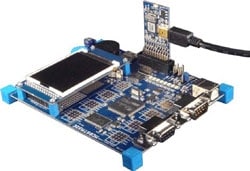
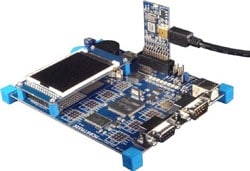
The STM3210E-SK/KEIL starter kit provides all the hardware and software you need to start developing applications for the STM32 ARM core-based families of microcontrollers. It comes complete with a full-featured evaluation board (including USB device, CAN, USARTs, Audio, MicroSD Card interface and QVGA LCD), Keil's MDK-ARM Lite Edition (32 KB) development tools, and the ULINK-ME™ (USB/JTAG) adapter.

Keil starter kits are available for a full range of ST ARM core-based microcontrollers.

  • All features

    • The Keil MDK-Lite development tools:
      • μVision®4 IDE/Debugger for application programming and debugging
      • ARM C/C++ compiler
      • RTX real-time kernel, a multi-tasking operating system for embedded applications
      • MDK-Lite supports applications with up to 32 KB code-size
    • ULINK-ME in-circuit debugger/programmer with USB interface to host PC and 20-pin JTAG or 10-pin CoreSight debug interface
    • Full-featured Keil evaluation board with a 72 MHz STM32F103ZE MCU

eDesignSuite

eDesignSuite is a comprehensive set of easy-to-use design-aid utilities ready to help you streamline the system development process with a wide range of ST products.

Power Management Design Center

Thermal-electrical Simulators for Components

Signal Conditioning Design Tool

NFC/RFID Calculators

Choose design tool:

Power Management Design Center

Power Supply Design Tool

• SMPS design, by topology, by type and by product
• PFC design with analog and digitial control
• Supports various PCB configurations
Choose type:
DC/DC
AC/DC
Solar Battery Charger

Power Management Design Center

LED Lighting Design Tool

• Handles AC-DC and DC-DC design in common topologies
• Displays interactive and annotated schematic
• Provides current/voltage graphs, Bode plots, efficiency curves and power-loss data
Choose type:
DC/DC
AC/DC

Power Management Design Center

Digital Power Workbench

• Provides a step-by-step optimized design of power section and control loop
• Generates the STM32Cube embedded software package for custom applications and allows firmware project generation, compatible with multiple STM32 IDEs

Power Management Design Center

Power Tree Designer

• Specify input/output power for each node in the tree
• Check for consistency
• Design each individual node
Choose design tool:

Thermal-electrical Simulators for Components

STPOWER Studio

• Supports long mission profiles
• Provides power loss and temperature graphs
• Helps define heatsink thermal properties

Thermal-electrical Simulators for Components

PCB Thermal Simulator

• Thermal analysis of a PCB from Gerber files.
• Possibility to add heat sources, heat sinks, copper areas and thermal paths.
• Powerful server-side engine for rendering and simulation.
• Thermal results shown graphically via 2D table.

Thermal-electrical Simulators for Components

AC Switches Simulator

• Select ratings and application waveforms
• Get junction temperature and blocking voltage graphs
• Search and sort suitable devices

Thermal-electrical Simulators for Components

Rectifier Diodes Simulator

• Select ratings and application waveforms
• Estimate power losses
• Search and sort suitable devices

Thermal-electrical Simulators for Components

Twister Sim

• Help select the right ViPOWER Automotive power device
• Supports load-compatibility, wiring harness optimization, fault condition impact and diagnostic analysis
• Supports various PCB configurations

Thermal-electrical Simulators for Components

TVS Simulator

• Specify system ratings and surge waveform
• Search and sort suitable devices

Thermal-electrical Simulators for Components

Estimate

• Build simple schematics and firmware inputs in minutes
• Quickly generate reliable estimates of battery life, system power consumption and bill of materials costs
Choose design tool:

Signal Conditioning Design Tool

Active Filters

• Handles multi-stage-designs and common topologies
• Returns circuit component values
• Provides gain, phase and group delay graphs
• Low Pass, High Pass and Band Pass

Signal Conditioning Design Tool

Comparators

• Handles most common configurations
• Returns circuit components values
• Provides I/O signal waveforms
• Inverting, Non Inverting, Window

Signal Conditioning Design Tool

Low side Current Sensing

• Returns circuit component values
• Provides current error graphs

Signal Conditioning Design Tool

High side Current Sensing

• Provides current error graphs.
• Help to select the right High side current sensing and shunt devices.
Choose design tool:

NFC/RFID Calculators

NFC Inductance

• Input geometry and substrate properties
• Get antenna impedance

NFC/RFID Calculators

UHF Link Budget

• Enter forward and reverse link characteristics
• The tool returns link budget estimate

NFC/RFID Calculators

NFC Tuning Circuit

• Enter antenna parameter and matching target
• Select the topology of the matching network
• The tool returns component values for the desired design targets