STSW-WMBUS-GUI
Active
Design Win
GUI for wireless M-Bus stack evaluation of ST Sub-1GHz devices

Get Software Download databrief

Product overview

Description

The STSW-WMBUS-GUI (wM-Bus demo suite) is a PC application to easily evaluate the features of the wM-Bus firmware running on ST Sub-1GHz devices.
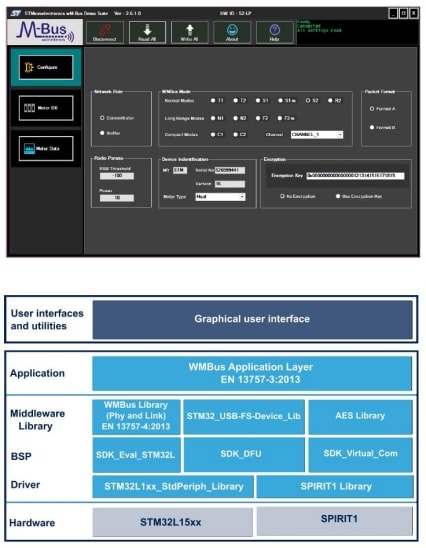
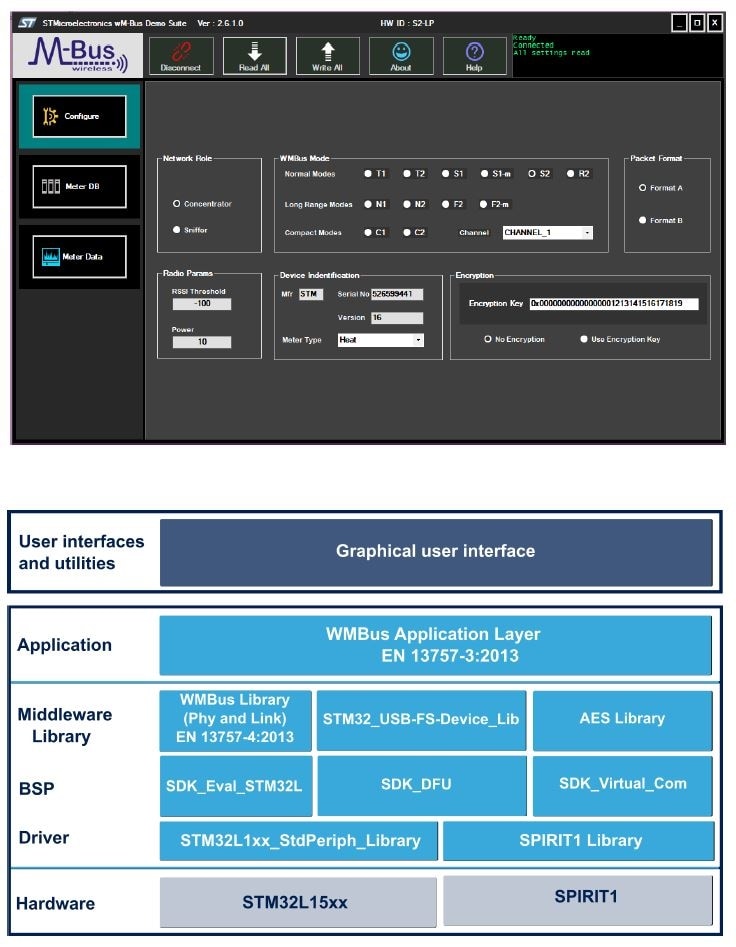
The application is used for automatic, gas, water, electricity and heat meter readings.

The X-NUCLEO-S2868A1/STEVAL-FKI868V2 boards mounted on NUCLEO-L152RE/NUCLEO-L053R8/NUCLEO-F401RE boards create hardware platforms for testing a wM-Bus stack which communicates with PC using the VCOM protocol (with a default baud rate of 115200).

The compatible STM32 Nucleo boards must have the wM-Bus firmware loaded (for further details, refer to UM1904 for X-CUBE-SUBG1 on www.st.com).

The wM-Bus stack can be easily configured in different wM-Bus modes (sniffer mode and concentrator mode) and packets transactions can be captured using a GUI.

Using any terminal utility on PC, AT commands can be sent to the board to reconfigure wM-Bus stack in the desired mode.

The command/response can also be seen on the PC-GUI for the data concentrator unit by programming the board with the Conc-PC-GUI workspace selectable from the dropdown menu in the firmware project.

  • All features

    • Graphical user interface to evaluate the wM-Bus firmware library
    • Identification of hardware and firmware:
      • Automatically identifies the connected evaluation board running the wM-Bus firmware
      • Reads wM-Bus device identification (serial number, vendor, version)
    • Easy configuration of the wM-Bus stack:
      • Reads and writes configuration settings of the wM-Bus stack
      • Sets wM-Bus modes like T, S, C, F, R
      • Sets channel and packet format
      • Sets radio RSSI and Tx power parameters
      • Enables/disables the encryption and sets the encryption key
    • Meter database management:
      • Manages meter database on the firmware which supports the feature
      • Adds and removes new meters
      • Updates meter settings
      • Assigns friendly name for easy identification of the meters
    • Sniffer mode:
      • Can work as a wM-Bus sniffer when used with the firmware with sniffer feature
      • Displays sent and received packets
      • Decodes wM-Bus packets
    • Supported devices:
      • X-NUCLEO-S2868A1/STEVAL-FKI868V2 with NUCLEO-L152RE/NUCLEO-L053R8/NUCLEO-F401RE
      • STEVAL-IKR002V4 with daughter board
    • Developer-friendly license terms

eDesignSuite

eDesignSuite is a comprehensive set of easy-to-use design-aid utilities ready to help you streamline the system development process with a wide range of ST products.

Power Management Design Center

Thermal-electrical Simulators for Components

Signal Conditioning Design Tool

NFC/RFID Calculators

Choose design tool:

Power Management Design Center

Power Supply Design Tool

• SMPS design, by topology, by type and by product
• PFC design with analog and digitial control
• Supports various PCB configurations
Choose type:
DC/DC
AC/DC
Solar Battery Charger

Power Management Design Center

LED Lighting Design Tool

• Handles AC-DC and DC-DC design in common topologies
• Displays interactive and annotated schematic
• Provides current/voltage graphs, Bode plots, efficiency curves and power-loss data
Choose type:
DC/DC
AC/DC

Power Management Design Center

Digital Power Workbench

• Provides a step-by-step optimized design of power section and control loop
• Generates the STM32Cube embedded software package for custom applications and allows firmware project generation, compatible with multiple STM32 IDEs

Power Management Design Center

Power Tree Designer

• Specify input/output power for each node in the tree
• Check for consistency
• Design each individual node
Choose design tool:

Thermal-electrical Simulators for Components

STPOWER Studio

• Supports long mission profiles
• Provides power loss and temperature graphs
• Helps define heatsink thermal properties

Thermal-electrical Simulators for Components

PCB Thermal Simulator

• Thermal analysis of a PCB from Gerber files.
• Possibility to add heat sources, heat sinks, copper areas and thermal paths.
• Powerful server-side engine for rendering and simulation.
• Thermal results shown graphically via 2D table.

Thermal-electrical Simulators for Components

AC Switches Simulator

• Select ratings and application waveforms
• Get junction temperature and blocking voltage graphs
• Search and sort suitable devices

Thermal-electrical Simulators for Components

Rectifier Diodes Simulator

• Select ratings and application waveforms
• Estimate power losses
• Search and sort suitable devices

Thermal-electrical Simulators for Components

Twister Sim

• Help select the right ViPOWER Automotive power device
• Supports load-compatibility, wiring harness optimization, fault condition impact and diagnostic analysis
• Supports various PCB configurations

Thermal-electrical Simulators for Components

TVS Simulator

• Specify system ratings and surge waveform
• Search and sort suitable devices

Thermal-electrical Simulators for Components

Estimate

• Build simple schematics and firmware inputs in minutes
• Quickly generate reliable estimates of battery life, system power consumption and bill of materials costs
Choose design tool:

Signal Conditioning Design Tool

Active Filters

• Handles multi-stage-designs and common topologies
• Returns circuit component values
• Provides gain, phase and group delay graphs
• Low Pass, High Pass and Band Pass

Signal Conditioning Design Tool

Comparators

• Handles most common configurations
• Returns circuit components values
• Provides I/O signal waveforms
• Inverting, Non Inverting, Window

Signal Conditioning Design Tool

Low side Current Sensing

• Returns circuit component values
• Provides current error graphs

Signal Conditioning Design Tool

High side Current Sensing

• Provides current error graphs.
• Help to select the right High side current sensing and shunt devices.
Choose design tool:

NFC/RFID Calculators

NFC Inductance

• Input geometry and substrate properties
• Get antenna impedance

NFC/RFID Calculators

UHF Link Budget

• Enter forward and reverse link characteristics
• The tool returns link budget estimate

NFC/RFID Calculators

NFC Tuning Circuit

• Enter antenna parameter and matching target
• Select the topology of the matching network
• The tool returns component values for the desired design targets

Get Software

eDesignSuite

eDesignSuite is a comprehensive set of easy-to-use design-aid utilities ready to help you streamline the system development process with a wide range of ST products.

Power Management Design Center

Thermal-electrical Simulators for Components

Signal Conditioning Design Tool

NFC/RFID Calculators

Choose design tool:

Power Management Design Center

Power Supply Design Tool

• SMPS design, by topology, by type and by product
• PFC design with analog and digitial control
• Supports various PCB configurations
Choose type:
DC/DC
AC/DC
Solar Battery Charger

Power Management Design Center

LED Lighting Design Tool

• Handles AC-DC and DC-DC design in common topologies
• Displays interactive and annotated schematic
• Provides current/voltage graphs, Bode plots, efficiency curves and power-loss data
Choose type:
DC/DC
AC/DC

Power Management Design Center

Digital Power Workbench

• Provides a step-by-step optimized design of power section and control loop
• Generates the STM32Cube embedded software package for custom applications and allows firmware project generation, compatible with multiple STM32 IDEs

Power Management Design Center

Power Tree Designer

• Specify input/output power for each node in the tree
• Check for consistency
• Design each individual node
Choose design tool:

Thermal-electrical Simulators for Components

STPOWER Studio

• Supports long mission profiles
• Provides power loss and temperature graphs
• Helps define heatsink thermal properties

Thermal-electrical Simulators for Components

PCB Thermal Simulator

• Thermal analysis of a PCB from Gerber files.
• Possibility to add heat sources, heat sinks, copper areas and thermal paths.
• Powerful server-side engine for rendering and simulation.
• Thermal results shown graphically via 2D table.

Thermal-electrical Simulators for Components

AC Switches Simulator

• Select ratings and application waveforms
• Get junction temperature and blocking voltage graphs
• Search and sort suitable devices

Thermal-electrical Simulators for Components

Rectifier Diodes Simulator

• Select ratings and application waveforms
• Estimate power losses
• Search and sort suitable devices

Thermal-electrical Simulators for Components

Twister Sim

• Help select the right ViPOWER Automotive power device
• Supports load-compatibility, wiring harness optimization, fault condition impact and diagnostic analysis
• Supports various PCB configurations

Thermal-electrical Simulators for Components

TVS Simulator

• Specify system ratings and surge waveform
• Search and sort suitable devices

Thermal-electrical Simulators for Components

Estimate

• Build simple schematics and firmware inputs in minutes
• Quickly generate reliable estimates of battery life, system power consumption and bill of materials costs
Choose design tool:

Signal Conditioning Design Tool

Active Filters

• Handles multi-stage-designs and common topologies
• Returns circuit component values
• Provides gain, phase and group delay graphs
• Low Pass, High Pass and Band Pass

Signal Conditioning Design Tool

Comparators

• Handles most common configurations
• Returns circuit components values
• Provides I/O signal waveforms
• Inverting, Non Inverting, Window

Signal Conditioning Design Tool

Low side Current Sensing

• Returns circuit component values
• Provides current error graphs

Signal Conditioning Design Tool

High side Current Sensing

• Provides current error graphs.
• Help to select the right High side current sensing and shunt devices.
Choose design tool:

NFC/RFID Calculators

NFC Inductance

• Input geometry and substrate properties
• Get antenna impedance

NFC/RFID Calculators

UHF Link Budget

• Enter forward and reverse link characteristics
• The tool returns link budget estimate

NFC/RFID Calculators

NFC Tuning Circuit

• Enter antenna parameter and matching target
• Select the topology of the matching network
• The tool returns component values for the desired design targets