A scalable set of 32-bit general-purpose MCUs for many types of applications

The STM32 mainstream series addresses the converging requirements of multiple segments, making it suitable for a wide range of applications.
The well-balanced device architecture matches the basic design needs for consumer markets, where constraints and time to market are essential.
To support their development, designers can benefit from an extensive set of development tools, including STM32Cube software and libraries, as well as STM32 Nucleo boards, discovery kits, and prototyping boards.

- Programmable logic controllers (PLC)
- Pumps and compressors

- Air conditioner
- Refrigerators and freezers
- Central alarm system
- Washing machines

- Keyboard
- Smartphones
- IoT tags and tracking devices

- Industrial communication
- Lighting controls

- CPAP and respirators
- Dialysis machines
- Pills distributors
- Powered patient beds
Product types
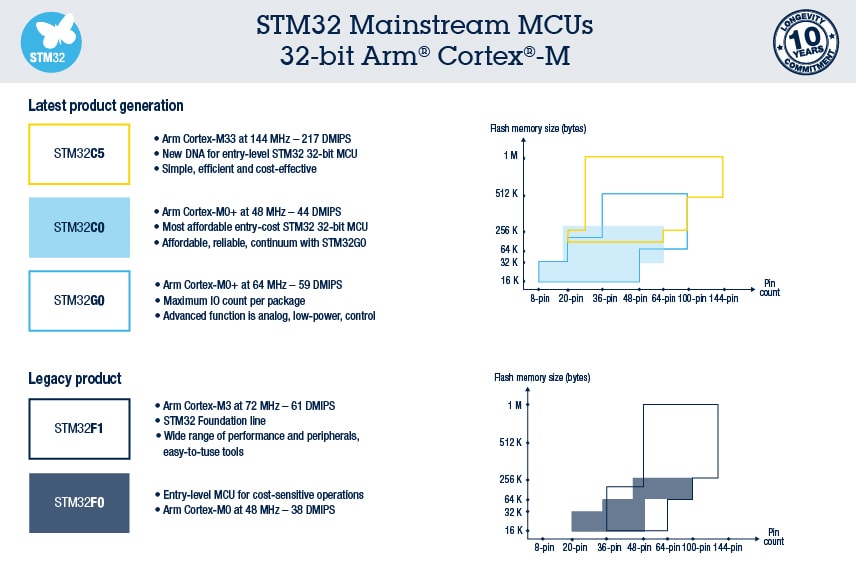
Latest product generation:
Legacy products:
The STM32C0, STM32F0, STM32G0, and STM32F1 MCU series are highly compatible to leave room for future product upgrades. By allowing maximum code reuse, they enable short development cycles for derivative projects. Read more about the benefits of the 32-bit Arm® Cortex®-M processor for MCUs here.
Discover our portfolio
The STM32 mainstream portfolio offers developers the latest generation of cost-effective and efficient MCUs that reduce costs while ensuring design quality and reliability, thanks to STM32C0 & STM32G0. The legacy lines combine real-time performance with first-class peripherals, low-power consumption, low-voltage, advanced architecture, a high level of integration, and easy-to-use tools at accessible prices.
Benefits
- High compatibility between product series
- Room for future product upgrades
- Maximum code reuse
Featured Videos


Recommended for you
ST’s most affordable 32-bit MCU, makes 32-bit capabilities accessible to all developers

The STM32C0 series bridges the gap between 8- or 16-bit MCUs and higher performance 32-bit MCUs. Powered by the industry-standard Arm Cortex-M0+ core running at 48 MHz, the STM32C0 lets developers do more with less. It offers up to 128 Kbytes of Flash memory and 6 to 24 Kbytes of RAM, in a variety of 8- to 64-pin packages.
- Affordability: helps you reduce costs thanks to an attractive price point and an optimized BOM
- Reliability: benefits from proven STM32 quality & reliability
- Continuity: consistent pinout with STM32G0 and shares same technological platform
- 64-pin Nucleo board: NUCLEO-C031C6, NUCLEO-C071RB
- Evaluation boards: STM32C0116-DK, STM32C0316-DK
- Dedicated software package STM32CubeC0
- Key applications: Smart home, industrial devices, consumer devices
eDesignSuite
eDesignSuite is a comprehensive set of easy-to-use design-aid utilities ready to help you streamline the system development process with a wide range of ST products.


Power Management Design Center
Thermal-electrical Simulators for Components
Signal Conditioning Design Tool
NFC/RFID Calculators
Power Management Design Center

Power Supply Design Tool
Power Management Design Center

LED Lighting Design Tool
Power Management Design Center

Digital Power Workbench
Power Management Design Center

Power Tree Designer
Thermal-electrical Simulators for Components

STPOWER Studio
Thermal-electrical Simulators for Components

PCB Thermal Simulator
Thermal-electrical Simulators for Components

AC Switches Simulator
Thermal-electrical Simulators for Components

Rectifier Diodes Simulator
Thermal-electrical Simulators for Components

Twister Sim
Thermal-electrical Simulators for Components

TVS Simulator
Thermal-electrical Simulators for Components

Estimate
Signal Conditioning Design Tool

Active Filters
Signal Conditioning Design Tool

Comparators
Signal Conditioning Design Tool

Low side Current Sensing
Signal Conditioning Design Tool

High side Current Sensing
NFC/RFID Calculators

NFC Inductance
NFC/RFID Calculators

UHF Link Budget
NFC/RFID Calculators
